

Page 1
Features
•
Large.
rate
mode)
•
Heavy.
duty
application
•
Simple
operating
•
Tamper
easy
to
read
diecast
enclosure
programming
mode
and
proof
programming
8-digit
LCD
for
procedure
other
functions
15-digit,
industrial
selects
mode
lock
Index
Overview
Page 2
OVERVIEW
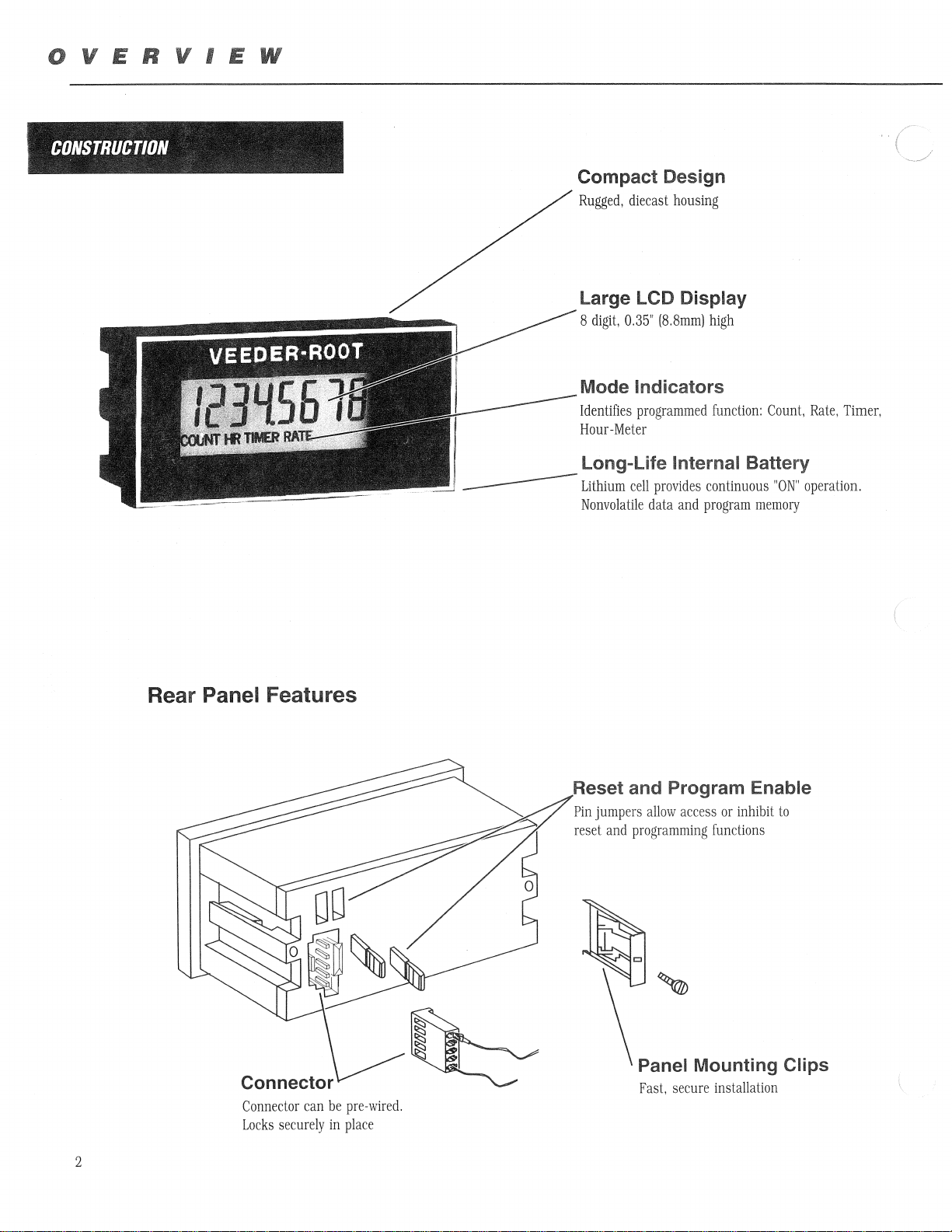
CONSTRUCTION
____
Compact Design
Rugged,
diecast
housing
Large LCD Display
S
digit,
0.35"
(S.Smm)
high
Mode Indicators
Identifies
Hour-Meter
programmed
function:
Count,
Long-Life Internal Battery
Lithium
Nonvolatile
cell
provides
data
and
continuous
program
memory
"ON"
Rate,
Timer,
operation.
Rear Panel Features
Reset and Program Enable
Pin
jumpers
reset
allow
and
programming
access
or
inhibit
functions
to
(
Panel Mounting Clips
Fast,
secure
installation
Connector
Locks
2
can
securely
be
pre-wired.
in
place
Page 3
•
SPECIFICATIONS
General
Power
Source:
Battery
Life:
Temperature
Inputs
High
Speed
Count
Speed:
Sensitivity:
Maximum
Low
Count
Sensitivity:
Maximum
Reset
Types:
Min.
Voltage:
Speed
Speed:
Voltage:
Pulse
Range:
Width:
Internal
Eight
year
0°
to
+75
10
KHz,
pulse;
for
Open
Collector,
magnetic
Low
Level
High
Level
28VDC
40
Hz,
12ms
with
isolated
Low
Level
High
Level
28VDC
Front
panel
input
through
between
5.
(Applies
for
Count
0.5ms
Lithium
typical
CO(+32°
50llS
min.
use
with
NPN
sensor
Logic < 1.0
Logic>
min.
switch/relay
Logic < 1.0
Logic>
button
contact
rear
terminal
only
when
or
Elapsed
Battery
life
to
+167°
high/low
TTL,
transistor
VDC
2.0
VDC
pulse;
VDC
2.0
VDC
and
closure
pins 4 and
configured
Time
F)
CMOS,
for
use
contact
remote
modes)
or
Functions
Totalizer:
Elapsed
Hour
*Rate
Mechanical
Dimensions:
Panel
Panel
Depth
Display
Type:
Height:
Number:
Decimal
Time
Meter:
Meter:
Cutout
Thickness:
Behind
Point:
Indicator:
Size:
Panel:
Eight
digit
capacity,
(divide
by 1 to
leading
and
trailing
or
remote
reset
Eight
digit
capacity;
when
signal
input
resolution
hundredths
minutes
reset
Eight
units,
Four
prescaler
converts
35.6
66.8
2mm
20.7
liquid
0.35"
8
digits
mode)
Programmable
(0
of
of
or
seconds;
digit
capacity;
tenths,
digit
capacity;
(multiply
pulses
mm
x 7l.9
mm x 33.2
to
13mm
mm
Crystal
(9mm)
(4
digit
to 3 places
hours,
programmable
9999),
Xl
or
X2
edge)
logic;
registers
is
held
tenths
hours,
front
registers
or
hundredths,
time
by
to
rate
mm, x 33.3
mm
Display
in
Rate
from 0 to 4 places
for
Rate)
ON;
of
minutes,
panel
interval
.0001
to
mm
Meter
elapsed
Programmable
hours,
hours
non-resettable
prescaler
(count
Front
tenths
or
remote
method
9999)
deep
both
panel
time
of
in
whole
with
PANEL
*Rate
mode.
MOUNTING
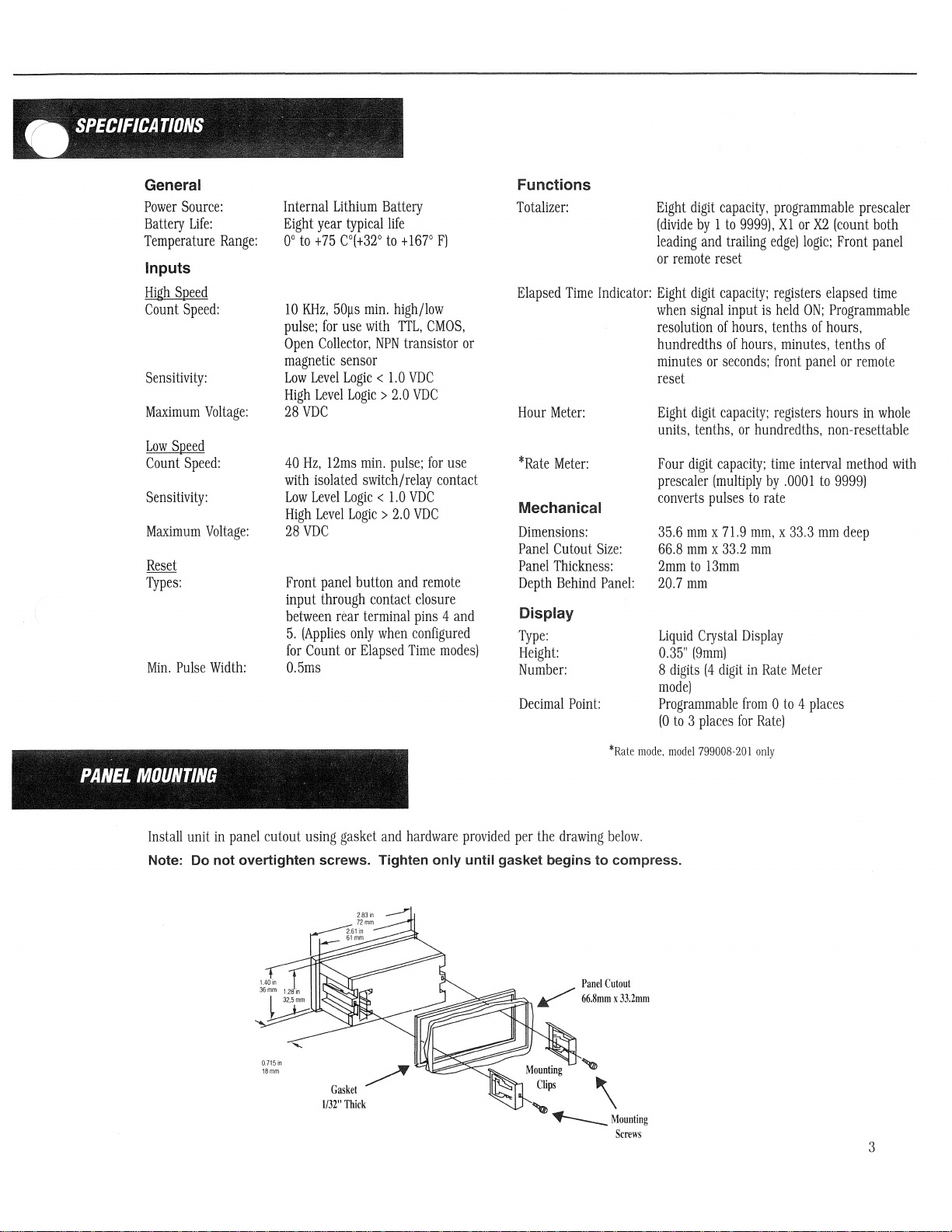
Install
unit
in
panel
cutout
using
gasket
and
hardware
Note: Do not overtighten screws. Tighten only until gasket begins to compress.
0.715in
18mm
Gasket
1132"
~
Thick
provided
per
the
drawing
,
~~
~Mounting
below.
\
Screws
model
799008-201
only
3
Page 4

SETUP
WIRING
The
FLEX
uses a detachable
with
locking
that
position.
and
gently
pressing
H.S.
Input
Inpul
___
__
L.S.
Reset
Reset Enable Common
tangs
Wires
attached.
can
be
on
the
"=::i
~
~
~
!3:::1
terminal
The
black
removed
locking
Wire
strip
from
tang
to
make
common
the
terminal
while
pulling
wire
wiring
is
installed
strip
gently
more
convenient.
in
the
by
inserting a small
on
the
wire.
Included
terminal
strip
screw
are
at
the
driver
the
terminal
factory,
into
BLACK
(COMMON)
WIRE
the
strip
and
slot
should
and 4 colored
always
on
the
side
of
be
the
wires
used
strip
o
in
Note: Do
OPERATION
1.
Reset
Switch:
Timer
mode.
Enable
jumper
Reset
Enable
this
button
is
highlighted
2.
Programming
one
numerical
number
parameter
value.
The
is
input
used
to
not
Used
to
Reset
function
set
to
the
(pins 4 and
to
set
or
scrolling
Stylus:
the
next
install
wires
reset
the
will
ON
position,
5)
is
parameter
through
Used
in
Set-up
and
to
move
for
functions
4.
Mode Display
present
value
only
be
activated
or
if
the
connected.
values
by
incrementing
the
possible
mode
to
between
digits
in
Count
rear
In
Set-up
choices.
advance
that
or
if
the
Reset
terminal
mode,
the
from
in
a
are
not
used.
3. Process Value
3.
value
value.
4.
programmed,
indicate
indicates
---
---
Present
Value:
in
operating
Operating
the
that
Mode
one
of
chosen
the
controller
1. Reset
2.
Programming
Displays
mode.
Display:
In
the
Set-up
Based
the 4 above
mode
of
operation. A flashing
is
Button
current
mode
on
displays
in
Set-up
Stylus
Count,
*Rate
displays
how
the
unit
will
be
illuminated
mode.
*Rate
mode.
799008-20 I only
or
the
parameter
is
display
model
Time
to
4
Page 5

•
SET-UP
OVERVIEW
Located
on
programming
up
is
complete.
elapsed
time
the
stylus.
value.
back
the
of
the
unit
are
two
jumpers
Before
beginning
jumpers
may
Operating Mode Selection
be
moved
Disabled
position
the
set-up
-+41---
to
which
procedure
the
OFF
are
used
it
position
to
enable
is
necessary
to
prevent
RESET
ENABLE
operation
to
set
of
these
unauthorized
the
front
two
jumpers
changes
panel
to
or
accidental
reset
the
button
ON
position.
reset
and
of
the
Mter
count
set-
or
COUNT
MODE
COUNT
HR
TIMER
RATE
Depressing
indicators
between
stylus
Prescale Value
The
be
display
reset
is
used
Note: A prescale value of 0000 is not valid. If no prescaling is required, leave this
parameter at the default value of
Count Logic
Depress
count
rising
the
key.
four
digits
divided
unit. a value
key
to
the
logiC.
and
the
recessed
will
be
illuminated
modes.
on
Once
the
before a pulse
of
to
increment
scroll
to
the
stylus
key
which
indicates
falling
edge
stylus
will
with
the
desired
right-hand
is
sent
20
would
the
currently
next
digit
until
the
whether
of
the
input
activate
the
In
Leading
remote
Counting
side
to
the
be
entered
flashing
to
the
digit
(2).
the
presently
mode
is
Count
reset
of
the
display
for
right
0001.
on
the
counting
Use
the
Operation
chosen
flashing.
Mode.
zeroes
input
will
not
display
counter.
this
number.
on
the
far
left
is
done
reset
Mode
one
it
can
the
unit
are
suppressed.
can
reset
resume
represents
For
parameter.
starting
display.
of
the
display
on
only
key
to
selection
flashing.
be
entered
operates
the
until
the
value
example
The
with
Default
begins
the
falling
toggle
between
Use
as
The
count
the
if
value
the
value
menu.
the
for
an
reset
reset
by
20
pulses
can
right
to
edge
Reset
set-up
eight
button.
to
zero
is
which
most
is
0001.
flash.
(1)
the
All
four
key
by
digit
if
at
any
released.
the
represented
be
set
by
digit.
This
of
the
two
values.
mode
to
scroll
depressing
decimal
enabled.
time.
input
signal
depressing
The
stylus
digit
selects
input
Default
the
totalizer.
and
will
one
key
or
both
the
the
is
the
the
1.
5
Page 6

SETUP
'>!
HOUR
~I"
~~.
0.0000
COUNT
~
~
""H,
",,'
, t :
MjSfEB
MODI
~,"~."~s:::
~:"'"~'J
r-
. , ,
"~,,,,~~,,'
~~:
01
L~HR_---,.
Decimal
After
the
count
display.
move
After
the
the
The
decimal
decimal
mode,
Note: In
effect
the
Point
Position
; y
,,~~,
Display
The
accumulated
Depressing
After
the
display
Operating
Point
Position
logic
has
position
can
position
position
count
mode
calibrated
set
to
Resolution
time
can
the
reset
sv.Titch
resolution
mode.
been
set,
depressing
be
changed
one
place
has
been
this
parameter
resolution.
0,
changing
be
displayed
will
scroll
has
been
the
by
depressing
to
left,
up
set,
depressing
serves
For
example,
the
position
In
Hour
Meter
is
held
active,
inoperative.
mode.
in
whole
the
display
set,
depressing
stylus
key
the
reset
to a maximum
the
stylus
as a cosmetic
if
the
to
1
will
mode,
the
Front
panel
The
Present
hours,
tenths
between
the
these
stylus
will
bring
key,
of
four
will
cause
display
cause
unit
accumulates
and
Value
of
hours
three
key
up
Each
successive
places.
the
decimal
showed
the
Remote
can
only
or
choices,
will
cause
the
decimal
Default
unit
to
point
123
display
time
Reset
functions
be
reset
hundredths
Default
the
unit
point
press
of
is
zero
return
to
that
will
with
the
to
show
whenever
by
entering
of
an
is
whole
to
return
position
the
key
places,
Operating
not
Decimal
12.3.
the
input
are
Set-up
hour.
hours,
to
will
-
,
1?IMER
,::
rJl!1l1J!
y"
ff'"
~""~
~ ~
BAlfMOIJS
'
~
ISf
: '
Y'
q~
r
L
= ,
TIMER
BATE
~"
'~'
<f~
?
"'-,' ~ '-.-
/.0001
~
Display
The
accumulated
minutes,
display
between
After
the
Operating
~ ~ ~ ~
'"'
Prescale Value
The
four
be
multiplied
to
9.999.
been
set,
currently
digit
to
the
Resolution
time
hours,
tenths
these
display
resolution
mode.
~
digits
on
the
before a pulse
Depressing
depressing
flashing
right
number
on
can
six
right
the
the
the
be
of
an
choices,
has
hand
is
reset
stylus
starting
display,
In
held
used
displayed
hour,
hundredths
Default
been
In
events
rates;
side
sent
to
key
will
key
will
with
Default
Timer
active.
to
in
one
set,
depressing
Hate
per
prodUction,
of
the
the
display
move
enable
the
value
mode,
The
reset
ihe
of
the
of
an
is
seconds.
Mode
(Rate
time.
display
counter.
the
decimal
the
value
right-most
is
1.
the
unit
reset
button,
timer
at
following
hour,
the
stylus
mode,
It
can
flow,
represents
position
to
digit.
000
accumulates
if
enabled,
any
time.
resolutions:
Depressing
key
will
model
799008-20 I only),
be
use
as a tachometer
etc.
the
value
This
value
to
the
be
set.
Use
The
stylus
the
cause
can
right.
the
key
time
and
seconds,
reset
the
by
which
be
set
reset
is
whenever
remote
minutes,
key
will
unit
or
to
the
in a range
After
the
key
to
used
to
the
input
reset
scroll
to
return
the
unit
display
input
signal
from
pOSition
increment
scroll
to
is
can
be
tenths
the
to
displays
other
0,001
has
the
the
of
will
next
Note: A
parameter
prescale
at
the
value
default
of
0000
value
is
of
not
valid.
1.000.
If
no
prescaling
is
required,
leave
this
6
Page 7

Rate Prescale Example:
This
unit
displayed
Value
is:
determines
would
be
rate
number
based
of
on
input
pulses
___
Pulses
Display
per
per
Unit
frequency,
seconds.
X #
of
1
thus
Based
seconds
if
on
the
this,
=
Prescale
the
basic
Prescale
Value
formula
Value
is
left
at
for
1.000,
the
the
value
Prescale
OPTION
MODULES
0.0001
RATE
Revolutions
Prescale
Gallons
Prescale
Decimal Point Position
After
Decimal
decimal
successive
Default
Note: In Rate mode, this parameter serves as a function decimal point that will effect the
displayed resolution. For example, if the displayed value was 123 with the Decimal Point
Position set at
read 123.X, with X representing tenth of a unit
Value
per
Value
the
left-most
Point
point
is
per
minute
(RPM)
can
be
displayed
according
to
the
_1_
formula
x..QL
360
hour
can
be
according
displayed
to
the
_1_
using a 20
formula
X
20
digit
on
the
Prescale
Position
position
press
zero
will
Display.
for
move
the
Prescaler.
the
This
decimal
parameter
places.
0, changing the decimal pOint position to 1 would cause the display to
Three
7990: a screw
Triac
using a 360
below:
=
.167
1
pulse
per
below:
3600 = 180.0
1
Value
has
been
applies
The
position
position
option
one
place
modules
terminal
Input
module.
PPR
encoder
gallon
flow
set,
depressing
to
the
rate
can
be
changed
to
the
left
resolution.
are
available
adaptor:
as
meter
as
the
stylus
display
and
by
depressing
up
to a maximum
to
snap-mount
an
AC/DC
the
the
input
input
will
is
not
input
by
setting
by
bring
related
the
reset
of
to
module
setting
up
to
three
the
rear
the
the
the
the
key.
places.
and
Each
of
a
the
Option Module Installation
1.
Remove
the
two
these
jumpers
2.
Place
the
3.
Position
instrument.
instrumen
in
their
six-position
the
option
Press
t.
jumpers
together
from
corresponding
pin
extender
module
so
that
until
the
the
back
of
positions
into
the
the
pin
option
the
instrument that
on
the
connector
extender
module
snaps
back
on
lines
of
the
up
into
MODULE
enable
the
option
bottom
with
position
OPTION
the
module.
of
the
connector
flush
the
reset
option
to
and
on
the
stylus
module.
the
back
back
of
keys.
of
the
Place
the
7
Page 8

WARRANTY
Option Module Wiring and Installation
The
Screw
of
input
The
AC/DC
volts
AC
immunity
The
Triac
input
signal
to
the
diagram
Terminal
signal
or
DC.
to
Input
and
Input
Module
Impulse
electrical
Module
source.
below
Adaptor
remote
(Part # 328992-010)
reset.
Wire
(Part # 328992-020)
frequency
transients
and
(Part # 328992-030)
Impulse
for
frequency
wiring
information.
COMMON
REM.RST
HIGH
VOLT
INPUT
signal
response
interference.
allows
response
{
and
allows
is 0 to
IS)
IS)
IS)
IS)
provides
reset
input
use
10
Hz.
Refer
use
of a 115
is 0 to
\-l
the
convenience
according
of a high-voltage
It
is
optically
to
the
diagram
VAC,
50/60
10
Hz.
The
module
REMOTE
RESET
CONTACT
CLOSURE
ONLY
Vl
V2
of
to
the
input
isolated
below
screw
wire
for
Hz
switching
is
optically
terminal
diagram
signal
for
maximum
wiring
connection
on
page
of
24
to
270
information.
devices
isolated.
4.
as
Refer
Standard
Company
in
year
which
will
Company,
products
are
workmanship
from
the
are
defective
be
repaired
at
determination
actually
obligation
limited
products
limitations,
receipt
alleged
discovery
case
Company,
not
able
products
defective
of
solely
that
by
the
defects
within
of
components
the
exceed
to
obtain
shall
and
the
manufactured
warranted
and
material
date
of
shipment,
in
workmanship
or
replaced,
no
charge
as
to
whether a product
rests
the
Company
to
repair
fall
within
shall
be
Company
or
deficiency
the
warranty
or
obligation
settlement
from
the
be
returned
to
be
free
for a period
at
the
to
the
Buyer.
with
the
hereunder
and
replacement
the
foregoing
conditioned
of
written
promptly
period,
units
purchased
of
the
Company
that
the
supplier
to
the
by
the
from
defects
and
products
or
material
option
Final
is
Company.
shall
of
upon
notice
after
and
by
Company
thereof.
Company
of
of
The
be
of
any
in
the
shall
No
one
the
the
is
without
its
prior
consent.
Company
shipped
Company
invoices
components,
the
extent,
COMPANY
FITNESS
APPLICATIONS
PERIOD
SPECIFICALLY
WRITING
BEEN
THE
AND
EXPRESSED
NOT
MERCHANTABILITI
PARTICULAR
consents
F.O.B.
the
cannot
for
unauthorized
even
products
upon
of
the
the
MAKES
OF
ITS
BY
OF
SERVICE
AGREES
AFTER
MADE
KNOWN
FOREGOING
IN
LIEU
OF
OR
LIMITED
TO
PURPOSE
to
have
Company's
assume
though
Company
type
NO
PRODUCTS
THE
THE
TO
WARRANTI
ALL
OTHER
IMPLIED,
ANY
OR
Products
returned
factory.
responsibility
repairs
to
defective.
depends,
of
usage
thereof,
WARRANTI
FOR
BUYER
NOR
UNLESS
THE
OTHERWISE
PROPOSED
IT.
IS
EXCLUSIVE
WARRANTIES
INCLUDING,
WARRANTI
OF
FITNESS
.
•
Danaher
which
the
shall
be
The
or
accept
its
The
life
to a large
and
THE
AS
TO
SPECIFIC
AS
TO
COMPANY
IN
USAGE
HAS
BUT
OF
FOR
A
Controls
of
Printed in U.S.A.
#701930-0000
19 February 1995
Revision none
8
2100 W. Broad
Elizabethtown, NC 28337
Phone: 847.662.2666
Fax:
847.662.6633
St.
 Loading...