

Page 1
DV6823
Page 2

Page 3

1
目錄
產品簡介
重要安全指示…………………………………………………………………………… 2
注意事項…………………………………………………………………………………3
產品概要………………………………………………………………………………… 3
前面板和後面板說明…………………………………………………………………… 4
遙控器…………………………………………………………………………………… 5
連接……………………………………………………………………………………… 6
進階功能
系統設定………………………………………………………………………………… 7
播放圖像光碟…………………………………………………………………………… 11
USB設備………………………………………………………………………………… 11
附加資訊
疑難排解………………………………………………………………………………… 12
規格……………………………………………………………………………………… 13
播放
………………………………………………
10
MP3,WMA,JEPG 及標清影片
Page 4

2
重要安全指示
1.請仔細閱讀本說明書。
2.請妥善保管本說明書。
3.請留意所有警告字眼。
4.請跟從所有指示。
5.切勿在水源附近使用本產品。
6.只可使用乾布清潔本產品。
7.請根據指示安裝本產品,切勿阻塞任何通風處。
8.切勿在熱源附近(如幅射、暖爐、或其他裝置包括擴音器)安裝本產品。
9.切勿破壞極化插頭的安全功能。 若隨機供應的插頭不能與家中的電源插座匹配,請諮
詢電器技師更換插座。
10.請妥善保護電源線,切勿踐踏或擠壓,特別是插頭、插座及,連接裝置的接駁位置。
11.只可使用生產商指定的附件或配件。
12.遇上颱風、雷電,或長時間沒有使用本產品時,請從電源插座拔出插頭。
13.所有維修程序須由合格的技術人員進行。若產品的電源線或插頭損毀、或有液體、
物件意外掉入產品內,又或本產品曾暴露於雨水或濕氣之中、不能正常操作或曾經
跌下,請轉交給弘毅有限公司檢查。
14.電源插頭是一個中斷電源的設備,這個斷電設備需隨時可以操作。
15.切勿用報紙、枱布、窗簾等雜物阻塞通風出口。
16.切勿將本產品放置在靠近火焰的位置,如燃點的香煙附近。
17.棄置電池時請留意環保條例和對環境的影響。
18.請在適中的天氣使用本產品。
19.切勿將本產品放置在滴水或濺水的環境中,產品上也不應放置如花瓶等可能會導致
液體滲入的物件。
警告︰要減少火警或觸電的危險,切勿將本產品暴露於雨水或濕氣之中。
警告︰切勿將電池暴露於過渡熱源之中如陽光、明火或類似物體。
本圖標說明產品內有構成觸電危險的電壓。
本圖標說明隨機附送的操作和維修指示具有重要的意義。
本圖標說明本產品在危險電壓和用戶可接觸到的零件上,具有雙重絕緣裝置,如需維
修,只可使用原廠的相同零件。
Page 5
3
注意事項
.為安全運送本產品,請使用原廠包裝盒及包裝物料。
.長期運作本產品會令前後面板發熱,此乃正常現象。
.運作途中,切勿移動本產品,否則會對光頭及光碟造成損害。
.使用前面板或遙控器上的開啟/關閉按鈕控制影碟門,切勿在開啟或關閉途中觸摸影碟
門。
產品概要
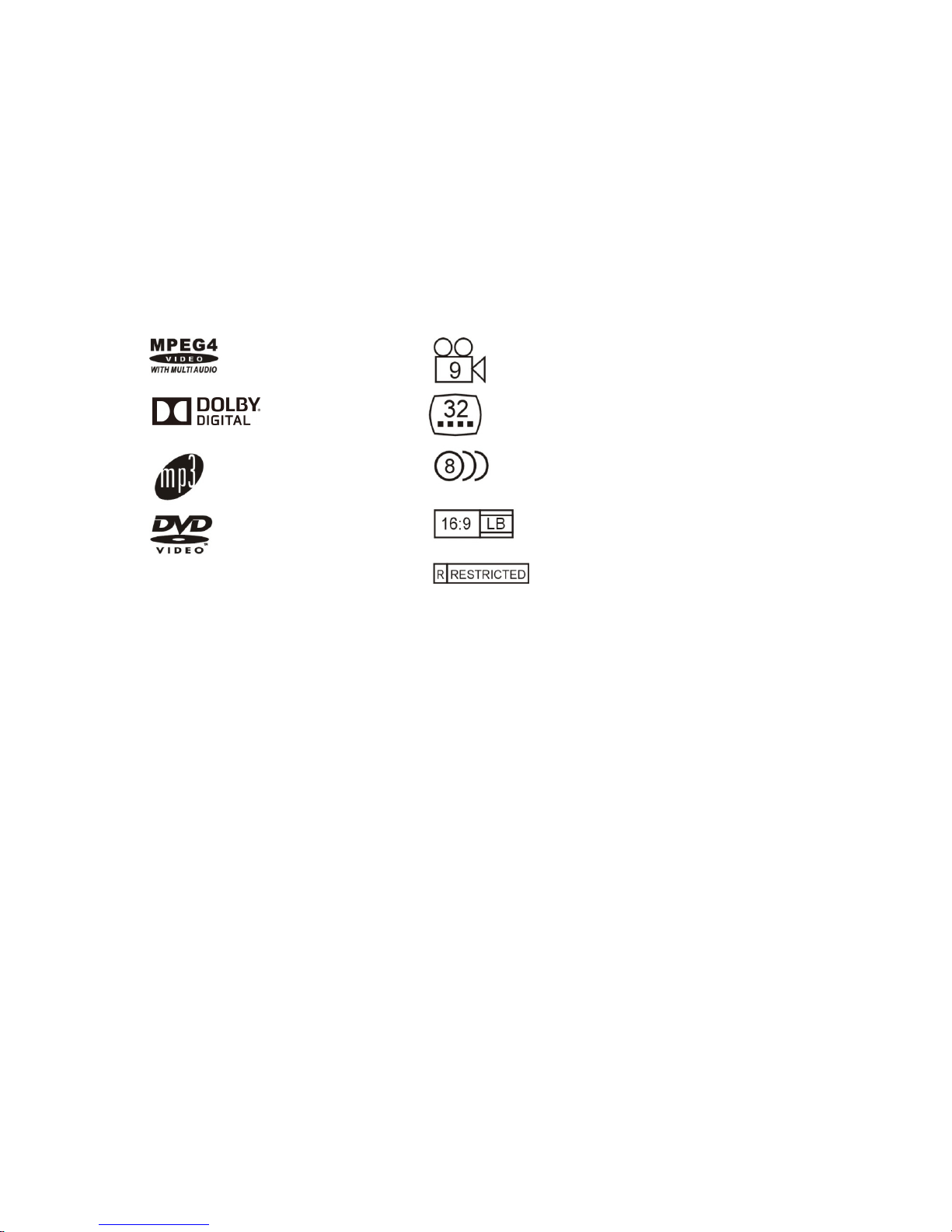
本產品支援之檔案格式及功能:
為協助保護環境,請遵守當地電子及電器產品與電池的分類回收相關法規,將廢棄電子產
品送交當地回收機構。
本產品採用由美國專利保護的版權保護技術、專利及其他知識產權。使用本版權保護技術
必須經由 Rovi 授權,且限於家用及其他有限檢視使用。除非 Rovi 另外授權,使用者不得執
行任何反向工程或拆解。
本產品支援圖樣光碟格式,並可播放圖像光碟。
本產品由杜比實驗室授權所製造。Dolby 及雙 D 符號為 DolbyLaboratories 之商標。
MPEG4 filesondiscs
Multi-angle
DolbyDigital
Subtitlechoices
Audiochoices
MP3filesonCD-R/CD-RW
TVAspectRatiomodes
DVDvideo
Parental Lock
Page 6
4
前面板和後面板說明
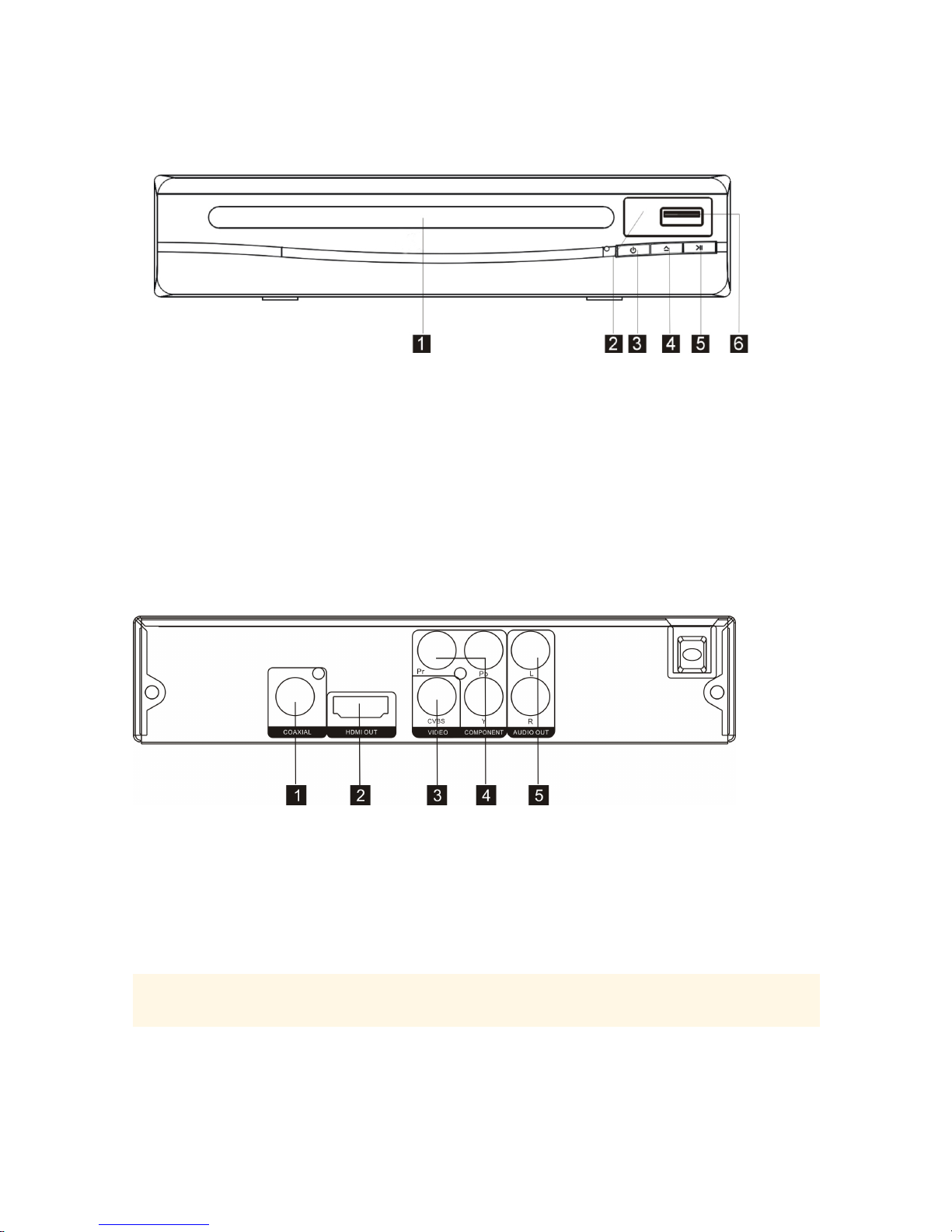
前面板
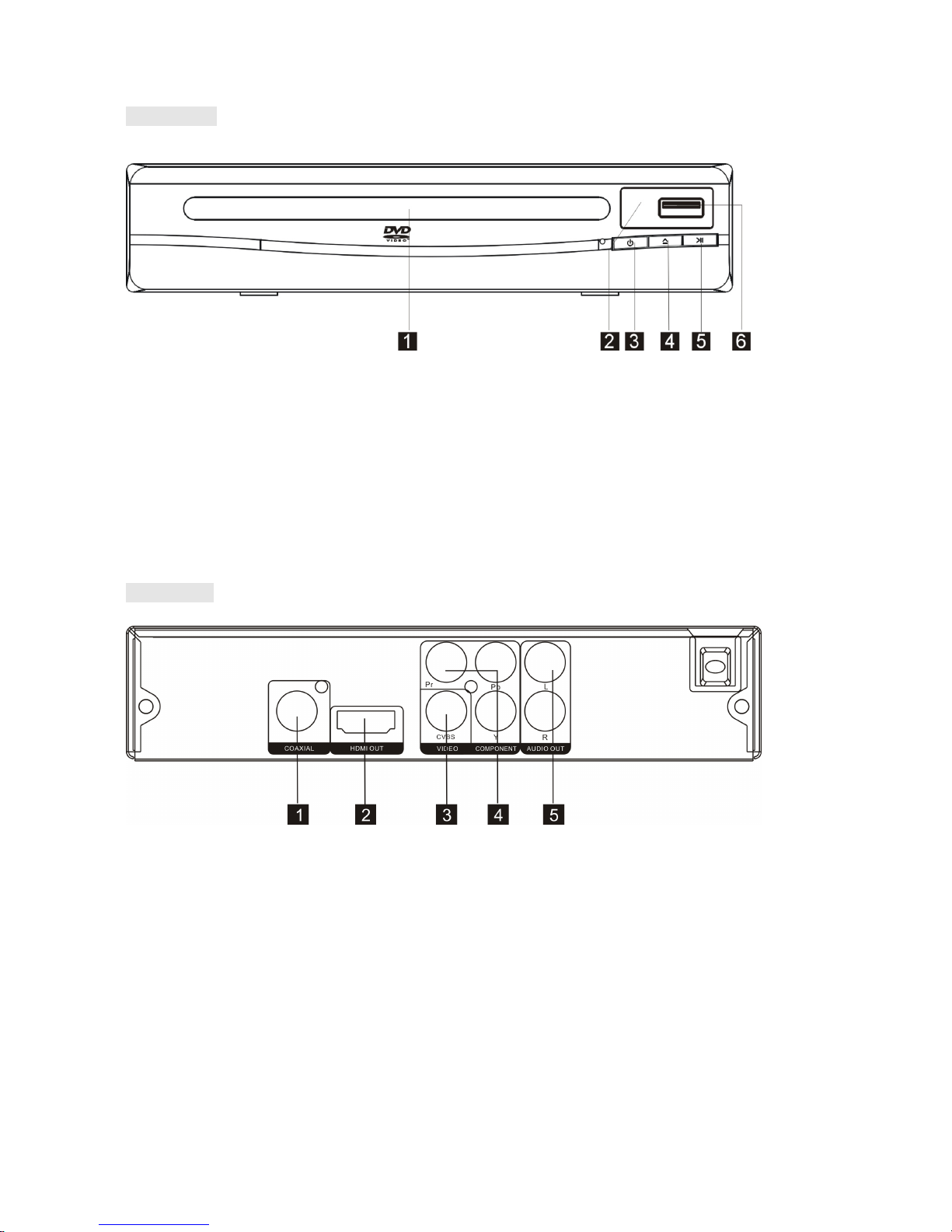
1.影碟門
2.紅外線接收器
3.電源按鈕
4.開啟/關閉鍵
5.播放/暫停鍵
6.USB插槽
後面板
1.數字音頻同軸輸出
2.HDMI輸出
3.CVBS輸出
4.複合視頻輸出(Y,Pb,Pr)
5.2CH 音頻輸出(L,R)
Page 7
5
遙控器
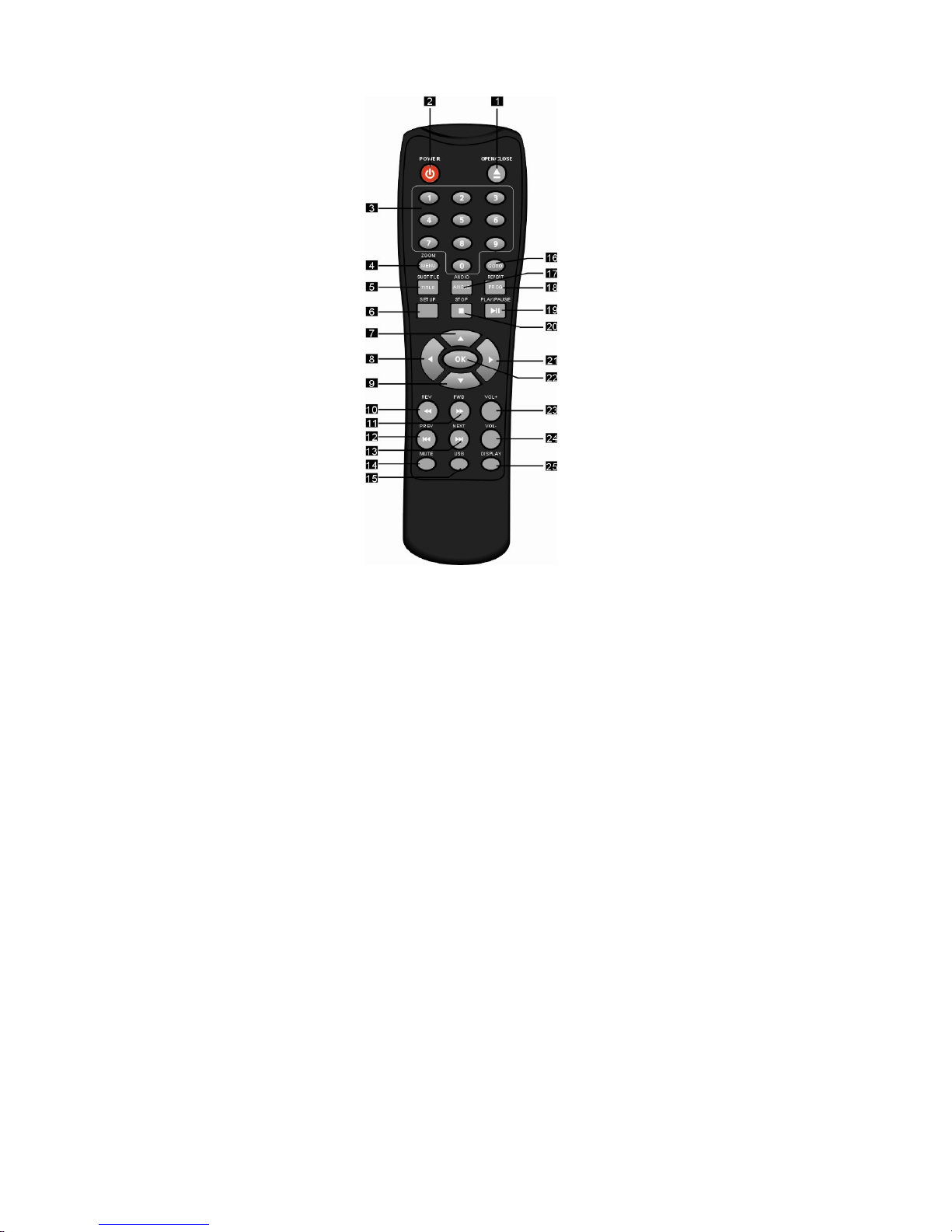
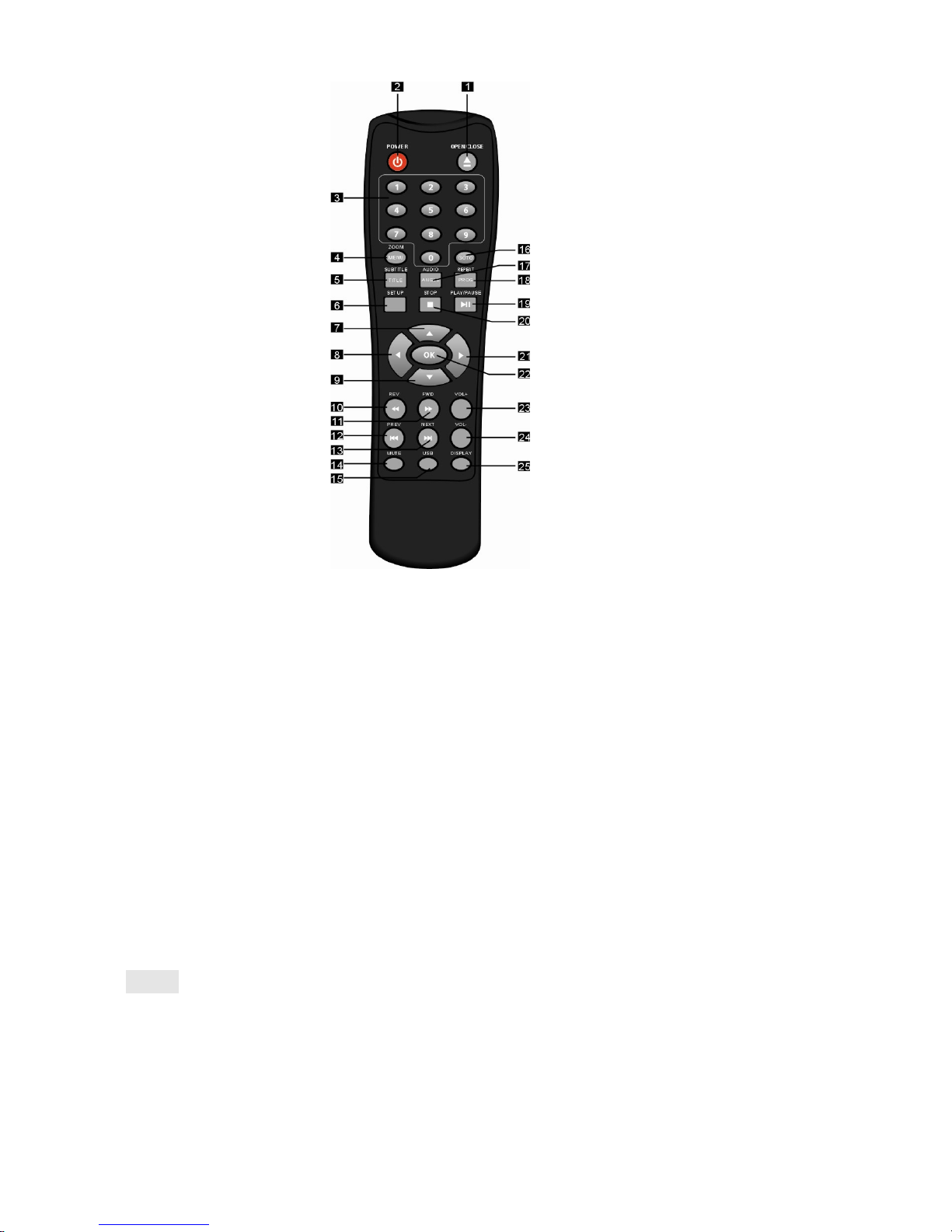
1.開啟/關閉 14.靜音
2.電源 15.USB裝置
3.小型數字鍵盤 16.選時
4.螢幕調整/目錄 17.語音/角度
5.字幕/標題 18.重播/播放模式
6.設定 19.播放/暫停
7.方向鍵-向上 20.停止
8.方向鍵-向左 21.方向鍵-向右
9.方向鍵-向下 22.確定
10.快退 23.音量+
11.快進 24.音量-
12.上一個標題、章節或曲目 25.顯示
13.下一個標題、章節或曲目
注意:
.長按 4,5,17,18 鍵超過 1.5 秒以操作按鈕上標示之功能(目錄,標題角度及 放模式)。
.按按鈕 4,5,17,18 鍵少於 1 秒以操作按鈕上方標示之功能(螢幕調整,字幕,語音及
重覆)。
播
Page 8
6
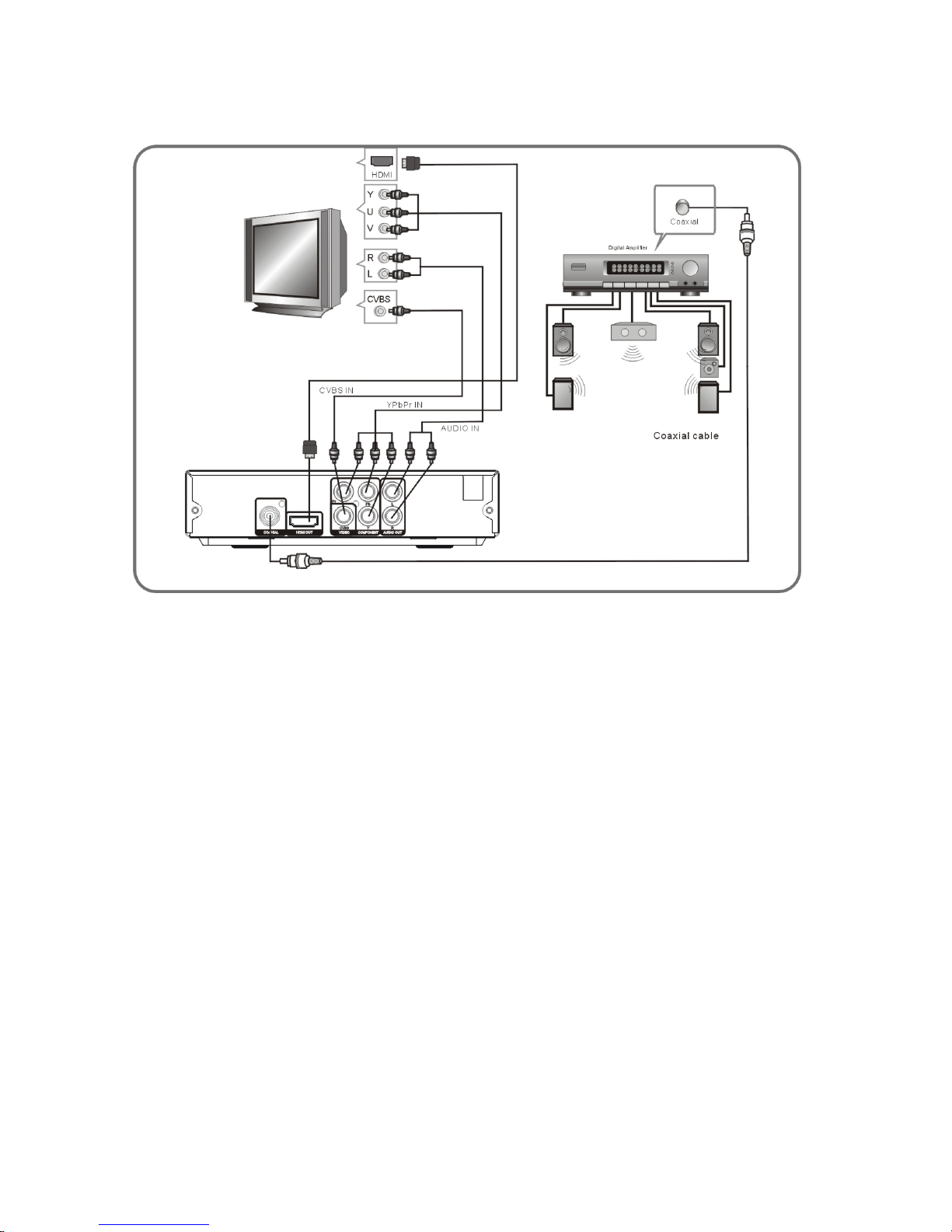
連接說明
複合視頻輸入
視頻輸入
HDMI
輸
入
音頻輸入
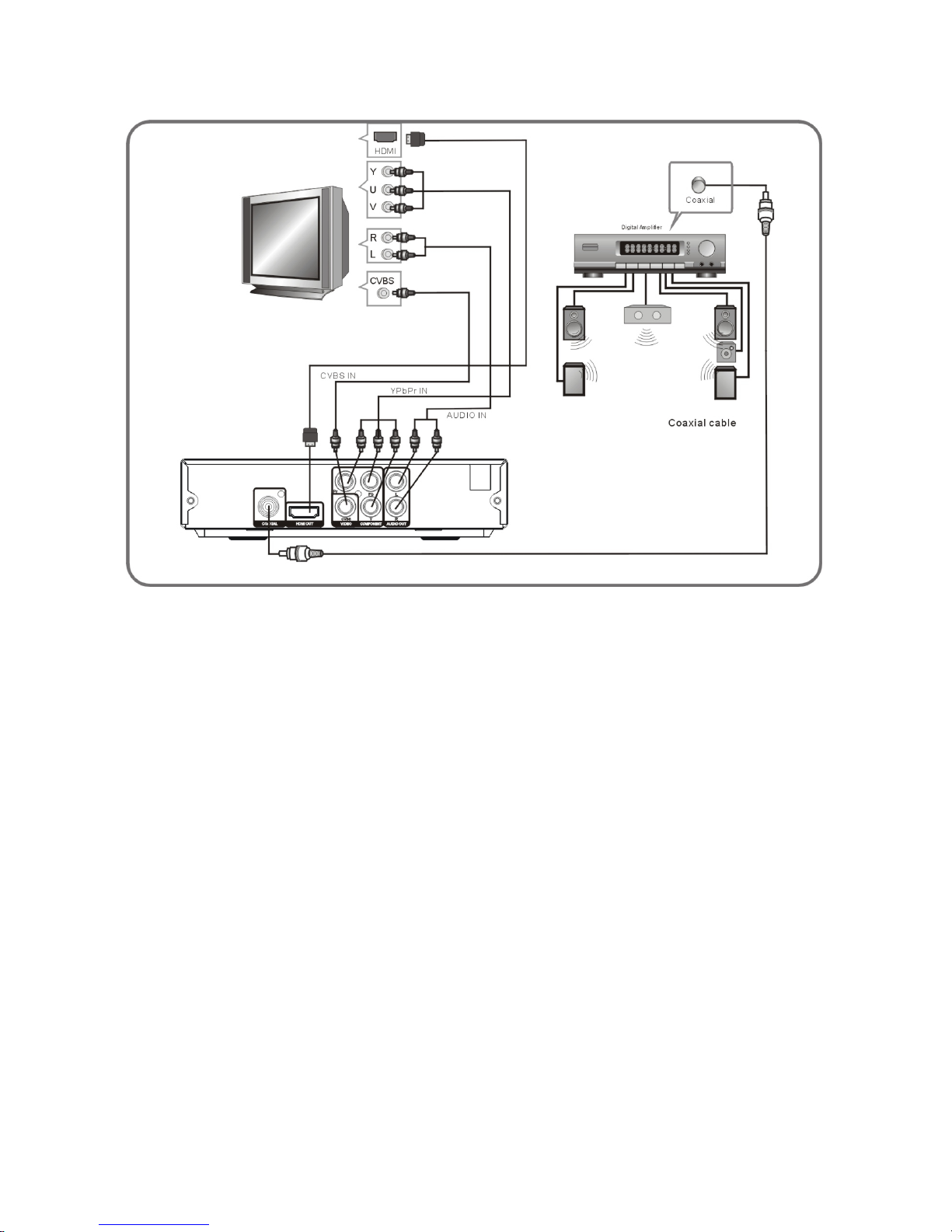
.使用AV纜線將DVD播放機連接至電視
將DVD播放機的 R 和 L 插孔連接至電視的音頻輸入插孔。
將DVD播放機的視頻輸出插孔連接至電視的視頻輸入插孔。
.使用複合視頻插口(YPbPr)將DVD播放機連接至電視
使用複合視頻線將DVD播放機連接至電視,選擇[Component]作[視頻輸出]。(選擇[P-SCAN]
以操作逐行掃瞄)[Component]及[P-SCAN]的訊號均由同一插口輸出。如電視支援逐行掃瞄
功能,可選擇[P-SCAN]作[視頻輸出]。否則,請選擇 作
[Component]
[視頻輸出]。
.使用HDMI輸出將DVD播放機連接至電視
使用HDMI纜線將DVD播放機與電視連接並選擇[HD]作[視頻輸出]。
使用數字音頻同軸輸出將 DVD 播放機連接至擴音機
使用同軸纜線將
DVD
播放機與擴音機連接。
選擇[RAW]或[PCM]作[數字輸出]。
選擇 DVD 播放機作為擴音機的音頻輸入。
.
.
.
.
Page 9
7
系統設定
目錄操作
按遙控器上的設定鍵,系統會顯示設定功能表。使用向上或向下鍵選擇瀏覽功能表,並按
確定鍵進行設定。按向左鍵返回上一層目錄。要離開設定功能表,請再按設定鍵。在
設定功能表中,可進行下列各項設定:
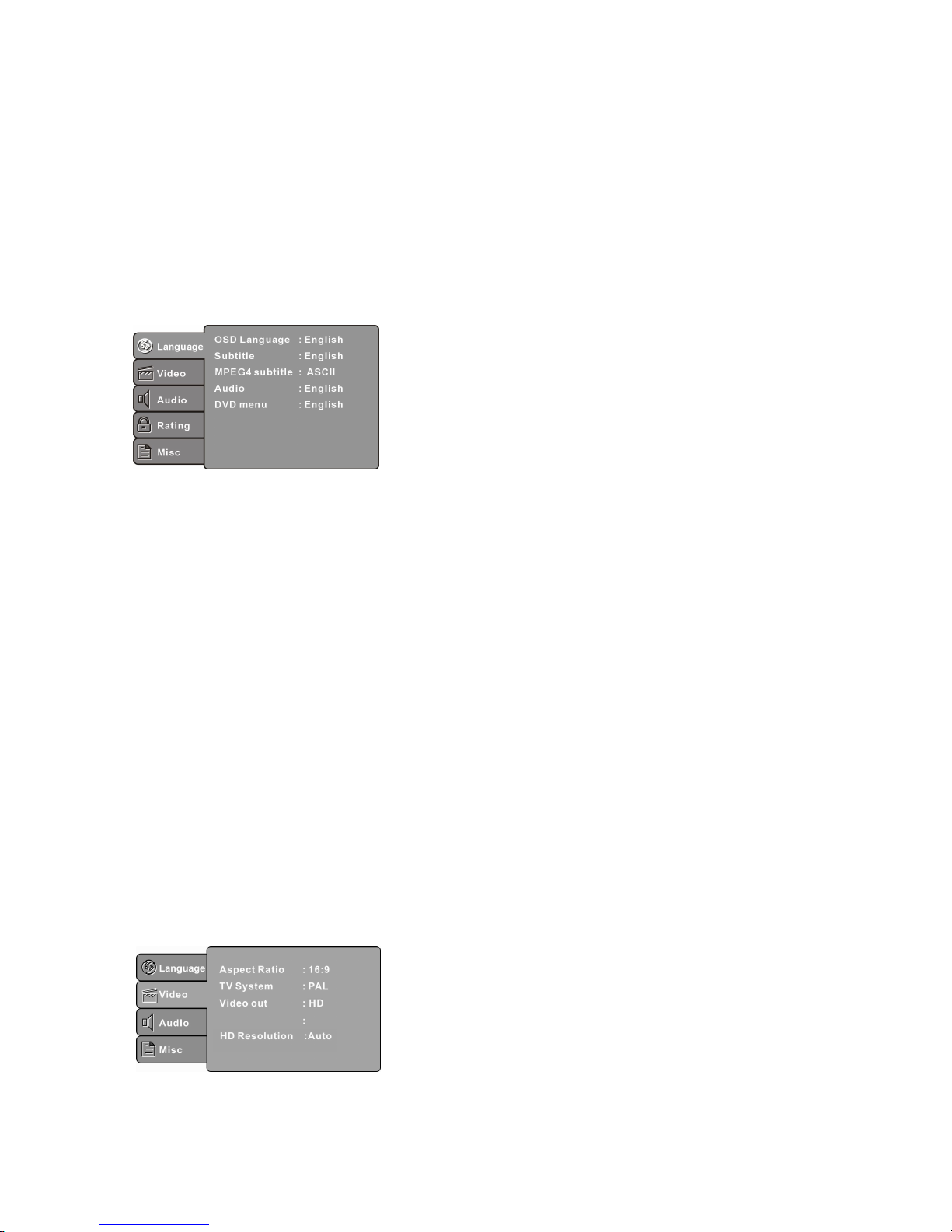
語言設定
在設定功能表選擇語言設定,系統會顯示語言設定次功能表:
畫面顯示語言
設定界面及功能表語言。
字幕
設定預設的字幕語言。
MPEG4 格式檔案字幕設(選擇性)
選擇字幕語言(並非所有播放機設有此功能)。
語音
設定預設的語音語言。
DVD 影碟目錄
設定影碟目錄的語言。
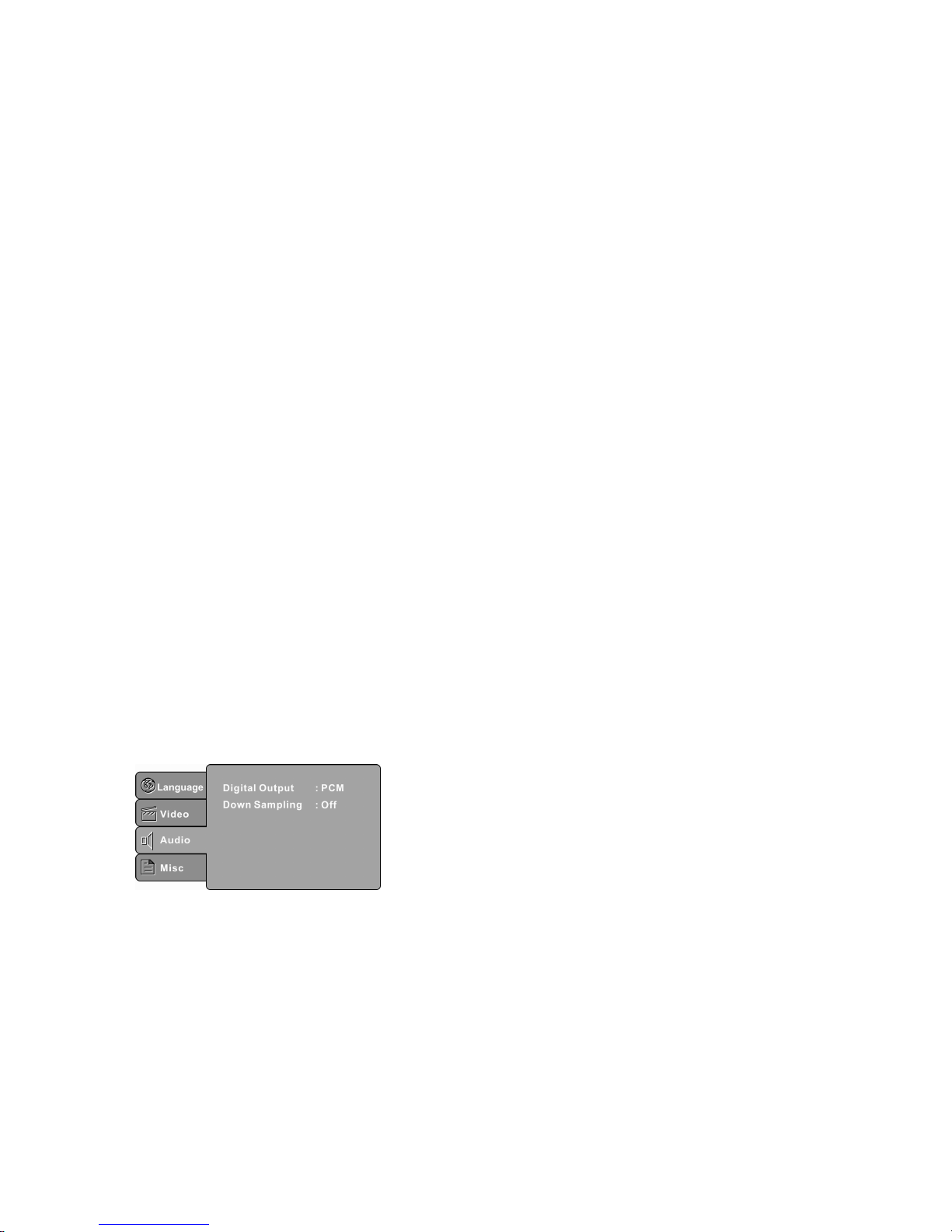
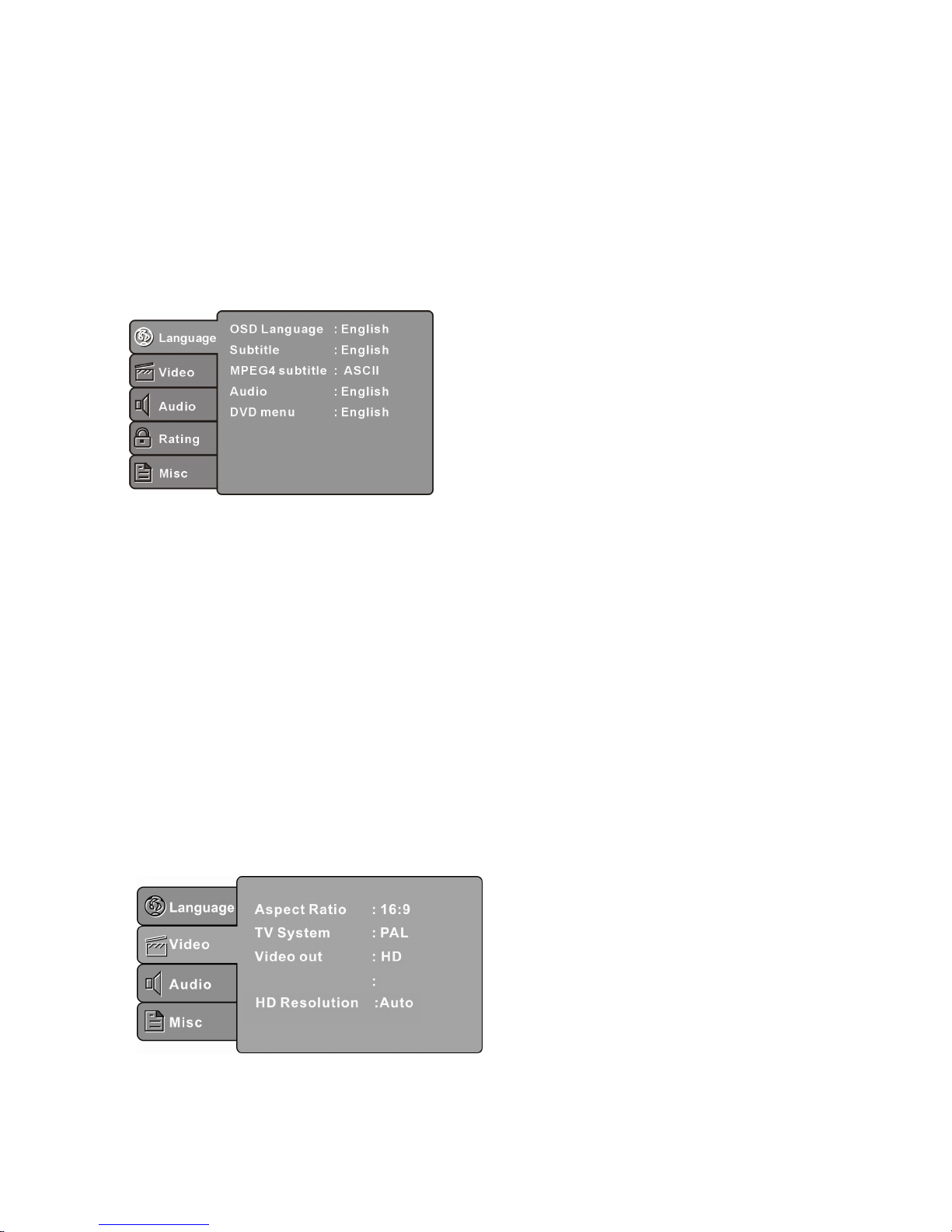
視訊設定
在設定功能表選擇視訊設定,系統會顯示視訊設定次功能表:
Smart Picture standard
Page 10
8
系統設定
設定合適的顯示比例。
註:螢幕顯示比例表按視訊的格式而定,部份格式不支援螢幕顯示比例。若以闊屏電視觀
看以
4:3
比例錄製之影碟,螢幕左右兩側將顯示黑條。因此,需根據不同類型之影碟設定
螢幕顯示比例。
設定電視系統。
註:
DVD
播放機之設定需配合電視系統。有關輸出制式詳情,請參閱個別電視的用戶手冊。
高清解像(選擇性)
選擇以高清制式輸出視訊後,可設定高清視訊的解像度。
註:只有
HDMIDVD
播放器提供此選項。
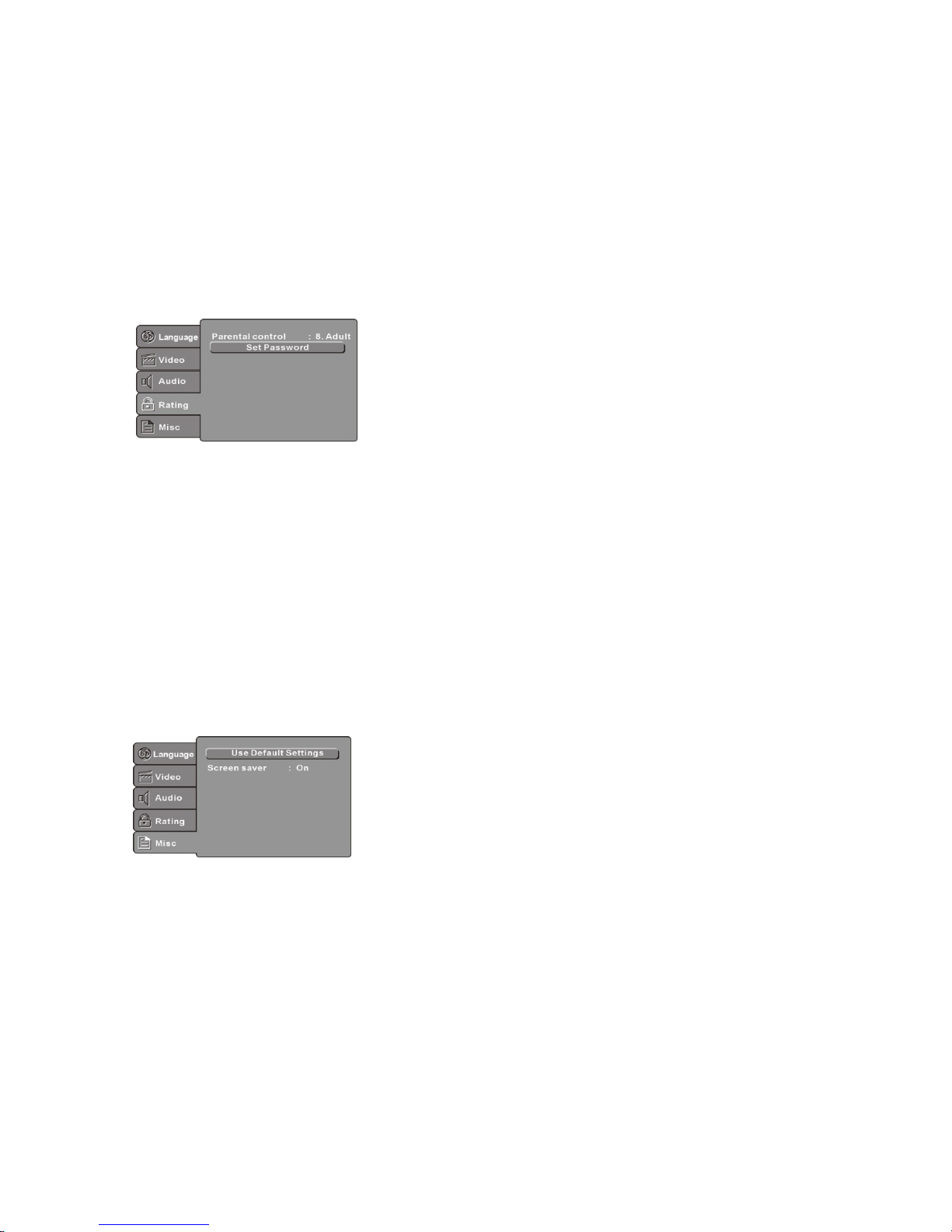
音訊設定
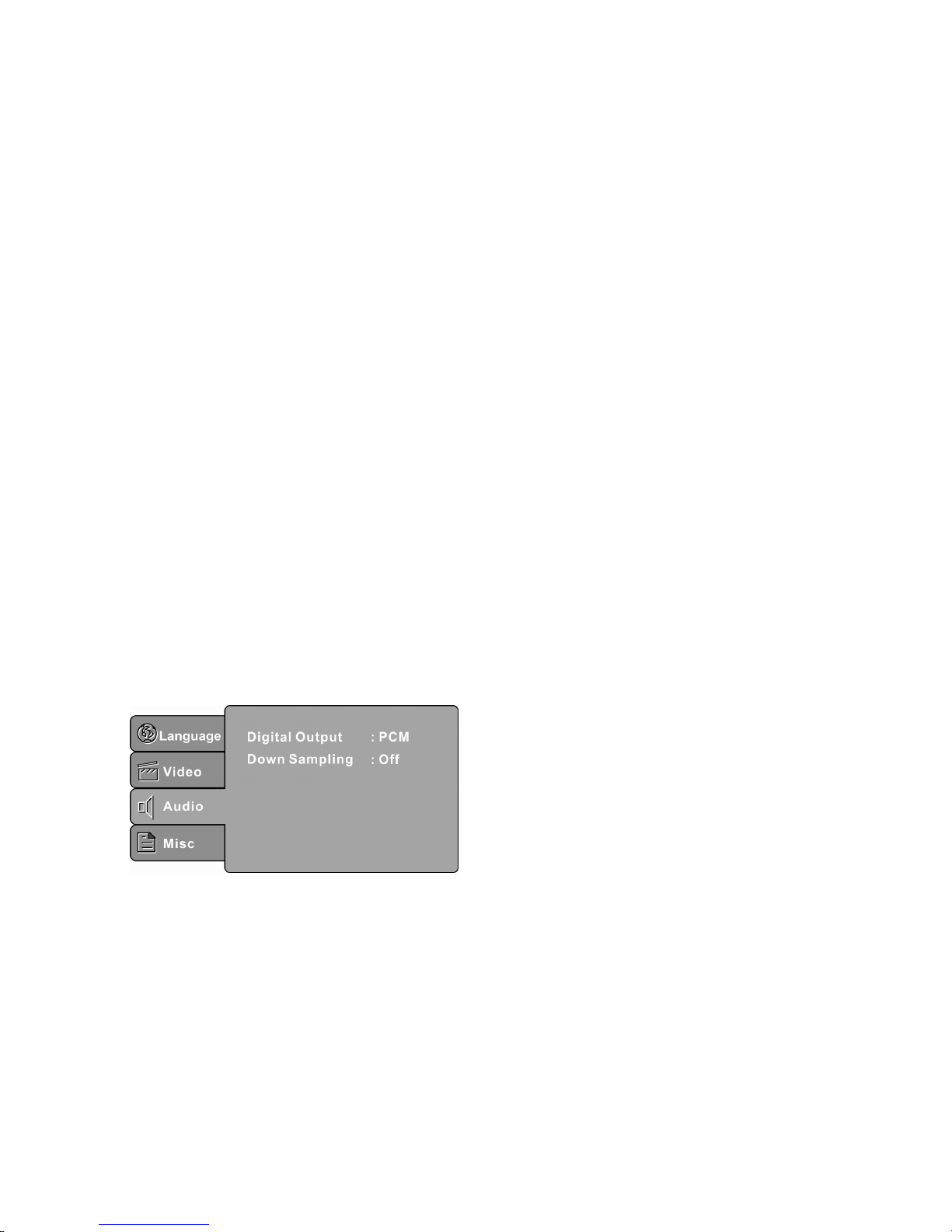
在設定功能表選擇音訊設定,系統會顯示音訊設定次功能表:
數位輸出(選擇性)
設定合適之音訊輸出模式以配合音訊裝置(如接收器及擴大器)。
Off 關閉數位音訊輸出
PCM 開啟二聲道音效
RAW 使用 DVD 影碟原有之音訊
註:只有支援同軸輸出之
DVD
播放器提供此選項。
寬高比
制式
螢幕顯示比例
電視系統
( )
( )
視頻輸出
設定視頻輸出格式。
註:只有
HDMIDVD
播放器提供高清選項。
圖像優化
設定圖像效果: 標準,明亮,SOFT 及個人。
個人: 可根據個人喜好設定圖像。光亮度,對比度,色調及色彩
Page 11
9
開啟或關閉平均取樣功能。
ON:開啟平均取樣功能以播放高頻率音訊
OFF:關閉向平均樣功能
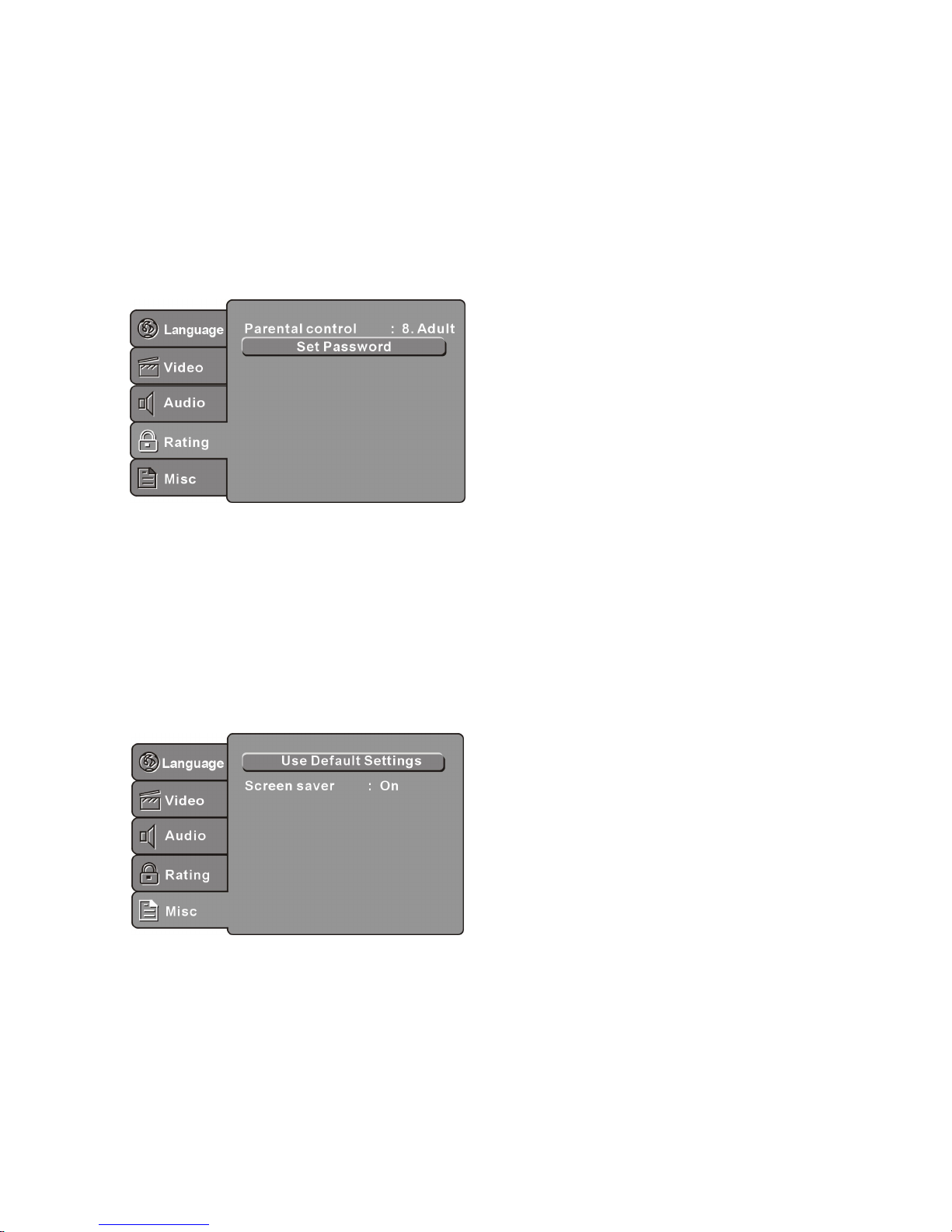
控制設定
視聽控制設定
在設定功能表選擇視聽控制設定,系統會顯示視聽控制設定次功能表:
年齡控制
設定年齡控制級別。
註:請輸入密碼以啟動此功能。
密碼
輸入四位數字密碼,再按確定鍵。
註:若忘記密碼,請以原廠密碼
6666
解鎖。
其他設定
在設定功能表選 其他設定,系統會顯示其他設定次功能表:
使用原廠設定
設定為原廠設定值。
螢幕保護程式(選擇性)
開啟或關閉螢幕保護程式。
註:並非所有播放器設有此功能。
向下取樣
擇
平均取樣
(
)
Page 12
10
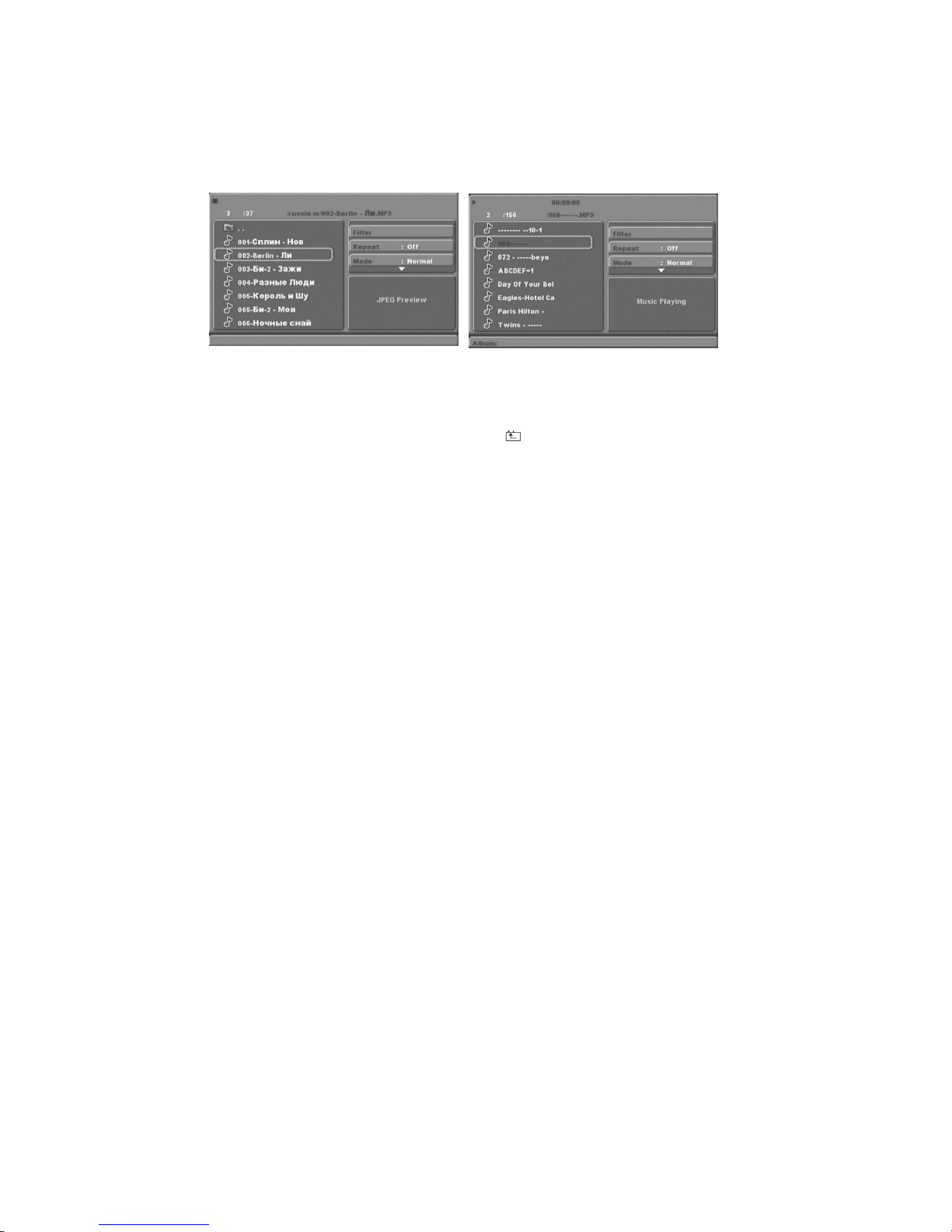
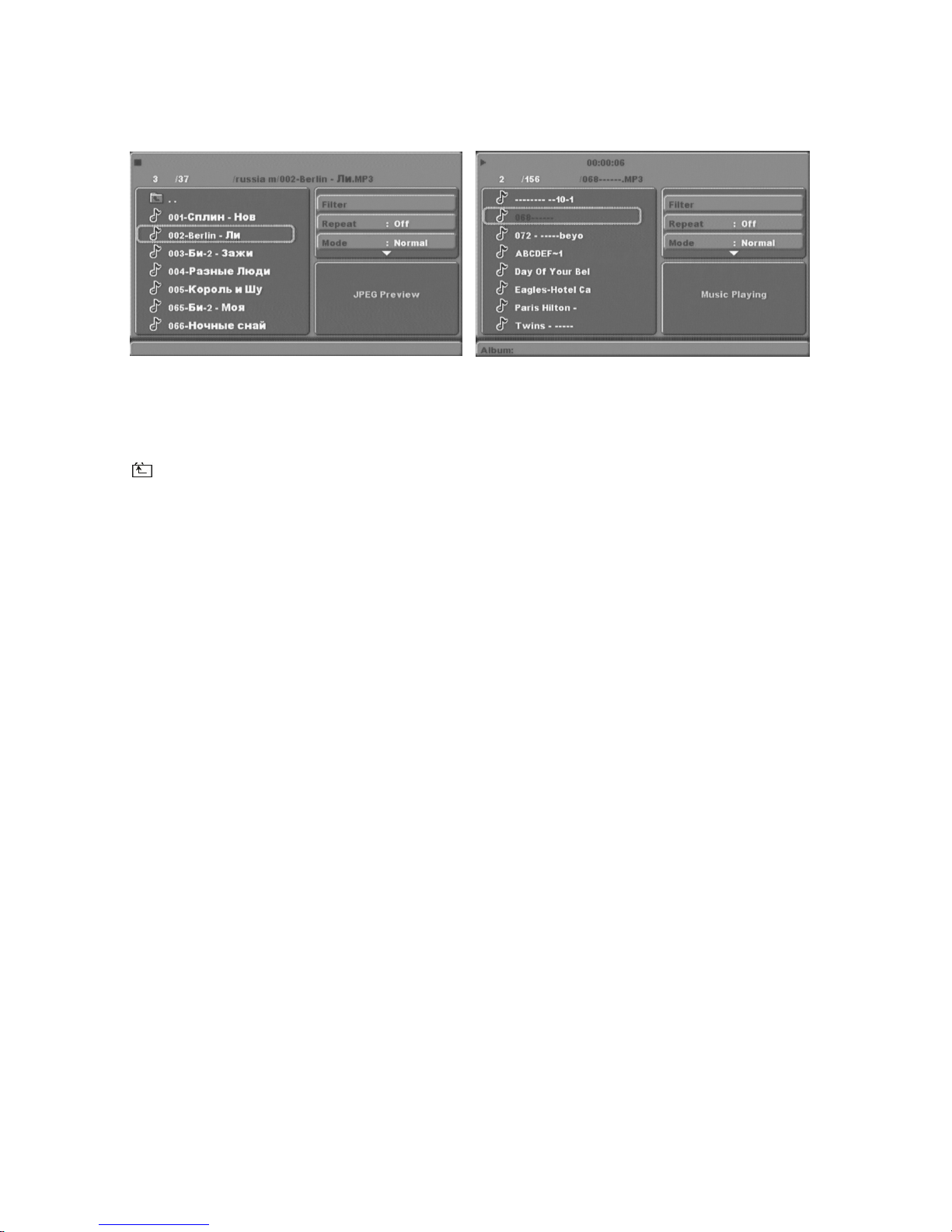
播放 mp3、WMA、JPEG 及 檔案
光碟內含以上圖示之目錄。
按方向鍵瀏覽目錄源並按確定進入次目錄。按方向鍵選擇想要播放之曲目並按確定或播放
進行播放。若想返回上一個目錄,按方向鍵選擇 並按確定。
過濾:選擇顯示不同種類的檔案
標清影片
註: 由於錄制方式不同, 並非所有影片均可在本播放機播放
重播:按確認鍵選擇播放模式:關,單曲, 檔夾
模式:
普通:關閉隨機播放模式
隨機播放:啟動隨機播放模式。完成播放一個曲目後,會隨機跳播下一個曲目。
當所有曲目都播放過一次或其他播放模式啟動後,隨機播放模式就會自動關閉。
序曲:只播放每個曲目的首10秒,然後跳至下一個曲目。
編輯模式:啟動編輯模式後,按向左的方向鍵到目錄,選擇想要播放之曲目。
按確定鍵
選擇並按加入編程播放開始以編輯模式播放曲目。
編程觀看:查看已新增到加入編程播放之曲目。
瀏覽觀看:查看檔夾內曲目之目錄。
加入編程播放:在完全停止播放的狀態下(按兩次停止鍵),選擇曲目然後按加
入編程
播放。
清除編程播放:在完全停止播放的狀態下(按兩次停止鍵),選擇曲目然後按清
除編程
播放鍵將曲目從列表刪除。
Page 13
11
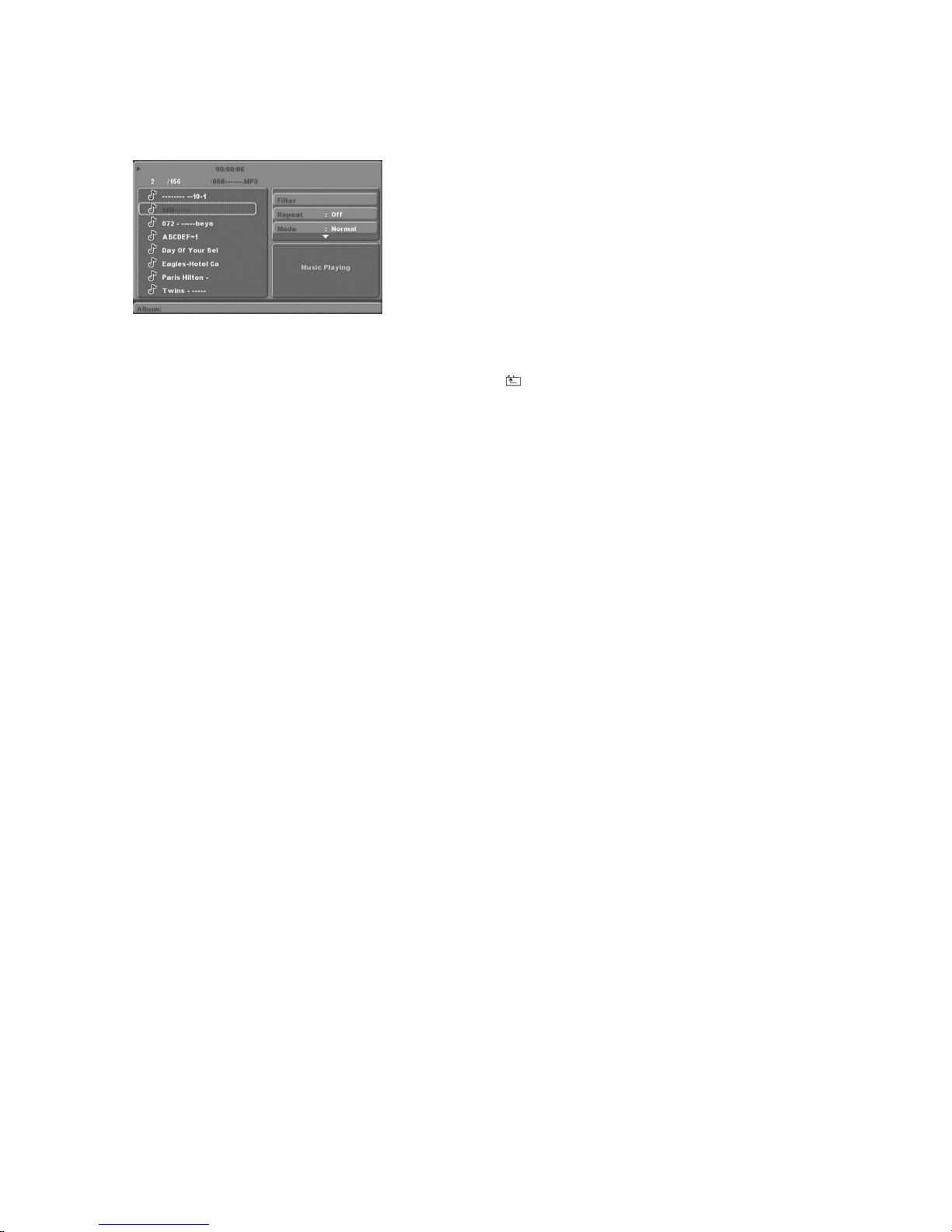
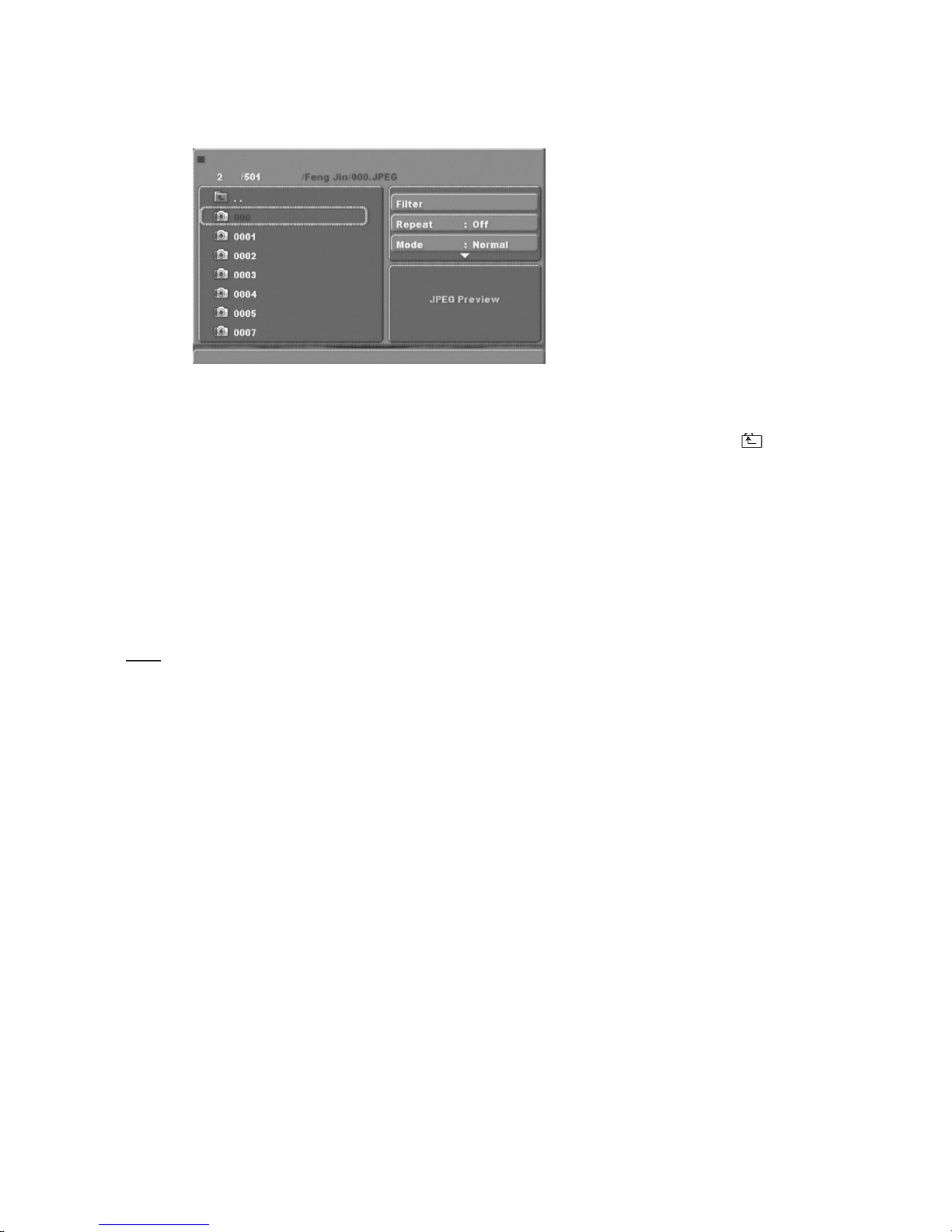
瀏覽圖像檔案光碟
光碟內含以下圖示之目錄:
按方向鍵瀏覽目錄源並按確定進入次目錄。按方向鍵選擇想要播放之影像並按確定或播放
進行播放。若想返回上一個目錄,按方向鍵選擇 並按確定。
影像旋轉
在播放影像時按方向鍵將影像旋轉,並按角度鍵調整螢幕顯示設定。
USB 快閃磁碟機
若播放器備有 USB 快閃磁碟機插槽而不在 「播放」狀態,可插入 USB 裝置或 mp3 播放器
進行 或 JPEG 圖像檔案播放。
註:請以正確方向插入
USB
裝置時,否則會對
USB
裝置或播放器造成損毀。
在播放進行時,請先停止播放再按遙控器上的 USB 鍵,然後播放 USB 內容。
此系統未能支援所有 USB 裝置。
注意:USB 裝置須直接插入播放器,避免使用延長線以防止資料在傳送過程中受到干擾甚
至丟失。
影碟
MP3
操作方法跟播放光碟時一樣。
Page 14

12
疑難排解
如發現產品出現任何問題,請參考以下的故障排除指南:
沒有畫面或聲音
確保已啟動電源開關。
確保電源插座可正常操作。
確保電源線沒有損毀。
確保電源插頭已穩固地插進插座。
有畫面但沒有聲音
確保音頻連接插孔已穩固連接。
確保音頻連接器沒有損毀。
確保音量沒有過低。
確保已正確設定播放機的 頻設定。
確保已為電視正確輸入 AV 輸入。
確保沒有把音量設為靜音模式。
有聲音但沒有畫面
確保視頻連接插孔已穩固連接。
確保已為電視正確輸入 AV 輸入。
確保視頻連接器沒有損毀。
確保已正確設定播放機的音頻設定。
畫面或聲音質素十分差
確保已正確設定播放機的
訊設定。
確保光碟沒有刮花或污漬。
確保AV連接器或輸出端子沒有損毀。
顯示屏出現BadDisc字樣
確保光碟沒有屈曲、損毀或變形。
確保光碟沒有附有污漬或嚴重損毀。
確保光碟為播放器支援之格式。
確保光碟並非程式光碟,否則請重啟播放
器。
遙控器無法操作
確保主機的電源開關已啟動。
確保電池操作正常。
把遙控器直接指向播放機的紅外線感應器。
移走任何在遙控器及紅外線感應器之間的
障礙物。
產品無法操作
關閉電源後重新啟動播放機。
顯示屏出現“NODISC”字樣
確保已把影碟放在光碟托盤上。
確保影碟沒有反轉。
確保光碟沒有變形,附有污漬或刮花。
視
/
視
音
Page 15

13
規格
功率要求:交流電 100-240V,50/60Hz
耗電量:15W
訊號系統:PAL/NTSC
影碟兼容:MPEG4,DVD,DVD+/-R/RW,VCD,JPEG.CD-DA,CD-R,CD-RW
視頻輸出
視頻輸出:1.0V(p-p)/75Ω,同步,負極
音頻輸出
聲音輸出水平︰
2Vrms-1/+0.2
頻率響應:20Hz-20kHz
訊噪比:>90dB
總失真:<0.025%
配件
遙控器一個
用戶手冊一本
AV 線一條
AAA 電池二個
註:規格可隨時改變而無須另行通知。
Page 16

Page 17
DV6823
Page 18

Page 19

1
Content
Introduction
ImportantSafetyInstructions .....................................................................................................2
Caution ............................................................................................................................................3
Features...........................................................................................................................................3
FrontPanelandRearPanelIllustration.................................................................................. 4
RemoteControl............................................................................................................................ 5
Connections...................................................................................................................................6
AdvancedFeatures
Systemsetup
................................................................................................................................
7
PictureCDplayback....................................................................................................................11
USB.................................................................................................................................................11
Others
Troubleshooting.............................................................................................................................. 12
Specifications..................................................................................................................................13
MP3/WMA/JPEG/ playback
.........................................................................................
10
SDVIDEO
Page 20

2
ImportantSafetyInstructions
1)Readtheseinstructions.
2)Keeptheseinstructions.
3)Heedallwarnings.
4)Followallinstructions.
5)Donotusethisapparatusnearwater.
6)Cleanonlywithdrycloth.
7)Donotblockanyventilationopenings,installinaccordancewiththeinstructions.
8)Donotinstallnearanyheatsourcessuchasradiations,heatregisters,stoves,orotherapparatus
(includingamplifiers)thatproduceheat.
9)Donotdefeatthesafetypurposeofthepolarizedplug.Iftheprovidedplugdoesnotfitintoyouroutlet,
consultanelectricianforreplacementoftheobsoleteoutlet.
10)Protectthepowercordfrombeingwalkedonorpinchedparticularlyatplugs,conveniencereceptacles,
andthepointwheretheyexitfromtheapparatus.
11)Onlyuseattachments/accessoriesspecifiedbythemanufacturer.
12)Unplugthisapparatusduringlightingstormsorwhenunusedforlongperiodsoftime.
13)Referallservicingtoqualifiedservicepersonnel.Servicingisrequiredwhentheapparatushasbeen
damagedinanyway,suchaspower-supplycordorplugisdamaged,liquidhasbeenspilledorobjectshave
fallenintotheapparatus,theapparatushasbeenexposedtorainormoisture,doesnotoperatenormally,or
hasbeendropped.
14)Mainsplugisusedasthedisconnectdevice,thedisconnectdeviceshallremainreadilyoperable.
15)Theventilationshouldnotbeimpededbycoveringtheventilationopeningswithitems,suchas
newspapers,table-cloth,curtains,etc.
16)Nonakedflamesources,suchaslightedcandles,shouldbeplacedontheapparatus.
17)Attentionshouldbedrawntotheenvironmentalaspectsofbatterydisposal.
18)Theuseofapparatusinmoderateclimate.
19)Theapparatusshallnotbeexposedtodrippingorsplashingandthatnoobjectsfilledwithliquids,suchas
vases,shallbeplacedontheapparatus.
WARNING:Toreducetheriskoffireorelectricshock,donotexposethisapparatustorainormoisture.
WARNING:Thebatteriesshallnotbeexposedtoexcessiveheatsuchassunshine,fireorthelike.
Thesymbolindicatesthatdangerousvoltagesconstitutingariskofelectricshockarepresent
withinthisunit.
Thesymbolindicatesthatthereareimportantoperatingandmaintenanceinstructionsinthe
literatureaccompanyingthisunit.
Thissymbolindicatesthatthisproductincorporatesdoubleinsulationbetweenhazardousmain
voltageanduseraccessibleparts.Whenservicinguseonlyidenticalreplacementparts.
Page 21
3
Caution
• Pleaseusetheoriginalboxandpackingmaterialsforsafetransportationofthisproduct.
• Itisnormalforthecoverandrearpaneltobecomewarmaftertheplayerhasbeen
operating foran extended period of time.
• Donotmovethisproductduringplayback.Doingsomaycausedamagetothepickupand
thedisc.
• PressOPEN/CLOSEonthefrontpanelorremotetoopenorclosethedisctray.Donot
pushortouch the tray while it is openingorclosing.
Features
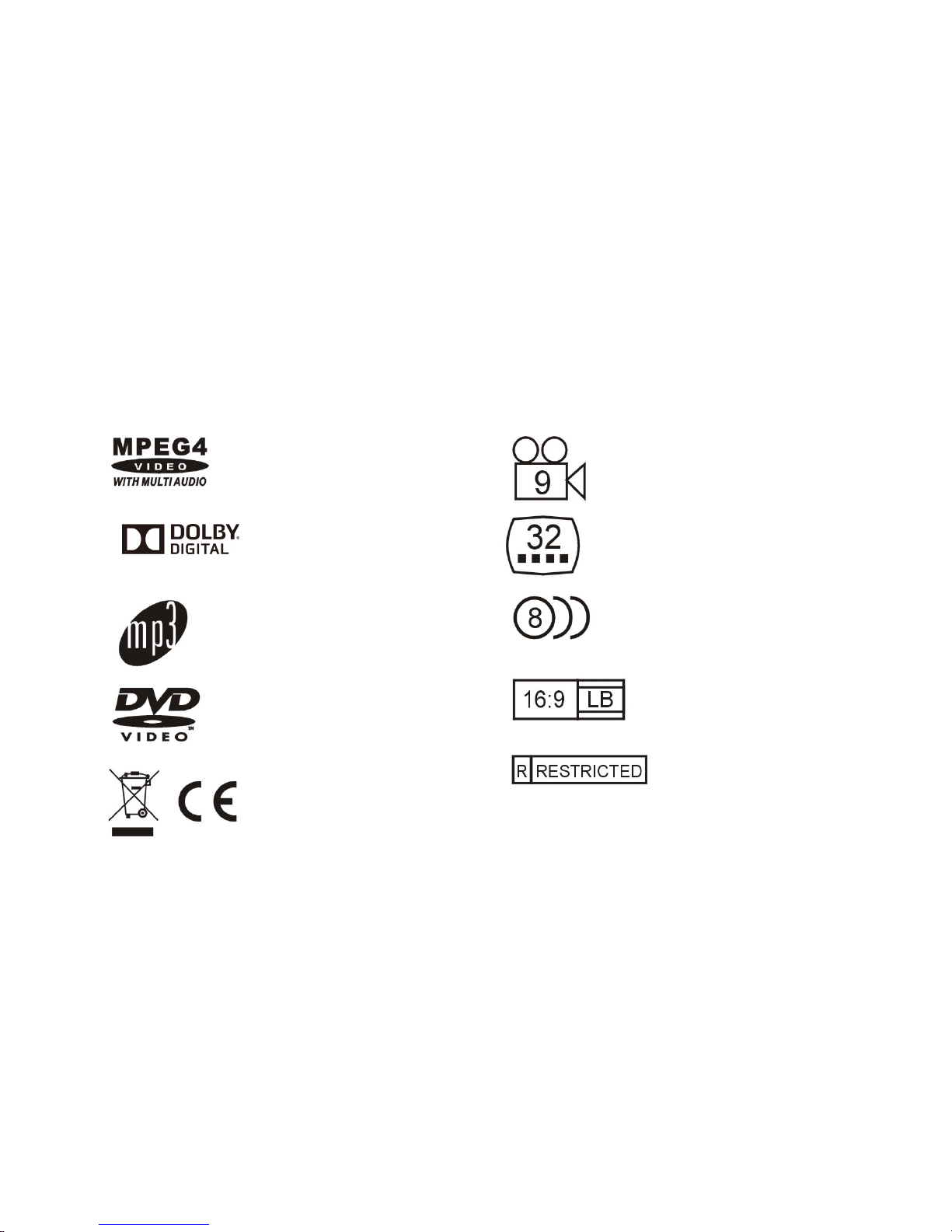
Discformatsandfeaturessupportedbythisplayer:
You can help protect the environment! Please remember to respect the local regulations: hand in the
non-working electrical equipments to an appropriate waste disposal center.
ThisproductincorporatescopyrightprotectiontechnologythatisprotectedbyU.S.patentsandother
intellectual propertyrights. Use of this copyright protection technologymust be authorizedbyRovi
Corporation, and is intended forhome and other limited viewing uses onlyunless otherwise
authorizedbyRovi Corporation. Reverse engineeringordisassemblyis prohibited.
TheproductcomplieswiththePictureCDformatandwilldisplayPictureCDs.
ManufacturedunderlicensefromDolbyLaboratories.Dolbyandthedouble-Dsymbolare
trademarks of DolbyLaboratories.
MPEG4 filesondiscs
Multi-angle
DolbyDigital Subtitlechoices
Audiochoices
MP3filesonCD-R/CD-RW
TVAspectRatiomodes
DVDvideo
Parental Lock
Page 22
4
FrontPanelandRearPanelIllustration
Front Panel
1.TrayDoor
2.Sensor
3.Power
4.Open/Closebutton
5.Play/PauseButton
6.USBport
Back Panel
1.DigitalAudioCoaxialOutput
2.HDMIOutput
3.CVBSoutput
4.ComponentVideooutput(Y,Pb,Pr)
5.2CHAudioOutput(L,R)
Page 23
5
RemoteControl
1.OPEN/CLOSE
2.POWER
3.0-9NUMBERKEY
4.ZOOM/MENU
5.SUBTITLE/TITLE
6.SETUP
7.UP
8.LEFT
9.DOWN
10.REVERSE
11.FORWARD
12.PREVIOUS
13.NEXT
14.MUTE
15.USB
16.GOTO
17.AUDIO/ANGLE
18.REPEAT/PROGRAM
19.PLAY/PAUSE
20.STOP
21.RIGHT
22.OK
23.VOLUMEINCREASE
24.VOLUMEDECREASE
25.DISPLAY
Note:
l Press4,5,17,18formorethan1.5s,therewillbefunctionsmarkedonthese
buttons(MENU,TITLE,ANGLE,PROG).
l Press4,5,17,18forlessthan1s,therewillbefunctionsmarkedabovethese
buttons(ZOOM,SUBTITLE,AUDIO,REPEAT).
Page 24
6
Connections
l CONNECTDVDPLAYERTOTVSETBYAVCABLE
ConnecttheDVDplayer'sRandLjacktotheaudioinputjackontheTV.
ConnecttheDVDplayer'sVIDEOjacktothevideoinputjackontheTV.
l
CONNECTDVDPLAYERTOTVSETUSINGTHEYPbPrJACKS
UsetheCOMPONENTCabletoconnectDVDplayertoyourTV.Setthe[VideoOut]to
[Component].(ForProgressiveScan,setto .[Component]and signalis
transferedthroughsamejack.IftheTVsetsupportsP-scanfunction,youcanset[Video
Out]to .Ifnot,youcanset[VideoOut]to[Component].
l
CONNECTDVDPLAYERTOTVSETWITHHDMICABLE
UsetheHDMIcabletoconnectDVDplayerandyourTV.Setthe[VideoOut]to[HD].
l CONNECTDVDPLAYERTOAVAMPLIFIERWITHDIGITALAUDIO(COAXIAL)
OUTPUT
1.ConnectthecoaxialdigitalaudiooutputtotheAVamplifier.
2.SettheDVDplayer's[DigitalOutput]to[Raw]or[PCM]
3.SettheAVAmplifiertothedigitalinputconnectedtotheDVDplayer.
[P-SCAN]
[P-SCAN]
[P-SCAN]
Page 25
7
SYSTEMSETUP
MENUOPERATION
PresstheSETUPbuttonontheremotecontrol,theSETUPMENUwillbedisplayed.
Afteraccessingthesetupmenu,pressthedirectionbuttonsforupanddownmovementto
selectanitemdesired,thenpresstheOKbuttontoconfirm.PressLEFTdirectionbutton
returntothemenuofupperlevel.Toexitthesetup,presstheSETUPbuttonagain.Inthe
SETUPMENU,youmaychooseanyofthefollowingoptionsasyoulike.
LANGUAGESETUP
Select Language inthesetupmenu,anddisplaythe Language submenu:
OSDLanguage
Usethisitemtoselectthelanguageofthesetupmenuandscreendisplay.
Subtitle
Thisoptionprovidesthepresetsubtitlelanguage.
MPEG4Subtitle(optional)
SelectdifferentMPEG4subtitleencodingoption.
Note: Notallplayerssupportthisitem.
Audio
Selectthebuilt-indiscdubbinglanguageoptions.
DVDMenu
Thisoptionprovidesthefilm'smenulanguageoptions.
VIDEO SETUP
Select Video inthesetupmenu,anddisplaythe Video submenu:
Smart Picture standard
Page 26
8
SYSTEMSETUP
AspectRatio
Selecttheaspectratio.
Notes:
Theimagedisplayratioisrelatedtotherecordeddiscformat.Somedisccannotdisplayimagesin
theaspectratioyouchoose.Ifyouplayadiscrecordedin4:3formatonawidescreenTV,black
barswillappearontheleftandrightsideofthescreen.Youmustadjustthescreensetting
dependingonthetypeofthetelevisionyouhave.
TVSystem
SelectthedifferentTVsystem.
Note: TheDVDplayersettingshouldbematchedtoyourTVset.
Formoreinformationofoutputformat,refertotheinstructionsoryourTVset.
HDResolution(optional)
AfteryousetthevideooutputtoHDoutput,youcanchoosetheresolutionofHDMIoutput.
Note: OnlyHDMIDVDplayerhasthisitem.
AUDIOSETUP
Select Audio inthesetupmenu,anddisplaythe Audio submenu.
Digitaloutput(Optional)
AdjusttheaudiooutputonCoaxialportstoworkinharmonywiththeaudioequipment(e.g.receiver,
amplifier)connectedtotheplayer.
Off Digitalaudiooutputisdisabled.
PCM Transferstereo2channelssignals
RAW: TransfertheDVDoriginalaudiotrack
Note: Thisitemisonlyfortheplayerwithcoaxialoutput.
,
VideoOut
Selectthevideooutputformatwanted.
Note: OnlyHDMIDVDplayerhas “HD” selection.
Selectthepictureeffectyouwanted. “Standard”, “Bright”, “Soft” and
“Dynamic”
Dynamic:Setyourfavorites “Brightness”, “Contrast”, “Tint” and
“Color”
SmartPicture
Page 27
9
SYSTEMSETUP
Downsampling
Selectdownsamplingfunctiononoroff.
ON:Systemwilldownsamplingrateforhighsamplingrateaudio(morethan96K).
OFF:Disablethisfunction.
RATINGSETUP
Select Rating inthesetupmenu,anddisplaytheRatingsubmenu:
ParentalControl
Settheparentalcontrolfeatureoftheplayer
Note: PasswordisneededbeforesettingParentalControl.
SetPassword
Inputfourdigits(password),thenpress OK toconfirm.
Note:Ifyouforgetyourpassword,pleaseusetheuniversalpassword6666tounlock.
MISCSETUP
Select MISC inthesetupmenu,anddisplaythesubmenu:
UseDefaultSettings
Resetsetupdatatofactorydefaultvalue.
ScreenSaver(Optional)
Enable/disablethescreensaverfunction.
Note: Notallplayerhasthisitem.
Page 28
10
MP3/WMA/JPEG/SD VIDEOPLAYBACK
TheMP3/WMA/SD VIDEO
dischassuchadirectorystructureasshown pictureabove.
Press Directionkey tochoosetherootdirectoryandthenpress OK buttontoenterintothesub
directory.Press Directionkey tochoosethedesiredtrackandthenpress OK or PLAY toenjoy
themusicormovie.Ifyouwanttoreturntotheuppermenu,press Directionkey tochoose
theiconandpress OK button.
Filter:Allowsselectingthecategoriesoffilesdisplayedinthebrowserlist.
Repeat:Toswitchdifferentrepeatplayingmode
Mode:Selectdifferentplayingmodeasfollows:
Normal:Shufflemodeiscancelled.
Shuffle:Shufflemodeenabled.Whenplaybackreachestheendofthecurrent
chapter/track,playbackjumpstoarandomchapter/track.Astheendofeach
chapter/trackisreached,anotherrandomchapter/trackwillbeplayeduntilall
tracks/chaptershavebeenplayedortheShufflemodeiscancelledbytogglingtoa
different Mode Option.
MusicIntro:Inthismode,themediawillplay10secondsthenskiptonextmedia.
EditMode:Toenableprogrammedplaybackmode.Whenyouselectthemode,pressLEFT
Directionkey todirectoryandpress OK tochoosethedesiredtrackandpress
Addtoprogram tostartprogramplayback.
Programview:Displayprogramtrack.
Browerview:Displaytrackdirectory.
Addtoprogram:Choicethetrackpress Addtoprogram toaddthetrackoftheprogramplay
directory.
Clearprogram:Inthecompletestopstate(pressthe STOP buttontwice),choosethetrack
press Clearprogram todeletethetrackoftheprogramplaydirectory.
Note:Duetothevideorecordingmethod,notallthevideoformatare
supportedbytheplayer.
Page 29
11
PICTURECDPLAYBACK
ThePICTURECDdischassuchadirectorystructurestructureasshowninthefollowingpicture.
Press Directionkey tochoosetherootdirectoryandthenpress OK buttontoenterintothesub
directory.Press Directionkey tochoosethedesiredpictureandthenpress OK or PLAY toenjoy
thepicture.Ifyouwanttoreturntotheuppermenu,press Directionkey tochoose theicon
andpress OK button.
Imagerotation
Inpictureplaystate,press Directionkey torotatethepicture,pressANGLEbuttontochangethe
picturescanmode.
USB
USB
IftheplayerhasaUSBslotandit’sNOTin “discplaying” status,youcaninsertaUSBdevice or
aMP3PlayerwithUSBInterfacetoplaytheMP3musicorandJPEGfiles.Allthefunctionisthe
sametoplayadisc.
Note: WheninsertingtheUSBdevice,pleasedonotinsertinthewrongdirection.Otherwisethe
USBdeviceorplayermaybedamaged.
Whenthediscisplaying,pleasestopplayingfirstandthenenjoyUSBbypressUSBkeyonthe
remotecontroller.
NotallUSBdevicecanbesupportedbythissystem.
Warning:TheUSBmemorystickshouldbeplugintheunitdirectly.USBextensioncableshould
notbeusedtoavoidfailingofdatatransferringandinterferencecaused.
Page 30

12
Troubleshooting
Ifyouhaveanyquestions,pleaseconsultthetroubleshootingguidebelow.
NOPICTUREORSOUND
• Ensurethepowerbuttonison.
• Ensurethepoweroutletisoperational.
• Ensurethepowercordisnotdamaged.
• Ensurethepowerplugisconnectedfirmlytothe
outlet.
"BADDISC"DISPLAYED
• Ensurethediscisnotwarped,damagedordeformed.
• Ensurethediscisnotbadlystainedordamaged.
• Ensurethediscformatiscompatiblewiththeplayer.
• PleasecheckwhetheryouhavetriedtoplayasoftwareCD.If
so,pleaserestarttheplayer.
PICTUREBUTNOSOUND
• Ensuretheaudiojacksaresecurelyconnected.
• Ensuretheaudioconnectorisnotdamaged.
• EnsurethevolumeisturnedupinVOUCHsetup.
• Ensureyouhavesettheplayer'sAUDIOsettingscorrectly.
• EnsureyouhaveenteredthecorrectAVinputforyourTV
• Ensuretheaudioisnotsettomute.
REMOTENOTWORKING
• MakesuretheMainunitsPOWERbuttonison
• Ensuretheremotebatteriesareworking.
• Pointtheremotecontroldirectlyattheplayer'sIR
sensor.
• Removeanyobstaclesbetweentheremoteand
theIRsensor.
SOUNDBUTNOPICTURE
• Ensurethevideojacksaresecurelyconnected.
• EnsureyouhaveenteredthecorrectAVinputforyourTV
• Ensurethevideoconnectorisnotdamaged.
• Ensureyouhavesettheplayer'sVIDEOsettingscorrectly.
UNITNOTWORKING
• Turnoffthepower,andthenturnitonagain.
POORPICTUREORSOUND
• Ensureyouhavesettheplayer'sAUDIOsettingscorrectly.
• Ensurethediscisnotscratchedorstained.
• EnsuretheAVconnectorortheoutputterminalisnot
damaged.
"NODISC"DISPLAYED
. • Ensureyouhaveputthedisconthetray.
• Ensurethediscisnotupsidedown.
• Ensurethediscisnotdistorted,stainedor
scratched.
Page 31

13
Specifications
Powerrequirements:AC100-240Volt,50/60Hz
Powerconsumption:15W
Videostandard:NTSC/PAL
DiscsCompatibility:MPEG4,DVD,DVD+/-R/RW,VCD,JPEG.CD-DA,CD-R,CD-RW
Videoout
Videoout:1.0V(p-p)/75Q,sync,negativepolarity
Audioout
Audiooutlevel: 2Vrms-1/+0.2
Frequencyresponse: 20Hzto20kHz
S/Nratio: >90dB
Totalharmonicdistortion: <0.025%
Accessories
RemoteControlx1
User'sManualx1
AVCablex1
AAAbatteriesx2
Note: Specificationsaresubjecttochangewithoutnotice.
Page 32

 Loading...