

Page 1
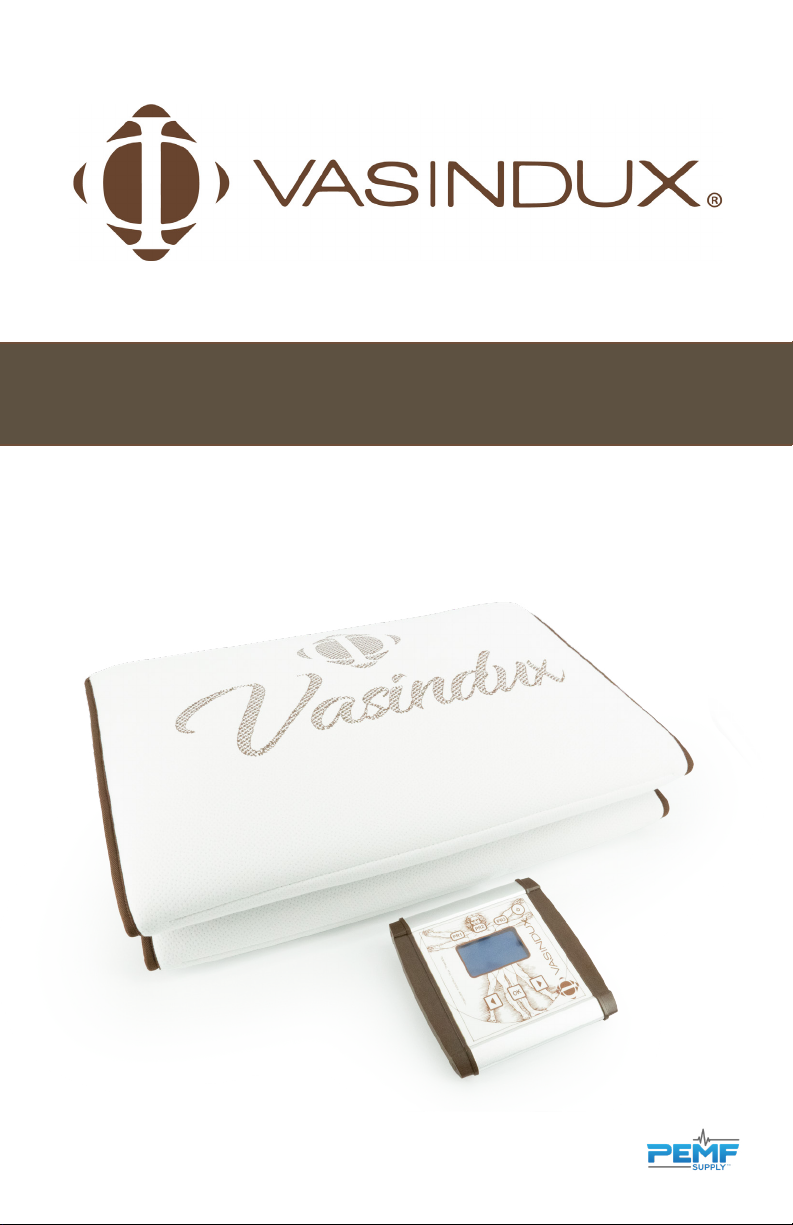
VASINDUX PRO 3.0 USER MANUAL
Pulsed Electromagnetic Field Therapy
Page 2

Vasindux Pro 3.0 User Manual
Pulsed Electromagnetic Field Therapy
4 Introduction
4 Included with Your Purchase
4 Application Tips for Best Results
5 Important Information about PEMF Therapy
6 Setup and Use of the Vasindux Pro
6 Controller settings
7 Turning the Device On and O
8 Choosing a Program
8 IF
9 Custom Program IF 11
9 Chakra
9 BioResonance
10 Shortcuts for Preferred Programs
11 Denitions
12 Program Guide
14 Accessory Devices
15 Benets of Regular Use of PEMF Therapy
16 Cleaning
16 Environmental Protection Declaration
16 Manufacturer and Warranty Service
17 Technical Specications
18 Warranty Statement
P AG E 2 | Copyright © 2019PEMF Supply LLC PAGE 3
Page 3

Introduction
Thank you for choosing Pulsed Electromagnetic Field (PEMF) Therapy.
The Vasindux Pro products are one of the most up-to-date pulsed
electromagnetic devices for in home or clinical use. This device has
innovative features designed to improve overall general health, well-being
and improve your quality of life.
This user manual is designed to help you use the Vasindux Home unit safely
and eectively to achieve the best results.
Included with Your Purchase
Vasindux Pro: Pro Controller, AC Adapter, Applicator, and Instruction Manual
Application Tips for Best Results
Important Information
about PEMF Therapy
WHO SHOULD USE PEMF DEVICES?
People who are: Experiencing painful conditions, desiring improvement and
maintenance of overall health or if you are recovering from an injury.
WHO SHOULD NOT USE PEMF DEVICES?
The use of a PEMF product is contraindicated in people with pacemakers or other
electronic implants, cochlear implants or mechanical heart valves, unless approved by
the device manufacturer. PEMF products are also contraindicated during pregnancy,
and in people with epilepsy or bleeding. PEMF therapy is contraindicated for organ
transplant recipients, those on immunosuppressive therapy, and for individuals with
non MRI safe IUDs.
Minor reactions to low intensity PEMF therapy may occur in some individuals and
is part of the detoxication and healing process. Because PEMF therapy results in
many activities within the body, some people may experience some slight discomfort,
especially when using it for the rst time. Lower frequencies from 1-12 Hz are least
likely to cause a negative reaction and are optimal for general wellness.
PEMF therapy side-eects are usually either non-existent, or very minor and temporary
People with severe chronic pain or other physiological concerns are advised to start
PEMF therapy at low frequency levels and then increase gradually over time as desired.
Side-eects from PEMF therapy are usually minor and temporary if at all. In some
cases users experience dizziness or tingling due to hyper sensitive to electromagnetic
elds. In most cases, changing the frequencies used and lowering the power level on
the PEMF device will resolve these issues.
• Drinking caeinated beverages and smoking is not recommended immediately
before and after use of the device as nicotine and caeine restricts blood vessels.
• It is recommended to stay properly hydrated. Drink a glass of water before and
after your therapy session.
• Avoid unhealthy diets. Be sure to eat a nutritious diet with fresh fruits and
vegetables. For maximum eciency, use the device regularly.
P AG E 4 | Copyright © 2019PEMF Supply LLC PAGE 5
but they may be observed in users who are hyper sensitive to electromagnetic elds.
Most of the time, changing the frequencies used on the PEMF device will help to
resolve any issues. It is very important to drink at least 8-10 ounces of pure water
before and after a PEMF session.
People who have severe chronic pain or other physiological concerns, it is suggested
to start PEMF therapy a low frequency levels (such as 1,2,3, 4 or 5 Hz) then increase up
to 12 Hz.
Proper nutritional support and supplements are also helpful in conjunction with PEMF
Therapy.
Page 4
Setup and Use of the
Turning the Device
Vasindux Home
• Connect the Vasindux Pro 3.0 mat (or
accessory device) to the “Out1” or “Out2”
port on the Controller. Only one device can
be connected at a time. The controller will
automatically detect the port and operate o
of the port that was connected rst.
• Plug the AC adapter into your electrical outlet.
• Connect the AC adapter to the Controller
using input connection “PS 12V”. Be sure to
use the AC adapter provided with your unit.
• Plug a set of headphones into the audio jack
to listen to relaxing music during your session.
See the instructions for adjusting volume
below.
Controller Settings
You can access the settings menu from the home
screen showing If, Ch, Br by pressing and holding
the left and right arrows for 5 seconds.
On and O
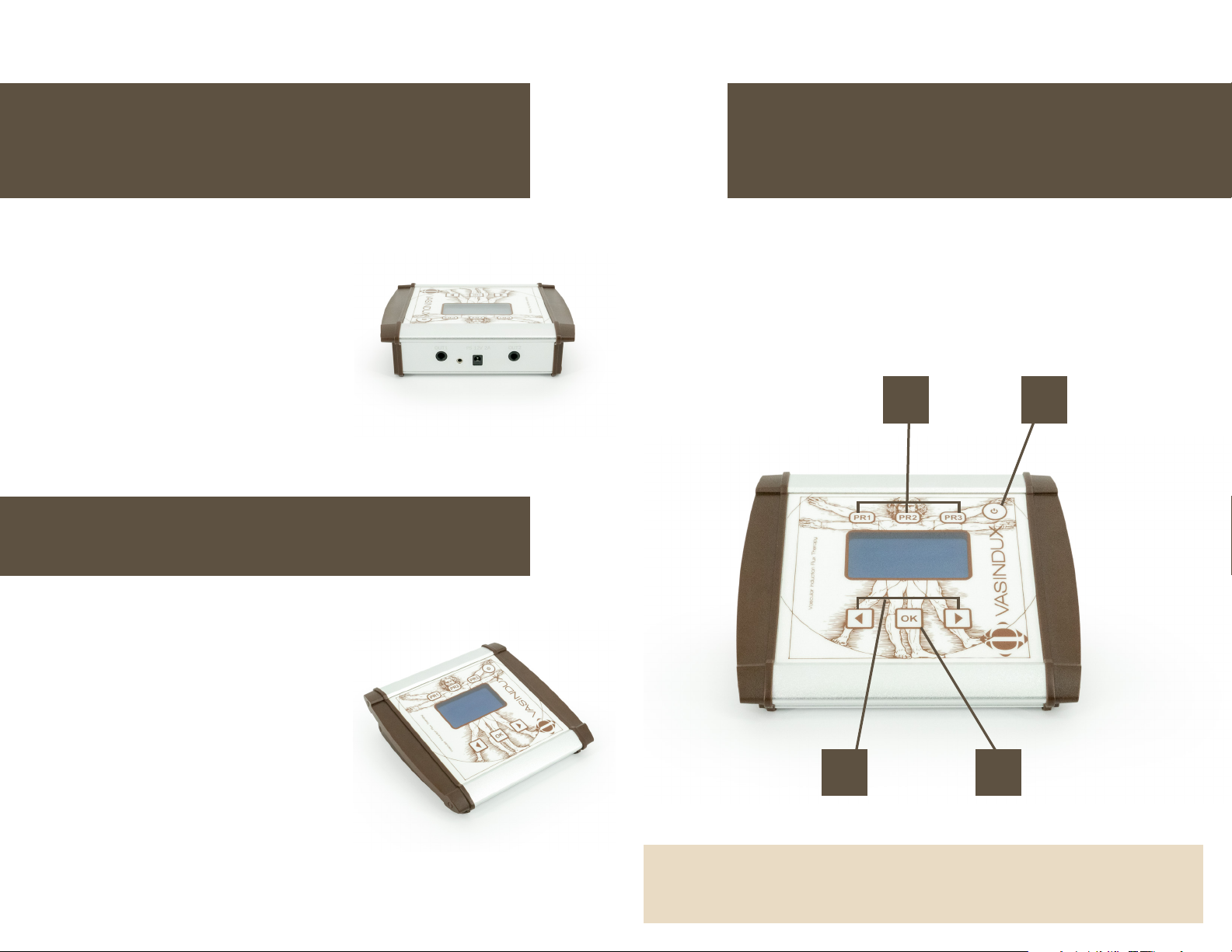
To turn on the device, press the “Power” button (1). When the device has powered
on, the logo will appear on the display. During this time, calibration is checked and
completed. If the applicator is not plugged in or is poorly connected, the device warns
the user with 3 shorts beeps. The unit will then turn o. If everything is ne during the
calibration check, the main screen will be displayed. To turn o the device, Press and
hold “Power” (1) for 4 seconds. If the device is inactive for at 5 minutes, it will
automatically power o.
12
Use the navigation (right arrow, left arrow)
buttons to select the settings you want to change:
“Language”, “Date”, “Time”, “Sound ”, “Volume”,
“Contrast”, “Device Data”.
Pressing the “OK” button will enter the sub menu
of the selected option, where you can use the
navigation keys to select from the available
options. Then press the “OK” button to conrm
the selection. You can exit the settings menu by
briey pressing the ON / OFF button.
1. Power
Note: “Sound” is referring to the Beep Signal. “Volume” is referring to
the sound level emitted by the headset.
P AG E 6 | Copyright © 2019PEMF Supply LLC PAGE 7
2. Preset Functions
4 3
3. OK
4. Navigation Buttons
Page 5

Choosing a Program
The main screen shows 3 program categories:
IF - Induction Flux (PEMF) Therapy
CH - Chakra Therapy
BR - Bioresonance Therapy
Use the navigation buttons (4) to select the type of treatment you would like to use.
Press the OK button (3) to advance to the program options.
Customizable Program IF11
IF 11 is the only fully customizable program: Once in IF11, you can customize
your settings. Press and hold the “OK” button for 3 seconds to get to the sub
menu. You can choose the waveform, frequency, polarity (positive, negative or
reversing polarity), or intensity by using the arrow keys to scroll through the
options.
Press the ok button each time to conrm your selection. Press the power
button briey to go back to the previous screen. You have the option to select
“Immediate” to start the session right away or “Timing” to scheduled the session
to begin at later a later time. The scheduled time is displayed as 24 hour time.
While any session is in progress, you can push the ok button to pause and or
continue your session.
Induction Flux Therapy (PEMF)
Use the navigation (4) keys to select the desired program (If 1- 11). By pressing “OK” (3)
the program starts with the default intensity and time.
If you press and hold the “OK” button for 4 sec, the program intensity will be displayed.
You can increase or decrease the intensity by using the navigation keys. Press the
“OK” after you have selected the intensity. You can then use the navigation keys to
change the time in 10 minute intervals. You will have the option to begin the session
immediately by selecting the “Instant” option or you can select “Scheduled” to select
the time your program will begin.
Using the “Instant” option: press the “OK” key again to start the selected program
with the selected intensity and time.
If “Scheduled” is selected, press the “OK” button to set the start time for the
treatment session. The time will be in 24 hour time.
Pressing the “OK” button after selecting the scheduled time causes the display to
darken.
The session will start at the selected time.
Chakra
Use the navigation (4) keys to select the desired program (Ch 1- 10). Press “OK” (3)to
start the program with the default intensity and time.
To increase or decrease the intensity press the “OK” button and hold for 4 seconds. Use
the navigation keys to set a higher or lower intensity.
Press Ok to start the set program with the selected intensity.
Bio Resonance
Use the navigation (4) keys to select the desired program (Br 1- 17). Press “OK” (3) to
start the program with the default intensity and time. To increase or decrease the
intensity press the “OK” button and hold for 4 seconds. Use the navigation keys to set a
higher or lower intensity.
Press Ok to start the set program with the selected intensity.
P AG E 8 | Copyright © 2019PEMF Supply LLC PAGE 9
Page 6
Shortcuts for Preferred
Programs
Denitions
Programming a Shortcut
The device contains 3 shortcut buttons for each category of therapy (see image on
page 7).
After selecting the category you want to use (If, Ch or Br), select the program from
the menu and press and hold the “OK” button for 4 seconds to increase or decrease
the intensity of the program. After selecting the desired intensity and time, Press the
“PR1” , “PR2” or “PR3” button for approximately 5 seconds. The screen will conrm with
“Saving...” The shortcut is now saved.
Using a Shortcut
From the home screen, select the desired preset you would like to use (IF,CH, BR). Press
the OK button. Press the OK button again. The screen will display <IF1>, <CH1>, or
<BR1> on the screen. Select the desired preset to begin your session.
You may set a total of 9 preferred programs (3 for each category).
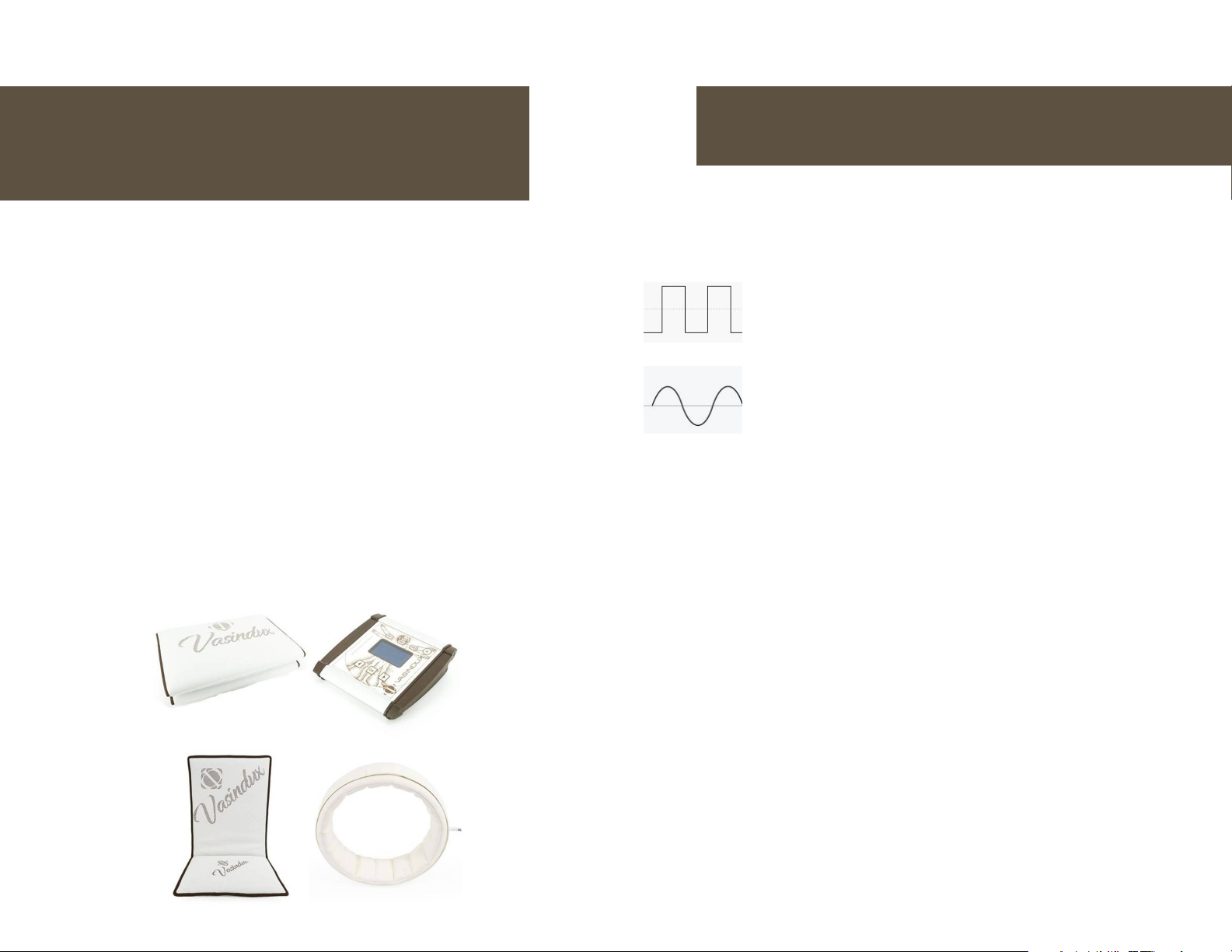
Waveform
the shape of the magnetic wave.
Square wave
From the NASA study, we know that the Square wave is ideal for
breaking up cycles of pain and promote healing and regeneration of
healthy tissues.
Sine wave
A variety of waveforms exist in nature, in the body, and in PEMF
devices. The sine wave mimics the waves that the body naturally
emits.
Intensity
the strength of the signal. Intensity is measured in Gauss or MicroTesla.
Frequency
the number of pulses that are emitted per second. Frequency is measured in Hertz or
pulse per second (PPS).
Induction Flux
IF therapy is based on the science of PEMF and the way it enhances the natural
healing processes within the body.
Chakra
This catagory of PEMF therapy targets the body’s energy centers and aids in the
distribution and transmission of energy throughout the body.
Bio Resonance
Rather than being focused on disease processes, this catefory of PEMF therapy focuses
on specic body systems and the energy required for optimal health and well-being
for that system.
P AG E 1 0 | Copyright © 2019PEMF Supply LLC PAGE 11
Page 7
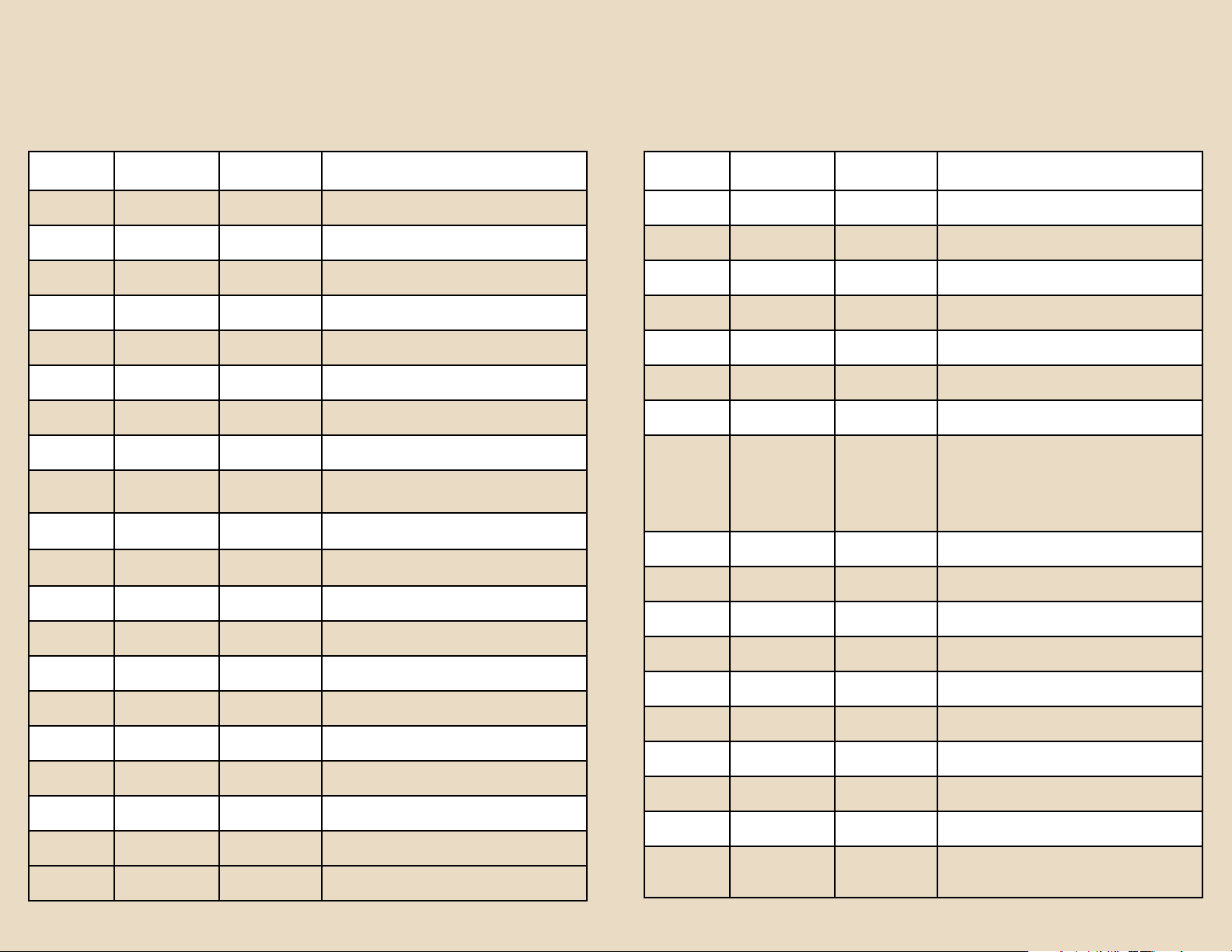
Vasindux Pro 3.0 Programs Vasindux Pro 3.0 Programs
Program Hz Time Comment
IF1 12-22 Hz Adjustable Sinusoidal Waveform
IF2 8-11 Hz Adjustable Sinusoidal Waveform
IF3 0.5-5 Hz Adjustable Sinusoidal Waveform
IF4 12-22 Hz Adjustable Sinusoidal Waveform
IF5 8-11 Hz Adjustable Sinusoidal Waveform
IF6 15.6 Hz Adjustable Sinusoidal Waveform
IF7 62.5 Hz Adjustable Sinusoidal Waveform
IF8 15.6 Hz Adjustable Square Waveform
IF9 26/15.6 Hz Adjustable
IF10
IF11
7.8, 14, 20.8, 25,
31 Hz
Adjustable
0.5-900 Hz
Adjustable Sinusoidal Waveform
Adjustable Custom - Sinusoidal or Square
Sinusoidal and Square Waveforms
alternating
BR1 7.83 Hz 10 Minutes Schuman (Earth)
BR2 110 Hz 10 Minutes Rife: Gastric
BR3 117.3 Hz 10 Minutes Rife: Pancreas
BR4 164.3 Hz 10 Minutes Rife: Gall Bladder
BR5 176 Hz 10 Minutes Rife: Colon
BR6 220 Hz 10 Minutes Rife: Lungs
BR7 281 Hz 10 Minutes Rife: Digestive System
BR8 295.8 Hz 10 Minutes Rife: Fat Cells
BR9 315.8 Hz 10 Minutes Rife: Brain
Program Hz Time Comment
BR10 317.8 Hz 10 Minutes Rife: Liver
BR11 319.8 Hz 10 Minutes Rife: Kidney
BR12 321.9 Hz 10 Minutes Rife: Blood
BR13 324 Hz 10 Minutes Rife: Musculature
BR14 355.2 Hz 10 Minutes Rife: Bladder
BR15 418.3 Hz 10 Minutes Rife: Bone
BR16 492.8 Hz 10 Minutes Rife: Adrenal
110, 117.3, 164.3,
176, 220, 281,
BR17
295.8, 315.8,
317.83, 319.88,
321.9, 324, 355.2,
418.3, 492.8 Hz
15 Minutes Full Rife Bioresonance
CH1 8-12 Hz Adjustable Alpha
CH2 4-7 Hz Adjustable Theta
CH3 963 Hz 10 Minutes Crown Chakra
CH4 852 Hz 10 Minutes Third Eye Chakra
CH5 741 Hz 10 Minutes Throat Chakra
CH6 639 Hz 10 Minutes Heart Chakra
CH7 528 Hz 10 Minutes Solar Plexus Chakra
CH8 417 Hz 10 Minutes Sacral Chakra
CH9 396 Hz 10 Minutes Root Chakra
396, 417, 528,
CH10
639, 741, 852,
963 Hz
15 Minutes Full Chakra
P AG E 1 2 | Copyright © 2019PEMF Supply LLC PAGE 13
Page 8
Accessory Devices
Benets of Regular Use of
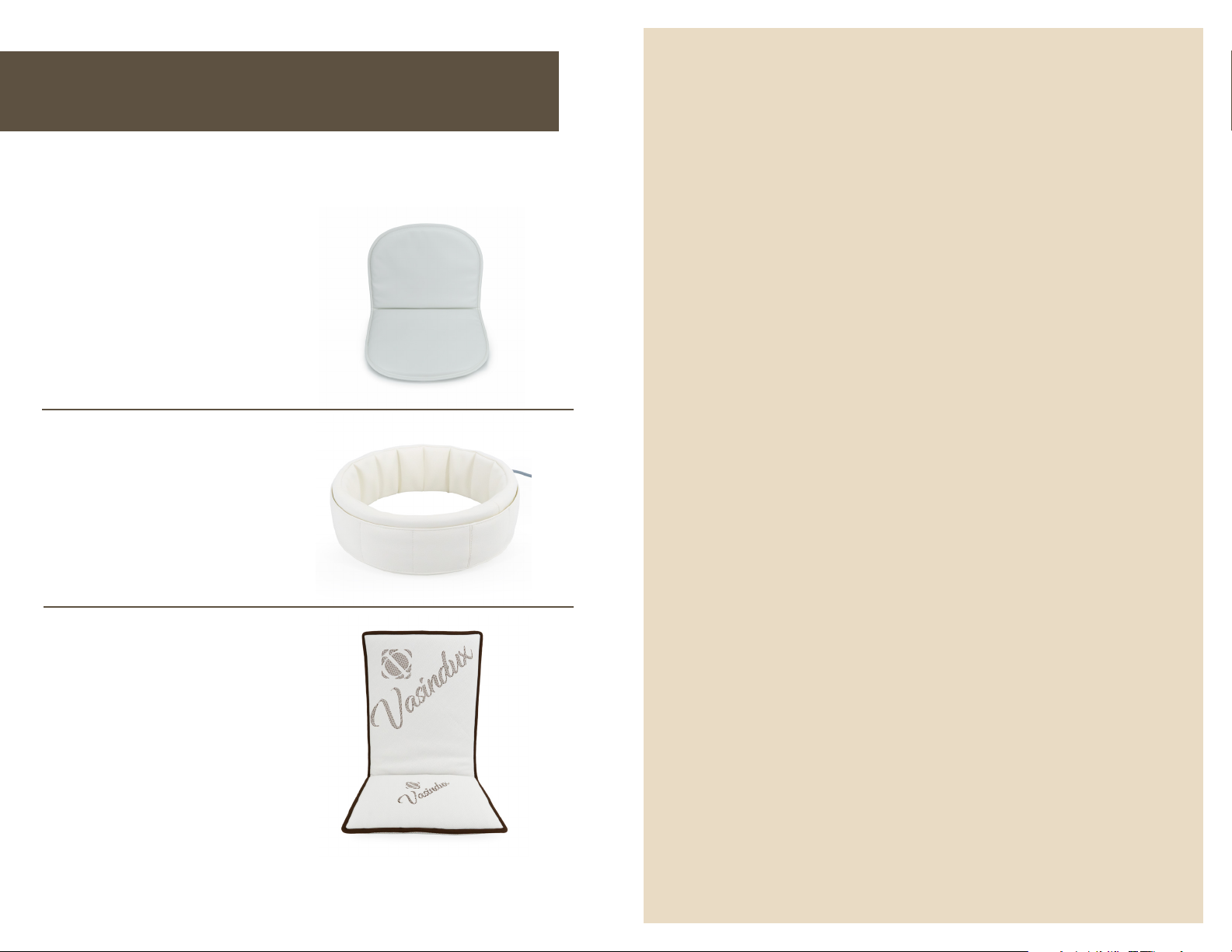
The Vasindux Pro 3.0 controller is compatible with two accessory devices. The Vasindux
Pro 3.0 Ring Accessory and Mini Mat Accessory are available as part of the Pro Package
or for individual purchase.
Vasindux Pro Mini
Mat Accessory
Use this device on a chair, in a
bed, or at the oce.
Vasindux Pro Ring
Accessory
This accessory is used for
targeted therapy of the head,
neck, and extremities.
PEMF Therapy
• Pain Reduction and accelerated healing
• Promotes cellular health to improve
wellness
• Enhances the body’s self-healing abilities
and quality of life
• Boosts energy and athletic performance
• Improves circulation, oxygenation and
immunity
• Improves detoxication and elimination
• Improves sleep, stress reduction and
cognitive function
Vasindux Pro Chair
• Modulates inammatory response,
Mat Accessory
reduces oxidative stress, promotes cellular
Use this device on a chair, in a
bed, or at the oce.
rejuvenation
• Non-toxic
Plug your accessory device into either port on the controller. The device that is plugged in
rst will be the device that is emitting PEMF. Two devices cannot be used at the same time.
P AG E 1 4 | Copyright © 2019PEMF Supply LLC PAGE 15
Page 9
Cleaning
The surface of your device is not washable. Do not clean with harsh chemicals. Mild
dirt should be removed with a dry cloth. It is recommended to cover the mat to
protect the surface.
Technical Specications
INPUT
AC100 -240V – 50/60 Hz
PU Leather: Clean the surface with warm water or mild detergent using a damp cloth.
Do not clean with chemicals.
Environmental Protection
OUTPUT
COIL TYPE
12V DC - 1.5 Amps - 18 Watts
Mat: 8 copper coils
Chair Mat: 6 copper coils
Ring: 1 large copper coil
Mini Mat: 6 copper coils
Declaration
Used electrical equipment is considered hazardous waste. Please recycle this product
accordingly. For more information, please contact your retailer.
Manufacturer
WAVEFORM
MAGNETIC FIELD
STRENGTH
STORAGE
TEMPERATURE
Sine and Square Wave
2.5-130 μTesla (.25 - 1.3 Gauss)
Between 35 F and 104 F
Relative air humidity up to 75%
and Warranty Service
FREQUENCY RANGE
MANUFACTURER
Vasindux is a Gemosz Elektronikai Kft brand.
Vac, Belgakert u. 5 2600 Hungary
MATERIAL
WARRANTY SERVICE
Fullled by distributor.
There is a three-year warranty for the Vasindux PEMF Products starting on the day of
purchase. However, it is not valid in the following cases:
• Failure or damage due to improper usage
• Damage and contamination of the mattress caused by improper protection
• If the controller or the adaptor has been opened during the warranty period
SIZES
WEIGHT
P AG E 1 6 | Copyright © 2019PEMF Supply LLC PAGE 17
0.1- 963 Hz
Mat: Poly Cotton
Chair Mat: Fabric
Ring: PU Leather
Mini Mat: PU Leather
Mat: 70 X 27 Inches (180 X 70 cm)
Chair Mat: 16 X 32 Inches (40 X 81 cm)
Ring: 8.5 Inches ID (21 cm ID)
Mini Mat: 16 X 28 Inches (40 X 71 cm)
Mat: 9 lbs (4.1 kg)
Chair Mat: 4 lbs (1.8 kg)
Ring: 3 lbs (1.4 kg)
Mini Mat: 3 lbs (1.4 kg)
Page 10

Warranty Statement
Vasindux warrants each new PEMF product to be free from defects in materials and
workmanship for a period of three (3) years after the sale of the Vasindux product to
the original buyer.
The obligation of Vasindux under this warranty is expressly limited solely and
exclusively to the repair or replacement of the unit or any parts thereof, which to
the satisfaction of Vasindux, have become defective during the warranty period,
and which shall have been returned to Vasindux within 5 business days after the
discovery of the defect by the original buyer. This warranty does not extend to any
liability for medical expenses, or for any other defect or malfunction of the “Vasindux”
product, except as herein provided, whether such damage claim shall be based on
contract, tort, breach of warranty, or otherwise. This warranty shall not apply to any
“Vasindux” product which has been repaired, tampered with or altered by someone
other than a duly authorized Vasindux representative, or which has been subjected to
negligence, accident, mishandling, normal wear and tear or which has not been used
in accordance with the enclosed instructions or for the stated purposes. This warranty
is expressly limited solely to the original buyer (user) and does not extend to any
transferee, assignee, or subsequent purchaser or user of the “Vasindux” product.
PEMF Supply is the North American Distributor for
Vasindux PEMF therapy products. We oer both retail and
dealer sales of PEMF devices.
This warranty is the sole and exclusive warranty made or which may be deemed to
have been made by Vasindux and is expressly in lieu of any and all other warranties,
either expressed or implied, including any warranties of merchantability or tness for
a particular purpose. No person or entity has any authority to bind Vasindux to any
warranty, guarantee or representation except as specically set forth herein.
Vasindux is a Gemosz Elektronikai Kft brand.
Vac, Belgakert u. 5 2600 Hungary
PEMF Supply
www.pemfsupply.com
(844) 855-7363
P AG E 1 8 | Copyright © 2019PEMF Supply LLC PAGE 19
OUR STORE
Our store which is located in
Central Pennsylvania also serves
as our oce, warehouse and
shipping center.
 Loading...