

Page 1
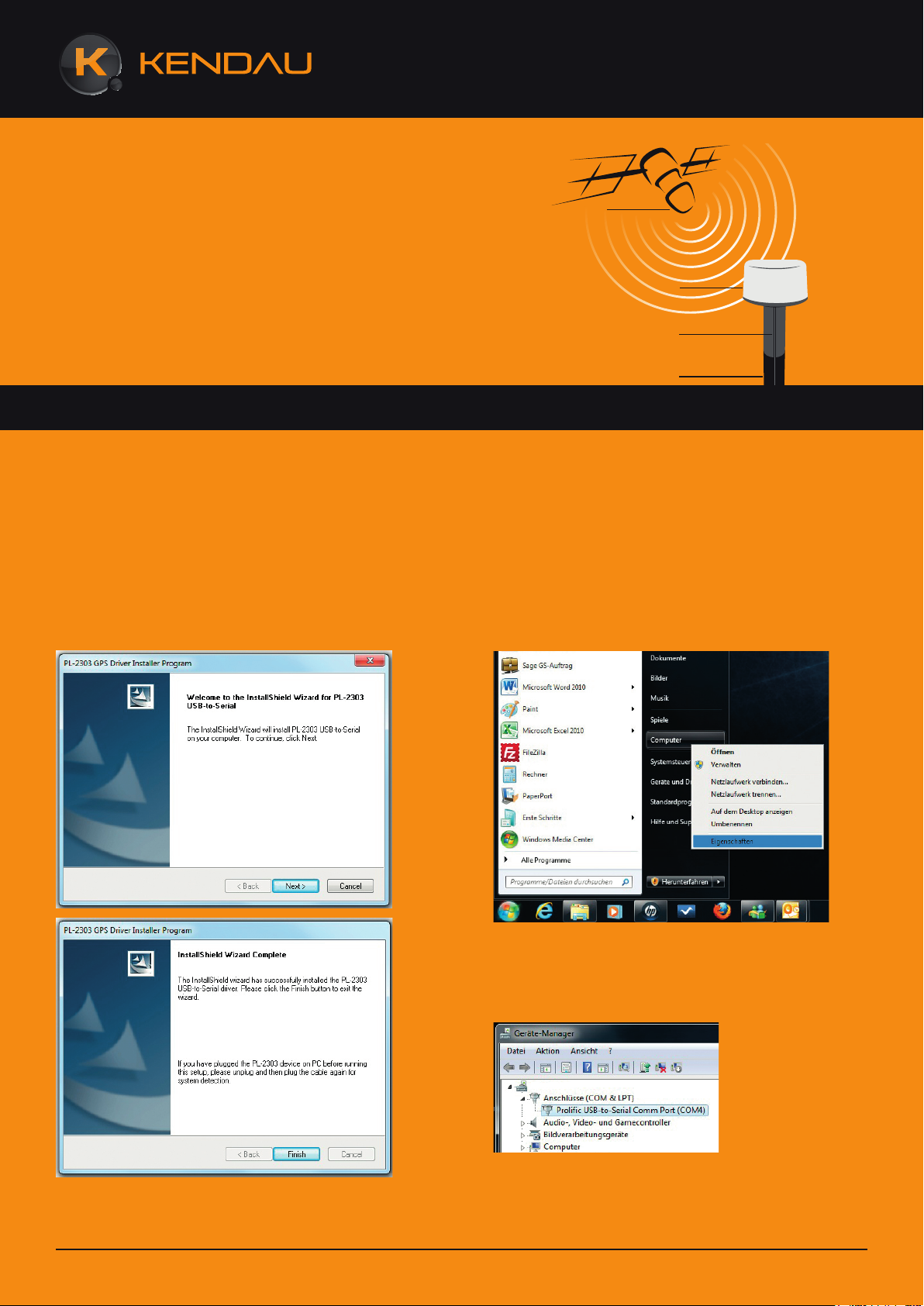
Satellit
Bedienungsanleitung für die Treiberinstallation
des Marine GPS Empfängers MG-210.
Es wird empfohlen den Empfänger erst dann an PC zu schließen, wenn der Treiber installiert ist.
GPS Empfänger
Kabel
Mast
Installationsvorgehensweise:
Schritt 1: legen Sie die CD in Ihr CD-ROM Laufwerk
Schritt 2: rufen Sie den Treiberordner auf … „USB
Driver/Windows“
Schritt 3: Starten Sie die Datei „PL2303_Prolific_GPS_
AllInOne-1013.exe“ und führen Sie die Installationsroutine durch.
Schritt 5: Vergewissern Sie sich dass der Treiber Ihres
Empfängers richtig installiert ist. Gehen Sie bitte wie
folgt vor: Mit der rechten Maustaste auf „Computer“
klicken , „Eigenschaften“ auswählen und anschließend
unter „Hardware“ auf „Geräte Manager“ klicken. Unter
Anschlüsse (COM & LPT) muss nun Ihr Marine GPS
Empfänger MG-210 mit dem Namen „Prolific USB-toSerial Comm Port (COM…)“ zu finden sein.
Schritt 4: schließen Sie nun Ihren Marine GPS Empfänger MG-210 an Ihren PC.
Web: www.kendau.com Phone: +49 211 508630-0
Schritt 6: Der Marine GPS Empfänger MG-210 kann
nun unter der COM Nummer (wie in Schritt 5 angegeben) benutzt werden.
Alle weiteren Infos, wie aktuelle Treiber, Bedienungsanleitung und Konformitätserklärung finden Sie unter
www.kendau.com
Page 2
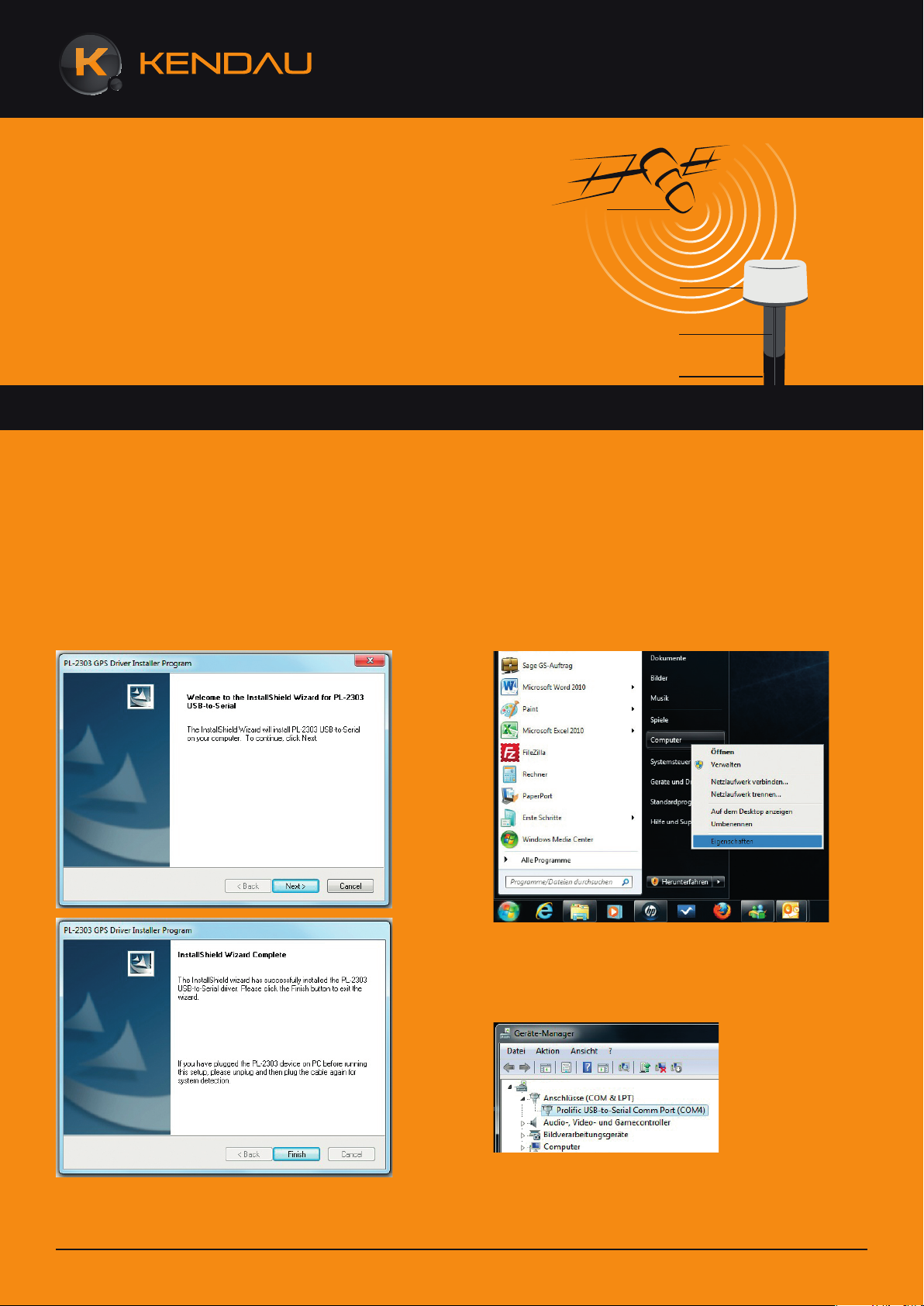
Satellite
Operating instructions on the driver installation
for the Marine GPS Receiver MG-210.
We recommend to not connect the receiver to your PC until the driver has been installed.
GPS Receiver
Cable
Mast
Installation procedure:
Step 1: Insert the CD into your CD-ROM drive
Step 2: Open the driver folder … “USB Driver/Windows”
Step 3: Open the file “PL2303_Prolific_GPS_AllInO-
ne-1013.exe” and run the installation wizard.
Step 5: Make sure that the driver for your receiver has
been installed correctly. Please proceed as follows: Right
click “Computer”, select “Properties”, open “Hardware”
and click on “Device Manager”. Now you should be able
to find your Marine GPS Receiver MG-210 in Connections (COM & LPT) under the name “Prolific USB-toSerial Comm Port (COM…)”.
Step 4: Now connect your Marine GPS Receiver MG210 to your PC.
Web: www.kendau.com Phone: +49 211 508630-0
Step 6: You may now use the Marine GPS Receiver MG210 under the COM number (as specified in Step 5).
For further information, including new drivers, operating
instructions and declaration of conformity, please visit
www.variotek.com
Page 3
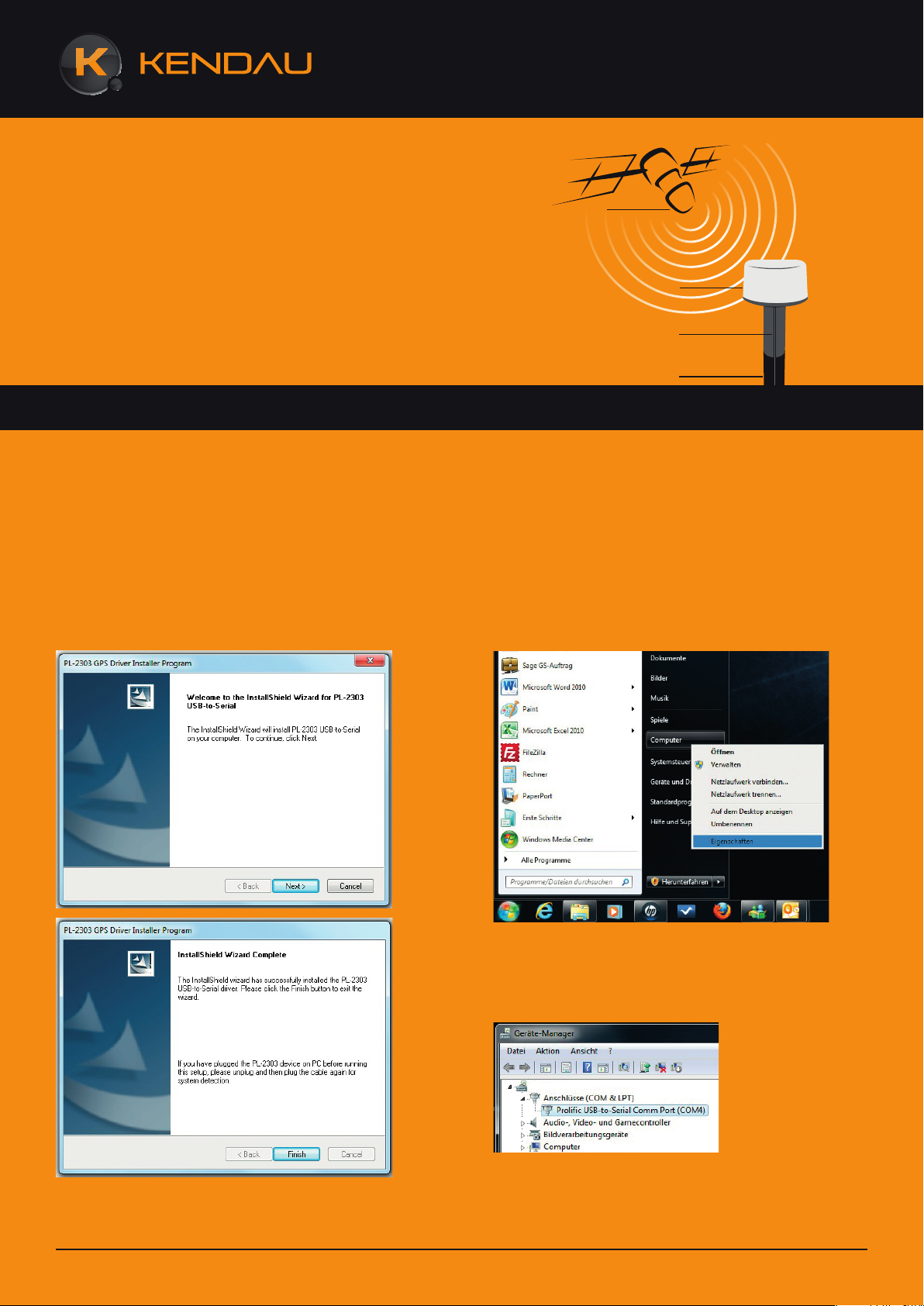
Satellite
Les instructions d‘opération pour l‘installation
du pilote de Récepteur GPS Marine MG-210.
Nous recommandons de ne pas connecter le récepteur à votre PC jusqu‘à le pilote sera installé:
GPS Accepteur
câble
Mât
Procédure d‘Installation :
Etape 1: Insérez le CD dans votre lecteur de CD-ROM
Etape 2: Ouvrez le dossier du pilote… “USB Driver/
Windows”
Etape 3: Ouvrez le dossier “PL2303_Prolific_GPS_AllInOne-1013.exe” et exécutez l‘assistant d‘installation.
Etape 5: Vérifiez que le pilote pour votre récepteur été
installé correctement. Veuillez procéder comme suivant:
Cliquez droit “Computer”, sélectionnez “Properties”,
ouvrez “Hardware” et cliquez sur “Device Manager”.
Maintenant vous devriez être en mesure trouver votre
Récepteur GPS Marine MG-210 dans Liens (COM &
LPT) sous le nom “Prolific USB-to-Serial Comm Port
(COM…)”
Etape 4: Maintenant connectez le Récepteur GPS Marine MG-210 à votre PC.
Web: www.kendau.com Phone: +49 211 508630-0
Etape 6: Vous pouvez maintenant utiliser le Récepteur
GPS Marine MG-210 sous le numéro COM (comme
spécifié en Etape 5).
Pour plus des informations, qui inclus les nouveaux
pilots, instructions d‘opération et déclaration de conformité, veuillez visiter www.variotek.com
 Loading...