

Page 1

Hand Held Reader
User Manual
GR-250
Page 2
Introduction
The GR-250 Hand Held Reader is designed to read Trovan RFID (radio
frequency identification) transponders.
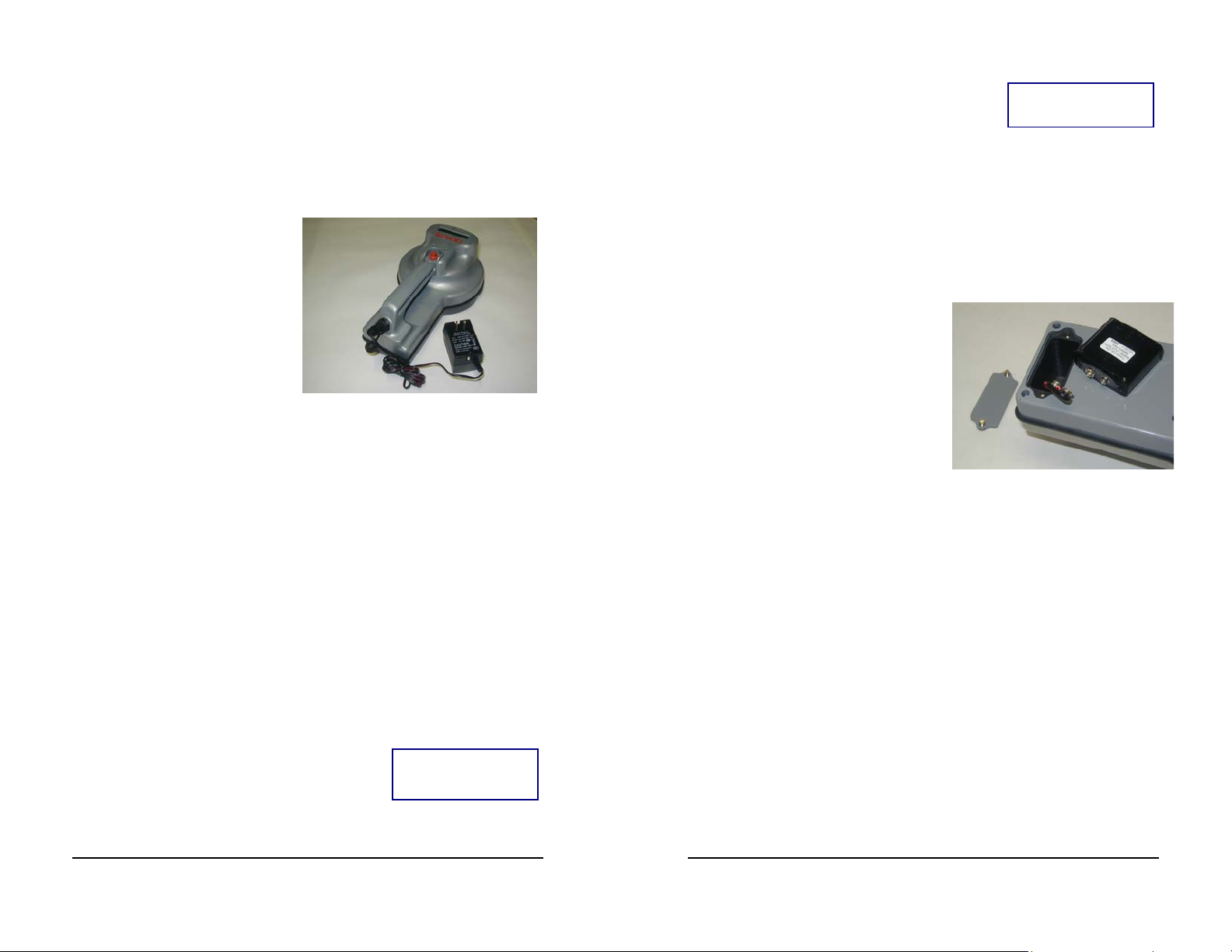
Prior to first use, you should fully charge the battery. Remove the dust
cap from the circular connector at the rear of the reader, attach the battery
charger’s connector to the reader,
and plug the battery charger into
an electrical outlet. The red LED
will light to indicate charging is in
progress. If the red LED doesn’t
light, check your power source
and try plugging the battery
charger into a different outlet.
The charger has an internal timer
that will automatically shut off the
charging process after approximately 14 hours and begin trickle charging
the battery. At that time, the red LED will also turn off to indicate that
the charging cycle is complete and will blink periodically to indicate trickle
charging. Once your reader is fully charged, unplug the charger from the
outlet, disconnect the reader from the charger, and replace the dust cap.
Your reader is now ready for use.
A fully charged reader will read approximately 3,000 transponders (average
scan time of 1-2 seconds) before the battery needs to be recharged. To
ensure maximum reading performance, the reader should be charged once
a week, even if 3,000 scans haven’t been performed. If the reader hasn’t
been used for about a month, the battery may be low. Therefore, it is
recommended the reader be charged at least once a month, even if stored.
The hole in the rear of the handle can be used to fasten a lanyard or wrist
strap to the reader.
Reading a Transponder
To read a transponder, depress the trigger and
bring the front face of the reader into close
proximity of the transponder to be scanned.
The red LED will flash rapidly, indicating that reading is in process. The
LCD will display READING……
READING ...…..…
S 07/25/05 13:47
If a transponder is detected, the green LED will illuminate and a capture
tone will sound. The transponder’s ten
hexadecimal digit (i.e., 0-9, A-F) ID number will
ID# 12-3456-789A
remain on the LCD while the trigger is
depressed. Once the trigger is no longer depressed, the ID number will be
displayed for about 30 seconds before it disappears from the LCD.
To initiate another reading, simply depress the trigger button again.
Replacing the Battery
Under normal use and recharging, the battery will provide years of service.
To replace the battery, remove the battery compartment cover on the
bottom of the reader by loosening the
two screws (but do not remove the
screws from the cover), unsnap the
battery
CAUTION: DO
NOT replace the
12 volt battery
with a 9 volt
battery. The
reader will not
operate with a 9
volt battery.
connector, and
attach it to the
new battery.
The battery is a
12 volt nickel
metal hydride (NiMH) battery. Although the
battery connector is the same as a typical 9 volt
battery, it is vital that you replace the battery with
an authorized 12 volt replacement, NOT a 9 volt battery.
Advanced Reader Functions
Note: An optional
interface cable must
be purchased to
connect the reader to
a computer via the
RS-232 interface.
• Date, time, and day of the week
• Communications parameters (BAUD rate, etc.)
• Hexadecimal (default) or decimal display mode
• Save and Seek modes
The GR-250 Hand Held Reader has additional
capabilities which are implemented via its RS232 interface. Up to 3,072 transponder ID
number readings, automatically stamped with
date & time, can be stored in memory. Also,
the following parameters can be set via the RS232 interface:
Page 3

Troubleshooting
The Reader Doesn’t Read
Symptoms: When the trigger is depressed, the red & green LEDs do not
illuminate, and the LCD is blank. There is no response from the reader.
Response: Recharge or replace battery. The reader will not operate until
the battery is recharged or replaced with a fully charged 12 volt battery.
The Reader Displays an Error Message on the LCD
* Low Battery *
Please RECHARGE
The battery voltage is below approximately 11.8
volts and must be recharged or replaced
immediately. The reader will not function until
the battery is either recharged or replaced with a fully charged battery.
**Transmitter**
Fault => SERVICE
SERVICE—Replace
Lithium Battery
The reader has experienced a hardware fault and
must be returned for repair.
The real time clock’s lithium battery must be
replaced or unpredictable reader operation may
occur. The reader must be returned for repair.
Technical Specifications
Dimensions:
Length: 11 3/4 inches (30 cm)
Width: 7 1/8 inches (18 cm)
Height: 4 1/8 inches (10.5 cm)
Weight: 2.85 pounds (1.3 kg) with battery pack
Display: LCD (2 lines x 16 characters)
Red LED – Flashes to indicate reading in process
Green LED – Illuminates when transponder is read
Memory Storage Capacity: 3,072 readings with date & time
Computer Interface: RS-232, 9600 BAUD (default BAUD rate)
Power: 12 volt rechargeable NiMH battery
Environmental: Water, salt air, & weather resistant
Caution: Changes or modifications not expressly approved by the party responsible for FCC
compliance could void the user’s authority to operate this equipment.
U.S. Patents 5,012,236, 5,095,309 and 5,198,807 032905
 Loading...