

Page 1

VT-TABLET-5081
All Rights Reserved
VT-TABLET-5081 User’s Manual
Chengdu Vantron Technology, Ltd.
Page 2

VT-TABLET-5081
Contents
CONTENTS ....................................................................................................................................................................... 2
REVISION HISTORY .......................................................................................................................................................... 3
1 FOREWORD ............................................................................................................................................................. 4
1.1 COPYRIGHT NOTICE.............................................................................................................................................................. 4
1.2 NOTES ............................................................................................................................................................................... 4
1.3 STATEMENT ........................................................................................................................................................................ 5
1.4 DISCLAIMER ....................................................................................................................................................................... 5
1.5 LIMITATION OF LIABILITY/NON-WARRANTY ............................................................................................................................... 5
1.6 SAFETY INSTRUCTIONS .......................................................................................................................................................... 5
1.7 PRECAUTIONS ..................................................................................................................................................................... 6
1.8 SAFETY INSTRUCTIONS FOR POWER CABLES AND ACCESSORIES ..................................................................................................... 7
2 OVERVIEW .............................................................................................................................................................. 8
2.1 INTRODUCTION ................................................................................................................................................................... 8
2.2 ORDERING INFORMATION ...................................................................................................................................................... 9
3 VT-TABLET-5081 HARDWARE INSTRUCTIONS ......................................................................................................... 10
3.1 PRODUCT APPEARANCE ...................................................................................................................................................... 10
3.2 SPECIFICATIONS ................................................................................................................................................................. 11
3.3 INTERFACE INSTRUCTIONS.................................................................................................................................................... 12
3.4 DIMENSION ...................................................................................................................................................................... 13
3.5 BUTTONS ......................................................................................................................................................................... 13
3.6 LED ................................................................................................................................................................................ 13
3.7 INTERFACE DESCRIPTION ..................................................................................................................................................... 14
3.7.1 Internal MIC in Interface ......................................................................................................................................... 14
3.7.2 USB OTG (USB type C) ............................................................................................................................................. 14
3.7.3 3.5mm Headphone Jack with external MIC in ......................................................................................................... 14
3.7.4 WPC ......................................................................................................................................................................... 14
3.8 PACKING LIST .................................................................................................................................................................... 14
4 SOFTWARE INSTRUCTIONS .................................................................................................................................... 15
4.1 BRIEF INTRODUCTION ......................................................................................................................................................... 15
5 TIPS ....................................................................................................................................................................... 16
Page 3

VT-TABLET-5081
3/ 18
Revision History
No.
Version
Description
Date
1
V1.0
First release
2018/07/05
2
V1.1
Change description
2018/07/27
2
V1.2
Revise
2018/10/25
Page 4

VT-TABLET-5081
4/ 18
1 Foreword
1.1 Copyright Notice
While all information contained herein have been carefully checked to
assure its accuracy in technical details and printing, Vantron assumes no
responsibility resulting from any error or features of this manual, or from
improper uses of this manual or the software. Please contact our technical
department for relevant operation solutions if there is any problem that cannot
be solved according to this manual.
Vantron reserves all rights of this manual, including the right to change the
content, form, product features, and specifications contained herein at any time
without prior notice. The latest version of this manual is at
www.vantrontech.com.cn. Please contact Vantron for further information:
The trademarks and registered trademarks in this manual are properties of
their respective owners. No part of this manual may be copied, reproduced,
translated or sold. No changes or other purposes are permitted without the prior
written consent of Vantron.
Vantron reserves the right of all publicly-released copies of this manual.
1.2 Notes
Applicable notes are listed in the following table:
Sign
Notice Type
Description
Notice
Important information and regulations
Caution
Caution for latent damage to system or harm to
personnel
Page 5

VT-TABLET-5081
5/ 18
1.3 Statement
It is recommended to read and comply with this manual before operating
VT-Tablet which provides important guidance and helps decreasing the danger
of injury, electric shock, fire, or any damage to the device.
1.4 Disclaimer
Vantron assumes no legal liability of accidents resulting from failure of
conforming to the safety instructions.
1.5 Limitation of Liability/Non-warranty
For direct or indirect damage to this device or other devices of Vantron
caused by failure of conforming to this manual or the safety instructions on
device label, Vantron assumes neither warranty nor legal liability even if the
device is still under warranty.
1.6 Safety Instructions
Keep and comply with all operation instructions, warnings, and
information.
Pay attention to warnings on this device.
Read the following precautions so as to decrease the danger of injury,
electric shock, fire, or any damage to the device.
Page 6

VT-TABLET-5081
6/ 18
1.7 Precautions
Pay attention to the product labels/safety instructions printed on silk
screens.
Do not try repairing this product unless declared in this manual.
Keep away from heat source, such as heater, heat dissipater, or engine
casing.
Do not insert other items into the slot (if any) of this device.
Keep the ventilation slot ventilated for cooling.
System fault may arise if other items are inserted into this device.
Installation: ensure correct installation according to instructions from the
manufacturer with recommended installation tools.
Ensure ventilation and smoothness according to relevant ventilation
standard.
Page 7
VT-TABLET-5081
7/ 18
1.8 Safety Instructions for Power Cables and Accessories
Proper power source only
Start only with power source that satisfies voltage label and the voltage
necessary according to this manual. Please contact technical support personnel
of Vantron for any uncertainty about the requirements of necessary power
source.
Use tested power source
This product still contains a button lithium battery as a real-time clock
after its external power source is removed and therefore should not be
short-circuited during transportation or placed under high temperature.
Place cables properly:
Do not place cables at any place with extrusion danger.
Cleaning Instructions
Please power off before cleaning the device.
Do not use spray detergent.
Clean with a damp cloth.
Do not try cleaning exposed electronic components unless with a dust
collector.
Support for special fault: Power off and contact technical support
personnel of Vantron in case of the following faults:
⚫ The device is damaged.
⚫ The temperature is excessively high.
⚫ Fault is still not solved after the operation according to the manual.
Page 8

VT-TABLET-5081
8/ 18
2 Overview
2.1 Introduction
Thank you for choosing Vantron. It is our commitment to provide our
valued customers with the embedded devices equipped with the state-of-the-art
technology and the best product services.
Tablet enables the interaction between operators/users and applications,
connects industrial control products such as wireless, transducer, battery inside,
storage, etc. Tablet adopts a display for displaying and input units such as touch
screen, keyboard, audio, kind of sensors etc. for writing working parameters or
inputting operation commands. As a digital device for realizing information
interaction between human and machine, Tablet is composed of hardware and
software. Based on its ample function interfaces and powerful user operational
interface, it is very suitable for control units such as medical device, intelligent
transportation, industrial field, etc..
Vantron’s VT-Tablet products are based on the most advanced ARM and
NXP processors and have low-power consumption and high integration. The
products are designed for applications such as industrials, medicals, and
transportations etc.
Page 9
VT-TABLET-5081
9/ 18
2.2 Ordering Information
VT-TABLET-5081
8” TFT LCD, 1920x1200 16:10 Wide Screen, RK-3288, Quad core
1.4GHz, USB2.0 OTG, 10000mAh battery inside, WIFI/BT4.2/FM.
Page 10
VT-TABLET-5081
10/ 18
3 VT-TABLET-5081 Hardware Instructions
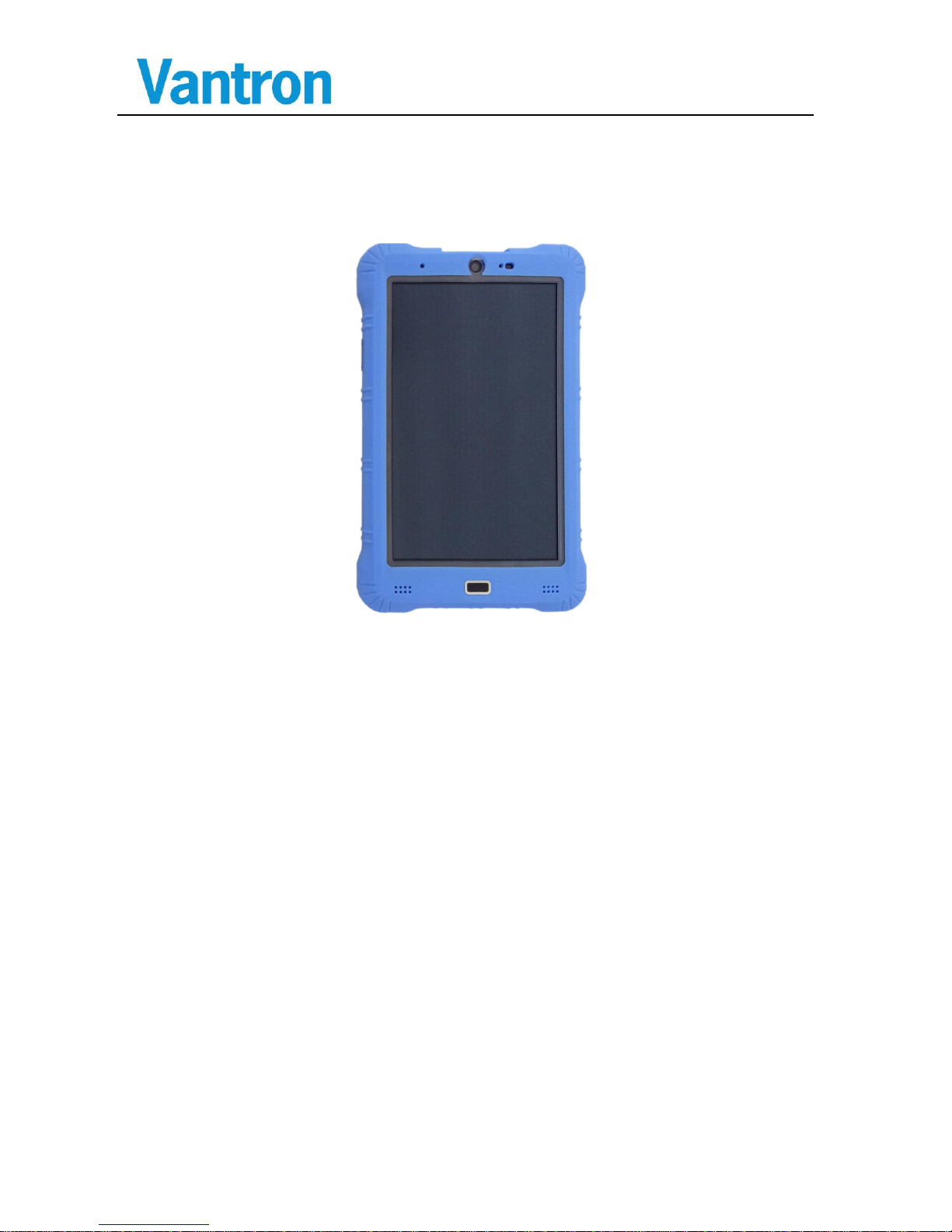
3.1 Product Appearance
Front View
Page 11
VT-TABLET-5081
11/ 18
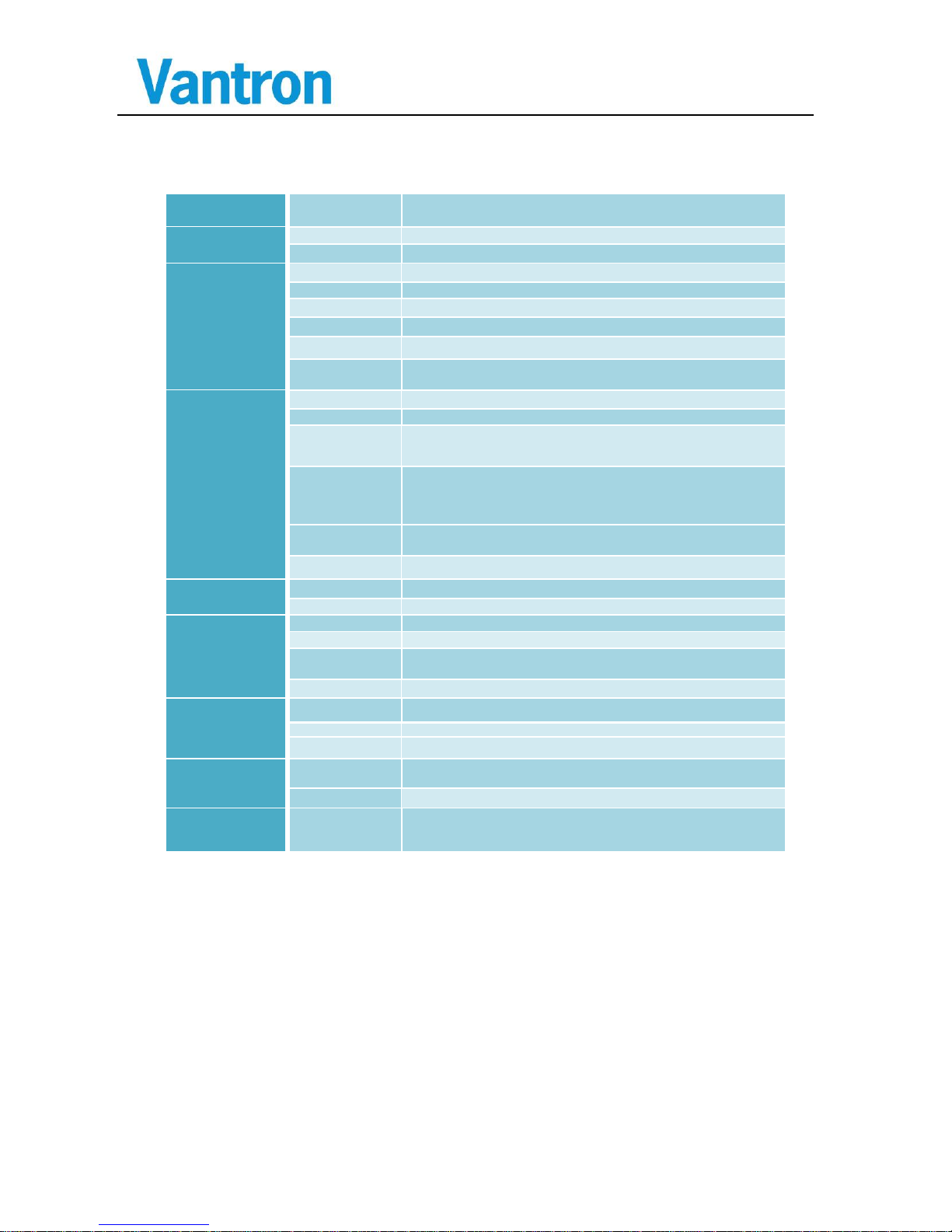
3.2 Specifications
CPU
Processor
RK3288,ARM Coretex-A17, Quad-Core CPU, up to 1.4GHz
Memory
RAM
2GB LPDDR3( Optional 4GB)
Flash
16GB EMMC Flash
Display
LCD
8" TFT LCD
Resolution
1920x1200, 16:10, 24bit Color
Contrast
900:1
Brightness
390 cd/m2(Auto brightness by Light sensor)
View Angle
85U/85D, 85L/85R
Touch
Screen
Cap-touch, multi-point,2.0mm thickness for ruggedized usage.
Interfaces
Camera
5M Pixels Camera
USB
1xUSB2.0 OTG, (Type-C, Secured)
Audio
3.5mm Headphone jack with MIC input,
2 x 0.8W speaker
1 x MIC at Upper Side
Wireless
1 x dual band WiFi 802.11 a/b/g/n/ac, 1 x Bluetooth 4.2,
1 x FM Radio
1xGPS
1xNFC
Sensors
FP Sensor, Light sensor, 3-axis accelerometer, Magnetometer,
Gyro, Proximity, Hall Sensor
RTC
Supported
Software
OS
Android 6.0
Applications
Provide SDK
Power
DC Input
5V DC power supply. (Suggest 5V/3.0A)
Battery
3.7V,10Ah Li-Battery, up to 7 hours
Wireless
Charging
4W WPC v1.1 Receiver, with NFC ANT +Coil Qi Wireless ANT
Combined on Back Cover.
Consumption
4~7W
Mechanical
Dimensions
Small than 235× 153 × 21mm
Weight
0.68Kg (Panel)
Installation
Rubber outside at edge for drop protection
Environment
Condition
Temperature
Operating: -20℃ ~ +50℃,
Storage: -20℃ ~ +50℃, Suggest:25℃(±5℃)
Humidity
10-85%RH (Non-Condensation), operating and storage
Accessories
Optional 220VAC to 5V/3.0A Power adapter.
Optional Identified Charger Station ( Charge after matched with
Tablet)
Page 12
VT-TABLET-5081
12/ 18
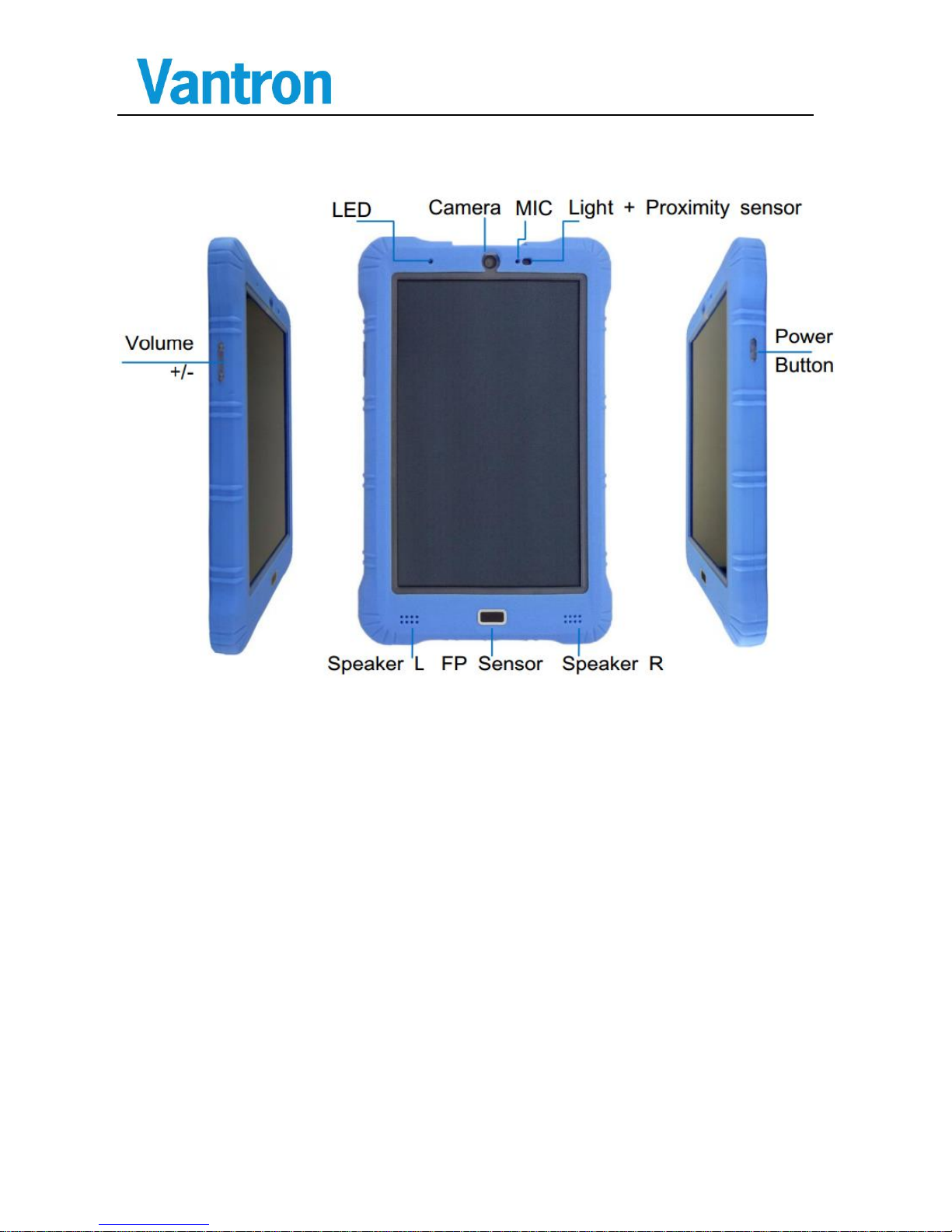
3.3 Interface Instructions
Page 13

VT-TABLET-5081
13/ 18
3.4 Dimension
Whole device Size: 235× 153 × 21mm
3.5 Buttons
Power/Sleep/Wake button
When you are not using Tablet, you can lock it to turn off the display and
save the battery.
Lock tablet: Press the Power/Sleep/Wake button.
Unlock tablet: Press the Power/Sleep/Wake button, then drag the slider.
Turn tablet off: Press and hold the Power/Sleep/Wake button greater than
6 seconds.
Turn tablet on: Press and hold the Power/Sleep/Wake button until logo
appears.
Volume buttons
You can use volume up or volume down to adjust the audio volume.
Never apply excessive pressure to a button, because this may
cause damage that is not covered under the warranty.
3.6 LED
Status LED
Green: solid green indicated the adapter is present and the battery
charging termination.
Yellow: solid yellow indicated the battery is charging.
Red: solid red indicated the battery capacity less than 10%.
Page 14
VT-TABLET-5081
14/ 18
3.7 Interface Description
3.7.1 Internal MIC in Interface
This hole is used to the onboard MIC in.
3.7.2 USB OTG (USB type C)
It is a USB2.0 OTG port (USB type C), you can connect to PC as USB
client to manage the android device and connect a USB device using USB OTG
to HOST adapter cable. It also can connect to USB adapter charge the table.
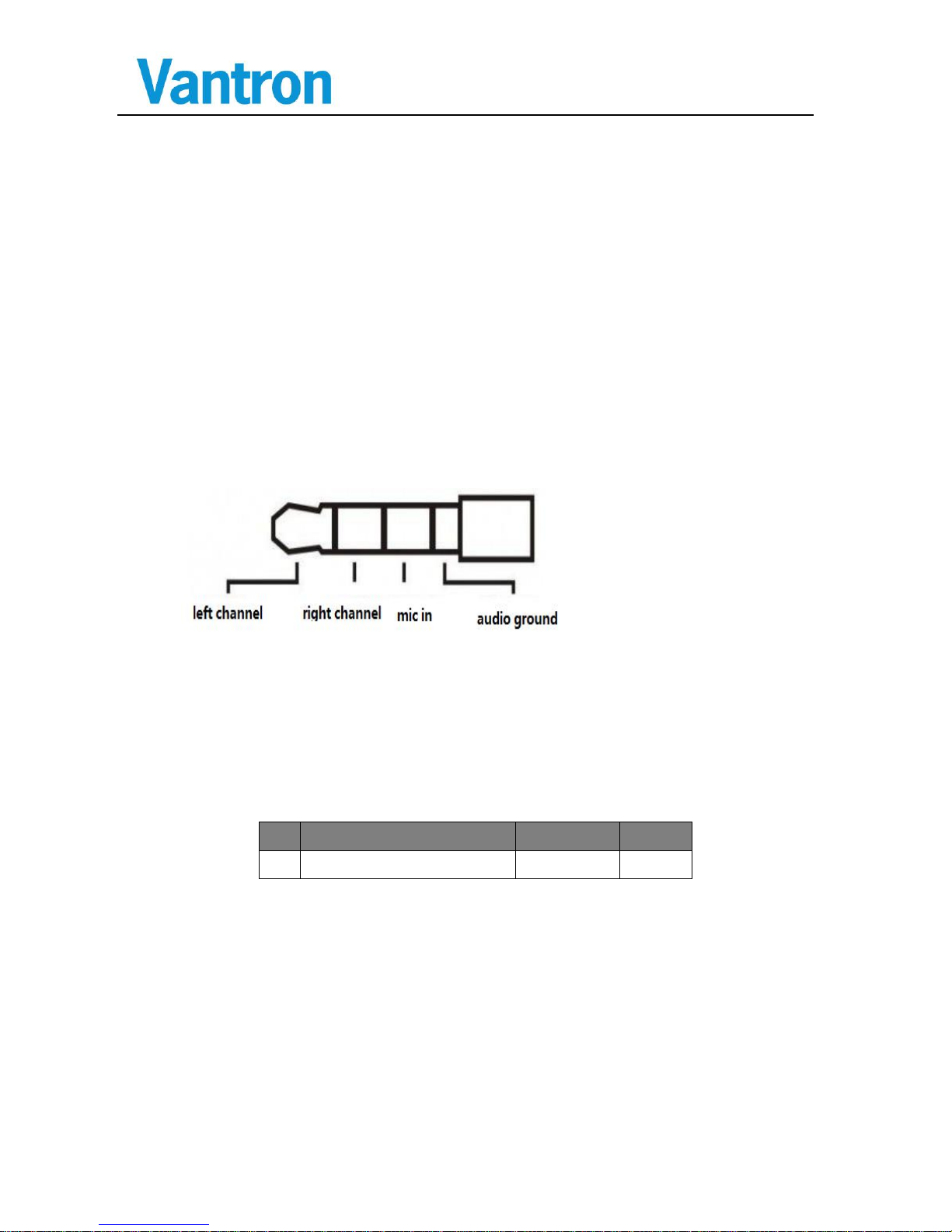
3.7.3 3.5mm Headphone Jack with external MIC in
It is a standard 4-pole 3.5mm Headphone Jack with external MIC in ,
every pole signal is defined as below.
3.7.4 WPC
The tablet with a standard WPC1.1 passivity receiving terminal. We can
charge the table with WPC ant.
3.8 Packing List
No
Part Description
Quantity
Type
1
VT-TABLET-5081
1 PCS
Page 15

VT-TABLET-5081
15/ 18
4 Software Instructions
4.1 Brief Introduction
VT-TABLET-5081 has been pre-loaded with Android image, so that the
system can run MFG tools to update the system image, please reference to
SW-UM.
Page 16
VT-TABLET-5081
16/ 18
5 Tips
Waste Disposal
It is recommended to disassemble the device before abandoning it in conformity
with local regulations. Please ensure that the abandoned batteries are disposed according
to local regulations on waste disposal. Do not throw batteries into fire (explosive) or put
in common waste canister. Products or product packages with the sign of “explosive”
should not be disposed like household waste but delivered to specialized electrical&
electronic waste recycling/disposal center. Proper disposal of this sort of waste helps
avoiding harm and adverse effect upon surroundings and people’s health. Please contact
local organizations or recycling/disposal center for more recycling/disposal methods of
related products.
Comply with the following safety tips:
Do not use in combustible and explosive environment
Keep away from combustible and explosive environment for fear of danger.
Keep away from all energized circuits.
Operators should not remove enclosure from the device. Only the group or person
with factory certification is permitted to open the enclosure to adjust and replace the
structure and components of the device. Do not change components unless the power
cord is removed. In some cases, the device may still have residual voltage even if the
power cord is removed. Therefore, it is a must to remove and fully discharge the device
before contact so as to avoid injury.
Unauthorized changes to this product or its components are prohibited.
In the aim of avoiding accidents as far as possible, it is not allowed to replace the
system or change components unless with permission and certification. Please contact
the technical department of Vantron or local branches for help.
Pay attention to caution signs.
Caution signs in this manual remind of possible danger. Please comply with
relevant safety tips below each sign. Meanwhile, you should strictly conform to all
Page 17
VT-TABLET-5081
17/ 18
safety tips for operation environment.
Notice
Considering that reasonable efforts have been made to assure accuracy of this
manual, Vantron assumes no responsibility of possible missing contents and information,
errors in contents, citations, examples, and source programs.
Vantron reserves the right to make necessary changes to this manual without prior
notice. No part of this manual may be reprinted or publicly released in forms of
photocopy, tape, broadcast, e-document, etc.
Exposure to Radio Frequency Energy
This product has been tested and meets the SAR (Specific Absorption Rate)
exposure requirements. The product is designed and manufactured to comply with the
limits for exposure to RF energy set by the Federal Communications Commission (FCC)
of the United States. The exposure standard employs a unit of measurement known as
the specific absorption, or SAR. Tests for SAR are conducted using standard operating
positions specified by these agencies, with this product transmitting at its highest
certified power level in all tested frequency bands.
This product has been tested, and meets the FCC RF exposure guidelines.
The highest value for body SAR is 1.35 W/kg.
FCC Warning
This device complies with FCC class B Rules. Operation is subject to the
Following conditions.
This device may not cause harmful interference.
This device must accept any interference received, including interference that may
cause undesired operation.
Note: This equipment has been tested and found to comply with the limits for a
Class B digital device, pursuant to part 15 of the FCC Rules. These limits are designed
to provide reasonable protection against harmful interference in a residential installation.
This equipment generates, uses and can radiate radio frequency energy and, if not
installed and used in accordance with the instructions, may cause harmful interference to
radio communications. However, there is no guarantee that interference will not occur in
Page 18
VT-TABLET-5081
18/ 18
a particular installation. If this equipment does cause harmful interference to radio or
television reception, which can be determined by turning the equipment off and on, the
user is encouraged to try to correct the interference by one or more of the following
measures:
—Reorient or relocate the receiving antenna.
—Consult the dealer or an experienced radio/TV technician for help.
Any modification to the product is not permitted unless authorized by Vantron. It’s
not allowed to disassemble the product, it is not allowed to replace the system or change
components unless with permission and certification. Please contact the technical
support department of Vantron or local branches for help.
US Office: Vantron Technology, Inc.
Address: 1292 Kifer Road #807,
Sunnyvale, CA 94086
Tel: 510-304-7666
Email: [email protected]
Manufacturer: Chengdu Vantron Technology, Ltd.
Address:No.5 GaoPeng Road, Hi-Tech Zone, Chengdu,
SiChuan, P.R. China 610045
Tel: 86-28-8512-3930/3931, 8515-7572/6320
Email: [email protected]
 Loading...