

Page 1

Artisan Technology Group is your source for quality
new and certied-used/pre-owned equipment
• FAST SHIPPING AND
DELIVERY
• TENS OF THOUSANDS OF
IN-STOCK ITEMS
• EQUIPMENT DEMOS
• HUNDREDS OF
MANUFACTURERS
SUPPORTED
• LEASING/MONTHLY
RENTALS
• ITAR CERTIFIED
SECURE ASSET SOLUTIONS
SERVICE CENTER REPAIRS
Experienced engineers and technicians on staff
at our full-service, in-house repair center
Instra
Remotely inspect equipment before purchasing with
our interactive website at www.instraview.com
Contact us: (888) 88-SOURCE | [email protected] | www.artisantg.com
SM
REMOTE INSPECTION
View
Page 2

USB 3.0 4-Port PCI Express Card
User Manual
Model: UGT-PC345
All brand names and trademarks are properties of their respective owners
All brand names and trademarks are properties of their
www.vantecusa.com
respective owners.
Page 3

Contents:
Chapter 1: Introduction .......................................................... 3
1.1 Product Introduction .................................................... 3
1.2 Features ........................................................................ 4
1.3 System Requirements .................................................. 5
1.4 Package Contents ......................................................... 5
Chapter 2: Getting Started ..................................................... 5
2.1 Hardware Installation .................................................. 5
2.2 Driver Installation ........................................................ 6
2.3 Hardware Verify........................................................... 7
2.4 Driver Uninstall ........................................................... 9
Chapter 3: Troubleshooting Tips ......................................... 10
UGT-PC345 Page 2
Page 4

Chapter 1: Introduction
1.1 Product Introduction
Super-Speed USB 3.0 interface is the next revolution in I/O
interconnect standards that will deliver the bandwidth and features
required by PCs, consumer electronics and communications devices.
With 10 times faster throughput than USB 2.0 standard and backward
compatible with current USB device features, USB 3.0 interface will
be the trend of the IT industries.
This board is a 4-port Super-Speed USB 3.0 PCI Express card. It is
compliant with the PCI Express Generation 2 specification for host PC
system. It works up to 5 Gbps for data transfer when connecting to
USB 3.0 compliant peripherals, while maintaining compatibility with
existing USB peripheral devices.
This board supports USB 3.0 High-Speed device and backward
compatible with current USB 2.0 High-Speed and USB 1.1 Full-Speed
device. It is an ideal choice for external storage devices, MP3 players,
external DVD Writer, Card Readers, digital cameras, webcams,
networking, video devices, and all other USB devices.
UGT-PC345 Page 3
Page 5

1.2 Features
Fully compliant with PCI Express Base Specification Revision
2.0
Support USB Battery Charging Specification Revision 1.2
Single-lane (x1) PCI Express throughput rates up to 5 Gbps
Compliant with Universal Serial Bus 3.0 specification Revision
1.0
Supports simultaneous operation of multiple USB 3.0, USB 2.0
and USB 1.1 devices
Supports the following speed data rates as follows:
Low-speed (1.5Mbps) / Full-speed (12Mbps) / High-speed
(480Mbps) / Super-speed (5Gbps)
Compliant with Intel’s eXtensible Host Controller Interface
(xHCI) Specification Revision 1.0
Supports 4 downstream ports for all speeds
Built-in 4-pin power connector for the power requirement of the
USB 3.0 port
Hot-swapping feature allows you to connect/disconnect devices
without powering down the system
Support Windows® XP/Vista/7/8 (32/64 bit)
UGT-PC345 Page 4
Page 6

1.3 System Requirements
Windows® XP/Vista/7/8 (32/64 bit)
One available PCI Express slot (Recommend PCI Express 2.0)
1 x USB 3.0 4-Port PCI Express Card
1 x Driver CD
1 x User Manual
1 x 4pin Power cable
1.4 Package Contents
Chapter 2: Getting Started
2.1 Hardware Installation
1. Turn off the power to your computer.
2. Unplug the power cord and remove your computer’s cover.
3. Remove the screw and the slot bracket from an available PCIe
slot.
4. To install the card, carefully align the card’s bus connector with
UGT-PC345 Page 5
Page 7

the selected PCIe slot on the motherboard. Push the board down
firmly.
5. Replace the slot bracket’s holding screw to secure the card.
6. Replace the computer cover and reconnect the power cord.
2.2 Driver Installation
1. Insert the provided CD into your CD-ROM drive.
2. At the Windows desktop click Start, then Run.
3. Type D:\UGT-PC345\Setup.exe, and then click OK. (Change D:
to match your CD-ROM drive letter)
4. Click “Next” to continue.
Please check accept license agreement box, and click “Next” to
continue.
UGT-PC345 Page 6
Page 8
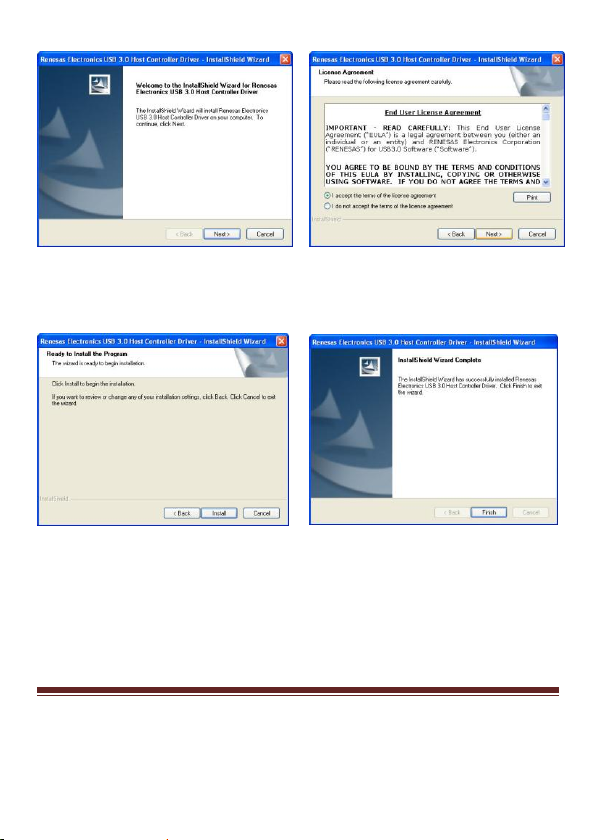
5. Click “Install” to continue.
Click “Finish” to end of the driver installation steps.
2.3 Hardware Verify
1. Click on the “Device Manager” tab in the Windows Control
UGT-PC345 Page 7
Page 9
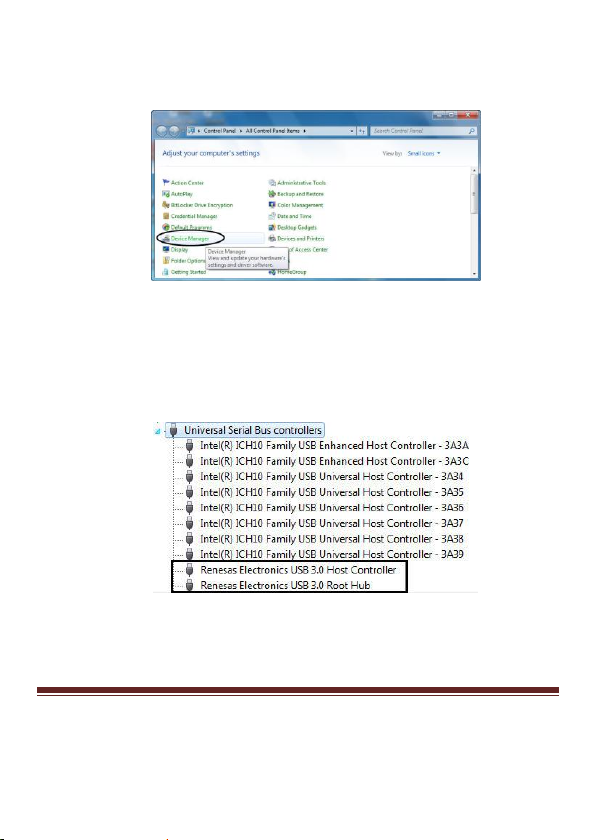
Panel.
Start > Control Panel > Device Manager
2. Look for the entry “Universal Serial Bus controllers” category
and double click on the category and you will see “Renesas
Electronics USB 3.0 Host Controller” and “Renesas
Electronics USB 3.0 Root Hub” in the Device Manager.
UGT-PC345 Page 8
Page 10
2.4 Driver Uninstall
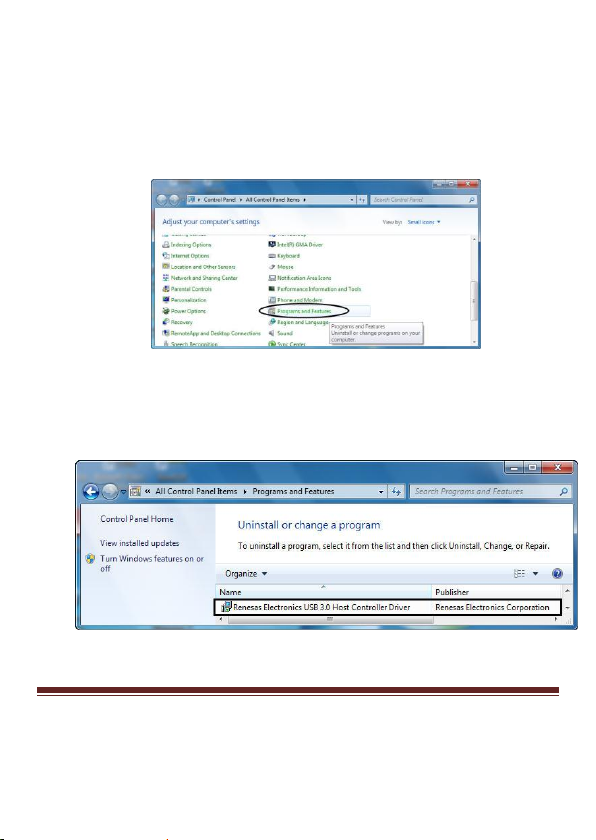
1. Click on the “Programs and Features” tab in the Windows
Control Panel.
Start > Control Panel > Programs and Features
2. Double click “Uninstall or change a program” page, and double
click “Renesas Electronics USB 3.0 Host Controller Driver” to
start the uninstall process.
UGT-PC345 Page 9
Page 11

Chapter 3: Troubleshooting Tips
If card and devices connected to the computer do not seem to be
working properly, please perform below basic troubleshooting
steps:
1. Check that all cables are correct and securely connected.
2. Make sure USB device’s power is turned on.
3. Make sure the devices are getting enough power they require.
4. Make sure there is no problem with the card installation.
Computer failed to start after inserting the USB 3.0 PCI Express
card.
Turn off the computer, remove the USB 3.0 PCI Express Card, and try
to restart the computer. If the computer starts successfully, it means
that the card has not been inserted into the PCI Express slot correctly.
Please clean the gold contact on the card and change it to another PCI
Express slot.
What to do if you encounter a yellow exclamation mark on the
controller in the device manager?
UGT-PC345 Page 10
Page 12
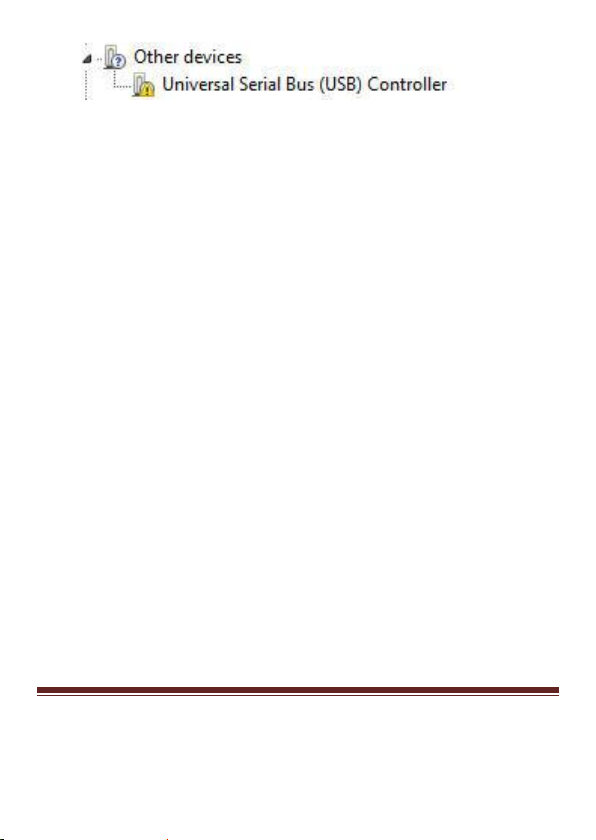
1. Please shutdown your computer and move the card to
another available slot then re-install USB 3.0 driver.
2. Please point to this device then right-click on the mouse.
Selecting “Update Driver” to renew the USB driver.
3. This exclamation mark usually means there is a resource
conflict between this card and another card in your system.
By moving the card to another available slot the system will
re-configure itself and re-assign the needed resources. After
the system has restarted, please check the device manager
again.
A message is displayed stating that not enough power can be
given to the connected device.
Make sure to connect the 4-pin power connector to the system power
supply; (if your power supply is using SATA power, please use the
provided 4pin molex to SATA power converter cable) to provide
sufficient power to the USB devices.
Is it possible to connect current USB 1.1 or 2.0 devices to the
USB 3.0 PCI Express card?
UGT-PC345 Page 11
Page 13

Yes it will work correctly, but the device will not be performing at the
USB 3.0 speed.
UGT-PC345 Page 12
Page 14

Artisan Technology Group is your source for quality
new and certied-used/pre-owned equipment
• FAST SHIPPING AND
DELIVERY
• TENS OF THOUSANDS OF
IN-STOCK ITEMS
• EQUIPMENT DEMOS
• HUNDREDS OF
MANUFACTURERS
SUPPORTED
• LEASING/MONTHLY
RENTALS
• ITAR CERTIFIED
SECURE ASSET SOLUTIONS
SERVICE CENTER REPAIRS
Experienced engineers and technicians on staff
at our full-service, in-house repair center
Instra
Remotely inspect equipment before purchasing with
our interactive website at www.instraview.com
Contact us: (888) 88-SOURCE | [email protected] | www.artisantg.com
SM
REMOTE INSPECTION
View
 Loading...