

Page 1
Van Raam BV
Aaltenseweg 56
7051 CM Varsseveld
The Netherlands
User manual
Version 16.05
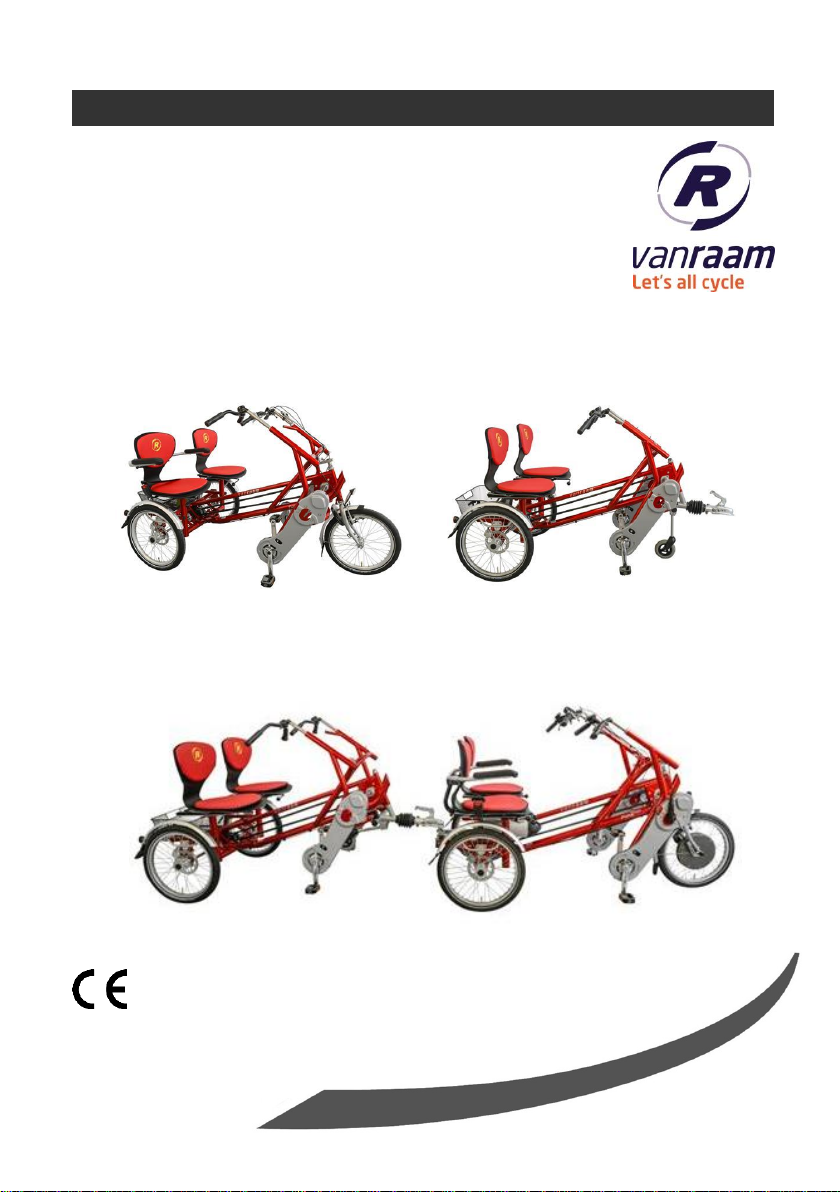
Fun2Go
Funtrain
Combination Fun2Go with Funtrain
Page 2
1
Table of contents
Contact details manufacturer ....................................................................................... 1
Conformity ................................................................................................................... 1
Introduction .................................................................................................................. 2
Delivery ....................................................................................................................... 2
Intended usage ............................................................................................................ 2
Safety measures ......................................................................................................... 3
Adjustment of the tricycle ............................................................................................ 5
Before the first use ...................................................................................................... 7
Electro system Silent ................................................................................................. 13
Accessories ............................................................................................................... 19
Technical details ........................................................................................................ 30
Maintenance and adjustments to be done by owner ................................................. 30
Repairs and maintenance to be done by dealer ........................................................ 31
Adjustments to be done by dealer ............................................................................. 32
Disposal..................................................................................................................... 33
Handover/sale to a new owner .................................................................................. 33
Guarantee ................................................................................................................. 33
Frame number ........................................................................................................... 34
Form service, maintenance, modifications and warranty claims ................................ 35
Contact details manufacturer
Van Raam BV
Aaltenseweg 56
7051 CM Varsseveld
The Netherlands
Tel. : +31 (0)315 257370
E-mail : info@vanraam.com
Internet : www.vanraam.com
Conformity
Van Raam declares as manufacturer that the Fun2Go tricycle and the Funtrain, as
described in this manual, are produced in accordance with the 93/42/EEG guidelines,
risk category 1. All products have been produced in accordance with the 2006/42/EG
guidelines. The declaration of conformity can be found on the Van Raam website.
User manual
Fun2Go 16.05
Page 3
2
Introduction
READ
CAREFULLY!
This user manual provides important and necessary
information about the use of your tricycle. We ask you to
read this manual thoroughly before using the tricycle.
Always follow all the instructions given in this manual.
Delivery
- Tricycle with packaging
- User manual(s)
- Possible chargers (depending on options)
- Spare key
Check the delivery immediately after receiving it. In case of damage or incomplete
delivery we ask you to contact your dealer immediately. Upon delivery you should fill
out the form “Form service, maintenance, modifications an warranty claims” in the
back of this manual.
Intended usage
The tricycle is designed for normal use on level and solid ground. The usual tricycle
caution should always be taken into consideration. At the same time all safety
instructions as described in this manual should be complied with explicitly. Also the
local traffic rules should always be complied with.
The tricycle is meant for two persons, coupled to the Funtrain it is meant for four
persons. The driver should be independently mobile and may not have any serious
visual or other impairments, which could adversely affect the controlling of the
tricycle.
All other use, including damage or physical injuries due to this, are not the
manufacturer's responsibility.
User manual
Fun2Go 16.05
Page 4

3
Safety measures
If children or people with limited mental perception join the bike ride, there
should always be a responsible supervising person as the main driver of the
bike. This main driver is always responsible for the safe use of the bike.
Ensure the tricycle is in good condition each time before using it. Check
before each ride that the brakes are in order. Check the lighting and make
sure there is enough tyre pressure.
Regularly check if the wheels, the handlebars and the saddle are properly
fixed and also whether all screw joints are tight.
Only use the tricycle on a solid and level surface.
Make sure that wide trousers or lose hanging clothing don’t get caught in the
chain, spokes or pedals.
Do not use a pressure washer or a steam cleaner for the cleaning of the
tricycle.
Block the tricycle to stop it from moving when you are getting on or off the
tricycle. Do this by using the parking brake and holding the tricycle.
Always lock the tricycle when leaving it unattended.
Make sure that no dangerous speed develops when driving downhill and
entering tunnels. Brake on time and don’t ride faster than 30 kilometres per
hour.
In case of pregnancy, extra care is required owing to a higher risk of injury.
Do not put the tricycle in direct sunlight: the temperature of some parts could
reach above 41ºC resulting in possible hypersensitivity of the skin.
In case that the tricycle is equipped with the Silent electric motor system,
make sure that you get used to riding with electric support. Beware when
you turn on the system and make sure you don’t get startled by unexpected
behaviour because you turned on the electric support. Practice the reverse
function! Please be careful not to switch on the reverse function of the
electric motor inadvertently.
Extra attention is essential if a child is using the tricycle!
Never leave a child alone with the tricycle without supervision!
User manual
Fun2Go 16.05
Page 5
4
Always have the child wear a tricycle helmet! Make sure the helmet fits
correctly!
Load
The maximum load should not be exceeded. See information in the index of technical
details on page 30. By permitted load we mean the total load, including the load on
the luggage rack and in the basket.
Make sure that the permitted basket weight is not exceeded. (maximum 20 kg).
People may not be transported in the basket!
Damaged or worn out parts
The replacement and repair of parts (frame, forks, light, brakes, drive mechanism and
the handlebars) should always be performed by an authorised dealer. If not, the
guarantee ceases to be valid and you will be personally responsible in the event of
possible damage.
Specific safety parts should always be replaced by new parts!
User manual
Fun2Go 16.05
Page 6

5
Adjustment of the tricycle
1.
2.
Before using the tricycle, adjust it to the measurements of the two cyclists. This is of
great importance, especially the seats and the handlebars.
If an optimal adjustment of the tricycle, as defined in the instructions, is not
possible, you can contact your dealer for a fitting solution.
The brakes are correctly adjusted and should only be adjusted by the dealer during
periodic maintenance.
Take care that fingers and limbs do not get trapped while adjusting the
tricycle.
Seat position
The seat position is correctly adjusted when
the cyclist is sitting on the tricycle and puts a
foot on the pedal in the furthest position.
Adjust the seat in such a way that the leg is
stretched but still relaxed
To adjust the seat:
1. Pull the handle up.
2. Move the seat to the correct position and
release the handle.
User manual
Fun2Go 16.05
Page 7
6
MIN INSERT
Handlebars height
1.
2.
1.
2.
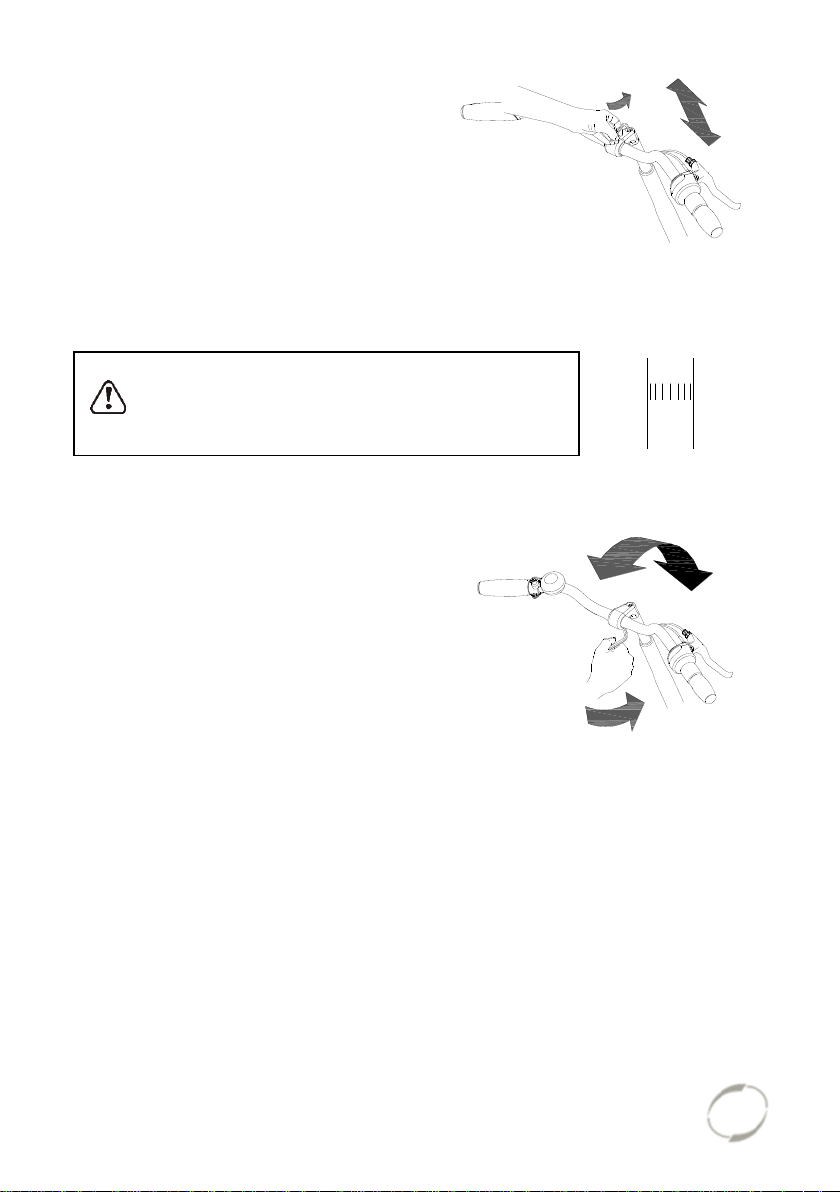
The height of the handlebars affects the
comfort of the ride. It determines the pressure
on the hands and the position of the back.
Determine your own most comfortable height
by using the bike.
To adjust the handlebars:
1. Slightly loosen the screw by using an Allen
key.
2. Slide the handlebars to the correct height
and tighten the screw very firmly again.
Do not pull out the handlebars further than the
mark. Otherwise the tube will not be deep enough in
the shaft and will risk coming off, which can lead to
serious injuries.
Position handlebars
You can tilt the handlebars. This influences
the distance from the handlebars to the upper
body. Determine your own most comfortable
position by using the bike.
To tilt the handlebars:
1. Slightly loosen the screw with an Allen
key.
2. Put the handlebars in the desired position
and then tighten the screw very firmly
again.
User manual
Fun2Go 16.05
Page 8
7
Before the first use
[A]
[B]
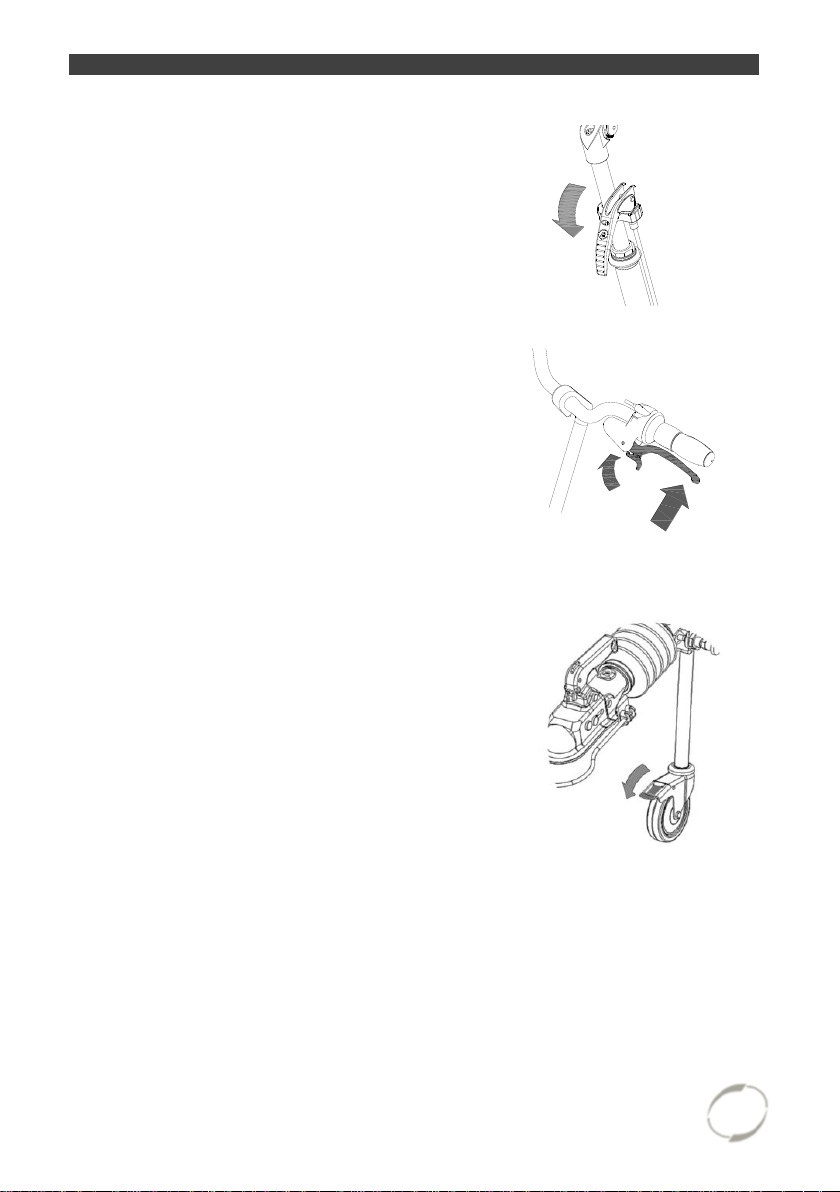
Parking brake (Fun2Go)
Always use the parking brake if you park the
tricycle and leave it.
Parking brake (Fun2Go Plus)
Always use the parking brake if you park the
tricycle and leave it.
Attach the parking brake to the bike by
squeezing the left brake [A] and lock it with
the pin [B].
Parking brake (Funtrain)
Always use the parking brake on the caster wheel
if you park the tricycle and leave it.
User manual
Fun2Go 16.05
Page 9
8
off
on
auto
Lights
Headlight
The headlight has a switch (sliding switch)
with three positions: Off-Auto-On.
The headlight can be manually switched on or
off with the “On/Off” position.
In the “Auto” position, the headlight turns on or
off automatically with the help of light- and
movement sensors. When the tricycle stands
still for a while, the light will automatically turn
off.
Adjusting the headlight
Set the angle of the headlight such that
the centre of the light beam falls
approximately ten meters ahead of the bike.
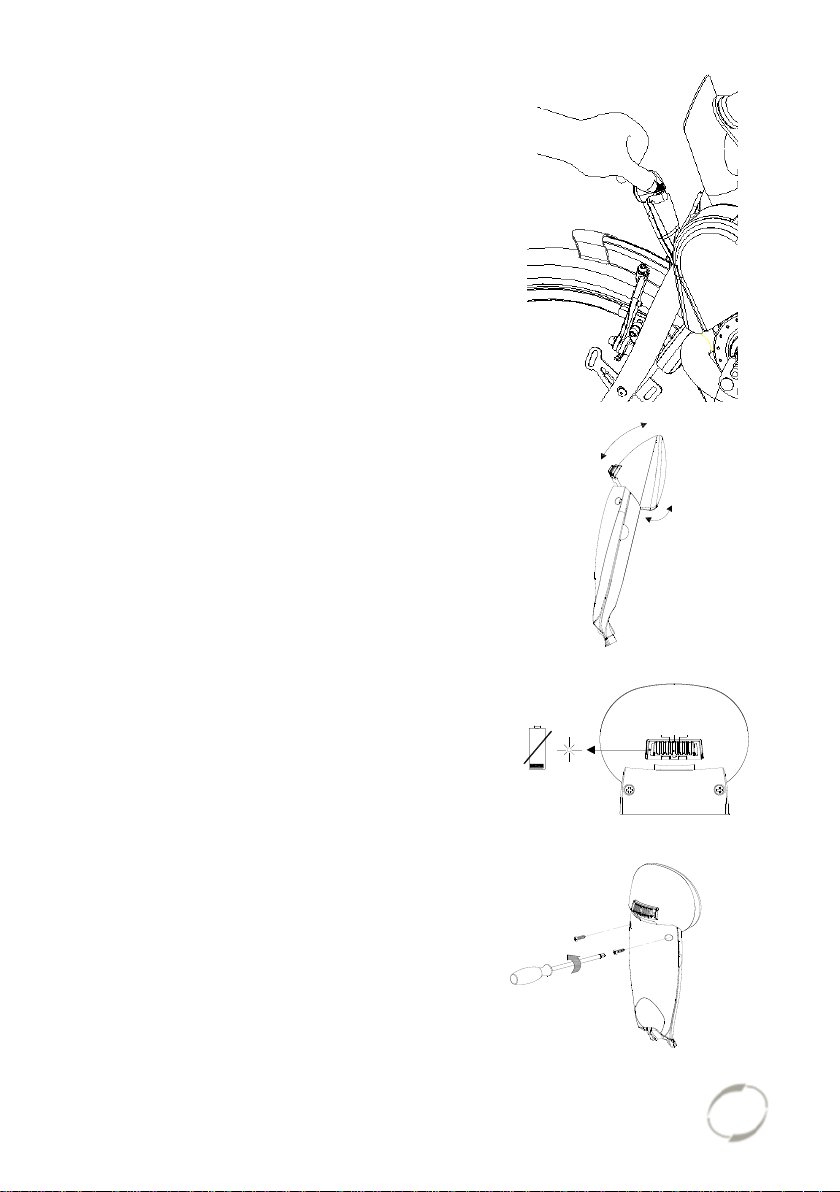
Replacing batteries
The headlight works on batteries. When the
batteries are almost empty, a red LED light
flashes on the headlight. Follow the next steps
to replace the batteries.
1. Remove the two screws at the back of the
front light.
User manual
Fun2Go 16.05
Page 10
9
1x = ON
2x = AUTO
3x = OFF
2. Dismantle the rear cover by pressing with
2.
+
-
-
+
+
-
3.
the thumb and index finger at the cavity on
both sides of the front cover and pulling
the rear cover back.
3. Replace the alkaline batteries (1.5 V 1500 mA) and assemble the rear cover.
Only operate the lighting when stationary to avoid dangerous situations and
the risk of personal injury. Advice: use the lighting in automatic mode.
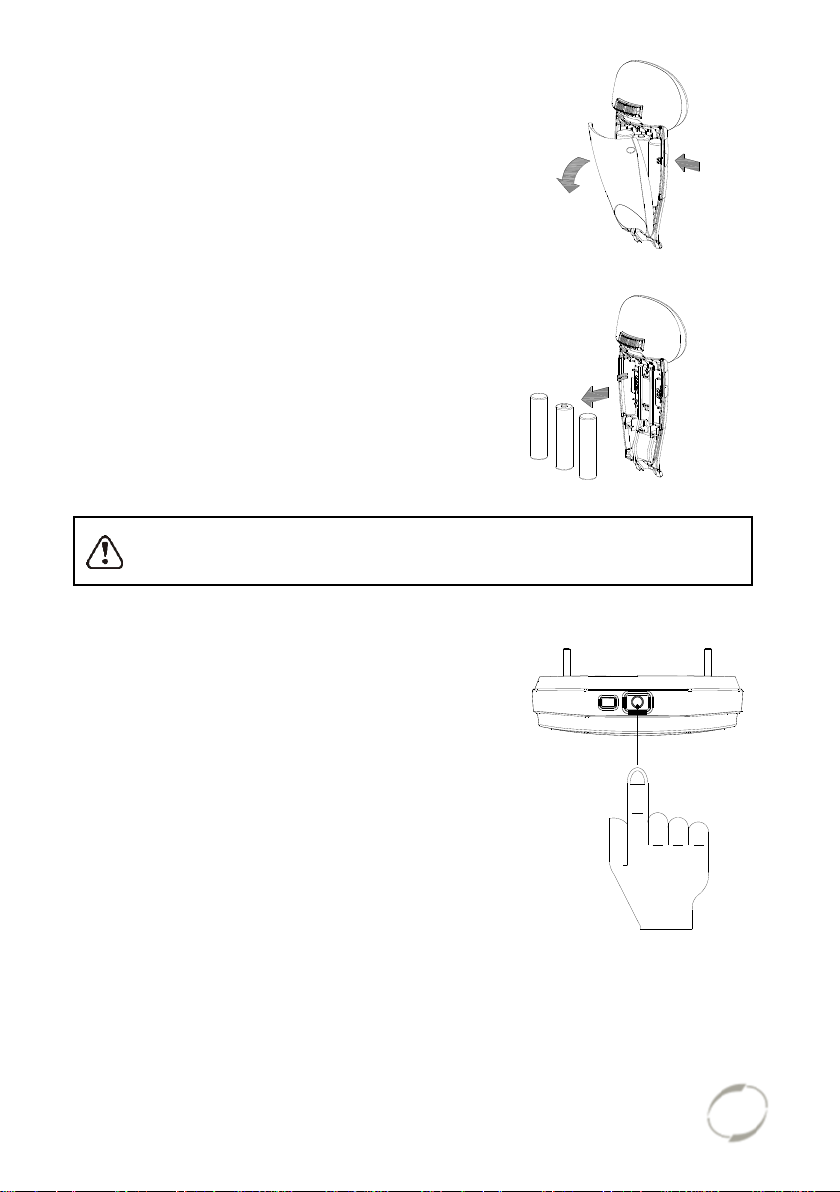
Rear light
The rear light has three options which you can
choose by pressing the button repeatedly: On-
Auto-Off.
The setting is as follows:
Press 1x: light is on
Press 2x: lighting is automatic
Press 3x: light is off
With the “On” or “Off“ mode, the rear light can
be manually switched on and off.
With the “Automatic” mode the rear light
automatically turns on and off with the help of
light and movement sensors. When the
tricycle stands still for a while, the light will
automatically turn off.
User manual
Fun2Go 16.05
Page 11
10
2.
1.
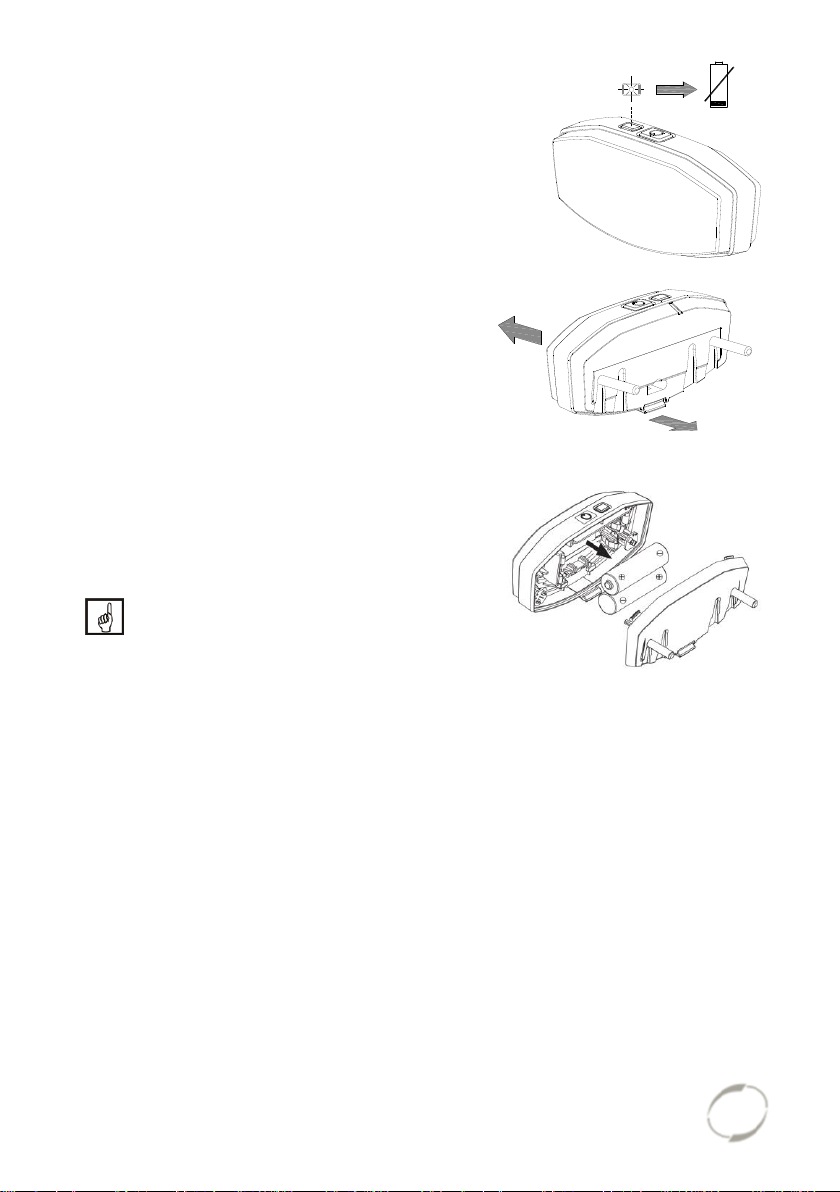
The rear light works on batteries. When the
batteries are almost empty, a red LED light
on the top starts flashing. To replace the
batteries, follow the next steps.
1. Dismantle the cover of the holder by
pressing in the lip at the bottom of the
light.
2. Replace the alkaline batteries
(1,5 V - 1500 mA) and assemble the
cover.
Batteries cause environmental pollution.
Follow the local regulations
during disposal.
User manual
Fun2Go 16.05
Page 12
11
Couple the Funtrain
5.
4.
1.
2.
4.
3.
[A]
1.
[A]
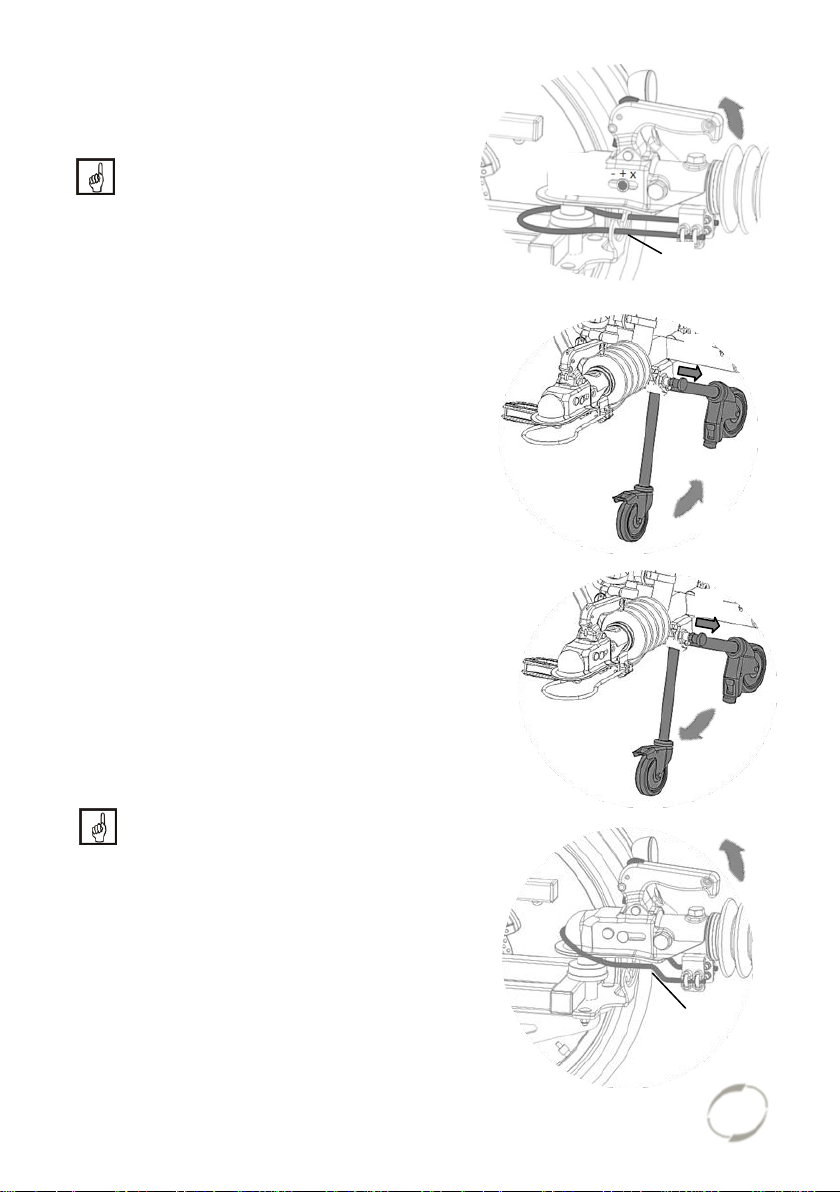
1. Lift the handle of the trailer coupler and
place the trailer coupler over the towing
ball.
Please verify that the safety cable is
positioned around the towing ball.
2. Hook the safety cable underneath the
bracket [A] as pictured.
3. The trailer coupler is fitted right when the
indication indicated the “+” sign.
4. Ensure the support wheel is folded after
connecting. Unlock the locking bolt by
pulling it out.
5. Move the support wheel to the folded
position until you hear a ‘click’ when the
locking bolt locks itself again.
Uncouple the Funtrain
1. Unfold the support wheel. Unlock the
locking bolt by pulling it out.
2. Move the support wheel to the unfolded
position until you hear a ‘click’ when the
locking bolt locks itself again.
3. Loosen the safety cable from the bracket
[A].
4. Lift the handle of the trailer coupler and
lift the trailer coupler from the towing
ball.
Beware that the safety cable comes
off the towing ball together with the
trailer coupler.
User manual
Fun2Go 16.05
Page 13

12
Gears
Standard the tricycle has eight gears. The
gears are used by turning the grip. Do not
use the pedals when turning the grip.
Check before every ride:
The brakes (including the parking brakes)
The tyre pressure (recommended: 3 bar)
The lights
That all parts are fitted properly
That the battery is adequately charged (depends on options)
Contact your dealer and stop using your tricycle as soon as you observe irregularities
during the check!
As with all mechanical parts, the tricycle is subject to wear tear and high loading. If a
component fails, it can lead to very dangerous situations. This can lead to damage or
injuries to the user of the tricycle/. Any form of cracks, scratching or change in colour
in heavily loaded parts or a component indicates that the component must be
replaced.
The tricycle gives a very different ride experience than a bicycle.
If there is an electric motor on a bike: you must train with the
acceleration function and reverse functions. Be careful that the
acceleration mode or reverse mode are not unintentionally started
while using the bike. For example, at traffic lights the reverse
function can accidentally be activated and the tricycle reverses.
High speeds in the bends, driving on rough ground, and sharp bends can
lead to the tricycle falling over!
Important safety points for the cyclist
Be very careful during the first ride.
When riding the tricycle hold both hands firmly on the handlebars and feet
on the pedals.
Test the riding style of the tricycle on rough ground at moderate speed. This
way the cyclist learns how to react to unexpected movements of the tricycle
and the handlebars during use.
Small obstacles should be cycled over with appropriate speed.
Obstacles higher than five centimetre should be avoided.
Ensure that no dangerous speed develops while driving downhill and
entering tunnels. Brake on time.
User manual
Fun2Go 16.05
Page 14

13
Electro system Silent
1. On/off button
3. Start assist
2. Degree of support
(1,2,3)
4. Battery indication lights
The Silent Electric motor system is a special developed support system by Van
Raam for the rehabilitation market. The system is characterized by:
1. A simplicity of operation
2. The powerful electric motors
3. Modern and efficient electronics
4. Extremely high quality and safe batteries
5. Individually adjustable support for cycling
The Silent system comes standard with a basic support mode individually
programmed for your bike. In most cases, it gives precise and smooth cycling
characteristics with a good compromise between support and radius of action.
In special cases, an individually tailor-made cycling program is necessary. You can
obtain information from the dealer about the possibilities of a customised cycling
program.
Functions:
The electric system has the following functions:
- Pedal support while cycling
- Start support
- Backwards pedalling with support
1. On/off button
Using the on/off button, the electrical system
can be switched on or off.
Switching on: Push the button briefly.
Switching off: Push the button for
two seconds.
After the system is turned on, the electric motor is active in level 1.
When the system is not used, it will automatically turn off after a certain time.
With the option “integrated lighting”, the lights will automatically switch on when you
turn on the electric motor system. You can switch the lights on and off by briefly
pressing the on/off button in this mode.
Always turn off the electrical system when you are getting off the bicycle.
Turn the electrical system on after you have taken up your riding position.
User manual
Fun2Go 16.05
Page 15

14
2. Degree of support 1, 2 and 3
The desired support can be set by using one of the support levels 1, 2 or 3.
1. Light support, maximum range.
2. Average support, average range.
3. Maximum support, low range.
You can change the level while cycling.
3. Start assist
The Silent electric motor has a start support. This allows the driver to pull-away
without pedalling up to a speed of 6 km/h over five seconds. To accelerate, press the
start assist button and keep it pressed down. The function will only activate again,
when the support button has been pressed down again.
If you peddle normally, the function works for up to five seconds, each time the button
is pressed, up to maximum speed of the bicycle (20-25 km/h).
The start assist is used for:
Extra support when starting.
Extra support for cycling uphill.
Tip: when cycling a steep climb, you can use support in level 3 and push the
start assist repeatedly for five seconds to achieve maximum support.
4. Battery indication lights
The level of charge in the battery is given by five LED lights: four of these are green,
the one on the left can show either green or red, if charge is low.
The battery is almost empty if only the last red LED light is on. The battery needs to
be recharged or replaced by a (new) fully charged battery.
When the last red LED light flashes, the battery is empty and the motor will no longer
support while cycling. The integrated lighting continues to work.
Never leave the bicycle with an empty battery!
Note: charge the battery within one day.
User manual
Fun2Go 16.05
Page 16

15
When the motor is not used for several days, the battery switches into the
[A]
sleeping mode. This is to protect the batteries. To activate it, you can press
the on/off button [A] on the battery and the indication lights will light up. You
also can connect the battery to the charger for a few seconds or cycle the
bike forwards (around 10 km/h) and push the on/off button to activate the
system.
If you push the bicycle, turn off the motor.
If your battery is equipped with a button and indicator lights, the charge-level in the
battery can be checked by pressing the button briefly. The five green lights indicate
the level of charge in your battery, the left one of these, if flashing, given the lowest
level. While charging the battery, these lights will also indicate how far the charging
has progressed.
Reverse mode
The reverse mode is activated by pedalling backwards from a standing position.
Within a few seconds the motor is activated and the tricycle cycles at a speed of
about 2 km/h backwards (when you start to pedal backwards).
Do not be startled by an unexpected reaction from the electrical
system. If you e.g. wait for the traffic light and you play with the pedals
by moving them backwards the reverse mode is activated and the
tricycle cycles backwards.
Bike application
The smart display is equipped with a Bluetooth connection. The Van Raam
application can connect with the bike and track your bike data. In addition, settings
can be changed while cycling. Once the smart display is ready to connect to the
smartphone, the on/off button briefly turns blue. More information about the Van
Raam application can be found on the Van Raam website.
Other functions
The smart display has an automatic dimming function. With an inbuilt light sensor the
lights of the display will automatically creating less distraction for the cyclist in darker
or more shadowy conditions.
User manual
Fun2Go 16.05
Page 17

16
Charging the Battery
1.
2.
3.
[A]
2.
For the best performance and to prolong the
life of the battery, we recommend that you
charge the battery at home at room
temperature.
To charge the battery:
1. Unlock the battery by turning the key a
quarter.
2. Push down the lock while pulling the
battery with your other hand.
3. Take the battery pack inside. First
connect the charger to the plug-ensure
contact of the battery. The magnetic plug
of the charger directly connected properly
to the battery.
4. Then connect the charger plug into the
mains socket. Turn the switch [A] on. A
green LED light on the charger will start to
blink fast. Now the battery will recharge.
Beware! If the battery is not
connected properly, the green LED
light blinks slowly. In case of a poor
contact, the connector of the
charger needs to be cleaned.
5. Depending on the battery level, the
charging time is about 2,5 hours for a
battery of 11,2 Ah and 6 hours for a
battery of 24,8 Ah.
6. Once the battery is fully charged, the
green LED light stays on. First pull the
plug from the mains socket or turn the
switch [A] off.
7. Then pull the connector from the battery.
8. Put the battery back in the holder of the
cycle and close the lock.
If necessary, the battery can also be charged
directly on the cycle.
Do not wait until the battery is completely empty. It is better to top-up the
battery regularly.
User manual
Fun2Go 16.05
Page 18

17
Ensure that the battery is always pushed straight into the holder.
Backup battery: (optional)
The bike can be supplied with a second
battery. When the first connected battery
is empty, switch over to the second
battery.
One of the battery holders is connected
to the system, you can recognize this
one because of the cables.
Switchable battery pack: (optional)
The tricycle may be fitted with a switchable
battery pack. Once the connected battery is
empty, you can swap the battery using a
switch. This switch is located either under the
seat, below the luggage rack or below one of
the two batteries.
One of the battery holders is connected to the system, you can recognize this one
because of the cables.
If desired, you can leave the second battery to charge when you are using the other.
Keep in mind that your bike provides less support when it’s cold (0ºC and
less) and the battery will discharge faster. Charging also takes more time at
lower temperatures.
The action radius depends on a lot of different factors and is strongly
influenced by: capacity and voltage of the battery, degree of support that is
used, temperature, wind speed, tyre pressure, cycling speed, weight of the
user and the luggage, use of gearing etcetera.
User manual
Fun2Go 16.05
Page 19

18
Charging and maintenance tips for the battery
Every battery discharges automatically over time. This process is called selfdischarge. A battery that is empty and not charged, will self-discharge and
will be deep discharged. The battery can be permanently damaged during
this process. In case of deep discharge, the warranty will be void.
Beware:
Never leave the bike with an empty battery! We advise you charge the battery as
soon as possible before it’s totally empty.
The best storage-charge of the battery is when three to five LED lights burn.
Check the battery every month in the winter. If fewer than three LED lights burn,
recharge the battery.
Make sure that the battery is not charged at a temperature lower than -5ºC. We
advise you charge the battery at room temperature.
Only use the charger indoors and in non-humid environments, the charger may
not get wet.
Only use the Van Raam supplied battery.
Only charge the battery with the supplied charger!
The battery housing ánd charger housing may never be opened! When there is a
problem, contact your dealer.
Don’t charge the battery in full sunshine.
Don’t drop the battery, this can cause external and internal damage.
If your bicycle has a fault, the battery should be disconnected for the bicycle.
Problem solving
The system does not turn on:
1. Make sure that the battery is properly attached.
2. Check the status of the battery. If it is empty, recharge the battery.
3. Make sure the battery is active. If the battery is not used for several days it
will shut itself down. The battery can be reactivated by recharging it briefly,
pushing and holding down the on/off button while cycling (less than 10km/h),
or on certain batteries by pushing the indicator button on the battery until the
indicator appears.
4. If the above action does not help, contact your dealer.
If the battery indicator LED lights on the display are flashing:
The motor may be overheated by continuous high load. For protection, the system
will reduce the support.
1. The system is in temperature-protection. You can continue cycling with
reduced support.
2. After cooling down, the normal support and indication will restore
automatically.
If the support LED lights on the display are flashing:
This indicates motor failure. You will need to contact your dealer.
If a red LED light on the charger starts flashing, remove the plug form the mains
outlet and do not longer use the charger. In this case, contact your dealer.
User manual
Fun2Go 16.05
Page 20

19
Accessories
Two assembly points pedal
[A]
Depending on your order, you can use the accessories as described below.
Crank shortener
The crank shortener is fitted to the
crank, as illustrated. The pedal can
then be fitted into the crank shortener
at two positions.
With the Allen screw [A] the crank
shortener should be aligned with the
crank.
Speed hub co-driver
The main driver can adjust the co-biking of the
co-driver with the speed hub. There are three
positions:
1. The pedals of the co-driver move
independently of the pedals of the main
driver. The pedals move free and the codriver can not cycle.
2. The pedals of the co-driver move
independently from the pedals of the main
driver. The co-driver can cycle also.
3. The pedals of the co-driver are moving
together with the pedals of the main driver.
The co-driver has to cycle also.
User manual
Fun2Go 16.05
Page 21

20
Foot support
[A]
[B]
2.
1.
When using the foot support you can fix your
foot by sliding the two straps [A] in the quick
releases [B].
The quick release can be unlocked by pulling
the lip to the rear. Now the strap can be pulled
out.
You can cut the straps to size. The strap
should retain a length of at least five
centimetre.
The position of the foot support on the pedal is
adjustable in length. This allows you to pedal with
the ball of your foot for better thrust.
1. Slightly loosen the four nuts with a socket
wrench.
2. Slide the plate included the foot support
forwards or backwards into the desired
position. Then tighten the nuts again.
User manual
Fun2Go 16.05
Page 22

21
The foot support is also adjustable in width.
2.
1.
1.
2.
Only the outer half of the foot support can
be extended.
1. Slightly loosen the two screws with an
Allen key.
2. Slide the adjustable half of the foot
support to the desired position. Then
tighten the screws again.
With the axel pedal extender the foot
support can be extend further.
De foot support Fix20 is suitable for a foot of up to size 36. The foot support
Fix 25 is suitable for size 36 to size 48.
The foot support returns to its neutral position
when it is not used. The neutral position can
be altered by shifting the balancing block.
1. Slightly loosen the two screws with a
socket wrench.
2. Slide the balancing block to the desired
position. Then tighten the screws again.
User manual
Fun2Go 16.05
Page 23

22
Lower leg support
1.
[A]
1.
[A]
The balance block can no longer be used in
combination with this option. To assemble the
lower leg support:
1. First attach the lower leg support to the
metal plate [A]. The lower leg support is
attached to the inner side of the foot
support.
The image at the top shows Fix 20 with
lower leg support, the image below shows
Fix 25 with lower leg support.
User manual
Fun2Go 16.05
Page 24

23
2. Adjust the height of the lower leg support
2.
3.
4.
5.
in such a way that it is aligned with the
lower leg of the rider.
3. The angle of the concave support is also
adjustable. Rotate the concave support is
is the desired position.
4. Fix the elastic on the frame, so the lower
leg support stays upright in its rest
position.
5. Use the velcro to sucure the lower leg of
the rider.
User manual
Fun2Go 16.05
Page 25

24
Intergrated lighting contol
[A]
The tricycle can be fitted with a different
headlight. This lighting is connected to the
electrical system.
Adjust the angle of the headlamp. Make sure
that the centre of the beam is approximately
ten meters in front of the bike.
The headlight switches automatically on when
the electrical system is activated. You can
manually activate and deactivate the lights
with a short press of the on/off button on the
display. If the electrical system is switched off,
the lighting turns off automatically.
Once the battery is low, the motor will no longer provide support for cycling. The
integrated lighting continues to work. However on the remaining charge.
The USB port, which is located on the headlight, has no function.
Flashing light system
To use the flashing lights press
the switch [A] to the left or right.
If you want to switch off the
flashing light system, put the
switch in the middle position.
User manual
Fun2Go 16.05
Page 26

25
The lights work on a battery.
1.
1.
2.
[C]
[B]
[D]
To replace the batteries, turn the screw on the
cap and take the orange cap [B] away. Then
remove the PCB [C] from the holder. You can
now replace the battery [D] .
This is a 3-volt lithium battery, CR123A.
Batteries cause environmental
pollution. Follow the local regulations
during disposal.
Rotating seat (not possible by Fun2Go Plus)
To rotate the seat:
1. Pull the handle to the front and rotate the
seat. The seat locks itself.
2. Pull the handle again to rotate the seat
back. The seat locks itself again.
OR
1. Pull the handle on the side of the chair
backwards and turn the seat. The seat
locks automatically.
2. Pull the handle on the side of the chair
backwards and turn the seat to its normal
positon. The seat locks automatically.
Lap belt of the co-driver
Wrap the belt around the body and buckle it.
Push the red button to unfasten the belt
again.
User manual
Fun2Go 16.05
Page 27

26
Armrests
To get on the scooter bike easily, the armrest
can be switched upwards.
Once seated, you can bring down the armrest
again.
The armrests are suitable to rest the arms. Do
not use them when getting up the chair.
Take care that fingers and limbs do not
get caught in between while folding the armrest!
Swivelling footrest
The footrest can be folded away under the
seat.
Ensure that the footrest falls into
place and locks firmly!
User manual
Fun2Go 16.05
Page 28

27
Comfort seat and children-comfort seat
(children-) comfort seat on
the child-seat adapter.
2.
1.
2.
1.
Comfort seat on the
bike frame.
Depending on your order, the comfort seat is
mounted on the bike frame or on the childseat adapter.
To adjust the position of the seat correctly, the
driver puts a foot on the pedals at the furthest
position. Adjust the position in such a way that
the leg is stretched but still relaxed.
To adjust the seat on the bike frame:
1. Pull the handle up.
2. Move the seat to the required position and
release the handle.
To adjust the seat on the adapter:
1. Slightly loosen the grip handle.
2. Bring the seat in the required position.
3. Tighten the grip handle again.
User manual
Fun2Go 16.05
Page 29

28
Position backrest comfort seat
1.
2.
1.
2.
The backrest can be adjusted to the desired
position. To do this:
1. Loosen the nut slightly.
2. Put the backrest in the desired position.
3. Tighten the nut again.
Position backrest comfort seat
(only seat on child-seat adapter)
The back rest can be adjusted to the desired
position. To do this:
1. Slightly loosen the screw with an Allen
key.
2. Put the backrest in the desired position
and then tighten the screw again.
Firmness backrest comfort seat
To adjust the backrest to a looser or tighter
position:
1. Open the straps by loosening the Velcro.
2. Tighten the straps or loosen them.
3. Fasten the Velcro again.
User manual
Fun2Go 16.05
Page 30

29
Wheelchair carrier
1.
2.
To attach the wheelchair on the back of
the bike:
1. Place the wheelchair on the
supports.
2. Wrap the belts around the tires and
then through the buckle. Next,
tighten the belts thoroughly.
Loosen the screws with an Allen key
to adjust the supports.
Loosen the screws with an Allen key
to remove the rack. When loosened,
the rods can be pulled out of the bike
frame.
Extra accessories are available at your dealer.
Transporting a walking frame is also possible. Please ask your dealer about
the possibilities.
User manual
Fun2Go 16.05
Page 31

30
Technical details
Fun2Go
Fun2Go Plus
Funtrain
Length (cm)
200
200
197
Width (cm)
113 (including
armrest)
113 (including armrest)
113 (including
armrest)
Height (cm)
113
113
113
Front wheel
20“
Scooter wheels 80/80-14”
-
Rear wheel
20“
Scooter wheels 80/80-14”
20”
Weight (kg)
From 69
From 110
From 67
Max. load basket (kg)
20
20
20
Max. user weight (kg)
120 p.p.
180 p.p.
120 p.p.
Brakes, front
Cantilever brakes
Disk brakes
-
Brakes, rear
Disk brakes
Powerful disk brakes
Disk brakes
Maintenance and adjustments to be done by owner
Below you can find the instructions for maintenance and adjustments that you can do
yourself on a regular basis, which will keep your tricycle in top condition.
Cleaning
The frame of the tricycle can be cleaned with a damp cloth. For areas that are dirtier
you can use a mild detergent.
The wheels can be cleaned with a moist brush with plastic hairs (not a wire brush!).
The grips and the seats (except the upholstery) can be cleaned with mild soap and
water.
Do not use a pressure washer or a steam cleaner!
Cleaning the upholstery of the seat
The upholstery and the back rest of the seat are removable and can be cleaned. You
can wash them in the washing machine at 40°C maximum.
The right lubricant
The chain should be cleaned and maintained at regular intervals (every three months
approximately). Only use special chain grease or Tevlon spray. This is the only way
to make sure that the chain will run smoothly, will stay water resistant and will not
rust.
1. Wipe the chain with a cloth.
2. Treat it with grease or spray.
3. Remove any excess lubricant with a rag.
Other parts should not be treated with a lubricant.
User manual
Fun2Go 16.05
Page 32

31
Inspection of the tricycle
It is recommended that the tricycle has a yearly inspection carried out by the dealer to
claim warranty. Please use the form “Form service, maintenance, modifications an
warranty claims” in the back of this manual. After 200 kilometres or after a period of
two months the tricycle should be inspected.
In the event of technical trouble or faults, the tricycle should be taken to the dealer for
repairs immediately.
The replacing of safety-related components (especially frame, brakes, lighting,
handlebars, front fork and actuation) should be performed by the dealer.
If you still decide you want to replace components yourself, you are responsible for
damage or harm due to incorrectly fitted components.
Only use original Van Raam spare parts, which you can buy at you dealer. If
requested the dealer will make the necessary information on repair and maintenance
available.
Repairs and maintenance to be done by dealer
Check the brakes, the rims, lighting, the chain tension and the spokes. Also check the
tyre tread depth. This should be at least one millimetre. Worn out tyres or possible
faulty parts should be replaced. Also check the parking brake. With the parking brake
pulled up, the tricycle should not ride away with the cyclist.
Checking the rim
Due to the combined action of the brake and the rims, not only the brake lining but
also the condition of the rim is important. For this reason the rim should be checked at
regular intervals, for example when you inflate the tyres. The presence of fine cracks
in the spoke punches or deformation of the rim when there is higher air pressure,
indicate more serious wear and tear. In that case the rim should be replaced,
because it can lead to loss of brake function or even a crack in the rim, which can
lead to all kinds of dangerous consequences.
Repairs, maintenance and modifications should only be performed with original Van
Raam parts.
User manual
Fun2Go 16.05
Page 33

32
Adjustments to be done by dealer
The correct tension of the chain
There are three chains on the tricycle. The chain should not be too tight. It should
hang loose. Without effort you should be able to move the chain up and down, half a
centimetre approximately.
To keep the tension of the central chain correct, a
special tensioning wheel is fitted by the back axis of
the tricycle, as an integrated chain tensioner. To
adjust the tension of the chain:
1. Slightly loosen the screw. Hold the nut at
the back tight with a socket wrench to stop
the screw from slipping.
2. Shift the tensioning wheel in such a way
that the chain hangs loose, as described
above.
3. Tighten the screw again.
To keep the tension of the two chains at the front
correct, you can adjust the special tension wheels
by the pedal axes. To do this:
1. Slightly loosen the screw. Hold the nut at
the back tight with a socket wrench to stop
the screw from slipping.
2. Shift the tensioning wheel in such a way
that the chain hangs loose, as described
above.
3. Tighten the screw again.
User manual
Fun2Go 16.05
Page 34

33
Disposal
If you want to dispose your tricycle, contact your dealer. You can also contact the
local waste disposal company. They will dispose the tricycle according to the
regulations of your town.
Handover/sale to a new owner
When you hand over your tricycle to a new owner it is important that you also hand
over all necessary technical documentation and spare keys, so that the new owner
can use the tricycle safely.
Guarantee
The guarantee is valid for all faults in the product, which are proven to be caused by
material or manufacturing error.
We give a guarantee of five years on the frame and the front fork. For all accessories
and other parts (except wear parts) we provide a two year guarantee, as legally
regulated. The guarantee only applies by normal use and maintenance of the tricycle,
as described in this manual.
Beware!
The guarantee as well as the product liability in general expires if the instructions
stated in this manual are not followed. This is also the case if unauthorized
maintenance is carried out or if technical changes or additions are made with nonoriginal Van Raam parts without permission of Van Raam. The original CE
certification will become nul-and-void if modifications are done by third parties. The
absence of the certification can lead to problems in insuring your bike, and for any
loss or incurred.
User manual
Fun2Go 16.05
Page 35

34
Frame number
On the side of the seat tube
The frame number is printed on the sticker. This sticker is located on the frame, see
the image below.
Example sticker:
Position of sticker:
User manual
Fun2Go 16.05
Page 36

35
Form service, maintenance, modifications and warranty claims
Service:
Carried out (date):
Signature dealer:
Service after the first 200 KM or
two months.
Service 1 year after delivery.
Service 2 year after delivery.
Service 3 year after delivery.
Service 4 year after delivery.
Service 5 year after delivery.
To maintain warranty on the Van Raam tricycle, follow this service schedule.
Even after five years, we advise you to give your bike annual service. Passing by the
service after five years will have no further effect on warranty claim because it expires
for certain parts after five years.
Modifications to the bike
The following items are changed to the bike:
Changed: Date: Carried out:
Beware! Please note that if changes are made by a non-authorized Van Raam dealer
or no original Van Raam parts or options are used, warranty may void.
User manual
Fun2Go 16.05
Page 37

36
Here you have space to take notes or write down the maintenance on your bike:
User manual
Fun2Go 16.05
Page 38

37
Here you have space to take notes or write down the maintenance on your bike:
User manual
Fun2Go 16.05
Page 39

38
Here you have space to take notes or write down the maintenance on your bike:
User manual
Fun2Go 16.05
Page 40

39
Delivery and service form
Type Van Raam tricycle:
Frame number:
Key number:
Delivered to:
By dealer:
Place:
Date:
Signature user bike:
Signature dealer:
When available, stamp dealer:
Congratulations on your purchase of your Van Raam tricycle. This bike is produced
with utmost care. To guarantee the quality as much as possible Van Raam produces
the cycles according to the ISO 9001: 2008 quality standards. Van Raam has been
certified by TÜV Rheinland Netherlands BV.
You will especially enjoy your Van Raam bike when the bike is adjusted to your
specifications and when the instructions in the user manual are followed. Pay special
attention on the service intervals who specified in the manual of the bike.
To claim warranty and service you should always fill out this form, at least at delivery
and service. This signed form declares that the end user had an instruction on the
operation of the tricycle, that the tricycle is adjusted to the specifications of the end
user and that the user manual is received.
Fill out when the tricycle is delivered
User manual
Fun2Go 16.05
 Loading...