

Page 1

Essia
ULTRASONIC LIFTING
& EXFOLIATING WAND
USER GUIDE
Page 2

Includes……………….………….…..
Your Essia……….……….…….…….
Instructions……………......…………
Upkeep……………………….………
Safety...…….……………....…….….
FAQ……....……......….....……..…..
Specs…......……………...………….
Warranty………………….......…….
Contents
1
2
3
12
14
16
17
18
Page 3
1
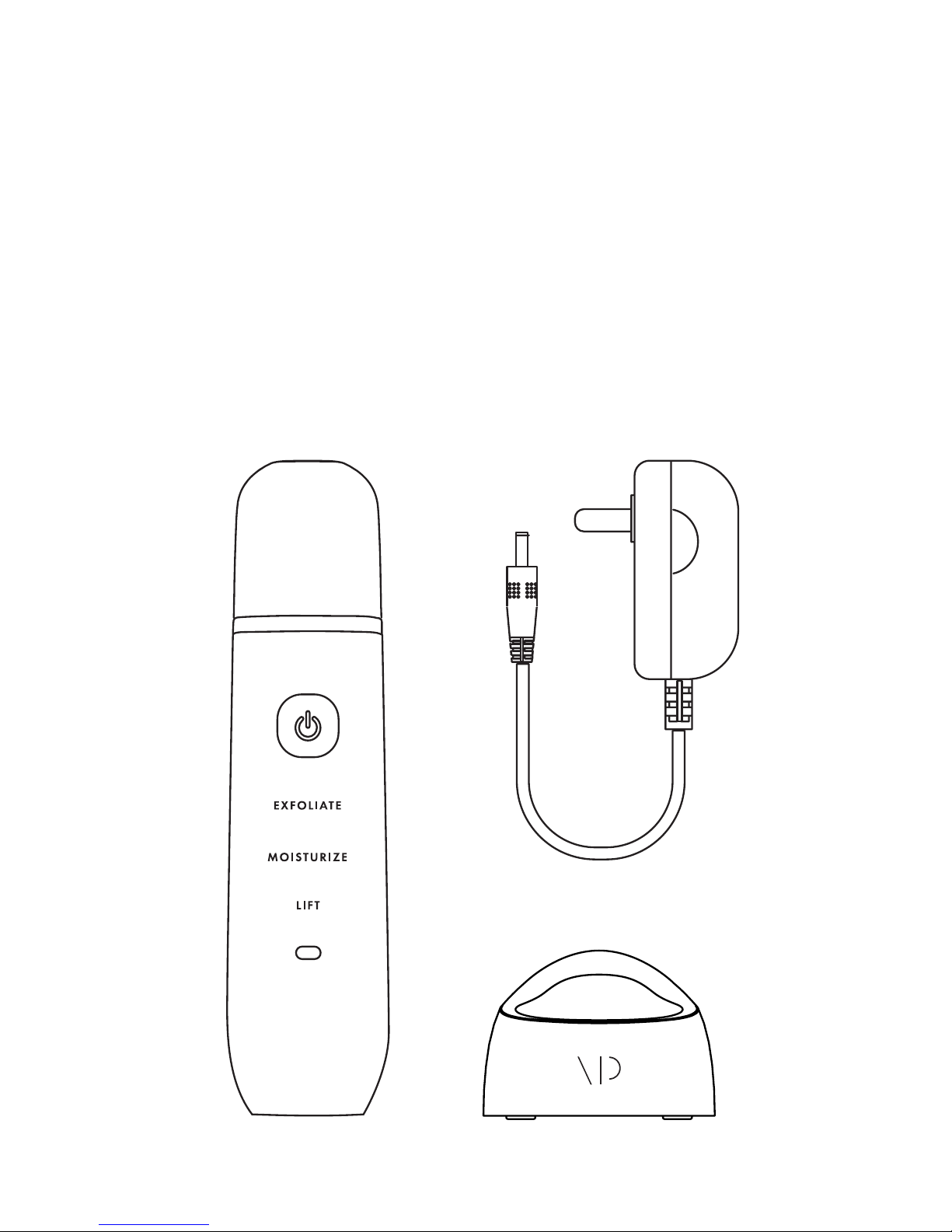
• Essia - Ultrasonic Lifting
and Exfoliating Wand
• Charging Base
• AC Adapter
• User Guide
Page 4

2
Your Essia
Power/
Mode Button
Cap
Exfoliate
Mode
Moisturize
Mode
Lift Mode
Charging Light
Side Panel(s)
Page 5

3
Instructions
Note: If not used, Essia will turn off after 15 seconds.
Before using Essia, wash your face, making
sure to remove makeup and surface-layer
debris. Then, apply your favorite moisturizer,
serum or water.
To turn Essia on, press and hold the
Power Button.
Then, continue to press the button
until you’ve selected the mode you
would like to use.
PREP
MODE SELECTION
Page 6

4
To exfoliate, gently press the back of the wand
head against your moisturized (or damp) skin at
a 30-degree angle and begin slowly moving
the wand forward. You’ll notice the ultrasonic
waves and wand head loosening blackheads
and clearing away dead skin and dirt.
Exfoliate
Mode
Page 7

The Power Button
should be facing
away from you.
Skin Surface
Page 8

6
Looking to make the most of your favorite
moisturizers and serums? Just apply the
product of your choice and activate
Moisturize Mode. Then, press the front of
the wand head to your skin at a 30-degree
angle, slowly moving the wand backwards.
Make sure to hold both side panels when
using this mode—it completes the anion
circuit and allows the microcurrent to better
penetrate your skin, stimulating your cells
and enhancing the absorption of your
skincare product.
Moisturize
Mode
Page 9

7
Gently move the
device upwards.
Make sure the device
is facing down.
The Power Button
should be facing
towards you.
Skin Surface
Page 10

8
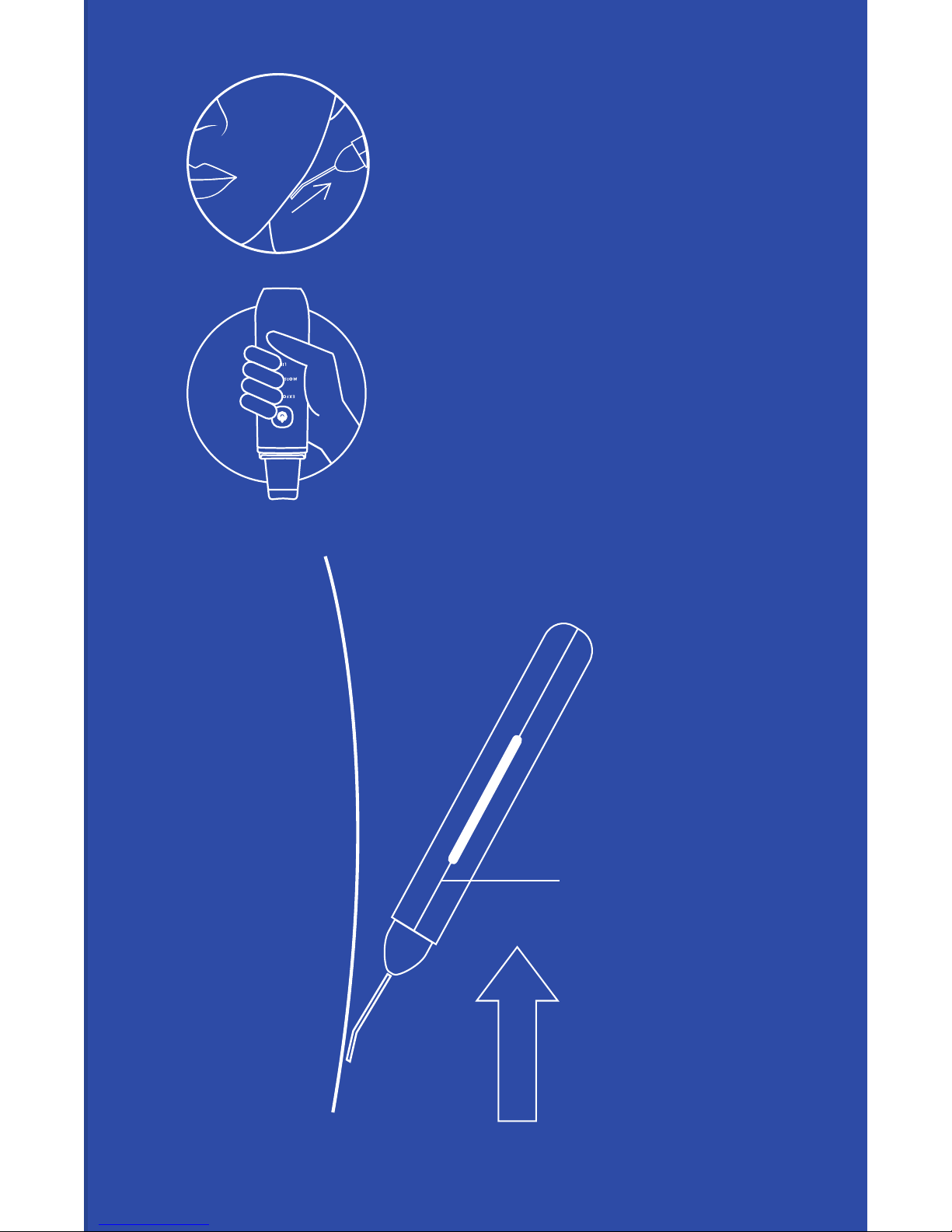
To firm and tighten your skin, grip the
wand facing downwards and press
the front of the wand head to your skin
at a 30-degree angle, slowly moving
the wand upwards. Make sure to hold
both side panels to complete the EMS
circuit, allowing the microcurrent to
penetrate your skin, stimulating your
muscles and helping to reduce the
appearance of fine lines and wrinkles.
Lift Mode
Page 11
9
Gently move the
device upwards.
Make sure the device
is facing down.
The Power Button
should be facing
towards you.
Skin Surface
Page 12

10
TAILOR YOUR SKINCARE ROUTINE:
Transition from Exfoliate Mode to Moisturize
Mode to Lift Mode for a thorough regimen or
pick and choose modes based on your needs—it’s
completely up to you.
We recommend following the sequence below:
Using Essia
Forehead
Cheeks
Chin, areas around mouth
Nose, areas around nose
Page 13

11
TIPS
CHARGING
• Feel free to use each mode for two
or more minutes but make sure not to
exceed six minutes
• Use Essia once or twice a week
(depending on your skin’s sensitivity)
• After using Essia, continue with your
daily routine (toners, lotions, etc.)
To charge Essia, place the
wand on the charging base
and connect the AC adapter.
• While charging, the
wand’s light will ash red
• Once charged, the light
will turn solid blue
Page 14

12
Upkeep
CLEANING ESSIA
• To clean the head of the device, use a
dry tissue, soft cloth or towel
• If a stain is particularly hard to remove,
try using a damp cloth
STORAGE
• Make sure to replace the cap when
you’re done using the wand
• Store the wand and accessories in a
cool,
dry place
• Make sure to turn off the wand before
storing it
• Try not to excessively squeeze or put
pressure on the wand
• Make sure to disconnect the adapter
before storing the wand
Page 15

13
Say hello
to true
beauty.
Page 16

14
For the best results and to prevent injury or damage
to the product, please carefully read these safety
warnings and follow the user guide instructions
when using your wand.
• Only plug your device into 100-240V outlets
• Don’t wrap the cord around the
power connector
• To avoid res or shocking yourself, don’t
bend, twist, stretch, squeeze, tie, clamp or
heat the power cord
• Don’t try to charge the wand if the power
cord or power connector is broken or if
wires are exposed
• Avoid exposing the wand, power cord or
charging base to water and don’t use the
wand if your hands are wet
• Don’t use the device if you have implanted
medical devices (i.e. pacemakers, etc.)
If you have sensitive skin, are taking a dermatologistrelated medication or are undergoing treatment, are
pregnant or have pre-existing medical conditions,
please consult your physician before using the wand.
Safety
Page 17

15
OTHER WARNINGS
Don’t use the device around your eyes, ears, in your mouth
or on wounds, facial melasma, acne, inflamed skin, rashes
or areas that have undergone plastic surgery.
TIPS
• Make sure to remove the adapter from the
power outlet when not charging the wand
• Don’t try to repair or disassemble the device on
your own
• Avoid dropping the wand
• Don’t share the wand
• Don’t use the wand on dry skin
• Don’t use the wand if you’ve undergone
IPL hair removal or if you are sunburned
• Make sure to avoid repeatedly going over
the same area of skin
• Don’t use the wand with scrubs or exfoliators
• Make sure to remove contacts, earrings,
necklaces or other accessories before
using the wand
• Keep out of reach of children
• If, while using the wand, you feel unwell in
anyway, stop using the device immediately and
consult your physician
Page 18

16
FAQ
Why won’t the wand turn on?
This might be because the wand isn’t charged. If
charging the wand doesn’t fix the problem, please
contact our Customer Experience Team.
Why won’t the wand charge?
Essia features a protection state that it will enter if it
isn’t used after a long period of time. This ensures
the integrity and lifespan of the battery. To return
the wand to its normal state, simply charge the
device for 15 minutes to reactivate the battery.
The light will flash red, meaning Essia can be
recharged again. We recommend replacing the
battery every six months.
How long does the charge last?
It takes about 12 hours to charge the wand
and each charge should last about 120 minutes.
Why is the Charging Light ashing?
In most cases, this means the wand needs to
be charged.
Page 19

17
Specs
Model No.
VP59312-0100
Dimensions
175.5 x 43.5mm x 22mm
Net Weight
Approx. 106g
Battery
Lithium batteries
Working Time
120 minutes
Charging Time
12 hours
Power
2.3W at maximum
Input Voltage
100-240V
Output Voltage
DC 9V
Current
500mA
Power Cord Length
1.2m
Available Color
White
Operating Temperature
40-50°C
Water Resistance
IPX5
Page 20

18
One-Year
Warranty
There are no express warranties except as listed above. This
warranty gives you specific legal rights and you may have
other rights which vary from state to state.
Please do not return this product to the retailer. Contact us
directly for warranty service.
This Vanity Planet product is warranted to be free of
manufacturer’s defects in materials or workmanship for one
year from the date of purchase. Damage or wear resulting from
an accident, misuse, abuse, commercial use, or unauthorized
adjustment and/or repair are not covered under this warranty.
Should this product require warranty service (or replacement at
our discretion), please contact client services. Proof of purchase
is required. Products returned without prior authorization from
Vanity Planet will not be accepted and the sender will not
receive a refund or replacement.
Visit vanityplanet.com/warranty
to register your product and
activate your warranty.
vanityplanet.com
[email protected]
1.888.870.2132
 Loading...