

Page 1
LenzO™ 6/6s
1
2
3
Quick Start Manual
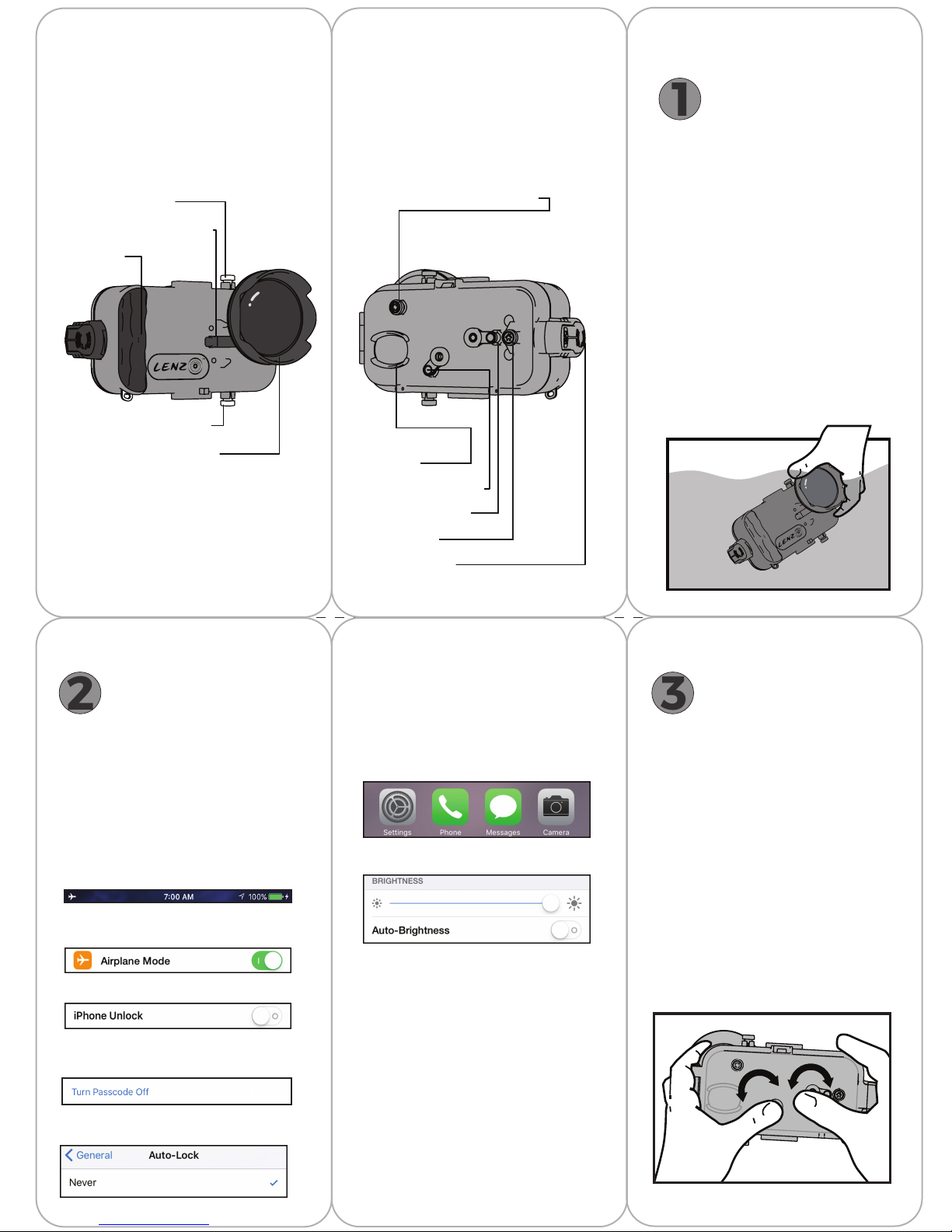
Front Back
Waterproof Testing
1
It is important to test the seal of the
™
LenzO
6/6s before using it with your
phone.
Phone on/off/sleep
Color correction flip filters
Hand grip
Camera start/stop/trigger
Removable dome port lens
Unit is sealed with a tight-fit rubber O-ring.
The O-ring is ony accessible when the back
cover is open.
Rear facing camera/Selfie Mode
Rear camera/
Selfie lens
Secondary Swing Arm
Primary Swing Arm
Home button
Secure seal latch
(push and turn counter clockwise to open)
Start by closing the housing. Press
the two halves together, and turn the
latch 180°, catching the metal fastener
until the arrow on the latch faces the
back of the housing. When the latch
‘clicks’, it is ready.
™
Completely submerge the LenzO
at least 4 inches underwater (in a
bathtub or bucket), for 5 minutes.
Remove, towel dry, open, and inspect
for any leaks or water inside.
If it is dry inside, the LenzO
there is moisture inside the housing,
remove and lubricate the O-ring (see Step
5: Care/Maintenance), then repeat Step 1.
in
™
is ready. If
2
Some screen protectors reduce the contact
sensitivity of the swing arm. If the phone is
not responding, you may want to remove
the screen protector.
Some settings on your phone will need
to be changed before using it with the
LenzO
in a dry location.
Back up your iPhone*, and recharge phone
battery to 100%.
Turn off all alarms, calendar events,
and notifications. Set your phone to
AIRPLANE MODE.
Under Settings>Touch ID & Passcode>
iPhone Unlock, set switch to OFF.
Under Settings>Touch ID & Passcode>
Turn Passcode Off. Be sure to re-enable
your password after LenzO
Under Stterings>General>Auto-Lock, set to
Never.
Phone Preparation
™
. Make sure the phone is prepped
™
use.
Phone Preparation {Continued}
On the Home Screen, move the CAMERA
ICON to the bottom right corner of the
Dock, and the SETTINGS ICON to the
bottom left corner of the Dock.
Set BRIGHTNESS to the maximum and
slide AUTO-BRIGHTNESS to off.
Set the CAMERA FLASH to OFF.
™
Open the LenzO
turning the secure seal latch 180° until
the arrow on the latch faces the front
of the housing.
Insert iPhone Home Screen up with phone
case removed. The iPhone camera lens
should line-up with the inside of the housing
lens. Press down on the sides of the phone
to secure it in place with the retaining clips.
by pressing and
Operation
3
Using the swing arm actuators:
Place thumbs on the swing arm actuators
and gently press down. The internal stylus
tips will press on the phone’s screen.
The primary swing arm allows the operator
to swipe the Home Screen, access some of
the phone’s settings, and open and control
many of the Camera app’s features,
including start, stop,
Using the primary and secondary swing
arms together, the operator has the ability
to zoom in and out with the Camera app,
allowing for the “pinch” or “spread”
gestures necessary for zooming.
Page 2
Operation {Continued}
4
5
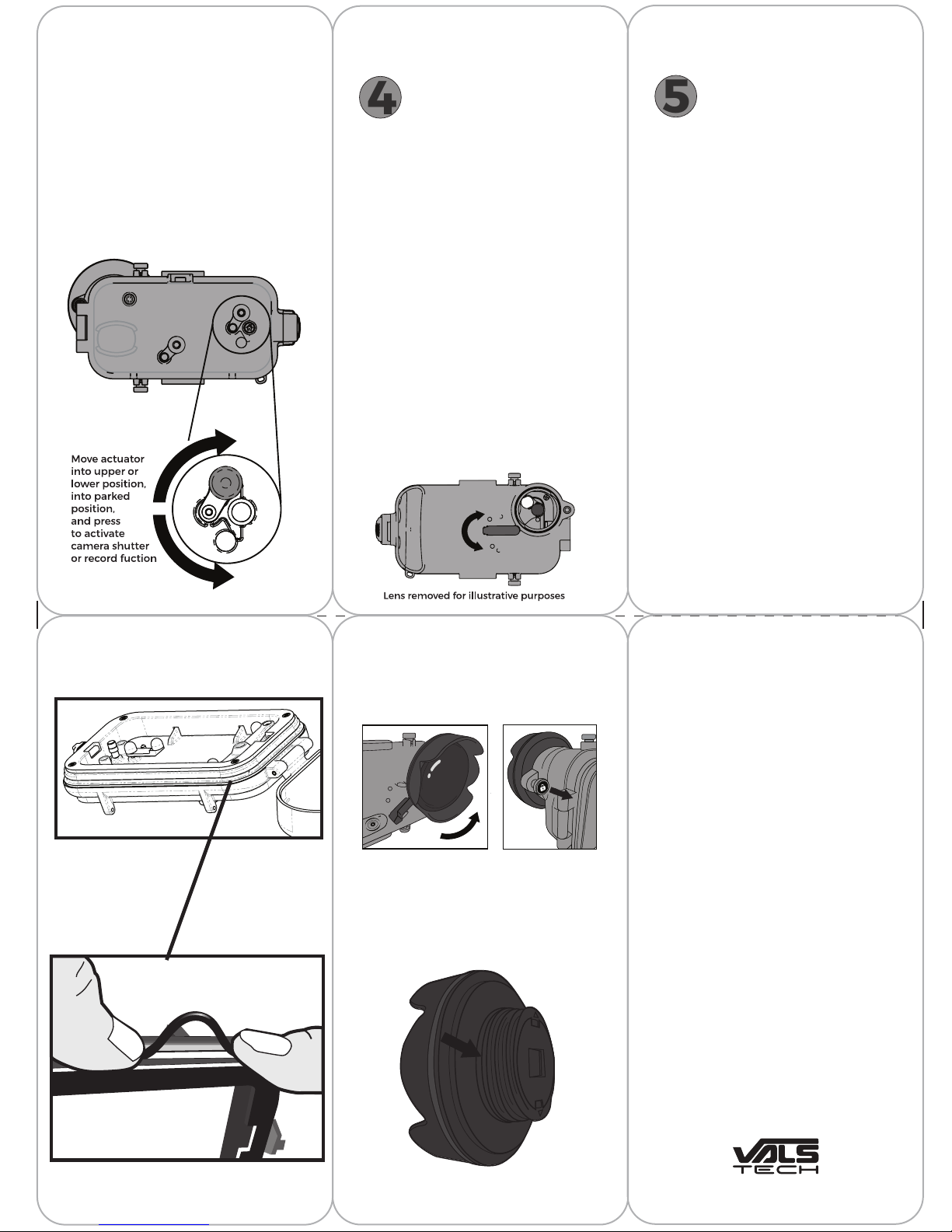
With the Camera app open, to start or stop
shooting video, or take a photo, rotate the
primary swing arm into the “parked position”
located at the top or bottom of its rotation
until it ‘clicks’ into place.
When in this position, it can be depressed
further, to activate the iPhone camera
shutter or video record button.
Underwater Filters
4
On the front face of the LenzO™ is a color
correction flip filter arm. This arm moves
optical filters in place to help color correct
photos and videos.
In its normal position (all the way down),
the camera has unfiltered view, ideal for on
and near the water use.
Sliding the arm to the middle position
engages the light magenta filter, designed
to adjust the color in more shallow depths.
Typically this would be used in tropical,
blue-green water.
Moving the arm all the way to the top
engages the deep red filter, designed for
adjusting the color in deeper, darker waters
where more of the red and orange light is
absorbed.
Different filters may enhance photos and
videos in different ways. It is best to try each
filter setting (including no filter) in different
locations to determine the best results.
Care/Maintenance
5
When finished using the LenzO™ it is
important to rinse the unit in fresh water
before opening, making sure there are no
bits of sand or debris collected in the
seams. Inspect the O-ring that sits
between the front and back of the
housing. Check for and remove any sand
or debris still present.
If the O-ring is dirty, pinch and pull O-ring,
remove, and wash under running water.
Dry completely, apply supplied silicone
lubricant, and re-insert into housing.
If the O-ring is damaged, replace with
supplied O-ring only.
Avoid touching stylus contacts, as finger
oil or dirt can reduce stylus contact
sensitivity. Avoid storing the LenzO™
in direct sunlight.
™
Avoid storing the LenzO
in an air
conditioned environment. This may cause
humidity to build up inside the system
with a temperature change. If the LenzO
is stored in an air-conditioned environment (like a hotel room), allow it to
warm-up outside before placing the
phone inside to avoid condensation on
the inside of the lens.
™
Pinching the O-ring to remove dirt, debris, or
for replacement.
Care/Maintenance {Continued}
To remove the dome lens, twist it counterclockwise while pulling the lock pin.
The O-ring is located by the arrow in the
image below, and can be removed using the
same method as the main O-ring. To
re-attach the dome lens to the housing,
twist it clockwise until the lock pin ‘clicks’
into place.
Use silica gel packs (if available) to absorb
moisture.
Your sole and exclusive warranty with regard to the purchased
LENZO 6/6S (“Product”) and associated ValsTech, Inc. accessories is
provided below and in any applicable Warranty section of the
ValsTech.com website. ValsTech warranties the Product against
substantial defects in materials and workmanship under normal
use for ninety (90) days from the date of purchase. This warranty
only covers the original consumer purchaser and is not transferrable
for any reason. This warranty does not cover the Product and
associated ValsTech accessories purchased or otherwise acquired
through non-authorized dealers, which at least includes all online
auction websites.
The warranties do not extend to any damages, malfunctions, or
non-conformities caused by: (i) your use of Product in a manner
inconsistent with the ValsTech User Guides including damage
caused by accident, abuse and/or misuse; (ii) your failure to follow
ValsTech’s operation or maintenance instructions; and (iii) Products
that have been serviced or modified by a party other than Valstech.
MOREOVER, EXCEPT AS SET FORTH IN THE LIMITED WARRANTY
SECTION, THE PRODUCT IS PROVIDED “AS IS” AND VALSTECH
MAKES NO REPRESENTATIONS OR WARRANTIES, EITHER EXPRESS
OR IMPLIED, OF MERCHANTABILITY, FITNESS FOR A SPECIFIC
PURPOSE, NON-INFRINGEMENT OF INTELLECTUAL PROPERTY. USE
OF THE PRODUCT BY A USER IS AT THE USER’S RISK.
THE LIMITATIONS OF LIABILITY IN THIS SECTION WILL APPLY TO
ANY DAMAGES, HOWEVER CAUSED, AND ON ANY THEORY OF
LIABILITY, WHETHER FOR BREACH OF CONTRACT, TORT
(INCLUDING, BUT NOT LIMITED TO, NEGLIGENCE), OR OTHERWISE,
AND REGARDLESS OF WHETHER THE LIMITED REMEDIES
AVAILABLE TO THE PARTIES FAIL OF THEIR ESSENTIAL PURPOSE. IN
NO EVENT WILL VALSTECH HAVE ANY LIABILITY FOR ANY
INCIDENTAL, SPECIAL, STATUTORY, INDIRECT OR CONSEQUENTIAL
DAMAGES, OR FOR ANY LOSS OF PROFITS, REVENUE, DATA, TOLL
FRAUD, OR COST OF COVER. NOTWITHSTANDING ANY DAMAGES
THAT YOU MIGHT INCUR FOR ANY REASON BASED ON THE
PURCHASE OR USE OF THE PRODUCT, THE ENTIRE LIABILITY OF
VALS TECH IS LIMITED TO REPLACEMENT OF THE PRODUCT OR THE
AMOUNT ACTUALLY PAID BY YOU FOR THE PRODUCT, AT
VALSTECH’S SOLE AND EXCLUSIVE DISCRETION. VALSTECH SHALL
HAVE NO LIABILITY ARISING OUT THE USE OF THE PRODUCT
INCLUDING, BUT NOT LIMITED TO, PROPERTY DAMAGE OR LOSS OF
VALUE OF THE PRODUCT OR ANY THIRD PARTY PRODUCTS
(INCLUDING ELECTRONIC DEVICES) USED IN OR WITH THE
PRODUCT, OR LOSS OF USE OF THE PRODUCT OR ANY THIRD
PARTY PRODUCTS USED IN OR WITH THE PRODUCT.
MULTIPLE PATENTS PENDING.
Apple and iPhone are trademarks of Apple Computer Inc. Apple
Computer Inc. is not affiliated with ValsTech, Inc. and is not
responsible in any way for your use of the Product.
Limited Warranty.
Warranty Exclusions.
LIMITATION OF LIABILITY.
 Loading...