

Page 1
True Wireless Earbuds
With Charging Dock (BTi36)
Thank you for purchasing the Valore True Wireless Earbuds With Charging Dock (BTi36).
• Connect up to two mobile phones simultaneously
• Enjoy premium quality music without added weight of wires
• Store wireless earbuds in a protective case while it recharges
Important: Please read the user manual thoroughly before using your wireless earbuds.
Specifications: Package Contents:
• Wireless range: Up to 10m
• Earbuds battery type: Built-in 80mAh lithium battery
• Charging case battery type: Built-in 600mAh
lithium-polymer battery
• Standby time: Up to 100 hours
• Charging time: Up to 2 hours
• Support: A2DP / HFP / HSP
• Playback/working time: Up to 3.5 hours
• Power input: DC5V
• Material: ABS + PC
• Dimensions (L x W x H): 92 x 38 x 36mm
• Weight: 72g
• Wireless earbuds x 1 pair
• Charging dock x 1
• USB charging cable (500mm) x 1
• Earbuds x 2 pairs
• Earhook x 1
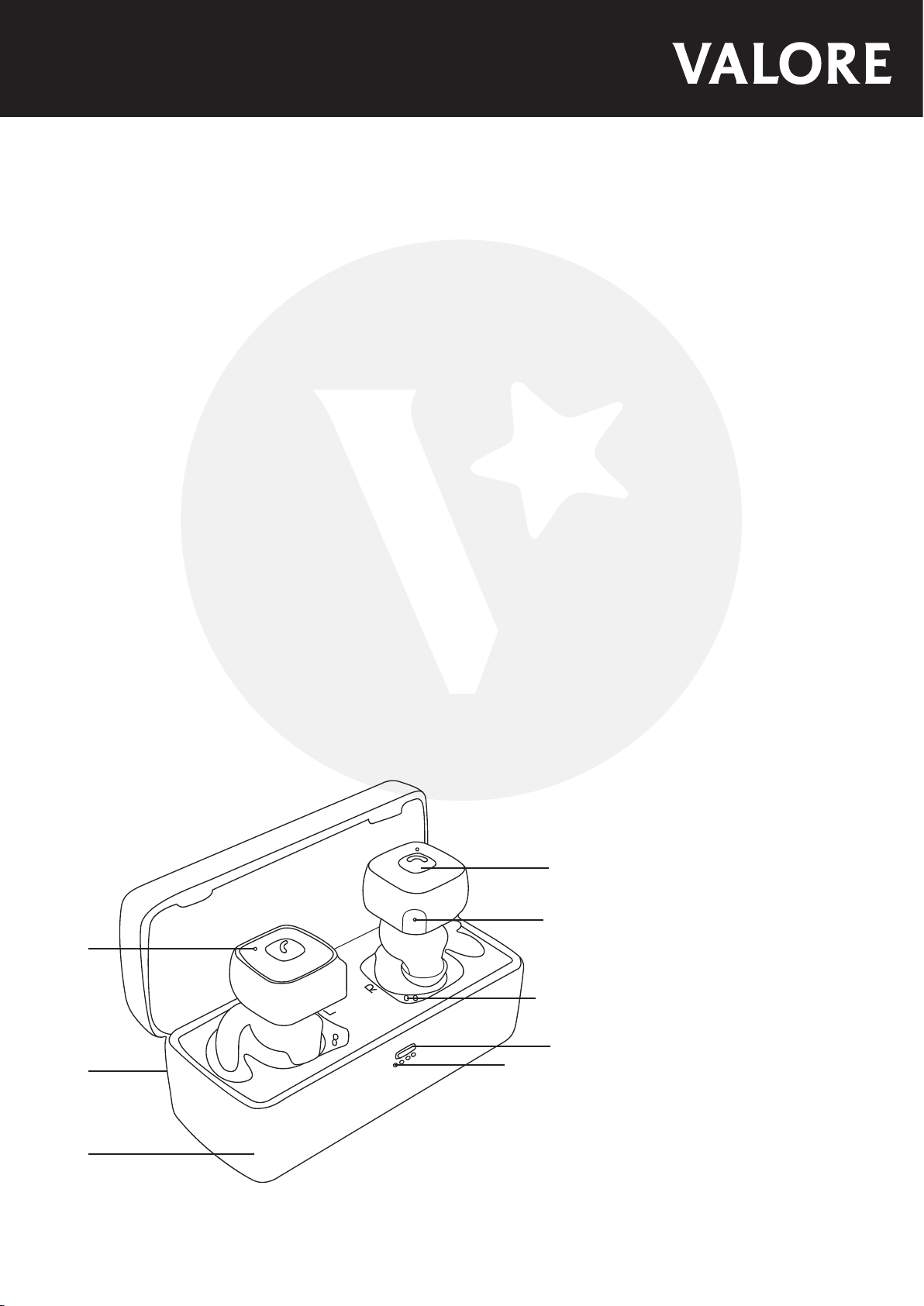
①
②
③
⑧
④
⑤
⑥
⑦
① LED indicator
② Micro USB charging port
③ Charging dock
④ Multi-functional button
⑤ Microphone
⑥ Charge connecting pin
⑦ Charging dock button
⑧ LED indicator for charging dock
Page 2

START USING THE WIRELESS EARBUDS
1) Charging the wireless earbuds
Earbuds are charged through connecting pin contacts when placed into the charging dock.
The LED indicator blinks blue while charging and goes off when fully charged.
When charging dock is being charged, the 4 LED indicators blink blue in sequence. When
fully charged, the indicators will stay solid.
Note: Please charge the earbuds for at least 8 hours before first use.
Please make sure that the earbuds are switched off
when charging is in progress.
2) Pairing the wireless earbuds (switched off)
Step 1: Activate Bluetooth function on your mobile device to begin pairing with earbuds.
Step 2: Remove earbuds from charging dock, wait for earbuds to connect to each other
(Voice prompt). The main earbud’s LED indicator will flicker red and blue.
Step 3: Connect to the earbuds by selecting ‘Valore BTi36’ under the device list.
Step 4: Once connected, the LED light at the will be solid blue.
If the pairing is not successful, please turn off wireless earbuds first, and then re-pair again. After pairing is
successful, paired devices will remember each other. Unless pairing information is deleted because of new
pairing, no need to pair when using the next time.
If you want to pair the wireless earbuds with other devices, please turn off Bluetooth function of existing source
device, and pair the wireless earbuds with the new device according to steps 1-4 mentioned above.
3) Wireless earbuds controls
Power on - Remove from charging dock / Press and hold multi-functional button
Power off - Place in charging dock / Press and hold multi-functional button
Multi-function button (Right):
Pick up call - Short press
Hang up call - Short press
Switch language - In pairing mode, double press to switch bewteen chinese and english
Multi-function button (Left):
Switch between mobile and earbuds - Press and hold
Reject call - Double press
To mute / unmute - Double click while in calling mode
Play/Pause music - Short press
Three-party call: If there is and incoming call during a call, press once to hang up call A and
answer new call. Double press to switch between call A & B.
Page 3

TROUBLESHOOTING
Issue 1: Earbuds is unable to switch on
Cause 1: Earbuds battery is flat
Solution: Fully charge the earbuds (2 hours) and retry connection with your mobile device.
Issue 2: Unable to charge the earbuds
Cause 1: The charge connecting pins are not connected properly.
Solution: Remove earbuds and adjust the pin’s angle and replace earbuds into charging dock.
Issue 3: Unable to switch off earbuds
Cause 1: The earbuds program has an error due to an incorrect operation.
Solution: Put earbuds in charging dock and reset.
Issue 4: The earbuds cannot be searched or paired.
Cause 1: The earbuds has not enter pairing state.
Solution: Press and hold the multi-function button until the LED indicator flashes blue and red,
then the earbuds has entered pairing mode.
Page 4

TECHNICAL SUPPORT & WARRANTY
• For Technical Support, email us at [email protected].
• For Warranty Registration, visit www.valore.sg.
Cautions:
Read all the instructions and warnings carefully prior to using this product.
• Do not store the earbuds in a high temperature environment.
• Do not place the earbuds near a fire or other excessively hot environments.
• Do not expose this speakerto moisture or submerge it in liquid. Keep earbuds dry at all
times.
• Do not attempt to charge the earbuds using any other method or connection other than the
headset’s provided charging cable.
• Do not disassemble this earbuds or attempt to repair or modify it in any manner.
• Be cautious of excessive drops, bumps, abrasions or other impacts to this headset. If there
is any damage to the earbuds such as dents, punctures, tears, deformities or corrosion,
stop using the earbuds and contact us immediately via email at [email protected], or return
this product to the store where you have purchased it from.
• If the product produces an abnormal smell, high temperature (low temperature during
normal use), discolours or changes shape abnormally, stop using the product and contact us
immediately via email at [email protected].
DISCLAIMER & TRADEMARKS
All information, trademarks, logos, graphics, and images (“Materials”) provided on this user manual are
copyrighted or trademarked and are the property of Valore Lifestyle Pte Ltd. Any unauthorized use of any
material contained on the instruction manual may violate copyright laws, trademark laws, laws of privacy and
communications statutes.
The trademarks, service marks and logos used and displayed in the Materials are registered and unregistered
trademarks and service marks of Valore and others. All other registered and unregistered company names,
product names and marks mentioned herein the (“Materials”) are the property of their respective owners and
may be trademarks or registered trademarks.
Inspired by Valore Singapore
For full range of Valore products visit www.valore.sg
 Loading...