

Page 1
DMS-W1QuickStartGuide 4-V00-603-01(1)
クイックスタートガイド
QuickStartGuide
Guidededémarragerapide
Guíadeiniciorápido
Schnellstartleitfaden
Guidaintroduttiva
4-V00-603-01(1)
Printed in Japan
Terrada Music Score co.,ltd 2017.06
DMS-W1
DIGITAL MUSIC SCORE
A
B
C
C
セットアップする
ご注意!
画面の操作は必ず付属のペンで行ってください。指で画面を触っても反応しません。
1
充電する。
付属のUSBケーブルで、本機とUSB充電アダプター(別売)を接続し、コンセントにつないで
ください 。
ご注意!
ACアダプターは本機に付属していません。市販の USB 充電アダプター(5V、1A以上に対
応)をお使いください。
2
電源を入れる。
本機を開き、電源ボタンを1 秒以上長押します。
3
初期設定をする。
画面の指示に従って、初期設定を行ってください。以下を設定できます。
• 言語
• ペンの持ちかた
• 使用する国/地域
• Wi-Fi ネットワークへの接続
• 日付と時刻
• GVIDOクラウドへの登録
4
[今すぐ始める]を選択する。
ホーム画面が表示され、本機を使用するための案内が表示されます。
5
画面の指示に従って操作し、「基本操作ガイド」を表示する。
本機の基本的な操作方法を確認できます。
本機の詳しい使いかたについては、同じく本機にインストールされている「取扱説明書」をご確
認ください。
ヒント
目的のページを開きたいときは、以下の手順でジャンプすることができます。
①楽譜や取扱説明書を表示中にメニューボタンを押す。
メニューが表示されます。
②[ページ位置]のスライダーを動かして、表示したいページを選択する。
困ったときは
Q電源が入らない
A本機が結露しているときは、電源が入ら
ないことがあります。数時間待ってから電
源を入れてください。
Aバッテリーの残量が完全になくなって
いるときは、本機の電源を入れること
ができません。付属のUSBケーブル
を市販 の USB充 電 ア ダ プ ターに接続
し、しばらく本機を充電したあと、電
源ボタンを1秒以上長押ししてください。
バッテリーの残量が完全になくなってい
るときは、充電を始めてから電源が入る
までに★5分★ほどかかることがあります。
A電源ボタンを押したときに電源 / 充電 LED
がオレンジ色ですばやく3 回点滅した場
合は、バッテリーの残量がない状態です。
付属のUSBケーブルを市販のUSB充電ア
ダプターに接続し、本機を充電してくださ
い。
Q充電できない
A充電には付属の USB ケーブルを使用して
ください。それ以外の使用については、性
能および安全性を保証いたしません。
A充電が完全に完了しているか確認してく
ださい。電源/ 充電 LED が赤色点灯から
消灯に切り替わったら充電は完了です。
A推奨温度の範囲内(5℃〜 35℃)で充電し
てください。推奨温度の範囲外のため充
電できないときは、本機から USBケーブ
ルを取りはずし、推奨温度の範囲内に戻
してから、再度 USBケーブルを接続して
充電してください。
Q画面が表示されない
A電源ボタンを7 秒以上長押ししてリセット
した後 、電源ボタンを 1 秒以上長押しして
本機を再起動してください。
Q画面が正しく動作しない
A画面の表示や切り替えに時間がかかるこ
とがあります。
A本機の画面はタッチパネルに対応してい
ないため、指での操作は行えません。付
属のペンを使用してください。
A磁気を帯びた機器などの近くで本機を操
作すると、正しく動作しないことがありま
す。本機の近くに磁気を帯びた機器を置
かないようにしてください。
Q文字が表示されない
Aユーザー定義の文字や特殊な記号は表
示されないことがあります。
本機を工場出荷時の状態に戻す
1
ホーム画面右下の[設定]を選択する。
設定画面が表示されます。
2
[リセット]−[工場出荷時状態に初期化]を選択する。
本機の内部ストレージを初期化し、すべての設定を工場出荷時の設定に戻します。
サポート情報
http:// 〜
English
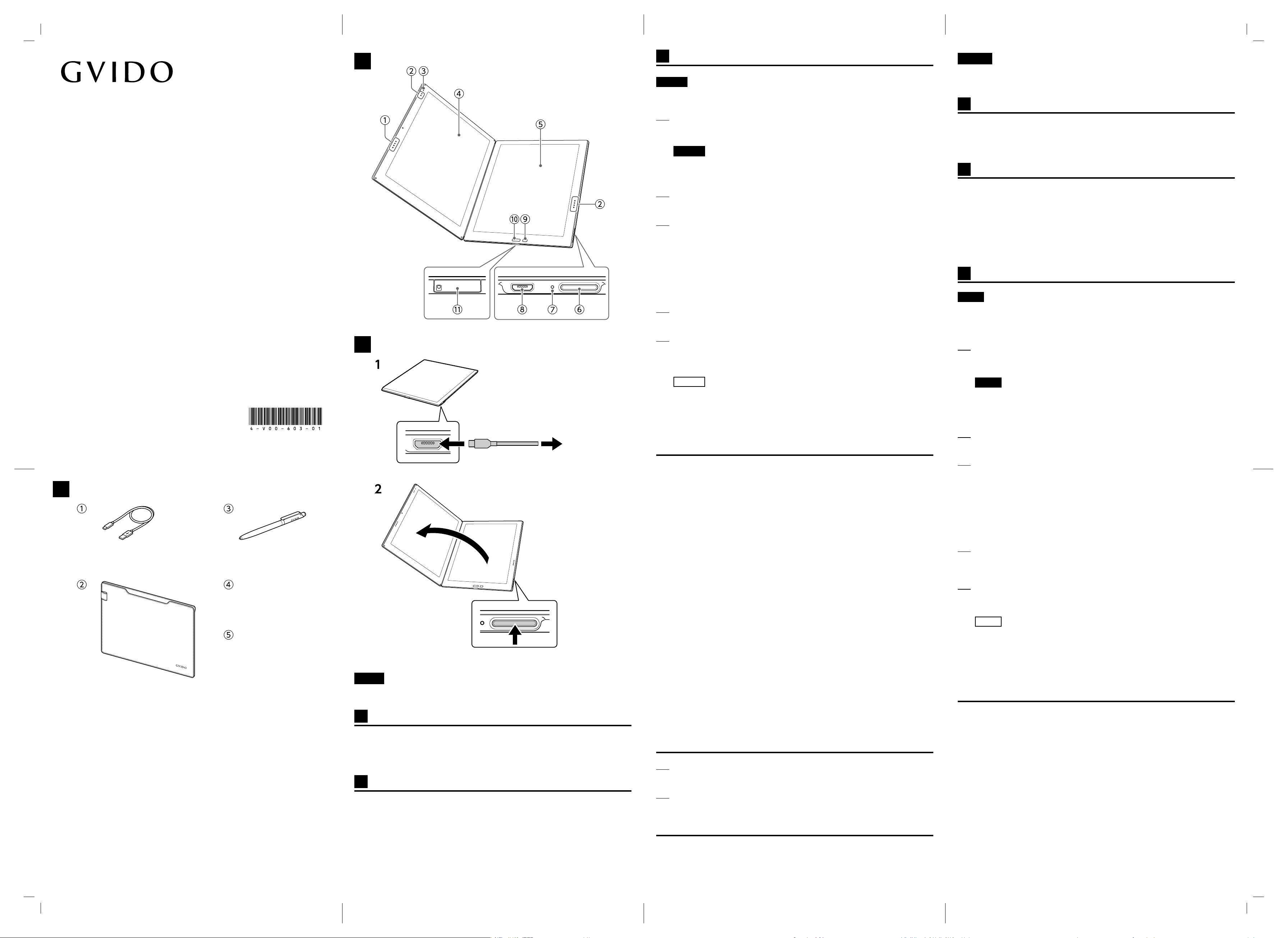
This guide describes how you get started with using the GVIDO digital music score
device (referred to as this device from here on).
A
Supplied items
①USB cable (1)
②Sleeve case (1)
③Pen (1)
④Spare pen tips (3)
⑤Pen tip puller (1)
B
Parts and controls
①Touch switch (for turning back to the
previous score page)
②Touch switch (for turning to the next
score page)
③LED
④Left screen
⑤Right screen
⑥Power button
⑦Power/Charge LED
⑧microUSB port
⑨Menu button
⑩Home button
⑪microSD card tray
C
Setting up this device
Note!
Be sure to use the supplied pen for screen operations. The screens of this device do
not support finger touch operations.
1
Charge the battery of this device.
Connect a USB charger adapter (not supplied) to this device with the supplied
USB cable and plug the adapter to a power outlet.
Note!
No AC adapter is supplied with this device. Use a USB charger adapter (with
the voltage and current specifications at or over 5 V AC and 1 A) available in
the market.
2
Turn on this device.
Open this device and press and hold the Power button for 1 second or longer.
3
Make the initial settings.
Follow the on-screen instructions to make the initial settings listed below:
• Your language
• How you hold the pen
• Your country or region of residence
• Wi-Fi network connection
• Date and time
• GVIDO Cloud registration
4
Select [Continue].
The [Home] screen and then the guidance for getting started with this device
appears.
5
Follow the on-screen instructions to display the Basic Instruction Guide.
You can lean some basic operations on this device.
For detailed instructions, view the User Guide also stored on this device.
Tip
To open a specific score page, follow these steps:
① While a score or the User Guide is open, press the Menu button.
The menu dialog appears.
② Slide the [Current position] slider to select the page you want to view.
Troubleshooting
Q This device does not turn on.
A Moisture condensation may have
formed. Wait for a few hours, then
turn on this device.
A When the battery power is worn
out, this device does not turn on.
Connect this device to a power
outlet with the supplied USB
cable and a USB charger adapter
available in the market, leave the
device for a while to let it charge
the battery, and then press and
hold the Power button on the
device for 1 second or longer.
When the battery power is worn
out, it may take as long as 5
minutes before this device is ready
to turn on.
A IfthePower/ChargeLEDflashesin
orangefor3timeswhenyouturn
onthisdevice,itindicatesthatthe
batteryislow.Connectthisdevice
toapoweroutletwiththesupplied
USBcableandaUSBcharger
adapteravailableinthemarketto
letitchargethebattery.
日本語
本書では、GVIDO(以下、「本機」と呼ぶ)を使い始めるまでの流れを説明します。
A
付属品について
①USBケーブル(1)
②スリーブケース(1)
③ペン(1)
④替え芯(3)
⑤芯抜き(1)
B
各部の名称
①タッチスイッチ(ページ戻し)
②タッチスイッチ(ページ送り)
③LED
④左画面
⑤右画面
⑥電源ボタン
⑦電源/充電LED
⑧microUSB端子
⑨メニューボタン
⑩ホームボタン
⑪microSDカードトレイ
Page 2
DMS-W1QuickStartGuide 4-V00-603-01(1)
Q The battery of this device does not
charge.
A Be sure to use the supplied USB
cable for charging the battery.
Use of any other USB cable is not
guaranteed for performance and
safety.
A Check if the battery charge is
completed. The red Power/Charge
LED indicates that the battery
charge is in progress. Wait until it
turns off.
A Be sure to charge the battery
where the ambient temperature
is in the recommended range of
5°C to 35 °C (41 °F to 95 °F). If it
is not within the range, unplug the
USB cable from this device, take
the device to a location where
the temperature is within the
recommended range, and then
connect the device to a power
outlet with the supplied USB
cable and a USB charger adapter
available in the market to let it
charge the battery.
Q The screens stay blank.
A Press and hold the Power button
for 7 seconds or longer to reset
this device, and then press and
hold the button for 1 second or
longer to restart the device.
Q The screens do not work properly.
A It may take a little time for the
screens to come on or refresh.
A The screens on this device do not
support finger touch operations. Be
sure to use the supplied pen.
A Magnetic interference from nearby
devices may be affecting operation
of this device. Keep this device
away from any magnetic devices.
Q Text does not appear on the screen.
A This device is not capable of
displaying some characters, such
as user-defined characters and
special symbols.
Restoring the factory default settings
1
Select [Settings] at the bottom right corner of the [Home] screen.
The [Settings] screen appears.
2
Select [Reset] - [Restore device to factory default settings].
The internal storage of this device is initialized and all the factory default
settings are restored.
Support information
http://
Français
Ce guide décrit comment démarrer avec le lecteur de musique numérique GVIDO
(nom utilisé à partir de maintenant).
A
Éléments fournis
⑫Câble USB (1)
⑬Housse (1)
⑭Stylet (1)
⑮Pointes de stylet de rechange (3)
⑯Extracteur de pointe de stylet (1)
B
Pièces et commandes
①Interrupteur tactile (pour revenir à la
page de partition précédente)
②Interrupteur tactile (pour passer à la
page de partition suivante)
③LED
④Écran de gauche
⑤Écran de droite
⑥Bouton d'alimentation
⑦LED de chargement/alimentation
⑧Port microUSB
⑨Bouton du menu
⑩Bouton Accueil
⑪Plateau à carte microSD
C
Configuration de l'appareil
Remarque!
Veillez à utiliser le stylet fourni pour les opérations à l'écran. Les écrans de cet
appareil ne prennent pas en charge les actions nécessitant une pression des doigts.
1
Chargez la batterie de cet appareil.
Connectez un adaptateur de chargeur USB (non fourni) à cet appareil avec le
câble USB fourni et branchez l'adaptateur au secteur.
Remarque!
Pas d'adaptateur secteur fourni avec cet appareil. Utilisez un adaptateur de
chargeur USB (avec les caractéristiques de courant et de tension égales ou
supérieures à 5 Vca et 1 A) disponible sur le marché.
2
Mettez l'appareil sous tension.
Ouvrez l'appareil et maintenez enfoncée le bouton d'alimentation pendant au
moins 1 seconde.
3
Effectuez les réglages de base.
Suivez les instructions à l'écran afin d'effectuer les réglages de base énumérés
ci-dessous:
• Votre langue
• Comment tenir le stylet
• Votre pays ou région de résidence
• Connexion réseau Wi-Fi
• Date et heure
• Enregistrement sur GVIDO Cloud
4
Sélectionnez [Continuer].
L'écran [Accueil] et ensuite les conseils pour commencer à utiliser l'appareil
s'affichent.
5
Suivez les instructions à l'écran afin d'afficher le Mode d'emploi de base.
Vous pouvez vous penchez sur certaines opérations de base sur cet appareil.
Pour des instructions détaillées, consultez le Guide d'utilisateur également
stocké sur cet appareil.
Astuce
Pour ouvrir une page de partition spécifique, suivez ces étapes :
① Alors qu'une partition ou que le Guide d'utilisateur est ouvert, appuyez sur le
bouton du menu.
La boîte de dialogue du menu s'affiche.
② Faites glisser le curseur [Position actuelle] pour sélectionner la page que
vous souhaitez consulter.
Diagnostic des pannes
Q L'appareil ne s'allume pas.
A De la condensation peut s'être
formée. Patientez quelques heures,
puis mettez l'appareil sous tension.
A Lorsque l'alimentation de la
batterie est épuisée, il est
impossible de mettre l'appareil
sous tension. Branchez l'appareil
au secteur avec le câble USB
fourni et un adaptateur chargeur
USB disponible sur le marché,
laissez l'appareil charger la batterie
un moment, puis maintenez le
bouton d'alimentation sur l'appareil
enfoncé pendant 1 seconde
minimum.
Lorsque l'alimentation de la
batterie est épuisée, 5 minutes
seront nécessaires avant de
pouvoir mettre cet appareil sous
tension.
A SilaLEDalimentation/chargement
clignoteenorangeà3reprises
lorsquevousmettezl'appareil
soustension,celaindiqueque
labatterieestfaible.Branchez
l'appareilausecteuravecle
câbleUSBfournietunadaptateur
chargeurUSBdisponiblesur
lemarchépourpermettrele
chargementdelabatterie.
Q La batterie de l'appareil ne se charge
pas.
A Veillez à utiliser le câble USB fourni
pour le chargement de la batterie.
L'utilisation d'un autre câble USB
ne permet pas de garantir la
performance et la sécurité.
A Vérifiez si le chargement de la
batterie est terminé. La LED rouge
alimentation/chargement indique
que le chargement de la batterie
est en cours. Attendez qu'il
s'éteigne.
A Veillez à charger la batterie dans
un endroit où la température
recommandée est comprise entre
5°C et 35 °C (41 °F à 95 °F). Si
elle n'est pas comprise dans cette
plage, débranchez le câble USB de
l'appareil, placez l'appareil dans
un endroit où la température se
trouve comprise dans la plage
recommandée, puis branchez
l'appareil au secteur à l'aide du
câble USB fourni et un adaptateur
chargeur USB disponible sur le
marché afin de pouvoir charger la
batterie.
Q L'écran reste vide.
A Maintenez le bouton d'alimentation
enfoncé pendant 7 secondes
minimum pour réinitialiser
l'appareil, puis maintenez le
bouton enfoncé pendant 1
seconde minimum pour redémarrer
l'appareil.
Q Les écrans ne fonctionnent pas
correctement.
A Les écrans peuvent nécessiter un
peu de temps pour s'allumer ou
s'actualiser.
A Les écrans sur cet appareil ne
prennent pas en charge les actions
nécessitant une pression des
doigts. Veillez à utiliser le stylet
fourni.
A Des perturbations
électromagnétiques provenant
des appareils à proximité peuvent
affecter le fonctionnement de
l'appareil. Éloignez l'appareil de
tout appareil électromagnétique.
Q Le texte ne s'affiche pas à l'écran.
A L'appareil n'est pas capable
d'afficher certains caractères,
tels que des caractères définis
par l'utilisateur et des symboles
spéciaux.
Rétablissement des réglages d'usine par défaut
1
Sélectionnez [Réglages] dans le coin inférieur droit de l'écran [Accueil].
L'écran [Réglages] s'affiche.
2
Sélectionnez [Réinitialisation] - [Rétablir les réglages par défaut de l'appareil].
Le stockage interne de l'appareil est initialisé et tous les réglages par défaut
sont rétablis.
Informations de prise en charge
http://
Español
Deutsch
Italiano
Page 3
安全のために4-V00-602-01(1)
日本語
本機は安全に十分配慮して設計されています。しか
し、電気製品は間違った使いかたをすると、火災や
感電などにより人身事故につながることがあり危
険です。事故を防ぐため、本書をよくお読みの上製
品を安全にお使いください。また、本書はいつでも
見られるところに必ず保管してください。
⬇
安全のための注意事項を守る
以下の注意事項をよくお読みください。製品全般の
注意事項が記載されています。
故障したら使わない
すぐにVAIOサポートセンター窓口、または販売店
に修理を依頼してください。
万一異常が起きたら
• 煙が出たら
• 異常な発熱、音、においがしたら
• 内部に水、異物が入ったら
• 製品を落としたり、キャビネットを破損した
とき
⬇
❶電源を切る。
❷USBケーブルを抜く。
❸VAIOサポートセンター窓口または販売店に点
検・修理を依頼する。
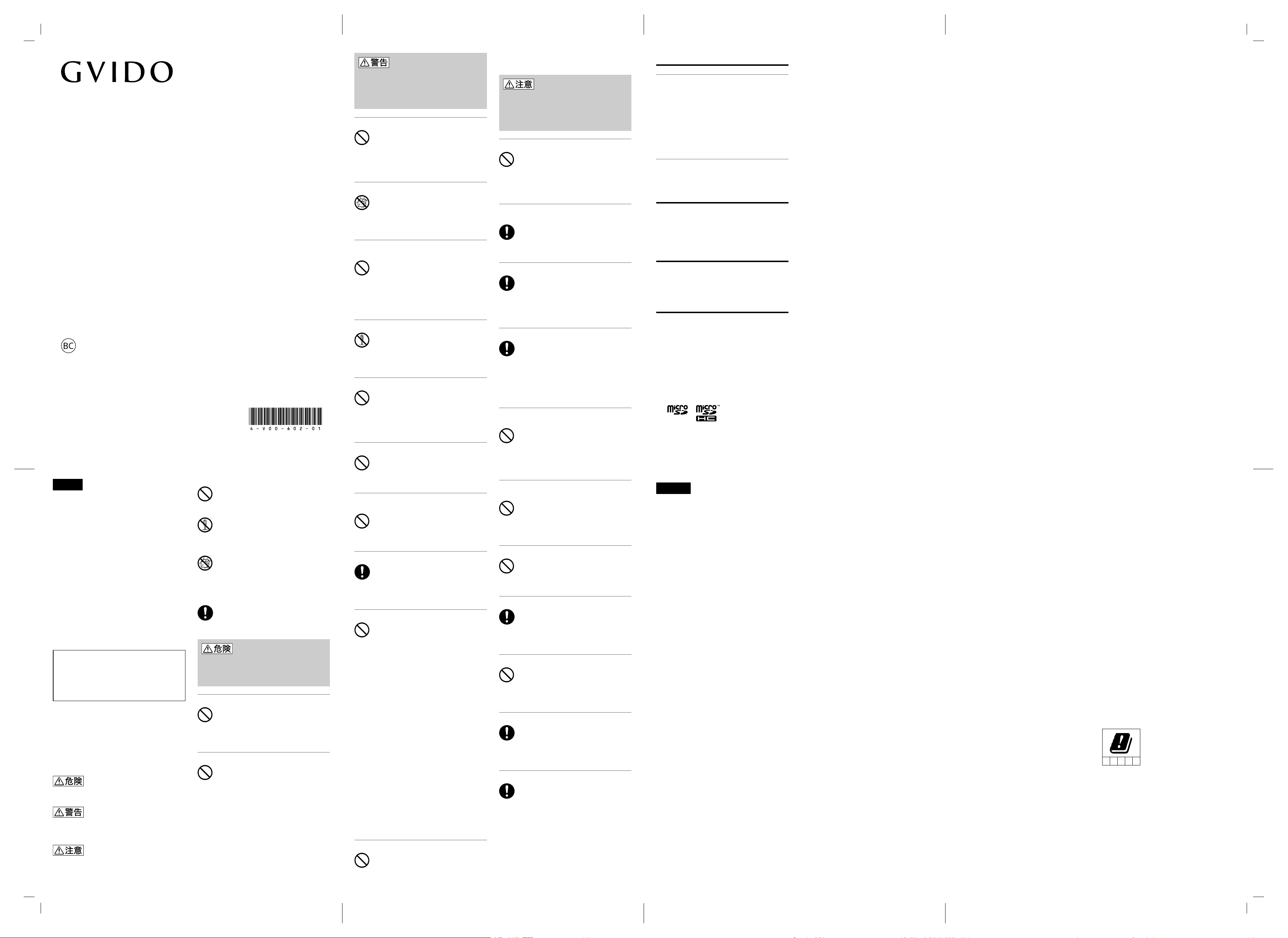
警告表示の意味
この表示の注意事項を守らないと、火災・感電・破裂
などにより死亡や大けがなどの人身事故が生じます。
この表示の注意事項を守らないと、火災・感電などに
より死亡や大けがなどの人身事故につながることがあ
ります。
この表示の注意事項を守らないと、感電やその他の事
故によりけがをしたり周辺の物品に損害を与えたりす
ることがあります。
行為を禁止する記号
一般的な禁止行為や禁止事項を示します。
機器を分解することで感電などの障害が起こる可能性
を示します。
水がかかる場所で使用したり水に濡らすなどして使用
すると、漏電による感電や発火の可能性を示します。
行為を指示する記号
一般的な使用者に対する行為を指示します。
下記の注意事項を守らないと、火災・感電・
破裂などにより死亡や大けがなどの人身
事故が生じます。
指定の充電方法以外でバッテリーを充電しない
本機はバッテリーを内蔵しています。指定の充電方法
以外でバッテリーを充電しないでください。火災や破
裂の原因となることがあります。
バッテリーの液が目に入ったら、すぐに洗浄する
バッテリーから漏れた液が目に入った場合は、きれい
な水で洗ったあと、ただちに医師に相談してください。
下記の注意事項を守らないと、火災・感
電などによる死亡や大けがの原因となり
ます。また、医療機器などを誤動作させ
ることがあり、事故の原因となります。
湿気、ほこり、油煙、湯気の多い場所では使わない
上記のような場所で使うと、火災や感電の原因となる
ことがあります。取扱説明書に記されている使用条件
以外の環境でのご使用は、火災や感電の原因となるこ
とがあります。
内部に水や異物を入れない
水や異物が入ると火災や感電の原因となることがあり
ます。万一、水や異物が入ったときは、すぐに電源を
切り、USB ケーブルを抜いてください。
可燃性のエアゾール製品(エアダスター等)を使
用しない
本機のお手入れのために可燃性ガスを使用したエア
ゾール製品(エアダスター、スプレー等)を使用する
と、可燃性ガスが本機の内部にたまり、スイッチ接点・
高温部などから引火し、爆発や発火の原因となること
があります。
分解や改造をしない
本機および付属の機器(ケーブルを含む)は、分解し
たり改造したりすると火災や感電の原因となることが
あります。
落雷のおそれがあるときは本機を使用しない
落雷により、感電することがあります。雷が予測され
るときは、火災や感電を防ぐために、USB ケーブル
が接続されている場合は抜いてください。また、雷が
鳴り出したら、本機には触らないでください。
ひざの上で長時間使用しない
長時間使用すると本機の底面が熱くなり、低温やけど
の原因となることがあります。
使用中や充電中に、本機を毛布などでおおったり
包んだりしない
熱がこもってケースが変形したり、火災の原因となる
ことがあります。
指定された USB ケーブルを使う
付属の USB ケーブル以外は本機にはご使用にならな
いでください。発熱により火災・感電の原因となるこ
とがあります。
特定の状況下では、ワイヤレス機能を使用しない
•本機はワイヤレス機能を内蔵しています。以下の点
に注意してご使用いただき、緊急の場合(障害など
が発生した場合)は、ただちに下記の方法でワイヤ
レス機能を停止させてください。
−本機の電源を切る。(本機では、お買い上げ時、ワ
イヤレス機能がオンになっています。)
−機内モードにする。
•満員電車の中など混雑した場所ではワイヤレス機能
を使用しないでください。付近に心臓ペースメー
カーを装着されている方がいる可能性のある場所で
は、電波によりペースメーカーの動作に影響を与え
ることがあります。
•病院など医療機関内、医療用電気機器の近くで使用
しないでください。電波が影響を及ぼし、医療用電
気機器の誤動作による事故の原因となることがあり
ます。
•航空機内ではワイヤレス機能を使用しないでくださ
い。航空機の離着陸時には、必ず本機の電源を切っ
てください。電波が影響を及ぼし、誤動作による事
故の原因となることがあります。ワイヤレス機能の
サービスを提供している航空機内での使用について
は、ご利用の航空会社に使用条件などをご確認くだ
さい。
•本機を使用中に他の機器に電波障害などが発生した
場合は、ただちに使用をやめてください。電波が影
響を及ぼし、誤動作による事故の原因となることが
あります。
心臓ペースメーカーに近づけない
本機には磁石が使用されています。心臓ペースメー
カーの装着部位に本機を近づけないでください。磁気
によりペースメーカーの動作に影響を与えることがあ
ります。
下記の注意事項を守らないと、けがをし
たり健康を害することがあります。また、
周辺の物品に損害を与えたりすることが
あります。
不安定な場所に置かない
不安定な場所に置いたり設置したりしないでください。
落ちたり、倒れたりしてけがの原因となることがあり
ます。また、設置・取り付け場所の強度も十分にお確
かめください。
お手入れの際は、電源を切って USB ケーブルを抜
く
USB ケーブルを接続したままお手入れをすると、感
電の原因となることがあります。
移動させるときは、USB ケーブルを抜く
接続したまま移動させると USB ケーブルが傷つき、
火災や感電の原因となったり、接続している機器が落
ちたり、倒れたりしてけがの原因となることがありま
す。また、本機を落とさないようにご注意ください。
端子はきちんと接続する
•接続端子の内部に金属片を入れないでください。ピ
ンとピンがショート(短絡)して、火災の原因とな
ることがあります。
•端子はまっすぐに差し込んで接続してください。斜
めに差し込むとピンとピンがショートして、火災の
原因となることがあります。
直射日光のあたる場所や熱器具の近くに設置・保
管しない
炎天下や窓をしめきった自動車内、直射日光が当たる
場所、暖房器具の近くなど、異常な高温になる場所に
置かないでください。内部の温度が上がり、火災の原
因となることがあります。
製品の設置や移動時に楽器や机などの上でずらさ
ない
本機を設置したり、移動させるときに楽器や机などの
上でずらさないでください。楽器や机などが傷つく原
因となることがあります。
本機に強い衝撃を与えない
重いものを載せる、落とす、本機の上に乗るなど、無
理な力が加わると、けがの原因となることがあります。
乳幼児の手の届かないところに置く
IC記録メディアや小さなカード類など小さな部品を
誤って飲み込んだり、USB ケーブルを首に巻きつけ
たりすると、事故やけがの原因となることがあります。
磁気に弱いものを近づけない
本機には磁石が使用されています。磁気カードや乗車
券などの磁気に弱い機器を磁石に近付けないでくださ
い。記録内容が破壊されることがあります。
コード類は正しく配置する
コード類は足に引っかけたりして引っぱると製品の落
下や転倒などによりけがの原因となることがあるため、
十分注意して接続・配置してください。
指を挟まないよう注意する
画面を開く際は、2 つの画面をつないでいるヒンジ部
分に指を挟まないよう注意してください。
安全のために
SafetyRegulations
Réglementationsdesécurité
Normasdeseguridad
Sicherheitsrichtlinien
Normativedisicurezza
4-V00-602-01(1)
Printed in Japan
Terrada Music Score co.,ltd 2017.06
DMS-W1
DIGITAL MUSIC SCORE
安全規制について
電波法及び電気通信事業法に基づく認証について
本機は、電波法及び電気通信事業法の認証を受けた無
線モジュールを内蔵しています。従って、本機を使用
するときに無線局の免許は必要ありません。本機を分
解/改造したりすると、法律で罰せられることがあり
ます。
認証表示は以下の手順で確認することができます。
1本機のホーム画面右下にある[設定]を選択する。
設定画面が表示されます。
2[本体情報]−[認証情報]を選択する。
5GHz 帯無線 LAN について
5GHz 帯無線 LAN は屋内のみでご使用ください。
本機を廃棄するときのご注意
不要になった本機は、一般のごみと一緒に捨てないで
ください。本機を廃棄するときは、市町村の指示に従っ
て適切に処理するようにお願いいたします。詳しくは、
お住いの各市町村にお問い合わせください。
バッテリー のリサイクルについて
本機に内蔵されているバッテリーはリサイクルできま
す。このバッテリーの取り外しはお客様ご自身では行
わず、「*****」にご相談ください。
商標について
• Wi-FiはWi-FiAllianceの登録商標です。
• Bluetoothのワードマークおよびロゴは、
BluetoothSIG,Inc.が所有する登録商標であり、
テラダミュージックスコア株式会社はこれらの
マークをライセンスに基づいて使用しています。
その他の商標およびトレードネームは、それぞれ
の所有者に帰属します。
• microSDロゴ、microSDHCロゴはSD-3C,LLC.
の商標です。
• その他、本マニュアルで登場するシステム名、製
品名、サービス名は、一般に各開発メーカーの登
録商標あるいは商標です。なお、本文中では
(TM)、(R)マークは明記していません。
English
• Use of this device in a location with
excessive humidity, dust, oil fumes, or steam
may cause a fire or an electric shock. Use of
this device in an environment that does not
comply with the conditions described in the
User Guide may cause a fire or an electric
shock.
• Ingress of water or foreign matters may
cause a fire or an electric shock. If such
ingression is found, immediately turn off the
device and unplug the USB cable.
• Do not use any aerosol products containing
flammable gases (air dusters, hair styling
sprays, etc.) for cleaning this device as it may
cause the interior of this device to be filled
with flammable gases. A spark from switch
contacts or heated components may ignite
such gases, resulting in an explosion or a fire.
• Do not disassemble or modify the
accessories (including the cable) supplied
with this device as it may cause a fire or an
electric shock.
• While using this device, a nearby thunder
strike may cause an electric shock. When
lightning is forecasted, unplug the USB cable
from this device. When you hear thunder
rolling in, stay away from this device.
• Do not use this device on your lap for a long
period of time as it will create heat build
up inside the device and may cause low
temperature burns on your lap.
• While using this device or charging its
battery, do not wrap the device with a fabric,
such as a blanket, as it will create heat build
up inside the device and may cause a fire.
• Do not use any USB cables other than the
supplied one. Use of such cables with this
device may cause heat build up inside the
device, resulting in a fire or an electric shock.
• On this device, a magnet is employed. Keep
this device away from the implanted cardiac
pace maker. Its magnetic charge may affect
operation of the cardiac pace maker.
• Do not place this device on an unstable
surface as it may cause the device to fall
off or over, resulting in injuries. When you
intend to place this device on somewhere,
make sure it is rigid enough to withstand the
weight of the device as well.
• Before cleaning this device, turn off the
device and unplug the USB cable. Cleaning
this device with the USB cable still connected
may cause an electrical shock.
• When you intend to move this device, unplug
the USB cable in advance. Moving this
device with the USB cable still connected
may damage the cable, resulting in a fire
or an electrical shock. It may also cause
other connected devices to fall off or over,
resulting in injuries. While moving this device,
be sure to hold this device firmly as well so
as not to drop the device.
• Keep any small metal objects out of the slot
with a connection terminal inside. Ingress of
such an object may short-circuit pins on the
terminal, resulting in a fire.
• Connect a plug straight to a terminal. The
slant connection of the plug may short-circuit
pins on the terminal, resulting in a fire.
• Do not leave this device in or at a location
subject to extreme temperatures, such as
in a closed window vehicle parked under
the glaring sun, at a place exposed to direct
sunlight, or in the vicinity of a heater, as it
will create heat build up inside the device
and may cause a fire.
• Do not slide this device on a music
instrument or a table to place or move the
device as it may leave scratches on the
surface of the instrument or the table.
• Do not let this device exposed to strong
shocks. Exerting excessive force to this
device, for example placing a heavy object
on the device, dropping the device, and
sitting on the device, may result in injuries.
• Keep this device out of reach of small
children. They might accidentally swallow
a small component, such as an IC storage
media or a small-sized card, or wrap a cable
around the neck, which may lead to an
accident or injuries.
• On this device, a magnet is employed. Keep
any magnetic sensitive products, including
magnetic stripe cards and transportation
cards, away from this device to keep their
data intact.
• Keep cables tidied up. When they are
scattered, you may trip over one of the
cables and pull it hard to cause the
connected device to fall off or over. For
connecting and routing cables, a thoughtful
arrangement is necessary.
• When opening this device, keep your hand
away from the hinge connecting the two
screens to avoid having your fingers caught in
the hinge.
• This device has the wireless function. In
case of emergency (network failures, etc.),
immediately disable the wireless function by
doing either of the following:
– Turn off this device. (The wireless function is
enabled at the time of your purchase.)
– Enable the Airplane mode.
• Do not enable the wireless function of this
device in a location with many people,
such as a crowded train car. There may
be persons with the cardiac pace maker
implanted nearby. Enabling the wireless
function near such persons may affect
operation of the implanted cardiac pace
maker.
• When using this device in a medical
institution, such as a hospital, stay away
from any electric medical devices. Radio
interference from this device may cause
malfunctions of such devices, leading to an
accident.
• Do not enable the wireless function of this
device in an airplane. Be sure to turn off
this device well before the airplane takes
off or lands. Radio interference from this
device may cause malfunctions of electronic
components of the airplane, leading to an
accident. When in- flight wireless services
are available, ask a flight attendant for the
service conditions.
• When use of this device causes radio
interference with other devices, immediately
turn of the device and stop using it.
Otherwise, it may cause malfunctions of
other devices, leading to an accident.
• This device contains a battery. Do not charge
the battery in any other way than instructed
as it may cause a fire or an explosion of the
battery pack.
• When your eyes are exposed to battery fluid,
rinse them with clean water and check with
your doctor.
• Caution: Risk of explosion if battery is
replaced by an incorrect type. Replace
only with the same or equivalent type
recommended by the manufacturer.
Dispose of used batteries according to the
instructions. The battery used in this device
may present a fire or chemical burn hazard if
mistreated. Do not crush, disassemble, heat
above 140°F / 60°C or incinerate. Dispose of
used batteries promptly and properly. Keep
away from children.
For customers in the U.S.A.
FCC Information and Precautions
This equipment has been tested and found
to comply with the limits for a Class B digital
device, pursuant to Part 15 of the FCC
Rules. These limits are designed to provide
reasonable protection against harmful
interference in a residential installation.
This equipment generates, uses, and can
radiate radio frequency energy and, if not
installed and used in accordance with the
instructions, may cause harmful interference
to radio communications. However, there is
no guarantee that interference will not occur
in a particular installation. If this equipment
does cause harmful interference to radio or
television reception, which can be determined
by turning the equipment off and on, the user
is encouraged to try to correct the interference
by one or more of the following measures:
– Reorient or relocate the receiving antenna.
– Increase the separation between the
equipment and receiver.
– Connect the equipment into an outlet on
a circuit different from that to which the
receiver is connected.
– Consult the dealer or an experienced radio/
TV technician for help.
Changes or modifications not expressly
approved by the party responsible for
compliance could void the user’s authority to
operate the equipment.
NOTE: The manufacturer is not responsible
for any radio or TV interference caused by
unauthorized modifications to this equipment.
Such modifications could void the user’s
authority to operate the equipment.
Only peripherals that comply with FCC Class
B limits may be attached to this product.
Operation with noncompliant peripherals is
likely to result in interference to radio and
television reception.
The supplied interface cable must be used
with the equipment in order to comply with
the limits for a digital device pursuant to
Subpart B of Part 15 of the FCC Rules.
The available scientific evidence does not
show that any health problems are associated
with using low power wireless devices.
There is no proof, however, that these
low power wireless devices are absolutely
safe. Low power Wireless devices emit low
levels of radio frequency energy (RF) in the
microwave range while being used. Whereas
high levels of RF can produce health effects
(by heating tissue), exposure of low-level
RF that does not produce heating effects
causes no known adverse health effects.
Many studies of low-level RF exposures
have not found any biological effects. Some
studies have suggested that some biological
effects might occur, but such findings have
not been confirmed by additional research.
This equipment has been tested and found
to comply with FCC radiation exposure limits
set forth for an uncontrolled environment and
meets the FCC radio frequency (RF) Exposure
Guidelines.
This transmitter must not be co-located
or operated in conjunction with any other
antenna or transmitter except Grant condition.
You can find out the FCC ID and/or DoC logo
of this product with the following steps.
1 Select [Settings] at the bottom right corner
of the [Home] screen.
The [Settings] screen appears.
2 Select [Device information] - [Regulatory
approvals].
Declaration of Conformity
Trade Name: GVIDO
Model No.: DMS-W1
Manufacturer: Terrada Music Score Co., Ltd.
Responsible Party: TRANSCOSMOS AMERICA,
INC.
879 West 190th Street, Suite 1050 Gardena,
CA 90248
Telephone No.: 310-630-0072
This device complies with Part 15 of the FCC
Rules. Operation is subject to the following
two conditions:
(1) this device may not cause harmful
interference, and
(2) this device must accept any interference
received, including interference that may cause
undesired operation.
Disposal and Recycling
Device Disposal and Recycling
Information
Disposal of this product may be regulated due
to environmental considerations.
For disposal, reuse or recycling information,
please visit XXXXX website: http://XXXX or call
XXXXX
For customers in Canada
IC Information and Precautions
This device complies with Industry Canada’s
licence-exempt RSSs. Operation is subject to
the following two conditions:
(1) This device may not cause interference;
and
(2) This device must accept any interference,
including interference that may cause
undesired operation of the device.
5150-5350 MHz band is restricted to indoor
operation only.
High-power radars are allocated as primary
users (i.e. priority users) of the bands 52505350 MHz and 5650-5850 MHz and that
these radars could cause interference and/or
damage to LE-LAN devices.
Data transmission is always initiated by
software, which is the passed down through
the MAC, through the digital and analog
baseband, and finally to the RF chip. Several
special packets are initiated by the MAC.
These are the only ways the digital baseband
portion will turn on the RF transmitter, which
it then turns off at the end of the packet.
Therefore, the transmitter will be on only
while one of the aforementioned packets is
being transmitted. In other words, this device
automatically discontinue transmission in case
of either absence of information to transmit or
operational failure.
The available scientific evidence does not
show that any health problems are associated
with using low power wireless devices.
There is no proof, however, that these
low power wireless devices are absolutely
safe. Low power Wireless devices emit low
levels of radio frequency energy (RF) in the
microwave range while being used. Whereas
high levels of RF can produce health effects
(by heating tissue), exposure of low-level RF
that does not produce heating effects causes
no known adverse health effects. Many
studies of low-level RF exposures have not
found any biological effects. Some studies
have suggested that some biological effects
might occur, but such findings have not been
confirmed by additional research. This product
has been tested and found to comply with
IC radiation exposure limits set forth for an
uncontrolled environment and meets RSS-102
of the IC radio frequency (RF) Exposure rules.
You can find out the IC No. and ICES-003
statement of this product with the following
steps.
1 Select [Settings] at the bottom right corner
of the [Home] screen.
The [Settings] screen appears.
2 Select [Device information] - [Regulatory
approvals].
For customers in European
countries
RE Directive and RoHS Directive
Information and Precautions
This product has been manufactured by or on
behalf of Terrada Music Score Co., Ltd. 2-6-10
Higashi-Shinagawa, Shinagawa-ku, Tokyo, 1400002 Japan.
Inquiries related to product compliance
based on European Union legislation shall be
addressed to the authorized representative,
TRANSCOSMOS(UK)LIMITED7thFloor18
KingWilliamStreetLondon,EC4N7BP,UK.
For any service or guarantee matters, please
refer to the addresses provided in the
separate service or guarantee documents.
Hereby, TRANSCOSMOS (UK) LIMITED
declares that this product is in compliance
with 2014/53/EU (RE Directive) and 2011/65/
EU (RoHS Directive).
The full text of the EU declaration of
conformity is available at the following internet
address: http://www.xxxxxxxxxx
This product has been tested and found
compliant with the limits set out in the EMC
Directive for using connection cables not
longer than 3 meters.
Radio frequency range: xxxx Hz - xxxxHz
Maximum radio frequency power supply: xxx W
Only use Wireless LAN indoors when using it
with IEEE 802.11a/n(5GHz)/ac.
This equipment is intended to be used at a
distance greater than xx mm between the
xxxxxxxx and the user.
DE ES FR IT UK
Page 4
安全のために4-V00-602-01(1)
Disposal of waste batteries and electrical
and electronic equipment (applicable in the
European Union and other European countries
with separate collection systems)
This symbol on the product, the battery or
on the packaging indicates that the product
and the battery shall not be treated as
household waste. On certain batteries this
symbol might be used in combination with a
chemical symbol. The chemical symbols for
mercury (Hg) or lead (Pb) are added if the
battery contains more than 0.0005% mercury
or 0.004% lead. By ensuring these products
and batteries are disposed of correctly,
you will help prevent potentially negative
consequences for the environment and human
health which could otherwise be caused by
inappropriate waste handling. The recycling
of the materials will help to conserve natural
resources.
In case of products that for safety,
performance or data integrity reasons require
a permanent connection with an incorporated
battery, this battery should be replaced by
qualified service staff only. To ensure that
the battery and the electrical and electronic
equipment will be treated properly, hand
over these products at end-of-life to the
applicable collection point for the recycling
of electrical and electronic equipment. For all
other batteries, please view the section on
how to remove the battery from the product
safely. Hand the battery over to the applicable
collection point for the recycling of waste
batteries. For more detailed information
about recycling of this product or battery,
please contact your local Civic Office, your
household waste disposal service or the shop
where you purchased the product or battery.
Trademarks
• Wi-Fi® is a registered trademark of the Wi-Fi
Alliance.
• The Bluetooth
®
word mark and logos are
registered trademarks owned by Bluetooth
SIG, Inc. and any use of such marks by
Terrada Music Score Co., Ltd is under license.
Other trademarks and trade names are those
of their respective owners.
• microSD and microSDHC logos are
trademarks of SD-3C, LLC.
• All other trademarks and registered
trademarks are trademarks or registered
trademarks of their respective holders.
Furthermore, “™” and “®” are not mentioned
in each in this manual.
Français
• L'utilisation de cet appareil dans un endroit
trop humide, poussiéreux, contenant trop de
vapeurs d'huile, ou de vapeur peut provoquer
un incendie ou une électrocution. L'utilisation
de cet appareil dans un environnement
non conforme aux conditions décrites dans
le Guide d'utilisateur peut provoquer un
incendie ou une électrocution.
• L'infiltration d'eau ou de corps étrangers peut
provoquer un incendie ou une électrocution.
Si une telle infiltration est trouvée, mettez
immédiatement l'appareil hors tension et
débranchez le câble USB.
• N'utilisez pas de produits aérosols contenant
des gaz inflammables (pulvérisateurs d'air
comprimé, sprays coiffants, etc.) pour le
nettoyage de l'appareil étant donné que
l'intérieur de l'appareil pourrait se remplir de
gaz inflammables. Une étincelle des contacts
d'interrupteur ou des éléments chauffés
peut enflammer de tels gaz, entraînant une
explosion ou un incendie.
• Ne démontez pas ni ne modifiez les
accessoires (y compris le câble) fournis
avec l'appareil étant donné que cela peut
provoquer un incendie ou une électrocution.
• Tout en utilisant l'appareil, un coup de
tonnerre proche peut entraîner une
électrocution. Lorsque les prévisions météo
annoncent de la foudre, débranchez le câble
USB de l'appareil. Lorsque vous entendez
le tonnerre s'approcher, restez éloigné de
l'appareil.
• N'utilisez pas l'appareil sur vos genoux
pendant une période de temps prolongée
étant donné que de la chaleur s'accumulera
à l'intérieur de l'appareil et pourra provoquer
des brûlures légères sur vos genoux.
• Tout en utilisant l'appareil ou en chargeant
sa batterie, n'enveloppez pas l'appareil dans
un tissu, tel qu'une couverture, étant donné
que la chaleur s'accumulera à l'intérieur de
l'appareil et pourra provoquer un incendie.
• N'utilisez pas d'autre câble USB que celui
fourni. L'utilisation de tels câbles avec
l'appareil peut entraîner une accumulation
de chaleur à l'intérieur de l'appareil, qui
peut être à l'origine d'un incendie ou d'une
électrocution.
• Un aimant est employé sur cet appareil.
Tenez l'appareil éloigné de stimulateur
cardiaque implanté. Son chargement
électromagnétique risque d'affecter le
fonctionnement du stimulateur cardiaque.
• Ne placez pas l'appareil sur une surface
instable, il pourrait tomber et vous blesser.
Lorsque vous voulez placer l'appareil
quelque-part, assurez-vous que la surface
est assez solide pour supporter le poids de
l'appareil.
• Avant de nettoyer l'appareil, mettez-le hors
tension et débranchez le câble USB. Le
nettoyage de l'appareil alors que le câble
USB est encore branché peut entraîner une
électrocution.
• Lorsque vous prévoyez de déplacer l'appareil,
débranchez le câble USB au préalable.
Déplacer l'appareil alors que le câble USB
est encore branché risque d'endommager
ce dernier et provoquer un incendie ou une
électrocution. Cela peut également entraîner
la chute d'autres appareils connectés, et par
là même vous blesser. Veillez à maintenir
fermement l'appareil afin qu'il ne tombe pas
pendant son déplacement.
• Gardez tout petit objet métallique en
dehors de l'encoche avec une borne de
raccordement à l'intérieur. L'infiltration d'un
tel objet peut court-circuiter les broches de
la borne et provoquer un incendie.
• Connectez une fiche droite à une borne.
Le raccordement de biais de la fiche peut
entraîner un court-circuit des broches sur la
borne, provoquant ainsi un incendie.
• Ne laissez pas l'appareil dans un endroit
soumis à des températures extrêmes, par
exemple, un véhicule aux vitres fermées
stationné sous un soleil de plomb, dans un
endroit exposé aux rayons directs du soleil,
ou à proximité d'un chauffage, étant donné
que la chaleur s'accumule à l'intérieur de
l'appareil et qu'un incendie peut survenir.
• Ne faites pas glisser l'appareil sur un
instrument de musique ou une table pour
placer ou déplacer l'appareil étant donné
qu'il peut rayer la surface de l'instrument ou
de la table.
• Ne laissez pas l'appareil exposé à de forts
impacts. Exercer un force excessive sur
l'appareil, par exemple, placer un objet lourd
sur l'appareil, laisser tomber l'appareil et
s'asseoir sur l'appareil, peut entraîner des
blessures.
• Gardez l'appareil hors de portée des enfants.
Ils pourraient ingérer accidentellement un
petit composant, comme un support de
stockage IC ou une carte de petite taille,
ou s'enrouler un câble autour du cou, ce
qui pourrait provoquer un accident ou des
blessures.
• Un aimant est employé sur cet appareil.
Gardez tout produit magnéto-sensible, dont
les cartes à bandes magnétiques et les
cartes de transport, éloigné de l'appareil
pour garder intactes leurs données.
• Gardez les câbles bien rangés. Lorsqu'ils
sont dispersés, vous risquez de trébucher sur
un des câbles et de le tirer fort entraînant
la chute de l'appareil connecté. Pour le
branchement et l'acheminement de câbles,
une disposition réfléchie est nécessaire.
• Lors de l'ouverture de l'appareil, gardez vos
mains éloignées de la charnière réunissant
les deux écrans pour éviter de vous y coincer
les doigts.
• Cet appareil dispose de la fonction sans fil.
En cas d'urgence (défaillances du réseau,
etc.), désactivez immédiatement la fonction
sans fil en effectuant une des opérations
suivantes:
– Mettez l'appareil hors tension. (La fonction
sans fil est activée au moment de votre
achat.)
– Activez le mode Avion.
• N'activez pas la fonction sans fil de l'appareil
dans un endroit rempli de monde, comme
un wagon bondé. Des personnes équipées
d'un simulateur cardiaque sont peut-être à
proximité. L'activation de la fonction sans
fil près de telles personnes peut affecter le
fonctionnement du simulateur cardiaque.
• Lors de l'utilisation de cet appareil dans
une institution médicale, comme un hôpital,
restez éloigné d'appareils médicaux
électriques. Des interférences radio
provenant de cet appareil peuvent provoquer
des dysfonctionnements de tels appareils,
menant à un accident.
• N'activez pas la fonction sans fil de l'appareil
dans un avion. Veillez à mettre hors tension
l'appareil avant le décollage ou l'atterrissage
de l'avion. Des interférences radio provenant
de cet appareil peuvent provoquer des
dysfonctionnements des composants
électroniques de l'avion, menant à un
accident. Lorsqu'en vol, des services sans fil
sont disponibles, demandez à un steward les
conditions de service.
• Lorsque l'utilisation de l'appareil provoque
des interférences radio avec d'autres
appareils, mettez immédiatement l'appareil
hors tension et arrêtez de l'utiliser. Dans
le cas contraire, il peut provoquer des
dysfonctionnements sur d'autres appareils,
menant à un accident.
• Cet appareil contient une batterie. Ne
chargez pas la batterie d'une manière
différente que celle donnée dans les
instructions sous peine d'incendie ou
d'explosion du bloc-batterie.
• Lorsque vos yeux sont exposés au liquide de
batterie, rincez-les à l'eau claire et consultez
votre médecin.
• Attention: risque d'explosion si la batterie
est remplacée par un type incorrect.
Remplacez uniquement par le même type
ou équivalent recommandé par le fabricant.
Enlevez les batteries usées en fonction
des instructions. La batterie usée dans
l'appareil peut présenter un incendie ou un
risque de brûlure chimique si elle n'est pas
correctement mise au rebut. N'écrasez pas,
ne démontez pas, ne chauffez pas au-delà
de 140°F / 60°C ni incinérez. Élimination de
batteries usées rapidement et correctement.
Tenez à l'écart des enfants.
Élimination et recyclage
Informations de recyclage et
d'élimination de l'appareil
L'élimination de ce produit peut être
réglementée en raison de préoccupations
environnementales.
Pour les informations d'élimination, de
réutilisation ou de recyclage,
veuillez visiter le site Web XXXXX: http://XXXX
ou appelez le XXXXX
Pour les clients du Canada
Informations et précautions IC
Le présent appareil est conforme aux CNR
d’Industrie Canada applicables aux appareils
radio exempts de licence.
L’exploitation est autorisée aux deux
conditions suivantes :
1) l’appareil ne doit pas produire de
brouillage;
2) l’utilisateur de l’appareil doit accepter tout
brouillage radioélectrique subi, même si le
brouillage est susceptible d’en compromettre
le fonctionnement.
La bande 5150-5350 MHz est restreinte à une
utilisation à l’intérieur seulement.
Les radars de haute puissance sont désignés
utilisateurs principaux (c.-à-d., qu'ils ont la
priorité) pour les bandes 5250-5350 MHz
et 5650-5850 MHz, et ces radars pourraient
causer du brouillage et/ou des dommages aux
dispositifs LAN-EL.
La transmission des données est toujours
initiée par le logiciel, puis les données sont
transmises par l'intermédiaire du MAC, par
la bande de base numérique et analogique
et, enfin, à la puce RF. Plusieurs paquets
spéciaux sont initiés par le MAC. Ce sont
les seuls moyens pour qu'une partie de la
bande de base numérique active l'émetteur
RF, puis désactive celui-ci à la fin du paquet.
En conséquence, l'émetteur reste uniquement
activé lors de la transmission d'un des
paquets susmentionnés. En d'autres termes, ce
dispositif interrompt automatiquement toute
transmission en cas d'absence d'information à
transmettre ou de défaillance.
Les connaissances scientifiques dont nous
disposons n’ont mis en évidence aucun
problème de santé associé à l’usage des
appareils sans fil à faible puissance. Nous
ne sommes cependant pas en mesure de
prouver que ces appareils sans fil à faible
puissance sont entièrement sans danger. Les
appareils sans fil à faible puissance émettent
une énergie fréquence radioélectrique (RF)
très faible dans le spectre des micro-ondes
lorsqu’ils sont utilisés. Alors qu’une dose
élevée de RF peut avoir des effets sur la santé
(en chauffant les tissus), l’exposition à de
faibles RF qui ne produisent pas de chaleur
n’a pas de mauvais effets connus sur la santé.
De nombreuses études ont été menées sur les
expositions aux RF faibles et n’ont découvert
aucun effet biologique. Certaines études ont
suggéré qu’il pouvait y avoir certains effets
biologiques, mais ces résultats n’ont pas été
confirmés par des recherches supplémentaires.
Ce produit a été testé et jugé conforme
aux limites d’exposition aux rayonnements
IC énoncées pour un environnement non
contrôlé et respecte les règles d’exposition
aux fréquences radioélectriques (RF) CNR-102
de l’IC.
Vous trouverez les instructions IC No. et NMB003 de ce produit avec les étapes suivantes.
1 Sélectionnez [Réglages] dans le coin inférieur
droit de l'écran [Accueil].
L'écran [Réglages] s'affiche.
2 Sélectionnez [Informations sur l'appareil] -
[Certifications règlementaires].
Pour les clients d'Europe
Informations sur la directive RE
et RoHS et précautions
Ce produit a été fabriqué par ou pour le
compte de Terrada Music Score Co., Ltd. 2-610 Higashi-Shinagawa, Shinagawa-ku, Tokyo,
140-0002 Japon.
Les demandes relatives à la conformité du
produit sur base de la législation de l'Union
européenne doivent être adressées au
représentant agréé, TRANSCOSMOS(UK)
LIMITED7thFloor18KingWilliamStreet
London,EC4N7BP,UK.
Pour toute question de garantie ou d'entretien,
veuillez vous reporter aux adresses fournies
dans les documents de garantie ou d'entretien
séparés.
Par la présente, TRANSCOSMOS (UK) LIMITED
déclare que ce produit est conforme à la
2014/53/EU (Directive RE) et à la 2011/65/EU
(Directive RoHS).
Le texte complet de la déclaration de
conformité européenne est disponible sur
l'adresse internet suivante: http://www.
xxxxxxxxxx
Ce produit a été testé et s'est avéré conforme
aux limites énoncées dans la Directive CEM
quant à l'utilisation de câbles de connexion
inférieurs à 3 mètres.
Plage de fréquence radio: xxxx Hz - xxxxHz
Alimentation électrique de fréquence radio
maximum: xxx W
Utilisez LAN sans fil uniquement à
l'intérieur lorsque vous l'utilisez avec IEEE
802.11a/n(5GHz)/ca.
Cet équipement est conçu pour une utilisation
à une distance supérieure à xx mm entre le
xxxxxxxx et l'utilisateur.
Elimination des piles et accumulateurs et des
Equipements Electriques et Electroniques
usagés (Applicable dans les pays de l'Union
Européenne et aux autres pays européens
disposant de systèmes de collecte sélective)
Ce symbole apposé sur le produit, la pile ou
l’accumulateur ou sur l’emballage, indique que
le produit et les piles et accumulateurs fournis
avec ce produit ne doivent pas être traités
comme de simples déchets ménagers.
Sur certains types de piles, ce symbole
apparaît parfois combiné avec un symbole
chimique. Les symboles pour le mercure (Hg)
ou le plomb (Pb) sont rajoutés lorsque ces
piles contiennent plus de 0,0005% de mercure
ou 0,004% de plomb.
En vous assurant que les produits, piles et
accumulateurs sont mis au rebut de façon
appropriée, vous participez activement à la
prévention des conséquences négatives que
leur mauvais traitement pourrait provoquer sur
l’environnement et sur la santé humaine. Le
recyclage des matériaux contribue par ailleurs
à la préservation des ressources naturelles.
Pour les produits qui pour des raisons de
sécurité, de performance ou d’intégrité
de données nécessitent une connexion
permanente à une pile ou à un accumulateur,
il conviendra de vous rapprocher d’un
Service Technique qualifié pour effectuer son
remplacement.
En rapportant votre appareil électrique, les
piles et accumulateurs en fin de vie à un point
de collecte approprié vous vous assurez que
le produit, la pile ou l'accumulateur incorporé
sera traité correctement.
Pour tous les autres cas de figure et afin
d’enlever les piles ou accumulateurs en toute
sécurité de votre appareil, reportez-vous au
manuel d’utilisation.
Rapportez les piles et accumulateurs, et les
équipements électriques et électroniques
usagés au point de collecte approprié pour le
recyclage.
Marques
• Wi-Fi® est une marque déposée de la Wi-Fi
Alliance.
• La marque verbale Bluetooth
®
et les logos
sont des marques déposées appartenant à
Bluetooth SIG, Inc. et tout utilisation de telles
marques par Terrada Music Score Co., Ltd se
fait sous licence. D'autres marques et noms
commerciaux appartiennent aux sociétés qui
en sont respectivement détentrices.
• Les logos microSD et microSDHC sont des
marques de SD-3C, LLC.
• Toutes les autres marques et marques
déposées sont des marques ou des marques
déposées appartenant aux détenteurs
respectifs. En outre, “™” et “®” ne sont pas
mentionnés dans ce manuel.
DE ES FR IT UK
 Loading...