

Page 1
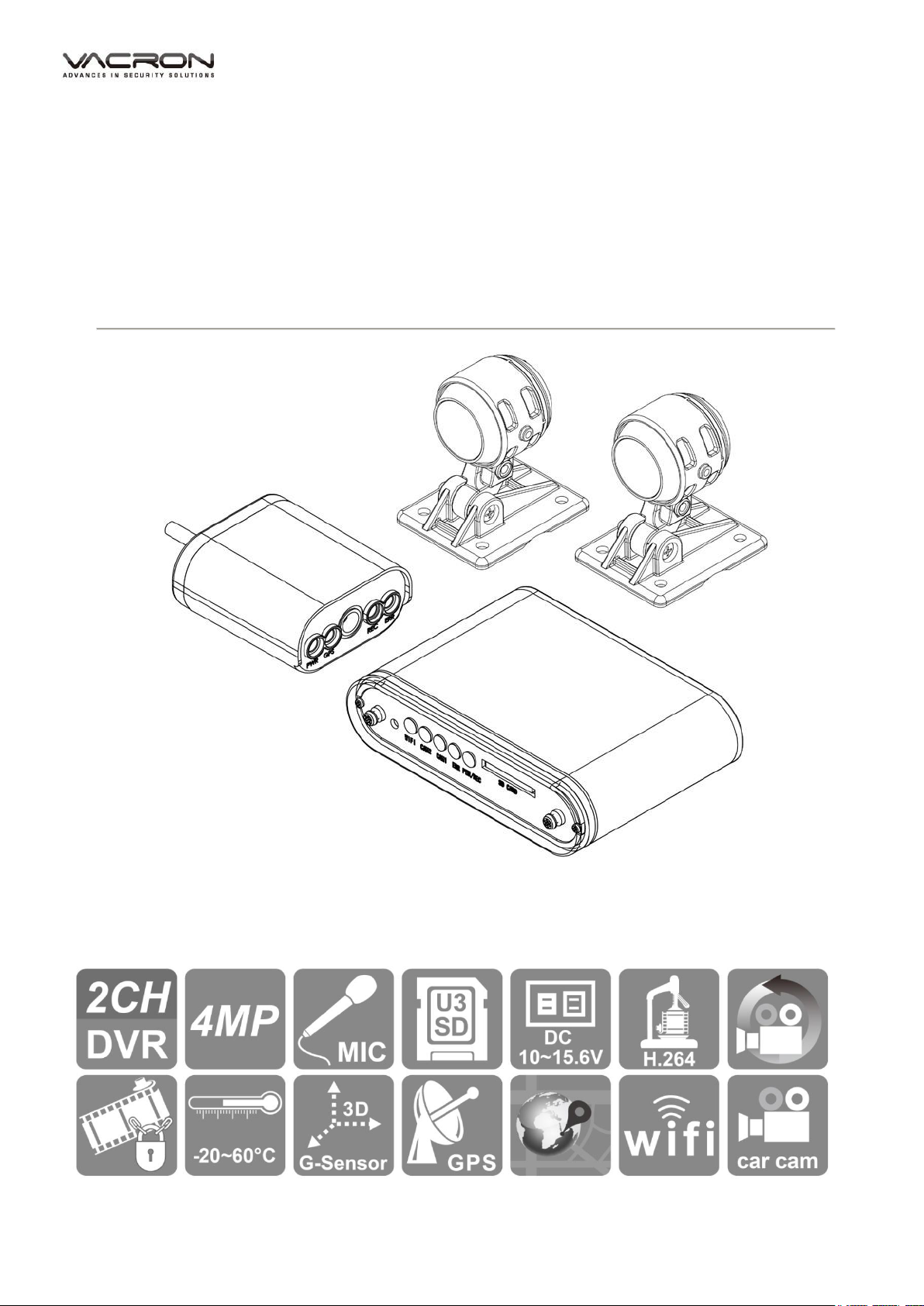
2CH Vehicle Video Recorder
Operation Manual
2018 OCT V1.0
Page 2

2-Channel Mobile Video Recorder
User Manual
i
Table of Contents
A.
Accessories ................................................................................................................................................... 1
B.
Features: ......................................................................................................................................................... 2
C.
Specifications ............................................................................................................................................... 3
D.
Product appearance .................................................................................................................................. 5
E.
Installation of SD card ............................................................................................................................... 6
F.
Cable Installation ........................................................................................................................................ 8
G.
Installation diagram ................................................................................................................................ 10
Installation on motorcycle ................................................................................................................. 10
DVR installation diagram ................................................................................................................... 12
H.
Remote Controller (optional) .................................................................................................................. 13
J.
Live view: ..................................................................................................................................................... 15
K.
WiFi connection ....................................................................................................................................... 17
(a)、QR Code download︰ ............................................................................................................................. 17
(b)、Android:
(c)、IOS
........................................................................................................................................................ 17
................................................................................................................................................................... 22
Page 3

2-Channel Mobile Video Recorder
User Manual
ii
Safety Precautions
Dear Vacron user,
Appreciate for you purchase Vacron products. Please contact your local
distributor if you meet any question or need for any assistance. We will
offer you complete and in time service via local distributor. However, we
still have rights to upgrade software and hardware without any kind
notice beforehand. Please read this manual carefully prior to use of this
product.
Installation Precautions
Before installation, please insure wires and cables connect correctly.
Device has to install in ventilated environment and the installation
have to guide or help by professional device installer.
Please use storage device that recommended by manufacture, and
purchase the storage device from official purchase channel.
Please contact local distributor and technology support service if
you have any question and need any help during product usage
In Use Precautions
Please avoid any solid or liquid get into the inner components.
Please do not disassemble the equipment for warranty issue.
Please contact local dealers or the manufacturer for prompt service.
Please remove the battery if remote control keeps idle for quite a
long while.
The equipment best connects with ground wire in case of outdoor
cameras connection or alarm I/O connection. This is to keep the DVR
away from static electricity damage.
Page 4

2-Channel Mobile Video Recorder
User Manual
iii
Surrounding
Please have the DVR under recommended temperature set it away
from the sun and heating source.
Please keep this equipment away from humid surrounding.
Please keep this equipment away from smoke and dust
environment.
Please avoid strongly collision and do not drop the equipment.
Please set this equipment in ventilation space, and do not block
the device’s ventilator.
Please use device under rated voltage and Amp.
Please keep flammable objects away from the equipment.
Page 5

2-Channel Mobile Video Recorder
User Manual
1
A. Accessories
Please check every accessory we list below, make sure everything include in
the product package before use. If you found any thing missing, please
contact local distributor.
Note:The product set does not come with memory card, please purchase
the memory card separately.
Standard set:
Power cable
Multi-functional OBD display (built in GPS and microphone)
USB WiFi Dongle
2 pcs camera (DC5V)
2 Pcs camera cable
Velcro tape
Page 6

2
2-Channel Mobile Video Recorder
User Manual
B. Features:
a) Aluminum casing make it durable and waterproof.
b) Small independent system, 2 channels video and 1 channel audio
c) H.264 compression format, 4MP video resolution.
d) Low power consumption and efficient heat dissipation, no build-in Lithium
e) Devices starts recording automatically when engine is on, file is well
f) Have GPS route tracking function, can display the route tracking by click
g) Can connect with USB WiFi dongle, connection for APP to display,
recording.
battery to prevent possible danger and heat explosion.
formatted and saved securely with extension recording by super capacitor.
Google map during video playing in PC player.
playback and backup file directly.
Page 7

3
2-Channel Mobile Video Recorder
User Manual
Item
Specification
Video Input
2CH 4MP
Resolution
4MP
CH1 NTSC/PAL:30FPS/25FPS、
CH2 NTSC/PAL:30FPS/25FPS
Power
Consumption
(a) DC12V input, power consumption is approx. 1A.
(b) DC12V input, ACC OFF standby power consumption is
approx.2.5mA.
(c) Operation voltage: DC10.0v ~ DC15.6v.
(d) Initial voltage: DC8V above.
Operation
Temperature
Operation -20℃~60℃ ( In disclosed space) .
Storing temperature: -40℃~85℃.
Storage
Device
Memory card speed is recommended to be above U3,
Otherwise it may causes the recording not completely.
Recording
mode
Continuous recording after power ON.
Data Content
Video, date, time, audio, GPS, external alarm trigger log,
G-Sensor.
Storage
Format
TS file format with universal playback software playback;
the device has the function of playback.
Audio Input
Compatible With multi-function display (including
microphone receiver)
C. Specifications
CAR DVR
Page 8

4
2-Channel Mobile Video Recorder
User Manual
Time Setting
GPS time zone auto calibration, and initialize with build-
in calendar if no GPS signal.
Please do GPS time calibration after installation, time
memory is kept with car battery, no battery power supply
will result setting return to default, please do time
calibration after connecting to power.
Display
TV-Out, Wifi AP mode by APP
Page 9

5
2-Channel Mobile Video Recorder
User Manual
Mode
OBD
Indicator
(a) Green light flashing: recording. (Higher flashing
frequency for event recording).
(b) Red light: install or set incorrect.
(c) Blue light: WiFi connection.
(d) Green light: CAM 1 on
(e) Green light: CAM 2 on
Input
(a) Power and signal input:
i. Power input DC12V
ii. ACC signal: power input range DC10.0v ~
DC15.5v。
iii. LAMP signal: power input range DC10.0v ~
DC15.6v for external alarm triggered force event
recording. (Reserved function, no effect)
(b) Video input
(c) Monitor input: GPS, speed, microphone audio input.
(d) Infrared remote control reception.
(e) SD card slot
Notes : The product specification is subject to change without prior notice
.
Page 10
2-Channel Mobile Video Recorder
User Manual
5
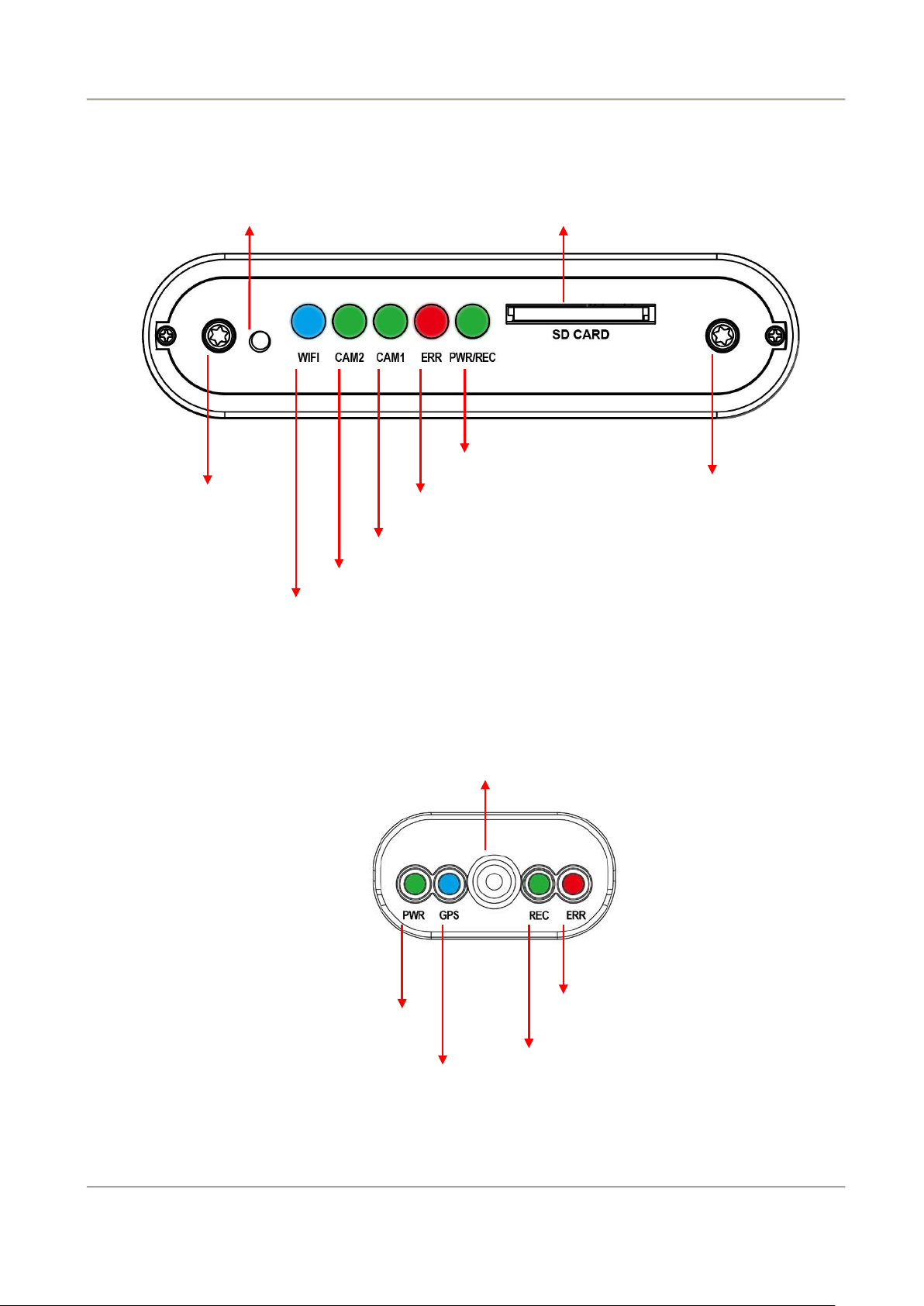
Power / Recording
Lid screw
Lid screw
Error Indicator
CAM1
CAM2
D. Product appearance
Mobile DVR unit:
IR Receiver
SD card slot
WiFi dongle light
OBD (On Board Display)
Microphone
Power
Error
GPS
Recording
Page 11
2-Channel Mobile Video Recorder
User Manual
6
E. Installation of SD card
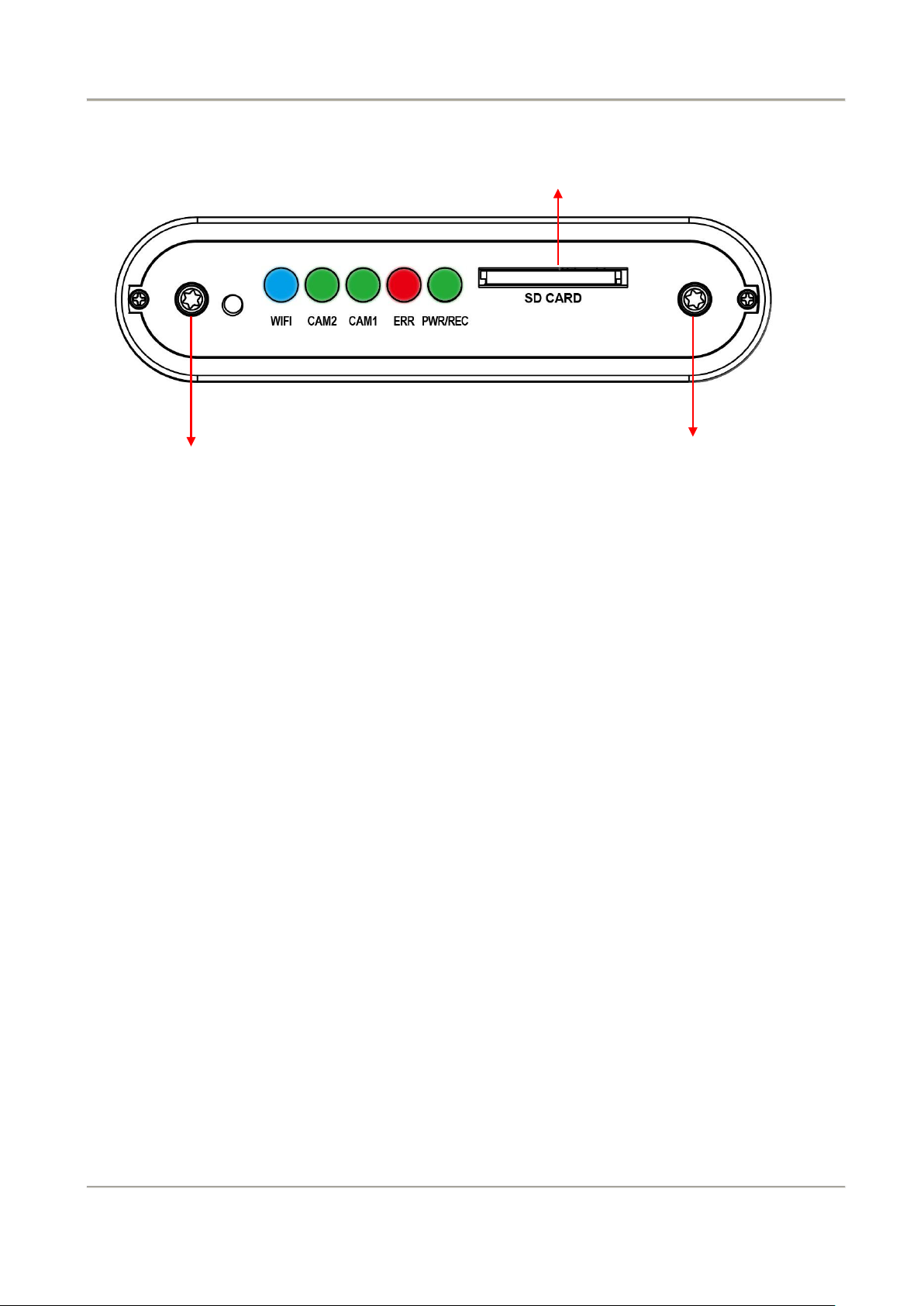
Dustproof lid screw
(1).
Counterclockwise to unscrew the screw of dustproof lid to install/takeoff the
SD card slot
Dustproof lid screw
SD card.
(2).
Format/ restoration SD card refer to other chapter description.
Page 12

2-Channel Mobile Video Recorder
User Manual
7
Attention
(1) Memory card speed is recommended to be above U3, Otherwise it
may causes the recording not completely.
(2) Before using the memory disk, please format the disk first by using the
software player in the CD-ROM. If not, device will automatically erase
all data in the memory disk before recording.
(3) To ensure recording quality, please do not use adapter card with
Micro SD card. Doing so may lead to bad connection due to shock and
vibration.
(4) All memory disks have limited lifespan. Please regularly watch videos
on PC and check the memory disk to ensure proper functioning.
(5) Collision and vibration may cause SD card defective and result
intermittent recording, please check data and backup file periodically.
(6) When you using new memory card insert host, the device will format
the memory card, and beginning recording after approx. 2 second.
(7) Any memory SD card, after being formatted by the device or PC, the
recorded image is played on the Windows operating system and to
format the SD Card by using PC to format.
(8) When accident happen, please remove SD card and set it as write
protection condition, for avoid record being over writing or
tampering.
Page 13
2-Channel Mobile Video Recorder
User Manual
8
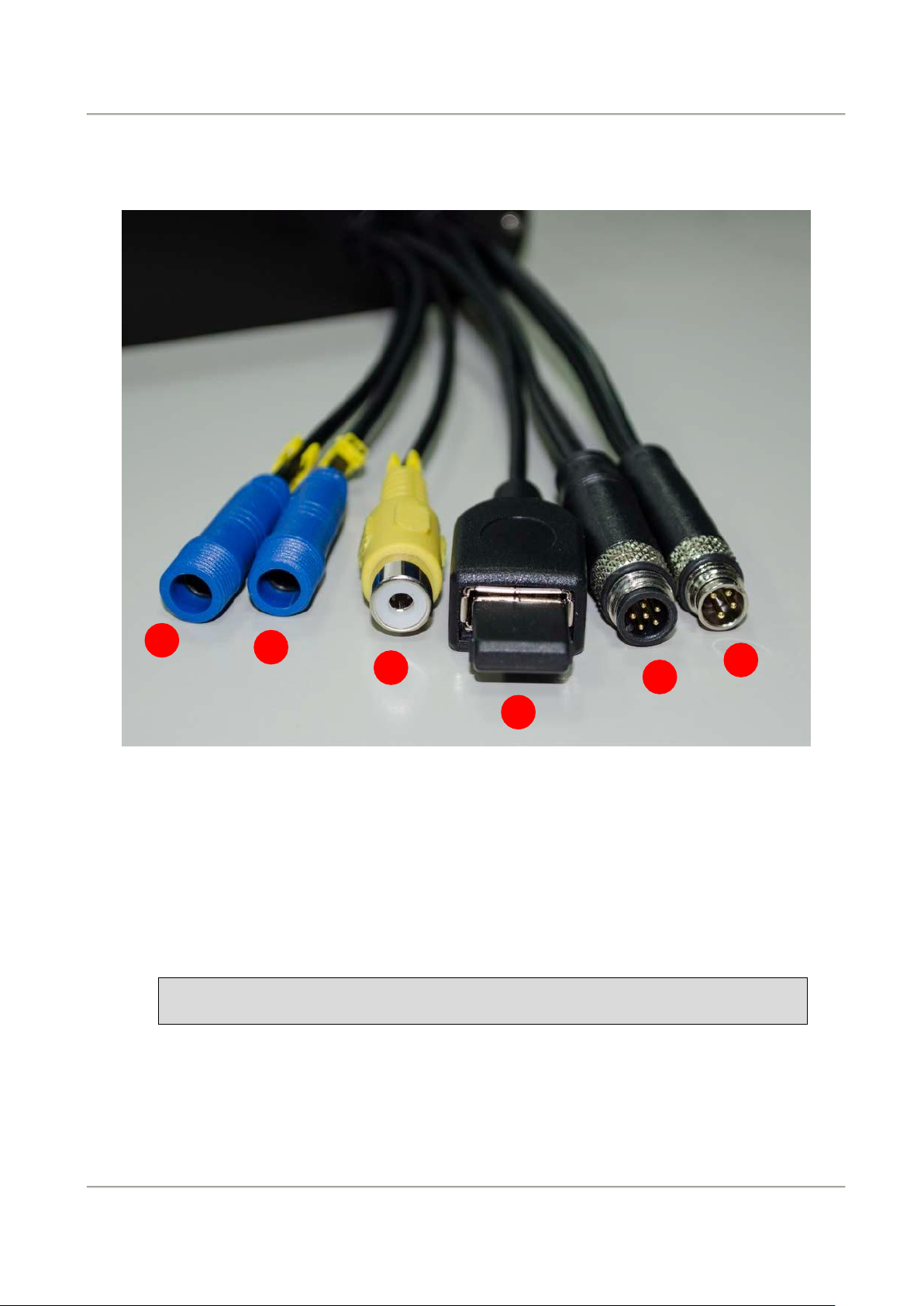
6 5 4 2 1 3
Note: Please use specified camera that provide by manufacture.
F. Cable Installation
Cables
(1) Power connector
(2) Multi-functional OBD display connector
(3) WiFi dongle slot
(4) Video out
(5) Camera 1 connector
(6) Camera 2 connector
Page 14
9
2-Channel Mobile Video Recorder
User Manual
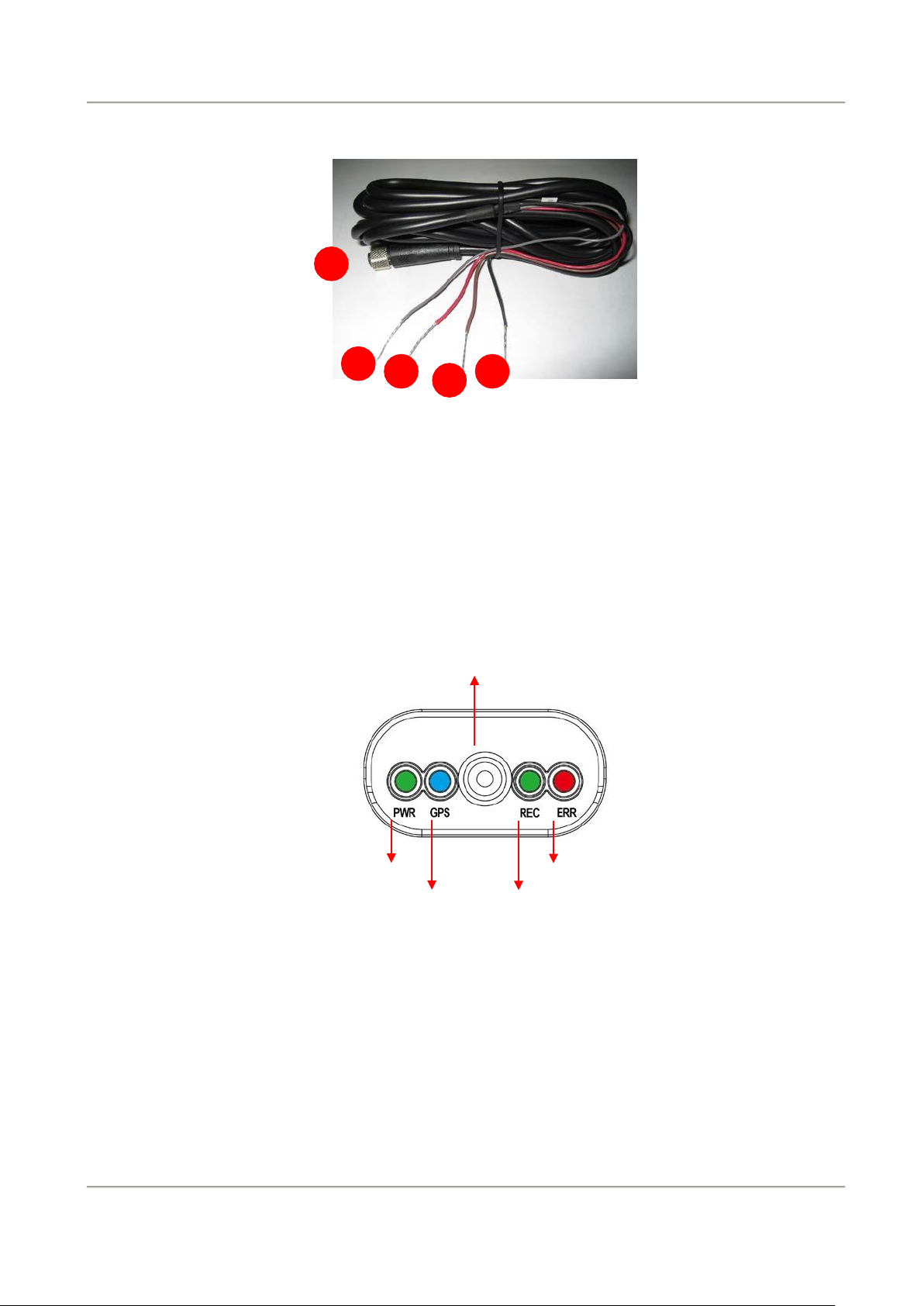
a b c d e
PWR
ERR
Power cable
(a) Power connection: reception
(b) Alarm recording (Grey cable): Pre-reserved function. (Reserved function, no
effect)
OBD
(c) Power cable (Red): connect to power positive connector.
(d) ACC activation cable (Brown): connect to motorcycle power switch (+).
(e) Ground (Black): connect to power supply (-).
Microphone
GPS REC
(A) PWR (Green):power indication.
(B) GPS (Blue):Flashing mean GPS 3D positioning searching. Consistent blue
light on means 3D positioned successfully.
(C) Microphone:built-in microphone input.
(D) REC (Green):Flashing means continuous recording.
(E) ERR (Red): Error diagnosis, please check camera signal, OBD display, SD
storage and so on.
Page 15
10
2-Channel Mobile Video Recorder
User Manual
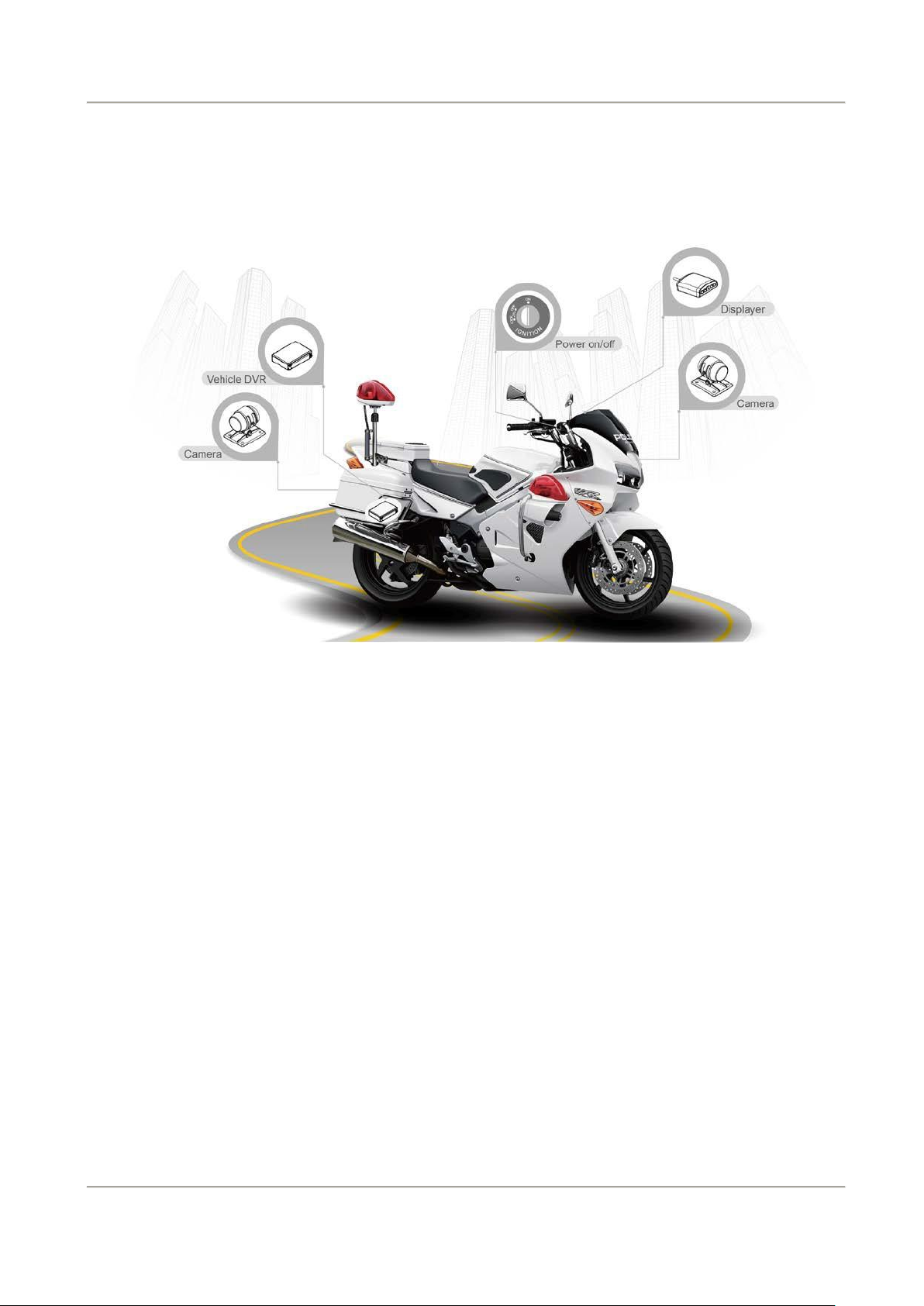
G. Installation diagram
Installation on motorcycle
Page 16

11
2-Channel Mobile Video Recorder
User Manual
Attention
(1) Please install this device with the help of professional technician
to avoid damaging your vehicle.
(2) For installation by none-technician, please use tapes instead of
boring tools to avoid damaging the electrical and gasoline
system.
(3) For safety, switch off ignition before installation, and please keep
away from gasoline pipeline and tank.
(4) Before inserting wires through holes, temporarily wrap the
terminal with tape to prevent bad connection from accumulated
dirt or debris.
(5) Tightly seal all electrical connection with tape to prevent loose
connection or leak leaking to the connection.
(6) Connect the power behind the key ignition and fuse (not directly
to the vehicle battery) to avoid depleting the battery.
(7) The device should be fixed to the vehicle. Tumbling inside the
storage trunk will damage the device.
(8) GPS positioning accuracy may be affected by the installation
position, sun-screen or weather condition.
Page 17
12
2-Channel Mobile Video Recorder
User Manual
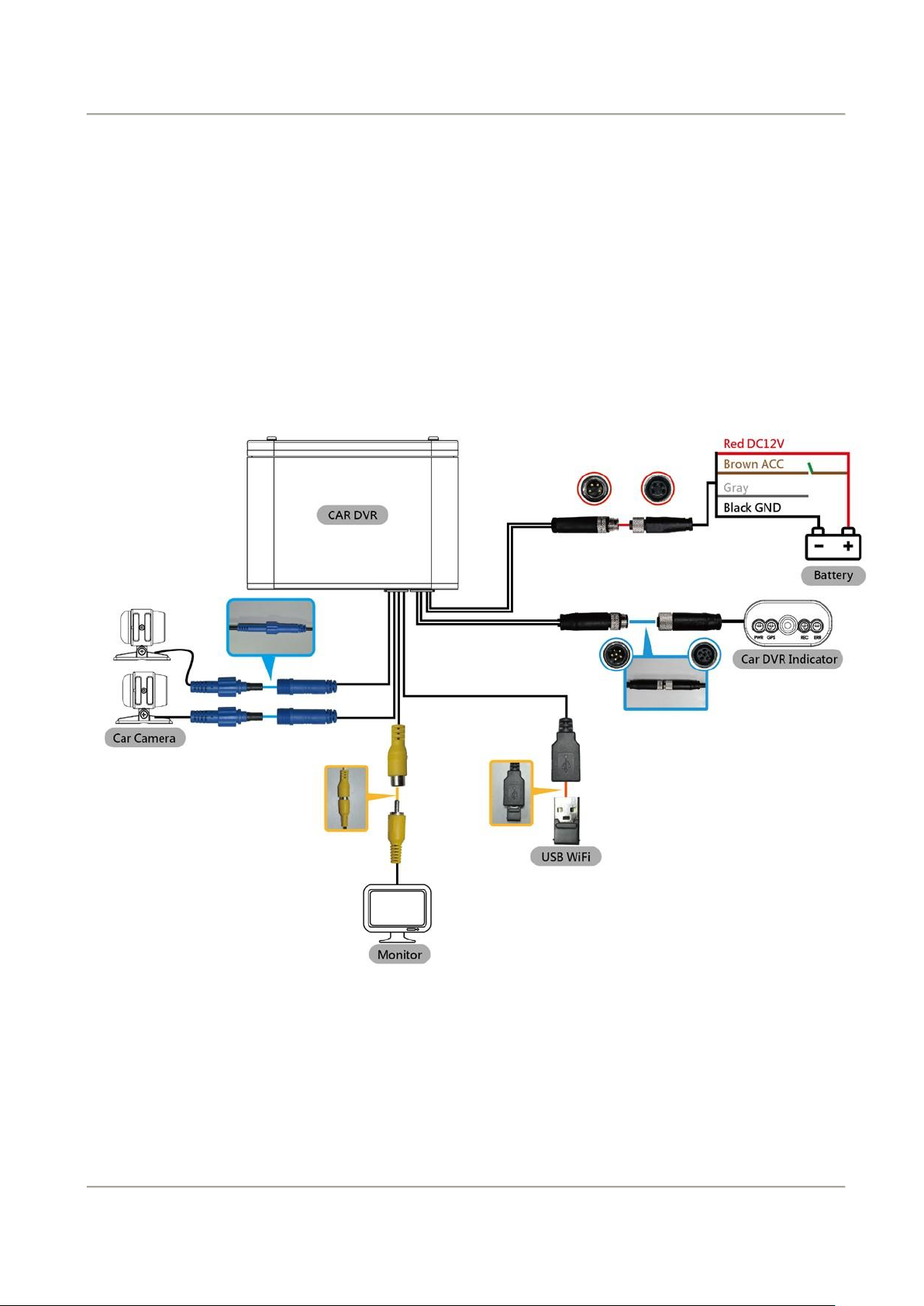
DVR installation diagram
(a) DC12V input is approx. 1A
consumption; Standby power
consumption when ACC OFF is
2.5mA.
(b) Operation electric pressure:
DC10.0v ~ DC15.6v.
(c) Device initiate by power DC8v
above.
Power supply:
Red cable: DC (+)
Brown cable: ACC power DC current
Grey cable: Pre-reserved function, no
effect
Black cable: Ground cable
Page 18
13
2-Channel Mobile Video Recorder
User Manual
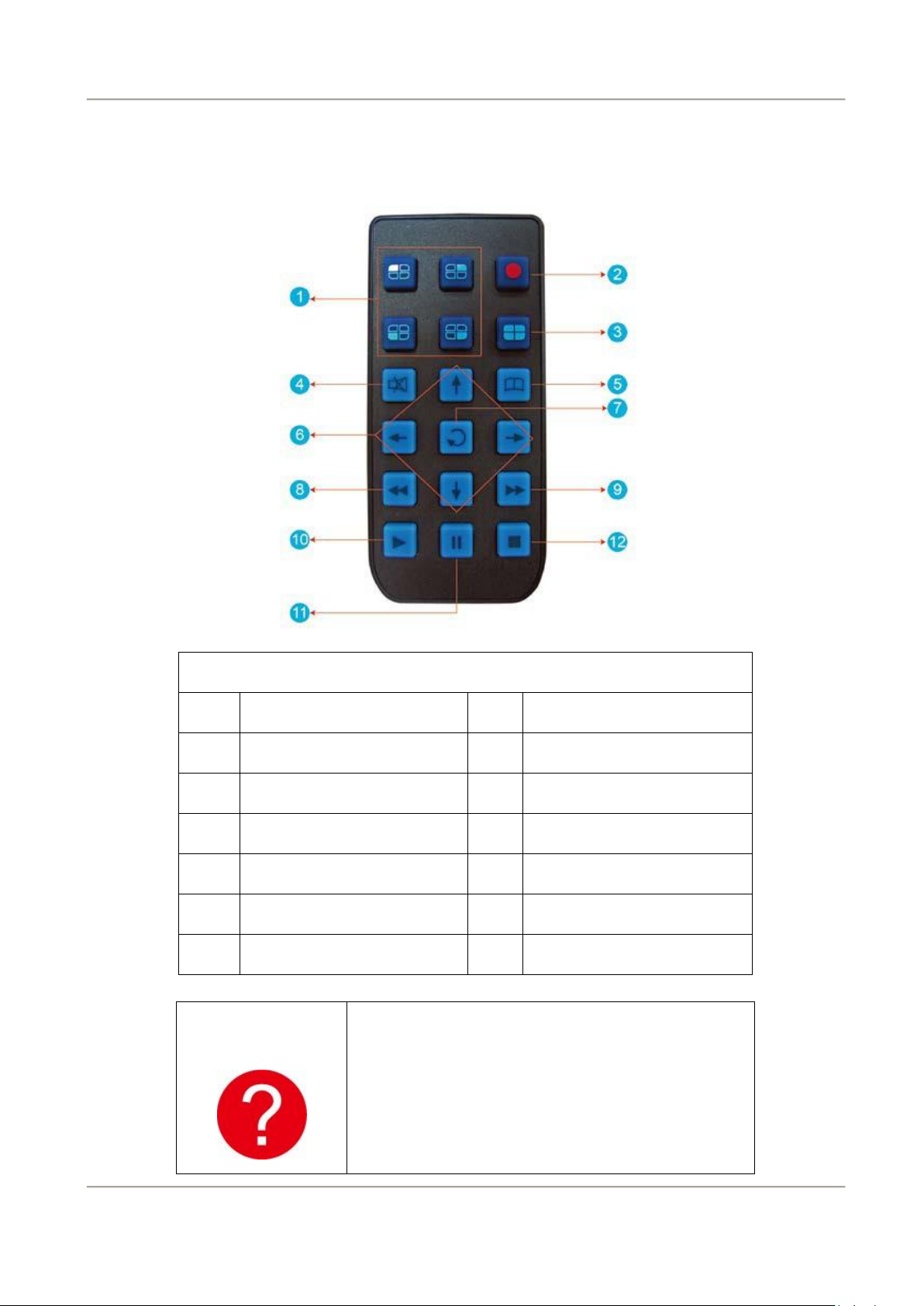
Button Description
No.
Description
No.
Description
1
Split screen display
7
Enter
2
Force Record
8
-
3
Quad display
9
Fast Forward
4
Mute
10
Play back
5
Menu
11
Pause
6
Arrow keys
12
Stop
How to check if the
remote controller is
not workable?
Check the mercury cell is installed in Correct
direction. (Check the pole)
√ Check the cell power is exhaust or not.
√ Check the sensor is covered or not
√Check if it nearby Fluorescent Lamp.
H. Remote Controller (optional)
Page 19
14
2-Channel Mobile Video Recorder
User Manual
I.
Recording and stop recording
1. System initialization / Recording:
System initializes within 30 seconds when power is on. PWR green light ON when
system is rebooting. System starts to recording when REC green light is flashing.
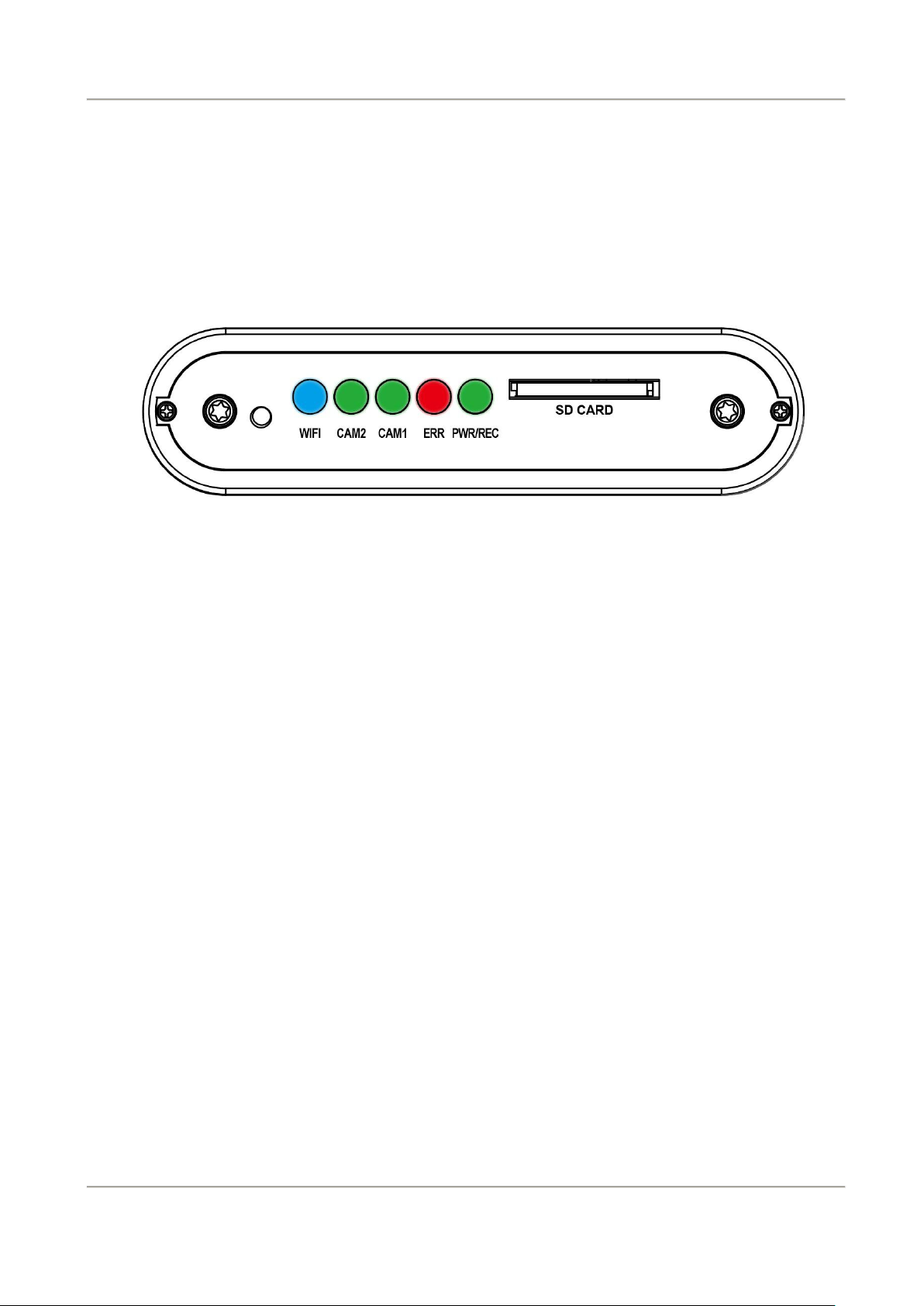
Light Indication:
●
PWR/REC:GREEN on means device POWER is on, Flashing resembles
recording.
●
ERR:RED on means abnormal, please check possible reason such as camera
signal, HUD display, SD card …etc.
●
CAM 1:GREEN means in connection.
●
CAM 2:GREEN means in connection.
●
WiFi:BLUE means the WiFi dongle has been detective.
2. Shut off/ Stop recording
Device offer prolonged 3 seconds recording after power off to ensure data is well
stored; user can take out the SD card when indication is off.
Page 20
15
2-Channel Mobile Video Recorder
User Manual
Recording
Setting
Image Setting
Setting the brightness, contrast, color adjustment
by chooses different channels.
Image input
For lens image adjustment, you can set the normal
mode, mirror mode, flip mode
Time Setting
When GPS signal successful positioning, the system
will automatically adjust time and time zone by GPS.
If device cannot receive GPS signal, user can directly
setting the time on device
GPS Setting
Select and display the vehicle speed and speed unit
on live view video screen.
Vehicle License
Plate Number
Input range: A~Z and 0~9
Record
FPS
NTSC
4M
5-30fps
PAL
4M
5-25fps
Record
Quality
regular
Good
Excellent
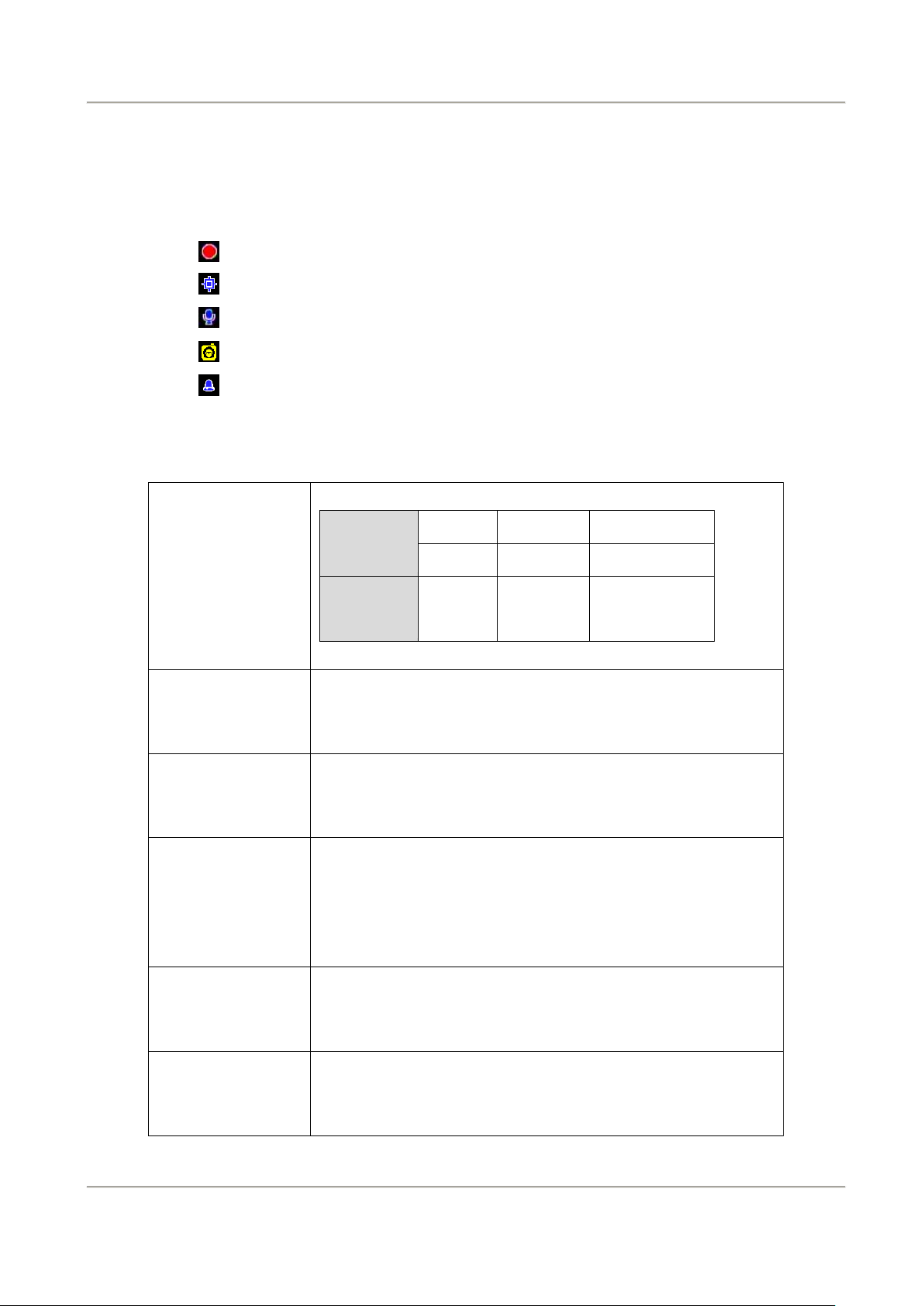
J. Live view:
(1) The monitor can display video record from CH1, CH2 or both CH1 and CH2.
(2) Icon Description:
(3) OBD Main menu operation and parameter setting description
•
: Recording
•
: GPS sensor position successfully.
•
: Microphone ON
•
: Activate event recording
•
: Alarm
Page 21

16
2-Channel Mobile Video Recorder
User Manual
Operating
Mode
1.Setting default channel mode
2.Audio record ON/OFF
G-Sensor
The device will activate force recording function,
which ensure device keep recording and avoid
overwrite records during vehicle collision accident.
Restore default
Setting
After restore default setting, the device will restart
and restore default setting data.
Format Hard
Disk
All the records will delete with Hard Disk format.
Page 22

17
2-Channel Mobile Video Recorder
User Manual
K. WiFi connection
(a)、QR Code download︰
VACRON MOTO FOR IOS VACRON MOTO FOR ANDROID
(b)、Android:
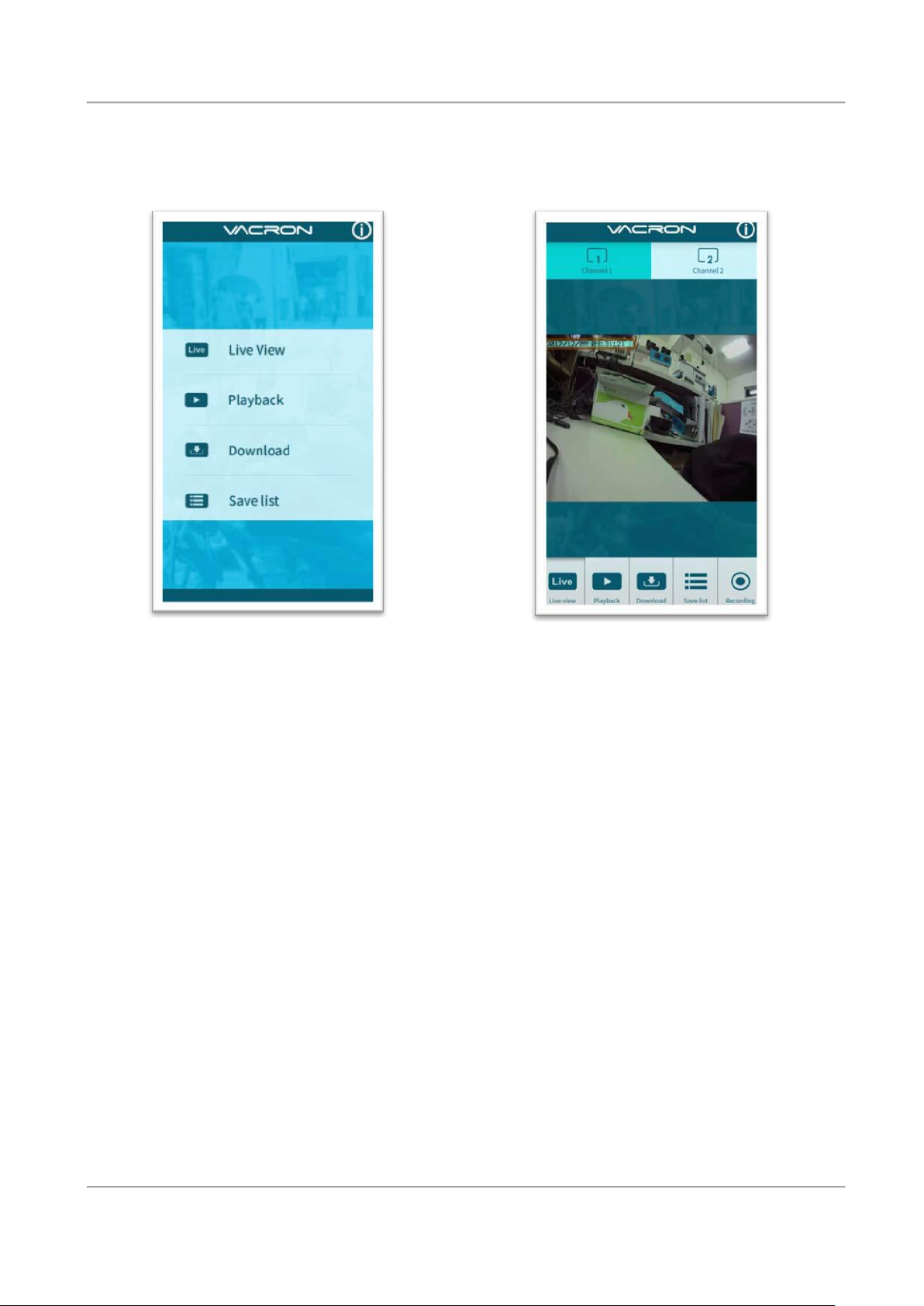
1. Visit Google play store, search for ” VACRON MOTO ”and download
2. WLAN connection, type in「DIRECT-SSID-XXXXXX」as user ID, password as
「12345678.」
3. Open “VACRON MOTO”, watch real time video record by selecting real time video
4. Select「Playback」: Capable play all video files that storages in SD card.
5. Select「Download Video files」, capable download video by date, time and channel
for 1 minute.
6. Click "Save Record": Capable watch all records, Instant Record, Playback Record, and
Downloaded Record.
Page 23
18
2-Channel Mobile Video Recorder
User Manual
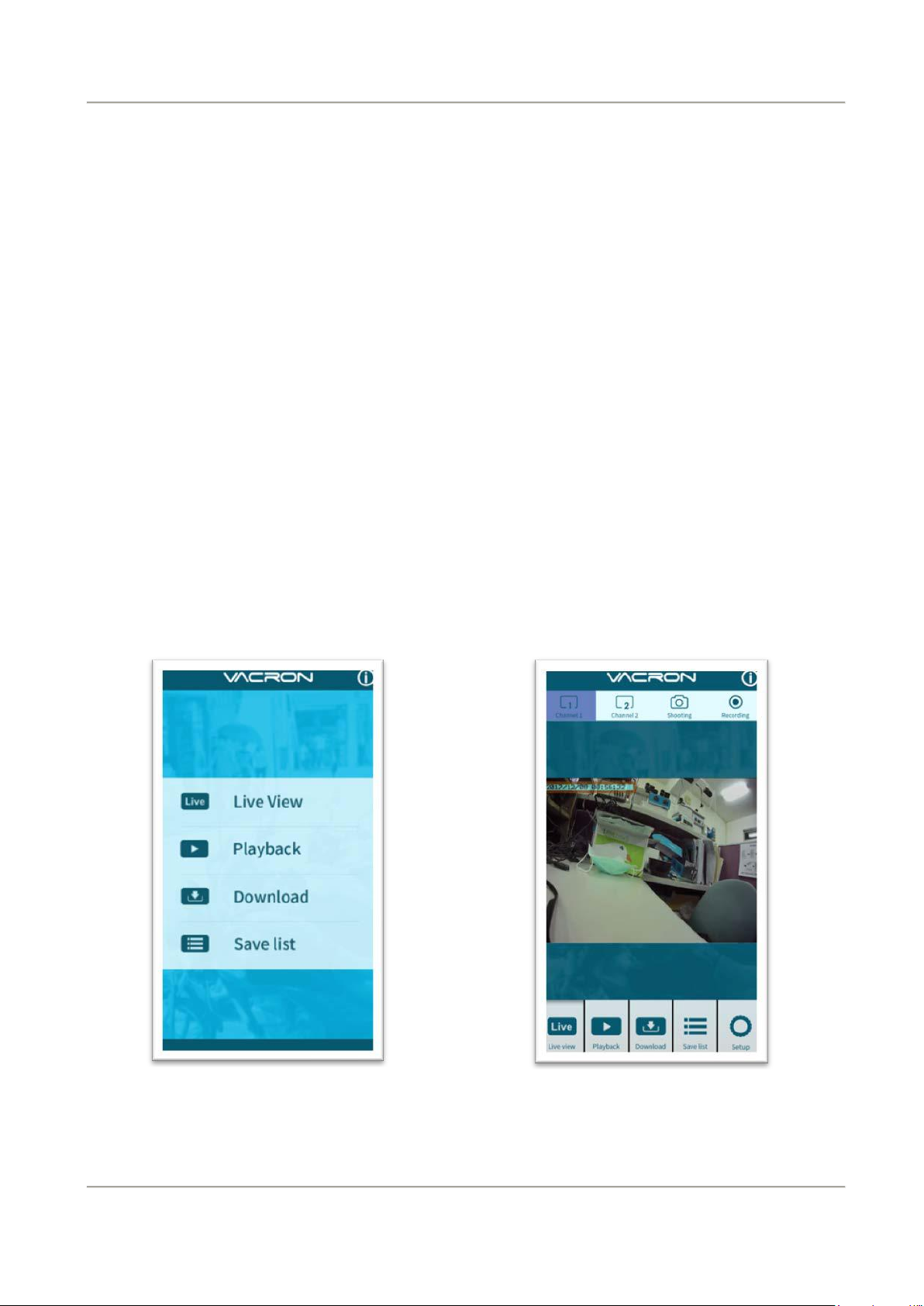
APP main menu
Real time image
7. Click " Video fragment ": watch the video fragment during play real time and
playback video
Page 24
19
2-Channel Mobile Video Recorder
User Manual
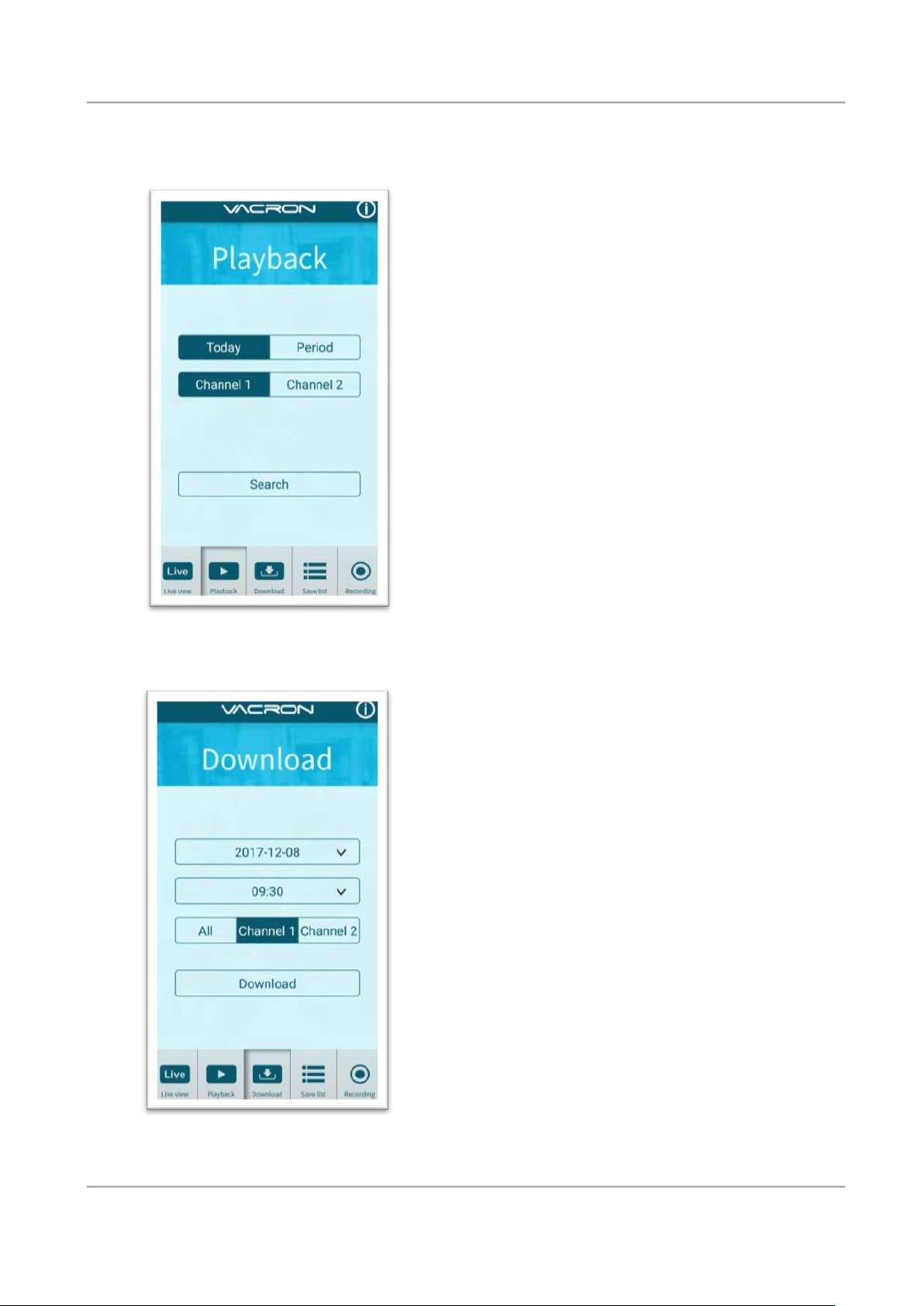
Playback
Playback:
1. Today: choose channel 1 or channel 2,
and then press Search button, it will show
all video files that record in today.
Select and playback any video record as
your request.
2.
Custom : Choose channel1 or channel2,
at meanwhile, setting date and time
period, press search, it will show all video
records that record during this range,
select and playback any video record as
your request.
File download
File Download
1. Select date, time point, and
channel to download video file
(choose suitable channel for
different device, it cannot
download file when you choose
incorrect channel for your device.)
2. Press download to download video
file, the complete download time
length depends on file size.
Normally, is takes approx.1 to 2
minutes, the download format as
MP4.
Page 25
20
2-Channel Mobile Video Recorder
User Manual
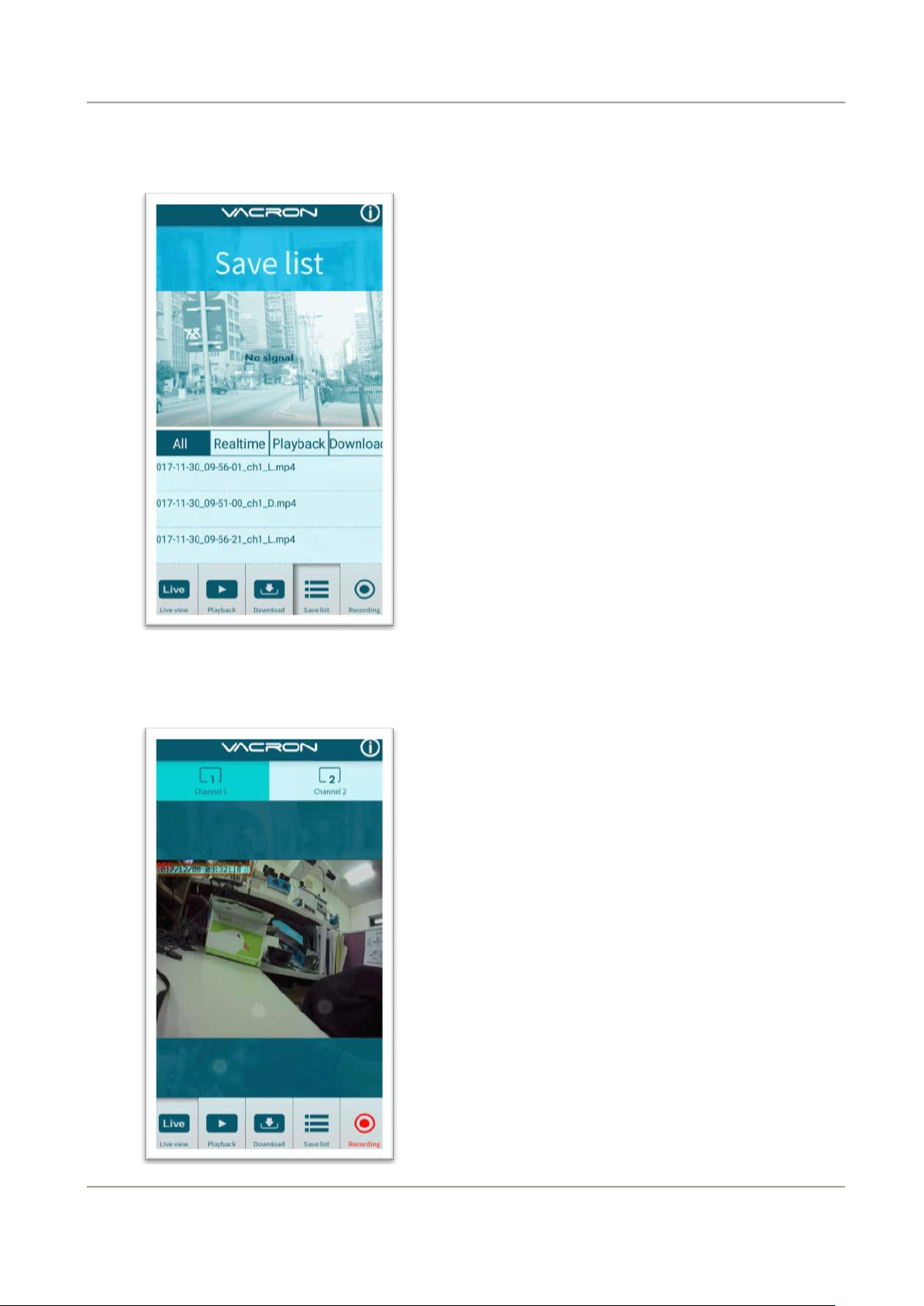
Save list
Video fragment
Save list
1. All records: press and playback all
downloaded records, which include
video clip of real time video, playback
video, download image.
2. Real time: video fragment of real time
video record, the file name ending
with “L”.
3. Playback: video fragment of playback
video record, file name ending
with”PB”.
4. Download: file name ending
with ”D”
video fragment:
1. Press “Video fragment” during play
real time video, the system will save a
video fragment as MP4 format.
2. Press “Video fragment” during play
back video records, the system will
save a video fragment as MP4 format.
Page 26
21
2-Channel Mobile Video Recorder
User Manual
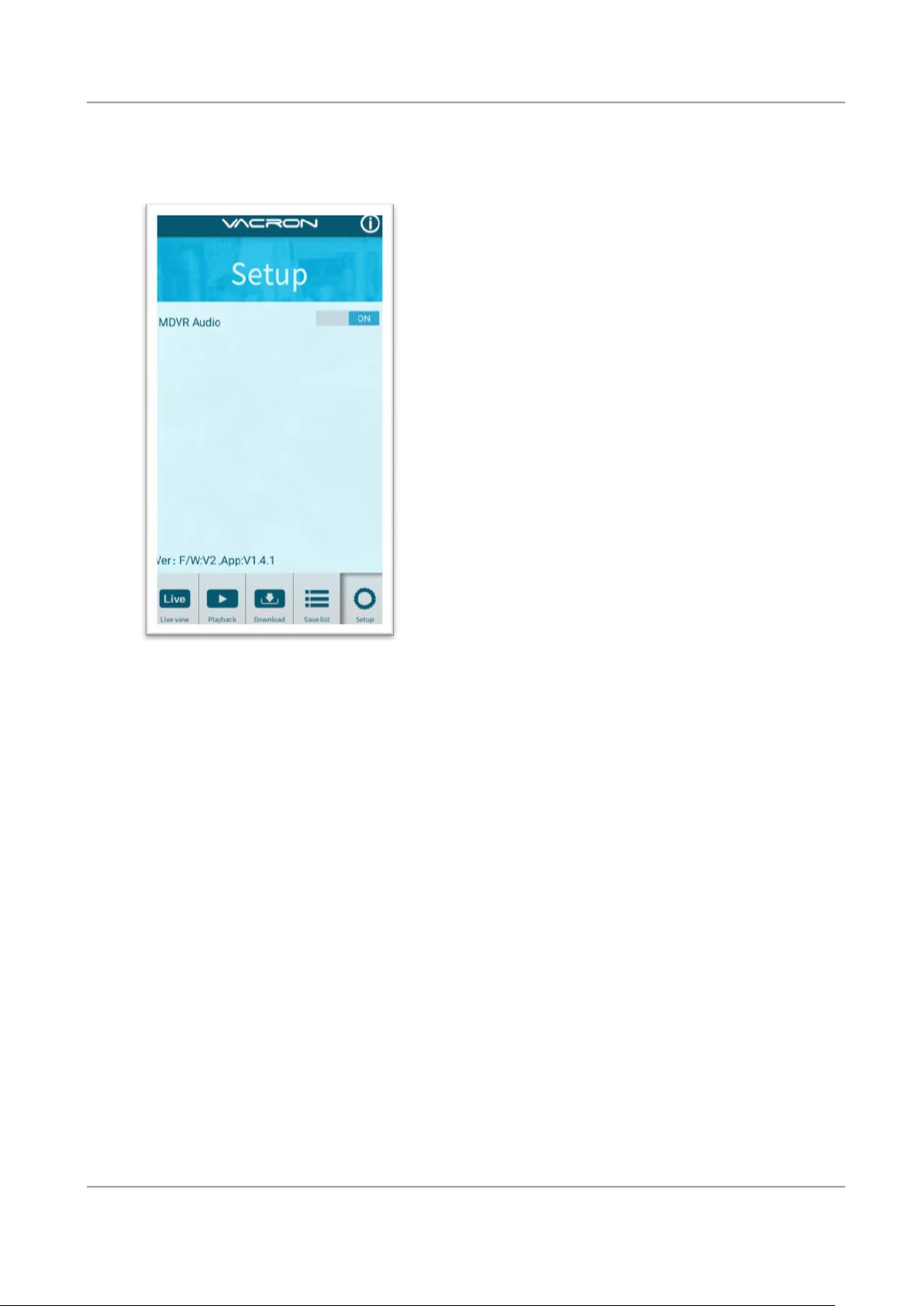
Setting
Setting:
Select microphone On/Off.( Require use
with OBD)
Version︰
1. F/W: Display the device current
version
2. App: Display APP current version
Page 27
22
2-Channel Mobile Video Recorder
User Manual
APP main menu
Real time image
(c)、IOS
1. Search and download “VACRON MOTO” in Apple store.
2. WLAN connection, type in「DIRECT-SSID-XXXXXXa」s user ID, password as
「12345678.」
3. Open “VACRON MOTO”, watch real time video record by selecting real time
video
4. Select「Playback:」Capable play all video files that storage in SD card.
5. Select「Download Video files」, capable download video by date, time and
channel for 1 minute.
6. Click "Save Record": Capable watch all records, Instant Record, Playback Record,
and Downloaded Record.
7. Select「Setting」: Capable turn On/Off microphone.
8. Select「Snapshot」: Capable take snapshot.
Page 28
2-Channel Mobile Video Recorder
User Manual
34
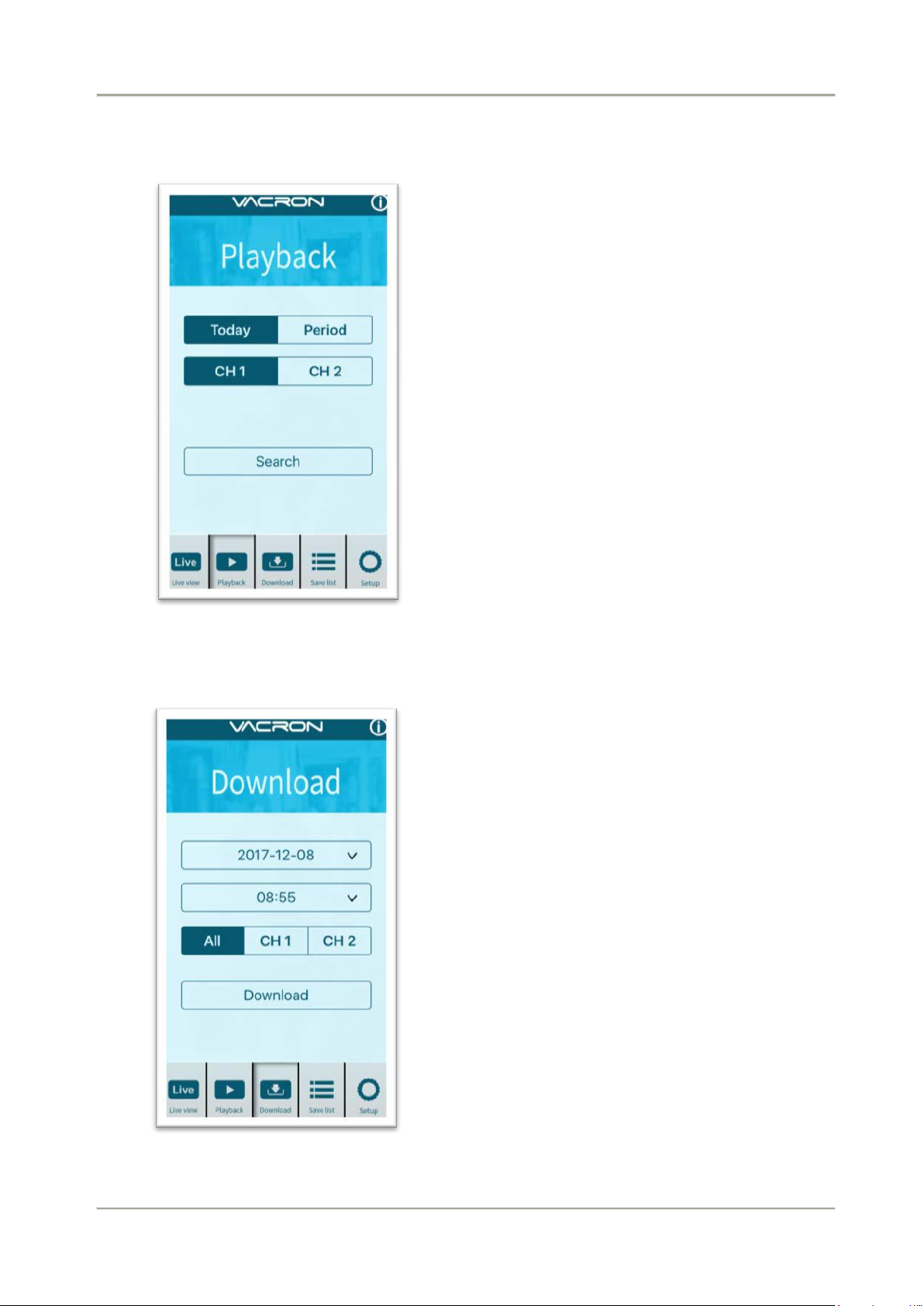
Playback
Playback:
1. Today: choose channel 1 or channel 2,
and then press Search button, it will
show all video files that record in today.
Select and playback any video record as
your request.
2.
Custom : Choose channel1 or channel2,
at meanwhile, setting date and time
period, press search, it will show all
video record that record during this
range, select and playback any video
record as your request.
File download
File Download
1. Select date, time point, and channel
to download video file (choose
suitable channel for different device,
it cannot download file when you
choose incorrect channel for your
device.)
2. Press download to download video
file, the complete download time
length depends on file size. Normally,
is takes approx.1 to 2 minutes, the
download format as MP4.
Page 29
2-Channel Mobile Video Recorder
User Manual
35
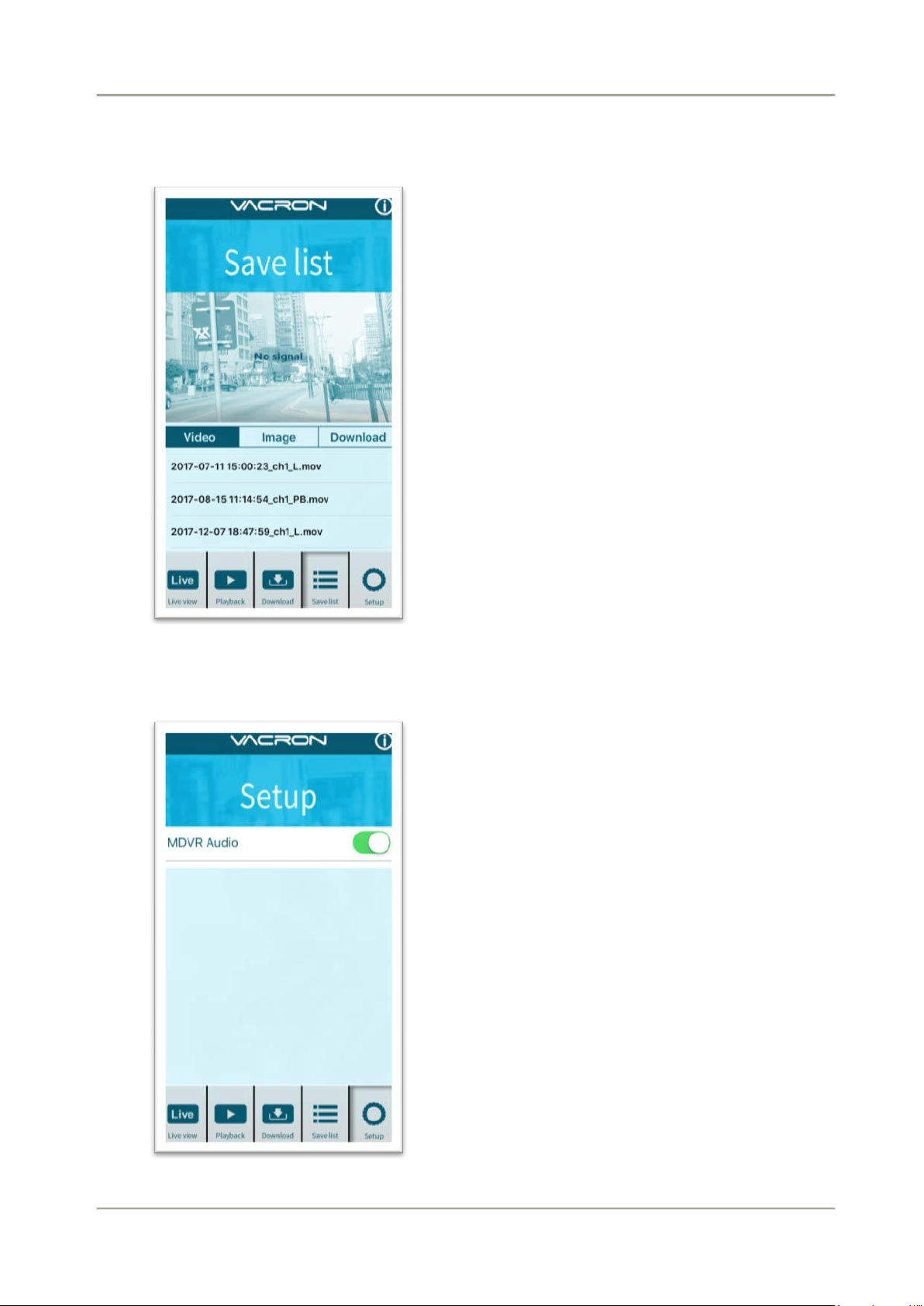
Save list
Setting
Save list
1. All records: press and playback all
downloaded records, which include
video clip of real time video, playback
video, download image.
2. Real time: video fragment of real time
video record, the file name ending
with “L”.
3. Playback: video fragment of playback
video record, file name ending
with”PB”.
4. Download: file name ending
with ”D”
Setting:
Select microphone On/Off.( Require use
with OBD)
Page 30

2-Channel Mobile Video Recorder
User Manual
36
Attention
1. Live image may be delay caused by wireless signal connection error.
2. Remote control only use for records that storage in device, record
cannot be searched when the SD card had been overwritten.
3. Remember to close the WiFi connect with device after operation
4. It is recommended to check regularly with the use of the Laptop
player to play the video. Make sure the video system maintain
normal operations if OBD is not installed.
Page 31

For more information
Please visit VACRON website
http://www.vacron.com Made in Taiwan
 Loading...