

Page 1
www.ute.de
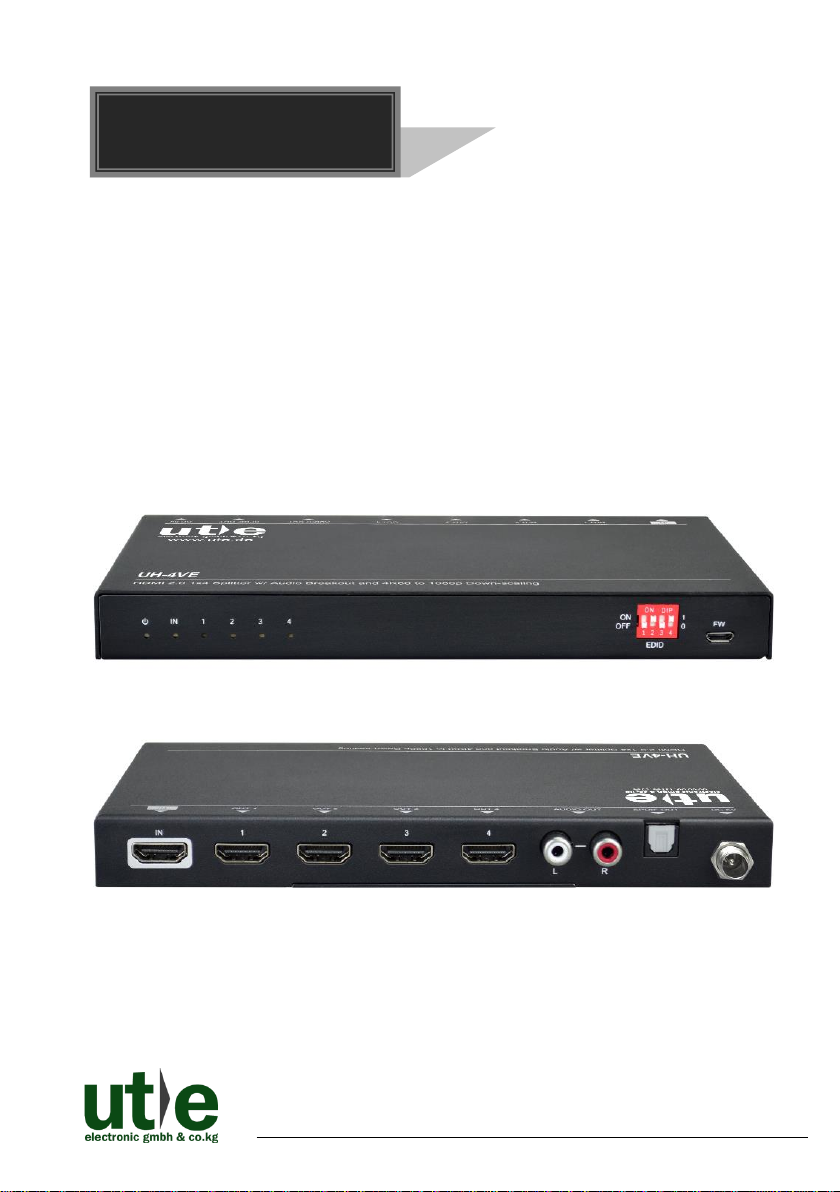
UH-4VE
HDMI 2.0 1x4 Splitter with Audio Breakout and
4K to 1080P Down-scaling
All Rights Reserved
Version: UH-4VE_2018V1.0
User Manual
Page 2

UH-4VE: HDMI 2.0 1x4 Splitter w. Audio Breakout and Down- scaling
U.T.E. electronic GmbH & Co. KG www.ute.de
Page 3

UH-4VE: HDMI 2.0 1x4 Splitter w. Audio Breakout and Down- scaling
U.T.E. electronic GmbH & Co. KG www.ute.de
Preface
Read this user manual carefully before using the product. Pictures are shown in this
manual for reference only. Different models and specifications are subject to real
product.
This manual is only for operation instruction, please contact the local distributor for
maintenance assistance. The functions described in this version were updated till
October, 2018. In the constant effort to improve the product, we reserve the right to
make functions or parameters changes without notice or obligation. Please refer to the
dealers for the latest details.
All product function is valid till 2018-10-28.
Trademarks
Product model and logo are trademarks of U.T.E. electronic GmbH & Co. KG.
Any other trademarks mentioned in this manual are acknowledged as the properties of
the trademark owner. No part of this publication may be copied or reproduced without
the prior written consent.
FCC Statement
This equipment generates, uses and can radiate radio frequency energy and, if not
installed and used in accordance with the instructions, may cause harmful interference
to radio communications. It has been tested and found to comply with the limits for a
Class B digital device, pursuant to part 15 of the FCC Rules. These limits are designed
to provide reasonable protection against harmful interference in a commercial
installation.
Operation of this equipment in a residential area is likely to cause interference, in which
case the user at their own expense will be required to take whatever measures may be
necessary to correct the interference.
Any changes or modifications not expressly approved by the manufacture would void
the user’s authority to operate the equipment.
Page 4

UH-4VE: HDMI 2.0 1x4 Splitter w. Audio Breakout and Down- scaling
U.T.E. electronic GmbH & Co. KG www.ute.de
SAFETY PRECAUTIONS
To ensure the best performance from the product, please read all instructions carefully
before using the device. Save this manual for further reference.
⚫ Unpack the equipment carefully and save the original box and packing material for
possible future shipment.
⚫ Follow basic safety precautions to reduce the risk of fire, electrical shock and injury
to persons.
⚫ Do not dismantle the housing or modify the module. It may result in electrical shock
or burn.
⚫ Using supplies or parts not meeting the products’ specifications may cause damage,
deterioration or malfunction.
⚫ Refer all servicing to qualified service personnel.
⚫ To prevent fire or shock hazard, do not expose the unit to rain, moisture or install this
product near water.
⚫ Do not put any heavy items on the extension cable in case of extrusion.
⚫ Do not remove the housing of the device as opening or removing housing may
expose you to dangerous voltage or other hazards.
⚫ Install the device in a place with fine ventilation to avoid damage caused by
overheat.
⚫ Keep the module away from liquids.
⚫ Spillage into the housing may result in fire, electrical shock, or equipment damage. If
an object or liquid falls or spills on to the housing, unplug the module immediately.
⚫ Do not twist or pull by force ends of the optical cable. It can cause malfunction.
⚫ Do not use liquid or aerosol cleaners to clean this unit. Always unplug the power to
the device before cleaning.
⚫ Always unplug the power to the device before cleaning.
⚫ Unplug the power cord when left unused for a long period of time.
⚫ Information on disposal for scrapped devices: do not burn or mix with general
household waste, please treat them as normal electrical wastes.
Page 5

UH-4VE: HDMI 2.0 1x4 Splitter w. Audio Breakout and Down- scaling
U.T.E. electronic GmbH & Co. KG www.ute.de
Table of Content
1. Introduction ................................................................................................................. 1
1.1 Product Introduction .......................................................................................... 1
1.2 Features ............................................................................................................ 1
1.3 Packing List ....................................................................................................... 2
2. Panel Description ........................................................................................................ 2
2.1 Front Panel ........................................................................................................ 2
2.2 Rear Panel ......................................................................................................... 3
3. System Connection ..................................................................................................... 4
3.1 Usage Precautions ............................................................................................ 4
3.2 System Diagram UH-4VE .................................................................................. 4
4. DIP Switch Operation .................................................................................................. 4
4.1 EDID Management ............................................................................................ 4
4.2 HDCP Mode ...................................................................................................... 6
5. Video Resolution Down-scaling ................................................................ .................. 6
6. Firmware Upgrade ...................................................................................................... 7
7. Technical Specification ................................................................................................ 8
8. Panel Drawing .......................................................................................................... 10
9. Troubleshooting & Maintenance ............................................................................... 11
10. After-sales/ Customer Service ................................................................................ 12
Page 6

UH-4VE: HDMI 2.0 1x4 Splitter w. Audio Breakout and Down- scaling
U.T.E. electronic GmbH & Co. KG 1 www.ute.de
1. Introduction
1.1 Product Introduction
Thanks for choosing the one input to four output HDMI2.0 Splitter UH-4VE. The splitter
supports HDMI video resolution up to 4K@60Hz 4:4:4, 1080P 3D and multichannel
audio formats. Besides passing EDID information from the display, there are multiple
built-in EDID settings can be selected by the 4-pin DIP switch on the front panel.
The splitter can de-embed digital stereo audio to one analog RCA audio output and
one optical Toslink audio output to provide audio sources for existing audio systems.
The splitter supports 4K to1080P down-scaling up to 4 outputs. Moreover, the UH-4VE
provides a Micro-USB port for convenient firmware upgrade.
1.2 Features
⚫ Splits a single HDMI input to four HDMI outputs.
⚫ Supports HDMI 2.0, 4Kx2K@60Hz 4:4:4, Dolby Vision.
⚫ 18Gbps high bandwidth.
⚫ HDMI input supports HDCP 2.2 and the outputs support HDCP Active or HDCP
Passive mode.
⚫ Supports video resolution down-scaling, the 4K input can be automatically degraded
to 1080P output for compatibility with 1080P display.
⚫ Built-in signal equalizer, provides capability to use longer range HDMI cable.
⚫ Up to 6 types of built-in EDIDs can be selected by DIP Switch.
⚫ RCA and Toslink audio outputs for audio de-embedded.
⚫ Up to 6 units can be cascaded to distribute video signal to multiple video displays.
⚫ CEC pass-through.
⚫ Micro-USB port for convenient firmware upgrade.
Page 7
UH-4VE: HDMI 2.0 1x4 Splitter w. Audio Breakout and Down- scaling
U.T.E. electronic GmbH & Co. KG 2 www.ute.de
1.3 Packing List
⚫ 1x UH-4VE: HDMI 2.0 1x4 Splitter
⚫ 2x Mounting Ears with 4 Screws
⚫ 4x Plastic Cushions
⚫ 1x Power Adapter (5V DC 1A)
⚫ 1x User Manual
Note: Please contact your distributor immediately if any damage or defect in the
components is found.
2. Panel Description
2.1 Front Panel
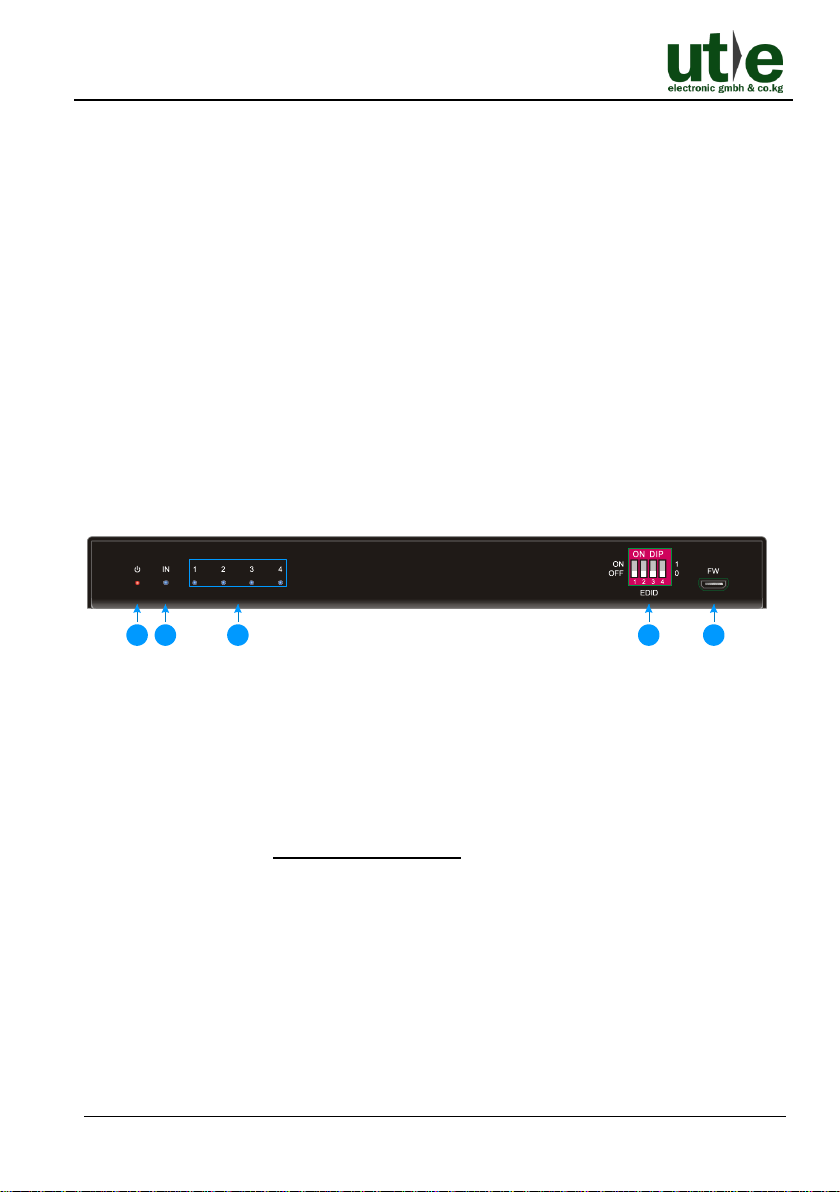
Figure 2-1 UH-4VE Front Panel
① Power LED: The LED illuminates red when power is applied.
② INPUT LED: The LED illuminates blue when there is an input signal present.
③ OUT 1~OUT 4 LED: The LED illuminates blue when there is HDMI output on the
corresponding channel.
④ EDID: 4-pin DIP switch for EDID setting and HDCP mode selection.
Please refer to the 4.1 EDID Management for more details.
⑤ FW: Micro-USB port for firmware upgrade.
1
2
3
4
5
Page 8
UH-4VE: HDMI 2.0 1x4 Splitter w. Audio Breakout and Down- scaling
U.T.E. electronic GmbH & Co. KG 3 www.ute.de
2.2 Rear Panel
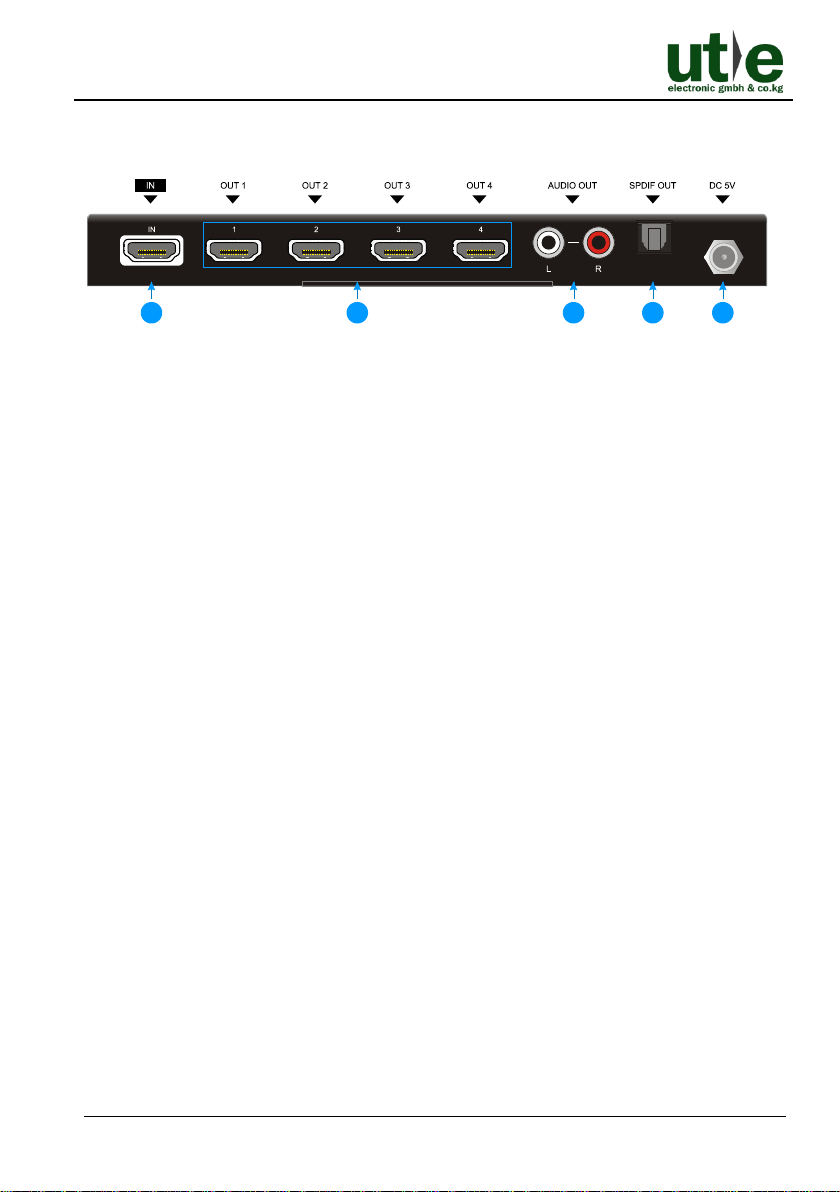
Figure 2-2 UH-4VE Rear Panel
① IN: Type-A female HDMI input port to connect HDMI source.
② OUT 1 ~ OUT 4: Four Type-A female HDMI output port to connect HDMI displays.
③ AUDIO OUT: RCA connector for analog audio output.
④ SPDIF OUT: Toslink connector for optical audio output.
⑤ DC 5V: DC barrel port to connect a power adapter.
Note: Pictures shown in this manual are for reference only, different model and
specifications are subject to real product.
1
2
3
4
5
Page 9
UH-4VE: HDMI 2.0 1x4 Splitter w. Audio Breakout and Down- scaling
U.T.E. electronic GmbH & Co. KG 4 www.ute.de
3. System Connection
3.1 Usage Precautions
1) Make sure all components and accessories included before installation.
2) System should be installed in a clean environment with proper temperature and
humidity.
3) All of the power switches, plugs, sockets, and power cords should be insulated and
safe.
4) All devices should be connected before power on.
3.2 System Diagram UH-4VE
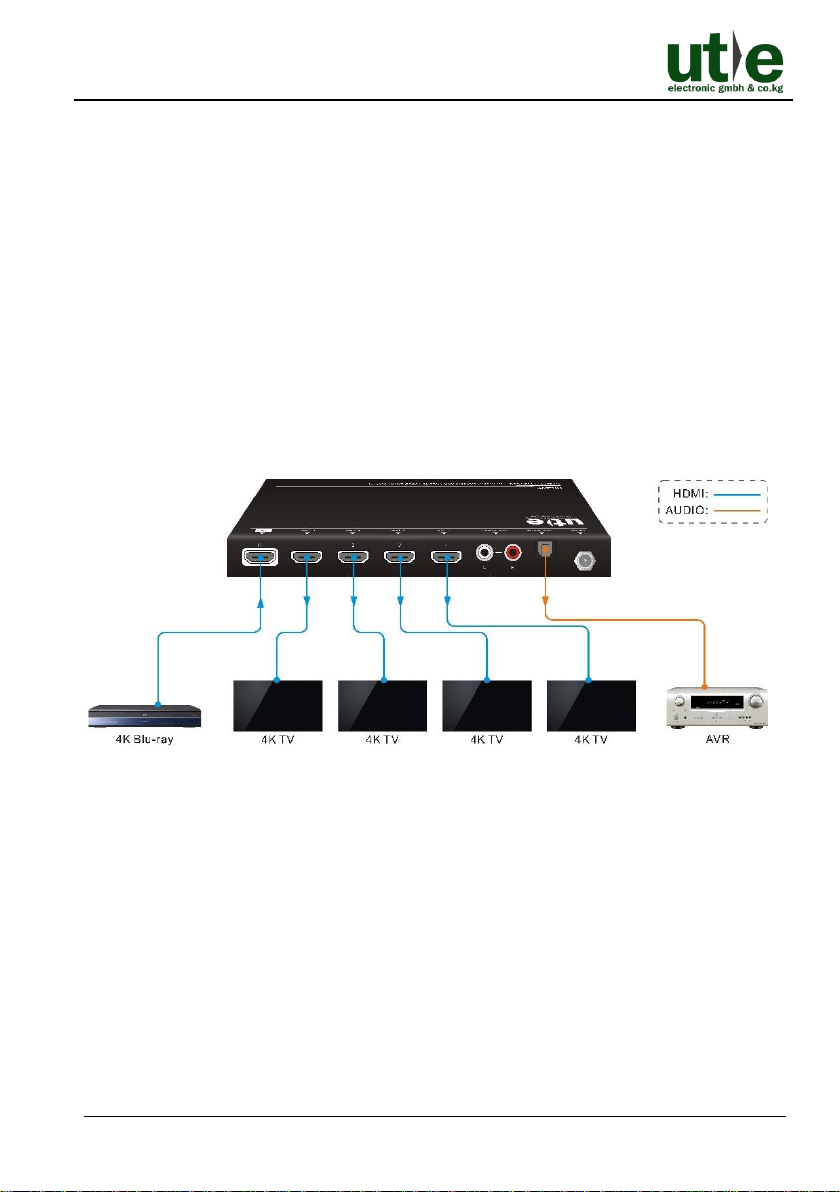
The following diagram illustrates typical input and output connections that can be
utilized with the 4K HDMI2.0 Splitter UH-4VE:
Figure 3-1 Connection and System Diagram
4. DIP Switch Operation
4.1 EDID Management
The Extended Display Identification Data (EDID) is used by the source device to
match its video resolution with the connected display. By default, the source device
obtains its EDID from the first connected display. Meanwhile, since the displays with
different capabilities are connected to the splitter, the DIP switch on the front panel can
be used to set the EDID to a fixed value to ensure the compatibility in video resolution.
Page 10
UH-4VE: HDMI 2.0 1x4 Splitter w. Audio Breakout and Down- scaling
U.T.E. electronic GmbH & Co. KG 5 www.ute.de
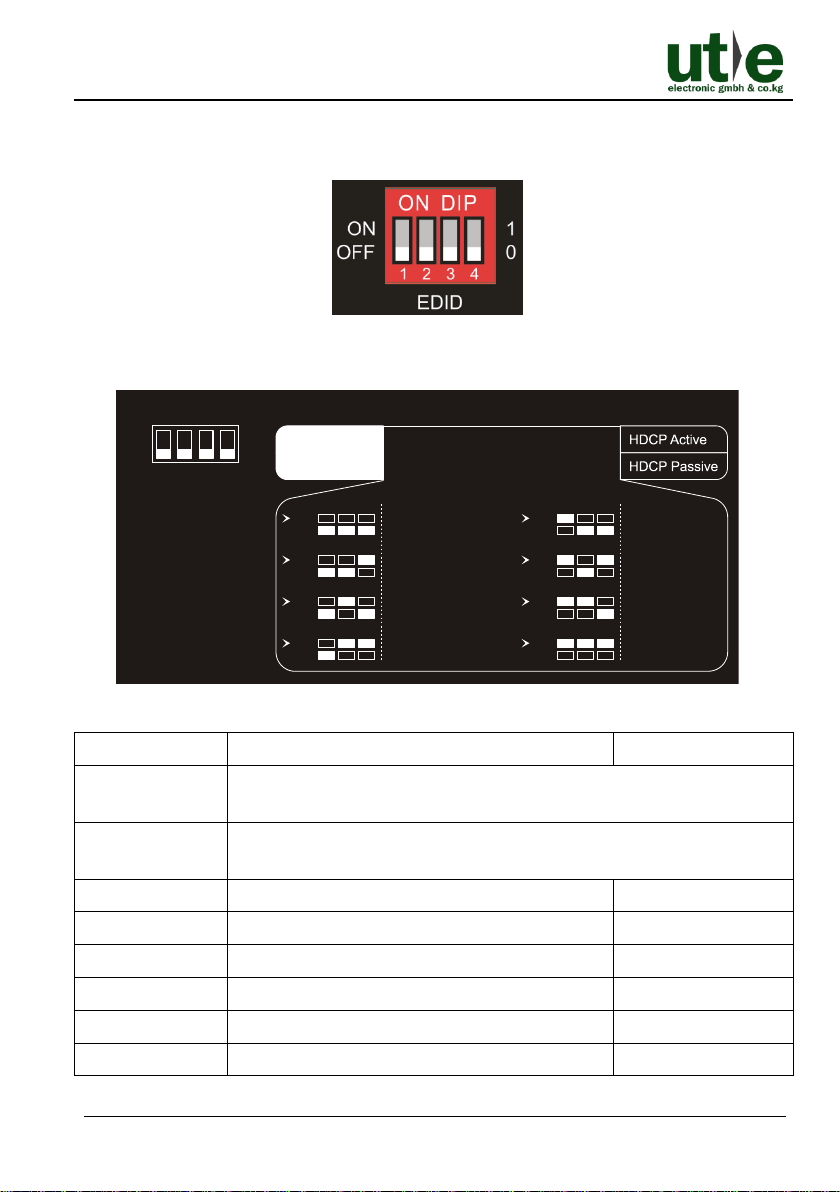
The switch represents “0” when in the lower (OFF) position, and it represents “1” while
putting the switch in the upper (ON) position.
Switch 1~3 are used for EDID setting. The DIP switch status and its corresponding
setting are shown at the back of the product.
Figure 4-1 EDID chart at the bottom of UH-4VE
Switch Status
Video Resolution
Audio Format
000
Obtains EDID from the first detected display starting at HDMI output
1>2>3>4.
001
Obtains EDID from the first detected display starting at HDMI output
4>3>2>1.
010
1080P
LPCM
011
1080P
DTS/Dolby
100
3840x2160@30Hz
LPCM
101
3840x2160@30Hz
DTS/Dolby
110
3840x2160@60Hz
LPCM
111
3840x2160@60Hz
DTS/Dolby
1 2 3 4
EDID Setting
1080p DTS/Dolby
4K/30Hz LPCM
4K/60Hz LPCM
4K/60Hz DTS/Dolby
Default
1 2 3 4
ON
OFF
1
0
ON
OFF
ON
OFF
1 2 3
Priority OUT 1 > 2 > 3 > 4
ON
OFF
1 2 3
Priority OUT 4 > 3 > 2 > 1
ON
OFF
1 2 3
ON
OFF
1 2 3
1080p LPCM
ON
OFF
1 2 3
ON
OFF
1 2 3
ON
OFF
1 2 3
ON
OFF
1 2 3
4K/30Hz DTS/Dolby
Page 11
UH-4VE: HDMI 2.0 1x4 Splitter w. Audio Breakout and Down- scaling
U.T.E. electronic GmbH & Co. KG 6 www.ute.de
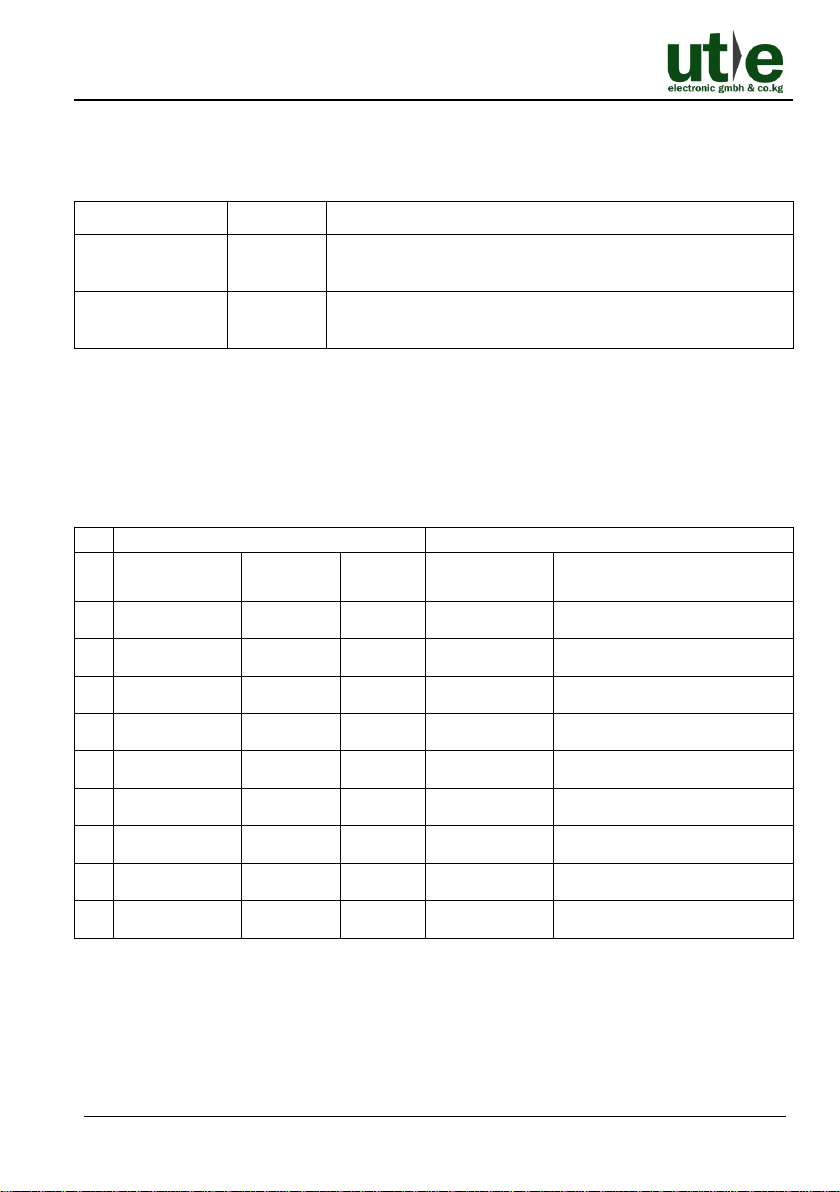
4.2 HDCP Mode
Put the switch 4 on “ON” position to select HDCP Active mode, or on the “OFF”
position for HDCP Passive mode.
Switch Status
Mode
HDCP
OFF (0)
Passive
(Default)
Automatically follows the display’s HDCP version.
ON (1)
Active
Automatically removes the HDCP content of HDMI
output for broader video solution.
5. Video Resolution Down-scaling
The UH-4VE supports video resolution down-scaling, the 4K input can be automatically
degraded to 1080P output for compatibility with 1080P display, shown in the below
chart.
Input
Output
#
Resolution
Refresh
Color
Space
Downscale
1080P Specs
1
3840x2160
60
4:4:4
Support
1080P@60Hz 4:4:4
2
3840x2160
30
4:4:4
Support
1080P@30Hz 4:4:4
3
3840x2160
24
4:4:4
Support
1080P@24Hz 4:4:4
4
3840x2160
60
4:2:0
Support
1080P@60Hz 4:2:0
5
3840x2160
30
4:2:0
Support
1080P@30Hz 4:2:0
6
3840x2160
24
4:2:0
Support
1080P@24Hz 4:2:0
7
3840x2160
60
4:2:2
Not Support
N/A
8
3840x2160
30
4:2:2
Not Support
N/A
9
3840x2160
24
4:2:2
Not Support
N/A
Note: UH-4VE supports 4K and 3D HDMI signals, please adopt quality HDMI
cables compliant with HDMI2.0 for better transmission when connecting 4K or 3D
sources.
Page 12

UH-4VE: HDMI 2.0 1x4 Splitter w. Audio Breakout and Down- scaling
U.T.E. electronic GmbH & Co. KG 7 www.ute.de
6. Firmware Upgrade
Please follow the below steps to upgrade firmware by the Micro-USB port:
Step1. Connect the splitter to the PC with USB cable.
Step2. Power on the HDMI 2.0 1x4 Splitter UH-4VE, and then the PC will automatically
detect a U-disk named of “BOOTDISK”.
Step3. Double-click to open the U-disk, a file named of “READY.TXT” will be showed.
Step4. Copy the latest upgrade file (.bin) to the “BOOTDISK” U-disk directly.
Step5. If the filename “READY.TXT” automatically turns to “SUCCESS.TXT”, the
firmware was upgraded successfully. If the firmware upgrade failed, please
check the file (.bin) and then follow the above procedure to operate again.
Step6. Remove the USB cable after firmware upgrade.
Page 13
UH-4VE: HDMI 2.0 1x4 Splitter w. Audio Breakout and Down- scaling
U.T.E. electronic GmbH & Co. KG 8 www.ute.de
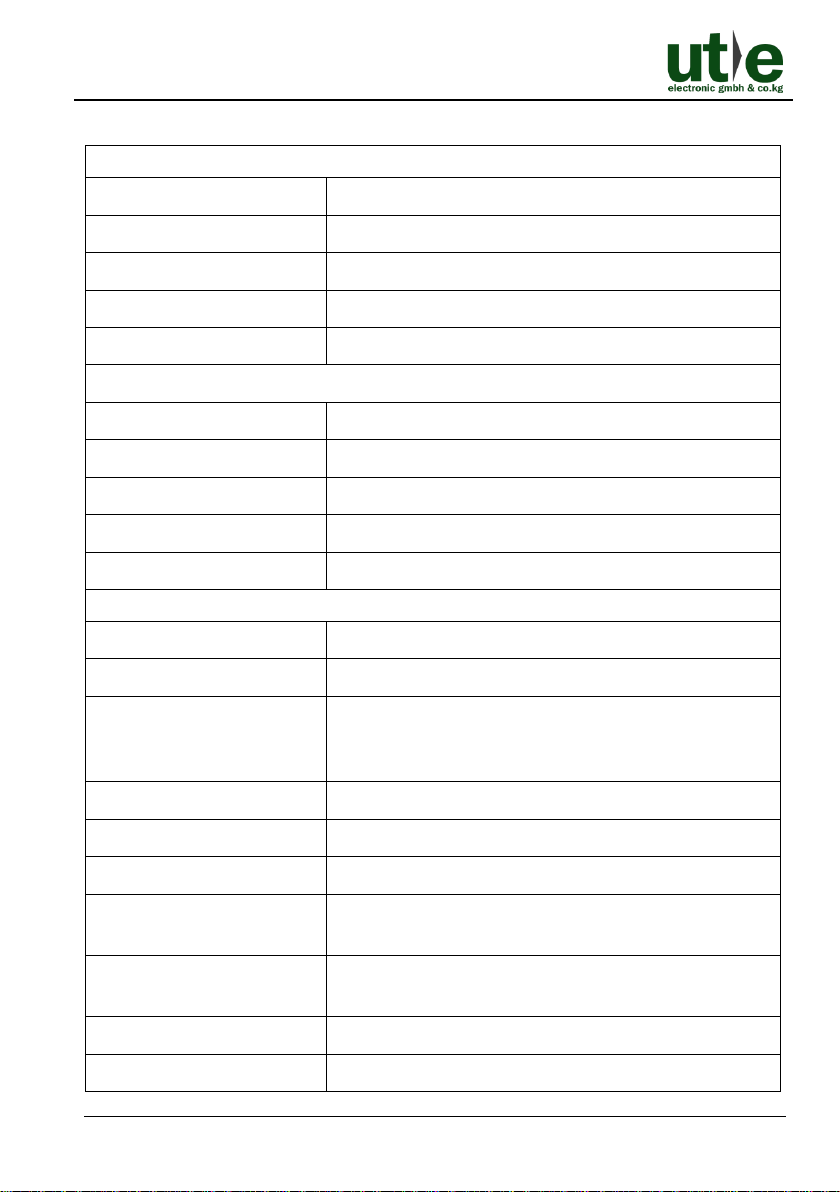
7. Technical Specification
Video Input
Input
(1) HDMI
Input Connector
(1) Female type-A HDMI
HDMI Input Resolution
Up to 4Kx2K@60Hz 4:4:4
HDMI Standard
2.0
HDCP Version
2.2, 1.4 compliant
Video Output
Output
(4) HDMI
Output Connector
(4) Female type-A HDMI
HDMI Output Resolution
Up to 4Kx2K@60Hz 4:4:4
HDMI Standard
2.0
HDCP Version
2.2, 1.4 compliant
Audio
Output
(1) AUDIO OUT, (1) SPDIF OUT
Output Connector
(1) RCA connector (L+R), (1) Toslink connector
HDMI Audio Format
LPCM 7.1 audio, Dolby Atmos®, Dolby® TrueHD,
Dolby Digital® Plus, DTS: X™, and DTS-HD® Master
Audio™ pass-through
DP Audio Format
8 channels LPCM, up to 24bit 192Khz, AC3, DTS
Analog L/R audio Format
PCM
Toslink Audio Format
PCM, Dolby Digital, DTS, DTS-HD
Max Output Level
2.0Vrms ± 0.5dB. 2V = 16dB headroom above -10dBV
(316mV) nominal consumer line level signal
THD+N
<0.05% (-80dB), 20Hz ~ 20KHz bandwidth,
1KHz sine at 0dBFS level (or max level)
SNR
>80dB, 20Hz ~ 20KHz bandwidth
Crosstalk Isolation
>70dB, 10KHz sine at 0dBFS level (or max level
Page 14
UH-4VE: HDMI 2.0 1x4 Splitter w. Audio Breakout and Down- scaling
U.T.E. electronic GmbH & Co. KG 9 www.ute.de
before clipping)
L-R Level Deviation
<0.3dB, 1KHz sine at 0dBFS level (or max level before
clipping)
Frequency Response
Deviation
<±0.5dB 20Hz ~ 20KHz
Output Load Capability
1KΩ and higher (supports 10x paralleled 10KΩ loads)
Stereo Channel Separation
>70dB@1KHz
Control
Control Part
(1) EDID 4-pin DIP switch, (1) Micro-USB port
General
Bandwidth
18Gbps
Operation Temperature
-10 ~ +55℃
Storage Temperature
-25 ~ +70℃
Relative Humility
10% - 90%
Power Supply
Input:100V~240V AC; Output: 5V DC 1A
Power Consumption
4W (Max)
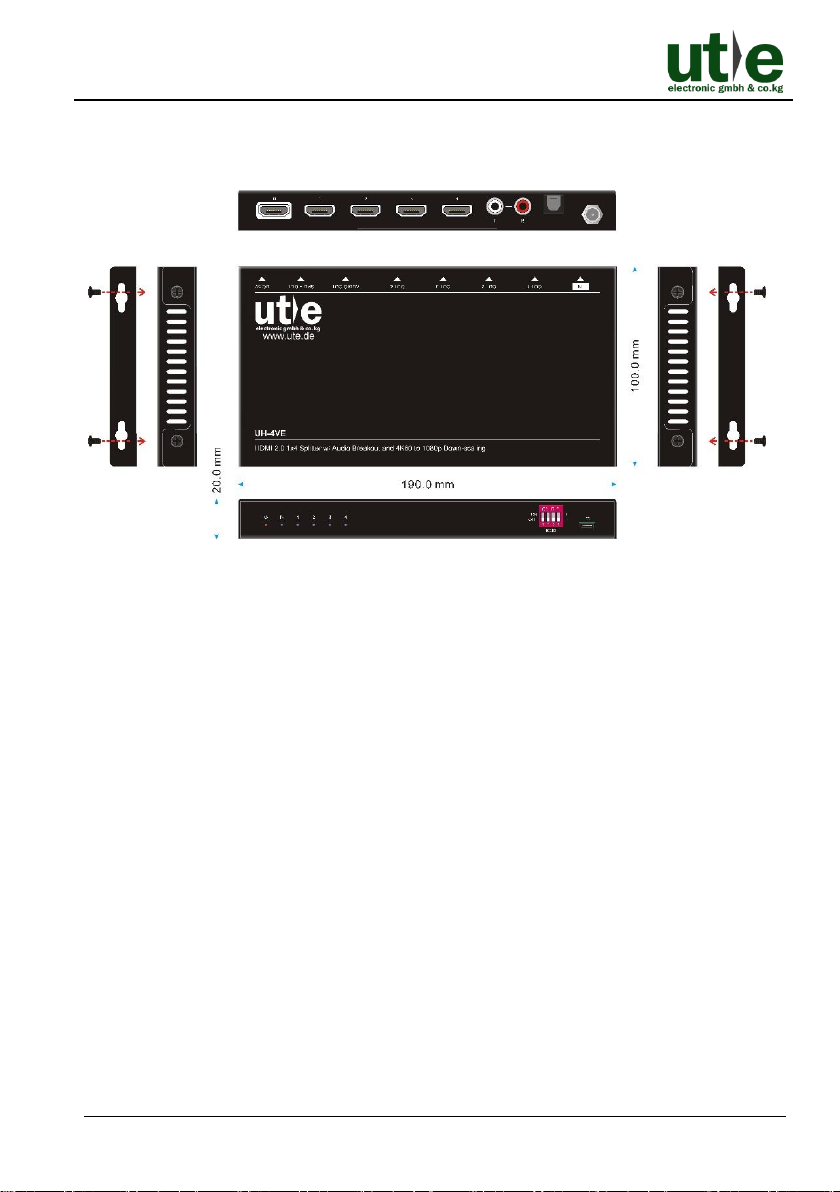
Dimension (W*H*D)
190mm x 20mm x 100mm
Net Weight
approx. 545g
Note: Please adopt high-qualified HDMI cable fully compliant with HDMI 2.0 for
reliable transmission and connection
Page 15
UH-4VE: HDMI 2.0 1x4 Splitter w. Audio Breakout and Down- scaling
U.T.E. electronic GmbH & Co. KG 10 www.ute.de
8. Panel Drawing
Figure 8-1 Panel Drawing of UH-4VE
Page 16
UH-4VE: HDMI 2.0 1x4 Splitter w. Audio Breakout and Down- scaling
U.T.E. electronic GmbH & Co. KG 11 www.ute.de
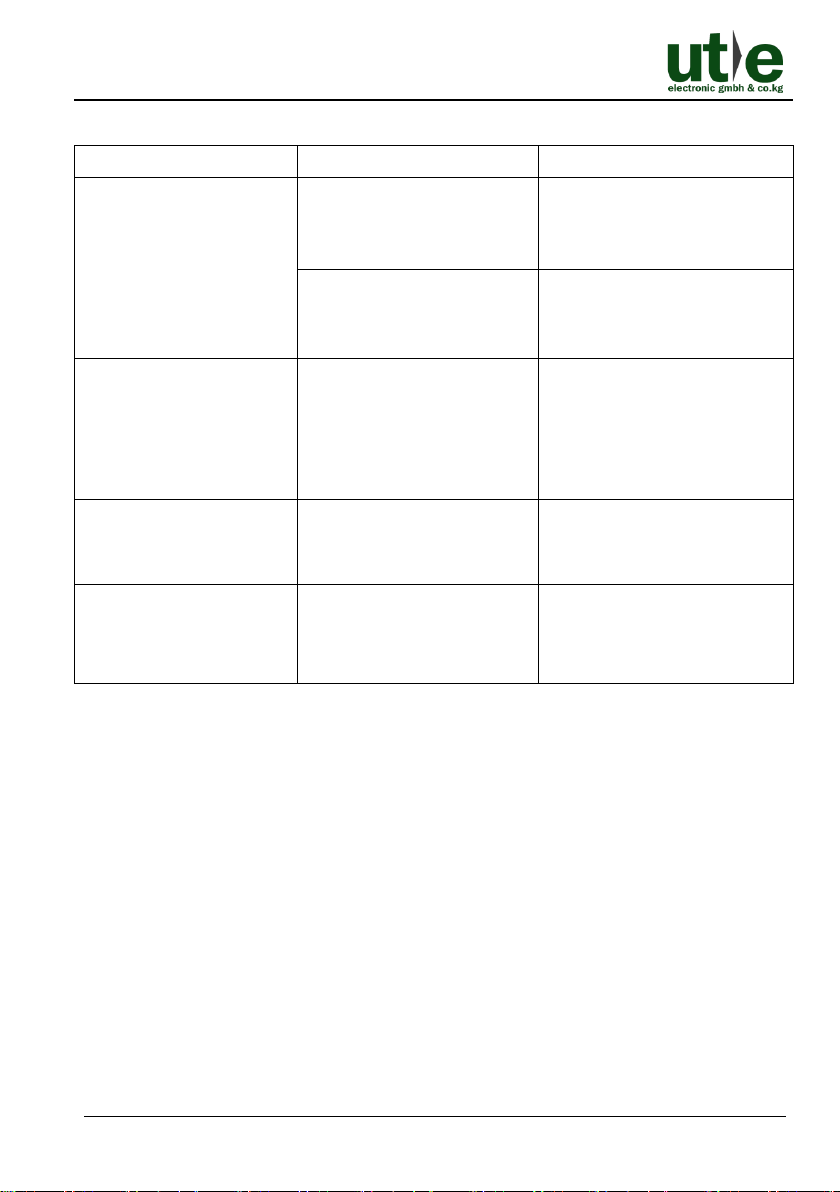
9. Troubleshooting & Maintenance
Problems
Potential Causes
Solutions
Colour losing or no video
signal output in HDMI
display.
The connecting cables may
not be connected correctly
or it may be broken.
Check whether the cables
are connected correctly and
in working condition.
The display is not
compatible with the present
output resolution.
Make sure the resolution of
the display(s) is compatible
with the present resolution.
No HDMI signal output in
the splitter while local
HDMI input is in normal
working state.
The connecting cables may
not be connected correctly
or it may be broken.
Check whether the cables
are connected correctly and
in working condition.
Splash screen in output
devices.
Poor quality of the
connecting cable.
Change for another cable of
good quality.
Static becomes stronger
when connecting the
video connectors.
Bad grounding.
Check the grounding and
make sure it is connected
well.
If your problem still remaining after following the above troubleshooting steps, please
contact your local dealer or our technical support ([email protected]) for further assistance.
Page 17

UH-4VE: HDMI 2.0 1x4 Splitter w. Audio Breakout and Down- scaling
U.T.E. electronic GmbH & Co. KG 12 www.ute.de
10. After-sales/ Customer Service
Any transport costs are borne by the users during the warranty.
The return of a product to our Customer Service implies the full agreement of the
terms and conditions hereinafter. There terms and conditions may be changed without
prior notice.
1) Product Limited Warranty: We warrants that its products will be free from defects
in materials and workmanship for two years, which starts from the first day you buy
this product (The purchase invoice shall prevail).
Proof of purchase in the form of a bill of sale or receipted invoice which is evidence
that the unit is within the Warranty period must be presented to obtain warranty
service.
2) Scope
These terms and conditions of Customer Service apply to the customer service
provided for the products or any other items sold by authorized dealer only.
3) What the warranty does not cover (Warranty Exclusion)
⚫ Warranty expiration.
⚫ Factory applied serial number has been altered or removed from the product.
⚫ Damage, deterioration or malfunction caused by:
• Normal wear and tear.
• Use of supplies or parts not meeting our specifications.
• No certificate or invoice as the proof of warranty.
• The product model showed on the warranty card does not match with the
model of the product for repairing or had been altered.
• Damage caused by force majeure.
• Servicing not authorized by distributor.
• Any other causes which does not relate to a product defect.
⚫ Shipping fees, installation or labor charges for installation or setup of the
product.
4) Documentation: Customer Service will accept defective product(s) in the scope of
warranty coverage at the sole condition that the defeat has been clearly defined,
and upon reception of the documents or copy of invoice, indicating the date of
purchase, the type of product, the serial number, and the name of dealer.
Page 18

UH-4VE: HDMI 2.0 1x4 Splitter w. Audio Breakout and Down- scaling
U.T.E. electronic GmbH & Co. KG 13 www.ute.de
5) Technical Support: Email to our after-sales department or make a call, please
inform us the following information about your cases.
⚫ Product version and name.
⚫ Detailed failure situations.
⚫ The formation of the cases.
Remarks: For any questions or problems, please try to get help from your local dealer
or our customer support ([email protected]).
Page 19

UH-4VE: HDMI 2.0 1x4 Splitter w. Audio Breakout and Down- scaling
U.T.E. electronic GmbH & Co. KG www.ute.de
Page 20

U.T.E. electronic GmbH & Co. KG
Tel: +49-2302-28283-0
Fax: +49-2302-28283-10
Email: [email protected]
Website: www.ute.de
 Loading...