

Page 1

0
DDR-E04AB
DDR-D04AB
User Manual
2015 Mar V1.0
Page 2
DDR-E04AB / DDR-D04AB User Manual
1
.
About this user manual
Before installing and using this DVR unit, please read this user manual carefully.
Be sure to keep it handy for later reference
Package of contents
Unpack carefully. This is electronic equipment and should be handled carefully. Check to ensure that
the following items are included
1.DVR unit 2.Mouse 3. HDD screw (4pcs) 4.ower Adapter(DC12V)
5. 4x.1080p DTV camera(Optional) 6. HDMI Cable
Safety Precautions
Caution
Page 3
DDR-E04AB / DDR-D04AB User Manual
2
Do not remove cover No user serviceable parts inside Refer servicing to qualified
service personnel.
Warning
To reduce risk of fire or electric shock.
Do not expose this appliance to rain or moisture.
Safety Precautions
Refer all work related to the installation of this product to qualified service personnel or system i
nstallers
Do not block the ventilation opening or slots on cover.
Do not drop metallic parts through slots. This could permanently damage the appliance. Turn the
power off immediately and contact qualified service personnel for service.
Do not attempt to disassemble the appliance. To prevent electric shock, do not remove screws or
covers .There are no user-serviceable parts inside. Contact qualified service personnel for
maintenance. Handle the appliance with care. Do not strike or shake, as this may damage the
appliance.
Do not expose the appliance to water or moisture ,nor try to operate it in wet areas. Do take
immediate action if the appliance becomes wet. Turn the power off and refer servicing to qualified
service personnel. Moisture may damage the appliance and also cause electric shock.
Do not overlord outlets and extension cords as this may result in a risk of fire or electric shock
Do not use strong or abrasive detergents when cleaning the appliance body. Use a dry cloth to clea
n the appliance when it is dirty. When the dirt is hard to remove ,use a mild detergent an wipe gentl
y.
Do not operate the appliance beyond its specified temperature ,humidity or power source ratings. Do
not use the appliance in an extreme environment where high temperature or high humidity exists.
Use the appliance at temperature within 0~+40 °C and a humidity below 90%. The input power
source for this appliance is AC100~240V.
The lighting flash with an arrowhead symbol, within an equilateral triangle, is intended to alert the
user to the presence of uninsulated “ dangerous voltage” within the product’s enclosure that may
be of sufficient magnitude to constitute a risk of electric shock to persons.
Page 4
DDR-E04AB / DDR-D04AB User Manual
3
The exclamation point within an equilateral triangle is intended to alert the user to presence of
Important operating and maintenance (servicing) instructions in the literature accompanying
the appliance.
Warning
. Electrostatic-sensitive device. Use proper CMOS/MOSFET handing precautions to avoid electrostatic
discharge.
. To prevent fire or shock hazard, do not expose units not specifically designed for outdoor use to
rain or moisture.
Attention
Installation should be performed by qualified service personnel only in accordance with the
National Electrical Code or applicable local codes.
Power Disconnect:
. Unit with or without ON-OFF switches have power supplied to the unit whenever the power cord
Is inserted into the power source; however the unit is operational only when the ON-OFF switch is
In the ON position. The power cord is the main power disconnect for all units;.
. AC100—240V Power Adapter
Note:
This is a class A product. In a domestic environment this product may cause radio interference in
Which case the user may be required to take adequate measures.
Note:
Before installing and using this unit, please read this manual carefully. Be sure to keep it
handy for later reference.
The information in this manual was current when published. The manufacturer reserves the
right to revise and improve its products. All specifications are therefore subject to change
without notice.
Do not place on unstable work surface. Seek servicing if the casing.
Important Safeguards
Page 5
DDR-E04AB / DDR-D04AB User Manual
4
Read instruction
All the safety and operating instructions should be read before the unit is operated.
Retain instructions
The safety and operating instructions should be retained for future reference.
Heed Warnings
All warnings on the unit and in the operating instructions should be adhered to.
Follow instructions
All operating and use instructions should be followed.
Cleaning
Unplug the unit from the outlet before cleaning. Do not use liquid cleaners or aerosol cleaners.
Use a damp cloth for cleaning.
Attachment
Do not use attachment not recommended by the product manufacturer as they may cause hazards.
Water and Moisture
Do not use this unit near water-for example near a bath tub, wash bowl, kitchen sink, or laundry t
ub, in a wet basement, near a swimming pool, in an unprotected outdoor installation, or any area
which is classified as a wet location.
Servicing
Do not attempt to service this unit yourself as opening or removing covers may expose you to
dangerous voltage or other hazards. Refer all servicing to qualified service personnel.
Power Cord Protection
Power supply cords should be routed so that they are not likely to be walked on or pinched by
items placed upon or against them, playing particular attention to cords and plugs, convenience
receptacles and the point where they exit from the appliance.
Object and Liquid Entry
Never push objects of any kind into this unit through openings as they may touch dangerous
voltage points or short-out parts that could result in a fire or electric shock. Never spill liquid of
any kind on the unit.
Page 6

DDR-E04AB / DDR-D04AB User Manual
1
目錄
Chapter 1 Introduction ................................................................................... 1
1.1 Overview .................................................................................................................................... 1
1.2 Product Components .................................................................................................................. 3
1.3 Front Panel ................................................................................................................................. 3
1.4 Rear Panel .................................................................................................................................. 3
Chapter 2 Installation ..................................................................................... 4
2.1 HDD Installation ........................................................................................................................ 4
2.2 Hardware connection ................................................................................................................. 5
2.3 Setup DVR ................................................................................................................................. 5
2.3-1 Power On .................................................................................................................................... 5
2.3-2 Login Screen .............................................................................................................................. 6
2.3-3 Camera Installation .................................................................................................................... 7
Chapter 3 Getting Start ................................................................................... 12
3.1 Live Display Screen ................................................................................................................. 12
3.2 Account setting ........................................................................................................................ 13
3.3 Streaming ................................................................................................................................. 14
3.4 Network Setting ....................................................................................................................... 14
3.5 FTP .......................................................................................................................................... 15
3.6 Email ........................................................................................................................................ 16
3.7 MyLinks ................................................................................................................................... 17
3.8 Sensor ...................................................................................................................................... 17
3.9 Date & Time Setting ................................................................................................................ 18
3.10 Schedule .................................................................................................................................. 18
3.11 Playback .................................................................................................................................. 19
3.12 Language ................................................................................................................................. 21
3.13 LOG ........................................................................................................................................ 21
3.14 Notification ............................................................................................................................. 23
3.15 About ...................................................................................................................................... 23
3.16 Pause, Replay and Backup in Live mode ............................................................................... 24
3.17 Quick Menu in Live mode ...................................................................................................... 25
Chapter 4 Windows® Remote Client .......................................................... 26
4.1 Login ........................................................................................................................................ 26
Chapter 5 iPhone / iPad users & Android users ........................................ 27
Page 7

DDR-E04AB / DDR-D04AB User Manual
1
Chapter 1 Introduction
1.1 Overview
DDR-E04AB / DDR-D04AB, is a ccHDtv standard with 4 channels DVR recorder; powered by
Embedded LINUX decoding technologies with superior stability and performance. It can support
most of today's off-the-shelf DTV cameras for up to 4 channels video recording and let you
access your recordings quickly and reliably. With this system, customers can rapidly deploy their
ccHDtv surveillance application with optimum surveillance and operating efficiency, and delivers
a better pluralism and flexibility than the counter-part Windows® powered system.
With DDR-E04AB / DDR-D04AB, user does not need to rewire original coaxial cables while
upgrade to 1080P. Just simply replacing recorder and camera, no matter how bad the quality of
original coaxial cable goes.
More importantly, with 500+ meter installation range and high flexibility of deployment you can
just check the installation environment, then decide which surveillance system is deployed to be
as Ring, Star or Bus (Daisy Chain). It’s very convenient for replaced market or new installed
market.
Main Features:
4 Channel Full HD 1080P Standalone real time recorder
H.264 Compression
No need to replace existing coaxial cables
Installation range more than 500M+ without repeater
Only one coaxial cable is able to connect multiple cameras(up to 4)
Support multiple deployment as Multiplex Network, Star and Bus
Meet with the ccHDtv Specification.
Product Specifications
System
Main Board
Processor
TI DaVinci DM8107
Operation System
Embedded LINUX
System
Resources
Live views, recording and playback, backup,
remote
Control Mode
USB Mouse
Video
Input
4 Channel, 1 or 4 BNC
Page 8

DDR-E04AB / DDR-D04AB User Manual
2
Standard
Dual stream 1080p / D1, (25~30fps),
Output
1 HDMI
Display
Display Split
1/4
Resolution
1080p @ 30 fps per channel
OSD
Camera title, date, time, video loss, motion
detection and recording
Recording
Video / Audio
Compression
H.264 / G711, G726, PCM
Image Resolution
Full Screen: 1080p
Quad screen: D1
Encoding Speed
Main Stream: 1080p 25~30 fps
Secondary Stream: D1 25~30 fps
Bit Rate
Full Screen: 6~7M bps
Quad Screen: 1~2M bps
Recording Mode
Continuous/Event/Schedule/Motion
Recording
Priority
Manual > Event > Schedule
Video Detection & Alarm
Motion Detection
Supported
Video Lost &
Camera Blank
Notification supported
Playback & Backup
Playback Channel
1 and 4
Search Mode
Timeline and event
Playback
Functions
Play, Pause, Stop, Fast Forward 30 seconds,
Rewind 30 seconds and Frame by Frame
Backup Mode
SD Card, USB Flash Drive
Network
Ethernet
RJ-45 Port (10/100M)
Protocol
HTTP, DHCP, Static IP, DNS, PPPoE, DDNS,
FTP, NTP, RDATE, SSH, UPnP and SMTP
Remote
Operation
Through PC software or App
Hard Disk
Hard Disk
1 SATA Port
eSATA
External Storage
Auxiliary Interface
USB Interface
USB X 3
Environmental
Power Supply
AC 100~240V, 50/60 Hz
Power
Consumption
36W (With 1 internal HDD)
Working
Environment
14° F~130°F/-10°C~+55°C
10~90%RH / 86~106kpa
Dimension
310 x 200 x 58.80mm (L x W x H)
Weight
1.4 kg
Certifications
CE / FCC / RoHS
Note : Products specifications are subject to change without previous notification
Page 9
DDR-E04AB / DDR-D04AB User Manual
3
1.2 Product Components
The package contains the main unit and its accessary as specified below. When you purchase
the DVR, please check to ensure the components specified below are included.
The DVR unit
Screws for HDD
Power Adapter (DC12V)
4x1080p DTV camera
Setup Wizard, Windows® Remote Client,
For iPhone / iPad users & Android users , please visit APP Store or Google Play to
download “ ccHDtv Mobile” for remote mobile device access .
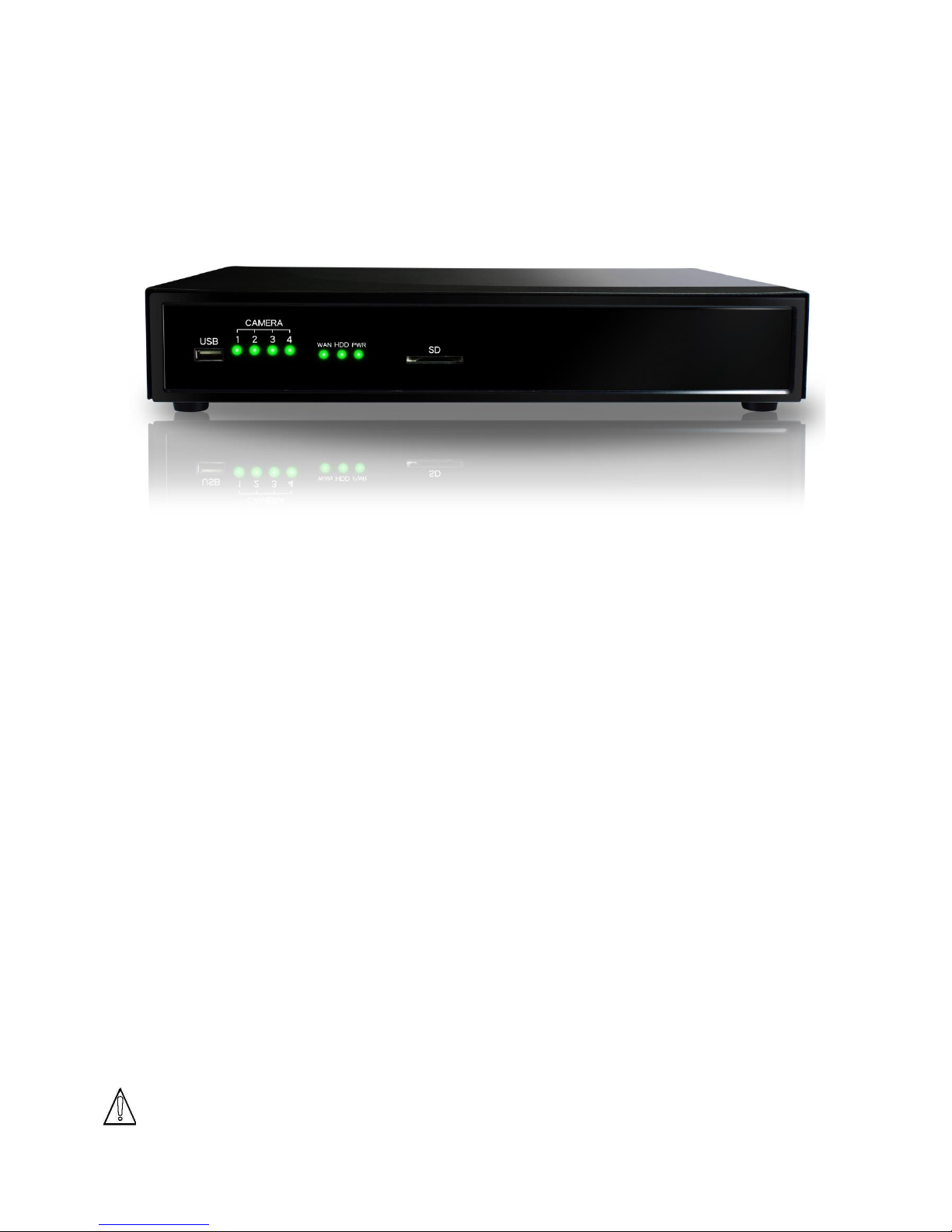
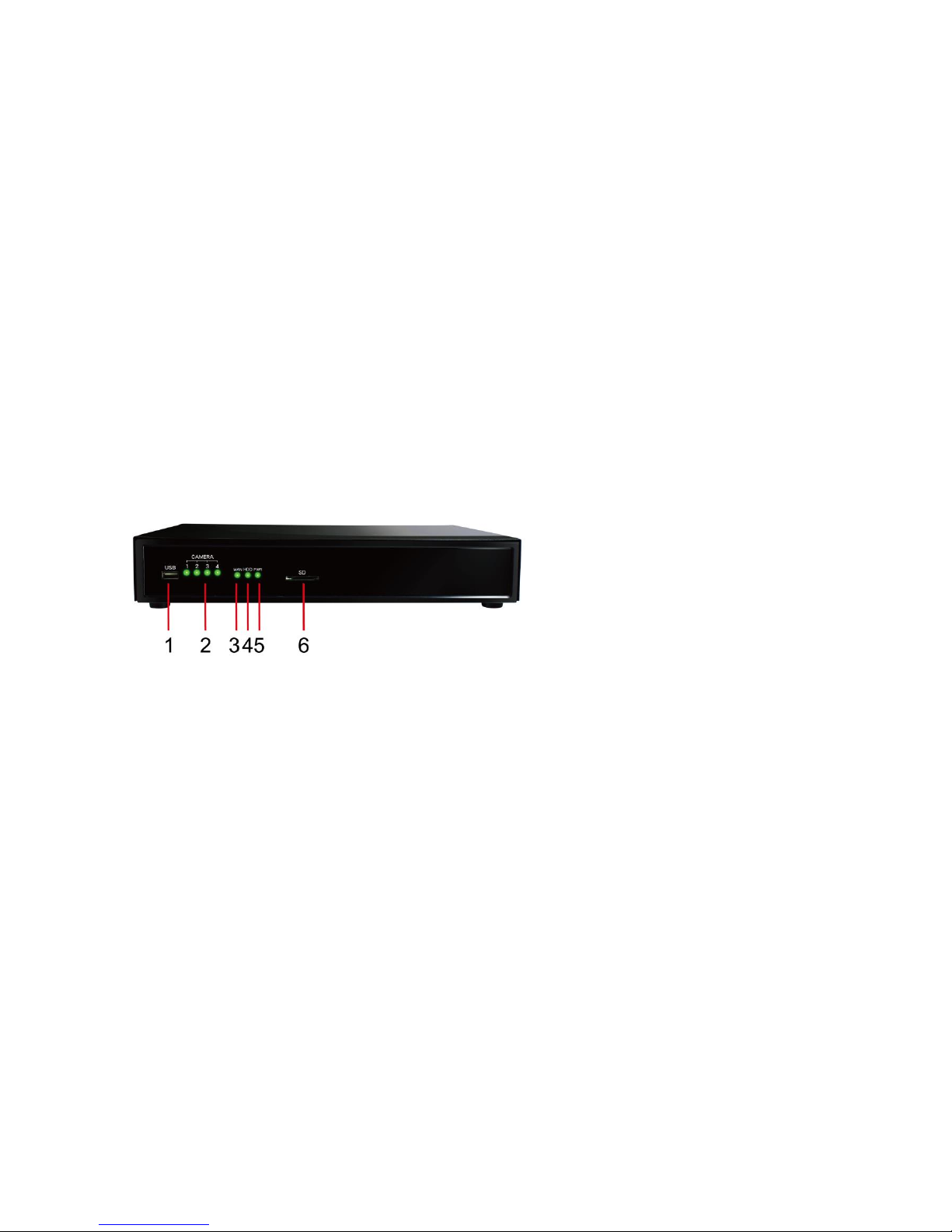
1.3 Front Panel
.
1. USB Port.
2. Camera ( 1.2.3.4 ) on
3. WAN LED
4. HDD activity LED
5. Power LED
6. SD card Connector
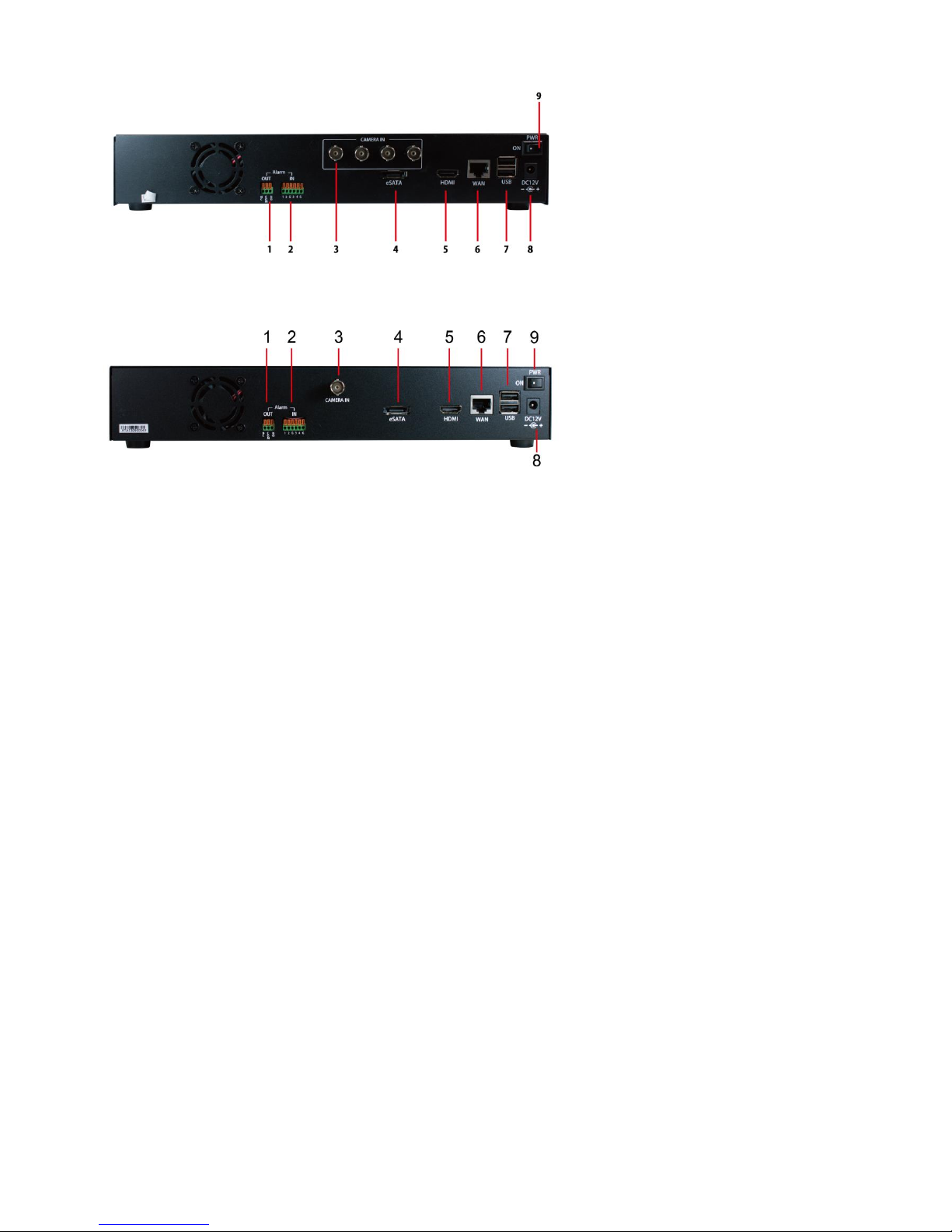
1.4 Rear Panel
DDR-E04AB
Page 10
DDR-E04AB / DDR-D04AB User Manual
4
DDR-D04AB
1. Alarm OUT 2. Alarm IN 3. BNC 1 or 4 connector 4. eSATA port
5. HDMI Port 6. WAN Port 7. USB Port x 2 8. DC 12V power connector
9. Power switch
Chapter 2 Installation
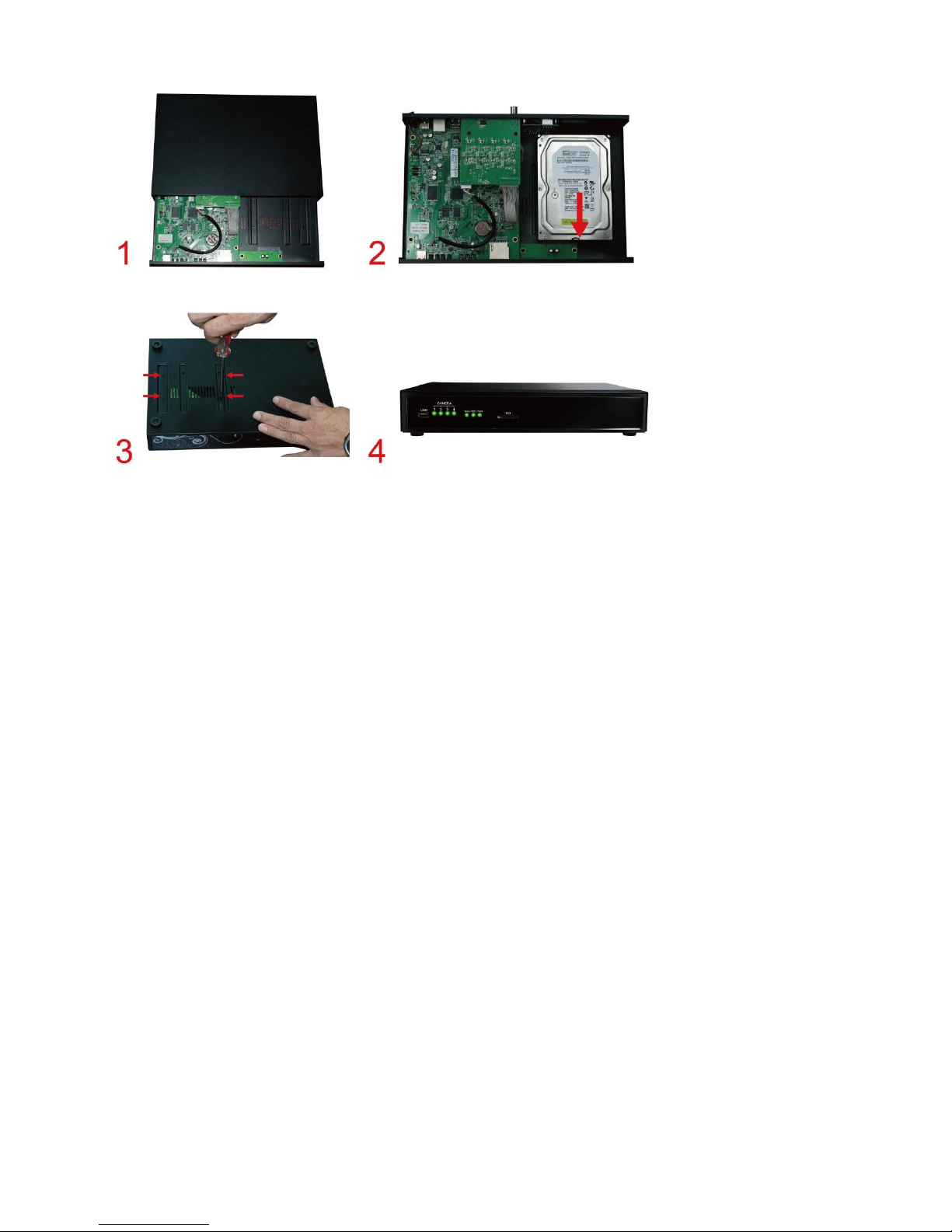
2.1 HDD Installation
1. Loosen the four screws to open the cover
2. Put the HDD inside and connect with SATA connector
3. Lock 4 screws for HDD
4. Put on cover and Lock the 4 screws
Page 11
DDR-E04AB / DDR-D04AB User Manual
5
.
2.2 Hardware connection
1. Connect one end of the network cable into the WAN port.
2. Connect the power adapter to the power source.
3. Connect the power adapter to the rear panel of the DVR unit.
4. At the rear panel of the DVR unit, click the power switch on.
5. It takes about one or two minutes for the DVR unit to fully power up. Once it is powered up,
the Power LED will turn Green and WAN LED will turn Green
6. Connect monitor to HDMI connector.
2.3 Setup DVR
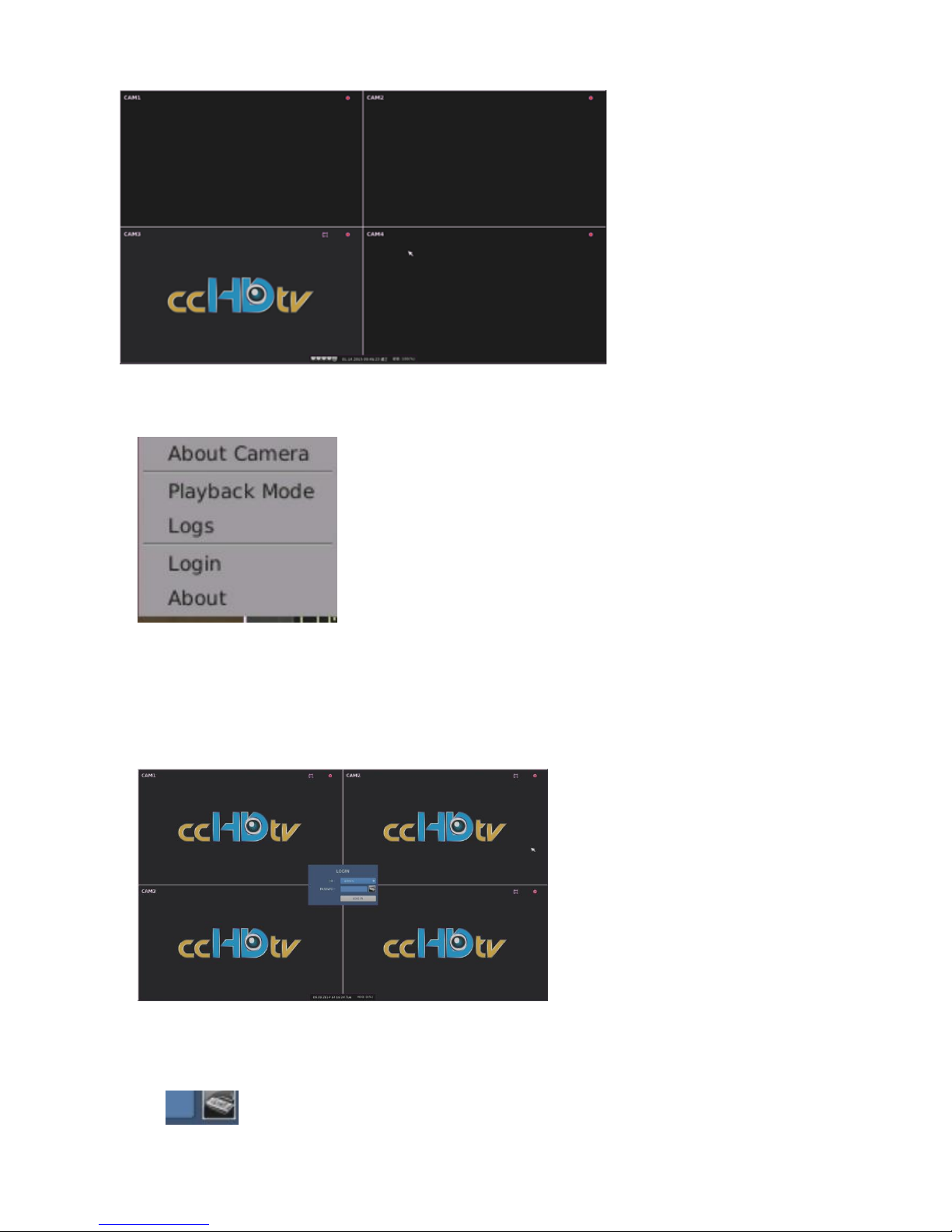
2.3-1 Power On
Click power switch. The following screen will appear.
(It is only for viewing instead of setting up by logging in with a “Guest” of user name.)
Page 12
DDR-E04AB / DDR-D04AB User Manual
6
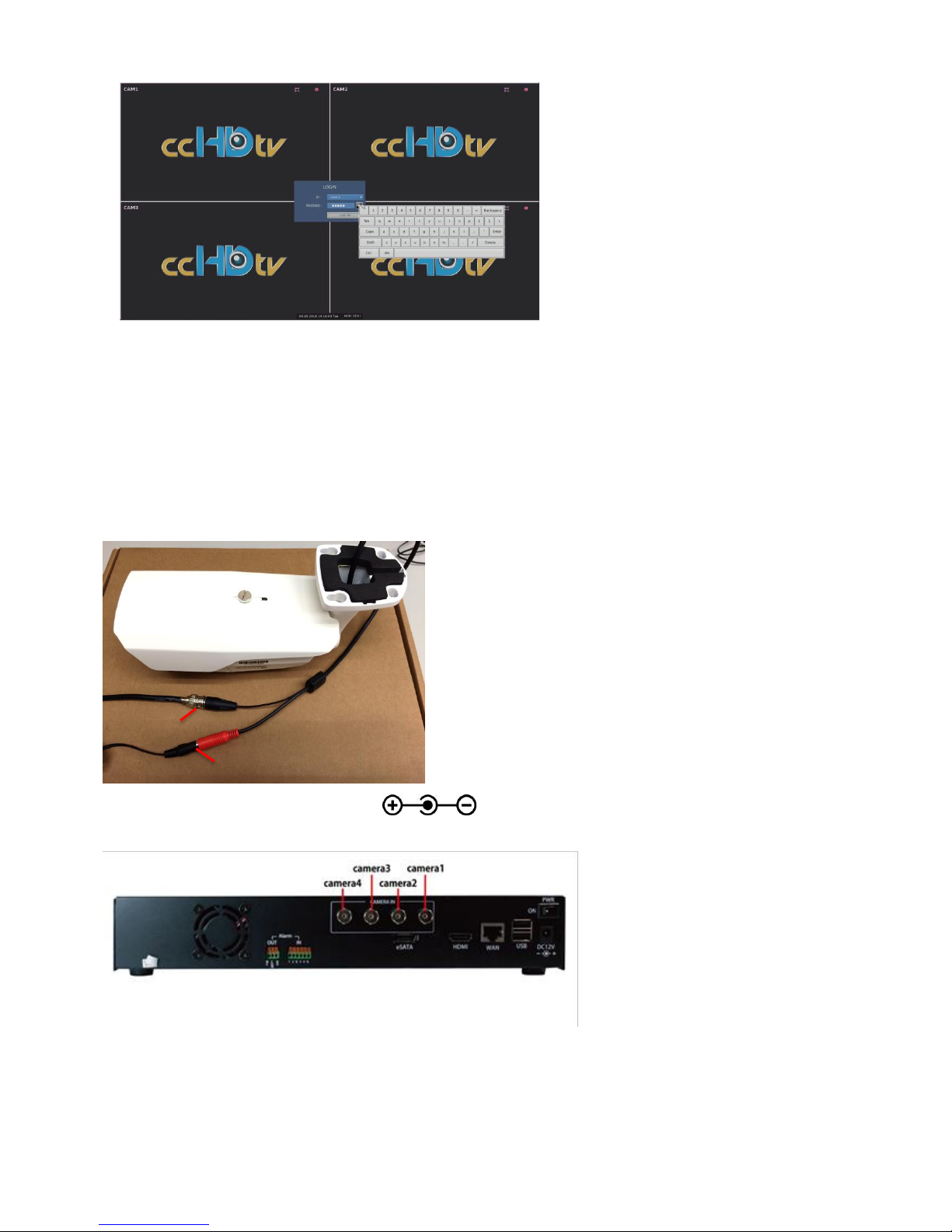
A. Press the right button of mouse in the grid to show the following screen.
B. Press ”Login” ,the following screen appears
2.3-2 Login Screen
Press to show a Virtual keyboard on the right side.
Page 13
DDR-E04AB / DDR-D04AB User Manual
7
. (Note: The default administrator: User Name is” admin”, Password is “admin”). Press “LOG
IN”
2.3-3 Camera Installation
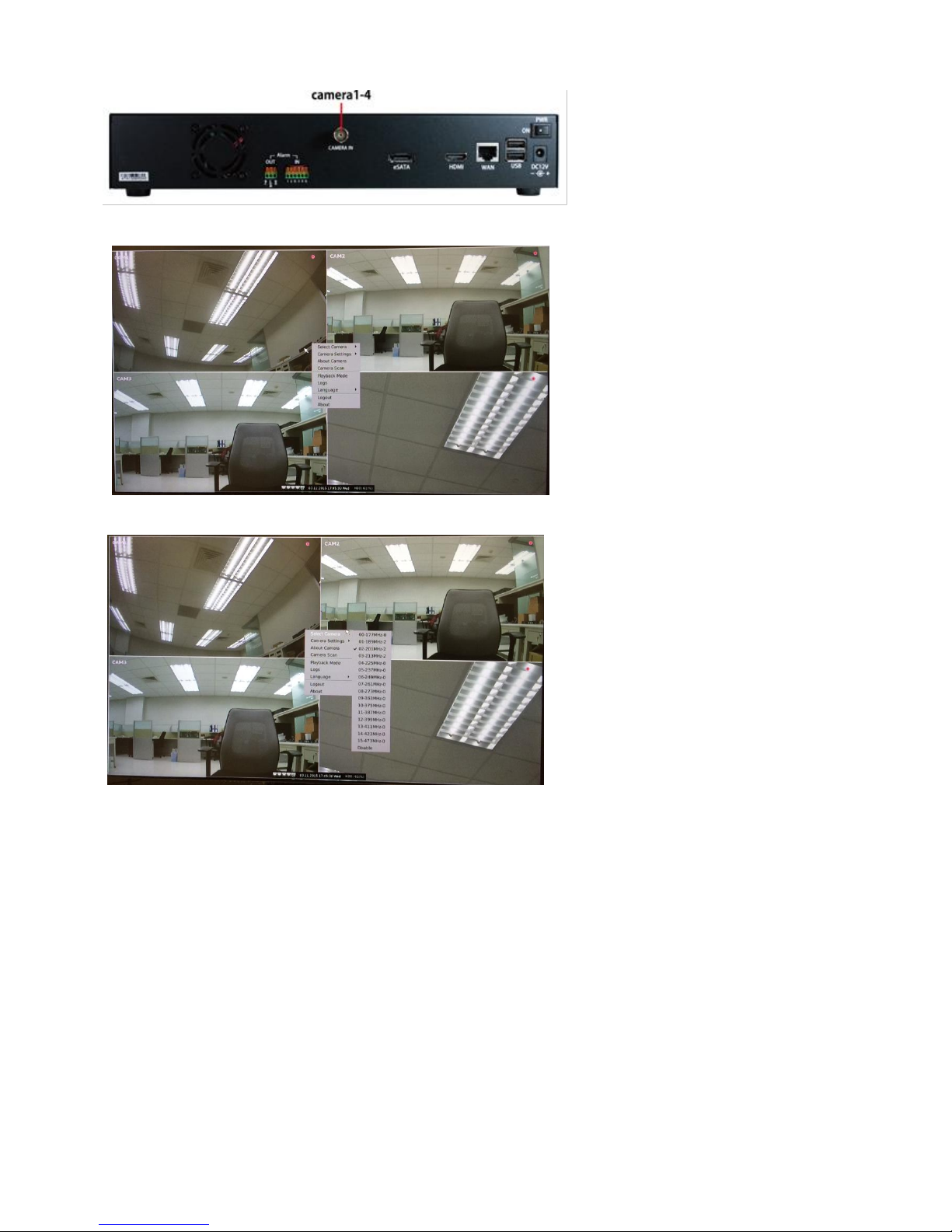
A. Connect coaxial cable and power cable step by step.
NOTE: Power input follows DC12V
DDR-E04AB to follow the following diagram to connect cameras (up to 4)
DDR-D04AB to follow the following diagram to connect cameras (up to 4)
DC 12V
BNC
Page 14
DDR-E04AB / DDR-D04AB User Manual
8
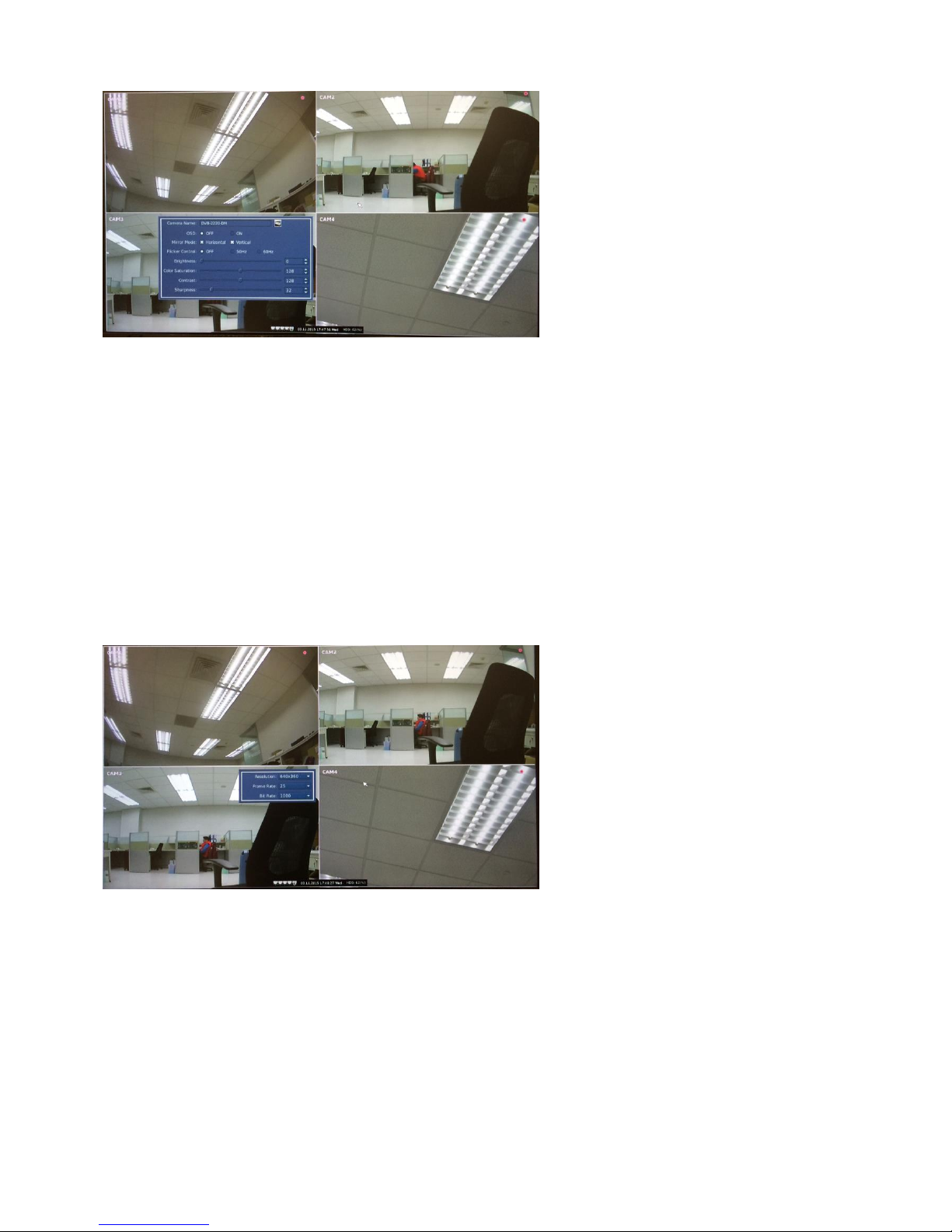
B. Press the right mouse in a grid will appear the following screen.
..
C. Press "Select Camera" to set the camera’s channel & frequency.
.
Note1: Each camera’s frequency is predefined and labeled on its own body.
Note2: Each camera’s channel & frequency must be different for distinguishing when is
connected to DDR-D04AB is no limitation for channel & frequency.
Behind the camera frequency, there is a number labeled:
0 -> Represents there is no camera with the frequency.
1 ->Represents camera is locked with the frequency but return channel is not available.
2 -> Represents camera is locked with the frequency and return channel is available.
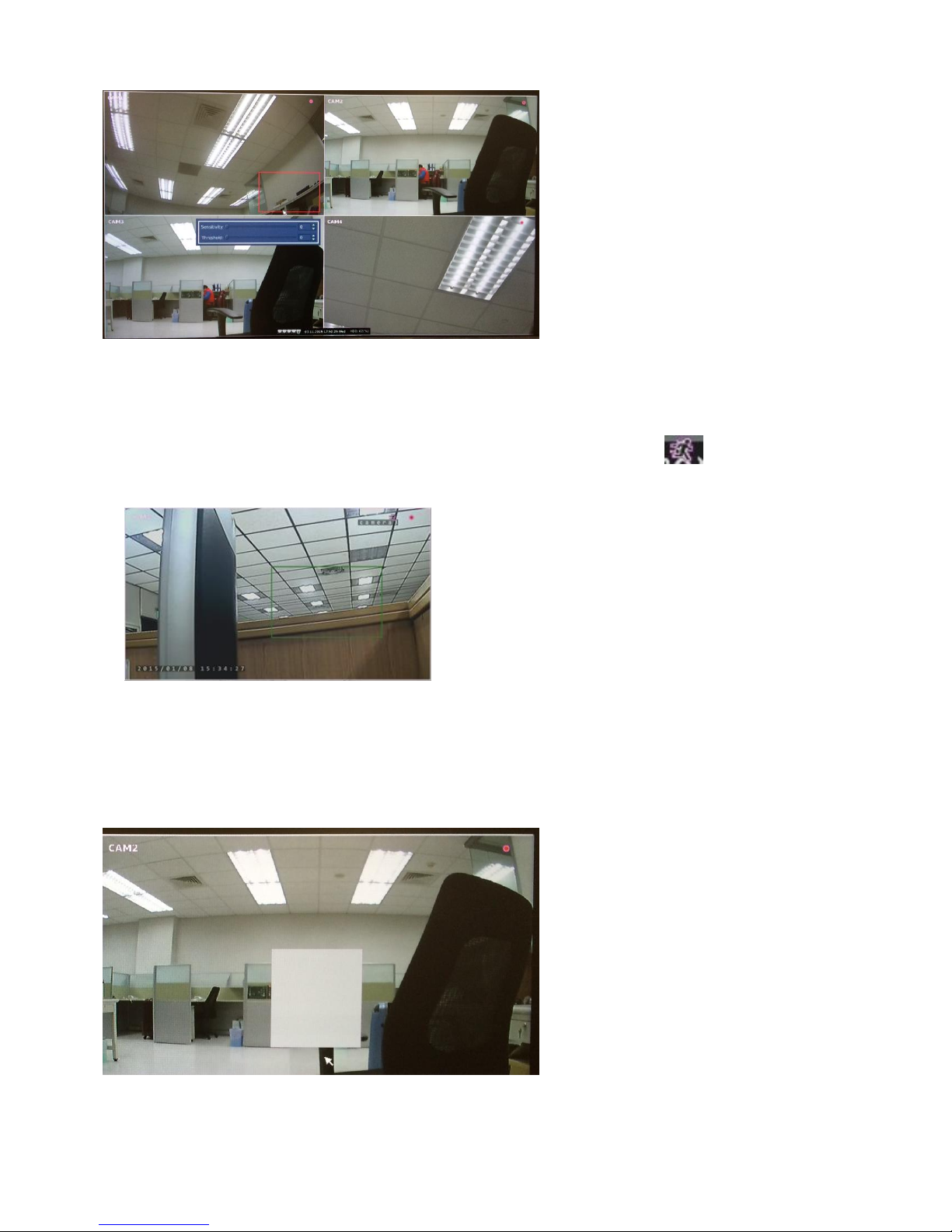
D. Press the "Camera Settings" and then press the "Image Settings" to display the
following screen
Page 15
DDR-E04AB / DDR-D04AB User Manual
9
1. Enter the camera’s name.
2. OSD 0FF or ON (display camera’s name, date and time).
3. Mirror Mode: vertical and horizontal flip.
4. Flicker Control: Flicker frequency is set to be 50Hz or 60Hz. (according to the local power
soured)
5. Brightness: Move the slider to set the brightness of image (0 to 255).
6. Color Saturation: Move the slider to set the color saturation of image (0 to 255).
7. Contrast: Move the slider to set the contrast of image (0 to 255).
8. Sharpness: move the slider to set the sharpness of image (0 to 255).
E. Press the "Camera Settings" and then "Stream Settings" to display the following
screen
1. Camera’s Resolution (appear automatically)
2. Frame Rate : (5~30) (appear automatically)
3. Bit Rate (500, 1000,1500,2000).
F. Press the "Camera Settings" and then "Motion Settings" by using the mouse from
(upper left to lower right) to set the motion area.
Page 16
DDR-E04AB / DDR-D04AB User Manual
10
1 Set motion area with the red line
2. IN the motion area, by using mouse right-click button to display the adjustment windows of
Sensitivity and Threshold (0-100).
3. If there are something moved into the motion area, display will show “. ” pattern and
motion areas appear green line.
….
4. Release “Motion Settings”
Press the "Camera Settings" and then "Motion Settings" by using the mouse from (lower right
to upper left) to release the motion area
G. Press the "Camera Settings" and then "Private Settings" by using the mouse from
(upper left to lower right) to set private area.
1. The hiding place will be shown with a blank shadow in the window
2. Release “Private Settings”
Page 17
DDR-E04AB / DDR-D04AB User Manual
11
Press the "Camera Settings" and then "Private Settings" by using the mouse (lower right to
upper left) to release the private area.
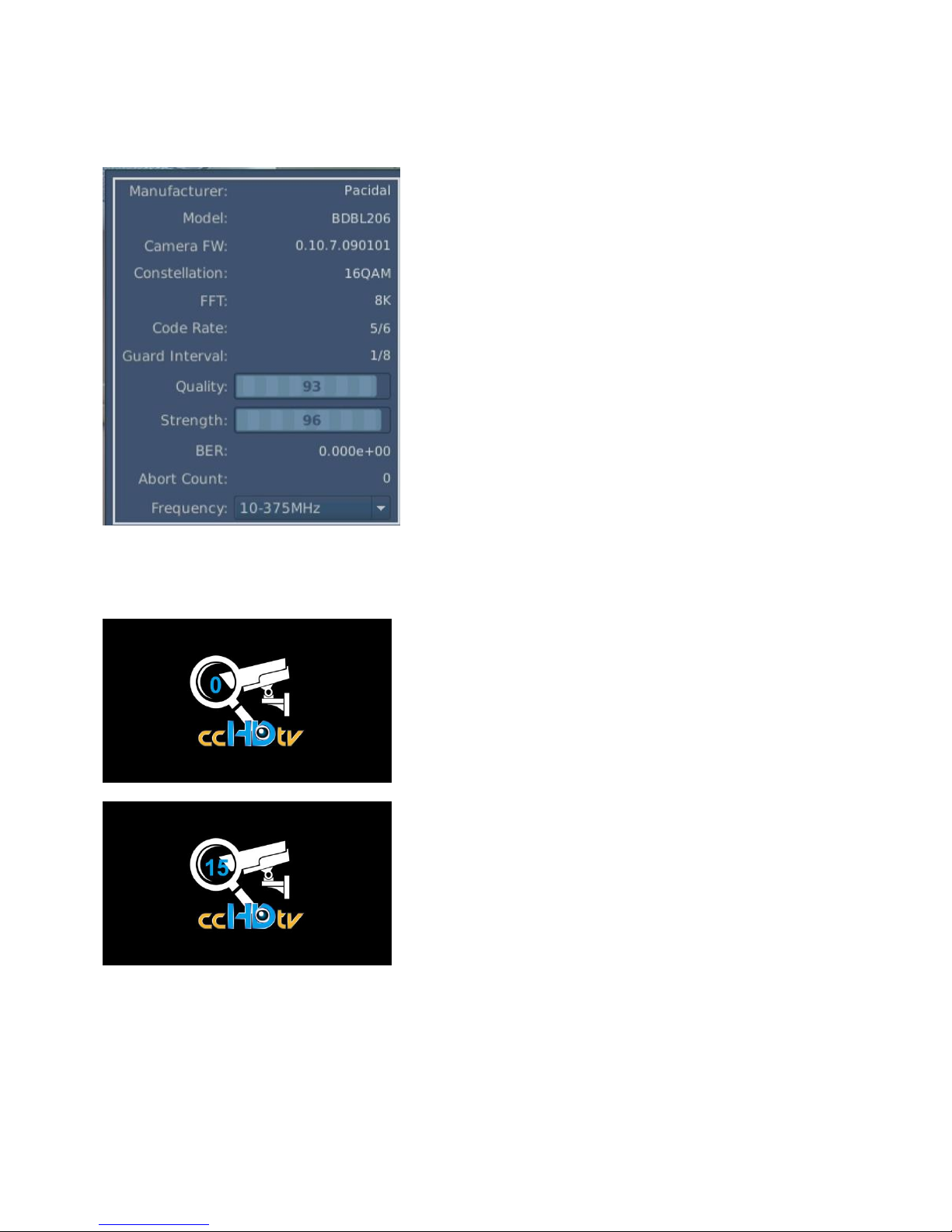
H. Press ”About Camera” to display the following screen
To show the Manufacturer, Model, Camera FW, FFT, Code Rate, Guard Interval, Quality,
Strength, BER, Abort Count, Frequency.
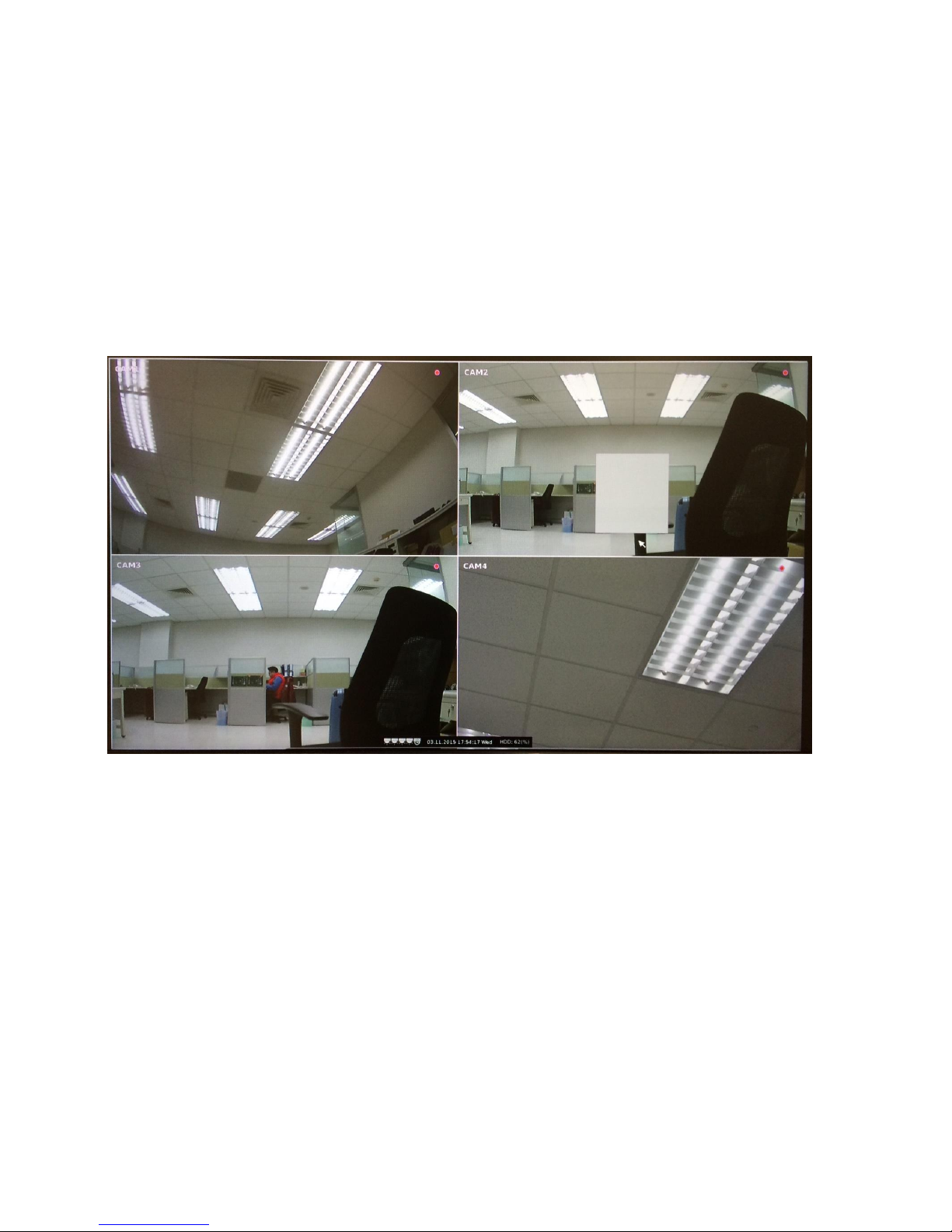
I. Press ”Camera Scan” to display the following screen
Digital display 0-15, 15 means the scan is complete.
After scanning to show the image
Note: 1.You can only do “Camera Scan” one by one.
2. DDR-D04AB: After the scan is completed, Press "Select Camera” to show the number
after the camera frequency, "2" means the camera’s function is available. (up to 4
camera)
Page 18
DDR-E04AB / DDR-D04AB User Manual
12
Chapter 3 Getting Start
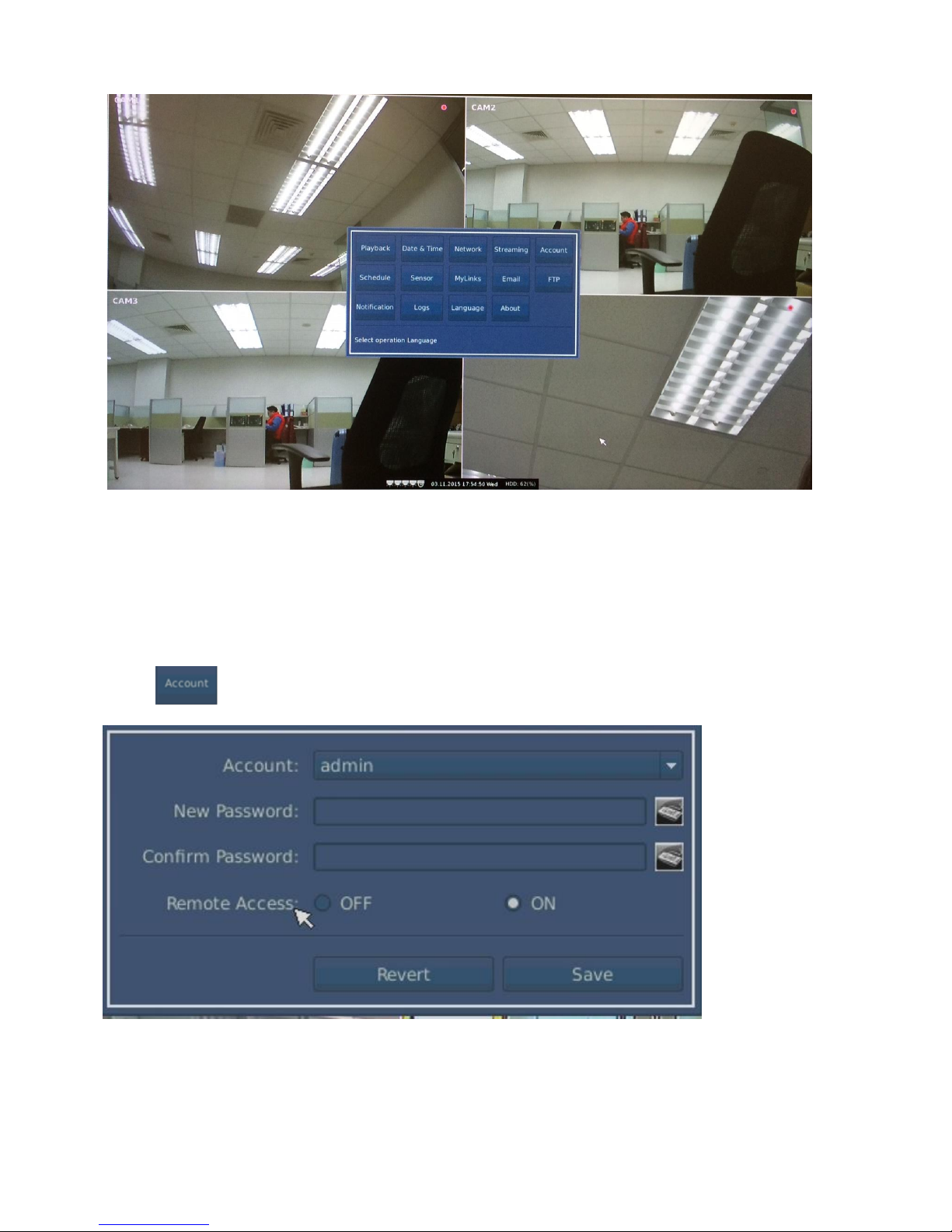
3.1 Live Display Screen
The following screen will appear after four cameras being installed
.
Press the left mouse button to display the following screen
Page 19
DDR-E04AB / DDR-D04AB User Manual
13
.
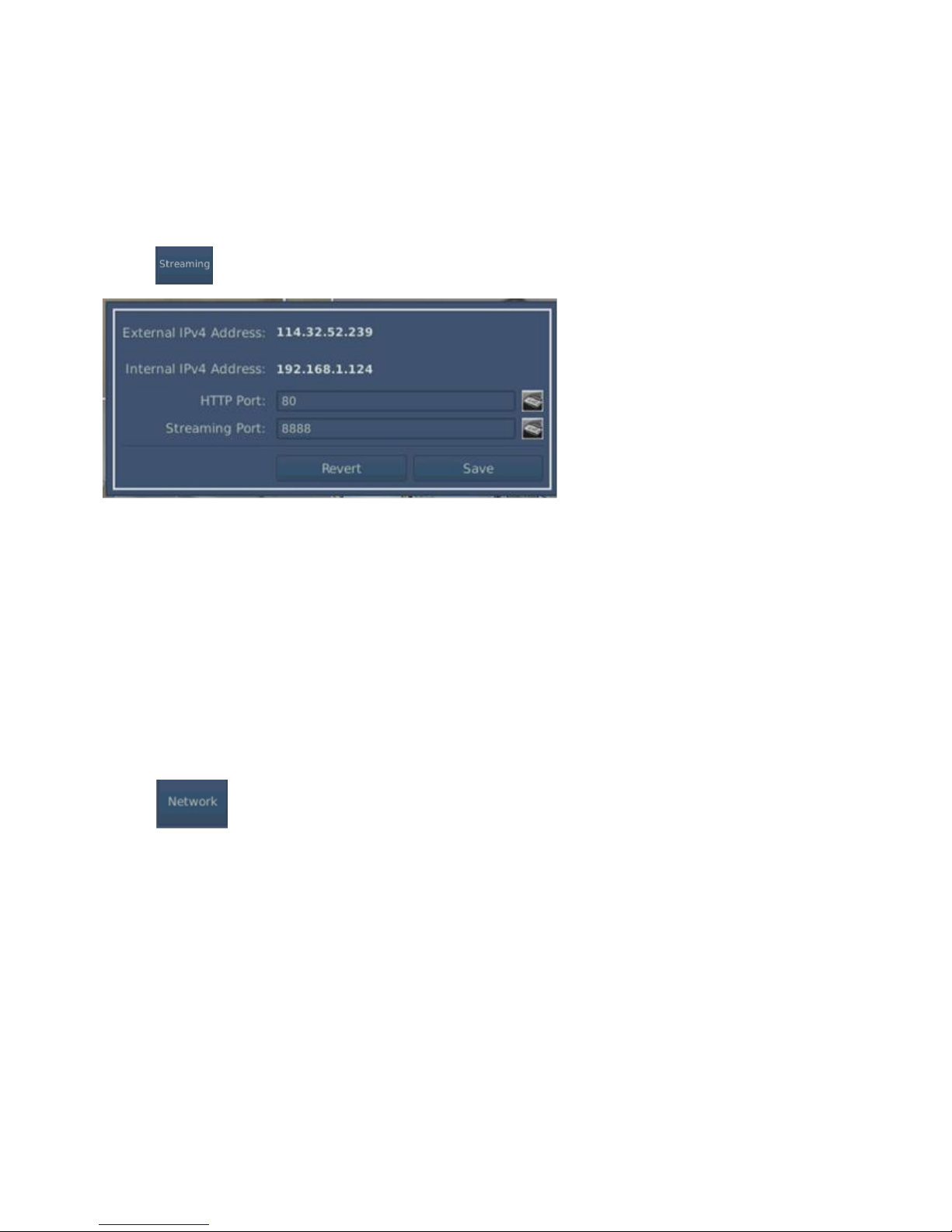
3.2 Account setting
Press , the following window is displayed
1. Account: Only the "admin" and "guest".
2. Set a new password and confirm password.
3. Remote Access: ON or OFF.
4. Press the "Save" to confirm setting or press "Revert" to revert again.
Page 20
DDR-E04AB / DDR-D04AB User Manual
14
3.3 Streaming
Press , the following window is displayed
1. Show external IPv4 address.(show automatically)
2. Show Internal IPv4 address. (show automatically)
3. Setting HTTP Port.
4. Setting Streaming Port.
5. Press the "Save" to confirm setting or press "Revert" to revert again.
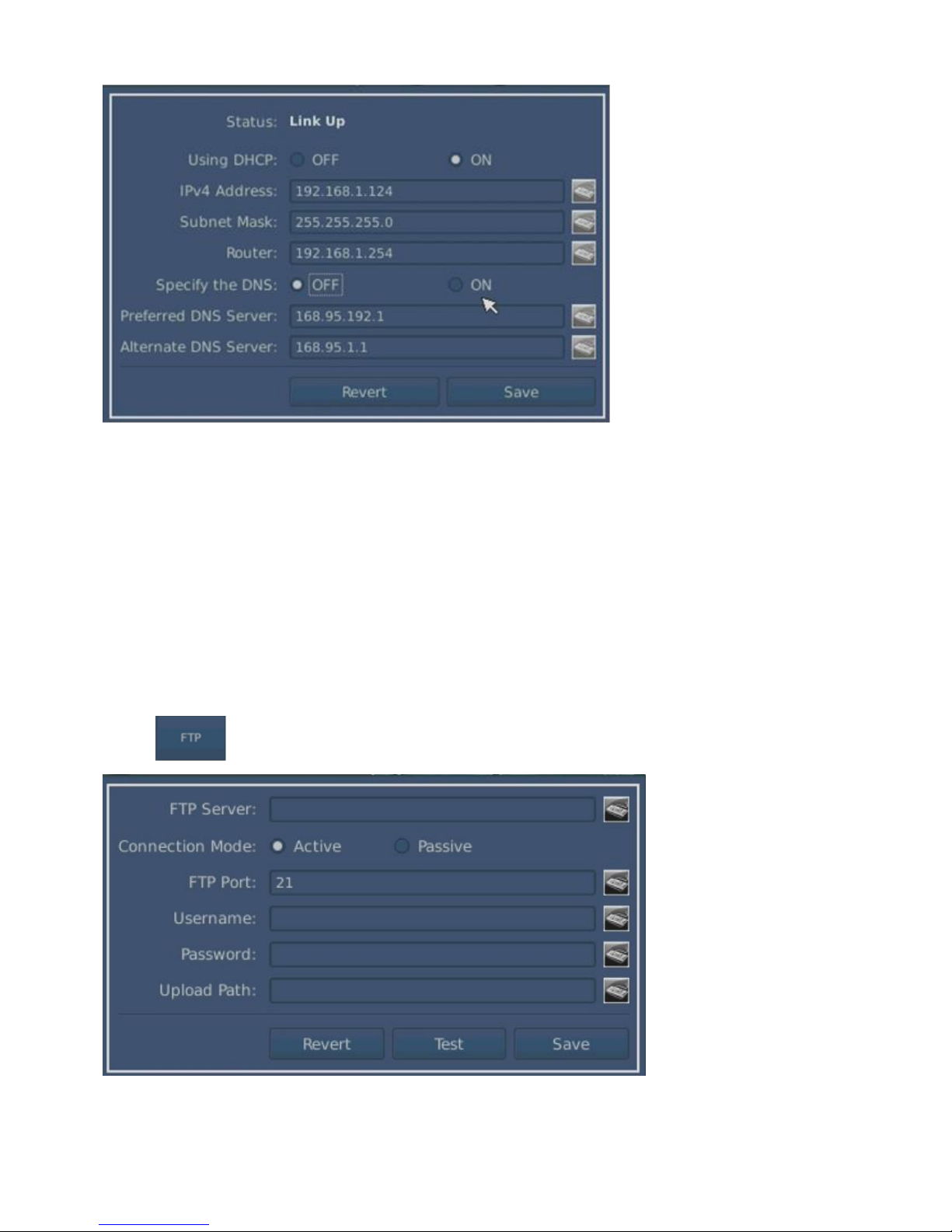
3.4 Network Setting
Press , the following window is displayed
Page 21
DDR-E04AB / DDR-D04AB User Manual
15
1. Status :Link Up or Link Down
2. Using DHCP: OFF or ON(Automatically obtain IP Address)
3. Specify the DNS:0FF or ON(Setting Preferred & Alternate DNS Server)
4. Press the "Save" to confirm setting or press "Revert" to revert again.
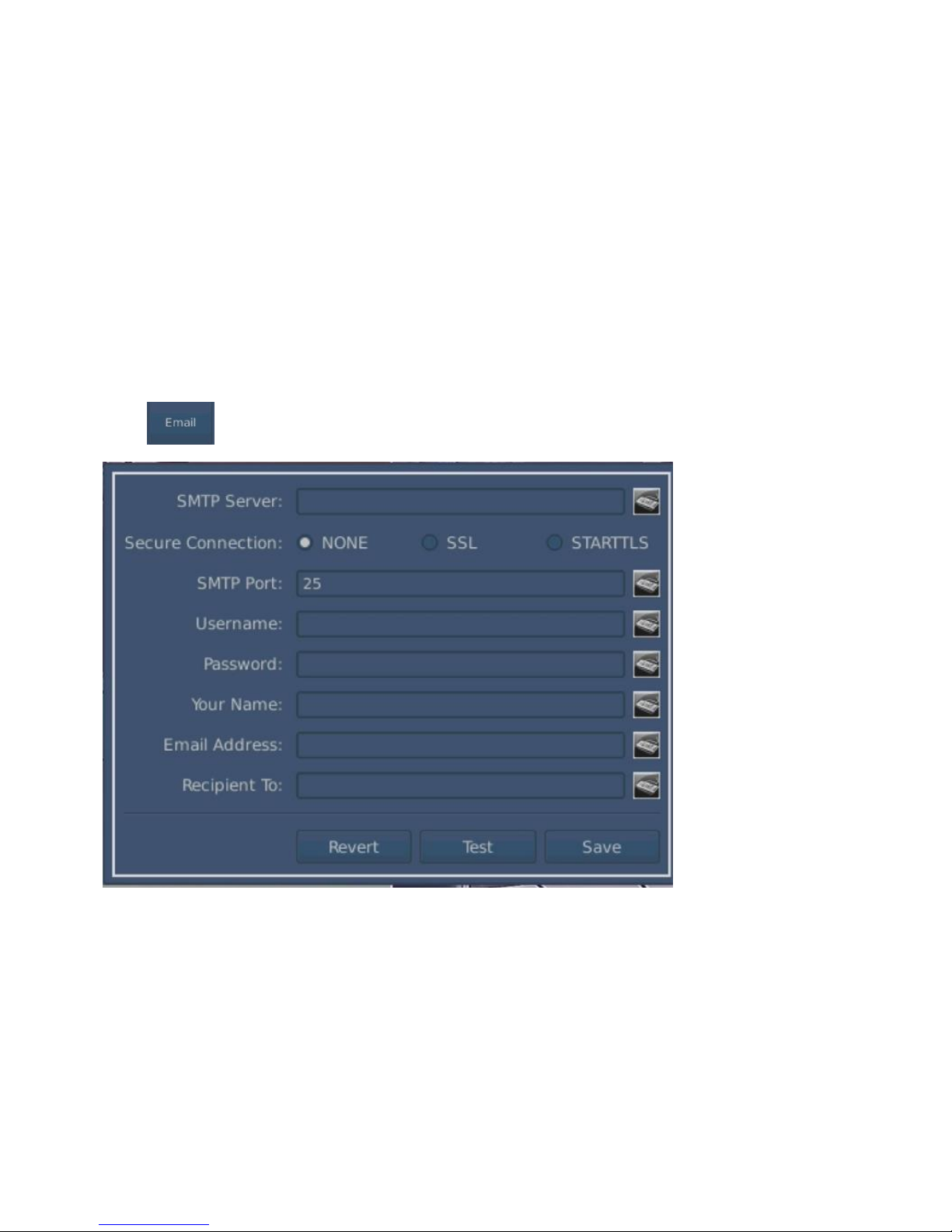
3.5 FTP
Press , the following window is displayed
A. Setup FTP Server.
Page 22
DDR-E04AB / DDR-D04AB User Manual
16
B. Select Connection Mode: Active or Passive.
C. Setup FTP Port.
D. Setup Username.
E. Setup Password.
F. Setup Upload Path.
G. Press the "Test" or "Save" to appear set-up successfully, press "Revert" to revert again.
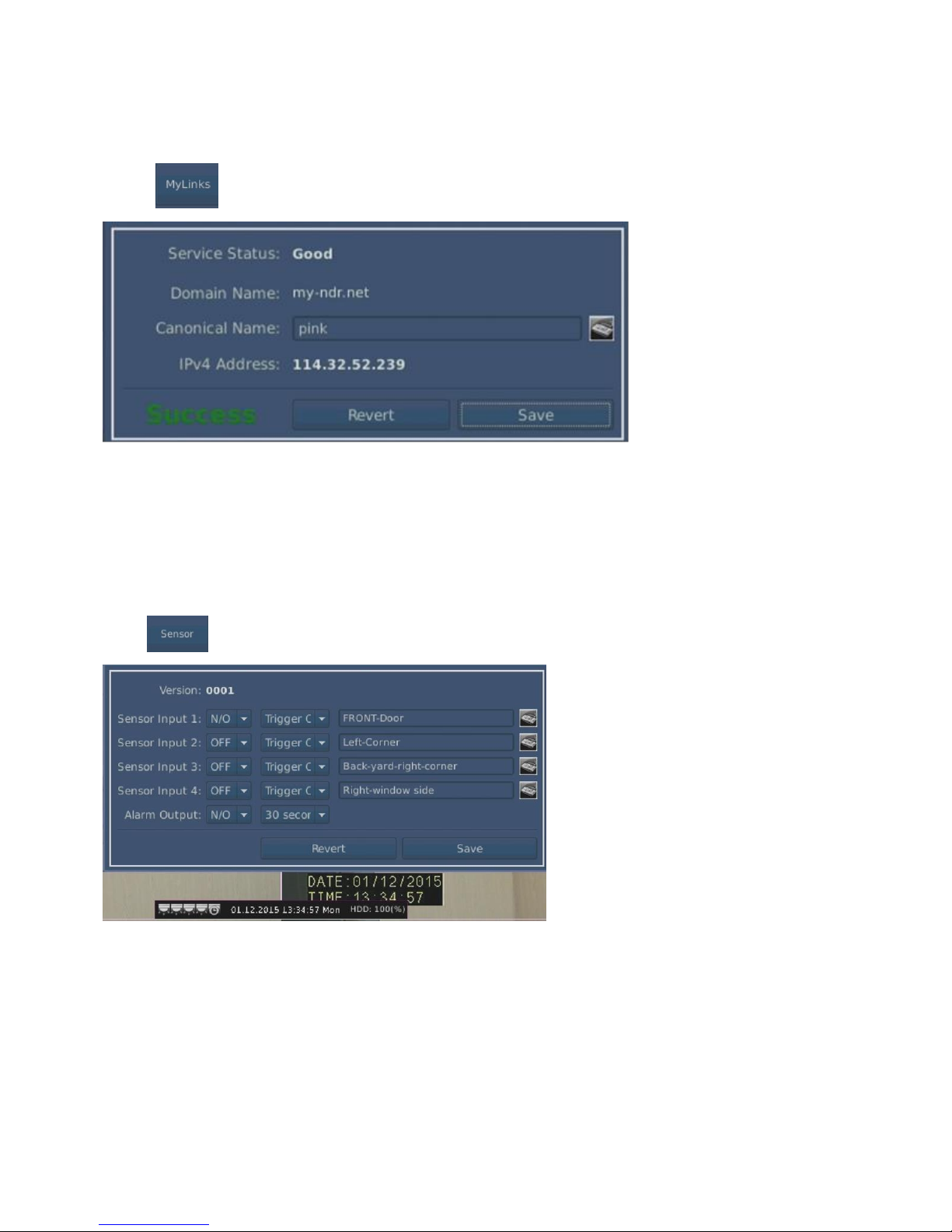
3.6 Email
Press , the following window is displayed
A. Setup SMTP Server.
B. Select Secure Connection: NONE, SSL or STARTTLS.
C. Setup SMTP Port.
D. Setup Username.
E. Setup Password.
F. Setup Your Name.
G. Setup Email Address.
H. Setup Recipient To :
I. Press the "Test" or "Save" to appear set-up successfully, press "Revert" to revert again.
Page 23
DDR-E04AB / DDR-D04AB User Manual
17
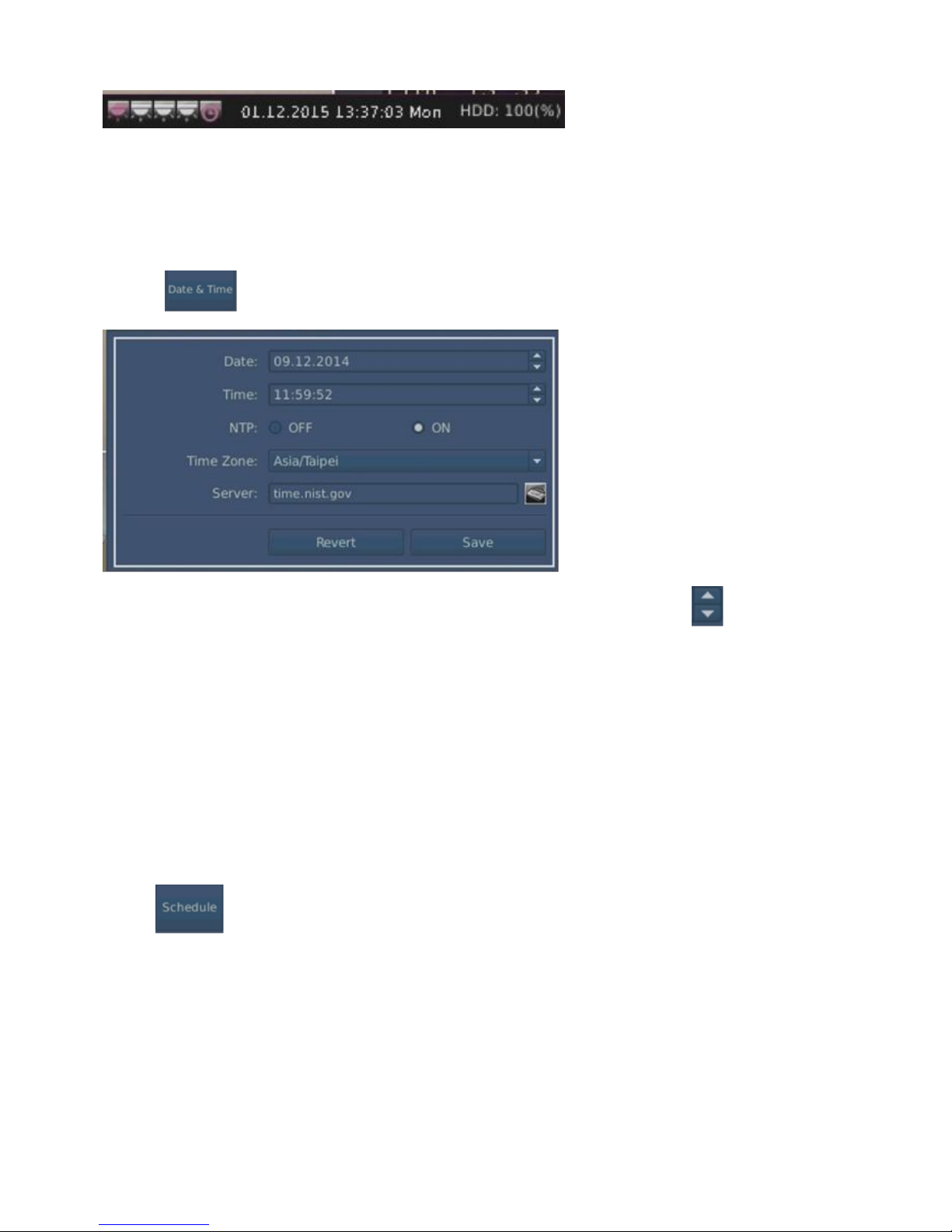
3.7 MyLinks
Press the following window is displayed
1. Enter the name and press "Save" to show the registration is completed successfully.
2. From external site to search this machine, enter the canonical name is: my-ndr.net
3.8 Sensor
Press , the following window is displayed
A. Setup Sensor Input: 1. OFF, N/C or N/O 2. Set up the sensor’s action 3. Sensor location
name setting (total of 4).
B. Setup Alarm Output 1. OFF, N/C or N/O 2. Alarm time setting.
C. Press "Save", appears set-up successfully, press "Revert" to revert again.
Sensors and alarm icon will appear in Red and display the trigger time when sensor is triggered.
Page 24
DDR-E04AB / DDR-D04AB User Manual
18
3.9 Date & Time Setting
Press , the following window is displayed
1. Manual adjustment: NTP “OFF” and choose the adjusted item, then press to adjust up or
down.
2. Network adjustment time: NTP “ON” (Synchronize the server’s right time)
3. Time Zone select
4. Server setting.
5. Press the "Save" to confirm setting or press "Revert" to revert again.
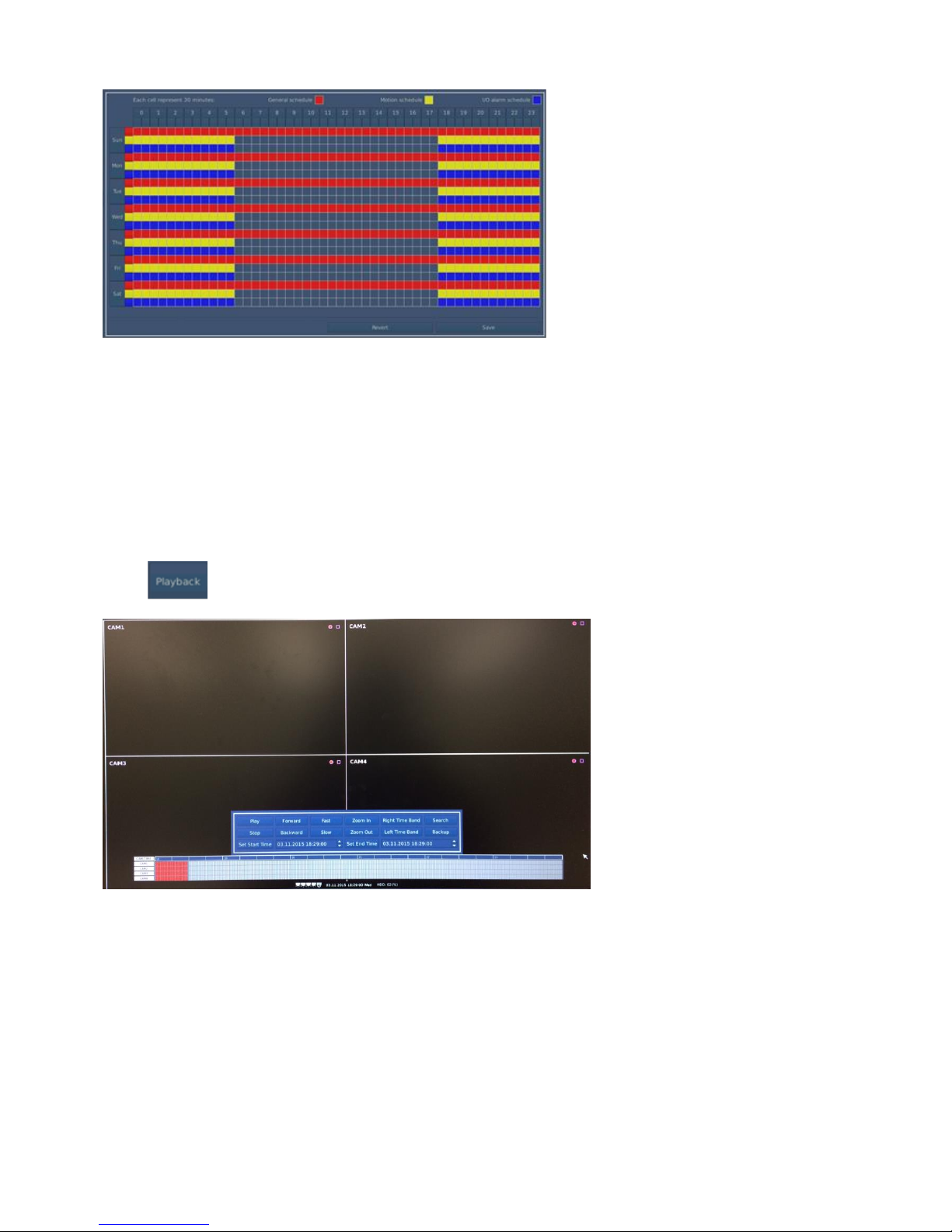
3.10 Schedule
Press , the following window is displayed
Page 25
DDR-E04AB / DDR-D04AB User Manual
19
1. Video schedule is one week and 24Hrs every day.
2. Each cell is 30 minutes
3. General Schedule is red and Motion Schedule is yellow and I / O alarm is blue
4. Choose the setting time or date line and then entire column or each grid can be set.
5. Press the "Save" to confirm setting or press "Revert" to revert again.
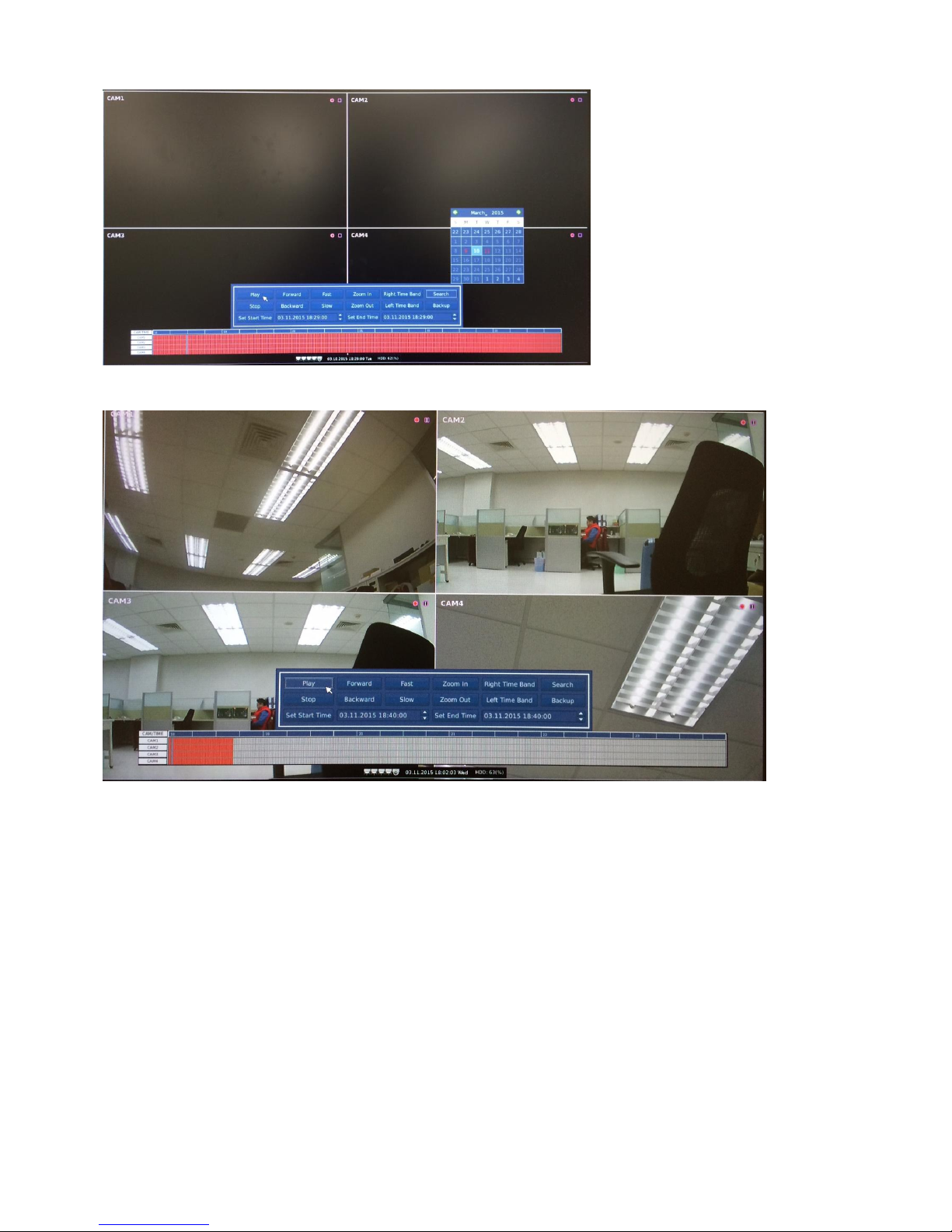
3.11 Playback
Press to display the following screen
1 Press "Search" to select a date and “Time line” to select time.
Page 26
DDR-E04AB / DDR-D04AB User Manual
20
2 Press "Play" to perform playback
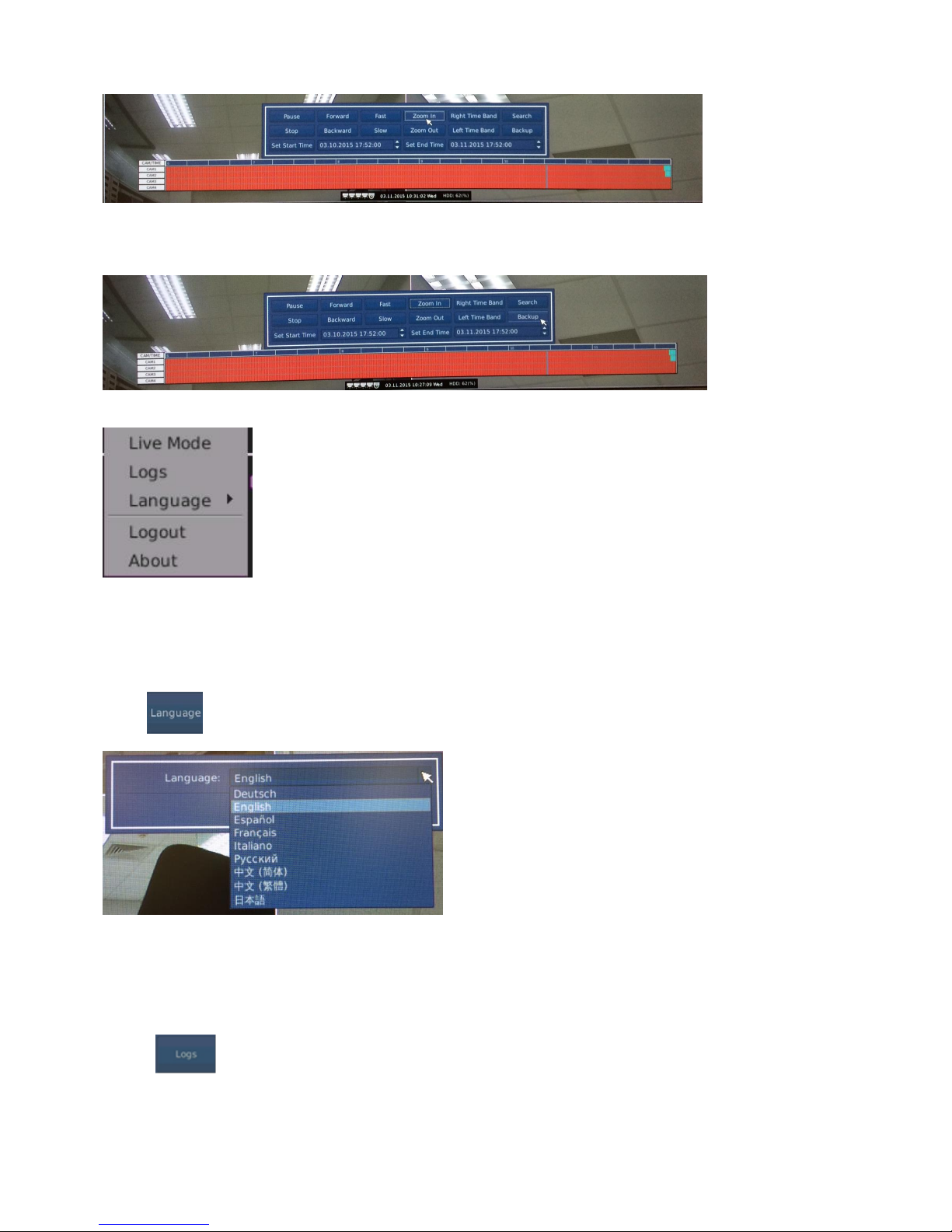
3. Press the "Forward" to play forward, press "Backward" to play backward.
Press the "Fast" to play accelerate (It is able to always press "Fast" to play accelerate).
"Slow" to play decelerated (It is able to always press "Slow" to play decelerated).
Press the "Pause" to pause play, Press the "Stop" to stop play.
Press the "Zoom In", time zone will change from 24 hours to 12 hours, press again, time zone
will change to be 6 hours.
Press "Zoom Out", time zone will changes from 6 hours to 12 hours, press again, time zone
will change to be 24 hours.
Press the "Right Time Band" to move the selected time zone toward right.
Press the "Left Time Band" to move the selected time zone toward left.
Page 27
DDR-E04AB / DDR-D04AB User Manual
21
4 .Backup: press "Backup" to set the date ,start time, end time( USB storage device or SD card
must be inserted)
5. Press the right mouse button to display the following screen
Press "Live Mode" to go back the real-time screen.
3.12 Language
Press , the following window is displayed
Select Language then press the "Save" to confirm setting, press "Revert" to revert again.
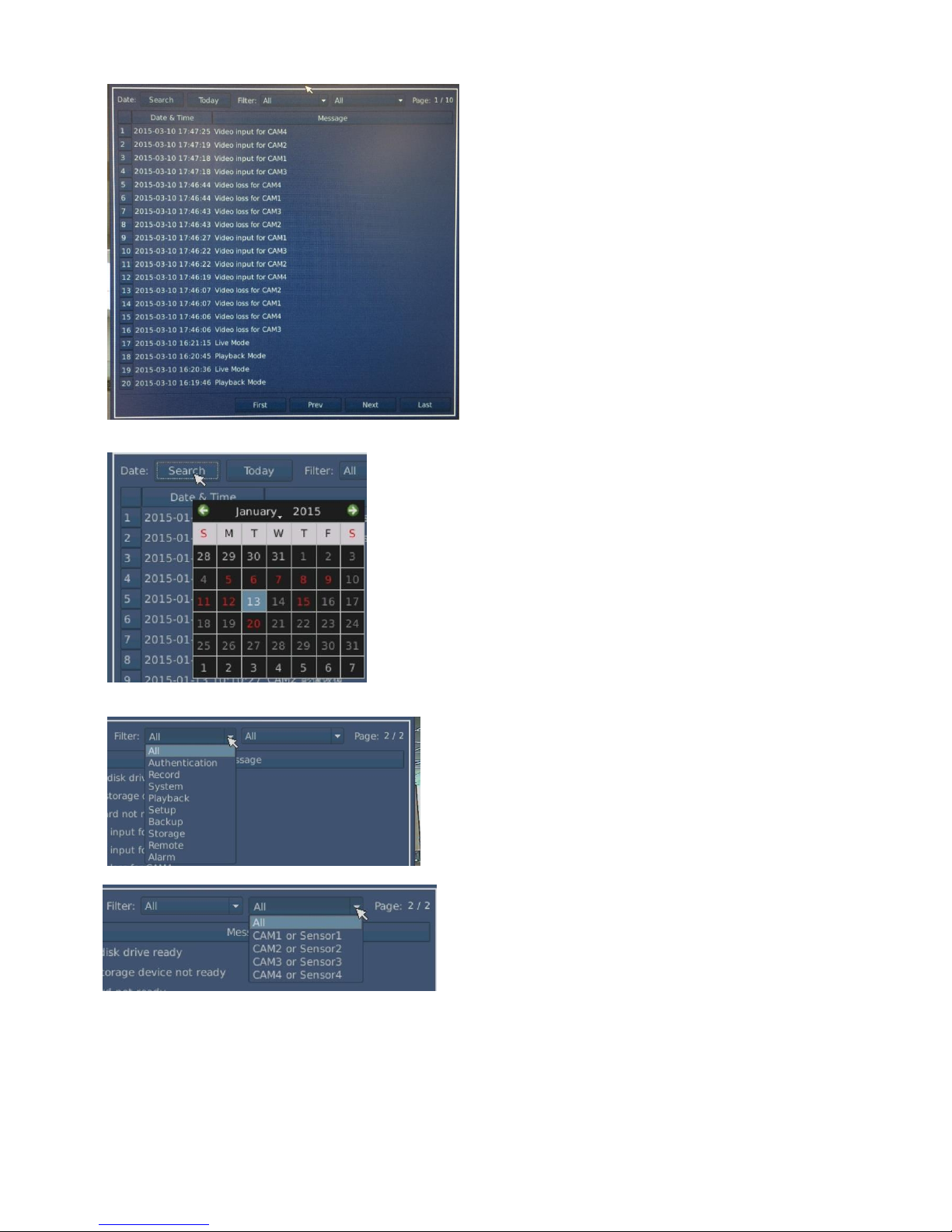
3.13 LOG
Press , the following window is displayed
Page 28
DDR-E04AB / DDR-D04AB User Manual
22
.
1. Select the date or today (Move the mouse wheel up and down to exit the page)
.
2. Select "Filter" and” cameras or Sensor”
.
There are those items in “Filter “: All, Authentication, Record , System ,Playback,
Setup ,Backup ,Storage ,Remote, Alarm.
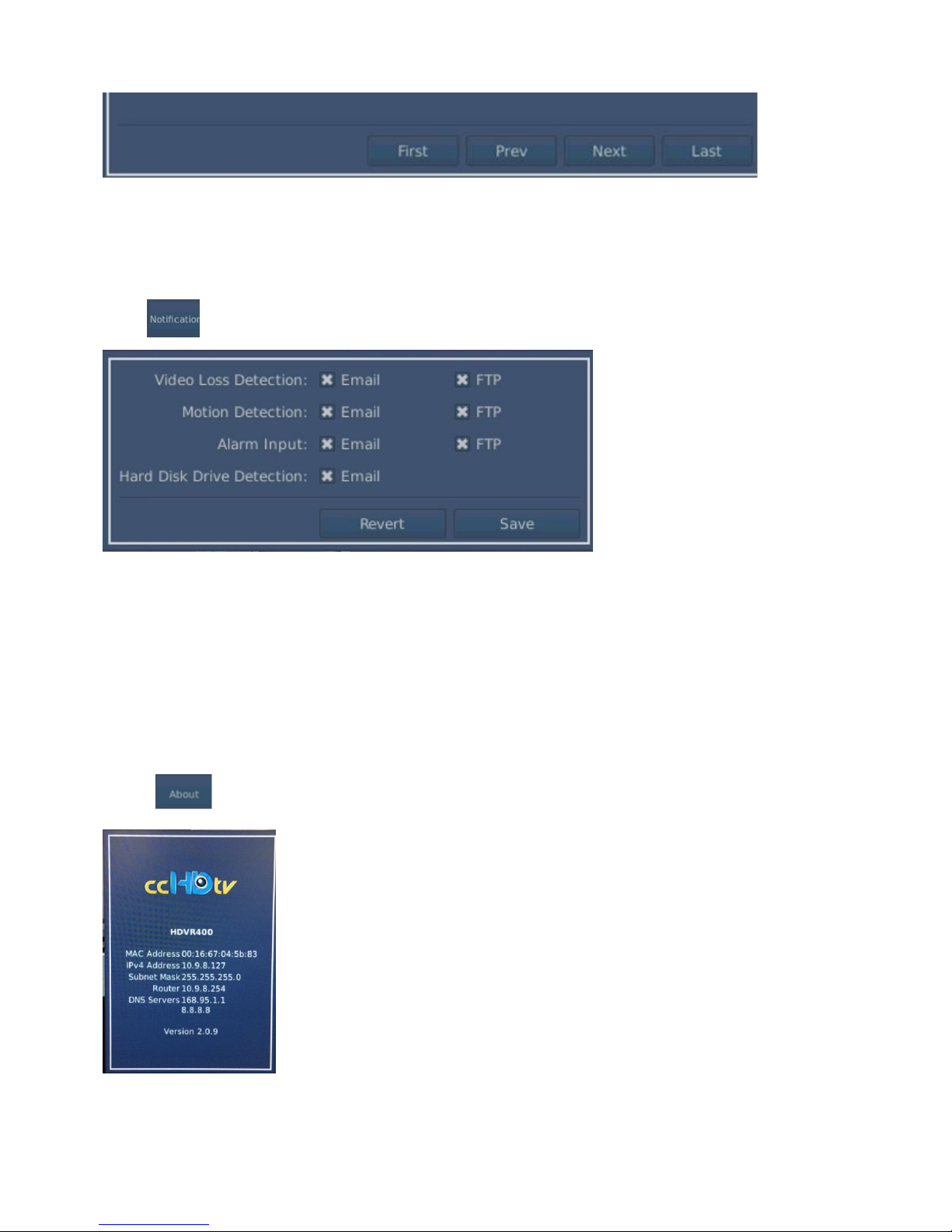
3. To select the pages of ”LOG” "First": First page, "Prev": Previous page, "Next": Next page,
"Last": last page .
Page 29
DDR-E04AB / DDR-D04AB User Manual
23
3.14 Notification
Press , the following window is displayed
A. Video Loss Detection, Motion Detection and Alarm Input can select “Email” and” FTP” to
notice.
B. Hard Disk Drive Detection select Email to notice.
C. Press the "Save" to confirm setting or press "Revert" to revert again.
3.15 About
Press , the following window is displayed
Show the model’s NO, network data, software version.
Page 30
DDR-E04AB / DDR-D04AB User Manual
24
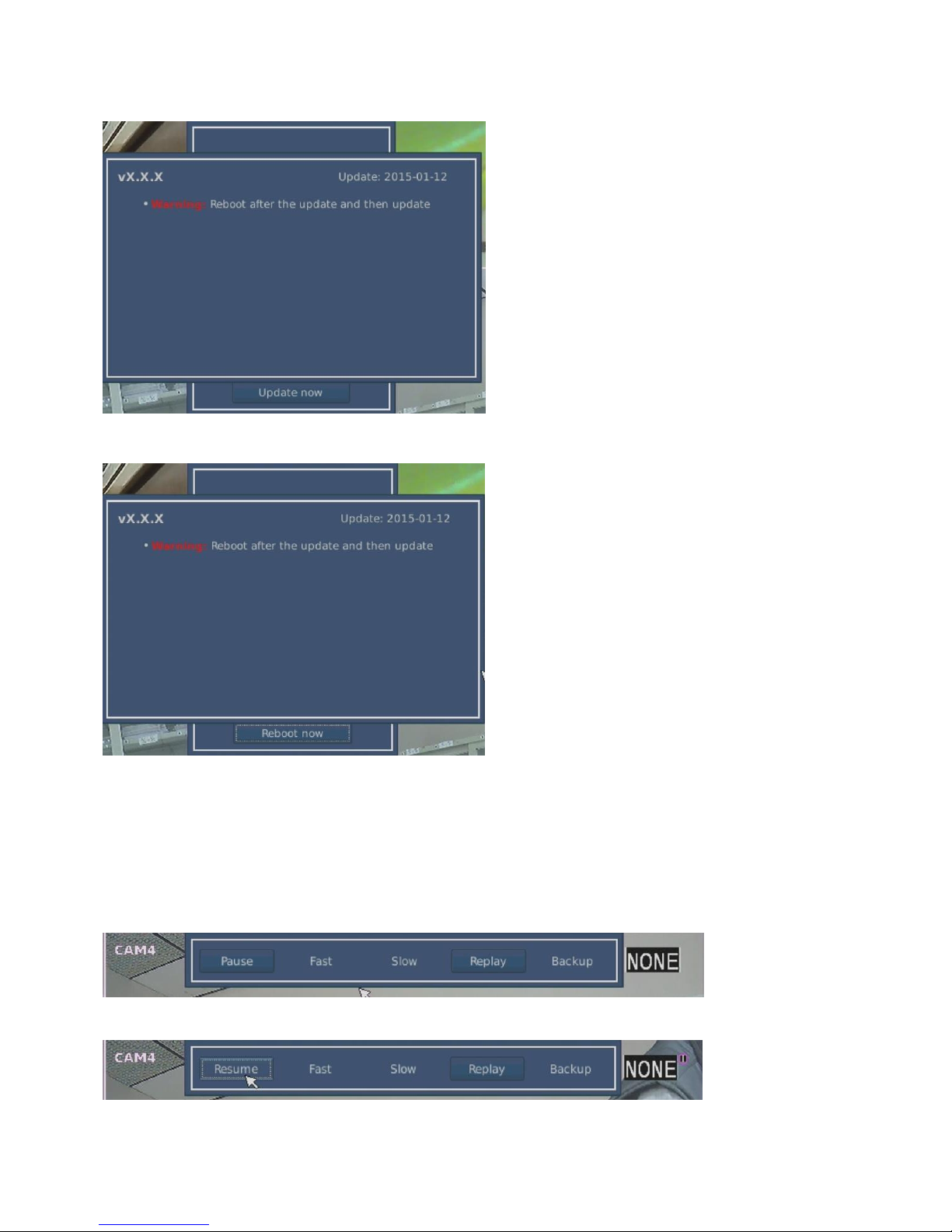
If there is software to update, the following screen will appear.
Press the "Update now", the following screen will appear after finishing the update.
Press “Reboot now” then reboot.
3.16 Pause, Replay and Backup in Live mode
Put the Mouse on top of the screen to appear the following screen.
A. Press "Pause" screen pause.
B. Press ”Resume” to resume the screen.
Page 31
DDR-E04AB / DDR-D04AB User Manual
25
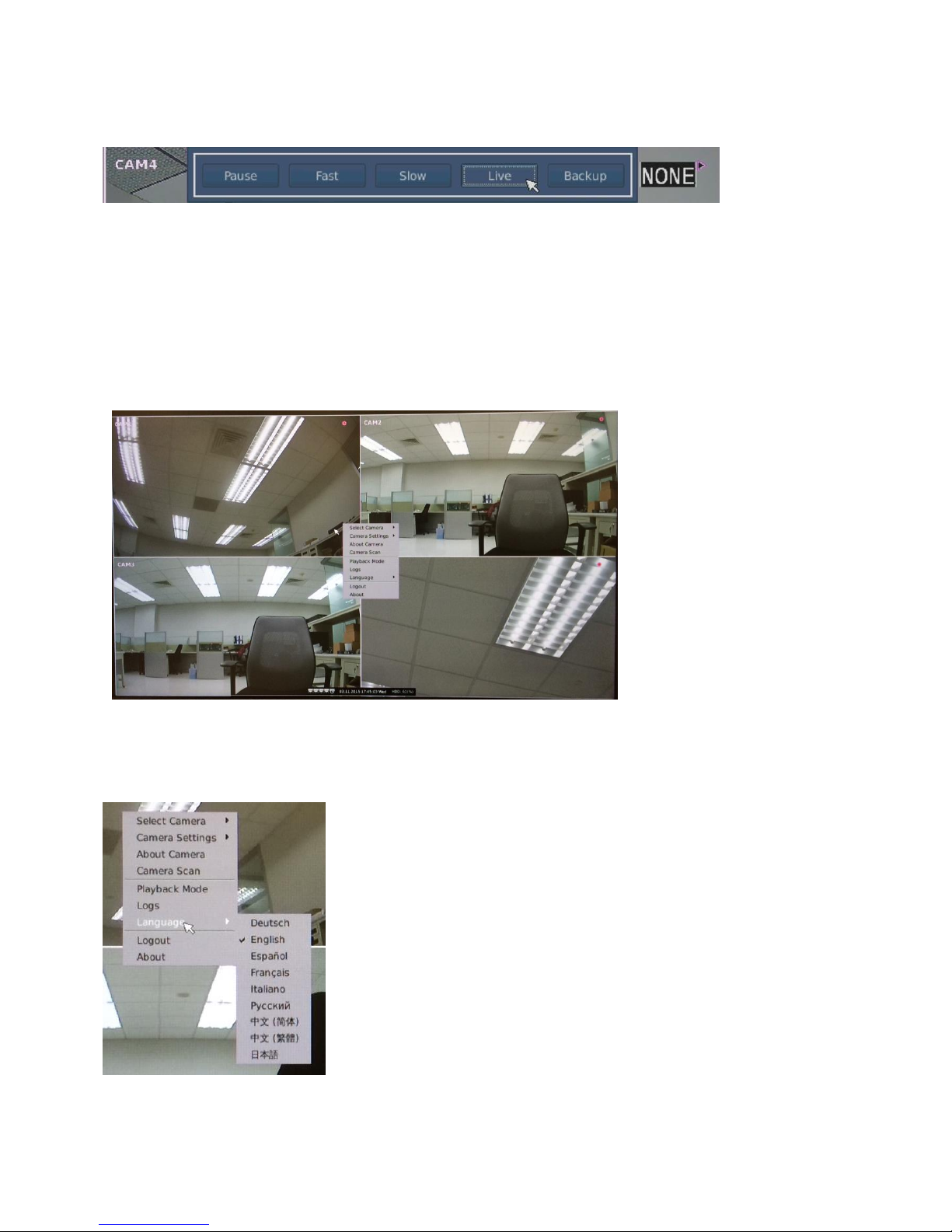
C. Press the "Replay" to replay screen within 15 seconds, press the "Fast" or "Slow" to speed up
or slow down the replay.
D. Press “Live” to resume live screen.
E. Press "Backup" ( USB storage device or SD card must be inserted)
3.17 Quick Menu in Live mode
Press the right mouse in a grid to show the following screen.
..
A. Select Camera, Camera Setting, About Camera and Camera Scan to see the 2.3-2.
B. Playback mode, log ,About to see the 3.11, 3.13, 3.15
C. Press the "language" to appear the following screen, you can directly select the language.
D. Logout or Login is accessible directly.
Page 32
DDR-E04AB / DDR-D04AB User Manual
26
Chapter 4 Windows® Remote Client
You can also operate the DVR unit via Windows® remote client to monitor, playback the
connected DTV cameras and manage the functions of the DVR system.
4.1 Login
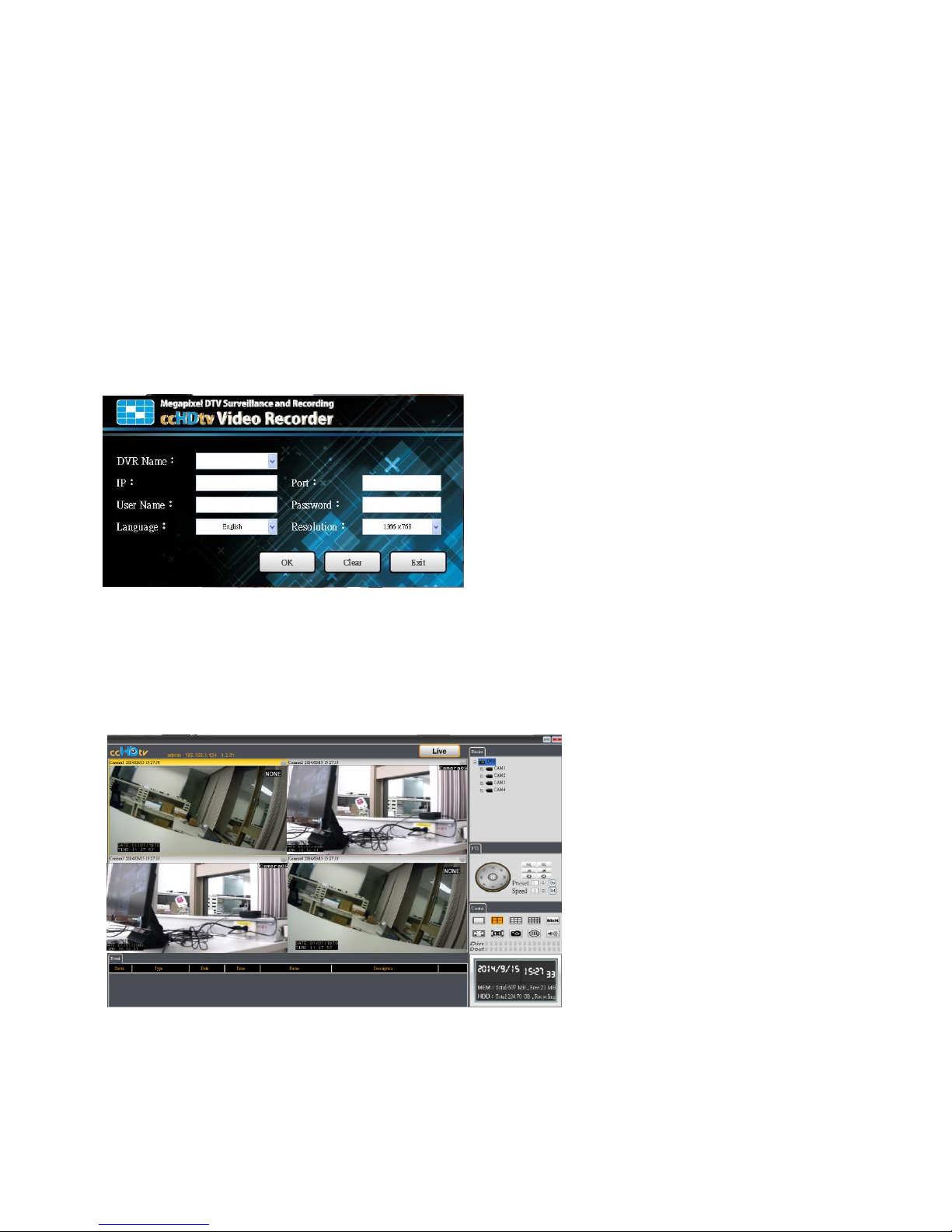
Click the Start button -> DVR Client -> DVR Remote Client at your Windows® desktop. When the
client is entered, you will see the following login window.
Login window
Login your DVR unit by entering DVR Name, IP Address, Port No., User Name, Password,
Language and Resolution and then click OK to begin using this unit. (Note: The default
administrator: User Name is “admin”, Password is “admin”). After entering the correct information,
you will see the live display screen within 10 seconds.
Live display screen
.
The entered DVR would be listed in the drop-down menu at the DVR Name field. You can select
the available DVR units from the drop-down menu during next time you log in and the system will
fill in the related fields automatically and you only need to reenter the Password field to login your
DVR unit.
Page 33
DDR-E04AB / DDR-D04AB User Manual
27
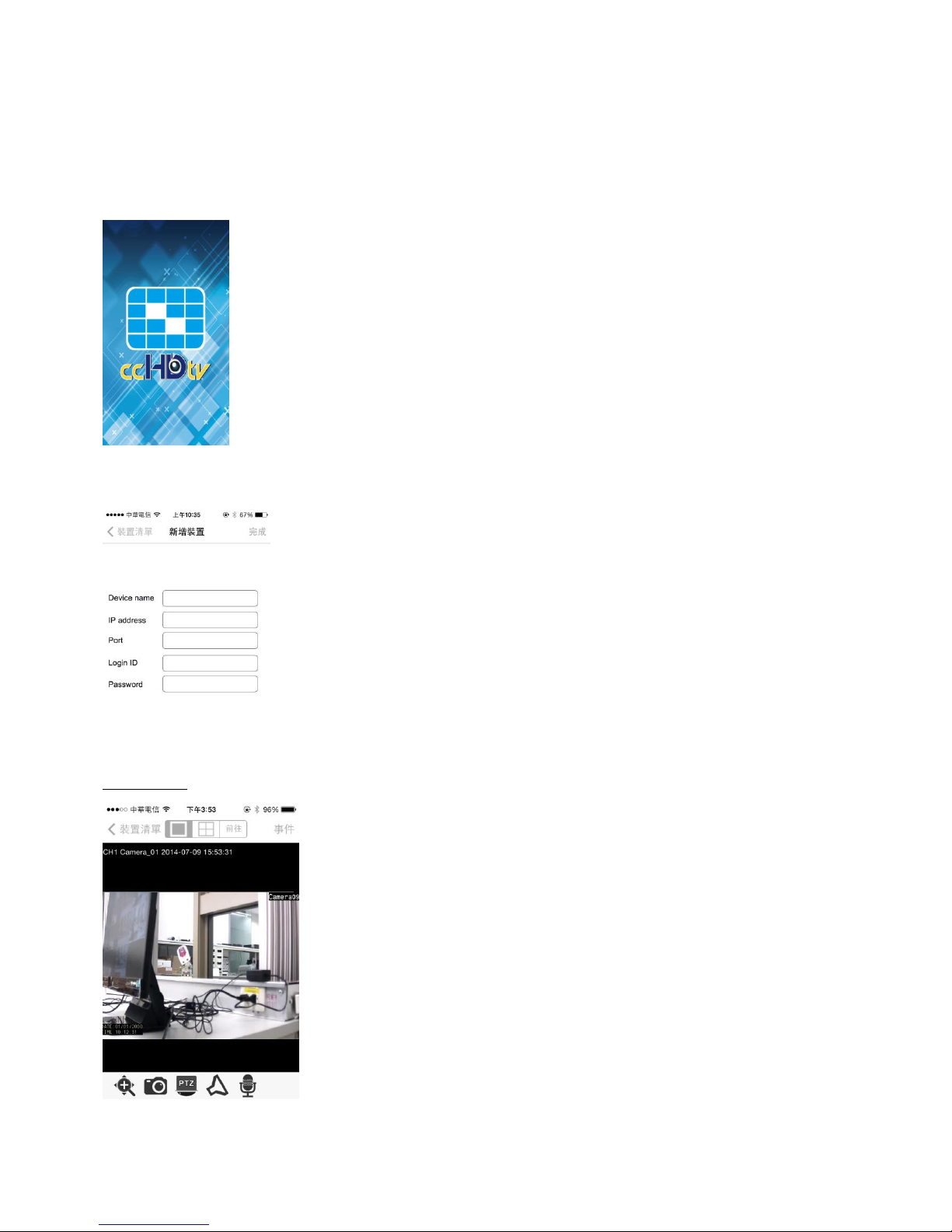
Chapter 5 iPhone / iPad users & Android users
For iPhone / iPad users & Android users, please visit APP Store or Google Play to download
“ ccHDtv Mobile” for remote mobile device access
This screen appears
Setting device
Enter Device name / IP address /Port / Login ID / Password
Completed
Page 34

Contact Information:
Ubiquity Smart Technology (UST Taiwan)
TEL: +886-3-5777-368
FAX: +886-3-5777-339
Mail: [email protected]
 Loading...