

Page 1
USR-TCP232-S2 User Manual h.usriot.com
1 / 34
USR-TCP232-S2 User Manual
File version:V1.0.1
Jinan USR IOT Technology Limited www.usriot.com
Page 2

USR-TCP232-S2 User Manual h.usriot.com
2 / 34
USR-TCP232-S2 User Manual................................................................................................................................1
1. Quick Start...............................................................................................................................................................4
1.1. Hardware Testing Environment................................................................................................................4
1.2. Connection...................................................................................................................................................4
1.3. Default Parameter...................................................................................................................................... 6
1.4. Data Transmission Testing........................................................................................................................6
2. Overview..................................................................................................................................................................7
2.1. Brief Introduction.........................................................................................................................................7
2.2. Features....................................................................................................................................................... 7
2.3. Parameters.................................................................................................................................................. 8
2.4. Hardware Information................................................................................................................................ 8
2.5. Pin Dimension...........................................................................................................................................10
3. Module Function...................................................................................................................................................11
3.1. Work mode.................................................................................................................................................11
3.1.1. TCP Client mode...........................................................................................................................11
3.1.2. TCP Server mode.........................................................................................................................12
3.1.3. UDP Client mode.......................................................................................................................... 14
3.1.4. UDP Server mode.........................................................................................................................14
3.1.5. HTTPD Client.................................................................................................................................15
3.1.6. TCP and UDP mechanism.......................................................................................................... 15
3.2. DHCP and DNS Function....................................................................................................................... 15
3.3. VCOM.........................................................................................................................................................17
3.3.1. Module Works as Client...............................................................................................................17
3.3.2. Module Works as Server............................................................................................................. 18
3.3.3. Create VCOM................................................................................................................................19
3.4. Special Function.......................................................................................................................................21
3.4.1. RS485 Function............................................................................................................................ 21
3.4.2. Transparent transmission cloud................................................................................................. 21
3.4.3. Link Function................................................................................................................................. 21
3.4.4. Factory Reset................................................................................................................................ 21
3.4.5. Reset Function.............................................................................................................................. 22
3.4.6. ID Function.....................................................................................................................................22
3.4.7. Index Function...............................................................................................................................22
3.4.8. Similar RFC2217 Function.......................................................................................................... 22
3.5. New Function............................................................................................................................................ 22
3.5.1. AT Command.................................................................................................................................22
3.5.2. Display IP and Data......................................................................................................................22
3.5.3. Set Client Number in TCP Server Mode...................................................................................23
3.5.4. Defined MAC Address..................................................................................................................23
3.5.5. Defined DNS Server IP................................................................................................................23
3.5.6. Defined Registration Package....................................................................................................23
3.5.7. Defined Heartbeat Package........................................................................................................23
3.5.8. HTTPD Client.................................................................................................................................23
Jinan USR IOT Technology Limited www.usriot.com
Page 3

USR-TCP232-S2 User Manual h.usriot.com
3 / 34
3.6. Firmware Upgrade................................................................................................................................... 23
4. Parameter Setting................................................................................................................................................24
4.1. Webpage Setting......................................................................................................................................25
4.2. Log in..........................................................................................................................................................25
4.3. State Configuration.................................................................................................................................. 26
4.4. Local IP...................................................................................................................................................... 26
4.5. Serial Port Parameter..............................................................................................................................27
4.6. Expand Function.......................................................................................................................................28
4.7. Misc Configuration................................................................................................................................... 28
4.8. Reboot........................................................................................................................................................29
4.9. Software Setting....................................................................................................................................... 29
5. Contact information............................................................................................................................................. 33
6. Disclaimer............................................................................................................................................................. 33
7. Undated History................................................................................................................................................... 34
Jinan USR IOT Technology Limited www.usriot.com
Page 4
USR-TCP232-S2 User Manual h.usriot.com
4
/ 34
1. Quick Start
1.1. Hardware Testing Environment
1.2. Connection
USR-TCP232-S2 is used for data bidirectional transparent transmission between TTL and Ethernet. S2
module itself complete protocol conversion, parameter can be set by built-in webpage or software. Once set
permanent preservation.
This chapter is quick start for using USR-TCP232-S2 module,we advice users to read it carefully and
operate personally, it can help you know about module generally.
Here is application case for inference:
http://www.usriot.com/support/application-case/usr-tcp232-series-application-case/
You can also email it to Customer Support Center:
http://h.usriot.com/
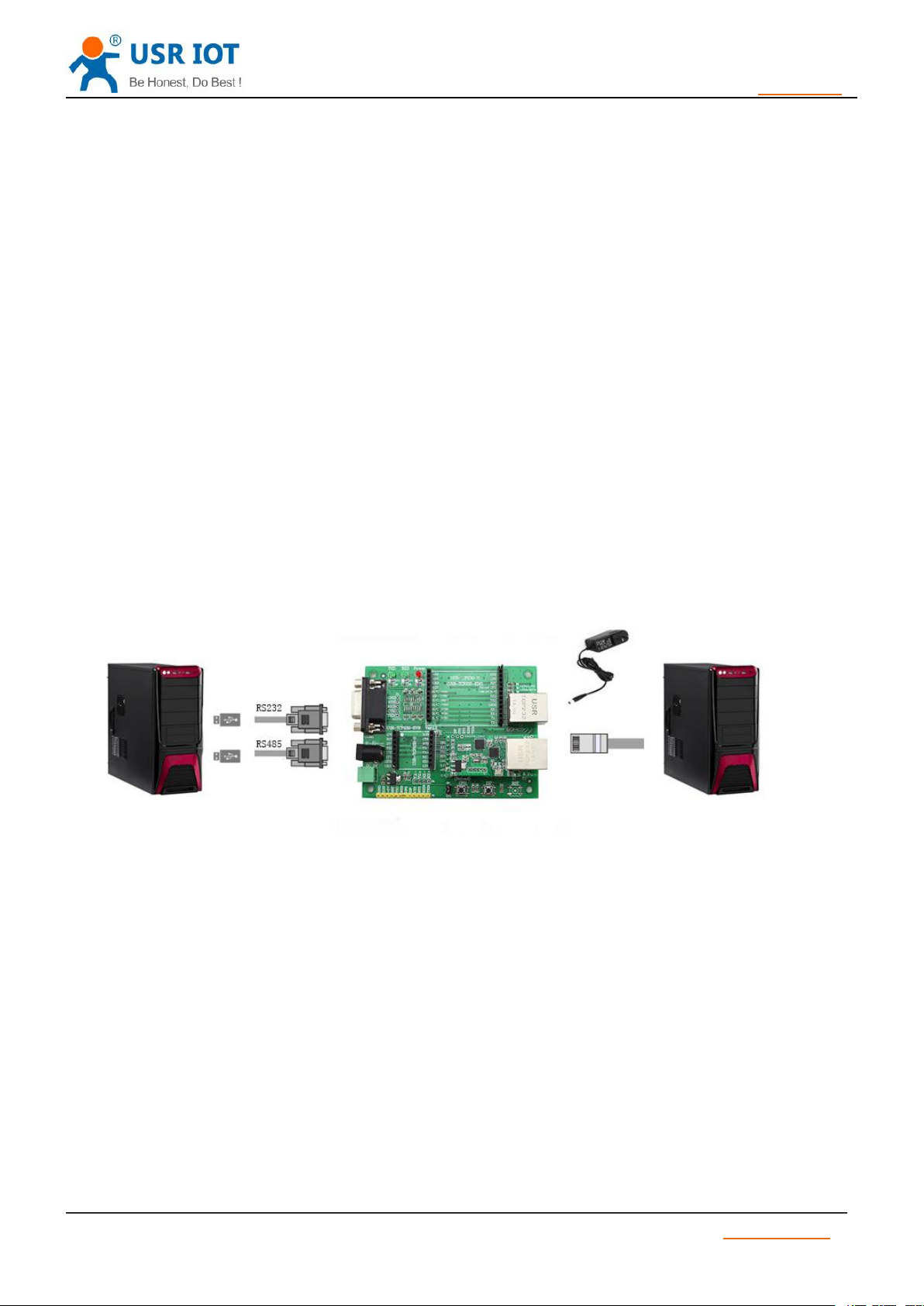
To test S2 conversion function, user should connect S2 UART to computer by USB to TTL serial line, then
connect S2 LAN port to computer LAN port by internet cable. If you want to use S2 evaluation board, use USB
to RS232 serial line instead of USB to TTL serial line.
Here is schematic diagram for hardware link .
Diagram 1 Hardware Link
Computer should be set as follows:
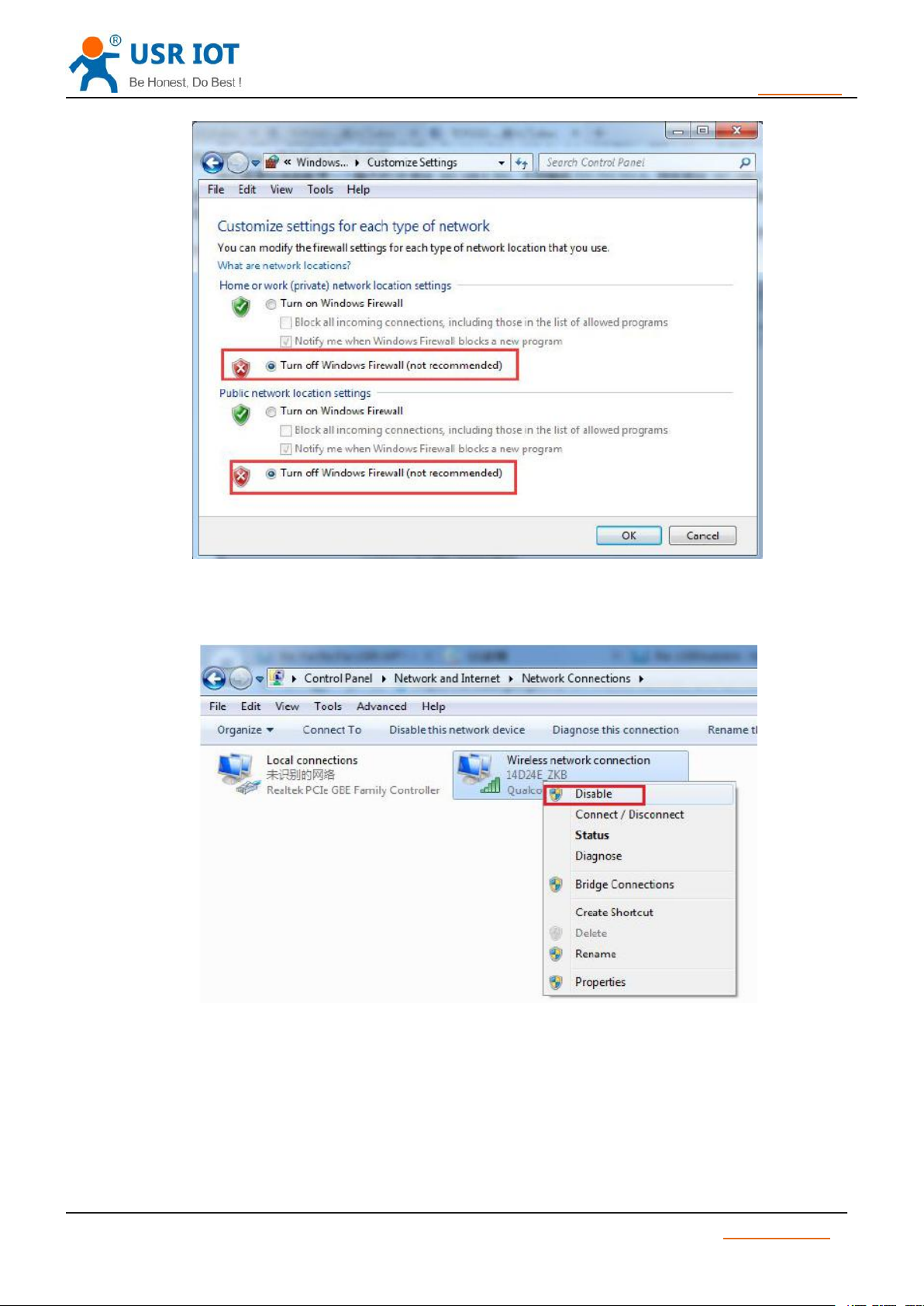
1) Shut down firewall and anti-virus software .
Jinan USR IOT Technology Limited www.usriot.com
Page 5
USR-TCP232-S2 User Manual h.usriot.com
5
/ 34
Diagram 2-1
2) Shut down unrelated network card, just use one local connection.
Diagram 2-2
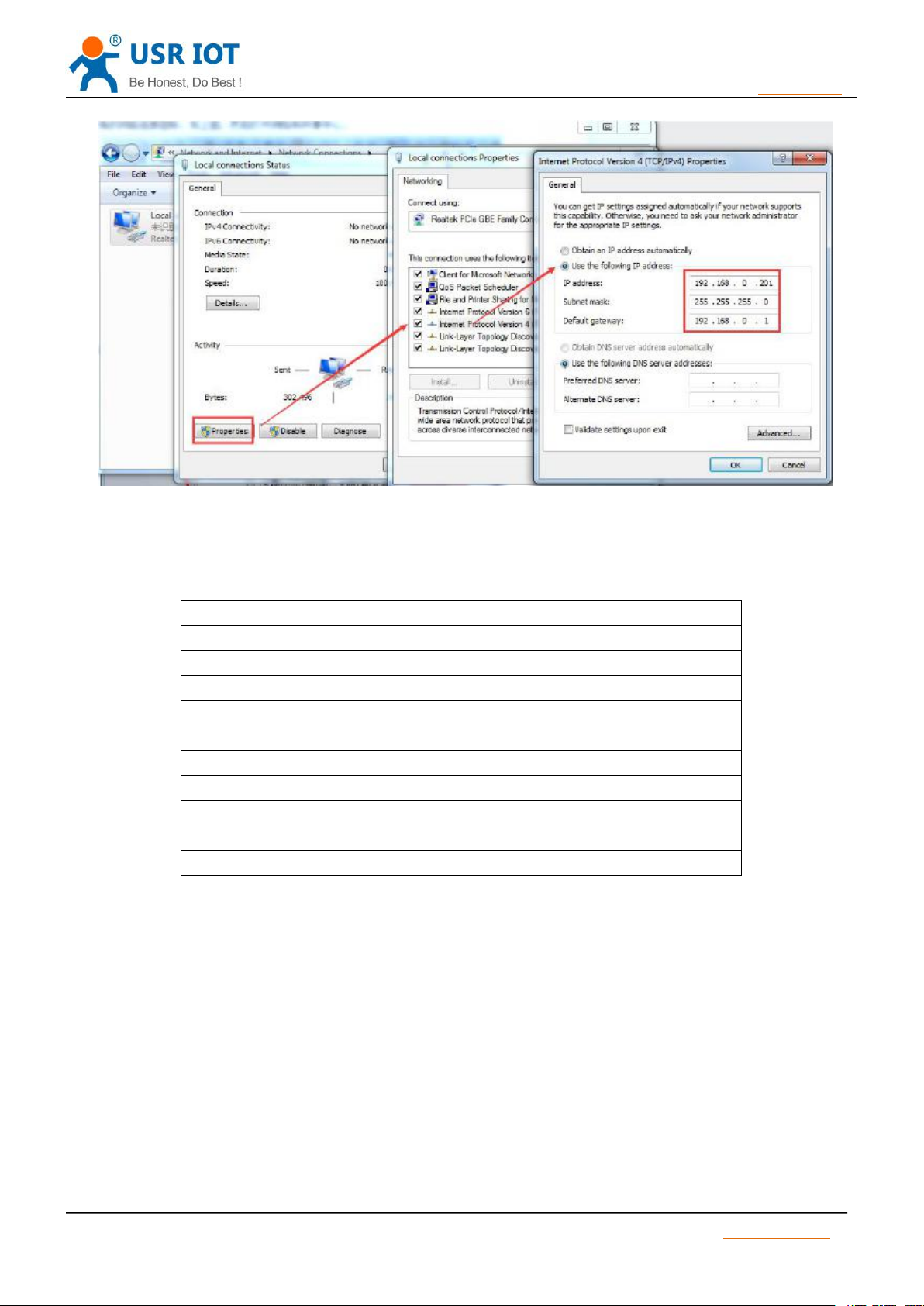
3) If you want connect module to PC directly, user should set static IP for computer which is in the
same network segment with module.
Jinan USR IOT Technology Limited www.usriot.com
Page 6
USR-TCP232-S2 User Manual h.usriot.com
6
/ 34
1.3. Default Parameter
Item
Content
User name
admin
Password
admin
IP address
192.168.0.7
Subnet mask
255.255.255.0
Default gateway
192.168.0.1
Serial baud rate
115200
Serial parameter
None, 8 ,1
Local port
20108
Target IP
192.168.0.201
Target port
8234
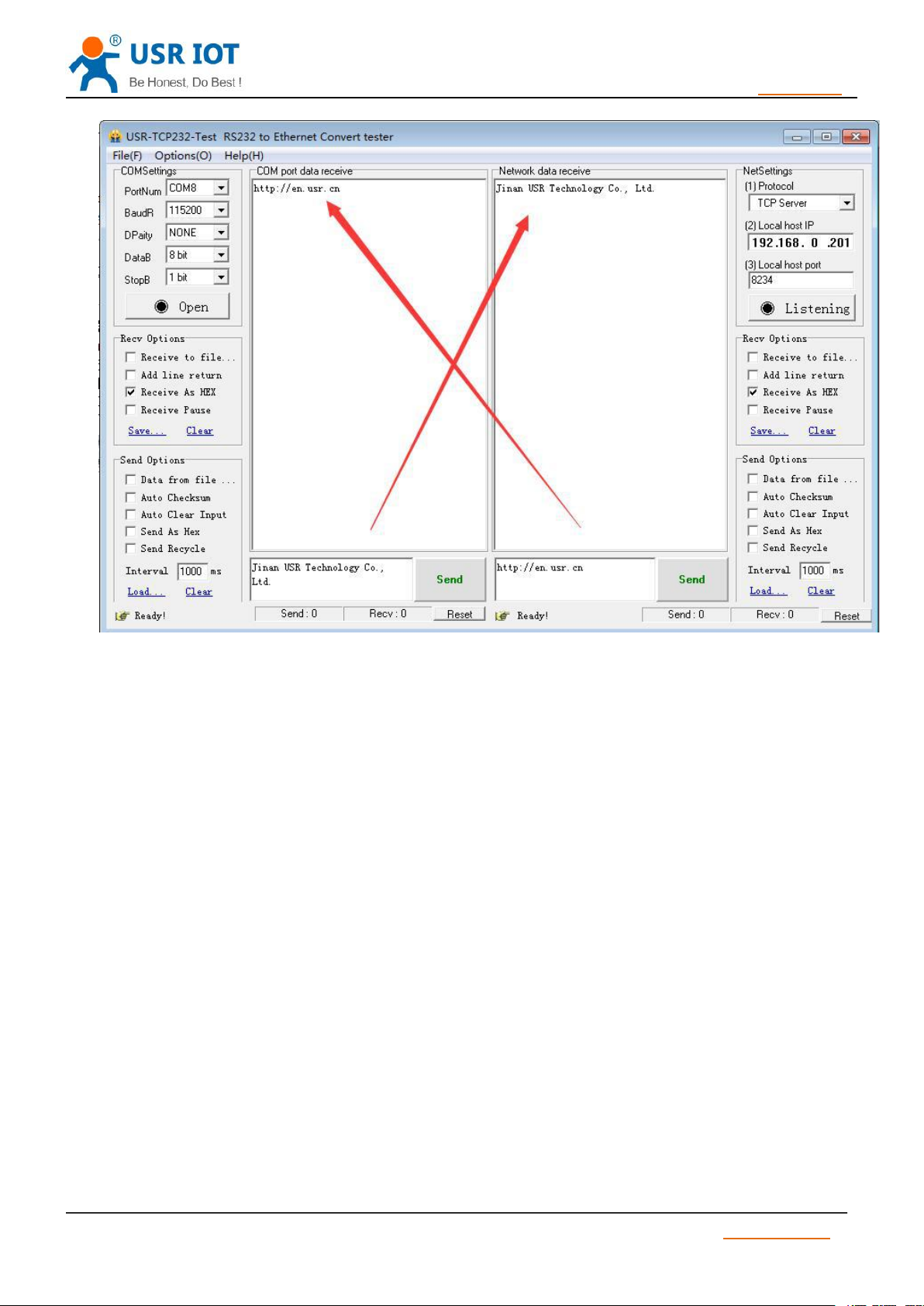
1.4. Data Transmission Testing
Diagram 2-3
Table 1 S2 Module Default Parameter
Steps for network communication parameters:
1) Install USR-TCP232-Test.exe .
2) Connect UART to PC, LAN to PC.
3) Protocol: TCP Server
Server IP: 192.168.201 ( PC Static IP )
Server Port No: 8234
Jinan USR IOT Technology Limited www.usriot.com
Page 7
USR-TCP232-S2 User Manual h.usriot.com
7
/ 34
2. Overview
2.1. Brief Introduction
2.2. Features
Diagram 3 Port to LAN Test
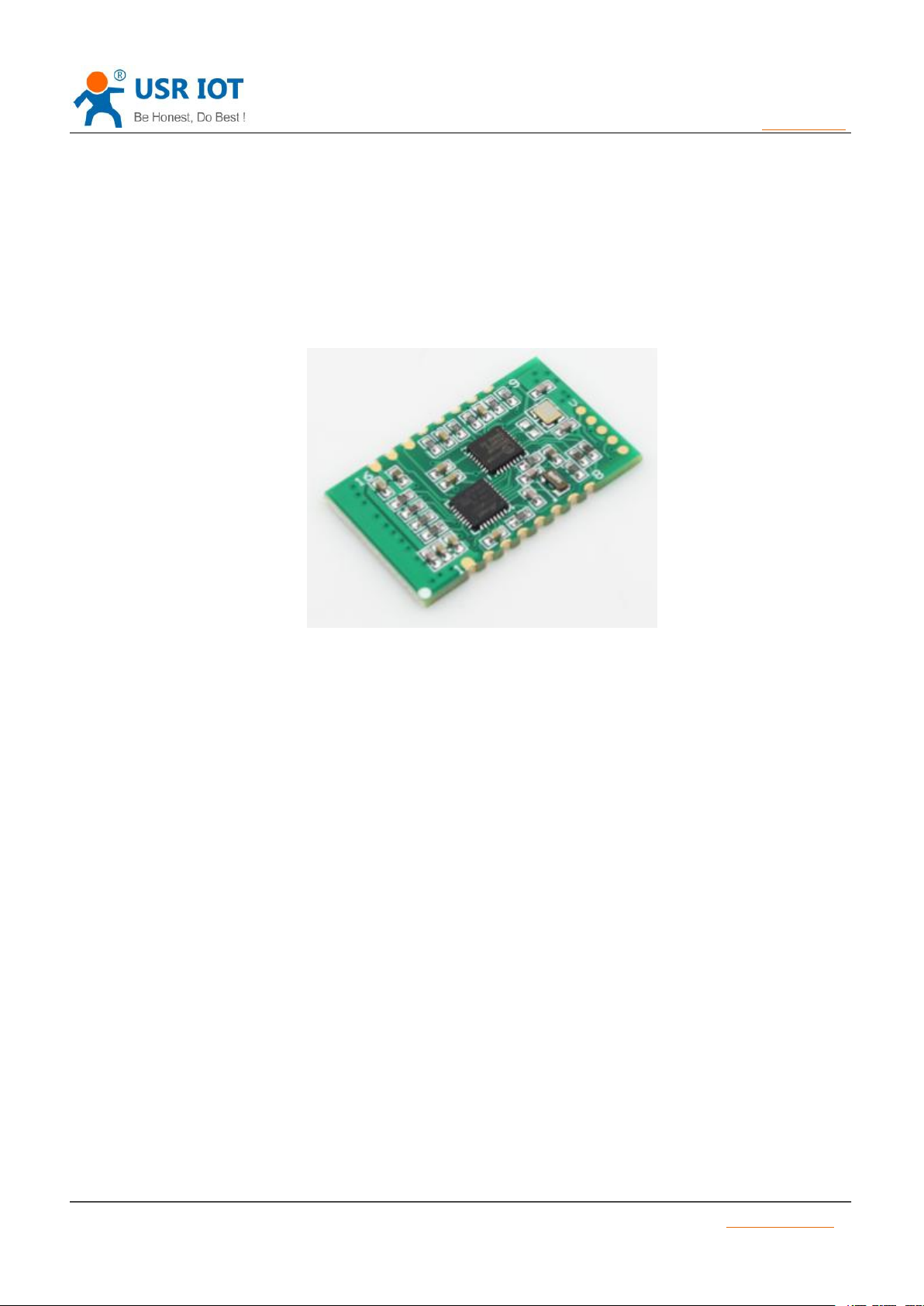
TCP232-S2 is a new and tiny size serial to Ethernet module which realizes data bidirectional transparent
transmission between TTL Port and RJ45 Port, it can also used in RS232/ RS485 by level shift circuit.
S2 is equipped with Cortex-M0 core. It has characters of low power, fast speed, high efficiency, strong
compatibility, it is easy to use.
●Support DHCP (Dynamic Host Configuration Protocol);
●Support DNS (Domain Name System);
●Web-set: Setting parameters through web;
●Upgrade firmware via network;
●Support AUTO MDI/MDIX, can use a crossover cable or parallel cable connection;
●Serial port baud rate 600 bps ~460.8Kbps, and None, Odd, Even, Mark, Space, five check bits;
●Work mode: TCP Server, TCP Client, UDP Client, UDP Server, HTTPD Client;
●Working mode related parameters can be set via a serial port or network;
Jinan USR IOT Technology Limited www.usriot.com
Page 8
USR-TCP232-S2 User Manual h.usriot.com
8
/ 34
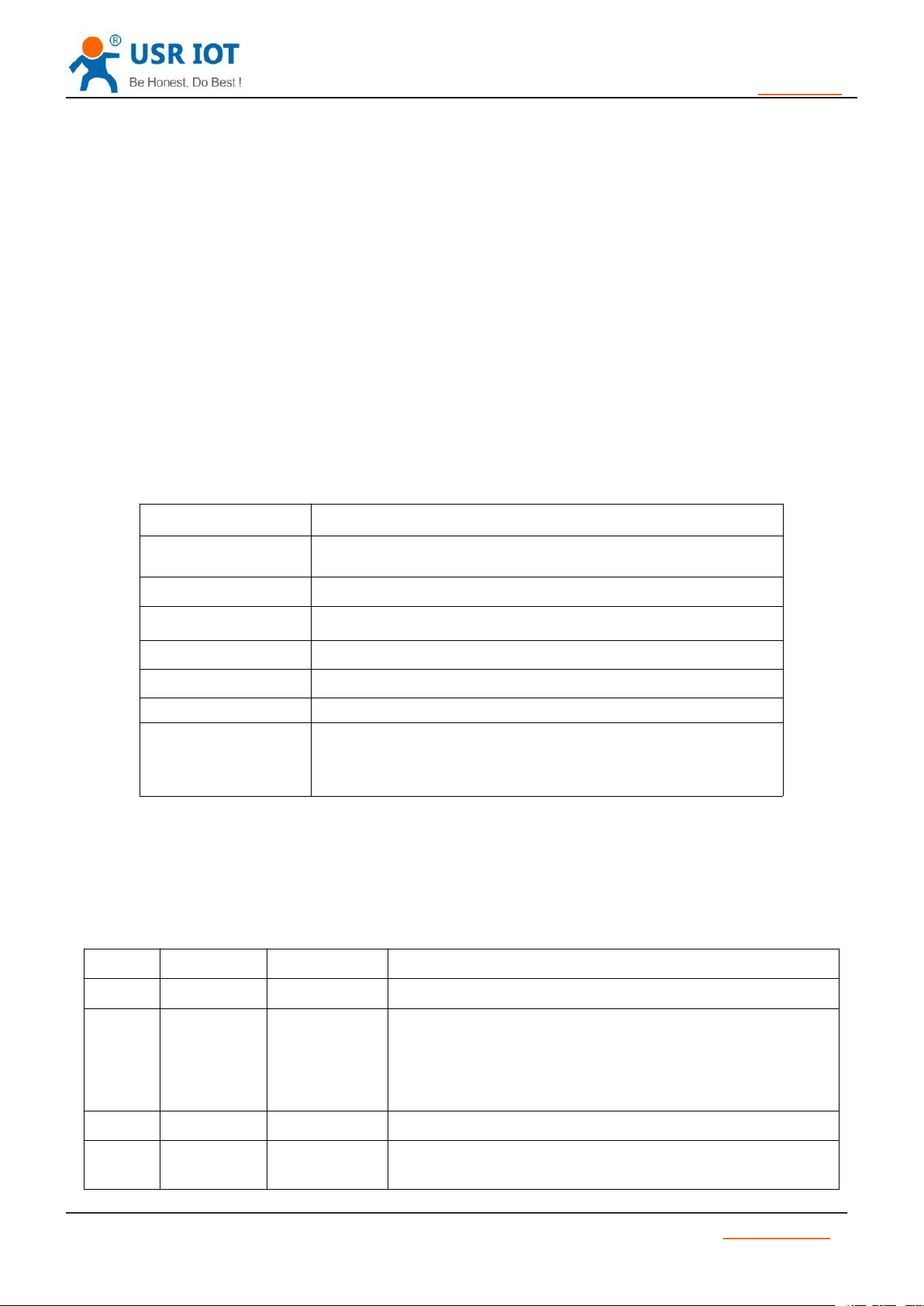
2.3. Parameters
Parameter
Parameter Value
Voltage
VCC: DC typical value 3.3V, 3.0V~3.6 V
Current
150mA(aver)/200mA(max)
Serial Level
TTL(3.3V)
Network interface
PHY signal
Packing
SMD package
Size
PCB:33.0*20.3 mm(L*W)
Temperature
Working temp: -25 ~ 75 °C
Storage temp: -40 ~ 105 °C
Storage humidity: 5% ~ 95% RH
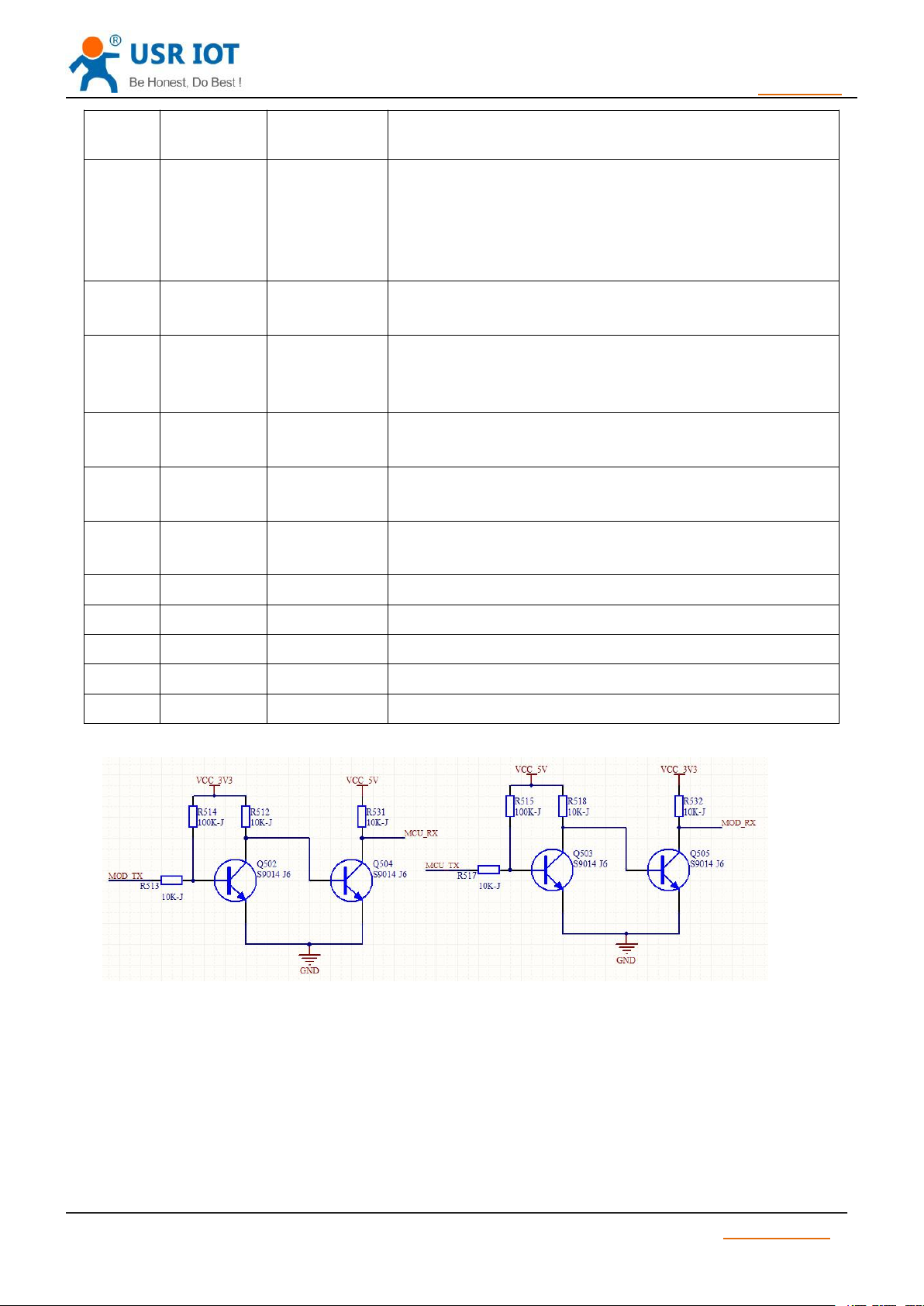
2.4. Hardware Information
Number
Pin
Function
Instruction
1
GND
Ground signal
Connect to ground
2
RST
Reset
Pin receive current below 200ms ,it can reset module.
If unneeded, don’t connect the pin .
(Power on , reset means restart the module. Advice connect
I/O of MCU, MCU can control the module .)
3
ISPNCDon’t connect the pin
4
RXD
Receive data
TTL connect to 3.3v MUC
(For 5V, refer to Diagram 4)
●Support virtual serial port, self-developed USR-VCOM software;
●Heartbeat package mechanism to ensure connection is reliable, put an end to connect feign death;
●User-defined registration package mechanism, check the status of connection;
●Under TCP Server mode, Client number rangefrom1 to 16, default value is 4;
●Support User-defined MAC address;
●Restore factory default;
●Across the gateway, switches, routers;
●Across the gateway, across switches, routers;
●Provide(socket), VB, C++, Delphi, Android, IOS;
●Download application cases;
●Support customization;
Table 2 USR-TCP232-S2 Parameter
Table 3 USR-TCP232-S2 Pin
Jinan USR IOT Technology Limited www.usriot.com
Page 9
USR-TCP232-S2 User Manual h.usriot.com
9
/ 34
5
TXD
Send data
TTL connect to 3.3v MCU
(For 5V, refer to Diagram 4)
6
CFG(Reloa
d)
For module
configuration
and restore
factory default
When normal working , don’t connect the pin or connect to
high level. Under low level, the pin is used for module
Configuration. When configuration, pull down Reload pin,
enter into port Configuration. If choose “Reload” in webpage
or setting software, it is used to restore factory default
7
LD2
Network data
indication
Network data indication light, connect VCC by LED, don’t
need to connect current-limiting resistance.
8
LD1
Network
connection
indication
Network connection indication light, connect VCC by LED,
don’t need to connect current-limiting resistance.
9
AVDD
PHY output
voltage
PHY control voltage output, connect network transformer
center tap.
10
RX+
Receive
signal +
Receive Data+ ,shorten the line if connect
11
RX-
Receive
signal +
Receive Data- ,shorten the line if connect
12
TX+
Send signal+
Transceiver Data+ ,shorten the line if connect
13
TX-
Send signal-
Transceiver Data- ,shorten the line if connect
14
RS_485
Reserved
RS485 reserved pin
15
Link
Reserved
Used as indication pin for TCP connection status.
16
VCC
Power supply
Typical value 3.3V @ 200mA
Diagram 4 3.3V to 5V voltage conversion circuit
Jinan USR IOT Technology Limited www.usriot.com
Page 10
USR-TCP232-S2 User Manual h.usriot.com
10
/ 34
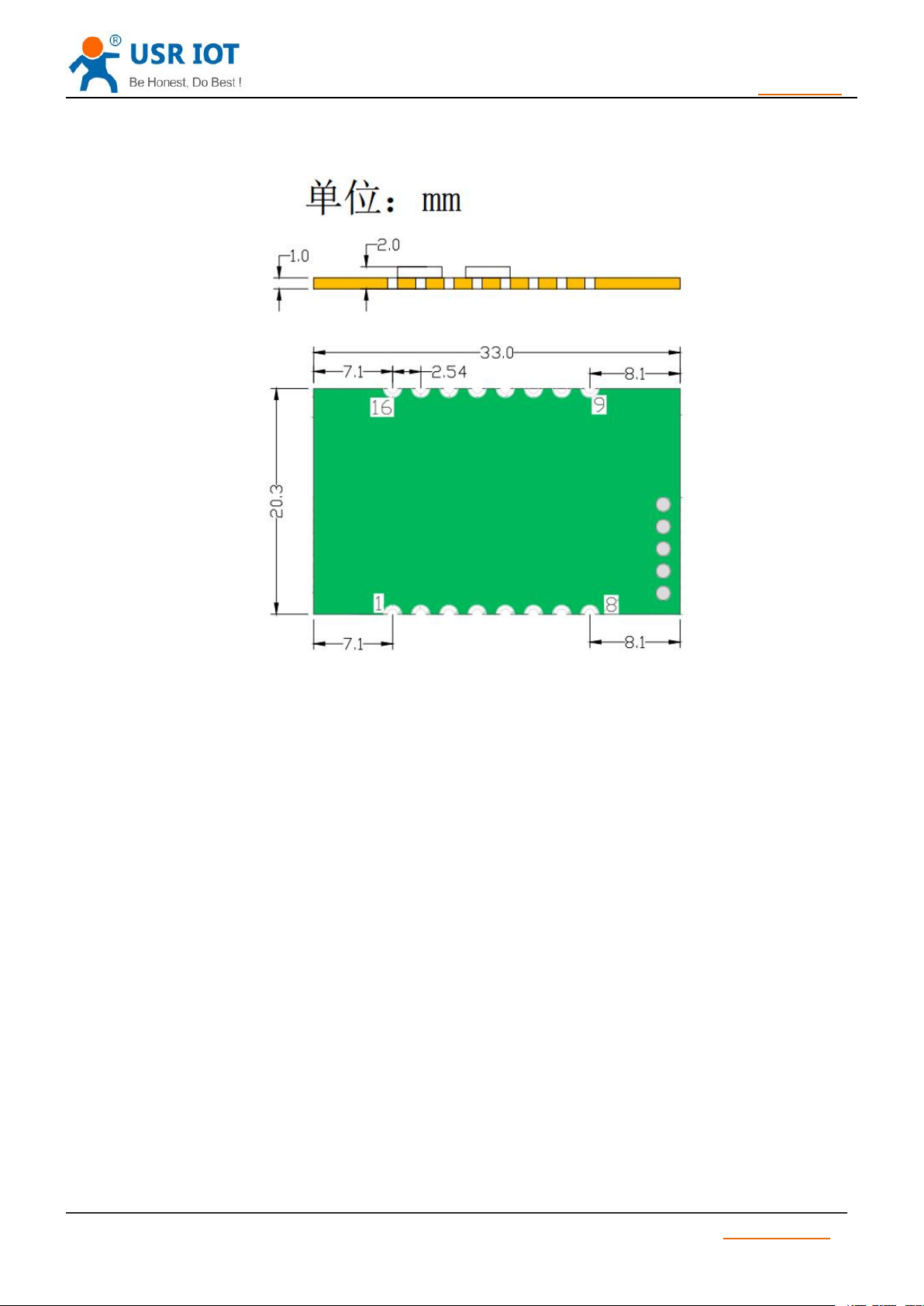
2.5. Pin Dimension
Diagram 5 S2 Dimension
Jinan USR IOT Technology Limited www.usriot.com
Page 11
USR-TCP232-S2 User Manual h.usriot.com
11
/ 34
3. Module Function
3.1. Work mode
3.1.1. TCP Client mode
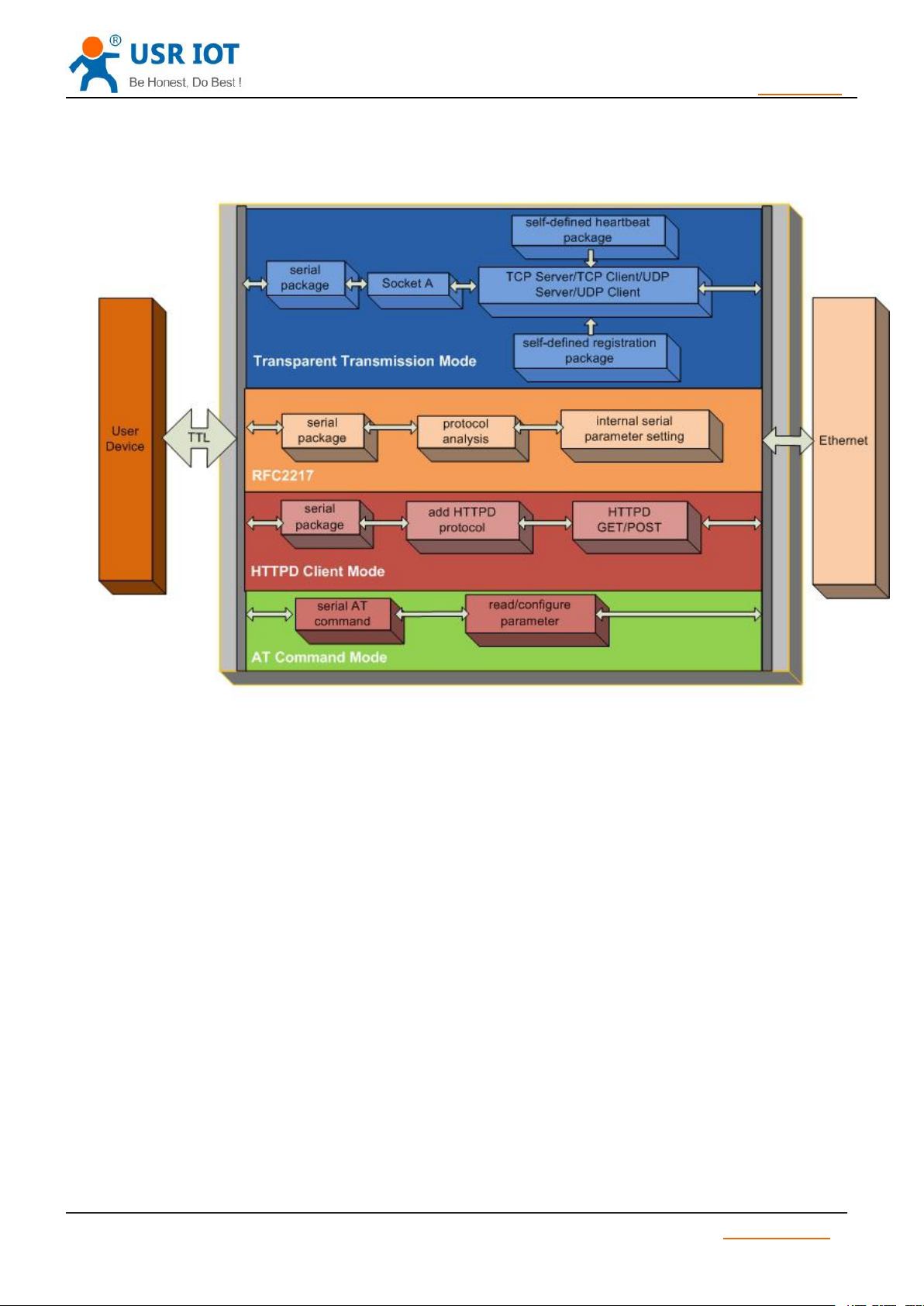
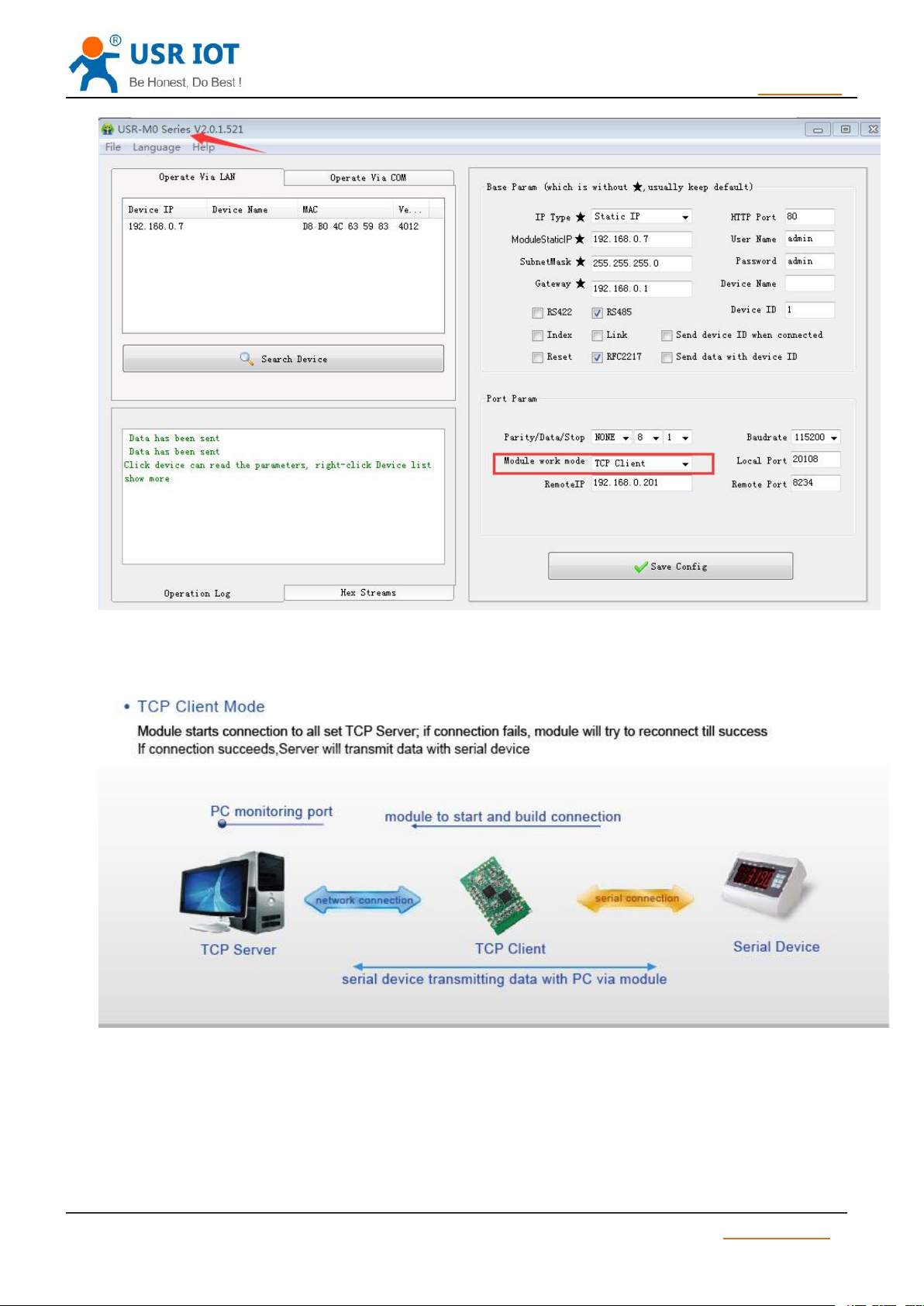
1) In TCP Client Mode,TCP232-S2 connects TCP Server actively, establish a connection to transmit date
2) In TCP Client Mode, It has function of identifying disconnected link. When connected, it will send
3) When TCP232-S2 try to connect remote server ,if the local port number is not “0" ,it will establish a
4) It has synchronizing function of baud rate, user should install USR VCOM Software.
5) When local port number is “0” , it means local port is random.
Diagram 6 USR-TCP232-S2 function flow
TCP Client, TCP Server, UDP Client, UDP Server, HTTPD Client
It has to be connected before transferring data.
keepalive package every 15s. If unconnected ,it can be detected timely and enforceTCP232-S2 to disconnect
the former link to establish a new one.
connection with the same source port every time.
Jinan USR IOT Technology Limited www.usriot.com
Page 12
USR-TCP232-S2 User Manual h.usriot.com
12
/ 34
3.1.2. TCP Server mode
TCP Client Setting
TCP Client mode
1) It has to be connected before transferring data.
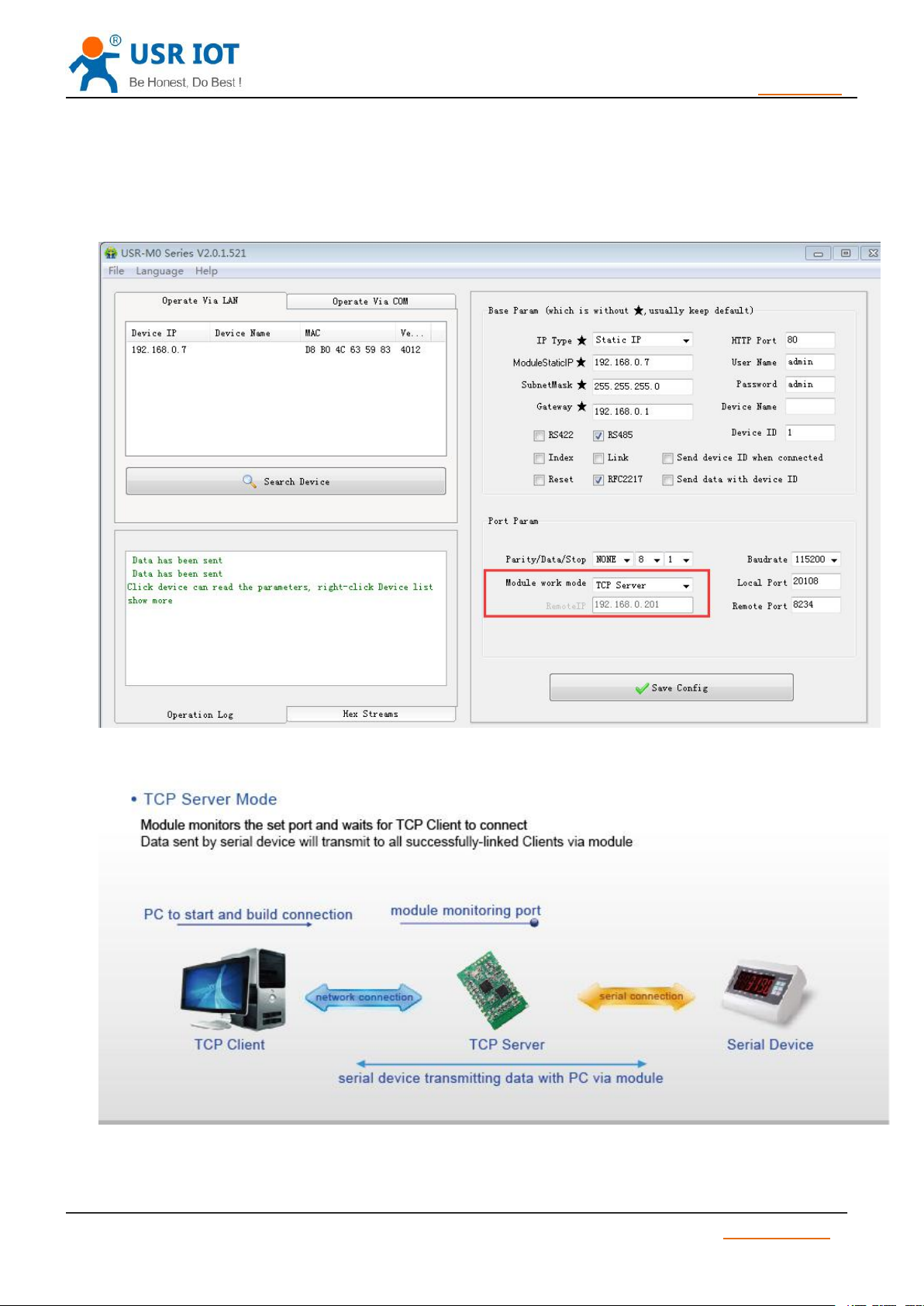
2 ) In TCP Server Mode, S2 monitors local port, it will response and establish a connection when there
is a request. Up to 4 links at the same time. Once received data, S2 serial port will send data to all the devices
Jinan USR IOT Technology Limited www.usriot.com
Page 13
USR-TCP232-S2 User Manual h.usriot.com
13
/ 34
4) In TCP Server Mode, The maximum number can be configured by user. TCP Client number is from 1
which connect to TCP232-S2.
3 ) It has synchronizing function of baud rate, user should install USR VCOM Software.
to 16, default value 4. When the Client link is more than 16, the new link will replace the former link from Link 1
If the Client link is more than 4, send and receive data at same time , the data flow should be within 2.5 KB/s
TCP Server Setting
TCP Server mode
Jinan USR IOT Technology Limited www.usriot.com
Page 14
USR-TCP232-S2 User Manual h.usriot.com
14
/ 34
3.1.3. UDP Client mode
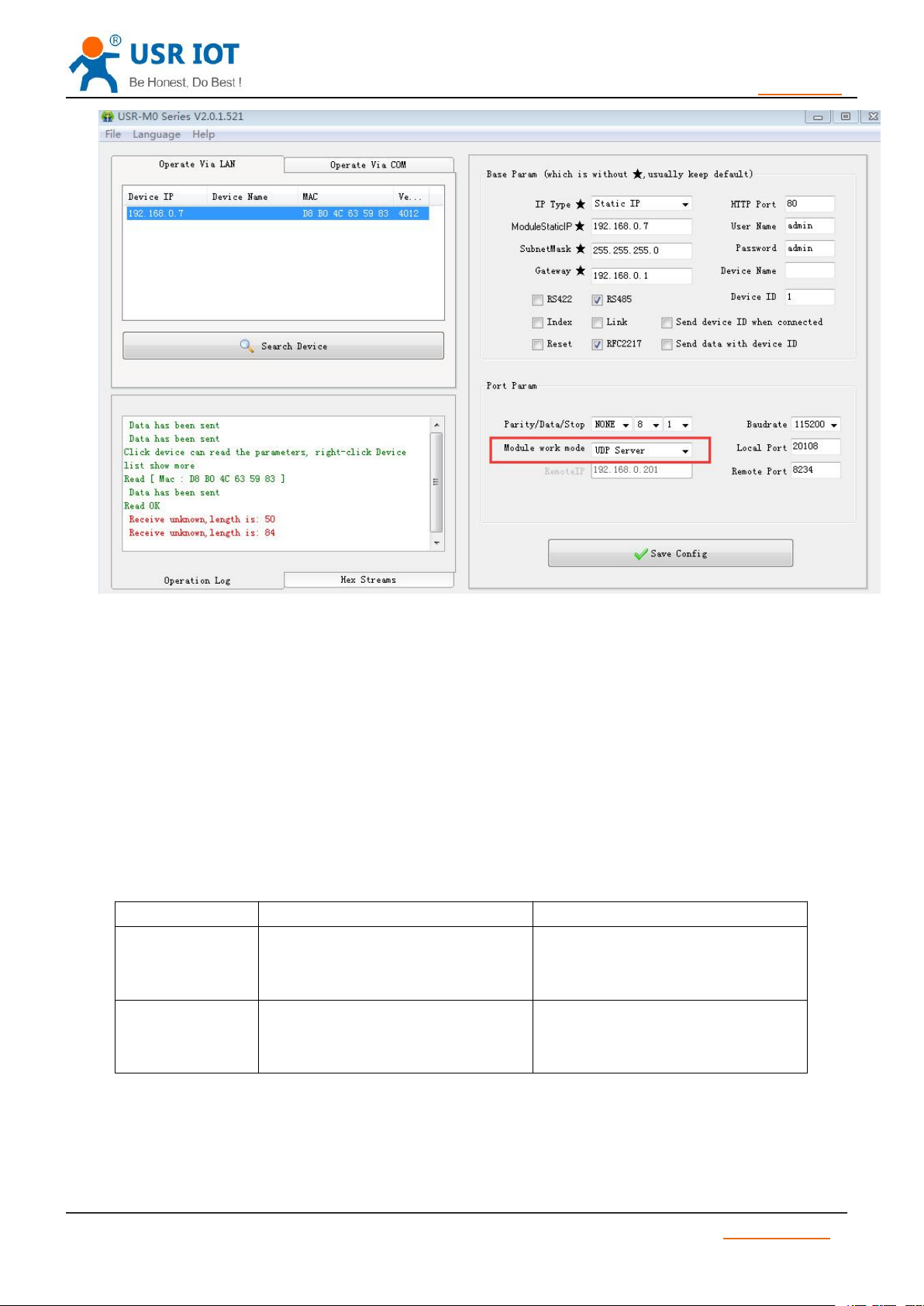
3.1.4. UDP Server mode
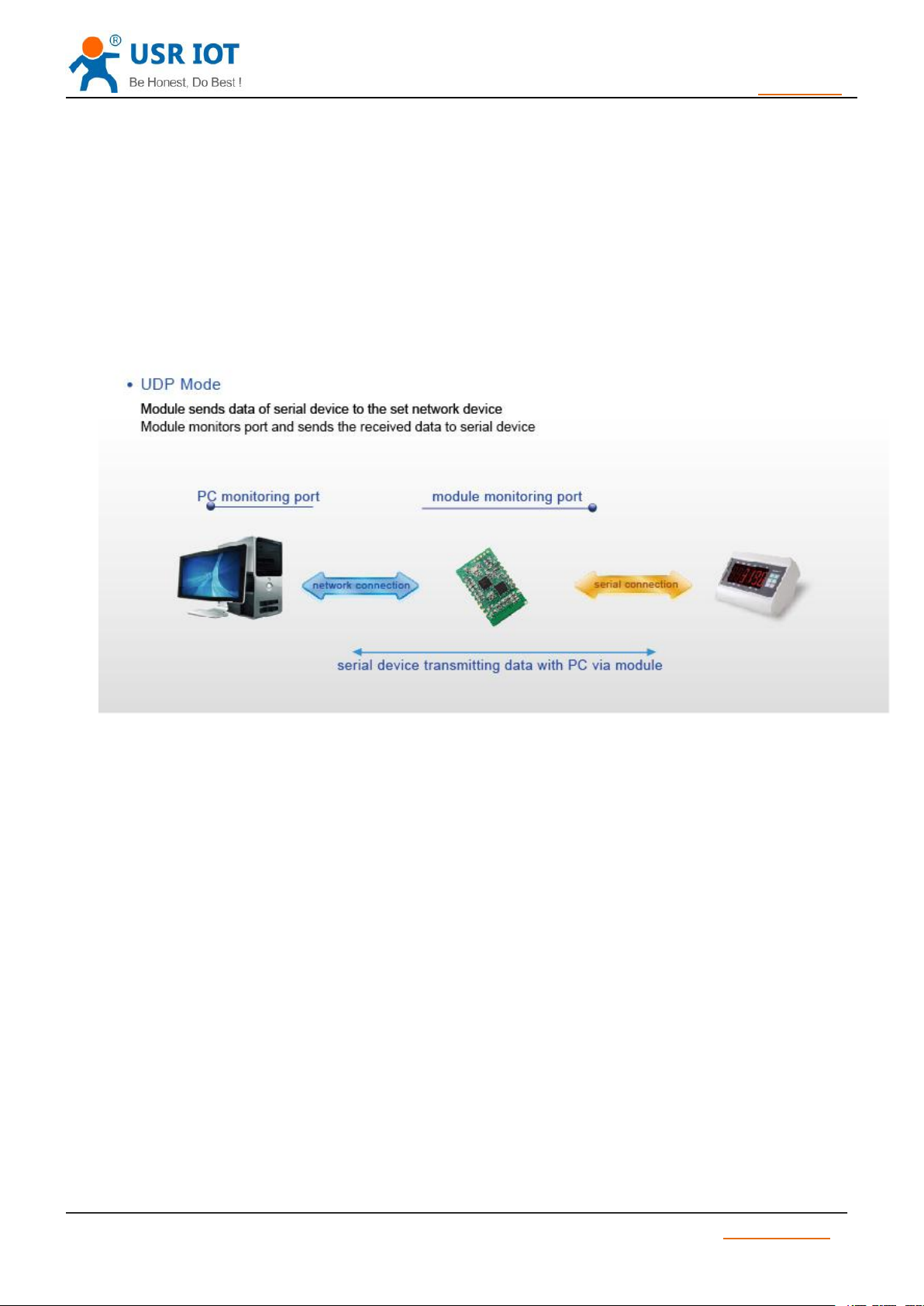
1) UDP Server is based on normal UDP, it doesn’t validate the source of IP address. Once received UDP
2) In UDP Server Mode, TCP232-S2 records an IP, Once it receives data, it will send data to record IP.
1) The mode belongs to UDP Protocol.
2) In UDP Client Mode, TCP232-S2 won’t establish the connection actively. It can only communicate with
the target port whose IP has been set. When serial port receive data, it send data to target IP and port. If data
doesn’t come from this channel, it will not be accepted by TCP232-S2.
3) In UDP Client Mode, if target IP is set as 255.255.255.255, it can realize function of entire network
broadcast, also can receive broadcast data. If broadcast in network segment ,eg.192.168.0.255, it can only
send data ,can’t receive data.
4) Under UDP Client, maximum data length sent from MCU to TCP232-S2 is 1460.
UDP Client mode
data, it convert target IP to data source IP, similar to TCP Server.
TCP232-S2 also works as a server, can receive data from Ethernet and convert target IP to data source IP.
Jinan USR IOT Technology Limited www.usriot.com
Page 15
USR-TCP232-S2 User Manual h.usriot.com
15
/ 34
3.1.5. HTTPD Client
1) Module S2 send data to HTTP Server or receive from HTTP Server, complex HTTP protocol will be
3.1.6. TCP and UDP mechanism
TCP
UDP
Advantages
Stable;
Not easy to lose data package;
Reliable connection mechanism;
Transmission interval is accurate;
No connection mechanism;
Easy and flexible;
Disadvantage
Easy to block up Information;
Because of check and resend
mechanism, interval isn’t accurate
Under bad network condition, it is
high risky to losing data package
3.2. DHCP and DNS Function
UDP Server Setting
This function is used for developer.
done by S2, it is convenient for user to programming.
2) S2 received data from HTTP Server will send to serial port without process.
3) According to demand, user can define HTTP content.
Table 4 TCP and UDP mechanism
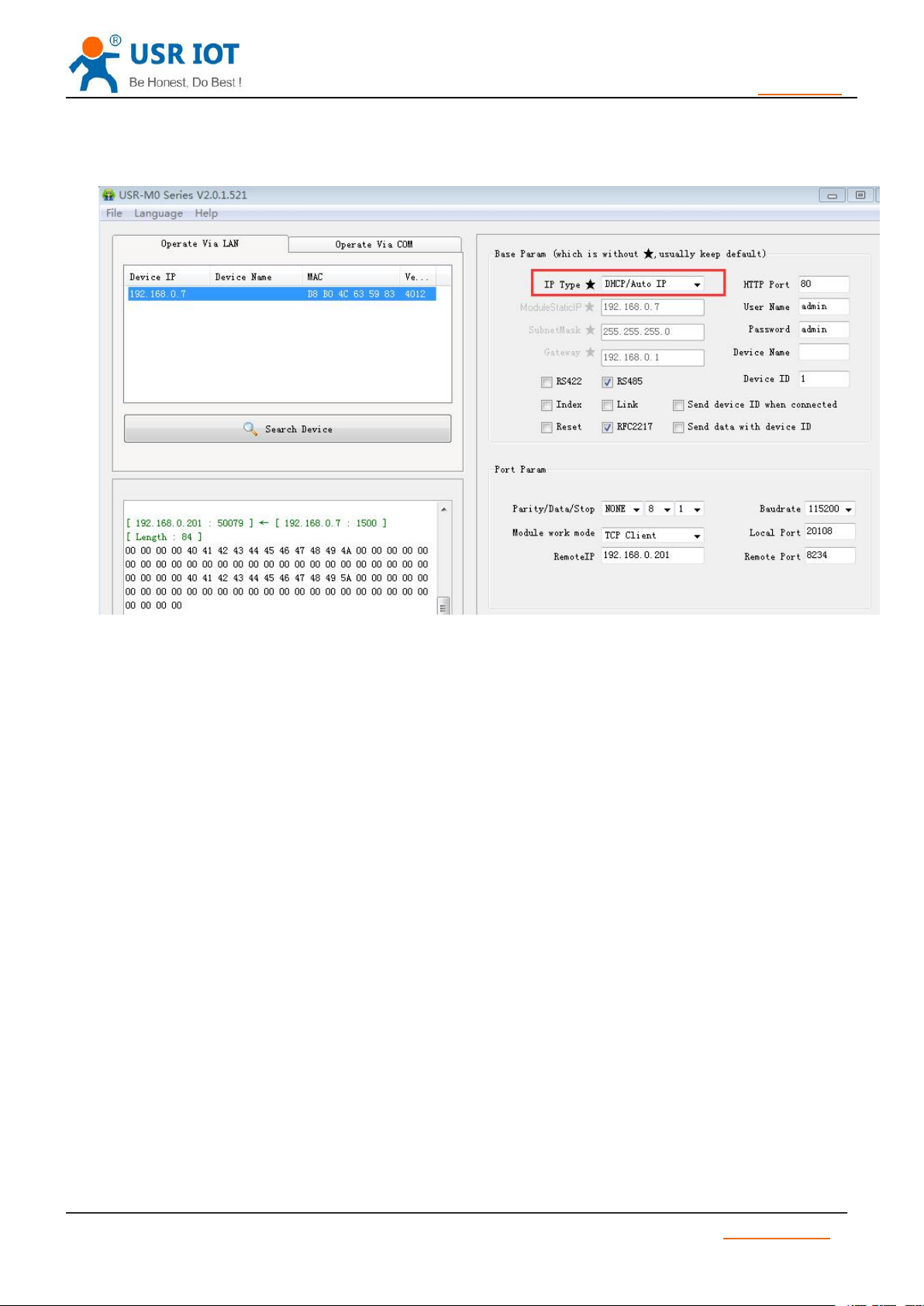
DHCP: Dynamic Host Configuration Protocol
Jinan USR IOT Technology Limited www.usriot.com
Page 16
USR-TCP232-S2 User Manual h.usriot.com
16
/ 34
When S2 connects to remote server, it can obtain an IP address automatically which router or gateway
distributed. If you don’t know how to set IP address or it can’t connect because of the set IP is not in the same
segment, the function is helpful for you.
Diagram 7 DHCP
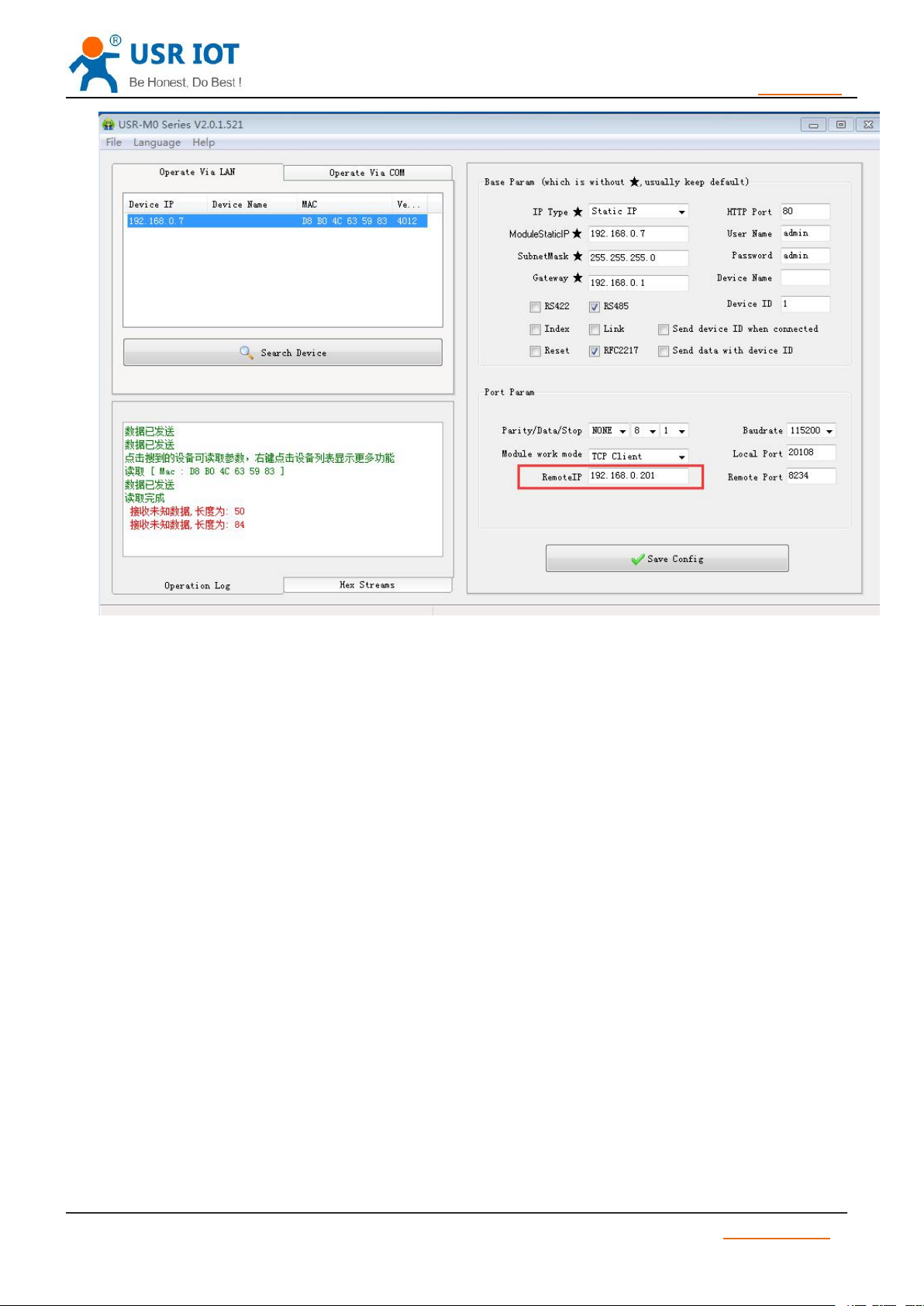
DNS: Domain Name System
e.g. domain name sever is cloud usr.cn, when we don’t know Server IP or Server IP changed, this function
plays an important role.
Note: when use NDS function, S2 gateway must be same as router IP or choose DHCP function.
Jinan USR IOT Technology Limited www.usriot.com
Page 17
USR-TCP232-S2 User Manual h.usriot.com
17
/ 34
3.3. VCOM
3.3.1. Module Works as Client
Diagram 8 DNS
USR-VCOM Download: http://www.usriot.com/usr-vcom-setup-software-v3-7-1-520/
USR-VCOM Manual: http://www.usriot.com/usr-vcom-setup-software-user-manual-v3-5-2/
If user’s upper computer and device are all connect by serial port, user can create a COM which has TCP/
IP to realize remote control by USR-VCOM software.
1) Turn off firewall and anti-virus software.
2) Install USR-VCOM.
I advise user to choose “Search”or “Smart vcom” to create virtual port. Please refer to 4.3.3
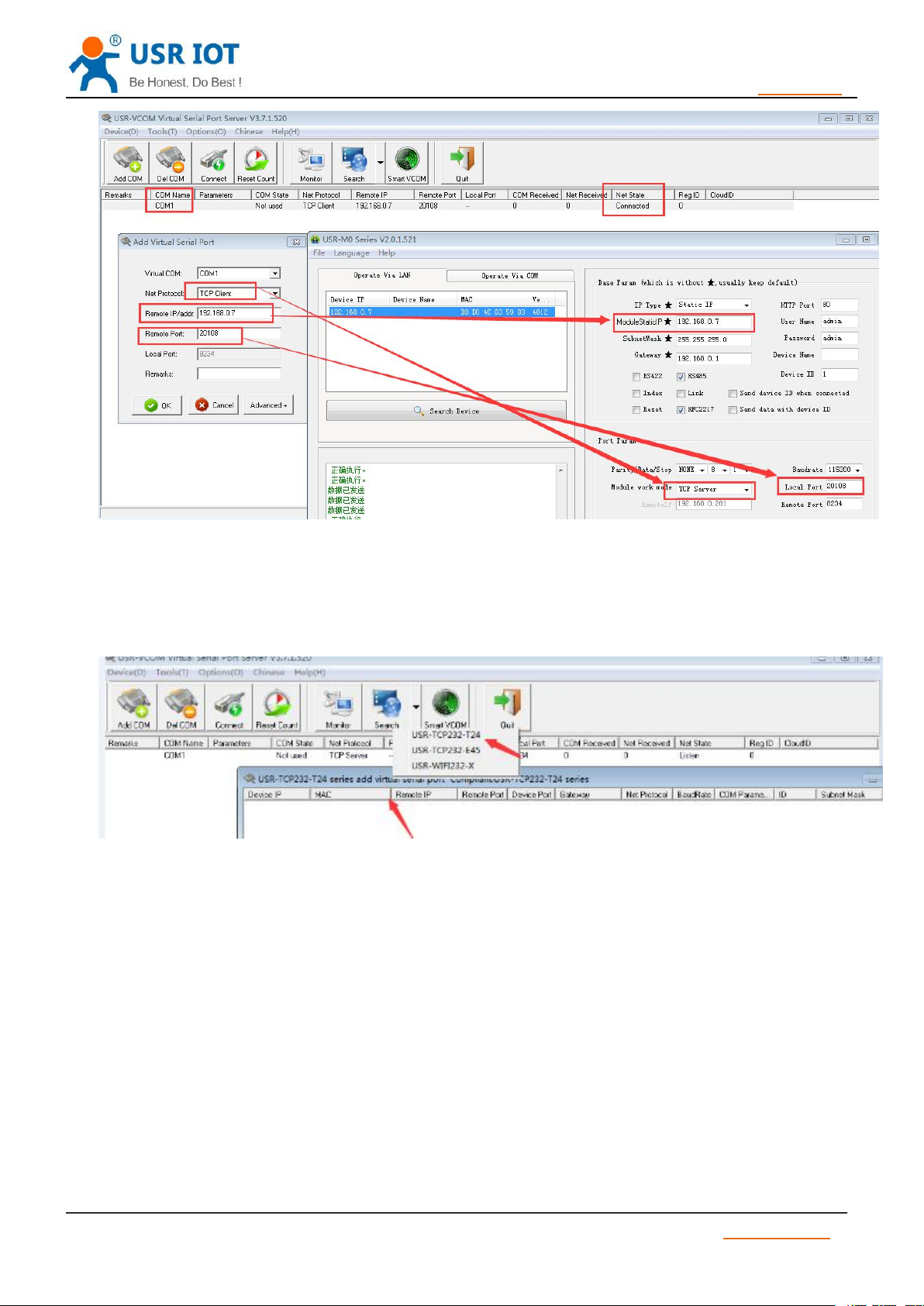
1) Set module parameters. S2 work mode: TCP Client.
2) Open USR-VCOM, set virtual port as follows :
Jinan USR IOT Technology Limited www.usriot.com
Page 18
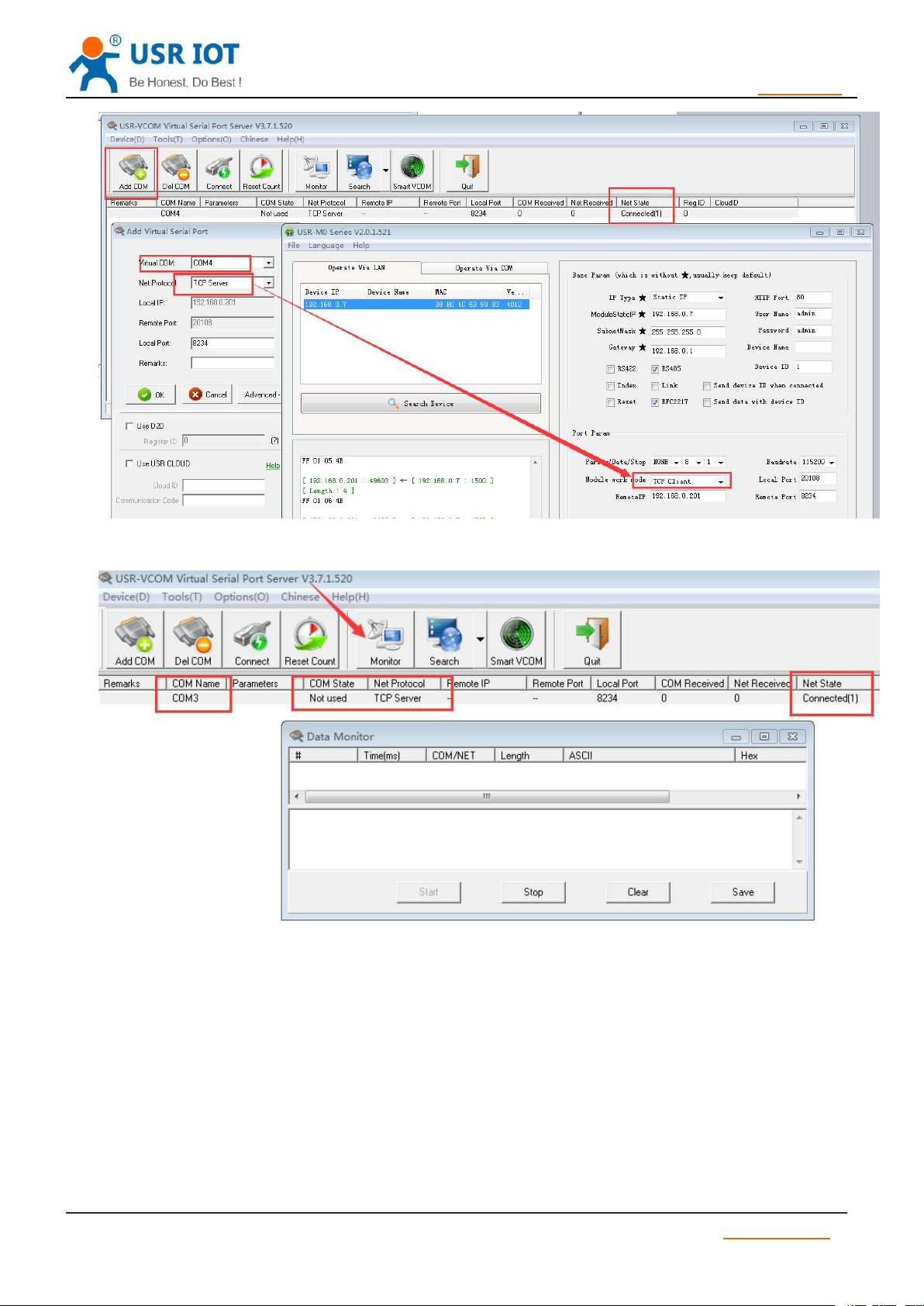
USR-TCP232-S2 User Manual h.usriot.com
18
/ 34
3.3.2. Module Works as Server
Diagram 10 Create Server Virtual Port
Diagram 11 VCOM software monitor function
1) Set S2 work mode: TCP Server.
2) Set virtual port as follows:
Jinan USR IOT Technology Limited www.usriot.com
Page 19
USR-TCP232-S2 User Manual h.usriot.com
19
/ 34
3.3.3. Create VCOM
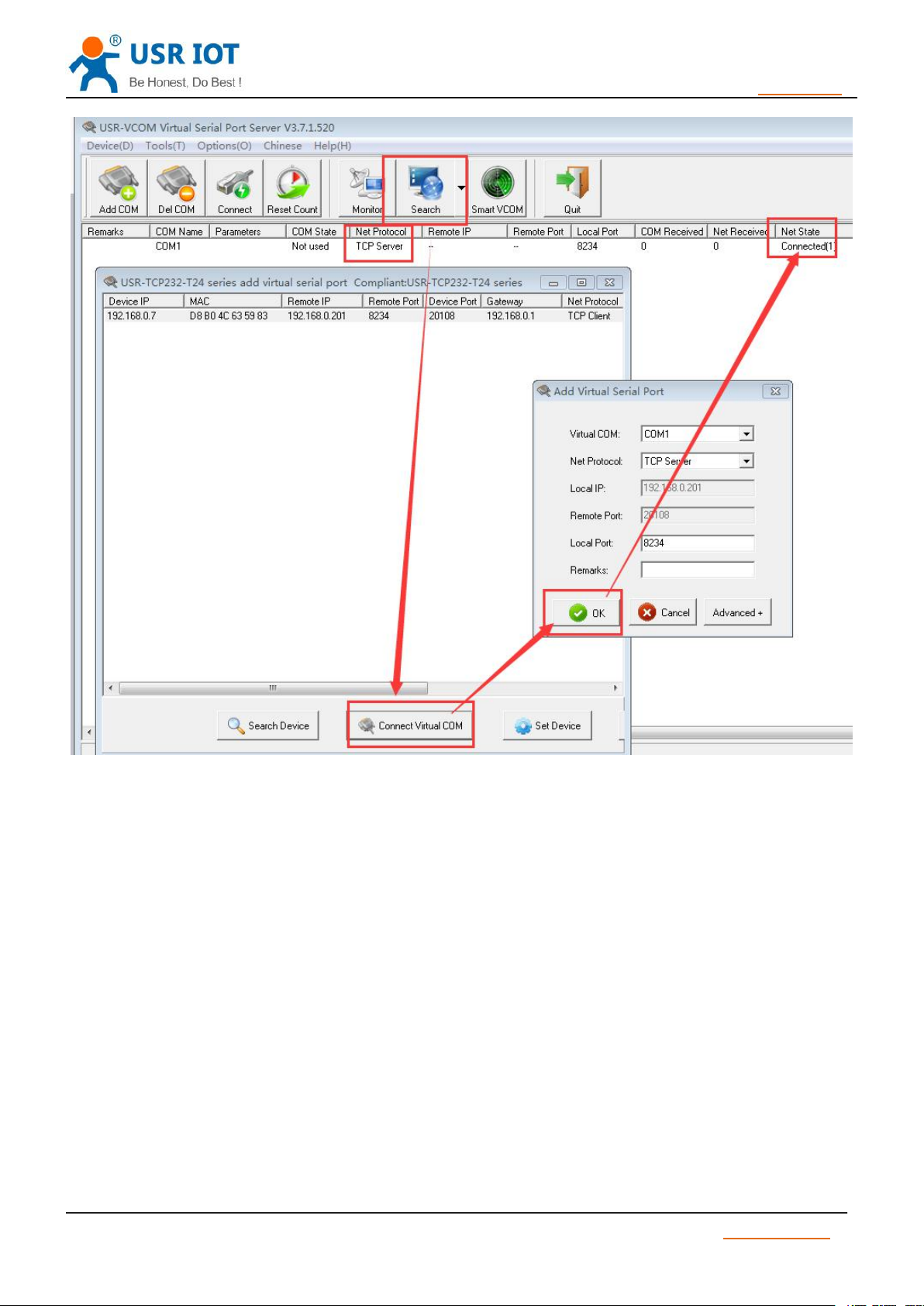
Diagram 12 Create Client Virtual Port
1) Create VCOM by “search” button.
Jinan USR IOT Technology Limited www.usriot.com
Page 20
USR-TCP232-S2 User Manual h.usriot.com
20
/ 34
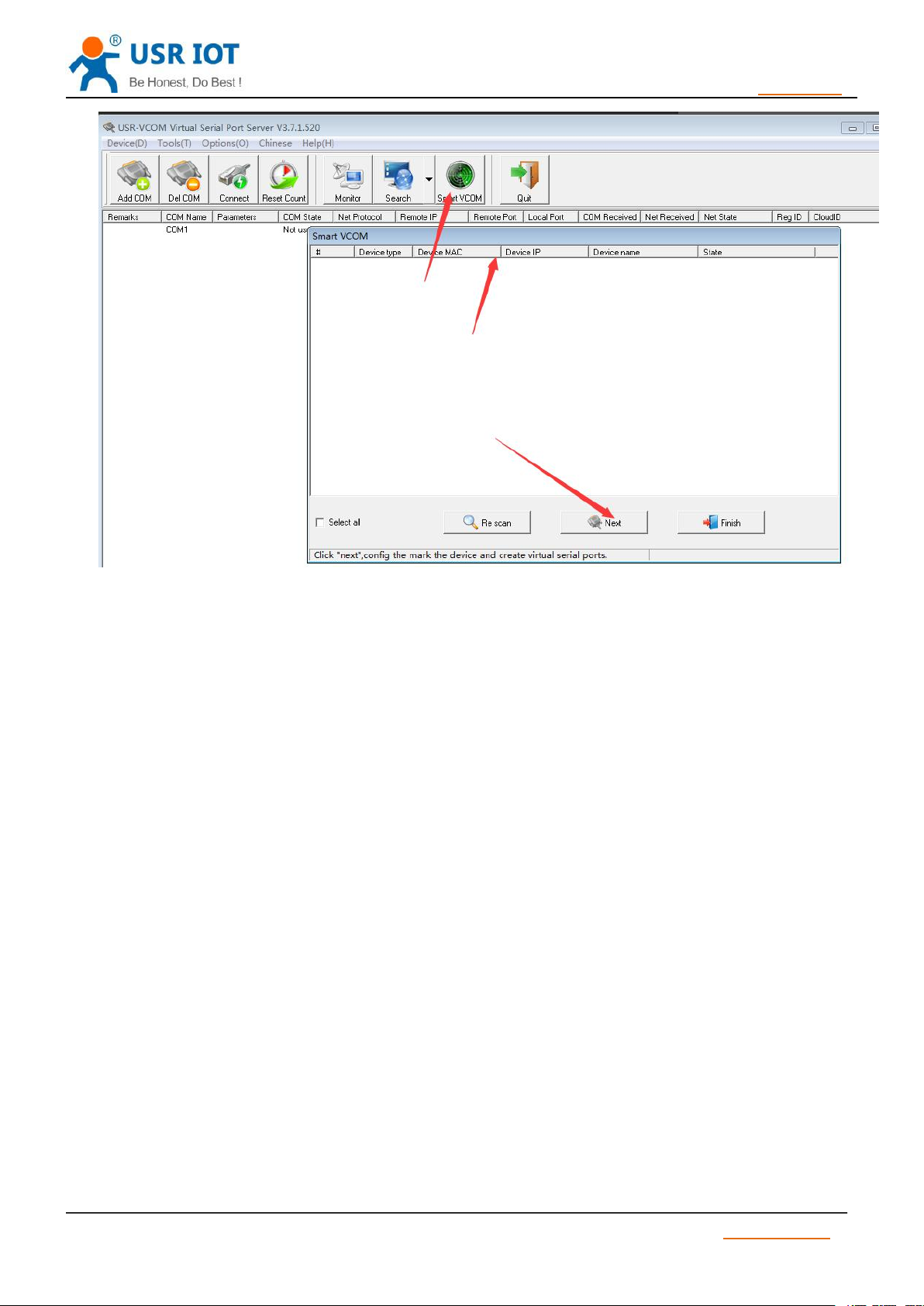
2) Automatically Create
Diagram 13 Search Function
Jinan USR IOT Technology Limited www.usriot.com
Page 21
USR-TCP232-S2 User Manual h.usriot.com
21
/ 34
3.4. Special Function
3.4.1. RS485 Function
3.4.2. Transparent transmission cloud
3.4.3. Link Function
3.4.4. Factory Reset
1) Hardware: At first, check “Reload” in webpage or software, then Reload can only used to restore
Diagram 14 Smart VCOM
S2 reserved 485 pin, this function can be set by software, won’t effect RS232 communication.
This function is used to get communication between module and MCU, transmit remote
data transparently . http://cloud.usr.cn/en
Cloud user name and password can be set through software.
Link pin can be used as indication pin for TCP connection status.
When connected, it output low level; When unconnected, high level.
When S2 is under TCP mode, Link pin will pull down, otherwise, it stays in high level.
When S2 is under DUP mode, Link pin will always pull down. By default ,it is not checked .
factory settings. After setting then module will reset, pull “ Reload “ down to 0 V level for 5 seconds then pull
CFG( Reload) up to 3.3 V or don’t connect it, factory reset is finished.
Jinan USR IOT Technology Limited www.usriot.com
Page 22

USR-TCP232-S2 User Manual h.usriot.com
22
/ 34
3.4.5. Reset Function
3.4.6. ID Function
3.4.7. Index Function
3.4.8. Similar RFC2217 Function
3.5. New Function
3.5.1. AT Command
3.5.2. Display IP and Data
2) Software: finish it by set-up software.
3) AT Command: After entering into AT Command, then send AT+ clear.
When S2 works as TCP Client, S2 connects to TCP Server actively. When start Reset function, S2 try to
connect to TCP Server for 30 times. If failed, S2 will restart automatically. By default, it won’t be chose.
When S2 works as TCP Client, it send module ID when establishing connection or carry ID when in
communication, S2 ID is decimal .1-65535 ( ID function and transparent transmission can’t work at same time )
When S2 works as TCP Server, it can establish 16 links simultaneously at most. The max number can
be set from 1 to 16. Default is 4. Take 16 link as example, Server send data to 16 Client simultaneously or
Server can’t distinguish the data source, Index can realize the choice of data source of sending or receiving.
Index function can be set by software or web-page.
This function is used to change USR-TCP232-S2 serial port parameter through network.
E.g: change baud rate from 115200bps to 9600bps. It can be set by software or webpage.By default ,
it is in open state.
When using VCOM software, this function also works, the baud rate of software in PC will match
Autonomic with the baud rate of USR-TCP232-S2, don’t need to focus on serial port baud rate .After
restart, it is default parameter .
According to AT Command protocol , TCP232-S2 enter into AT Command mode and set parameter
More details ,please refer to 《USR-TCP232-S2 software manual》
When pull low CFG(Reload)Pin firstly, S2 will set parameter by port , AT Command is invalid.
When enter into AT Command Mode, then pull down CFG(Reload), S2 will set parameter by port firstly,
AT Command is invalid. User pull up or don’t connect CFG(Reload), it enter into AT Command Mode again.
On the web page of TCP232-S2, it can display the IP of device and sent/received data byte, and the total
data byte of TCP232-S2.
In TCP Mode, it can display the TOP 5 device IP and sent/received data byte. In UDP Mode, it only
display sent/received data byte,don’t display connection IP.
Jinan USR IOT Technology Limited www.usriot.com
Page 23

USR-TCP232-S2 User Manual h.usriot.com
23
/ 34
3.5.3. Set Client Number in TCP Server Mode
3.5.4. Defined MAC Address
3.5.5. Defined DNS Server IP
3.5.6. Defined Registration Package
3.5.7. Defined Heartbeat Package
3.5.8. HTTPD Client
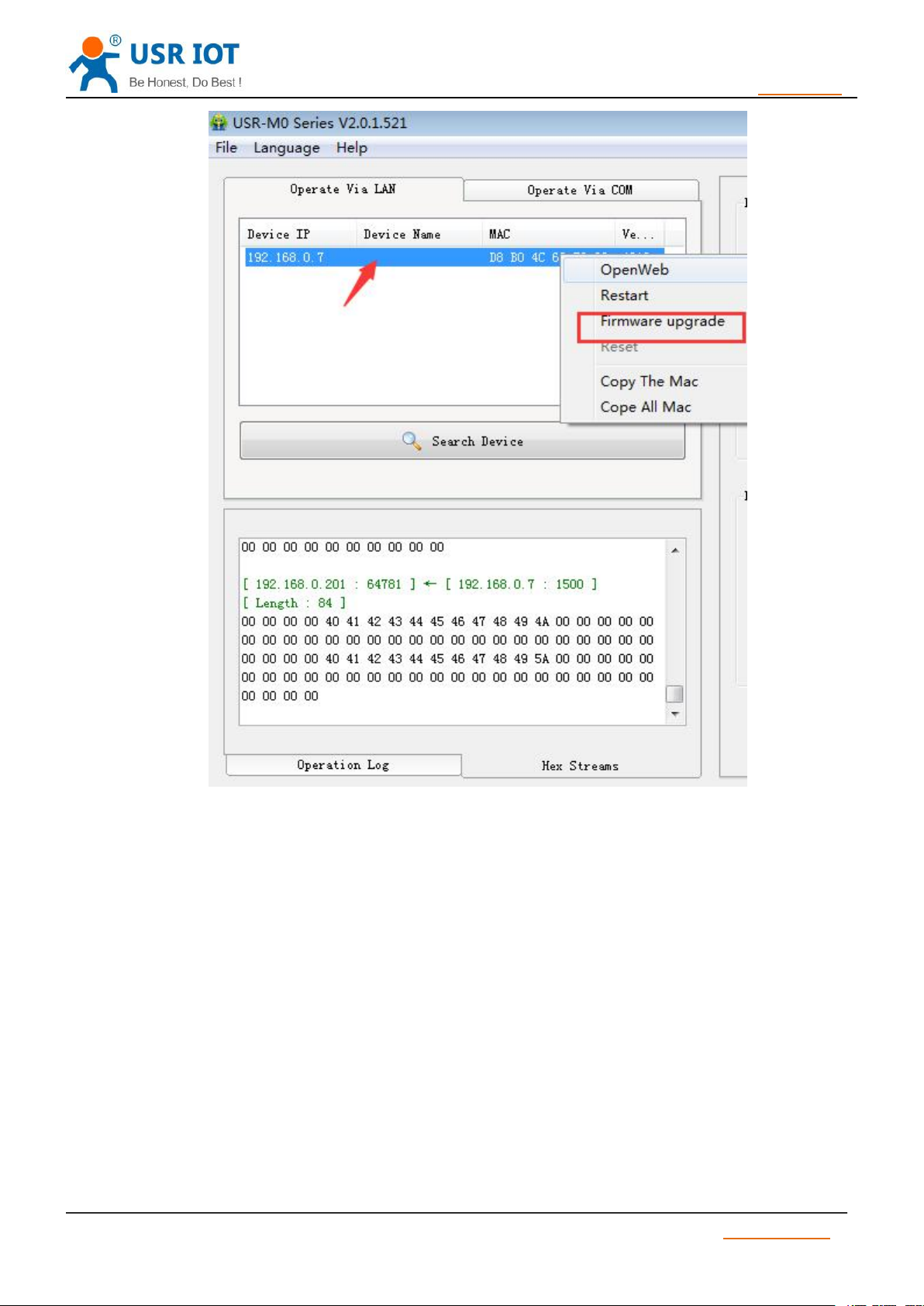
3.6. Firmware Upgrade
In TCP Server Mode, The maximum number can be configured by user. TCP Client number is from 1
to 16, default value 4. When the Client link is more than 16, the new link will replace the former link from Link 1
When the Client link is more than 4, send and receive data at same time , the data flow should be within
2.5 KB/s.
Mac address can be modified. Factory Mac address is exclusive.
To resolve server domain name, user should send data by gateway or router, then gateway or router
Distributes IP address, it can show IP in the webpage. User can set specific domain name resolution IP,
to specific gateway or router to resolve domain name.
The content of registration package can be defined, 40 bytes at most.
It includes sending registration package when connecting and carrying registration package when sending
data. It can be used singly or together.
It is set by webpage, support decimal input and hexadecimal input. By default ,this function isn’t open..
The content of heartbeat package can be defined, 40 bytes at most. Time set from 1s to 255s
It can ensure connection is reliable, put an end to connect feign death; It can send to LAN Port or Serial
Port singly or at same time.
TCP232-S2 has HTTPD Client , it support GET and POST. In HTTPD Client, package head and end can
be modified . In GET Mode, package head data is replaced by “$’. In POST Mode, put port data in the end,
“$” means data length in package head, TCP232-S2 will assign a value, user don’t need to modify. The
Parameter can be set in webpage.
Jinan USR IOT Technology Limited www.usriot.com
Page 24
USR-TCP232-S2 User Manual h.usriot.com
24
/ 34
4. Parameter Setting
1)TCP232-S2 connect PC by Lan cable, user should set parameter for PC. When TCP232-S2 connects
2)TCP232-S2 connects PC by router, one PC can connect several modules or one module connects
Diagram 17 Firmware upgrade
At first, user should connect PC to TCP232-S2 Lan port ,then set parameter by webpage or software.
TCP232-S2 connects Auto-MDI/MDIX RJ45 port with 10/100Mbps. It support Router connection
and direct connection.
to power supply and PC, module will connect PC directly. (Module IP and PC IP should in the same
Network segment )
Several PC (When modules works as TCP Server , at most it can connect 16 clients )
Jinan USR IOT Technology Limited www.usriot.com
Page 25
25
/ 34
4.1. Webpage Setting
User should set parameter as follows:
Work mode:
TCP Client、TCP Server、UDP Client、UDP Server、HTTPD Client
Default TCP/UDP connection parameter
Connection type (Server, Client, HTTPD Client)
Target Port
Target IP address
Local Port
Serial Port parameter
Baud rate
Data bit
Check bit
Stop bit
RS485 function
IP address and module password
The way of getting IP address.
Module name and password
4.2. Log in
USR-TCP232-S2 User Manual h.usriot.com
After setting parameter then reset the module .
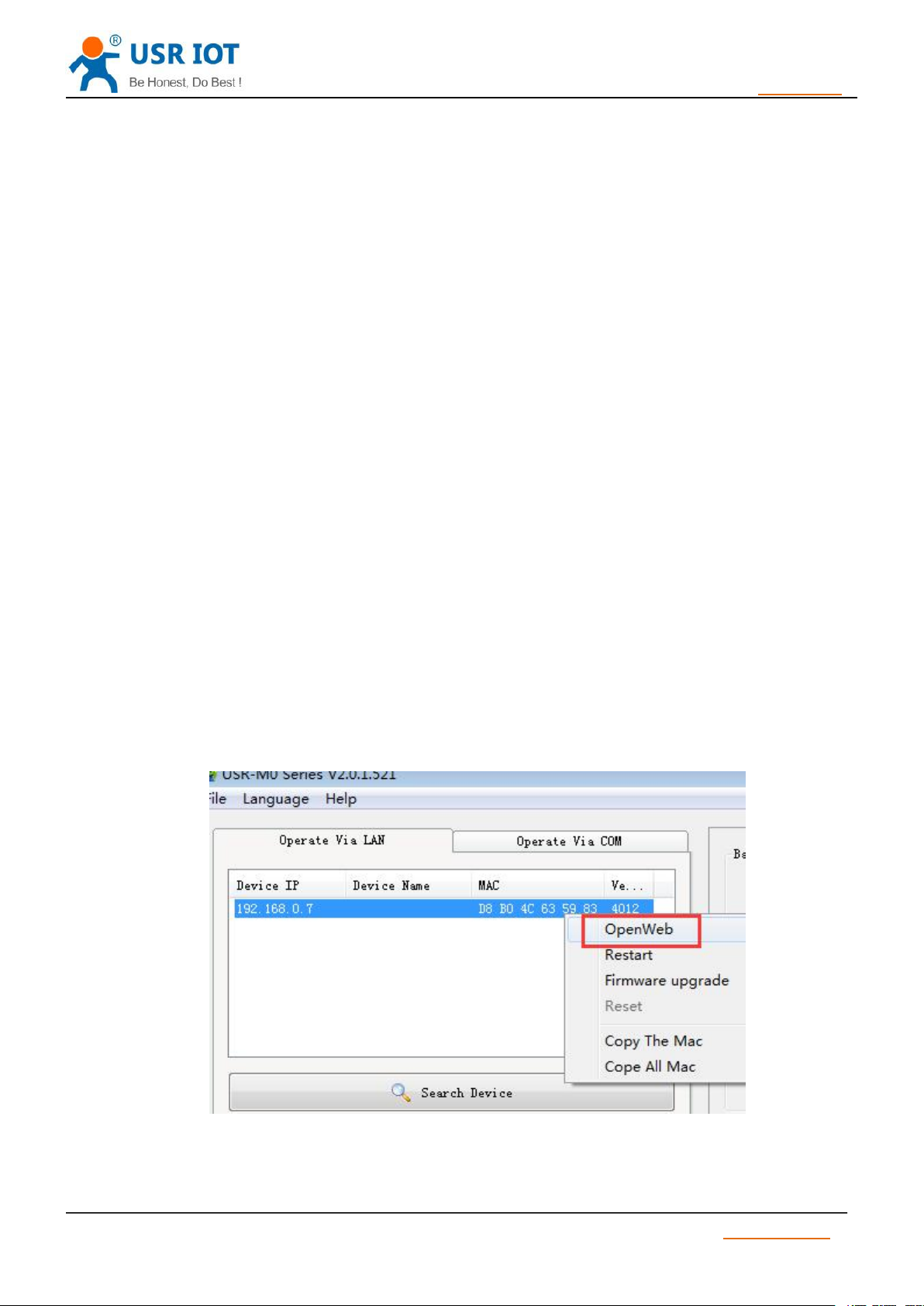
Open a browser, type 192.168.07 , Name and password:admin
User can also log in by software.
Diagram 18 Open Web
Jinan USR IOT Technology Limited www.usriot.com
Page 26
USR-TCP232-S2 User Manual h.usriot.com
26
/ 34
4.3. State Configuration
4.4. Local IP
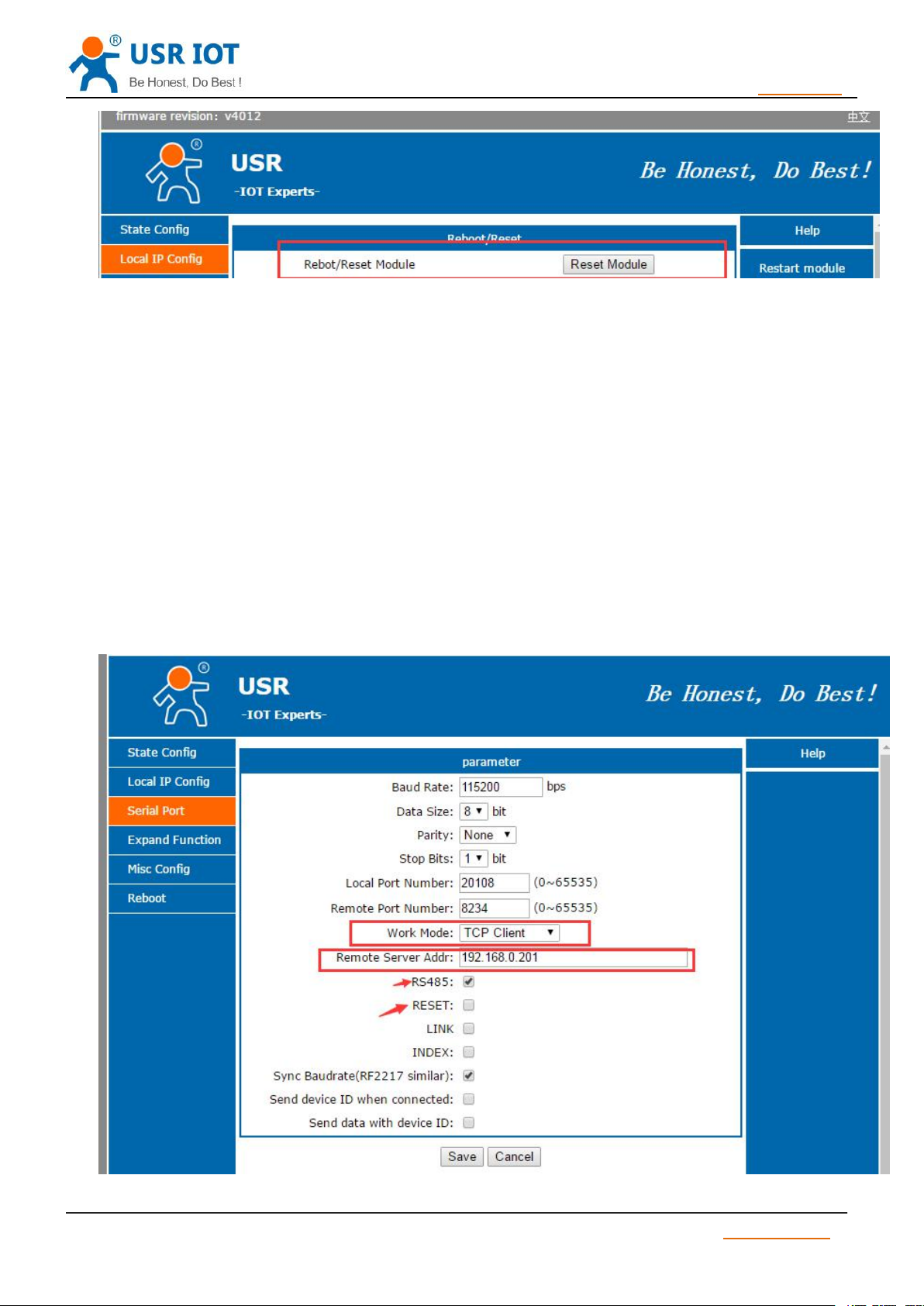
1)IP type : Static IP means fixed IP, DHCP means acquire IP automatically.
2)Static IP : when user choose Static IP, don’t conflict IP address in the LAN.
3)Subnet mask: used to distinguish network segment, default value is 255.255.255.0
4)Gateway: Router IP address, it should be set correctly when used for domain name resolution.
5)DNS Gateway : Server IP of domain name resolution , by default it is module gateway.
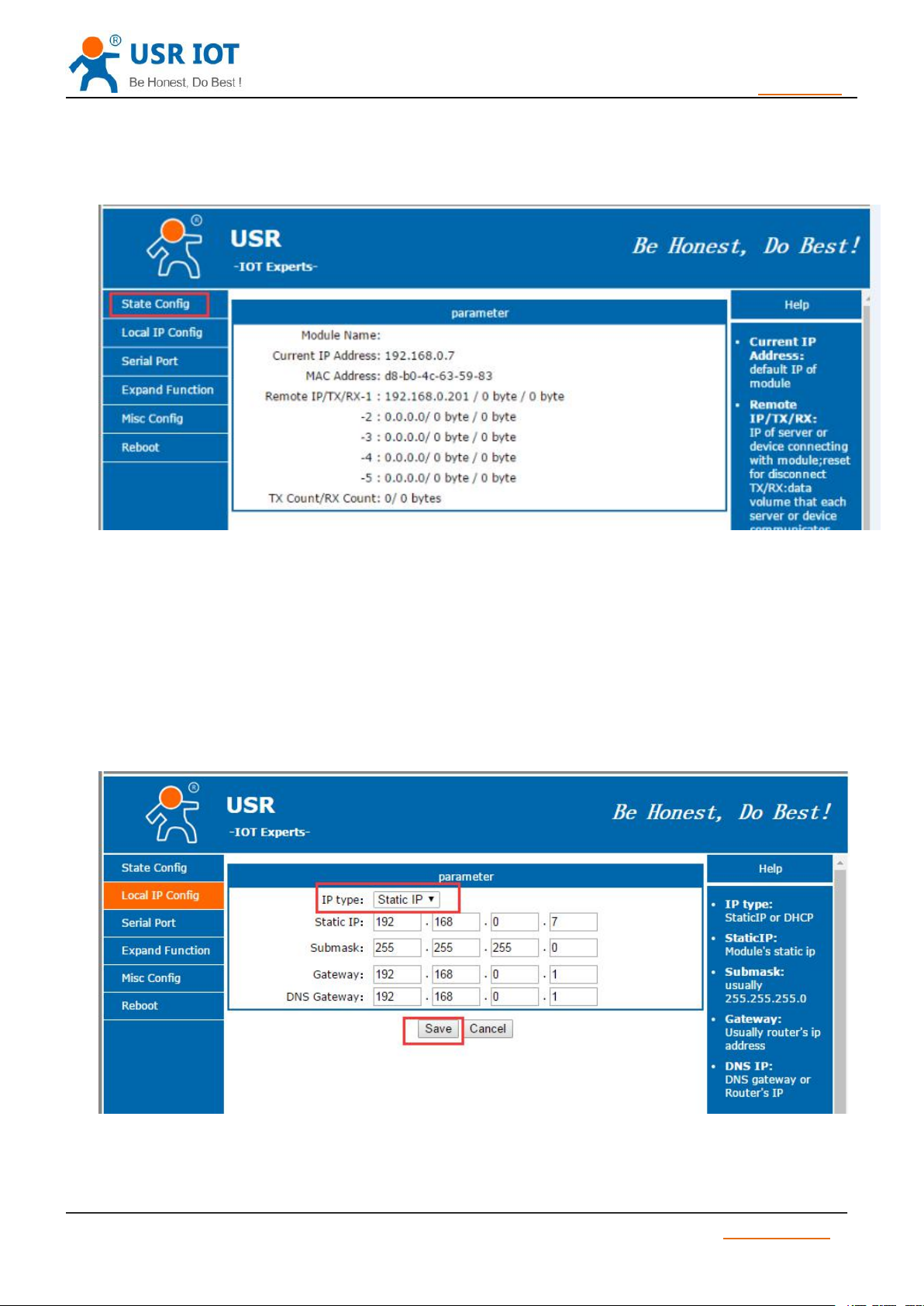
Module name , Current IP address , Mac address, Remote IP/TX/RX , TX Count/ RX Count.
Diagram 19 State Configuration
Jinan USR IOT Technology Limited www.usriot.com
Page 27
USR-TCP232-S2 User Manual h.usriot.com
27
/ 34
4.5. Serial Port Parameter
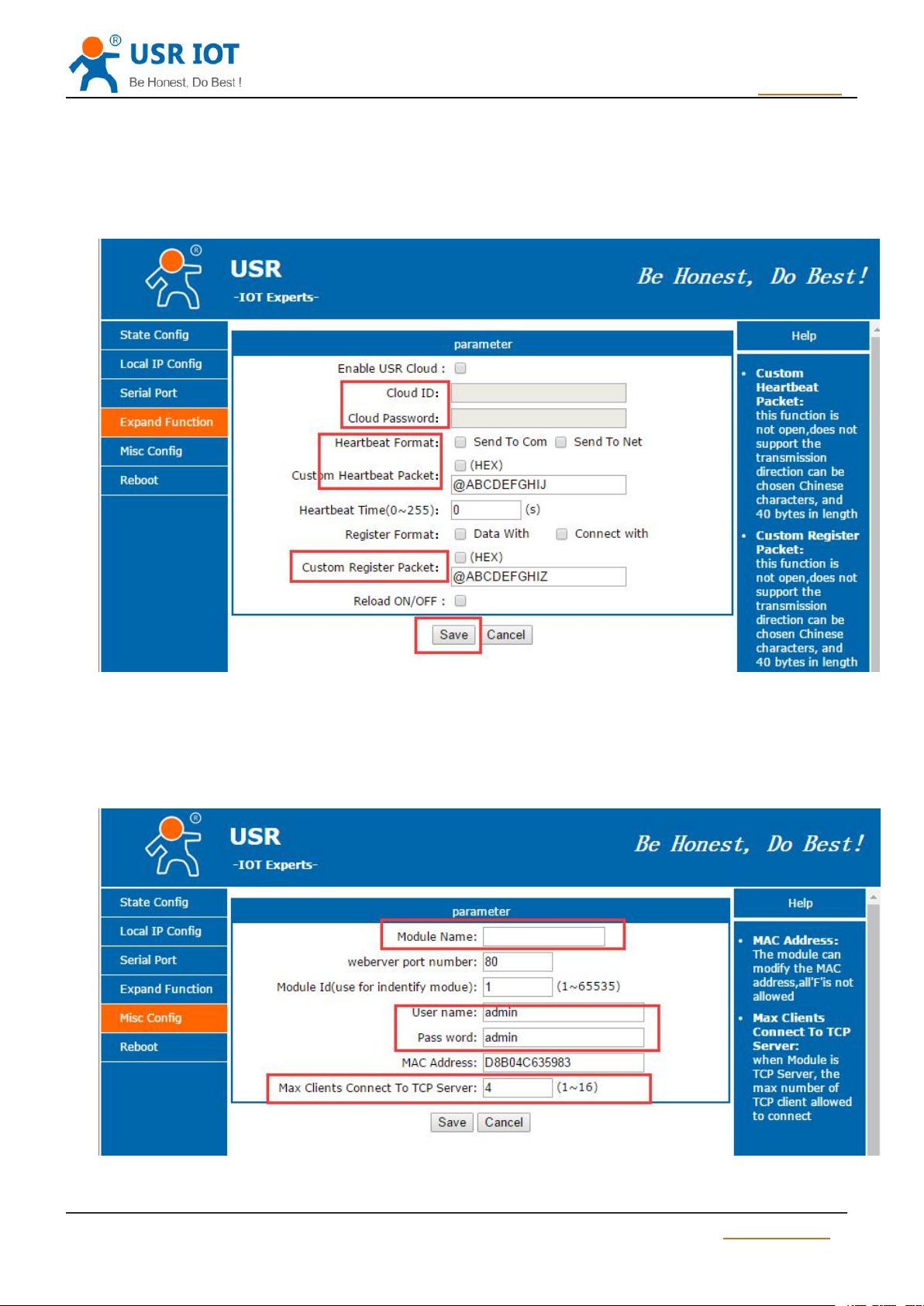
1) Baud rate: 600bps~460.8Kbps
Diagram 20 Local IP
2) Stop bit: 1,2.
3) Data bit : 5,6,7,8.
4) Check bit: NONE,ODD,EVEN,MARK,SPACE.
5) Local Port :By default ,it is local port number, it can set 0 if connect outer net.
6) Remote: Remote server port
7) Work mode :TCP Server, TCP Client,UDP Client,UDP Server,HTTPD Client.
8) Remote Server address: it can be IP address or server domain name.
9) HTTPD:HTTPD GET or HTTPD POST.
Jinan USR IOT Technology Limited www.usriot.com
Page 28
USR-TCP232-S2 User Manual h.usriot.com
28
/ 34
4.6. Expand Function
4.7. Misc Configuration
Diagram 21 Serial Port parameter
Diagram 22 Expand Function
After setting , click “save” ,then restart the module .
Diagram 23 Misc Setting
Jinan USR IOT Technology Limited www.usriot.com
Page 29
29
/ 34
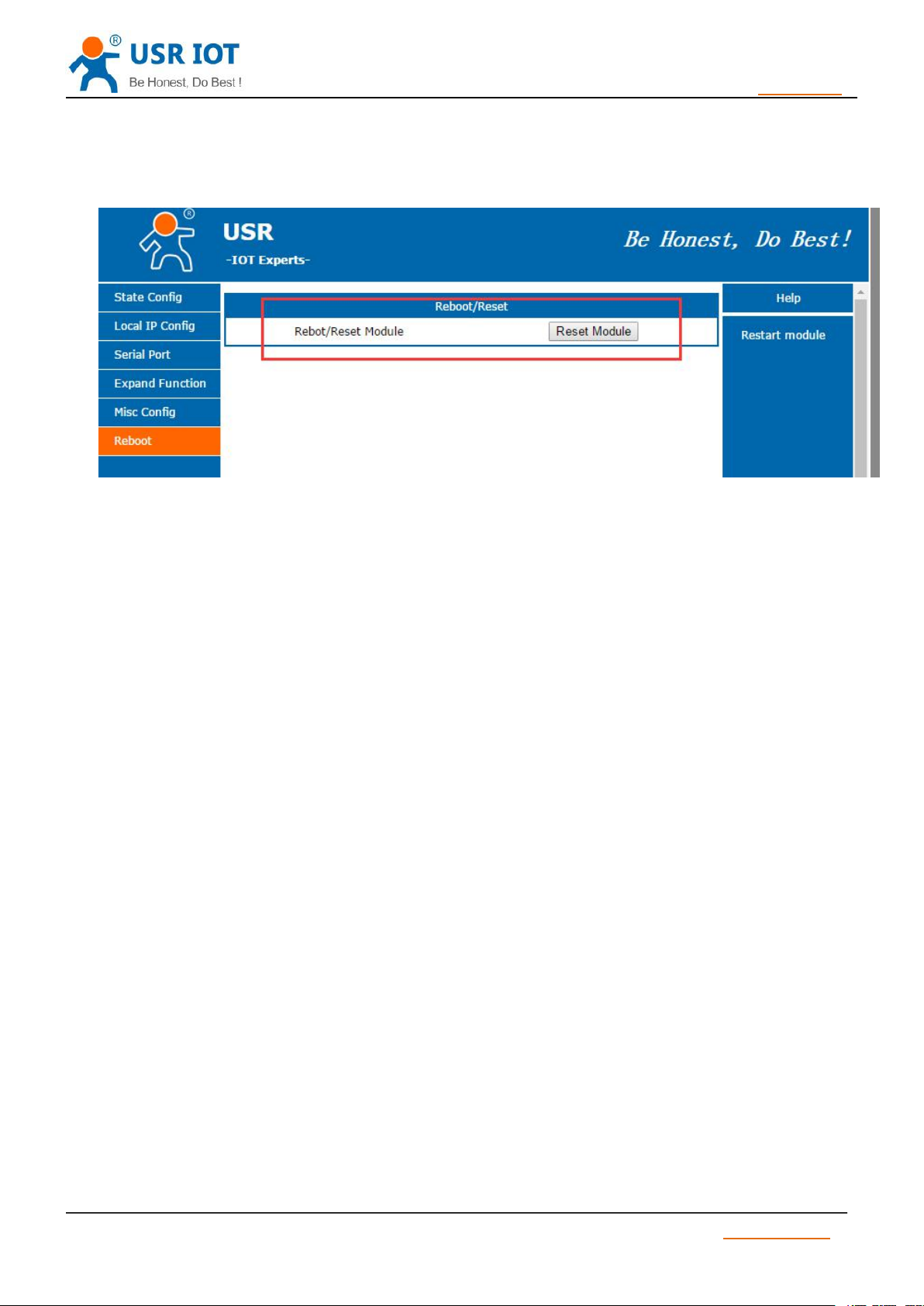
4.8. Reboot
Only have reset function.
4.9. Software Setting
USR-TCP232-S2 User Manual h.usriot.com
Diagram 24 Reboot Setting
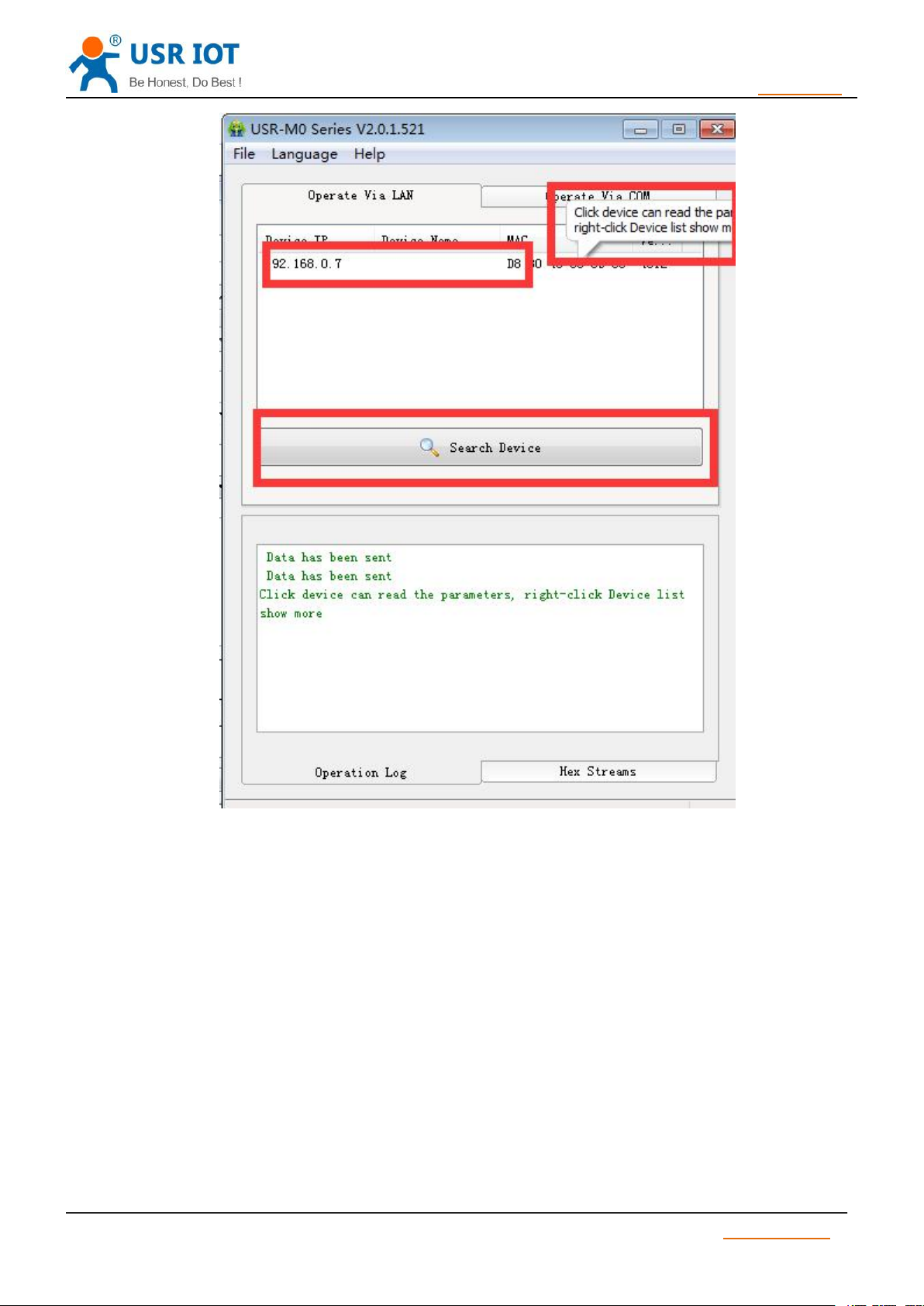
1) Search device
Jinan USR IOT Technology Limited www.usriot.com
Page 30
USR-TCP232-S2 User Manual h.usriot.com
30
/ 34
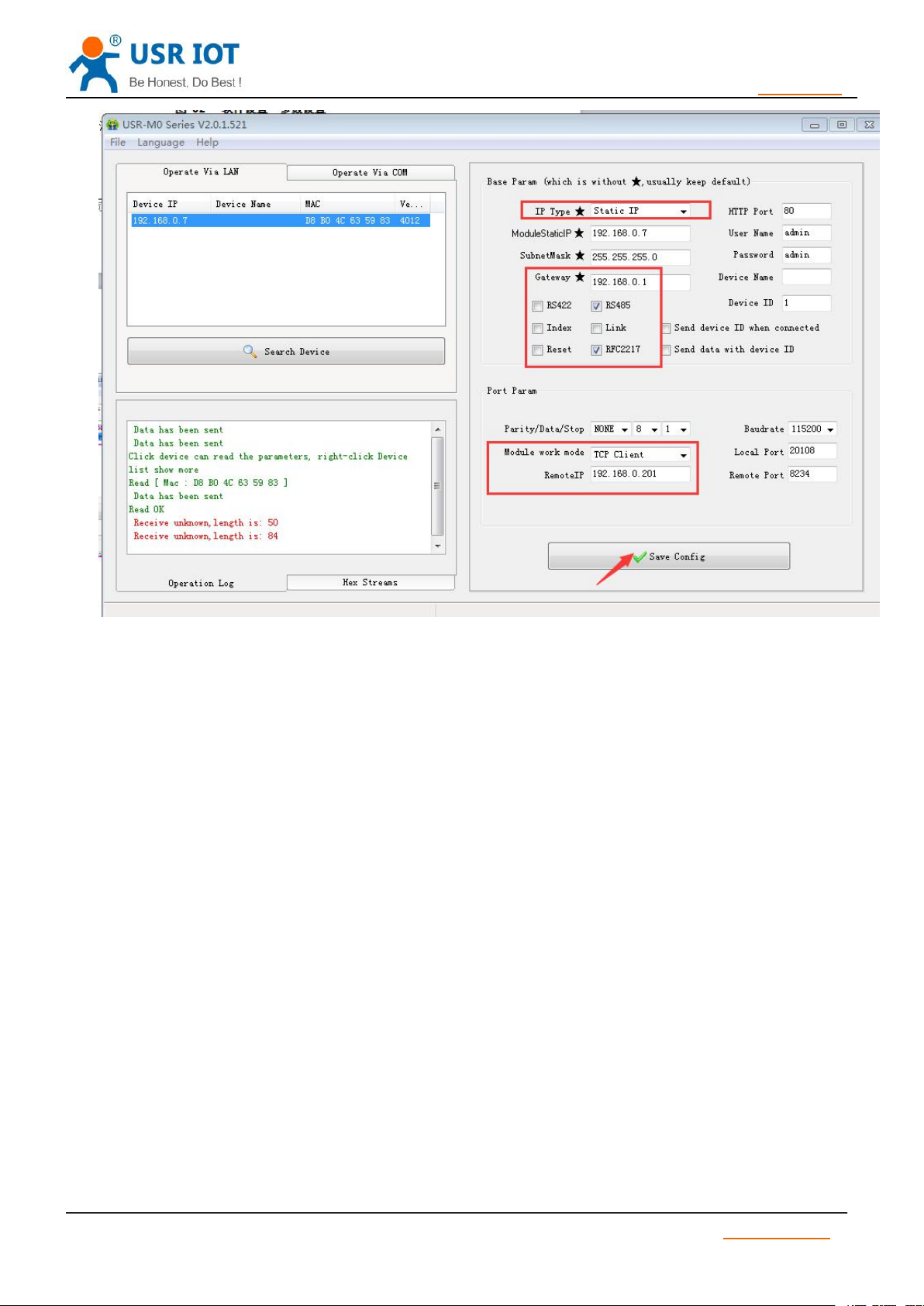
2) Set parameters
Diagram 25 Search
After setting parameters, click “save” .
Jinan USR IOT Technology Limited www.usriot.com
Page 31
USR-TCP232-S2 User Manual h.usriot.com
31
/ 34
Diagram 26 Parameter setting
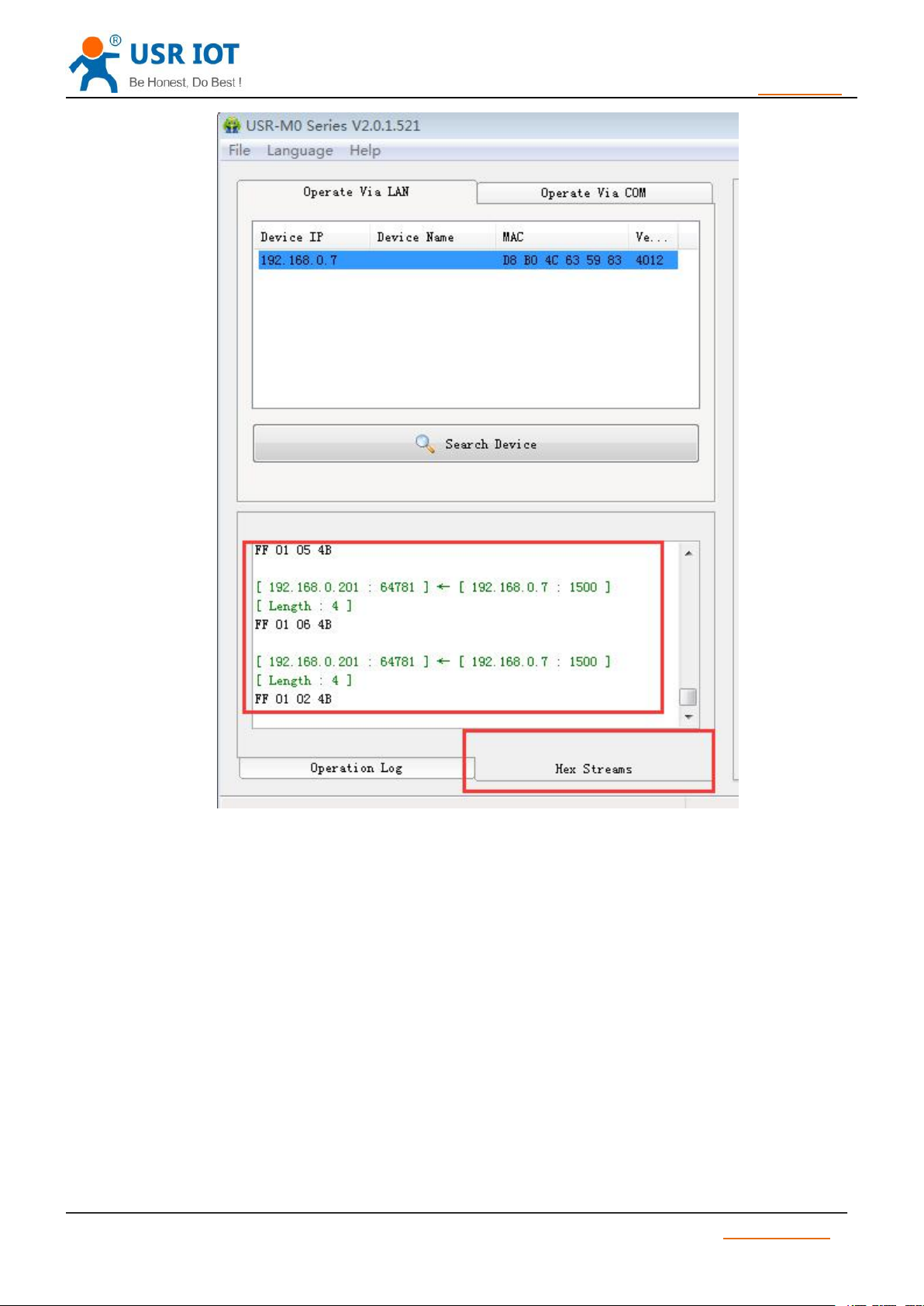
3) Check data
Click” Hex streams”, check whether the data sends correctly.
Jinan USR IOT Technology Limited www.usriot.com
Page 32
USR-TCP232-S2 User Manual h.usriot.com
32
/ 34
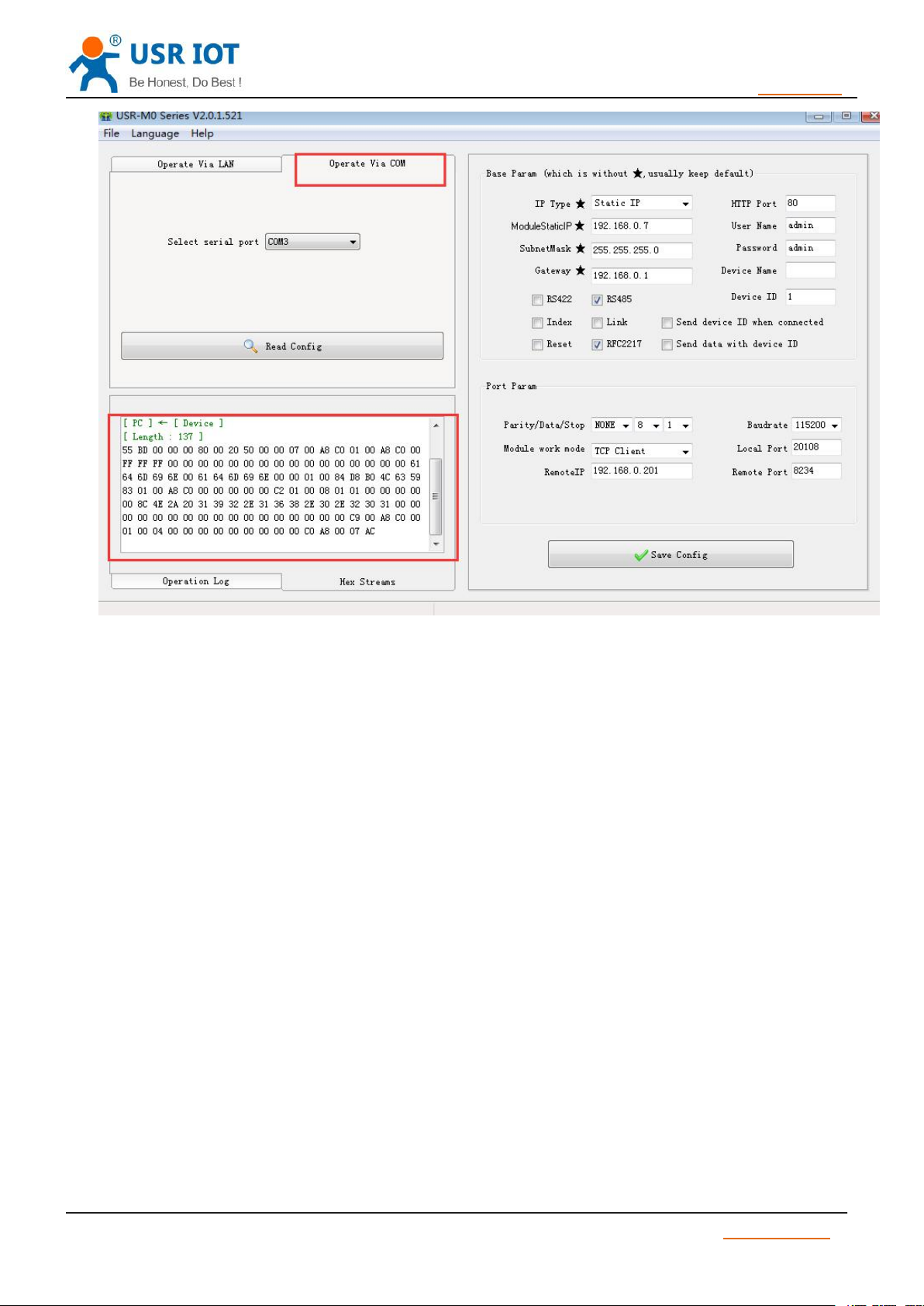
4) Pull CFG(Reload) down and keep this state. Choose right COM, click”operate via COM”, then
Diagram 27 Check Streams
Set parameter in the right page.
Jinan USR IOT Technology Limited www.usriot.com
Page 33
USR-TCP232-S2 User Manual h.usriot.com
33
/ 34
5. Contact information
6. Disclaimer
Diagram 28 Port Setting
Company: Jinan USR IOT Technology Limited.
Address: Floor 11,Building1,No.1166 Xinluo Street, Gaoxin Distric, Jinan, Shandong, 250101 China.
Tel: 86-531-55507297 86-531-88826739-803
Web: http://www.usriot.com/
Support:http://h.usriot.com/
Email: [email protected]
The document provides information about USR-TCP232-S2 module, it doesn’t grant any license to the
intellectual property rights. Except the responsibility declared in the product sale clause, USR does not assure
any other responsibilities. In addition, USR does not make any warranties for the sale and use of this product,
including the suitability of products for a particular purpose, merchant ability or fitness for any patent, copyright
or other intellectual property infringement.USR may make changes to specifications and products description
without notice.
Jinan USR IOT Technology Limited www.usriot.com
Page 34

34
/ 34
7. Undated History
V 1.0 2016-4-29 First Version
USR-TCP232-S2 User Manual h.usriot.com
Jinan USR IOT Technology Limited www.usriot.com
 Loading...