

Page 1

USR-K7 User Manual www.usriot.com
USR-K7 User Manual
File Version: V1.0.1
Jinan USR IOT Technology Limited 1 / 120 [email protected]
Page 2
Page 3

USR-K7 User Manual www.usriot.com
Contents
1. Get Start ......................................................................................................................................................................... 6
1.1. Hardware Testing Environment ............................................................................................................................ 7
1.1.1. Hardware Preparing .................................................................................................................................. 7
1.1.2. Hardware Connection ............................................................................................................................... 9
1.2. Net Testing Environment ..................................................................................................................................... 9
1.3. Default ............................................................................................................................................................... 11
1.4. Data Transport Testing ....................................................................................................................................... 11
2. Overview ....................................................................................................................................................................... 12
2.1. Brief Introduction .............................................................................................................................................. 12
2.2. Features ............................................................................................................................................................. 13
2.3. Basic Parameters................................................................................................................................................ 14
3. Hardware Parameters ................................................................................................................................................... 15
3.1. Pin Definition ..................................................................................................................................................... 15
3.2. Dimension .......................................................................................................................................................... 17
4. Product Function .......................................................................................................................................................... 18
4.1. Net basic function .............................................................................................................................................. 19
4.1.1. IP address/subnet masks/gateway .......................................................................................................... 19
4.1.2. DNS Address ........................................................................................................................................... 22
4.1.3. Hardware Restore the Factory Function ................................................................................................. 22
4.1.4. Web Server ............................................................................................................................................. 23
4.1.5. Net Firmware Upgrade ........................................................................................................................... 24
Jinan USR IOT Technology Limited 3 / 120 [email protected]
Page 4

USR-K7 User Manual www.usriot.com
4.2. Socket ................................................................................................................................................................ 24
4.2.1. TCP Client mode ..................................................................................................................................... 26
4.2.2. TCP Server Mod ...................................................................................................................................... 30
4.2.3. UDP Client mode..................................................................................................................................... 33
4.2.4. UDP Server mode ................................................................................................................................... 37
4.2.5. HTTPD client ........................................................................................................................................... 40
4.2.6. Websocket .............................................................................................................................................. 42
4.2.7. USR-VCOM .............................................................................................................................................. 45
4.3. Serial Function ................................................................................................................................................... 46
4.3.1. Serial port Basic Parameters ................................................................................................................... 46
4.3.2. Flow Control ........................................................................................................................................... 47
4.3.3. Serial Port Mapping ................................................................................................................................ 48
4.3.4. Similar RFC2217 ...................................................................................................................................... 49
4.4. Special Function ................................................................................................................................................. 52
4.4.1. Heartbeat Package Function ................................................................................................................... 53
4.4.2. Modbus Gateway .................................................................................................................................... 54
4.4.3. Registration Package ............................................................................................................................... 55
4.4.4. USR-cloud ............................................................................................................................................... 57
4.4.5. Net Printing ............................................................................................................................................. 60
4.4.6. Customize Webpage ............................................................................................................................... 61
4.4.7. Customize MAC ....................................................................................................................................... 62
4.4.8. Restart Timeout ...................................................................................................................................... 63
Jinan USR IOT Technology Limited 4 / 120 [email protected]
Page 5

USR-K7 User Manual www.usriot.com
4.4.9. Clear Buffer Data ..................................................................................................................................... 64
4.4.10. Short Connection .................................................................................................................................. 65
5. Parameters Setting ....................................................................................................................................................... 66
5.1. Net Protocol Setting Parameters ........................................................................................................................ 66
5.1.1. Setup Software Setting Parameters ........................................................................................................ 66
5.1.2. Setting Protocol Setting Parameters ....................................................................................................... 72
5.2. Webpage Setting Parameters ............................................................................................................................ 80
5.3. AT Command ..................................................................................................................................................... 86
5.3.1. Net AT Command .................................................................................................................................... 86
5.3.2. Serial AT Command ................................................................................................................................. 86
5.3.3. Error AT Command ................................................................................................................................. 88
5.3.4. AT Command .......................................................................................................................................... 89
5.3.5. AT Command Details ............................................................................................................................... 91
6. Contact us ................................................................................................................................................................... 119
7. Disclaimer ................................................................................................................................................................... 120
8. Modified History ......................................................................................................................................................... 120
Jinan USR IOT Technology Limited 5 / 120 [email protected]
Page 6

USR-K7 User Manual www.usriot.com
1. Get Start
K7 is a module that can realize data transmission between the Network and TTL serial port, which is equipped with
ARM cortex-M4 processor. No need to care of the details, the module realize the protocol converse.parameters can be
set in the software and webpage, configure one time and save forever.
This character aimed at get start and the user are advised to operation one time according to the instr to
understand K7 completely.
Questions occur in the testing, you can refer to our application case and answers:
https://www.usriot.com/support/faq/ethernet-series/
Also you can submit the problem into the support: http://h.usriot.com/
Product link: https://www.usriot.com/products/super-port-serial-ttl-uart-to-ethernet-module.html
Related software:
M4 setting software: https://www.usriot.com/support/downloads/usr-m4-setup-software-v234102.html
(also, it can be used in the industrial serial to Ethernet Converter:USR-N668,USR-N510, USR-N520, USR-N540,
USR-TCP232-410S, USR-TCP232-419 and industrial ethernet modules: USR-TCP232-E2, USR-TCP232-ED2.)
Testing software: https://www.usriot.com/support/downloads/usr-tcp-test-testing-software.html
Jinan USR IOT Technology Limited 6 / 120 [email protected]
Page 7
USR-K7 User Manual www.usriot.com
1.1. Hardware Testing Environment
1.1.1. Hardware Preparing
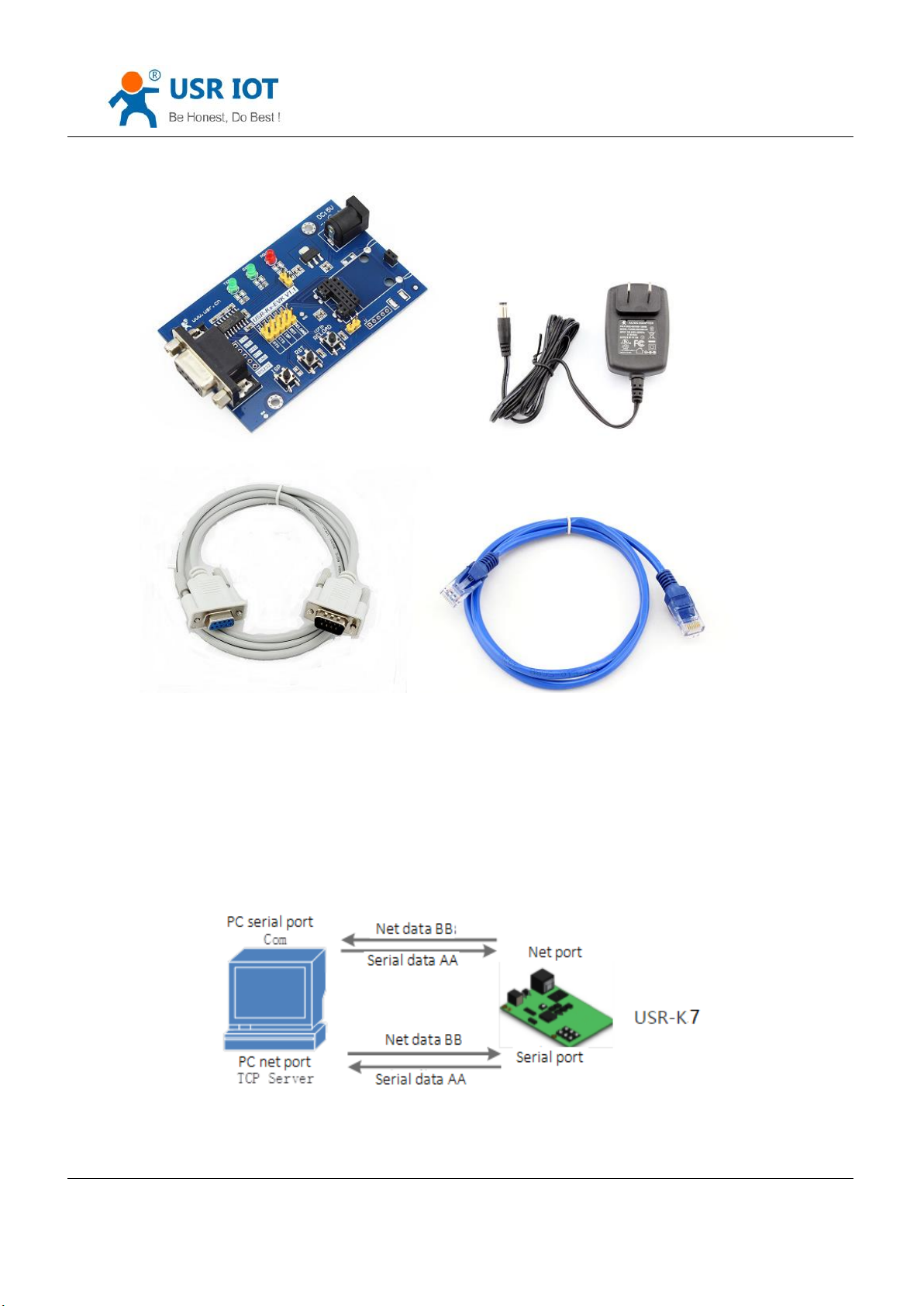
USR-K7*1
USR-Kx-EVK*1
Cable*1
PC *1
Power adapter (DC5V 1A)*1
Serial port cable *1
Diagram 1-1 Download Page
Jinan USR IOT Technology Limited 7 / 120 [email protected]
Page 8
USR-K7 User Manual www.usriot.com
1.Testing purpose:
Have a complete understand for K7
Testing the function.
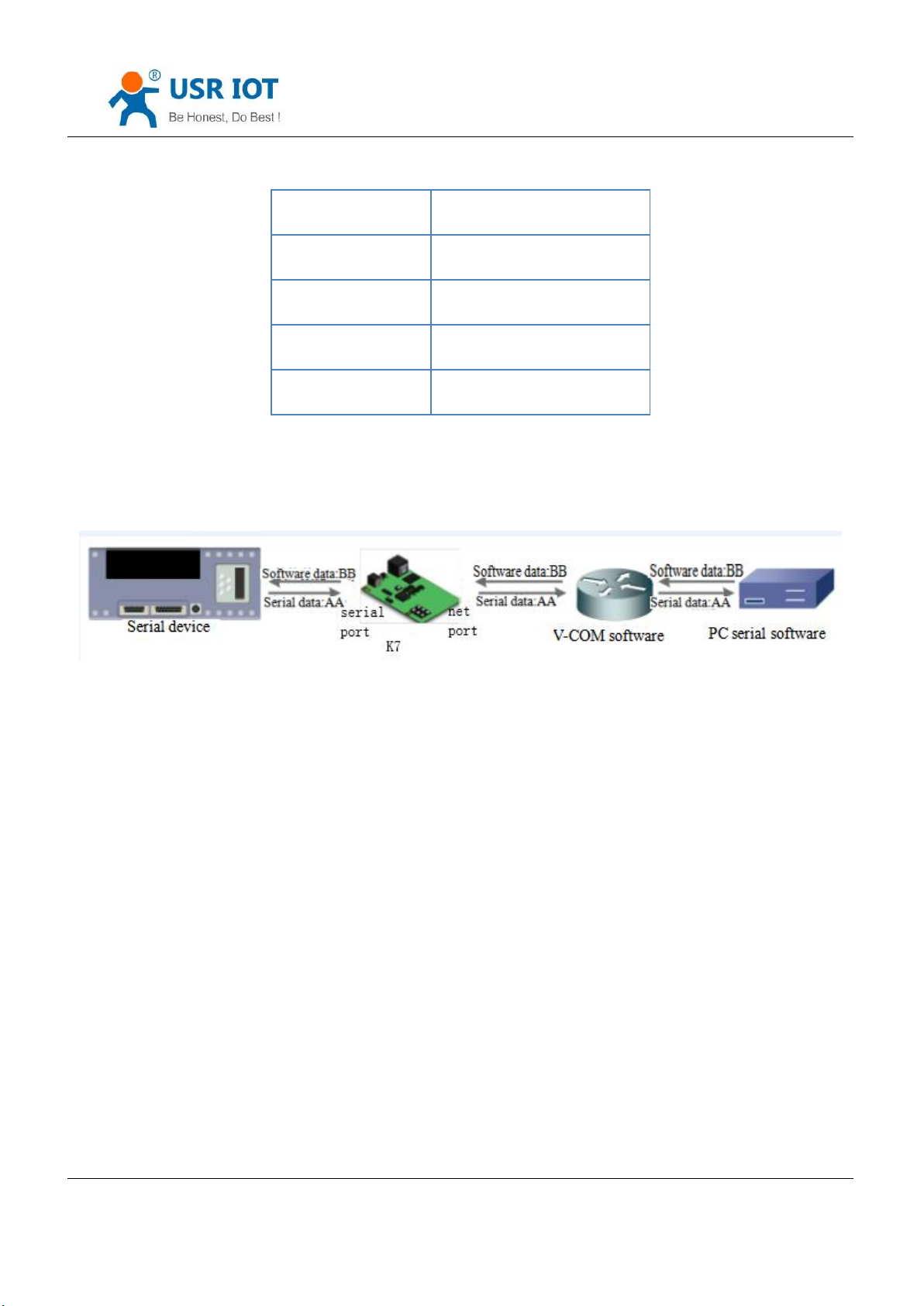
2.Data direction
Diagram 1.1.1-1 hardware prepare tools
Diagram 1.1.1-2 Data Direction
Jinan USR IOT Technology Limited 8 / 120 [email protected]
Page 9
USR-K7 User Manual www.usriot.com
1.1.2. Hardware Connection
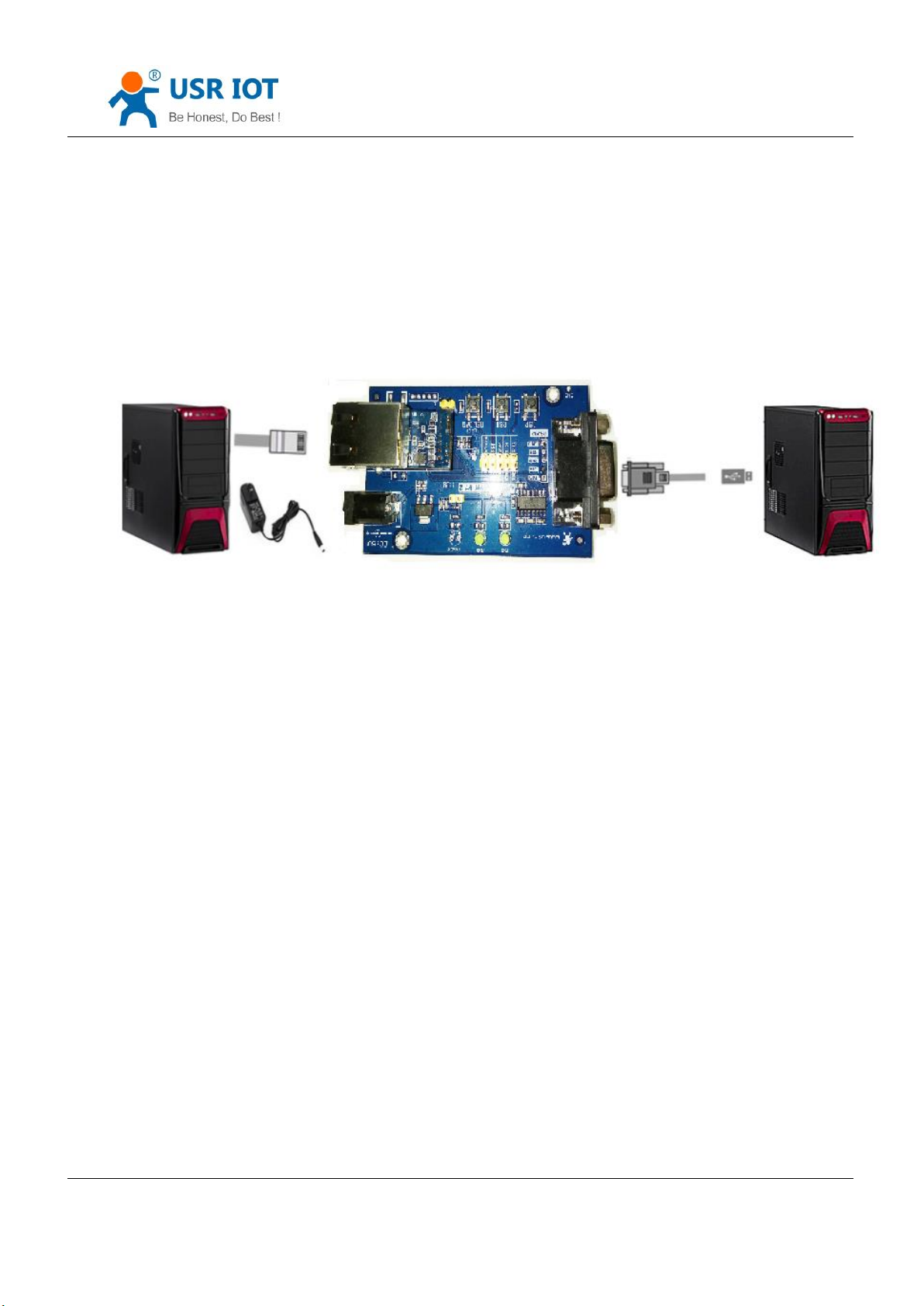
To test the communication converse from serial port to net, connect the USR-K7 with evaluation board, and
connected with the PC using serial cable, then connect the net port of K7 and PC. Power on the it. The diagram is as
fellow:
Diagram 1.1.2-1 Hardware Connection
Note: the power adapter and cable are from USR.
1.2. Net Testing Environment
To prevent from searching nothing, not ping and not opening the webpage, you should testing the below contents
before using.
1) Shut down firewall and antivirus software.
2) Shut down net card none-related and reserve only one local connection.
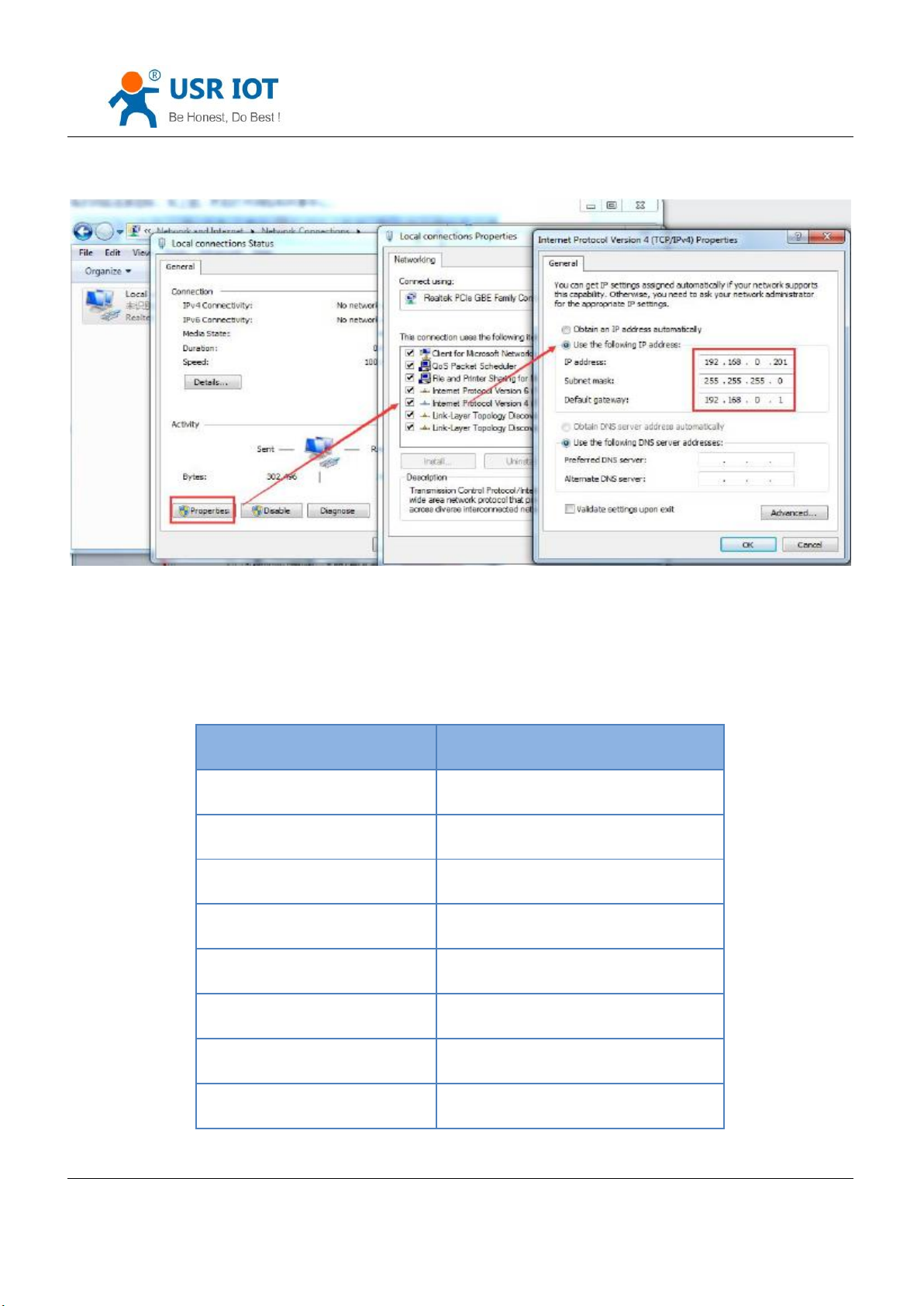
3) For the direct connection between PC and server, please provide a static IP in the same LAN with the IP of K7,
e.g.192.168.0.201.
Jinan USR IOT Technology Limited 9 / 120 [email protected]
Page 10
USR-K7 User Manual www.usriot.com
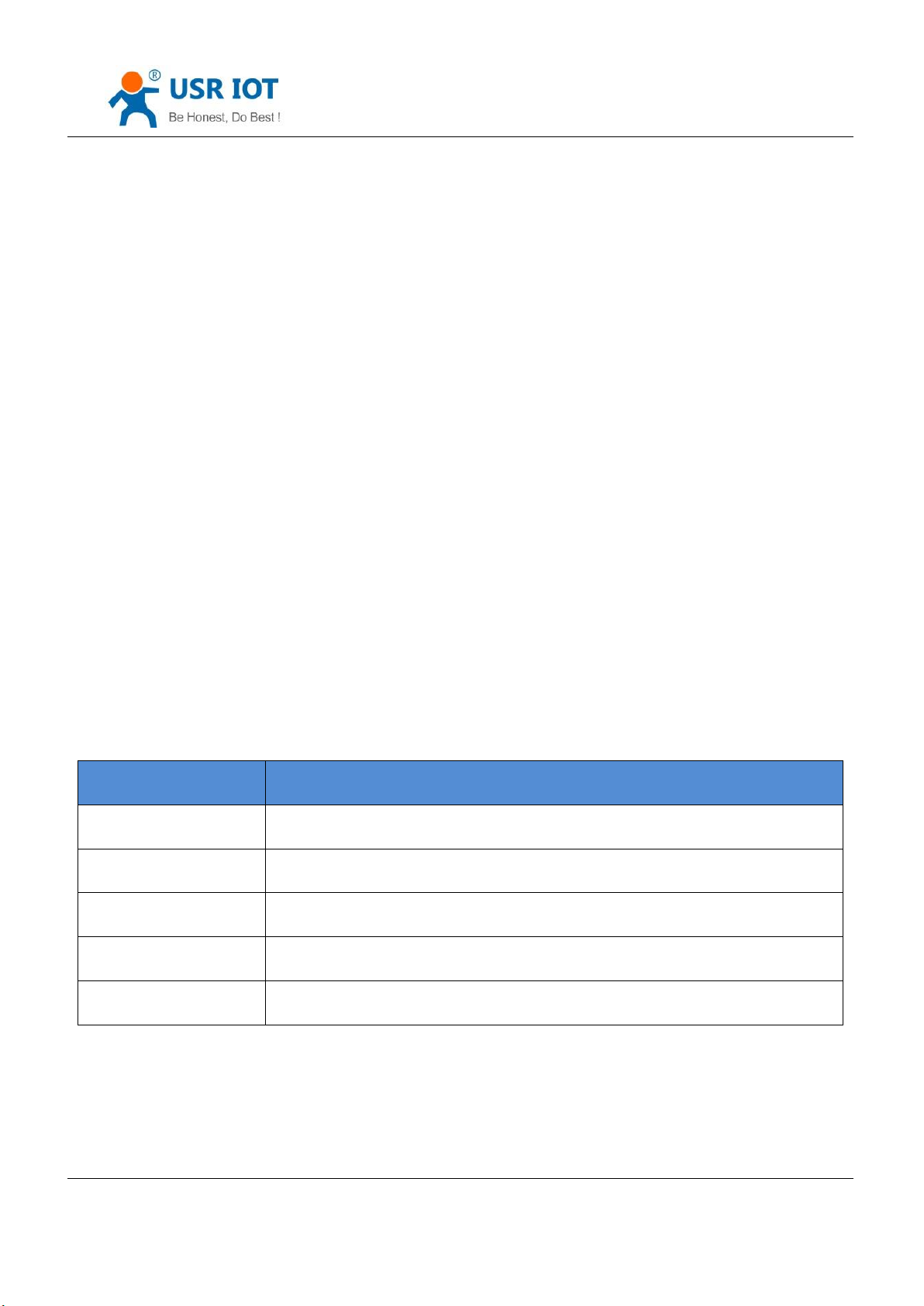
Item
Content
Username
admin
Password
admin
IP address of K7
192.168.0.7
Subnet masks of K7
255.255.255.0
Default gateway of K7
192.168.0.1
Default mode of the port1 k7
TCP Server
Default local port of the port1 K7
23
Serial port baud rate
115200
Diagram 1.2-1 Local Connection of the PC
Jinan USR IOT Technology Limited 10 / 120 [email protected]
Page 11

Serial port parameters
None/8/1
1.3. Default
USR-K7 User Manual www.usriot.com
Form 1.3-1 Default parameters
1.4. Data Transport Testing
After the above steps, the K7 can realize the bi-direction between the serial port and ethernet, operation steps are
as fellows:
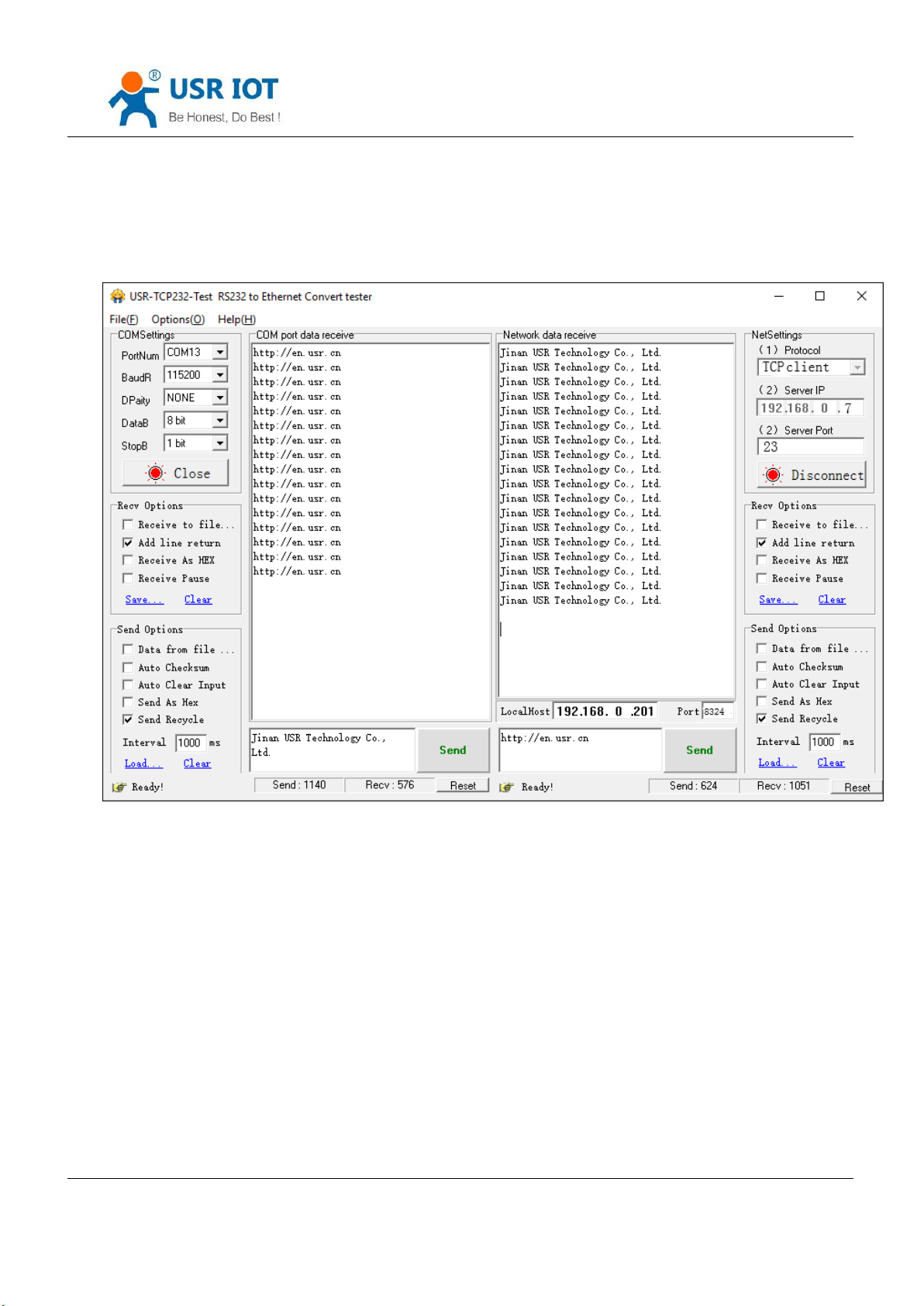
1) Open the “USR-TCP232-Test.exe” connecting the hardware as Diagram 1.1.2-1 .
2) Net setting change into TCP Client, enter the 192.168.0.7 into IP address, server port is 23. then click to build
TCP connection. serial baud rate:115200, Serial port parameters: none/8/1 then open the serial port.
From now, we can have the data transmit testing from the serial port to network.
Direction from serial port to network:
PC serial port → K7 serial port → K7 network → PC network data
Direction from network to serial port:
Jinan USR IOT Technology Limited 11 / 120 [email protected]
Page 12
USR-K7 User Manual www.usriot.com
PC network data → network →K7 serial port → PC serial port
As the below:
Diagram 1.4-1 Default Parameters Testing
2. Overview
2.1. Brief Introduction
Super port module K7 is a new serial Ethernet module. It is a module that can realize data transmission between
the network and TTL serial port. This module is equipped with ARM cortex- M4 processor, which has the advantages of
low power consumption, fast speed and high stability.
In terms of the volume, the width of the device is equal to the common RJ45 port, and the length is less than twice
length of the common network port, with the industry- leading ultra-small volume, and the current is only 130mA when
Jinan USR IOT Technology Limited 12 / 120 [email protected]
Page 13

USR-K7 User Manual www.usriot.com
working at full speed.
This product is developed on the basis of the hardware and software of serial to ethernet M4 series. The internal
integration of TCP/IP protocol stack, user can use it to complete the embedded device networking function easily,saving
the development process of human, material and development cycle, so that products can be faster into the market,
enhance competitiveness.
Passed the strict testing, K7 has successful case in Banks, highways, large corporate networks, busy webcam
networks and complex network environments such as fiber-optic to Ethernet.
2.2. Features
Equipped with ARM cortex-M4, industrial width of temperature,TCP/IP protocol stack, more stable and reliable.
10/100Mbps net port, supports Auto-MDI/MDIX
Supports TCP server, TCP client, UDP server, UDP client and HTTPD client work mode
Build-in webpage where can set the parameters, also can customize webpage. The port of the webpage can be
defined
Enable 485, and the serial port can work as 485
Supports RTS/CTS hardware flow control and Xon/Xoff software flow control
Supports USR-VCOM
Baud rate:600bps~1Mbps; and five parity way:none, odd, even, mark, space
Supports modbus gateway
Supports Reload button, hardware restore to factory setting
RJ45 have Link/Data indicator, in the net port, there is Isolating transformer,1.5KB ESD
The unique MAC in the world, and the user can self-defined
Supports net upgrade firmware,DDNS, DHCP
Supports keepalive, check dead connection and abnormal and reconnection
Supports password and username, more safety
Jinan USR IOT Technology Limited 13 / 120 [email protected]
Page 14
USR-K7 User Manual www.usriot.com
Parameter
Value
Hardware parameters
Input Voltage
DC3.0~3.6V( 3.3V is best)
Working Current
Net port
Rj45, 10/100mMbps
Encapsulation way
Pin
Serial port
600~1M(bps)
Software parameters
Network protocol
IP, IPV4, TCP, UDP, DHCP, DNS, HTTP, ARP,
ICMP, Web socket
Access way to IP
Static IP, DHCP
DDNS
Support
User parameters
Software setting, webpage setting, AT
command
Single transparent transmission
TCP Server/TCP client/UDP Server/UDP Client
Modbus
Supports modbus gateway
Webpage to serial port
Websocket
Similar RFC2217
Support
Httpd client
support
Self-defined webpage
support
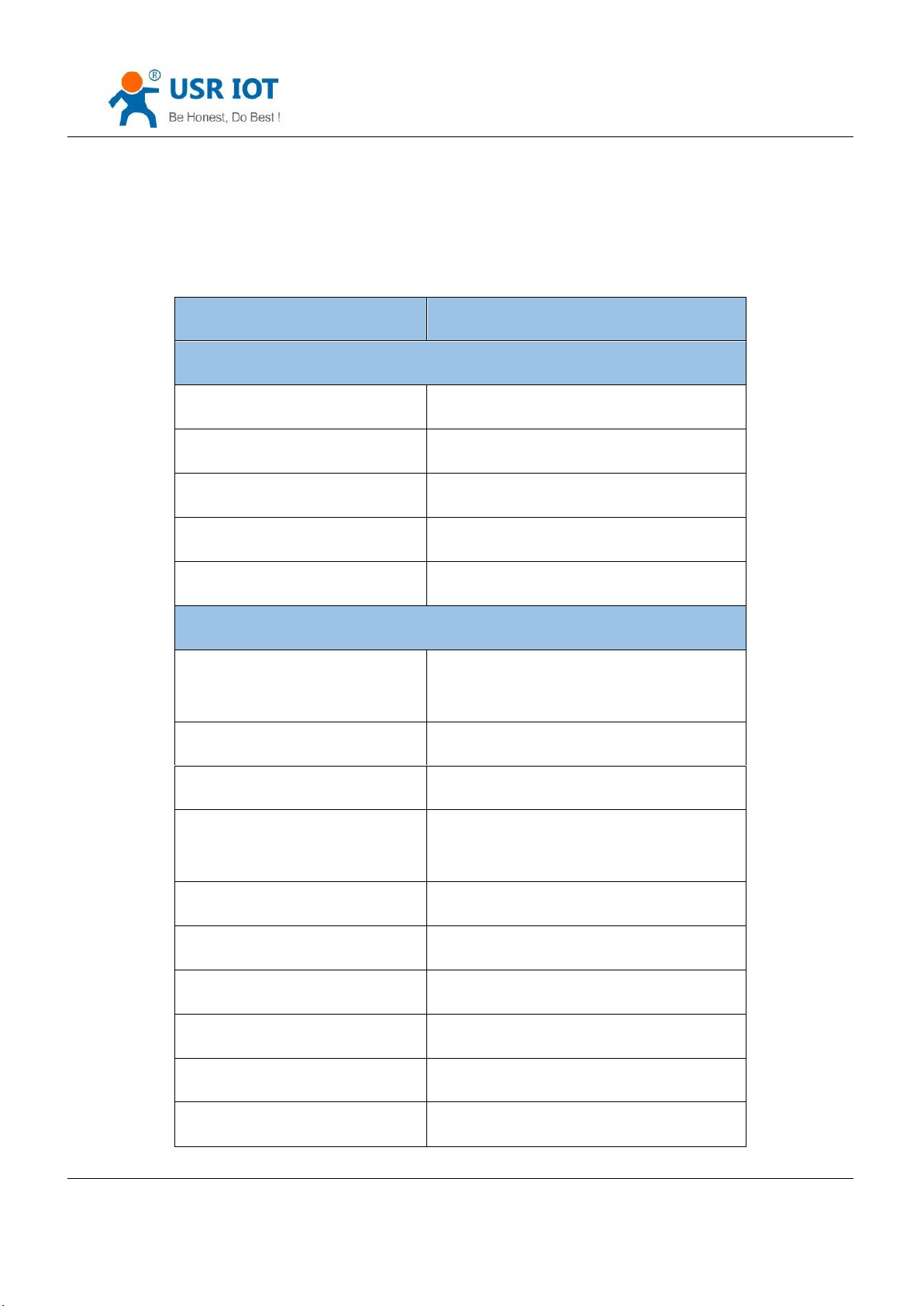
Supports two websocket to realize the bi-direction transparent transmission between serial port and webpage.
2.3. Basic Parameters
Jinan USR IOT Technology Limited 14 / 120 [email protected]
Page 15
USR-K7 User Manual www.usriot.com
TCP server connection
Default 4 and maximum 16
Net buffer
Send:16Kbyte; receive:16Kbyte
Serial port buffer
Send:2K byte;receive: 2kbyte
Average transport delay
<10ms
Set software
USR-VCOM, USR-Cloud, parameters setting
software
others
Certification
CE,FCC, ROHS
Size
35.0x19.39x18.25 mm(L*W*H)
Operating Temp.
-40~+85°C
Storage temp
-40~+105°C
operating humidity
5%~95% RH
Storage humidity
5%~95% RH
3. Hardware Parameters
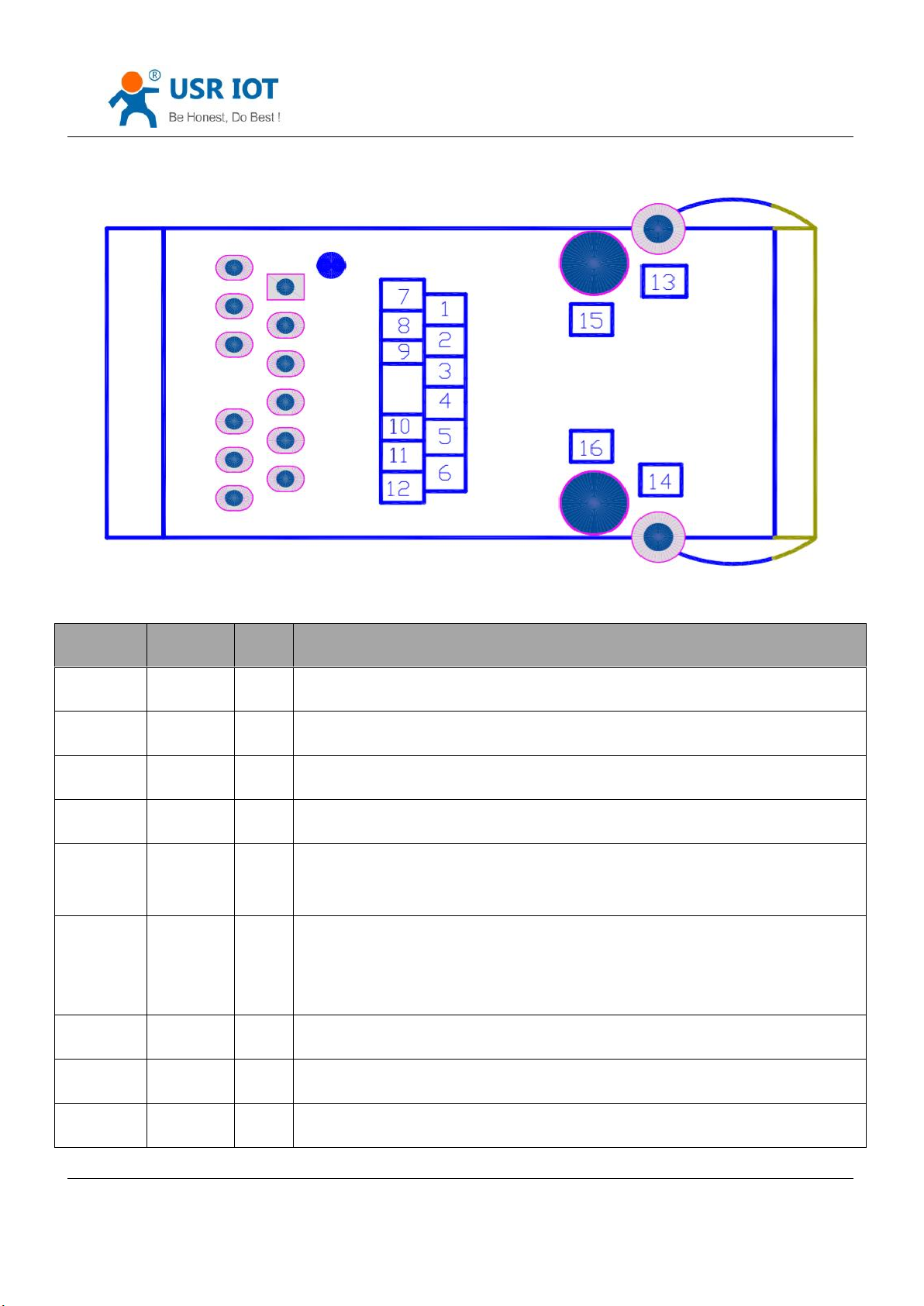
3.1. Pin Definition
Jinan USR IOT Technology Limited 15 / 120 [email protected]
Page 16
USR-K7 User Manual www.usriot.com
NO.
Name
Type
Instr
1
NC
NC
Have not opened, please hang
2
NC
NC
Have not opened, please hang
3
CTS I Default disable,can be configured into hardware flow control(clear to send)
4
RST I Module reboot(200ms or above low level pulse to make the module reboot)
5
RTS O Default 485 receive and send control, high level pulse send. Configured into
hardware flow control.(request to send)
6
Reload
I
Module can restore to factory setting, under power off(or reboot)put down reload
then power on, keep the reload down for 5s, after 5s put up and then reload to
factory setting.
7
NC \ Have not opened, please hang
8
RXD I Serial port receive(3.3V,TTL)
9
TXD O Serial port send(3.3V, TTL )
Diagram 3.1-1Pin
Jinan USR IOT Technology Limited 16 / 120 [email protected]
Page 17
USR-K7 User Manual www.usriot.com
10
GND
Power
Ground(including power and signal)
11
VDD
Power
Power (DC3.3V is supporting)
12
NC \ Have not opened, please hang
13
ETH \ Network shield pin
14
ETH \ Network shield pin
15
Fixed
column
\
Module fixed column
16
Fixed
column
\
Module fixed column
Form 3.1-1 Pin Definition
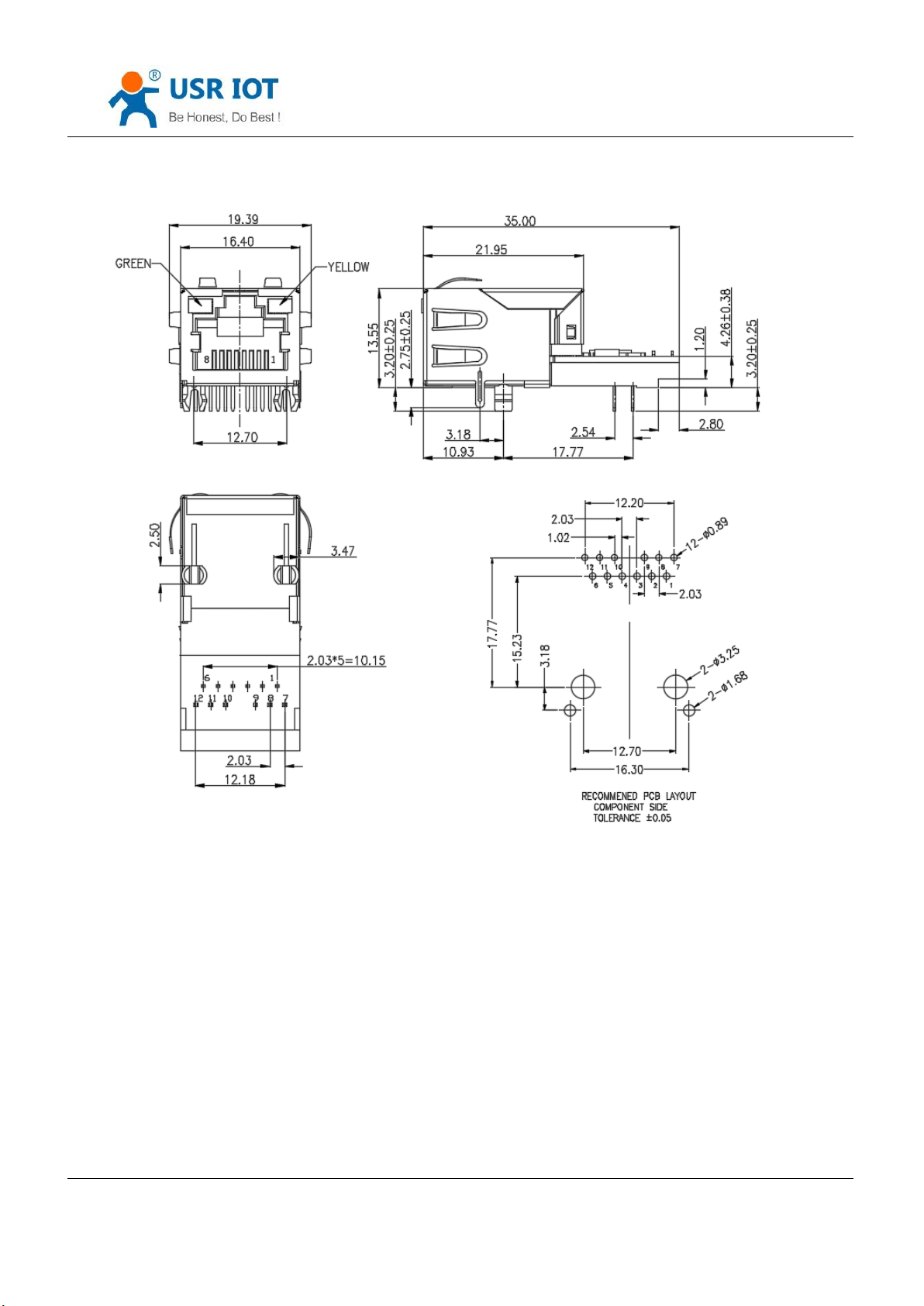
3.2. Dimension
Jinan USR IOT Technology Limited 17 / 120 [email protected]
Page 18
USR-K7 User Manual www.usriot.com
Diagram 3.2-1 Dimension
4. Product Function
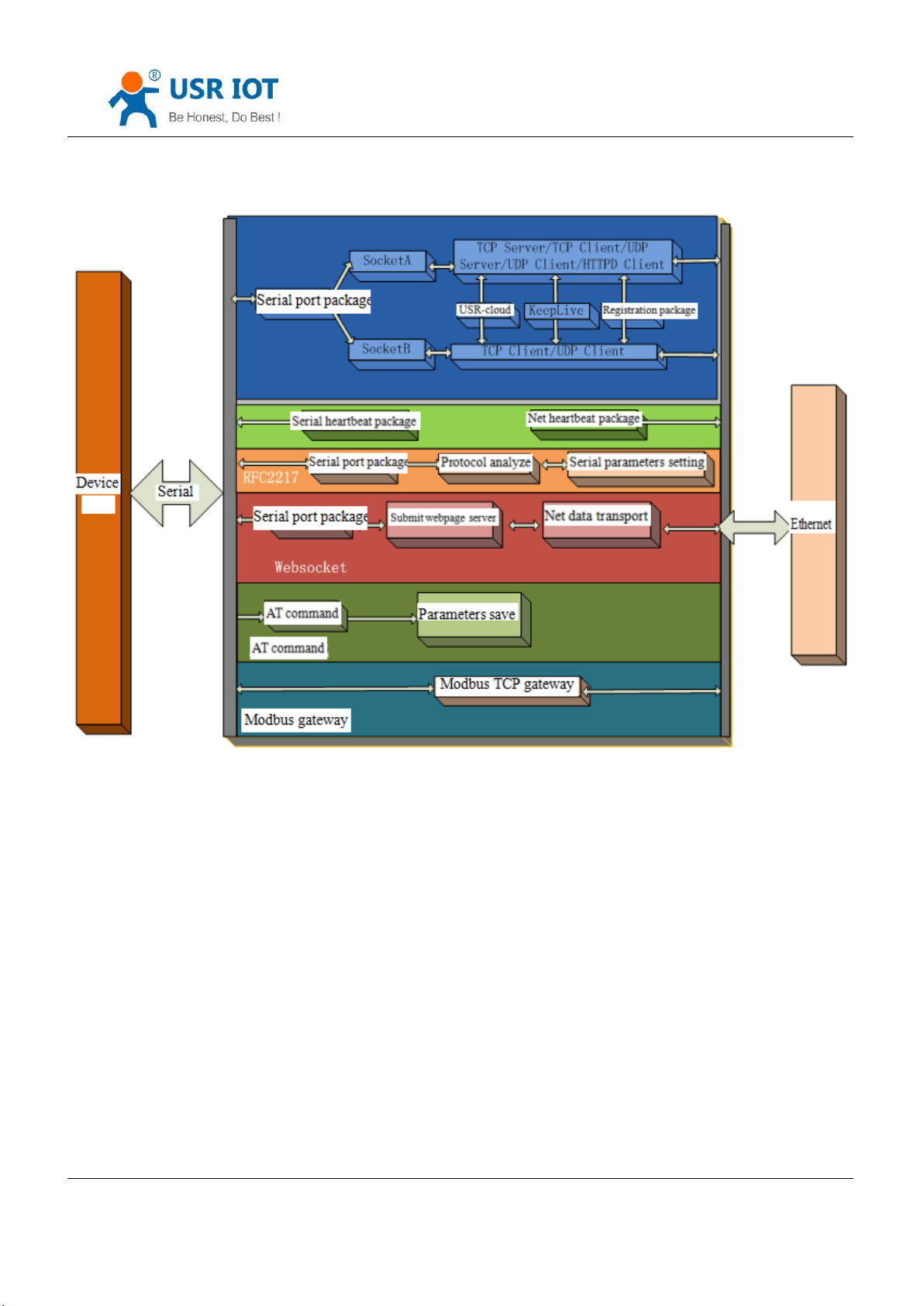
This character instruct all the function of the K7, below is the details.
Jinan USR IOT Technology Limited 18 / 120 [email protected]
Page 19
USR-K7 User Manual www.usriot.com
Diagram 4-1 K7 Function
4.1. Net basic function
4.1.1. IP address/subnet masks/gateway
1.IP address is the identity representation of the module in the LAN, which is unique in the LAN, so please be sure there
is no another device same as it in the LAN.
Static IP
Handle to setting. Note fill the IP, subnet masks and gateway.
Static IP adopted to the environment that required to statistics the IP and the device and makes them correspond
Jinan USR IOT Technology Limited 19 / 120 [email protected]
Page 20
USR-K7 User Manual www.usriot.com
Name
Instr
AT+WANN
Setting and query the access way,IP, subnet masks and gateway
parameters for K7
one to one.
Advantage: accessing the device that can not distribute IP address can be searched via UDP broadcast.
Disadvantage: different net segment in the different LAN can not communicate normally.
DHCP
Get IP address , gateway address, DNS server and other information from the gateway server to easy the step for
setting IP address, DHCP adopted to the environment that have no special requirement to IP.
Advantage: accessing the device equipment with the DHCP server such as router can communicate directly.
Reduce the hassle of setting IP address and subnet masks.
Disadvantage: accessing the device with no DHCP server such as computer directly, K7 can not work.
2.Subnet masks is a 32 address, used to determine the host number and the network number by shielding some IP
address, indicates the number of subnet and determine the flag within the subnet. Using combine with the IP address.
The subnet masks needed to set, usually we use the subnet masks: 255.255.255.0. The number of IP addresses in the
subnet is 2 to the eighth power minus 2, that is, 256-2=254, and the general host addresses are all 0 or 1 (binary) has its
special role.
3.Gateway is the net port of the LAN. If you connect the router to access the internet, the gateway is the router IP
address, setting wrong and can not access into the net. No device such as router and no setting, keep the default.
4.Related AT command.
Form 4.1.1-1 Related AT Command
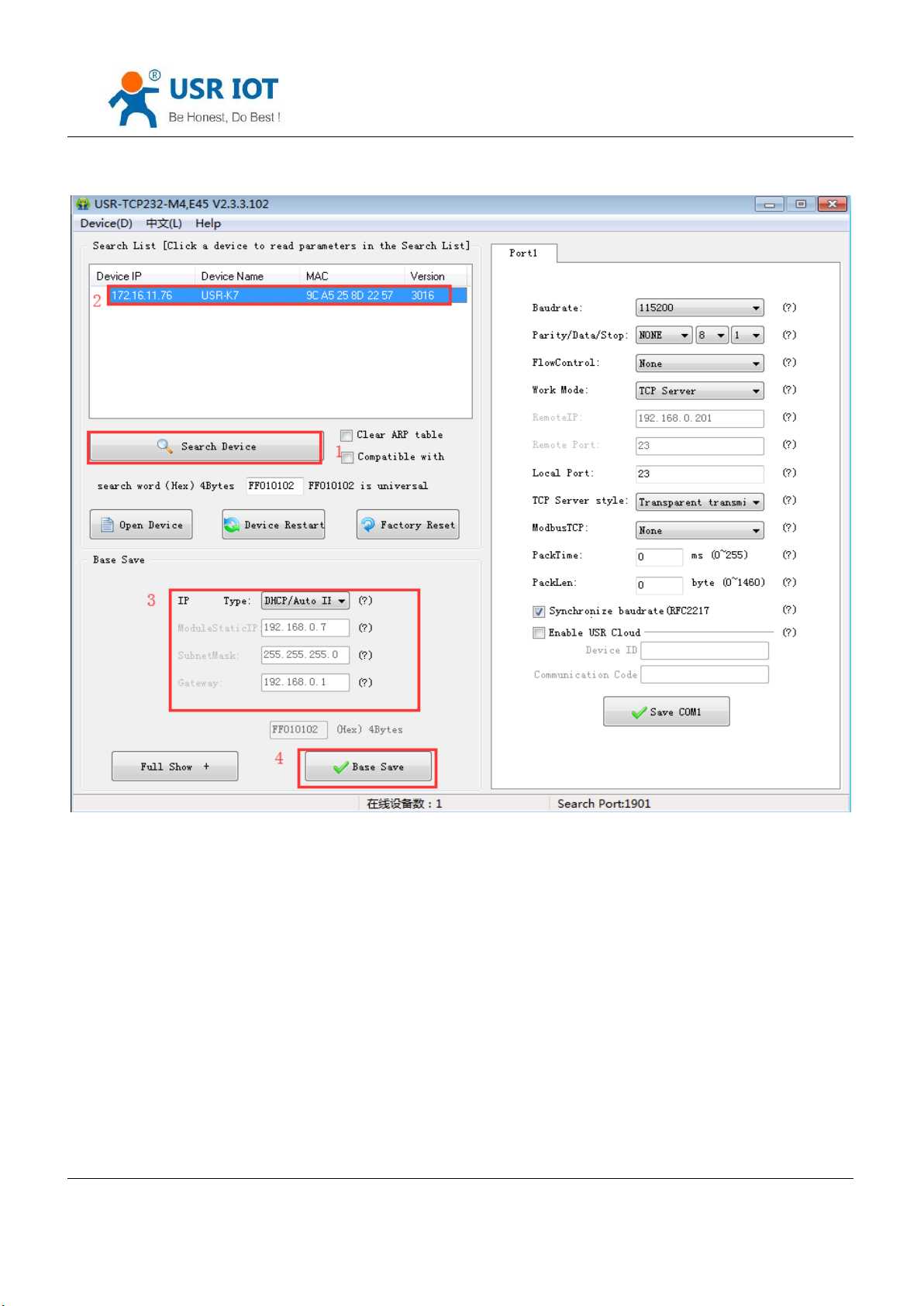
5.Setup software
Jinan USR IOT Technology Limited 20 / 120 [email protected]
Page 21
USR-K7 User Manual www.usriot.com
Diagram4.1.1-1 Setup Software
Jinan USR IOT Technology Limited 21 / 120 [email protected]
Page 22
Name
Instr
AT+DNS
Setting and query the DNS address server.
4.1.2. DNS Address
USR-K7 User Manual www.usriot.com
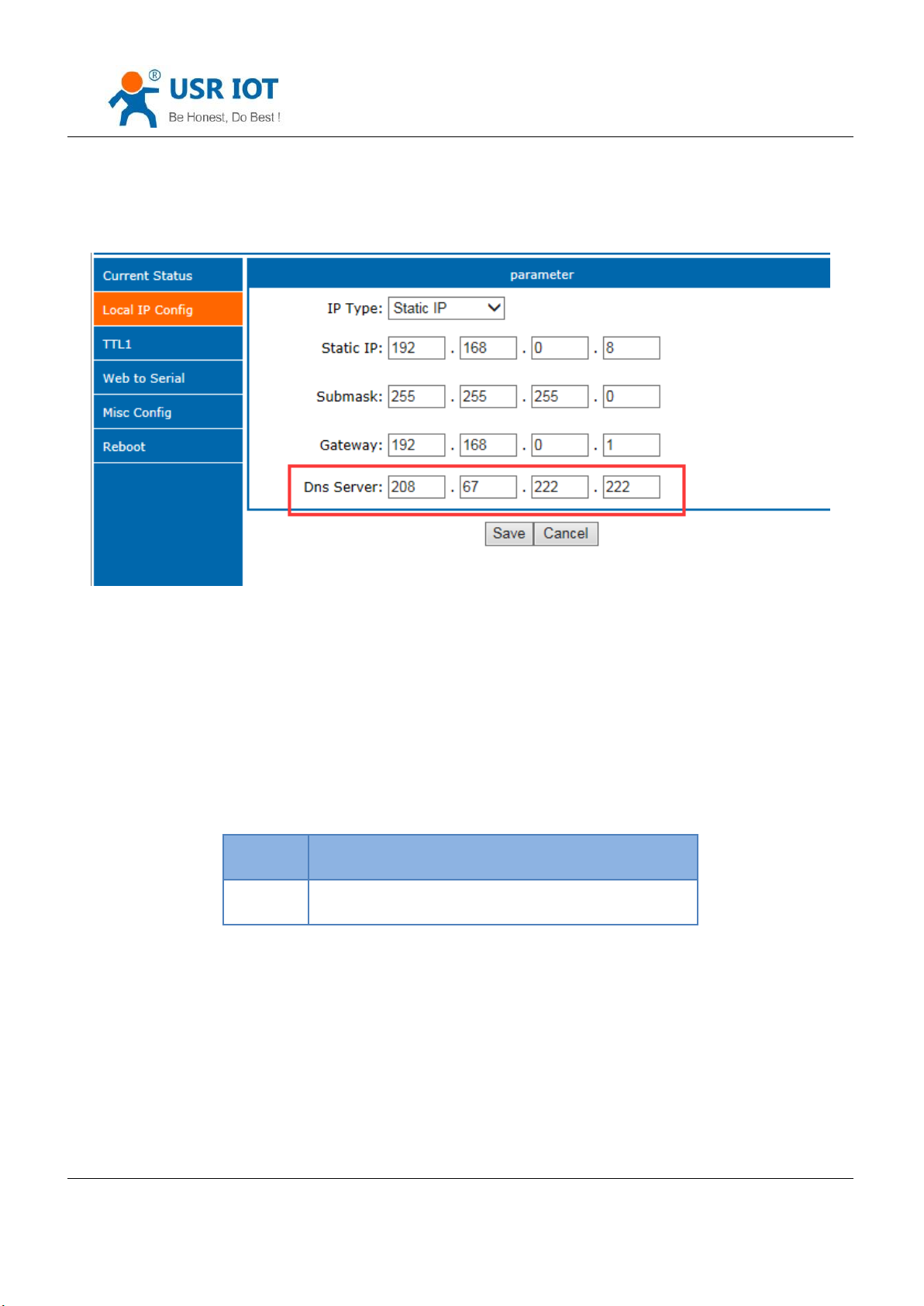
Diagram 4.1.2-1 DNS Server
DNS address of the K7 can be set. When K7 need DNS, it will quest for the address that you set.(3010 and above
version support self-define DNS address.)
The default DNS server address is the gateway. In DHCP, default DNS address is acquired automatically.
DNS address can be set, which means that if the domain name server are imperfect,user also can realize the
domain name analyze referred to AT command.
form 4.1.2-1 DNS AT Command
4.1.3. Hardware Restore the Factory Function
Module supports hardware restore factory function.
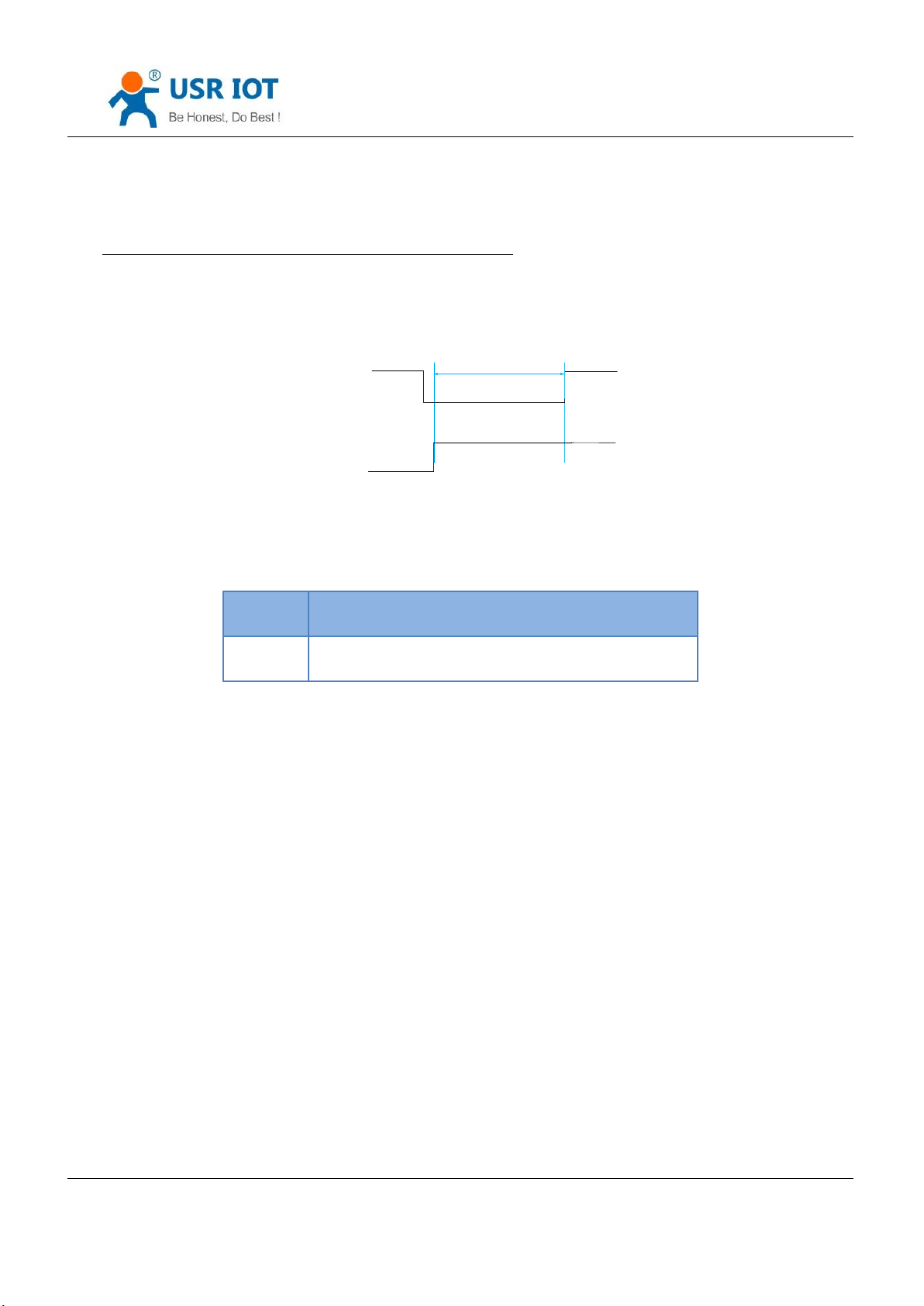
Powered off and put down the reload. Then power on and keep the reload down for 5s. After put up, restore to
factory setting successfully.
Jinan USR IOT Technology Limited 22 / 120 [email protected]
Page 23
USR-K7 User Manual www.usriot.com
> 5S
Reload
VCC
Name
Instr
AT+RELD
Restore to factory setting
Steps:
Put down the reload →power on →reload keep for 5s→ put up
Diagram 4.1.3-1 Restore to Factory Setting Step
When there are wronged parameters or forget the password, you can use hardware restore.
Form 4.1.3-1 Hardware Restore Factory AT Command
4.1.4. Web Server
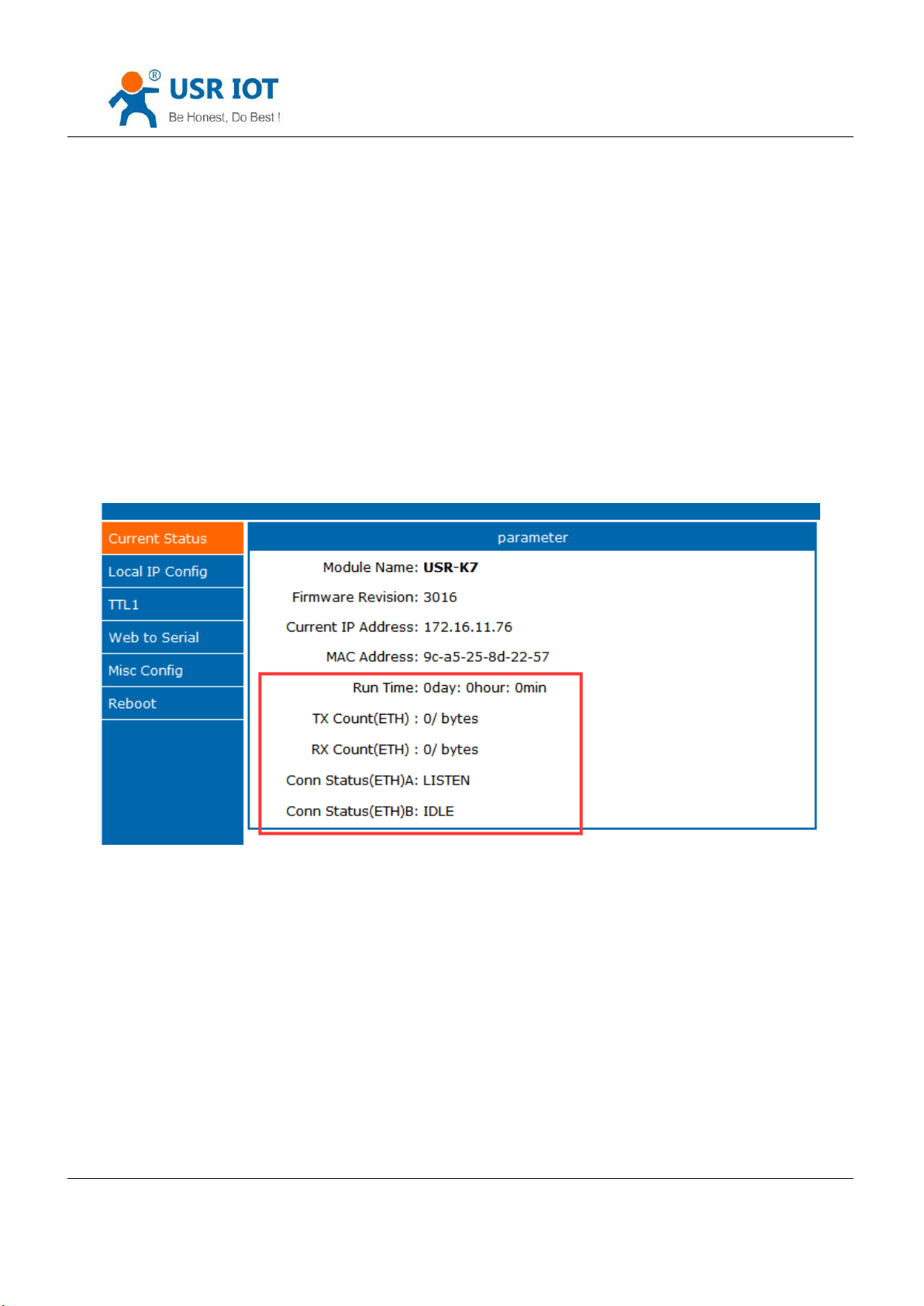
The build-in webpage of the K7 same as the common webpage. User can check the related status of the module
via webpage. Default port of the web server:80(can be modify, after modify, you can access the webpage via other port.
Check the running status of the K7
1) Running time: determine the running time and whether restart.
2) TX count(eth): determine how many data K7 send to internet.
3) RX count(eth): determine how many data send to module from net
4) Conn status(eth)A: connection status of the A to determine which status that K7 stay.
Connection status: IDLE, LISTEN, CONNECTING, CONNECTED, ERROR
IDLE: initial status, no connection and no listening. e.g. waiting connection of the short connection or original
Jinan USR IOT Technology Limited 23 / 120 [email protected]
Page 24
USR-K7 User Manual www.usriot.com
status.
LISTEN: under TCP server mode, listening and wait being connected.
CONNECTING: under TCP client, K7 building the connection to TCP server
CONNECTED: have built
CONNECTED(n):under TCP server, the number of the client connected.
ERROR: k7 stayed in abnormal disconnection.
5) Conn status (ETH)B:connection status of socket B
Diagram4.1.4-1 Running Status
4.1.5. Net Firmware Upgrade
Net upgrade firmware is stable and easy. New function can be enjoyed in the last firmware to meet the high
requirement. Ask for new firmware from supply or from the USR support: http://h.usriot.com, details please refer to
5.1.1 firmware upgrade.
4.2. Socket
Jinan USR IOT Technology Limited 24 / 120 [email protected]
Page 25
USR-K7 User Manual www.usriot.com
Name
Instr
AT+SOCKA1
Setting the protocol/ remote IP/remote port of K7 SOCKA
AT+SOCKB1
Setting the protocol/ remote IP/ remote port of K7 SOCKB
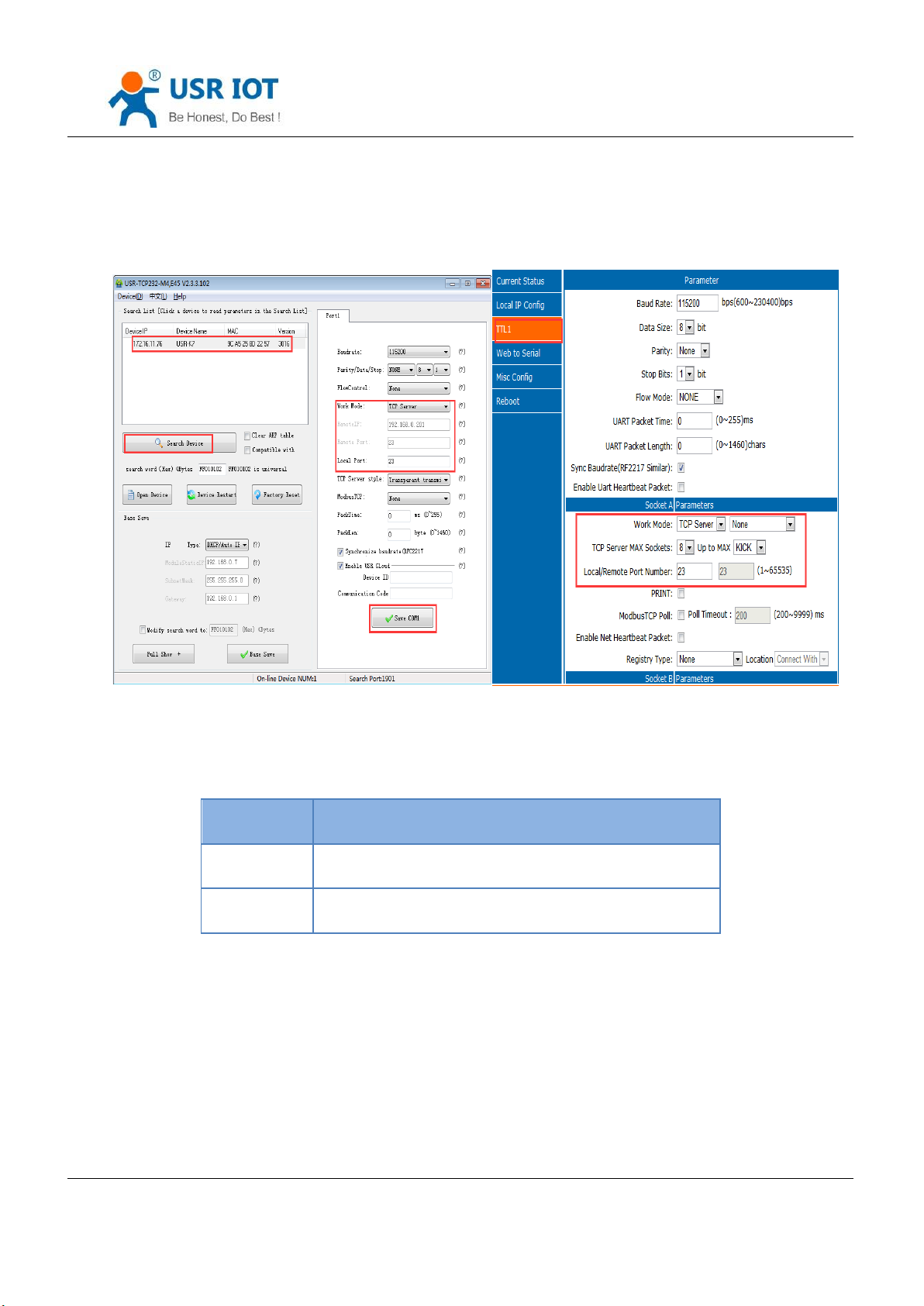
There are five work modes for K7:TCP server, TCP client, UDP server, UDP client and HTTPD client. Setting from the
setup software or the webpage.
Diagram 4.2-1 Work Mode
Form 4.2-1 Work Mode AT Command
Jinan USR IOT Technology Limited 25 / 120 [email protected]
Page 26
USR-K7 User Manual www.usriot.com
4.2.1. TCP Client mode
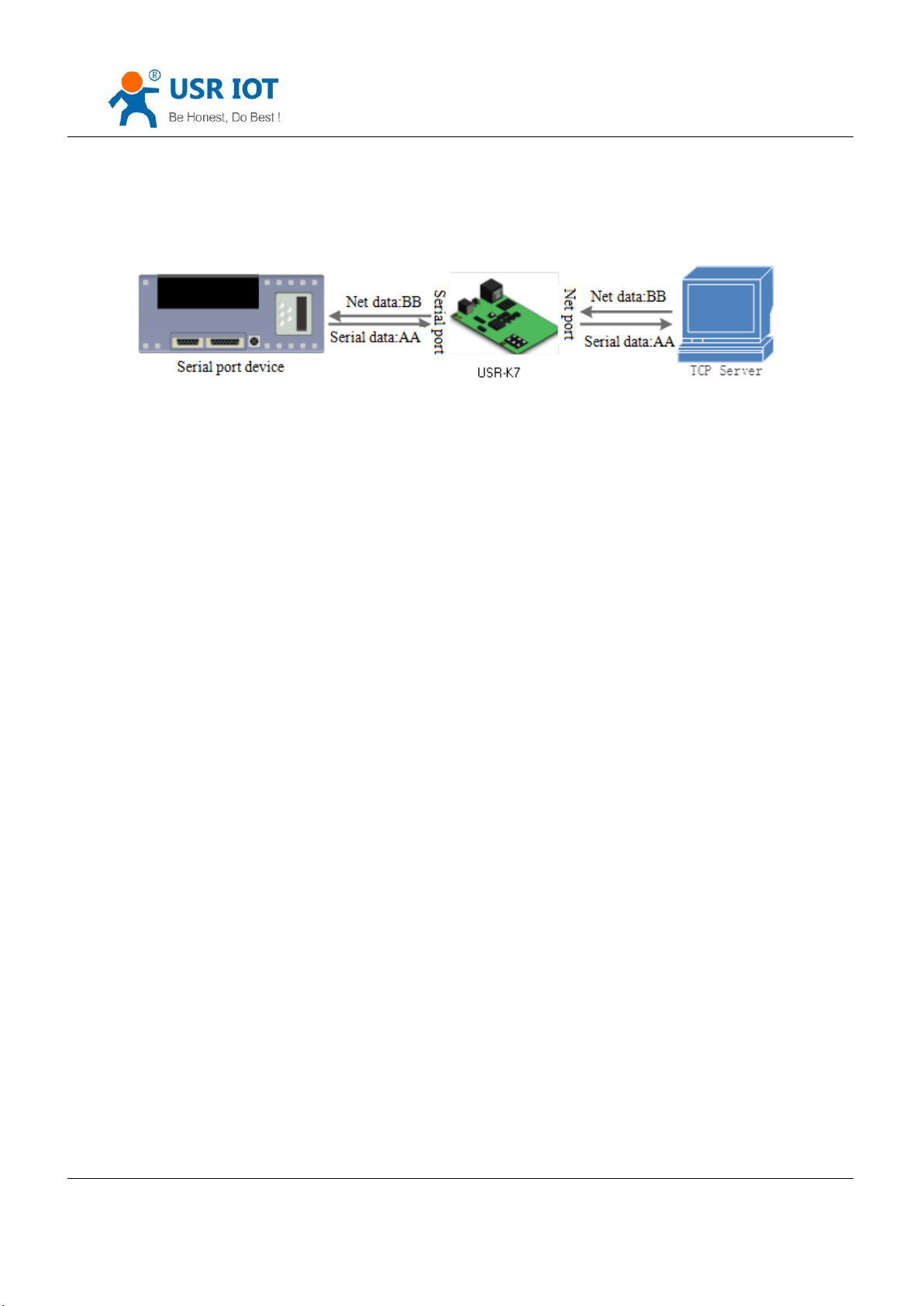
Diagram 4.2.1-1 TCP Client Mode
1. TCP client provides client connection for TCP net server. Build connection automatically and connect to server
to realize the data transmit between serial port and server port. According to related rule of TCP, TCP client has
difference between connecting and disconnecting, to confirm the data transport reliable. Usually used in the data
interaction between device and server, which is the commonest communication way.
2. Under TCP client mode, K7 supports recognize the abnormal connection automatically. About 15s internal to
send Keep Alive to keep active after build. If there is abnormal disconnection, k7 will find it and reconnection.K7
connects the server as a TCP, remote port is 0, connecting with random port every time.
3. connecting the remote IP automatically, but do not receive any other connecting quest.
4. Supporting the similar RFC2217, USR-cloud and modbus TCP. In LAN, if the K7 is static IP, please be sure that
set the IP of K7 in the same LAN and set gateway correctly, or K7 is can not communication.
5. Note: keep alive, similar RFC2217, USR-cloud and modbus TCP are instructed in the bellow.
6. TCP client communication case:
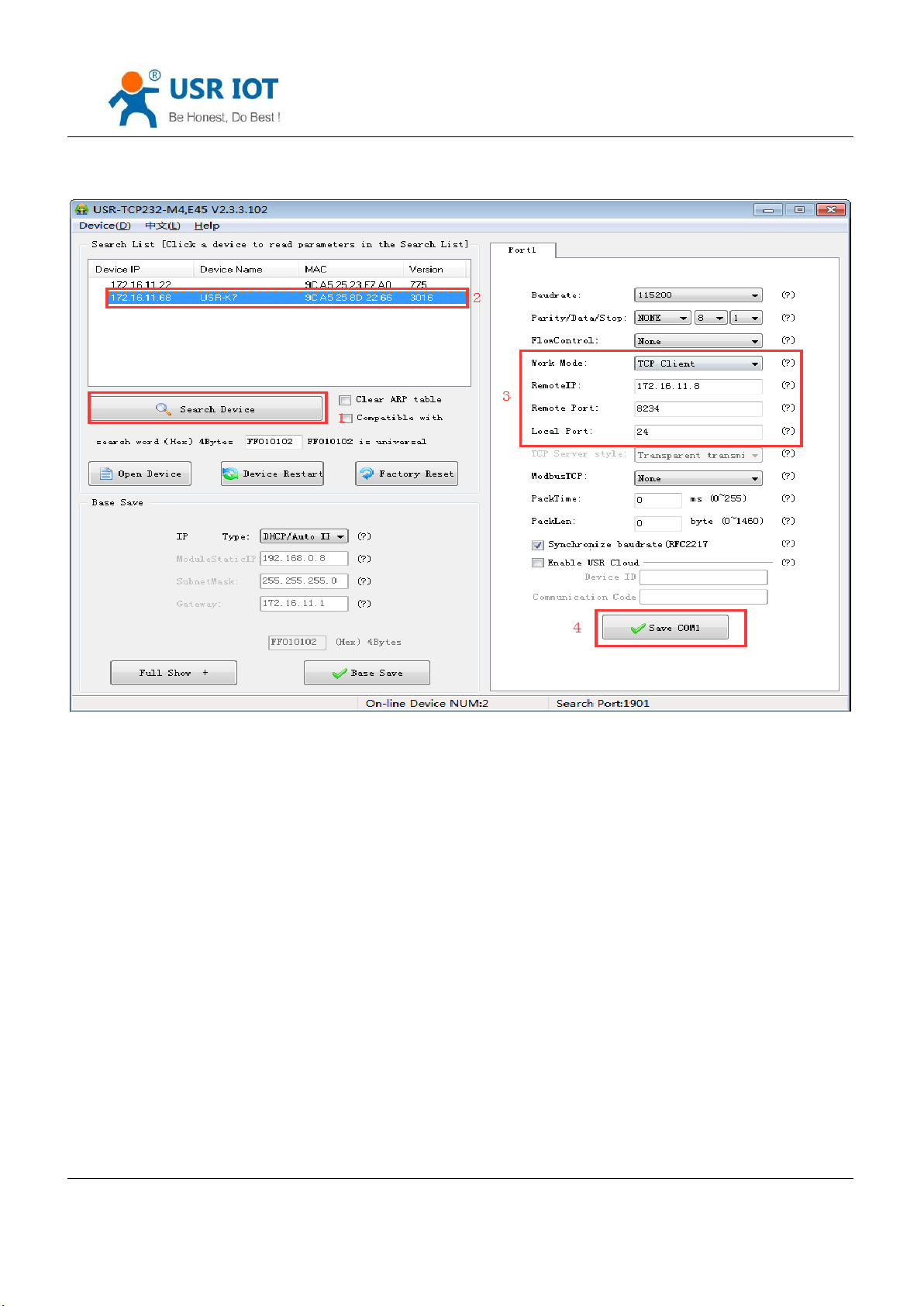
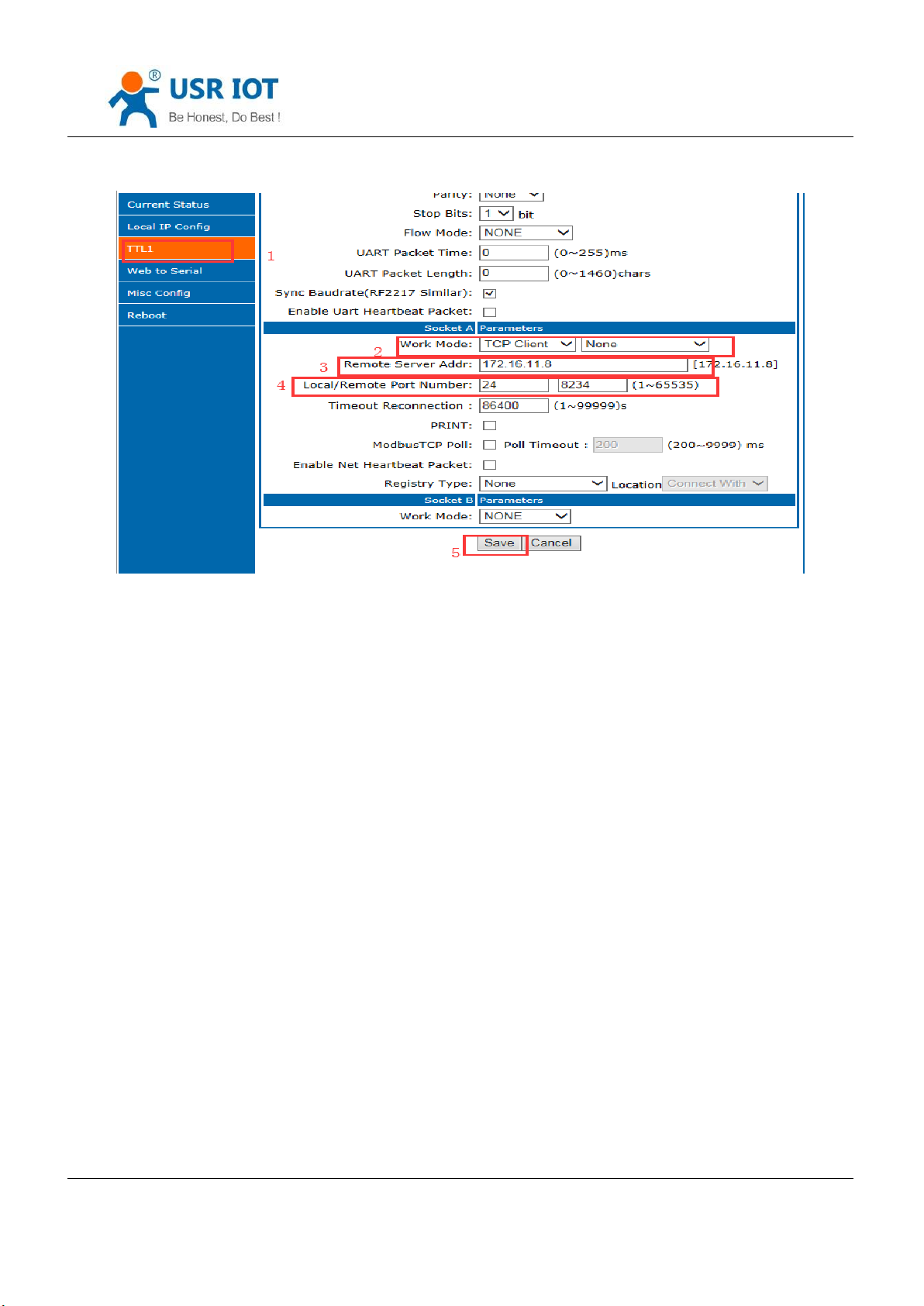
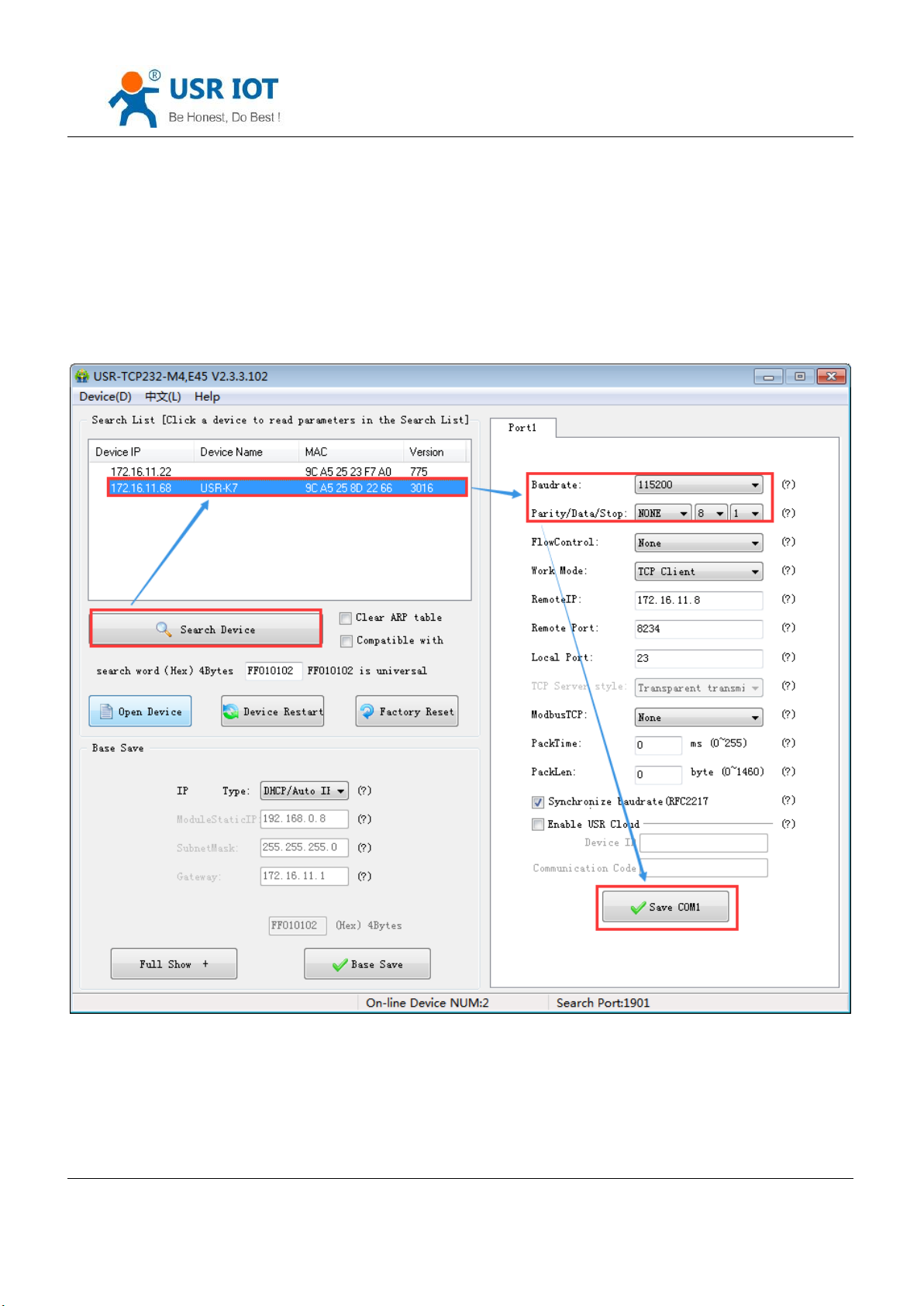
① K7 work in TCP client mode, remote IP:172.16.11.8, remote port:8234, click to save then search the K7 again
and check the parameters.
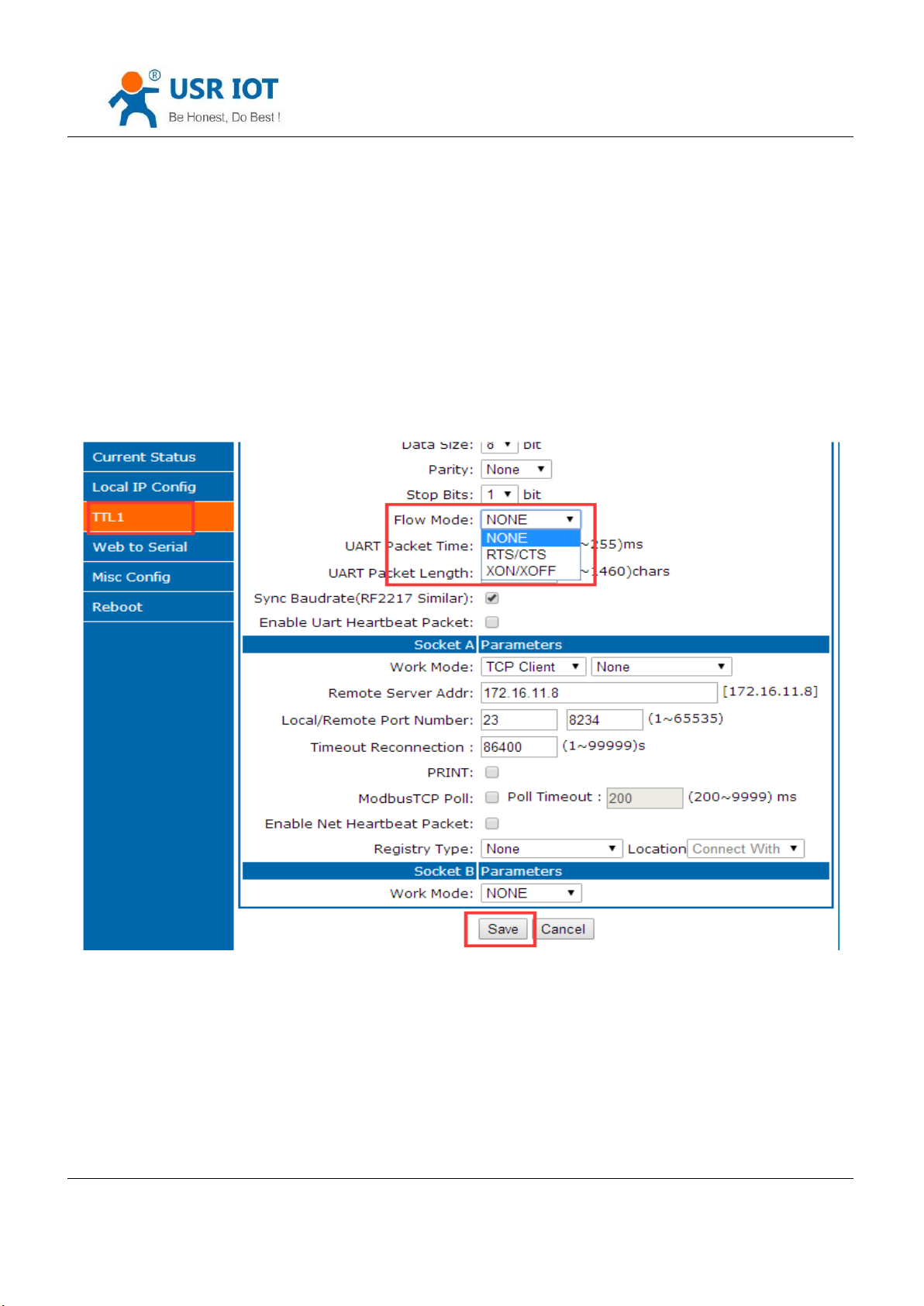
Also you can set in the webpage, remote IP and port are as above, then save and restart.
Jinan USR IOT Technology Limited 26 / 120 [email protected]
Page 27
USR-K7 User Manual www.usriot.com
Diagram 4.2.1-2 TCP Client Setup Software Setting
Jinan USR IOT Technology Limited 27 / 120 [email protected]
Page 28
USR-K7 User Manual www.usriot.com
Diagram 4.2.1-3 TCP Client Webpage Setting
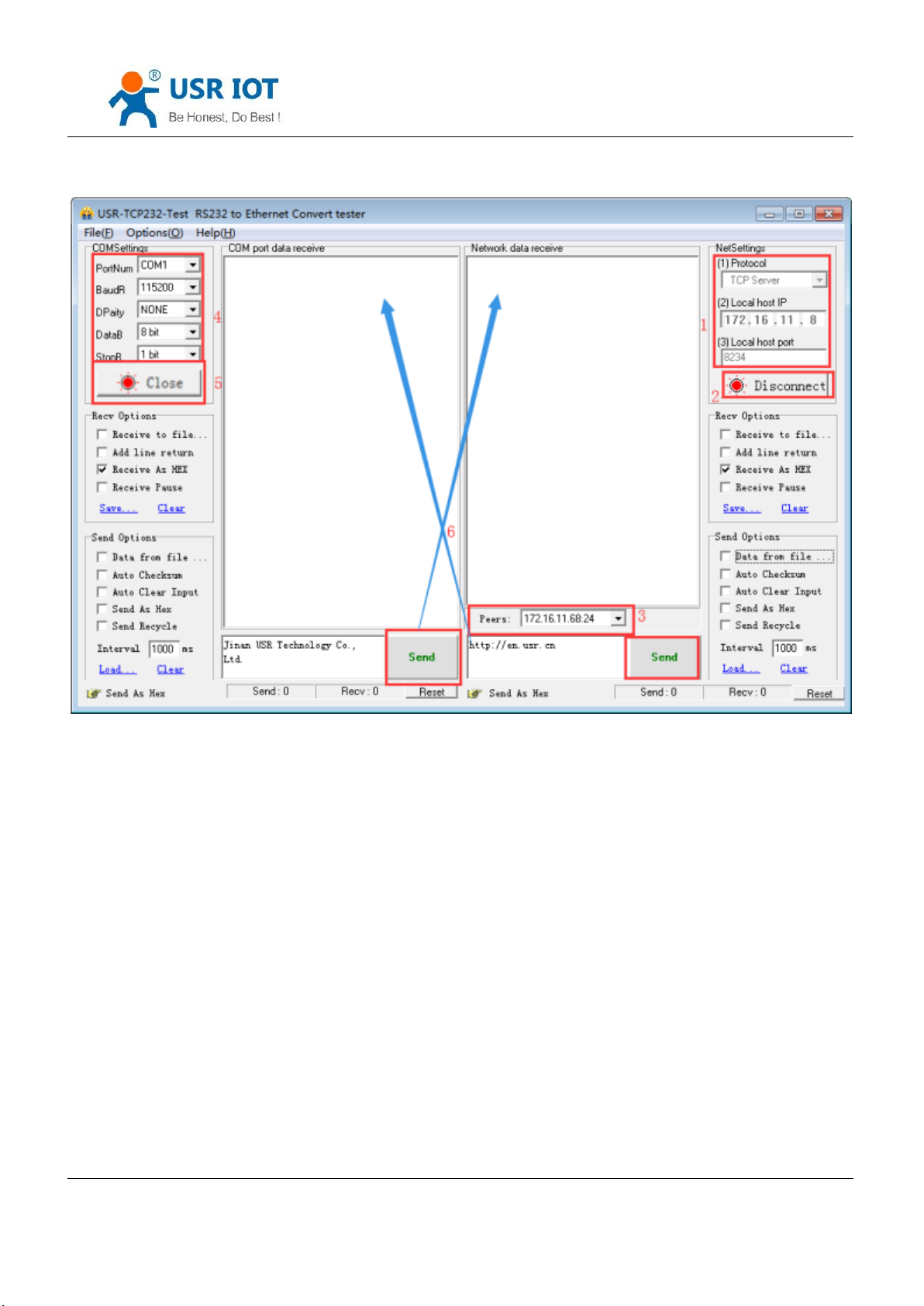
② connecting the TCP server, the IP of my computer:172.16.11.8, local host port:8234(can be modify), testing
software show the connection information:172.16.11.68:24( if the local port of K7 is 0, here will distribute a port
randomly for K7, e.g.172.16.11.68:49155).
③ setting the correct serial port parameters, click the serial port and the sent, receive the bi-direction data
transmission.
Jinan USR IOT Technology Limited 28 / 120 [email protected]
Page 29
USR-K7 User Manual www.usriot.com
Diagram 1.4-1 TCP Connection Testing
Jinan USR IOT Technology Limited 29 / 120 [email protected]
Page 30
4.2.2. TCP Server Mod
USR-K7 User Manual www.usriot.com
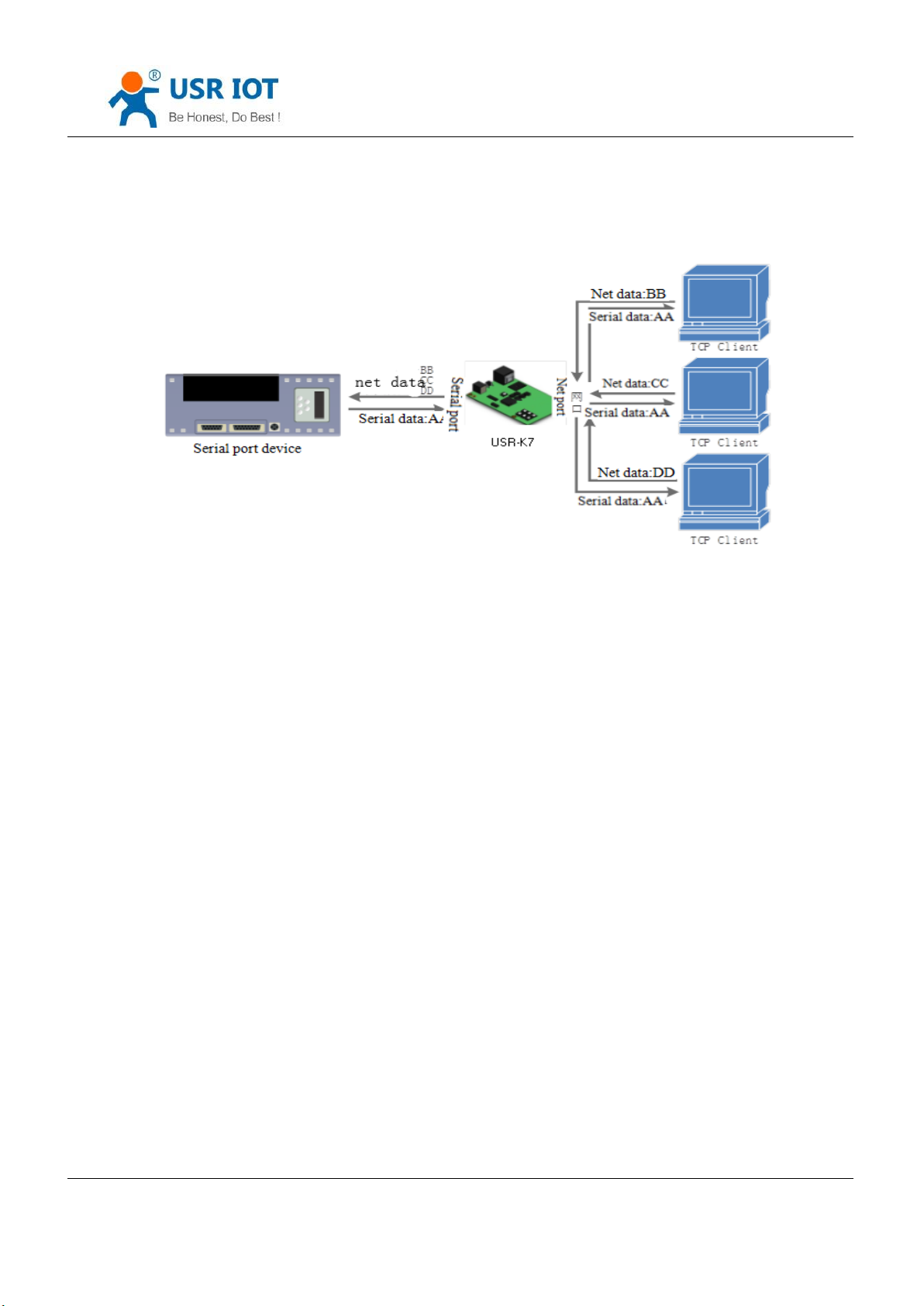
Diagram 4.2.2-1 TCP Server Mode
1. Under TCP server mode ,module monitoring the local port, receive and build connection when there is
connecting quest, receive the data and sent all to the client connected. If access the TCP server of K7 across the public
net, user should build termination mapping on the router.( mapping way: http://www.usr.cn/Download/155.html) also
TCP server supports Keepalive to monitoring connection timely.
2. Used in communicating with the TCP client in LAN. Adopt to the situation where is no server and several PC
and phone sending quest. And same as TCP client , TCP server has different between connecting and disconnecting to
confirm data transport stable.
3. TCP server supports similar RFC2217 and modbus TCP
4. At most K7 can receive 8 client to connect when work as TCP server. The max number of the client can be
connected can be set.
5. Under TCP server,K7 listens the local port and do not monitoring, if the questing number more than max
number you set, kick off the oldest one.
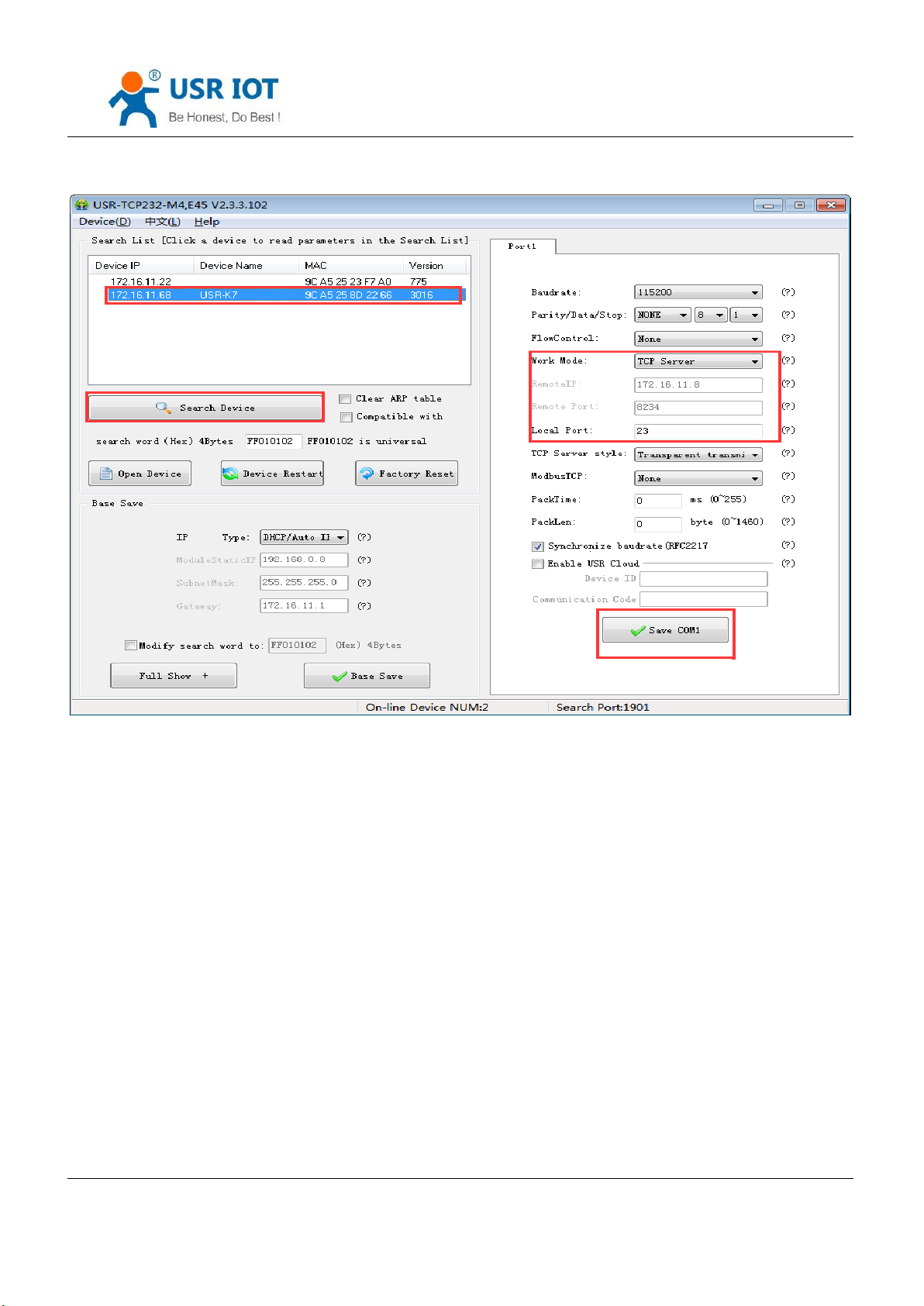
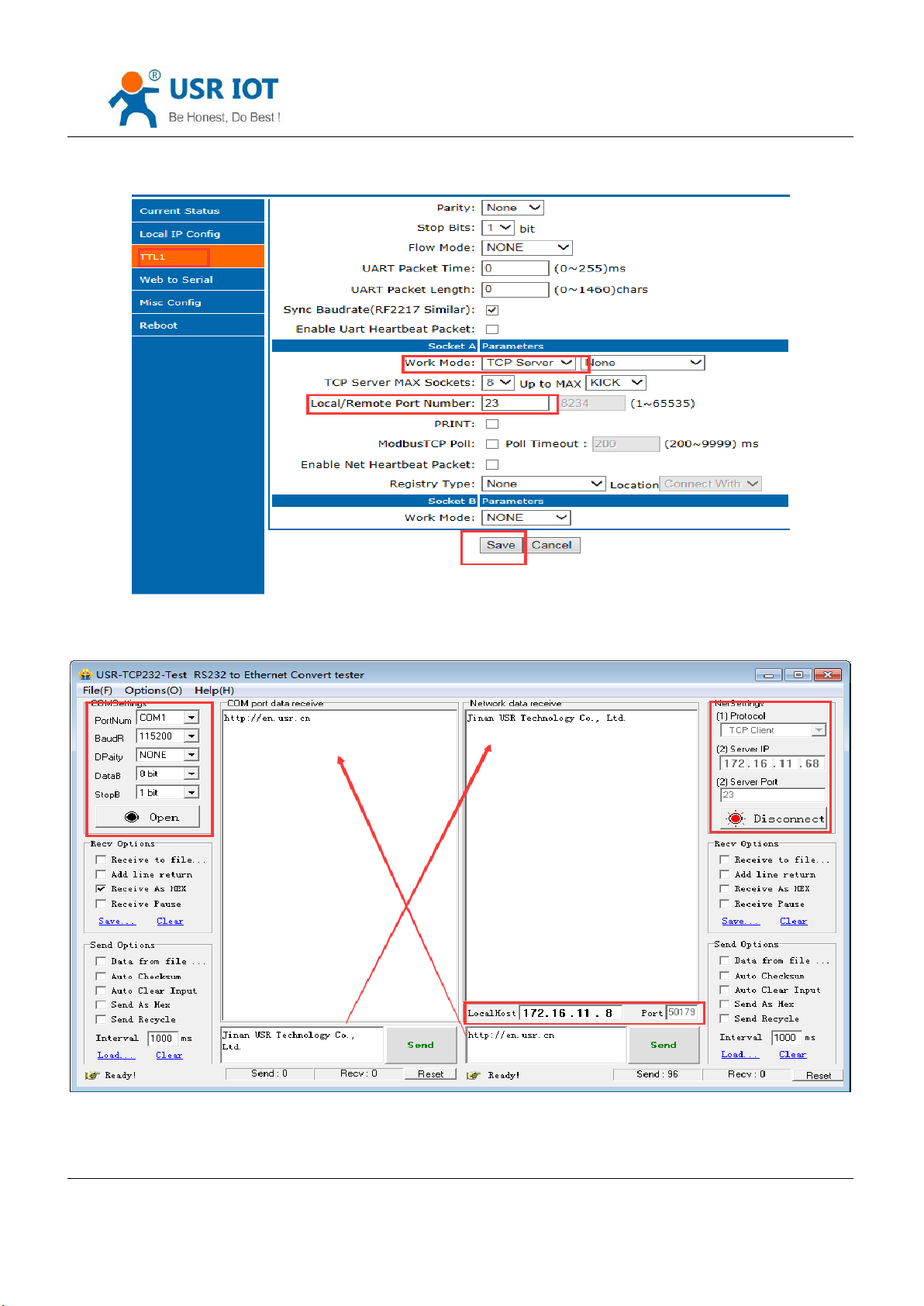
6. communication case:
K7 work in CP server mode, local port 23. Open the testing software and have the mode to be TCP client, writing
the remote IP and remote local port, the click connection and testing data transporting.
Jinan USR IOT Technology Limited 30 / 120 [email protected]
Page 31
USR-K7 User Manual www.usriot.com
Diagram 4.2.2-2 TCP Server Setup Setting
Jinan USR IOT Technology Limited 31 / 120 [email protected]
Page 32
USR-K7 User Manual www.usriot.com
Diagram 4.2.2-3 TCP Server Webpage Setting
Diagram 4.2.2-4 TCP Connection Testing
Jinan USR IOT Technology Limited 32 / 120 [email protected]
Page 33
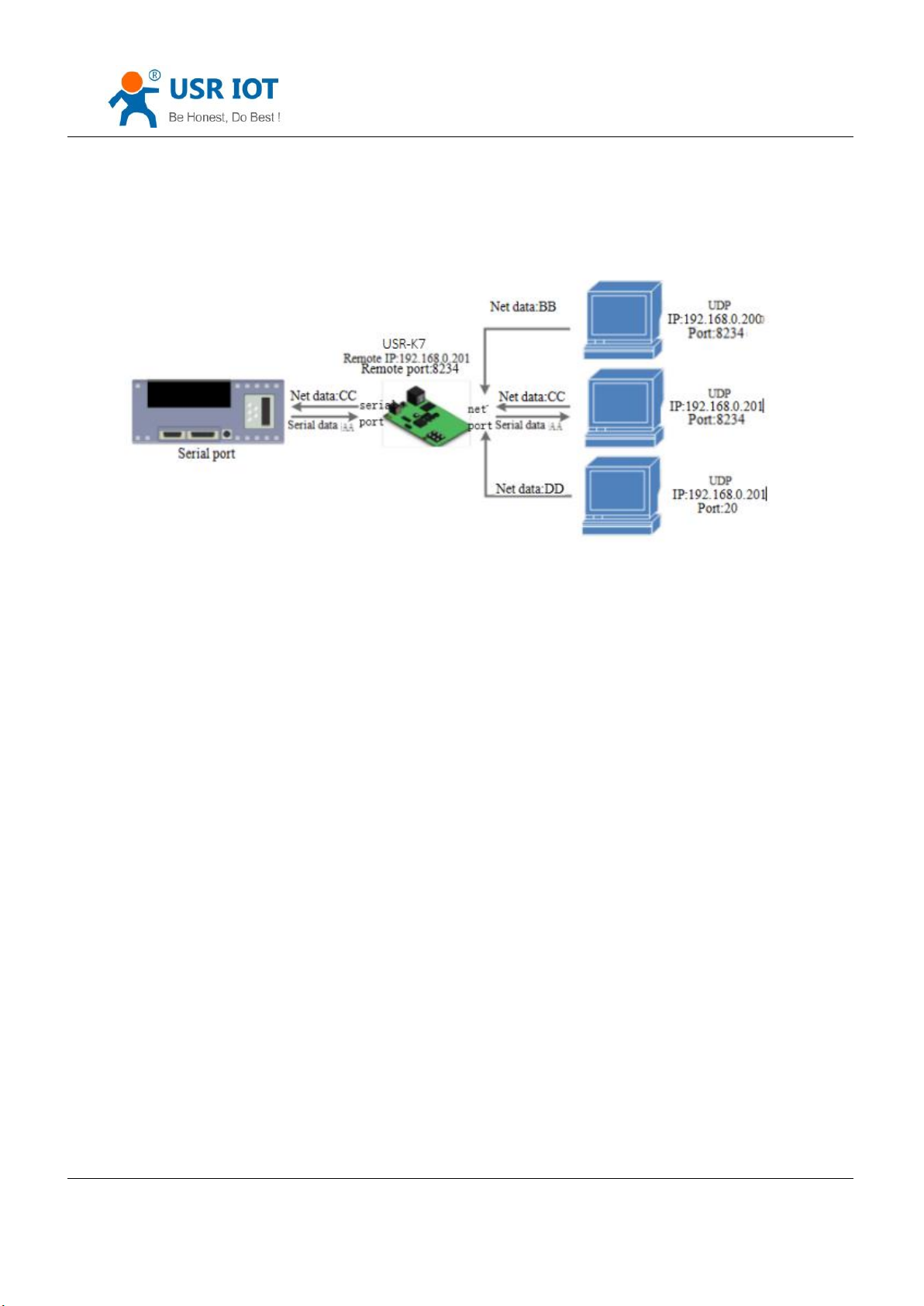
4.2.3. UDP Client mode
USR-K7 User Manual www.usriot.com
Diagram 4.2.3-1 UDP Client Mode
1. This mode belongs to UDP protocol.
2. UDP client is a wireless transport protocol, provide the transmission service that easy and not reliable. No
difference between the disconnecting and connecting, make the IP and port then send data to it. No requirement for
drop package. Small data package and fast frequency, send data to point IP.
3. Under UDP client mode ,K7 communicate with the remote port of the remote IP, if the data comes from other
tunnel, it will not be received by K7.
4. Under the UDP client, K7 can realize the UDP broadcast if the remote address is 255.255.255.255; meanwhile,
it also can receive the broadcast data. 3010 and above firmware supports broadcast in LAN, like xxx.xxx.xxx.255.
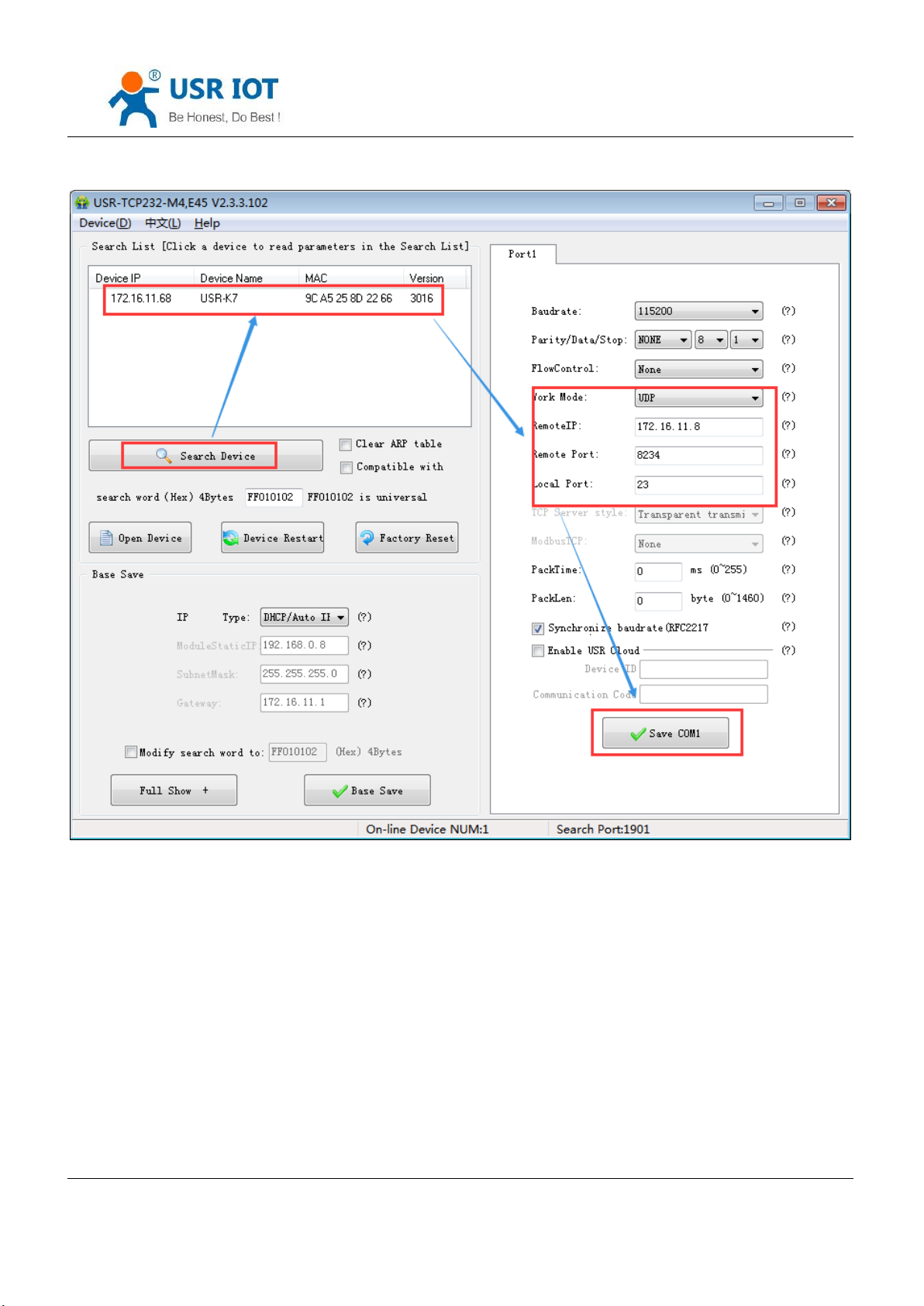
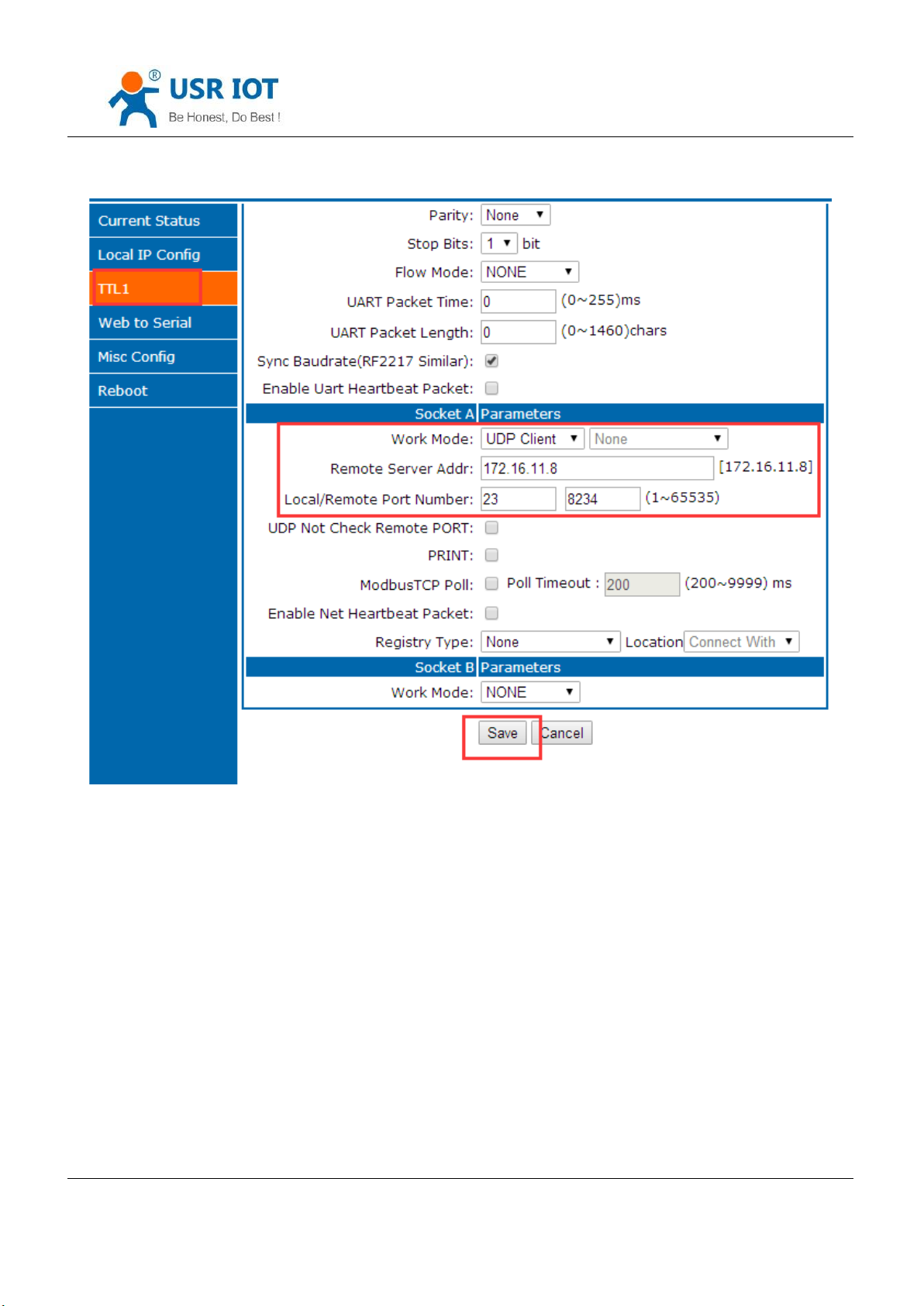
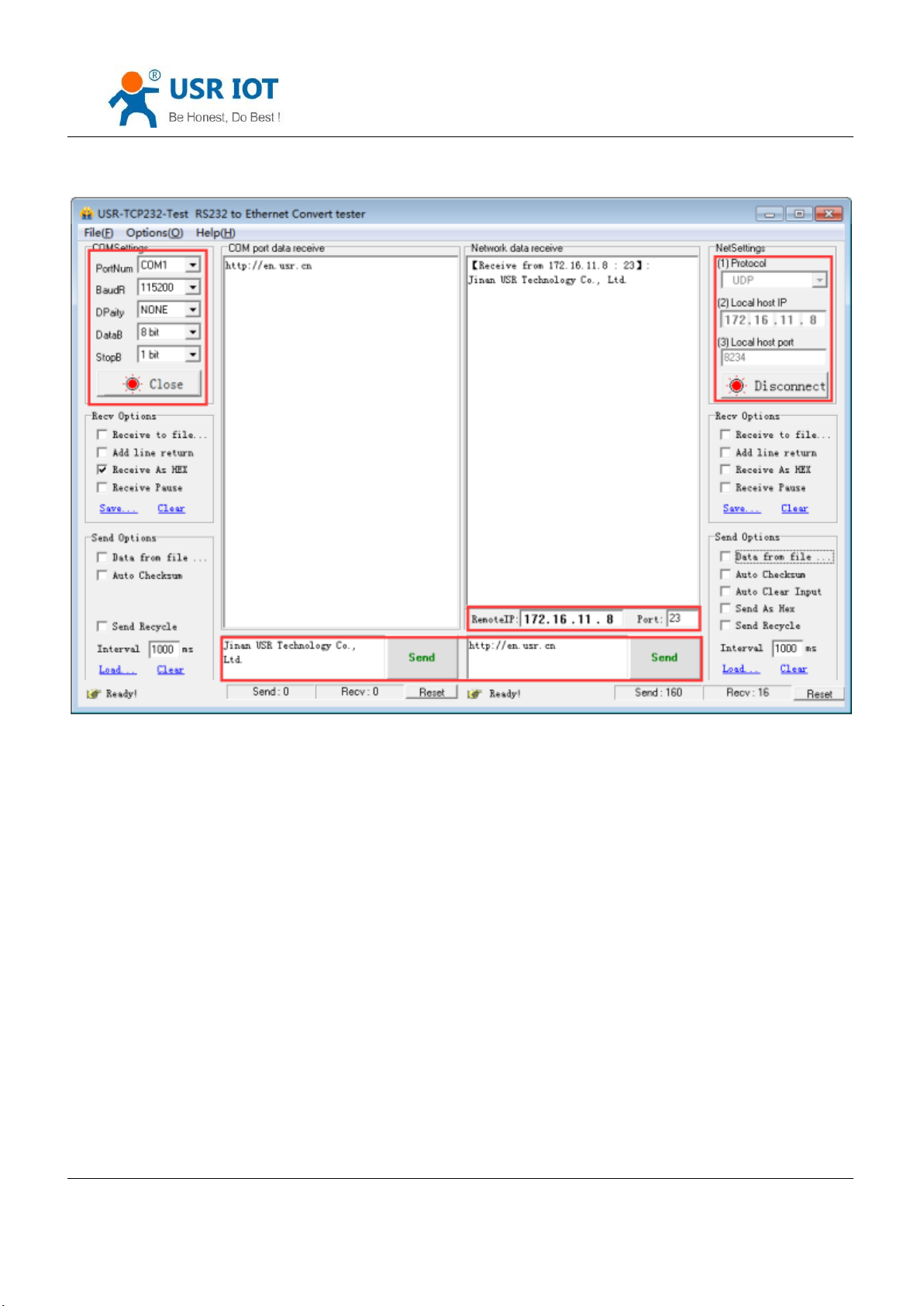
5. Communication case:
① Build a UDP, the IP of the PC: 172.16.11.8, port:20108
② K7 work in UDP client mode, remote port is 20108
Jinan USR IOT Technology Limited 33 / 120 [email protected]
Page 34
USR-K7 User Manual www.usriot.com
Diagram4.2.3-1 UDP Setup Setting
Jinan USR IOT Technology Limited 34 / 120 [email protected]
Page 35
USR-K7 User Manual www.usriot.com
Diagram 4.2.3-2 UDP Webpage
③ Click the serial port send. Received data, the testing software remote IP and port change into IP and port for K7,
then click net send and send data to serial port.
Jinan USR IOT Technology Limited 35 / 120 [email protected]
Page 36
USR-K7 User Manual www.usriot.com
Diagram 4.2.3-3 UDP Connection Testing
Jinan USR IOT Technology Limited 36 / 120 [email protected]
Page 37
4.2.4. UDP Server mode
USR-K7 User Manual www.usriot.com
Diagram 4.2.4-1 UDP Server Mode
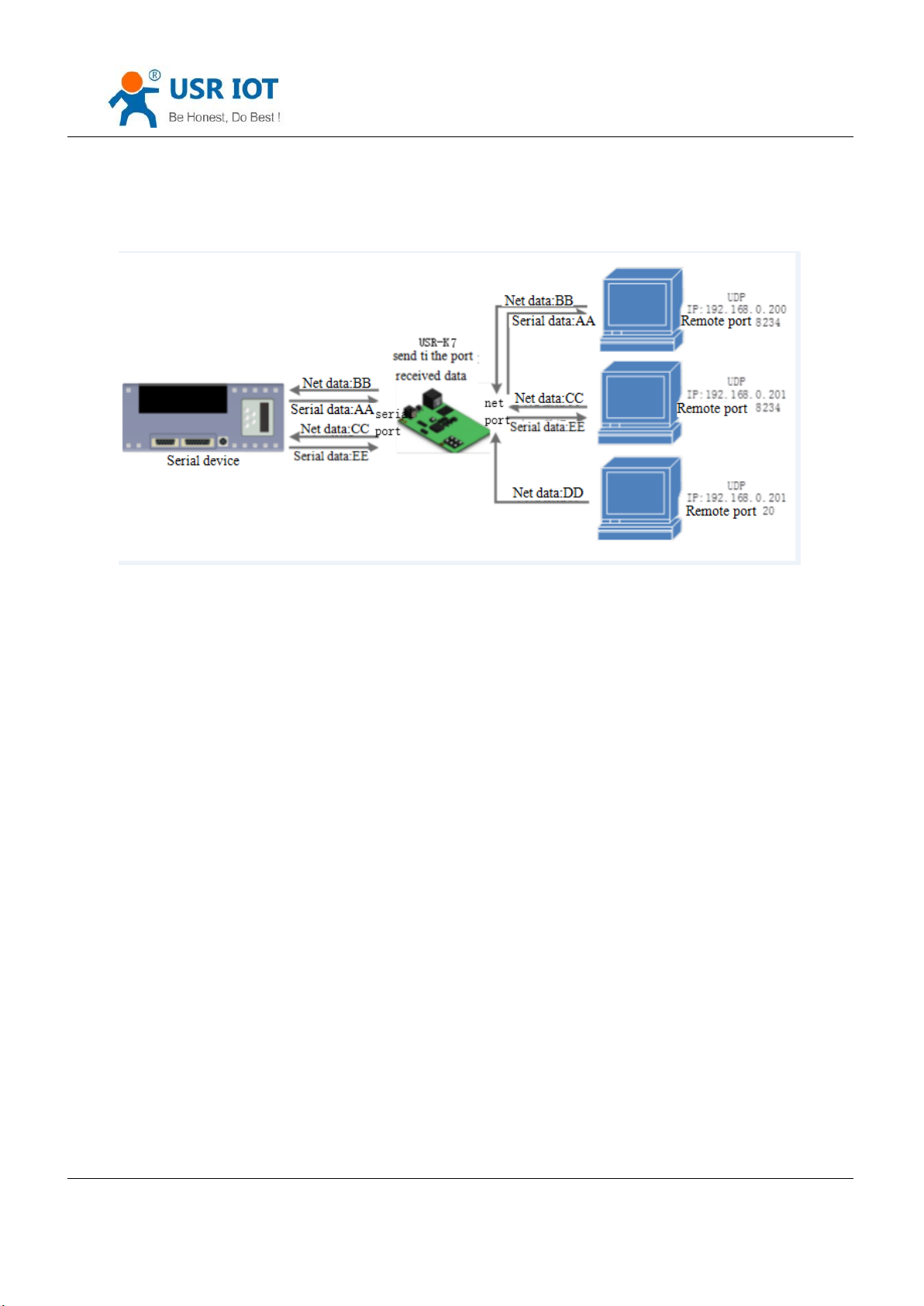
1. Do not check the original IP address basic on the common UDP, under UDP server mode, K7 received the UDP
data package and change the remote IP change into data original IP and port, the turn back to the last IP and port.
2. Used in communicating with several device and do not want to use the TCP for the high speed.
3. Application case:
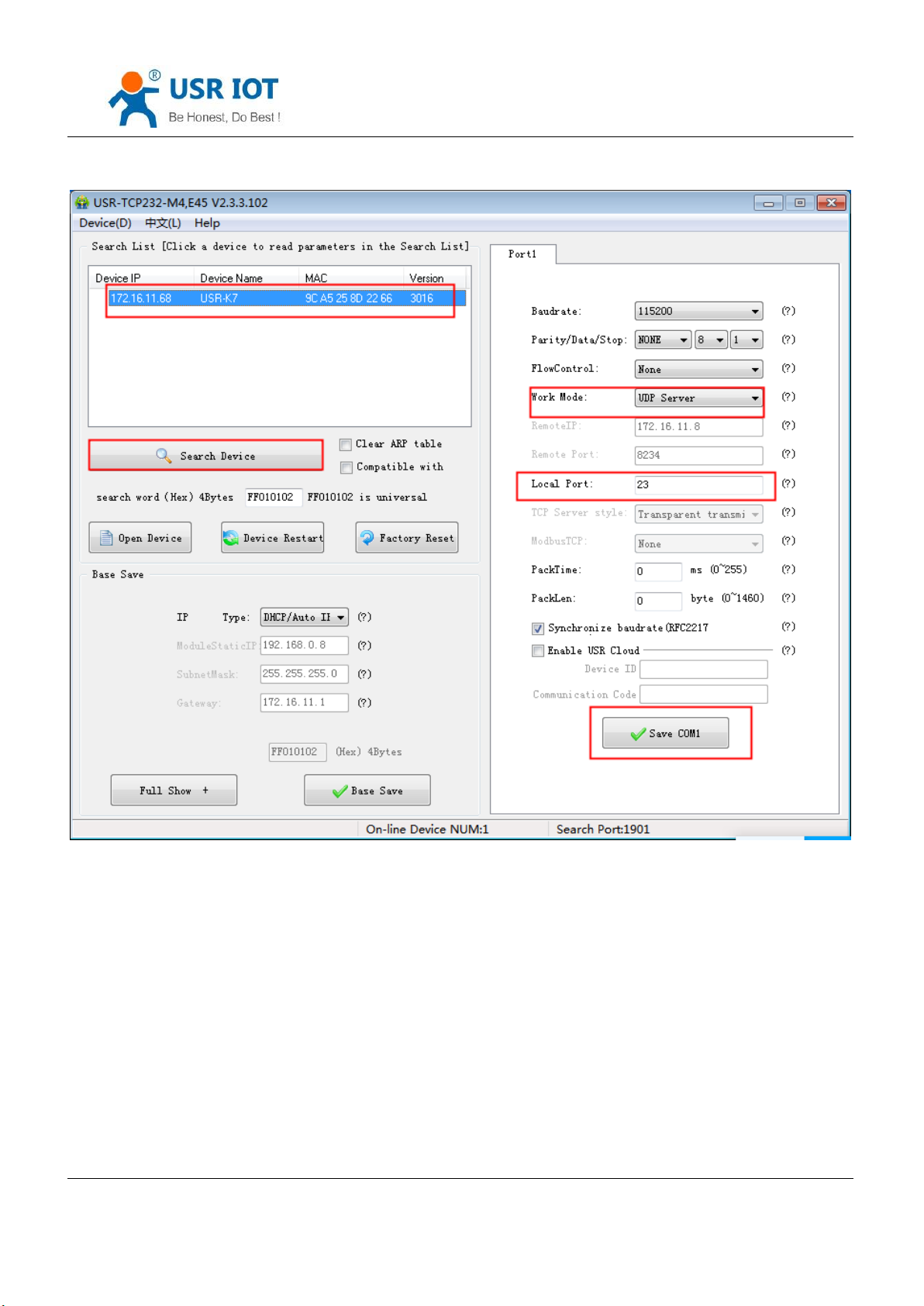
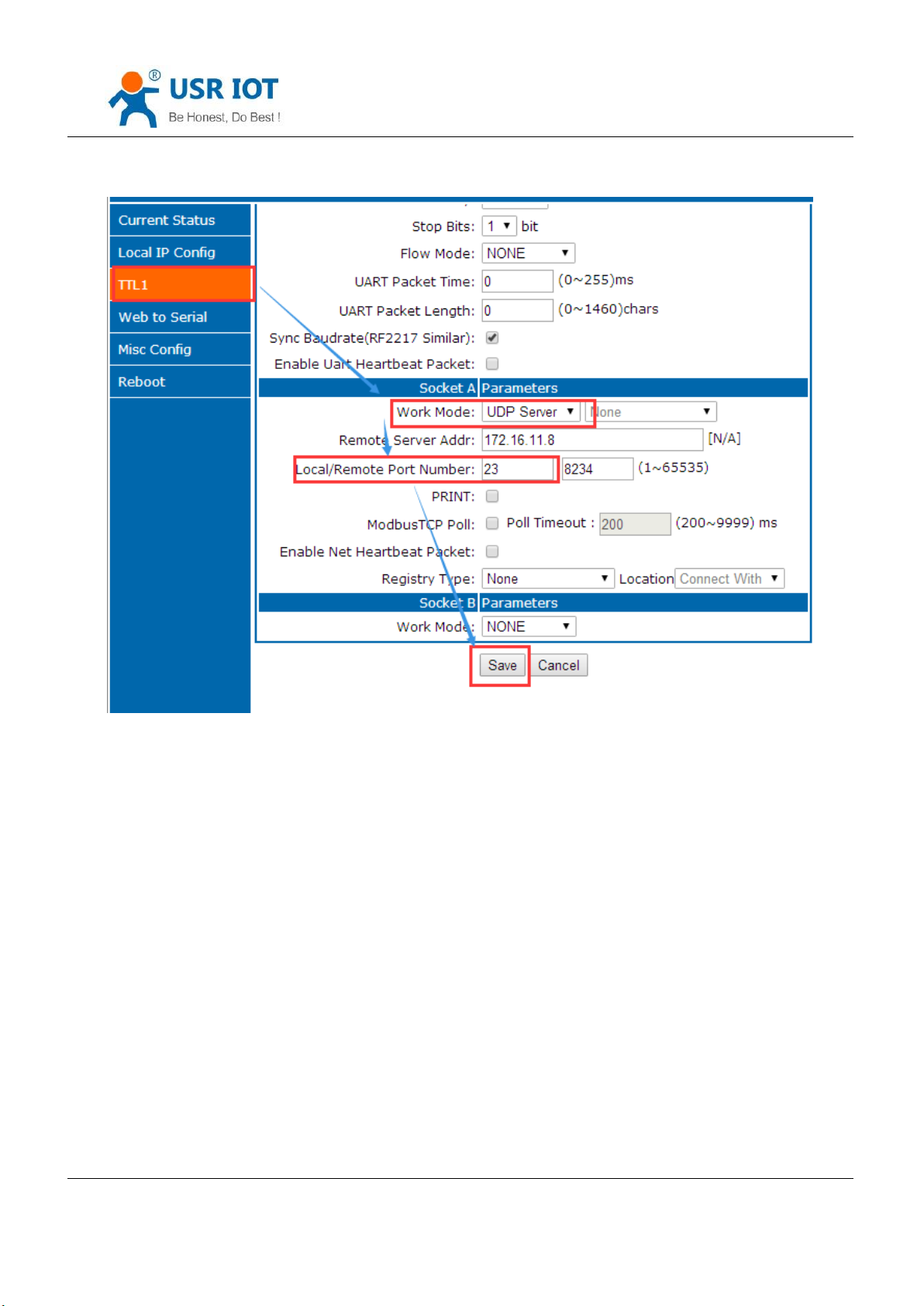
① set K7 into UDP server mode, local port is 23
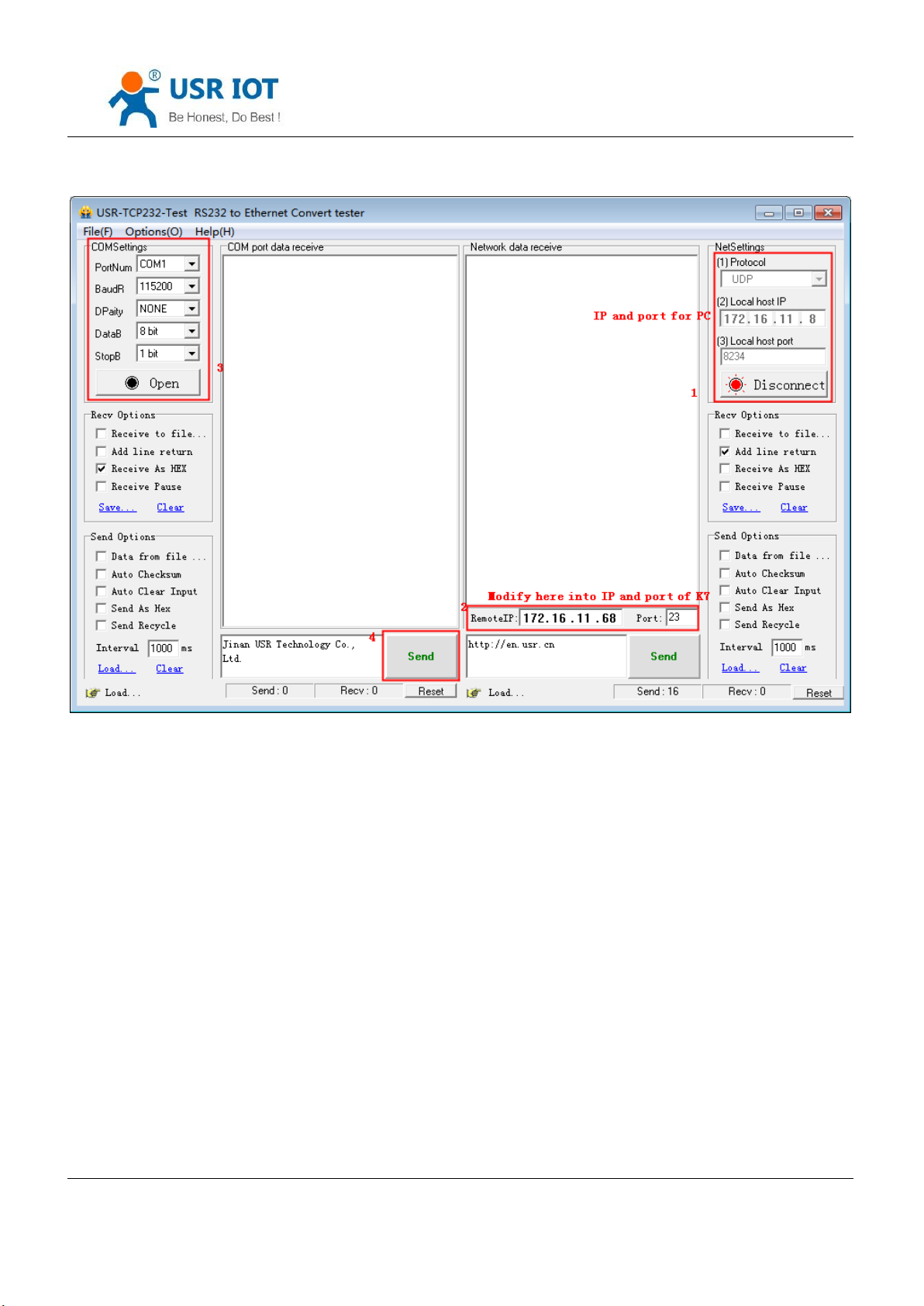
② Click two testing software, work mode:UDP; remote IP and port is the IP and port of K7. then click send, the
serial port will receive the data , click serial port send, the testing software will display the data that received by the
recent one communicating with K7.
Jinan USR IOT Technology Limited 37 / 120 [email protected]
Page 38
USR-K7 User Manual www.usriot.com
Diagram 4.2.4-2 Setup Setting Software
Jinan USR IOT Technology Limited 38 / 120 [email protected]
Page 39
USR-K7 User Manual www.usriot.com
Diagram 4.2.4-3 Webpage Setting
Jinan USR IOT Technology Limited 39 / 120 [email protected]
Page 40
USR-K7 User Manual www.usriot.com
Diagram 4.2.4-4 Connection Testing
4.2.5. HTTPD client
1. Under the HTTPD client mode, user’s device send questing data to appointed HTTP server via K7, then K7
received the data from HTTP serve and analyze it and send to serial device.
2. No need to care of the data converse between the serial port data and net data package, easy parameters
configuring and can realize the serial device send questing data to HTTP server.
3. When sending data to HTTP server, the URL, header, remote IP, remote port and other information can be set
via K7, then save them. Every time send data, K7 will add URL and header. In terms of the returned data, user can
choose whether to drop the header.
4. Application case:
Jinan USR IOT Technology Limited 40 / 120 [email protected]
Page 41
USR-K7 User Manual www.usriot.com
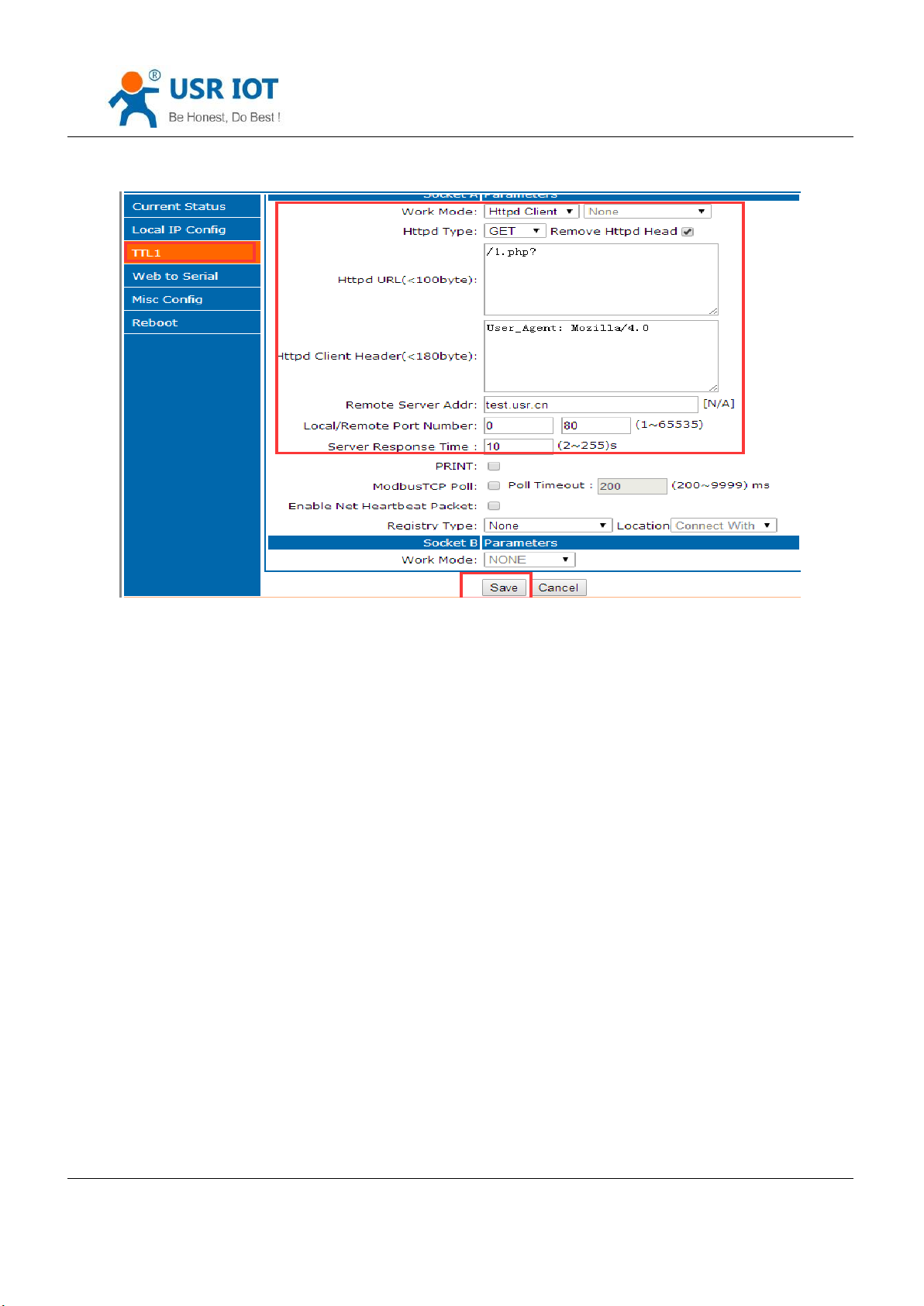
Diagram 4.2.5-1 HTTP Client Webpage Setting
1. Set into HTTPd client mode via webpage, and set correspond remote IP and port.
2. Setting the HTTPD type, HTTPD URL and httpd client header
3. Hook whether remove HTTPD head when the data send back.
4. Then save them, and restart.
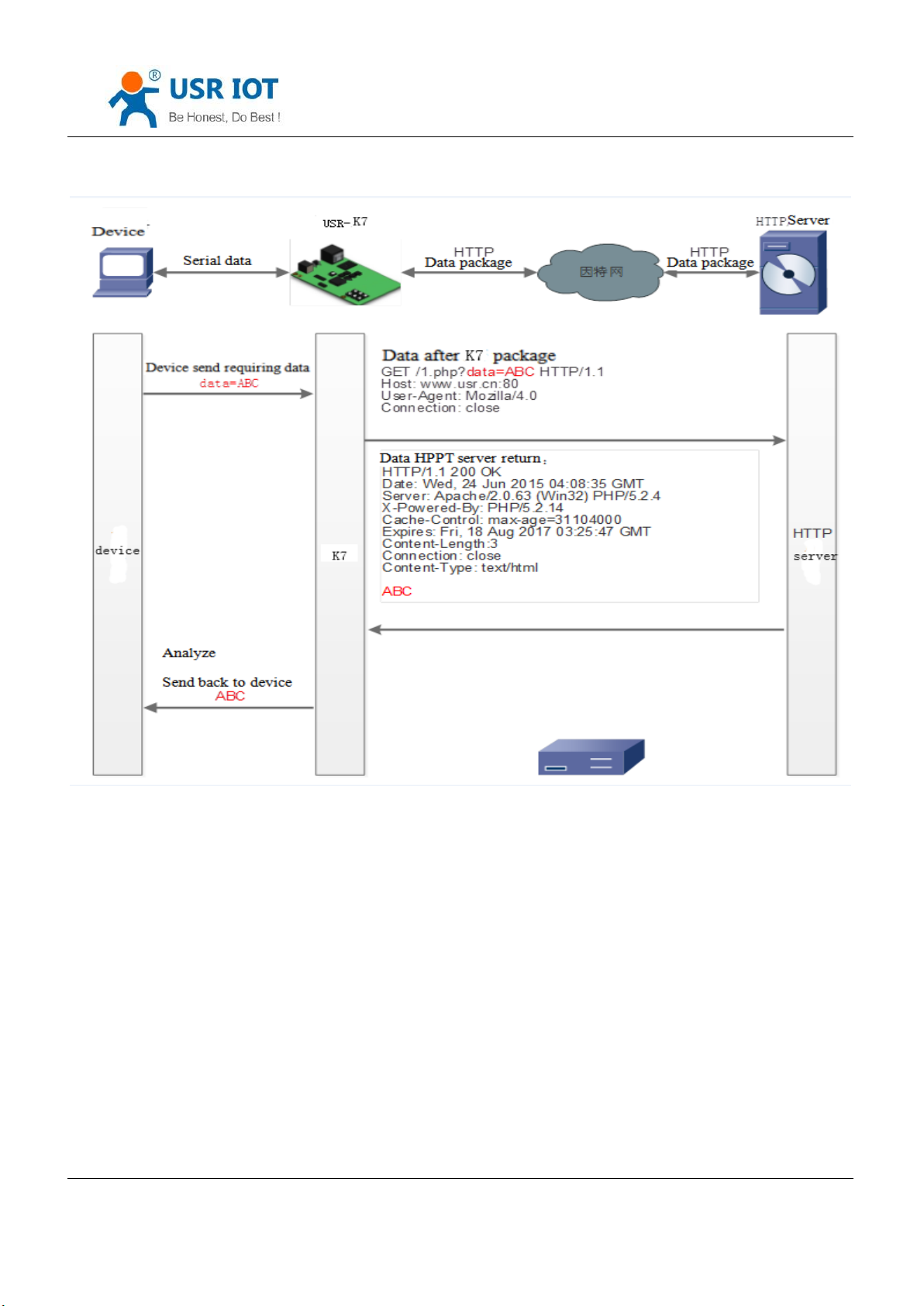
5. Open the serial port to send data and the serial data will submit to your webpage, meanwhile the serial device
also received the information that server return.
6. Detailed information can refer to the below diagram.
Jinan USR IOT Technology Limited 41 / 120 [email protected]
Page 42
USR-K7 User Manual www.usriot.com
Diagram4.2.5-2 HTTP Work Mode
4.2.6. Websocket
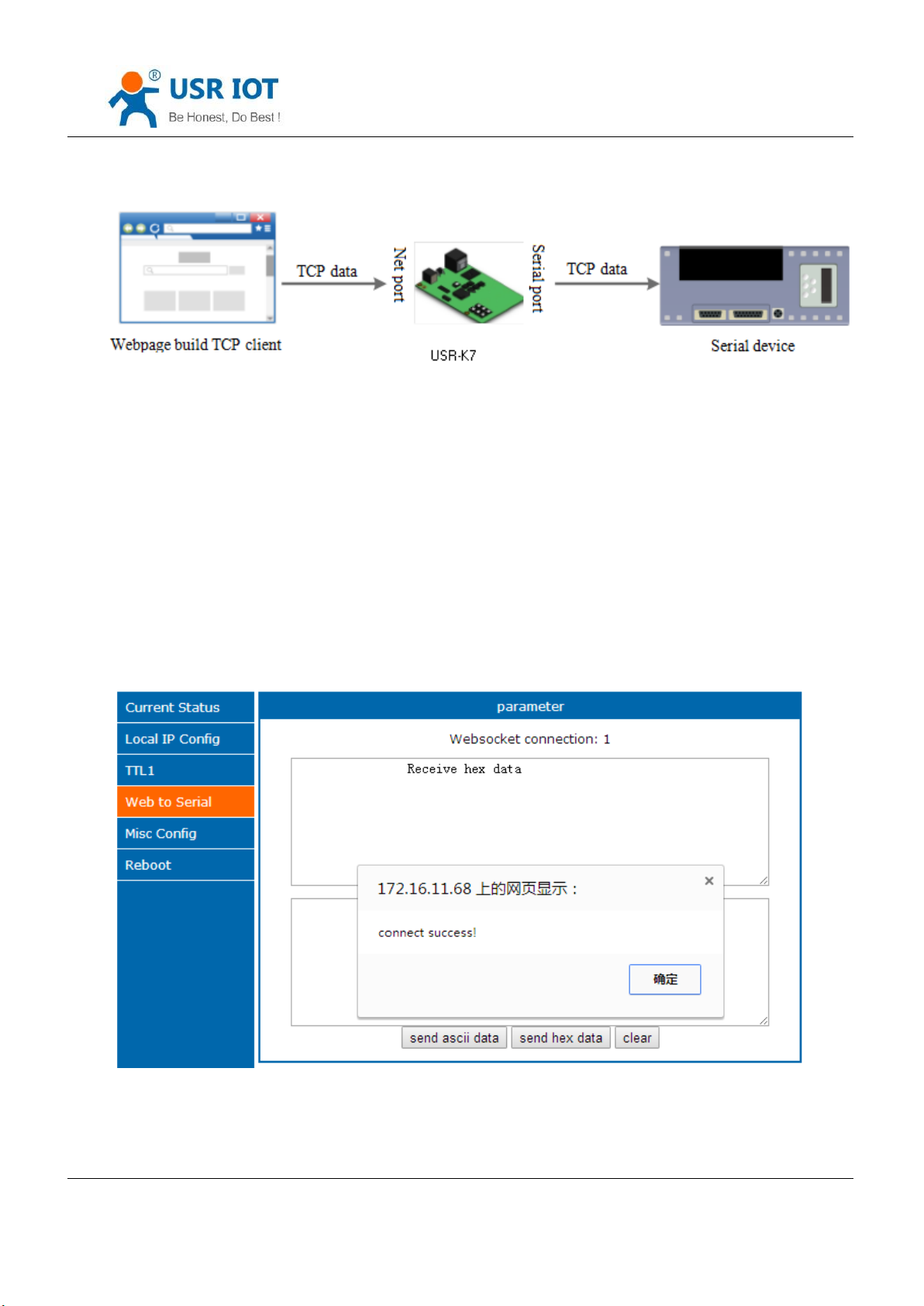
Webpage to serial port function can realizes the interaction between the serial port and webpage forK7. user’s
device data display to webpage, and realize the interaction between the webpage and device.
Jinan USR IOT Technology Limited 42 / 120 [email protected]
Page 43
USR-K7 User Manual www.usriot.com
Web to serial port function display:
1. Setting web to serial port, default port:6432
Diagram 4.2.6-1 Websocket Mode
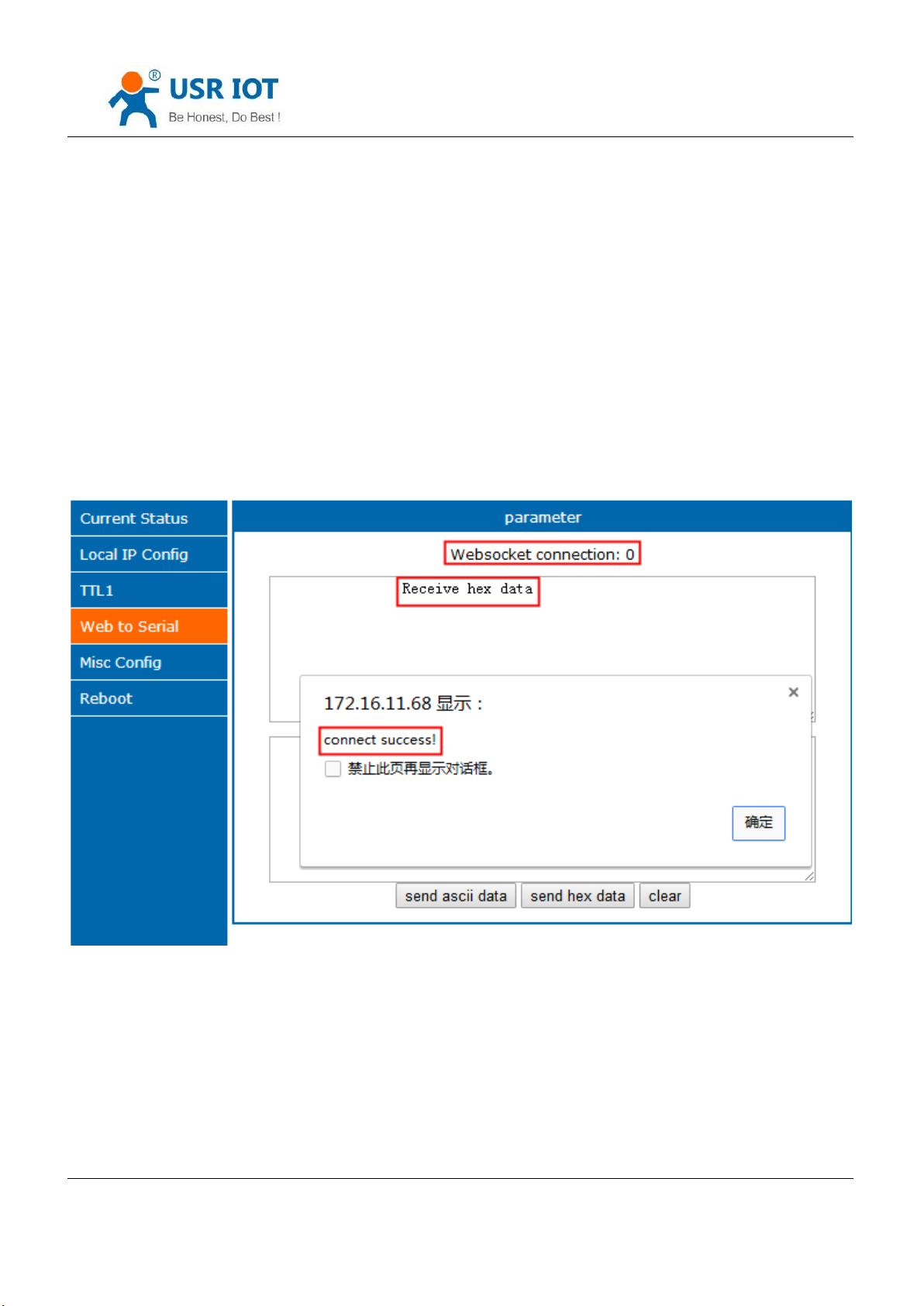
2. Enter webpage, click the web to serial, bond out “connect success” and means that you can receive and send.
Open the Testing software, configuring the serial parameters then open the serial port.
3. Click to send ASCII code, serial receive the data. Click send in testing software, the webpage receive the data.
Diagram 4.2.6-2 Web to Serial Webpage
Webpage to serial port, user should possess of some web program, design the webpage, asking their device data
Jinan USR IOT Technology Limited 43 / 120 [email protected]
Page 44
USR-K7 User Manual www.usriot.com
Browser
Version
and deal with the data. Then the result will display on the web. After design the webpage, download the webpage to K7
according to the defined webpage to realize the development.
1. Build a connection and connect to K7
function connectx(){
try{
socket=new WebSocket('ws://'+window.location.host+':6432');
socket.binaryType = "arraybuffer";
}catch(e){
alert('error');
return;
}
socket.onopen = sOpen;
socket.onerror=sError;
socket.onmessage=sMessage;
socket.onclose=sClose
}
2. Receive the data
function sMessage(msg)
3. Send data
function send()
Jinan USR IOT Technology Limited 44 / 120 [email protected]
Page 45
Chrome
Supported in version 4+
Firefox
Supported in version 4+
Internet Explorer
Supported in version 10+
Opera
Supported in version 10+
Safari
Supported in version 5+
4.2.7. USR-VCOM
USR-K7 User Manual www.usriot.com
Form 4.2.6-1 Webpage Browser and Version
Diagram 4.2.6-1 VCOM
Receive the data assigned VCOM data, and send it in the data of net data using VCOM to solve the PC as a serial
port and can not connect with device,which is convenient for users.
E.g.
1. Take K7 in TCP Server mode as a server, which is convenient for user to change the computer and connected.
2. Setting the way to connect the VCOM and K7 manually:
① Open the VCOM and add the serial port, choose the port: COM2(avoid the exist COM port) protocol use the TCP
client, remote IP set to the IP of the K7, remote port is the port of the K7. note fill the device name.
② Click sure, observe if the connection is established, if the connection has established, and you can test the data
transport transmission.
3.More information reference the below:
Jinan USR IOT Technology Limited 45 / 120 [email protected]
Page 46
USR-K7 User Manual www.usriot.com
http://www.usr.cn/Search/getList/keyword/%E8%99%9A%E6%8B%9F%E4%B8%B2%E5%8F%A3/
4.3. Serial Function
4.3.1. Serial port Basic Parameters
Diagram 4.3.1-1 Serial Port Basic Parameters
Serial basic parameters includes: baud rate, parity, data and stop
1. Baud rate: serial communication rate, can be set from:600~1Mbps, baud rate supports random baud rate.
Jinan USR IOT Technology Limited 46 / 120 [email protected]
Page 47
USR-K7 User Manual www.usriot.com
2. Data: the length of the data, range from 5~8
3. Stop: can be set from 1~2
4. Parity: none, odd, even, mark, space.
Via setting serial port parameters, keep consistent with the device to make sure communicating.
4.3.2. Flow Control
Diagram 4.3.2-1 Serial Flow Control
Flow control: the way for serial port flow control, users can choose to enable 485 or not, control the receive and
send for 485, 3010 and later default enable 485 control mode, under the condition that no hardware flow control,
enable 485.
1. NONE: default serial port mode, under this mode, 3010 and later version enable 485
Jinan USR IOT Technology Limited 47 / 120 [email protected]
Page 48
USR-K7 User Manual www.usriot.com
AA AA AA
BB BB BB
5 ms
5 ms
8ms
4ms
20
ms
BBBBBB
AAAAAA
串口
网络
按时间成帧
(10ms)
AA AA AA
BB BB BB
5 ms
5 ms
8ms
4ms
20
ms
BB
BBBBAAAAAA
串口
网络
按长度成帧
(长度5字节)
2. RTS/CTS: hardware flow control. The hardware flow control for K7 supports RTS/CTS.
3. Xon/Xoff: software flow control. 3010 and later version enable the software flow control.
Hardware or software flow control deal the serial port data for better. When the serial port received buffer data
out than the threshold value, inform the remote port stop sending data until complete buffering, then inform to deal
with data.
Usually used in the situation that rich in time.
4.3.3. Serial Port Mapping
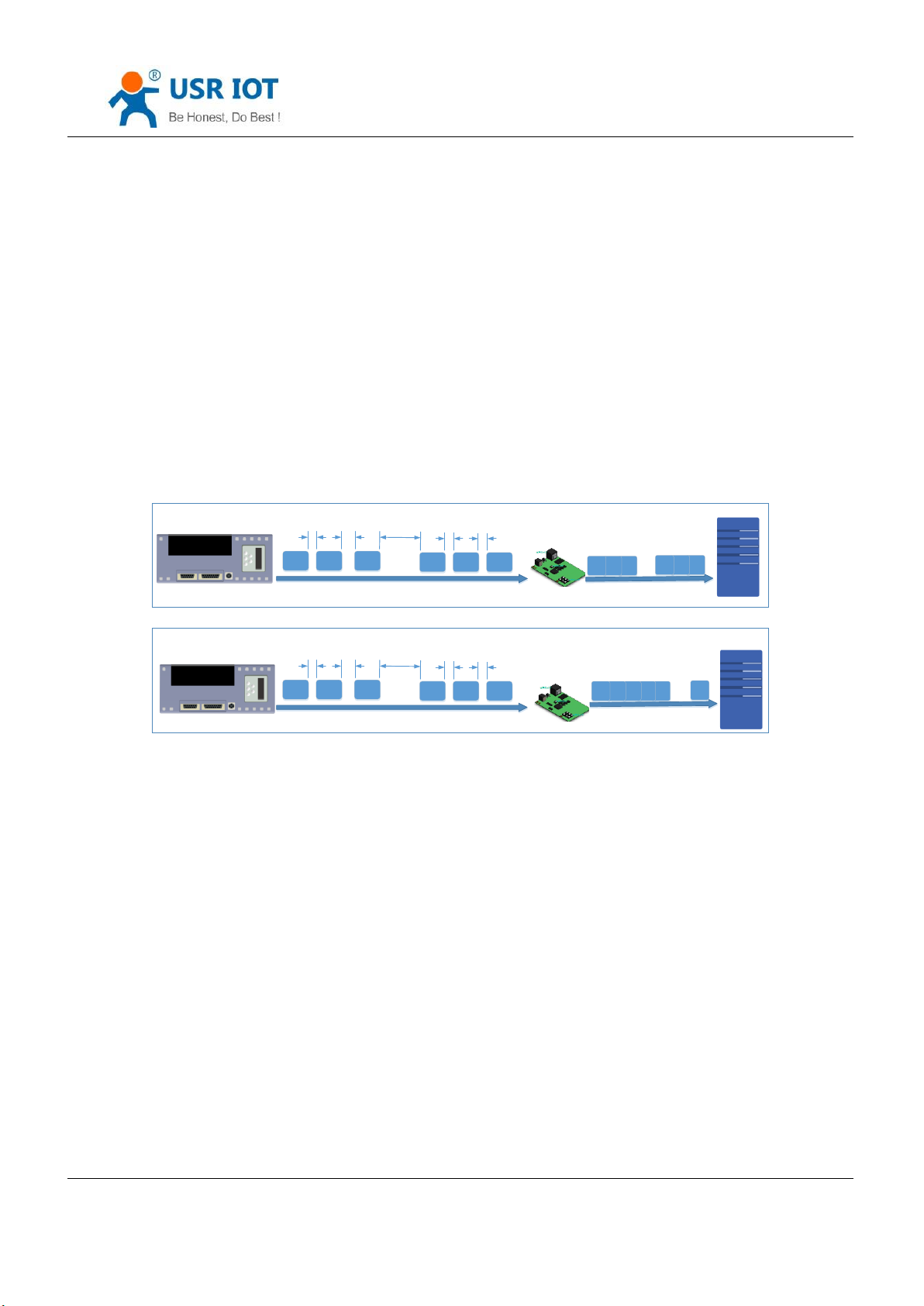
The serial packing time and length of K7 can be set. Packing the serial port data according to the packing time and
packing length under the transparent transmission mode .
The frame mechanism of serial port is based on the packaging time and the packaging length. The case are as
fellow.
1. Packing time set as 10ms and the length as 512.
If the internal time for serial received the data more than 10ms, or the length more than 512, K7 send packing to
net when the serial port receive data.
2. If the packing time is 0 and the packing length is not 0, only the packing length work; and if the packing length is
0 and he packing time is not 0, only the packing time work.
3. Set the packing time is 0 ms and the packing length is 0
Jinan USR IOT Technology Limited 48 / 120 [email protected]
Page 49

USR-K7 User Manual www.usriot.com
When the packing time is 0ms, K7 works the default packing time: if the interval that serial port received data more
than packing time for send 4 byte, K7 send packing. E.g. baud rate 115200, 4 bytes packing time is:
T=0.4ms, (if the value less than 0.1ms. Packing time calculates as 0.1ms.
T=1/baud rate*10*4
4. For the limit of the serial port speed, users should control the flow when K7 receive the data from net and send
to serial, or there will be data over flow in serial. So when send net data to serial, user should calculate the data flow.
E.g.
Calculate way: if sending M bytes need N s. the way to check for possible overflow methods (if the net situation is
ok, the time can be ignored ). The time for M bytes:
T=1/baud rate*10*m
If there is no overflow, M bytes of data must be transmit within Ns,
N>2T is require for K7 to work properly. If the baud rate is less than 9600, keep n>T.
Serial packing time: default is 4 bytes time, can be set from0~255.
Serial packing length:default 1460, can be set from the 0~1460.
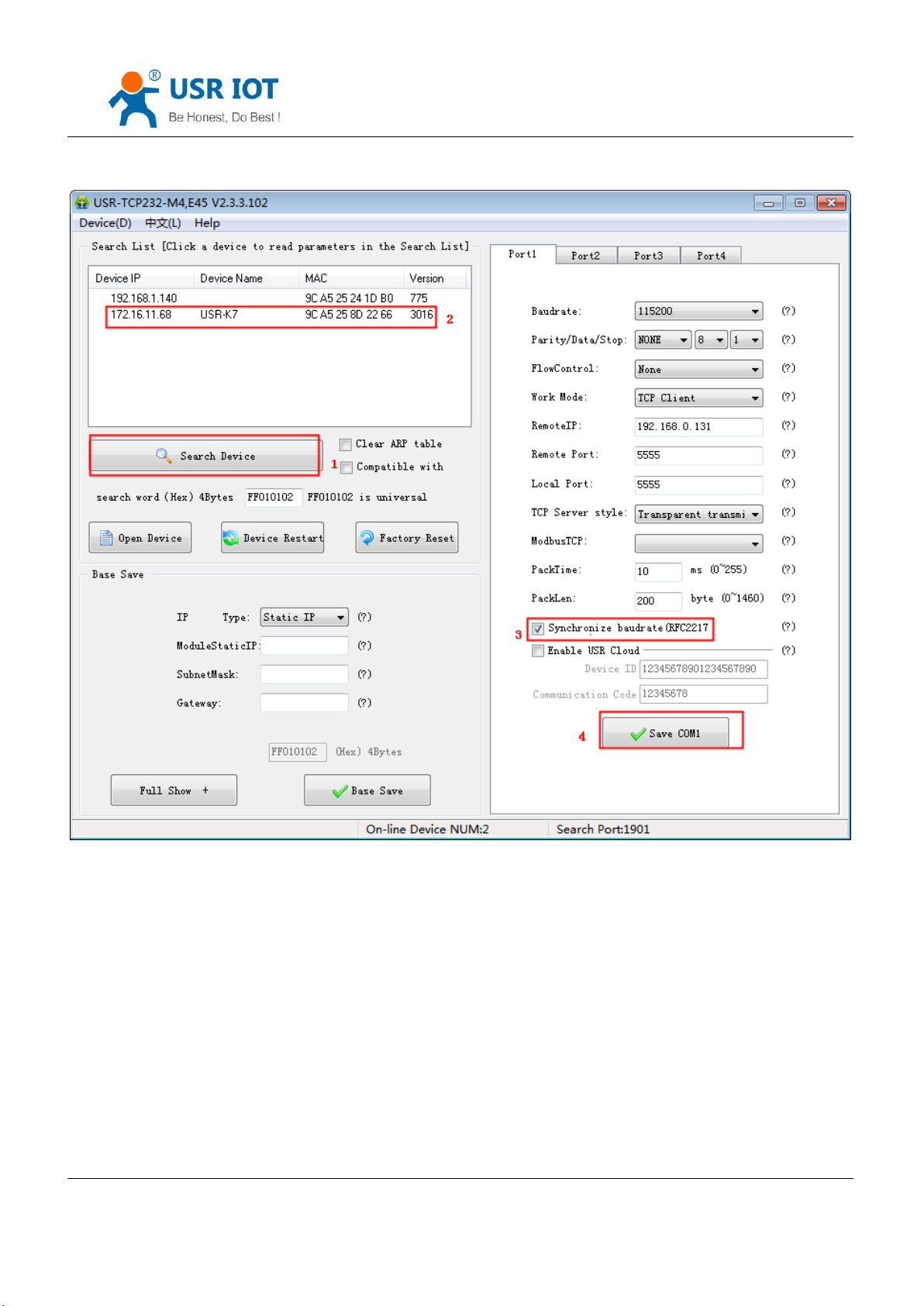
4.3.4. Similar RFC2217
Similar RFC2217 is a simple RFC2217 protocol, working with the VCOM and changing serial port parameters
candynamically to realize the communication with variable serial port parameters.
Enable this function, using USR-VCOM can open this function,which can realize the serial baud of the PC software
and K7 automatically match. No need to pay attention to serial port baud rate setting.
Jinan USR IOT Technology Limited 49 / 120 [email protected]
Page 50
USR-K7 User Manual www.usriot.com
Diagram 4.3.4-1 Similar RFC2217 Function
Jinan USR IOT Technology Limited 50 / 120 [email protected]
Page 51
USR-K7 User Manual www.usriot.com
name
Package head
Baud rate
Median
parameter
Parity sum
bytes
3 3 1
1
instr
3 byte to reduce
miscalculation
High in front, and the
minimum is 600( 00 02 58 )
data/stop/parity,
next chart
Four sum except the
package head .
115200,N,8,1
55 AA 55
01 C2 00
03
C6
9600, N,8,1
55 AA 55
00 25 80
03
A8
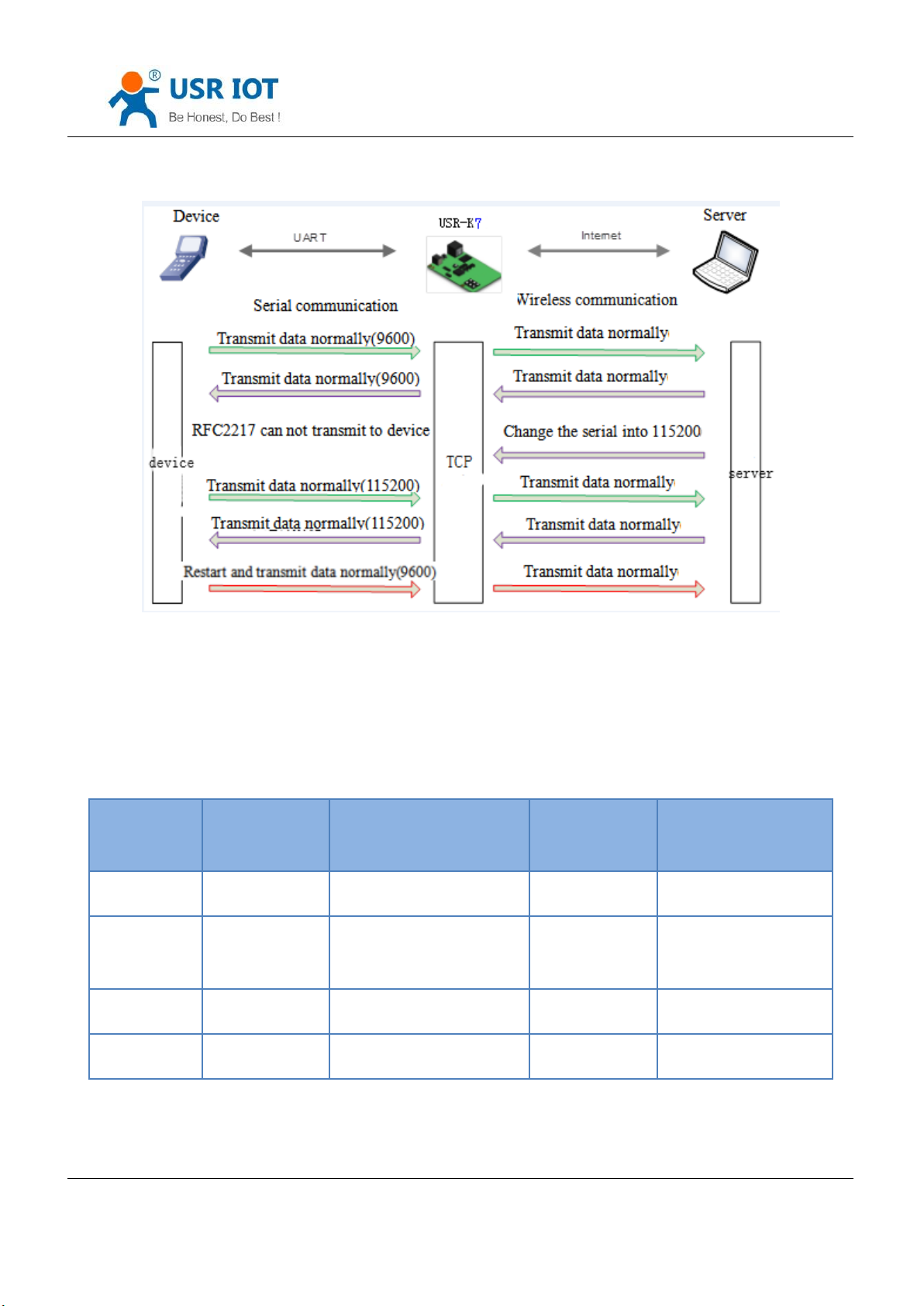
Diagram 4.3.4-2 RFC2217 Function
For the encryption of data transmission in some industrial situation, some device will change the data length, baud,
parity and other parameters in the transmission, and K7 supports this function.
Protocol length is 8 bytes, details are as fellows. The value in example are in HEX type.
Jinan USR IOT Technology Limited 51 / 120 [email protected]
Form4.3.4-1 RFC 2217 Function Protocol
Page 52
USR-K7 User Manual www.usriot.com
A no.
instr
value
Describe
1:0
data bits select
00
5 data bits
01
6 data bits
10
7 data bits
11
8 data bits
2
stop
0
1 stop
1
2 stop
3
Parity enable
0
Disable parity
1
Enable parity
5:4
Parity type
00
ODD
01
EVEN
10
Mark
11
Clear
7:6
none
00
Please fill 0
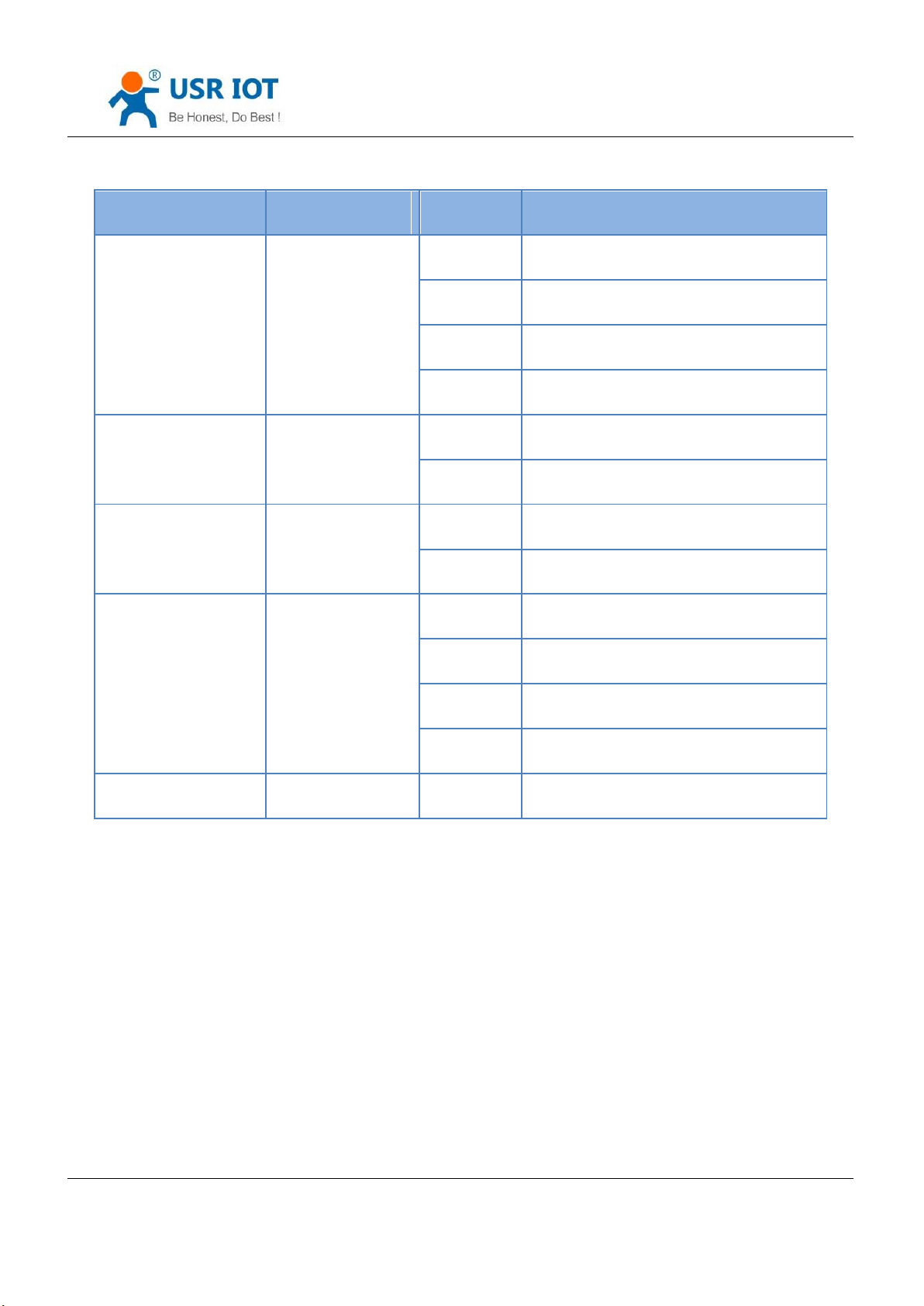
1) When using RFC2217, click setting software RFC2217 to enable this function.
2) When the serial port parameters change, send the RFC2217 package, after K7 received the RFC2217 command,
modify the serial parameters and can not transparent transmission.
4.4. Special Function
Jinan USR IOT Technology Limited 52 / 120 [email protected]
Form4.3.4-2 Serial Port Parameters Basic Meaning
Enable Note:
Page 53
USR-K7 User Manual www.usriot.com
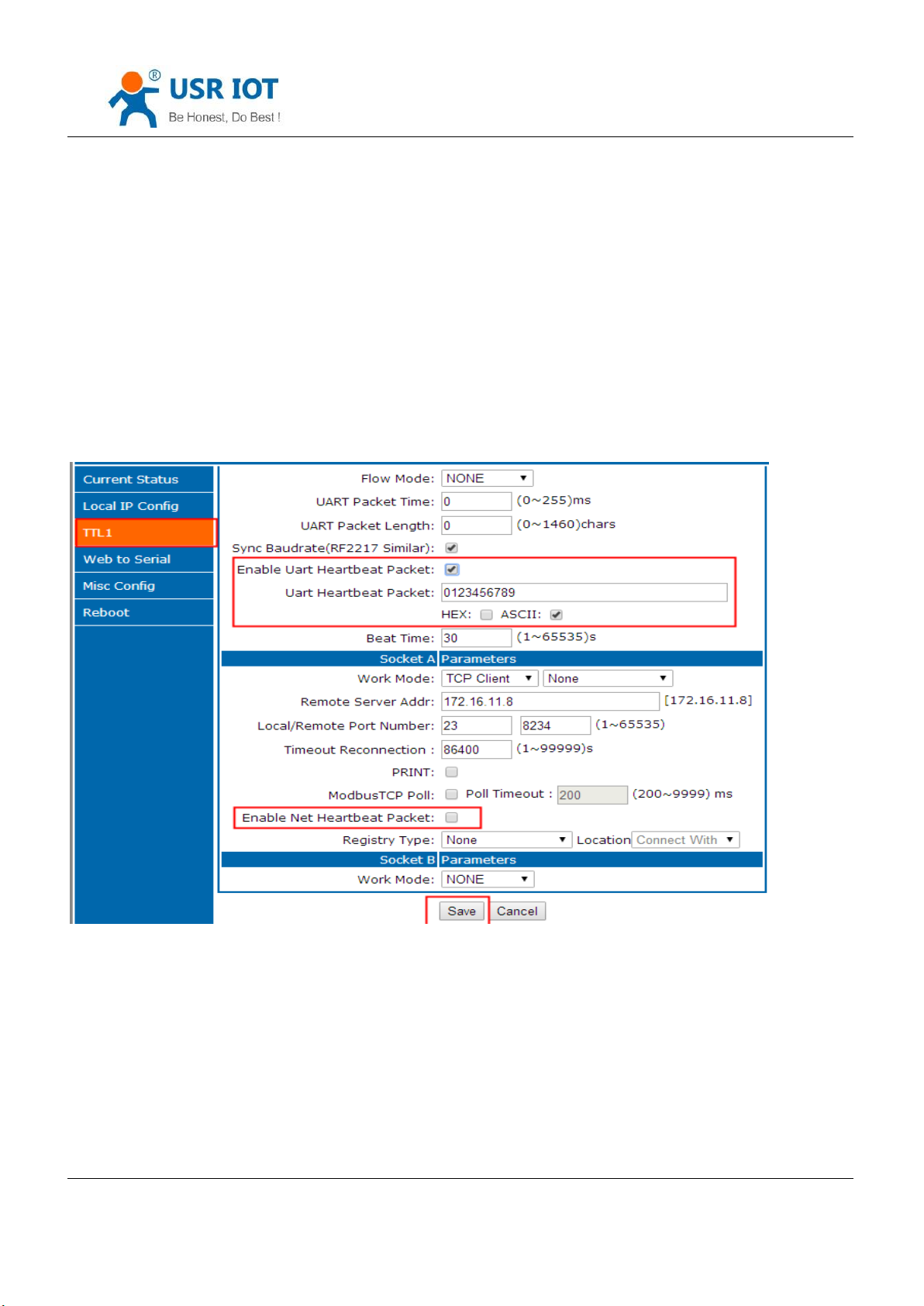
4.4.1. Heartbeat Package Function
Under Transparent transmission, have the K7 sent heartbeat package to net server or the serial port
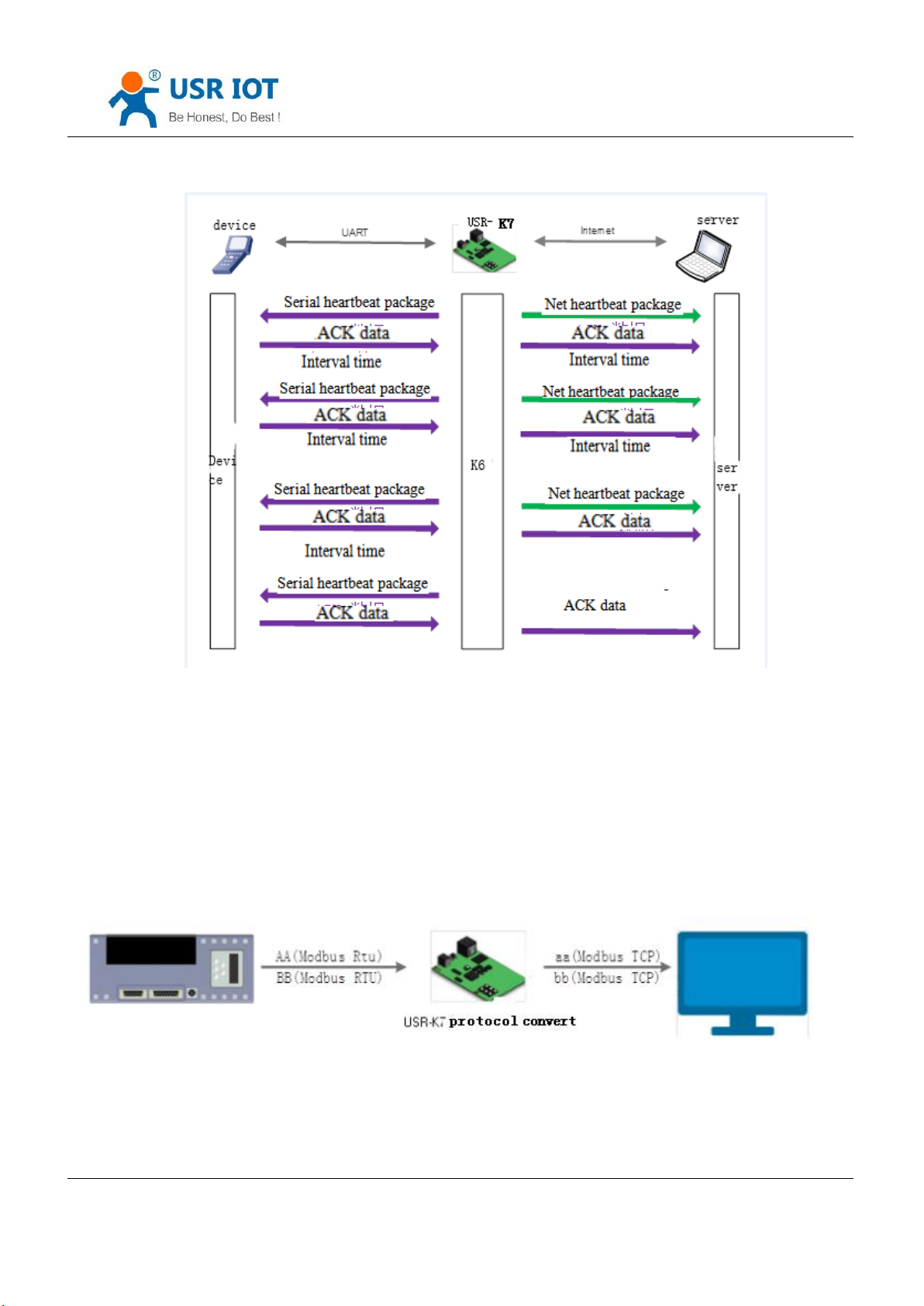
Heartbeat package send to the net to keep connecting with server and works in TCP client and UDP client mode.
Send heartbeat package to serial port and instead of the query command from net to reduce the communication
flow.
3010 and above version supports heartbeat function which can send to serial and net.
Diagram 4.4.1-1 Heartbeat Webpage
Jinan USR IOT Technology Limited 53 / 120 [email protected]
Page 54
USR-K7 User Manual www.usriot.com
Diagram 4.4.1-2 Heartbeat Function
Note: net heartbeat package and serial heartbeat package can be not used.
4.4.2. Modbus Gateway
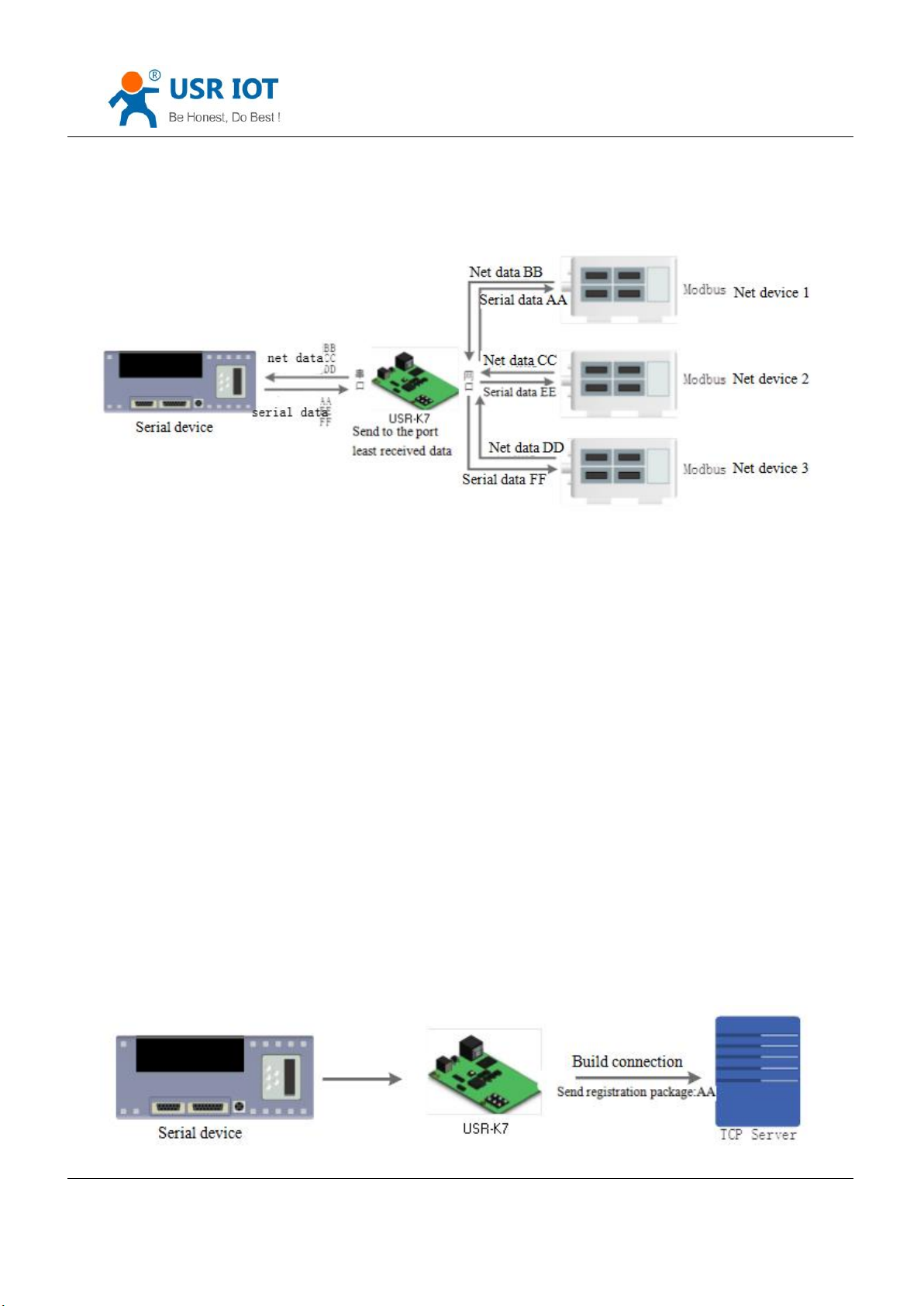
Modbus gateway includes modbus RTU transmission, modbus ASCII transmission, modbus RTU to TCP, modbus
polling and serial query.
Diagram4.4.2-1 Modbus TCP
Modbus RTU and modbus TCP: can realize the modbus serial port protocol and modbus net protocol convert.
Jinan USR IOT Technology Limited 54 / 120 [email protected]
Page 55
USR-K7 User Manual www.usriot.com
Diagram 4.4.2-1 Modbus TCP Polling
Modbus polling:supports more than one master PC query the data of slave PC, the timeout can be set. 3010 and
above version supports this function.
4.4.3. Registration Package
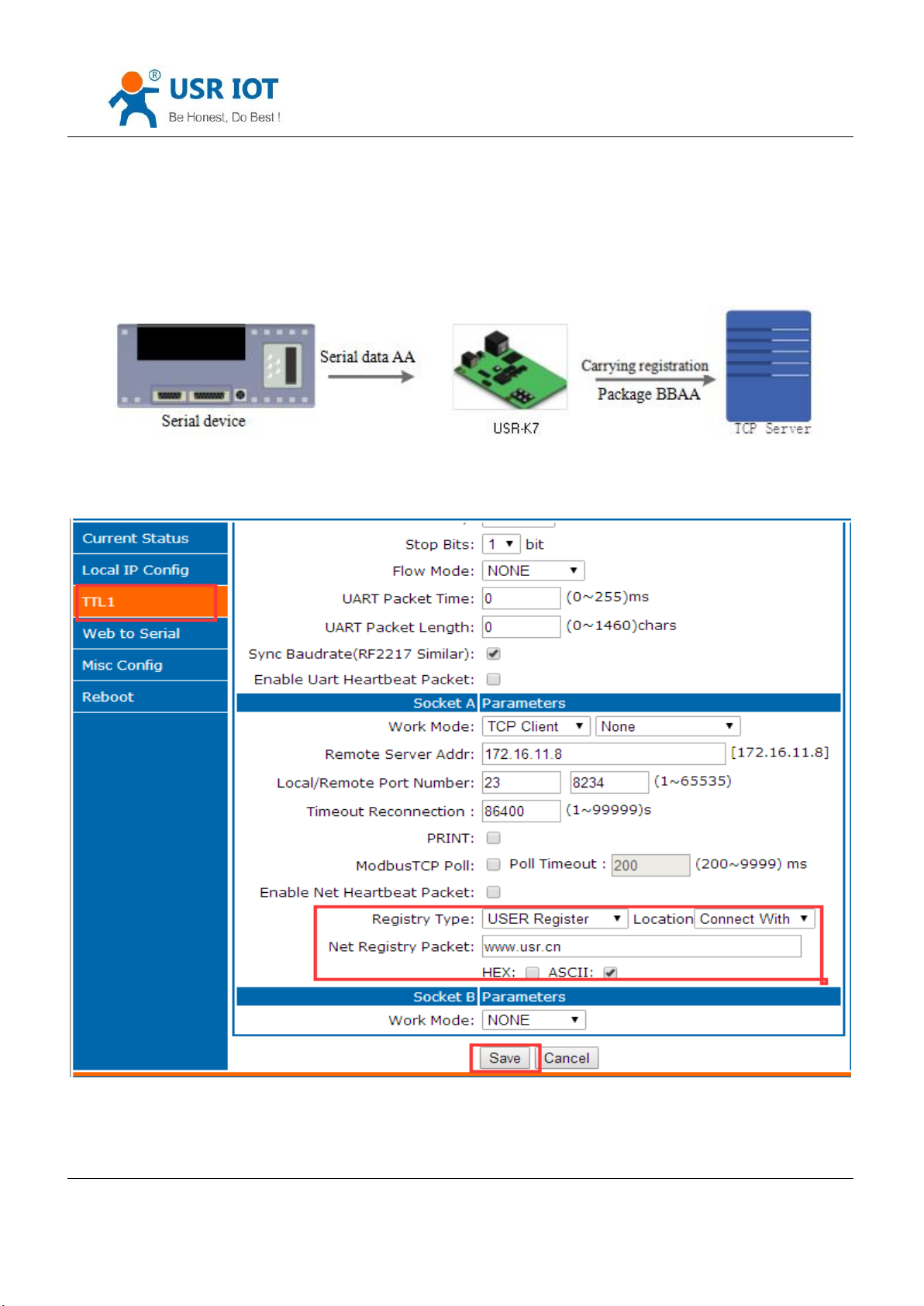
Under the net transparent transmission mode, user can have the module sent registration package to server to
recognize the original of the data or work as the authorization code for server function.
Registration can be sent when the connection build between the module and server, also it can inset a registration
package data in front of the data package. The data registered can be MAC address or the definition registration
package(at most the definition registration can be 40 byte.)
3010 and above version supports the registration package.
Send registration package when building connection usually used in the situation that connecting the server
needed to register.
Jinan USR IOT Technology Limited 55 / 120 [email protected]
Page 56
USR-K7 User Manual www.usriot.com
Diagram 4.4.3-1 Building send Registration Package
Carrying the registration package:insert the package in front of the registration and used in the protocol
transmission.
Diagram 4.4.3-2 Carrying Registration Package
Diagram 4.4.3-3 Registration Webpage
Jinan USR IOT Technology Limited 56 / 120 [email protected]
Page 57
USR-K7 User Manual www.usriot.com
4.4.4. USR-cloud
Diagram 4.4.3-1 USR-cloud
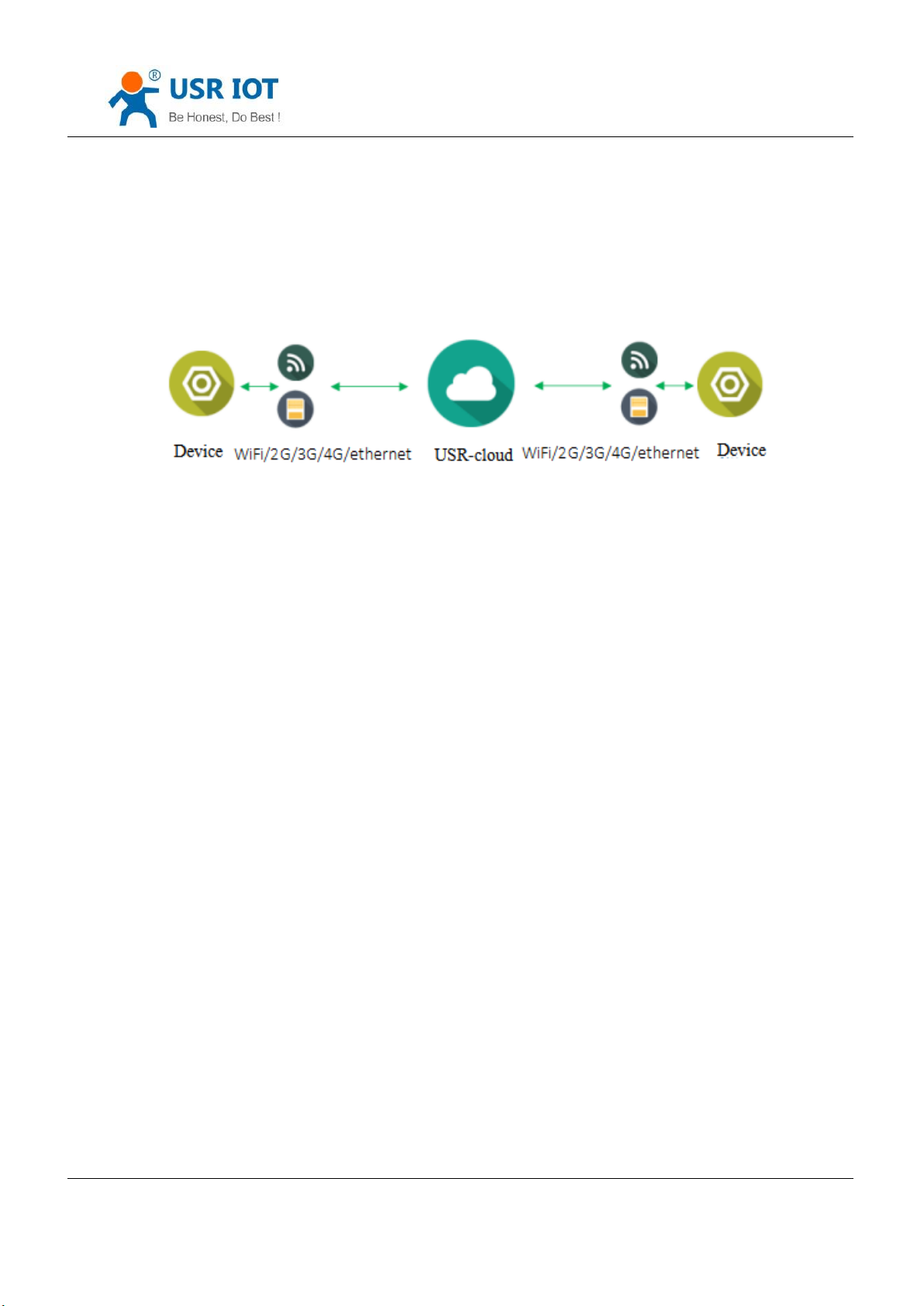
USR-cloud aim to solve the problem of the communication between device and device, device and upper
machine( android, IOS,PC).USR-cloud used to transparent transport the data, the device connected can access remote
data without modify.USR-cloud can used in remote monitor, the internet of things, the internet of cars and intelligent
house, so the K7 installed USR-cloud. More information can be scan http://console.usriot.com
Jinan USR IOT Technology Limited 57 / 120 [email protected]
Page 58
USR-K7 User Manual www.usriot.com
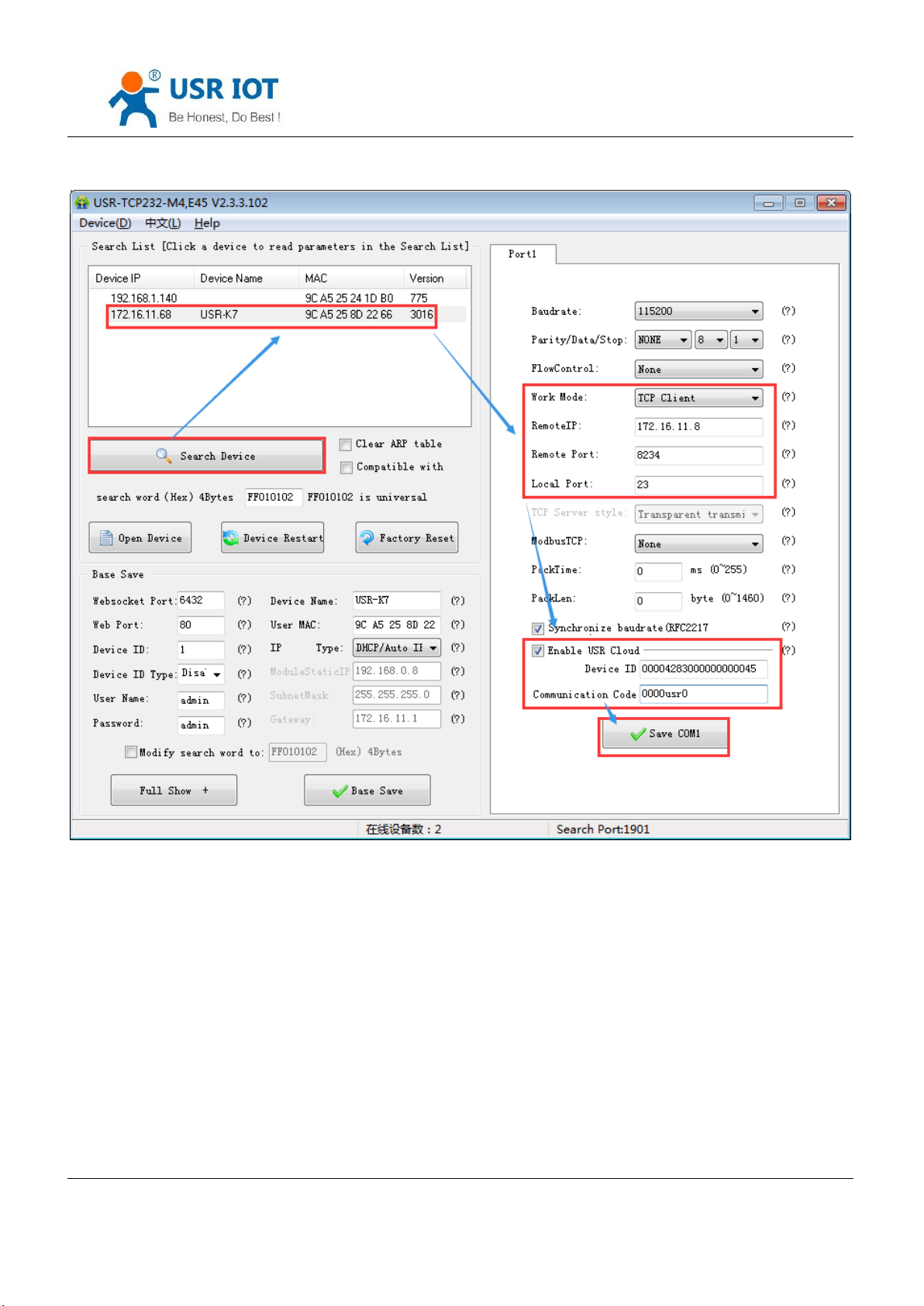
Diagram 4.4.3-2 USR-cloud Software Setting
Note: under the TCP client mode .
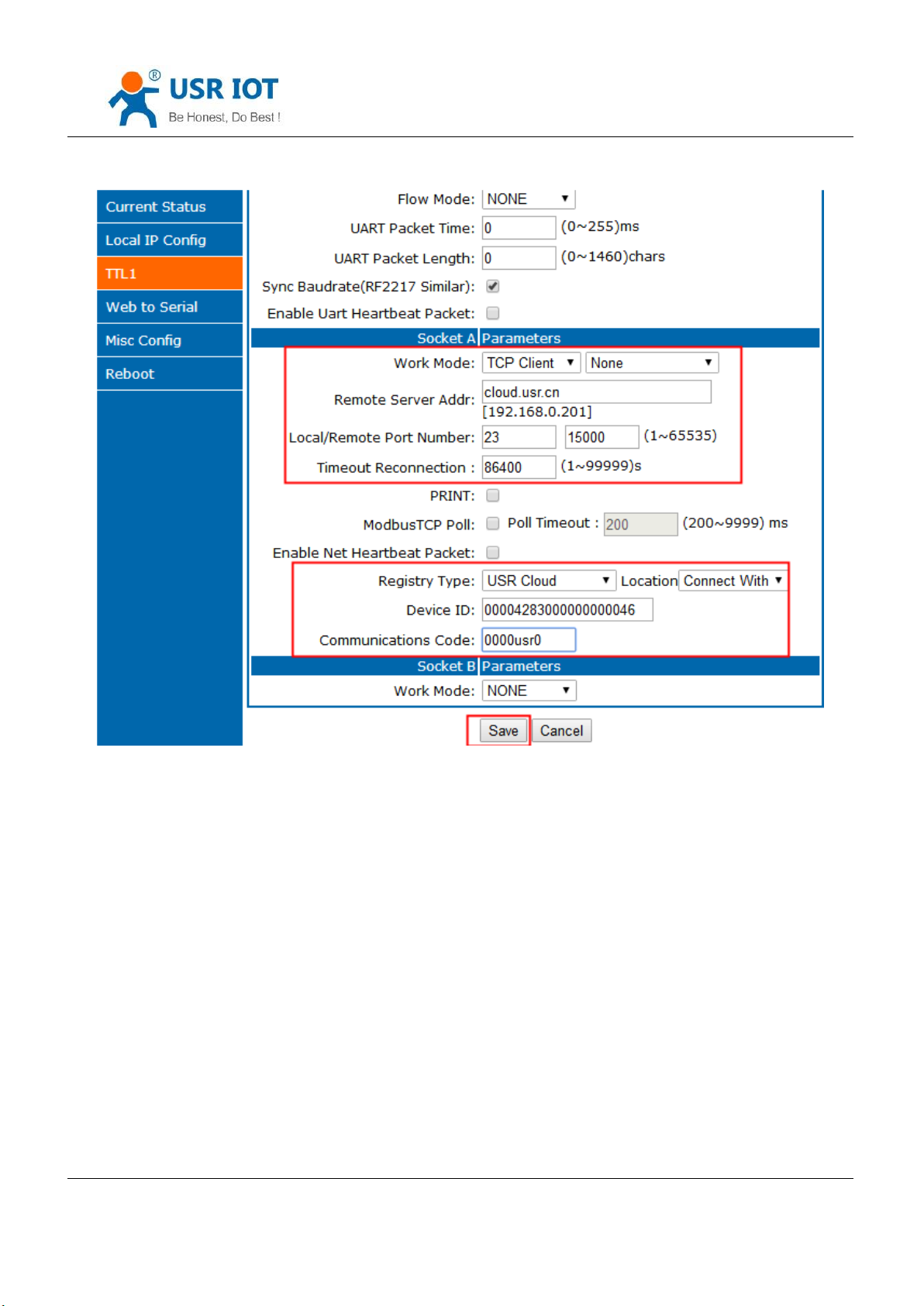
Also can be set in the webpage as fellows:
Jinan USR IOT Technology Limited 58 / 120 [email protected]
Page 59
USR-K7 User Manual www.usriot.com
Diagram 4.4.3-3 USR-cloud Webpage Setting
USR-cloud software is a platform for communication between devices and PC software. The cloud software is
mainly used for data transmission or monitoring remotely. This function only works in TCP client mode and supports the
devices with firmware 3009 and later versions.
Login link of USRIOT Cloud: http://console.usriot.com
Remote server address: console.usriot.com
Local port: The port of device, Remote port: Cloud software’s port
Device ID: It is assigned to device by cloud software
Communications Code: Password generated after adding the device to cloud software
The following is test account of USR-cloud:
Jinan USR IOT Technology Limited 59 / 120 [email protected]
Page 60
Account:jin321_
Password:1987322
4.4.5. Net Printing
USR-K7 User Manual www.usriot.com
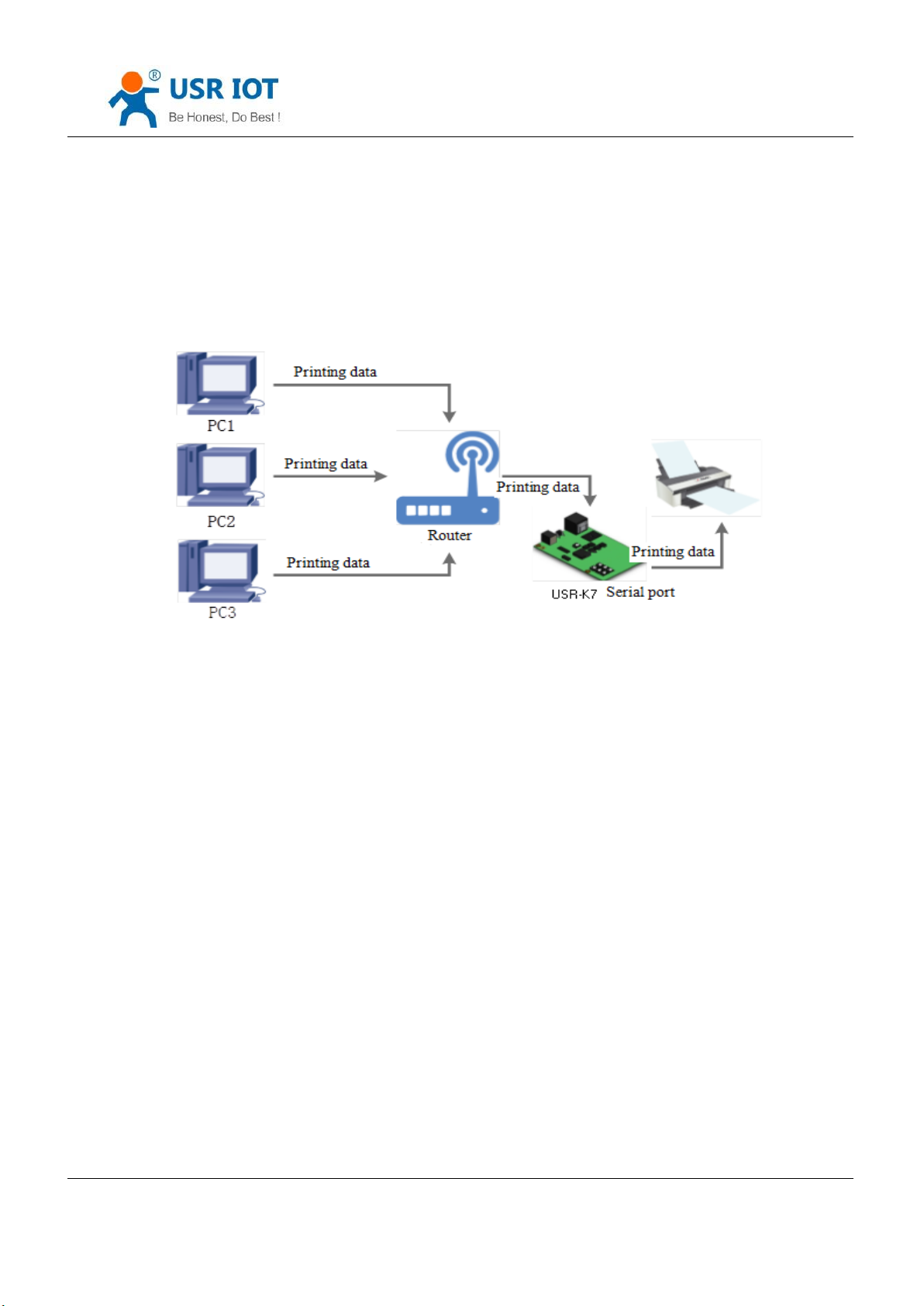
Diagram 4.4.5-1 Net Printing
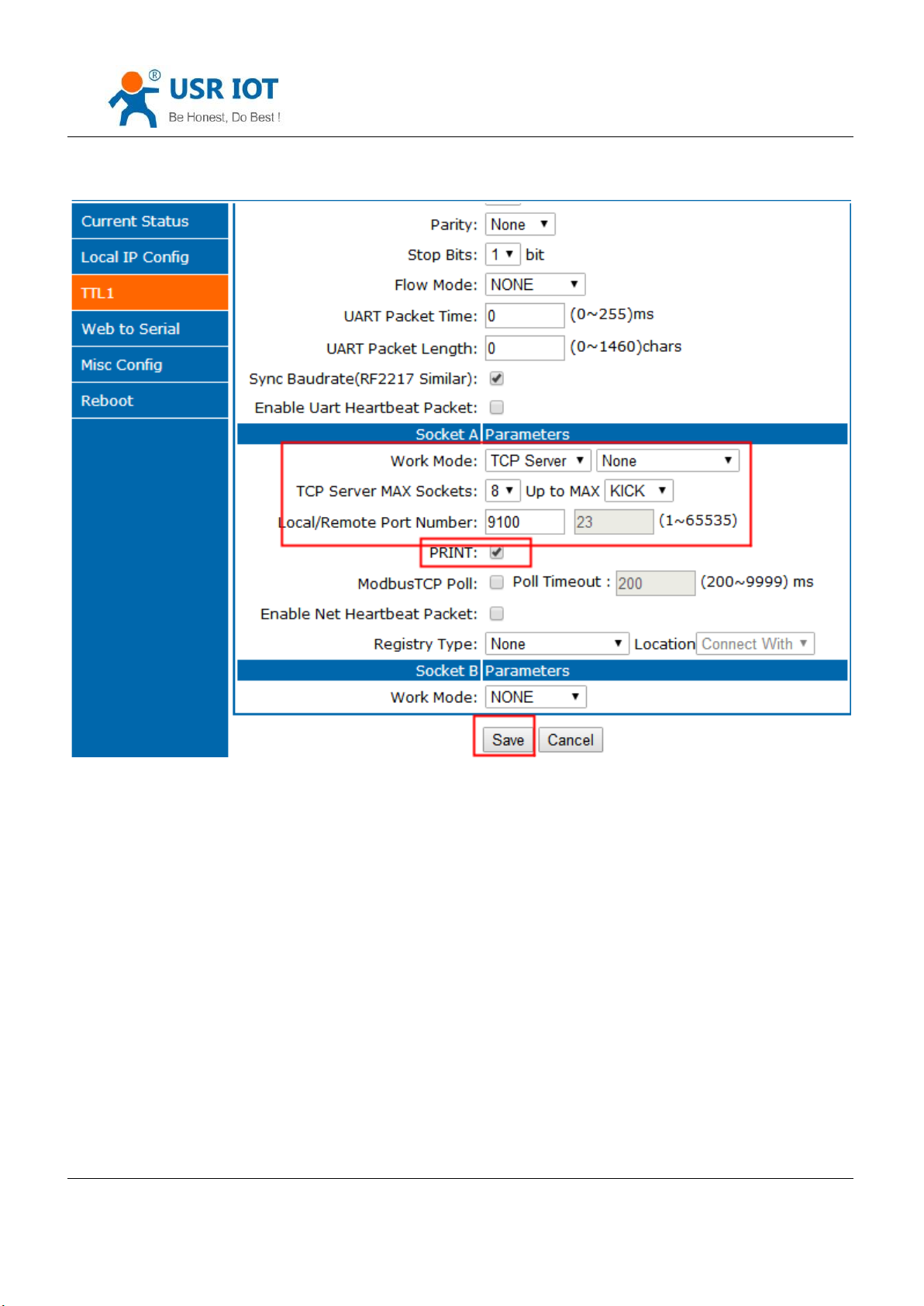
K7 can connect with the serial printing, operating the printing via net, and change the serial printer into net printer,
3010 and above version supports this function.
Testing way:
1. Configuring module parameters:work mode:TCP server, local port:9100
Jinan USR IOT Technology Limited 60 / 120 [email protected]
Page 61
USR-K7 User Manual www.usriot.com
Diagram 4.4.5-2 Net Printing
4.4.6. Customize Webpage
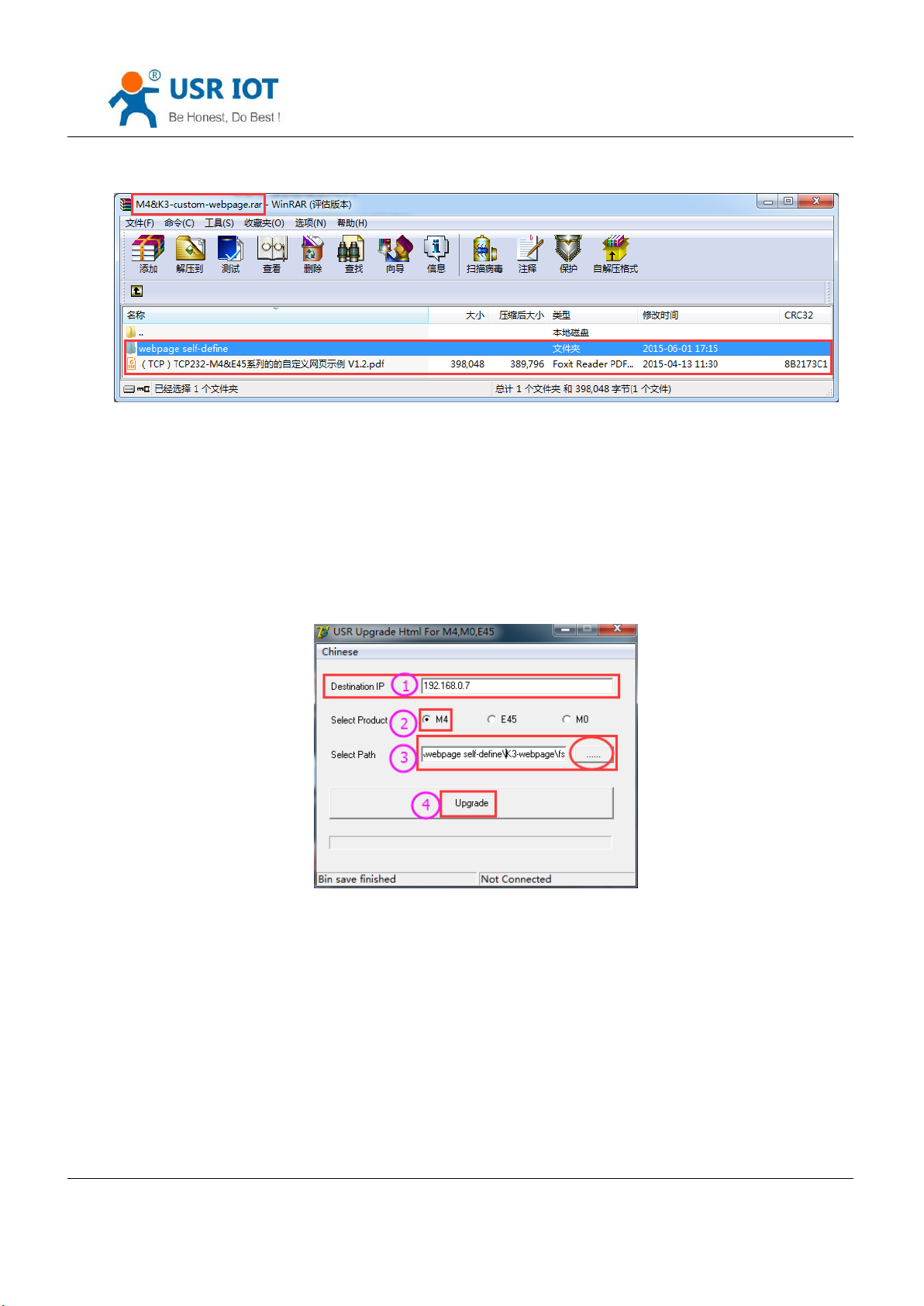
K7 supports customize webpage. The user can upgrade their webpage into K7 via customize webpage. To be more
convenient for user, we have prepared upgrade webpage package
Including webpage code(K7 default webpage code and medium webpage code), webpage tools can be download.
Jinan USR IOT Technology Limited 61 / 120 [email protected]
Page 62
USR-K7 User Manual www.usriot.com
Diagram 4.4.6-1 Package Update
Steps to realize the customize webpage:
1. If you will customize webpage, please contact with the USR supports or the sale.
Modify the webpage code, open “UpgradeHtml.exe”, destination IP is the IP of K7, the final name of file is “fs”,
product choose the”M4”, then click the upgrade.
Diagram 4.4.6-2 Webpage Upgrade
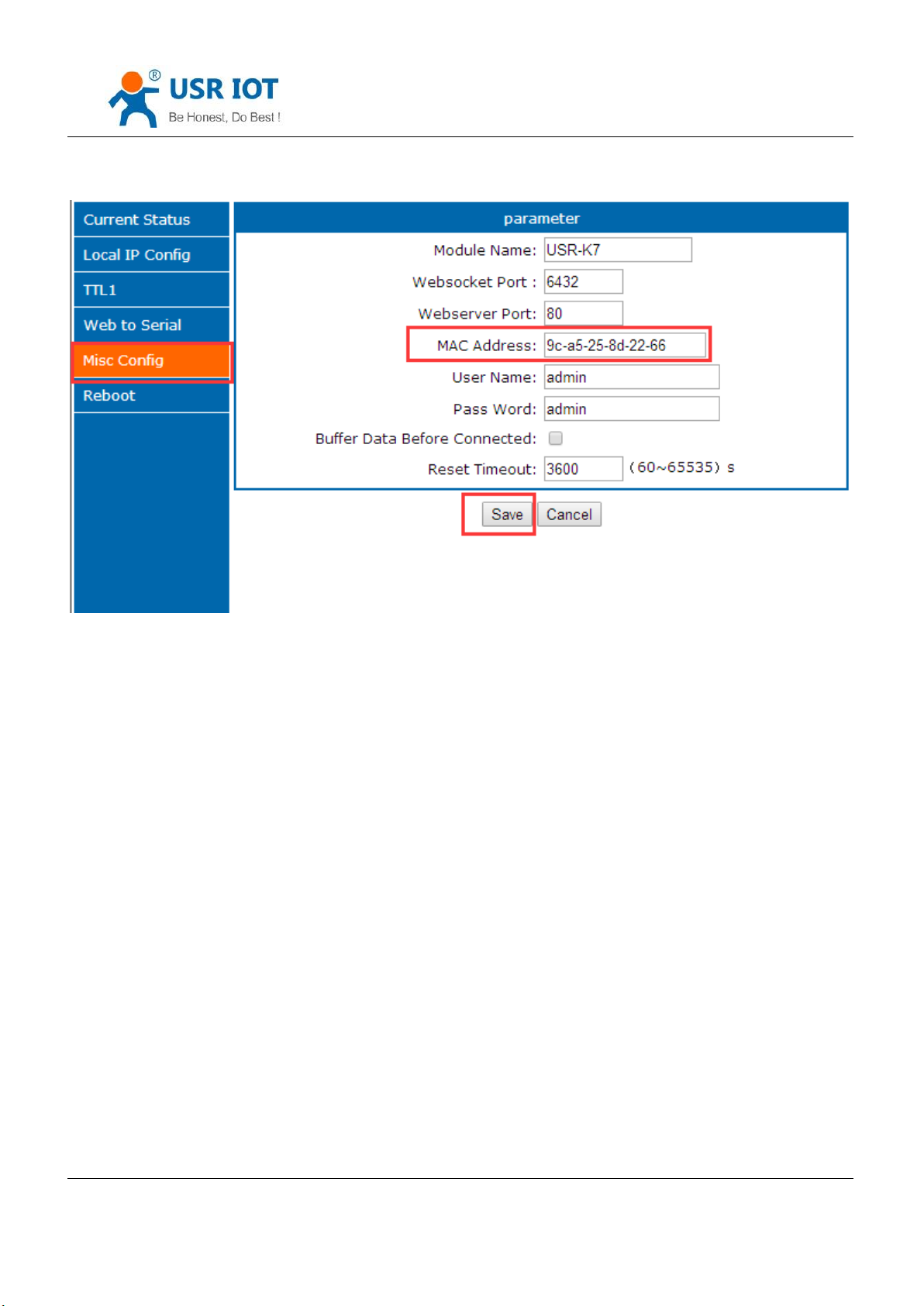
4.4.7. Customize MAC
The unique MAC in the world for K7, can be check in the webpage. If the user have special demand, can set instant
MAC via webpage. Please do not all F. restore to the factory setting and the MAC will be back to the factory MAC.
The below is MAC setting webpage.
Jinan USR IOT Technology Limited 62 / 120 [email protected]
Page 63
USR-K7 User Manual www.usriot.com
Diagram 4.4.7-1 Customize MAC
4.4.8. Restart Timeout
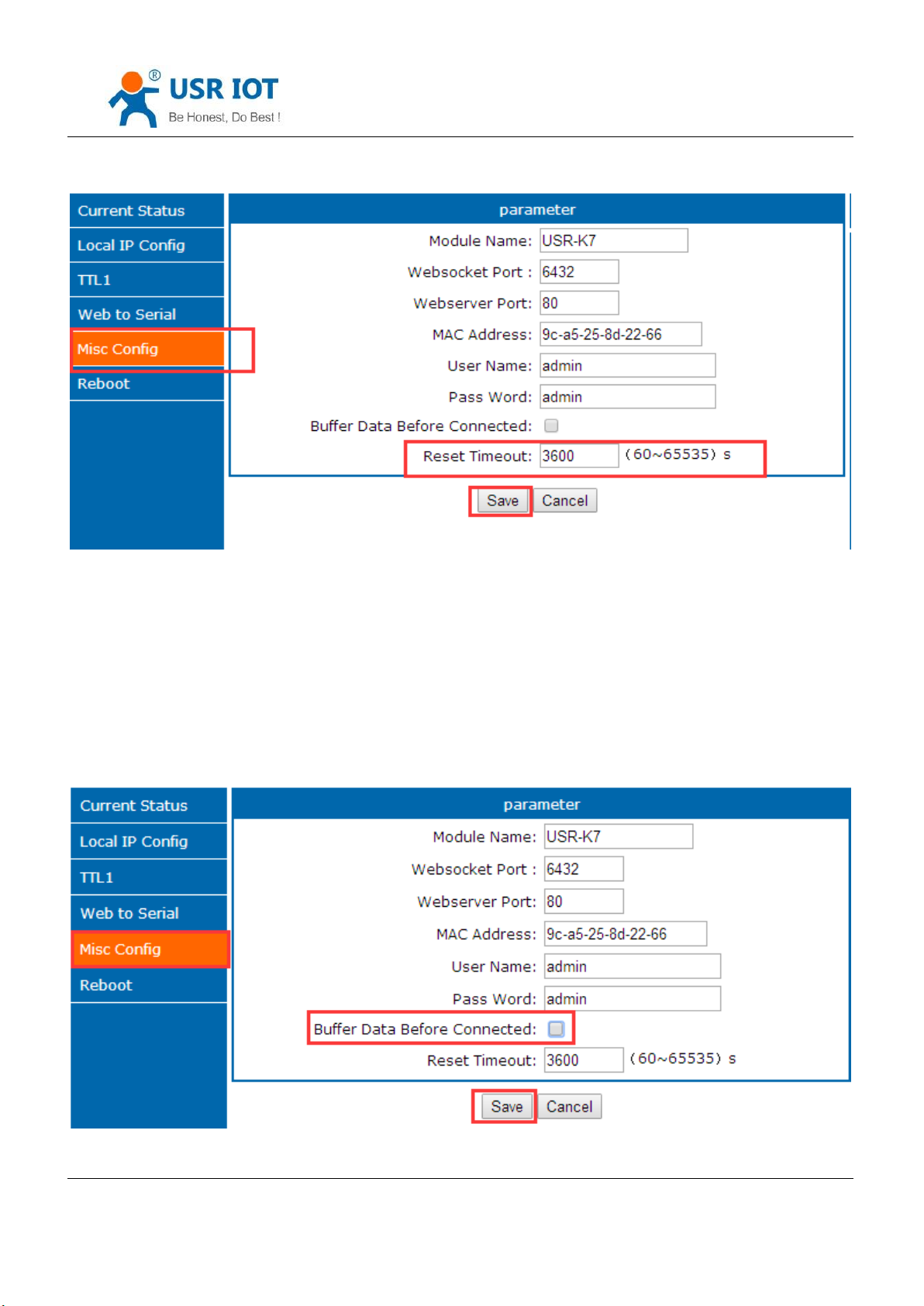
Restart timeout( no data restore) used to keep K7 long time stable work. When net port can not receive the data,
or have note receive data for long time, K7 will restart in the time to prevent the communication from the abnormal.
The time can be set via webpage and AT command, range from 60~65536s, default value is 3600s. When the time less
than 60s, default is 0 which means that disable this function.
Jinan USR IOT Technology Limited 63 / 120 [email protected]
Page 64
USR-K7 User Manual www.usriot.com
Diagram 4.4.8-1 Reset timeout
4.4.9. Clear Buffer Data
Before data connection, data serial port received will be put in the buffer zone. K7 serial received buffer:2Kbyte.
After connecting the TCP connection, clear the buffer data or not can be choose in the webpage, default do not clear. If
user enable the short connection, this function will do not work.
Jinan USR IOT Technology Limited 64 / 120 [email protected]
Page 65
USR-K7 User Manual www.usriot.com
Diagram4.4.9-1 Clear Buffer Data
4.4.10. Short Connection
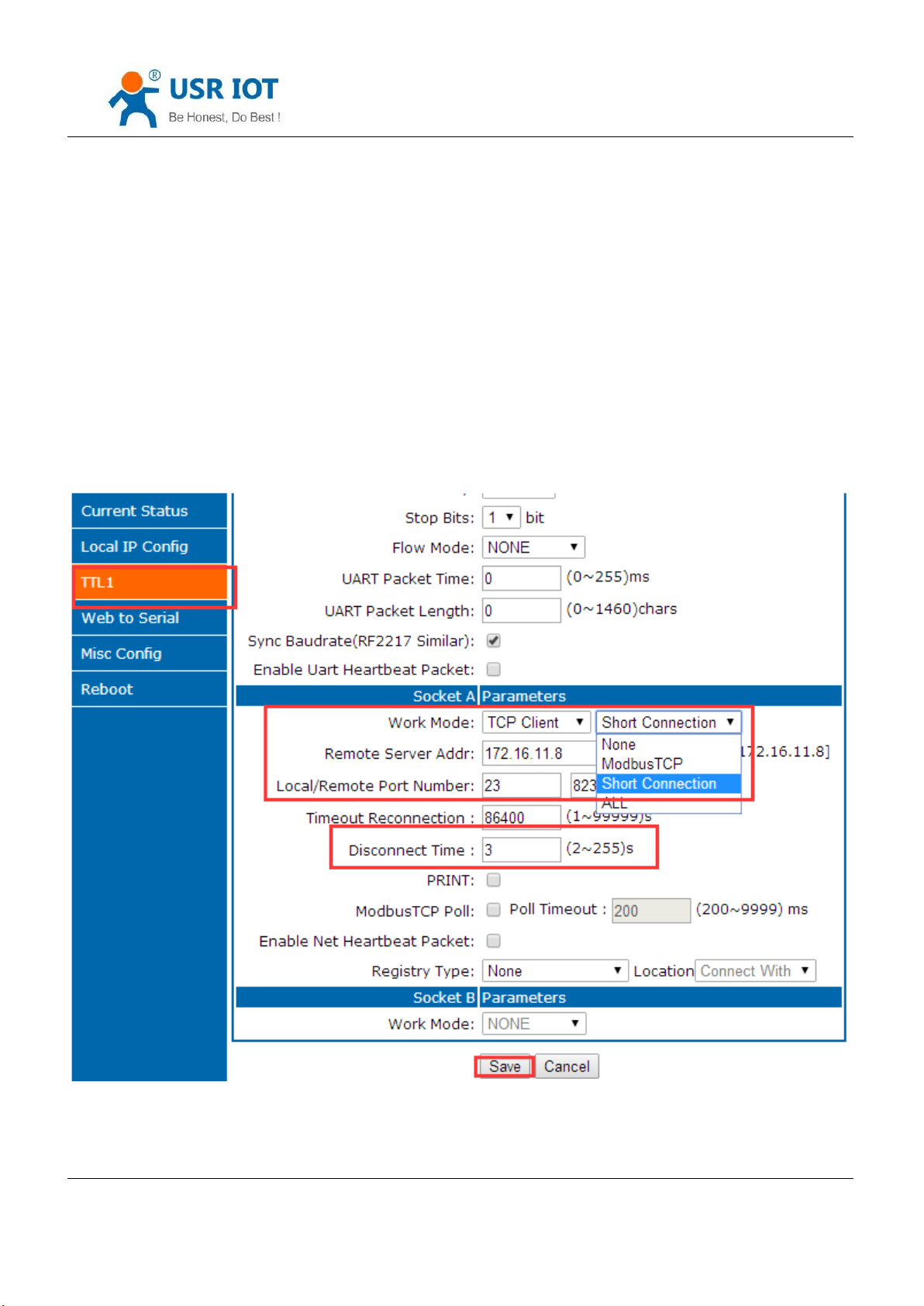
Used to save the server resource, used in the situation that several point to one. Short connection make sure all
the connection can work, do not need any extra way to filtrate.
TCP short connection can used under the TCP client mode. Enable the short connection and send data, if there is
no data received any data in serial port or the net port, it will disconnect.
Default disable, the interval time can be set, range from 2~255s, default 3s. setting diagram are as fellow:
Diagram 4.4.10-1 Short Connection
Jinan USR IOT Technology Limited 65 / 120 [email protected]
Page 66

USR-K7 User Manual www.usriot.com
5. Parameters Setting
This character shows how to set K7 parameters to realize the application.
The way to set K7 including setup software, webpage setting and serial port setting.
Configuring steps:
Modify the user name and password→ setting the access way to the IP address→ serial parameter→ the related
parameters for working method.
To ensure the normal using of software, the following steps are necessary
1.When using setting software to setting parameter, K7 and the PC of the setting software are in a LAN.
2.Close the antivirus software and firewall software.
3.Close the irrelevant network card.
5.1. Net Protocol Setting Parameters
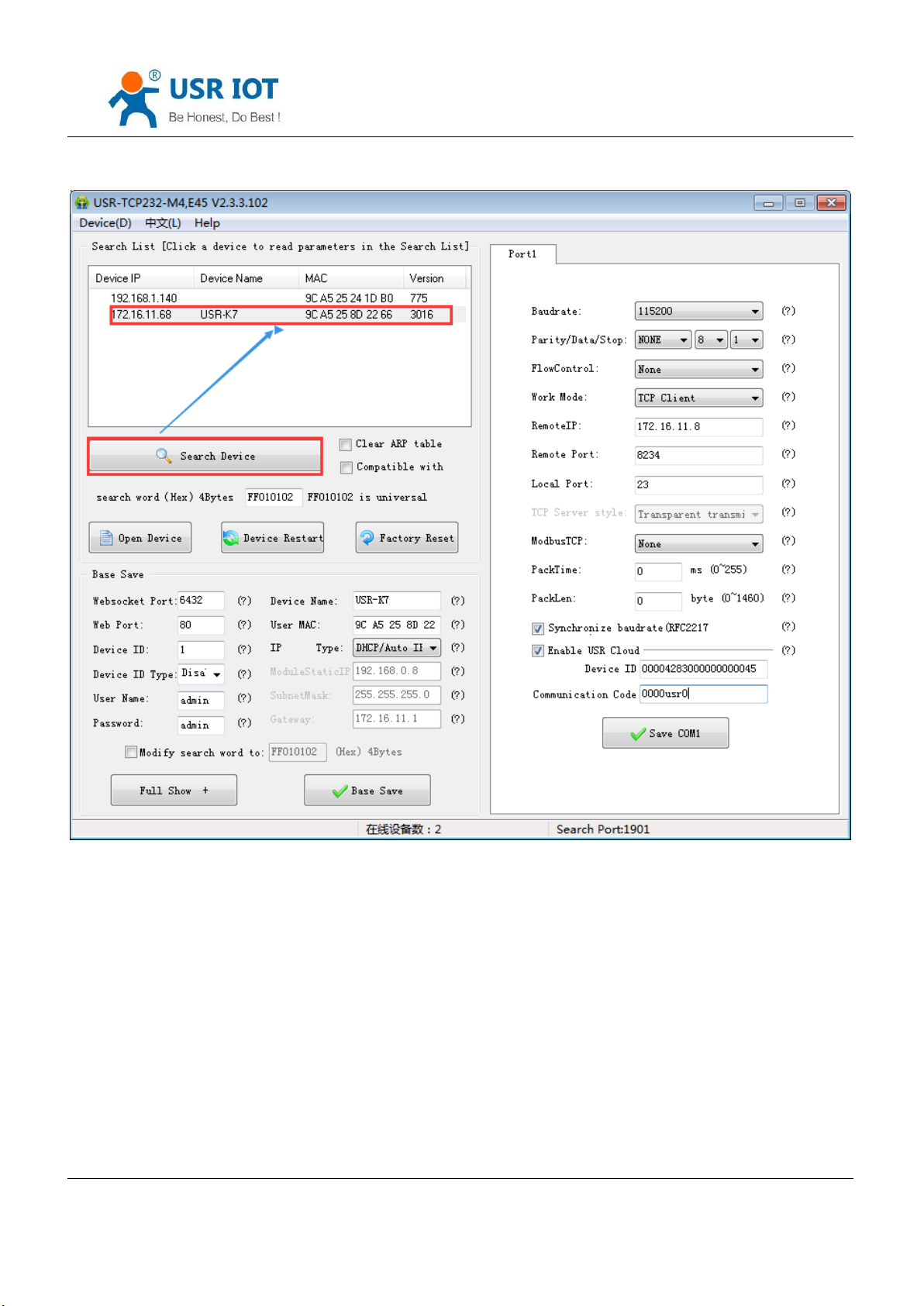
5.1.1. Setup Software Setting Parameters
Click setup software and search K7, searched all K7. Display the device IP, device name, MAC and version for K7.
Jinan USR IOT Technology Limited 66 / 120 [email protected]
Page 67
USR-K7 User Manual www.usriot.com
Diagram 5.1.1-1 Searching
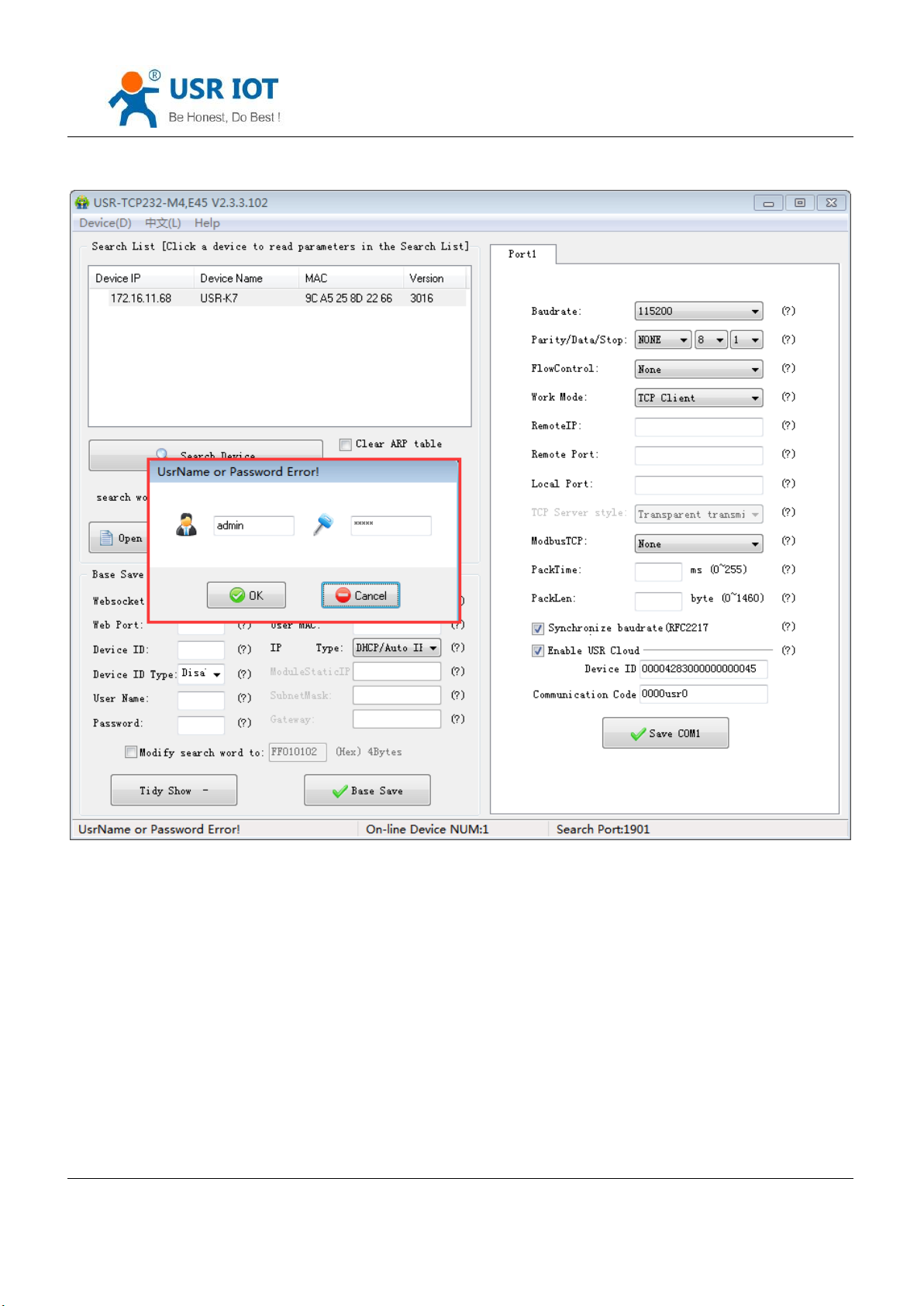
1. Click the K7 you searched. At first you should check the password, if the password is correct, there will show the
information for K7, if the password is error, software will bond out the window that you should enter the username and
password, the click enter. Both default username and password are admin. All the default parameters setting and there
will not bond out username and password.
Jinan USR IOT Technology Limited 67 / 120 [email protected]
Page 68
USR-K7 User Manual www.usriot.com
Diagram 5.1.1-2 Username and Password
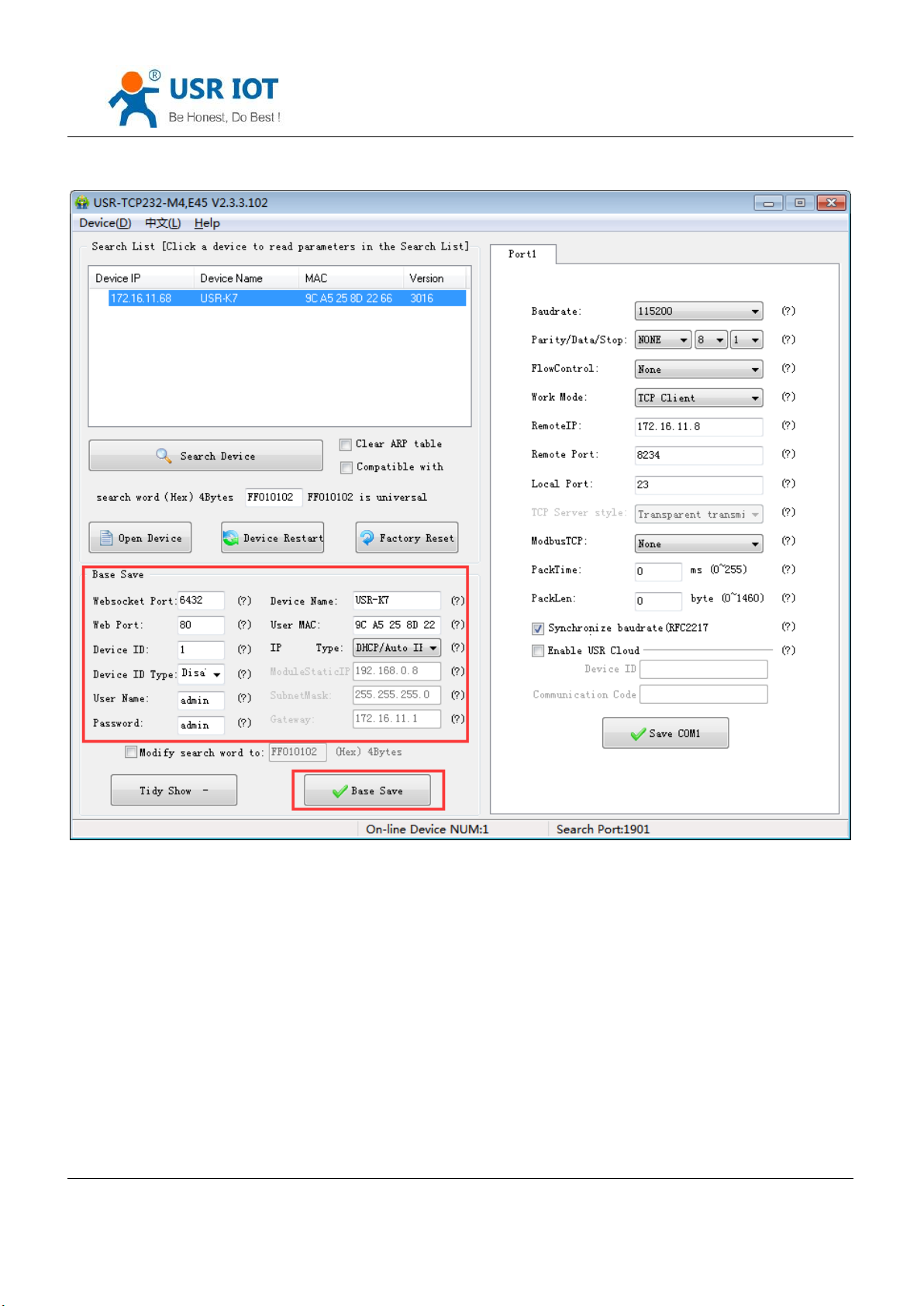
2. Basic Parameters setting
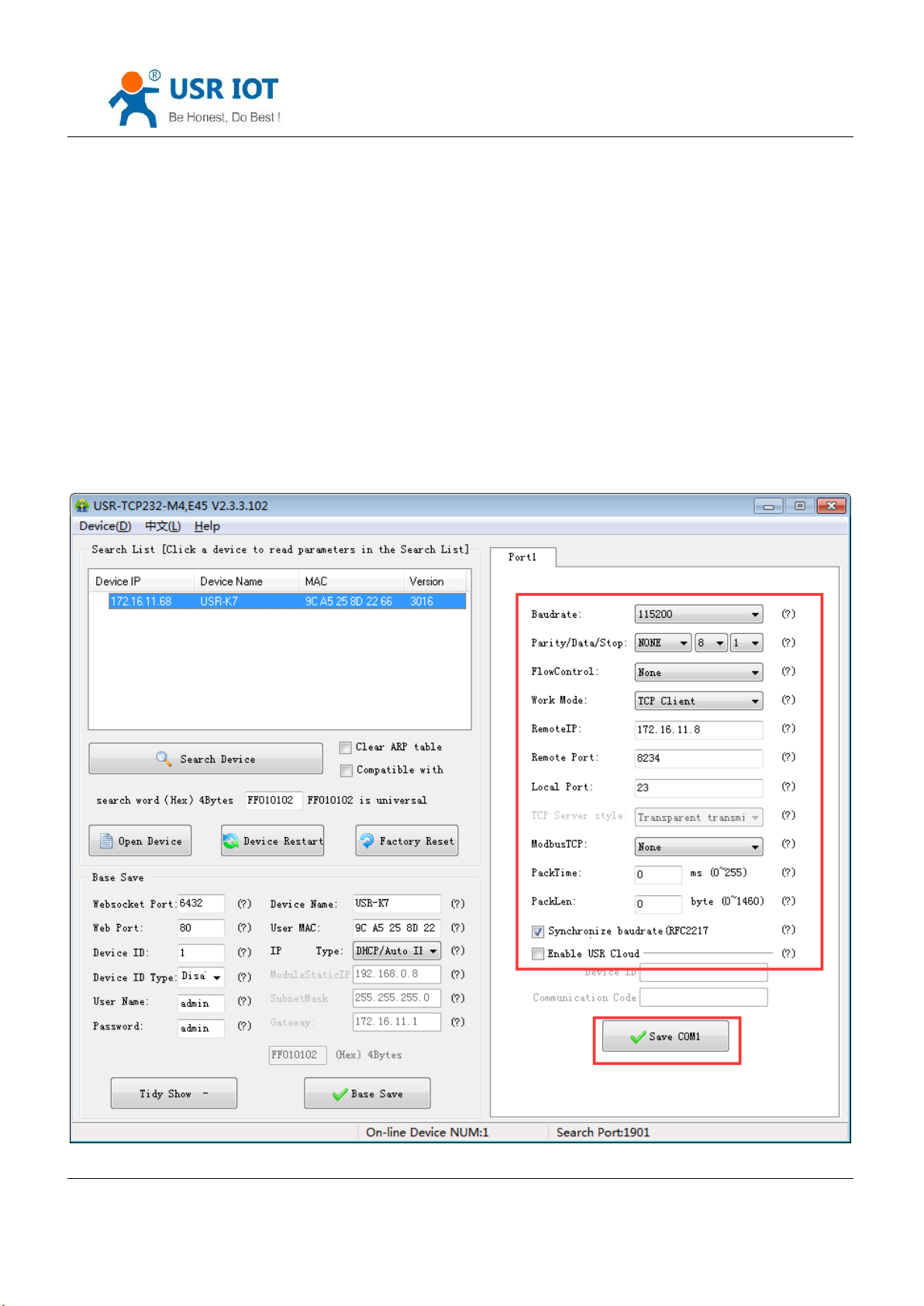
Click Tidy Show and you will see all the basic parameters we can set, setting the parameters you need, and then
base save, and you can save the parameters you set, keep others in default.
Jinan USR IOT Technology Limited 68 / 120 [email protected]
Page 69
USR-K7 User Manual www.usriot.com
Diagram 5.1.1-3 Basic Parameters
Websocket port: refer to the character “ webpage to serial”, this port is the webpage to serial port
Web port: the default port to access the webpage is 80.
Username: the username forK7 to log in, the certification code to modify the parameters which can prevent other
user in the same LAN from changing K7 parameters.
Password: as the username, the password for K7.
Device name:default USR-K7 and can be modify
Jinan USR IOT Technology Limited 69 / 120 [email protected]
Page 70
USR-K7 User Manual www.usriot.com
User MAC: the MAC address of the K7
IP address type: static IP and DHCP
Module static IP: the static IP for K7, keep it in the same LAN with your router.
Subnet mask: default is 255.255.255.0
Gateway: usually is the IP for router, setting correctly and user can communicating across the LAN and DDNS.
3. Port setting
Modify the parameters you need to setting then save them.
Jinan USR IOT Technology Limited 70 / 120 [email protected]
Page 71

USR-K7 User Manual www.usriot.com
Diagram 5.1.1-4 Serial Port Parameters
Baud rate: serial port communication baud rate, can be the standard baud rate or customize.
Parity/ data/ stop:serial parameters: parity:none, odd, even, mark, space; data:5,6,7,8; stop:1,2.
Flow control: None/RS485/Hardware, Hardware means hardware flow control, none or RS485 means no flow
control.
Work mode: TCP Server /TCP Client/ Httpd Client/UDP Client/UDP Server
Remote IP/remote port:the IP and port of server connected when K7 work as a client including TCP Client/ Httpd
Client/UDP Client
Local port: the port that K7 build connection, recommend set to be 0 when K7 work as TCP client, which means
build in random connection.
TCP server style: none
Modbus TCP: setting when using the modbus TCP to modbus RTU
Pack time and packlen: used in the serial port mapping
Synchronize baud rate(RFC2217)
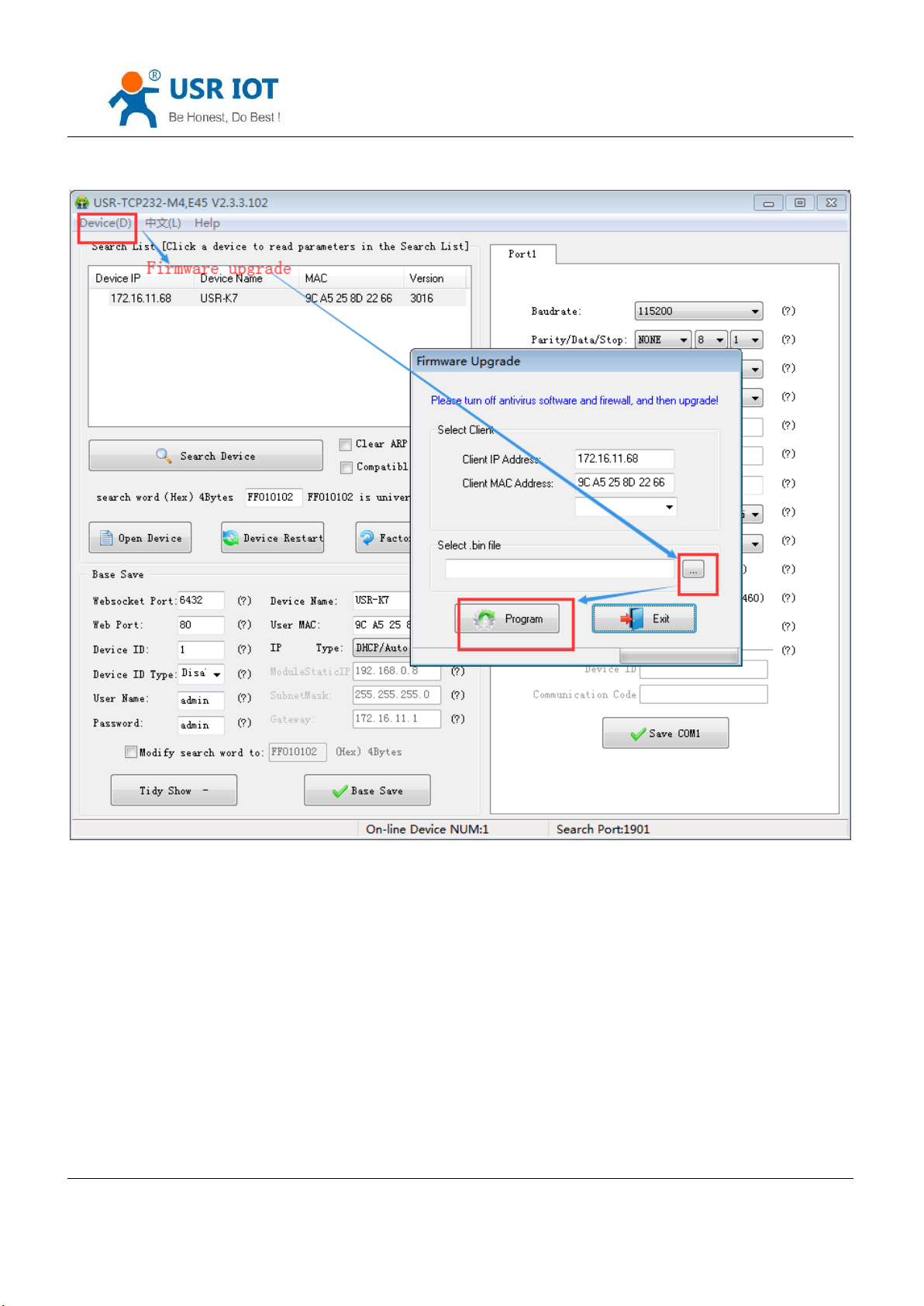
4. Firmware upgrade:
If the module firmware need to upgrade to the high vision,user can consult with sales to get the upgraded
firmware and click the device, upgrade the vision. When you upgrade it, connect directly the device and PC and notice
that PC upgrading module is forbidden.
Select the device, then choose upgrade the firmware.
Jinan USR IOT Technology Limited 71 / 120 [email protected]
Page 72
USR-K7 User Manual www.usriot.com
Diagram 5.1.1-5 Firmware Upgrade
5.1.2. Setting Protocol Setting Parameters
Via the protocol, you can complete: search, set, save parameters, restore. For user to make their own setup parameters.
1. Net setting parameters steps
① Built socket:
Jinan USR IOT Technology Limited 72 / 120 [email protected]
Page 73
USR-K7 User Manual www.usriot.com
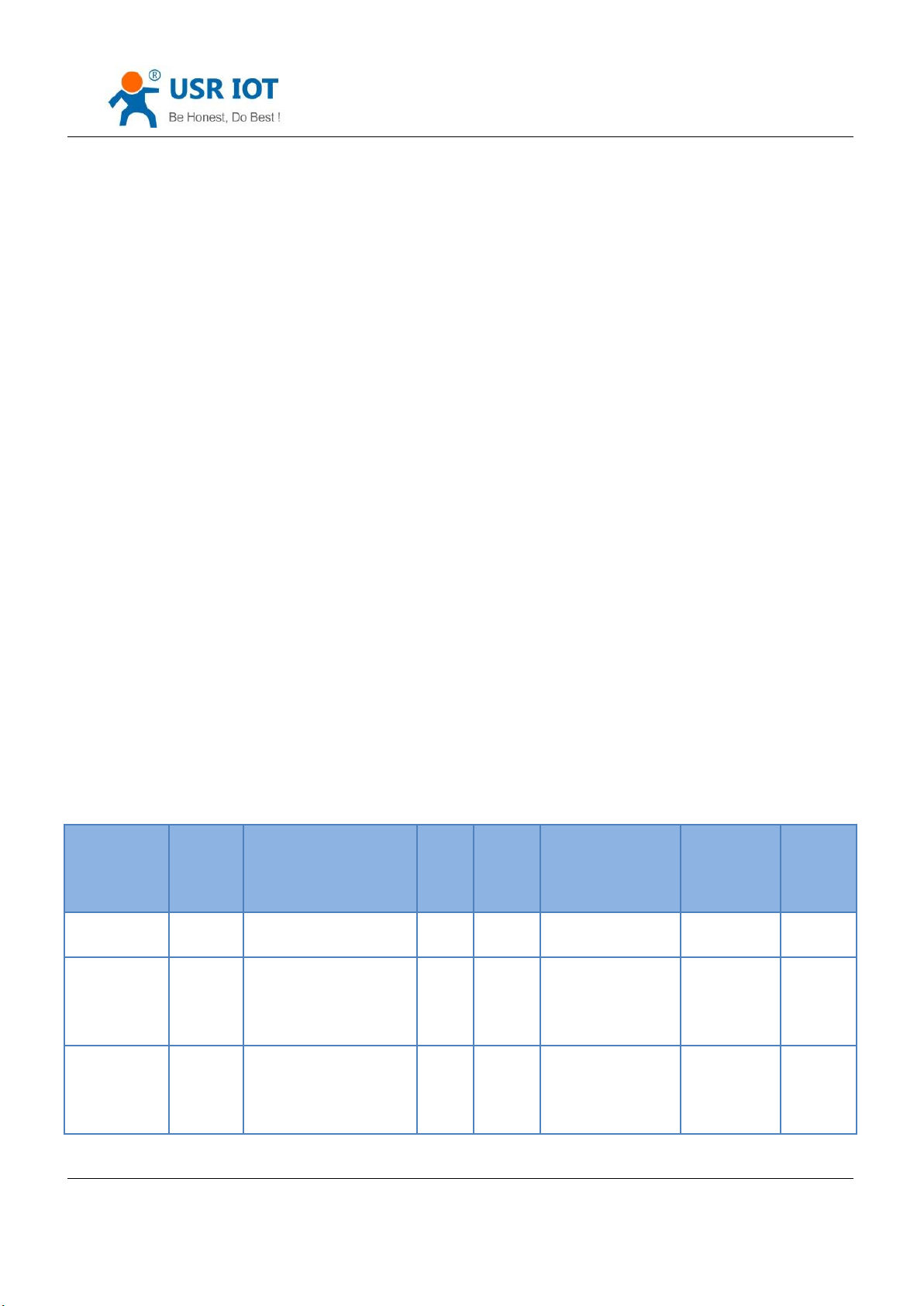
function
Package
head
length
(order~ parameters bit)
order
MAC
(6 bits)
Username and
password (12 bits)
parameters
Parity
(sum)
search
FF
01
01 - - - 02
restore
FF
xx
02
[MAC]
[usrname]
[password]
-
xx
Read setting
FF
xx
03
[MAC]
[usrname]
[password]
-
xx
Build a UDP socket, remote IP :255.255.255.255, remote port:1901.
② Setting command steps
Send searching order on the internet.
K7 return the IP address and MAC.
Net port read the parameters of K7.
Combine the MAC address the username, password and the parameter that need setting to be a setting
command.
Send setting command.
K7 return setting right.
Upper send storage setting command.
K7 return setting right.
Restart command.
The return command of K7 right (wrong).
2. Net setting command content
① Command query
Jinan USR IOT Technology Limited 73 / 120 [email protected]
Page 74

USR-K7 User Manual www.usriot.com
Storage
setting
FF
xx
04
[MAC]
[usrname]
[password]
-
xx
basic setting
FF
xx
05
[MAC]
[usrname]
[password]
basic
parameters
xx
serial port 0
setting
FF
xx
06
[MAC]
[usrname]
[password]
serial port
parameters
xx
serial port 1
setting
FF
xx
07
[MAC]
[usrname]
[password]
serial port
parameters
xx
serial port 2
setting
FF
xx
08
[MAC]
[usrname]
[password]
serial port
parameters
xx
USR-cloud
0x10
[MAC]
[usrname]
[password]
Form 5.1.2-1 Command Query
Note: the parity is sum parity: begin at the length add to the first digit of the parity. The sum is the value to parity,
and reserve the lower bits.
② Some command example
Search command
Search command is: FF 01 01 02, parity sum 02 = 01 + 01.
Restore command
FF 13 02 D8 B0 4C C0 0D 65 61 64 6D 69 6E 00 61 64 6D 69 6E 00 2D
parity sum:
2D = 13 + 02 + ... + 6E + 00
Note: username and password are 5 bytes+00, fill the blanks with 0
Jinan USR IOT Technology Limited 74 / 120 [email protected]
Page 75

USR-K7 User Manual www.usriot.com
Name
bits
E.g.
Instr
Uc Sequence Num
1
xx
Fill what you read
Uc CRC
1
xx
Fill what you read
Uc Version
1
xx
Fill what you read
Uc Flags
1
80
IP address type
8th is 0: DHCP: 1: static IP
Us Location URL Port
2
20 19
Fill what you read
Us HTTP Server Port
2
50 00
HTTP server port
Uc User Flag
1 Fill what you read
Ul Static IP
4
38 00 A8 C0
Static IP
Ul Gateway IP
4
01 00 A8 C0
Gateway
Ul Subnet Mask
4
00 FF FF FF
Subnet Mask
Uc Mod Name
16
55 53 52 2D 54 43 50
32 33 32 2D 45 00 00
00 00
Name for K7
Read setting command
Send (16bits): FF 13 03 D8 B0 4C C0 0D 65 61 64 6D 69 6E 00 61 64 6D 69 6E 00 2E
Storage setting command
Send (16bits):FF 13 04 D8 B0 4C C0 0D 65 61 64 6D 69 6E 00 61 64 6D 69 6E 00 2F
③ detailed example for some command
Basic parameter setting command
Jinan USR IOT Technology Limited 75 / 120 [email protected]
Page 76

USR-K7 User Manual www.usriot.com
Username
6
61 64 6D 69 6E 00
username
password
6
61 64 6D 69 6E 00
password
Uc Net Send Time
1 Fill what you read
Ui Id
2
01 00
device ID
Uc Id Type
1
00
Device ID type(0~3)
0:no use
1:send ID when connect
2:send ID when send data
3:both
ucUserMAC
6
FF FF FF FF FF FF
Device MAC address
ucReserved
8 Unused
Name
Bits
E.g.
Instr
Ul Baud Rate
4
00 C2 01 00
Serial port baud rate
Uc Data Size
1
08
Serial port data bits(0X05/0x06/0x07/0x08)
Uc Parity
1
01
Serial port parity
1: no, 2: odd, 3: even, 4: mark, 5: space
e.g.
FF 56 05 D8 B0 4C C0 0D 65 61 64 6D 69 6E 00 61 64 6D 69 6E 00 04 78 03 00 20 19 50 00 02 07 00 A8 C0 01 00 A8 C0
00 FF FF FF 55 53 52 2D 4B 33 00 00 00 00 00 00 00 00 00 00 61 64 6D 69 6E 00 61 64 6D 69 6E 00 02 01 00 00 D8 B0
4C C0 0D 65 10 0E 00 00 01 00 00 00 31
Port parameters command details
Form 5.1.2-2 Basic Parameter Web Setting
Jinan USR IOT Technology Limited 76 / 120 [email protected]
Page 77

USR-K7 User Manual www.usriot.com
Uc Stop Bits
1
01
Serial port stop(0x01/0x02)
Uc Flow Control
1
00
Serial port flow control(0x01: no, 0x03: HW)
Ul Telnet Timeout
4
00 00 00 00
Time for net reconnection
Us Telnet Local Port
2
17 00
Local port
Us Telnet Remote Port
2
17 00
Remote port
Ui Telnet URL
30
31 39 32 2E 31 36 38 2E
30 2E 31 00 00 00 00 00
00 00 00 00 00 00 00 00
00 00 00 00 00 00
Send the IP address or domain name in ASCII code,
e.g:92.168.0.1
Ul Telnet IP Addr
4
00 00 00 00
No effect, set randomly
Uc Flags
1
02
Special selection
Enable modbus function: 0x010(bit2)
Enable similar RFC2217 function: 0x08(bit3)
Enable USR-cloud function: 0x010(bit4)
Uc Work Mode
1
03
Work mode:
0: UDP, 1: TCP Client, 2: UDP Server, 3: TCP Server, 4:
HTTPD Client
uiPackLen
4
C8 00 00 00
Serial packing length
ucPackTime
1
0A
Serial packing time
ucTimeCount
1
91
Fill what you read
TCP server type
1 1 Fill what you read
ucReserved
4
random
Reserve to extend
Form 5.1.2-3 Serial Port Parameters
Jinan USR IOT Technology Limited 77 / 120 [email protected]
Page 78

USR-K7 User Manual www.usriot.com
name
bits
E.g.
Instr
TAG_STATUS
0
FF
Packet_length
1
24 CMD_DISCOVER_TARGET
2
01
Board_type
3
00
Board_ID
4
00 Client_IP_address
5~8
C0 A8 00 07
device IP( higher in front )
MAC_address
9~14
AC CF 23 20 FE 3D
device MAC( higher in front )
Firmware_version
15~18
D0 07 12 34
D0 07 : Firmware version( lower in front)
12 34: encryption version, others are not encrypted
version; encrypted version can upgrade the encrypt
program and no encrypted one should analyze the
encryption then send.
Application_title
19~34
55 53 52 2D 54 43
50 32 33 32 2D 35
30 30 00 00
device name
checksum
35
F0
(this value can be ignore)
Check sum initial value is 0x00, reduce every bits of
TAG_STATUS in order,till the last bit, and the result is
E.g.
FF 52 06 D8 B0 4C C0 0D 65 61 64 6D 69 6E 00 61 64 6D 69 6E 00 00 C2 01 00 08 01 01 01 00 00 00 00 17 00 17
00 31 39 32 2E 31 36 38 2E 30 2E 32 30 31 00 00 00 00 00 00 00 00 00 00 00 00 00 00 00 00 00 00 00 00 00 09 03 00
00 00 00 00 00 81 01 01 01 01 85
3. Net return the command
① The result of search command return
Jinan USR IOT Technology Limited 78 / 120 [email protected]
Page 79
USR-K7 User Manual www.usriot.com
checksum.
Form 5.1.2-7 Return Command
e.g.
search command returned result(36 bytes):
FF 24 01 00 00 C0 A8 01 6B D8 B0 4C C0 0D 65 C3 0B 01 00 55 53 52 2D 4B 33 00 00 00 00 00 00 00 00 00 00 8E
Parity is minus the sum parity, original value is 0x00, then minus every bytes one by one as below:
0x8E = 00 - FF - 24 - 01 - 00 - 4B - ... - 31 - 00 - 00
② Restart command return result
Respond (4 bits): FF 01 02 4B if the password right 4B = 'K'
FF 01 02 45 username password wrong 45 ='E'
③ Read order command return result
Return all the parameters of K7 net, totally 180 bytes without parity
No protocol and return directly
Returned content:180 bytes(basic parameters + serial parameters+ USR-cloud)
④ Storage setting command return result
Correct:
FF 01 04 4B
⑤ Other return
Parity and return: return 'E' + right value:
Correct perform: FF 01 CMD‘K’:
Username password wrong return: FF 01 CMD‘P‘:
Other wrong return: FF 01 CMD‘E’.
Jinan USR IOT Technology Limited 79 / 120 [email protected]
Page 80
USR-K7 User Manual www.usriot.com
5.2. Webpage Setting Parameters
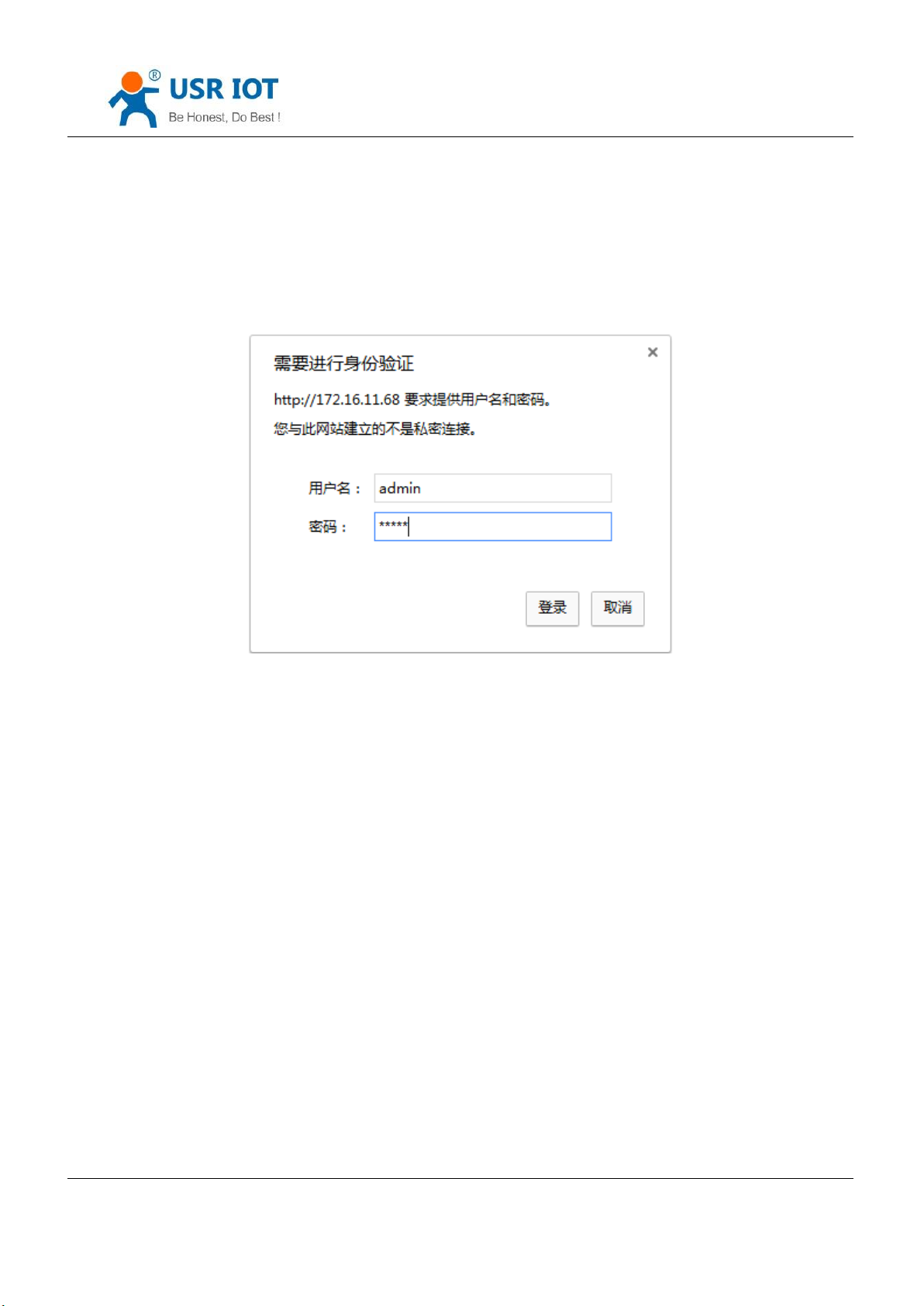
Open the browse and enter the IP of K7,( default is 192.168.0.7) and user can open the K7 login windows. Enter
username:admin, password:admin, then click enter and enter the webpage.
Diagram 5.2-1 Username and Password
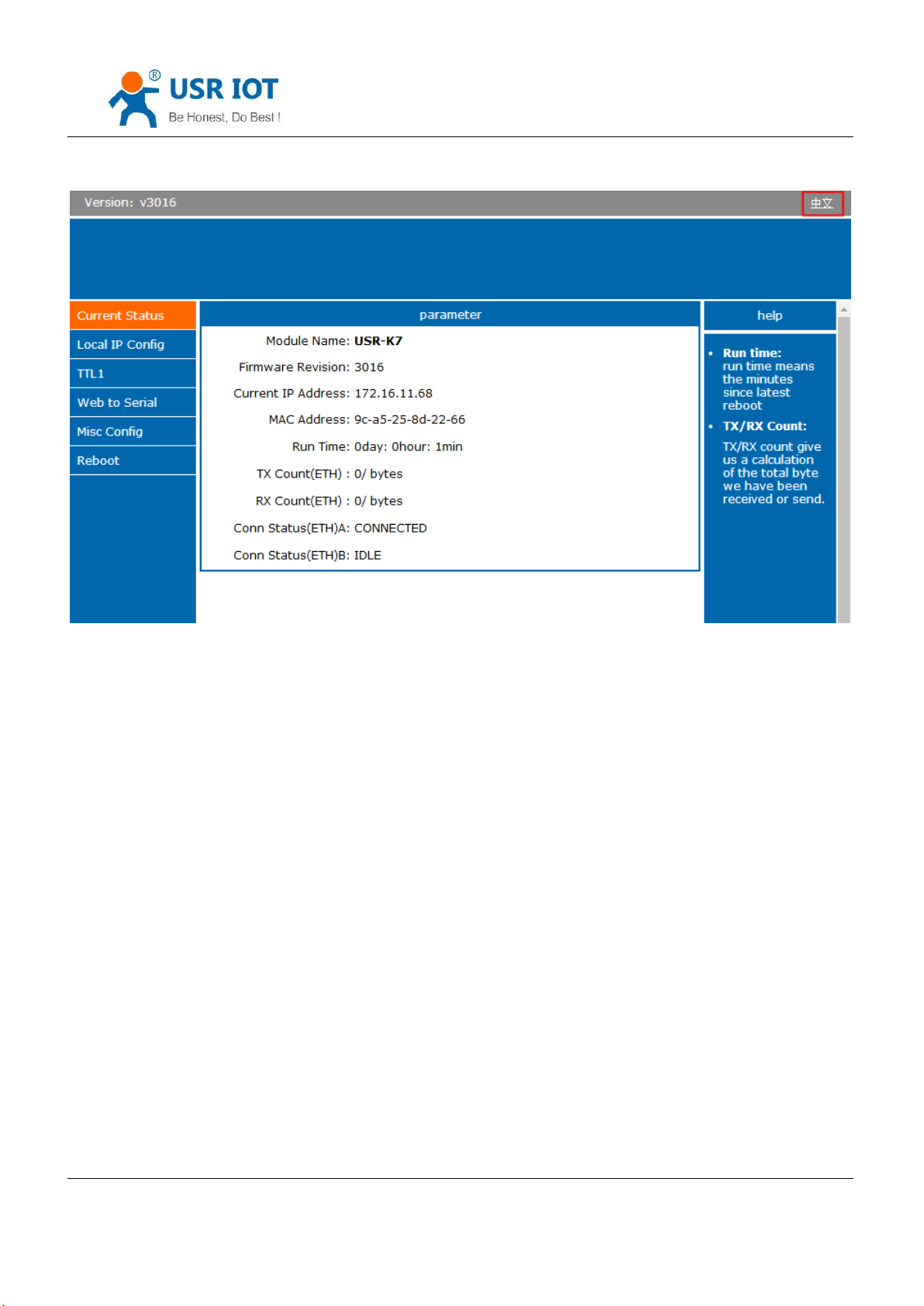
Click the English on the right up, change the language.
Jinan USR IOT Technology Limited 80 / 120 [email protected]
Page 81
USR-K7 User Manual www.usriot.com
Diagram 5.2-2 Language
Note: default is English.
1. Current status webpage
Module name: default is USR-k7
Firmware revision: the current version is 3016
Current IP address: default is static IP(192.168.0.7),here using DHCP to connect the PC.
NAC address
Run time: count time from power on.
TX count(ETH): the send number of the data from power on.
RX count(ETH):the received number of the data from power on.
Conn status(ETH): using in the debugging, check the connection.
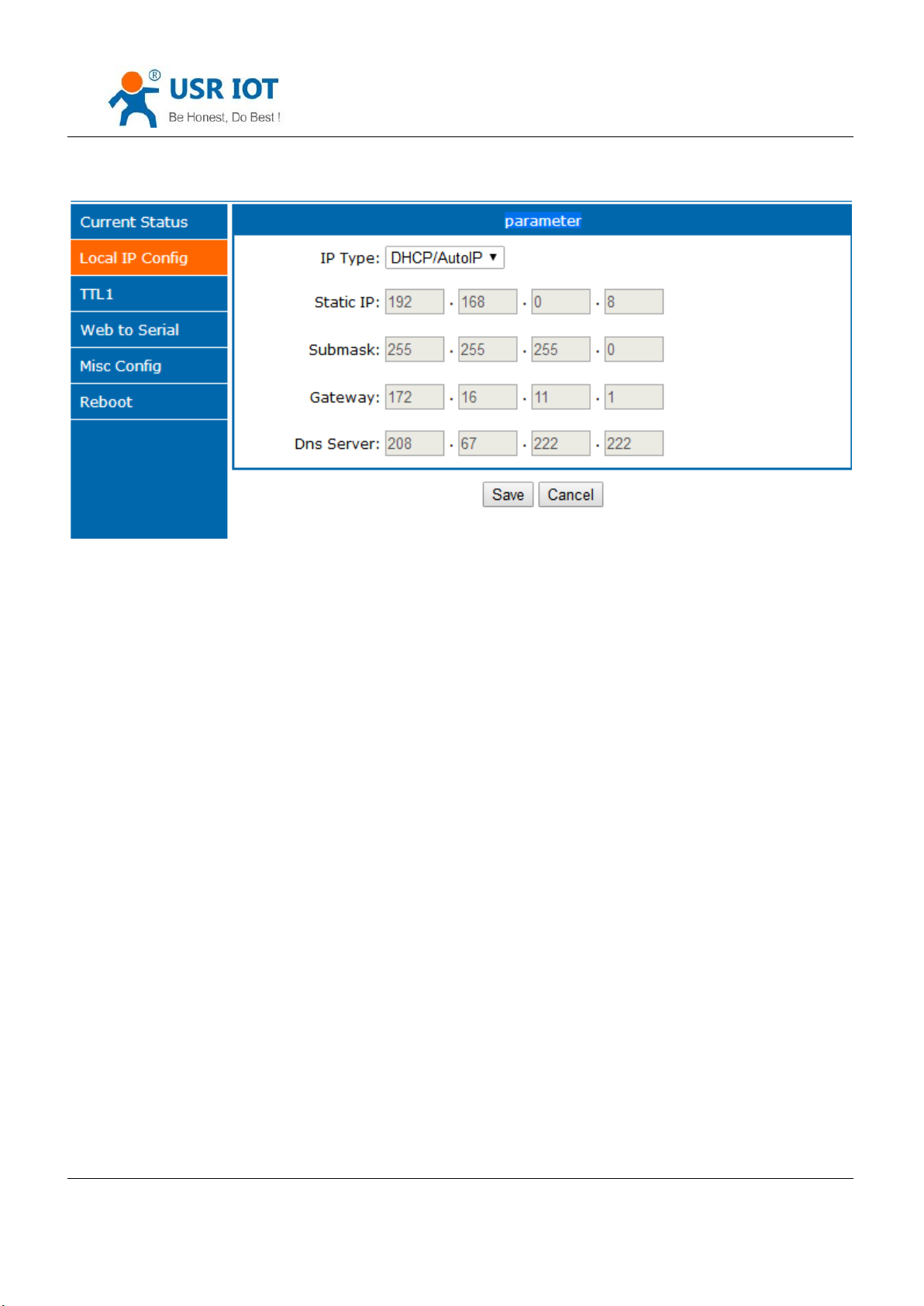
2. Local IP config
Jinan USR IOT Technology Limited 81 / 120 [email protected]
Page 82
USR-K7 User Manual www.usriot.com
IP type: DHCP or static IP
Static IP
Sub mask:subnet mask
Gateway:gateway address
3. TTL1
Diagram 5.2-3 local IP
Jinan USR IOT Technology Limited 82 / 120 [email protected]
Page 83
USR-K7 User Manual www.usriot.com
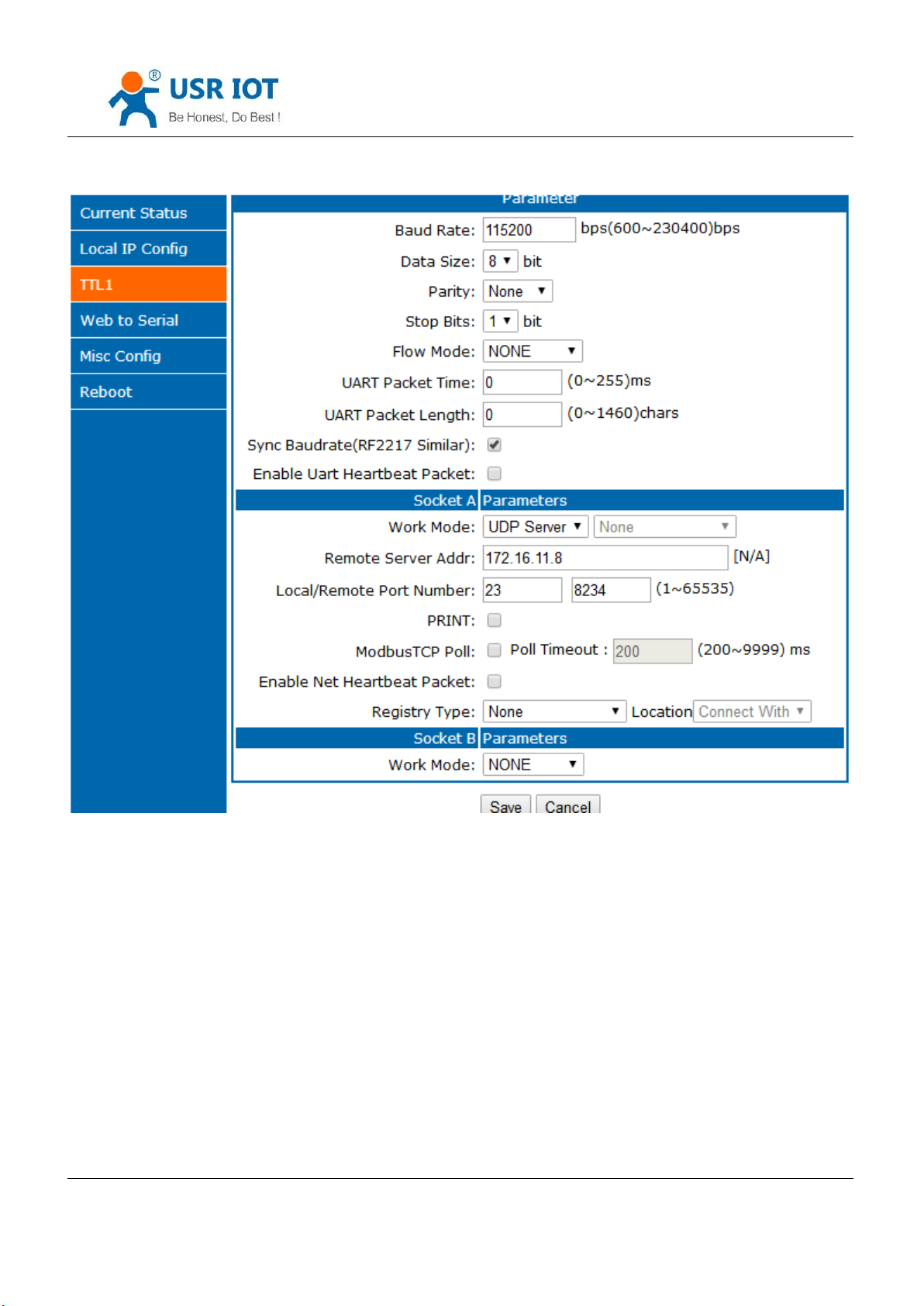
Diagram 5.2-4 Port 1 Parameters Configuring
Baud rate
Data
Parity
Stop bits
Flow mode: none/ hardware
Port mapping: UART packet time and length can be set here
Jinan USR IOT Technology Limited 83 / 120 [email protected]
Page 84
USR-K7 User Manual www.usriot.com
Similar RFC2217
Enable UART heartbeat package
Work mode: TCP server,TCP client, UDP server,UDP client, HTTPD client
Remote server address
Local/ remote port number
Print:net printing function,default disable
4. Web to serial
Diagram 5.2-5 Webpage to Serial
5. Misc Config
Jinan USR IOT Technology Limited 84 / 120 [email protected]
Page 85
USR-K7 User Manual www.usriot.com
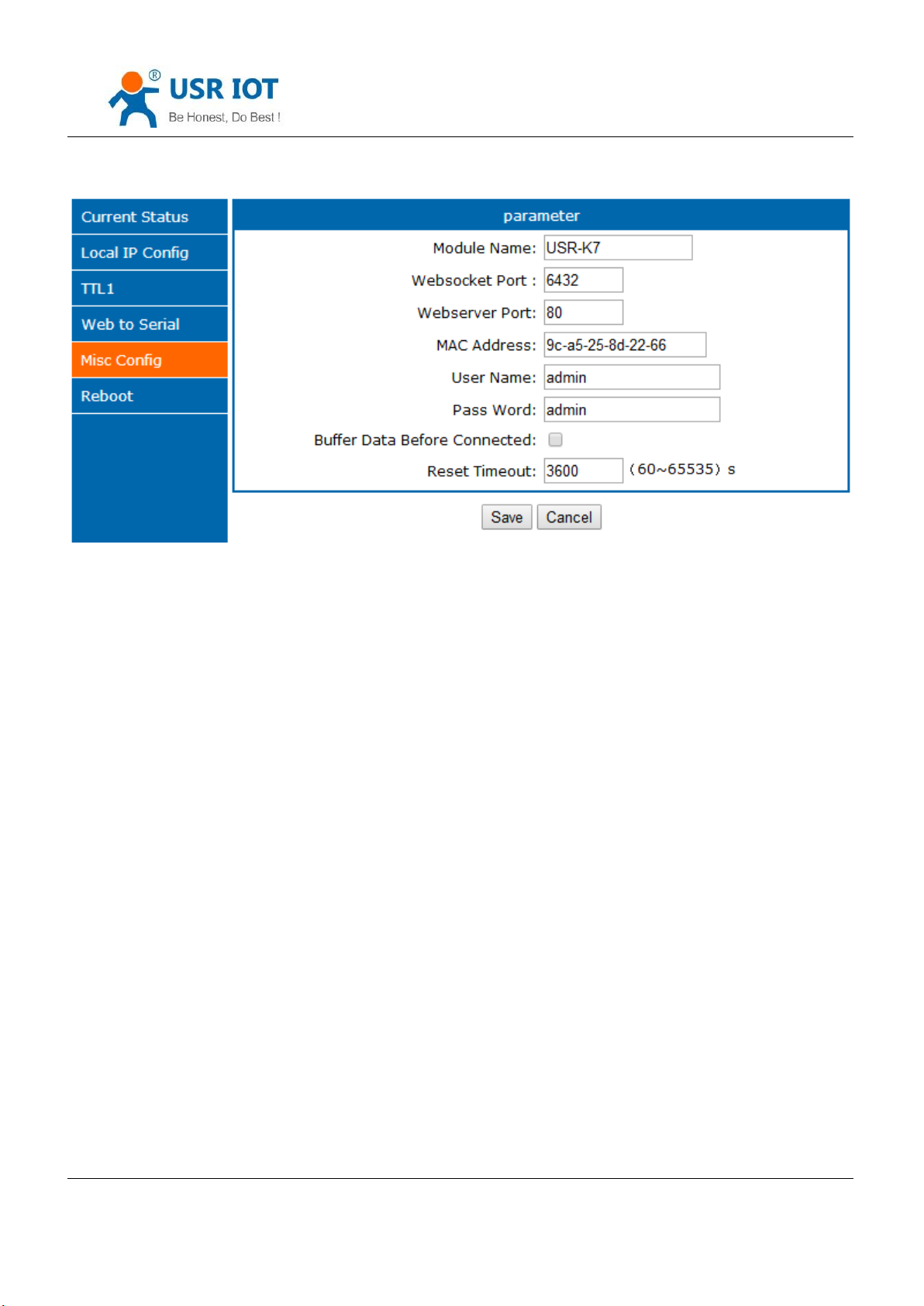
Diagram 5.2-6 Misc Config
Module name:default:USR-K7 and can be change
Websocket port
Net port
MAC address( can be modify)
Username
Password
Buffer data before connected: whether to clear the buffer data.
Reset timeout: after set time interval, serial or net have not receive the data, K7 will reset, and 0 means this
function disable.
6. Reboot
Jinan USR IOT Technology Limited 85 / 120 [email protected]
Page 86
USR-K7 User Manual www.usriot.com
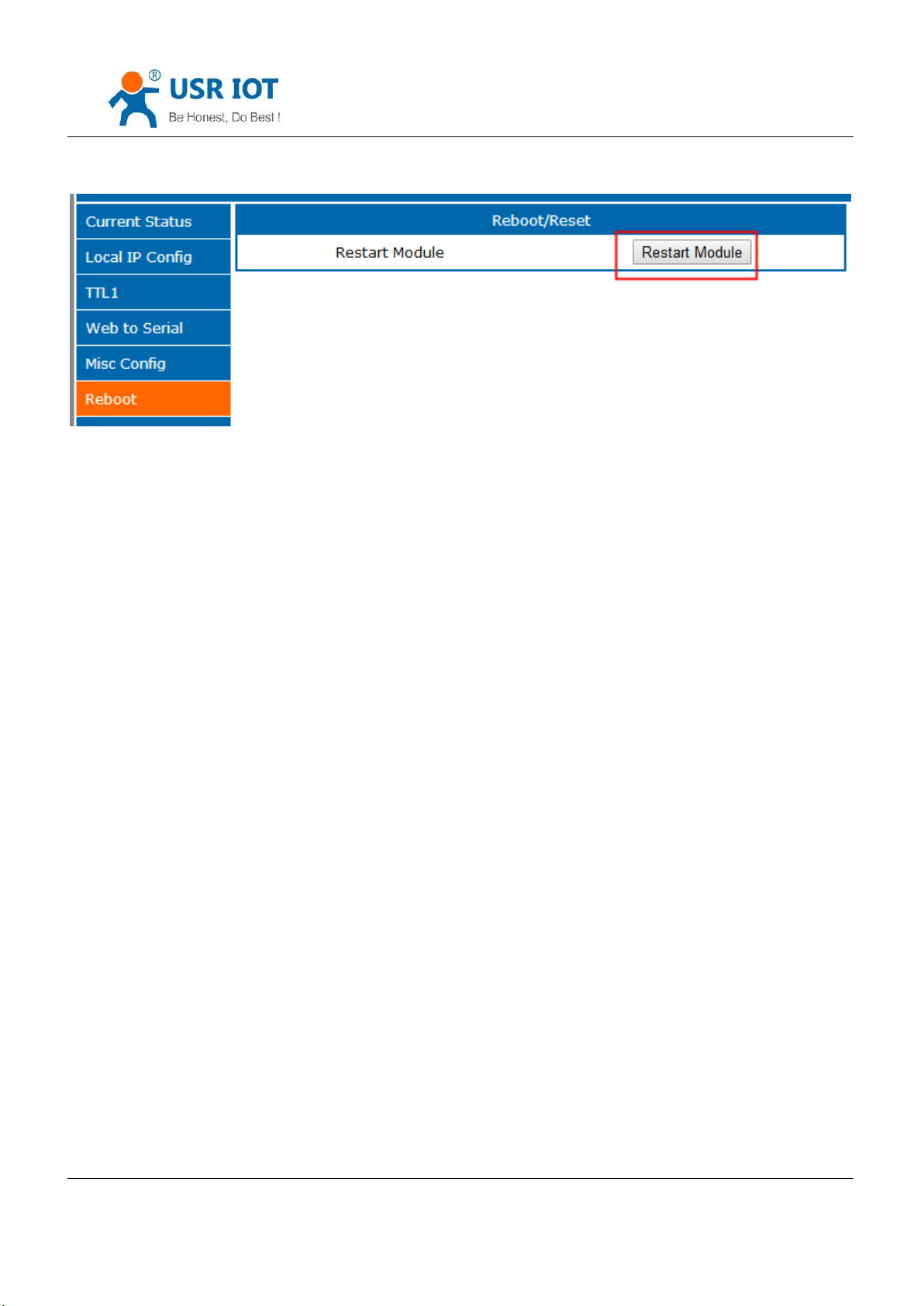
Diagram 5.2-7 Reboot
Save all the parameters and click restart module to work.
5.3. AT Command
5.3.1. Net AT Command
Net AT command, the command collection that delivery via net port and module under the command mode,
details are like the serial port command.
Net AT command mode: keep the module and PC in the same LAN, and the user can setting via AT command.
Send www.usr.cn via UDP, if the module and PC in the same LAN, PC will receive the return data from K7, which
means module have enter the net AT command and can configure it.
Under AT command mode, if there is no command for 30s, K7 will exit the AT command.
5.3.2. Serial AT Command
AT+ command is the command collection that perform the command transport using UART and module under the
order mode. Later we will interpret the type in detail.
Powered successfully, we can setting the module with UART.
The default UART port parameters of the module are: baud rate1152000, no parity, data 8 and stop 1.
Instr
Jinan USR IOT Technology Limited 86 / 120 [email protected]
Page 87
USR-K7 User Manual www.usriot.com
AT command test tools.UART interface commend to use secureCRT software tool or USR pro APP. Below are using
the secureCRT with UART to perform.
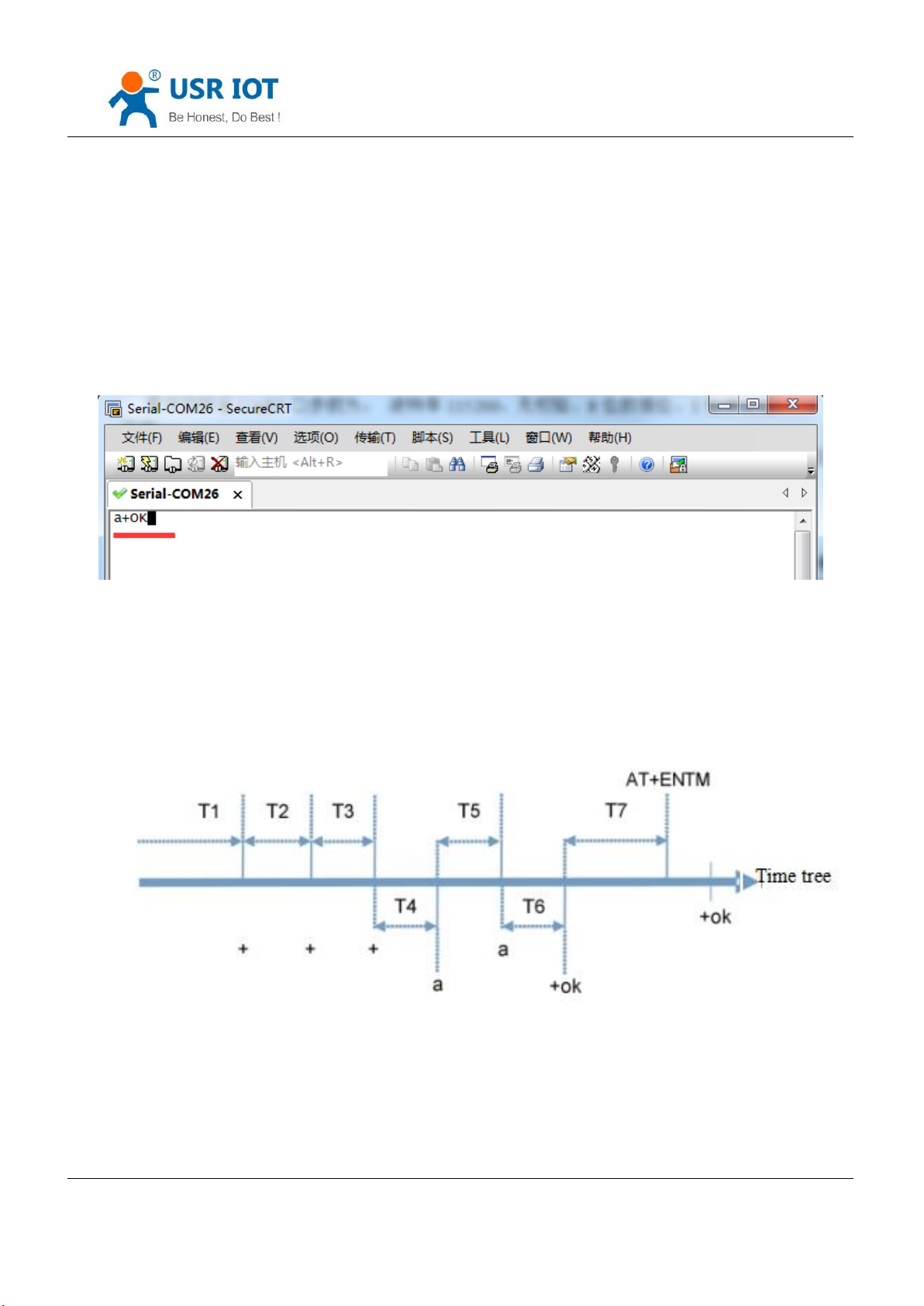
From transparent transport to order mode need two step as below:
Fill “+++”in the UART. After the module receive the “++++”,it will send a “a” to confirm;
Fill the confirming “a” in the UART, after the module receive and send “+ok”, enter the command mode.
Diagram 5.3.1-1 Enter the AT Command
Instr: if no feedback after fill “++++”and “a”, as the above.
Fill “+++”and “a” need to achieve in the time to reduce the chance of entering command mode while working
normally accidentally. Detail requirement are as fellows.
Diagram 5.3.1-2 Time Tree
Time requirement:
T1>the interval of serial port package
Jinan USR IOT Technology Limited 87 / 120 [email protected]
Page 88
USR-K7 User Manual www.usriot.com
Error code
Instr
-1
Invalid format
-2
Invalid order
-3
Invalid operator
-4
Invalid parameter
-5
Not allow
T2<300ms
T3<300ms
T5<3s
The order change into temporary command mode from transparent transport mode:
1. Serial mode device send “+++”to module continuously. The module receive and send “a” back. Before sending“+++”is
the packaging time and can not send any data.
2. After receive “a” feedback a “a”in 3s.
3. After the module receive “a, send “ok”to the device, and enter “AT”command
4. After the device receive “+ok” and know the module enter the AT command mode, then send AT command.
The order change into net transparent transport from AT command mode:
1.Serial device send “AT+ENTM”to module.
2.After the module receive the command, feedback “+ok”, then back to the previous working mode.
5.3.3. Error AT Command
Jinan USR IOT Technology Limited 88 / 120 [email protected]
Form 5.3.3-1 Error Code List
Page 89
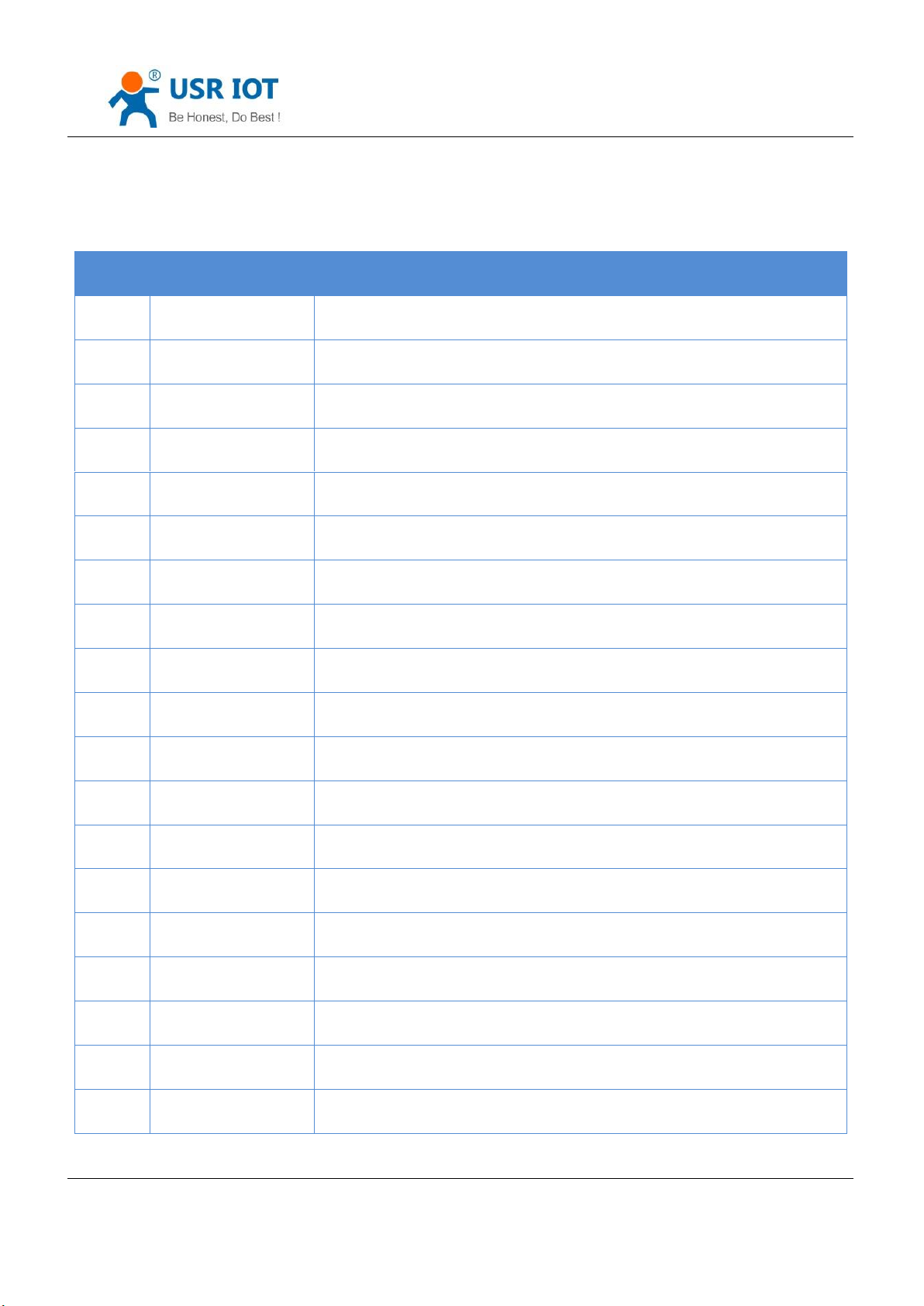
Num
command
Instr
1 E Enable/disable the echo function
2 Z restart module
3
VER
Query the vision
4
ENTM
Exit AT command mode and enter the transparent transmission
5
MAC
Query module MAC address
6
RELD
Reset default settings
7
WANN
Setting/ query WAN port parameters
8
DNS
Setting/ query DNS server address
7
USERMAC
Setting customize MAC
9
WEBU
Setting/ query username and password
10
WEBPORT
Setting/ query webpage port
11
SEARCH
Setting/query search key world
12
PLANG
Setting/query webpage language
13
UARTN
Setting/ query serial port N parameters
14
UARTTLN
Setting/ query serial port N packing parameters
15
SOCKMN
Setting/ query N serial port socket M parameters
16
SOCKLKMN
Query the connection status
17
WEBSOCKPORT1
Setting/ query websocket port number
18
REGENN
Setting/ query registration package N type
5.3.4. AT Command
USR-K7 User Manual www.usriot.com
Jinan USR IOT Technology Limited 89 / 120 [email protected]
Page 90

USR-K7 User Manual www.usriot.com
19
REGTCPN
Setting/ query registration package N position
20
REGUSRN
Setting/ query the content of registration package that customized, support
ASCII
21
REGCLOUDN
Setting/ query USR-cloud parameters
22
HTPTPN
Setting/ query in httpd client mode, the asking way of the http
23
HTPURLN
Setting/ query the URL in httpd client mode
24
HTPHEADN
Setting/ query the package head in httpd client
25
HTPCHDN
Setting/ query HTP remove the package head
26
HEARTENN
Setting/ query heartbeat package enable
27
HEARTTPN
Setting/ query method of the heartbeat package send
28
HEARTTMN
Setting/ query the heartbeat package time
29
HEARTDTN
Setting/ query customize heartbeat package, supports ASCII
30
PDTIME
Query the product time
31
MID
Setting/ query module name
32
USERMAC
Setting customize MAC
33
RECENN
Setting/ query RFC2217 enable
34
SOCKSLN
Setting/ query short connection function
35
SHORTON
Setting/ query short connection time
36
RSTIM
Setting/ query timeout reset time
37
UARTCLBUF
Setting/ query clear serial port cache before module build connection function
enable/disable
38
SOCKTONN
Setting/query timeout reconnection time
Jinan USR IOT Technology Limited 90 / 120 [email protected]
Page 91

USR-K7 User Manual www.usriot.com
39
MODTCPN
Setting/query modbus TCP function
40
MODPOLLN
Setting/query modbus polling function
41
MODTON
Setting/query modbus polling time
42
NETPRN
Setting/query net printing function
43
UDPONN
Setting/query not detect the remote IP and port under UDP mode
44
CFGTF
Setting current parameters saved to be the default parameters
45
PINGN
Setting ping function remote IP and have a ping
46
HEARTUSERN
Setting/query port N customize heartbeat package, supports ASCII and HEX
47
REGUSERN
Setting/query port N customize registration package, supports ASCII and HEX
5.3.5. AT Command Details
1. AT+E
Function: setting/query module AT command echo setting
Format:
query
AT+E <CR>
<CR><LF>+OK=<on/off><CR><LF>
setting
AT+E=<on/off><CR>
Form 5.3.4-1 AT Command
<CR><LF>+OK<CR><LF>
Parameters:
Jinan USR IOT Technology Limited 91 / 120 [email protected]
Page 92

E.g. : AT+E=0N
2. AT+Z
Function: restart module
Format:
USR-K7 User Manual www.usriot.com
On: enable echo, echo the enter command under AT command
Off: under the AT command, enter command do not echo
setting
AT+Z<CR>
<CR><LF>+OK<CR><LF>
Parameters: none
Note: perform this function, module restart
3. AT+VER
Function: setting/query module firmware version
Format:
query
AT+VER<CR>
<CR><LF>+OK=<ver><CR><LF>
Parameters:
ver:setting/query module firmware version
4. AT+ENTM
Function: exit AT command mode and enter the transparent transmission
Format:
Jinan USR IOT Technology Limited 92 / 120 [email protected]
Page 93

Parameters: none
5. AT+MAC
Function: query module MAC
Format:
USR-K7 User Manual www.usriot.com
setting
AT+ENTM<CR>
<CR><LF>+OK<CR><LF>
Perform this function, module enter the transparent transmission from AT command mode
query
Parameters:
6. AT+RELD
Function: restore module setting to default factory setting
Format:
Parameters: none
AT+MAC<CR>
<CR><LF>+OK=<mac><CR><LF>
mac: MAC of the module(for example 01020304050A);
setting
AT+RELD<CR>
<CR><LF>+OK<CR><LF>
7. AT+WANN
Function: setting/query IP(DHCP/STATIC)of the WAN that module accessed;
Jinan USR IOT Technology Limited 93 / 120 [email protected]
Page 94

USR-K7 User Manual www.usriot.com
Format:
query
AT+WANN<CR>
<CR><LF>+OK=<mode,address,mask,gateway><CR><LF>
setting
AT+WANN=<mode,address,mask,gateway><CR>
<CR><LF>+OK<CR><LF>
Parameters:
mode:mode of the net IP
static:static IP
DHCP:automatically IP(address,mask,gateway please ignore them)
address: IP address
mask:subnet masks
gateway:gateway address
E.g. : AT+WANN=static,192.168.0.7,255.255.255.0,192.168.0.1
8. AT+DNS
Function: setting/query the server address of the DNS
Format:
query
AT+DNS<CR>
<CR><LF>+OK=< address ><CR><LF>
setting
Jinan USR IOT Technology Limited 94 / 120 [email protected]
Page 95

Parameters:
address: DNS server address
E.g. : AT+DNS=208.67.222.222
9. AT+WEBU
Function: setting/query login username and password
Format:
query
USR-K7 User Manual www.usriot.com
AT+DNS=< address ><CR>
<CR><LF>+OK<CR><LF>
setting
Parameters:
username:username, at most for 5 bytes, please be sure no black
password:pass word, at most for 5 bytes
E.g. : AT+WEBU=admin,admin
10. AT+WEBPORT
Function: setting/query the port of the module Web Server ;
AT+WEBU<CR>
<CR><LF>+OK=<username,password><CR><LF>
AT+WEBU<CR>
<CR><LF>+OK =<username,password><CR><LF>
Format:
query
Jinan USR IOT Technology Limited 95 / 120 [email protected]
Page 96

setting
Parameters:
port:the port of the build-in webserver of module, default is 80.
E.g. : AT+WEBPORT=80
11. AT+SEARCH
USR-K7 User Manual www.usriot.com
AT+WEBPORT<CR>
<CR><LF>+OK=<port><CR><LF>
AT+WEBPORT<CR>
<CR><LF>+OK =<port><CR><LF>
Function: setting/query the searching port and keyword of the module in LAN
Format:
query
AT+SEARCH<CR>
<CR><LF>+OK=<port,keywords><CR><LF>
setting
AT+SEARCH =<port,keywords><CR><LF>
<CR><LF>+OK<CR><LF>
Parameters:
port:search port of the module; default: 48899
keywords:searching keyword of the module.default: www.usr.cn (at most for 20 bytes length)
E.g. : AT+SEARCH=48899, www.usr.cn
Jinan USR IOT Technology Limited 96 / 120 [email protected]
Page 97

12. AT+PLANG
Function: setting/query module net language version for login webpage.
Format:
USR-K7 User Manual www.usriot.com
query
AT+ PLANG <CR>
<CR><LF>+OK=<language><CR><LF>
setting
AT+PLANG =<language><CR>
<CR><LF>+OK<CR><LF>
Parameters:
E.g. : AT+PLANG=CN
13. AT+UARTN
(N:the number of the port, 1~8. for single port socket, ignore the N)
Function: setting/query UARTN interface parameters
Format:
language:
cn: default for Chinese
en: default for English
query :
AT+UARTN<CR>
<CR><LF>+OK=<baudrate,data_bits,stop_bit,parity,flowctrl ><CR><LF>
setting :
Jinan USR IOT Technology Limited 97 / 120 [email protected]
Page 98

USR-K7 User Manual www.usriot.com
AT+UARTN=<baudrate,data_bits,stop_bit,parity,flowctrl ><CR><LF>
<CR><LF>+OK<CR><LF>
Parameters:
baudrate:baud rate
9600,19200,38400,57600,115200,230400,380400,460800(details according to module
customize, module can supports random baud rate. )
data_bits:data: 5、6、7、8
stop_bits:stop 1、2( details refer to the module supporting
parity:parity
NONE
EVEN
ODD
MARK
SPACE
flowctrl:hardware flow control(CTS RTS)
NFC:no hardware flow control
FCH:hardware flow control
FCR:software flow control
E.g. : AT+UART=115200,8,1,NONE,NFC
14. AT+UARTTLN
(N:the number of the port, 1~8. for single port socket, ignore the N)
Function: setting/query the customize Packaging mechanism
Format:
Jinan USR IOT Technology Limited 98 / 120 [email protected]
Page 99

USR-K7 User Manual www.usriot.com
query
AT+ UARTTLN<CR>
<CR><LF>+OK=<time,length><CR><LF>
setting
AT+ UARTTLN=<time,length> <CR>
<CR><LF>+OK<CR><LF>
Parameters:
time:bytes interval:0~255 ms;.
length:longest bytes for data package:0~1460 byte.
E.g. : AT+UARTTL1=0,0
15. AT+SOCKMN
(M: the port number of the socket, A~H. N:serial port number, 1~8. single socket please ignore the MN)
Function: setting/query web protocol parameters
Format:
query
setting
AT+SOCKMN<CR>
<CR><LF>+OK=<protocol,IP,port ><CR><LF>
AT+SOCKMN=< protocol,IP,port ><CR>
<CR><LF>+OK<CR><LF>
Parameters:
Protocol:protocol type
Jinan USR IOT Technology Limited 99 / 120 [email protected]
Page 100

USR-K7 User Manual www.usriot.com
TCPS TCP server
TCPC TCP Client
UDPS UDP server
UDPC UDP client
HTPC Httpd client
IP:if the module work in client mode, the IP address is server IP.
Port: protocol port, The decimal system, less than 65535
E.g. : AT+SOCKA1=TCPC,192.168.0.201,8234
16. AT+SOCKLKMN
(M: the port number of the socket, A~H. N:serial port number, 1~8. single socket please ignore the MN)
Function: query if there is TCP connection
query
Parameters:
sta.: please refer to 2.2.3 Web Server
17. AT+WEBSOCKPORT1
Function: setting/query port number Websocket
Format:
query
AT+ SOCKLKMN<CR>
<CR><LF>+OK=<sta><CR><LF>
AT+ WEBSOCKPORT1<CR>
<CR><LF>+OK=<port><CR><LF>
Jinan USR IOT Technology Limited 100 / 120 [email protected]
 Loading...