

Page 1
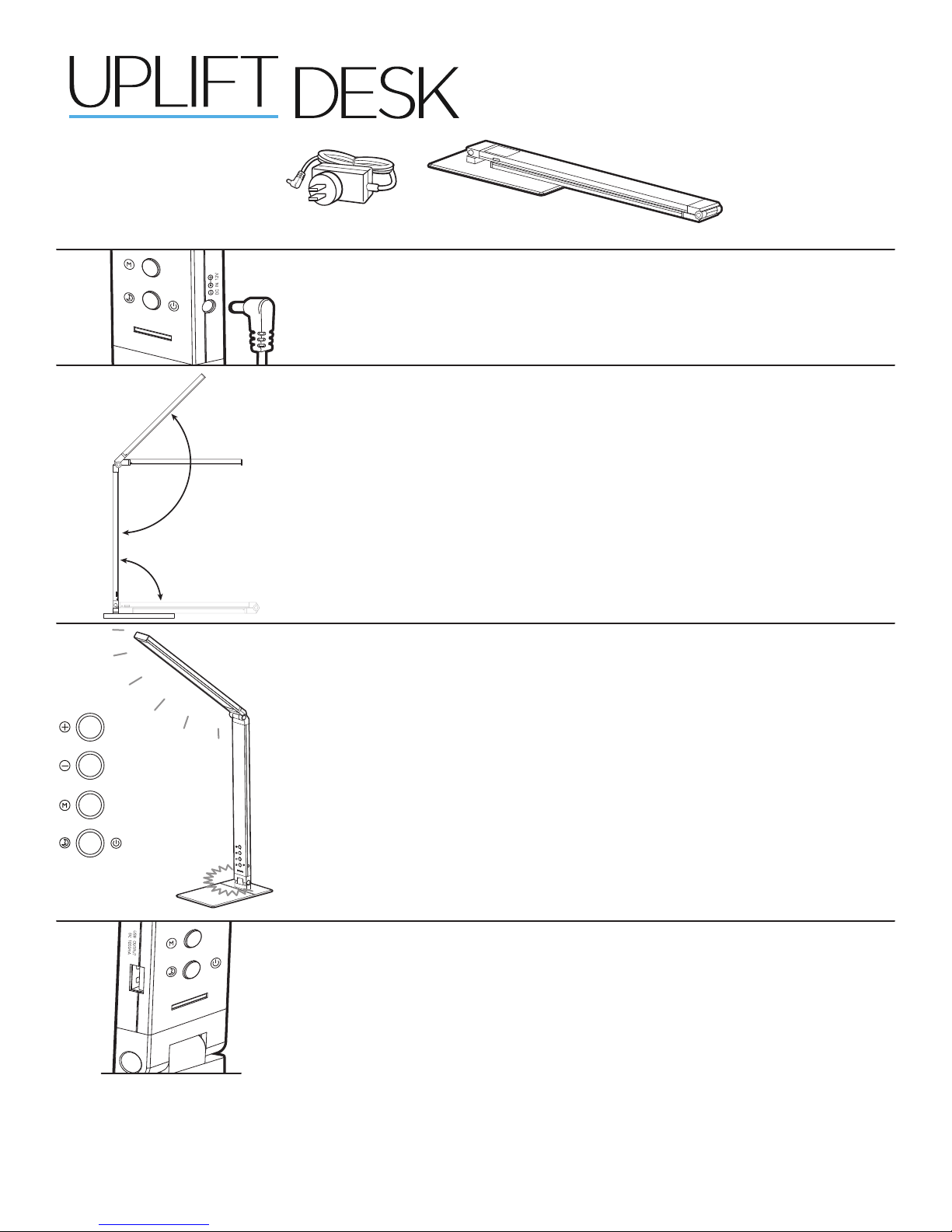
Package Contents:
®
Illuminate™ LED Task Light
ACC024
LampPower adapter
Step 1
Plug the Power adapter into the DC port on the lower right-hand side of the
Lamp.
Step 2
Holding the base of the Lamp, swivel the main column upward, rotating it out 90
degrees.
Next, swivel out the Lamp’s upper arm, up to its maximum adjustable range of
135 degrees. The light will swivel at the top joint 45 degrees in both directions.
Warning: When opening, closing, and adjusting the Task Light, please mind the
Lamp’s joints to avoid clamping or pinching hands or clothing.
Position the light where you want it, where it’s stable, and close to its power
source.
Step 3
Press the bottom button once to turn on the main light.
Pressing the + and - buttons will cycle through the light’s 5 brightness levels.
Pressing the M button will cycle through the light’s cool/warm/natural light modes.
The blue nightlight at the Lamp’s base will automatically turn on when the light
is turned off. To turn off the night light, press and hold the bottom button for
three seconds. The blue light will turn off when the light is turned on.
Step 4
Plug in your USB devices via the port on the lower left-hand side of the lamp,
allowing you to power and charge your electronics.
UPLIFT Desk • 1-800-349-3839 • [email protected] • www.upliftdesk.com
ACC024/R02
Page 2
!
!
!
!
!
!
!
!
CAUTIONS & WARNINGS
CAUTION: Read all instructions before assembly. Failure to assemble properly may
result in damage or personal injury
WARNING: To avoid electric shock, do not attempt to disassemble the light.
CAUTION: The included Power Adapter is designed exclusively for this product.
Do not attempt to use any other adapter.
CAUTION: Avoid using the light in very high temperatures or very high humidity.
WARNING: Do not look directly into the LED light source.
CAUTION: Do not use outdoors.
WARNING: Never use in a wet environment. Never allow liquid of any kind to spill onto or
enter any part of the product.
WARNING:
ered outlet. Do not pull on device cord or remove plug from any angle other than straight from
!
outlet. Never touch metal conductors on plug during connecting or removal from product.
CAUTION: Route power cord so it won’t be stepped on, pinched, have items placed on it, or in
!
any place where it could be a tripping hazard. Never allow the power cord to sit in liquid or get
wet in any manner.
WARNING: Disconnect the Power Adapter and discontinue use in the event that
!
the following occurs:
- The Power Adapter or cord breaks
- The outer shell, or one or more of the joints break
- The light emits sparks or smoke
- Abnormal ickering occurs or any LED lights break
CAUTION: Do not try to adjust the movable components beyond their adjustment range,
!
to avoid damage to the shell or joints.
CAUTION:
height before positioning xture to ensure that cord will reach the outlet when work surface
!
is raised.
To remove powered devices, safely grasp device plug and pull straight from pow-
If using light on an adjustable height work surface, raise work surface to maximum
Live Brighter with
Copyright Notice: This guide is a component of the UPLIFT Illuminate LED Task Light. This guide is a part of the scope of delivery, even if the item is resold. This guide is also available on the UPLIFT Desk website: uplift-
©
desk.com. Excerpts or copies may not be forwarded to third parties or used in any other published form without the prior written consent of UPLIFT Desk. These instructions are subject to United States copyright law.
UPLIFT Desk • 1-800-349-3839 • [email protected] • www.upliftdesk.com
UPLIFT
 Loading...