

Page 1

TRANSPORT STREAM
MULTIPLEXER
User Manual
www.upcom.com
Page 2

Operations Manual UC-MX16
© 2007-2010 UPCOM TECHNOLOGIES, INC
This document is property of UPCOM TECHNOLOGIES, INC and is delivered on the express
condition that it not be disclosed, reproduced in whole or in part, or used for the manufacture for
anyone other than UPCOM without written consent, and that right is granted to disclose or so use
any information on said document.
Notice
The information in this document was believed to be correct at the time of publication, and every
effort was made to ensure that the most current information was shipped with each machine. If
subsequent modifications were made to your unit, and you need information on these, please
contact the UPCOM documentation department.
If you have technical or editorial comments concerning this manual, please write them on
photocopies of the relevant pages and send them to the documentation department or contact
the Customer Service Department. This assistance will be greatly appreciated
Manual Applicability and Symbols
This is the general operating manual for UPCOM Receivers Please make sure that the correct
manual is being used by verifying part number and serial number with UPCOM technical support
team or your local distributor.
Be prepared to furnish:
Serial Number
Exact Model Number
Symbols
The following warning and caution symbols are used throughout this manual:
Warning: A hazard exists that may result in personal injury or loss of life.
Caution: Failure to follow the procedures given may result in damage to the
equipment.
Page 3

WARNING
This equipment operates at potentially lethal voltages. Only trained, qualified personnel should
operate, maintain, or service it. Only technicians thoroughly familiar with the equipment must
perform Service work.
This equipment is rated for 85 to 265V. Proper power cords should be used for the country where
the equipment will be operated. Power consumption should not exceed 50W.
The UC-16MX should not be operated where the unit is exposed to extremes of temperature
outside the ambient range, ( 0ºC to +45ºC ), precipitation, condensation or humid atmospheres
above 75%.
This equipment should not be operated around excessive dust, vibration, flammable gases,
corrosive or explosive atmospheres.
Page 4

CONTENT
1.#Before#Getting#Started............................................................................................................. 1!
2.Introduction ................................................................................................................................ 2!
2.1#Working#principle............................................................................................................................. 2!
2.2#Function................................................................................................................................................3!
2.3#Technique#parameter......................................................................................................................3!
2.4#Use#surrounding................................................................................................................................3!
3#Structure....................................................................................................................................... 4!
3.1#Front#Panel#&#Dimensions .............................................................................................................4!
3.2#Rear#Panel............................................................................................................................................5!
4#Operation...................................................................................................................................... 6!
4.1 Front Panel............................................................................................................................................6!
4.2#UCJ16MX#Operation#Flow ................................ ............................................................................... 6!
4.3#Menu#Structure ..................................................................................................................................7!
4.3.1!Setting!the!network!address .................................................................................................................... 9!
4.3.3!Output!number............................................................................................................................................ 11!
4.3.4!Test!mode...................................................................................................................................................... 12!
4.3.5!Keyboard!Lock ............................................................................................................................................ 13!
4.3.6!Modify!password........................................................................................................................................ 14!
4.3.7!Master!Reset................................................................................................................................................. 15!
4.3.8!Version!Info.................................................................................................................................................. 16!
Appendix#A.#Alarm#information ............................................................................................ 17!
Appendix#B.#Noun#Abbreviations.......................................................................................... 18!
Page 5

UC-16MX
- 1 -
UC-16MX
Transport Stream Multiplexer
1. Before Getting Started
If you need help UPCOM and its distributors stand by every product sold. If you need help
please contact your local distributor or UPCOM directly at:
+1.408.329.4158
or
by e-mail:
Manual Updates
From time to time, new versions of software may require slight changes to the material
presented in this document. Check inside the back cover for supplementary pages that may
have been added to keep the manual up to date
Unpacking and Inspection
Before installing the equipment. Please check the box for integrity. After unpacking, look
for any missing items or damage to the equipment. If there is damage, please contact customer
support immediately. Do not proceed installing the equipment if there is visible or perceived
physical damage.
Warranty and RMA
UPCOM guarantees this equipment against defects in material and workmanship for a
period of 3 years from date of shipment. During this period UPCOM will repair or replace
products that are under warranty.
For all equipment under warranty the owner is responsible for freight to UPCOM and all
related customs, tariffs, insurance, etc. UPCOM is responsible for the freight of the equipment
from the factory to the owner under the same method the equipment was returned to UPCOM.
Equipment shipped back to UPCOM without a previously accepted RMA will be returned
to owner at owner’s expense.
The warranty does not cover: products with defaced serial number, damage during
shipping, damage caused by lightning, power surge or installation services.
Page 6

UC-16MX
- 2 -
2.Introduction
The UC-16MX is a DVB Standard Transport Stream Multiplexer supports real-time video
stream multiplexing and re-multiplexing. The UC-16MX can handle 16 inport ASI SPTS or
MPTS and send the out through 1 or two MPTS streams.
It is compatible with the ISO/IEC-13818 standard with DVB ASI output interface.
2.1 Working principle
[Principle figure]
#
Figure2-1
[Working principle explanation]
(1) The multiplexer supports 16 MPEG-2 SPTS or MPTS inputs and two MPEG-2 transport
stream (MPTS) outputs. It filters out the empty packets or the unneeded packets, and
changes the PID (packet identity).
(2) Obtains the PSI (Program Specific Information) and SI (Service Information) and
integrates them with local data.
(3) The UC-16MX can connect with a network management software through TCP/IP
protocol.
Page 7

UC-16MX
- 3 -
2.2 Function
Multiplexing to SPTS (single program transport streams) or multiplexing to MPTS (multi
program transport streams), MPTS supports all-chosen or part-chosen.
Supports two different outport.
Low time delay. The delay for MPEG-2 Video program is less than 100ms.
Providing PCR check
Supports DVB data broadcast.
Supports remote upgrade of the software.
Real time monitor input status.
Port PID monitor function, you can customize monitoring time and port.
2.3 Technique parameter
PCR: < 100 ns
Input interface: ASI Interface, BNC
Input interface impedance: 75Ω
Input interface bit rate(max): 180Mbps
Input select PID num(max): 120
Input program num(max): 100
Input packet length: 188or 204byte
Output interface : ASI Interface, BNC
Output interface impedance: 75Ω
Output packed length: 188 or204byte
Total output rate(max): 180Mbps
Power supply: 220VAC±10%,50Hz
Power: 30W
Weight: 4Kg
Dimension: 450*430*44(deep*wide*high)mm
2.4 Use surrounding
Working temperature: 0~45
Working humidity: 5~80%
Storage temperature: -20~70
Storage humidity: 5~90%
Page 8
UC-16MX
- 4 -
3 Structure
3.1 Front Panel & Dimensions
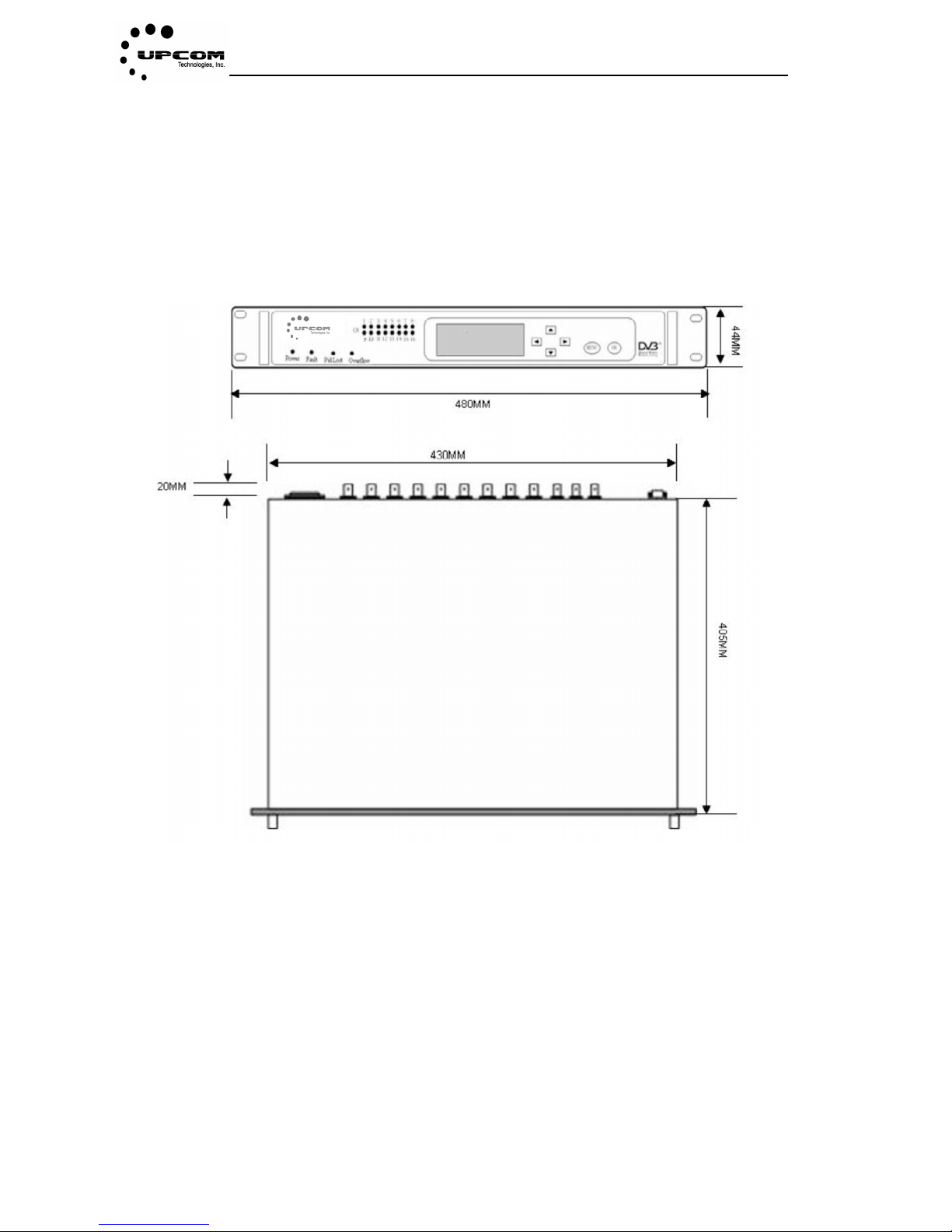
Each equipment is designed for 1U(44mm)space, machine dimensions of equipment is shown
as figure3-1.
#
Figure 3-1
Page 9
UC-16MX
- 5 -
3.2 Rear Panel
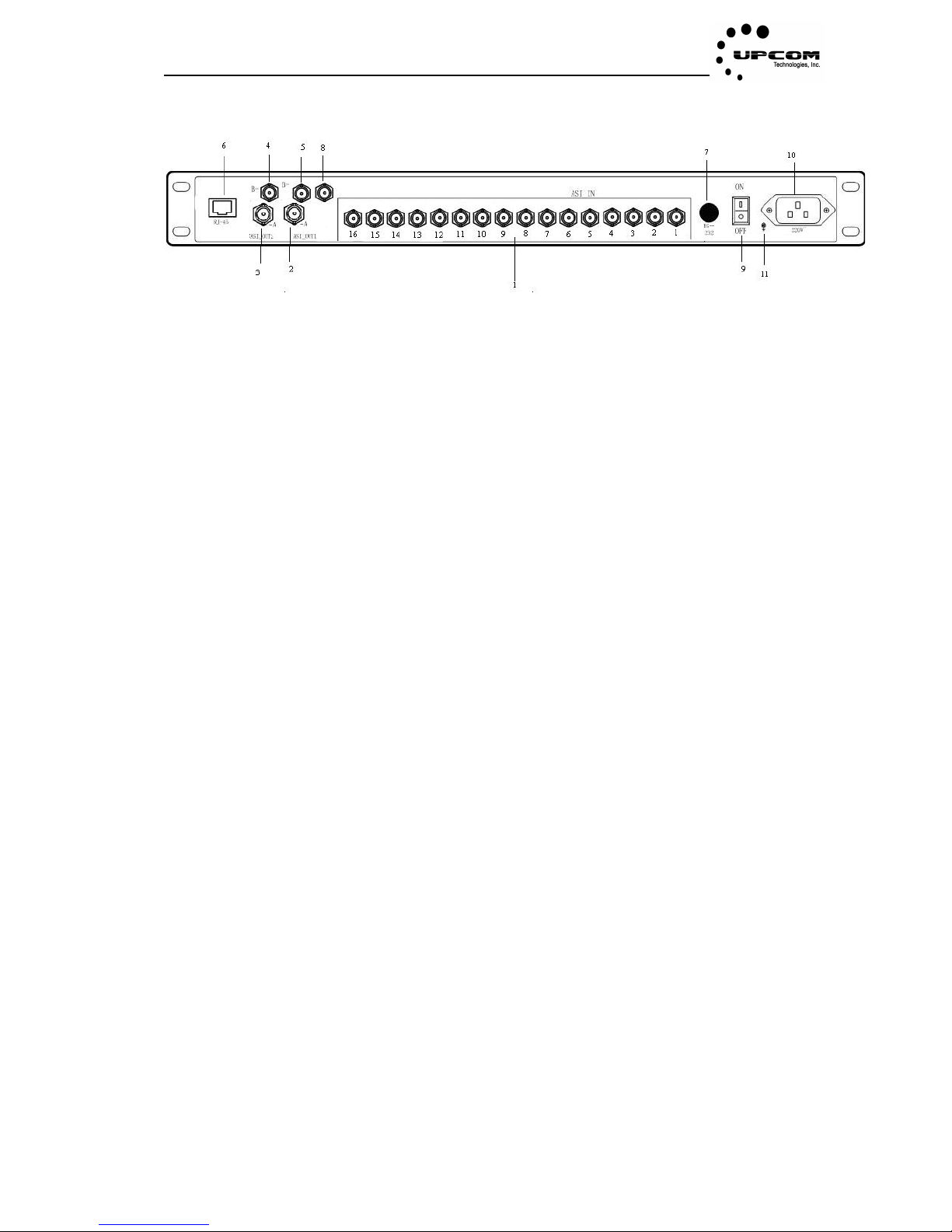
Figure3-2
Figure3-2 shows rear-panel map of equipment, port describe is shown:
(1) ASI input channel(from1 to 16), input SPTS or MPTS with DVB standard, 75ΩBNC.
(2) ASI output 1, multiplex output, 75ΩBNC.
(3) ASI output 2, multiplex output, 75ΩBNC.
(4) The same as to ASI output 2.
(5) The same as to ASI output1.
(6) RJ-45 port, network control. The customer can manage the multiplexer via any PC in
the LAN or WAN.
(7) RS232 port, it is used upgrade and test locally.
(8) ASI ring outport.
(9) Power switch.
(10) Power supply.
(11) GND.
Note: output1 is different or same with output 2
Page 10
UC-16MX
- 6 -
4 Operation
4.1 Front Panel
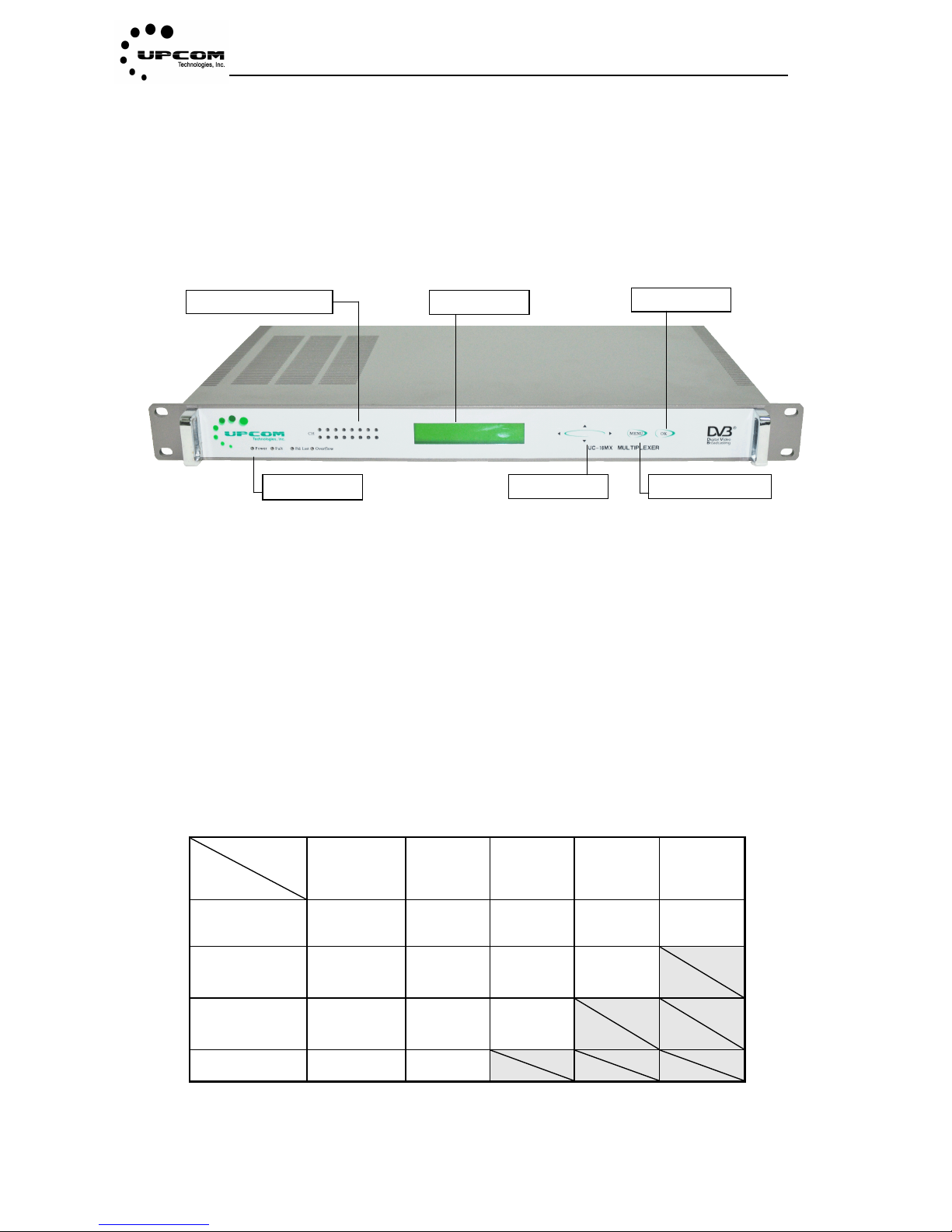
Figure 4-1
Power:power supply work indicator light, when green the system is normal.
channel indicator light:Display channel status. These status is shown as appendix A
Display screen:Display the system state and menu setting.
select key: , key is used to switch up/down menu and add/decrease number,
key is used to change numbers.
MENU key:enter or exit operation.
OK key:make sure the operation.
4.2 UC-16MX Operation Flow
Step
Appliance
First
Second
Third
Fourth
Fifth
Installation
Setting
network
address
Initialization
Logon
Reading
information
Program
multiplexing
Change input
port transport
streams
Initialization
Logon
Reading
information
Program
multiplexing
Change output
program
parameters
Logon
Reading
information
Modify
parameters
Status monitor
Logon
Reading
information
Table 4-1 UC-16MX basic operation flow
Channel indicator lights
Power light
Display screen
OK key
MENU key
Select keys
Page 11
UC-16MX
- 7 -
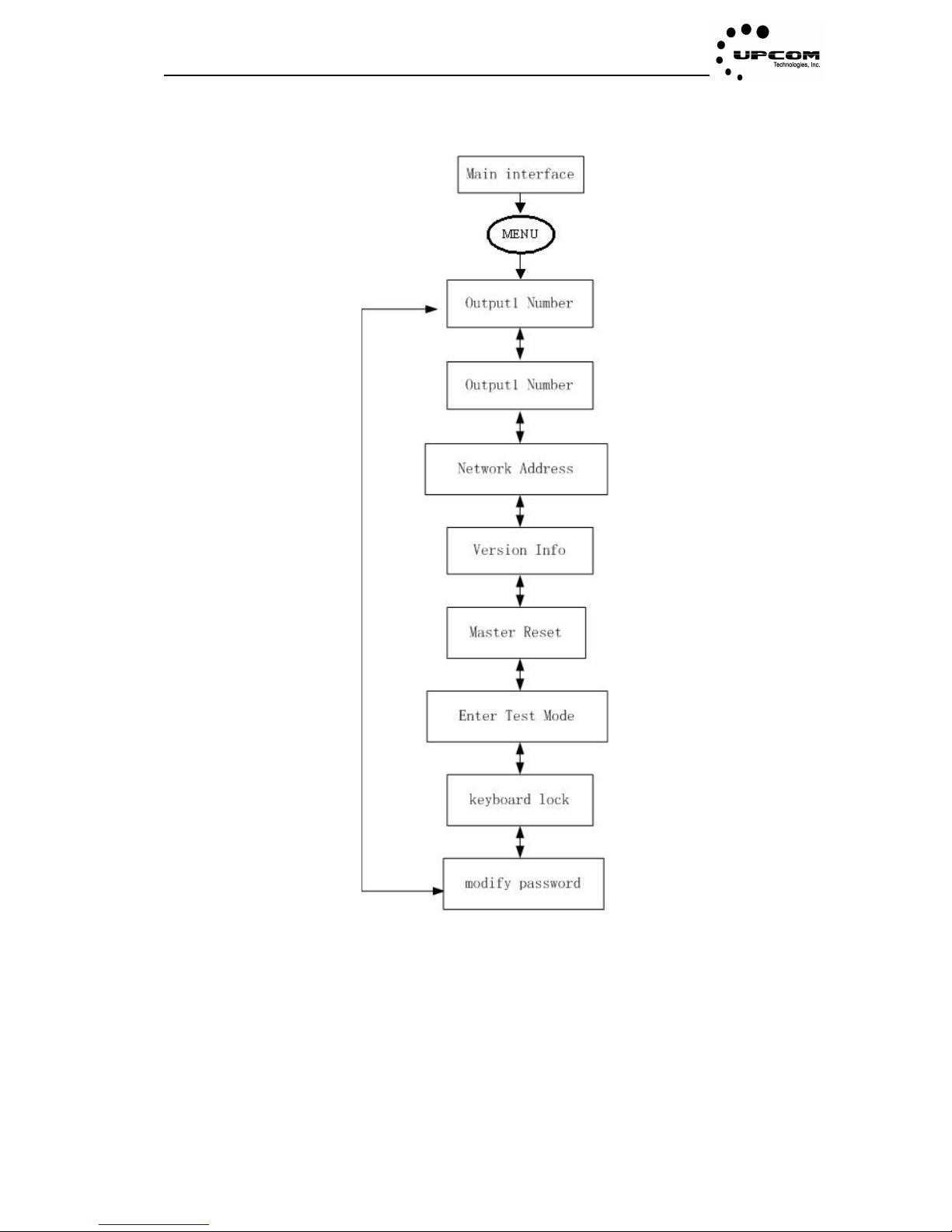
4.3 Menu Structure
Figure 4-2
Page 12

UC-16MX
- 8 -
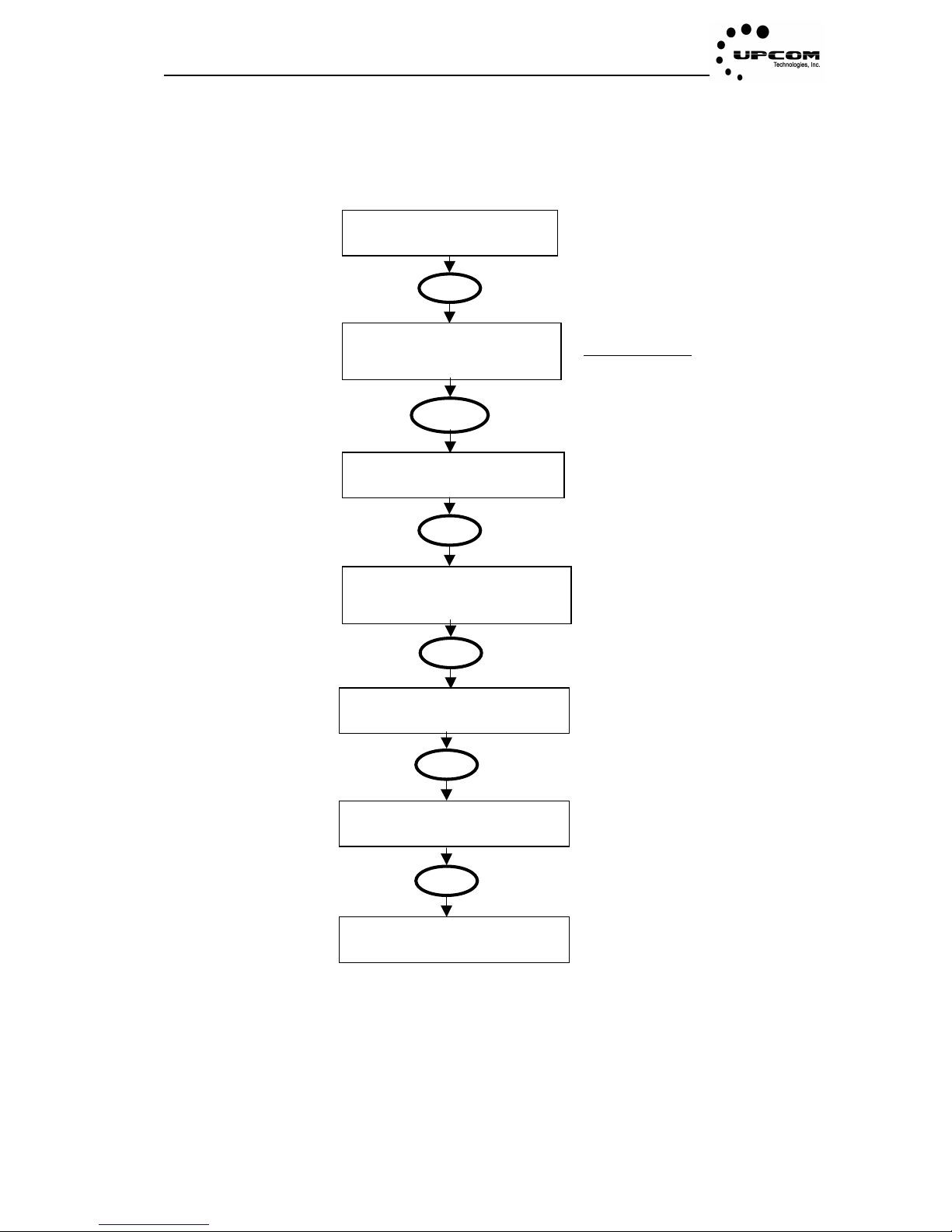
Main interface shows the multiplexer running state
• 01#, 02#: Outport number.
• p03, p04:Output program number
• Bitrat000.0: Outport real time output effective bitrate
For example:01# p03 bitrat015.0, means outport 1 have three programs and output
bitrate is 15Mbps
output1 number:Modify output1 number
output2 number:Modify output2 number
Network address:Setting network IP address
Version info:Display equipment version information
Master reset:Return to original parameters
Test mode:It is a kind of work mode
Keyboard lock:Setting the keyboard lock
Modify password:Setting unlock password
01# p03 bitrat000.0
02# p04 bitrat000.0
Page 13
UC-16MX
- 9 -
4.3.1 Setting the network address
Modify the multiplexer IP settings to define IP address/subnet mask/gateway.
01# P03 bitrat 000.0
02# P03 bitrat 000.0
Main interface
M216 Multiplexer
Output1 mumber
Use key then move the cursor
to network address
Subnet Mask
255.255.255.000
Use key to move cursor,
Use key to modify number.
Ip Address
192.168.001.210
Use key to move cursor,
Use key to modify number
MEN
OK
OK
Gateway
192.168.001.001
Use key to move cursor, use
key to modify number.
Saving network address
Wait please
Save the network IP address
M216 multiplexer
Network address
OK
OK
Page 14
UC-16MX
- 10 -
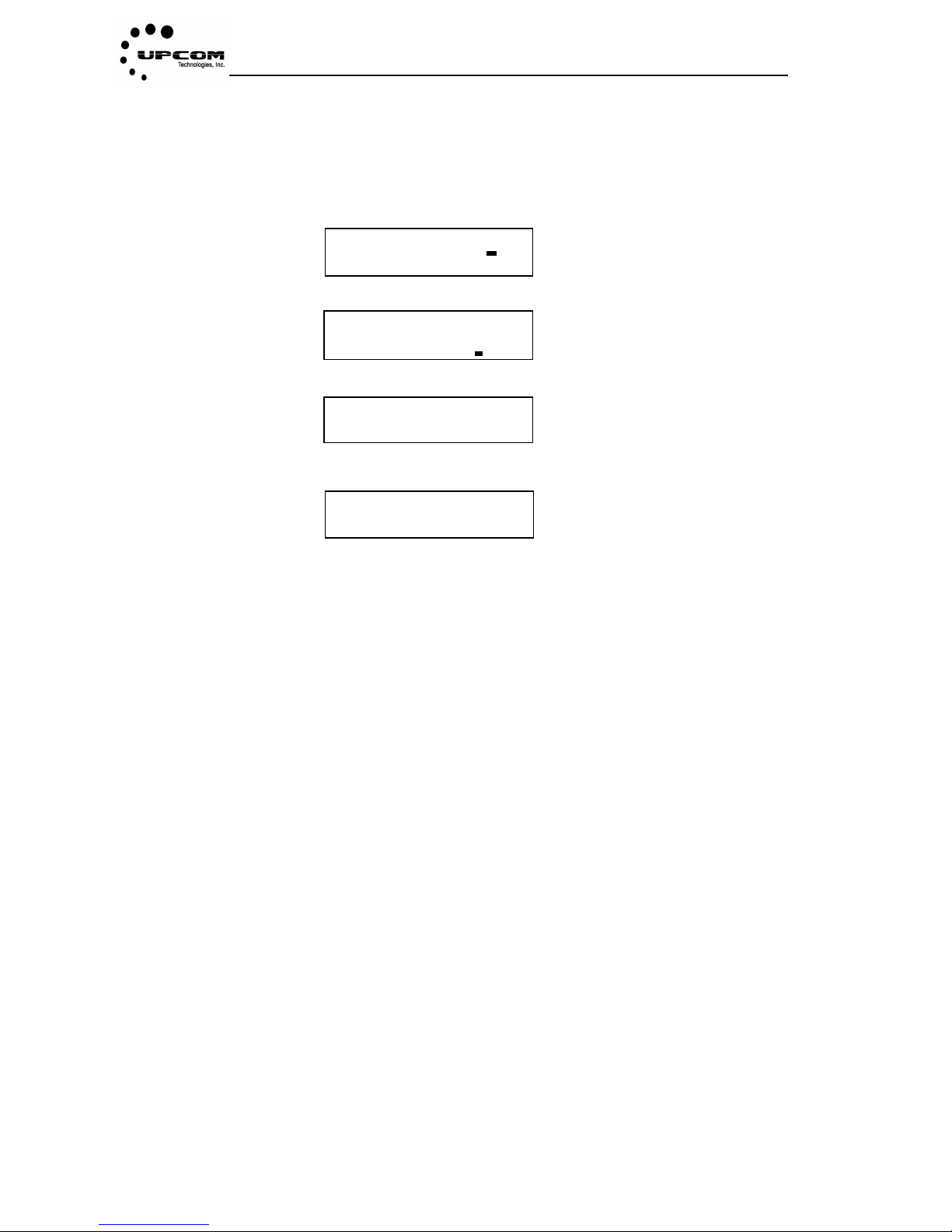
4.3.2 Initialization
• The initialization of multiplexer deletes some Parameters of the configuration
• The initialization of multiplexer is usually used during the first installation, when the input
streams must be changed or when the work status is abnormal.
1、 Click” MENU”, enter into main menu.
2、 Click key to move ‘master reset’.
3、Click ‘OK’ key to enter the following figure.
4、Click “OK” key to finish initialization, the interface is shown as following figure.
Mater Reset
Master Reset OK?
UC-16 multiplexer
Output1 number
UC-16 multiplexer
Master Reset
UC-16 Multiplexer
initializing
Page 15
UC-16MX
- 11 -
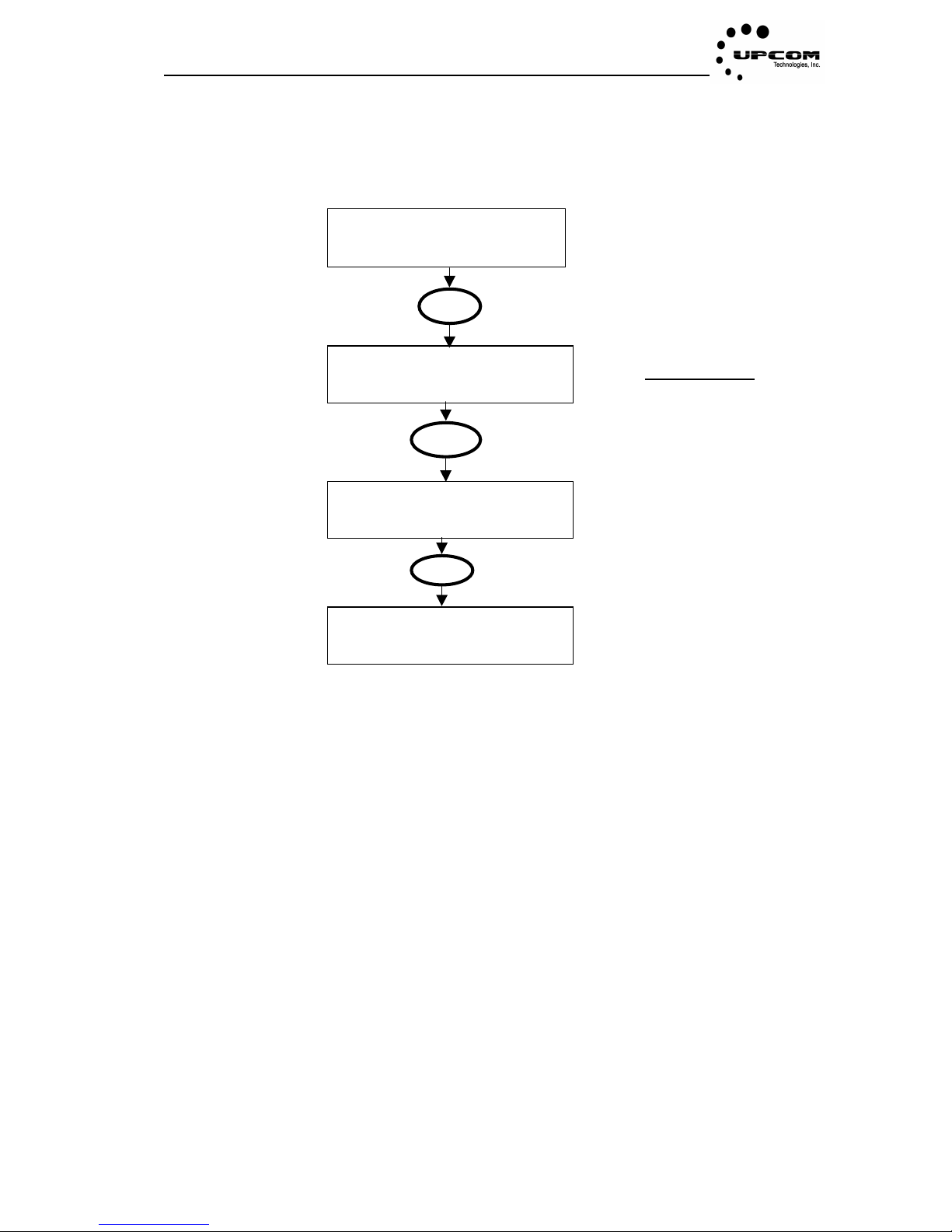
4.3.3 Output number
Setting Output number modifies multiplexer outport number, for example setting output1
number
01# P03 bitrat 000.0
02# P04 bitrat 000.0
Main interface
UC-16 multiplexer
Output1 Number
Use key then move
Cursor to output1 number
UC-16 multiplexer
Output1 Number
Return to main interface
Output1 number
New number:_ _
Use key to move cursor,
Use key to modify number.
MEN
OK
OK
Page 16
UC-16MX
- 12 -
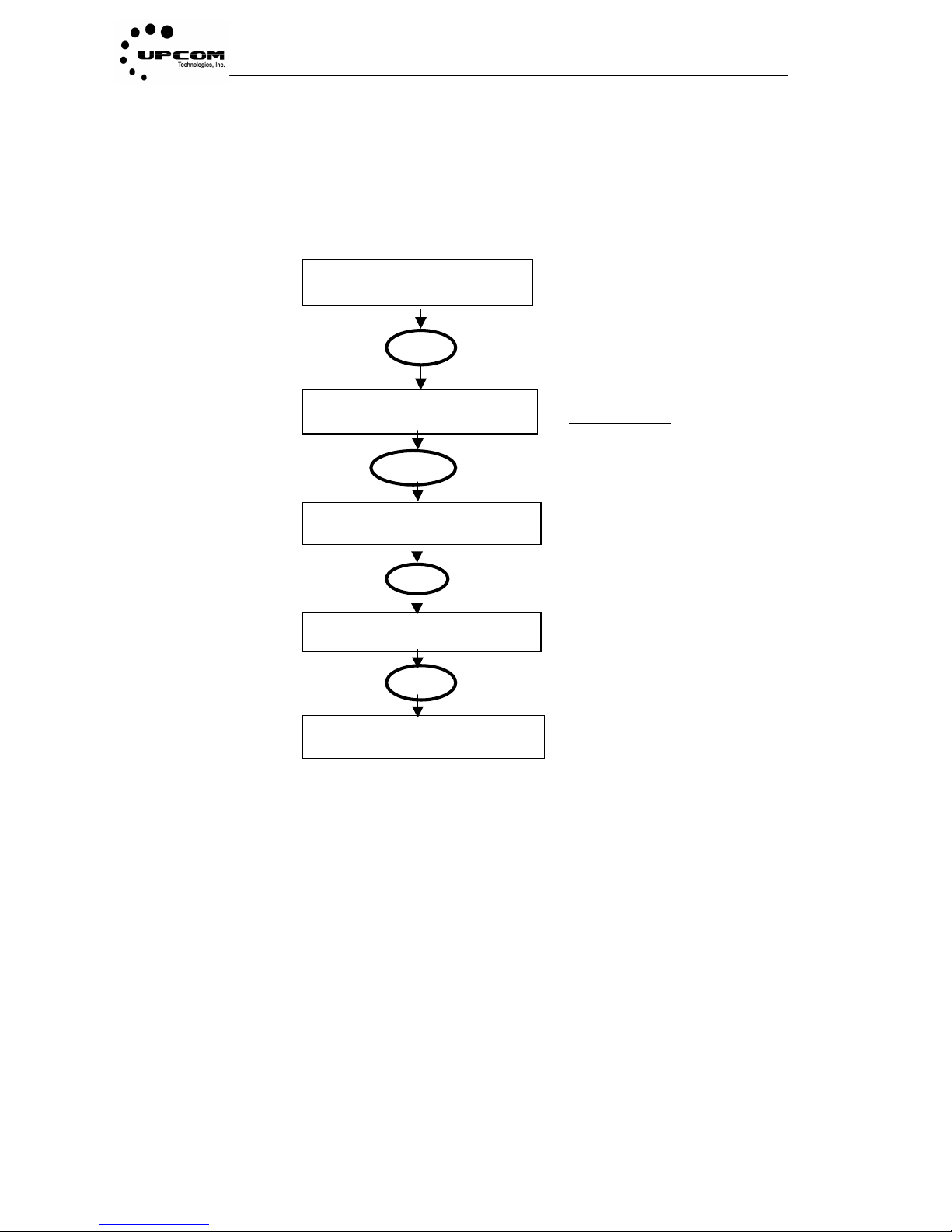
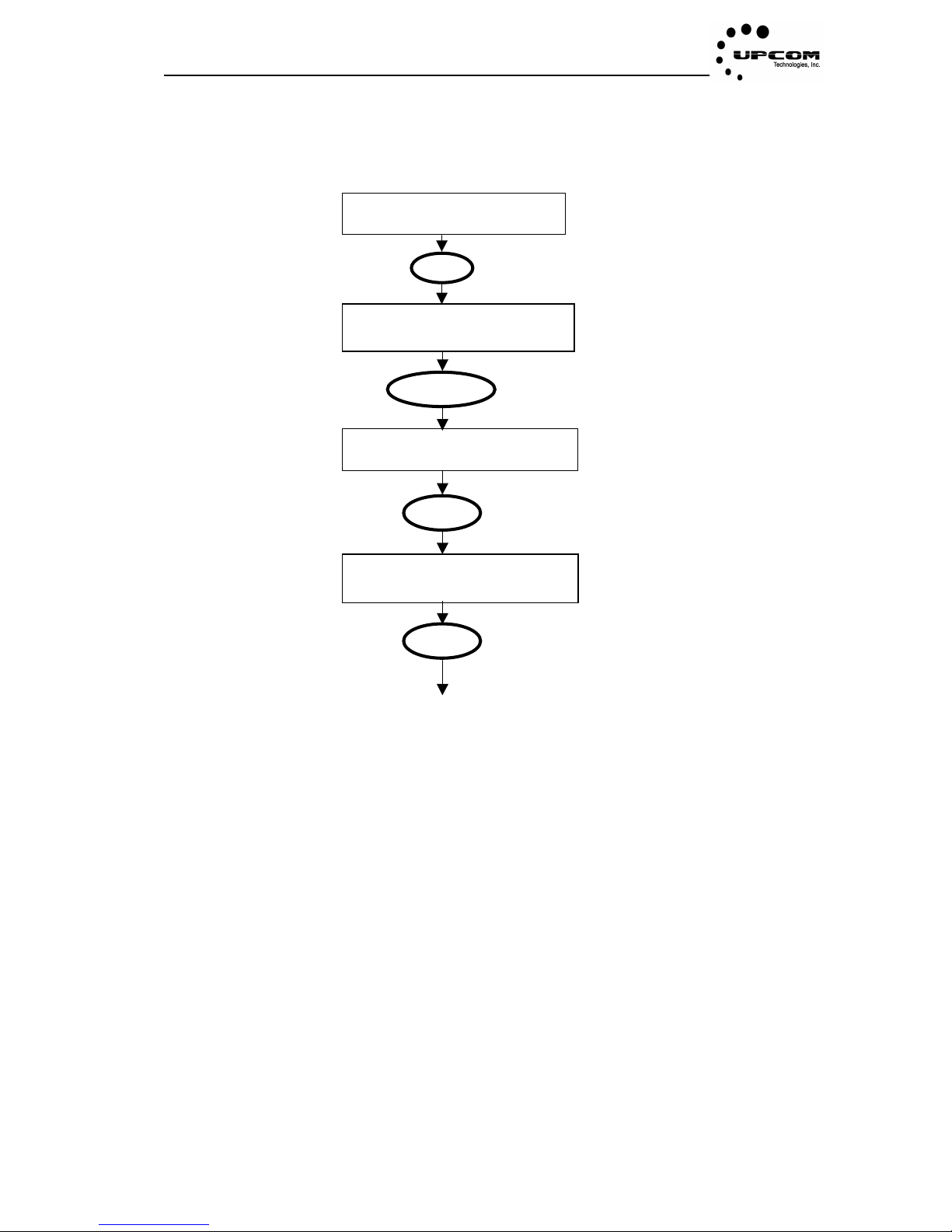
4.3.4 Test mode
Note:When setting test mode, input port will select a program to send to outport and output, until you turn
on the equipment again to return to original work mode.
When the equipment is in test mode the front panel keys can not be operated, the equipment
returns to its normal working mode after you power cycle.
01# P03 bitrat 000.0
02# P04 bitrat 000.0
Main interface
UC-16 multiplexer
Output1 Number
Use key then move cursor
to enter test mode
MENU
OK
OK
Enter Test Mode
Enter Test Mode OK?
Click”MENU”key to exit,
click”OK”key to make sure setting
UC-16 multiplexer
Test mode running
Display test mode running
UC-16 multiplexer
Enter Test Mode
Page 17
UC-16MX
- 13 -
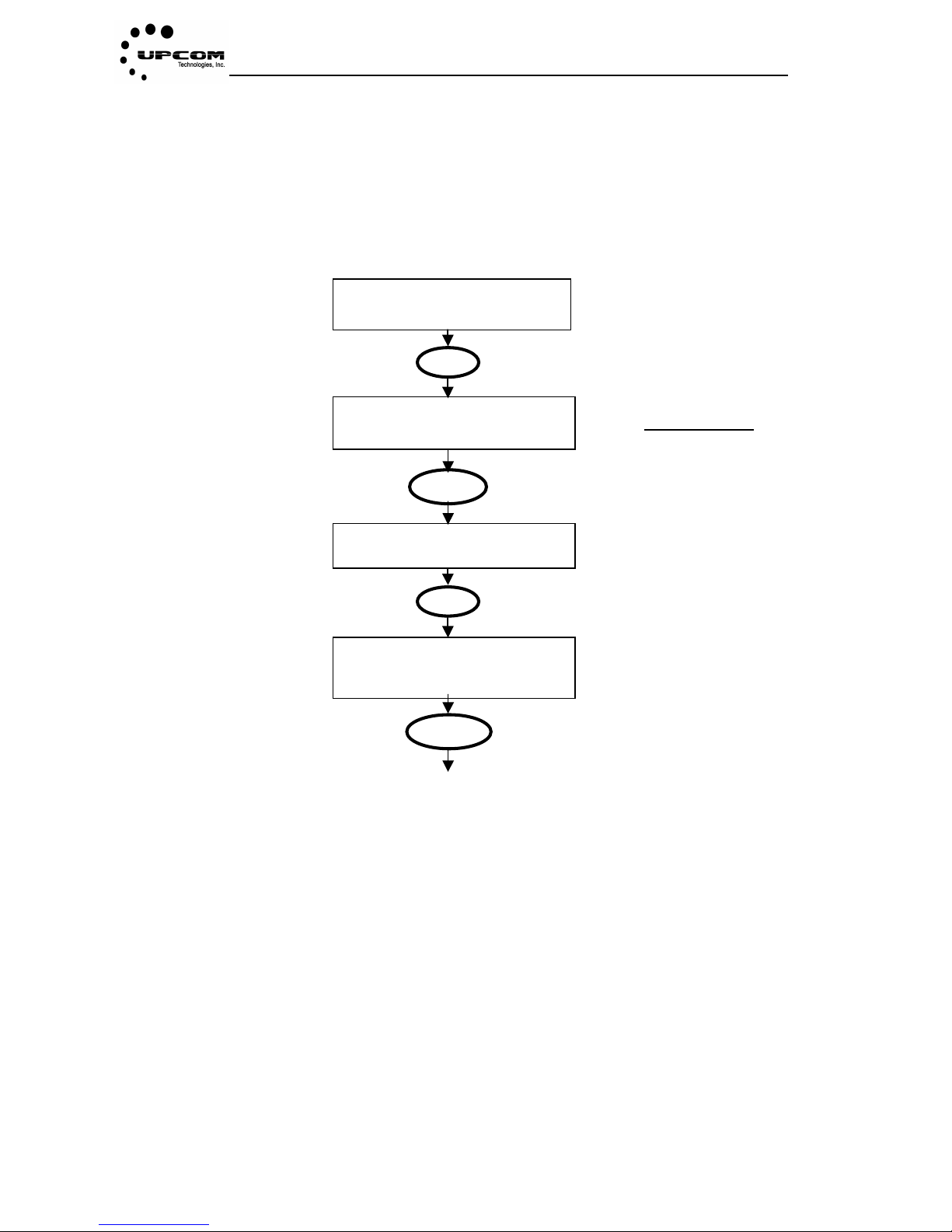
4.3.5 Keyboard Lock
Make sure operate safely by Keyboard lock
Main interface
When the front panel is locked the unlock password would be needed to operate the
equipment. Original unlock password is , if you need to modify the unlock
password, please look procedure ahead.
01# p03 bitrat000.0
02# p04 bitrat000.0
Main interface
UC-16 multiplexer
Output1 Number
Use key then move
Cursor to Keyboard Lock
MEN
Keyboard Lock
Keyboard Lock OK?
Click “ok” key,make sure
to lock front panel
OK
Press
UC-16 multiplexer
Keyboard Lock
OK
Page 18
UC-16MX
- 14 -
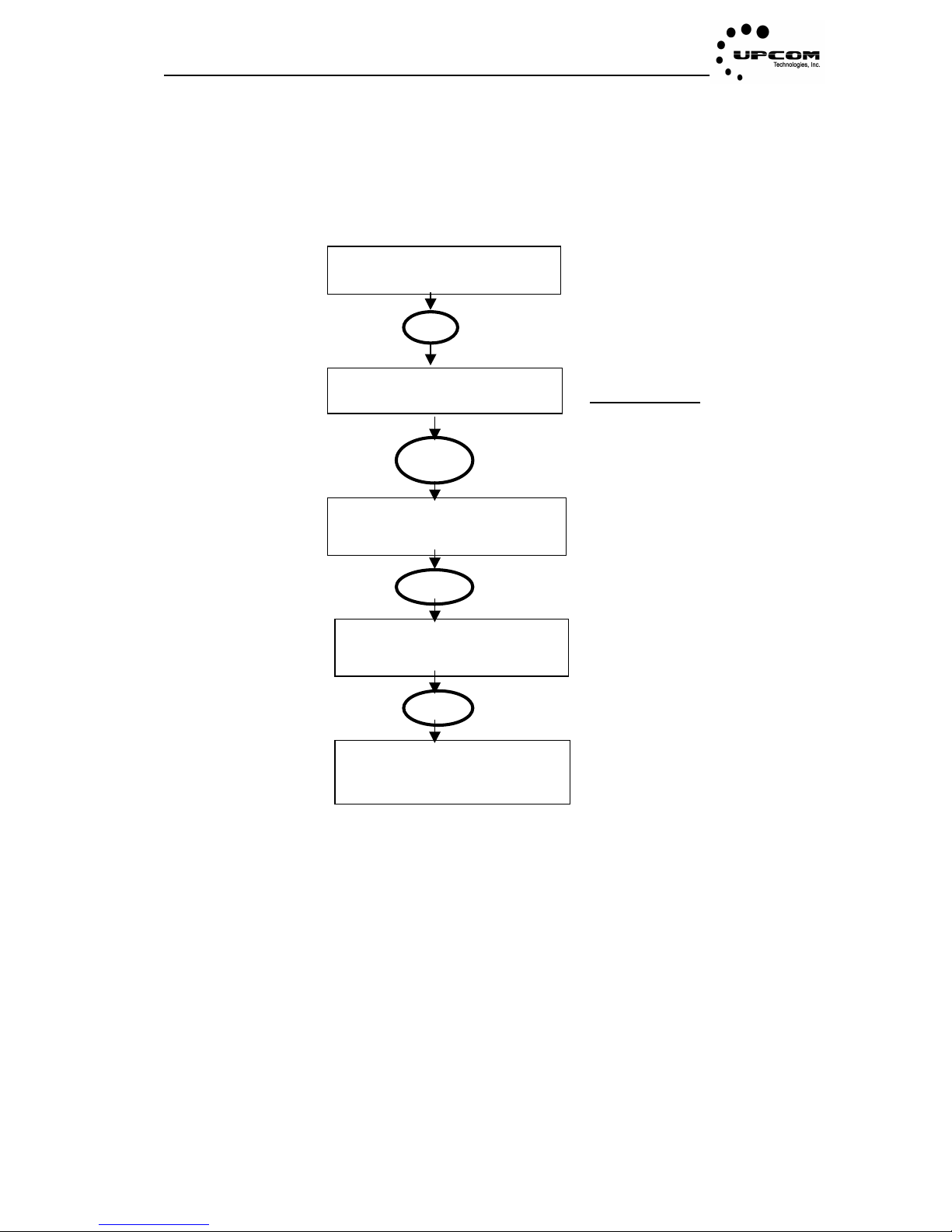
Modify password
- - - - - - - -
Modify password:use
key to modify password,Input password is the
same with check password
4.3.6 Modify password
• Front-panel password is necessary to operate the equipment; once you change it you will
be only one to know the new password. Please keep it on a safe, known place in case you
need it in the future.
Main interface
01# P03 bitrat 00.00
02# P06 bitrat 00.00
Main interface
UC-16 multiplexer
Output1 Number
Use key then move
cursor to modify password
MEN
OK
OK
UC-16 multiplexer
Modify password
Page 19
UC-16MX
- 15 -
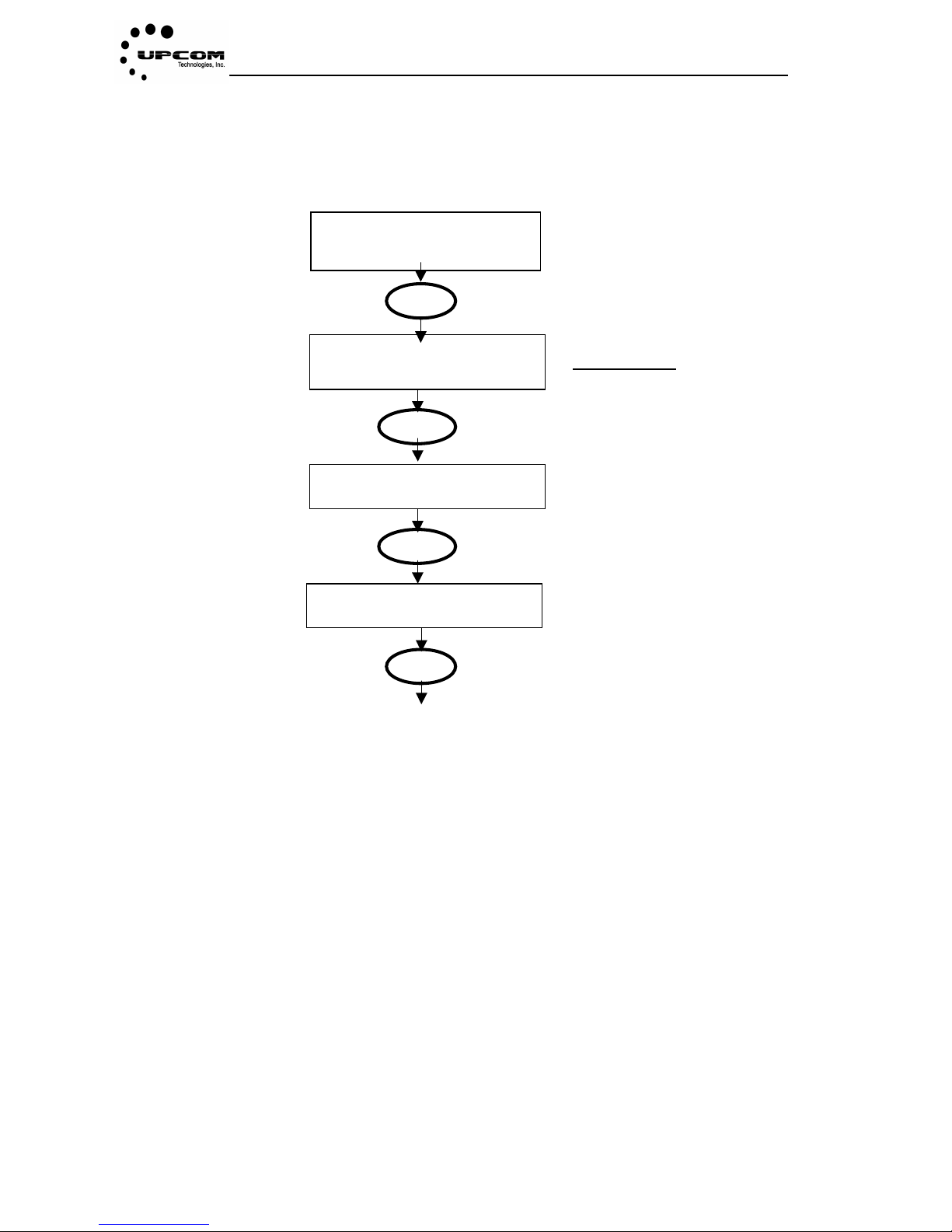
4.3.7 Master Reset
• Once you reset the equipment, all previous settings will be lost. Please be careful with this
option.
01# P03 bitrat 00.00
02# P04 bitrat 00.00
Main interface
M216 multiplexer
Output1 Number
Use key and move cursor
to(master reset)
MEN
OK
Master Reset
Master Reset OK?
Click’OK’ to make sure ‘reset’,
Click ‘MENU’ to return main
interface
OK
M216 multiplexer
Initializing
Finish the master reset
operation
M216 multiplexer
Master Reset
Page 20
UC-16MX
- 16 -
4.3.8 Version Info
Version info display the M216 version status information
Main interface
01# p03 bitrat
02# p04 bitrat
Main interface
UC-16 multiplexer
Output1 number
Use key and move cursor
to(version info)
MENU
Version infor
1.0
Display version information,
click”menu”to return interface
OK
Menu
UC-16 multiplexer
Version Info
Page 21
UC-16MX
- 17 -
Appendix A. Alarm information
Indicator light states
Input channels states
Green light shine
Input information locked, channels port opened
Green light twinkle
Input information but channels port unopened
Red light shine
Input bitrate overflow or input port opened but no
signal input
Light dark
No input signal or open input port
Page 22

UC-16MX
- 18 -
Appendix B. Noun Abbreviations
A ASI: Asynchronous serial interface
B BAT: Bouquet Association Table
C CAT: Condition Access Table
M MPTS: Multiple Programs Transport Stream
N NIT: Net work Information Table
P PAT: Program Association Table
PCR: Program Clock Reference
PID: Packet Identifier
PMT: Program Map Table
PSI: Program Specific Information
S SDT: Service Description Table
SI: Service Information
SPTS: Single Program Transport Stream
T TDT: Time and Date Table
TS: Transport_Stream
Page 23

Tel: +1.408.329.4158 Fax: +1.408.329.4159
website:www.upcom.com
Upcom Technologies, Inc. San José, California. Copyright 2007-2010
 Loading...