

Page 1

uTV™guide
Page 2

2 3
(b)(c)
(f) (g)
(d) (e)
(a)
The Unitron uTV connects your A2DP Headset
wirelessly to your TV or other audio devices.
uTV™ description
hearing
instrument
headset
up to 30 meters (100 ft)
uTV
cable
The uTV is connected tou your TV (or any other audio
source) and wirelessly sends audio signals from your
TV to your headset within a range of up to 30 meters
(100 ft).
Legend
Buttons
(a) ON/OFF button
(b) Volume control (up)
(c) Volume control (down)
Bluetooth is a registered trademark owned by the Bluetooth SIG, Inc. and
any use of such marks by Unitron is under license.
Other trademarks and trade names are those of their respective owners.
®
Inputs
(d) Power input (mini-USB)
(e) Audio input (3.5 mm jack)
(f) Charging slot
(g) Status light
®
Page 3

54
(i)
(e)
Installation
Step 1: Connecting the uTV
To connect the power supply (h):
Place the uTV next to your TV. Connect the mini-USB
plug of the power suppply to the power input (”Power”)
of the uTV. Plug the power supply into the wall socket.
uTV
Use the RCA/Cinch cable (i) to connect the uTV to
the TV:
Connect the 3.5 mm stereo plug to the audio input
(”Audio IN”) of the uTV. Connect the red and white
RCA/Cinch plugs to the matching red and white
RCA/Cinch output sockets on your TV.
Page 4
76
(k)
(e)
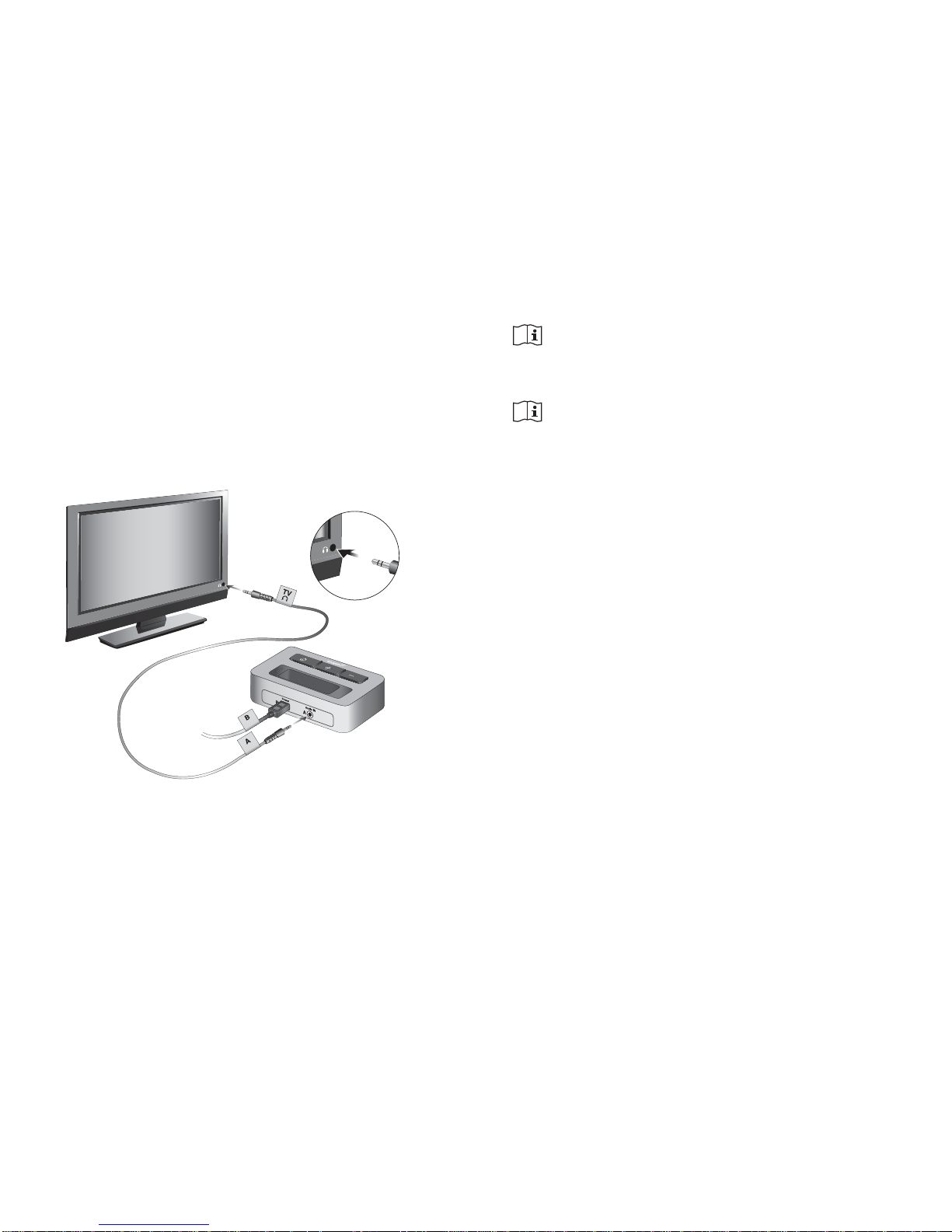
You can also connect your uTV to the 3.5 mm headset
socket of your TV, using the 3.5 mm audio cable (k):
Connect the 3.5 mm stereo plug to the audio input of
the uTV (”Audio IN”).
Plug the other end into the headset output socket of
your TV.
When connecting the uTV to the 3.5 mm
headset socket of your TV you are able to adjust the
volume via your TV remote control.
Many TVs will switch off their loudspeakers
when plugging the 3.5 mm jack into the headset
socket - the TV will not be audible for other people.
In such a case use the Cinch/RCA or SCART socket as
described above. For further information on volume
adjustment please refer to step 5 below. The Unitron
uTV can also be connected to any other audio source
such as an MP3 player, PC or home sound system
using the stereo plug cable (k).
Page 5
98
fig. 2
(a)
(g)
Step 2: Switching on
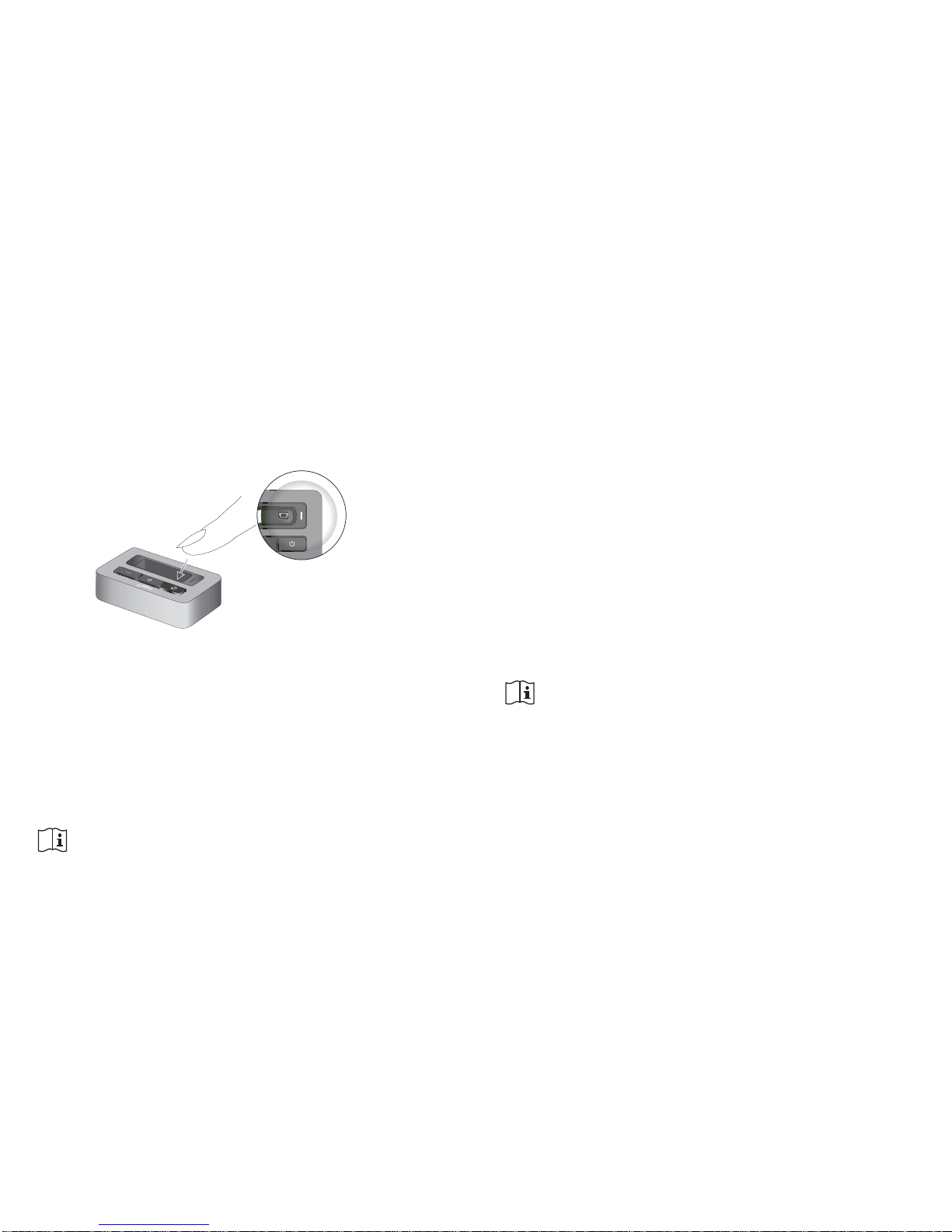
1. Switch on the uTV by a short press of the ON/OFF
button (a) as shown in fig. 2. The status light (g)
will illuminate green iniatially and may switch to
blue later.
Step 3: Pairing Headset and uTV
Before starting to use the uTV, it must be paired with
your headset. The pairing procedure controls which
Bluetooth devices are permitted to communicate with
each other.
Pairing needs to be completed only once for
each device you wish to use with your headset.
● Initiate the pairing process on your headset as
stated in its manual.
● If the uTV basestation status light (g) is not
flashing blue already, press the ON/OFF button (a)
for 5 seconds until the Bluetooth indicator (g) is
fast flashing blue.
● Wait until the Bluetooth indicator light (g) turns
solid blue. This can take up to 2 minutes but
typically is done within a few seconds.
Step 4: Listening to your TV
You will hear the sound of your TV directly in your
headset.
If you cannot hear the sound of your TV through
uTV please repeat steps 1 to 4.
The uTV system supports Bluetooth operation up to a
range of 30 m (100 ft). Line-of-sight between your
headset and the uTV is not required. However,
interference in the environment by walls or furniture
may reduce the operating range.
Page 6
1110
(c) (b)
Step 5: Adjusting the volume of the TV signal
First, set the volume of the TV speakers at the level
to suit other viewers.
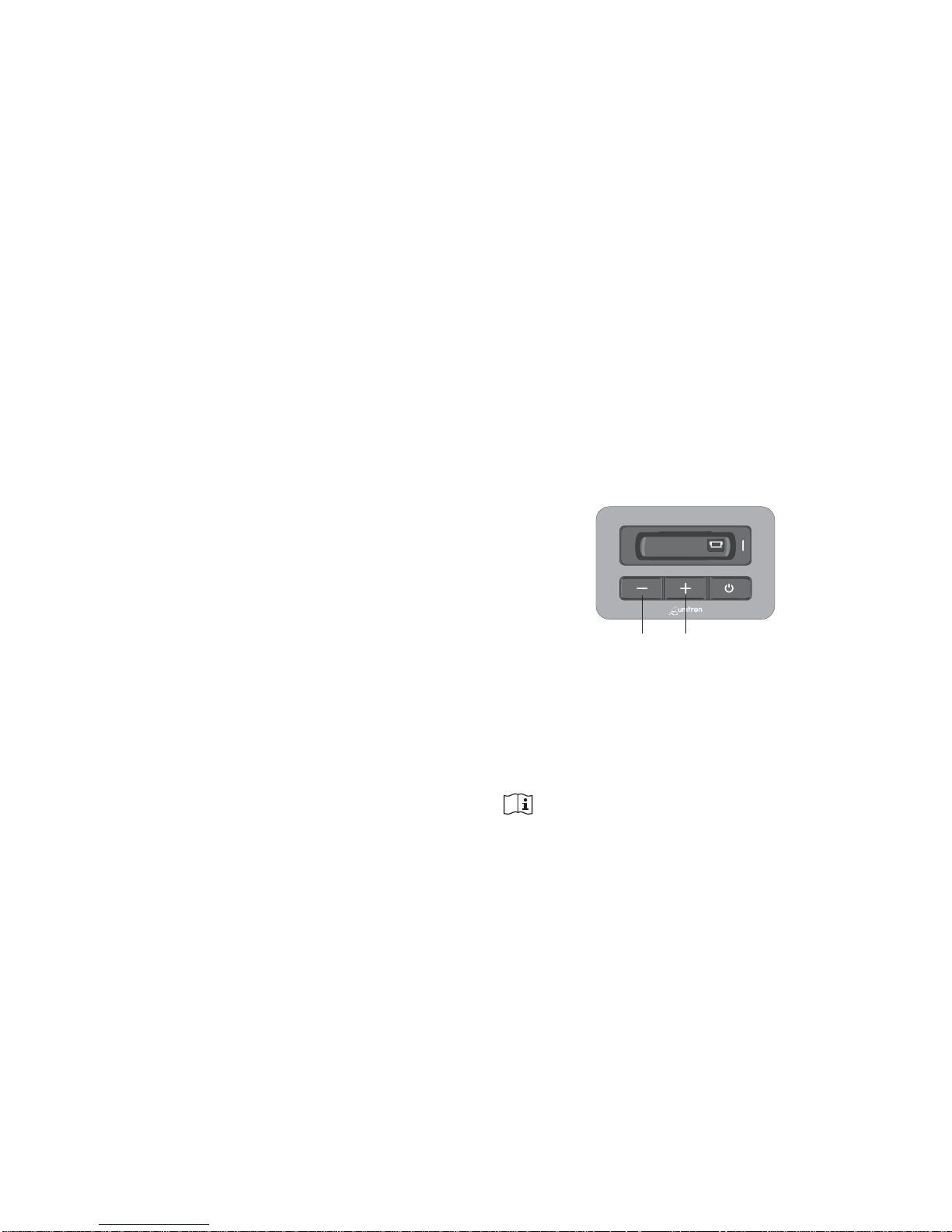
● If the uTV is connected to your TV with the
RCA/Cinch cable (i), adjust the volume on the uTV
by pressing the +/- volume control (b) and (c).
● If your uTV is connected to the headphone socket
of your TV, you may also use your TV remote control
to adjust volume via the TV directly. Please refer to
the TV user guide for more details on setting the TV
volume.
If your TV is connected to a satellite receiver or a
cable box, make sure the volumes of these additional
devices sre set to a medium level for best audio
quality results.
If the headset moves out of range of the uTV the
wireless audio transmission will be terminated.
If the headset is then moved back into range of
the uTV, it will automatically resume.
It may take up to 10 seconds until the streaming
resumes. The Bluetooth streaming light indicator on
the uTV (g) should be solid blue during streaming.
If the uTV status light (g)
● is green, make sure TV sound and headset are
switched on.
● blinks blue, you are in paused mode. Press the
headset main button (b) to resume streaming.
Page 7
1312
Declaration of Conformity
Hereby Unitron declares that this uTV meets the
requirements of the Radio and Telecommunications
Terminal Equipment Directive 1999/5/EC. The full text
of the Declaration of Conformity can be obtained from
the address below.
Manufacturer:
Unitron Hearing Ltd.
20 Beasley Drive, P.O. Box 9017,
Kitchener, ON N2G4X1 Canada
(a)
fig. 7
Step 6: Switching off uTV
To switch off the devices:
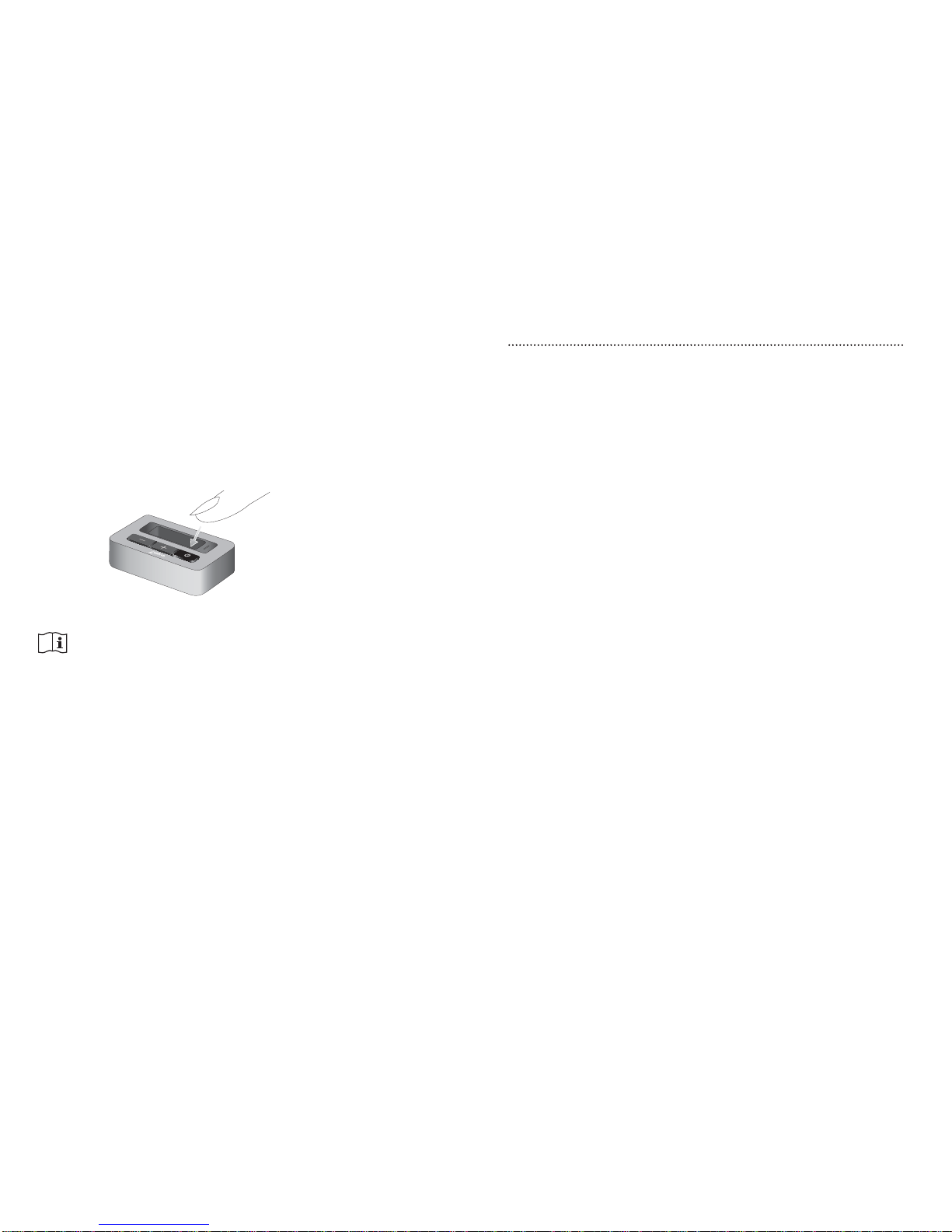
● To end the transmission of the TV audio signal,
switch off the uTV by pressing the ON/OFF button
(a) as shown in fig. 7.
If no audio input is available, the uTV
automatically stops the Bluetooth audio
transmission after 3 minutes. Its status light (g)
will turn solid green.
Page 8

1514
and receiver.
- Connect the equipment into an outlet on a circuit
different from that to which the receiver is connected.
-Consult the dealer or an experienced radio/TV
technician for help.
FCC/IC RF Radiation Exposure Statement
This equipment complies with FCC/IC radiation
exposure limits set forth for an uncontrolled
environment. End users must follow the specific
operating instructions for satisfying RF exposure
compliance. This transmitter must not be co-located
or operating in conjunction with any other antenna or
transmitter.
This device complies with Part 15 of the FCC Rules
and with RSS-210 of Industry Canada. Operation is
subject to the following two conditions:
1.) this device may not cause harmful interference, and
2.) this device must accept any interference received,
including interference that may cause undesired
operation.
Changes or modifications made to this device not
expressly approved by Unitron may void the FCC
authorization to operate this device.
This equipment has been tested and found to comply
with the limits for a Class B digital device, pursuant to
part 15 of the FCC/IC rules. These limits are designed
to provide reasonable protection against harmful
interference in a residential installation. This equipment
generates, uses and can radiate radio frequency energy
and, if not installed and used in accordance with the
instructions, may cause harmful interference to radio
communications. However, there is no guarantee that
interference will not occur in a particular installation. If
this equipment does cause harmful interference to radio
or televesion reception, which can be determined by
turning the equipment off and on, the user is
encouraged to try to correct the interference by one
or more of the following measures:
- Reorient or relocate the receiving antenna.
- Increase the separation between the equipment
This device is a class 2 device and can be operated in
the EU member states without restrictions for indoor
use, but must not operated outdoorsin France.
Page 9
Unitron Distributors
CORPORATE OFFICE / INTERNATIONAL
20 Beasley Drive, P.O. Box 9017, Kitchener, ON N2G4X1 Canada
AUSTRALIA
Level 2, Norwest Quay, 21 Solent
Circuit, Baulkham Hills, NSW,
NSW 2153
BELGIUM
Baron de Vironlaan, 60
b-1700 Dilbeek
CANADA
20 Beasley Drive, P.O. Box 9017,
Kitchener, ON N2G4X1
CHINA
No. 78, Qi Ming Road,
Export Processing Zone District B,
Suzhou Industrial Park, P.R. 215021
DENMARK
Nitivej 10, DK-2000 Frederiksberg
EUROPEAN REPRESENTATIVE
Daimlerstrasse 22, 70736
Fellbach-Oeffingen, Germany
FRANCE
5 bis, rue Maryse Bastié - BP 15
69671 Bron Cedex, France
NETHERLANDS
Ir. D.S Tuijnmanweg 10,
4131 PN VIANEN
Unitron Hearing Ltd.
20 Beasley Drive, P.O. Box 9017,
Kitchener, ON N2G4X1 Canada
NEW ZEALAND
10/215 Rosedale Rd., M277 Private
Bag, 300987, Albany, Auckland
SOUTH AFRICA
First Floor - Selborne House,
Fourways Golf Park, Roos Street,
Fourways, Johannesburg
SPAIN
Avenida de la Industria n°13/15,
Polígono de Canastell,
03690 Sant Vicent del Raspeig.
Alicante, España
SWEDEN
Förmansvägen 2, 4 tr
SE-11743, Stockholm, Sweden
UNITED KINGDOM
St. George House, Cygnet Court,
Centre Park, Warrington, Cheshire
WA1 1PD
U.S.A.
Suite A, 2300 Berkshire Lane North,
Plymouth, MN 55441
www.unitron.com
10-035 029-5836-02
DISTRIBUTOR
 Loading...