

Page 1
Page 2

Welcome
Congratulations on your purchase of this Uniden DSS5805 optional
handset and charger. This additional handset is for use with the
Uniden DSS5855 base. You can place a fully featured cordless handset
anywhere in your home where AC power is available to connect the
handset charging cradle. The original base will support up to 2
handsets (the original handset and one DSS5805 handset).
The DSS5805 will not be an alternative of the original handset,
if the original handset is damaged.
Important
The DSS5805 will not operate unless it has been registered to a
Uniden DSS5855. Before the additional handset can be used, the
battery must be charged and it must be registered with the base.
This manual describes only the instructions specific to the
additional handset. For detailed operation, refer to the owner’s
manual supplied with the original unit.
Checking the Package Contents
Make sure you have received the following items in the package. If
any of these items are missing or damaged, contact the Uniden Parts
Department.
• Cordless Handset • Beltclip
• Charger • This Owner’s Manual
• Battery Pack (BT-446) • Other Printed Material
(Capacity: 800 mAH, 3.6V)
• AC Adapter (AAD-600S)
(INPUT: 230V-240V AC 50Hz)
(OUTPUT: 9V DC 210 mA)
Uniden Australia Pty Limited Uniden New Zealand Limited
Service Division Service Division
Toll Free : 1300 366 895 Toll Free : 0800 4 UNIDEN
We can also be reached We can also be reached
at www.uniden.com.au at www.uniden.co.nz
(0800 4864 336)
– 1 –
Page 3
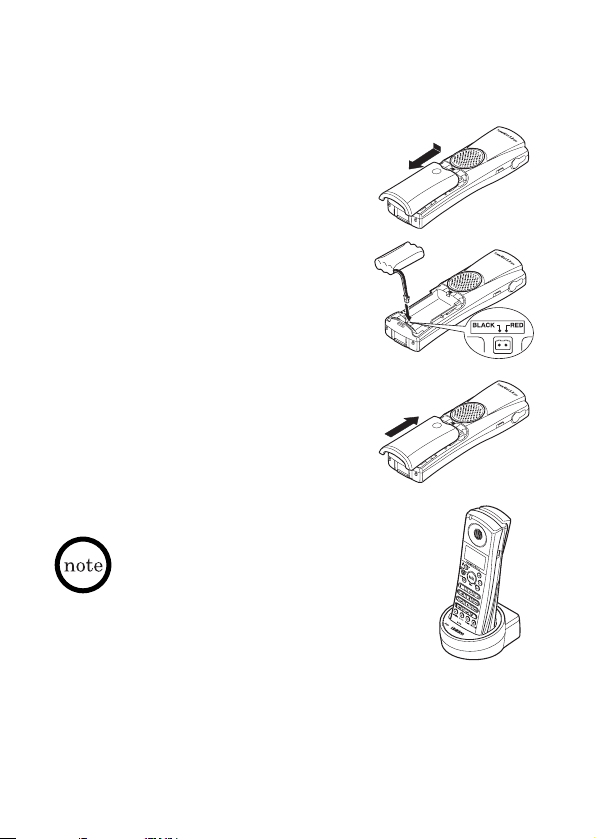
Install the Battery Pack
Charge the battery pack for at least 15-20 hours before
completing the installation or using the handset.
Press down on the battery cover
1
release and slide the cover down until
it comes off.
Connect the battery pack connector
2
observing the correct polarity (black
and red wires) to the jack inside the
battery compartment.
Do not exert any force on this connection.
It could cause damage to the battery or to
the handset. The plastic connectors will fit
in only one way.
Once you are certain that you have made a
good connection, then insert the battery
pack into the battery compartment. Do
not pinch the wires.
Securely close the battery
3
compartment cover by sliding it
until it snaps into place.
Place the handset in the charging
4
cradle with the keypad facing forward.
• Use only the Uniden battery (BT-446)
supplied with your phone. Replacement
batteries are also available through the
Service Division (See page 1).
• Recharge your handset on a regular basis
by returning the handset to the charger
after each phone call.
Battery Information
Battery use time (per charge)
From fully charged (15-20 hours charge time)
• Up to 4 hours continuous use
• Up to 8 days when the handset is in the standby mode
– 2 –
Page 4

Low battery alert
contacts
When the battery pack is very low and needs to be charged, the
phone is programmed to eliminate functions in order to save power.
If the phone is in the standby mode, ”Low Battery” appears
on the LCD and none of the keys will operate. If the phone is in
use, ”Low Battery” appears and the handset beeps. Complete
your conversation as quickly as possible and return the handset to
the base unit for charging.
Cleaning the battery charging contacts
To maintain a good charge, it is important to
clean the charging contacts on both the
handset and base unit once a month. Use
a dry cloth or pencil eraser to clean.
Connect the Charger
Connect the AC adapter
1
to the DC IN 9V jack and
to a standard wall outlet.
Set the charger on a desk
2
or tabletop, and place
the handset in the
charger with the keypad
facing forward.
Make sure that the
3
charge LED illuminates.
If the LED does not illuminate, check to see that the AC adapter
is plugged in and that the handset makes good contact with the
base charging contacts.
• Use only the supplied AAD-600S
AC adapter. Do not use any
other AC adapter.
• Place the charger close to the AC
outlet so that you can unplug the
AC adapter easily.
•”HS2” appears on the display
while the handset is charging.
Polarity of the plug
– 3 –
Page 5

Register the Handset
You need to register the DSS5805 before use.
To register the additional handset, place the DSS5805 handset on
the original unit’s base (DSS5855) for at least 5 seconds. The status
LED on the original base will flash indicating that registration is
occurring. After 5 seconds, the DSS5805 handset will be registered.
• In some cases you may need to attempt registration
a few times.
• You cannot register the handset when the original phone
is in use.
Call Transfer Feature
You can transfer an outside call to the original unit. For more
instructions, see the owner’s manual supplied with the original unit.
To transfer a call to the Press xfer/del during a call.
original unit When the original unit receives the
To receive a transferred call Press
from the original unit the transferred call.
To cancel the transfer Press
• If you transfer a call and it is not picked up after 5 minutes,
you hear a beep, and the call will be disconnected.
• Only one handset at a time can talk with an outside caller.
The earcap of this telephone may attract and retain small
metallic objects.
transferred call, the DSS5805 handset
returns to the standby mode.
talk/flash or spkr to answer
talk/flash or spkr.
– 4 –
Page 6

Notes
– 5 –
Page 7

WARRANTY
One Year Limited Warranty
Important:
Warrantor: Uniden Australia Pty Limited A.B.N. 58 001 865 498
ELEMENT OF WARRANTY: Uniden warrants to the original retail owner for the duration of
this warranty, its DSS5805 (herein after referred to as the Product), to be free from defects
in materials and craftsmanship with only the limitations or exclusions set out below.
WARRANTY DURATION: This warranty to the original retail owner only, shall terminate and
be of no further effect 12 months after the date of original retail sale. This warranty will be
deemed invalid if the product is; (A) Damaged or not maintained as reasonable and
necessary, (B) Modified, altered or used as part of any conversion kits, subassemblies, or any
configurations not sold by Uniden, (C) Improperly installed, (D) Repaired by someone other
than an authorised Uniden Repair Agent for a defect or malfunction covered by this
warranty, (E) Used in conjunction with any equipment or parts or as part of a system not
manufactured by Uniden, (F) Warranty is only valid in original country of purchase.
PARTS COVERED: This warranty covers for one (1) year, the Base Unit and Handset only. All
accessories (AC Adaptor etc)are covered for 90 days only.
STATEMENT OF REMEDY: In the event that the product does not conform to this warranty at
any time while this warranty is in effect, the warrantor at its discretion, will repair the
defect or replace the product and return it to you without charge for parts or service. THIS
WARRANTY DOES NOT COVER OR PROVIDE FOR THE REIMBURSEMENT OR PAYMENT OF
INCIDENTAL OR CONSEQUENTIAL DAMAGES. THIS GUARANTEE IS IN ADDITION TO AND DOES
NOT IN ANY WAY AFFECT YOUR RIGHTS UNDER THE CONSUMER GUARANTEE ACT.
PROCEDURE FOR OBTAINING PERFORMANCE OR WARRANTY: In the event that the product
does not conform to this warranty, the Product should be shipped or delivered, freight
pre-paid, with evidence of original purchase (eg. a copy of the sales docket), to the
warrantor at:
UNIDEN AUSTRALIA PTY LIMITED UNIDEN NEW ZEALAND LIMITED
SERVICE DIVISION SERVICE DIVISION
345 Princes Highway, Rockdale NSW 2216 150 Harris Road, East Tamaki, Auckland
Ph (02) 9599 3355 Fx (02) 9599 3278 Ph (09) 273 8383 Fx (09) 274 4253
Toll Free 1300 366 895 Toll Free 0800 4 UNIDEN (4 864 336)
www.uniden.com.au www.uniden.co.nz
Customers in other States should ship or deliver the Product freight pre-paid to their nearest
Uniden Authorised Repair Centre (Contact Uniden for the nearest Warranty Agent to you).
Evidence of original purchase is required for warranty service.
– 6 –
Page 8

 Loading...