

Page 1
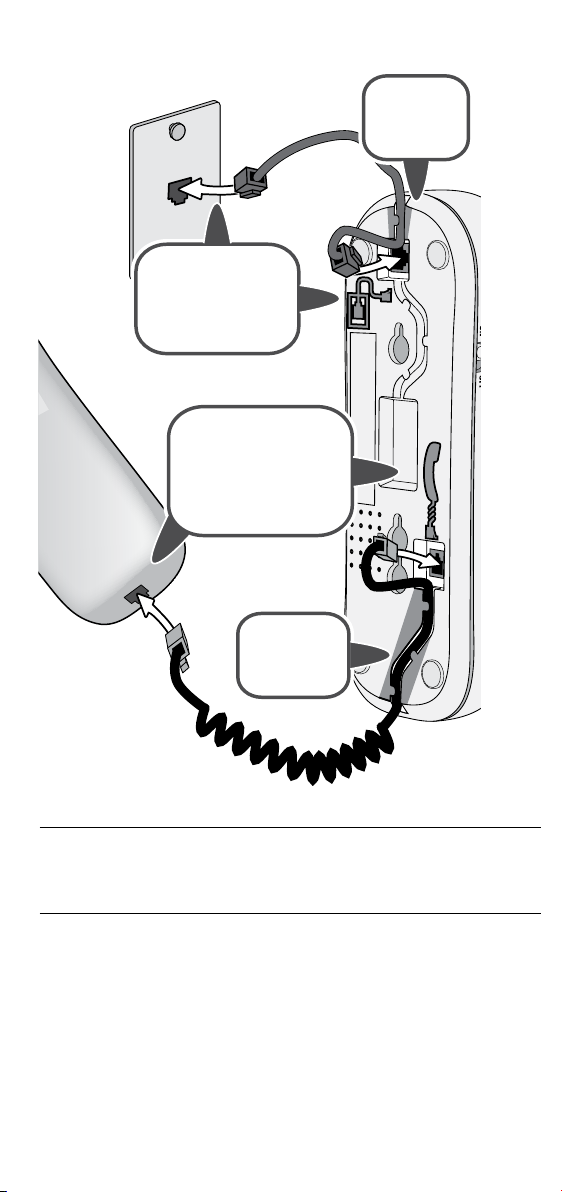
Connecting the Phone
Use the telephone
cord to connect the
line jack to a standard
telephone wall jack.
Use the coiled cord to
connect the handset
to the base (use the
jack marked with the
handset icon).
Route the
cord through
the channel.
Route the
cord through
the channel.
To reduce the risk of re, use only No. 26 AWG or larger
(e.g., 24 AWG) UL listed or CSA Certied Telecommunications
Line Cord.
Test the connection
1) Pick up the handset and listen for a dial tone. If you don't hear
one, check the connection between the base and the phone jack.
2) Make a test call. If the dial won't stop when you dial, check the
Tone/pulse switch: if it’s on tone, change it to pulse, and vice
versa. Try your test call again.
If static or noise is on the line, see the section on Solving Problems.
Page 2

FCC Part 15 Information
This equipment has been tested and found to comply with the limits for a Class B digital device, pursuant to part
15 of the FCC Rules. These limits are designed to provide reasonable protection against harmful interference in a
residential installation. This equipment generates, uses and can radiate radio frequency energy and, if not installed
and used in accordance with the instructions, may cause harmful interference to radio communications. However,
there is no guarantee that interference will not occur in a particular installation. If this equipment does cause harmful
interference to radio or television reception, which can be determined by turning the equipment o and on, the user is
encouraged to try to correct the interference by one or more of the following measures:
• Reorient or relocate the receiving antenna.
• Increase the separation between the equipment and receiver.
• Connect the equipment into an outlet on a circuit dierent from that to which the receiver
is connected.
• Consult the dealer or an experienced radio/TV technician for help.
If your home has wired alarm equipment connected to a phone line, be sure that installing the system does not disable
your alarm equipment. If you have questions about what will disable alarm equipment, contact your telephone
company or a qualied installer.
Changes or modications to this equipment not expressly approved by the party responsible for compliance could void
the user’s authority to operate the equipment.
Industry Canada (I.C.) Notice
Terminal equipment
NOTICE: This equipment meets the applicable Industry Canada Terminal Equipment Technical
Specications. This is conrmed by the registration number. The abbreviation, IC, before the registration
number signies that registration was performed based on a Declaration of Conformity indicating that
Industry Canada technical specications were met. It does not imply that Industry Canada approved the
equipment.
NOTICE: The Ringer Equivalence Number (REN) for this terminal equipment is marked on the equipment
itself. The REN assigned to each terminal equipment provides an indication of the maximum number
of terminals allowed to be connected to a telephone interface. The termination on an interface may
consist of any combination of devices subject only to the requirement that the sum of the Ringer
Equivalence Numbers of all the devices does not exceed 5.
One-year Limited Warranty
Important: Evidence of original purchase is required for warranty service. WARRANTOR: UNIDEN AMERICA
CORPORATION ("Uniden") ELEMENTS OF WARRANTY: Uniden warrants, for one year, to the original retail owner, this
Uniden Product to be free from defects in materials and craftsmanship with only the limitations or exclusions set out
below.
WARRANTY DURATION: This warranty to the original user shall terminate and be of no further eect 12 months after
the date of original retail sale. The warranty is invalid if the Product is (A) damaged or not maintained as reasonable
or necessary, (B) modied, altered, or used as part of any conversion kits, subassemblies, or any congurations not
sold by Uniden, (C) improperly installed, (D) serviced or repaired by someone other than an authorized Uniden service
center for a defect or malfunction covered by this warranty, (E) used in any conjunction with equipment or parts or as
part of any system not manufactured by Uniden, or (F) installed or programmed by anyone other than as detailed by
the owner's manual for this product.
STATEMENT OF REMEDY: In the event that the product does not conform to this warranty at any time while this
warranty is in eect, warrantor will either, at its option, repair or replace the defective unit and return it to you without
charge for parts, service, or any other cost (except shipping and handling) incurred by warrantor or its representatives
in connection with the performance of this warranty. Warrantor, at its option, may replace the unit with a new or
refurbished unit. THE LIMITED WARRANTY SET FORTH ABOVE IS THE SOLE AND ENTIRE WARRANTY PERTAINING TO
THE PRODUCT AND IS IN LIEU OF AND EXCLUDES ALL OTHER WARRANTIES OF ANY NATURE WHATSOEVER, WHETHER
EXPRESS, IMPLIED OR ARISING BY OPERATION OF LAW, INCLUDING, BUT NOT LIMITED TO ANY IMPLIED WARRANTIES OF
MERCHANTABILITY OR FITNESS FOR A PARTICULAR PURPOSE. THIS WARRANTY DOES NOT COVER OR PROVIDE FOR THE
REIMBURSEMENT OR PAYMENT OF INCIDENTAL OR CONSEQUENTIAL DAMAGES. Some states do not allow this exclusion
or limitation of incidental or consequential damages so the above limitation or exclusion may not apply to you.
LEGAL REMEDIES: This warranty gives you specic legal rights, and you may also have other rights which vary from
state to state. This warranty is void outside the United States of America and Canada.
PROCEDURE FOR OBTAINING PERFORMANCE OF WARRANTY: If, after following the instructions in the owner's manual
you are certain that the Product is defective, pack the Product carefully (preferably in its original packaging). The
Product should include all parts and accessories originally packaged with the Product. Include evidence of original
purchase and a note describing the defect that has caused you to return it. The Product should be shipped freight
prepaid, by traceable means, to warrantor at:
Uniden America Corporation
Service Department
4700 Amon Carter Blvd.
Fort Worth, TX 76155
Page 3

Slimline Phone User's Guide
What's in the box?
Handset
Base
Coiled
handset cord
If You... Contact Uniden’s... Phone
have a question or problem Customer Care Line* 800-297-1023
need a part or accessory Parts Department* 800-554-3988
need special assistance due
to a disability
* During regular business hours, Central Standard Time. Visit our website for detailed
business hours.
Accessibility Help Line
Telephone
cord
If any items are missing
or damaged, contact
our Customer Care Line
immediately. Never use
damaged products.
Need Help? You can get
answers 24/7 at our website:
www.uniden.com.
800-874-9314
(voice or TTY)
Important safety precautions
When using your telephone equipment, always follow basic safety
precautions to reduce the risk of re, electric shock and injury to
persons, including the following:
►
Do not use this product near water, for example, near a bath tub,
wash bowl, kitchen sink or laundry tub, in a wet basement or near a
swimming pool.
►
Avoid using a telephone (other than a cordless type) during an electrical
storm. There may be a remote risk of electric shock from lightning.
►
Do not use the telephone to report a gas leak in the vicinity of the leak.
SAVE THESE INSTRUCTIONS
Uniden works to reduce lead content in our PVC coated cords in our products and
accessories.
Warning! The cords on this product and/or accessories contain lead,
a chemical known to the State of California to cause birth defects or
other reproductive harm. Wash hands after handling.
Uniden® is a registered trademark of Uniden America Corporation.
The pictures in this manual are used for examples only. Your actual phone may not look
exactly like the pictures.
Page 4

Using the Phone
Visual
ringer
Boost
button
Volume
dial
Flash
button
Tone/pulse
switch
Reset
button
Mute
button
Redial
button
Button What it does
Boost and
Volume dial
These controls work together to change the volume. See
Changing the Audio Volume.
Flash During a call: switch to a waiting call
Tone/pulse Change the dial mode (see Solving Problems.)
Reset During a call: Hang up the current call and get a dial tone.
Mute
During a call: press & hold to mute the microphone so callers
can’t hear you. Release to turn the microphone back on.
Redial Redial the last number.
Ringer Turn the audio ringer (but not the visual ringer) o or on.
light
Hook
switch
Handset
clip
Ringer
switch
Using Call Waiting
Call waiting is service provided by your local telephone provider;
contact your telephone provider to subscribe to this service.
If you get a Call Waiting call, the handset beeps. Press Flash to
switch between the current call and the waiting call; each time you
switch, there’s a short pause before you're connected to the other
caller.
Changing the Audio Volume
During a call, press Boost to activate the Volume dial. Use the dial
to change the volume. When you’re nished, press Boost again to
deactivate the Volume dial.
Page 5

Wall-Mounting the Phone
Connect the cords as
usual, but route the
line cord through
the inside channel.
Line up the notches on the
base with the pins on the
wall plate. Place the phone
over the plate and slide it
down to lock it into place.
Tuck excess line cord into the
space on the back of the phone.
You can mount the phone on
any standard telephone wall
plate where the pins are
100 mm (3
15
/16 inches)
apart.
Before
putting the
handset in
the cradle,
you need to
switch the
handset
clip into
wall mount
mode as
shown in
the drawing
below.
Flip the clip from
front to back.
Rotate the clip
180 degrees.
Slide the
clip out of
its slot.
Slide it
back into
the slot.
Solving Problems
If you have any trouble with your phone, try these simple steps rst.
If you still have a question or problem, call the Customer Hotline
listed on the front page.
Problem Things to try
I keep hearing a dial tone
when I try to make a call.
The phone rings, but I can't
hear anything.
Checking the Tone/pulse switch: if it’s on
tone, change it to pulse and try again.
Checking the coiled cord connection
between the base and the handset.
Page 6

If there's static on the line
DSL broadband Internet service can
DSL lter
cause static on telephones, but a DSL
lter usually solves any problems. To
get a DSL lter, call your DSL provider
or look in any electronics store.
Telephone
wall jack
Telephone
cord
To install the lter, plug the DSL lter
into the wall jack and then plug your
phone into the lter. Make a test call
to see if the noise is gone.
What Else Do I Need to Know?
FCC compliance information
Part 68 information
This equipment complies with Part 68 of the FCC rules and the requirements adopted by the ACTA. On
the bottom of this equipment is a label that contains, among other information, a product identier
in the format US: 6NYTE##BXXXXXX (where XXXXXX stands for a specic model number). If requested,
this number must be provided to the telephone company.
An applicable Universal Service Order Codes (USOC) certication for the jacks used in this equipment
is provided (i.e., RJ11C) in the packaging with each piece of approved terminal equipment. A plug and
jack used to connect this equipment to the premises wiring and telephone network must comply with
the applicable FCC Part 68 rules and requirements adopted by the ACTA. A compliant telephone cord
and modular plug is provided with this product. It is designed to be connected to a compatible modular
jack that is also compliant. See installation instructions for details.
The REN is used to determine the number of devices that may be connected to a telephone line.
Excessive RENs on a telephone line may result in the devices not ringing in response to an incoming
call. In most but not all areas, the sum of RENs should not exceed ve (5.0). To be certain of the
number of devices that may be connected to a line, as determined by the total RENs, contact the
telephone provider. The REN for this product is part of the product identier that has the format
US:6NYTE##BXXXXXX. The digits represented by ## are the REN without a decimal point (e.g., 18 is a
REN of 1.8).
If this equipment causes harm to the telephone network, the telephone company will notify you in
advance that temporary discontinuance of service may be required. But if advance notice isn’t practical,
the telephone company will notify the customer as soon as possible. Also, you will be advised of your
right to le a complaint with the FCC if you believe it is necessary. The telephone company may make
changes in its facilities, equipment, operations or procedures that could aect the operation of the
equipment. If this happens the telephone company will provide advance notice in order for you to
make necessary modications to maintain uninterrupted service.
If the equipment is causing harm to the telephone network, the telephone company may request that
you disconnect the equipment until the problem is resolved.
Follow instructions for repairing, if any (e.g. battery replacement section); otherwise do not substitute
or repair any parts of the device except as specied in this manual. Should you experience trouble with
this equipment, contact Uniden customer service at 800-297-1023 to arrange repairs. All repairs must
be done by Uniden or an authorized agent.
Connection to party line service is subject to state taris. Contact the state public utility commission,
public service commission or corporation commission for information. This equipment is hearing aid
compatible.
NOTICE: According to telephone company reports, AC electrical surges, typically resulting from
lightning strikes, are very destructive to telephone equipment connected to AC power sources. To
minimize damage from these types of surges, a surge arrestor is recommended.
Changes or modications to this product not expressly approved by Uniden, or operation of this
product in any way other than as detailed by the owner’s manual, could void your authority to operate
this product.
 Loading...