

Page 1

Managed Gigabit Fiber Switch
Model: ES-12F
Page 2

Introduction
Thank you for purchasing the Ubiquiti Networks® EdgeSwitch®
Fiber. This Quick Start Guide is designed to guide you through
installation and also includes warranty terms.
Package Contents
EdgeSwitch Fiber
Power Cord Rack-Mount Brackets
Mounting Screws
(Qty. 4)
TERMS OF USE: All Ethernet cabling runs must use CAT5 (or above). It is the professional
installer’s responsibility to follow local country regulations, including operation within legal
frequency channels, output power, indoor cabling requirements, and Dynamic Frequency
Selection (DFS) requirements.
(Qty. 2)
Cage Nuts
(Qty. 4)
Bracket Screws
(M4, Qty. 8)
Managed Gigabit Fiber Switch
Model: ES-12F
Quick Start
Guide
Page 3

Installation Requirements
• Phillips screwdriver (for rack- or wall-mounting)
• Standard-sized, 19" wide rack with a minimum of 1U height
available (for rack-mounting)
• Use compatible fiber SFP modules with the appropriate fiber
optic cabling. For information about compatible fiber SFP
modules, visit: community.ubnt.com/edgemax
• For indoor applications, use Category 5 (or above) UTP
cabling approved for indoor use.
• For outdoor applications, shielded Category 5 (or above)
cabling should be used for all wired Ethernet connections
and should be grounded through the AC ground of the
power supply.
We recommend that you protect your networks from
harmful outdoor environments and destructive ESD events
with industrial-grade, shielded Ethernet cable from Ubiquiti
Networks. For more details, visit:
www.ubnt.com/toughcable
WARNING: To reduce the risk of fire or electric shock, do
not expose the EdgeSwitch Fiber to rain or moisture.
Note: Although the cabling can be located outdoors,
the EdgeSwitch Fiber itself should be housed inside a
protective enclosure.
Hardware Overview
Front Panel Ports
Port Description
SFP 1-12
RJ45 13-16
Hot-swappable SFP ports support 1 Gbps
connections. Ports 1-8 also support 100 Mbps.
RJ45 ports support 10/100/1000 Ethernet
connections.
SFP 1-12 RJ45 13-16
Page 4

Front Panel LEDs
System
System LED
Note: The System LED functionality has been updated
with firmware v1.8.0. We recommend that you update
the EdgeSwitch to the latest firmware.
State Status
Flashing White Bootup in progress.
White
Blue Ready for use, connected to UNMS.
Steady Blue
with Occasional
Flashing
Quickly Flashing
Blue
Alternating
Blue/White
You can use the EdgeSwitch Configuration Interface or UNMS
to manage your device. UNMS lets you configure, monitor,
upgrade, and back up your devices using a singleapplication.
Get started at www.unms.com
Ready for use, not connected to Ubiquiti®
Network Management System (UNMS™).
Ready for use, unable to connect to
UNMS, check connection to UNMSserver.
Used to locate a device in UNMS.
Firmware upgrade in progress.
Page 5

SFP: Speed/Link/Act
SFP LEDs
LED
State Status
Off No Link
Amber Link Established at 100 Mbps
Speed/
Amber
Link/
Activity
Link Activity at 100 Mbps
Flashing
Green Link Established at 1000 Mbps (1 Gbps)
Green
Link Activity at 1000 Mbps (1Gbps)
Flashing
RJ45 LEDs
LED
State Status
Off No Link
Amber Link Established at 10/100 Mbps
Speed/
Amber
Link/
Activity
Link Activity at 10/100 Mbps
Flashing
Green Link Established at 1000 Mbps (1 Gbps)
Green
Link Activity at 1000 Mbps (1Gbps)
Flashing
RJ45: Speed/Link/Act
Page 6

Front Panel Button
Button Description
Reset
There are two methods to reset the
EdgeSwitch Fiber to factory defaults:
Runtime Reset (Recommended)
The EdgeSwitch Fiber should be running
after bootup is complete, and the System
LED is white. Press and hold the Reset
button. The EdgeSwitch Fiber will reboot,
and the System LED becomesblue after
three seconds. Continue to hold the Reset
button for about 15seconds until the
System LED flashes blue for two seconds.
This indicates that the EdgeSwitch Fiber has
reset to its factorydefaults.
Power-on Reset
1. Disconnect the Power Cord from the
2. While connecting the Power Cord to the
Reset
EdgeSwitch Fiber.
EdgeSwitch Fiber, hold the Reset button
for about 15seconds until the System
LED flashes blue for two seconds. This
indicates that the EdgeSwitch Fiber has
reset to its factory defaults.
Page 7

Back Panel Console Port
Console
Port Description
RJ45 serial console port for Command
Line Interface (CLI) management. Use an
RJ45-to-DB9, serial console cable, also
known as a rollover cable, to connect
the Console port to your computer. Then
Console
configure the following settings as needed:
• Baud rate 115200
• Data bits 8
• Parity NONE
• Stop bits 1
• Flow control NONE
Page 8
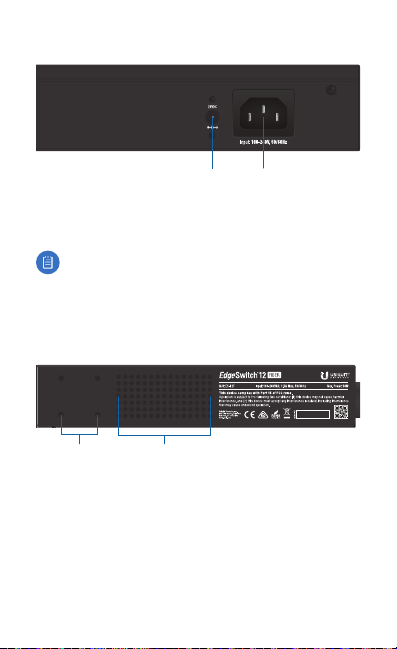
Back Panel Power
Power
DC Input
DC Input The 25VDC input can connect a redundant or
stand-alone DC power source (not included) with minimum
power: 56W, 25 to 16V, and 2.5 mm DC power inline connector.
Note: You can use the redundant DC power source as a
hot spare; if the internal AC/DC power supply no longer
provides power, then the EdgeSwitch Fiber will switch to
the DC power source without interrupting its operation.
Power Connect the included Power Cord to the Power port.
Side Panel
Bracket Mounting
Holes
Ventilation
Holes
Page 9
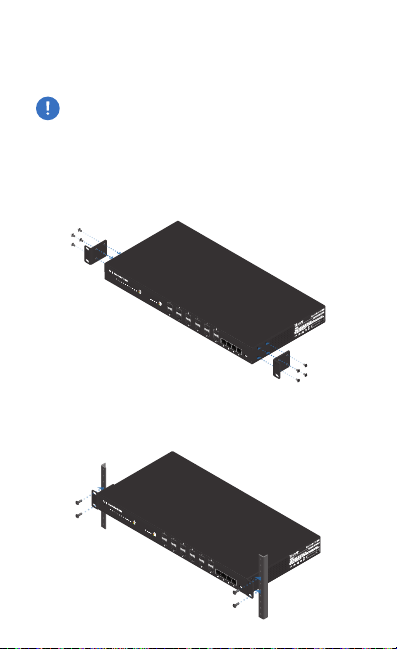
Hardware Installation
The EdgeSwitch Fiber can be placed on a horizontal surface,
mounted on a wall, or mounted in a rack.
WARNING: FAILURE TO PROVIDE PROPER VENTILATION
MAY CAUSE FIRE HAZARD. KEEP AT LEAST 20 MM OF
CLEARANCE NEXT TO THE VENTILATION HOLES FOR
ADEQUATE AIRFLOW.
Mounting in a Rack (Optional)
1. Attach the Rack-Mount Brackets to the EdgeSwitch Fiber
using the eight Bracket Screws.
2. Attach the EdgeSwitch Fiber to the rack or wall using the
four Mounting Screws. (If the rack has square slots, then use
the Cage Nuts with the Mounting Screws.)
Page 10
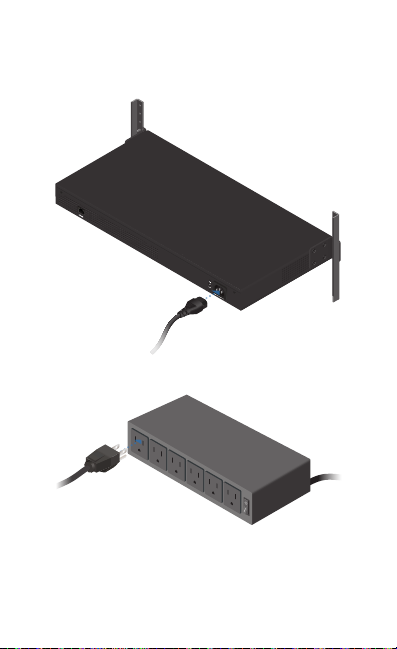
Connecting Power
1. Connect the Power Cord to the Power port of the
EdgeSwitch Fiber.
2. Connect the other end of the Power Cord to a power outlet.
Page 11
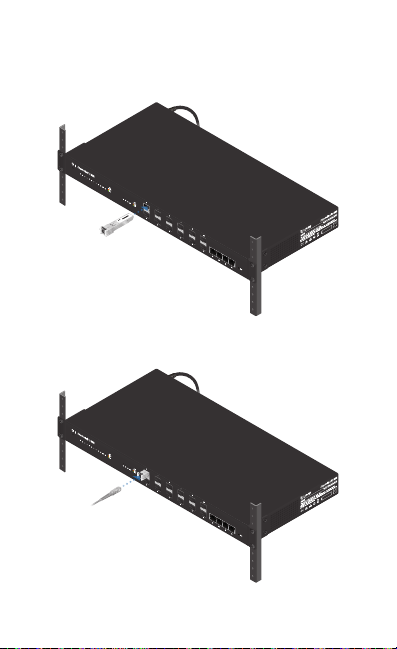
Connecting SFP
1. Remove the protective plug covering the SFP port.
2. Plug a compatible fiber module into the SFP port.
Tx1550nm/Rx1310nm
1000Mbps SM/SC 20KM DDM
3. Connect the fiber optic cable to the fiber module. Then
connect the other end of the cable to another fiber device.
4. Repeat steps 1-3 to connect additional SFP ports.
Page 12
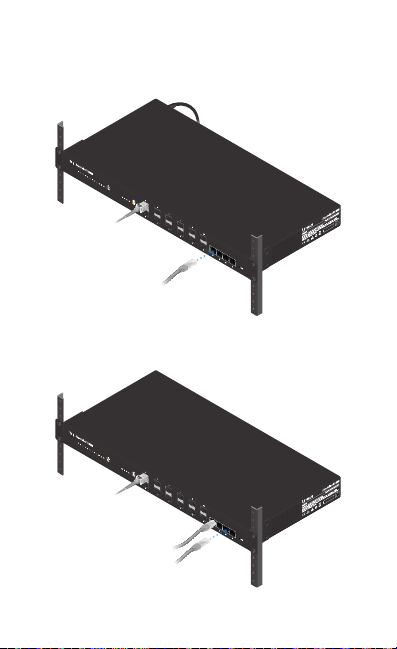
Connecting RJ45
1. Connect an Ethernet cable from your computer or host
system to any RJ45 port of the EdgeSwitch Fiber.
2. Connect Ethernet cables from the RJ45 ports of your
devices to the other RJ45 ports of the EdgeSwitch Fiber.
Page 13
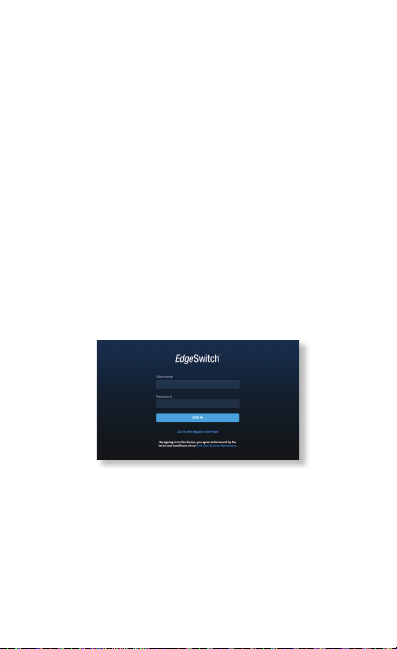
Accessing the Configuration Interface
The EdgeSwitch Fiber is set to DHCP by default, so it will try
to automatically obtain an IP address. If that fails, then it will
use the default fallback IP address, 192.168.1.2. Proceed to the
appropriate section, DHCP or Fallback IP Address:
DHCP
Use one of the following methods:
• Set up the DHCP server to provide a specific IP address to the
EdgeSwitch Fiber based on its MAC address (on the label).
• Let the EdgeSwitch Fiber obtain an IP address and then
check the DHCP server to see which IP address was assigned.
To log in, follow these steps:
1. Launch your web browser. Type the appropriate IP address
in the address field. Press enter (PC) or return (Mac).
2. Enter ubnt in the Username and Password fields. Click
SignIn. (When you sign in, you agree to accept the
Ubiquiti License Agreement.)
The EdgeSwitch Configuration Interface will appear. Customize
additional settings as needed. For more information, refer to
the EdgeSwitch documentation, which is available at
www.ubnt.com/download/edgemax
You can also manage your device using the Ubiquiti® Network
Management System. UNMS™ lets you configure, monitor,
upgrade, and back up your devices using a single application.
Get started at www.unms.com
Page 14
Fallback IP Address
1. Ensure that your computer (or other host system) is
connected to the EdgeSwitch Fiber.
2. Configure the Ethernet adapter on your host system with a
static IP address on the 192.168.1.x subnet.
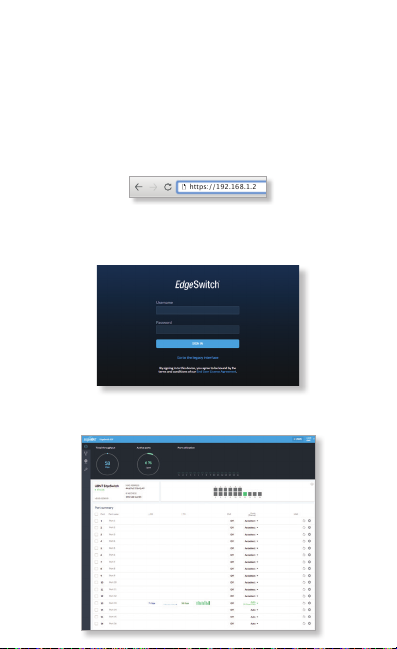
3. Launch your web browser. Type the appropriate IP address
in the address field (192.168.1.2 is the default fallback IP
address). Press enter (PC) or return (Mac).
https://192.168.1.2
4. Enter ubnt in the Username and Password fields. Click
SignIn. (When you sign in, you agree to accept the
Ubiquiti License Agreement.)
5. The EdgeSwitch Configuration Interface will appear. Click
the System Settings tab.
Page 15
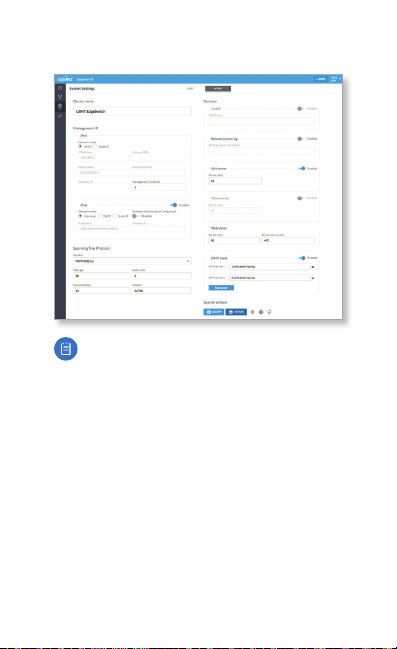
6. Change the IP Address to a unique IP address or keep the
default, DHCP. Click Apply.
Note: If you change the IP settings, then the session
will be cut off, and you will need to reconnect to the
EdgeSwitch Fiber using the new IP address.
Customize additional settings as needed. For more
information, refer to the EdgeSwitch documentation, which is
available at www.ubnt.com/download/edgemax
You can also manage your device using the Ubiquiti Network
Management System. UNMS lets you configure, monitor,
upgrade, and back up your devices using a single application.
Get started at www.unms.com
Page 16
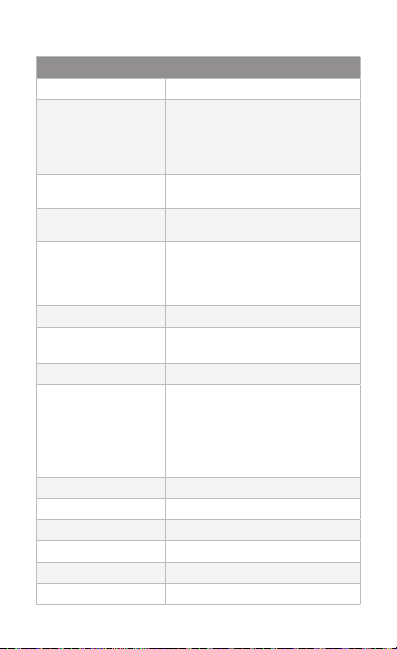
Specifications
ES-12F
Dimensions 443 x 221 x 43 mm (17.44 x 8.70 x 1.69")
Weight
Rack-Mount Brackets
Included
Rack-Mount Brackets
Excluded
Total Non-Blocking
Line Rate
Max. AC Power
Consumption
Power Method
AC
DC
Power Supply AC/DC, Internal, 56W DC
Supported Voltage Range 100 to 240VAC
LEDs Per Data Port Speed/Link/Activity
Interfaces
Networking Interfaces
Management Interface
Rackmount Yes, 1U High
ESD/EMP Protection Air: ± 24 kV, Contact: ± 24 kV
Shock and Vibration ETSI300-019-1.4 Standard
Operating Temperature -5 to 40° C (23 to 104° F)
Operating Humidity 5 to 95% Noncondensing
Certications CE, FCC, IC
100-240VAC/50-60 Hz, Universal Input
DC 56W, 25 to 16V, with 2.5 mm
(8) 100/1000 Mbps SFP Ethernet Ports
(4) 1000 Mbps SFP Ethernet Ports
(4) 10/100/1000 Mbps RJ45 Ethernet Ports
(1) RJ45 Serial Port Out-of-Band,
2.68 kg (5.91 lb)
2.59 kg (5.71 lb)
16 Gbps
DC Power Inline Connector
25 to 16VDC
Ethernet In-Band
56W
Page 17

Safety Notices
1. Read, follow, and keep these instructions.
2. Heed all warnings.
3. Only use attachments/accessories specified by the manufacturer.
WARNING: Failure to provide proper ventilation may
cause fire hazard. Keep at least 20 mm of clearance next
to the ventilation holes for adequate airflow.
WARNING: To reduce the risk of fire or electric shock, do
not expose this product to rain or moisture.
WARNING: Do not use this product in location that can
be submerged by water.
WARNING: Avoid using this product during an electrical
storm. There may be a remote risk of electric shock from
lightning.
Electrical Safety Information
1. Compliance is required with respect to voltage, frequency, and current
requirements indicated on the manufacturer’s label. Connection to a
different power source than those specified may result in improper
operation, damage to the equipment or pose a fire hazard if the
limitations are not followed.
2. There are no operator serviceable parts inside this equipment. Service
should be provided only by a qualified service technician.
3. This equipment is provided with a detachable power cord which has
an integral safety ground wire intended for connection to a grounded
safety outlet.
a. Do not substitute the power cord with one that is not the provided
approved type. Never use an adapter plug to connect to a 2-wire
outlet as this will defeat the continuity of the grounding wire.
b. The equipment requires the use of the ground wire as a part of the
safety certification, modification or misuse can provide a shock
hazard that can result in serious injury or death.
c. Contact a qualified electrician or the manufacturer if there
are questions about the installation prior to connecting the
equipment.
d. Protective earthing is provided by Listed AC adapter. Building
installation shall provide appropriate short-circuit backup
protection.
e. Protective bonding must be installed in accordance with local
national wiring rules and regulations.
Page 18

Limited Warranty
www.ubnt.com/support/warranty/
The limited warranty requires the use of arbitration to resolve disputes on
an individual basis, and, where applicable, specify arbitration instead of
jury trials or class actions.
Compliance
FCC
Changes or modifications not expressly approved by the party responsible
for compliance could void the user’s authority to operate the equipment.
This device complies with Part 15 of the FCC Rules. Operation is subject to
the following two conditions:
1. This device may not cause harmful interference, and
2. This device must accept any interference received, including
interference that may cause undesired operation.
NOTE: This equipment has been tested and found to comply with the
limits for a Class A digital device, pursuant to part 15 of the FCC Rules.
These limits are designed to provide reasonable protection against
harmful interference when the equipment is operated in a commercial
environment. This equipment generates, uses, and can radiate radio
frequency energy and, if not installed and used in accordance with
the instruction manual, may cause harmful interference to radio
communications. Operations of this equipment in a residential area is likely
to cause harmful interference in which case the user will be required to
correct the interference at his own expense.
ISED Canada
CAN ICES-3(A)/NMB-3(A)
This Class A digital apparatus complies with Canadian CAN ICES-003.
CAN ICES-3(A)/NMB-3(A)
Cet appareil numérique de la classe A est conforme à la norme NMB-003
du Canada.
Australia and New Zealand
Warning: This is a Class A product. In a domestic environment this
product may cause radio interference in which case the user may
be required to take adequate measures.
Page 19
CE Marking
CE marking on this product represents the product is in compliance with all
directives that are applicable to it.
RoHS/WEEE Compliance Statement
English
European Directive 2012/19/EU requires that the equipment bearing
this symbol on the product and/or its packaging must not be disposed
of with unsorted municipal waste. The symbol indicates that this
product should be disposed of separately from regular household waste
streams. It is your responsibility to dispose of this and other electric and
electronic equipment via designated collection facilities appointed by the
government or local authorities. Correct disposal and recycling will help
prevent potential negative consequences to the environment and human
health. For more detailed information about the disposal of your old
equipment, please contact your local authorities, waste disposal service, or
the shop where you purchased the product.
Deutsch
Die Europäische Richtlinie 2012/19/EU verlangt, dass technische
Ausrüstung, die direkt am Gerät und/oder an der Verpackung mit diesem
Symbol versehen ist, nicht zusammen mit unsortiertem Gemeindeabfall
entsorgt werden darf. Das Symbol weist darauf hin, dass das Produkt
von regulärem Haushaltmüll getrennt entsorgt werden sollte. Es
liegt in Ihrer Verantwortung, dieses Gerät und andere elektrische
und elektronische Geräte über die dafür zuständigen und von der
Regierung oder örtlichen Behörden dazu bestimmten Sammelstellen zu
entsorgen. Ordnungsgemäßes Entsorgen und Recyceln trägt dazu bei,
potentielle negative Folgen für Umwelt und die menschliche Gesundheit
zu vermeiden. Wenn Sie weitere Informationen zur Entsorgung Ihrer
Altgeräte benötigen, wenden Sie sich bitte an die örtlichen Behörden oder
städtischen Entsorgungsdienste oder an den Händler, bei dem Sie das
Produkt erworben haben.
Page 20

Español
La Directiva 2012/19/UE exige que los equipos que lleven este símbolo en
el propio aparato y/o en su embalaje no deben eliminarse junto con otros
residuos urbanos no seleccionados. El símbolo indica que el producto
en cuestión debe separarse de los residuos domésticos convencionales
con vistas a su eliminación. Es responsabilidad suya desechar este y
cualesquiera otros aparatos eléctricos y electrónicos a través de los puntos
de recogida que ponen a su disposición el gobierno y las autoridades
locales. Al desechar y reciclar correctamente estos aparatos estará
contribuyendo a evitar posibles consecuencias negativas para el medio
ambiente y la salud de las personas. Si desea obtener información más
detallada sobre la eliminación segura de su aparato usado, consulte a las
autoridades locales, al servicio de recogida y eliminación de residuos de su
zona o pregunte en la tienda donde adquirió el producto.
Français
La directive européenne 2012/19/UE exige que l’équipement sur lequel
est apposé ce symbole sur le produit et/ou son emballage ne soit pas jeté
avec les autres ordures ménagères. Ce symbole indique que le produit
doit être éliminé dans un circuit distinct de celui pour les déchets des
ménages. Il est de votre responsabilité de jeter ce matériel ainsi que tout
autre matériel électrique ou électronique par les moyens de collecte
indiqués par le gouvernement et les pouvoirs publics des collectivités
territoriales. L’élimination et le recyclage en bonne et due forme ont pour
but de lutter contre l’impact néfaste potentiel de ce type de produits
sur l’environnement et la santé publique. Pour plus d’informations sur le
mode d’élimination de votre ancien équipement, veuillez prendre contact
avec les pouvoirs publics locaux, le service de traitement des déchets, ou
l’endroit où vous avez acheté le produit.
Italiano
La direttiva europea 2012/19/UE richiede che le apparecchiature
contrassegnate con questo simbolo sul prodotto e/o sull’imballaggio non
siano smaltite insieme ai rifiuti urbani non differenziati. Il simbolo indica
che questo prodotto non deve essere smaltito insieme ai normali rifiuti
domestici. È responsabilità del proprietario smaltire sia questi prodotti sia
le altre apparecchiature elettriche ed elettroniche mediante le specifiche
strutture di raccolta indicate dal governo o dagli enti pubblici locali. Il
corretto smaltimento ed il riciclaggio aiuteranno a prevenire conseguenze
potenzialmente negative per l’ambiente e per la salute dell’essere umano.
Per ricevere informazioni più dettagliate circa lo smaltimento delle vecchie
apparecchiature in Vostro possesso, Vi invitiamo a contattare gli enti
pubblici di competenza, il servizio di smaltimento rifiuti o il negozio nel
quale avete acquistato il prodotto.
Page 21

Declaration of Conformity
български [Bulgarian] С настоящото UBIQUITI NETWORKS декларира, че това устройство
ES-12F е в съответствие със съществените изисквания и други приложими разпоредби на
Директиви 2014/30/ЕС, 2014/35/ЕС. Цялостният текст на ЕС декларацията за съответствие
може да се намери на следния интернет адрес:
Hrvatski [Croatian] UBIQUITI NETWORKS ovim putem izjavljuje da je ovaj uređaj ES-12F
sukladan osnovnim zahtjevima i ostalim bitnim odredbama Direktiva 2014/30/EU,
2014/35/EU. Cjeloviti tekst EU izjave o sukladnosti dostupan je na sljedećoj internetskoj adresi:
www.ubnt.com/compliance
Čeština [Czech] UBIQUITI NETWORKS tímto prohlašuje, že toto ES-12F zařízení, je ve
shodě se základními požadavky a dalšími příslušnými ustanoveními směrnic 2014/30/EU,
2014/35/EU. Úplné znění EU prohlášení o shodě je k dispozici na této internetové adrese:
www.ubnt.com/compliance
Dansk [Danish] Hermed, UBIQUITI NETWORKS, erklærer at denne ES-12F enhed,
er i overensstemmelse med de væsentlige krav og øvrige relevante krav i direktiver
2014/30/EU, 2014/35/EU. EU-overensstemmelseserklæringens fulde tekst kan findes på følgende
internetadresse:
www.ubnt.com/compliance
Nederlands [Dutch] Hierbij verklaart UBIQUITI NET WORKS, dat deze ES-12F apparaat, in
overeenstemming is met de essentiële eisen en de andere relevante bepalingen van richtlijnen
2014/30/EU, 2014/35/EU. De volledige tekst van de EU-conformiteitsverklaring kan worden
geraadpleegd op het volgende internetadres:
English
Hereby, UBIQUITI NETWORKS, declares that this ES-12F device, is in compliance with
the essential requirements and other relevant provisions of Directives
The full text of the EU declaration of conformity is available at the following internet address:
www.ubnt.com/compliance
Eesti keel [Estonian] Käesolevaga UBIQUITI NETWORKS kinnitab, et antud ES-12F seade,
on vastavus olulistele nõuetele ja teistele asjakohastele sätetele direktiivide 2014/30/EL,
2014/35/EL. ELi vastavusdeklaratsiooni täielik tekst on kättesaadav järgmisel internetiaadressil:
www.ubnt.com/compliance
Suomi [Finnish] Täten UBIQUITI NETWORKS vakuuttaa, että tämä ES-12F laite, on yhdenmukainen
olennaisten vaatimusten ja muiden sitä koskevien direktiivien 2014/30/EU, 2014/35/EU.
EU-vaatimustenmukaisuusvakuutuksen täysimittainen teksti on saatavilla seuraavassa
internetosoitteessa:
Français [French] Par la présente UBIQUITI NETWORKS déclare que l’appareil ES-12F, est conforme
aux exigences essentielles et aux autres dispositions pertinentes des directives 2014/30/UE,
2014/35/UE. Le texte complet de la déclaration UE de conformité est disponible à l’adresse
internet suivante:
Deutsch [German] Hiermit erklärt UBIQUITI NET WORKS, dass sich dieses ES-12F Gerät, in
Übereinstimmung mit den grundlegenden Anforderungen und den anderen relevanten
Vorschriften der Richtlinien 2014/30/EU, 2014/35/EU befindet. Der vollständige Text
der EU-Konformitätserklärung ist unter der folgenden Internetadresse verfügbar:
www.ubnt.com/compliance
Ελληνικά [Greek] Δια του παρόντος, UBIQUITI NETWORKS, δηλώνει ότι αυτή η συσκευή ES-12F,
είναι σε συμμόρφωση με τις βασικές απαιτήσεις και τις λοιπές σχετικές διατάξεις των οδηγιών
2014/30/EE, 2014/35/EE. Το πλήρες κείμενο της δήλωσης συμμόρφωσης ΕΕ διατίθεται στην
ακόλουθη ιστοσελίδα στο διαδίκτυο:
Magyar [Hungarian] Ezennel UBIQUITI NETWORKS kijelenti, hogy ez a ES-12F készülék
megfelel az alapvető követelményeknek és más vonatkozó 2014/30/EU, 2014/35/EU irányelvek
rendelkezéseit. Az EU-megfelelőségi nyilatkozat teljes szövege elérhető a következő internetes
címen:
Íslenska [Icelandic] Hér, UBIQUITI NETWORKS, því yfir að þetta ES-12F tæki er í samræmi við
grunnkröfur og önnur viðeigandi ákvæði tilskipana 2014/30/ESB, 2014/35/ESB. Fullur texti ESB
samræmisyfirlýsing er að finna á eftirfarandi netfangi:
www.ubnt.com/compliance
www.ubnt.com/compliance
www.ubnt.com/compliance
www.ubnt.com/compliance
www.ubnt.com/compliance
2014/30/EU, 2014/35/EU
www.ubnt.com/compliance
www.ubnt.com/compliance
.
Page 22

Italiano [Italian] Con la presente, UBIQUITI NETWORKS, dichiara che questo dispositivo ES-12F,
è conforme ai requisiti essenziali ed alle altre disposizioni pertinenti delle direttive 2014/30/UE,
2014/35/UE. Il testo completo della dichiarazione di conformità UE è disponibile al seguente
indirizzo Internet:
www.ubnt.com/compliance
Latviešu valoda [Latvian] Ar šo, UBIQUITI NETWORKS, deklarē, ka ES-12F ierīce, ir saskaņā ar
būtiskajām prasībām un citiem attiecīgiem noteikumiem Direktīvās 2014/30/ES, 2014/35/ES. Pilns
ES atbilstības deklarācijas teksts ir pieejams šādā interneta vietnē:
Lietuvių kalba [Lithuanian] UBIQUITI NETWORKS dek laruoja, kad šis ES-12F įrenginys atitinka
esminius reikalavimus ir kitas 2014/30/ES, 2014/35/ES Direktyvų nuostatas. Visas ES atitikties
deklaracijos tekstas prieinamas šiuo interneto adresu:
Malti [Maltese]
Hawnhekk, UBIQUITI NETWORKS, tiddikjara li dan il-mezz ES-12F huwa konformi
mar-rekwiżiti essenzjali u dispożizzjonijiet rilevanti oħrajn ta ‘Direttivi 2014/30/UE, 2014/35/UE.
Id-dikjarazzjoni tal-konformità tista’ tiġi kkonsultata minn www.ubnt.com/compliance
Norsk [Norwegian]
med de grunnleggende kravene og andre relevante bestemmelser i direktivene 2014/30/EU,
2014/35/EU. Den fulle teksten til EU-samsvarserklæringen er tilgjengelig på følgende
internettadresse: www.ubnt.com/compliance
Polski [Polish] Niniejszym, Ubiquiti Networks, oświadcza, że urządzenie ES-12F, jest zgodny
z zasadniczymi wymaganiami oraz pozostałymi stosownymi postanowieniami Dyrektyw
2014/30/UE, 2014/35/UE
adresem internetowym:
Português [Portuguese] UBIQUITI NETWORKS declara que este dispositivo ES-12F, está
conforme com os requisitos essenciais e outras disposições das Directivas
2014/35/UE
endereço de Internet:
Română [Romanian] Prin prezenta, UBIQUITI NETWORKS declară că acest dispozitiv ES-12F este
în conformitate cu cerințele esențiale și alte prevederi relevante ale Directivelor
2014/35/UE
internet:
Slovenčina [Slovak]
je v súlade so základnými požiadavkami a ďalšími relevantnými ustanoveniami smernice
2014/30/EÚ, 2014/35/EÚ
www.ubnt.com/compliance
Slovenščina [Slovenian]
skladu z obveznimi zahtevami in drugimi ustreznimi določbami direktiv 2014/30/EU in
2014/35/EU. Celotno besedilo izjave EU o skladnosti je na voljo na naslednjem spletnem naslovu:
www.ubnt.com/compliance
Español [Spanish] Por medio de la presente UBIQUITI NETWORKS declara que este dispositivo
ES-12F, cumple con los requisitos esenciales y cualesquiera otras disposiciones aplicables o
exigibles de las Directivas
conformidad está disponible en la dirección Internet siguiente:
Svenska [Swedish] Härmed UBIQUITI NETWORKS, intygar att denna ES-12F enhet är i
överensstämmelse med de väsentliga egenskapskrav och övriga relevanta bestämmelser som
framgår av direktiven
överensstämmelse finns på följande webbadress:
Herved UBIQUITI NETWORKS, erklærer at denne ES-12F enheten, er i samsvar
. Pełny tekst deklaracji zgodności UE jest dostępny pod następującym
www.ubnt.com/compliance
. O texto integral da declaração de conformidade está disponível no seguinte
www.ubnt.com/compliance
. Textul integral al declarației UE de conformitate este disponibil la următoarea adresă
www.ubnt.com/compliance
Týmto UBIQUITI NETWORKS, prehlasuje, že toto ES-12F zariadenie,
. Úplné EÚ vyhlásenie o zhode je k dispozícii na tejto internetovej adrese:
Družba UBIQUITI NETWORKS izjavlja, da je naprava ES-12F v
2014/30/UE, 2014/35/UE
2014/30/EU, 2014/35/EU
. Den fullständiga texten till EU-försäkran om
www.ubnt.com/compliance
www.ubnt.com/compliance
2014/30/UE,
2014/30/UE,
. El texto completo de la declaración UE de
www.ubnt.com/compliance
www.ubnt.com/compliance
Online Resources
Support help.ubnt.com
Community community.ubnt.com
Downloads downloads.ubnt.com
Page 23

www.ubnt.com
Ubiquiti Networks, Inc.
685 Third Avenue, 27th Floor
New York, NY 10017
USA
©2015-2018 Ubiquiti Networks, Inc. All rights reserved. Ubiquiti, UbiquitiNetworks,
the UbiquitiU logo, the Ubiquiti beam logo, EdgeMAX, EdgeOS, EdgeSwitch,
TOUGHCable, and UNMS are trademarks or registered trademarks of
UbiquitiNetworks,Inc. in the United States and inother countries. All other
trademarks are the property of their respectiveowners. JL091218
 Loading...