

Page 1

Datasheet
In-Wall 802.11ac Wave 2 Wi-Fi Access Point
Model: UAP-IW-HD
Simultaneous Dual-Band 4x4 Multi-User MIMO
Four-Stream 802.11ac Wave 2 Technology
802.3af/802.3at PoE Compatibility
Page 2

Scalable Enterprise Wi-Fi Management
Good
Fair
Poor
Great
Network:
Switches12Gateway
Ulizaon
18%
Internet
Capacity
43%
Clients
412
Guests
113
IoT
45
Everything is
great
My Dashboard
Edit Widgets
-24hrs
-24hrs
Max
980
Min
0
Now
Now
Throughput
Latency
ISP Load:
Great
-24hrs
Max
0
Now
Airme
-24hrs
High
Low
Now
Retry Rate
Great
Wi-Fi Load:
225.2 Mbps
125.2 Mbps
1
Wi-Fi Traffic Distribuon
3661140444852566064100
104
108
112
116
120
124
128
132
136
140
149
153
157
161
165
5 GHz
2.4 GHz
Access Points
20
Last 24 Hrs
Most Acve APs
Office
Back Room
Storage
Roof
Hallway We ...
91 GB
86 GB
53 GB
48 GB
45 GB
Top 5 Applicaons
YouTube
35 Clients
Instagram
19 Clients
Squarespace
17 Clients
Google
12 Clients
Facebook
20 Clients
Top Interference
Hallway We ...
Roof
Storage
51%
45%
44%
Top CPU Usage
Office
Back Room
Home
51%
45%
43%
Most Acve Clients
Wi-Fi Key Metrics
91 Clients
iPhone
87 Clients
Android
45 Clients
MacBook
35 Clients
PC Laptop
12 Clients
iPad
Top Memory Usage
Client Frequency Distribuon
Device Distribuon
HD-Kitchen
HD-Conference
Storage
Roof
Hallway We ...
56.9%
35.6%
34%
28%
24%
Longest Client Upme
Wi-Fi Summary
Roung Ulizaon
Switch Summary
iPad-1
APs Online
Gateway - USG Main
Controller - Office CK
Controller - Office 2 CK
25% CPU Ulizaon
50% CPU Ulizaon
33% CPU Ulizaon
Online
MBP-2
Clients
iPad-2
Ulizaon
Clients
Port Ulizaon
8d 4h 0m3224
2d 8h 30m
1,324
2d 5h 15m
64%
1,324
32%
Port Usage
VPN Name
Status
Users
Guests
Purpose
Average Data
Port 1- GB
VPN-LA-PDX
212Corporate
320 GB
Port 2- GB POE+
VPN-LA-PDX2
60VLAN Only
11 GB
Port 3- 10 GB
Remote-Office-1
430VLAN Only
12 GB
120
80
32
HD-Conference
42%
Office - Art Dept
42%
MBP-1
Traffic
Devices
Traffic
2d 3h 10m
248 GB
536
1,248 GB
Port 4- GB POE
Transfer-1
712VLAN Only
0 GB
13
5GHz
50%
13 LAN
03 WLAN
01 WAN
0%
0%
0%
100%
100%
100%
Average Capacity
500 Mbps
Average Airme Ulizaon
8%
Average Spectral Efficiency
2.1 (b/s) Hz
64% 11ac W2
28% 11ac
08% 11n
1300 Mbps
0 Mbps
100%
0%
(b/s) Hz
3.76 (b/s) Hz
Internet Connecon:
30 Mbps
40 Mbps
50 Mbps
20 Mbps
10 Mbps
0 Mbps
-24 hrs
-12 hrs
Now
Download
Theorecal Capacity
Throughput
Portlan d
SDN
Most Acve Switches
Datasheet
UniFi® is the revolutionary Wi-Fi system that combines
enterprise performance, unlimited scalability, and a
central management controller. The UniFi IW HD AP has a
rened industrial design and can be easily installed using
the included mounting hardware.
Features
Save Money and Save Time UniFi comes bundled with a
non-dedicated software controller that can be deployed
on an on-site PC, Mac, or Linux machine; in a private
cloud; or using a public cloudservice. You also have the
option of deploying the compact UniFi Cloud Key with
built-in software.
Easily accessible through any standard web browser
and the UniFi app (iOS or Android™), the UniFi Controller
software is a powerful software engine ideal for
Powerful Hardware The UniFi IW HD AP features the
latest in Wi-Fi 802.11ac Wave 2 MU-MIMO technology.
high-density client deployments requiring low latency
and high uptime performance.
Intuitive UniFi Controller Software Congure and
manage your APs with the easy-to-learn user interface.
Use the UniFi Controller software to quickly congure
and administer an enterprise Wi-Fi network – no special
training required. RF map and performance features,
real-time status, automatic UAP device detection, and
advanced security options are all seamlessly integrated.
Expandable Unlimited scalability: build wireless
networks as big or small as needed. Start with one (or
upgrade to a multi-pack) and expand to thousands while
maintaining a single unied management system.
Extend Your Coverage
With the UniFi Controller software running in a NOC or in the cloud, administrators can manage multiple sites: multiple,
distributed deployments and multi-tenancy for managed service providers. Below are some deployment examples.
SW-24A
56.9%
SW-8A
35.6%
SW-8B
34%
SW-24E
28%
SW-24D
24%
Corporate BuildingsHotel
2
Page 3

UniFi Controller
Packed with Features
Use the UniFi Controller to provision thousands
of UniFi APs, map out networks, quickly manage
system trafc, and provision additional UniFi APs.
View Your RF Environment
Use the RF environment functionality of the UniFi
IW HD AP to detect and troubleshoot nearby
interference, analyze radio frequencies, choose
optimal AP placement, and congure settings.
Datasheet
Powerful RF Performance Features
Advanced RF performance and conguration
features include spectral analysis, airtime fairness,
and band steering.
Detailed Analytics
Use the congurable reporting and analytics to
manage large user populations and expedite
troubleshooting.
Wireless Uplink
Wireless Uplink functionality enables wireless
connectivity between APs for extended range. One
wired UniFi AP uplink supports up to four wireless
downlinks on a single operating band, allowing
wireless adoption of devices in their default state
and real-time changes to network topology.
Guest Portal/Hotspot Support
Easy customization and options for Guest Portals
include authentication, Hotspot setup, and the
ability to use your own external portal server. Use
UniFi’s rate limiting for your Guest Portal/Hotspot
package offerings. Apply different bandwidth rates
(download/upload), limit total data usage, and
limit duration of use.
Dashboard
UniFi provides visual representation and status information
about different aspects of your network.
RF Map
Monitor UniFi APs and analyze the surrounding RF environment.
All UniFi APs include Hotspot functionality:
• Built-in support for billing integration using
major credit cards.
• Built-in support for voucher-based
authentication.
• Built-in Hotspot Manager for voucher creation,
guest management, and payment refunds.
• Full customization and branding of Hotspot
portal pages.
Multi-Site Management
A single UniFi Controller running in the cloud
can manage multiple sites: multiple, distributed
deployments and multi-tenancy for managed
service providers. Each site is logically separated
and has its own conguration, maps, statistics,
guest portal, and administrator read/write and
read-only accounts.
WLAN Groups
The UniFi Controller can manage exible
congurations of large deployments. Create
multiple WLAN groups and assign them to an
AP’sradio. Each WLAN can be VLAN tagged.
Dynamic VLAN tagging per Wi-Fi station (or
RADIUS VLAN) is also supported.
Insights
UniFi displays the client types for a specic time period.
UniFi App
Manage your UniFi devices from your smartphone or tablet.
3
Page 4
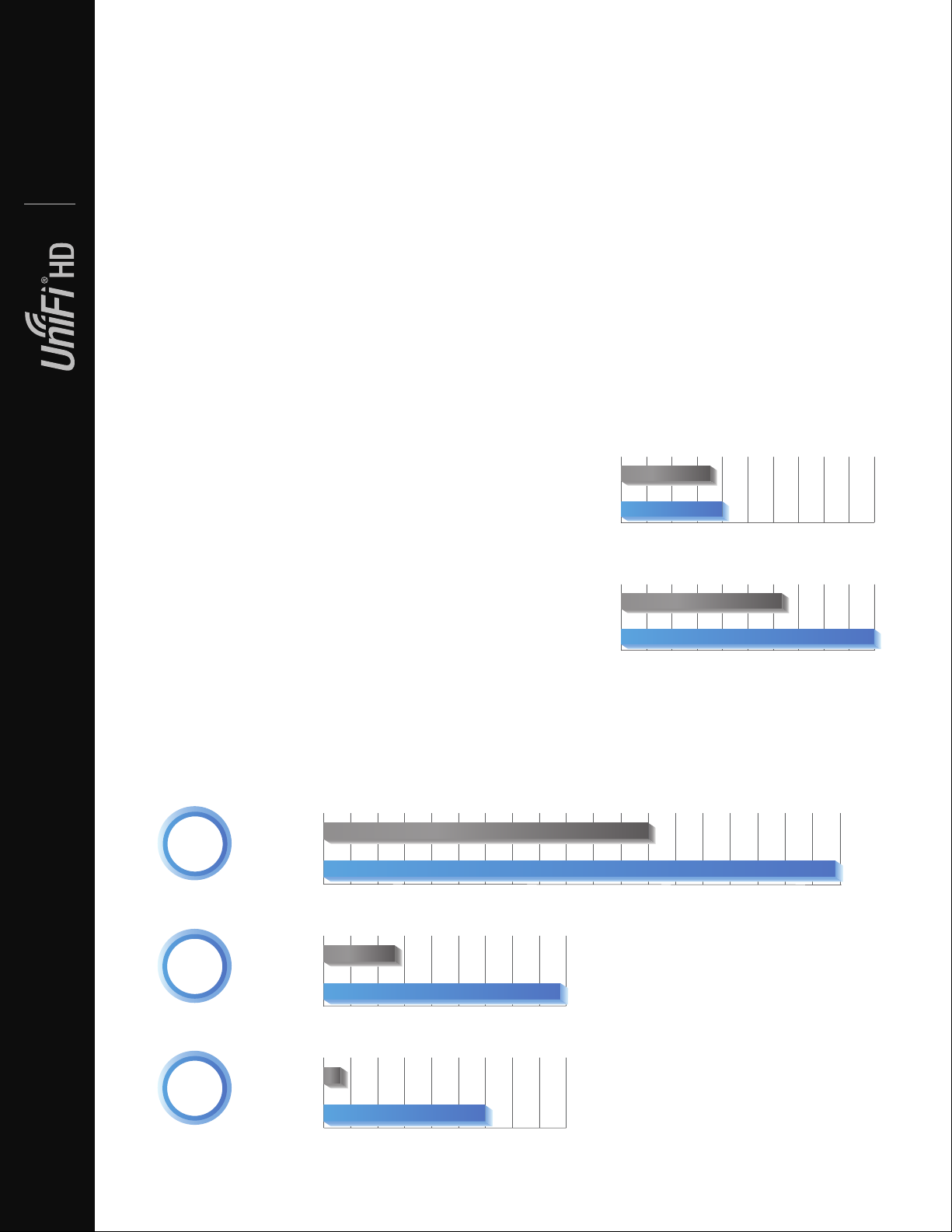
802.11ac Technology
UniFi AC Pro AP
UniFi IW HD AP
0
50 100 150 200 250 300 350 400 450 500 550 600 650 700 750 800
850
900
950
Mbps
UniFi AC Pro AP
UniFi IW HD AP
0
50 100 150 200 250 300 350 400 450 Mbps
UniFi AC Pro AP
UniFi IW HD AP
0
50 100 150 200 250 300 350 400 450 Mbps
UniFi AC Pro AP
UniFi IW HD AP
0
20 40 60 80 100 120 140 160 180 200 Users
UniFi AC Pro AP
UniFi IW HD AP
0
20 40 60 80 100 120 140 160 180 200Users
High-Density Scenarios
Initial 802.11ac Wave 1 SU-MIMO (Single-User,
Multiple Input, Multiple Output) technology allows an
earlier-generation AP, such as the UniFi AC Pro AP, to
For high-density environments, such as hotel suites and
meeting rooms where there are numerous clients in a
relatively small space, we recommend the UniFi IW HD AP.
communicate with only one client at a time.
Datasheet
802.11ac Wave 2 MU-MIMO (Multi-User, Multiple Input,
Multiple Output) technology allows a Wave 2 AP, such as
the UniFi IW HD AP, to communicate with multiple clients
Both Wave 1 and Wave 2 APs offer 28 independent
(non-overlapping) channels: three for the 2.4 GHz band
and twenty-ve for the 5 GHz band, including DFS
channels.
at the same time – signicantly increasing multi-user
throughput and overall user experience.
When you use the 2.4 GHz band in a high-density
location, you encounter self-interference and channel
The following describes a 5-client scenario:
saturation. When you use the 5 GHz band, you can deploy
smaller cells (coverage areas), so you can support more
MU-MIMO Assuming the same conditions, a Wave 2 AP
clients in any cell that deploys more than one AP.
provides up to 75% improvement1 overall over a Wave1
AP. This improvement increases wireless performance
and/or serves more clients at the same performance level.
With the advantages of MU-MIMO technology and 4x4
spatial streams, the UniFi IW HD AP can support more
than triple the number of users2 than a typical Wave1 AP.
4x4 Spatial Streams At any single time, a Wave 2 AP can
communicate with the following MU-MIMO clients:
• four 1x1 clients
Recommended Maximum Number
ofUsers
• two 2x2 clients
• one 2x2 client and two 1x1 clients
70
• one 3x3 client and one 1x1 client
A 4x4 Wave 2 AP delivers up to 33% greater performance1
80
than a Wave 1 AP that is 3x3 in both radio bands.
Real-World Performance The UniFi IW HD AP is the
Theoretical Maximum Number of Users
rst UniFi 802.11ac Wave 2 AP using the in-wall design.
Combining the performance increases from MU-MIMO
technology and the use of 4x4 spatial streams, the UniFi
125
IW HD AP delivers up to 125% greater performance1 than
a typical Wave 1 AP.
200
Client Compatibility For optimal performance, use
MU-MIMO clients. SU-MIMO clients will also benet and
gain up to 10-20% greater performance when used with
the UniFi IW HD AP.
¹ Actual per formance values may vary depending on environmental and
installation conditions.
Single-Client Aggregate Throughput
56%
Improvement
10-Client Aggregate Throughput
238%
Improvement
130 Mbps
100-Client Aggregate Throughput
900%
Improvement
30*
300 Mbps
For more information, go to:
ubnt.link/UniFi-UAPs-High-Density
² Actual numbers may vary depending on environmental and installation
conditions.
600 Mbps
940 Mbps
440 Mbps
4
* Mbps
Page 5
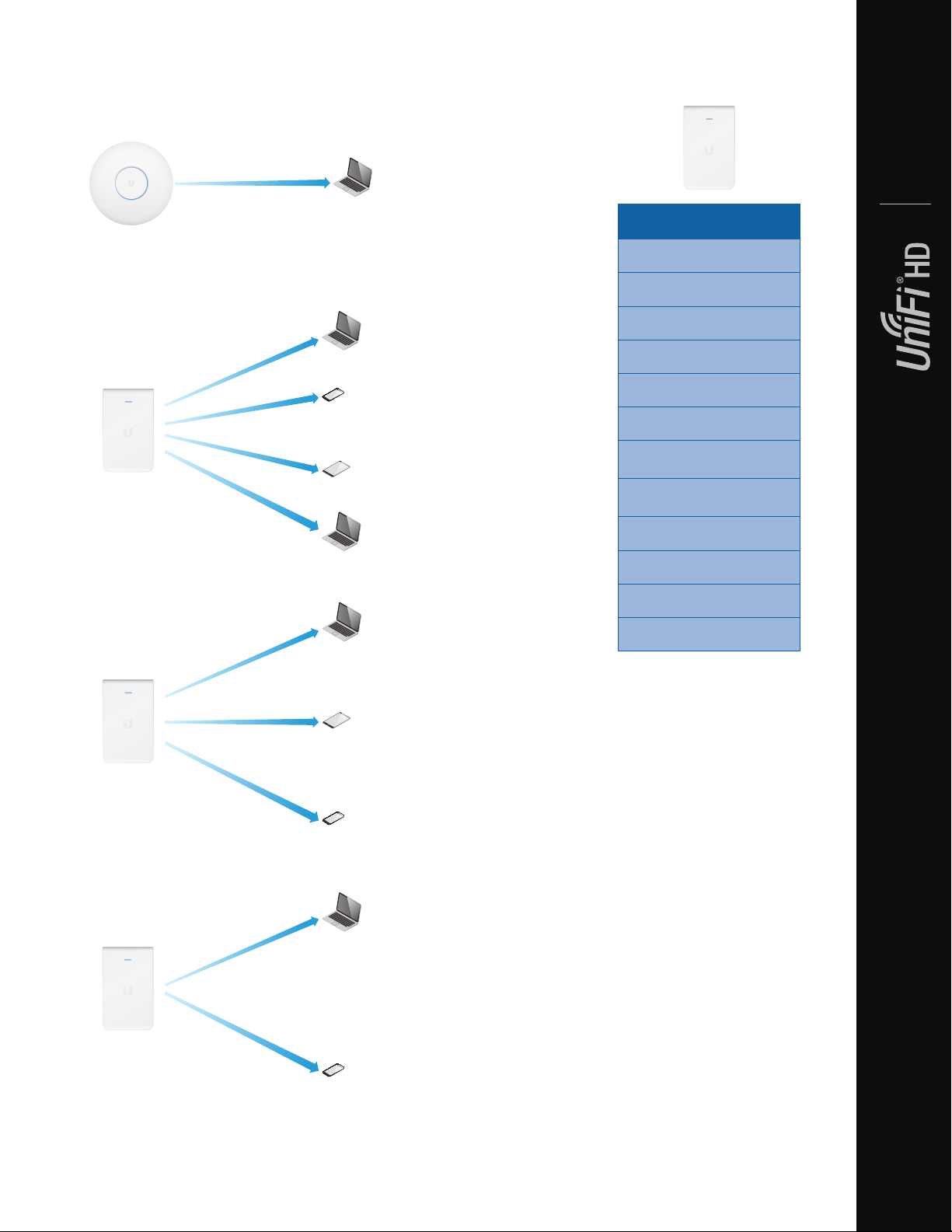
802.11ac Wave 1 SU-MIMO
SU-MIMO: A Wave 1 AP communicates with one client at
atime.
Model Summary
Datasheet
UAP-IW-HD
Environment Indoor
802.11ac Wave 2 MU-MIMO
MU-MIMO with 1x1 clients: The UniFi IW HD AP
communicates with four 1x1 clients at a time.
Simultaneous Dual-Band
2.4 GHz Radio Rate 300 Mbps
2.4 GHz MIMO 2x2
5 GHz Radio Rate 1733 Mbps
5 GHz MIMO 4x4
Secondary Ethernet Port
PoE Mode
PoE Passthrough ✓*
Wall Mount
Wireless Uplink
DFS Certication
(4 Additional Ports)
* Requires PoE 802.3at PoE+ switch.
✓
✓
802.3af PoE
802.3at PoE+
✓
✓
✓
MU-MIMO with 2x2 and 1x1 clients: The UniFi IW HD AP
communicates with one 2x2 client and two 1x1 clients at
a time.
MU-MIMO with 3x3 and 1x1 clients: The UniFi IW HD AP
communicates with one 3x3 client and one 1x1 client at
atime.
5
Page 6
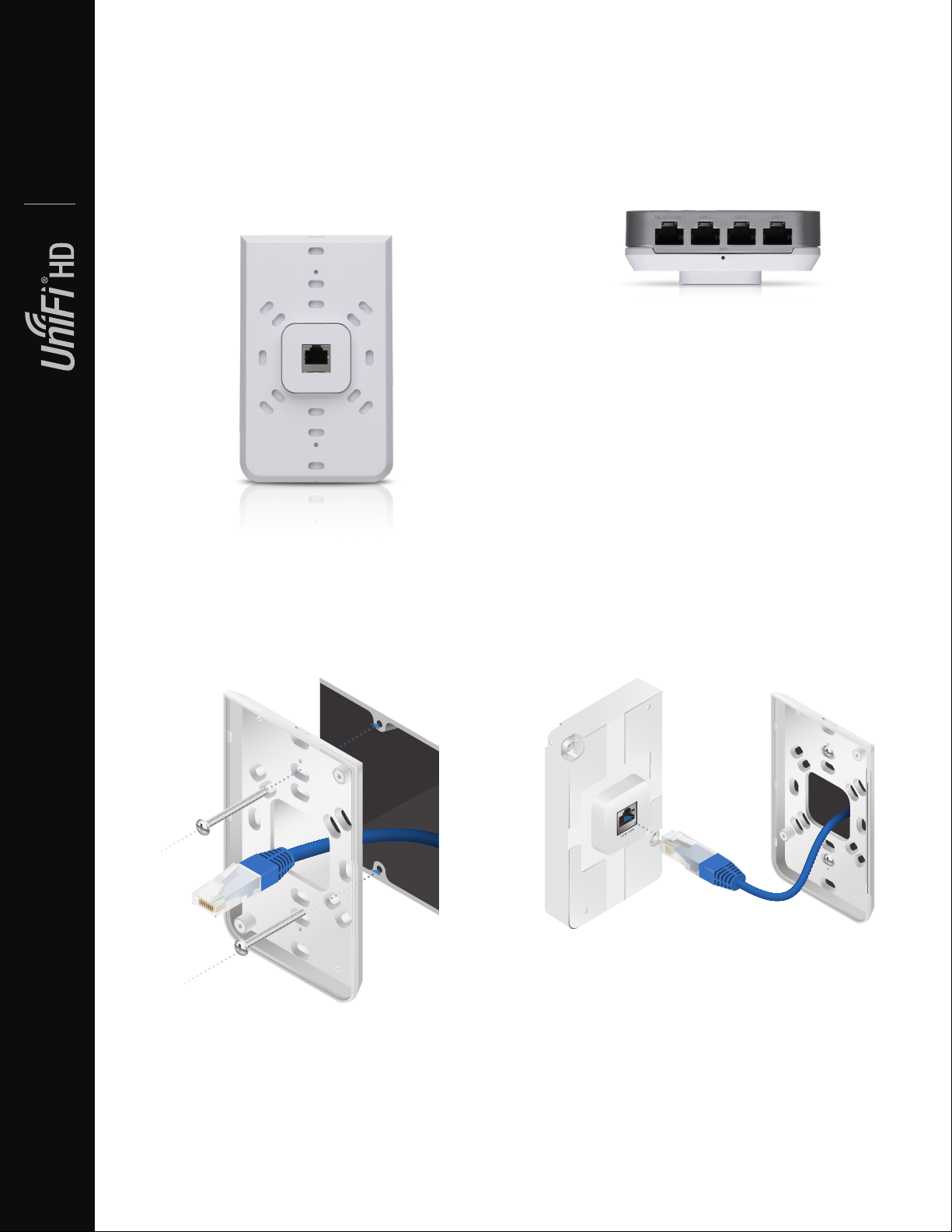
Hardware Overview
The sleek and elegant UniFi In-Wall HD AP transforms an
Ethernet wall connection into a simultaneous, dual-band
802.11ac Wi-Fi Access Point with 4x4 MIMO technology.
Available in single- and 25-packs.
Datasheet
Easy Mounting The back plate offers multiple mounting
holes for use with a variety of 1-gang electrical wall boxes.
LED The unique provisioning LED provides administrator
location tracking and alerts for each device.
Secondary Gigabit Ethernet Four ports are available for
bridging – one of which offers PoE passthrough when the
AP is powered by an 802.3at PoE+switch.
Superior Processing Power The UniFi IW HD AP is
capable of complex operations (guest control, ltering,
and other resource-intensive tasks) that may slow down a
lesser-equipped AP.
Power over Ethernet (PoE) Standard The UniFi IW HD
AP can be conveniently powered by an 802.3af or 802.at
compliant switch. We recommend powering your UniFi
devices with a UniFi PoE Switch (sold separately).
UniFi PoE Switch Available in 8*, 16, 24, and 48-port
versions with multiple power output options, the UniFi
PoE Switch conveniently offers auto-sensing IEEE 802.3af
PoE/802.3at PoE+.
* The US-8 and US-8-60W do not support 802.3at PoE+.
Connecting the Ethernet Cable to the UniFi In-Wall HD AP
6
Page 7
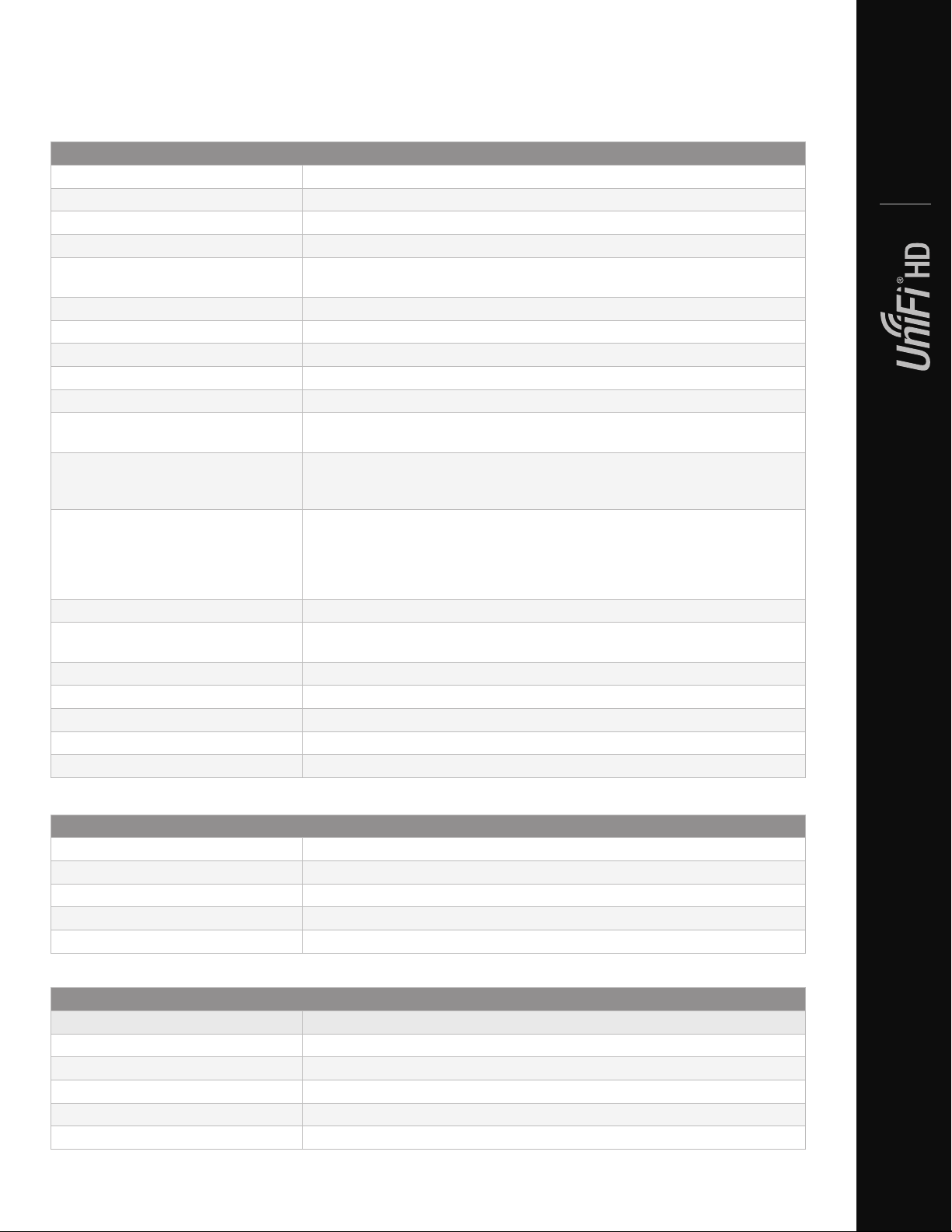
UAP-IW-HD Specications
UAP-IW-HD
Dimensions 139.7 x 86.7 x 25.75 mm (5.5 x 3.41 x 1.01")
Weight 210 g (7.41 oz)
Networking Interface (5) 10/100/1000 Ethernet Ports
Buttons Reset
Power Method 802.3af PoE
802.3at PoE+
Supported Voltage Range 44 to 57VDC
Power Supply UniFi Switch (PoE)
PoE Out 48V Passthrough (Pins +1, 2; -3, 6)
Power Save Supported
Beamforming Supported
Maximum Power Consumption
with PoE Passthrough
TX Power
2.4 GHz
5 GHz
Antennas
Dual-Band
Single-Band
Wi-Fi Standards 802.11 a/b/g/n/r/k/v/ac/ac-wave2
Wireless Security WEP, WPA-PSK, WPA-Enterprise (WPA/WPA2, TKIP/AES)
BSSID Up to 8 per Radio
Mounting 1-Gang Electrical Wall Box (Not Included)
Operating Temperature -10 to 60° C (14 to 140° F)
Operating Humidity 5 to 95% Noncondensing
Certications CE, FCC, IC
(2) Single-Port, Single-Polarity Dual-Band Antennas,
2.4 GHz: 1.8 dBi Each, 5 GHz: 3.4 dBi Each
(2) Single-Port, Dual-Polarity, Single-Band Antennas,
5 GHz: 6 dBi Each
* Requires 802.3at PoE+ switch.
23 dBm
26 dBm
802.11w/PMF
Datasheet
11W
23W*
Advanced Trafc Management
VLAN 802.1Q
Advanced QoS Per-User Rate Limiting
Guest Trafc Isolation Supported
WMM Voice, Video, Best Effort, and Background
Concurrent Clients 200+
Supported Data Rates (Mbps)
Standard Data Rates
802.11a 6, 9, 12, 18, 24, 36, 48, 54 Mbps
802.11n 6.5 Mbps to 300 Mbps (MCS0 - MCS15, HT 20/40)
802.11ac 6.5 Mbps to 1.7 Gbps (MCS0 - MCS9 NSS1/2/3/4, VHT 20/40/80)
802.11b 1, 2, 5.5, 11 Mbps
802.11g 6, 9, 12, 18, 24, 36, 48, 54 Mbps
7
Page 8
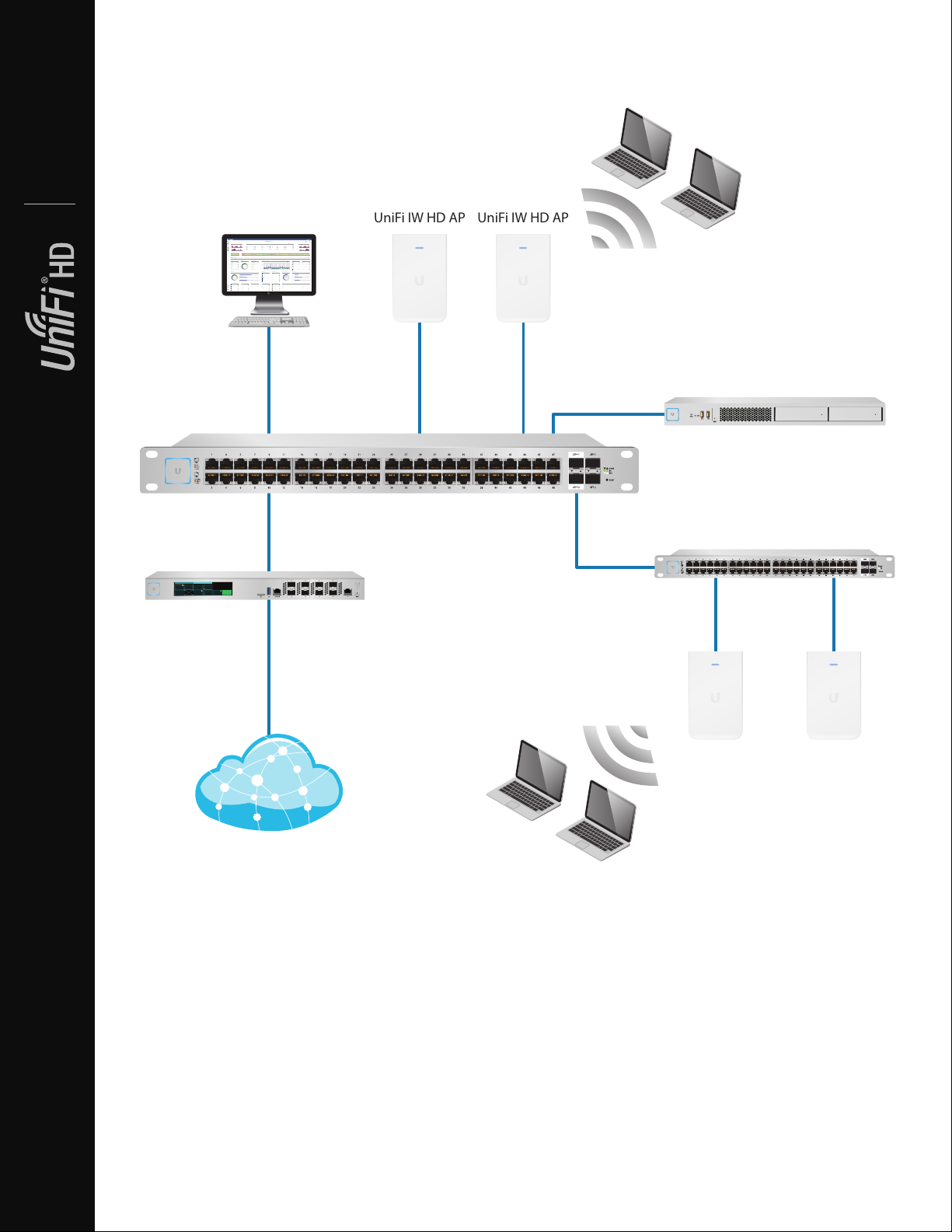
System Example
Good
Fair
Poor
Great
Network:
Switches12Gateway
Ulizaon
18%
Internet
Capacity
43%
Clients
412
Guests
113
IoT
45
Everything is
great
My Dashboard
Edit Widgets
-24hrs
-24hrs
Max
980
Min
0
Now
Now
Throughput
Latency
ISP Load:
Great
-24hrs
Max
0
Now
Airme
-24hrs
High
Low
Now
Retry Rate
Great
Wi-Fi Load:
225.2 Mbps
125.2 Mbps
1
Wi-Fi Traffic Distribuon
3661140444852566064100
104
108
112
116
120
124
128
132
136
140
149
153
157
161
165
5 GHz
2.4 GHz
Access Points
20
Last 24 Hrs
Most Acve APs
Office
Back Room
Storage
Roof
Hallway We ...
91 GB
86 GB
53 GB
48 GB
45 GB
Top 5 Applicaons
YouTube
35 Clients
Instagram
19 Clients
Squarespace
17 Clients
Google
12 Clients
Facebook
20 Clients
Top Interference
Hallway We ...
Roof
Storage
51%
45%
44%
Top CPU Usage
Office
Back Room
Home
51%
45%
43%
Most Acve Clients
Wi-Fi Key Metrics
91 Clients
iPhone
87 Clients
Android
45 Clients
MacBook
35 Clients
PC Laptop
12 Clients
iPad
Top Memory Usage
Client Frequency Distribuon
Device Distribuon
HD-Kitchen
HD-Conference
Storage
Roof
Hallway We ...
56.9%
35.6%
34%
28%
24%
Longest Client Upme
Wi-Fi Summary
Roung Ulizaon
Switch Summary
iPad-1
APs Online
Gateway - USG Main
Controller - Office CK
Controller - Office 2 CK
25% CPU Ulizaon
50% CPU Ulizaon
33% CPU Ulizaon
Online
MBP-2
Clients
iPad-2
Ulizaon
Clients
Port Ulizaon
8d 4h 0m3224
2d 8h 30m
1,324
2d 5h 15m
64%
1,324
32%
Port Usage
VPN Name
Status
Users
Guests
Purpose
Average Data
Port 1- GB
VPN-LA-PDX
212Corporate
320 GB
Port 2- GB POE+
VPN-LA-PDX2
60VLAN Only
11 GB
Port 3- 10 GB
Remote-Office-1
430VLAN Only
12 GB
120
80
32
HD-Conference
42%
Office - Art Dept
42%
MBP-1
Traffic
Devices
Traffic
2d 3h 10m
248 GB
536
1,248 GB
Port 4- GB POE
Transfer-1
712VLAN Only
0 GB
13
5GHz
50%
13 LAN
03 WLAN
01 WAN
0%
0%
0%
100%
100%
100%
Average Capacity
500 Mbps
Average Airme Ulizaon
8%
Average Spectral Efficiency
2.1 (b/s) Hz
64% 11ac W2
28% 11ac
08% 11n
1300 Mbps
0 Mbps
100%
0%
(b/s) Hz
3.76 (b/s) Hz
Internet Connecon:
30 Mbps
40 Mbps
50 Mbps
20 Mbps
10 Mbps
0 Mbps
-24 hrs
-12 hrs
Now
Download
Theorecal Capacity
Throughput
Portlan d
SDN
Most Acve Switches
1G
10G
1
2
192.168.99.233
USG-XG
Wireless Clients
Datasheet
UniFi Controller
# 1
WAN1
32d 1h 52m 5s
192.168.1.1
3
7
5
Mbps
Mbps
Gbps
378.9
35.7
1.6
192.168.122.22
/
726
Mbps
Mbps
535.1
222.9
5.9
Gbps
192.168.12.32
CLIENTS
8
0
6
Mbps
Gbps
Mbps
378.9
2.2
829.3
/
Mbps
Gbps
Mbps
682.1
3.8
934.9
UniFi XG Gateway
SW-24A
56.9%
SW-8A
35.6%
SW-8B
34%
SW-24E
28%
SW-24D
24%
UniFi Switch
(LAN Devices)
UniFi IW HD AP
UniFi IW HD AP
UniFi XG Server
UniFi Switch
UniFi IW HD AP UniFi IW HD AP
Internet
8
Wireless Clients
Page 9
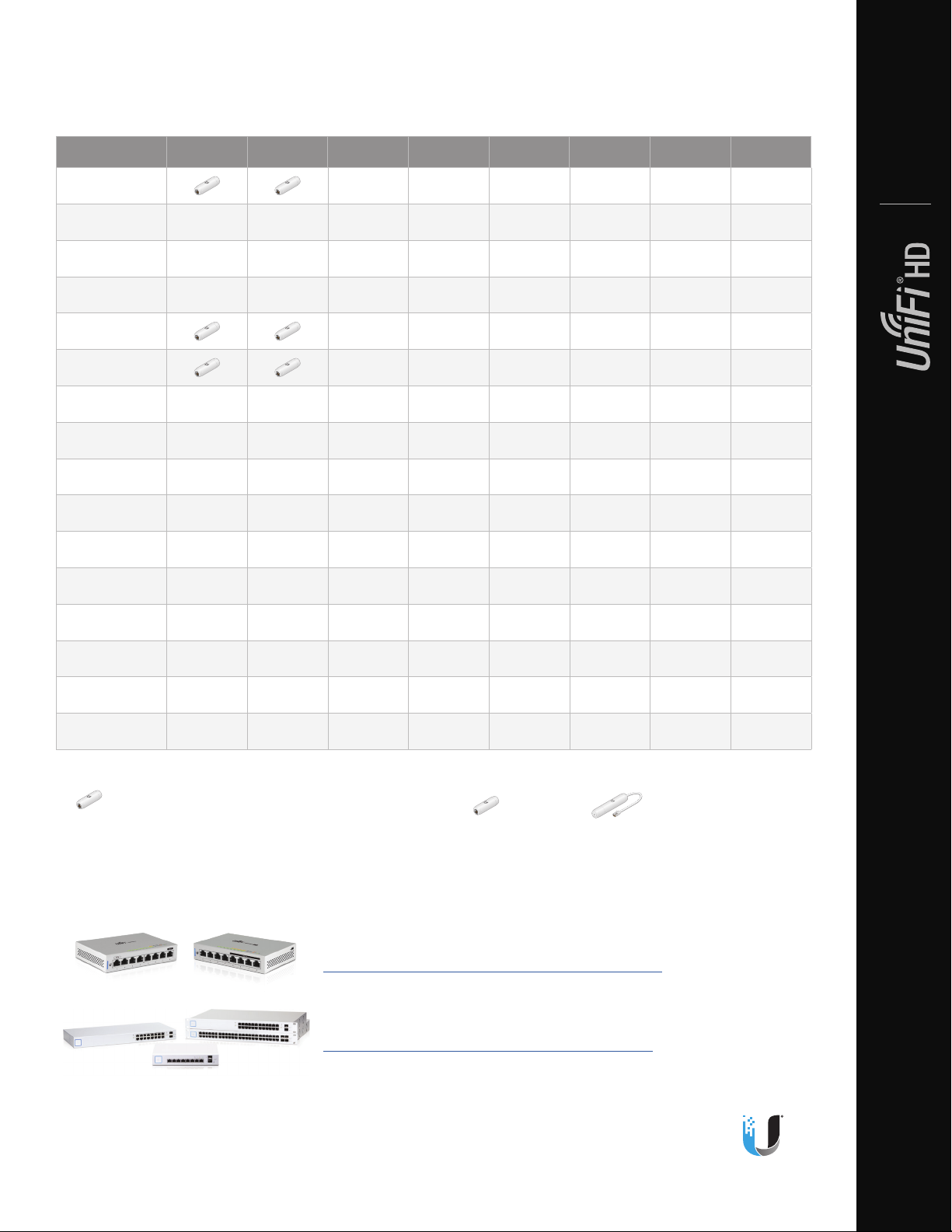
UniFi Switch Compatibility
The UniFi switches are compatible with UniFi Access Points and UniFi G3 Video Cameras, as detailed below.
AP/Camera Model US-8 US-8-60W US-8-150W US-16-150W US-24-250W US-24-500W US-48-500W US-48-750W
UVC-G3
UVC-G3-AF
UVC-G3-DOME
UVC-G3-FLEX
UAP
UAP-LR
UAP-PRO
UAP-AC-LITE
UAP-AC-LR
UAP-AC-PRO
UAP-AC-M
UAP-AC-M-PRO
UAP-AC-IW*
✓ ✓ ✓ ✓ ✓ ✓
✓ ✓ ✓ ✓ ✓ ✓ ✓ ✓
✓ ✓ ✓ ✓ ✓ ✓ ✓ ✓
✓ ✓ ✓ ✓ ✓ ✓ ✓ ✓
✓ ✓ ✓ ✓ ✓ ✓
✓ ✓ ✓ ✓ ✓ ✓
✓ ✓ ✓ ✓ ✓ ✓ ✓ ✓
✓ ✓ ✓ ✓ ✓ ✓ ✓ ✓
✓ ✓ ✓ ✓ ✓ ✓ ✓ ✓
✓ ✓ ✓ ✓ ✓ ✓ ✓ ✓
✓ ✓ ✓ ✓ ✓ ✓ ✓ ✓
✓ ✓ ✓ ✓ ✓ ✓ ✓ ✓
✓ ✓ ✓ ✓ ✓ ✓ ✓ ✓
Datasheet
UAP-AC-IW-PRO*
UAP-AC-HD
UAP-IW-HD*
✓
Note:
* UAP-AC-IW, UAP-AC-IW-PRO, and UAP-IW-HD: PoE passthrough is supported by all of the switches listed above except for models US-8 and US-8-60W.
Compatible with the UniFi switch
Requires an Instant 802.3af Gigabit PoE Converter: INS-3AF-I-G or INS-3AF-O-G
✓ ✓ ✓ ✓ ✓ ✓ ✓ ✓
– –
✓ ✓ ✓ ✓ ✓ ✓
✓ ✓ ✓ ✓ ✓ ✓ ✓ ✓
Related Product Datasheets
UniFi Switch 8, UniFi Switch 8-60W:
dl.ubnt.com/datasheets/uni/UniFi_Switch_8_DS.pdf
UniFi PoE Switches:
dl.ubnt.com/datasheets/uni/UniFi_PoE_Switch.pdf
Specications are subject to change. Ubiquiti products are sold with a limited warranty described at: www.ubnt.com/support/warranty
The limited warranty requires the use of arbitration to resolve disputes on an individual basis, and, where applicable, specify arbitration instead of jury
trials or class actions.
©2018-2019 Ubiquiti Networks, Inc. All rights reserved. Ubiquiti, Ubiquiti Networks, the Ubiquiti U logo, the Ubiquiti beam logo, airTime, airView, and
UniFi are trademarks or registered trademarks of Ubiquiti Networks, Inc. in the United States and in other countries. Apple and the Apple logo are
trademarks of Apple Inc., registered in the U.S. and other countries. App Store is a service mark of Apple, Inc., registered in the U.S. and other countries.
Android, Google, Google Play, the Google Play logo and other marks are trademarks of Google Inc. All other trademarks are the property of their
respectiveowners.
www.ubnt.com
AIJL012119
9
 Loading...