

Page 1
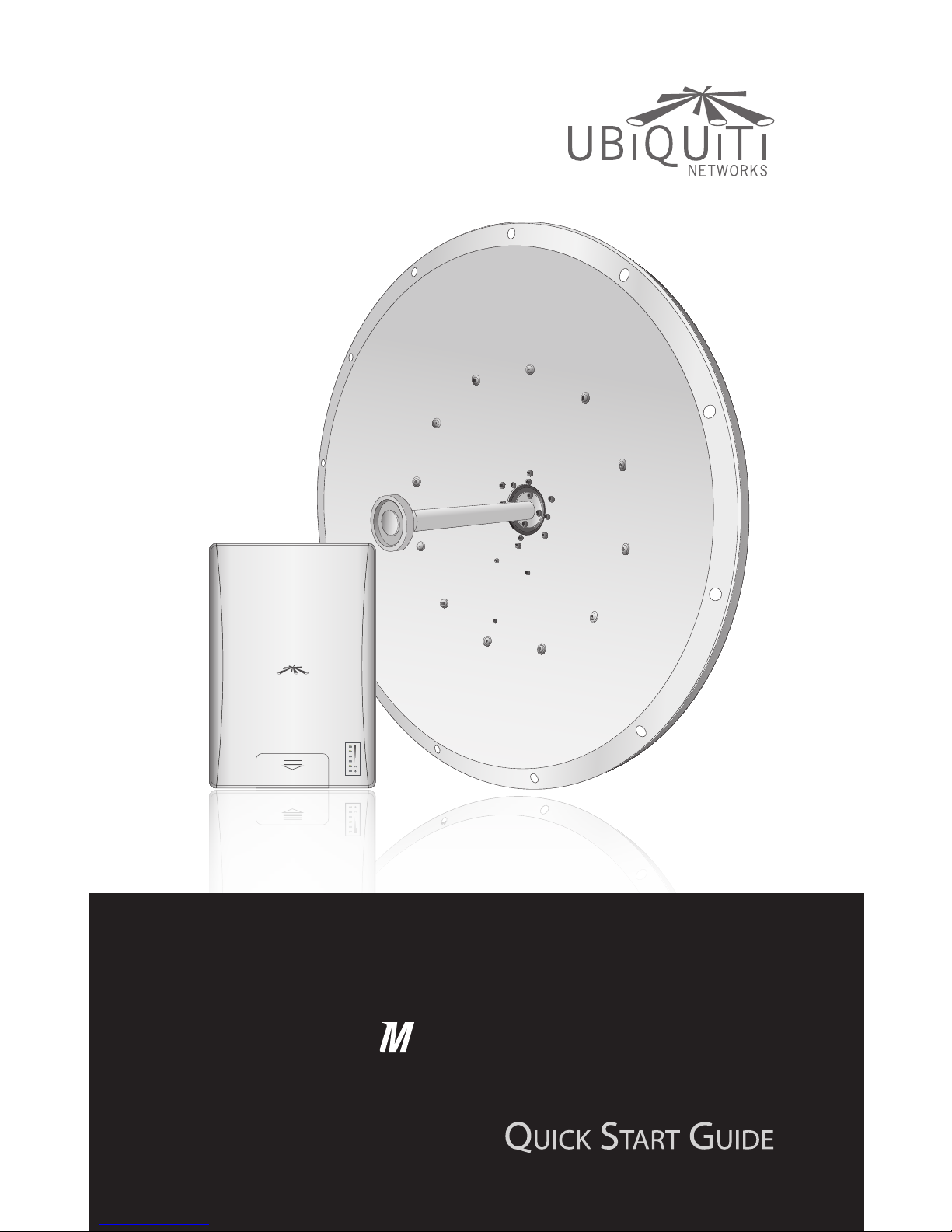
10 GHz Carrier Class
airMAX BaseStation with
Dish Antenna
10
PowerBridge
Page 2

Page 3
1
Package Contents
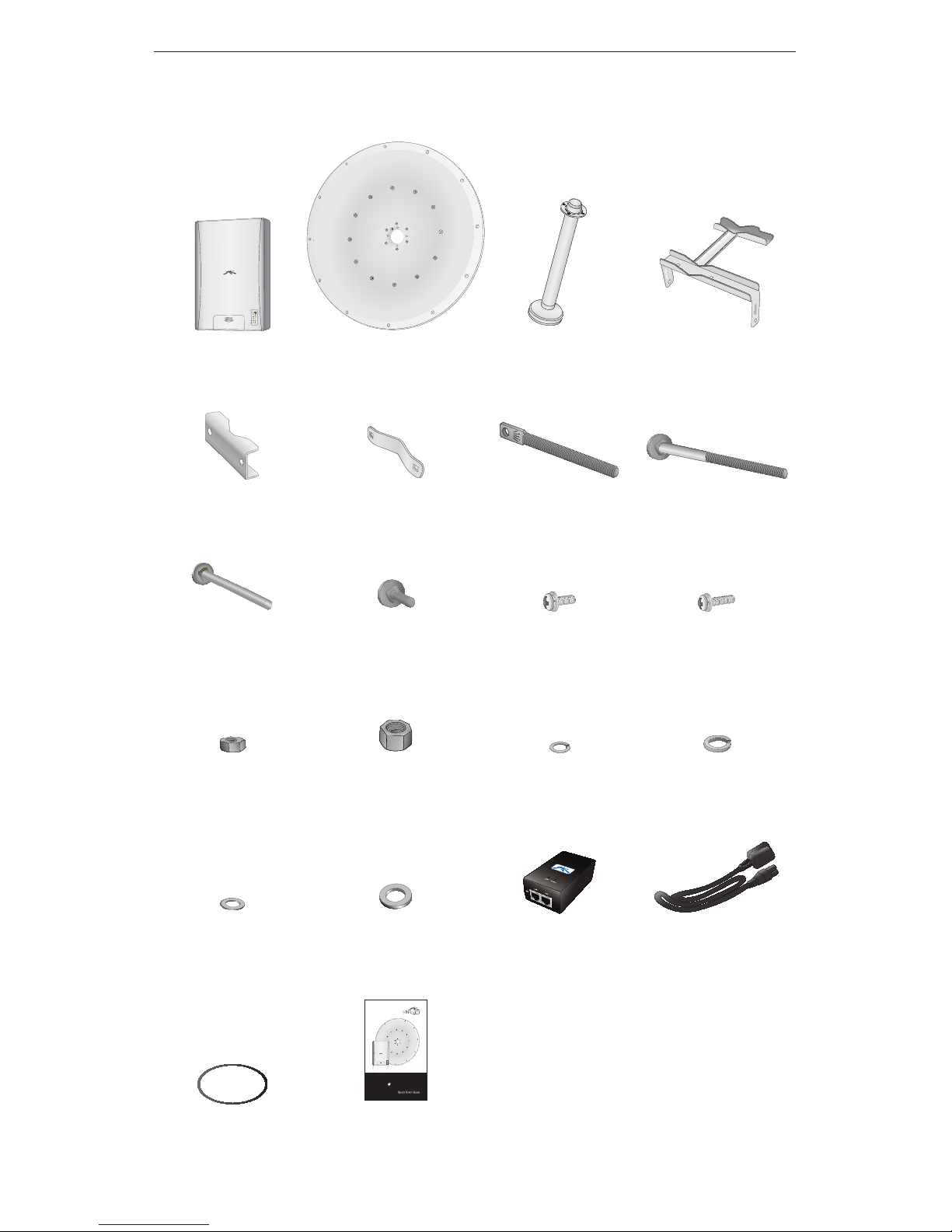
Package Contents
Rocket Dish Feed Main Mounting
Bracket
Mast Brackets
(Qty. 2)
Stabilizer Brackets
(Qty. 2)
Tilt Screw M10x150 Bolts
(Qty. 4)
M10x100 Bolts
(Qty. 2)
M10x25 Bolts
(Qty. 3)
M4x12 Screw and
Washer Assembly
(Qty. 4)
M4x18 Screw and
Washer Assembly
(Qty. 4)
M10 Hex Nuts
(Qty. 9)
M16 Hex Nuts
(Qty. 2)
M10 Spring Lock
Washers (Qty. 9)
M16 Spring Lock
Washer (Qty. 1)
M10 Washers
(Qty. 9)
M16 Washers
(Qty. 2)
24V PoE Adapter Power Cord
10 GHz Carrier Class
AirMax BaseStation with
Dish Antenna
10
PowerBridge
O-Ring (Qty. 1) Quick Start Guide
Page 4
2
PowerBridge M10
Installation Requirements
• Adjustable wrench or one 16 mm and one 24 mm wrench
• Phillips screwdriver
Hardware Installation
To install the PowerBridge M10, perform the following steps:
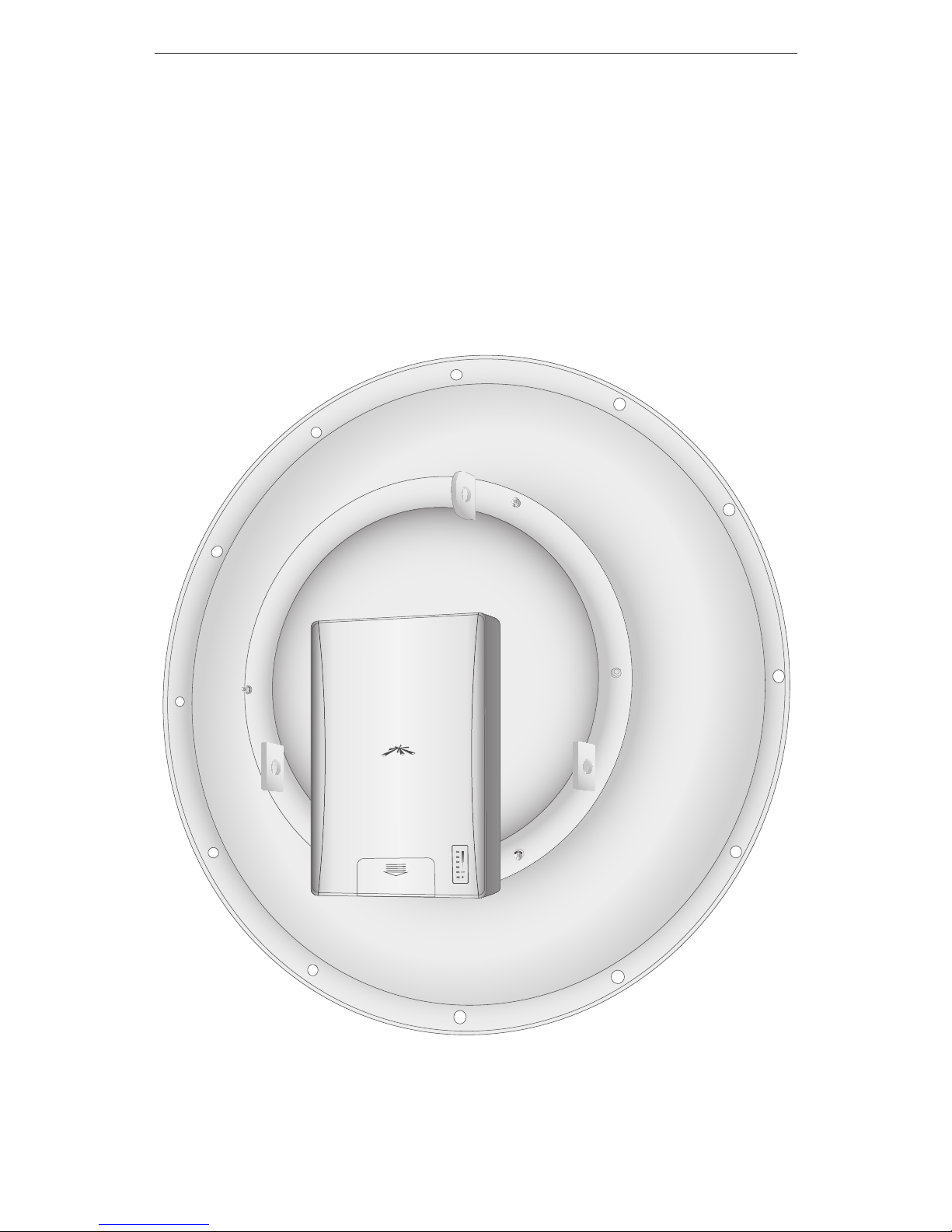
1. Align the Rocket to the back of the Dish.
Page 5
3
Hardware Installation
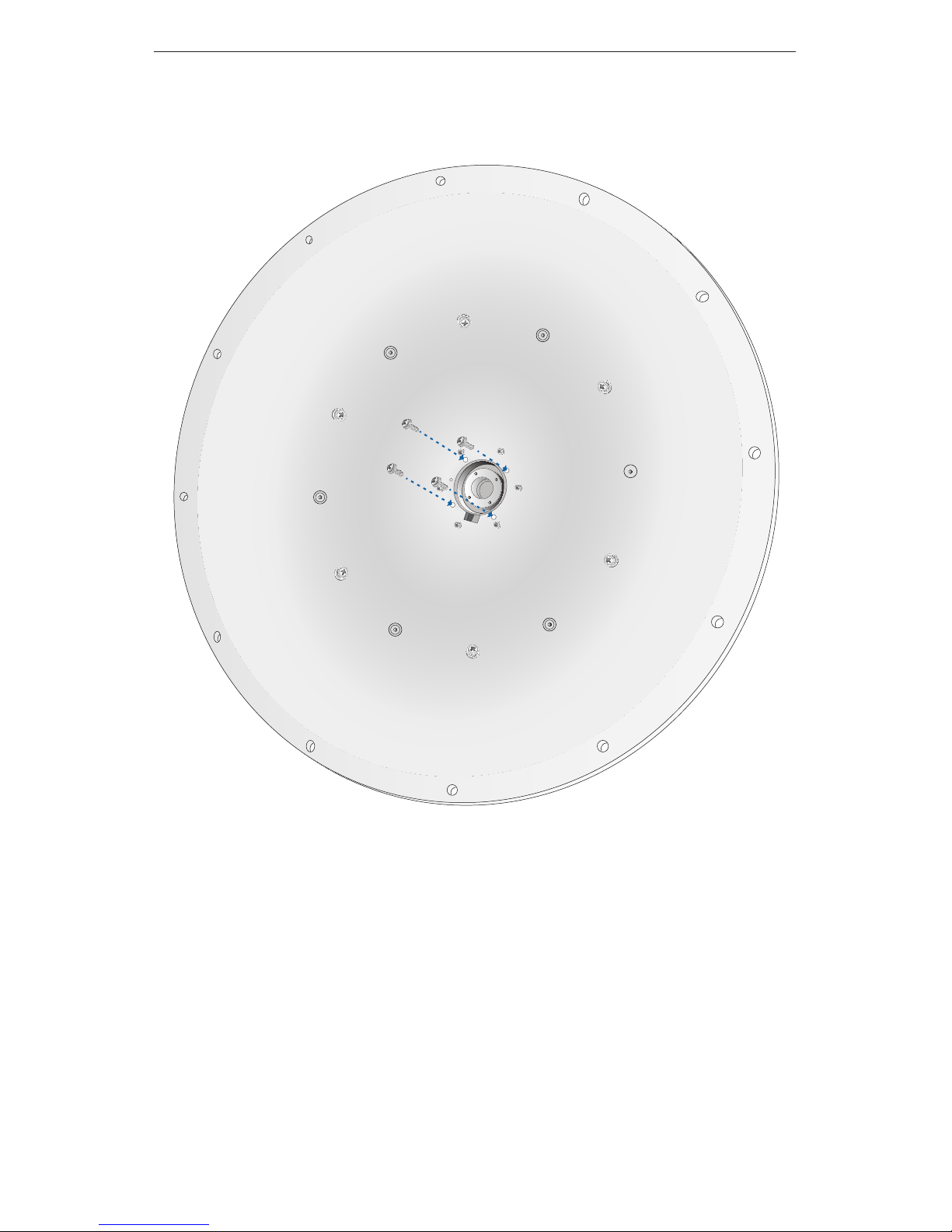
2. On the front of the Dish, use the four M4x18 Screw and Washer
Assemblies to secure the Rocket to the Dish.
Page 6
4
PowerBridge M10
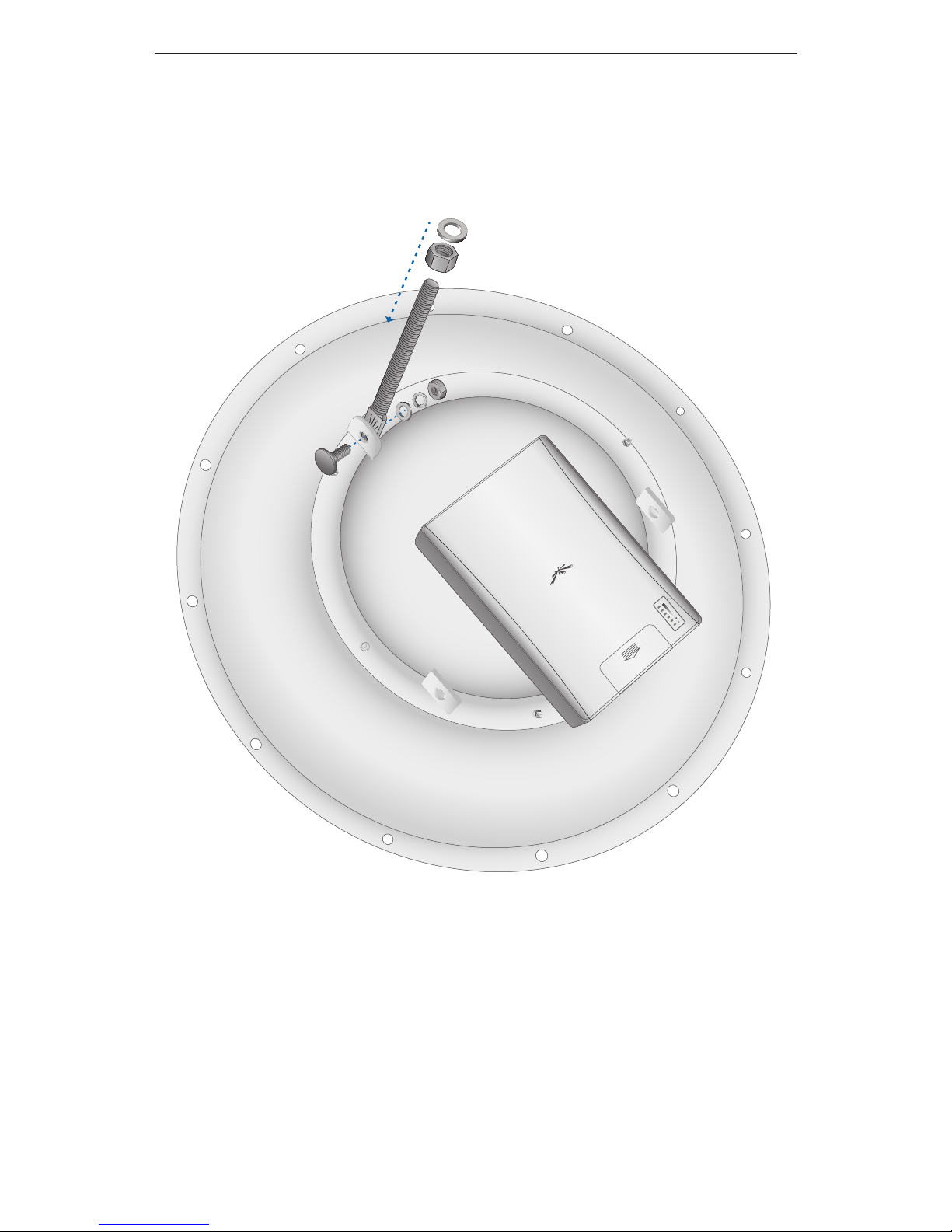
3. Connect the Tilt Screw to the back of the Dish using a M10x25
Bolt, a M10 Washer, a M10 Spring Lock Washer, and a M10 Hex
Nut. Install a M16 Hex Nut about halfway down on the Tilt Screw
and then install a M16 Washer on the Tilt Screw.
Page 7
5
Hardware Installation
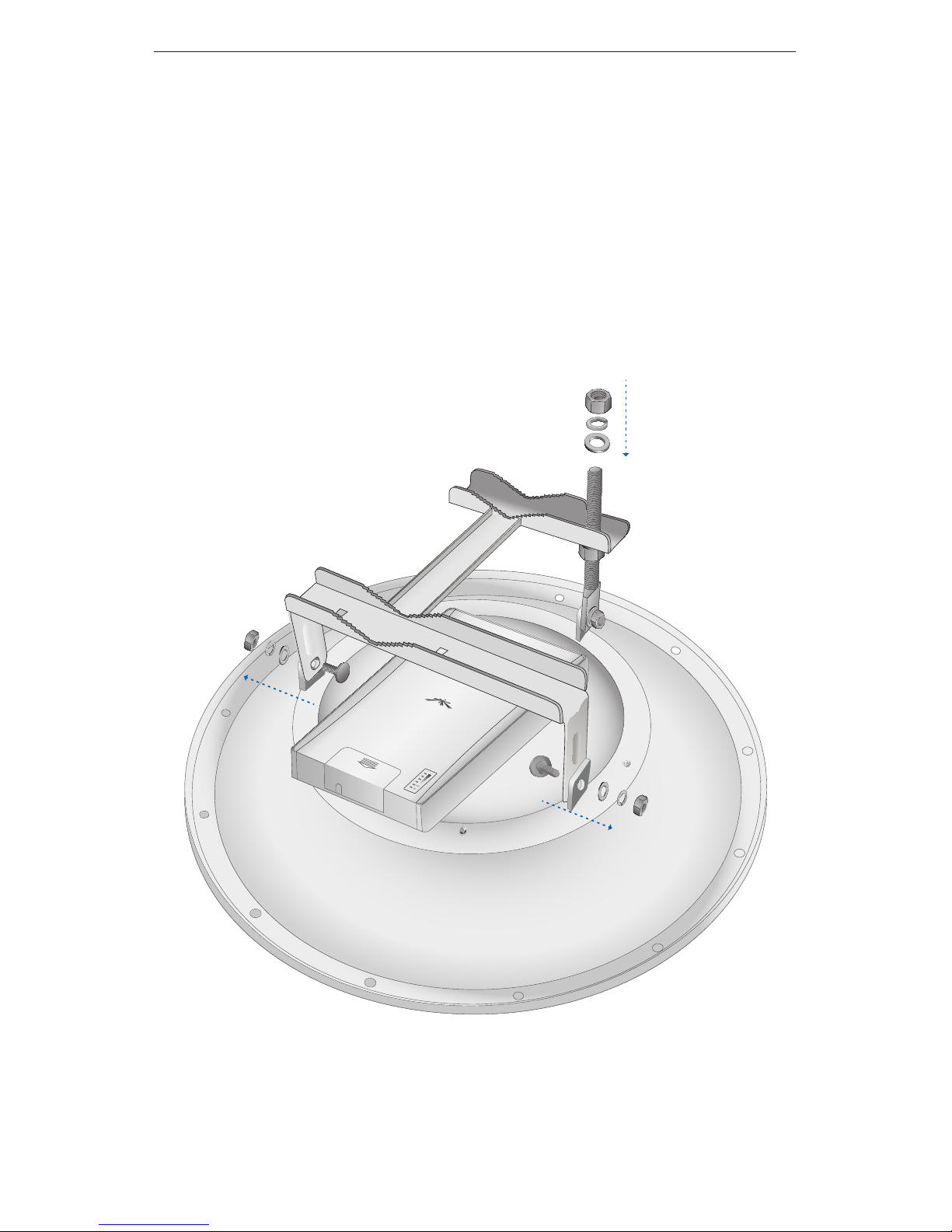
4. Connect the Main Mounting Bracket to the Dish:
a. Insert two M10x25 Bolts through the bottom of the Main
Mounting Bracket and through the Dish. The bolts should be
on the inside facing outward.
b. Secure each bolt using a M10 Washer, a M10 Spring Lock
Washer, and a M10 Hex Nut.
c. Slide the Main Mounting Bracket onto the Tilt Screw.
d. Secure the Main Mounting Bracket to the Tilt Screw using a
M16 Washer, a M16 Spring Lock Washer, and a M16 Hex Nut.
Page 8
6
PowerBridge M10
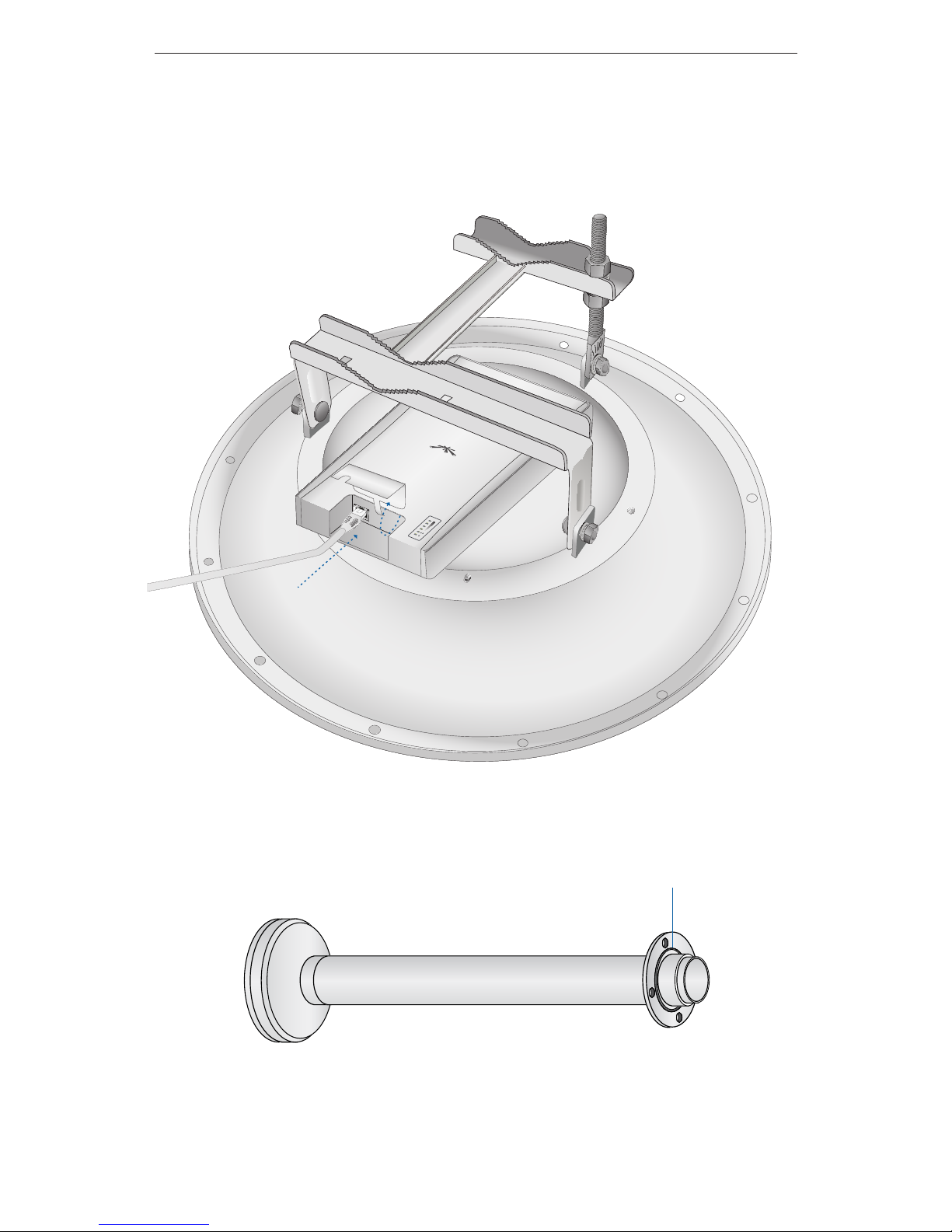
5. Lift the cover on the Rocket by pressing down and raising it up.
Connect an Ethernet cable to the Rocket and place the cover
back on the Rocket. There is an opening for the Ethernet cable.
Slide the cover over the cable.
6. Make sure the O-Ring is secure on the Feed.
O-Ring
Page 9
7
Hardware Installation
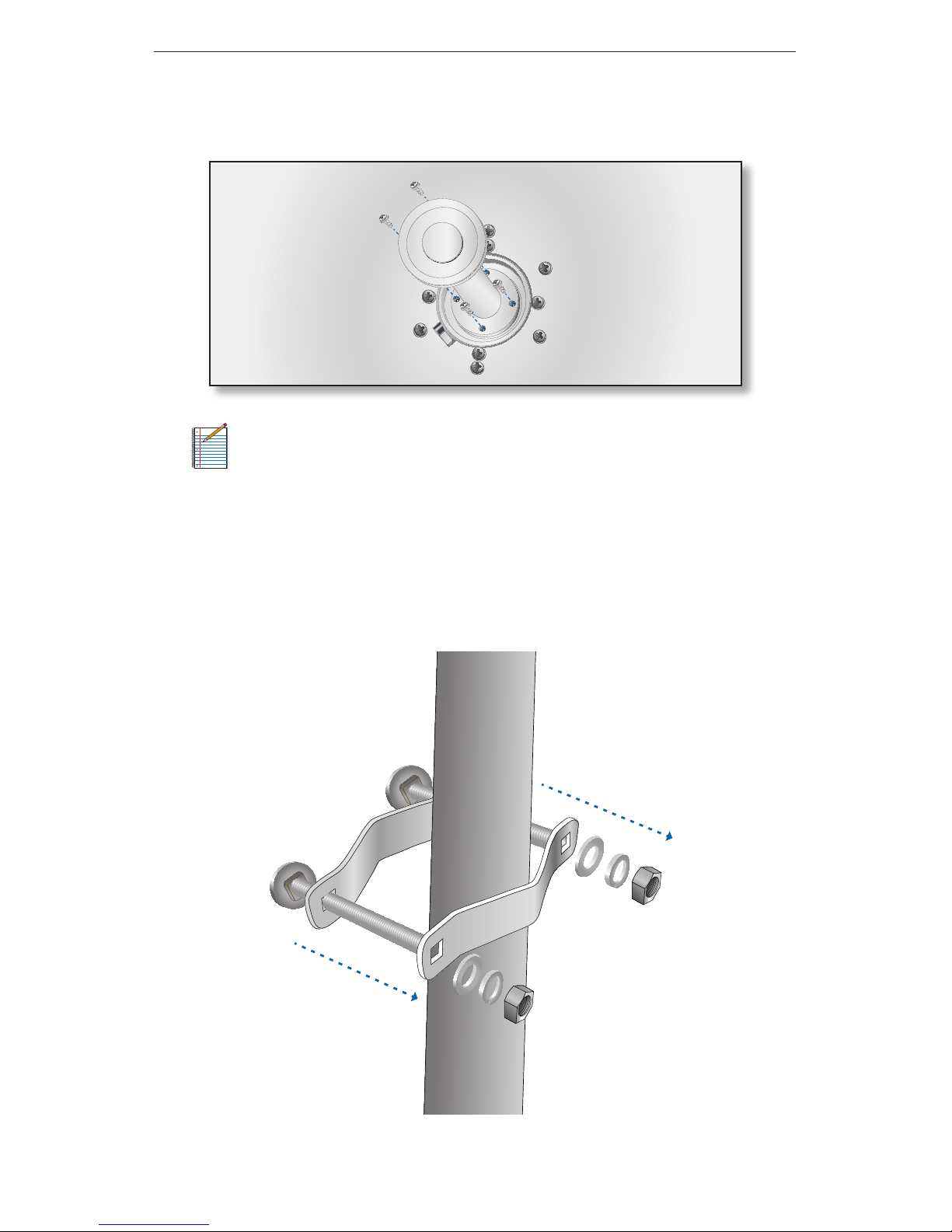
7. On the front of the Dish, connect the Feed to the Rocket and
Dish using the four M4x12 Screw and Washer Assemblies.
Note: DO NOT handle the assembled unit by the feed
at any time, especially during installation of the dish to
thepole.Alwaysholdthedishorthebracketswhile
installing the product.
8. Select a mounting location for the Dish antenna and connect
the Stabilizer Brackets to the pole just below where the Dish will
be installed. Use two M10x100 Bolts, two M10 Washers, two M10
Spring Lock Washers, and two M10 Hex Nuts.
Page 10
8
PowerBridge M10
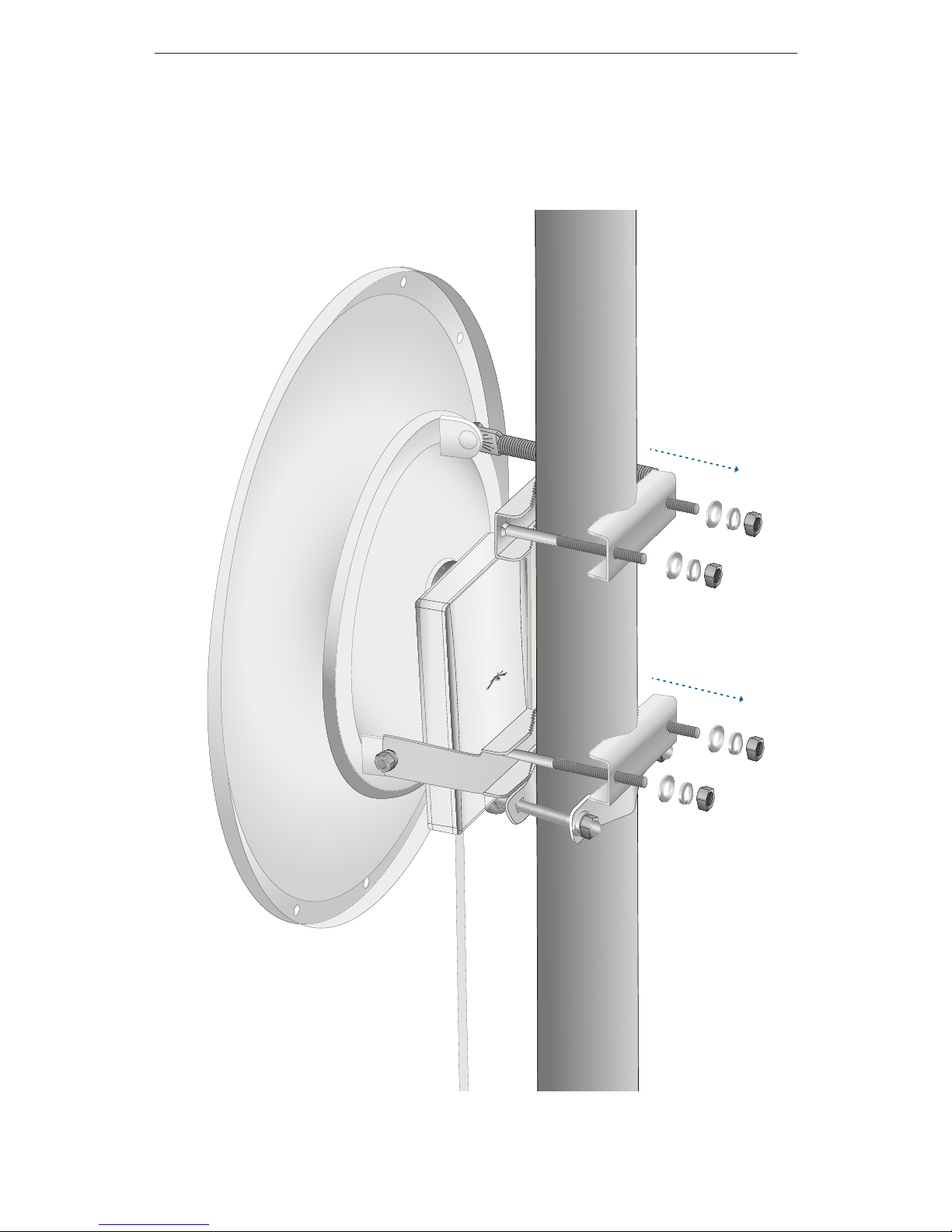
9. Place the Mast Brackets on the other side of the pole that
the Dish will be mounted on and connect them to the Main
Mounting Bracket using M10 Washers, M10 Spring Lock Washers,
and M10 Hex Nuts.
Page 11
9
Hardware Installation
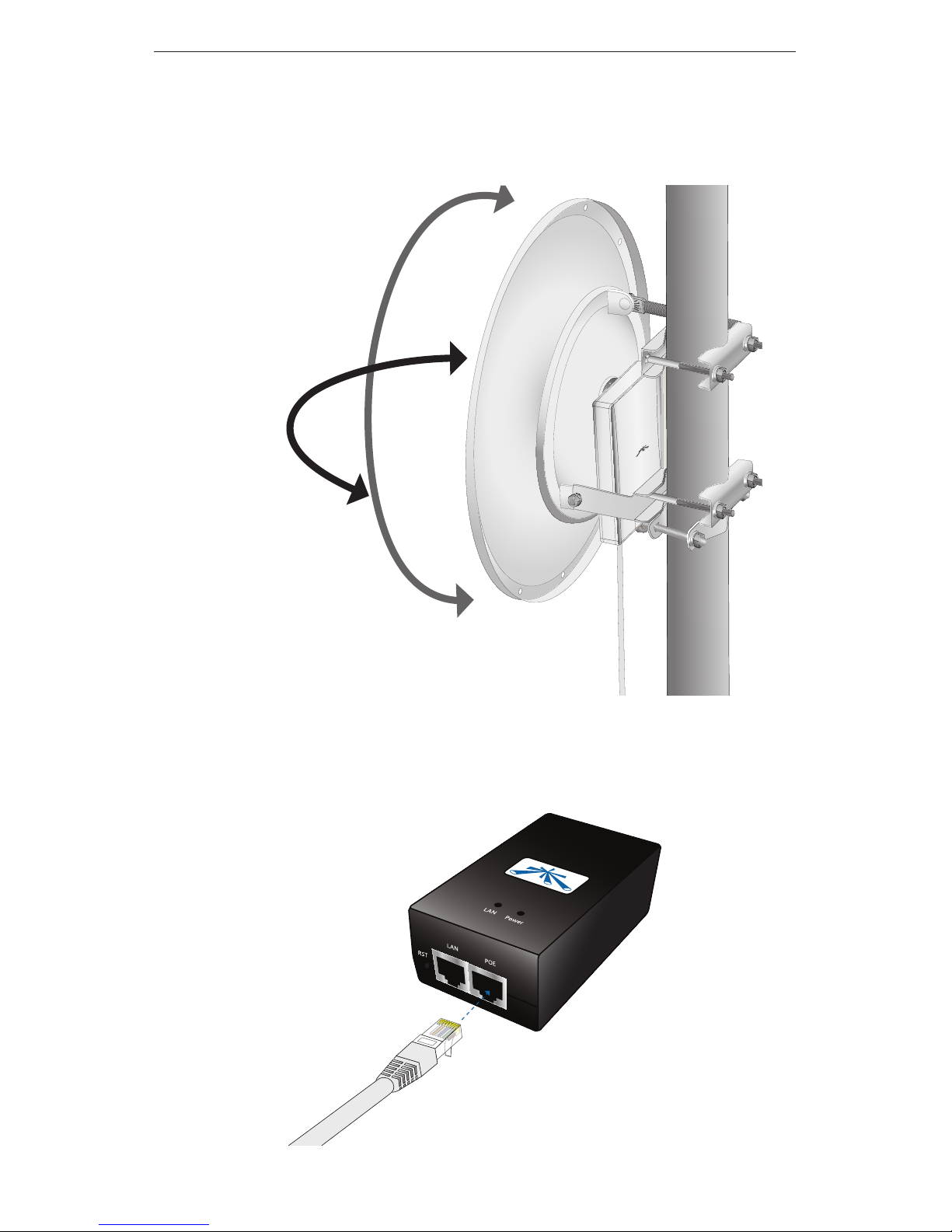
10. Adjust the Azimuth and Elevation. Azimuth can be adjusted by
rotating the antenna while supported by the stabilizer bracket.
Elevation is adjusted by loosening the Tilt Screw.
elevation
azimuth
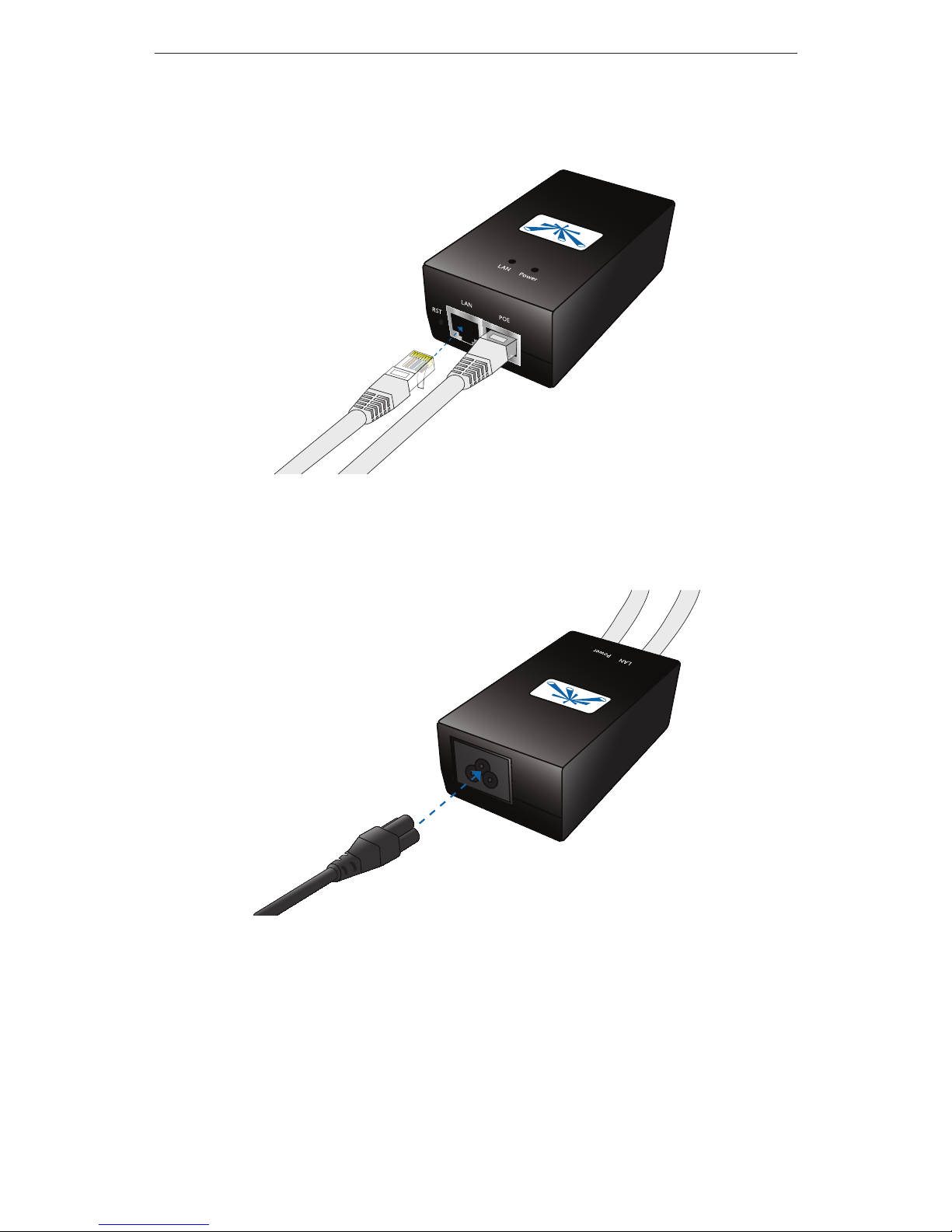
11. Connect the other end of the Ethernet cable from the Rocket to
the Ethernet port labeled POE on the PoE Adapter.
Page 12
10
PowerBridge M10
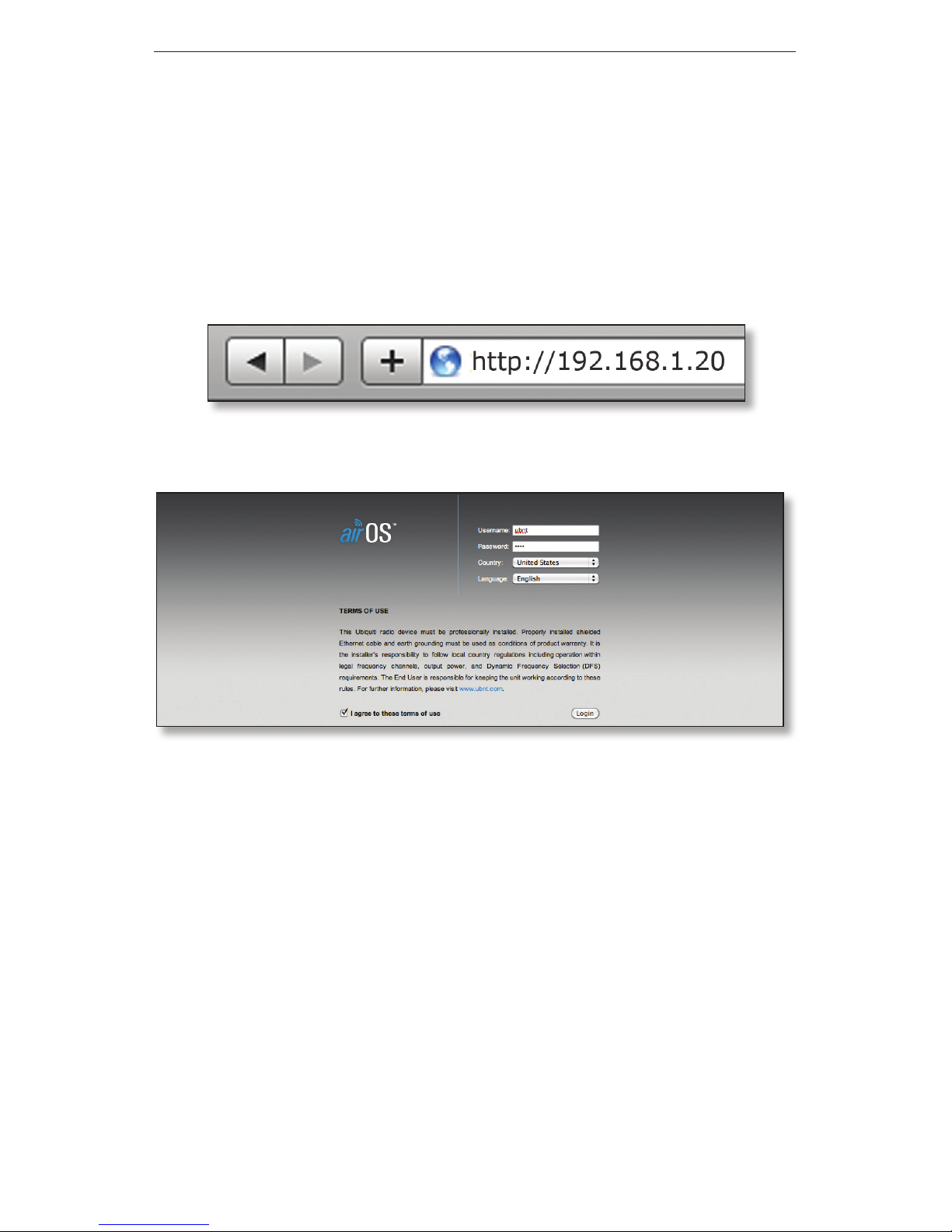
12. Connect an Ethernet cable from your LAN to the Ethernet port
labeled LAN on the PoE Adapter.
13. Connect the power cord to the power port on the PoE Adapter.
Connect the other end of the power cord to a power outlet.
Page 13
11
Accessing airOS™
Accessing airOS
™
1. Make sure that your host machine is connected to the LAN that
is connected to the Rocket.
2. Configure the Ethernet adapter on your host system with a
static IP address on the 192.168.1.x subnet.
3. Launch your Web browser. Type http://192.168.1.20 in the
address field and press enter (PC) or return (Mac).
4. The login screen will appear. Enter ubnt in the Username and
Password fields and click Login.
The airOS Configuration Interface will appear, allowing you to
customize your settings as needed.
Congratulations! Installation is complete.
Page 14

12
PowerBridge M10
General Warranty
UBIQUITI NETWORKS, Inc (“UBIQUITI NETWORKS”) represents and
warrants that the Products furnished hereunder shall be free from defects
in material and workmanship for a period of one (1) year from the date
of shipment by UBIQUITI NETWORKS under normal use and operation.
UBIQUITI NETWORKS sole and exclusive obligation under the foregoing
warranty shall be to repair or replace, at its option, any defective Product
that fails during the warranty period. The expense of removal and
reinstallation of any item is not included in this warranty.
The foregoing warranty is exclusive and in lieu of all other warranties,
express or implied, including the implied warranties of merchantability and
fitness for a particular purpose and any warranties arising from a course
of dealing, usage or trade practice with respect to the products. Repair or
replacement in the manner provided herein shall be the sole and exclusive
remedy of Buyer for breach of warranty and shall constitute fulfillment
of all liabilities of UBIQUITI NETWORKS with respect to the quality and
performance of the Products. UBIQUITI NETWORKS reserves the right
to inspect all defective Products (which must be returned by Buyer to
UBIQUITI NETWORKS factory freight prepaid).
No Products will be accepted for replacement or repair without obtaining
a Return Materials Authorization (RMA) number from UBIQUITI NETWORKS.
Products returned without an RMA number will not be processed and will
be returned to Buyer freight collect. UBIQUITI NETWORKS shall have no
obligation to make repairs or replacement necessitated by catastrophe,
fault, negligence, misuse, abuse, or accident by Buyer, Buyer’s customers or
any other parties. The warranty period of any repaired or replaced. Product
shall not extend beyond its original term.
Warranty Conditions
The foregoing warranty shall apply only if:
(I) The Product has not been subjected to misuse, neglect or unusual
physical, electrical or electromagnetic stress, or some other type of
accident.
(II) No modification, alteration or addition has been made to the Product
by persons other than UBIQUITI NETWORKS or UBIQUITI NETWORK’S
authorized representatives or otherwise approved by UBIQUITI
NETWORKS.
(III) The Product has been properly installed and used at all times in
accordance, and in all material respects, with the applicable Product
documentation.
(IV) All Ethernet cabling runs use CAT5 (or above) shielded cabling.
Page 15

13
Compliance
Disclaimer: UBIQUITI NETWORKS does not warrant that the operation of
the products is error-free or that operation will be uninterrupted. In no
event shall UBIQUITI NETWORKS be responsible for damages or claims
of any nature or description relating to system performance, including
coverage, buyer’s selection of products for buyer’s application and/or
failure of products to meet government or regulatory requirements.
Returns
In the unlikely event a defect occurs, please work through the dealer or
distributor from which this product was purchased.
Compliance
CE Marking
CE marking on this product represents the product is in compliance with
all directives that are applicable to it.
Alert Sign (!) Follows CE Marking
Alert sign must be indicated if a restriction on use applied to the product
and it must follow the CE marking.
NB-Identification Number (if there is any)
Notified body number is indicated if it is involved in the conformity
assessment procedure.
Please check the CE mark on the product label to find out which notified
body was involved during assessment.
Page 16

14
PowerBridge M10
Declaration of Conformity
Česky
[Czech]
UBIQUITI NETWORKS tímto prohla uje, e tento UBIQUITI
NETWORKS device, je ve shod se základními po adavky a dal ími p
íslu n mi ustanoveními sm rnice 1999/5/ES.
Dansk
[Danish]
Undertegnede UBIQUITI NETWORKS erklærer herved, at følgende
udstyr UBIQUITI NETWORKS device, overholder de væsentlige krav
og øvrige relevante krav i direktiv 1999/5/EF.
Nederlands
[Dutch]
Hierbij verklaart UBIQUITI NETWORKS dat het toestel UBIQUITI
NETWORKS device, in overeenstemming is met de essentiële eisen
en de andere relevante bepalingen van richtlijn 1999/5/EG.
Bij deze verklaart UBIQUITI NETWORKS dat deze UBIQUITI
NETWORKS device, voldoet aan de essentiële eisen en aan de
overige relevante bepalingen van Richtlijn 1999/5/EC.
English
Hereby, UBIQUITI NETWORKS, declares that this UBIQUITI
NETWORKS device, is in compliance with the essential requirements
and other relevant provisions of Directive 1999/5/EC.
Eesti
[Estonian]
Käesolevaga kinnitab UBIQUITI NETWORKS seadme UBIQUITI
NETWORKS device, vastavust direktiivi 1999/5/EÜ põhinõuetele ja
nimetatud direktiivist tulenevatele teistele asjakohastele sätetele.
Suomi
[Finnish]
UBIQUITI NETWORKS vakuuttaa täten että UBIQUITI NETWORKS
device, tyyppinen laite on direktiivin 1999/5/EY oleellisten
vaatimusten ja sitä koskevien direktiivin muiden ehtojen
mukainen.
Français
[French]
Par la présente UBIQUITI NETWORKS déclare que l’appareil
UBIQUITI NETWORKS, device est conforme aux exigences
essentielles et aux autres dispositions pertinentes de la directive
1999/5/CE.
Deutsch
[German]
Hiermit erklärt UBIQUITI NETWORKS, dass sich diese UBIQUITI
NETWORKS device, in Übereinstimmung mit den grundlegenden
Anforderungen und den anderen relevanten Vorschriften der
Richtlinie 1999/5/EG befindet”. (BMWi)
Ελληνική
[Greek]
ΜΕ ΤΗΝ ΠΑΡΟΥΣΑ UBIQUITI NETWORKS ΔΗΛΩΝΕΙ ΟΤΙ UBIQUITI
NETWORKS device, ΣΥΜΜΟΡΦΩΝΕΤΑΙ ΠΡΟΣ ΤΙΣ ΟΥΣΙΩΔΕΙΣ
ΑΠΑΙΤΗΣΕΙΣ ΚΑΙ ΤΙΣ ΛΟΙΠΕΣ ΣΧΕΤΙΚΕΣ ΔΙΑΤΑΞΕΙΣ ΤΗΣ ΟΔΗΓΙΑΣ
1995/5/ΕΚ.
Magyar
[Hungarian]
Alulírott, UBIQUITI NETWORKS nyilatkozom, hogy a
UBIQUITI NETWORKS device, megfelel a vonatkozó alapvetõ
követelményeknek és az 1999/5/EC irányelv egyéb elõírásainak.
Íslenska
[Icelandic]
Hér me l sir UBIQUITI NETWORKS yfir ví a UBIQUITI NETWORKS
device, er í samræmi vi grunnkröfur og a rar kröfur, sem ger ar eru í
tilskipun 1999/5/EC.
Italiano
[Italian]
Con la presente UBIQUITI NETWORKS dichiara che questo UBIQUITI
NETWORKS device, è conforme ai requisiti essenziali ed alle altre
disposizioni pertinenti stabilite dalla direttiva 1999/5/CE.
Page 17

15
Declaration of Conformity
Latviski
[Latvian]
Ar o UBIQUITI NETWORKS deklar , ka UBIQUITI NETWORKS device,
atbilst Direkt vas 1999/5/EK b tiskaj m pras b m un citiem ar to saist
tajiem noteikumiem.
Lietuviškai
[Lithuanian]
UBIQUITI NETWORKS deklaruoja, kad šis UBIQUITI NETWORKS
įrenginys atitinka esminius reikalavimus ir kitas 1999/5/EB
Direktyvos nuostatas.
Malti
[Maltese]
Hawnhekk, UBIQUITI NETWORKS, jiddikjara li dan UBIQUITI
NETWORKS device, jikkonforma mal- ti ijiet essenzjali u ma
provvedimenti o rajn relevanti li hemm fid-Dirrettiva 1999/5/EC.
Norsk
[Norwegian]
UBIQUITI NETWORKS erklærer herved at utstyret UBIQUITI
NETWORKS device, er i samsvar med de grunnleggende krav og
øvrige relevante krav i direktiv 1999/5/EF.
Slovensky
[Slovak]
UBIQUITI NETWORKS t mto vyhlasuje, e UBIQUITI NETWORKS
device, sp a základné po iadavky a v etky príslu né ustanovenia
Smernice 1999/5/ES.
Svenska
[Swedish]
Härmed intygar UBIQUITI NETWORKS att denna UBIQUITI
NETWORKS device, står I överensstämmelse med de väsentliga
egenskapskrav och övriga relevanta bestämmelser som framgår av
direktiv 1999/5/EG.
Español
[Spanish]
Por medio de la presente UBIQUITI NETWORKS declara que el
UBIQUITI NETWORKS device, cumple con los requisitos esenciales
y cualesquiera otras disposiciones aplicables o exigibles de la
Directiva 1999/5/CE.
Polski
[Polish]
Niniejszym, firma UBIQUITI NETWORKS o wiadcza, e produkt serii
UBIQUITI NETWORKS device, spełnia zasadnicze wymagania i inne
istotne postanowienia Dyrektywy 1999/5/EC.
Português
[Portuguese]
UBIQUITI NETWORKS declara que este UBIQUITI NETWORKS device,
está conforme com os requisitos essenciais e outras disposições da
Directiva 1999/5/CE.
Română
[Romanian]
Prin prezenta, UBIQUITI NETWORKS declară că acest dispozitiv
UBIQUITI NETWORKS este în conformitate cu cerințele esențiale și
alte prevederi relevante ale Directivei 1999/5/CE.
Page 18

JL030912
English
We recommend that you protect your networks
from the most brutal environments and
devastating ESD attacks with industrial-grade
shielded Ethernet cable from Ubiquiti Networks.
For more details, visit www.ubnt.com/toughcable
Deutsch
Schützen Sie Ihre Netzwerke vor extremen Umwelteinflüssen
und verheerender elektrostatischer Entladung (ESD), indem
Sie abgeschirmte Ethernetkabel in Unternehmensqualität von
Ubiquiti Networks verwenden. Weitere Informationen erhalten Sie
unter www.ubnt.com/toughcable
Español
Le recomendamos que proteja sus redes de los entornos más
hostiles y los devastadores efectos de las descargas electrostáticas
utilizando cable Ethernet blindado con calidad-industrial de
Ubiquiti Networks. Para obtener más información, visite
www.ubnt.com/toughcable
Français
Nous vous recommandons de protéger vos réseaux contre les
environnements les plus brutaux et les décharges électrostatiques
les plus dévastatrices avec un câble Ethernet Ubiquiti Networks
avec blindage renforcé. Pour en savoir plus, rendez-vous sur
www.ubnt.com/toughcable
Italiano
Si consiglia di proteggere le reti dagli ambienti e dagli attacchi
ESD più invasivi con il cavo Ethernet schermato-di tipo industriale
di Ubiquiti Networks. Per ulteriori informazioni, visitare il sito Web
www.ubnt.com/toughcable
Page 19

Page 20

Ubiquiti Networks Support
Email: [email protected]
Phone (9 a.m. - 5 p.m. PST): 408-942-1153
Online Resources
Wiki Page: wiki.ubnt.com
Support Forum: forum.ubnt.com
Downloads: downloads.ubnt.com
www.ubnt.com
© 2012 Ubiquiti Networks, Inc. All rights reserved.
 Loading...