

Page 1

MODEL: AFi-RT
QUICK START GUIDE
View the latest update at
amplifi.com/teleport/guide
Page 2

Page 3

Introduction
Thank you for purchasing the AmpliFi™ Teleport System.
This Quick Start Guide is designed to guide you through
installation and also includes warranty terms.
Package Contents
Router Teleport Power Adapter
MODEL: AFi-RT
Ethernet Cables (Qty. 2) Documentation
QUICK START GUIDE
1
Page 4

Hardware Overview
Router Front
The front of the AmpliFi Router features an
adjustable, full‑color touchscreen display.
The bottom of the AmpliFi Router features an
adjustable LED that is fully lit by default when
the Router is congured and ready for use.
The brightness settings of the touchscreen and
LED are congurable using the AmpliFi app.
2
Page 5

Router Back
Four Gigabit Ethernet ports available to
1-4
connect 10/100/1000Mbps wired network
devices to the internet.
Connects to the broadband modem provided
by your ISP (Internet Service Provider).
Reserved for future use.
The Power Adapter connects to this port.
1 2
3 4
3
Page 6

Teleport LED
The Teleport features an LED that illuminates when
powered on and indicates the device status.
LED Description
Circulating Blue Connecting to the router
Flashing Blue Isolated state (waiting to be congured);
Steady Blue Congured and connected to router
4
Being located (ashing rapidly)
Page 7

Installation of the Router
The AmpliFi Router can be installed using one of the
following methods:
• AmpliFi app for iPhone®
• AmpliFi app for Android
• Connecting to the default AmpliFi wireless network
(SSID) from a computer or tablet.
App Users
Download and install the AmpliFi app from the App Store
or Google Play™ Store.
If you are not using the app to install the AmpliFi Router,
please skip step 1.
™
5
Page 8

1 Launch the AmpliFi app.
iPhone Users: Ensure that Bluetooth is enabled.
Android Users: Ensure that Wi‑Fi is enabled.
2 Power o your broadband modem.
6
Page 9

3 Connect one end of the Ethernet Cable to your
broadband modem and the other end to the
Internet port on the AmpliFi Router.
7
Page 10

4 Connect the Power Adapter to the power port on
the AmpliFi Router.
8
Page 11

5 Connect the Power Adapter to a power outlet.
9
Page 12
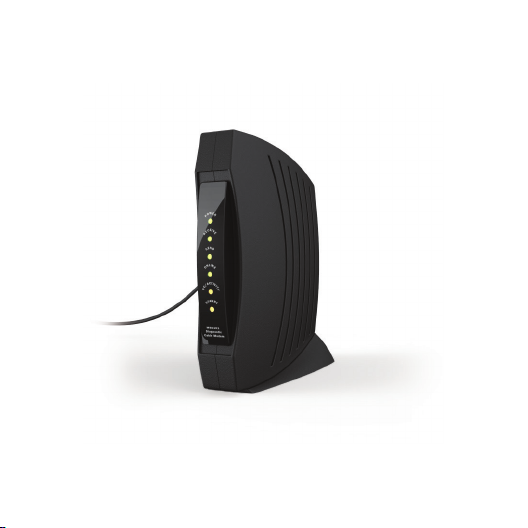
6 Power on your broadband modem.
10
Page 13
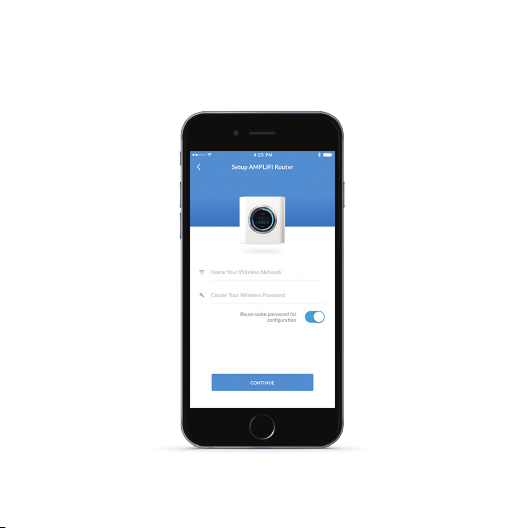
7 App Users Follow the on‑screen instructions to
congure your AmpliFi Router.
11
Page 14
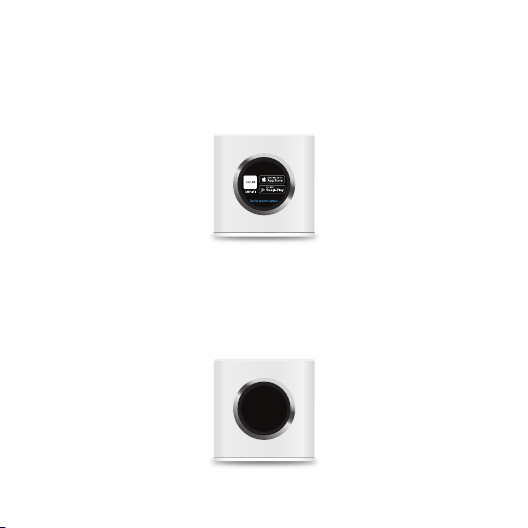
Non-App Users Perform the following steps:
1 Tap the touchscreen on the AmpliFi Router.
2 Use a computer or tablet to connect to the unique
wireless network (SSID) displayed on the screen of
your AmpliFi Router.
Please connect to this
Wi-Fi Network
AFI-R-HD-1234567890XX
Setup
12
Page 15
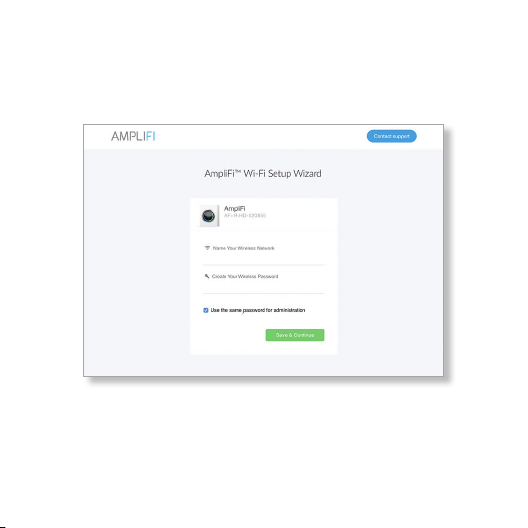
3 Launch a web browser to trigger the following
AmpliFi Wi-Fi Setup Wizard. When prompted, name
your wireless network and create a password.
4 Click Save & Continue.
5 Connect to the new wireless network you created in
the previous step.
13
Page 16

Installation of the Teleport
1 Using the mobile app, connect to the AmpliFi Router
wireless network that you created in the AmpliFi Setup
Wizard on page 13.
2 Tap the Teleport icon and select Test Connectivity.
If any portion of the test fails, please refer to
ampli.com/teleport/guide for assistance.
3 Connect the Teleport to a power outlet and wait for the
LED to start ashing with a full circle.
4 Connect your mobile device or computer to the wireless
network named Teleport XXXXXX, where XXXXXX
represents the last six characters of the Teleport’s MAC
address, which is located on the device label.
5 When the setup portal opens (tap Sign in to Wi-Fi
Network or manually browse to http://ampli.lan, if
necessary) congure the wireless network you will use to
access Teleport in the future. It will replace the wireless
network described in step 4.
14
Page 17

6
Select the network you will use to connect Teleport to
the internet.
7
Teleport will recongure as needed and
connect to the network you selected.
8
Connect to the wireless network you congured in step
5 to continue setup (tap on Sign in to Wi‑Fi network or
browse to http://ampli.lan if the setup portal doesn’t
open automatically).
9
10
If the network you selected in step 6 has a
guest portal, you will be redirected there for
authentication, after which setup will resume
(this can take longer on some devices, but you
can speed it up by reconnecting to Teleport).
Using the mobile app, tap Yes, pair this Teleport to pair
the Teleport with the AmpliFi Router after verifying that
its MAC address matches the device label.
Teleport will connect to your home network. The setup
portal may close during this process.
15
Page 18

11 Verify that setup was successful by browsing the web or
checking Teleport’s status in the mobile app.
It is recommended that you enable Remote
Access on the router. (See page 20.)
If you selected your home Wi‑Fi in step 6,
relocate Teleport to a dierent network. This
may include a dierent home, oce, hotel,
public Wi‑Fi, or mobile hotspot.
You can recongure your Teleport at any
time by opening http://ampli.lan in your
browser.
The pairing between the Teleport and your
router can be cancelled at any time by
resetting either of the devices. This is useful
if the Teleport is ever lost or stolen.
16
Page 19
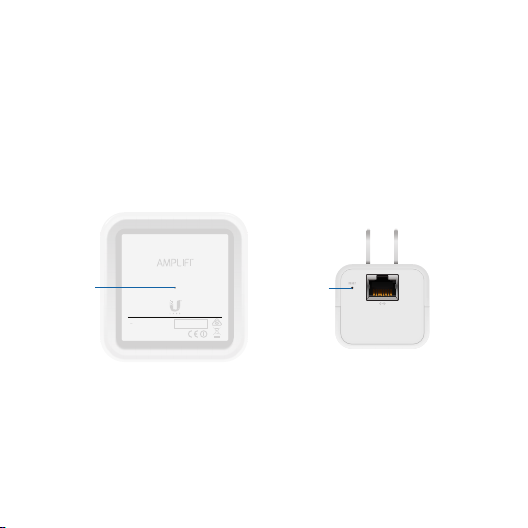
Resetting to Factory Defaults
Factory defaults can be restored to either device. Using
an object such as a straightened paper clip or pin, press
the Reset button located on the bottom of the AmpliFi
Router or Teleport device for approximately 10 seconds
until the LED turns o.
Reset
Reset
FCC ID: SWX-AFR
M/N: AFi-R
IC: 6545A-AFR
9V 1.7A
This device complies with Part 15 of FCC rule s.
Operation is subject to the following 2 conditions:
1) this device may not cause harmful interference and,
2) this device must accept any interference received,
including interference that may cause undesired operation.
RESET
MAC ID
AmpliFi Router AmpliFi Teleport
17
Page 20

App Features
System
Remote access can be enabled using your Facebook or
Google account. To enable remote access, go to the side
menu as shown on page 20.
The system dashboard is displayed
in the System window. It provides an
overview of the AmpliFi Wi‑Fi system
including network status, number of
connected clients, and active
download/upload speeds. Tap devices
to display/edit settings.
Tap Start Test on the Performance
screen to run a speed test that will
Performance
18
provide your download speed, upload
speed, and connection ping time. Swipe
left on the throughput section to view
additional data. A history of recent tests
is displayed at the bottom.
Page 21
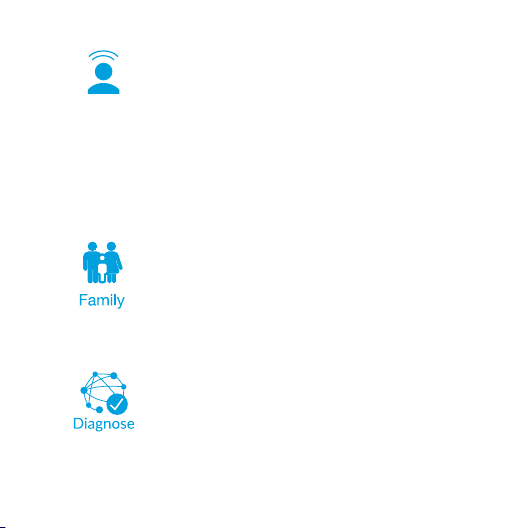
Guest
To provide guest access, determine
the number of guests, select a time
limit for their access, and tap Start.
Guests simply connect to your wireless
network named with the -guest label. No
password is required. As guests connect,
the number of users connected will be
displayed in the app. Tap Stop at any
time to turn o the guest network.
The Family Proles feature allows you
to create proles for family members,
groups, or areas of your home. Assign
devices to the prole, schedule quiet
time (when Internet is not accessible),
and pause the internet at any time.
The Diagnose option will check
your WAN link, IP settings, internet
connection, and MeshPoint status.
19
Page 22
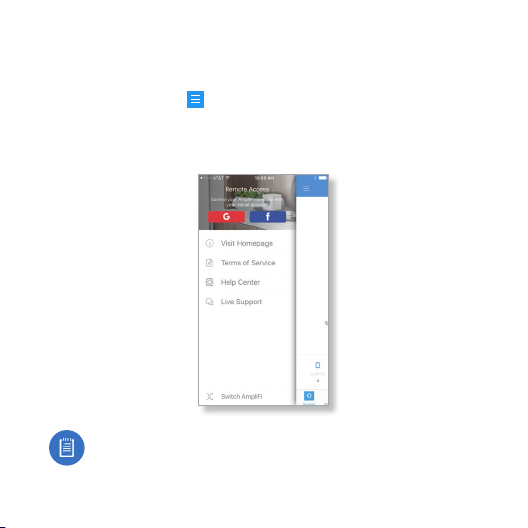
Side Menu - 24/7 Live Chat Support
Tap the menu icon in the upper left corner to access
additional options. Tap Live Support for 24/7 live chat
support. Remote Access can also be enabled from this
menu.
Live chat is also available at help.ampli.com by
selecting Chat with us in the bottom right.
20
Page 23

AFi-R Specications (Router)
Dimensions 99.5 x 97.8 x 99.6 mm (3.91 x 3.85 x 3.92")
Weight 410 g (14.46 oz)
Max. TX Power 26 dBm
Radios 2
MIMO Chains 6
Speed 1750 Mbps
ESD/EMP Protection
Buttons Reset
Antennas (1) Dual‑Band Antenna, Tri‑Polarity
Display 1.6" (40.6 mm) Diagonal, 240 x 240, 212 ppi,
Wi‑Fi Standard 802.11ac
Power Save Supported
Wireless Security WPA2‑PSK AES/TKIP
OperatingTemperature 14 to 131° F (‑10 to 55° C)
Operating Humidity 5 to 95% Noncondensing
Certications FCC / CE / IC
Supported Data Rates
802.11ac 13 Mbps to 1300 Mbps (MCS0 ‑ MCS9, VHT 20/40/80)
802.11n 6.5 Mbps to 450 Mbps (MCS0 ‑ MCS23, HT 20/40)
802.11a 6, 9, 12, 18, 24, 36, 48, 54 Mbps
802.11b 1, 2, 5.5, 11 Mbps
802.11g 6, 9, 12, 18, 24, 36, 48, 54 Mbps
± 24kV Air/Contact
G+F Touch, Full Color
21
Page 24
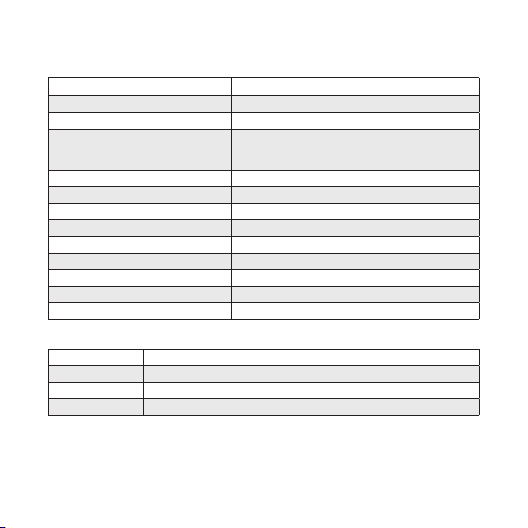
AFi-T Specications (Teleport)
Dimensions 43.00 x 75.85 x 38.85 mm (1.69 x 2.95 x 1.53")
Weight 80 g (2.82 oz)
Max. TX Power 19 dBm
Speed
2.4 GHz
5 GHz
ESD/EMP Protection
Buttons Reset
Antennas (2) Dual‑Band Antennas
Wi‑Fi Standard 802.11b/g/a/n
Power Save Supported
Wireless Security WPA2‑PSK AES/TKIP
OperatingTemperature 14 to 131° F (‑10 to 55° C)
Operating Humidity 5 to 95% Noncondensing
Certications FCC / CE / IC
Supported Data Rates
802.11n 6.5 Mbps to 300 Mbps (MCS0 ‑ MCS15, HT 20/40)
802.11a 6, 9, 12, 18, 24, 36, 48, 54 Mbps
802.11b 1, 2, 5.5, 11 Mbps
802.11g 6, 9, 12, 18, 24, 36, 48, 54 Mbps
22
300 Mbps
300 Mbps
± 24kV Air/Contact
Page 25

Limited Warranty
UBIQUITI NETWORKS, Inc (“UBIQUITI NETWORKS”) warrants that the product(s) furnished hereunder (the
“Product(s)”) shall be free from defects in material and workmanship for a period of one (1) year from the
date of shipment by UBIQUITI NETWORKS under normal use and operation. UBIQUITI NETWORKS’ sole
and exclusive obligation and liability under the foregoing warranty shall be for UBIQUITI NETWORKS,
at its discretion, to repair or replace any Product that fails to conform to the above warranty during
the above warranty period. The expense of removal and reinstallation of any Product is not included
in this warranty. The warranty period of any repaired or replaced Product shall not extend beyond its
original term.
Warranty Conditions
The above warranty does not apply if the Product:
(I) has been modied and/or altered, or an addition made thereto, except by Ubiquiti Networks, or
Ubiquiti Networks’ authorized representatives, or as approved by Ubiquiti Networks in writing;
(II) has been painted, rebranded or physically modied in any way;
(III) has been damaged due to errors or defects in cabling;
(IV) has been subjected to misuse, abuse, negligence, abnormal physical, electromagnetic or
electrical stress, including lightning strikes, or accident;
(V) has been damaged or impaired as a result of using third party rmware;
(VI) has no original Ubiquiti MAC label, or is missing any other original Ubiquiti label(s); or
(VII) has not been received by Ubiquiti within 30 days of issuance of the RMA.
In addition, the above warranty shall apply only if: the product has been properly installed and used at all
times in accordance, and in all material respects, with the applicable Product documentation; all Ethernet
cabling runs use CAT5 (or above), and for outdoor installations, shielded Ethernet cabling is used, and for
indoor installations, indoor cabling requirements are followed.
Returns
No Products will be accepted for replacement or repair without obtaining a Return Materials
Authorization (RMA) number from UBIQUITI NETWORKS during the warranty period, and the Products
being received at UBIQUITI NETWORKS’ facility freight prepaid in accordance with the RMA process of
UBIQUITI NETWORKS. Products returned without an RMA number will not be processed and will be
returned freight collect or subject to disposal. Information on the RMA process and obtaining an RMA
number can be found at: www.ampli.com/support/warranty
23
Page 26

Disclaimer
EXCEPT FOR ANY EXPRESS WARRANTIES PROVIDED HEREIN, UBIQUITI NETWORKS, ITS AFFILIATES,
AND ITS AND THEIR THIRD PAR TY DATA, SERVICE, SOFTWARE AND HARDWARE PROVIDERS HEREBY
DISCLAIM AND MAKE NO OTHER REPRESENTATION OR WARRANTY OF ANY KIND, EXPRESS, IMPLIED OR
STATUTORY, INCLUDING, BUT NOT LIMITED TO, REPRESENTATIONS, GUARANTEES, OR WARRANTIES OF
MERCHANTABILITY, ACCURACY, QUALITY OF SERVICE OR RESULTS, AVAILABILIT Y, SATISFACTORY QUALITY,
LACK OF VIRUSES, QUIET ENJOYMENT, FITNESS FOR A PARTICULAR PURPOSE AND NON‑INFRINGEMENT
AND ANY WARRANTIES ARISING FROM ANY COURSE OF DEALING, USAGE OR TRADE PRACTICE IN
CONNECTION WITH SUCH PRODUCTS AND SERVICES. BUYER ACKNOWLEDGES THAT NEITHER UBIQUITI
NETWORKS NOR ITS THIRD PARTY PROVIDERS CONTROL BUYER’S EQUIPMENT OR THE TRANSFER OF
DATA OVER COMMUNICATIONS FACILITIES, INCLUDING THE INTERNET, AND THAT THE PRODUCTS AND
SERVICES MAY BE SUBJECT TO LIMITATIONS, INTERRUPTIONS, DELAYS, CANCELLATIONS AND OTHER
PROBLEMS INHERENT IN THE USE OF COMMUNICATIONS FACILITIES. UBIQUITI NET WORKS, ITS AFFILIATES
AND ITS AND THEIR THIRD PAR TY PROVIDERS ARE NOT RESPONSIBLE FOR ANY INTERRUPTIONS, DELAYS,
CANCELLATIONS, DELIVERY FAILURES, DATA LOSS, CONTENT CORRUPTION, PACKET LOSS, OR OTHER
DAMAGE RESULTING FROM ANY OF THE FOREGOING. In addition, UBIQUITI NETWORKS does not warrant
that the operation of the Products will be error‑free or that operation will be uninterrupted. In no event
shall UBIQUITI NETWORKS be responsible for damages or claims of any nature or description relating
to system performance, including coverage, buyer’s selection of products (including the Products) for
buyer’s application and/or failure of products (including the Products) to meet government or regulatory
requirements.
Limitation of Liability
EXCEPT TO THE EXTENT PROHIBITED BY LOCAL LAW, IN NO EVENT WILL UBIQUITI OR ITS SUBSIDIARIES,
AFFILIATES OR SUPPLIERS BE LIABLE FOR DIRECT, SPECIAL, INCIDENTAL, CONSEQUENTIAL OR OTHER
DAMAGES (INCLUDING LOST PROFIT, LOST DATA, OR DOWNTIME COSTS), ARISING OUT OF THE
USE, INABILITY TO USE, OR THE RESULTS OF USE OF THE PRODUCT, WHETHER BASED IN WARRANTY,
CONTRACT, TORT OR OTHER LEGAL THEORY, AND WHETHER OR NOT ADVISED OF THE POSSIBILITY OF
SUCH DAMAGES.
24
Page 27

Note
Some countries, states and provinces do not allow exclusions of implied warranties or conditions, so
the above exclusion may not apply to you. You may have other rights that vary from country to country,
state to state, or province to province. Some countries, states and provinces do not allow the exclusion
or limitation of liability for incidental or consequential damages, so the above limitation may not apply
to you. EXCEPT TO THE EXTENT ALLOWED BY LOCAL LAW, THESE WARRANTY TERMS DO NOT EXCLUDE,
RESTRICT OR MODIFY, AND ARE IN ADDITION TO, THE MANDATORY STATUTORY RIGHTS APPLICABLE TO
THE LICENSE OF ANY SOFTWARE (EMBEDDED IN THE PRODUCT) TO YOU. The United Nations Convention
on Contracts for the International Sale of Goods shall not apply to any transactions regarding the sale
of the Products.
Compliance
FCC
Changes or modications not expressly approved by the party responsible for compliance could void the
user’s authority to operate the equipment.
This device complies with Part 15 of the FCC Rules. Operation is subject to the following two conditions.
1 This device may not cause harmful interference, and
2 This device must accept any interference received, including interference that may cause undesired
operation.
This equipment has been tested and found to comply with the limits for a Class B digital device, pursuant
to Part 15 of the FCC Rules. These limits are designed to provide reasonable protection against harmful
interference in a residential installation. This equipment generates, uses, and can radiate radio frequency
energy and, if not installed and used in accordance with the instructions, may cause harmful interference
to radio communications. However, there is no guarantee that interference will not occur in a particular
installation. If this equipment does cause harmful interference to radio or television reception, which
can be determined by turning the equipment o and on, the user is encouraged to try to correct the
interference by one or more of the following measures:
• Reorient or relocate the receiving antenna.
• Increase the separation between the equipment and receiver.
• Connect the equipment to an outlet on a circuit dierent from which the receiver is connected.
• Consult the dealer or an experienced radio/TV technician for help.
These devices have been approved by the FCC under FCC IDs: SWX‑AFR and SWX‑AFT
25
Page 28

ISED Canada
CAN ICES‑3(B)/NMB‑3(B)
This Class B digital apparatus complies with Canadian CAN ICES‑003.
To reduce potential radio interference to other users, the antenna type and its gain should be so chosen
that the equivalent isotropically radiated power (e.i.r.p.) is not more than that permitted for successful
communication.
This device complies with ISED Canada licence‑exempt RSS standard(s). Operation is subject to the
following two conditions:
1 This device may not cause interference, and
2 This device must accept any interference, including interference that may cause undesired operation
of the device.
These devices have been approved by Industry Canada under IC: 6545A‑AFR and 6545A‑AFT. The device
for the band 5150‑5250 MHz is only for indoor usage to reduce potential for harmful interference to co‑
channel mobile satellite systems.
CAN ICES‑3(B)/NMB‑3(B)
Cet appareil numérique de la classe B est conforme à la norme NMB‑003 du Canada.
Pour réduire le risque d’interférence aux autres utilisateurs, le type d’antenne et son gain doivent être
choisies de façon que la puissance isotrope rayonnée équivalente (PIRE) ne dépasse pas ce qui est
nécessaire pour une communication réussie.
Le présent appareil est conforme aux CNR d’ISDE Canada applicables aux appareils radio exempts de
licence. L’exploitation est autorisée aux deux conditions suivantes:
1 Cet appareil ne peut pas provoquer d’interférences et
2 Cet appareil doit accepter toute interférence, y compris les interférences qui peuvent causer un
mauvais fonctionnement du dispositif.
Le appareil ont été approuvés par Industrie Canada en vertu IC: 6545A‑AFR et 6545A‑AFT. Les dispositifs
fonctionnant dans la bande 5150‑5250 MHz sont réservés uniquement pour une utilisation à l’intérieur
an de réduire les risques de brouillage préjudiciable aux systèmes de satellites mobiles utilisant les
mêmes canaux.
26
Page 29
RF Exposure Warning
The antennas used for this transmitter must be installed to provide a separation distance of at least
20cm from all persons and must not be located or operating in conjunction with any other antenna
or transmitter.
Les antennes utilisées pour ce transmetteur doivent être installé en considérant une distance de
séparation de toute personnes d’au moins 20 cm et ne doivent pas être localisé ou utilisé en conit avec
tout autre antenne ou transmetteur.
CE Marking
CE marking on this product represents the product is in compliance with all directives that are applicable
to it.
AT BE BG CY CZ DE DK EE EL ES FI FR HR HU
IE IT LV LT LU MT NL PL PT RO SE SI SK UK
BFWA (Broadband Fixed Wireless Access) members are noted in blue.
Note: This device meets Max. TX power limit per ETSI regulations.
The following apply to products that operate in the 5 GHz frequency range:
Note: This device is restricted to indoor use only when operating in the 5150 ‑ 5350 MHz
frequency range within all member states.
Note: All countries listed may operate at 30 dBm. BFWA member states may operate at
36dBm.
Note: Operation in the 5.8 GHz frequency band is prohibited in BFWA member states. Other
countries listed may use the 5.8 GHz frequency band.
Country List
27
Page 30

RoHS/WEEE Compliance Statement
English
European Directive 2012/19/EU requires that the equipment bearing this symbol on the product and/
or its packaging must not be disposed of with unsorted municipal waste. The symbol indicates that this
product should be disposed of separately from regular household waste streams. It is your responsibility
to dispose of this and other electric and electronic equipment via designated collection facilities
appointed by the government or local authorities. Correct disposal and recycling will help prevent
potential negative consequences to the environment and human health. For more detailed information
about the disposal of your old equipment, please contact your local authorities, waste disposal service, or
the shop where you purchased the product.
Deutsch
Die Europäische Richtlinie 2012/19/EU verlangt, dass technische Ausrüstung, die direkt am Gerät
und/oder an der Verpackung mit diesem Symbol versehen ist, nicht zusammen mit unsortiertem
Gemeindeabfall entsorgt werden darf. Das Symbol weist darauf hin, dass das Produkt von regulärem
Haushaltmüll getrennt entsorgt werden sollte. Es liegt in Ihrer Verantwortung, dieses Gerät und andere
elektrische und elektronische Geräte über die dafür zuständigen und von der Regierung oder örtlichen
Behörden dazu bestimmten Sammelstellen zu entsorgen. Ordnungsgemäßes Entsorgen und Recyceln
trägt dazu bei, potentielle negative Folgen für Umwelt und die menschliche Gesundheit zu vermeiden.
Wenn Sie weitere Informationen zur Entsorgung Ihrer Altgeräte benötigen, wenden Sie sich bitte an die
örtlichen Behörden oder städtischen Entsorgungsdienste oder an den Händler, bei dem Sie das Produkt
erworben haben
28
Page 31

. Español
La Directiva 2012/19/EU exige que los equipos que lleven este símbolo en el propio aparato y/o en su
embalaje no deben eliminarse junto con otros residuos urbanos no seleccionados. El símbolo indica
que el producto en cuestión debe separarse de los residuos domésticos convencionales con vistas a su
eliminación. Es responsabilidad suya desechar este y cualesquiera otros aparatos eléctricos y electrónicos
a través de los puntos de recogida que ponen a su disposición el gobierno y las autoridades locales. Al
desechar y reciclar correctamente estos aparatos estará contribuyendo a evitar posibles consecuencias
negativas para el medio ambiente y la salud de las personas. Si desea obtener información más detallada
sobre la eliminación segura de su aparato usado, consulte a las autoridades locales, al servicio de
recogida y eliminación de residuos de su zona o pregunte en la tienda donde adquirió el producto.
Français
La directive européenne 2012/19/EU exige que l’équipement sur lequel est apposé ce symbole sur le
produit et/ou son emballage ne soit pas jeté avec les autres ordures ménagères. Ce symbole indique
que le produit doit être éliminé dans un circuit distinct de celui pour les déchets des ménages. Il est de
votre responsabilité de jeter ce matériel ainsi que tout autre matériel électrique ou électronique par les
moyens de collecte indiqués par le gouvernement et les pouvoirs publics des collectivités territoriales.
L’élimination et le recyclage en bonne et due forme ont pour but de lutter contre l’impact néfaste
potentiel de ce type de produits sur l’environnement et la santé publique. Pour plus d’informations sur
le mode d’élimination de votre ancien équipement, veuillez prendre contact avec les pouvoirs publics
locaux, le service de traitement des déchets, ou l’endroit où vous avez acheté le produit.
Italiano
La direttiva europea 2012/19/EU richiede che le apparecchiature contrassegnate con questo simbolo sul
prodotto e/o sull’imballaggio non siano smaltite insieme ai riuti urbani non dierenziati. Il simbolo indica
che questo prodotto non deve essere smaltito insieme ai normali riuti domestici. È responsabilità del
proprietario smaltire sia questi prodotti sia le altre apparecchiature elettriche ed elettroniche mediante
le speciche strutture di raccolta indicate dal governo o dagli enti pubblici locali. Il corretto smaltimento
ed il riciclaggio aiuteranno a prevenire conseguenze potenzialmente negative per l’ambiente e per la
salute dell’essere umano. Per ricevere informazioni più dettagliate circa lo smaltimento delle vecchie
apparecchiature in Vostro possesso, Vi invitiamo a contattare gli enti pubblici di competenza, il servizio di
smaltimento riuti o il negozio nel quale avete acquistato il prodotto.
29
Page 32

Declaration of Conformity
български [Bulgarian] С настоящото UBIQUITI NETWORKS декларира, че този тип радиосъоръжение AFi‑T е в съответствие с
Директива 2014/53/ЕС. Цялостният текст на ЕС декларацията за съответствие може да се намери на следния интернет адрес:
www.ubnt.com/compliance
Hrvatski [Croatian] UBIQUITI NETWORKS ovime izjavljuje da je radijska oprema tipa AFi‑T u skladu s Direktivom 2014/53/EU.
Cjeloviti tekst EU izjave o sukladnosti dostupan je na sljedećoj internetskoj adresi:
Čeština [Czech] Tímto UBIQUITI NETWORKS prohlašuje, že typ rádiového zařízení AFi‑T je v souladu se směrnicí 2014/53/EU. Úplné
znění EU prohlášení o shodě je k dispozici na této internetové adrese:
Dansk [Danish] Hermed erklærer UBIQUITI NETWORKS, at radioudstyrstypen AFi‑T er i overensstemmelse med direktiv 2014/53/EU.
EU‑overensstemmelseserklæringens fulde tekst kan ndes på følgende internetadresse:
Nederlands [Dutch] Hierbij verklaar ik, UBIQUITI NET WORKS, dat het type radioapparatuur AFi‑T conform is met Richtlijn
2014/53/EU. De volledige tekst van de EU‑conformiteitsverklaring kan worden geraadpleegd op het volgende internetadres:
www.ubnt.com/compliance
English
Hereby, UBIQUITI NETWORKS declares that the radio equipment type
The full text of the EU declaration of conformity is available at the following internet address: www.ubnt.com/compliance
Eesti keel [Estonian] Käesolevaga deklareerib UBIQUITI NETWORKS, et käesolev raadioseadme tüüp AFi‑T vastab
direktiivi 2014/53/EL nõuetele. ELi vastavusdeklaratsiooni täielik tekst on kättesaadav järgmisel internetiaadressil:
www.ubnt.com/compliance
Suomi [Finnish] UBIQUITI NETWORKS vakuuttaa, että radiolaitetyyppi AFi‑T on direktiivin 2014/53/EU mukainen.
EU‑vaatimustenmukaisuusvakuutuksen täysimittainen teksti on saatavilla seuraavassa internetosoitteessa:
www.ubnt.com/compliance
Français [French] Le soussigné, UBIQUITI NETWORKS, déclare que l’équipement radioélectrique du type AFi‑T est conforme
à la directive 2014/53/UE. Le texte complet de la déclaration UE de conformité est disponible à l’adresse internet suivante:
www.ubnt.com/compliance
Deutsch [German] Hiermit erklärt UBIQUITI NET WORKS, dass der Funkanlagentyp AFi‑T der Richtlinie 2014/53/EU entspricht. Der
vollständige Text der EU‑Konformitätserklärung ist unter der folgenden Internetadresse verfügbar:
Ελληνικά [Greek] Με την παρούσα ο/η UBIQUITI NETWORKS, δηλώνει ότι ο ραδιοεξοπλισμός AFi‑T πληροί την οδηγία
2014/53/ΕΕ. Το πλήρες κείμενο της δήλωσης συμμόρφωσης ΕΕ διατίθεται στην ακόλουθη ιστοσελίδα στο διαδίκτυο:
www.ubnt.com/compliance
Magyar [Hungarian] UBIQUITI NETWORKS igazolja, hogy a AFi‑T típusú rádióberendezés megfelel a 2014/53/EU irányelvnek. Az
EU‑megfelelőségi nyilatkozat teljes szövege elérhető a következő internetes címen:
Íslenska [Icelandic] Hér með lýsir UBIQUITI NETWORKS yr því að AFi‑T er í samræmi við grunnkröfur og aðrar kröfur, sem gerðar
eru í tilskipun 2014/53/EU. Fullur texti ESB samræmisyrlýsing er að nna á eftirfarandi netfangi:
Italiano [Italian] Il fabbricante, UBIQUITI NETWORKS, dichiara che il tipo di apparecchiatura radio AFi‑T èconforme alla
direttiva 2014/53/UE. Il testo completo della dichiarazione di conformità UE è disponibile al seguente indirizzo Internet:
www.ubnt.com/compliance
www.ubnt.com/compliance
www.ubnt.com/compliance
www.ubnt.com/compliance
AFi‑T
is in compliance with Directive 2014/53/EU.
www.ubnt.com/compliance
www.ubnt.com/compliance
www.ubnt.com/compliance
30
Page 33

Latvių kalba [Latvian] Ar šo UBIQUITI NET WORKS deklarē, ka radioiekārta AFi‑T atbilst Direktīvai 2014/53/ES. Pilns ES atbilstības
deklarācijas teksts ir pieejams šādā interneta vietnē:
Lietuvių kalba [Lithuanian] Aš, UBIQUITI NETWORKS, patvirtinu, k ad radijo įrenginių tipas AFi‑T atitinka Direktyvą 2014/53/ES. Visas
ES atitikties deklaracijos tekstas prieinamas šiuo interneto adresu:
Malti [Maltese]
B’dan, UBIQUITI NETWORKS, niddikjara li dan it‑tip ta’ tagħmir tar‑radju
2014/53/UE. Id‑dikjarazzjoni tal‑konformità tista’ tiġi kkonsultata minn www.ubnt.com/compliance
Norsk [Norwegian]
relevante krav i direktiv 2014/53/EU. Den fulle teksten til EU‑samsvarserklæringen er tilgjengelig på følgende internettadresse:
www.ubnt.com/compliance
Polski [Polish] UBIQUITI NETWORKS niniejszym oświadcza, że typ urządzenia radiowego AFi‑T jest zgodny z
dyrektywą 2014/53/UE. Pełny tekst deklaracji zgodności UE jest dostępny pod następującym adresem internetowym:
www.ubnt.com/compliance
Português [Portuguese] O(a) abaixo assinado(a) UBIQUITI NETWORKS declara que o presente tipo de equipamento de rádio
AFi‑T está em conformidade com a Diretiva 2014/53/UE. O texto integral da declaração de conformidade está disponível no
seguinte endereço de Internet:
Română [Romanian] Prin prezenta, UBIQUITI NETWORKS declară că tipul de echipamente radio AFi‑T este în conformitate
cu Directiva 2014/53/UE. Textul integral al declarației UE de conformitate este disponibil la următoarea adresă internet:
www.ubnt.com/compliance
Slovenčina [Slovak]
Úplné EÚ vyhlásenie o zhode je k dispozícii na tejto internetovej adrese:
Slovenščina [Slovenian]
besedilo izjave EU o skladnosti je na voljo na naslednjem spletnem naslovu: www.ubnt.com/compliance
Español [Spanish] Por la presente, UBIQUITI NETWORKS declara que el tipo de equipo radioeléctrico AFi‑T es conforme con la
Directiva 2014/53/UE. El texto completo de la declaración UE de conformidad está disponible en la dirección Internet siguiente:
www.ubnt.com/compliance
Svenska [Swedish] Härmed försäkrar UBIQUITI NETWORKS att denna typ av radioutrustning AFi‑T överensstämmer
med direktiv 2014/53/EU. Den fullständiga texten till EU‑försäkran om överensstämmelse nns på följande webbadress:
www.ubnt.com/compliance
UBIQUITI NETWORKS erklærer herved at utstyret
www.ubnt.com/compliance
UBIQUITI NETWORKS
UBIQUITI NETWORKS potrjuje, da je tip radijske opreme
www.ubnt.com/compliance
www.ubnt.com/compliance
týmto vyhlasuje, že rádiové zariadenie typu AFi‑T je v súlade so smernicou 2014/53/EÚ.
AFi‑T
huwa konformi mad‑Direttiva
AFi‑T
er i samsvar med de grunnleggende krav og øvrige
www.ubnt.com/compliance
AFi‑T
skladen z Direktivo 2014/53/EU. Celotno
31
Page 34

Support
Online
help.ampli.com
Email
help@ampli.com
Ubiquiti Networks, Inc.
685 Third Avenue, 27th Floor
New York, NY 10017
USA
©2017 Ubiquiti Networks, Inc. All rights reserved. Ubiquiti, Ubiquiti Networks, the Ubiquiti U logo,
ULabs, the ULabs logo, and AmpliFi are trademarks or registered trademarks of Ubiquiti Networks, Inc.
in the United States and in other countries. Apple, the Apple logo, and iPhone are trademarks of Apple
Inc., registered in the U.S. and other countries. App Store is a service mark of Apple Inc. Android, Google,
Google Play, the Google Play logo and other marks are trademarks of Google Inc. All other trademarks
are the property of their respective owners.
640‑00337‑03 • AJ113017
32
Page 35

Page 36

 Loading...