

Page 1

Jan9th2018 RD06 user manual V 1.4
- 1 -
RD06 user manual
V1.4
Page 2

Jan9th2018 RD06 user manual V 1.4
- 2 -
1 Product overview
The TZ-RD06 is an ultra-long-range wireless data acquisition gateway dedicated to
receiving our temperature and humidity sensor Tag06/06B. Support GPRS
(850,900,1800,1900MHz), RS485, MODBUS-RTU and other communication
interface. RD06 uses high-performance 32-bit industrial processor and
industrial-grade wireless module, with high reliability, stability and data security.
TZ-RD06 support the local sound and light alarm, SMS alarm, GPRS alarm and other
alarm methods.
2 Product feature
Four band(850、900、1800、1900MHz)
RS-485;
1 digital output ,can be used to alert,
Kinds of alarm method;
External special USB configure interface, user can configure RD06 operate mode;
Prevent collision: advanced technology to prevent the collision;
Security: encryption algorithm and certification to ensure data security, to prevent the
data link eavesdropping and data to be cracked
Metal shell, resistance to high pressure;
3 Technical Parameters
RF frequency
433M
RF modulation mode
GFSK
RF Receiving Sensitivity
-124dBm
RF identification Angle
3D
Interface
GPRS\RS485\MODBUS-RTU
GSM
Support 4 band(850/ 900/1800 /1900MHZ)
LED
3 LED (RF、GSM、Power)
Firmware update
Support
RF protocol
Private protocol
Supply power
DC12V
Flash Memory
32Mb
Net weight
0.27kg
Page 3

Jan9th2018 RD06 user manual V 1.4
- 3 -
Operating temperature.
-40°C~+60°C
Operating humidity.
5% ~ 95% (non-condensing)
Built-in battery
3.7V/850mAh
Dimension
112mm*105mm*27mm
4 Definition of interfaces
4.1 Appearance
Page 4

Jan9th2018 RD06 user manual V 1.4
- 4 -
4.2 All interfaces
Interfaces
Functions
A.LED light
RF、GSM、Power
B.Expansion interface
Expand functions(Pls check explanation
following)
C.USB
Configure device and save log
D.Switch of power
Turn on/off
E.Charge interface
Connect power plug
F.SIM card slot
Insert SIM card
G.RF antenna interface
Connect RF antenna
H.GSM antenna interface
Connect GSM antenna
4.3 Expand interfaces
Interfaces
Functions
1- RS-485B
RS-485B
2- RS-485A
RS-485A
3- GND
GND
4- OUT
Output
5-GND
GND
6-12V
12V output
5 LED light indicating status
Blue light - RF
RF light status
Explanations
Keep on always
OTA、Read or write configure
Sparkling 0.1 second
Receive TAG
Green light - GSM
GSM light status
Explanations
Keep on always
OTA 、Read or write configure、In communicating
On 0.1second,off 0.1second
Can’t read IMEI、Wait for picking up
On 0.1second,off 0.2second
Receive SMS
On 0.1second,off 0.9second
Connect with GPRS network
On 0.1second,off 2.9sedond
Connect with GSM network
Page 5
Jan9th2018 RD06 user manual V 1.4
- 5 -
6 GPRS
data protocol
Pls read the document RD06 GPRS data protocol v1.1 .
7 RS485 data format
7.1 Report automatically
Pls read the document RD06 report automatically protocol v1.1 .
7.2 Modbus Protocol
RD06 support standard RS485 Modbus protocol, pls read the document RS485 modbus protocol
v1.1 .
8 Command List
The following commands is ASCII, can be set via SMS, or can be set by serial port and
GPRS.
Note: the default has been configured for 5 minutes to send a GPRS data to the Tzone
platform;
If the SIM card needs to set APN to be used, please set 011 instructions.
Set the APN (Access Point Name)
Format: *$$$$$$,011,APN,Username,Password#
On 1second,off 2second
Can’t connect with GSM network
On 0.5second,off 0.5second
Can’t connect with SIM card
Red light - Charging
Charging light status
Explanations
Keep on always
OTA、 Read or write configure、connect power
Sparkling each 2seconds
not connect power
Page 6

Jan9th2018 RD06 user manual V 1.4
- 6 -
Notes: The username and password could to be null.
For example: *000000,011,cmnet,,#
Explication: The China Mobile’s APN is “cmnet”, and the username and
password are empty.
After you send the command of SMS to device, it will reply to your mobile phone:
Receive:’011’OK
*000000,011,cmnet,,#
If you send the command of USB to device, the serial port tool will shows:
CMD bytes: 14
*000000,011,cmnet,,#
ComdType:011(SETAPN)
APNnumber:cmnet
Username:
Password:
Note: $$$$$$ is RD06 `s password, and the initial password is 000000
NO.
Instruction
Format
Note
001
Modify user password
*$$$$$$,001,@@@@@@#
$$$$$$ is old password
@@@@@@ is new Password
(default:000000)
003
Set a preset SMS number
*$$$$$$,003,SMS Number#
SMS Number: must less than
25 digits
004
Set low power alarm
*$$$$$$,004,XXX#
XXX is the low power alarm
voltage, eg: 3.8v,XXX=380
(default:360)
For example:
*$$$$$$,004,380#
When the voltage is lower than
the preset value,RD06 will send
one lower power alarm GPRS
data to the Preset Server.
Page 7

Jan9th2018 RD06 user manual V 1.4
- 7 -
008
Extend setting
*$$$$$$,008,ABCDEFG#
A=0,
B=0,
C=0,
D=0, default,
D=1,Close all SMS function’
E=0,
F=0,
G=0,disable ACK function,
default,
G=1,enable ACK function
009
Change band
*$$$$$$,009,S#
S=0, work in 900/1800
S=1, work in 850/1900
S=2, Automatic selection
S=3, not set(default)
*note: the default of parameter
is S=3, not set the frequency
band, if the unit of GSM
module support three
frequency(900/1800/1900),
then you could set the
parameter to S=0, if the unit of
GSM module support the four
frequency(850/900/1800/1900),
then you could set the
parameter to S=1.
011
Set APN,Username,Password
*$$$$$$,011,APN,Username,Pass
word#
APN : must<28 character
Username: must<28 character
Password: must<28 character
* If haven't username or
password, then left it blank.
For example:
*000000,011,CMNET,,#
014
Set DNS
*$$$$$$,014, X,DNS1,DNS2#
Disable the DNS
X=0 Disable the DN(default)
X=1 Enable the DNS
DNS is the domain name
server , xxx.xxx.xxx.xxx
015
Set IP Address & port number
*$$$$$$,015,X,IP,PORT#
X=0 use IP connect the server
X=1 use DN connect the server
IP : xxx.xxx.xxx.xxx
DN:(domain name)
www.xxx.com
PORT : [1,65535]
016
Enable/Disable GPRS function
*$$$$$$,016,X#
X=0 Disable GPRS unction
Page 8

Jan9th2018 RD06 user manual V 1.4
- 8 -
X=1 Enable GPRS Function
(default)
018
Set the time intervals of GPRS
Data
*$$$$$$,018,X#
X=0 stop send time interval
GPRS
=[10,6000] Time interval
(Unit: sec)
(default:300)
019
Set the GPRS mode
*$$$$$$,019,X#
X=0, Use the UDP mode
X=1, Use the TCP mode
(default)
020
Local digital OUTPUT alarm
function
*$$$$$$,020,X#
X=0, disable
X=1, enable,(default)
030
Set SMS alarm function
*$$$$$$,030, ABCDEFG#
A=1,Enable SMS alarm for
temperature and humidity alert,
(default);
B=1,Enable SMS alarm for
power off (default);
C=1,Enable SMS alarm for low
voltage alert, (default);
D=0;
E=0;
F=0;
G=0;
040
RS485 setting
*$$$$$$,040, A,B,C,D #
A:Baud rate [1200,115200],
9600(default);
B:Data bit,
0-8bit(default),
1-9bit;
C:Stop bit,
0-0.5bit,
1-1bit(default),
2-1.5bit,
3-2bit
D:Parity bit,
0-null(default),
1-Even parity,
2-Odd parity
041
RS485 working mode
*$$$$$$,041, X#
X:0-Report automatically;
X:1-modbus, Should add TAG
to channels(command
144) ,default;
042
RS485 address
*$$$$$$,042, AB#
AB:[0-F],
Can’t be 00,
default:01
Page 9

Jan9th2018 RD06 user manual V 1.4
- 9 -
043
RS485 Anti-Reread
*$$$$$$,043, X#
X:[0-3600],unit:s,default:0
RS485 send once tag data
within this time period, no
matter RD06 receive this tag
many times.
Only use in RS485 Report
automatically mode
044
Max tag online time
*$$$$$$,044, X#
X:[0-86400],unit:s,default:300
RD06 will think tag is offline if
it do not receive this tag
within this time period
Only use in RS485 modbus
mode
127
GPRS sending interval when no
power
*$$$$$$,127,X#
X=0,Disable this function
(default)
X:[10,6000]
GPRS interval,
unit: s;
136
Enable RF function
*$$$$$$,136,X#
X:0:disable RF function
1:enable RF function(default)
138
Choose TAG type
*$$$$$$,138,X#
X:
0:Reserved
1:Reserved
2:Reserved
3:Reserved
4:Reserved
5:Reserved
6:Reserved
7:TAG06/06B(default)
141
Set tag’s baud rate
*$$$$$$,141,X#
X:0,1K;
X:1,2K;
X:2,10k;
X:3,38.4k,default;
X:4,100k;
142
Set Tag temperature and
humidity alert function
*$$$$$$,142,X,Temp_H,Temp_L,
RH_H,RH_L#
X=0,disable (default)
X=1,
If tag’s temperature
exceed Temp_H、under
Page 10

Jan9th2018 RD06 user manual V 1.4
- 10 -
Temp_L、humidity
exceed RH_H、under
RH_L,
RD06 alert;
X=2,
If tag’s status means
alert RD06 alert;
X=3,
If tag’s temperature
exceed Temp_H
RD06 alert, when
temperature under
Temp_L RD06 relieve
alert;
If tag’s humidity
exceed RH_H RD06
alert, when humidity
under RH_L RD06
relieve alert;
X=4,
If tag’s temperature
under Temp_L RD06
alert, when
temperature exceed
Temp_H RD06
relieve alert;
If tag’s humidity
under RH_L RD06
alert, when humidity
exceed RH_H RD06
relieve alert;
Page 11

Jan9th2018 RD06 user manual V 1.4
- 11 -
Temp_H: high temperature
threshold,
[-55~125],unit:℃,
default: 100;
Temp_L: low temperature
threshold,
[-55~125],unit:℃,
default: 0
RH_H: high humidity
threshold,
[0~100],unit:%,
default: 80
RH_L: low humidity threshold,
[0~100],unit:%,
default: 0
144
Add a TAG
*$$$$$$,144,X,ID#
X:Channel,[1,100];
ID:TAG ID,8 character;
145
Delete a TAG
*$$$$$$,145,X#
X:Channel,[1,100];
146
Delete all TAG
*$$$$$$,146,1#
147
Read all added TAG
*$$$$$$,147,1#
148
RF reboot
*$$$$$$,148,X#
X:[1,1440],default:5,unit:min
RF module will reboot if RD06
can not receive any tag within
this time period
500
Clear data flash
*$$$$$$,500#
Clear stored in the flash
memory inside the machine
600
Auto Reboot
*$$$$$$,600,X,Y#
X=0,Disable his function
X=1, Active this function.
(Default)
Y:Reboot time interval,
[10,9999],unit: Min,
(default: 1440)
801
Reading the IMEI number
*$$$$$$,801#
RD06 reply the IMEI number
Page 12
Jan9th2018 RD06 user manual V 1.4
- 12 -
2. Data query
Two ways to query the temperature and humidity data.
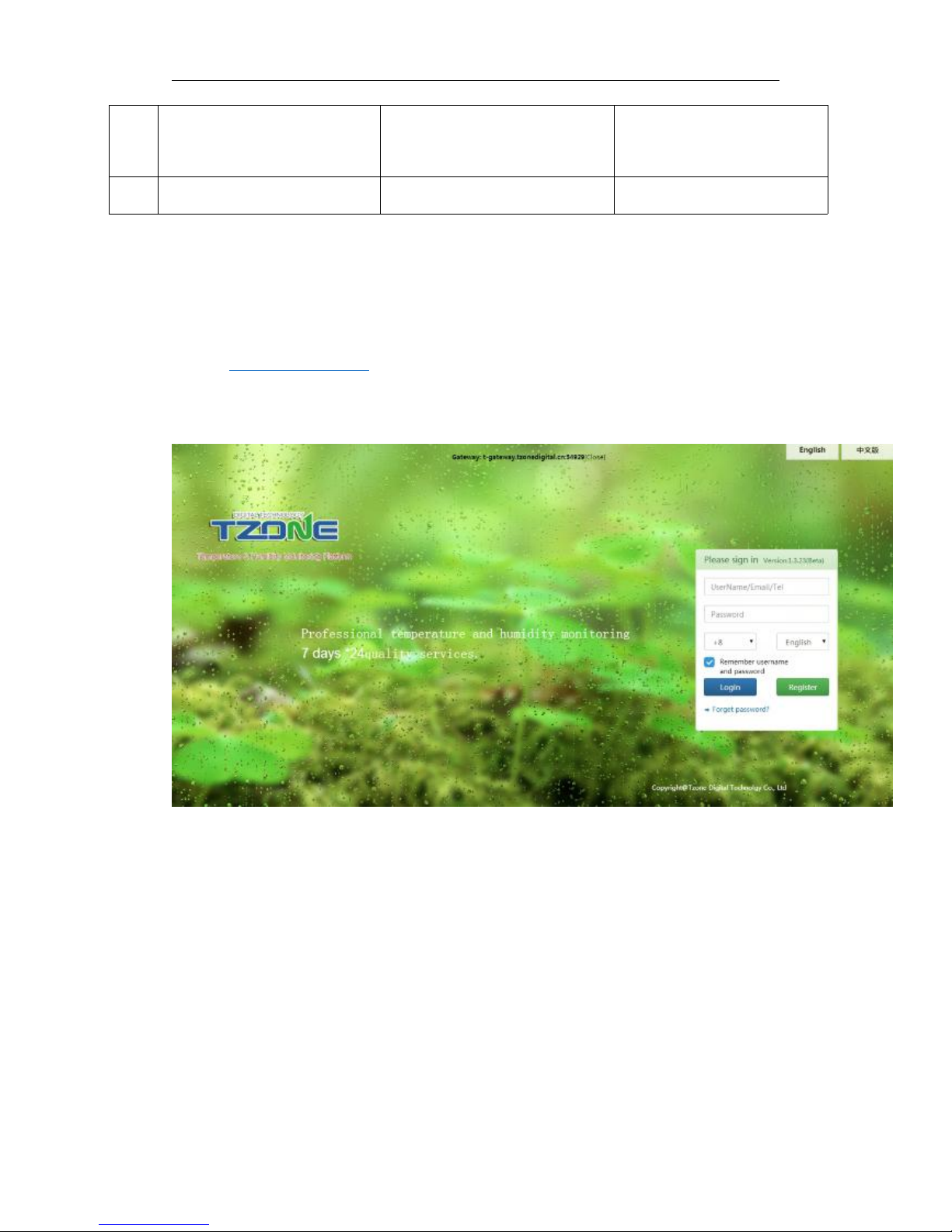
2.1 Temperature and humidity web cloud platform.
Need add the TAG ID
Website: http://t.tzonedigital.cn/
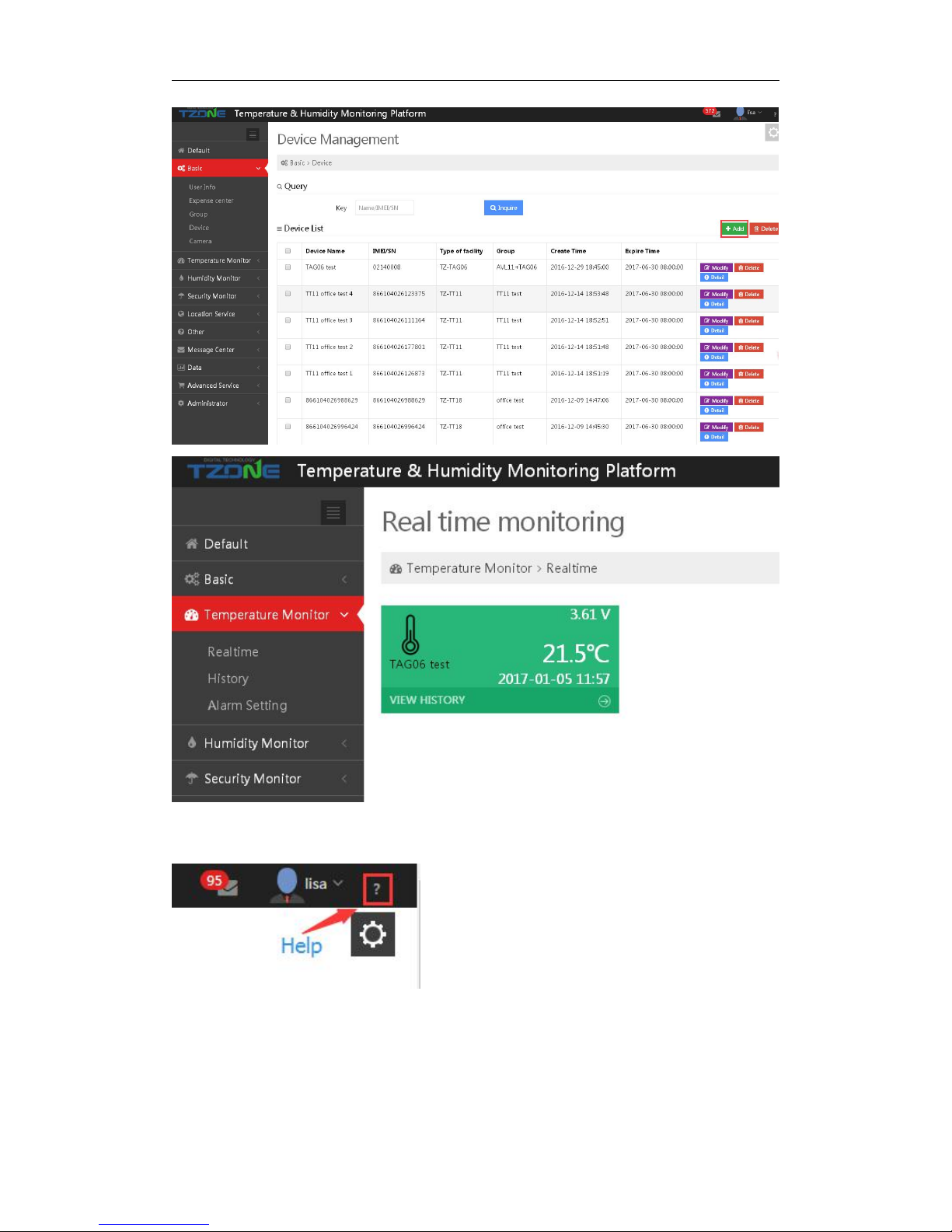
Please register an account and add the TAG via its ID to the platform(The default data
transmission interval of the TAG is every 1 minutes. And the default data transmission interval of
the RD06 is every 5 minutes). Then all the real-time temperature and humidity data
990
Initialization Tracker
*$$$$$$,990,099#
It will set all parameter to
factory default value
(Excluding the Password).
991
Reboot now
*$$$$$$,991#
Reboot the RD06
Page 13
Jan9th2018 RD06 user manual V 1.4
- 13 -
For more details, please check the "Help" button in the upper right corner of the temperature and
humidity monitoring platform:
 Loading...