

Page 1

NC100 Bluetooth Non-Contact Infrared Thermometer
User Manual
NC100
Page 2

Dear NC100 Owner:
Thank you for purchasing the NC100 Bluetooth Non-Contact
Infrared Thermometer. Please read this instruction manual rst so
you can use this thermometer safely and correctly. Please keep this
instruction manual for future reference. This innovative medical
device uses advanced infrared (IR) technology to measure
temperature instantly and accurately on the forehead or object.
IMPORTANT SAFETY INSTRUCTIONS READ BEFORE USE
The following basic safety precautions should always be taken.
1. Close supervision is necessary when the thermometer is used by,
on, or near children, handicapped persons or invalids.
2. Use the thermometer only for the intended use described in this
manual.
3. Do not use the thermometer if it is not working properly, or if it
has suered any damage.
KEEP THESE INSTRUCTIONS IN A SAFE PLACE
03
Page 3

Table of Content
BEFORE YOU BEGIN
Cautions and Warnings
Restrictions of Use
Intended Use
How does it work
Highlighted Features
Package Contents
Meter Overview
Display Screen
Display Mode
Select the Temperature Unit
Replacing the Battery
Setting the Thermometer
DETAILED INFORMATION
About Normal Body Temperature and Fever
PERFORM THE TEST
Using the Device
As a Body Measurement Thermometer
As an Object Measurement Thermometer
METER MEMORY
Recalling the Memory
MAINTENANCE
Care and Cleaning
SYSTEM TROUBLESHOOTING
Measurement Result
Troubleshooting
SYMBOL INFORMATION
SPECIFICATIONS
STATEMENTS AND DECLARATIONS
DISPOSAL
REFERENCE STANDARDS
WARRANTY
05
05
05
06
06
06
07
07
08
08
09
10
10
11
11
12
12
12
14
15
15
16
16
17
17
18
19
20
21
23
24
25
04
Page 4

BEFORE YOU BEGIN
Cautions and Warnings
˙As with any thermometer, proper technique is crucial to
obtaining accurate temperature readings. Please read this
manual thoroughly and carefully before using.
˙Always operate the thermometer in an operating temperature
range 10°C to 40°C (50°F to 104°F), and relative humidity less
than 80%.
˙Always store the thermometer in a cool and dry place -25°C to
55°C (-13°F to 131°F) and relative humidity less than 95%.
˙Avoid direct sunlight.
˙Avoid dropping the thermometer, if it happens and you think
the thermometer may be damaged, please contact customer
services immediately.
˙Do not touch the lens.
˙Do not disassemble the thermometer.
˙Basic safety precautions should always be observed, especially
when the thermometer is used on or near children and disabled
persons.
˙This thermometer is not intended to substitute for a consulta-
tion with your physician.
˙This thermometer and the subject must remain in a stable
environment for at least 30 minutes before measuring the
temperature.
˙When the measured temperature falls within the fever tempera-
ture range of ≥37.8°C (100°F) and <43°C (109.4°F), as indicated
by the red LCD display, please consult with your physician
immediately.
This thermometer is clinically proven to produce accurate
temperature measurements. However, please be advised that the
accuracy cannot be ensured when the thermometer is not clean.
Check that the probe is clean before taking a measurement.
Restrictions of Use
05
Page 5

Intended Use
How Does It Work
Highlighted Features
NC100 Bluetooth Non-Contact Infrared Thermometer is intended
for the intermittent measurement and monitoring of human body
temperature from forehead measurement at home. A control
measurement using a conventional thermometer is recommended
in the following cases:
1. If the reading is surprisingly low,
2. For new-born infants up to 100 days old,
3. For children under three years of age who have a weakened
immune system or who react unusually in the presence or
absence of fever.
The thermometer measures the infrared heat generated by the
surface of the skin over the vessel and its surrounding tissue. The
thermometer then converts it into a temperature value.
˙Non-contact measurement that does not require probe cover,
thereby saving cost of replacement.
˙Automatically power o if left idle for 60 seconds.
˙Memory function allows you to recall previous forehead results
up to 32 previous results.
˙Easy to read LCD with blue and red backlight in a dark environ-
ment.
˙Color visible indication of alarm (red) and measurement in
progress (blue).
˙Measurement within 5 cm.
NOTE:
The thermometer does not emit any infrared signal.
06
Page 6
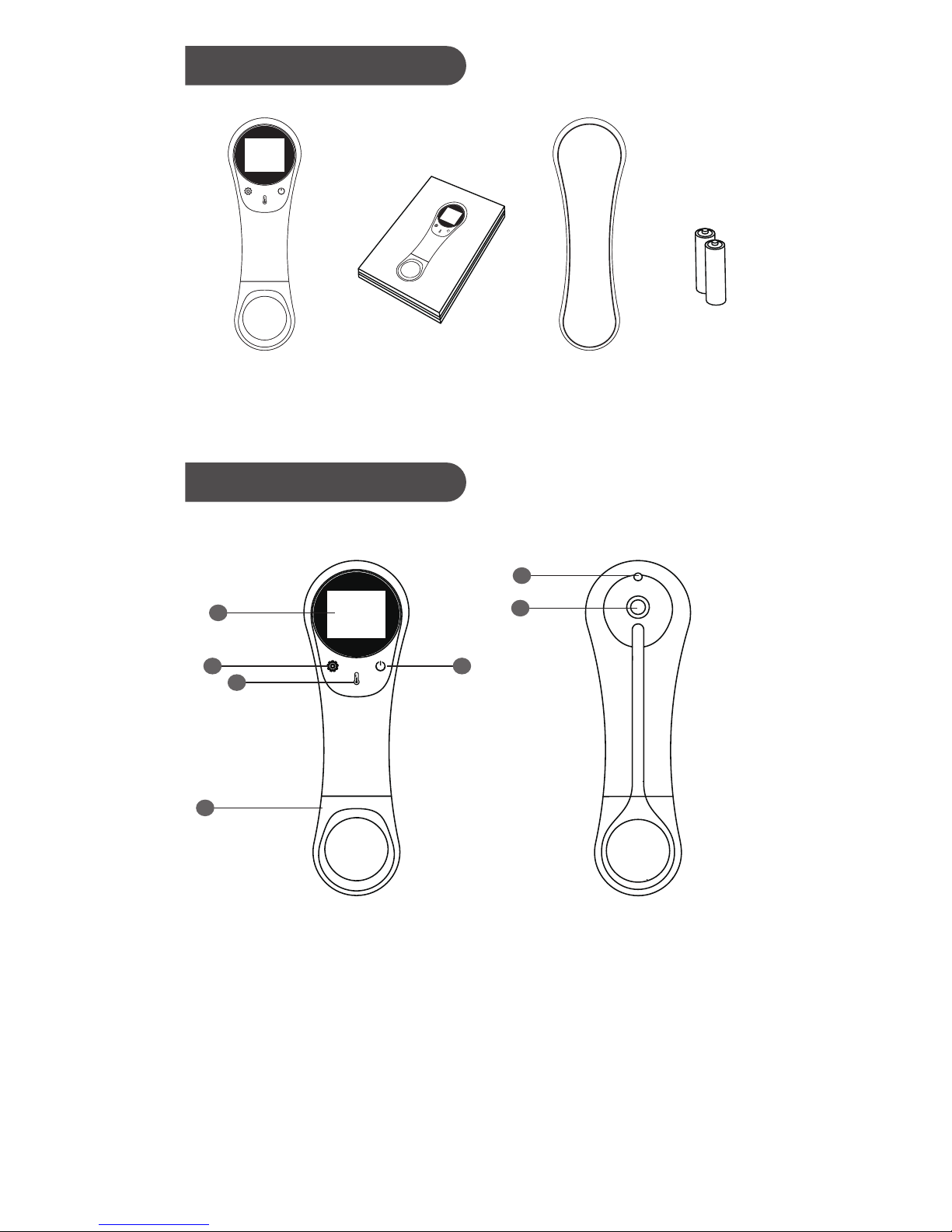
Package Content
Meter Overview
Thermometer
Silicone
Dust Cover
User Manual
1.5 V AAA
Alkaline
batteries x 2
1
2
4
3
5
6
7
Front view Back view
1. Display Screen
2. Setting Button
3. Power Button
4. Measure / Memory Button
5. Battery Cover
6. Light Indicator
7. Sensor Probe
07
Page 7
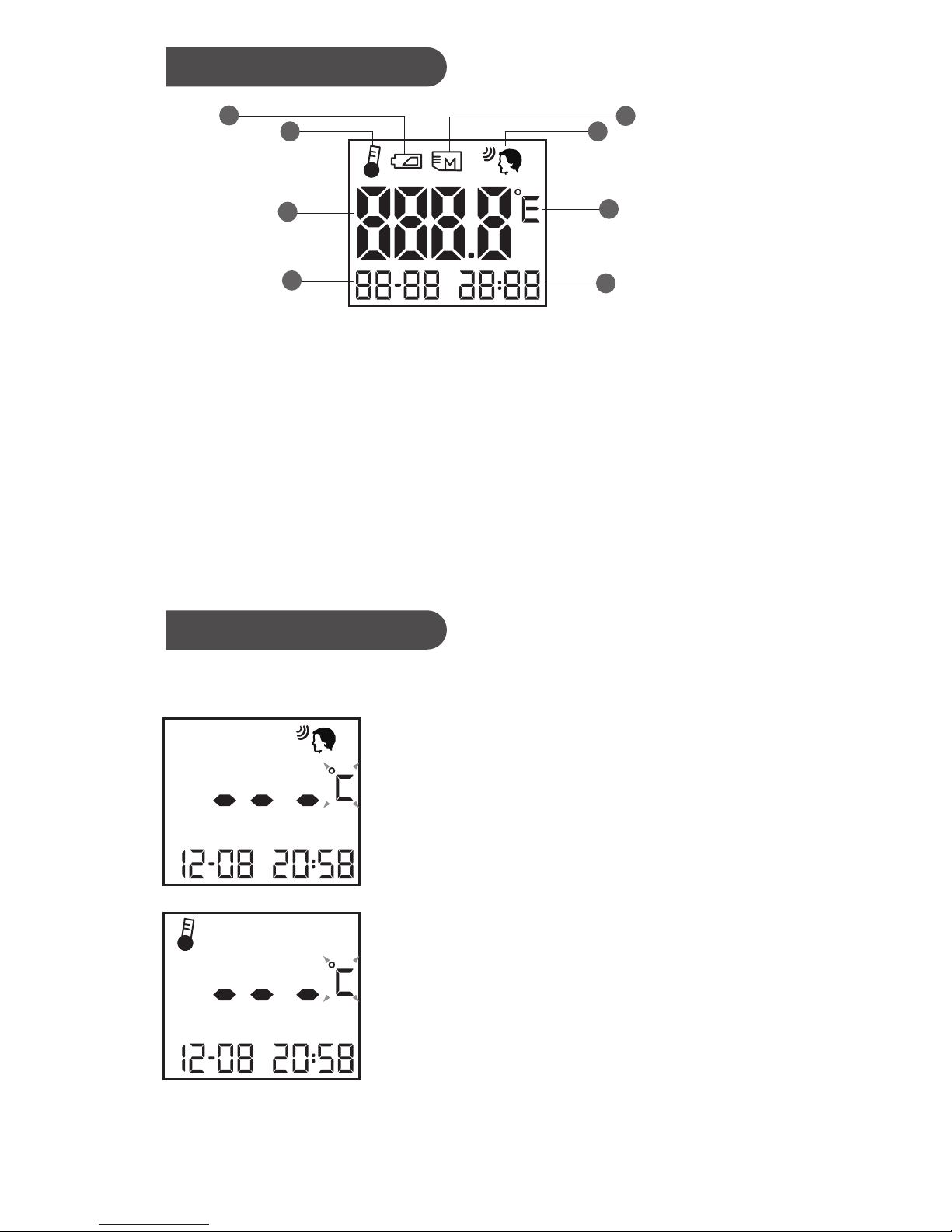
Press setting button once to switch between.
Display Mode
Display Mode
1. Low battery indicator
2. Object temperature indicator
3. Temperature reading
4. Date
5. Memory mode
6. Body temperature indicator
7. Temperature unit
8. Time
1. Body Mode
˙This mode is used to measure the
forehead temperature.
˙It also provides clock.
2. Object Mode
˙This mode is used to measure the
object temperature.
˙It also provides clock.
1
2
3
4
5
6
7
8
08
Page 8
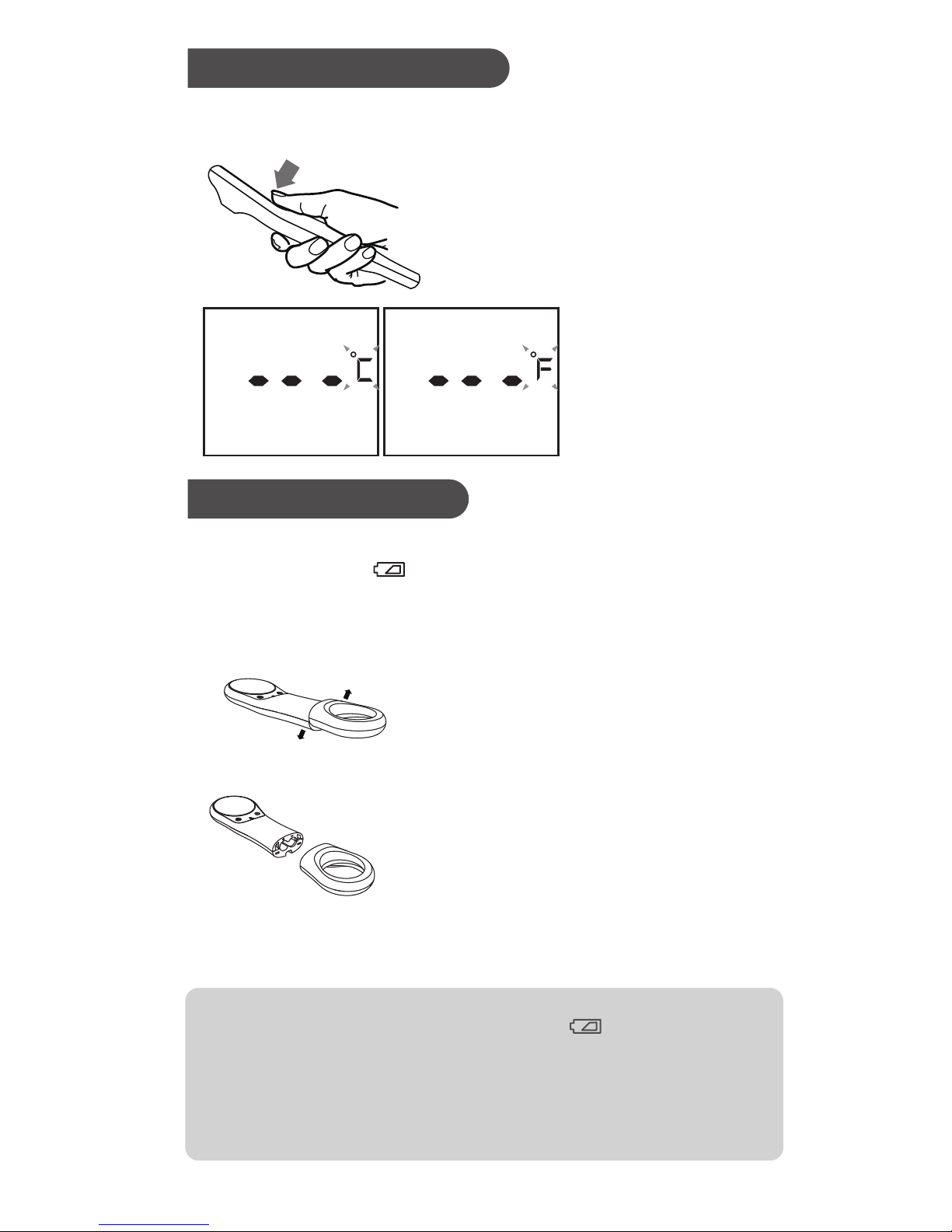
This meter provides two measurement units used for indicating
the body/object temperature, °C or °F, for your preferred selection.
Select the Temperature Unit
Replacing the Battery
The thermometer comes with two 1.5 V AAA alkaline batteries. The
meter will display " " to alert you when the meter power is
getting low. Please follow the steps below to replace new batteries
immediately.
NOTE:
1. Although the thermometer works when " " appears, we still
recommend that you change the batteries to obtain an accurate
result.
2. Remove the batteries if planned to store for a long period of time.
3. The batteries should be kept away out of child’s reach. If they are
swallowed, promptly see a doctor for help.
Press Measure /
Memory Button to
toggle between °C
or °F.
Press Setting Button
to exit.
2.
3.
Press Power button to turn ON
the meter. Press Setting Button
for 3 seconds to enter the screen.
1.
LCD side facing upwards.
Press the end link upwards and
remove it.
Remove old batteries and replace
with two 1.5 V AAA alkaline
batteries. Follow the correct
position of positive “+” and
negative “-“ as indication.
Insert and press the end link
downwards into the main unit.
1.
2.
3.
4.
09
Page 9
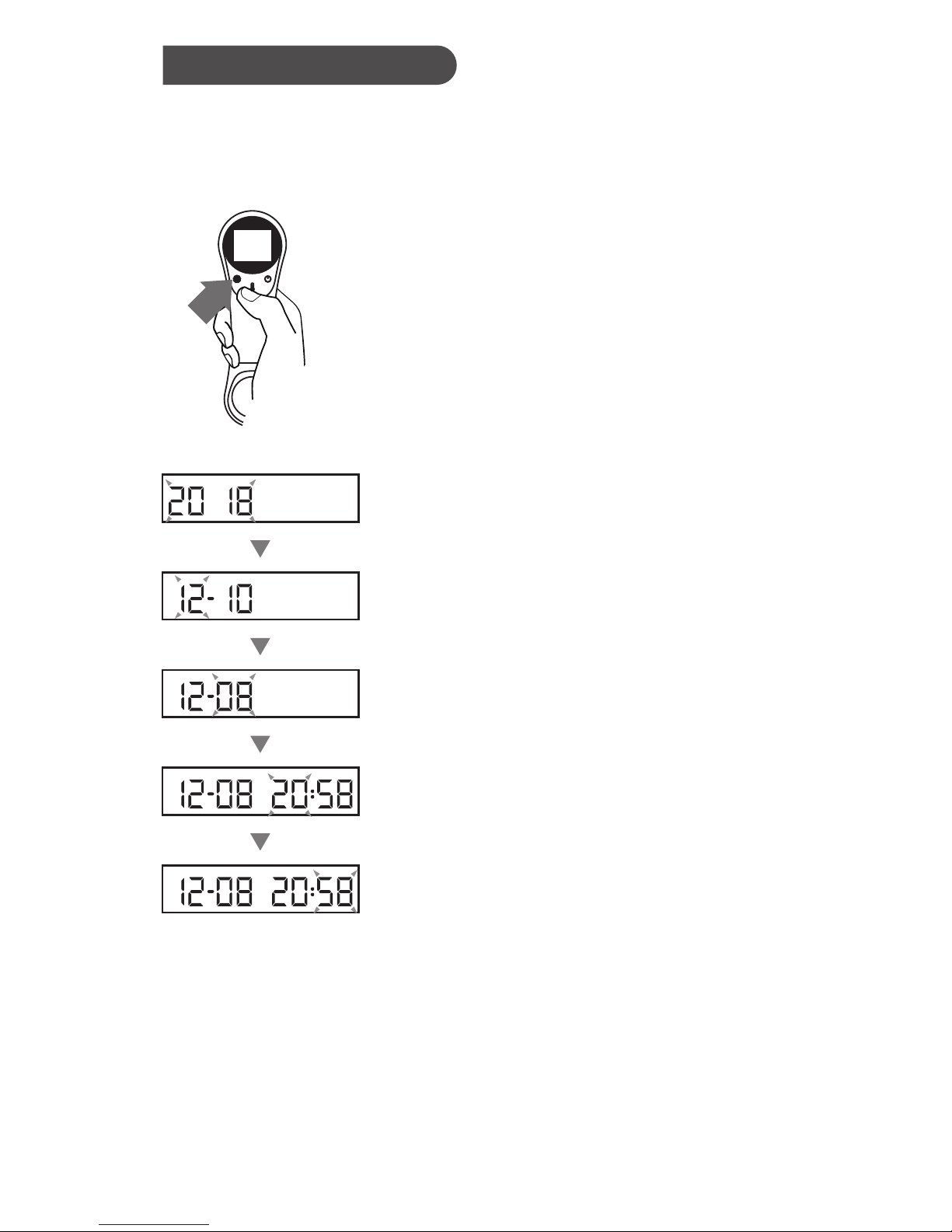
You will need to set time for rst-time use or after replacing the
batteries.
Setting is all completed. Press Setting Button to exit the setting
mode.
1. Entering the setting mode
Start with the meter ON, press Setting
Button for 5 seconds to enter the setting
mode.
2. To set the date and time
Press Measure / Memory Button to select
the correct year. Press Setting Button to
conrm and move to the next step. The
same step for month/day/hour/minute
settings.
Setting the Thermometer
10
Page 10

The temperature on the forehead and temple area diers from the
internal temperature, which is taken orally or rectally. Vasoconstriction, an eect which constricts the blood vessels and cools the
skin, can occur during the early stages of a fever. In this case, the
temperature measured by the NC100 Bluetooth Non-Contact
Infrared Thermometer may be unusually low. If the measurement
therefore does not match the patient’s own perception or is
unusually low, repeat the measurement every 15 minutes. As a
reference, you can also measure the internal body temperature
using a conventional oral or rectal thermometer.
Body temperature can vary from one individual/ person to next. It
also varies by location on the body and time of day. Below shows
the statistical normal ranges from dierent sites. Please keep in
mind that temperatures measured from dierent sites, even at the
same time, should not be directly compared. Fever indicates that
the body temperature is higher than normal. This symptom may be
caused by infection, overdressing or immunization. Some people
may not experience fever even when they are ill. These include, but
are not limited to, infants younger than 3 months old, persons with
compromised immune systems, persons taking antibiotics,
steroids or antipyretics (aspirin, ibuprofen, acetaminophen), or
persons with certain chronic illnesses. Please consult your
physician when you feel ill even if you do not have fever.
DETAILED INFORMATION
About Normal Body Temperature and Fever
Table* Body Site Normal Temperature Range
*1. Body Temperature at WebMD;
website: http://rstaid.webmd.com/body-temperature
retrieved at 2010 Jan 7.
Oral
0.6°C (1°F) or more above or below
37°C (98.6°F)
Rectal/ear
0.3°C to 0.6°C (0.5°F to 1°F) higher
than oral temperature
Axillary
(armpit)
0.3°C to 0.6°C (0.5°F to 1°F) lower
than oral temperature
1
11
Page 11
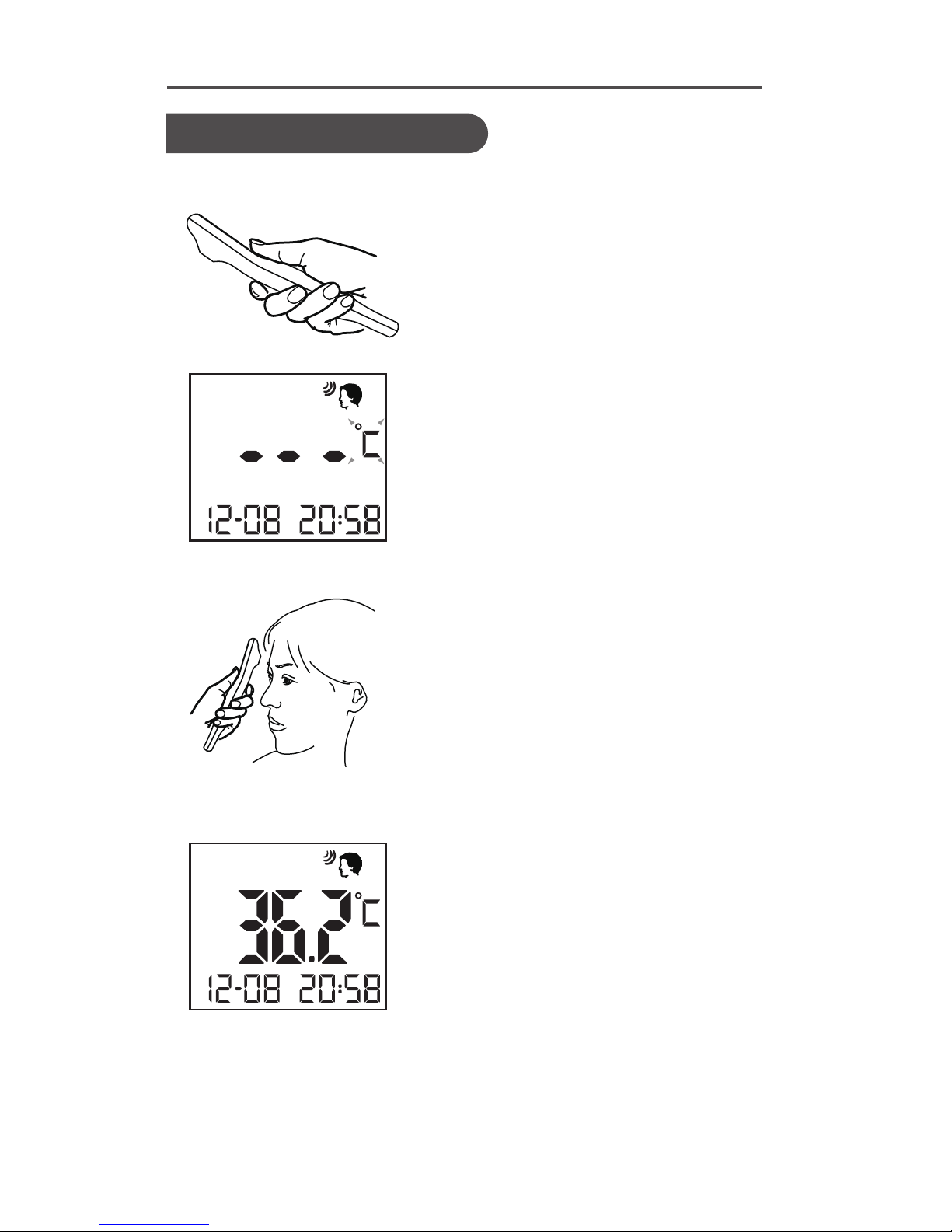
As a Body Temperature Thermometer
Using the Device
Press Power Button to turn on
the meter.
When °C or °F blinks, temperature
can be measured.
Press Setting Button to select
Body Mode.
If you started with Object Mode.
Move the probe close to the
forehead.
Make sure the probe is at , with 5 10 cm distance from the center of
forehead.
Press Measure/ Memory Button
to read the result.
The meter will take measurement
automatically.
The reading is shown together
with blue backlight and 1 long
beep.
Next Reading.
About 3 seconds afterwards (when
a short beep is heard), °C or °F blinks
again, and next temperature
measurement can be taken.
1.
2.
3.
4.
5.
PERFORM THE TEST
12
Page 12

NOTE:
˙As the forehead measurement temperature is likely to be aected
by sweat, oil and the surroundings, the reading shall be taken as a
reference only.
˙If the probe is placed at an angle close to the forehead measure-
ment, the reading will be aected by surrounding temperature.
Babies’ skin reacts very quickly to the ambient temperature.
Therefore, do not take their temperature with the NC100
thermometer during or after breastfeeding, because the skin
temperature may then be lower than the internal body
temperature.
˙If the reading is < 32°C (89.6°F), the display will show together with
red backlight and two short beeps.
˙If the reading is ≥ 37.8 °C (100°F) and < 43°C (109.4°F), the display
will show together with red backlight and four short beeps.
˙The thermometer will automatically turn o if left idle for 60
seconds.
13
Page 13
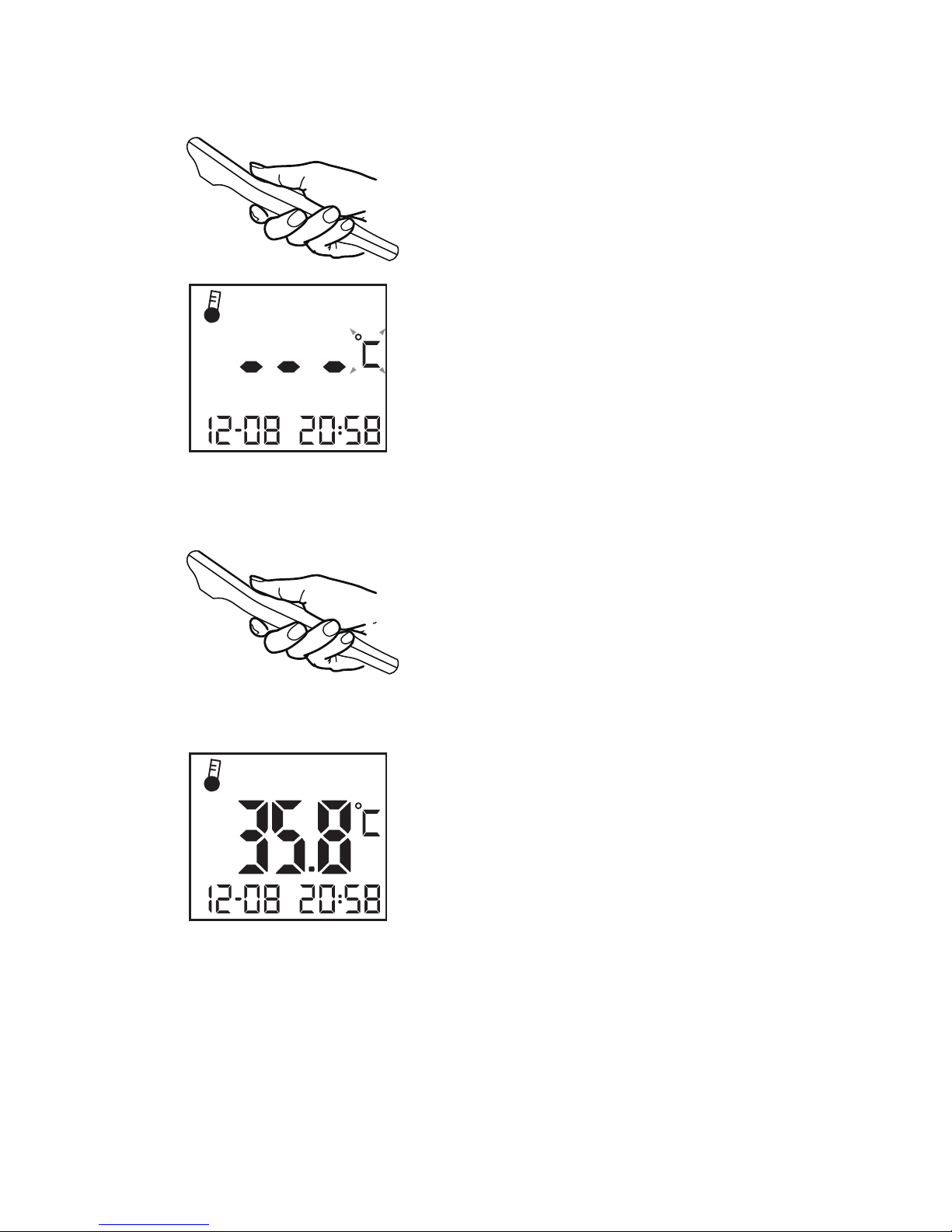
As an Object Measurement Thermometer
Press Power Button to turn on
the meter.
When °C or °F blinks, temperature
can be measured.
Press Setting Button to select
Object Mode.
If you started with Body Mode.
Move the probe close to the
object.
Make sure the probe is at , not at
an angle. with 5 - 10 cm distance
from the object.
Press Measure/ Memory Button
to read the result.
The meter will take measurement
automatically.
The reading is shown together
with blue backlight and 1 long
beep.
Next Reading.
About 3 seconds afterwards (when
a short beep is heard), °C or °F blinks
again, and next temperature
measurement can be taken.
1.
2.
3.
4.
5.
14
Page 14
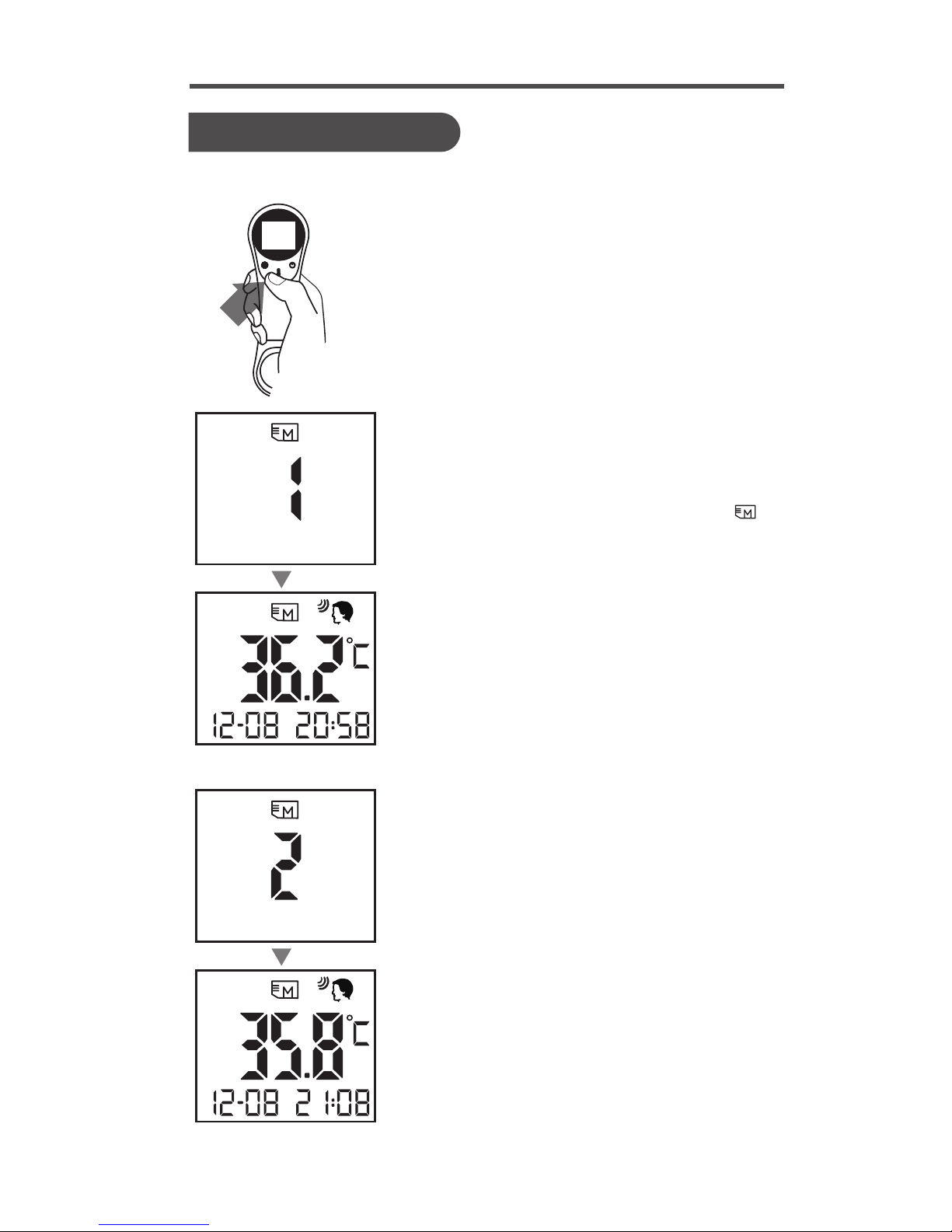
METER MEMORY
Recalling the Memory
Your thermometer stores 32 most recent forehead readings
1. Be sure the thermometer is OFF before
recalling this memory.
2. Press Measure / Memory Button to
enter the memory mode.
Each time you press the Measure /
Memory Button, a result will be
displayed in the order of dates (latest
result shown rst), together with ” ”
and number (from 1 to 32).
Backlight in blue or red will appear
according to the memory reading.
When the memory is full, the oldest
result is deleted as the new one added.
When the last record displays on the
screen, press Measure / Memory Button
again to return to the rst record.
Exit the memory.
Press Power Button to exit the memory
or keep the meter in idle for 60 seconds
to switch o automatically.
3.
15
Page 15

˙The probe is not waterproof. Please wipe with a clean and dry
cotton swab to clean the probe surface.
˙The body of the thermometer is not water-resistant. Never put
the thermometer under a running tap or submerge it into water.
Use a soft and dry cloth to clean it. Do not use abrasive cleaners.
˙Store the thermometer in a cool and dry location. Free from dust
and away from direct sunlight.
Care and Cleaning
MAINTENANCE
16
Page 16
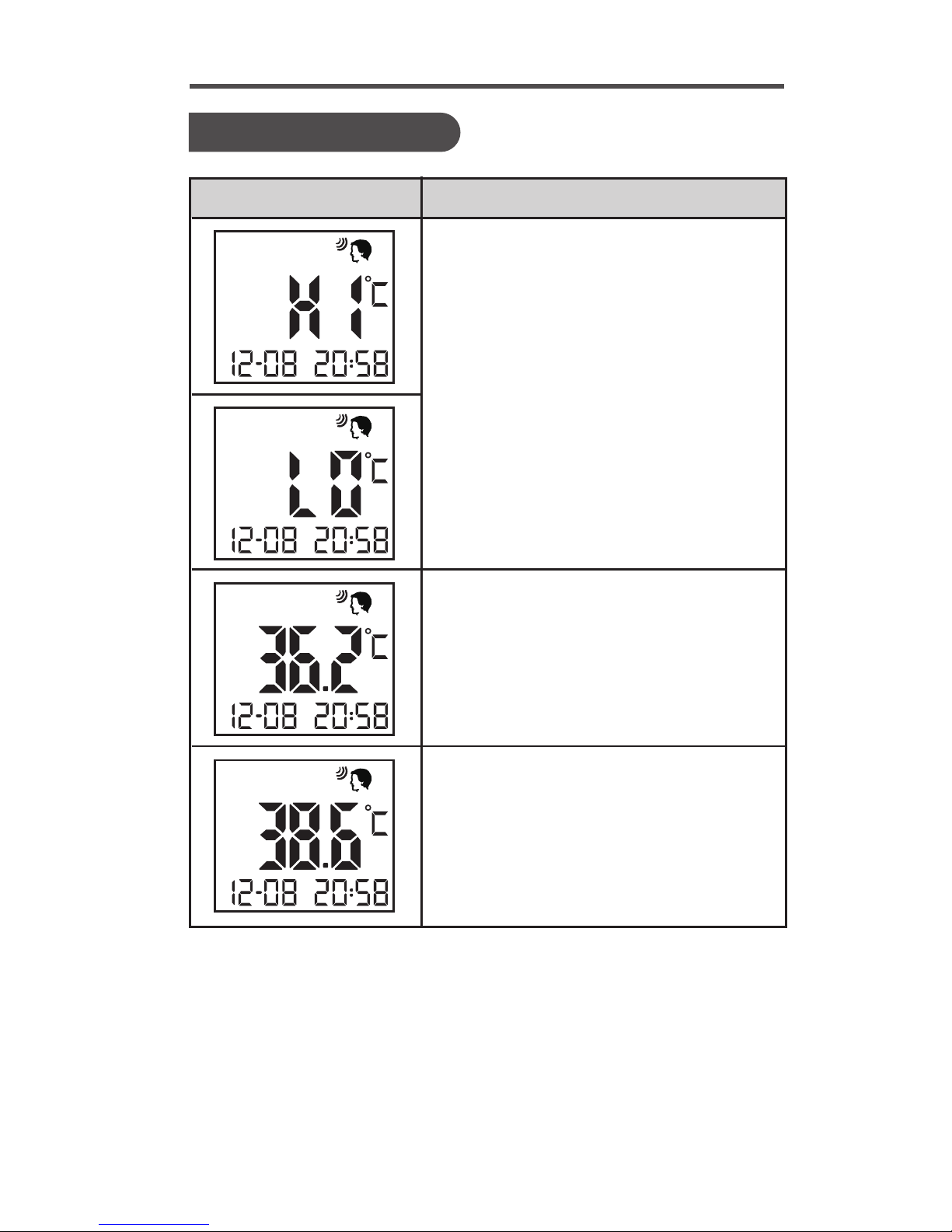
SYSTEM TROUBLESHOOTING
Measurement Result
Measured temperature falls outside
the displayed temperature range of
32°C to 43°C (89.6°F to 109.4°F), is
shown on the display with red
backlight.
˙Hi-temperature ≥ 43°C (109.4°F)
˙Lo-temperature < 32°C (89.6°F)
Measured temperature falls in normal
reading, within the range of 32°C to
37.8°C (89.6°F to 100°F), is shown on
the display with blue backlight.
Measured temperature falls in fever
reading, ≥ 37.8°C (100°F) and < 43°C
(109.4°F), is shown on the display with
red backlight.
MESSAGE WHAT IT MEANS
17
Page 17
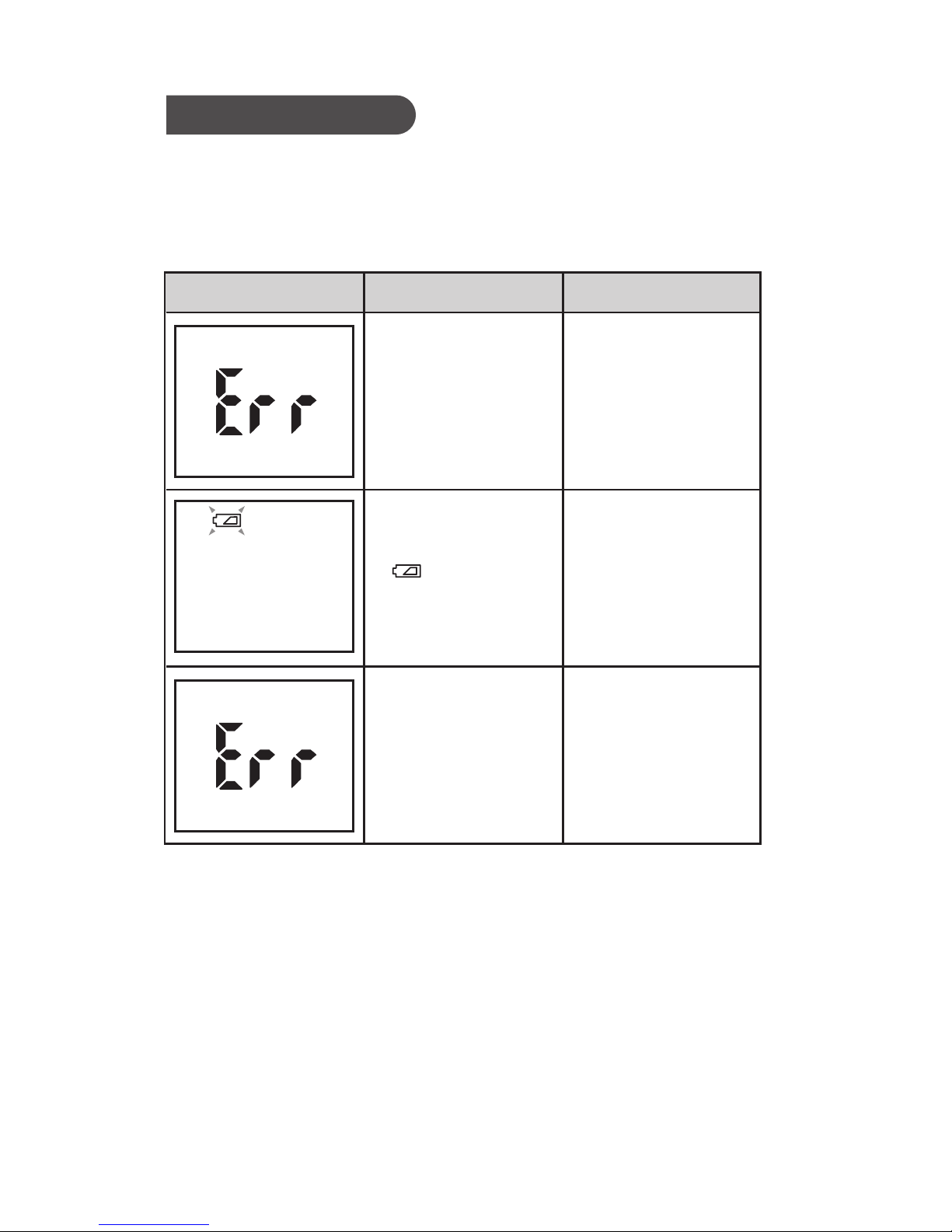
The table below shows problems you may encounter. All error
messages below would be shown together with backlight. Please
follow "WHAT TO DO" to resolve problems. If the problem still
exists, please call your local dealer for help.
Appear when
environmental
temperature is
below/above
system operation
range.
Put the
thermometer
under operating
temperature range
of 10°C to 40°C
(50°F to 104°F).
Please replace
batteries as soon as
possible.
Please contact the
customer service
line.
If the thermometer
is broken or
aected by EMF.
Troubleshooting
MESSAGE WHAT IT MEANS WHAT TO DO
Battery is low and
" " appears on
display.
18
Page 18
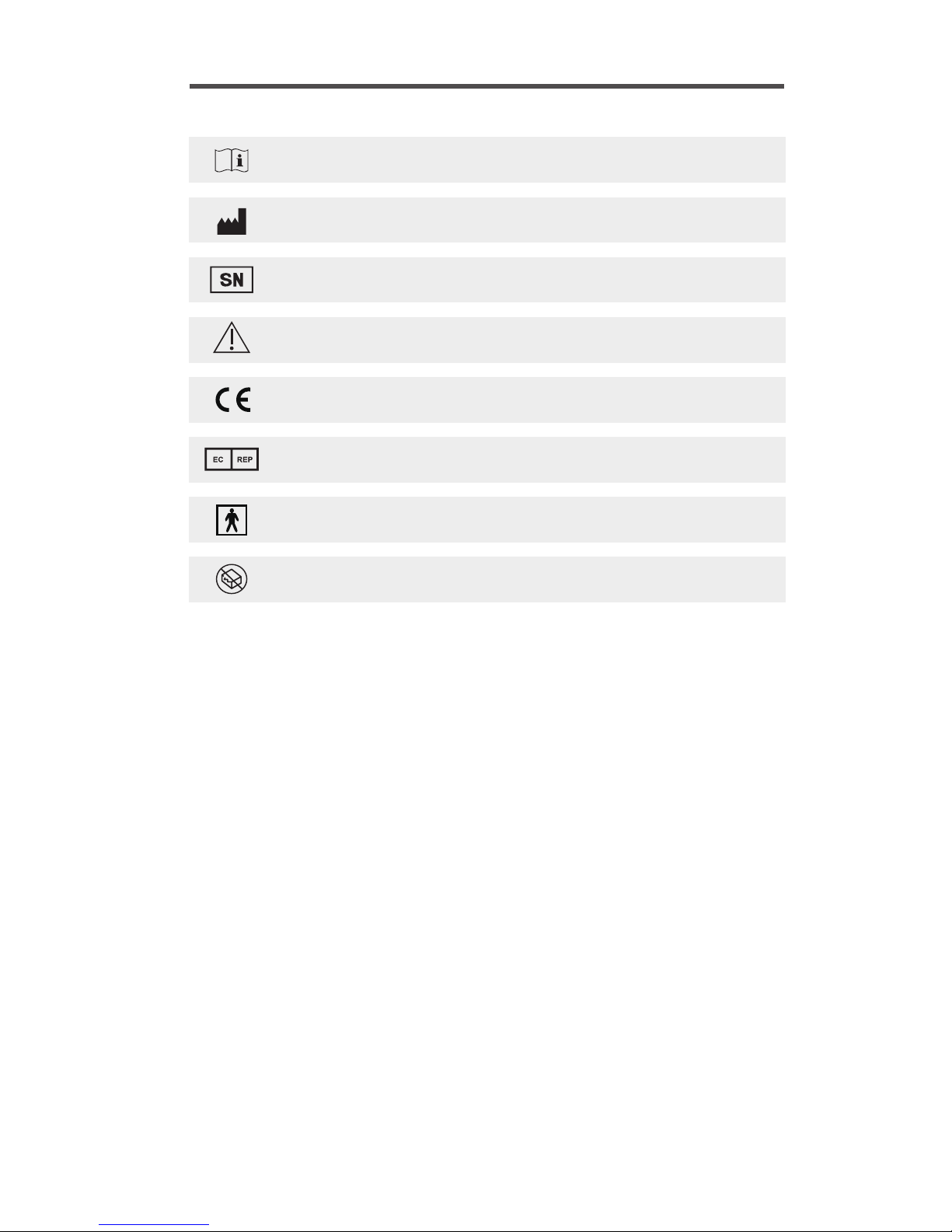
SYMBOL INFORMATION
Consult instructions for use
Manufacturer
Serial Number
Caution, consult accompanying documents
CE mark
Authorised Representative in the European Community
Type BF Equipment
Do not use if package is damaged
19
Page 19
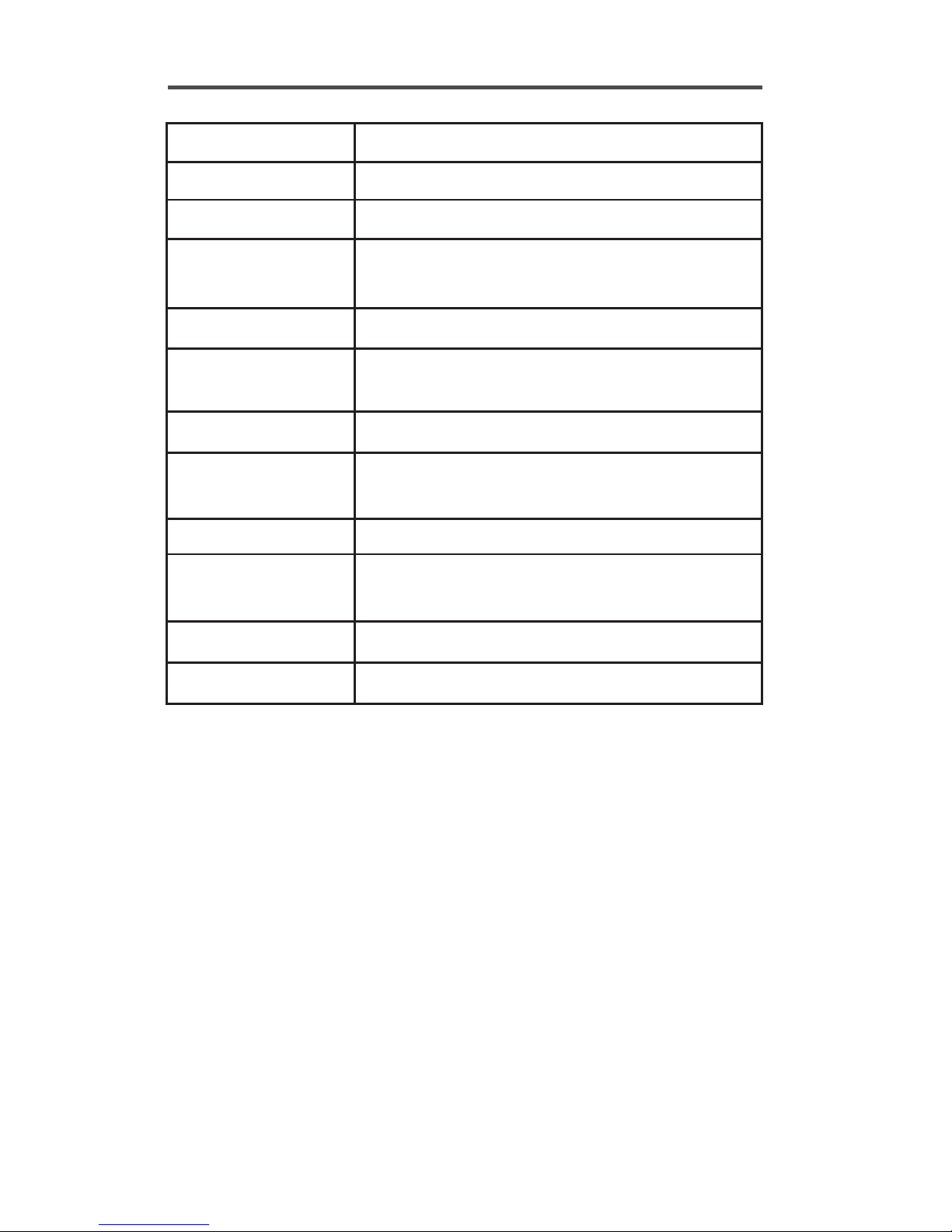
185.1mm(L) x 58mm(W) x 29.1mm(H)
93g (include 2 x1.5V AAA batteries)
2 x 1.5 V AAA alkaline batteries
Forehead: 32.0°C to 42.9°C(89.6°F to109.2°F)
Object: 0.0°C to 100.0°C(32.0°F to 212.0°F)
0.1°C/0.2°F
±0.2°C / 0.4 °F (32.0 ~ 42.9°C / 89.6~ 109.2 °F )
±1.0°C / 2.0 °F (0.0 ~ 100.0°C / 32.0 ~ 212.0 °F )
°C or °F
10°C to40°C(50.0°F to 104.0°F)
≦80% RH non-condensing
-25°Cto55°C(-13.0°F to 131.0°F)
≦95% RH non-condensing
32 measurements
SPECIFICATIONS
Dimensions
Weight
Battery
Measuring
temperature range
Display resolution
Accuracy
Temperature unit
Operating
temperature range
Operating humidity
Storage
temperature range
Storage humidity
Memory capacity
20
Page 20

1. This product needs special precautions regarding EMC and
needs to be installed and put into service according to the EMC
information provided, and this unit can be aected by portable
and mobile RF communications equipment.
2. Do not use a mobile phone or other devices that emit
electromagnetic elds, near the unit. This may result in incorrect
operation of the unit.
3. Caution: This unit has been thoroughly tested and inspected to
assure proper performance and operation!
4. Caution: this machine should not be used adjacent to or
stacked with other equipment and that if adjacent or stacked
use is necessary, this machine should be observed to verify
normal operation in the conguration in which it will be used.
The NC100 use RF energy
only for its internal
function. Therefore, its RF
emissions are very low and
are not likely to cause any
interference in nearby
electronic equipment.
The NC100 is suitable for
use in all establishments,
including domestic
establishments and those
directly connected to the
public low-voltage power
supply network that
supplies buildings used for
domestic purposes.
STATEMENTS AND DECLARATIONS:
Guidance and manufacture’s
declaration – electromagnetic emission
Emission test Compliance
Electromagnetic
environment – guidance
The NC100 is intended for use in the electromagnetic
environment specied below. The customer of the user of the
NC100 should assure that it is used in such an environment.
RF emissions
CISPR 11
Group 1
Group B
RF emission
CISPR 11
21
Page 21

Floors should be wood,
concrete or ceramic
tile. If oors are
covered with synthetic
material, the relative
humidity should be at
least 30%.
Guidance and manufacture’s
declaration – electromagnetic immunity
Immunity test
IEC 60601
test level
Compliance
level
Electromagnetic
environment - guidance
The NC100 is intended for use in the electromagnetic
environment specied below. The customer or the user of
NC100 should assure that it is used in such an environment.
NOTE UT is the a.c. mains voltage prior to application of the
test level.
Electrostatic
discharge (ESD)
IEC 61000-4-2
±6 kV contact
±8 kV air
±6 kV contact
±8 kV air
Power frequency
magnetic elds should
be at levels
characteristic of a
typical location in a
typical commercial or
hospital environment.
Power
frequency
(50Hz/60Hz)
magnetic
eld
IEC 61000-4-8
3 A/m 3 A/m
22
Page 22

DISPOSAL
Adhere to the applicable regulations when
disposing of the device.
This product must not be disposed of
together with domestic waste.
All users are obliged to hand in all electrical or electronic devices,
regardless of whether or not they contain toxic substances, at a
municipal or commercial collection point so that they can be
disposed of in an environmentally acceptable manner.
Please remove the batteries before disposing of the device/unit.
Do not dispose of old batteries with your household waste, but at
a battery collection station at a recycling site or in a shop.
23
Page 23

The statements should be displayed in the user manual:
changes or modifications not expressly approved by the party responsible
for compliance could void the user’s authority to operate the equipment.
This equipment has been tested and found to comply with the limits for a
Class B digital device, pursuant to Part 15 of the FCC Rules. These limits
are designed to provide reasonable protection against harmful
interference in a residential installation. This equipment generates, uses
and can radiate radio frequency energy and, if not installed and used in
accordance with the instructions, may cause harmful interference to radio
communications. However, there is no guarantee that interference will not
occur in a particular installation.
If this equipment does cause harmful interference to radio or television
reception, which can be determined by turning the equipment off and on,
the user is encouraged to try to correct the interference by one or more of
the following measures:
-- Reorient or relocate the receiving antenna.
-- Increase the separation between the equipment and receiver.
-- Connect the equipment into an outlet on a circuit different from that to
which the receiver is connected.
-- Consult the dealer or an experienced radio/TV technician for help.
The statements should be displayed in the user manual:
changes or modifications not expressly approved by the party responsible
for compliance could void the user’s authority to operate the equipment.
This equipment has been tested and found to comply with the limits for a
Class B digital device, pursuant to Part 15 of the FCC Rules. These limits
are designed to provide reasonable protection against harmful
interference in a residential installation. This equipment generates, uses
and can radiate radio frequency energy and, if not installed and used in
accordance with the instructions, may cause harmful interference to radio
communications. However, there is no guarantee that interference will not
occur in a particular installation.
24
Page 24

˙
˙
˙
WARRANTY
Tyson Bioresearch, Inc. oers a 2 years guarantee on this
product excluding batteries. Our company shall repair or
replace any Tyson Bio Bluetooth Non-Contact Infrared
Thermometer found defective with a new one.
This warranty does not apply to the performance of a Tyson Bio
Bluetooth Non-Contact Infrared Thermometer that has been
accidentally damaged, altered, misused, tampered with or
abused in any way. In no event shall our company be liable to
the purchaser or any other person for any incidental,
consequential, or punitive damages arising from or in any way
connected with the purchase or operation of Tyson Bio
Bluetooth Non-Contact Infrared Thermometer.
For manufacturer warranty services, purchaser must contact
Tyson Bioresearch, Inc. for help.
25
Page 25
Customer Service
+886-37-585998 (8:30 ~ 17:30, Monday ~ Friday)
Medical Device Safety Service GmbH
Schigraben 41, D-30175 Hannover, Germany
Tyson Bioresearch, Inc.
5F., No. 16, 18, 20, 22, Kedong 3rd Rd.,
Zhunan Township, Miaoli County 35053, Taiwan
www.tysonbio.com
Copyright 2016 Tyson Bioresearch Inc. All rights reserved.
is either registered trademark or trademark of Tyson Bioresearch Inc.
All product images do not reflect actual sizes.
AF004-0044000N (01)
Rev. date: 10/2017
 Loading...