

Page 1
TWIG PROTECTOR Ex
Intrinsically Safe and Rugged Protection Device (ATEX)
Quick Guide
TWIG Protector Ex protection device is
designed to be your personal "guardian
angel" – intended for all areas of personal
and professional safety in potentionally
explosive areas.
Instructed by simple icons, the device is
especially suitable for loneworkers as well
as for applications or situations where
simplicity and robustness is a must
Manufacturer:
Twig Com Oy,
24101 SALO, Finl an d
web: www.twigworld.com
0700 / 0537
Publication number: YZ3304-04
All rights reserved.
© Twig Com Plc
Twig Com Oy declares that this mobile device, type TGP81EG, is in
compliance with the essent ial requirements and other re levant provisions
of Directive 1999/5/.
Information in this Quick Guide is subject to change without notice. TWIG
COM reserves the right to change or improve their products and to make
changes in the content without obligation to notify any person or
organization of such changes or improvements. TWIG COM is not
responsible for any loss of data, income or any consequential damage
whatsoever caused.
Some of the features described in this guide are optional and intended to
be purchased separately. For more information, please contact your
dealer.
For more information, details and descriptions, including device
configuration and assortment of chargers and accessories, visit the web
site: www.twigworld.com.
WHAT TO DO FIRST
DOWNLOAD PC CONFIGURATION SOFTWARE,
INSTRUCTIONS AND USB DRIVERS FROM
ftp://support.twigworld.com/public/
If possible turn off the PIN request from the SIM card. If not,
change the PIN code to 9999 or change the PIN code that is
programmed to Protector to same that is used in SIM card before
starting the phone. Changing the PIN code that unit automatically
uses, please refer to configurat ion gu ide and PC C onfigure
program.
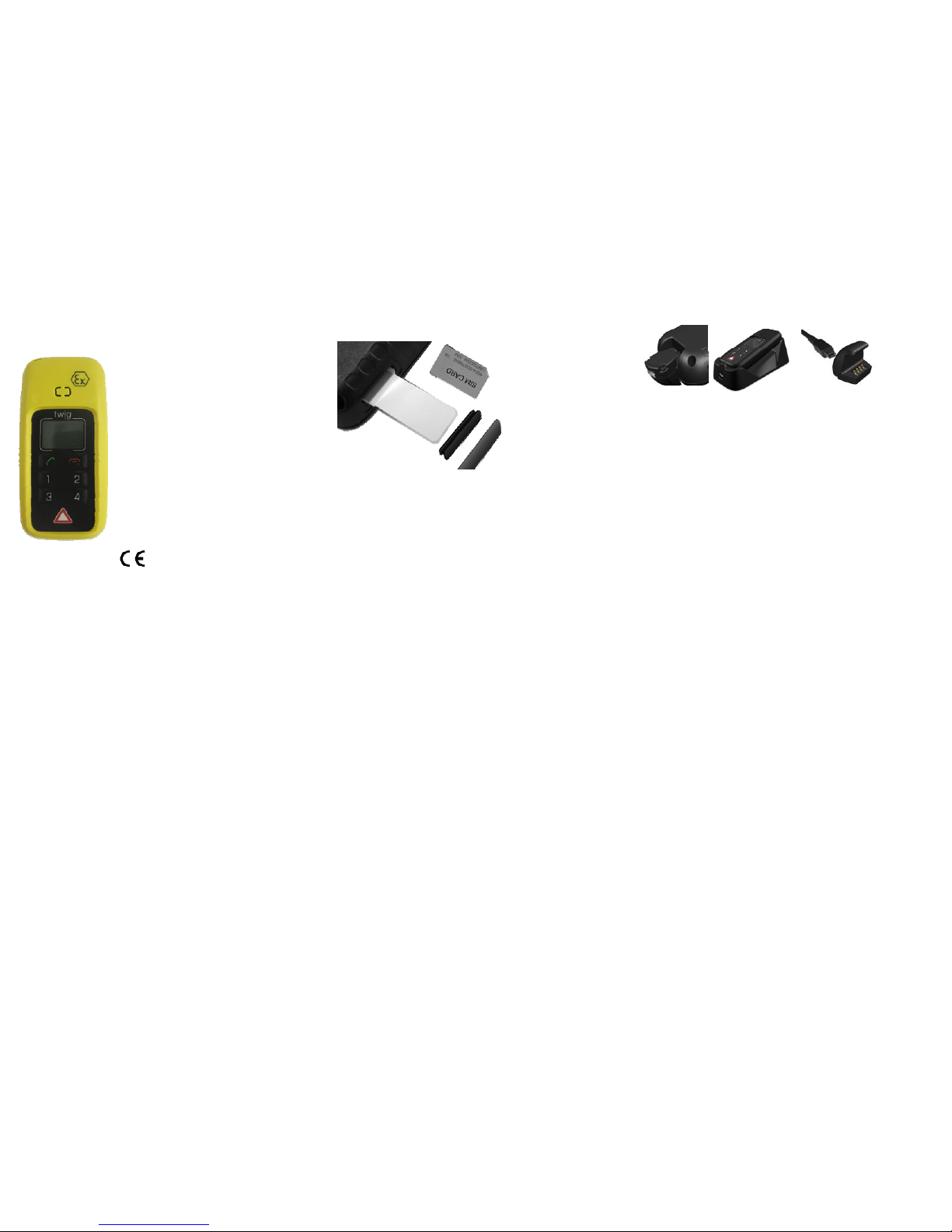
INSERTING THE SIM CARD
1. Slide the SIM card
to the holder from the
hole on the side of
the unit slightly tilting
the SIM card towards
the keyboard when
pushing it in.
Contacts in the SIM
are facing towards
keypad and the cut
corner of the card
outward. Use the
silver tape in the salesbox to assist if you need to remove it or
inserting to SIM holder is difficult. Do not use force as the SIM
will go to its place easily.
2. Push the SIM card all the way in with e.g. another SIM card
or some small stick. Remove the tape if you used that pulling
sideways, so that SIM doesn’t come out. Do not use sharp or
metal tools or objects!
3. Insert the rubber plug to the SIM holder hole.
4. Insert the seal tape carefully on top of the rubber plug.
C.f. ftp://support.twigworld.com/Public/Video_Instructions/
The device is dust and water proof. The protection
category for the device is IP67. To meet the requirements,
the rubber plug and the sealing tape must be inserted in
place correctly. If the seal or plus is damaged it must be
changed immediately to maintain tightness and warranty.
INITIALIZING THE DEVICE
When you start using the device for the first time, you should
charge the battery first. Please note that the battery will reach
its full capacity only after two or three charging times.
POWER SUPPLY
Device is equipped with system, that protects the unit for being
overloaded or malfunctioning causing danger to user. In rare
case where the device battery is overloaded. e.g heavy GPRS
transmission, the protection system turns the device off. Device
can be turned on again by connecting to cha rger. T his must not
be done inside Ex area. This is normal behaviour. It is
suggested not to use GPRS to telematics to minimise the
possible automatic turning off.
•Mains charger with the charger adapter or charging cradle
•Standard Li-Ion battery integrated to the unit is 1300mAh Li-po
battery. The battery type and capacity may vary depending on
the market area and model of the un it in the s ales package.
MAINS CHARGER
The mains charger should only be used indoors. Make su re that the
voltage in the country which you are staying corresponds to the
voltage marked on the charger. When charging, connect the mini USB
connector to mini USB connector in charging adapter or the charging
cradle. Twist the Charging adapter to the bottom of the phone from
keyboardside down, all the way until it clicks on its place on back
cover.
If placing to charging adapter, place first the bottom towards the
charging pins in the cradle and the let the top of the unit lie down.
MAINS CHARGER
The mains charger should only be used indoors. Make su re that the
voltage in the country which you are staying corresponds to the
voltage marked on the charger. When charging, connect the mini USB
connector to mini USB connector in charging adapter or the charging
cradle. Twist the Charging adapter to the bottom of the phone from
keyboardside down, all the way until it clicks on its place on back
cover. Charge minimum 3 hou r s aft er us e.
If placing to charging adapter, place first the bottom towards the
charging pins in the cradle and the let the top of the unit lie down.
CHARGING
The device controls the charging status, the battery temperature and
power supply during the charging operation. The ideal temperature
range for charging is +10°...+30°C. If charging the battery above or
below these temperatures the life of a battery may be shortened. Also,
the battery may not reach ful l capacity. B attery cha rging with supplied
mains charger is not allowed be l ow +0°C or above +40°C
When charging the Li-po batteries with the USB charger, about 70% of
the battery capacity will be charged quickly, but chargi ng the remaining
30% takes relatively more time. Also note that humidity, temperature,
age of the battery and currently used features (e.g. the GPS) affect the
time spent on charging.
Standard CE-approved USB car charger ( 5VDC, 500mA ) may be
used for charging.
BATTERY CARE, MAINTENANCE AND DISPOSAL
The continuous operating time is less when using an old battery than a
new battery. When storing unit for a long time, it should be kept cool
and with fully charged battery in a dry place. Li-po batteries do not
contain heavy metals which can damage the environment. Li-po
batteries should be disposed of according to the country-specific
regulations.
Page 2
ENVIRONMENTAL EFFECTS IN USAGE
SIGHT
The device must have an unobstructed view to satellites at any time. In
marginal conditions (e.g. when staying in surroundings with heavy tree
cover or in a shadow area in between base stations) GPS positioning
may not work properly.
The device can be used like a standard GSM phone with the limited
feature set. In some cases, the device can be built in clothes or special
vests. If the device is mounted somehow, it must be attached to the
surface so that the back of the device is facing up and the top of the
phone upwards. To ensure proper functioning of the GPS and GSM,
the unit can be covered with thin low loss materi a l suc h as p l ast ic, fibe r
glass or clothes, but not with metal.
TEMPERATURE RANGES
•Usage: -20°C to +40°C, at temperatures below -20°C, or above
+55°C, the battery will not supply power and the device will shut down
to prevent damage. Upon warming up/cooling down, the device will
function properly again
•Charging: Battery must not be charged below °0. Like wise, charging
above +50 °C is prevented.
.
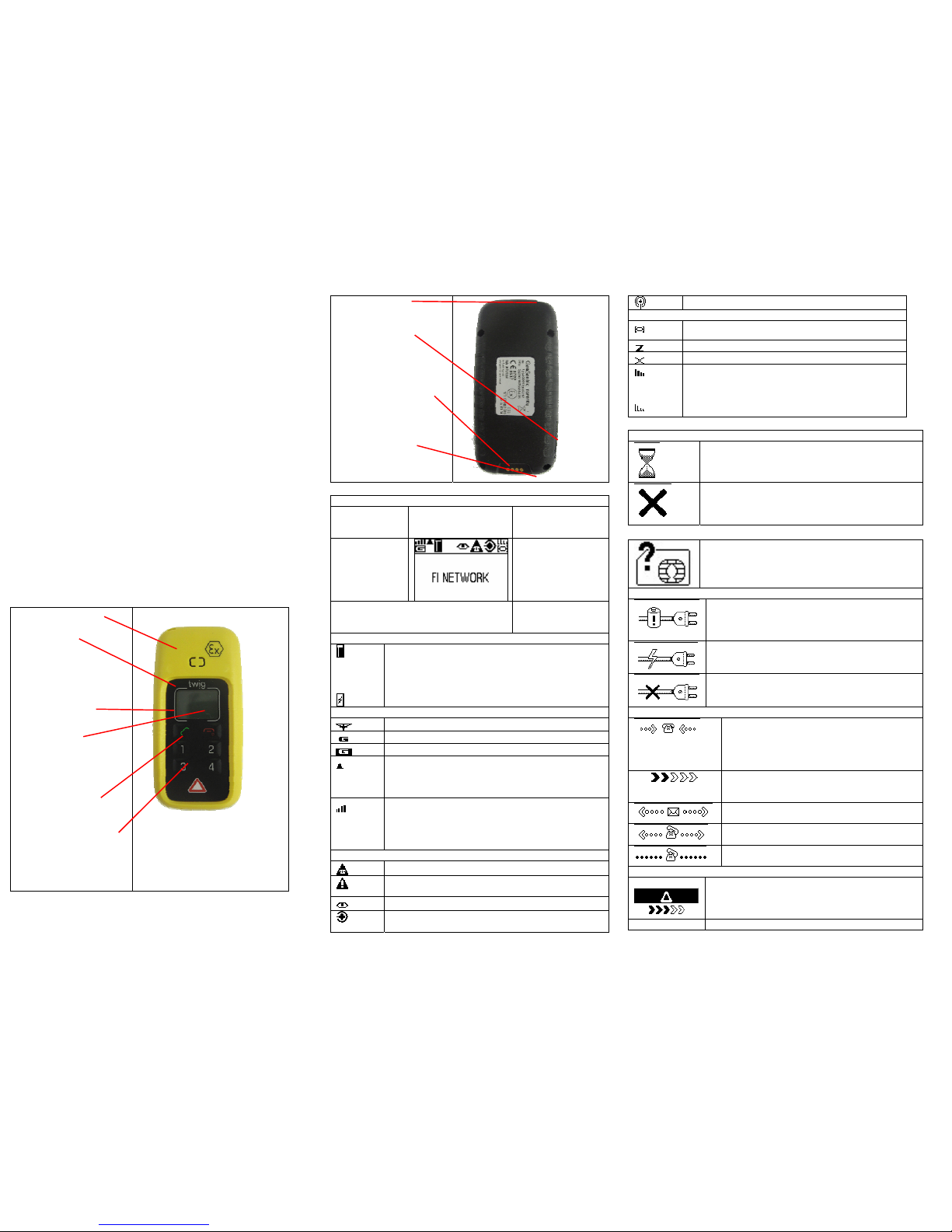
USER INTERFACE
LOUDSPEAKER
DISPLAY
•GSM status
•GPS status
•Battery status
KEYS
SEND KEY
•For answering calls
END KEY
•For rejecting/ending
calls
•For cancelling some
operations
•Power on/off
NUMBER KEYS
•For making information
call/ sending position
TWIG SOS BUTTON
For making emergency
calls/sending emergency
reports
STRAP HOLE
SIM HOLDER
SYSTEM CONNECTOR
For connecting
charger or data cable
to the device.
MICROPHONE
DISPLAY INDICATORS
DEVICE IN STAND-BY MODE
BATTERY
INDICATOR
TELEMATICS
FEATURES
INDICATORS
GSM
NETWORK
INDICATORS
GPS POSITIONING
INDICATORS
NETWORK
OPERATOR/ SERVICE
PROVIDER IDENTIFIER
BATTERY STATUS
The water level indicates charge left in the battery.
The higher the level, the more charge is left. Shown
only when unit is turned ON and disconnected from
charger.
During charging, the battery icon is changed to
indicate this event.
GSM / GPRS NETWORK STATUS
GSM is on
GPRS is used for telematics
GPRS is active for telematics
.GSM is roaming. Phone is using other than home
network. Call and position transmissions are charged
according to roaming agreements. Position
transmissions may have been blocked automatically.
Bars on top of the network stat us icon indicate the
strength of the GSM network. The more bars and the
taller the bars, the better the GSM network.
- Four bars - high network strength
- No bars - no network
GENERAL STAUS ICONS
TWIG SOS is active.
TWIG SOS in is post emergency mode. Position
requests are possible from emergency numbers
Tracking is active to one or more detinations
Man Down Alert is active. Automated emergency
cycles are possible
Wireless Alert ( wrist alert) connection availa ble
GPS POSITIONING STATUS
GPS is active
GPS is sleeping
GPS is not available
Bars on top of the network st atus icon indicate the
accuracy of the last GPS position. The more bars
and the taller the bars, the better the accuracy. If the
position is older than 1 – minute the signal bars are
shown as wireframes
DISPLAY / TONE NOTIFICATIONS
GENERAL NOTIFICATIONS
Processing. An operation is in progress, please wait.
General failure. Shown when an operation fails. E.g.
if you try to make a call when there is no number
pre-configured in the device. Simultaneously, the
Failure tone is played.
SIM failure. Shown when there is no SIM card
inserted in the device, or if the PIN code was
rejected. Simultaneously, the
Failure tone is played.
CHARGING NOTIFICATIONS
Battery low. Shown when there is a need to
recharge the battery (or replace it with another
recharged battery). Simultaneously, the
Battery low
tone is played.
The device is connected to a charger. Settings
during battery loading take place. Simultaneously,
the
Charging tone is played.
The device is disconnected from a charger.
Settings during battery loading are ended, the
device returns to normal operation.
NOTIFICATIONS REFERRING CALLS OR MESSA GE S
Normal incoming call. If available, the name
associated with the calling number/the phone
number itself is shown on the bottom. Shown
until the call is answered (to answer, press
SEND KEY).
Initiating information call or position report.
Press the corresponding number key and hold
it down while this notification is shown.
Sending a position report. Simultaneously, the
Message sending tone is played.
Making an information call. Shown until the call
is answered.
A call is in progress. Shown while the call is
connected.
START EMERGENCY CYCLE NOTIFICATIONS (DISPLAYS ON)
Starting emergency cycle (a long press):
Emergency tone settings are switched on. Press
the TWIG SOS button and hold it down until the
wedges are all turned black.
Starting emergency cycle (two quick presses):
Page 3
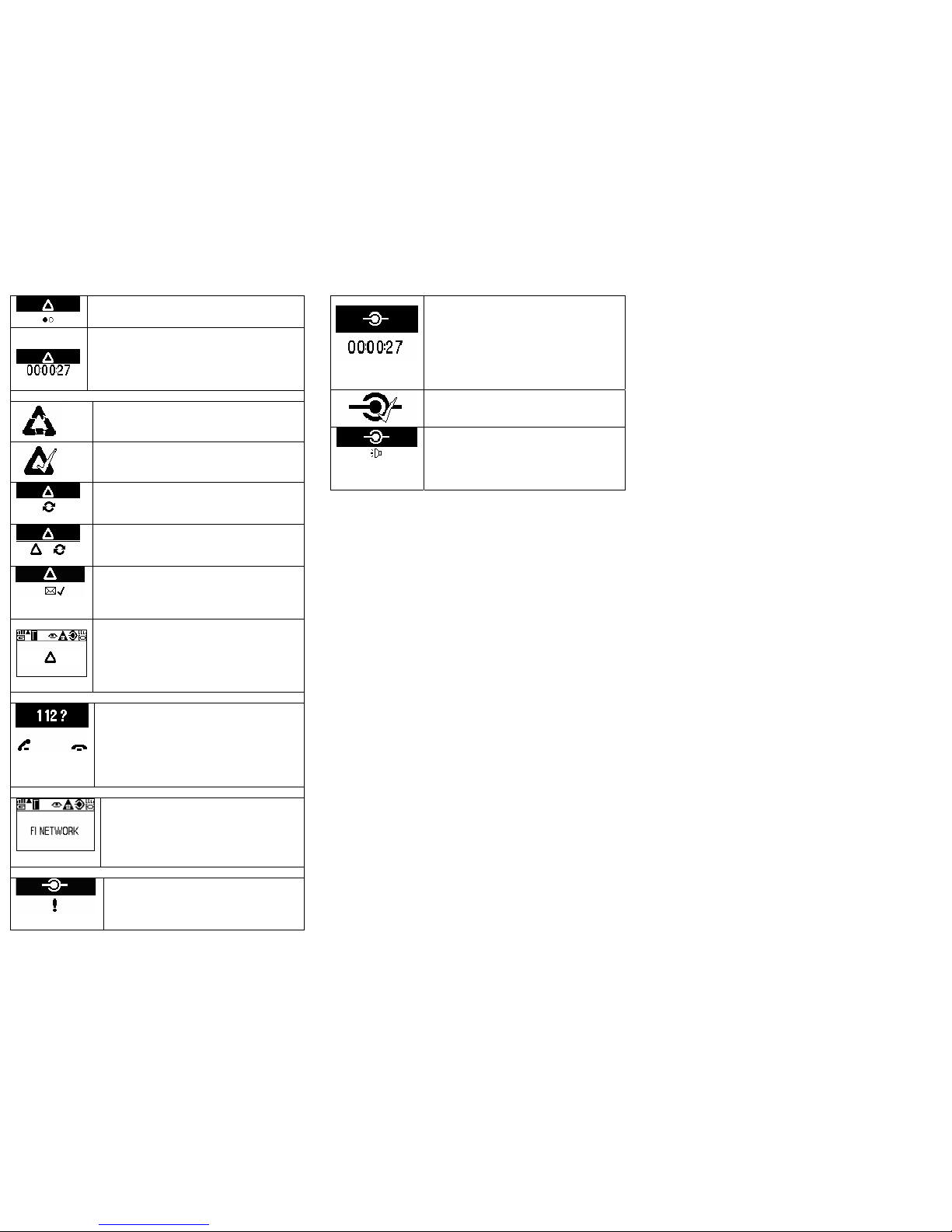
Press the TWIG SOS button briefly. Emergency
tone settings are switched on. Press the button
again when the second circle starts blinking.
Emergency cycle cancellation period. A countdown
timer is shown on the bottom. The timer counts the
cancellation time left (in seconds). Simultaneously,
the
Cancellation tone is played. To cancel the
emergency cycle, do it while this notification is
shown (by pressing the END KEY).
OTHER EMERGENCY CYCLE NOTIFICATI ONS ( DI SPL A YS ON)
Emergency cancellation. Shown right after the
emergency cycle was cancelled.
Emergency completion. Shown when the
emergency cycle ends normally, or when the
emergency mode is ended manually.
Emergency call retry. Emergency numbers can
be voice call numbers. The notification is shown
when the device makes another call attempt to a
number.
Emergency mode/Working. The device is through
with emergency calls, but sending messages,
message confirmation or position refresh is still
going on.
Emergency confirmation message received. After
receiving confirmation, the device will end
resending of an emergency message.
Simultaneously, the
Message reception tone is
played.
"Post-emergency mode". The GSM operator´s
name is replaced by the emergency symbol.
While this notification is shown, the device can be
tracked by emergency numbers, also emergency
tone and display settings are kept on. This mode
can be terminated manually, by pressing the
c
key.
NETWORK EMERGENCY CALL ( 112, 911, 000, 999, 08 etc)
Network emergency call query. Shown when the
TWIG SOS button is pressed but making
emergency cycle is NOT possible (e.g. SIM card
is missing or no roaming network available). You
may still try to make network emergency call by
pressing END KEY. You can also exit the query
without making an emergency call by pressing
END KEY
DISCREET EMERGEN CY CYCLE (DISPLAY NOTIFICATIONS OFF)
During the discreet emergency cycle, the device
looks like it is in stand-by mode. The only indicator
of the ongoing emergency cycle is the Emergency
cycle indicator appearing to idon area. When the
icon disappears or changes cycle is over or moved
to post emergency mode. Also tones can be
turned off.
NOTIFICATIONS REFERRING S ENSOR ALERTS
Pre-alarm for sensor alert is NOT set. Shown
when "the cancel timer" is not configured, and
Emergency cycle starts right away. To mute
the audible alert tone , press the lowmost si de
key
Pre-alarm for sensor alert is set. The
countdown timer shows that you still have 27
seconds time left to cancel the sensor alert if
you so desire.
To cancel the emergency cycle, lift the device
to vertical position. Do it while this notification
is shown. To let the emergency cycle take
place: Do nothing. To mute the audible alert
tone, press the number 1 key
Alert state ended. Shown right after the
emergency cycle is finished, or the sensor alert
is cancelled.
Post-alarm state. Shown when the emergency
cycle is completed, and the device makes
audible alarms at regular intervals. You can
receive phone calls and answer them by
pressing
l. In order to stop the post-alarm tone,
the device must be lift up to vertical position.
BASIC KEY FUNCTIONS
TURNING THE DEVICE ON
1. Press END KEY and hold it down for a few seconds.
2. The logo is shown.
TURNING THE DEVICE OFF
1. Press th e E ND KEY and hold it down for a few seconds.
2. The logo is shown and the Power down tone is heard.
ADJUSTING VOLUME DURING A CALL
Press the 1 and 2 keys during call. ! to lower and 2 to rise
volume .
ANSWERING INCOMING CALLS
Press the SEND KEY key when the device alert s.
NOTE: The device may be configured to answer some/all
incoming
calls automatically. It may even be, that all incoming calls are
bloked and you can not receive calls.
DROPPING/ENDING/CANCELLI NG A CALL
Press the END KEY briefly.
MAKING AN INFORMATION CALL
Press the corresponding number key and hold it down for a few
seconds. The device will call to conf i gu r ed n umber.
SENDING POSITION REPORT
1. Press the corresponding number key and hold it down for a
few seconds.
2. After sending the position report, the device may receive an
incoming information call - de pending on service.
3. When the device starts alerting, answer the call by pressing
the SEND KEY.
NOTE: The device may also be configured to answer the call
automatically.
MAKING EMERGENCY CALLS AND SENDING
EMERGENCY MESSAGES (EMERGENCY CYCLE)
Press the TWIG SOS button according to configuration (a long press/
two quick presses). The device will make emergency calls and send
emergency reports (emergency messages including position
information) accordin g t o co nf i gu r ation.
CANCELLING EMERGENCY CYCLE
During cancellation period you may hear the cancellatio n tone and see
timer showing time left for cancellation.
•To cancel the entire emergency cycle, press the END KEY briefly
during the cancellation period.
•When the emergency cycle has already started you may, depending
on configuration still cancel the rest of the calls and messages: Press
the END KEY and hold it down for severa l seconds. After succesful
cancellation the device will return to normal operation and switch back
to normal tone and displ ay settings.
ENDING EMERGENCY MODE MANUALLY
The emergency mode must be terminated manually. This means, the
emergency tone settings are kept on and the emergency numbers are
permitted to track the device without further notice.
Emergency tones and tracking option are switched on from the
moment you start the emergency cycle (by pressing the TWIG SOS
button) until you end the emergency mode (by pressing the
END KEY
briefly). Another alarm cycle is not possible before is is ended.
SOME CIRCUMSTANCES MAY AFFECT ON EMERGENCY
CYCLE AND MODE
•Being in a shadow area of the GS M n etwork at the time of the event.
•Poor GPS coverage during emergency cycle may cause the
emergency cycle completion to slow down.
•Busy telephone lines when connecting (voice) calls.
•Message transmission errors caused by the carrier of an SMS/GPRS,
i.e. the network operator.
SENSOR ALERTS
To cancel sensor alert and prevent emergency cycle from starting,
change the phone to allowed position ( horizontal or vertical) or move it
gently if it is configured to detect only movement. Do it while the
countdown timer is still shown.
To let the emergency cycle take place: Do nothing. To mute the
audible alert tone, press the 1 key
INCOMING/OUTGOING MPTP MESSAGES
The device may send or receive some MPTP messages. In most
cases messages are either remote configuration/activation messages,
some notifications, emergency reports or various types of position
messages and they work autono mo us ly according to configurati on.
•In most cases there are no display notifications.
•Message sending/reception tones are configurable (beep sound as a
default).
Page 4

CARE AND MAINTENANCE
NOTE: The instructions below apply to the device, its accessories and
integrated batteries. •Dust and dirt may damage the moving parts of the
device. Do not use or keep the device in dusty or dirty surroundings.
•Do not open the device by yourself or pierce holes in it.
•Rough handling may brea k the circuitry inside the device. D o not drop,
knock, twist or shake the device.
•Keep the device dry. Liquids contain minerals which could corrode
electronic circuits. If the device gets wet, turn it off and dry the device .
•Even though the device is wat e rproof, do not wet the devic e un ne c e s s ar ily
or immerse it in water.
•Protect the device from heat. High temperatures may shor ten the life of
the electronical devices, melt or warp plastics and damage batteries. Do
not warm up the device or battery or use it near fire.
•Do not short-circuit the charging contacts with a metallic object, such as a
coin, a clip or a set of k eys. This c an cause acc idental sho rt-circui ting and
damage the device.
•Charge and recharge the battery only with the charger specified in the
Operating instructions/ Q uick Guide.
•Clean the device with a soft cloth, dampened slightly with mild soapy
water. Do not clean the device with harsh chemicals, solvents or other
corrosive substances.
•Only allow service personnel authorised by the manufacturer to service
the device.
SAFETY AND PRECAUTIONS
The user of the device is fully responsibe for ensuring that the TWIG
Protector Ex is used in explosive atmospheres in accordance with the
applicable regulations. The category of TWIG Protector Ex is II 2 G Ex ib
IIB T4. TWIG Protecor Ex is an intrinsically safe, waterproof, dust- and
impact-resistant mobile safety device phone for industrial application in
areas with an increased risk of explosion in accordance with directive
1999/92/EC (ATEX 137).
SAFETY INSTRUCTIONS
These safety instructi ons contain inform ation and safety regu lations which
are to be observed without fail for safe operation in the described
conditions. Nonobservance of this information and these instructions can
have serious consequences or it may violate regulations. Please read
these safety instructions carefully before starting to use the unit. In case of
any doubt (in the form of translation or printing errors) the English language
operating instructions shall apply.
FAULTS AND DAMAGES
If there is any reason to suspect that the safety of the unit has been
impaired, it must be withdrawn from use and removed immediately from
the Ex-area. Measures must be taken to prevent it from being restarted
accidentally. The safety of the device may be compromised, if, for
example:
- there is visible damage to the housing.
- the unit has been subjected to excessive loads.
- the unit has been improperly stored.
- the unit has been damaged in transit.
- unit markings or inscriptions are illegible.
- malfunctions occur.
- permitted limit values have been exceeded.
SAFETY REGULATIONS
Use of the mobile safety device TWIG Protector Ex assumes that the
operator complies with conventional safety regulations and has read the
certificate in order to eliminate faulty operation of the unit. The
following points are to be observed:
- The battery of the device may not be changed inside the Ex-area.
- The battery of the device may only be charged outside the Exarea and only then using the original mains charger or USB data
cable.
- The cover for the SIM card must be closed in the Ex-area.
- The SIM card may not be changed in the Ex-area
- Only approved TWIG Protector Ex accessories may be used.
- Connecting USB cable or any other connector to device is not
allowed in Ex-area.
- Opening and repair of the device is only permitted in the factory
service
- User takes full responsibility on making sure that device may only
be used in areas which are in accordance to the Ex approval of the
unit printed in the type l abel of the unit.
TELEMATICS PROTOCOL
MPTP (Mobile Phone Telematic Protocol) allows, among other
things, tracking of the device over the SMS communication.
Automatically sent telematics messages are only allowed to
authorised numbers configured in the device. Such numbers can
be, e.g. emergency and service center numbers. Position of the
device is retrieved by the GPS, or by the network parameters -the
latter is a network-dependent service.
The carrier for telematics messages is an SMS-message or GPRS
data. Deliveries of all messages is fully handled by and in the
responsibility of the GSM network operator and services can vary
substantially. The charge of a protocol message is determined on
the contract by the service provider.
GPS
The Global Positioning System (GPS) is operated by the
government of the United States, which is solely responsible for its
accuracy and maintenance. The system is subject to changes that
could affect the accuracy and performance of all GPS equipment.
EMERGENCY CALLS
The device is an aid and should never be relied upon as an only
emergency device. Its functionality is dependent on GSM network
and GPS satellites which may no t be avai la b le a l l th e ti me . To m ake
emergency calls, the device must be turned on and located in an
area with adequate GSM network signal strength.
Making TWIG SOS emergency call also requires GPS satellite
coverage and a valid SIM-card. Emergency calls may not be
possible on all GSM phone networks or when certain network
services or phone features are in use. In unclear cases, consult the
network operator.
GENERAL
•Traffic: Strictly adhere to all eventual European and national
legislation and also honour other eventual safety recommendations
when using the device while driving a vehicle. Place the device in
its holder, do not leave it o n the passenger seat or some other
place where it can break loose in a collision or a sudden stop.
When receiving a call in an awkward driving situation, you must
always put safety before other priorities and courtesy. If you feel
uncomfortable about using a device while driving, you should not
use it.
•Vehicles with air bags: An air bag inflates with great forc e. Do not place
objects, including either installed or portable wireless devices, in the area
over the air bag or in the air bag deployment area.
•External alert: The use of the alert device to operate a vehicle´s lights or
horn on public roads is n ot permitted.
•Children: Keep the device and its accessories away from small children to
avoid causing injury to themselves or others. Damage to the device or its
accessories is also thus avoided.
•Power supply: This equipm ent is inte nded for use with th e s peci fie d po wer
supplies listed in the Quick Guide/Operating Instructions. Any other usage
will invalidate any approval given to this apparatus and may be dangerous.
•Other accessories: Any other accessories used sh ould also be appr oved
by the device manufacturer. Check the compatibility of new power supply
units and other accessories at the dealer or manufacturer.
•Connections: All installations, connections and service regarding the
device, its power supply and accessories should be approved by the
device manufacturer. Use of any unauthorized accesso ries, modifications
or attachments may be dangerous and voids the device warranty if said
accessories cause damage or a defect to the device.
•Magnetic fields: The device contains small magnetic components. Even
though the magnetic fields of the components are weak, they might
damage magnetic cards, such as bank and credit cards. We recommend
that you would keep the device away from magnetic cards.
•Storing positions: Position information is stored correctly in the device
when the GPS is turned off (from the GPS menu) or powered off (by
pressing the topmost side key). To prevent the memory from becoming
corrupted, never power off the device by removing the battery.
RADIO FREQUENCY (RF) ENERGY
•Aircrafts: Turn your device off before boarding any aircraft and do not use
the device while in the air. Besides being illegal, the use of a device in an
aircraft may endanger the operation of the aircraft or disrupt the mobile
network. Failure to comply with this instruction may lead to suspension or
denial of mobile phone services, and possibly even legal action.
•Hospitals: Turn your device off before entering hospitals or other health
care facilities where medical electronic equipment may be in use. Such
devices can be extremely sensitive to radio frequency interference. Only
use the device with permission and under the instruction of hospital staff.
•Medical devices: Remember that any personal medical devices (such as
hearing aids or pacemake rs) may be a ffected by R F energy if they are no t
adequately shielded. Consult the manufacturer or vendor of the equipment
to determine the proper shielding.
•Posted facilities and country-specific regulations: Power off the device in
any facility where posted notices require to turn off mobile phones. Also
follow all the country- specific regulations a pplicable to where the d evice is
used.
•Potentially explosive atmospheres: Turn off the device at refuelling points,
e.g. gas stations. Also observe restrictions on the use of radio equipment in
fuel depots, chemical plants or where blasting operations are in progress
because remote control RF devices are often used to set off explosives. Do
not store or carry flammable liquids, gases or explosive materia ls in the
same compartment as the device, its parts or accessories.
•Other electronical equi pment: Using the device may cause interference
with a vehicle's electronic equipment if it is not adequately shielded.
Consult the manufacturer or the vehicle seller to determine the proper
shielding.
•Computers: Remember that using the device close to a computer may
cause interference. When using your device near such equipment keep a
distance of about one meter.
•Body parts: When the device is in operation do not touch the antenna with
eyes, mouth or bare skin to guarantee proper function.
 Loading...