

Page 1
TV SOUND ®
2.3 MHz TV Listening Device
(Product can support 2 Headsets)
Model No.: 1130
User Manual
2
INTRODUCTION
TV SOUND® is a Personal Sound Amplifier which can be used by people with
impaired hearing or by people with normal hearing. It can be used to listen to TV or
other audio equipment without disturbing others. It uses a 2.3MHz Infra-red (IR)
system.
WARNING: This product can produce high sound pressure levels in order to
assist people with impaired hearing. Excessive sound pressure levels can cause
hearing damage so it is recommended to initially set the volume to a low level and
gradually increase it to a comfortable level.
If your TV set has only digital audio output terminals (optical or coaxial) it
will be necessary to obtain a Digital to Analog (DAC) converter box and
connect as described elsewhere in this manual.
PRODUCT CONTENTS
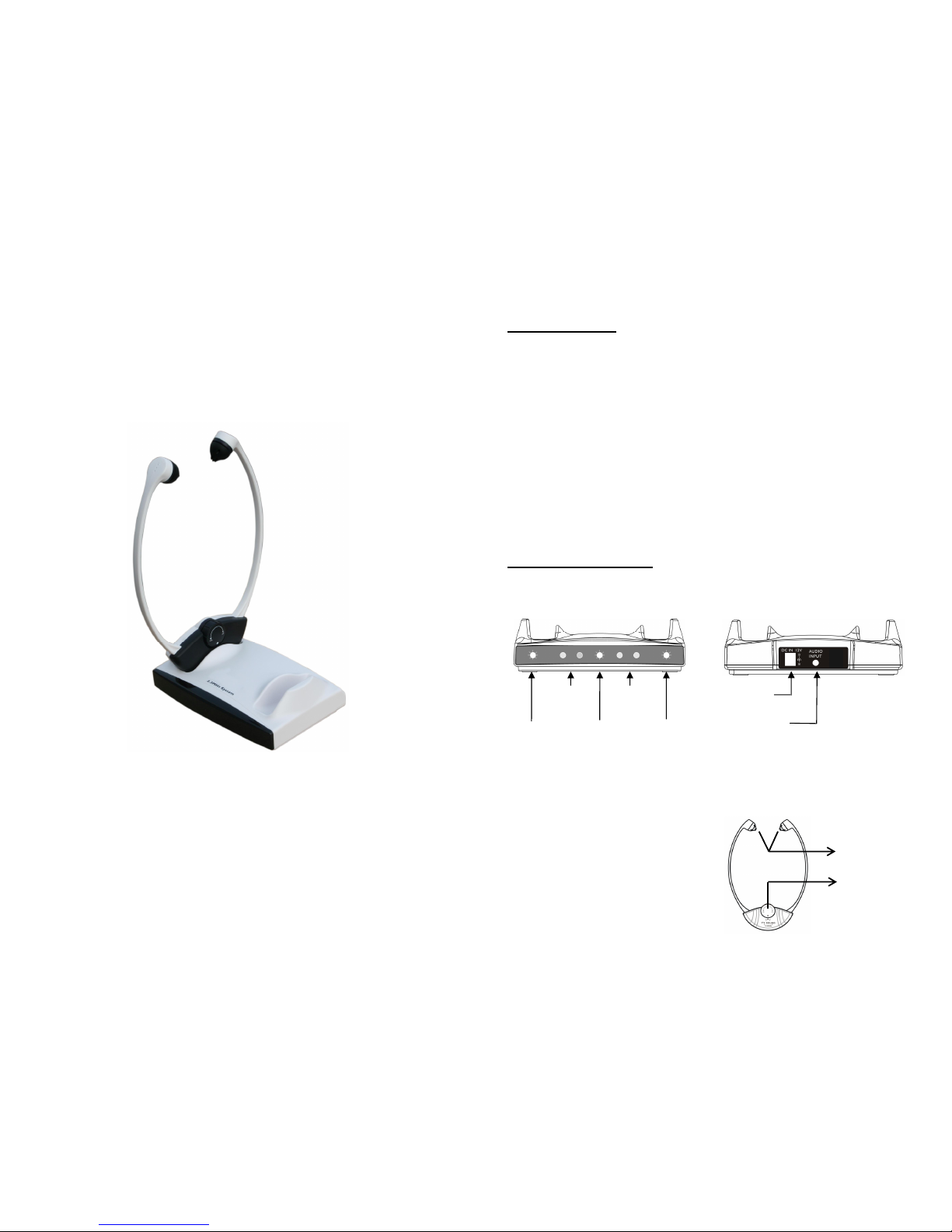
1. Transmitter/Charger.
Front View
Back View
NOTE: The transmitter/charger can charge one or two headsets.
2. Headset.
NOTE: Depending on the model
purchased there may be either one or two
headsets in the box.
Replaceable
Silicone Ear
Tips
ON/OFF/
Volume Control
Left Cradle
Charging
indicator
(RED)
IR
EMITT
ER
Power and
Emission
indicator
Right Cradle
Charging
indicator
(
RED)
IR
EMITT
ER
DC 12V
Power Jack
A
udio Input
Jack
Page 2
3
3. Power Supply (AC – DC Adapter, 100 - 240V).
4. RCA (red/white) to 3.5mm audio cable.
5. Spare ear tips. There are 3 styles of ear tip.
6. Lithium Polymer Rechargeable battery (sealed inside the headset)
3.7V/200mAH.
This type of battery should last for many years and normally should not need
replacing.
We recommend that the battery be charged for about 2 hours before the system is
used for the first time.
Place the headset in the charging cradle. Verify that the LED charging indicator
(RED) is lit. The LED turns off when the battery is fully charged.
It is not possible to overcharge the battery. We recommend that the headset be
placed in the charging cradle when not in use.
BATTERY WARNINGS
z Do not attempt to change or remove the battery.
z Do not dispose in fire.
z Keep away from children.
z Do not short circuit the charging terminals in the bottom of the headset.
NOTE: This series of TV Sound® products comes in 2 models variations and spare
headsets as below and this Instruction Manual covers all of them.
1) TV Sound® Wireless Single Headset System.
2) TV Sound® Wireless Double Headset System.
3) Extra Wireless Headset.
Right cradle
charging
indicator
Left cradle
charging
indicator
4
INSTALLATION
Page 3

5
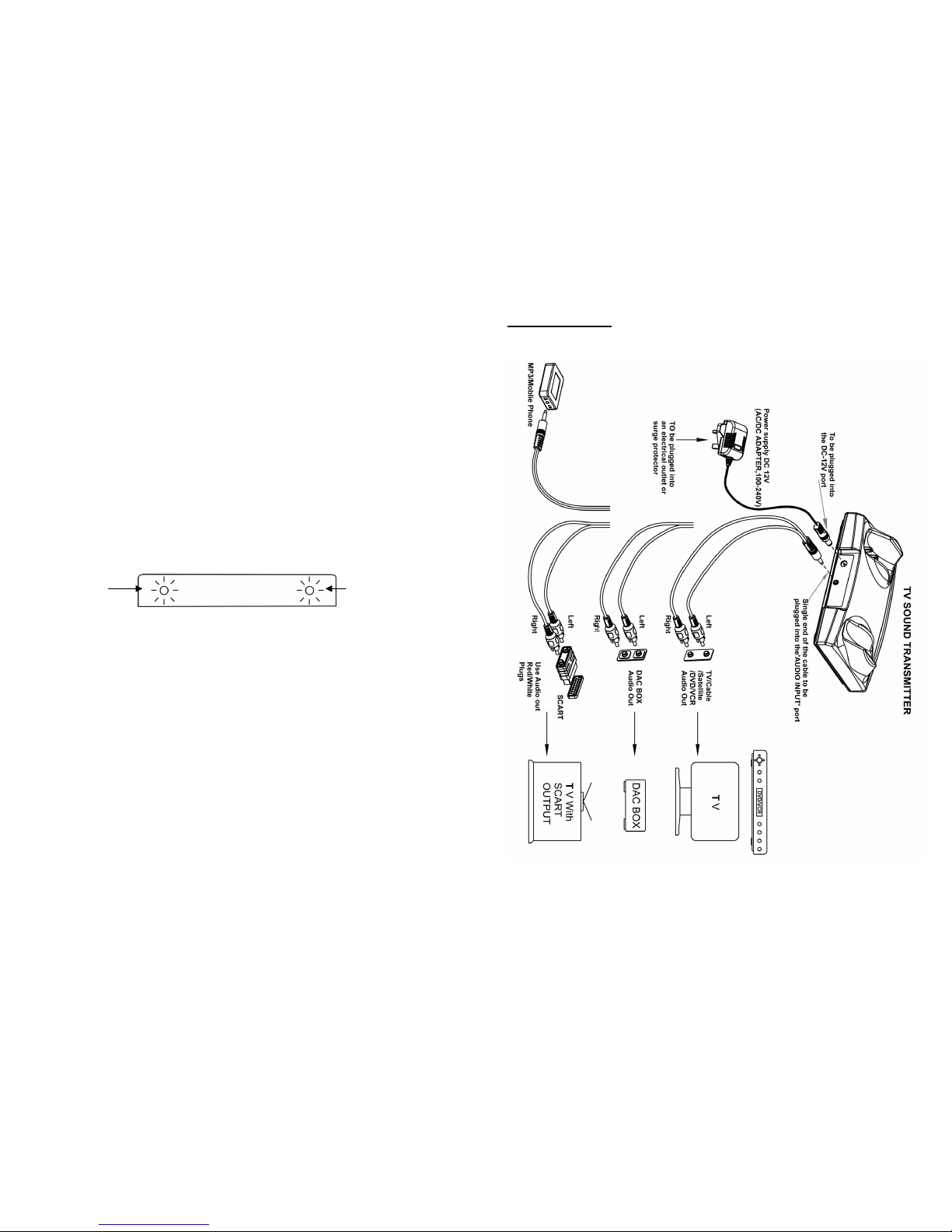
1. Connect the power supply as shown in the diagram.
2. The transmitter/charger must be connected to the audio OUTPUT sockets of the
TV, audio equipment, cable or satellite box, DVD or VCR player, etc. When an
RCA type cable is used the outputs jacks are red and white. Refer to the diagram.
A Scart adapter (not included) may also be used. Use only the red and white
terminals.
NOTE: If the system is connected to a cable or satellite box and to a DVD or VCR
player it is necessary to turn off the device which is not in use at the time. When
using the DVD or VCR player turn off the cable or satellite box. When watching
TV turn off the DVD and VCR player.
3. Connecting to a digital converter box (DAC).
Connect the digital audio output from the TV or audio device to the DAC using
an appropriate cable (optical or coaxial cable). Then use the supplied RCA type
cable to connect from the red and white output terminals of the DAC to the audio
input socket of the transmitter/charger.
NOTE: If you wish to use the system to listen to TV while the TV sound is muted
so as not to disturb others the TV audio output must be set to FIXED. Refer to the
user manual of your TV for instructions as to how to set to FIXED.
POSITIONING
The infra-red (IR) signals need a direct line-of-sight connection between the
transmitter and the headset. Position the transmitter such that there is a direct
line-of-sight connection with the headset when in use. The IR signals may be
6
blocked by objects such as walls, doors, furniture, newspapers, books, etc. The IR
diodes are lit during use.
NOTE: When there is no audio input to the transmitter/charge transmission is
turned off automatically and is resumed automatically when audio signal is
restored.
OPERATION
1. Make sure that the transmitter/charger is correctly connected to the mains supply
using the supplied adapter.
2. Put on the headset such that the front (silkscreened) part of the headset is facing
the transmitter.
3. Turn on the headset using the ON/OFF/VOLUME control and adjust the volume.
4. When you are finished using the system carefully place the headset in the
charging cradle making sure that it fits snugly in the cradle. Check that the charging
light turns on.
SAFETY, CARE AND MAINTENANCE
• The system which is designed to operate from a 100-240V AC supply does
not have an integral ON/OFF switch. To disconnect the power switch the
mains power point switch to OFF or unplug the power supply (AC-DC
adapter).
• Clean the headset and ear tips regularly ----- use a damp cloth for the
headset and warm water and a mild detergent for the ear tips (after removal
from the headset).
• Keep away from heat sources such as hot-plates, and heat generating
appliances.
Page 4
7
• Keep away from water and other fluids.
• Repairs must be carried out by qualified personnel.
• We suggest that a power surge protector is connected between the mains
supply power point and the AC-DC adapter.
PROBLEMS AND SOLUTIONS
The sound is not clear (static/interference).
• Check the line-of-sight connection.
• Make sure that the LEDs are lit.
• Check the transmitter location (height above the floor).
• Keep away from any window or interfering device.
• Check if the audio cable is connected to an analogue (RCA) audio-OUT
jack on TV, cable or satellite decoder /receiver.
• Check that the audio cable is NOT connected to a digital audio-out jack.
• The power outlet may already be in use with another device.
• Audio cable is connected to the transmitter’s audio jack.
The transmitter’s LED lights are not on.
• Check the connection to the wall socket or power outlet.
• Check the connection to the TV Sound 12V jack.
The charging lights do not come on when the earphone set is in the cradle.
• Realign earphone set; if necessary, move around in the cradle.
• Ensure that the charging cradle is connected to mains power.
8
PRODUCT SPECIFICATIONS
General data:
Frequency: 2.3MHz
Modulation: Infrared, mono
Approx. range: 60 sqm (approx. 600 sq. ft.)
Audio frequency response: 100-16,000 Hz
Total harmonic distortion: < 1%
Signal to noise Ratio: 70 dB
Auto ON/OFF
Headset
Max. sound pressure level (SPL): 119 dB
Battery requirement:
Lithium Polymer
Rechargeable battery, 3.7V/200mAH
Operating time: Max.10 hrs
Weight: approx.: 58–60 g
Transmitter:
Audio connection: Mini headphone/RCA
cable
Power Supply: DC Power Supply 12V,
500mA
Weight: Approx. 171 g
Dimensions (HxWxD): 4.8x10.5x15.4 cm
RESET SWITCH: Sometimes computers malfunction due to electrostatic discharge or
other electrical disturbances, or when DC Jack is plugged. If this happens push a thin rod
into the RESET hole in the base of transmitter unit and press down for about one second.
This resets the computer, clears its memory and returns it to normal operation.
Declaration of conformity
This Product has been tested by an accredited testing laboratory and is in compliance with
the following standards and directives:
z EN60065
z EMC 2004/108/EC
z RoHS
z UL1642
WEEE (Waste Electrical and Electronics Equipment) Declaration
Help to protect the environment. Do not dispose of defective electrical or
electronic products with your household refuse, but dispose of them in
compliance with local regulations through local collection or recycling points.
The materials used in this product can be recycled and/or reused. This symbol
indicates that electrical and electronic equipment must be disposed of
separately from normal waste at the end of its operational lifetime.
 Loading...