

Page 1
All specifications are subject to change without notice
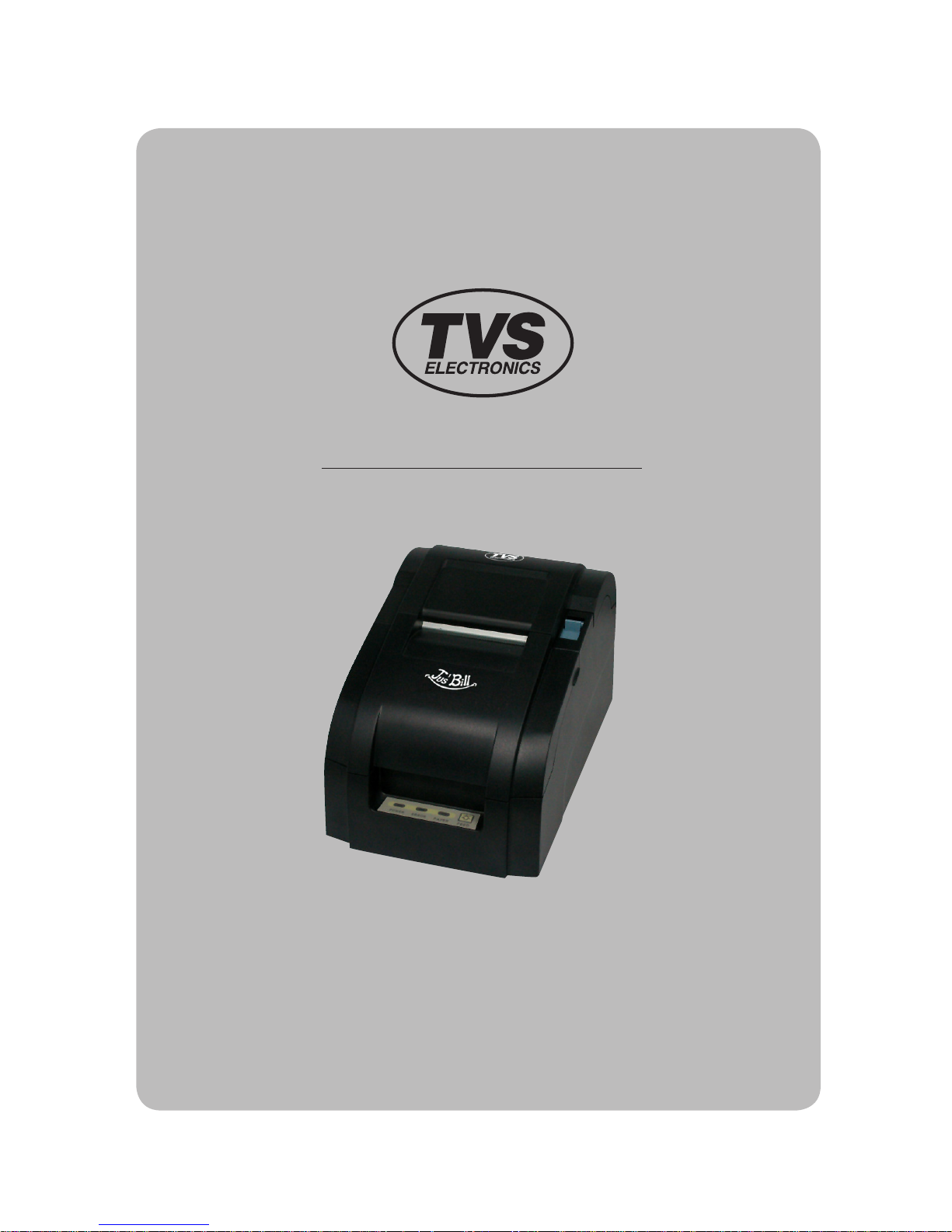
Mini Dot Impact Printer
MODEL : Jus’ Bill RP-35
Page 2
Page 3
2
1. Features 3
2. Specification
4
3. Self Test
6
4. User Switches 7
5. Command List 8
5.1. EMULATION EPSON TM-U200
8
5.2. EMULATION CITIZEN iDP-3540
9
5.3. EMULATION STAR SP200
10
6. Interface 11
6.1. Interface Connector 11
7. Cash Drawer Connector 13
8. Electrical Specifications
14
9. Dip Switch Settings 15
Table of Contents
Page 4

3
♣Dip Switch Configuration
Emulation mode, communications mode, baud rate, serial/parallel handshake, and head printing
characteristics are all configured through dip switch settings.
♣Data Buffer
The Jus' Bill RP-35 printer has a built-in 16 Kilobyte I/O buffer allowing the host computer to free itself
after sending the print data.
♣Reliable communications
The Jus' Bill RP-35 supports multiple baud rates, protocols, and handshaking on its parallel & serial
interfaces.
♣User controls
A power switch, a paper feed switch, power LED and Paper Low/Out error LED provide ease of use.
♣Self Test Mode
A comprehensive self-test mode is available which describes the printer configuration and dip switch
setting information along with the version number of firmware installed.
♣Print orientation
The printer is capable of printing normal and upside down, the print orientation is selected by software
commands.
♣Selectable international characters
The Jus' Bill RP-35 supports international characters selectable by software control.
♣Multiple Fonts/Sizes
Two different resident fonts are available for printing diversity. Each of these fonts can be printed in
normal, double wide, double height, and quadruple sizes. Both fonts and sizes are software selected.
♣Bit image graphic
Two formats for bit mapped graphics are provided.
♣Error detection
The Jus' Bill RP-35 can detect paper-out and paper-jam as well as paper near-end, controller malfunction,
and cover open status.
♣Peripheral Drive
Two cash drawer drivers are provided.
♣Certification
(1) This device complies with Part 15 of the FCC Rules. Operation is subject to the following two
conditions:
1) this device may not cause harmful interference , and
2) this device must accept any interference received , including interference that may cause
undesired operation.
(2) UL/cUL (UL 60950-1)
(3) MIC
(4) CE-EMCD (CE-EMCD Class B should use Parallel shield Cable complied with IEEE-1284 standards)
(5) RoHS (TUV)
(6) CCC
1. Features
Page 5

4
MODEL Jus' Bill RP-35
PRINT METHOD 9-pin serial impact dot matrix
PRINT DIRECTION Bi-directional (with logical seeking)
NO. OF COLUMNS
Epson Mode : 42/35, 40/33, Star Sp200 : 42/35
Other Modes : 40/32
FONT SIZE 7 x 9, 9 x 9 dots
LINE SPACING
n/144 inch
PRINTING WIDTH
63.5mm (2.5”)
PRINT SPEED 5 Line / Sec (at 40 cpl)
INK RIBBON
EPSON, ERC-38 compatible
Black or Purple, Black/Red
PAPER
Media Roll Paper
Width 76.2mm (3.0”)
Diameter 76mm (3.0”) max.
Copies
3-ply max. (0.2mm or 0.008” thick)
One Original and one copy
DATA BUFFER
16K bytes
CASH DRAWER DRIVER 2 circuits (24V, 1A max)
INTERFACE
RS-232C Serial (25Pin)
USB
USB Combo
Ethernet
Wireless Lan
Centronics Parallel (36Pin)
EMULATION
Epson TM-U200, Citizen iDP-3540
Star SP200
POWER SUPPLY
Type External Adaptor
Input 120VAC, 230VAC
Output 24VDC X 2.5A
OPERATING CONDITION 5°C to 40°C, 10% to 80% RH
STORAGE CONDITION -20°C to 60°C, 5% to 95% RH
RELIABILITY
MCBF 18 million lines
Printhead 150 million characters
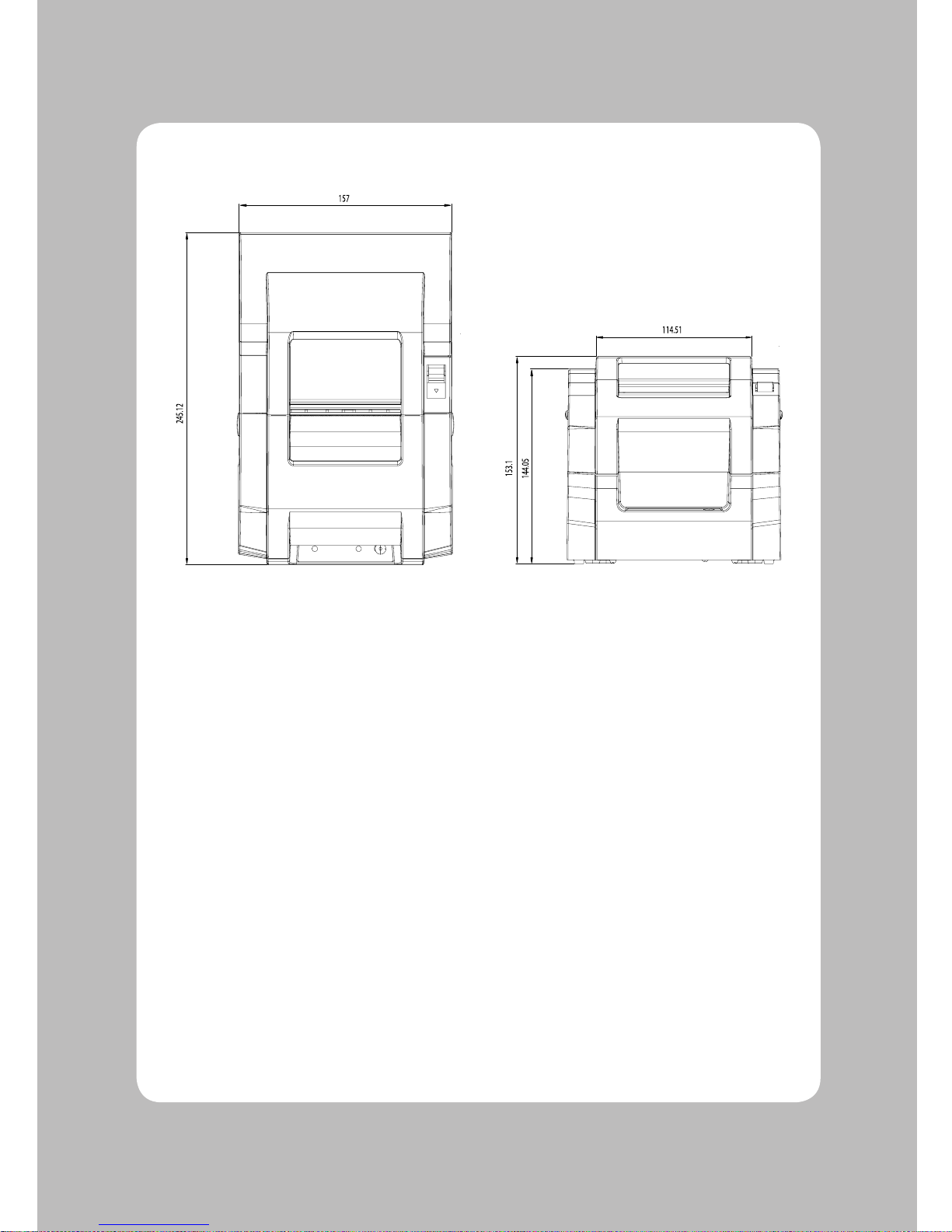
DIMENSIONS
Cutter 157(W) X 245.12(D) X 153.1(H)mm
Non cutter 157(W) X 245.12(D) X 153.1(H)mm
WEIGHT
Cutter 5.24 lbs (2.38 kg)
Non cutter 4.96 lbs (2.25 kg)
2. Specification
Printer Specifications
Page 6
5
Overall dimension
Page 7

6
While pressing the paper feed switch for more than 10 seconds after the printer in turned on, the self
test mode is initiated.
The printer self test includes a listing of the current default settings, read and write test of internal RAM,
checksum test of internal program memory, loop back detection statement, a staggered dot line, a few
lines of rotating character set, and a diagnostic report.
The printer then enters into the On-Line mode.
Configuration Setup
When the paper FEED switch is pressed and released instantly as the power is applied to the printer, the
printer will print the current printer configuration settings along with the DIP switch information.
If the printer setup needs to be changed, turn the Power Off before changing the setting.
The printer will be setup at the factory as follows;
Printer is setup as follows:
Model : Jus' Bill RP-35
Firmware : Ver X.XX
Interface : Serial
Emulation : Epson TM-U200
CR Character : CR=CR only
Flow Control : DTR/DSR
Data Bits : 8 Bits
Parity : None
Baud Rate : 9600
CPL : 40/33 Char / Line
Two Color : Installed
Auto Cutter : Installed / Not Installed
Journal : Installed / Not Installed
3. Self Test
Page 8
7
Panel Switches
Paper Feed button : Pressing the PF button momentarily will advance the paper one character line and
pressing it continuously will cause a fast feed at 15 lines per second.
Power Switch
A Power switch located on the lower left side of the printer is used to turn the printer on/off.
Indicators
This section explains the different patterns signaled by the two LED indicators located on the top cover
of the Jus' Bill RP-35.
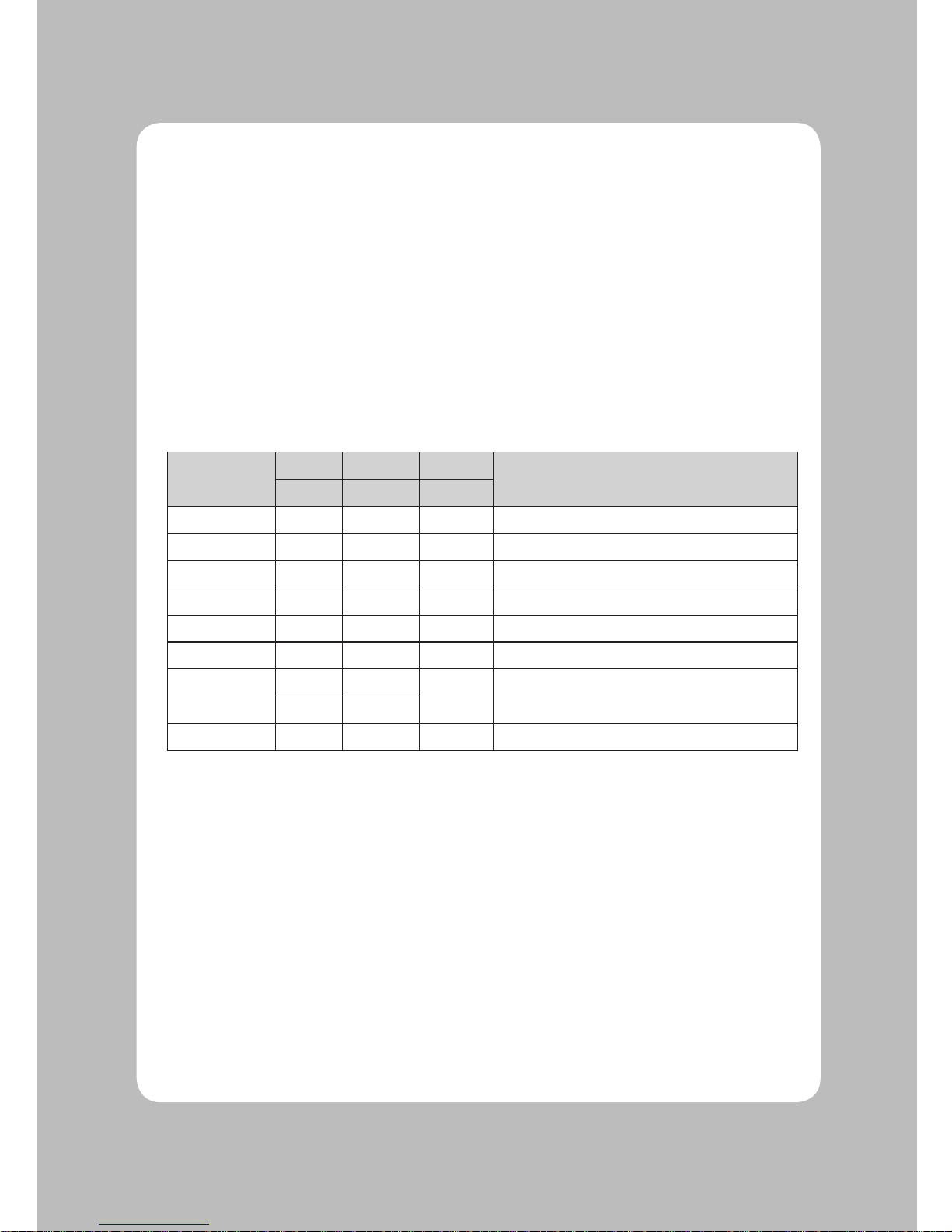
STATUS
LED1 LED2 LED3
REMARKS
GREEN RED RED
Power Off
OFF OFF OFF Normal power is not supplied to the printer
Power On
Flash ON ON Normal power is supplied to the printer
On line ON OFF OFF Normal error-free mode
Paper low
ON OFF ON Insert new paper roll
Cover open ON Flash OFF Close cover
Paper empty
ON Flash OFF Insert new paper roll
Paper jam
ON OFF
OFF Impossible to recover
OFF ON
Test mode
ON ON OFF Ignored Paper Low
4. User Switches
Page 9
8
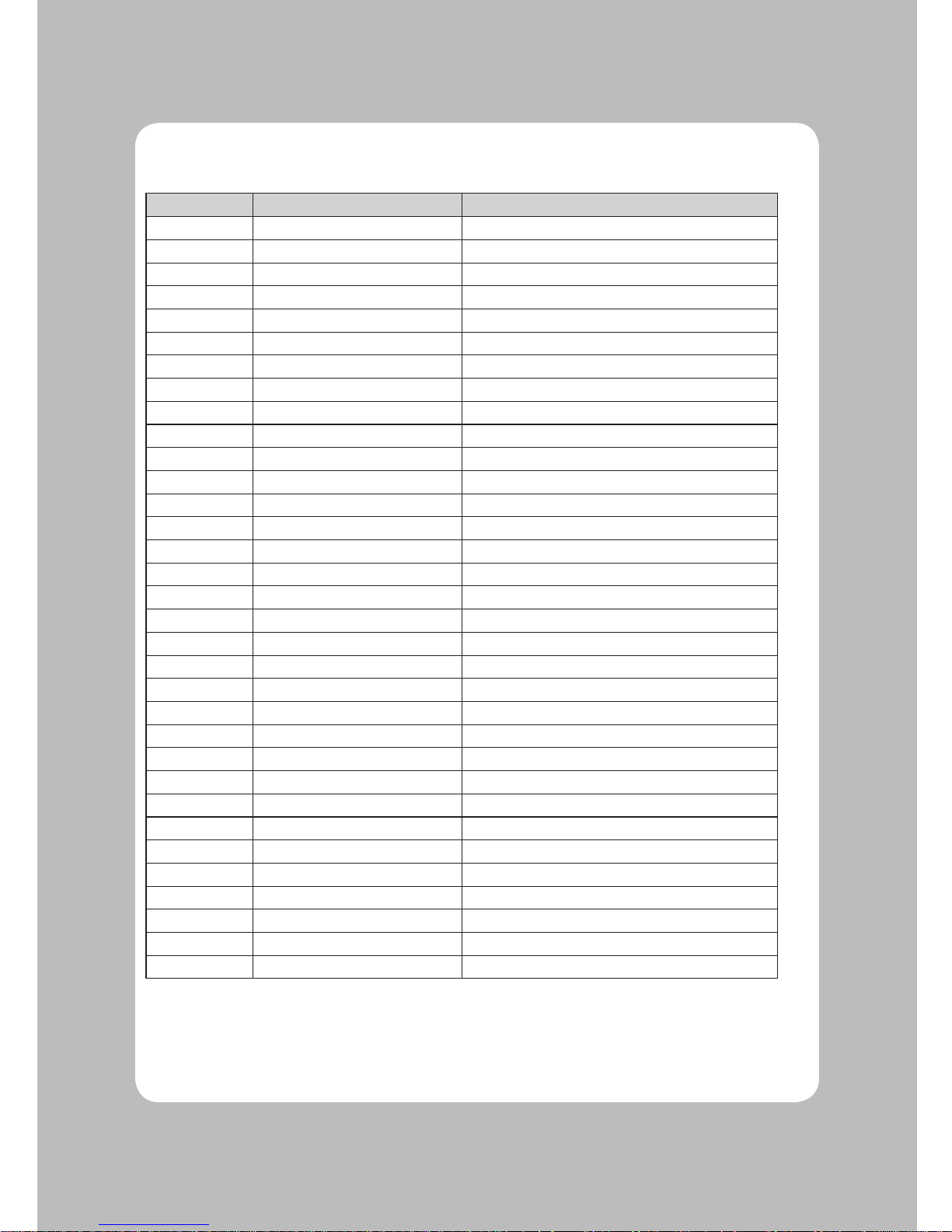
5.1. EMULATION EPSON TM-U200
Command Hex Code Description
HT <09>H Horizontal tab
LF <0A>H Print and line feed
CR <0D>H Carriage Return
DLE EOT
<10>H<04>H<n> Real-time status transmission
DLE ENQ <10>H<05>H<n> Real-time request to printer
ESC SP <1B>H<20>H<n> Set right-side character spacing
ESC ! <1B>H<21>H<n> Set print mode
ESC % <1B>H<25>H<n>S Select/cancel user-defined character set
ESC & <1B>H<26>H Define user-defined characters
ESC * <1B>H<2A>H Select bit-image mode
ESC - <1B>H<2D><n> Turn on/off underline mode
ESC 2 <1B>H<32>H Select 1/6 inch line spacing
ESC 3 <1B>H<33>H<n> Set line spacing
ESC < <1B>H<3C>H Return home
ESC = <1B>H<3D>H<n> Select peripheral device
ESC ? <1B>H<3F>H<n> Cancel user-defined characters
ESC @ <1B>H<40>H Initialize printer
ESC D <1B>H<44>H<n> Set horizontal tab positions
ESC E <1B>H<45>H<n> Turn on/off emphasized mode
ESC G <1B>H<47>H<n> Turn on/off double-strike mode
ESC J <1B>H<4A>H<n> Print and feed paper
ESC R <1B>H<52>H<n> Select an international character set
ESC U <1B>H<55>H<n> Turns on/off unidirectional printing mode
ESC a <1B>H<61>H<n> Select justification
ESC c 4 <1B>H<63>H<34>H<n> Select paper sensor to stop printing
ESC c 5 <1B>H<63>H<35>H<n> Enable/disable panel button
ESC d <1B>H<64>H<n> Print and feed n lines
ESC p <1B>H<70>H Generate pulse
ESC t <1B>H<74>H<n> Select character code table
ESC { <1B>H<7B>H<n> Turn on/off upside-down printing mode
GS I <1D>H<49>H<n> Transmit printer ID
GS a <1D>H<61>H<n> Enable/disable Automatic Status Back
GS r <1D>H<72>H<n> Transmit status
5. Command List
Page 10
9
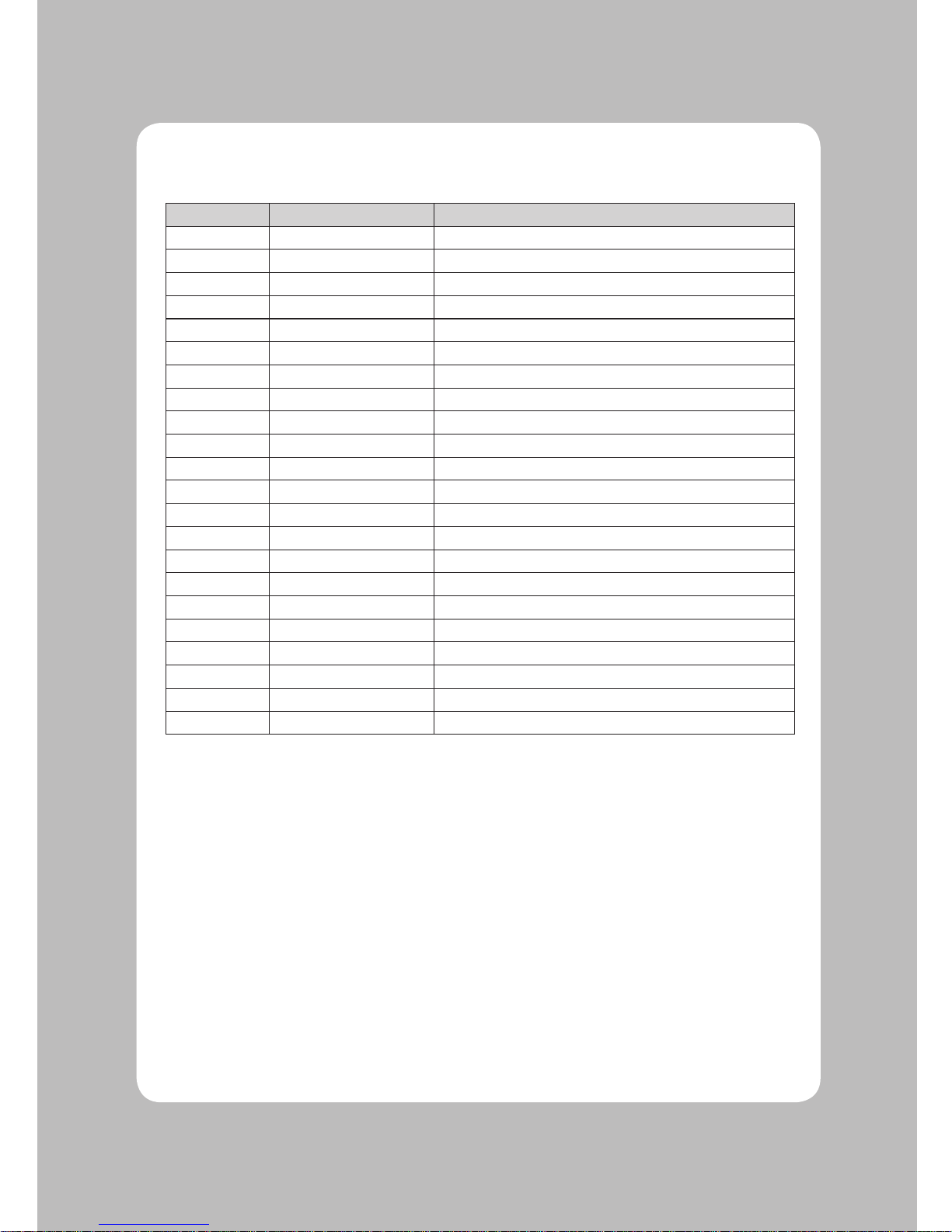
5.2. EMULATION CITIZEN iDP-3540
Command Hex Code Description
BEL <07>H Drive pulse setting command for 1st drawer
CAN <18>H Clear data in buffer
LF <0A>H Paper feed
FF <0C>H<n> Paper feed n lines
CR <0D>H Print command
SO <0E>H Select expanded character mode
SI <0F>H Select normal character mode
DC1 <11>H Initial set command
DC2 <12>H Inverted print mode
DC3 <13>H Red color print command
ESC BEL <1B>H<07>H<n> 1st drawer driver command
SUB <1A>H 2nd drawer driver command
ESC - <1B>H<2D>H<n> Select underline mode
ESC * <1B>H<2A>H<n> Graphic command
ESC 1 <1B>H<31>H Set 1/9 inch line feed
ESC 2 <1B>H<32>H<n> Set 2/9 inch line feed
ESC C <1B>H<43>H<n> Set page length
ESC N <1B>H<4E>H<n> n line skip perforation command
ESC O <1B>H<4F>H Cancel skip perforation command
ESC P <1B>H<50>H<n> Select full-cut / partial-cut
ESC f <1B>H<66>H Form feed
FS <1C>H 1st drawer drive command
Page 11
10
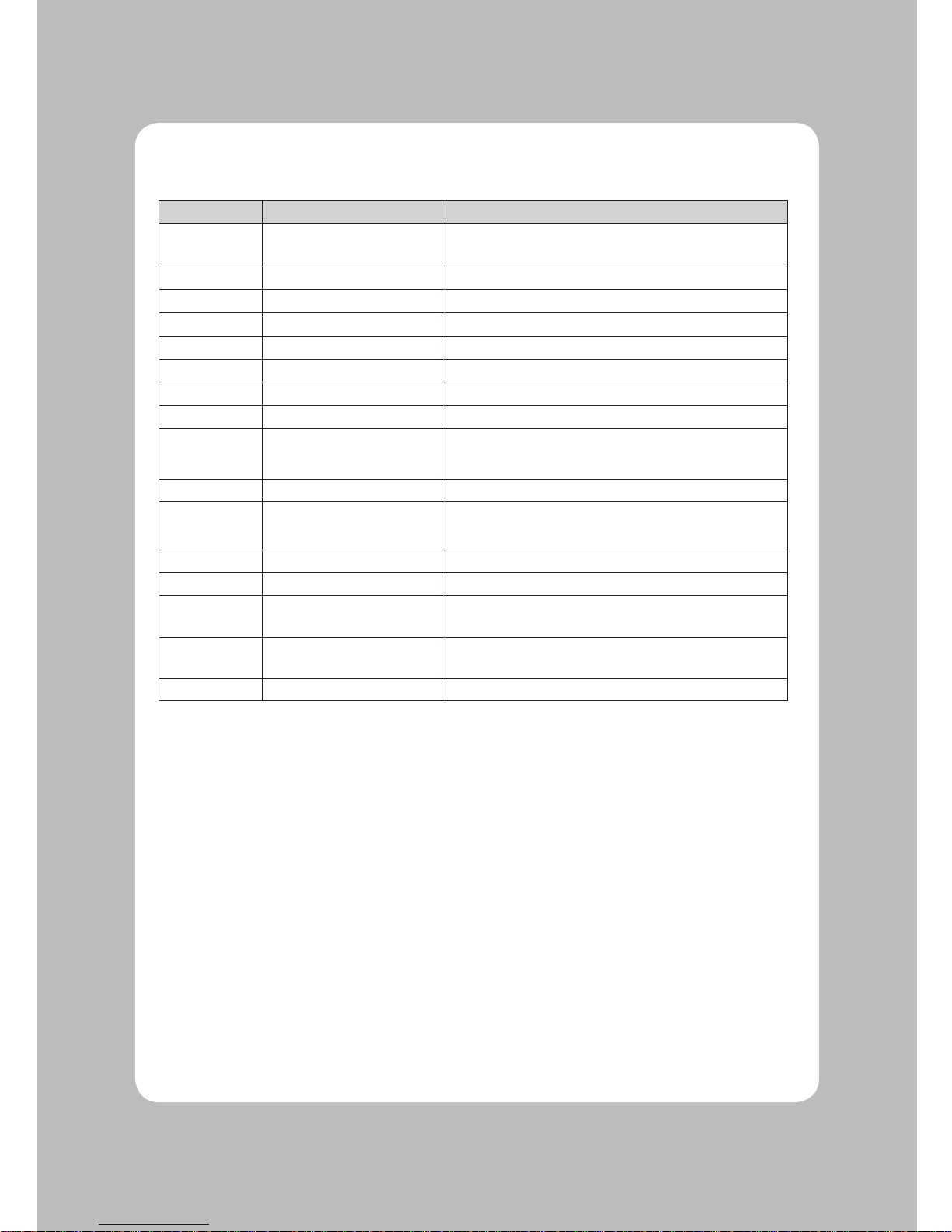
5.3. EMULATION STAR SP200
Command Hex Code Description
BEL <07>H
Differed drive command “A” for peripheral unit
(Default setting)
CAN <18>H Cancel print data in buffer
LF <0A>H Line feed
CR <0D>H Line feed (same as LF)
SO <0E>H Select expanded character mode
SI <0F>H Cancel expanded character mode
FS <1C>H Immediate drive command “B” for peripheral unit 1
DC4 <14>H Cancel expanded character mode
ESC BEL
n1 n2
<1B>H<07>H<n1><n2>
Adjust drive pulse width for peripheral unit
(Default setting)
ESC @ <1B>H<40>H Initialize printer
ESC M <1B>H<4D>H
Select 7 x 7 (Half dots) character size
(Default setting)
ESC R n <1B>H<52>H<n> Select international character set
ESC P <1B>H<50>H Select 9 x 7 (Half dots) character size
ESC W 1
<1B>H<57>H<31>
H<1B>H<57>H<1>
Select expanded character mode
ESC W 0
<1B>H<57>H<37>
H<1B>H<57>H<0>
Cancel expanded character mode
ESC a n <1B>H<61>H<n> Feed paper n lines
Page 12
11
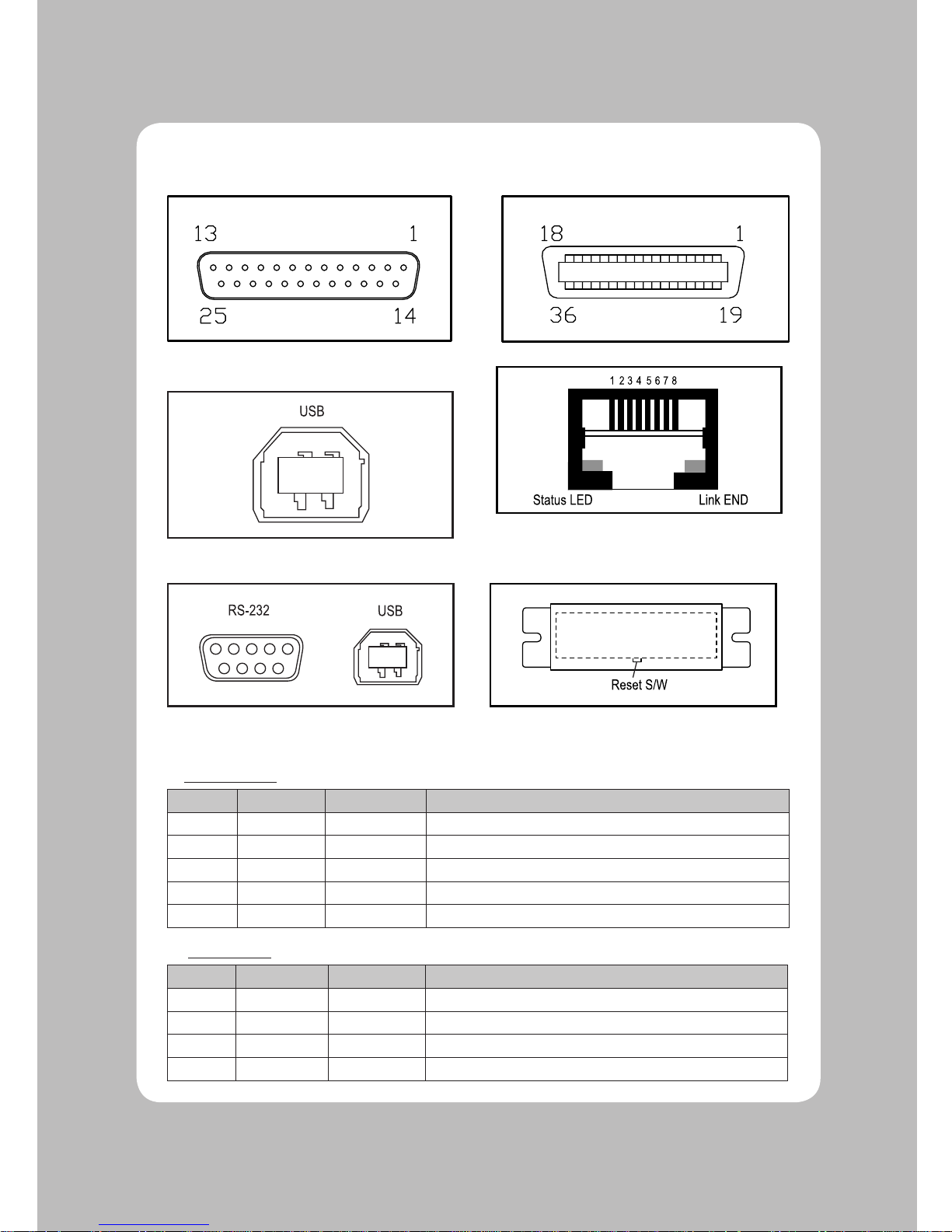
6-1. Interface Connector
<D-SUB 25 Female Serial> <Centronics Parallel>
<USB “B” Type> <Ethernet>
<USB COMBO> <Wi-fi>
Serial Interface
PIN SIGNAL I/O DESCRIPTION
2 TXD Output Printer transmit data line RS-232C level
3 RXD Input Printer receive data line RS-232C level
4, 20
DTR Output Printer handshake to host line RS-232C level
6 DSR Input Data Send Ready
1, 7
GND - System Ground
USB Interface
PIN SIGNAL I/O DESCRIPTION
1 +5V - +5V
2 DATA- - Printer transmit data line
3 DATA+ - Printer transmit data line
4 GND - System Ground
6. Interface
Page 13
12
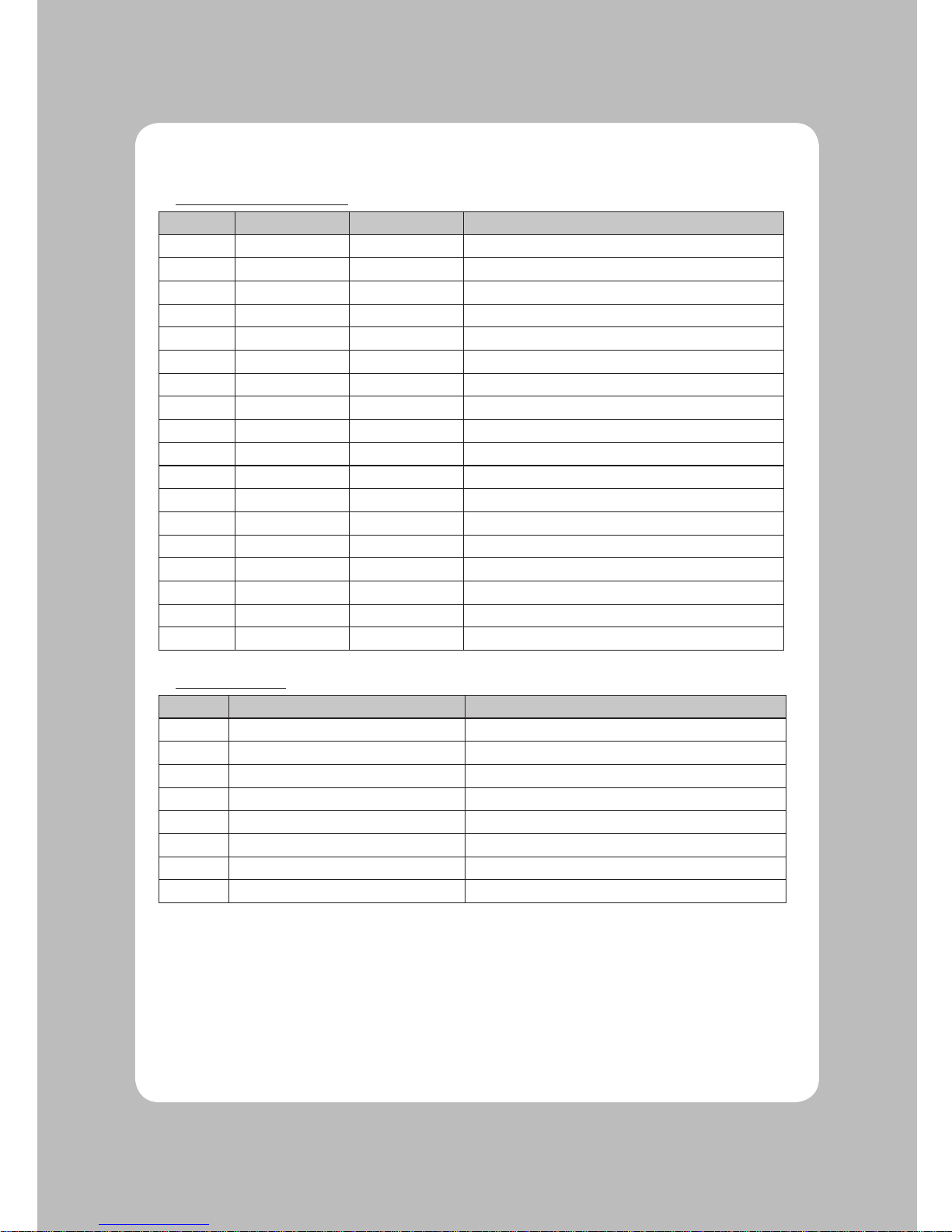
Centronics Parallel Interface
PIN SIGNAL I/O DESCRIPTION
1 STROBE- Input Synchronize signal Data received
2~9 DATA0~7 Input/Output Data bit Transmitted 0~7
10 ACK- Output Data receiving completed.
11 BUSY Output Impossible to print of data receiving.
12 PE Output Paper empty
13 SELECT Output Printer status for ON/OFF line
14 AUTO FEED- Input Paper auto feed signal
15 GROUND - System ground
16 GROUND - System ground
17 NC 18 LOGIC-H - +5V
19~30 GROUND - System ground
31 INIT- Input Initialize
32 ERROR- Output Printer error
33 GROUND - System ground
34 NC 35 +5V - +5V
36 SELLECT IN- Input Printer select signal
Ethernet Interface
PIN SIGNAL I/O
1 Data Out + Output Data +
2 Data Out - Output Data 3 GND Ground
4 Data IN + Input Data +
5 Data IN - Input Data 6 N.C
7 N.C
8 N.C
Page 14
13
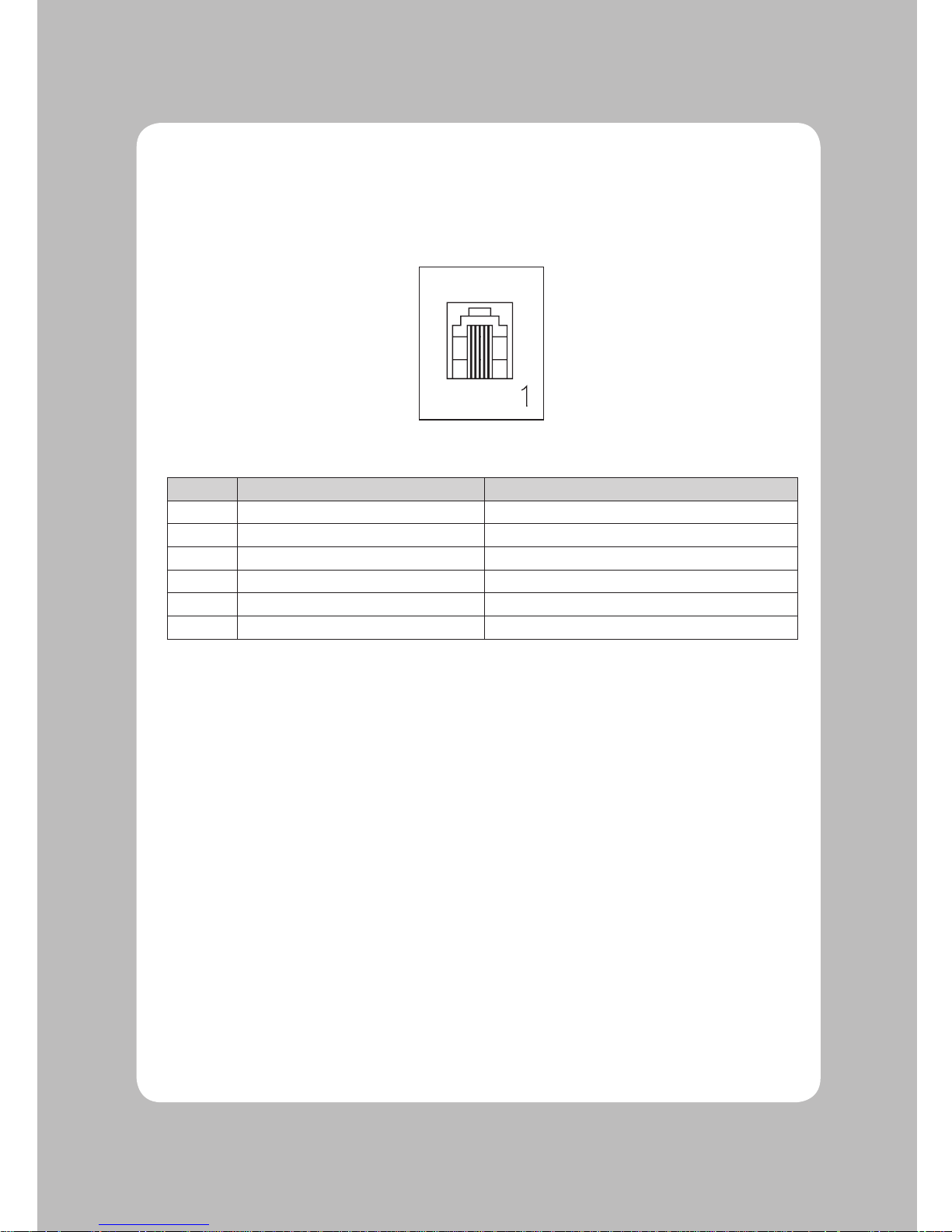
The Jus' Bill RP-35 can operate two cash drawers with a 6 pin RJ-11 modular connector. The driver is
capable of supplying a maximum current of 1.0A for 510 ms or less, when not printing.
<Cash Drawer Connector>
PIN SIGNAL DESCRIPTION
1 Signal GND 2 Drawer kick-out drive signal 1 Output
3 Drawer open/close signal Input
4 +24V 5 Drawer kick-out drive signal 2 Output
6 Signal GND -
7. Cash Drawer Connector
Page 15
14
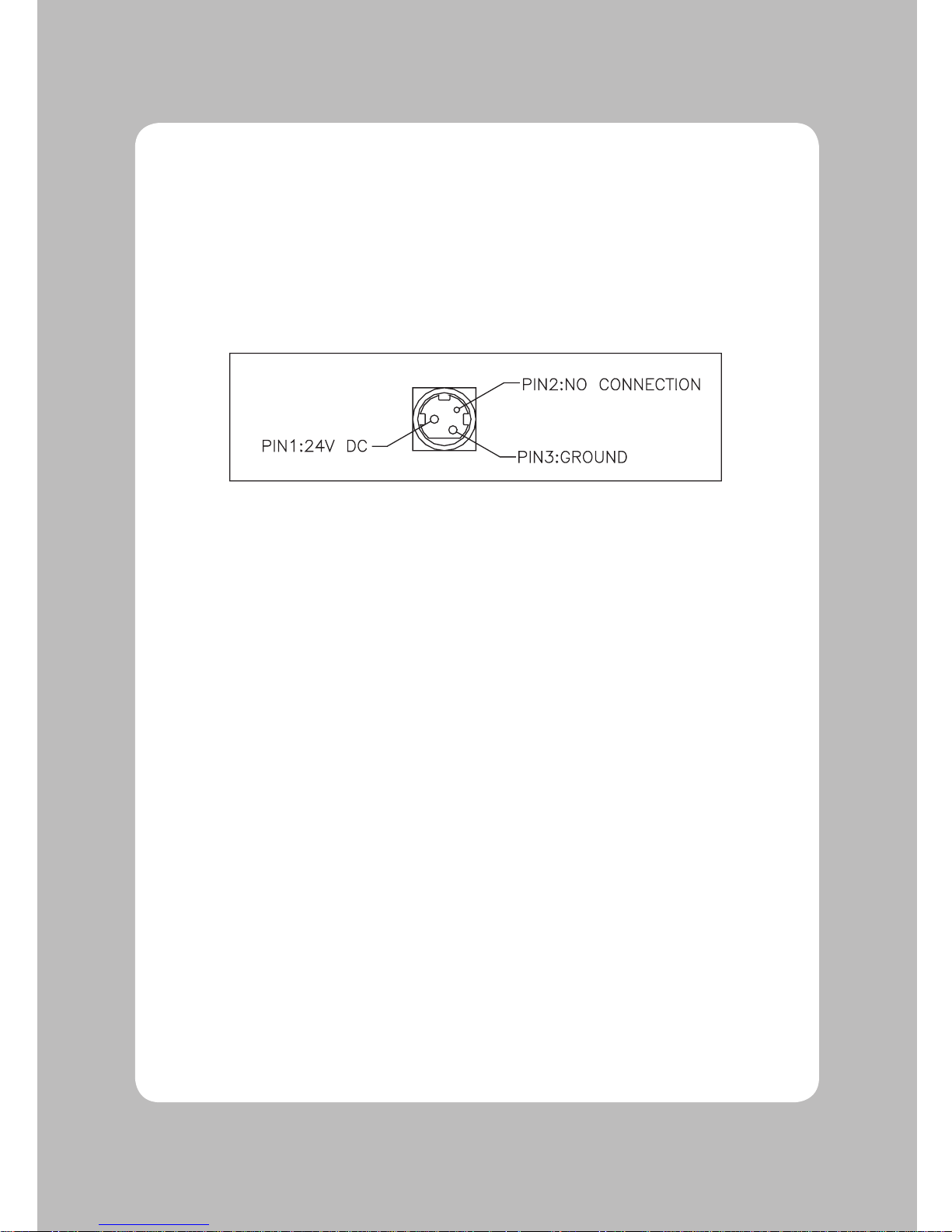
The Jus' Bill RP-35 requires a power supply with the following parameters.
A linear power Adapter is included in the Jus' Bill RP-35 box.
Power Supply Voltage : 24VDC±10%
Power Supply Current : 2.5 A
<Power Supply Connector>
8. Electrical Specifications
Page 16
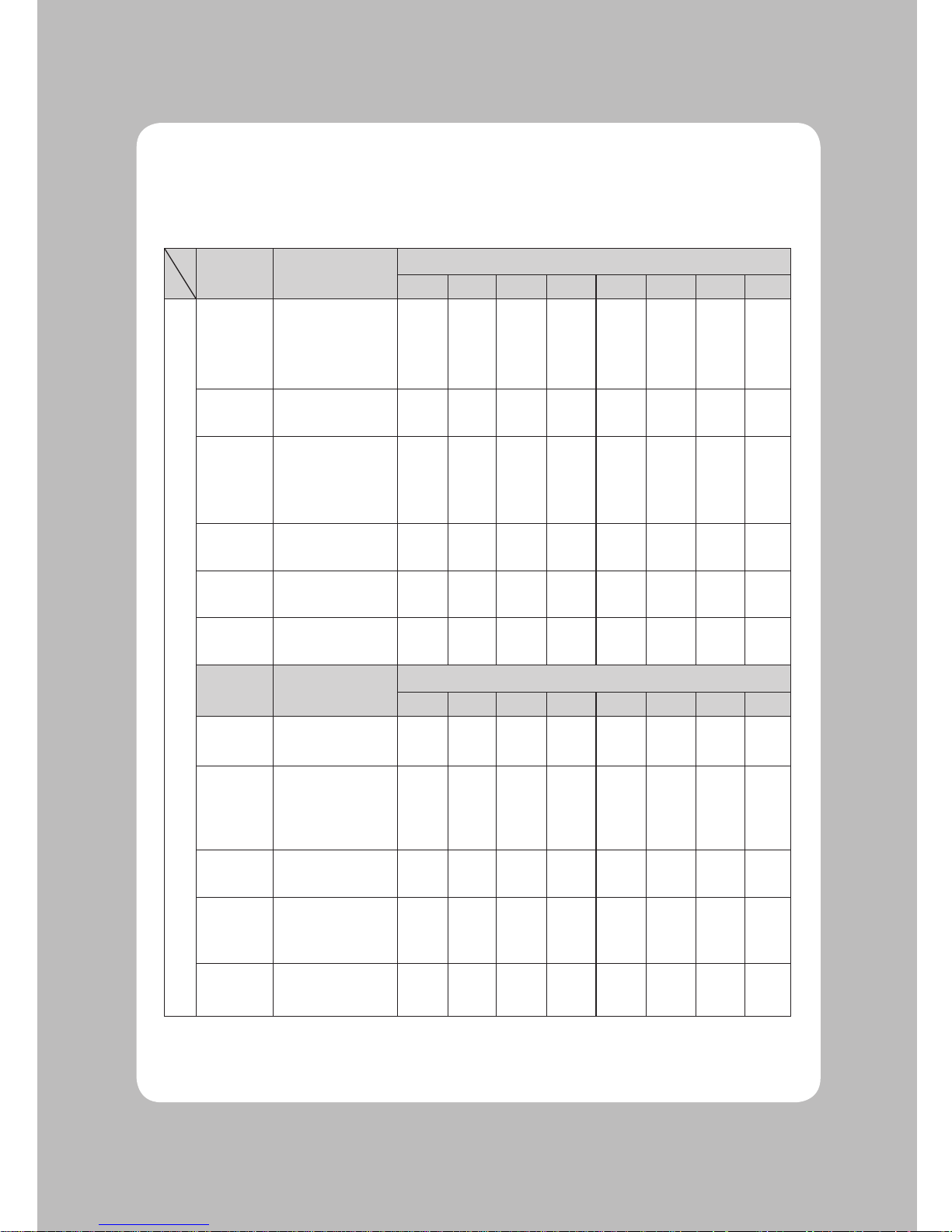
15
This table gives the definition for the DIP switch settings.
Function Setting
SW1
1 2 3 4 5 6 7 8
S
E
R
I
A
L
Emulation
Epson TM-U200
Epson TM-U300
Citizen iDP3540
Star SP200
OFF
ON
OFF
ON
OFF
OFF
ON
ON
········
CR
Character
CR=CR Only
CR=CR + LF
OFF
ON
CPL
40/33
Char/Line
42/35
Char/Line
OFF
ON
Auto
Cutter
Not Install
Install
OFF
ON
2Color
Not Install
Install
OFF
ON
Journal
Not Install
Install
OFF
ON
Function Setting
SW2
1 2 3 4 5 6 7 8
Flow
Control
DTR/DSR
Xon/Xoff
OFF
ON
Baud
Rate
38400
19200
9600
4800
OFF
ON
OFF
ON
OFF
OFF
ON
ON
Data Bits
8 Bits
7 Bits
OFF
ON
Parity
None
Odd
Even
-
OFF
ON
OFF
ON
ON
Auto
Melody
Not Install
Installed
OFF
ON
9. Dip Switch Settings
Page 17
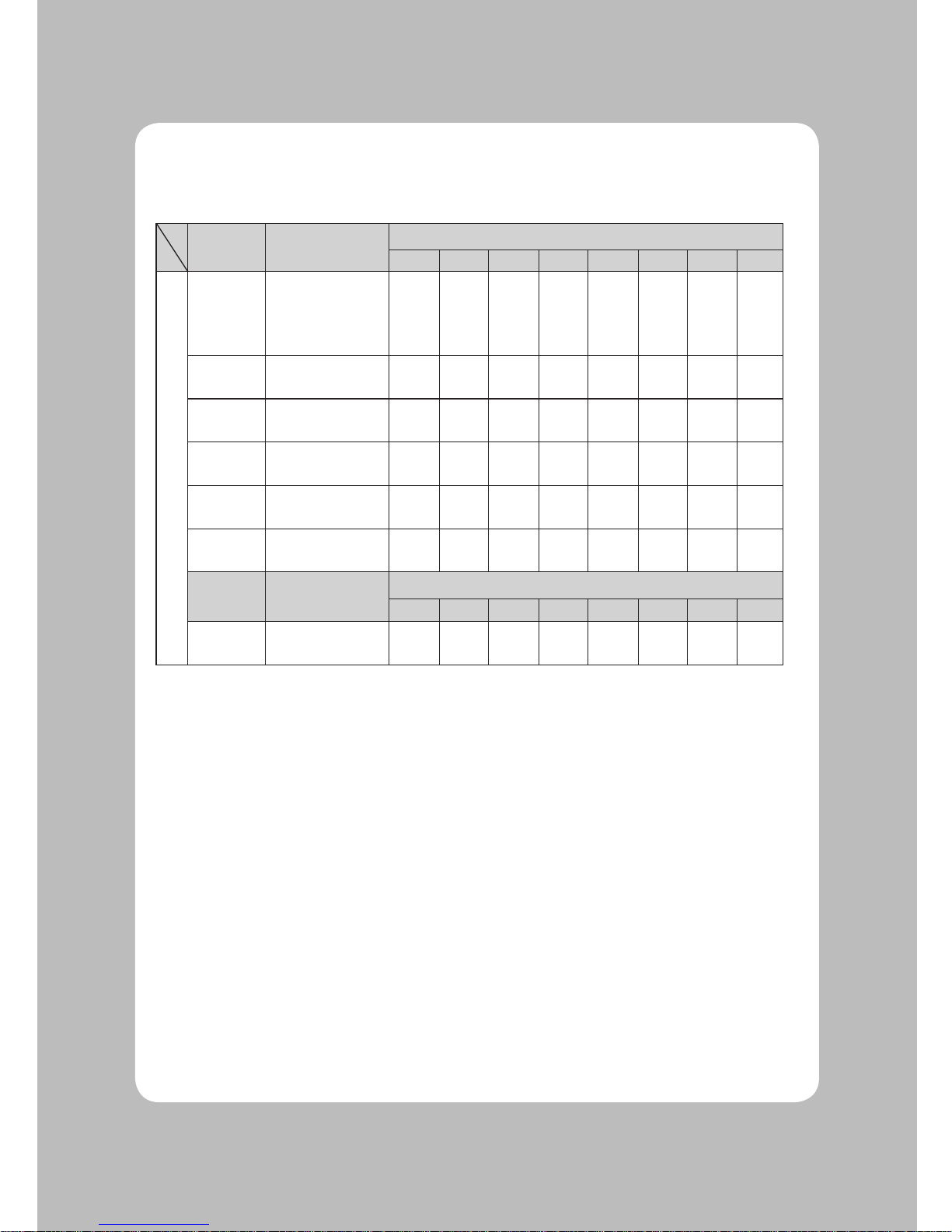
16
Function Setting
SW1
1 2 3 4 5 6 7 8
P
A
R
A
L
L
E
L
Emulation
Epson TM-U200
Epson TM-U300
Citizen iDP3540
Star SP200
OFF
OFF
ON
ON
OFF
ON
OFF
ON
CR
Character
CR=CR Only
CR=CR + LF
OFF
ON
CPL
40/33 Char/Line
42/35 Char/Line
OFF
ON
Auto
Cutter
Not Installed
Installed
OFF
ON
2 Color
Not Installed
Installed
OFF
ON
Journal
Not Installed
Installed
OFF
ON
Function Setting
SW2
1 2 3 4 5 6 7 8
Auto
Melody
Not Install
Installed
OFF
ON
Page 18

17
Page 19

Rev. 1.0
 Loading...