

Page 1
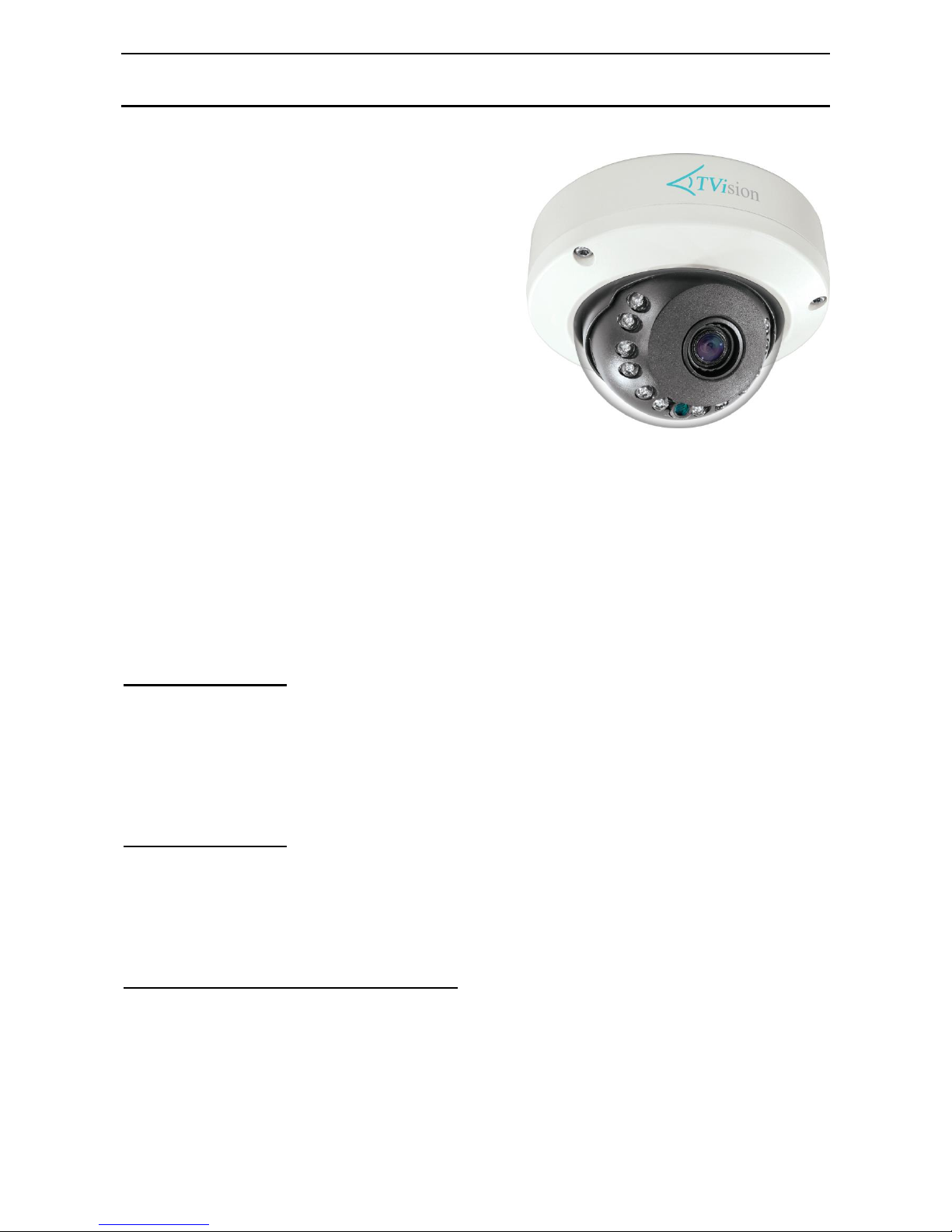
HD-TVI XSEE515
SEE515 fixed lens Internal* HD-TVI & Analogue Camera with IR
Email: [email protected] Last Revised 15/06/2017
Mounting the Camera
The camera is for outdoor mounting on a wall or under a lintel.
Installing the Camera
The camera is a ball camera and therefore can be set to most angles. First remove the camera dome
cover by unscrewing the three Torx screws using the tool supplied. A cord is attached to the dome
cover to avoid dropping it. If the camera is to be installed outdoors then before screwing the
camera base to the wall, ceiling or lintel, put silicon sealant over the holes on the bottom of the base
and around the cable entry point. Then secure the base with screws. Adjust camera position and
angle. As this is a fixed lens there are no zoom and focus controls.
Powering the Camera
The SEE515 runs on a 12V DC regulated power supply. The camera is provided with a fly lead
with a mini power red 2.1mm DC socket. It is recommended to use a power supply that is rated
higher than the current consumption of the camera i.e. the current consumption is 260mA with IRs
on so add approximately 50% headroom, and use a regulated power supply rated at 500mA or
above. The camera is polarity sensitive so connections must be correctly made.
Connecting the camera to control equipment
The dome camera comes with a fly lead for power, HD-TVI video out and CVBS (analogue
output). Connect the camera to control equipment via a female BNC-BNC lead. The green BNC is
for HD-TVI and the yellow CVBS is for analogue output. When using a co-ax type cable such as
RG59 or similar, the outer braid of the co-ax provides the “0V GROUND” connection and the inner
core provides the “Video” connection.
SEE515 Internal* HD-TVI Camera
This HD-TVI camera has a 2.1 Mega
Pixel 3.6mm fixed lens, 12x IRs with
15 metre range, IP66 rating, Panasonic
CCD, Wide Dynamic Range, Digital
Zoom, OSD menu with options for
Privacy masking, Sens-Up & Motion
and a separate (analogue connection).
The SEE515B (Black) or SEE515W (White)
cameras produce exceptional quality images
using the Panasonic CCD providing HD
1080P resolution. The true day/night
mechanical filter provides excellent colour
reproduction.
The cameras have Coaxitron Control for changing the OSD menu specifications via
the DVR or remote network connection, or via the camera joystick.
* Although this camera is classified for internal use, the camera can be effectively
used outdoors providing screw holes in the base of the camera are adequately
Page 2
HD-TVI XSEE515
SEE515 fixed lens Internal* HD-TVI & Analogue Camera with IR
Email: [email protected] Last Revised 15/06/2017
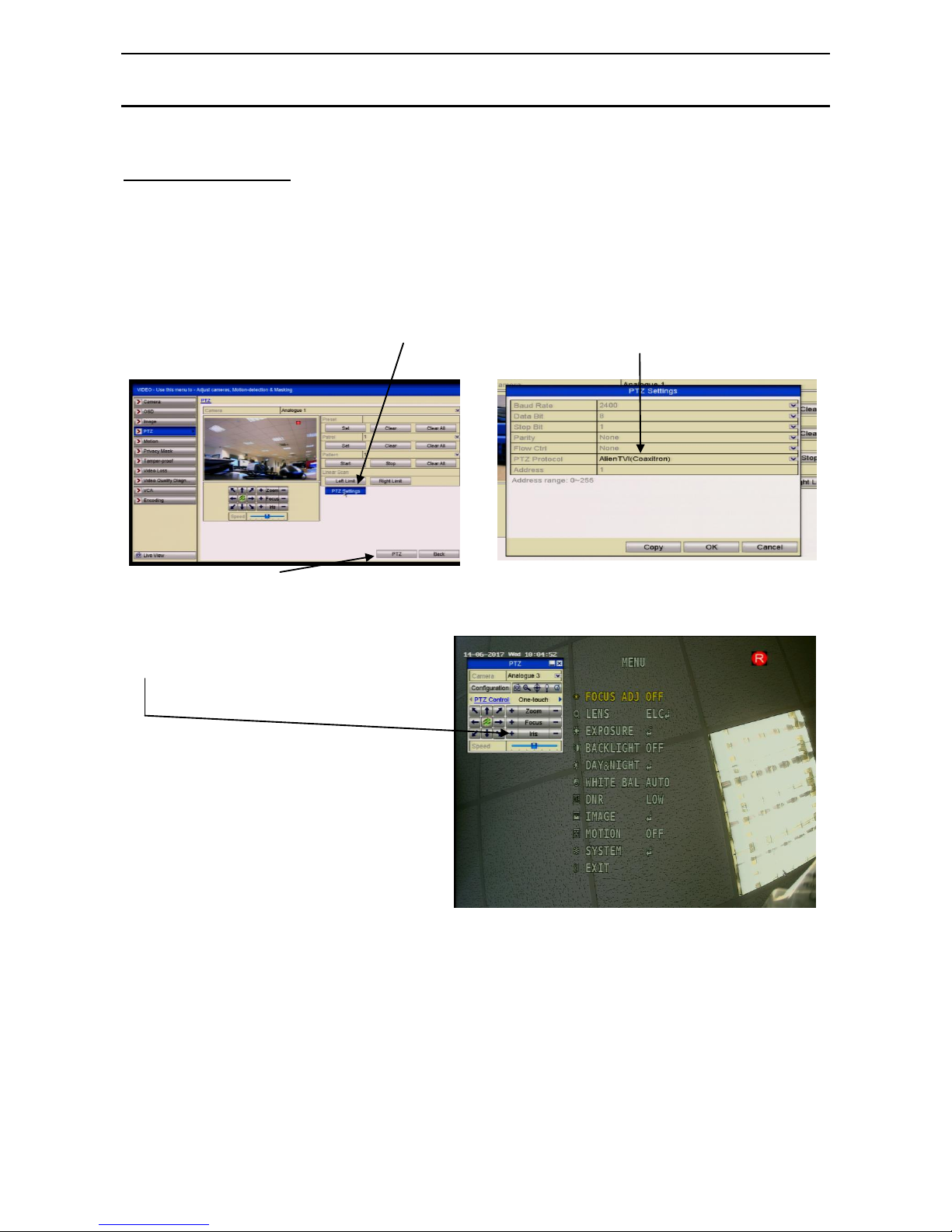
Menu Access via DVR
Access to the camera menu is via the menu buttons on the camera or via the Up the Co-ax
connection. Access by the menu buttons is described below. To use the Up the Coax connection,
this can be accessed using the PTZ menu in the MEGA TVI or MAX TVI DVRs using the
AlienTVI(Coaxitron) protocol. This protocol is generally set in the PTZ Settings menu as default
but if not, select using the following:
Enter the DVR Menu, click on Video, PTZ and select the channel number of the TVI camera
connected to the DVR. Then click on PTZ Settings and select AlienTVI(Coaxitron) and click
OK.
Now click on the PTZ button at the
bottom of the screen and a full
screen picture will be displayed with
the PTZ control menu. Click on the
IRIS+ button to display menu
Use the directional arrows to move
up and down or right to select
options.
Page 3
HD-TVI XSEE515
SEE515 fixed lens Internal* HD-TVI & Analogue Camera with IR
Email: [email protected] Last Revised 15/06/2017
OSD Menu
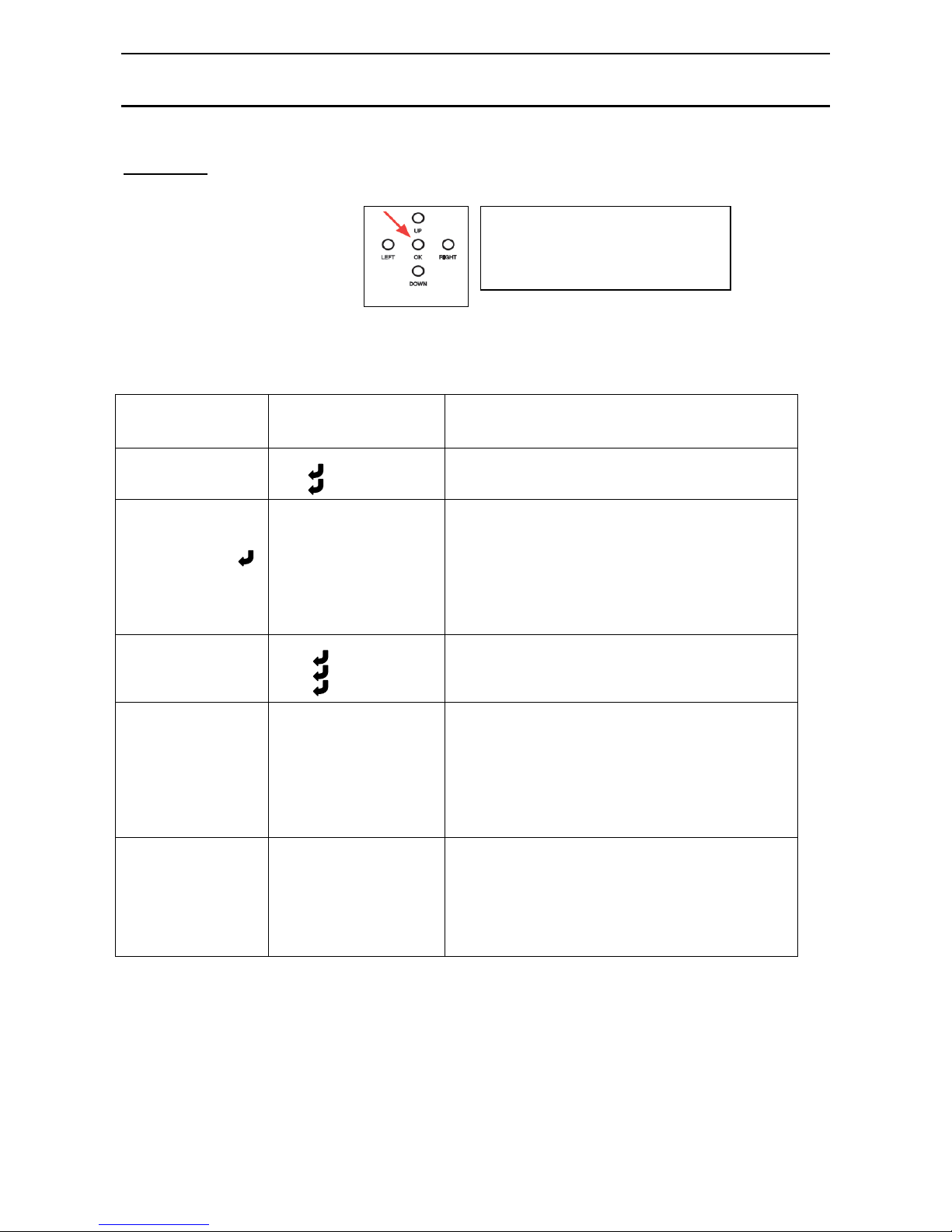
The SEE515 has an on screen display menu. This can be accessed using the small joystick on the
camera lead.
Alternatively use the TVI DVR PTZ menu as detailed in “Menu Access via DVR” above.
The following menu display is shown:
FOCUS ADJ OFF
ON
Focus adjustment display (Not relevant for fixed lens)
LENS
ELC
ALC
Mode - Normal
Mode – Indoor
EXPOSURE
BRIGHTNESS
SHUTTER
SENS-UP
AGC
RETURN
1 ~ 20
Auto / Manual1/25,1/50,1/100,1/240,1/500,1/1000,1/2000,1/4000,
1/8000,1/16000,1/30000, 1/60000
Off /x2/x3/x4/x5/x6/x7/x8
1 ~ 20
BACKLIGHT
OFF
HLC
BLC
WDR
Level 1 ~ 20 / Mode – All Day / Night Only
H-Pos – V-Pos – H-Size – V-Size - Return
Weight – Low / Middle / High - Return
DAY&NIGHT
EXTERN / AUTO
COLOUR / B&W
Anti-Sat. 1 ~ 20
Extern S/W High / Low
AGC Threshold 1 ~ 20
AGC Margin 1 ~ 20
Delay – Low / Middle / High - Return
WHITE BALANCE
AUTO
AUTOext
PRESET (Push)
MANUAL
Kelvin – Low / Middle / High
R-Gain 1 ~ 20
B-Gain 1 ~ 20 - Return
Press the centre button straight down
(see arrow) to enter the menu and use
Left, Right, Up and Down to move
through and amend menu settings.
Page 4
HD-TVI XSEE515
SEE515 fixed lens Internal* HD-TVI & Analogue Camera with IR
Email: [email protected] Last Revised 15/06/2017
DIGITAL NOISE
REDUCTION
DNR
Off / Low / Middle / High
IMAGE
SHARPNESS
GAMMA
COLOR GAIN
MIRROR
FLIP
D-ZOOM
ACE
DEFOG
SHADING
PRIVACY
RETURN
1 ~ 10 Default 5
0.55 / 0.6 / 0.65 /0.45 / 0.5 Default 0.5
1 ~ 20 Default 12
Off / On
Off / On
1.0X ~ 8.0X
Off / Low / Middle / High (Adaptive Colour &
Contrast Enhancement)
Off / On Mode – Auto / Manual
Level - Low / Middle / High
Off / On Weight – 1% ~ 100% Ret Default 100%
Off / On Zone Num (0 ~ 15) / Zone Disp Off /On
H-Pos / V-Pos / H-Size / V-Size /
Y-Level (1 ~ 20) / CR Level (1 ~ 20)
CB Level (1 ~ 20) / Return
MOTION
OFF / ON
Sensitivity 0 ~ 20
Window Tone 0 ~ 6
Det H-Pos <nn>
Det V-Pos <nn>
Det H-Size <nn>
Det V-Size <nn>
Motion OSD Off / On
Alarm Off / On
Return
<nn> value = position or size
SYSTEM
COM.
IMAGE RANGE
OUTPUT MODE
MONITOR
FRAME RATE
CVBS
LANGUAGE
COLOR BAR
RESET ON(Push)
Return
Cam ID 0 ~ 255
Baud Rate 2400 / 4800 / 9600 / 57600 /115200
USER Offset 1 ~ 20 (Default = 8) / FULL / COMP
1080P(25 FPS) / 720P(25FPS) / 720P CROP (50FPS)
0 ~ 3
25 FPS / 30 FPS
PAL / NTSC
ENG / CHN / CHN(S) / KOR / JPN / DEU / FRA /NLD
ESP / ITA
Off / On
Return
EXIT
Press IRIS + to exit
Page 5
HD-TVI XSEE515
SEE515 fixed lens Internal* HD-TVI & Analogue Camera with IR
Email: [email protected] Last Revised 15/06/2017
Menu Description
FOCUS ADJ OFF
ON Focus adjustment display (Not relevant for fixed lens)
LENS
ELC
ALC
Mode – Normal
Mode – Indoor
ELC Electronic Light Compensation
Electronic Light Compensation is used for cameras fitted with a board or manual Vari-Focal lens.
Press IRIS + button or joystick centre button
MODE Normal Normal lighting conditions
RETURN Return to main menu
ALC Automatic Light Compensation
Automatic Light Compensation is used for cameras fitted with an Auto DC Iris Vari-Focal lens.
Press IRIS + button or joystick centre button
MODE Indoor Normal indoor lighting conditions
RETURN Return to main menu
EXPOSURE
BRIGHTNESS
SHUTTER
SENS-UP
AGC
RETURN
1 ~ 20
Auto / Manual1/25,1/50,1/100,1/240,1/500,1/1000,1/2000,1/4000,
1/8000,1/16000,1/30000, 1/60000
Off /x2/x3/x4/x5/x6/x7/x8
1 ~ 20
BRIGHTNESS 1 ~ 20 (Default = 15)
Use this setting to increase brightness by opening camera iris. Useful for improving night time
viewing by using in conjunction with the Sens-Up option. However be aware to consider possible
effects when there is strong sunlight in summer that may cause the picture to white out.
SHUTTER Auto / Manual
1/25,1/50,1/100,1/240,1/500,1/1000,1/2000,1/4000,1/8000,
1/16000,1/30000, 1/60000
Shutter speed changes allow you to freeze moving objects without ghosting but reduce the amount
of available light the faster the shutter operates. At night the slower the shutter speed the more light
is available.
SENSUP Off /x2/x3/x4/x5/x6/x7/x8
The SensUp option allows the shutter speed to be reduced allowing additional light to be captured.
Increasing brightness also helps night time viewing (see BRIGHTNESS setting above).
AGC 1 ~ 20 (Default = 20)
For better performance in low light conditions the AGC (Automatic Gain Control) can be increased.
This has the effect of making the picture brighter but it may also add more noise as it amplifies all
aspects of the video signal.
RETURN
Return to main menu.
Page 6
HD-TVI XSEE515
SEE515 fixed lens Internal* HD-TVI & Analogue Camera with IR
Email: [email protected] Last Revised 15/06/2017
BACKLIGHT
OFF
HLC
BLC
WDR
Level 1 ~ 20 / Mode – All Day / Night Only
H-Pos – V-Pos – H-Size – V-Size - Return
Weight – Low / Middle / High - Return
Backlight Compensation when set, can balance light levels during day and night so that light hitting
objects viewed, is evenly spread across the picture. There are three options BLC, HLC and WDR
that can be selected.
BLC
(Backlight Compensation)
H-Pos – V-Pos – H-Size – V-Size
BLC is the standard setting for low level light differences. Select an area where BLC is required.
Using the H-Pos (Horizontal Position) and V-Pos (Vertical Position) followed by H-Size
(Horizontal Size) and V-Size (Vertical Size) create a box where light balancing is required.
HLC
(High Level Backlight Compensation)
Level 1 ~ 20 / Mode – All Day / Night Only
HLC is high level backlight compensation that will darken a bright area e.g car headlights. This can
be set for all day or night only. The lower the level the more compensation is applied. Note that
using the night option may be best as daytime pictures generally give a more even spread of light
apart from sunlight issues.
WDR
(Wide Dynamic Range)
Weight – Low / Middle / High
WDR is used for surveillance applications where there is a large difference in foreground and
background light levels. This is typical in homes and office buildings that have large areas of glass
with direct sunlight outside. Without the option switched on, views by cameras looking through
windows may not give good reproduction outside. Also where there are areas of shadow and bright
sunlight, the WDR option helps to balance light levels.
Return
Return to main menu
Page 7

HD-TVI XSEE515
SEE515 fixed lens Internal* HD-TVI & Analogue Camera with IR
Email: [email protected] Last Revised 15/06/2017
DAY&NIGHT
EXTERN / AUTO
COLOUR / B&W
Anti-Sat. 1 ~ 20
Extern S/W High / Low
AGC Threshold 1 ~ 20
AGC Margin 1 ~ 20
Delay – Low / Middle / High - Return
Day & Night menu controls light settings and predominantly provides options for using the cameras
Infra Red facilities. There are four sub-options namely External, Auto, Colour and Black & White.
EXTERNAL
This option does not use the internal CDS sensor to measure the available light. With cameras using
their own IR light source, it is often better to use the external option. Anti-Saturation helps to limit
picture saturation and External S/W (switch) can be set to High or Low limit. High switches to B/W
and Low to Colour which is opposite to the Auto, colour and B/W options. AGC threshold and
margin control video gain and Delay allows the switching from D/N or N/D to be delayed in a Low,
Middle or High time period.
AUTO
The standard Auto function uses the internal CDS to measure available light. This uses AGC
(Automatic Gain Control) and Anti Saturation to measure picture quality before switching which is
used in conjunction with a Delay time that Delay allows the switching from D/N or N/D to be
delayed in a Low, Middle or High time period.
COLOUR
This option will remain in colour mode day and night. This uses AGC (Automatic Gain Control)
and Anti Saturation.
B&W
When this option is selected the camera will remain in black and white mode, day and night. This
uses AGC (Automatic Gain Control) and Anti Saturation.
Return
Return to main menu.
Page 8
HD-TVI XSEE515
SEE515 fixed lens Internal* HD-TVI & Analogue Camera with IR
Email: [email protected] Last Revised 15/06/2017
WHITE BALANCE
AUTO
AUTOext
PRESET (Push)
MANUAL
Press IRIS+ or joystick centre button down
Kelvin – Low / Middle / High
R-Gain 1 ~ 20 (default 10)
B-Gain 1 ~ 20 (default 10)
This feature automatically adjusts the colour settings in the camera to match the type of light
available, so that white and other colours appear as natural as possible.
AUTO
This option automatically sets white balance.
AUTOext
This option is generally used to set white balance when camera is used externally.
PRESET(Push) Press IRIS+ or joystick centre button down
This option allows you to set white balance using current light levels. Settings will only change
when you press IRIS+ or joystick centre button down.
MANUAL
Use this option to manually balance light levels. Note that the manual option is used for a static
light environment and generally suitable for cameras installed indoors using constant artificial light.
Kelvin - Low / Middle / High
Sets colour temperature to low / middle / high
R-Gain 1 ~ 20
Set Red gain
B-Gain 1 ~ 20
Set Blue gain
RETURN
Return to main menu
DIGITAL NOISE
REDUCTION
DNR
Off / Low / Middle / High
DNR Off / Low / Middle / High
Digital Noise Reduction is generally applied when the Sens-Up feature is used to improve night
time views in low light conditions. Using the Sens-Up option slows the shutter speed but this
increases noise and causes grainy picture effects. DNR helps to minimise this effect. The options
low, medium and high, apply different levels of noise reduction and therefore have to be tested to
gain the best result as light levels will be different at every site and location.
Page 9
HD-TVI XSEE515
SEE515 fixed lens Internal* HD-TVI & Analogue Camera with IR
Email: [email protected] Last Revised 15/06/2017
IMAGE
SHARPNESS
GAMMA
COLOR GAIN
MIRROR
FLIP
D-ZOOM
ACE
DEFOG
SHADING
PRIVACY
RETURN
1 ~ 10 (Default 5)
0.55 / 0.6 / 0.65 /0.45 / 0.5 (Default 0.55)
1 ~ 20 (Default 12)
Off / On
Off / On
1.0X ~ 8.0X (Default 1.0X)
Off / Low / Middle / High (Adaptive Colour &
Contrast Enhancement)
Off / On Mode – Auto / Manual
Level - Low / Middle / High
Off / On Weight – 1% ~ 100% Default 100%
Off / On Zone Num (0 ~ 15) / Zone Disp Off /On
H-Pos / V-Pos / H-Size / V-Size /
Y-Level (1 ~ 20) / CR Level (1 ~ 20)
CB Level (1 ~ 20) / Return
IMAGE
The Image menu covers a variety of options including colour, sharpness, mirror, defog, shading and
privacy masking facilities.
Sharpness 1~ 10 (Default)
The sharpness control is done by digital correction and the best way to set this option is to set level
to maximum of 10, then flick back to 1, to see the difference. Then adjust to display sharpest picture
without displaying too heavy black lines around subjects.
Gamma 0.55 / 0.6 / 0.65 /0.45 / 0.5 (Default 0.55)
Gamma correction controls and adjusts the overall brightness of an image. Try the various options
to give best quality brightness.
Color Gain 1 ~ 20 (Default 12)
This option changes the colour gain. Try to match the colours displayed as close as possible on the
monitor with the colours viewed by eye.
Mirror Off / On
This option changes a left handed view to a right handed view if switched on.
Flip Off / On
This option turns a view upside down. This option is generally used with the Mirror function.
D-Zoom 1.0X ~ 8.0X (Default 1.0X)
The digital zoom function allows you to enlarge the view by expanding the pixel size. You will
notice that as picture size increases the sharpness of the picture deteriorates so you will only be able
to use the function up to a certain point of magnitude.
ACE Off / Low / Middle / High
Adaptive Colour & Contrast Enhancement (ACE) is an automated option for adjusting colour and
contrast as light levels changes through the day. Low, middle or high options are available.
Page 10
HD-TVI XSEE515
SEE515 fixed lens Internal* HD-TVI & Analogue Camera with IR
Email: [email protected] Last Revised 15/06/2017
DEFOG Off / On
Mode – Auto - Level - Low / Middle / High
Manual - Level - Low / Middle / High
The defog option can be used to improve the captured image in poor weather conditions such as
smog, fog or smoke. Three levels of optimisation can be applied, low, middle or high. This option
is useful to stabilise rapid fluctuating light levels.
SHADING Off / On
Weight 1% ~ 100% (Default 100%)
The shading option is used to provide overall shading with 100% providing no shading and 0%
providing full shading.
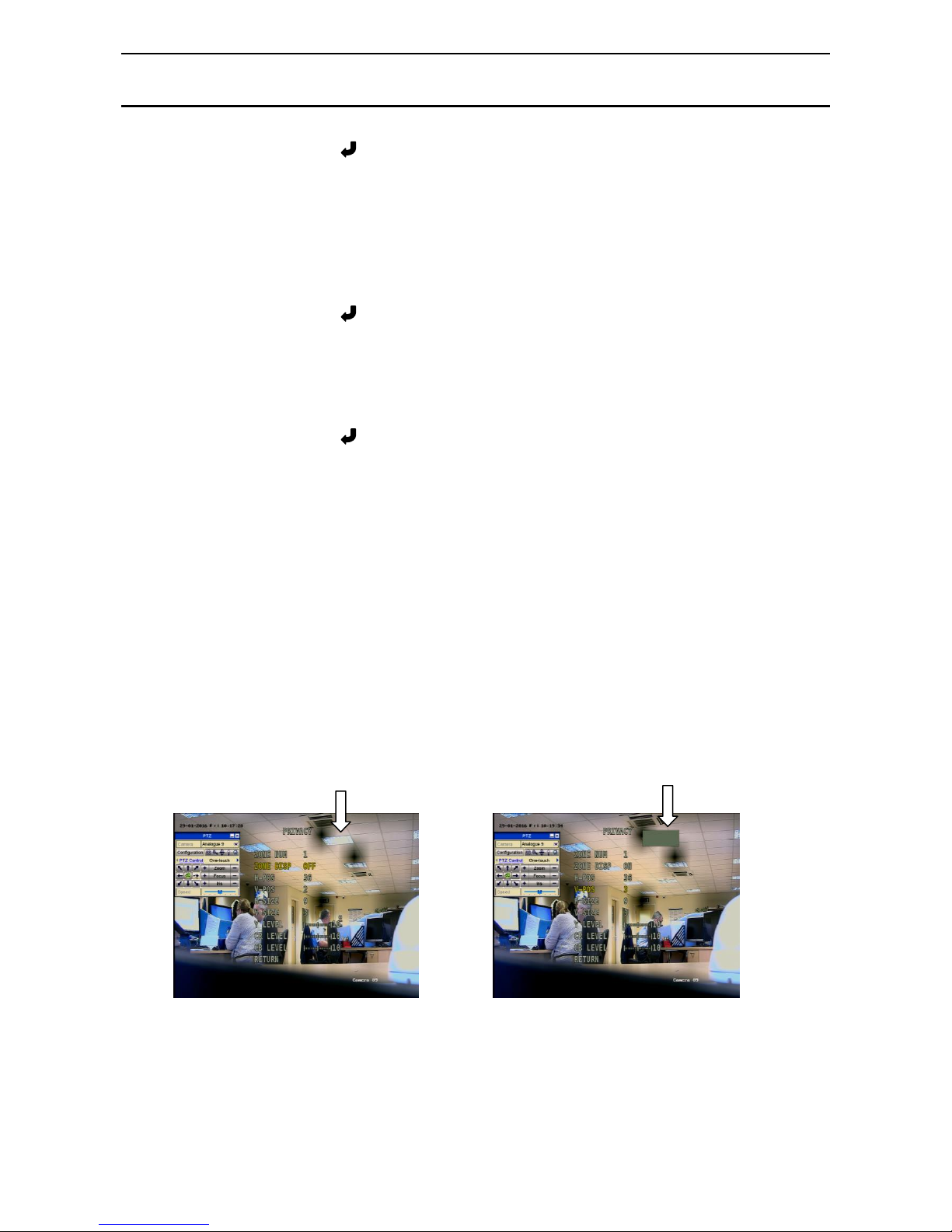
PRIVACY Off / On
Zone Num (0 ~ 15) This function allows the creation of up to 15 coloured
areas to be created to provide privacy masking.
Zone Disp Off /On The Zone Display allows you to switch on and off the
zone number.
H-Pos / V-Pos / H-Size / V-Size
Each area can be positioned using the H-Pos (horizontal position), VPos (vertical position) and
sized using the H-Size (horizontal size) and V-Size (vertical size) options. The Zone Display allows
you to switch on and off the zone number.
Y-Level (1 ~ 20)
CR Level (1 ~ 20)
CB Level (1 ~ 20)
The Y-Level is the colour hue for privacy masking and the CR Level (Chrominance Red) and CB
Level (Chrominance Blue) are used to create the required colour.
The pictures below show an area that has been masked, before and after.
RETURN
Return to main menu
Page 11
HD-TVI XSEE515
SEE515 fixed lens Internal* HD-TVI & Analogue Camera with IR
Email: [email protected] Last Revised 15/06/2017
MOTION
OFF / ON
Sensitivity 0 ~ 20
Window Tone 0 ~ 6
Det H-Pos <nn>
Det V-Pos <nn>
Det H-Size <nn>
Det V-Size <nn>
Motion OSD Off / On
Alarm Off / On
Return
<nn> value = position or size
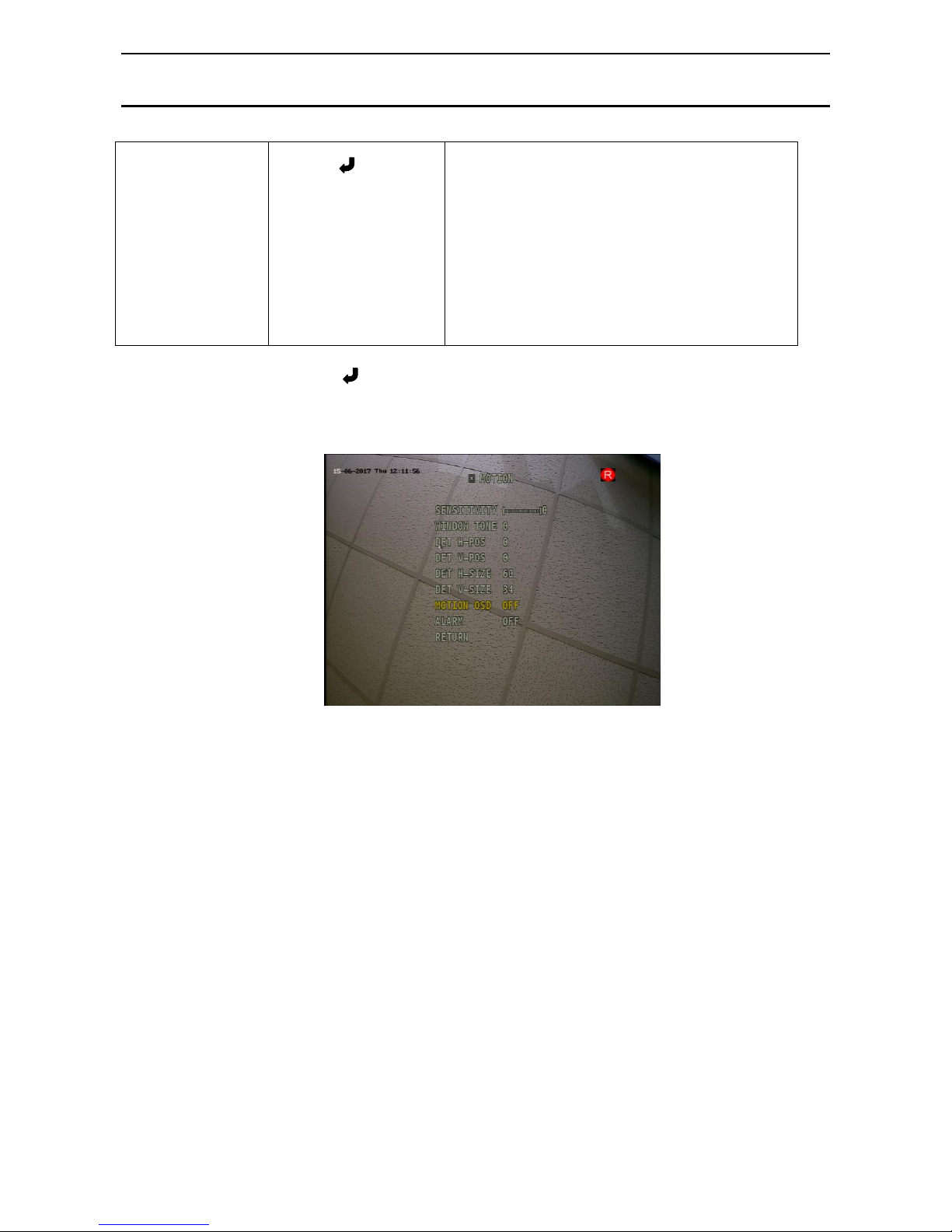
MOTION Off / On
The motion option when switched on allows you to create up to three areas in the picture and as
motion is detected in these areas, the areas will be displayed with red moving boxes.
Sensitivity 0 ~ 20
Sets the sensitivity of the motion detection.
Window Tone 0 ~ 6
Sets the background tone to enable the motion detect
area to be more or less prominent.
Det H-Pos / V-Pos / H-Size / V-Size
Each area can be positioned using the H-Pos (horizontal
position), VPos (vertical position) and sized using the H-Size
(horizontal size) and V-Size (vertical size) options.
Motion OSD Off / On
Alarm Off / On
Switch off motion alarm
Return Return to main menu
Page 12
HD-TVI XSEE515
SEE515 fixed lens Internal* HD-TVI & Analogue Camera with IR
SYSTEM
COM.
IMAGE RANGE
OUTPUT MODE
MONITOR
FRAME RATE
CVBS
LANGUAGE
COLOR BAR
RESET ON(Push)
Return
Cam ID 0 ~ 255
Baud Rate 2400 / 4800 / 9600 / 57600 /115200
USER Offset 1 ~ 20 (Default = 8) / FULL / COMP
1080P(25 FPS) / 720P(25FPS) / 720P CROP (50FPS)
0 ~ 3 Monitor Type (Default = 0)
25 FPS / 30 FPS
PAL / NTSC
ENG / CHN / CHN(S) / KOR / JPN / DEU / FRA / NLD
ESP / ITA
Off / On
Return
The SYSTEM menu provides a number of general facilities. These include setting a camera
identification number and baud rate for RS485 connection, resolution mode, frame rate and colour
standard, language, test colour bar and camera reset option.
COM. Cam ID 0 ~ 255
Set ID number in camera between 0 and 255
Baud Rate 2400 / 4800 / 9600 / 57600 /115200
IMAGE RANGE User
Offset 1 ~ 20 (Default = 8)
Full
Comp
OUTPUT MODE 1080P(25 FPS) / 720P(25FPS) / 720P CROP (50FPS)
Sets the camera output mode. 1080P is default.
MONITOR 0 ~ 3 (Default = 0)
FRAME RATE 25 FPS / NTSC
25 Frames per second PAL UK / 30 Frames per second NTSC USA
CVBS PAL / NTSC
PAL UK / NTSC USA
LANGUAGE ENG / CHN / CHN(S) / KOR / JPN / DEU / FRA /
English / Chinese / Chinese Formal / Korean / Japanese / German / French /
NLD / ESP / ITA
Dutch / Spanish / Italian
COLOR BAR Off / On
Useful for confirming CCD performance.
RESET ON(Push) Press IRIS+ or joystick centre button down - Return
EXIT Press IRIS + to exit
Page 13
HD-TVI XSEE515
SEE515 fixed lens Internal* HD-TVI & Analogue Camera with IR
Email: [email protected] Last Revised 15/06/2017
USING THE CAMERA MENU
Whilst there are no recommended camera settings as installation sites do vary considerably,
invariably most problems occur with light levels particularly at night. Making changes to the menus
can improve results. If making changes, it is a better option to test each change separately, so that if
results are worse reverse the change, but leave it set, if the results are better.
The following changes can be tried for general improvements, but note that they will not apply to
every installation.
Poor Night time pictures: Exposure Menu - Brightness 15
Sens-Up x4
AGC 12
Day time pictures colour poor: Image Menu - Gamma Try each setting and leave on best
ACE ON
Defog ON
SEE515 Camera Specifications
Sensor
Panasonic 34227 CMOS
IP Rating
IP66
Lens Size
3.6mm Fixed
Mega Pixel
2.1 Mega Pixel
Resolution
1920 x 1080P
IRs
12 LEDs 15 metre range
Day/Night
Mechanical True Day/Night
Input Voltage
12v DC ± 15%
Video Outputs
2 BNCs - 1 x HD-TVI & 1 x CVBS
Power/Current
135mA IRs off 260mA IRs on
Min.Illumination
0.01 Lux Colour 0.001 Lux B/W
Power Plug
2.1 mini jack plug
S/N Ratio
More than 50dB
Menu Access
Coaxitron / Joystick Control
Sens-UP
0 ~ 32x
White Balance
Auto
WDR
120dB
Dimensions
60mm x 95mm
Digital Zoom
16x Digital Zoom
Build/Colour
Metal - Black or White
Motion Detect
Available
Privacy Masking
Available
AGC
Automatic/Selectable
Noise Reduction
3DNR
White Balance
Auto and manual options
BLC
Backlight Compensation/HLC/WDR
All specifications are approximate. Kovert.com reserves the right to change
any product specification or features without notice. Whilst every effort is
made to ensure that these instructions are complete and accurate,
kovert.com cannot be held responsible in any way for any losses, no matter
how they arise, from errors or omissions in these instructions, or the
performance or non-performance of the camera or other equipment that
these instructions refer to.
 Loading...