

Page 1
Version 1.0
Please read this user manual carefully before using this product.
Failure to understand operation procedures may result in injury.
Side View
Rigid Inspection Camera
Mod el: 490 8AL
OFF
ON
OFF
ON
Side View
Rigid Inspection Camera
Mod el: 490 8AL
Page 2

General Safety Information ---------------------------------------------------------------------------- 02
Welcome ------------------------------------------------------------------------------------------------------ 03
Features ------------------------------------------------------------------------------------------------------ 03
Packing List -------------------------------------------------------------------------------------------------- 03
Structure ----------------------------------------------------------------------------------------------------- 04
Installation ---------------------------------------------------------------------------------------------------- 05
To Install Monitor Mounting Bracket ---------------------------------------------------------- 05
To Insert SD Card ------------------------------------------------------------------------------------ 05
To Connect USB Cable ------------------------------------------------------------------------------ 05
To Connect Monitor Power ------------------------------------------------------------------------ 05
To Connect Camera Power ------------------------------------------------------------------------ 06
Video Output of Monitor ---------------------------------------------------------------------------- 06
Video Output of Camera ---------------------------------------------------------------------------- 06
Operation ------------------------------------------------------------------------------------------------------ 06
Basic Operation-------------------------------------------------------------------------------------------06
Recording Video ----------------------------------------------------------------------------------------- 07
Taking Photos -------------------------------------------------------------------------------------------- 07
Playback Video/Picture ------------------------------------------------------------------------------- 07
Deleting Video/Picture -------------------------------------------------------------------------------- 08
Deleting Folder ------------------------------------------------------------------------------------------ 08
How To Enter The Setting Mode ---------------------------------------------------------------- 09
Language Setting -------------------------------------------------------------------------------------- 09
Video System Setting -------------------------------------------------------------------------------- 09
Format ----------------------------------------------------------------------------------------------------- 09
Default Setup ------------------------------------------------------------------------------------------- 09
View Version Information --------------------------------------------------------------------------- 10
Date/Time Setting ------------------------------------------------------------------------------------- 10
Frame Rate Setting ---------------------------------------------------------------------------------- 10
Time Stamp Setting ---------------------------------------------------------------------------------- 10
Recording Type ----------------------------------------------------------------------------------------- 10
Event Playback ----------------------------------------------------------------------------------------- 10
Specifications ----------------------------------------------------------------------------------------------- 11
Troubleshooting -------------------------------------------------------------------------------------------- 12
FCC Information ------------------------------------------------------------------------------------------- 12
Page 3
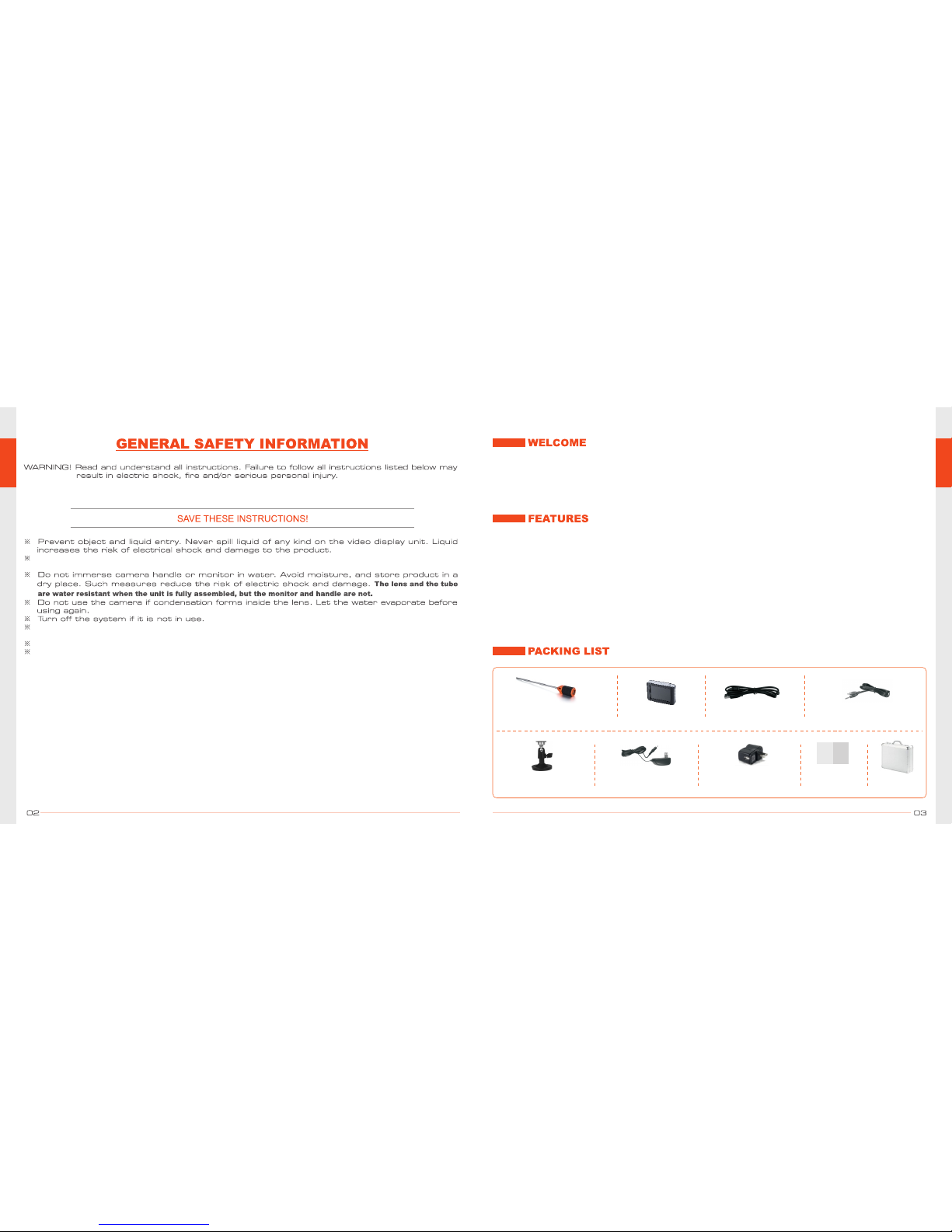
Than k you fo r p urch asi ng our si de vie w R igid I nspe cti on Came ra. Th is pro duct i s spec ial ly
desi gne d fo r ca vit y wa ll i nsp ecti on, wall t ie a nd dry rot inspe ctio n, i nsp ecti on o f s pace s
unde r flo ors, abov e cei ling s and behi nd pa nels and du cts , and m any m ore wh ere a rigi d sid e
view en dos cope is re quir ed.
l 2.4G hz wir eles s trans mis sion be twe en came ra and mon ito r
l Mini st ain less st eel ins ert ion tub e, dia . 9mm
l Inse rti on tube le ngth 30 0mm
l Side vi ew cam era hea d, 380T VL
l 2 high int ens ity LED s on camer a head , provi din g light up to 1.5 met ers
l Vide o out fun ctio n
l 3.5" TFT-LCD wi rel ess mon itor wi th SD car d recor din g (Max. SD ca rd: 32G B)
l Water pro of leve l: IP67 (c ame ra tube on ly)
l Buil t-i n Recha rgea ble Li -bat tery fo r both ca mera an d monit or
l Mult i-l angu age sup por t
1x Monitor
1x USB Cable 1x Video Out Cable
1x
for Monito r
Magnet Sta nd
1x Camera Probe
1x Case
Manual
1x Manual
1x Power adapter
for Camera
1x Power adapter
for Monito r
The unit is not shoc k-resis tant. Do not use thi s camera as a hammer an d avoid high impa ct
resulta nt from thing s such as droppin g the unit from heig ht.
This pro duct can o nly be co mpletely disconn ected fr om its pow er source by unplu gging the
power ad apter.
Do not cut the DC power cable off provided with this product to fit with another power source.
Use power adapters provided by vender only.
Page 4
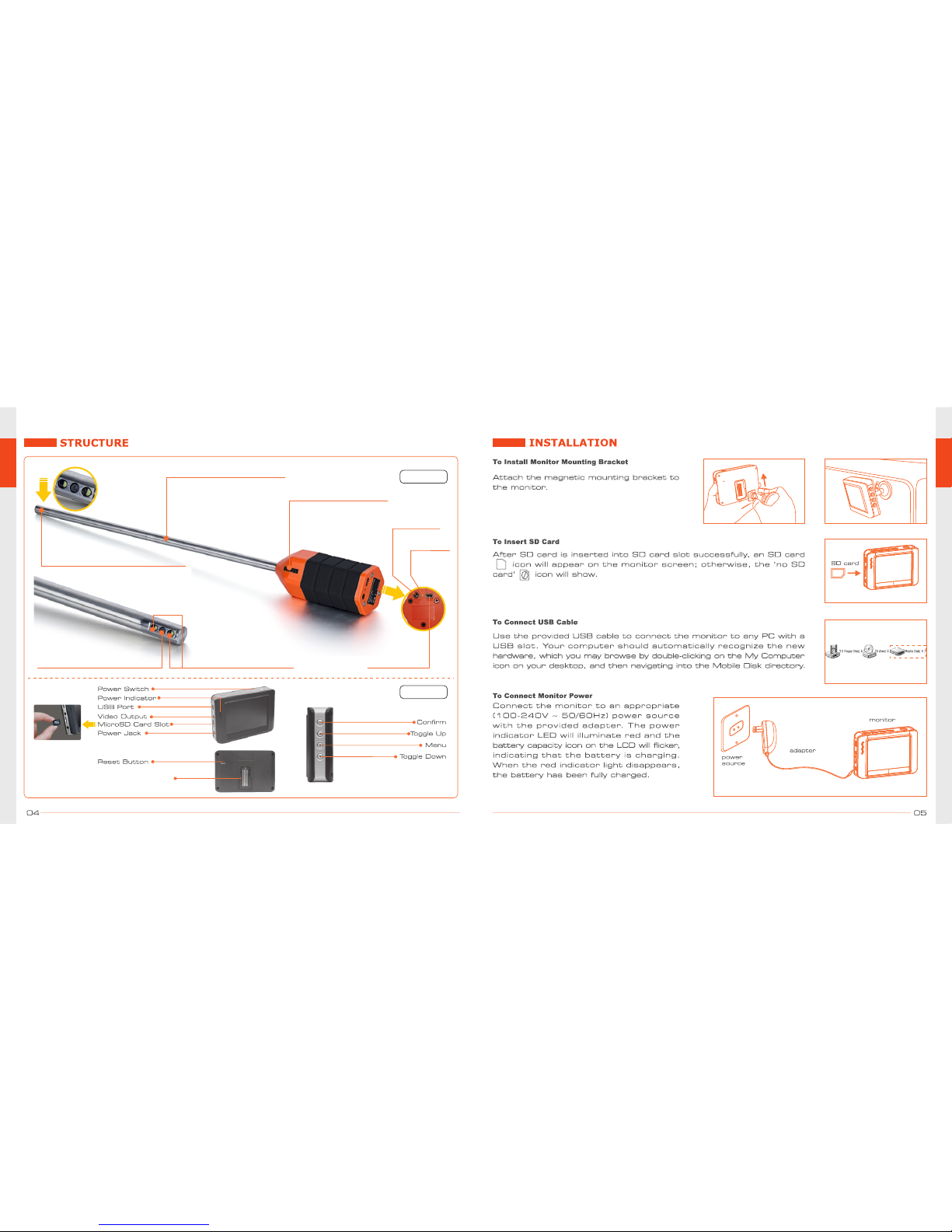
Slide the
bracket
upward.
Side View Camera
LEDs Lighting Distance Up To 1.5m
Stainless Steel Insertion Tube
Dia. 9mm
Lenth 300mm
Side View Camera
2 High Intensity LEDs
Lighting Distance: 1.5m
On/Off Switch
LED Brightness Control
Video Out
USB Charging
Indicator
MONITOR
MAIN UNIT
Magnet Stand Slot
Page 5
13:54:15 JPG
14:17:34 MP4
14:36:40 JPG
15:09:03 MP4
14:12:19 MP4
2013/03/21 0001/0005
Indicates
video file
Indicates
picture file
The JPG format file is a picture;
the MP4 format file is a video.
1.0x
Photo
Icon
zoom
SD Card
capacity time
[01:18:16]
2013/03/21
13:50:40
* press theIn real-time monitoring mode,
button to zoom interface.
Photo
Icon
Image
OFF
O
N
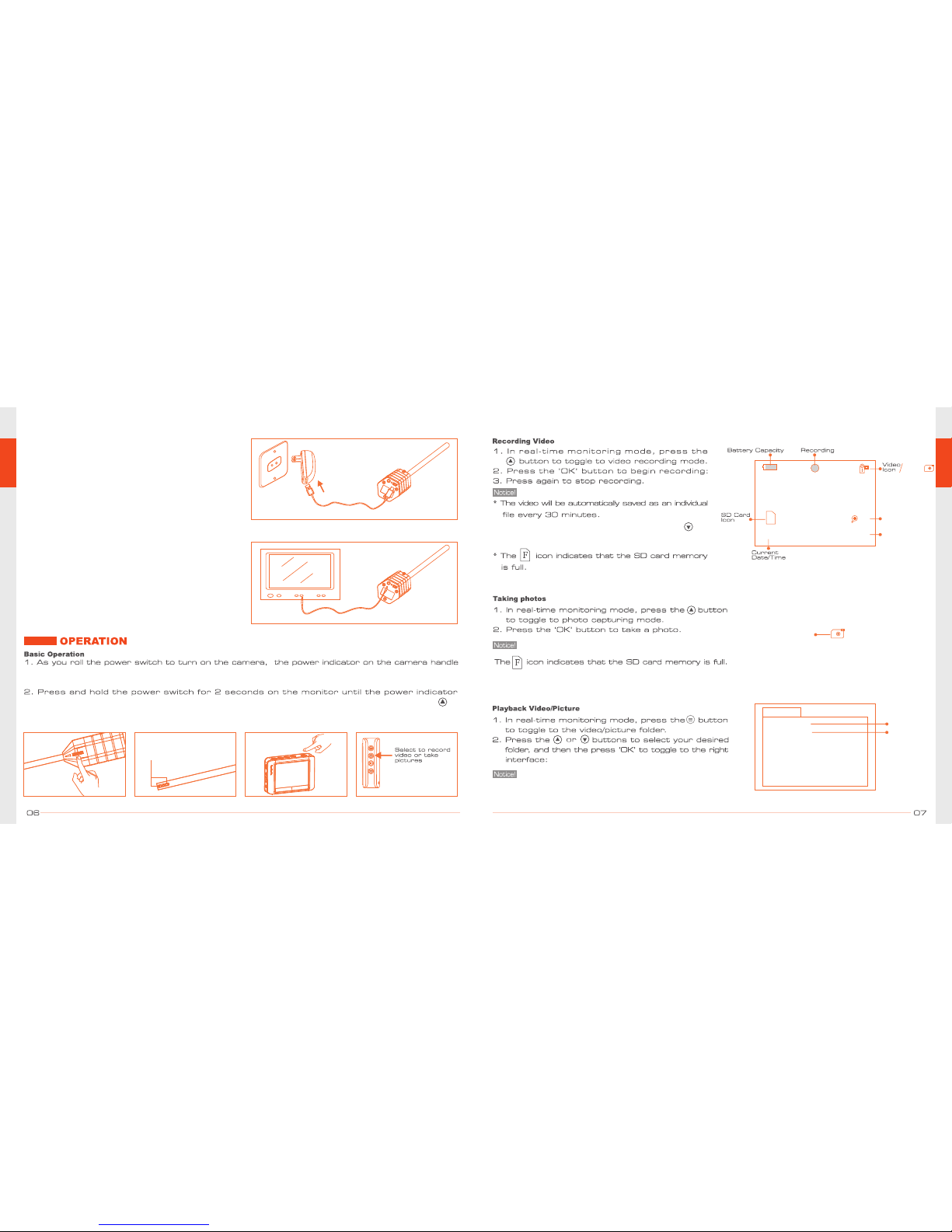
illuminates green. when the picture from the lens is displayed on the monitor, press the
button on the side of the mon itor. To toggle between video recordi ng and p icture taking
functions.
Insert video cable into the video out socket of
the monitor, insert the other end of the cable
into the video in jack of any compatible TV or
display device. The LCD monitor is now capable
of outputting high quality video to another
display.
Video Output of Monitor
Insert the video out cable to camera's video out
port, and another end to a TV, The camera is
now capable of outputting high quality video to
another display.
Video Output of Camera
Vi
d
e
o
O
u
t
U
SB
video output cable
TC4908
TV
Video In
To Connect Camera Power
Plug the USB cable into the power adapter, and
the other end into the camera to charge the
camera.
Power adapter
Vid
e
o
O
u
t
USB
USB cable
TC4908
power
source
will light RED. The rolling switch then acts as a dimmer for the LEDs that beside the camera on
the end of the tube.
Notice: You must use the original power
adapters provided by the vender.
Two LEDs provide lighting
Page 6
System Setting
00:00:05 00:05:12
2013/03/21 14:12:19
Press the or button to select your desired photo, press
‘OK’ button to view and press the button to exit.
13:54:15 JPG
14:17:34 MP4
14:36:40 JPG
15:09:03 MP4
14:12:19 MP4
2013/03/21 0001/0005
2013/03/18
2013/03/19
2013/03/20
2013/03/21
2013/03/17
2013/03/16
2013/03/15
FOLDER NOT EMPTY !
Page 7
Specifications
Items
Specifications
Items
Camera (Model No. TC4908)
Monitor (Model No. GB7307)
Diam. of Insertion Tube
Insertion Tube Length
Overall Length
Tube Material
Light Source
Effective Pixels
Mains Battery Charger
Depth of Field (DOF)
Field of View (FOV)
Water Proof
Operation Temperature
Battery capacity
Work Time
Charge time
9mm
300mm
400mm
Stainless Steel
2 high intensity LEDs for
1.5m lighting distance
768 x 494(NTSC) /
752 x 582(PAL)
Yes
6cm-infinite
55º
IP67 (Probe only)
-10ºC ~ 60ºC
1500mAh
4 hours
5 hours
3.5" TFT-LCD
320(R.G.B.) x 240dot
NTSC / PAL
FM
-85dBm (module)
1100MAH/3.7V
3 hours
3 hours
500MA(MAX)
Micro SD Card
.JPG
.AVI
640x480
30Frame/S
0~+45ºC
-20~+60ºC
Screen Size
Display Resolution
Video Format
Modulation Mode
Receive Sensitivity
Built-in Li-Battery Capacity
Charge Time
Work Time
Consumption Current
Memory
Picture Format
Video Format
Picture/Video Resolution
Frame Rate
Operation Temperature
Storage Temperature
2013 / 03 / 21
Page 8
1. Camera not charged
2. monitor not charged
1. charge camera
2. charge monitor
 Loading...