

Page 1
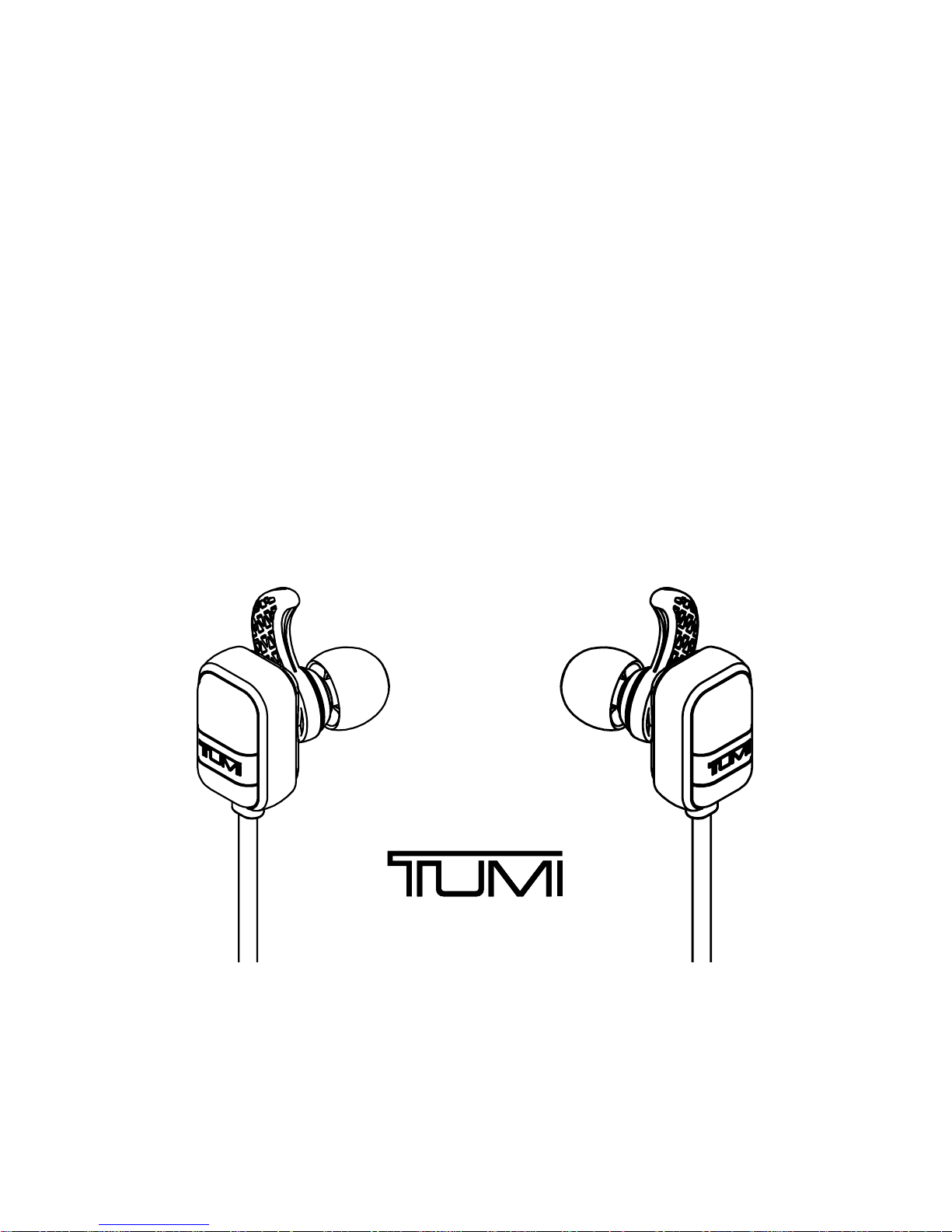
PREMIUM WIRELESS EARBUDS
Model:TUWEB
FCC ID:Z7RTUWEB
IC:10013A-TUWEB
Page 2
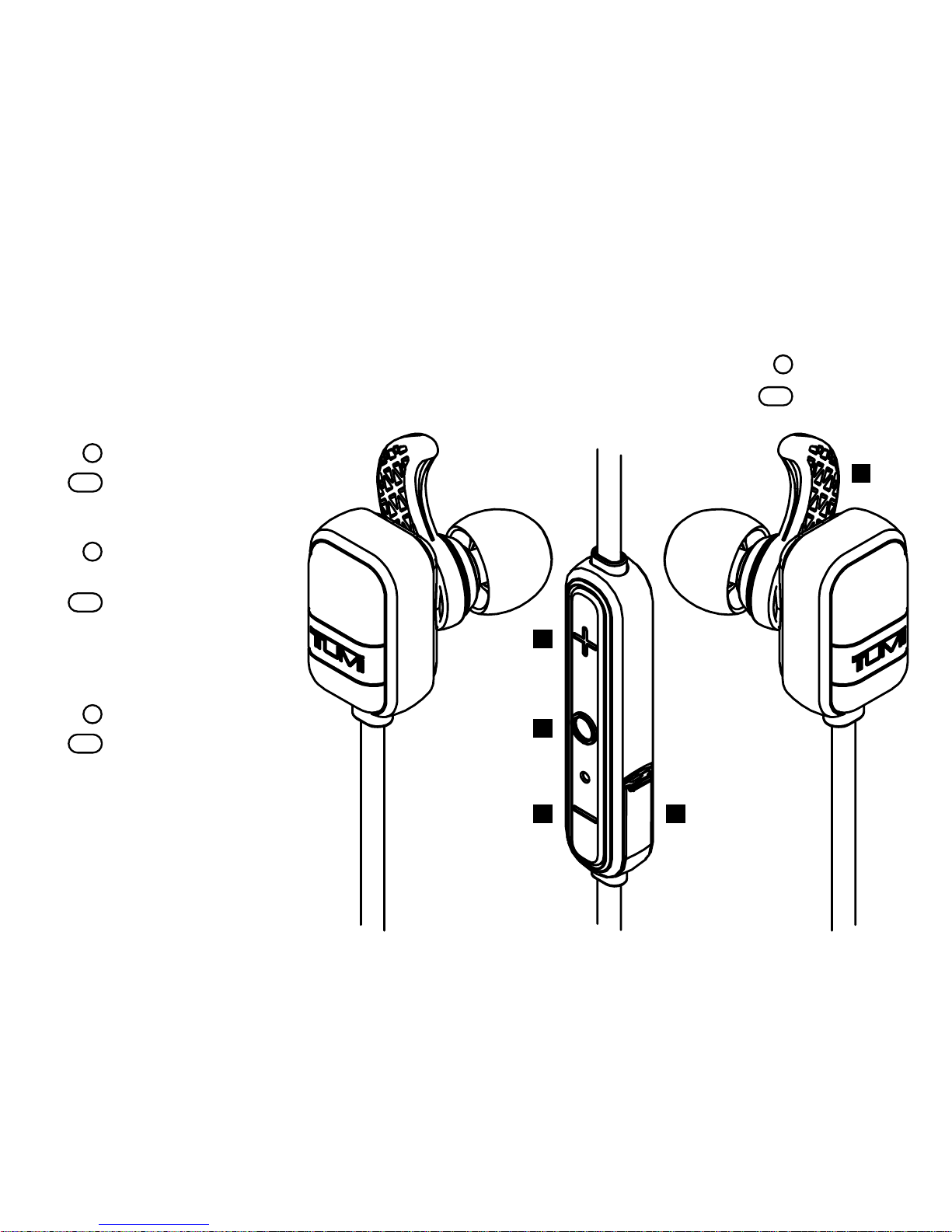
1. “+” Button
Volume up
Next track
2. “O” Button
Pause / play /
answer call
Power on, enter
pairing mode /
reject call
3. “-” Button
Volume down
Previous track
4. Micro-USB Charge Port
• Connect Micro-USB cable
here to charge Earbuds
• Pull tab to open
5. Removable Sport Hooks
1
4
5
2
3
GET TO KNOW YOUR TUMI EARBUDS
Short Press
Long Press
Page 3

ENG
1. Activate Bluetooth® on the phone
or device you are pairing with (see
your device’s instruction manual
for information on activating
its Bluetooth® settings).
2. Press and hold the “O” MultiFunction button for 5 seconds on
your Earbuds. The Earbuds will
turn on, and then automatically
enter pairing mode.
3. LED will flash alternating
RED and WHITE
4. Go to your phone or device’s
Bluetooth® settings and select
“TUMI Earbuds” from the list.
5. If asked for a passcode enter “0000”
Your Tumi Earbuds will remember the
last 8 devices it has paired with.
NOTE: If your Earbuds do not have an
active Bluetooth® connection and is left
on, it will shut itself o after 5 minutes.
To restart your Earbuds you will need to
press and hold the “O” Multi-Function
button for 5 seconds.
TURN ON & BLUETOOTH PAIRING
Page 4

CHARGING
YOUR TUMI EARBUDS
• Before using your Earbuds for the
first time, charge the unit 7 to 9 hours.
• To charge your Earbuds, plug the
included USB-to-Micro-USB cable
into a wall power adapter (not
included) or into a powered USB
port on a computer. Plug the MicroUSB connector end of the cable
into the Earbud charging port.
• It will take approximately 2
hours to reach a full charge.
1. Start playing music on your
paired device. Music plays
through your Earbud.
2. On your Earbud, push “+” or “-“ button
to increase or decrease volume.
3. NOTE: A tone sounds when maximum
volume setting is achieved.
4. Press the “O” Multi-Function
button to pause playback. Press
again to resume playback.
PLAY MUSIC
Page 5

ENG
You can listen through your Earbuds
and speak through your Earbud’s
microphone during phone calls.
If you make a call while paired: The
audio and microphone automatically
default to your Earbuds.
• Use your phone to make the call
• Press the “O” Multi-Function
button to end the call
If you receive a call while paired: Your
phone rings through your Earbuds.
TAKING CALLS
To listen and speak through
your speaker:
• Press the “O” Multi-Function
button to answer the call
• Press the “O” Multi-Function
button to end the call
• Press and hold the “O” MultiFunction button to reject the call
To listen and speak through your
phone (depending on your phone),
use your phone to answer the call,
or use your phone settings to switch
to your phone during a call.
Page 6
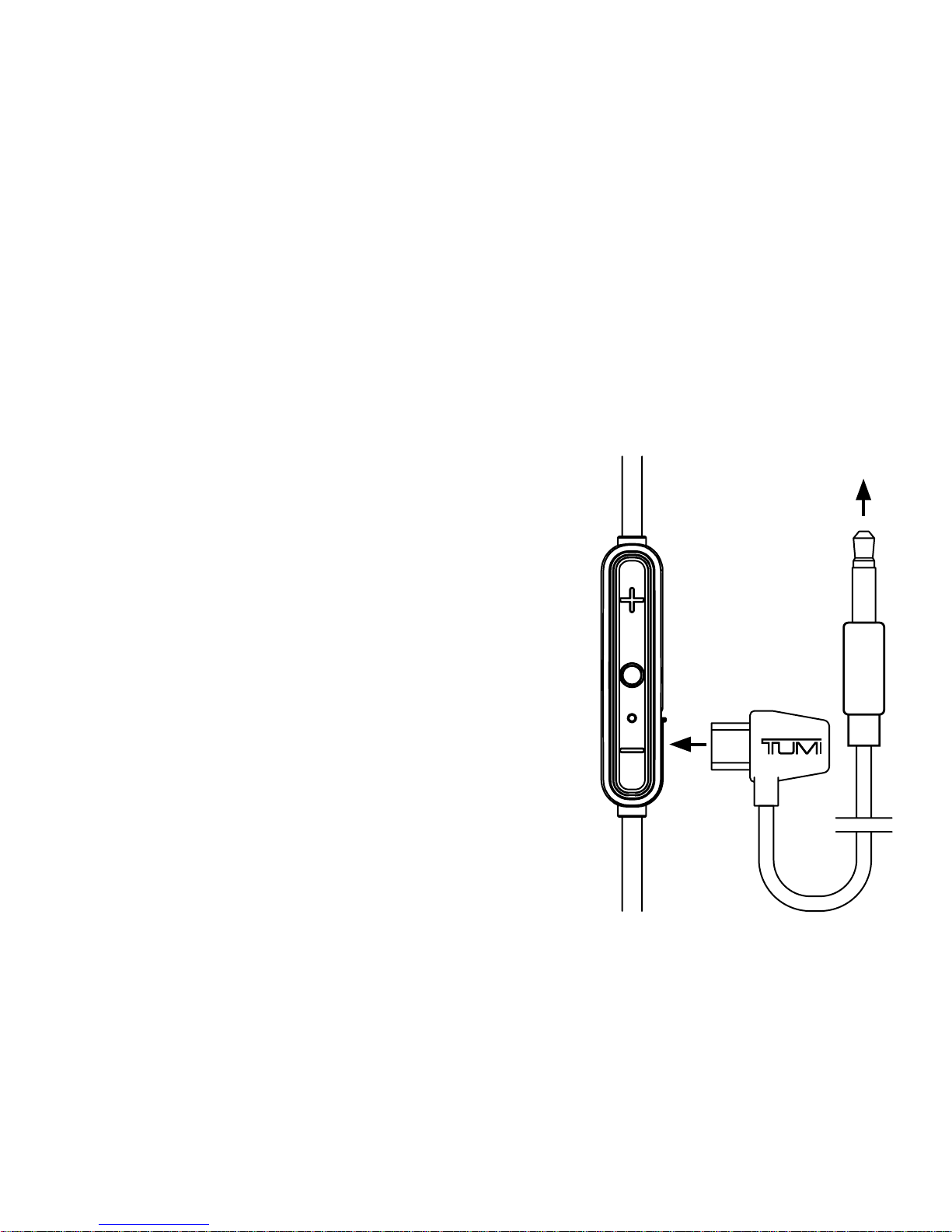
If your Earbuds lose power and will not turn
on, you can still listen to music by connecting
your Earbuds to an audio device (like a phone)
with the included AUX-Micro-USB cable.
• To complete the connection, connect the Earbuds
and your audio device with the included AUX-to-
Micro-USB cable. Plug the AUX connector end of
the cable into your Audio Device, and the MicroUSB connector end of the cable into your Earbud
charging port located on the remote control.
• Your Wireless Earbuds should now play music
through the AUX-Micro-USB connection.
NOTE: Your TUMI Wireless Earbuds will need
minimal power to use this feature. If Earbuds
have used all available power and have not been
charged in several weeks, you may need to plug
Earbuds in for 5-10 minutes to initiate this feature.
USE EARBUDS WITH LOW /
NO REMAINING BATTERY POWER
to Audio
Device
Page 7
ENG
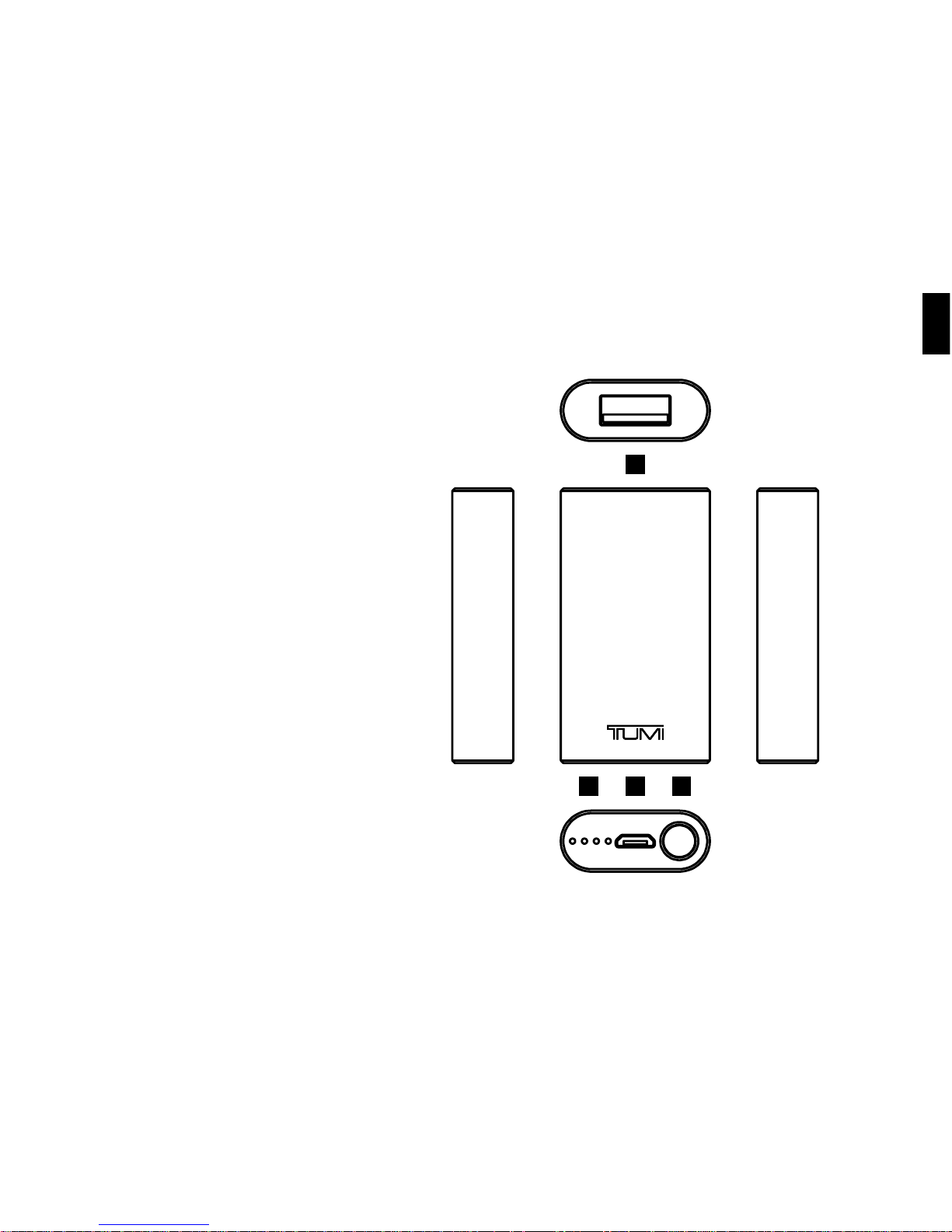
A 500mAh battery bank
is included with your
Wireless Earbuds to
extend audio playtime.
1. USB: Charge Out
2. Battery LED’s
• 4 Battery Status LED’s
• Each light represents
25% charge capacity
3. Micro-USB: Charge In
4. Power Button
• Power On (Press 1x)
• Power O (Press 2x)
1
42 3
TUMI 500MAH
BATTERY BANK
Page 8
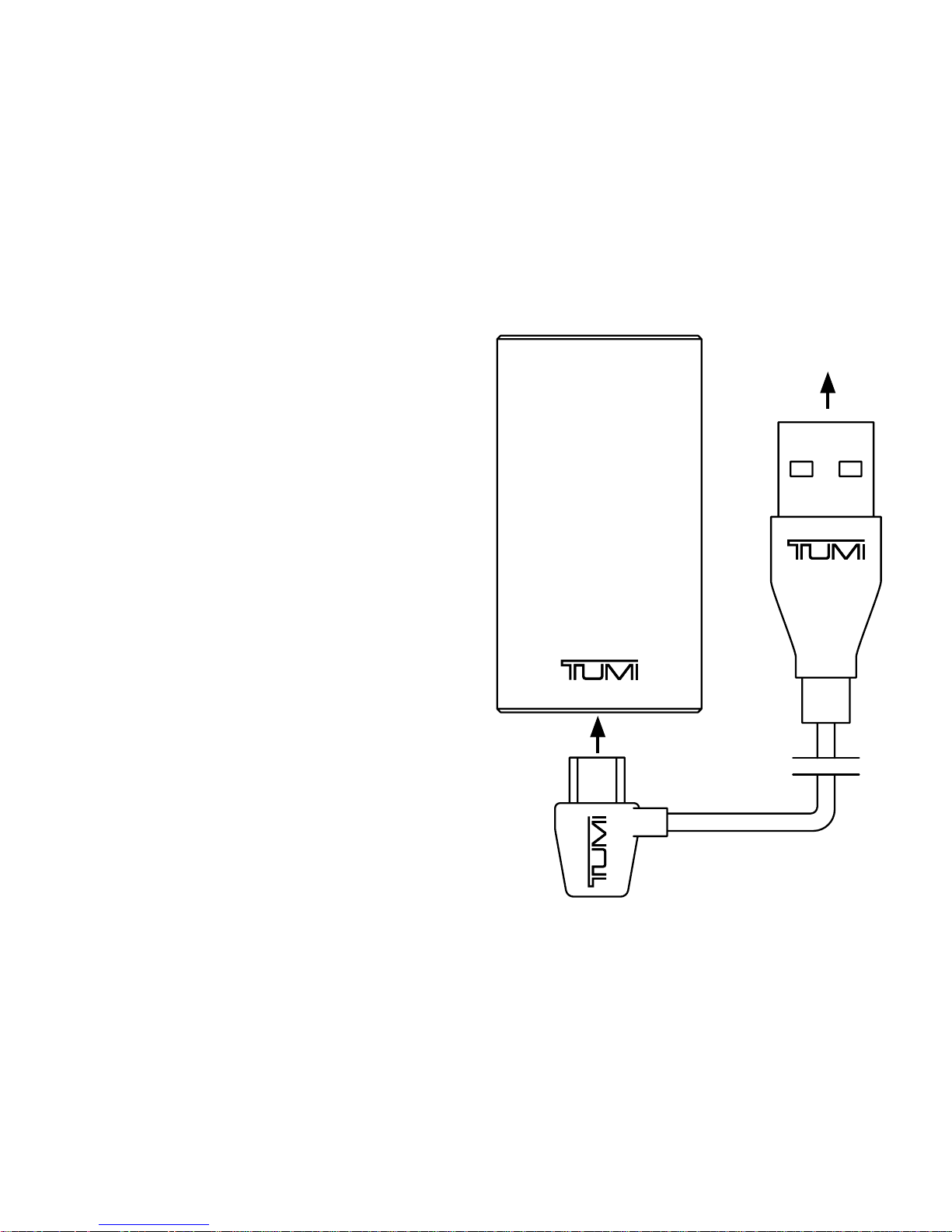
• To charge your Battery Bank, plug
the included USB-to-Micro-USB
cable into a wall power adapter (not
included) or into a powered USB port
on a computer. Plug the Micro-USB
connector end of the cable into
the Battery Bank charging port.
CHARGING YOUR
BATTERY BANK
to Computer
Page 9
ENG
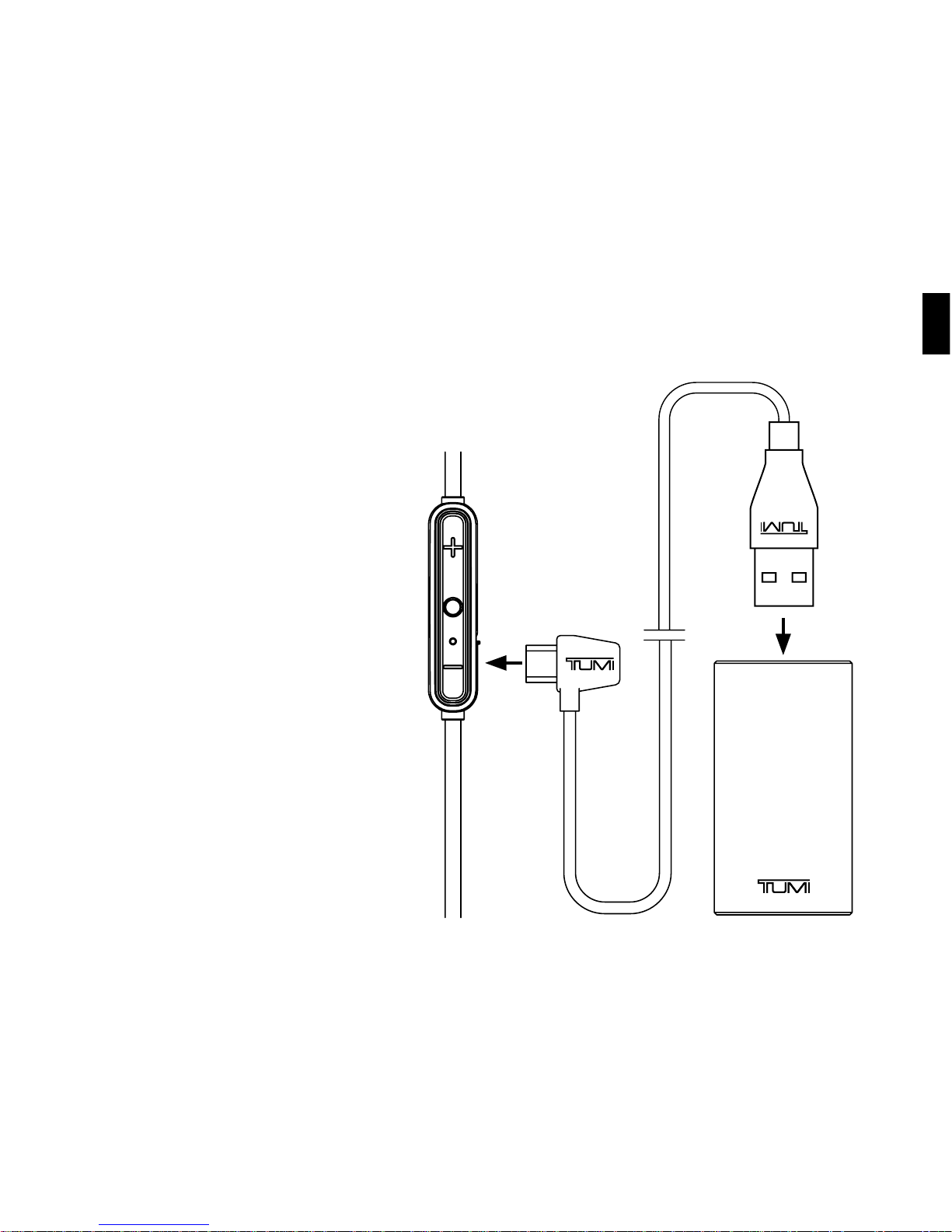
• To charge your Earbuds
with your Battery Bank,
connect the Earbuds and
Battery Bank with the
included USB-to-Micro-USB
cable. Plug the Micro-USB
connector end of the cable
into the Wireless Earbuds
charging port, and the USB
connector end of the cable
into the Battery Bank.
• A red status LED will
appear on the Earbud
remote, indicating the
Earbuds are charging.
CHARGING YOUR EARBUD WITH
YOUR TUMI BATTERY BANK
Page 10
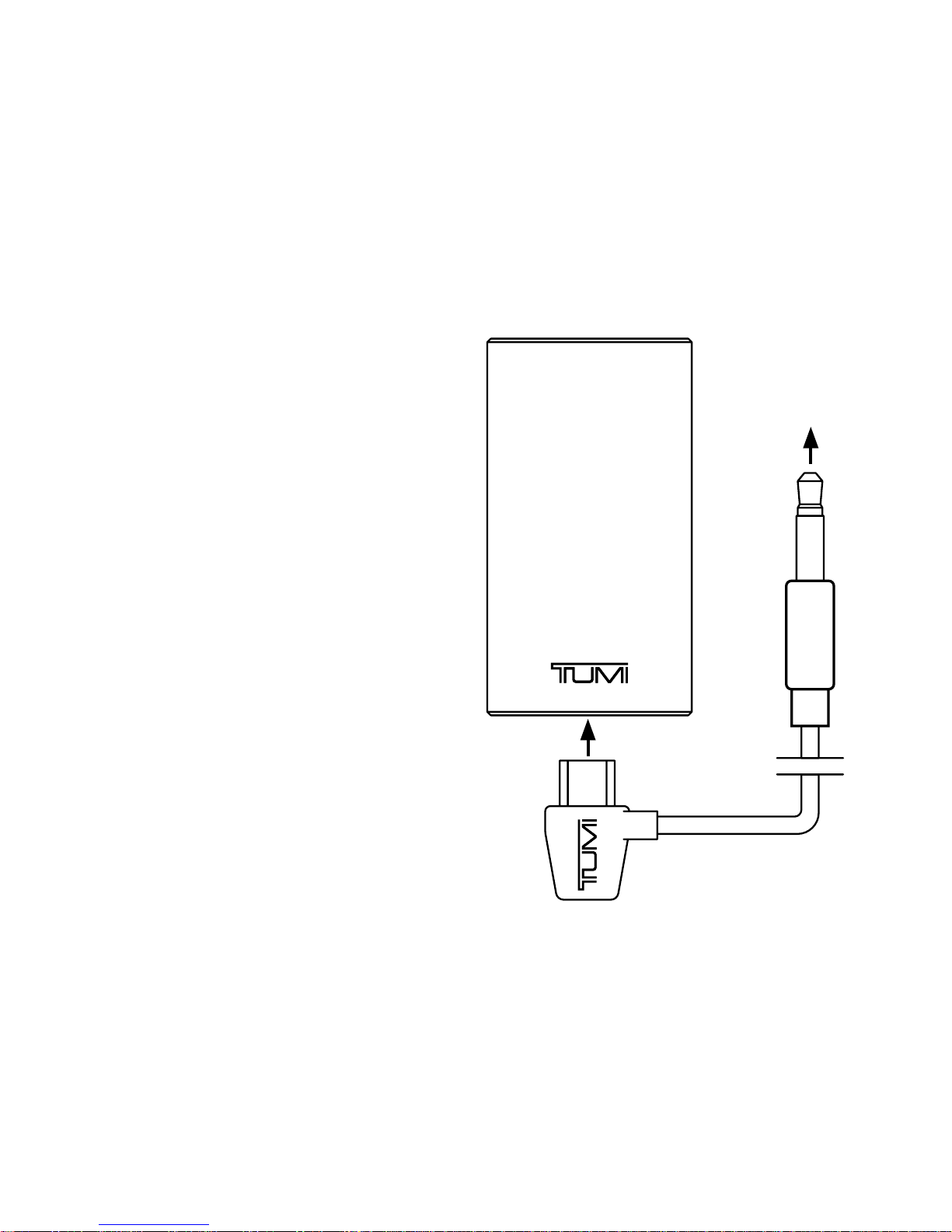
CHARGING YOUR
EARBUDS WHILE
LISTENING TO MUSIC
Step 1: Connect Audio
Device to Battery Bank
• To charge your Earbuds with your
Battery Bank while listening to
music, connect the Battery Bank
and your audio device (like a phone)
with the included AUX-to-MicroUSB cable. Plug the Micro-USB
connector end of the cable into
the Battery Bank charging port,
and the AUX connector end of
the cable into the audio device.
to Audio
Device
Page 11
ENG
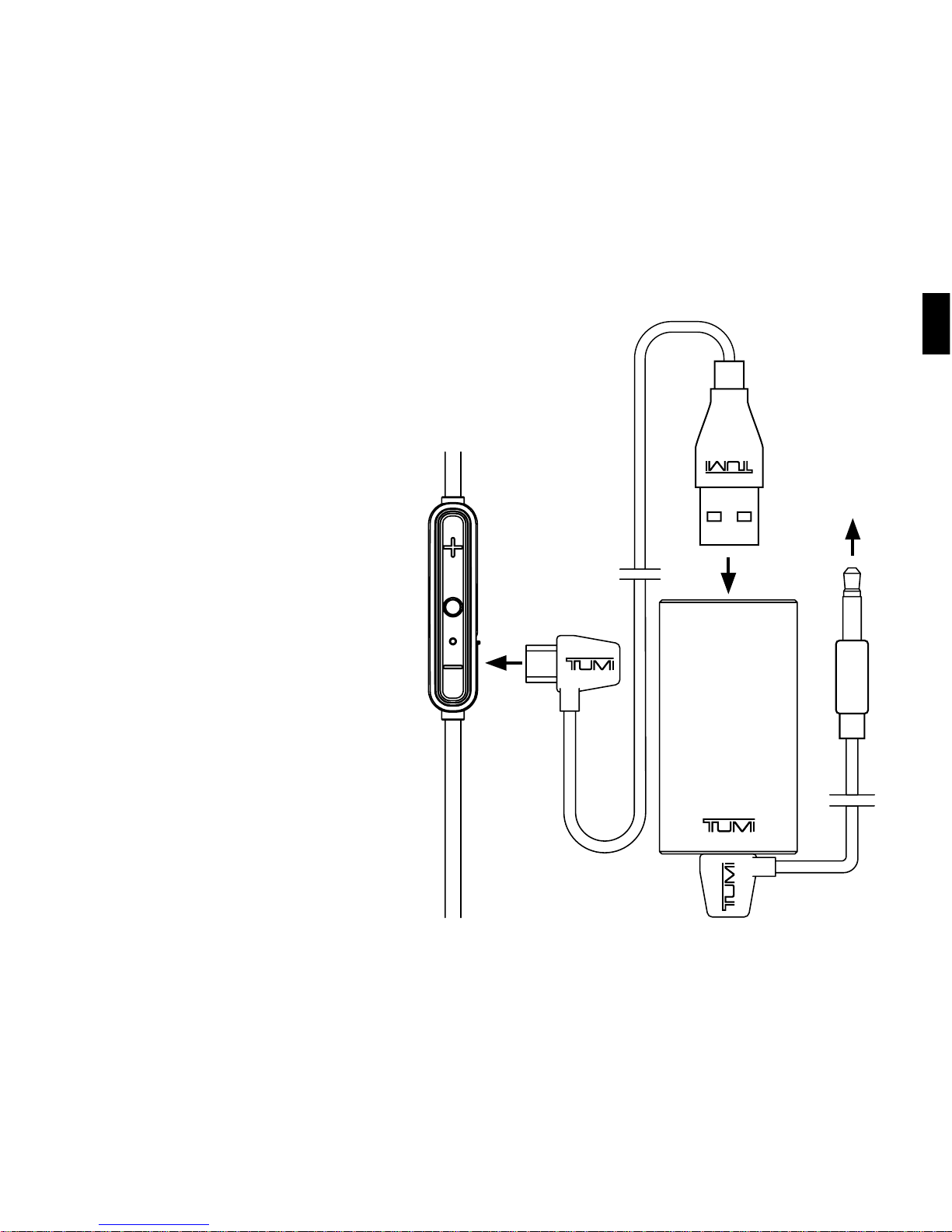
Step 2: Connect Battery
Bank to Earbuds
• To complete the connection,
connect the Battery Bank
and your Earbuds with the
included USB-to-Micro-USB
cable. Plug the Micro-USB
connector end of the cable
into the Earbud charging
port located on the remote
control, and the USB
connector end of the cable
into the Battery Bank.
The Earbuds should now
play music while charging.
CHARGING YOUR EARBUDS
WHILE LISTENING TO
MUSIC (CONT.)
to Audio
Device
Page 12
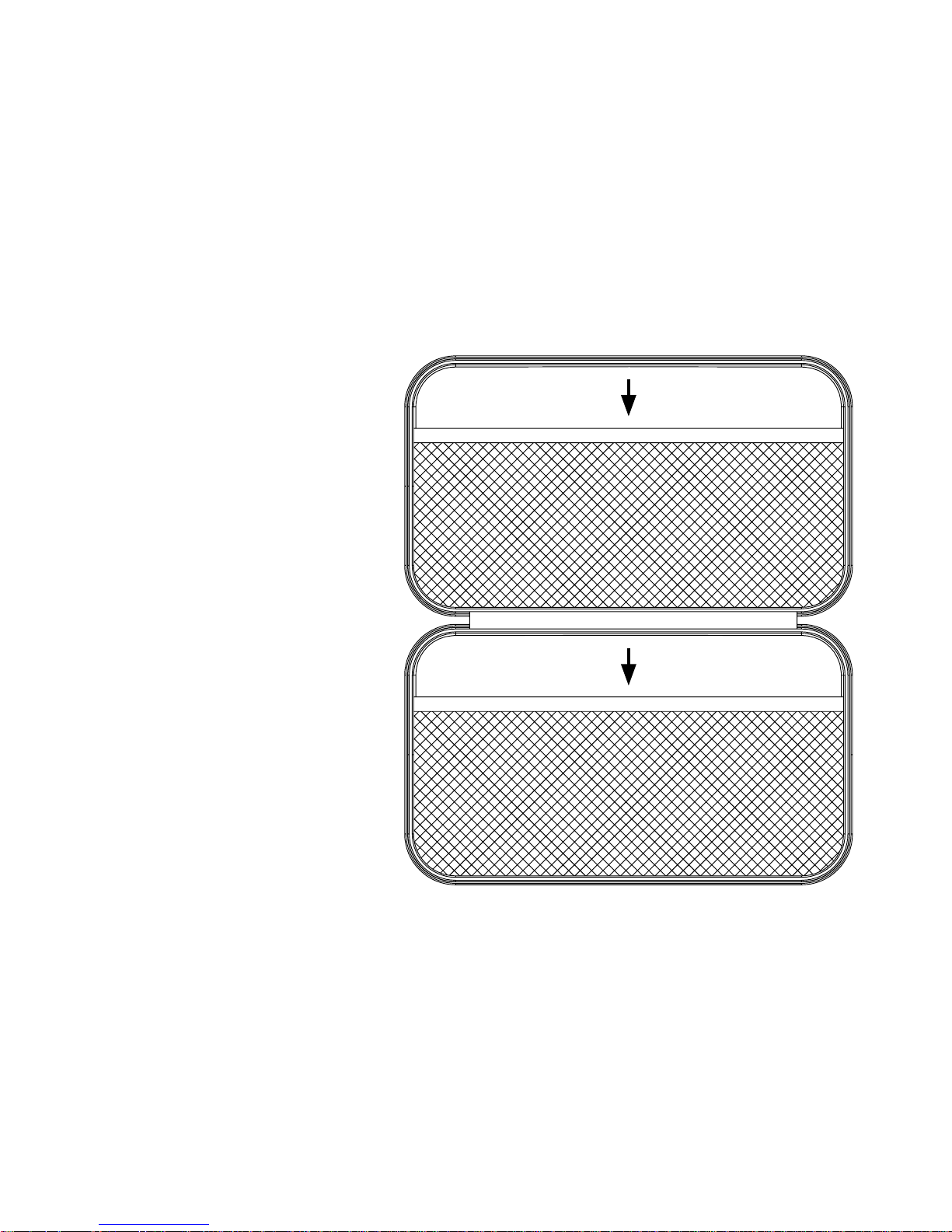
TUMI EARBUD
CARRY CASE
Interior pockets designed
to hold Earbuds, and
all accessories.
Page 13
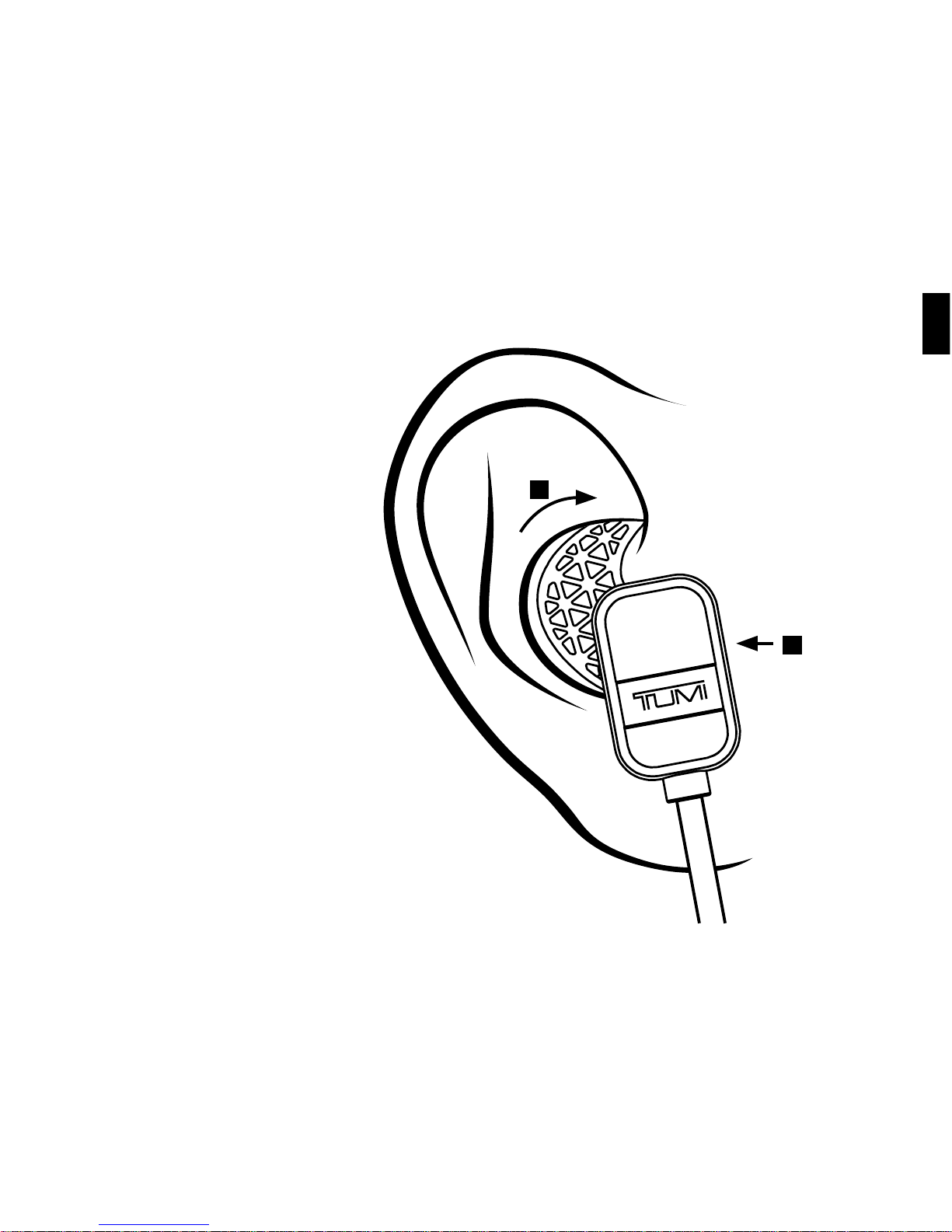
ENG
1. Insert into ear
2. Lock forward
REMOVABLE
SPORT HOOKS
1
2
Page 14

To reduce the risk of fire or electric shock, do not expose the
Tumi Earbuds to rain or moisture while charging. The Tumi
Earbuds should not be exposed to dripping or splashing,
and objects filled with liquids, such as vases, should not be
placed on or near it while being charged or charging other
devices. As with any electronic products, use care not to
spill liquids into any part of the product. Liquids can cause
a failure and/or a fire hazard. The power supply must be
used indoors only. Make no modifications to the product
or accessories. Unauthorized alterations may compromise
safety, regulatory compliance, and system performance, and
will void the warranty. Do not place any flame sources, such
as lighted candles, on or near the Tumi Earbuds. The Tumi
Earbuds contains small parts that may be a choking hazard
and is not suitable for children under age 3. Do not continue
charging the battery if it does not reach full charge within
the specified charging time. Overcharging may cause the
battery to become hot, rupture, or ignite. If you see any heat
deformation or leakage, properly dispose of the battery. Do
not attempt to charge the battery in temperatures outside
the range of 32°-104°F (0°-40°C). If the battery begins to leak,
do not allow the liquid to come in contact with your skin or
eyes. If contact has been made, wash the aected area with
plenty of water and seek medical attention immediately. Do
not expose the product or battery to excessive heat, including
direct sunlight or fire and storage or use inside cars in hot
weather, where it can be exposed to temperatures in excess
of 115°F (60°C). Doing so may cause the battery and power
supply to generate heat, rupture, or ignite. Using the product
in this manner also may result in a loss of performance and
a shortened life expectancy. Extended exposure to direct
sunlight may damage the external appearance and material
qualities. Do not step on, throw, or drop batteries or the power
supply or device, or expose them to a strong shock. Do not
pierce, crush, dent, or deform the batteries or power supply
in any way. If either becomes deformed, properly dispose of
it. Do not short-circuit batteries. Do not attempt to service
the Tumi Earbuds yourself. Opening or removing covers may
expose you to dangerous voltages or other hazards and
will void the manufacturer’s warranty. To prevent risk of fire
or electric shock, avoid overloading wall outlets, extension
cords, or integral convenience receptacles. Your Bluetooth
device (mobile phone, music player, tablet, laptop, etc.) must
support the A2DP Bluetooth profile in order to work wirelessly
with your new Tumi Earbuds. The A2DP profile is supported
by most recent mobile products with built-in Bluetooth
capability. Please refer to your device’s user manual for
details and instruction regarding the Bluetooth profiles it
supports. This device complies with part 15 of the FCC Rules.
Operation is subject to the following two conditions: (1) This
device may not cause harmful interference, and (2) this device
must accept any interference received, including interference
that may cause undesired operation.
NOTE: This equipment has been tested and found to comply
with the limits for a Class B digital device, pursuant to part
15 of the FCC Rules. These limits are designed to provide
reasonable protection against harmful interference in a
residential installation. This equipment generates, uses and
WARNINGS, CAUTIONS & LEGAL INFORMATION
Page 15
ENG
can radiate radio frequency energy and, if not installed and
used in accordance with the instructions, may cause harmful
interference to radio communications. However, there is
no guarantee that interference will not occur in a particular
installation. If this equipment does cause harmful interference
to radio or television reception, which can be determined by
turning the equipment o and on, the user is encouraged to
try to correct the interference by one or more of the following
measures:—Reorient or relocate the receiving antenna. —
Increase the separation between the equipment and receiver.
—Connect the equipment into an outlet on a circuit dierent
from that to which the receiver is connected. — Consult the
dealer or an experienced radio/TV technician for help.
CAUTION: Any changes or modifications not expressly
approved by the party responsible for compliance could void
the user’s authority to operate the equipment.
FCC RADIATION EXPOSURE STATEMENT: This device
complies with FCC radiation exposure limits set forth for an
uncontrolled environment.
This device complies with Industry Canada license-exempt
RSS standard(s). Operation is subject to the following two
conditions: (1) this device may not cause interference, and
(2) this device must accept any interference, including
interference that may cause undesired operation of the
Lithium Battery installed is not intended to be replaced by
the USER.
CAUTION: Danger of explosion if battery is incorrectly
replaced. Replace only with the same or equivalent type.
Where the MAINS plug is used as the disconnect device, the
disconnect device shall remain readily operable.
The device meets the exemption from the routine evaluation
limits in section 2.5 of RSS 102 and compliance with RSS-102
RF exposure, users can obtain Canadian information on RF
exposure and compliance.
Correct Disposal of this product. This marking indicates
that this product should not be disposed with other
household wastes throughout the EU. To prevent possible
harm to the environment or human health from uncontrolled
waste disposal, recycle it responsibly to promote the
sustainable reuse of material resources. To return your used
device, please use the return and collection systems or
contact the retailer where the product was purchased.
This product complies with California
Energy Commission eciency standards
for consumer battery chargers.
device.
(1) l'appareil ne doit pas produire de brouillage, et
Le présent appareil est conforme aux CNR d'Industrie Canada
applicables aux appareils
radio exempts de licence.
L'exploitation est autorisée aux deux conditions suivantes :
(2) l'utilisateur de l'appareil doit accepter tout brouillage radioélectrique
subi, même si le
brouillage est susceptible d'en compromettre le
fonctionnement.
Page 16

Since our founding in 1975, Tumi has been committed
to providing our customers with an ownership
experience that is second to none. Specifically, we
make three promises to our customers:
1. You will enjoy using innovative products that
are designed and manufactured to be the best;
2. You will experience world-class customer
service for as long as you own your product;
3. For two (2) years after you purchase Tumi
small leather goods or accessories, virtually
any problem that you encounter with the
product will be covered by our warranty.
Tumi’s warranty is just a small part of the ownership
experience that we provide to our customers, and you
will find that it is straightforward and comprehensive.
FIRST YEAR OF OWNERSHIP:
TOTALLY WORRY FREE
For the first twelve (12) months of ownership, if any
damage – including wear and tear – happens to your
Tumi product, Tumi will cover all repair expenses,
including shipping costs to and from our repair facility.
The only exceptions to this are purely cosmetic
damage, such as scratched leather, and incidents or
consequential damages, such as damage to, or loss
of, the contents of a bag, loss of use, loss of time or
similar expenses.
YEAR TWO: FULL COVERAGE
Through your second year of ownership, Tumi will
cover all of the repair costs for any problems that
result from defective materials or workmanship or
damage from wear and tear. The only exceptions to
this are damages caused by obvious abuse of the
product, purely cosmetic damage and incidental or
consequential damages as described above. Your
only responsibility is to ship your item to us for repair,
or take it to a Tumi store or authorized Tumi dealer,
who will be happy to process the repair for a nominal
handling and shipping fee. Many repairs can actually
be handled right in the store, but if your item does
need to be sent to our facility, we will repair it quickly
and ship it back at no cost to you. In those rare cases
mentioned above where our warranty does not apply,
we will promptly provide you with an estimate of any
repair costs that may be involved.
TUMI’S ACCESSORIES WARRANTY
Page 17

ENG
A LIFETIME OF SERVICE
It is extremely rare that we see an accessory product
problem due to a manufacturing defect show up after
two years of use, but we do have many customers
with older items that they would like to have
refurbished. For these customers, we oer a lifetime
of courteous, responsive service and the highest
quality repairs and refurbishment done at the lowest
possible cost.
TOTAL COMMITMENT
The bottom line is that at Tumi, we are totally
committed to keeping you happy about our products
and our service. Once you have had the pleasure of
owning and using our products, we hope that they
will become your trusted companions for life. You
can reach us online, 24 hours a day, 7 days a week at
www.tumi.com/repair or call 800.781.TUMI (8864) to
speak with a customer service representative during
normal business hours. (To contact customer service
outside of the US and Canada, please see the list of
international centers that follows.)
PROOF OF PURCHASE
Please save your store receipt as proof of purchase.
This will be needed to facilitate your first year worryfree coverage. Additionally, this will serve as proof
that your purchase was made at an authorized Tumi
retailer. Our warranty services only apply to products
that were purchased from an authorized Tumi store
or dealer.
CUSTOMER SERVICE CONTACT NUMBERS
USA/Canada
800.781.8864
For additional locations, please refer to tumi.com
TUMI
1001 Durham Avenue
South Plainfield, NJ 07080
Page 18

TUMI.COM
PKG5416R01016
 Loading...