

Page 1

Page 2

www.hellottec.com
Page 3

Table of Contents
Thanks.............................................................................................................
Overview..........................................................................................................
Usage...............................................................................................................
Turning on and off............................................................................................
How to charge AlumiSlim.................................................................................
Charging your device with AlumiSlim................................................................
Checking AlumiSlim’s remaining power capacity...............................................
Important safety instructions.............................................................................
Maintenance.....................................................................................................
4
5
6
7
8
10
11
12
15
3
Page 4

Thanks
Thanks for having bought AlumiSlim. Please read the explanations carefully before
operating the product for the optimal performance and safety. Please keep your
user manual for future reference.
Specications
• Capacity: 10.000mAh
• Battery type: Li-Polymer
• Port: 1 Micro USB Port, 1 Lightning Port
• Port: 1 USB Port
• Input: DC5V 2A (maximum)
• Output: DC5V2.1A (maximum)
• Charging time: 5 hours
4
Page 5

Overview
AlumiSlim Power Bank features the parts shown in the following
Micro USB Port / Lightning Port
LED Power Indicator
On-Off Button
USB Port
Contents of the package:
• 1 AlumiSlim Power Bank
• 1 Micro USB Cable
• 1 User Manual
5
Page 6
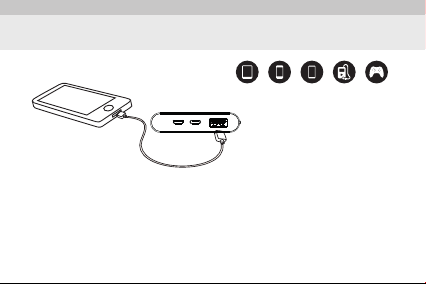
Usage
iPad PSPiPhone MP3/MP4Telephone
• iPhone/iPod/iPad
• Samsung, LG, Sony, HTC, Nokia, Huawei, Motorola, BlackBerry, etc.
• Smart watches
• Digital cameras
• Portable Bluetooth devices such as headphones, car kits, speakers
• Handheld game consoles
6
Page 7

Turning on and off
Turning AlumiSlim on and off
1. Turning AlumiSlim on:
Press the power button once to turn on the LED power indicator, which means that the
device is on.
2. Turning AlumiSlim off:
If AlumiSlim is not connected to any device, the LED indicator will turn off within 38
seconds and AlumiSlim turns off.
If no device is connected, the LED indicators will turn off after 38 seconds, and
the power bank will automatically turn off after 120 seconds.
7
Page 8
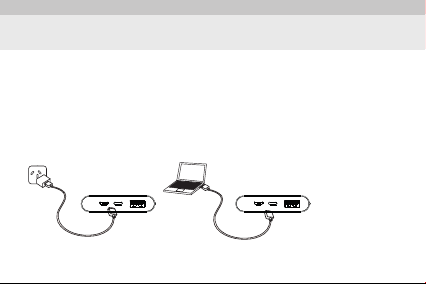
How to Charge AlumiSlim
Charging AlumiSlim
Connect the Micro USB end of the USB cable to the Micro USB port or the Lightning
port on AlumiSlim, and then connect the USB end of the cable to a charging device
that accepts a USB cable or your computer to start charging.
• While charging, the LED lights will blink to indicate the charging status.
• Once the charging is complete, all of the 4 LED lights will illuminate.
8
Page 9

How to Charge AlumiSlim
When AlumiSlim is not responding or in short circuit protection mode due to
improper use, charge and restart AlumiSlim.
*Charging device and computer are not included in the package. Charging time
depends on the output power of the charger.
9
Page 10
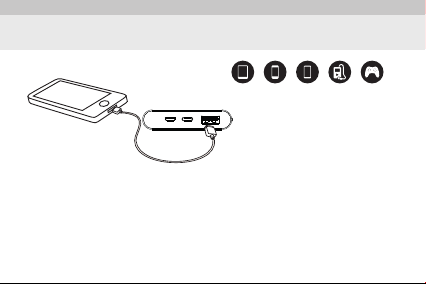
Charging your device with AlumiSlim
Suitable for the following devices:
iPad PSPiPhone MP3/MP4Telephone
1. To connect your device, you can use your original USB data cable or the Micro USB
cable that comes in the package.
2. Connect your device to the USB port of AlumiSlim with a cable.
3. Press the power button.
4. While charging, the LED power indicator will be always on.
5. Disconnect your device after it is fully charged.
10
Page 11
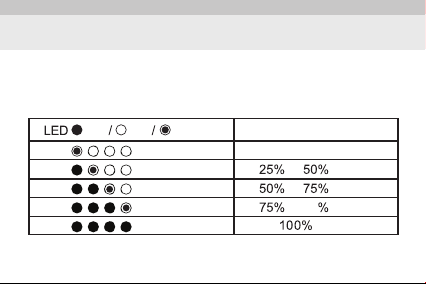
Checking AlumiSlim’s remaining power capacity
• After pressing the on/off button, LED lights will show the remaining capacity.
• After about 4 seconds, the LED lights will automatically turn off.
On Off Blinking
Remaining
Less than 25%
to
to
99
to
11
Page 12

Important safety instructions
• In order to maximize the battery life, fully charge AlumiSlim prior to rst use.
• Keep AlumiSlim in a dry and cool place.
• Do not leave AlumiSlim in a hot and humid environment.
• The ambient temperature where it is used should be 10°C to 45°C.
• If AlumiSlim has not been used for a long time, you need to charge it and drain its
charge every 3 months.
• AlumiSlim may generate heat when charging a device. It is normal and there is no
need to become alarmed.
• Under normal conditions, the battery performance will decrease over a couple of
years.
• Do not throw AlumiSlim into extremely hot places and re.
• Do not clean AlumiSlim with harmful chemicals or cleaning agents.
• Misuse, dropping or extreme power may damage the device.
12
Page 13

Safety information
• Remove the product carefully from its box, and keep all the accessories within the
box in order not to lose them. Check the product against any possible damages during
transportation. Do not expose your product to any impact when carrying.
• If your product is damaged and not working, immediately notify the supplier.
• If your product was directly sent to you, promptly inform the sender company.
• Your product does not contain any maintainable parts; refer to the authorized
service stations (See the list showing the authorized service stations) or the authorized
dealer from whom you have bought your product.
13
Page 14

Information on misuse
• Errors arising from failure to use the product as indicated in the manual,
• Short-circuiting of the product when it is operated in hot and extremely humid
environments,
• Using connection cables other than those that have been provided in the product’s
package by the manufacturing company,
• Interventions by the user or inserting or removing parts,
• Exterior damages to products such as physical impacts and breaks,
• Destroying or removing the serial number of the product,
• Malfunctions arising from not using the original consumable materials,
• Damages resulting from natural disasters such as re, lightning, ood, earthquake.
14
Page 15

Maintenance
Your device is a product of superior design and workmanship, and it should
be maintained carefully. The following recommendations will help you
preserve the warranty.
• Keep all the accessories and additional parts out of reach of children.
• Make sure that the device stays dry. Rain, humidity and all kinds of liquids contain
minerals that may corrode the electronic circuits. If your device gets wet, dry it out.
• Do not use and keep the device in dusty and dirty environments. Otherwise, the
moving parts and electronic components may become damaged.
• Do not keep the device in hot areas. High temperatures may decrease the economic
life of electronic devices, damage their batteries and cause deformation or melting of
certain plastic parts.
15
Page 16

• Do not store your device in cold areas. When the device returns to its normal
temperature, humidity can form within the device, which may damage the electronic
circuits.
• Do not drop or shake your device or expose it to impact. Rough use may result in
breaking of the internal circuits and sensitive mechanical parts.
• Do not use harsh chemicals, cleaning solvents or strong cleaning agents to clean
your device.
• Do not paint your device. Paints may restrict the movements of moving parts and
prevent them from working properly.
All of the recommendations above apply to the device, batteries, charging device or
all the other accessories. If any device is not working properly, take your device to the
nearest authorized service.
16
Page 17

The ECONOMIC LIFE needed for your device to fulll its functions is 3 years in terms
of spare parts supply.
Note: Our company is not responsible for any typographical errors.
*** This product has been marked in accordance with the and
norms.
*** This product is RoHs compliant.
17
Page 18

RoHs Declaration
All the lead-free products offered by the company are in compliance with the
Restriction of Hazardous Substances Directive (RoHS); this means that our production
processes and products are strictly free of “lead” and any substances indicated in
the Directive.
The crossed-out wheeled bin symbol symbolizes that the product must be collected
separately at the end of its economic life within the European Union. This applies
to your product that bears this symbol and its accessories. Do not dispose of these
products as unclassied urban waste.
18
Page 19

Correct disposal of this product
(Waste electrical and electronic devices) (For countries that have separate
collection systems)
This symbol found on the product, its accessories or relevant documents
indicates that the product and its electronic accessories (e.g. charging
device, earphones, USB cable) should not be disposed of along with other
domestic wastes. In order to prevent the harmful effect of uncontrolled
disposal of wastes on the environment and human health, please
separate it from other types of waste and ensure the recycling of material
sources for their sustainable reuse. Domestic users should contact their
Dealer or the local authority for detailed information on where to take
this product and how to do it for en environmentally safe recycling.
Industrial users should contact their supplier and check the provisions and
conditions of the purchasing agreement. This product and its electronic
accessories should not be mixed with the wastes to be destroyed or
commercial wastes.
19
Page 20

Correct disposal of the battery
(For countries that have separate collection systems)
If you intend to dispose of the product, necessary precautions should be
taken for reprocessing and repair of the product, including its battery, at
the waste collection area.
The economic life of this product is 3 years.
20
Page 21

Page 22

with from ttec
 Loading...