

Page 1

UG ATP/ASP/QTP/QSP -E1.64
ATP/ASP/QTP/QSP
Series
Price Computing Scales
User’s guide
Page 2

Page 3

ATP/ASP/QTP/QSP Price Computing Scale User’s Guide
Contents
SECTION 1 INTRODUCTION………………………………..……………….…...……1
1. 1 Figures……………………………………………………………..…………….1
1. 2 Specifications…………………………………………………….………...……1
1. 3 Dimension………………………………………………………………………..1
1. 4 Install ……………………………………………………………..……………1
SECTION 2 KEYBOARD DESCRIPTIONS…………………………….……………..3
SECTION 3 OPERATION…………………………………….……………...………….4
3. 1 General instruction……………………………………………………..……….4
3. 2 Basic operation…………………………………………..………………………4
3.2.1 Zeroing the scale……………………………………….……………..……….4
3.2.2 Tare……………………………………………………………………..……….4
3.2.3 Overload warning………………………………………….…………….…….4
3.2.4 unit price setting…………………………………………….………………….4
3.2.5 Change unit…………………………………………………..……..………….5
3. 3 Accumulator operation…………………………………………..………………5
3. 3.1 prepare to Accumulator……………………………………………..…………5
3. 3.2 Accumulator operation…………………………………….….………………5
3. 3.3 Account operation……………………………………………………..………5
3. 4.1Save the Unit price………………………………….….……………………5
3. 4.2 Load the Unit price…………………………………….………..……………5
3. 5 Other function……………………………………………………………………6
3. 5.1 backlight………………………………………………….……………………6
3. 5.2 Automatic unit price clear……………………………………………………6
3.5.3 Auto power off……………………………………………….…………………6
3.5.4 View audit operate………………………………………………………..……6
SECTION 4 SETTING OF PARAMETERS…………………………………..……….7
4. 1 Enter setting mode……………………………………………..……………….7
4. 2 Parameter setting table…………………………………………….……….….7
SECTION 5 RS-232 OUTPUT …………………………………………….……….……9
SECTION 6 BATTERY OPRATE
……………………………………………………………..…. 11
APPENDIX ERROR CODE…………………………………………………13
Page 4

Page 5
ATP/ASP/QTP/QSP Price Computing Scale User’s Guide
- 1 -
SECTION 1 INTRODUCTION
1. 1 FIGURES
◆ Large LCD display
◆ AC / Rechargeable battery
◆ Selectable weighing unit
◆ Accumulate operation
◆ Account function, do memory recall, give change and memory clear one
time
◆ Selectable reading resolution
◆ Auto backlight
1. 2 SPECIFICATIONS
Model
Capacity
Division
ATP/ASP/QTP/QSP -6
6kg
2g/1g
ATP/ASP/QTP/QSP -15
15kg
5g/2g
ATP/ASP/QTP/QSP -30
30kg
10g/5g
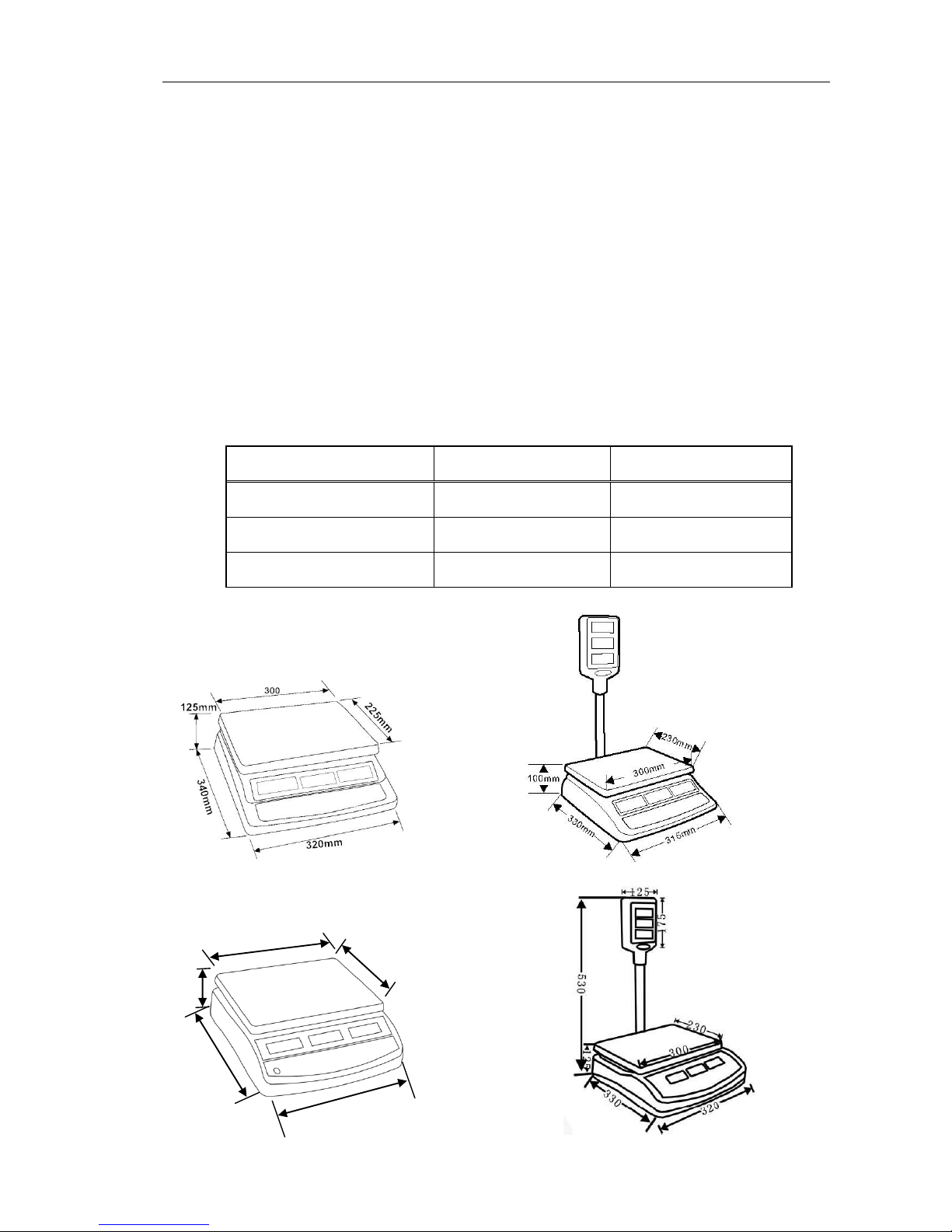
1. 3 DIMENSION
Page 6

ATP/ASP/QTP/QSP Price Computing Scale User’s Guide
- 2 -
1.4 INSTALL
Keep the scale dry. Precipitation, humidity and all types of liquids or moisture can
contain minerals that will corrode electronic circuits.
This scale is not waterproof designed (IP44), avoid high humidity that might cause
condensation. Avoid direct contact with water. Do not spray or immerse the scales in
water. If scale meet water, reading data will be unstable, or scale will can’t work
correctly, please turn off the power immediately, warm the scale, or call your dealer.
Attach the main cable to the connector on
the bottom of the scale. The power switch is
located on the base near the front of the
scale.
Power switch is at the right side of bottom
cover, AC adapter jack also near the power
switch, see attached drawing.
Power switch
Page 7

ATP/ASP/QTP/QSP Price Computing Scale User’s Guide
- 3 -
SECTION 2 KEY DESCRIPTION
Each of the keys are shown and described for you.
ZERO The ZERO key zeroes the scale.
TARE The TARE key subtracts tare values and changes the ATP/ASP/QTP/QSP
from gross mode (no tare) to net mode.
SAVE The SAVE key used to disable or enable the price and tare auto-clear
Function
B/L The B/L key used to set the backlight mode (ON/OFF/AUTO)
ACCOUNT The ACCOUNT key is used to do memory recall, give change and
memory clear in one time
M+ The M+ key adds data to the accumulators. The second function print the
weight data
UNIT The UNIT key is used change unit.
PLU The PLU key used to store unit price memory and recall unit price from
memory
C The C key is used for canceling the memorized data.
0~9 The NUMERIC key (0~9) is used for setting unit price data.
DECIMAL POINT key is used for set the decimal position of unit price
Page 8

ATP/ASP/QTP/QSP Price Computing Scale User’s Guide
- 4 -
SECTION 3 OPERATION
3. 1 GENERAL INSTRUCTION
1.When battery goes low, the light will be turned on automatically. It is the
time to charge the battery with the AC power. If ATP/ASP/QTP/QSP goes on
being used without proper charging, the display window will show “BAT LO” every
10 minutes, and ATP/ASP/QTP/QSP would be shut down automatically after 50
minutes of warning in order to protect the battery. Please charge the battery
immediately, or ATP/ASP/QTP/QSP cannot be used.
2.The display window will show color of orange when battery is being charged, and
it will turn to color green when battery is fully charged.
3.Before starting using ATP/ASP/QTP/QSP, please check if the bubble is in the
middle of the level ; if not, please make appropriate adjustment.
3. 2 BASIC OPERATION
3. 2. 1 Zero the scale
When there is no item on the scale but reading is not zero, press the key
to turn on ZERO indicator. When the weight goes over 20 % of the full
capacity, “read zero” function is obsolete.
3. 2. 2 Tare
Put container on the platter, once the weight reading is stable, press the
key, the TARE indicator will be on and the container’s weight will be deducted.
When it is time to clear the TARE, take off the container, and press key
again.
3. 2. 3 Overload Warning
Please do not add item that is over the maximum capacity. When reading
“—OL—“ and hear beeping sound, remove the item on the platter to avoid
damage to the load cell.
3. 2. 4 Unit price setting
To trade with your ATP/ASP/QTP/QSP scale, it is necessary to setting a unit
price of the goods, ATP/ASP/QTP/QSP then uses this unit price to determine
Page 9

ATP/ASP/QTP/QSP Price Computing Scale User’s Guide
- 5 -
how much that goods are on the platter.
When ATP/ASP/QTP/QSP scale displaying the weight of the goods placed on
the scale, set the unit price through numeric keys. Set unit price is showed in
UNIT PRICE window display, TOTAL PRICE window display shows the total
price of the goods. To cancel the previous unit price, press CANCEL key .
3. 2. 5 Change unit
You can use the UNIT key to change unit. Press UNIT key will change the
weighing unit circularly, and the pertinent indicator will on.
3. 3 ACCUMULATOR OPERATION
3. 3. 1 Prepare to accumulate
Each time before accumulate,please make sure the platter is empty, the
current accumulator values is reset to zero, and the weight reading is stable.
3. 3. 2 Accumulative operation
Put the weighing item on platter,wait for the weight reading to be stable, press
the M+ key,the window will show ACC n,n being the number of times a count
operation had been performed.
3. 3. 3 Account operation
After do accumulate operate, you can press Account key, WEIGHT window
will show the summed price, key in paid money by keyboard, this will show on
Unit Price window, and the Total Price window will show the return value.
Press Tare key to return normal weighing mode and clear memory, if you don’t
want clear memory, press Zero key to return normal weighing mode.
Note: if you haven’t do accumulate operation, you also can use Account
function, the summed price is current total price.
3. 4 UNIT PRICE MEMORY
ATP/ASP/QTP/QSP can store 10 sets unit price.
3. 4. 1 Save the unit price
Hold the PLU key for 3 seconds after you key in the unit price, it will show “PS
0~9” , press numeric key 0~9 to select which memory location you want to use.
After you do, the unit price is stored in the ATP/ASP/QTP/QSP.
Page 10

ATP/ASP/QTP/QSP Price Computing Scale User’s Guide
- 6 -
3. 4. 2 Load the unit price
If you want to use the unit price stored in the ATP/ASP/QTP/QSP, press PLU
key, ATP/ASP/QTP/QSP will shows “PL 0~9”, press numeric key 0~9 to select
which memory location’s price you want to use, current unit price will change
to the value stored in the memory.
3. 5 Other function
3.5.1 Backlight
ATP/ASP/QTP/QSP have three backlight mode: on, off and auto.
ON: backlight will turn on however current weight is zero or not Zero
OFF: backlight will turn off however current weight is zero or not zero
AUTO: backlight will turn on when current weight is not zero and it will turn off
if current weight is zero
You can press B/L key to set backlight mode, display will show current
backlight mode, press SAVE key to select backlight mode (ON/OFF/AUTO),
after you select, press TARE key to sure.
3.5.2 Automatic unit price clear
ATP/ASP/QTP/QSP can set automatic unit price clear, when return to zero,
ATP/ASP/QTP/QSP will clear the unit price automatically.
Press SAVE key will turn on / off automatic unit price clear function, when
SAVE indicator on, automatic unit price clear disable, when SAVE indicator off,
automatic unit price clear enable.
3.5.3 Auto power off
ATP/ASP/QTP/QSP scale have auto shut off function, you can set this
parameter.
Press ACCOUNT key during self-checking, display shows “sleep mode”,
press Speed 4 key to select 0/1/5/30 (not use auto power off / turn off power
after scale leisure for 1 minutes / turn off power after scale leisure for 5
minutes / turn off power after scale leisure for 30 minutes), press Tare key to
sure
3.5.4 View audit operate
Press SAVE key during self-checking, display shows AUDIT OPT AA CAL BB,
press ZERO key to escape.
Page 11

ATP/ASP/QTP/QSP Price Computing Scale User’s Guide
- 7 -
SECTIOIN 4 SETTING OF PARAMETERS
4. 1 ENTER SETTING MODE
To set the parameters it is necessary to enter a secure menu. This is done by
entering a password number when requested.
To enter the parameter menus press the TARE key during the initial counting of the
display after power turned on. The Weight Display will show "P n " requesting the
password number to be entered.
Press the "O" key four times. The display will show "Pn- - - -", Press the TARE key.
The Parameter menu has 18 functions that can be accessed using the PLU key to
cycle through the choices. The Weight Display will show the name of the functions.
Also you can press 0 to select F0, and key 2 to select F2…… To enter a function
press the TARE key. At any time press the ZERO key to return to weighing.
4. 2 PARAMETER SETTING TABLE
Weight Display
Description
F0 CAL
When the parameter menu show "F0" press the TARE key.
The display will then show "unLoAd" to request all weight be
removed from the platform.
After STABLE indicator on, press the TARE key to set the
zero point.
The display will then show the calibration weight requested,
press the TARE key to accept it.
The display will show "LOAd". place the calibration weight
on the scale. After STABLE indicator on, press the TARE key.
The scale will calibrate.
F1 RES
Set external resolution, press SAVE key to change
(3000/60000/duag range), press ZERO key to sure.
F2 UNIT
Set weighing unit, press SAVE key to change
(KILOS/POUNDS/HJ/HL/100), press ZERO key to sure.
F3 CAPA
Set capacity, Press SAVE key to select, press ZERO key to
sure..
F4 POINT
Set weighing decimal point, press SAVE key to select, press
ZERO key to sure.
F5 POINT
Set price decimal point, press SAVE key to select, press
ZERO key to sure.
F6 INIT ZERO
Set initialization zero range (auto zero range), press SAVE
key to select, press ZERO key to sure.
F7 RE ZERO
Set re zero range (manual zero range), press SAVE key to
select, press ZERO key to sure.
Page 12

ATP/ASP/QTP/QSP Price Computing Scale User’s Guide
- 8 -
F8 SCSIUE TARE
Set whether use re tare function, if this parameter is on, you
can do tare operation continuously, if this parameter is off,
you only can do tare operation one time, press ZERO key to
select, press ZERO key to sure.
F9 A-D COUNTS
Displays the A/D counts.
F10 SPEED
Set speed of ADC, press SAVE key to change (7.5/15/30/60),
press ZERO key to sure.
F11 BAUD
Set Baud rate, press SAVE key to change
(2400/4800/9600/19200), press ZERO key to sure.
Page 13

ATP/ASP/QTP/QSP Price Computing Scale User’s Guide
- 9 -
SECTION 5 RS-232 OUTPUT
The ATP/ASP/QTP/QSP Series of scales can be ordered with an optional RS-232
output.
Specifications:
RS-232 output of weighing data
ASCII code
8 data bits
No Parity
Connector: 9 pin d-subminiature socket
Pin 2: Output
Pin 3: Input, not used at this time
Pin 5: Signal Ground
Data format: ASCII code, 10 bits per frame data, bit 1: start bit, bit2~bit8: data
bits, bit 9: verify bit (even)
STX ± k g p
CR
LF
- WEIGHT DATA- -WEIGHT UNIT-
p=01x1x2x3x4x5x6.
stable: x6=1, unstable: x6=0.
Over : x5=1, ontherwise: x5=0.
Negative:x4=1, pluse: x4=0;
Zero: x3=1, ontherwise: x3=0;
Net Zero:x2=1, ontherwise: x2=0;
Tare: x1=1; ontherwise: x1=0;
Page 14

ATP/ASP/QTP/QSP Price Computing Scale User’s Guide
- 10 -
Baud rate: 9600bps
If you connect TPUP printer, it will print the format as follows:
NO. 1
NET WEIGHT:
0. 650kg
UNIT PRICE :
5/kg
TOTAL PRICE:
3.25
If the weight is loss than 20d, and the scale has unit price. press M+ key, it will
print accumulator value:
TOTAL
NO. 1
TOTAL PRICE:
3.25
################
Page 15

ATP/ASP/QTP/QSP Price Computing Scale User’s Guide
- 11 -
SECTION 6 BATTERY OPERATION
The scales can be operated from the battery if desired. The battery life is
approximately 100 hours.
When the battery needs charging the arrow above the low battery symbol under the
weight display will turn on. The battery should be charged as soon as the arrow
above the symbol is on. The scale will still operate for about 10 hours after which it
will automatically switch off to protect the battery.
To charge the battery simply plug into the mains power. The scale does not need to
be turned on.
The battery should be charged for 12 hours for full capacity.
Just under the quantity display is an LED to indicate the status of battery charging.
When the scale is plugged into the mains power the internal battery will be charged.
If the LED is green the battery has a full charge. If it is Red the battery is nearly
discharged and yellow indicates the battery is being charged.
As the battery is used it may fail to hold a full charge. If the battery life becomes
unacceptable then contact your distributor or Adam Equipment.
Note: new batteries are shipped partially charged. Before you can use your scale,
you need to install and charge the battery, as indicated by the following instructions.
Some batteries perform best after several full charge/discharge cycles.
Battery performance depends on many factors, including
your backlight setting and operate.
Never use any charger or battery which is damaged.
Do not short-circuit the battery. Accidental short-circuiting
can occur when a metallic object (coin, clip or pen)
causes direct connection of the + and - terminals of the
battery (metal strips on the battery) for example when
!
Page 16

ATP/ASP/QTP/QSP Price Computing Scale User’s Guide
- 12 -
you carry a spare battery in your pocket. Short-circuiting the terminals may damage
the battery or the connecting object.
Do not dispose of batteries in a fire
Dispose of batteries according to local regulations (e.g. recycling). Do not dispose as
household waste.
Avoid charging under airless conditions
To maximize your battery’s performance:
• Always use TSCALE Original batteries and AC adapter. The scale warranty does
not cover damage caused from using non-TSCALE batteries and/or battery chargers.
• The rating of AC adapter output is 9V, but normal output range will be 11V~15V
• New batteries or batteries that have been stored for long periods of time may
require a longer charge time.
• Maintain the battery at or near room temperature when charging.
• Do not expose batteries to temperatures below -10°C (14°F) or above 45°C
(113°F).
• Over extended periods of time, batteries gradually wear down and require longer
charging times.
This is normal. If you charge your battery regularly and notice a decrease in operate
time or an increase in charging time, then it is probably time to purchase a new
battery.
Page 17

ATP/ASP/QTP/QSP Price Computing Scale User’s Guide
- 13 -
ERROR CODES
Error Codes
Meaning
ERR 4
Current weight exceed set zero limit,thus cannot reset to zero
ERR 5
Keyboard error
ERR 6
Load cell not connected or Load cell damaged
Page 18

ATP/ASP/QTP/QSP Price Computing Scale User’s Guide
- 14 -
TAIWAN SCALE is a international supplier with more than 30 years experience in the production
and sale of electronic weighing equipment.
Products are supplied and serviced from our company locations in the CHINA, TAIWAN and
distributed through a world wide dealer network, also we make OEM/ODM products for world
wide customer.
TAIWAN SCALE's products are predominantly designed for the laboratory, medical, business
and industrial markets.
The product range can be summarised as follows:
Counting scales for general industrial and warehouse applications
Digital weighing/check-weighing scales
High performance platform scales with extensive software facilities including parts
counting, percent weighing etc.
Digital electronic scales for medical use
Retail price computing scales
Floor scales
Truck scale
Crane scales
Weighing indicator for platform scales, floor scales and truck scales
Hand push and pull gauge
Customize auto weighing systems
TAIWAN SCALE and their distributors offer a full range of technical services such as on site and
workshop repair, preventative maintenance and calibration facilities.
TAIWAN SCALE operates an approved quality management system and is certified to
ISO9001:2000.
Visit our Website at: www.taiwanscale.com
Taiwan Scale Mfg. Co., Ltd.
282, Sec.3, Hoping W. Rd.
Taipei,
Taiwan
TEL:886-02-23068203
FAX:886-02-23044354
e-mail: [email protected]
W & P Scales Mfg. (Kunshan) Co., Ltd.
No. 756 Kuntai Road
Kunshan Hi-tech industry park
Kunshan, Jiangsu
China
TEL:86-520-7797088
FAX:86-520-7797399
e-mail: [email protected]
©Copyright by Taiwan Scale Mfg. Co., Ltd. All rights reserved. No part of this publication may
be reprinted or translated in any form or by any means without the prior permission of Taiwan
scale.
Taiwan Scale reserves the right to make changes to the technology, features, specifications and design of
the equipment without notice.
All information contained within this publication was to the best of our knowledge timely, complete
and accurate when issued. However, we are not responsible for misimpressions which may
result form the reading of this material.
The latest version of this publication can be found on our Website.
 Loading...