

Page 1

TSPL/TSPL2 Programming Language
PROGRAMMING
MANUAL
TSC BAR CODE PRINTER SERIES
Page 2

Update History
Date
Content
Editor
2007/7/13
Revise some typos
Phil
2007/12/25
Revise FREAD$() example
Camille
2008/4/10
Add update history list
Camille
2009/1/17
Add GAPDETECT command.
Ken
2009/5/18
Add CIRCLE command
Phil
2009/6/24
Add RSS command
Phil
2010/7/6
Revise bar command section
Camille
2010/10/25
Revise some sections
Camille
2011/01/06
Add CODE 11 barcode
Ernest
2011/01/06
Add AZTEC barcode
Ernest
2011/01/06
Revise sensor intension table in SET GAP
Ernest
2011/01/10
Add BLINEDETECT command
Ernest
2011/01/10
Add AUTODETECT command
Ernest
2011/01/10
Add BASIC function FORMAT$()
Ernest
2011/01/10
Add BASIC function NOW$()
Ernest
2011/01/10
Add BASIC function TRIM$()
Ernest
2011/01/10
Add BASIC function LTRIM$()
Ernest
2011/01/10
Add BASIC function RTRIM$()
Ernest
2010/01/10
Add BASIC function STRCOMP()
Ernest
2010/01/10
Add BASIC function INSTR()
Ernest
2011/01/25
Modify TSC address
Camille
2011/03/04
Revise, TTP-248M doesn't support mirror function
Ernest
2011/03/04
Add sensor range of TTP-225/ TDP-225 in command SET GAP
Ernest
2011/12/09
Add some command spec in RSS.
Ernest
Page 3

TSC AUTO ID Technology Co., Ltd. I Copyright 2009 All Rights Reserved.
TABLE OF CONTENTS
Document Conventions ................................................................................................... IV
Object Position Calculation ............................................................................................... V
Printer Models List ......................................................................................................... VII
Setup and System Commands ........................................................................................... 1
SIZE ........................................................................................................................................................... 1
GAP ........................................................................................................................................................... 3
GAPDETECT ............................................................................................................................................... 5
BLINEDETECT ............................................................................................................................................ 6
AUTODETECT ............................................................................................................................................ 7
BLINE ........................................................................................................................................................ 8
OFFSET .................................................................................................................................................... 10
SPEED ..................................................................................................................................................... 11
DENSITY .................................................................................................................................................. 13
DIRECTION AND MIRROR IMAGE ................................................................................................................. 14
REFERENCE ............................................................................................................................................. 16
SHIFT ....................................................................................................................................................... 17
COUNTRY ................................................................................................................................................ 19
CODEPAGE .............................................................................................................................................. 20
CLS .......................................................................................................................................................... 22
FEED........................................................................................................................................................ 23
BACKFEED & BACKUP .............................................................................................................................. 24
FORMFEED .............................................................................................................................................. 26
HOME ..................................................................................................................................................... 27
PRINT ...................................................................................................................................................... 29
SOUND .................................................................................................................................................... 30
CUT ......................................................................................................................................................... 31
LIMITFEED............................................................................................................................................... 32
SELFTEST ................................................................................................................................................. 33
Label Formatting Commands .......................................................................................... 34
BAR ......................................................................................................................................................... 34
BARCODE ................................................................................................................................................ 35
BITMAP ................................................................................................................................................... 40
BOX ......................................................................................................................................................... 42
CIRCLE ..................................................................................................................................................... 43
DMATRIX ................................................................................................................................................. 44
ERASE ...................................................................................................................................................... 45
MAXICODE .............................................................................................................................................. 46
PDF417 ................................................................................................................................................... 48
AZTEC ...................................................................................................................................................... 53
PUTBMP ................................................................................................................................................. 55
PUTPCX ................................................................................................................................................... 57
QRCODE .................................................................................................................................................. 59
RSS .......................................................................................................................................................... 64
REVERSE.................................................................................................................................................. 68
TEXT ........................................................................................................................................................ 69
Status Polling Commands (RS-232) .................................................................................. 71
<ESC>!? ................................................................................................................................................... 71
<ESC>!R .................................................................................................................................................. 72
~!@ ......................................................................................................................................................... 73
~!A .......................................................................................................................................................... 74
Page 4

TSC AUTO ID Technology Co., Ltd. II Copyright 2009 All Rights Reserved.
~!C .......................................................................................................................................................... 75
~!D .......................................................................................................................................................... 76
~!F ........................................................................................................................................................... 77
~!I ........................................................................................................................................................... 78
~!T .......................................................................................................................................................... 79
Message Translation Protocols ........................................................................................ 81
~# ............................................................................................................................................................ 81
Commands for Windows Driver ...................................................................................... 82
!B ............................................................................................................................................................ 82
!J ............................................................................................................................................................. 83
!N ............................................................................................................................................................ 84
File Management Commands ......................................................................................... 85
DOWNLOAD ............................................................................................................................................ 85
EOP ......................................................................................................................................................... 90
FILES ....................................................................................................................................................... 91
KILL ......................................................................................................................................................... 92
MOVE...................................................................................................................................................... 94
RUN ........................................................................................................................................................ 95
BASIC Commands and Functions ..................................................................................... 97
ABS( ) ...................................................................................................................................................... 97
ASC( ) ...................................................................................................................................................... 98
CHR$( ) .................................................................................................................................................... 99
END ....................................................................................................................................................... 100
EOF( ) .................................................................................................................................................... 101
OPEN .................................................................................................................................................... 103
WRITE ................................................................................................................................................... 106
READ ..................................................................................................................................................... 107
SEEK ...................................................................................................................................................... 109
LOF( )..................................................................................................................................................... 110
FREAD$( ) .............................................................................................................................................. 111
FOR…NEXT LOOP .................................................................................................................................. 112
IF…THEN…ELSE…ENDIF LOOP ............................................................................................................. 114
GOSUB…RETURN .................................................................................................................................. 118
GOTO .................................................................................................................................................... 119
INP$( ) ................................................................................................................................................... 121
INPUT ................................................................................................................................................... 122
REM ...................................................................................................................................................... 123
OUT ...................................................................................................................................................... 124
GETKEY( ) .............................................................................................................................................. 125
INT( ) ..................................................................................................................................................... 127
LEFT$( ) ................................................................................................................................................. 128
LEN( ) .................................................................................................................................................... 129
MID$( ) .................................................................................................................................................. 130
RIGHT$( ) .............................................................................................................................................. 131
STR$( ) ................................................................................................................................................... 132
STRCOMP ( ) .......................................................................................................................................... 133
INSTR ( ) ................................................................................................................................................ 134
TRIM$( ) ................................................................................................................................................ 135
LTRIM$( ) ............................................................................................................................................... 136
RTRIM$( ) .............................................................................................................................................. 137
VAL( )..................................................................................................................................................... 138
BEEP ...................................................................................................................................................... 139
Page 5

TSC AUTO ID Technology Co., Ltd. III Copyright 2009 All Rights Reserved.
NOW$( ) ................................................................................................................................................ 140
FORMAT$( ) ........................................................................................................................................... 141
Device Reconfiguration Commands ............................................................................... 144
SET COUNTER ....................................................................................................................................... 144
SET CUTTER .......................................................................................................................................... 145
SET PARTIAL_CUTTER ........................................................................................................................... 147
SET BACK ............................................................................................................................................... 149
SET KEY1, SET KEY2, SET KEY3 ............................................................................................................... 151
SET LED1, SET LED2, SET LED3 ............................................................................................................... 153
SET PEEL ................................................................................................................................................ 155
SET TEAR & SET STRIPER ....................................................................................................................... 156
SET GAP ................................................................................................................................................ 158
SET HEAD .............................................................................................................................................. 161
SET RIBBON ........................................................................................................................................... 162
SET COM1 ............................................................................................................................................. 163
SET PRINTKEY ........................................................................................................................................ 164
SET REPRINT ......................................................................................................................................... 166
PEEL ...................................................................................................................................................... 167
LED1, LED2, LED3 .................................................................................................................................. 169
KEY1, KEY2, KEY3 .................................................................................................................................. 171
Printer Global Variables ................................................................................................ 173
@LABEL ................................................................................................................................................ 173
YEAR ..................................................................................................................................................... 175
MONTH ................................................................................................................................................. 176
DATE ..................................................................................................................................................... 177
WEEK .................................................................................................................................................... 178
HOUR .................................................................................................................................................... 179
MINUTE ................................................................................................................................................ 180
SECOND ................................................................................................................................................ 181
@YEAR .................................................................................................................................................. 182
@MONTH ............................................................................................................................................. 184
@DATE .................................................................................................................................................. 186
@DAY .................................................................................................................................................... 188
@HOUR ................................................................................................................................................ 190
@MINUTE ............................................................................................................................................. 192
@SECOND ............................................................................................................................................. 194
Page 6

TSC AUTO ID Technology Co., Ltd. IV Copyright 2009 All Rights Reserved.
Document Conventions
This manual uses the following typographic conventions.
Convention Description
[expression list] Items inside square brackets are optional, expression
maximum length 2*1024 bytes;
<ESC> ESCAPE (ASCII 27), control code of status
polling command returns the printer status
immediately.
~ (ASCII 126), control code of status polling
command, returns the printer status only when
the printer is ready.
Space (ASCII 32) characters will be ignored in the
command line.
“ (ASCII 34), beginning and ending of expression
CR,LF (ASCII 13),(ASCII 10) denotes end of command line.
NULL (ASCII 0) supported in the expression, except the
2D bar code commands.
Note: 203 DPI: 1 mm = 8 dots Arial font in bold and italic type is used for note.
Page 7

TSC AUTO ID Technology Co., Ltd. V Copyright 2009 All Rights Reserved.
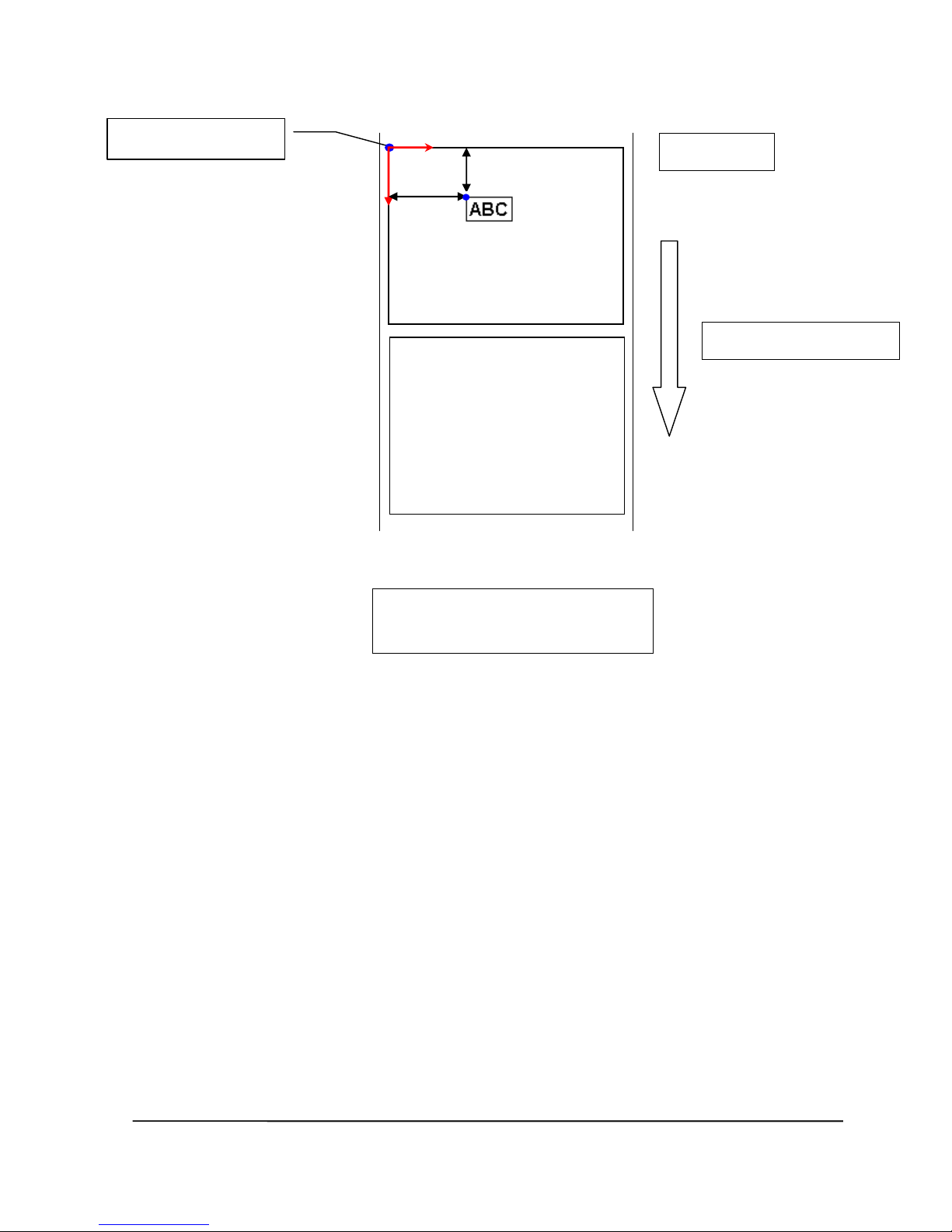
Paper feed direction
DIRECTION 0
Label origin (0,0)
X
Y
X=7mm
Y=3mm
Object Position Calculation
203 DPI, 1mm=8 dots
300 DPI, 1mm=12 dots
DIRECTION 0
TEXT 56,24,”3”,0,1,1,”ABC”
Page 8
TSC AUTO ID Technology Co., Ltd. VI Copyright 2009 All Rights Reserved.
DIRECTION 1
TEXT 56,24,”3”,0,1,1,”ABC”
Paper feed direction
DIRECTION 1
Label origin (0,0)
X
Y
X=7mm
Y=3mm
Page 9

TSC AUTO ID Technology Co., Ltd. VII Copyright 2009 All Rights Reserved.
Printer Models List
Series
Models
TTP-243 series
1. TTP-243
2. TTP-243E
TTP-243 Plus series
3. TTP-243 Plus
4. TTP-243E Plus
TTP-244ME series
5. TTP-243M
6. TTP-244ME
7. TTP-244ME Plus
TTP-244 series
8. TTP-244
9. TTP-244 Plus
TTP-244CE series
10. TTP-244CE
TTP-245 series
11. TTP-245
12. TTP-245G
13. TTP-245 Plus
TTP-247
14. TTP-247
TTP-225
15. TTP-225
TTP-245C series
16. TTP-245C
TDP-245 series
17. TDP-245
10. TDP-245G
11. TDP-245 Plus
TDP-225
18. TDP-225
TTP-246M series
19. TTP-246M
20. TTP-246G
21. TTP-246M Plus
TTP-248M series
22. TTP-248M
TTP-2410M series
23. TTP-2410M
TDP-643 Plus
24. TDP-643 Plus
TDP-643R Plus
25. TDP-643R Plus
TTP-342 series
26. TTP-342
27. TTP-342 Plus
TTP-342M series
28. TTP-342M
29. TTP-342M Plus
TTP-343 series
30. TTP-343
31. TTP-343 Plus
TTP-345
32. TTP-345
TTP-343C series
33. TTP-343C
TTP-344M series
34. TTP-344M
35. TTP-344M Plus
TTP-346M series
36. TTP-346M
TTP-384M series
37. TTP-384M
TTP-644M series
38. TTP-644M
M23 series
39. M23
Page 10

TSC AUTO ID Technology Co., Ltd. VIII Copyright 2009 All Rights Reserved.
Page 11

TSC AUTO ID Technology Co., Ltd. 1 Copyright 2009 All Rights Reserved.
Setup and System Commands
SIZE
Description
This command defines the label width and length.
Syntax
English system (inch)
SIZE m,n
Metric system (mm)
SIZE m mm,n mm
Dot measurement
SIZE m dot,n dot
This command is only supported in v6.27 and later firmware.
Parameter Description
m Label width (inch or mm)
n Label length (inch or mm)
Note :
200 DPI : 1 mm = 8 dots
300 DPI : 1mm = 12 dots
For metric and dot systems, there must be a space between parameter and
“mm” or “dot”.
Max. width
72mm
104mm
106mm
108mm
219.5mm
TTP-243 series
X
TTP-243 Plus series
X
TTP-244ME series
X
TTP-244ME Plus series
X
TTP-244 series
X
TTP-244CE series
X
TTP-245 series
X
TTP-245C series
X
TDP-245 series
X
TTP-246M series
X
TTP-248M series
X
TTP-2410M series
X
TDP-643 Plus series
X
TDP-643R Plus series
X
TTP-342 series
X
TTP-342 Plus series
X
TTP-342M series
X
TTP-342M Plus series
X
Page 12
TSC AUTO ID Technology Co., Ltd. 2 Copyright 2009 All Rights Reserved.
TTP-343 series
X
TTP-343C series
X
TTP-344M series
X
TTP-346M series
X
TTP-384M series
X
TTP-644M series
X
TTP-247 X
TTP-345 X
M23 series
X
Example
(1) English system (inch)
SIZE 3.5, 3.00
(2) Metric system (mm)
SIZE 100 mm, 100 mm
See Also
GAP, BLINE
Page 13
TSC AUTO ID Technology Co., Ltd. 3 Copyright 2009 All Rights Reserved.
GAP
Description
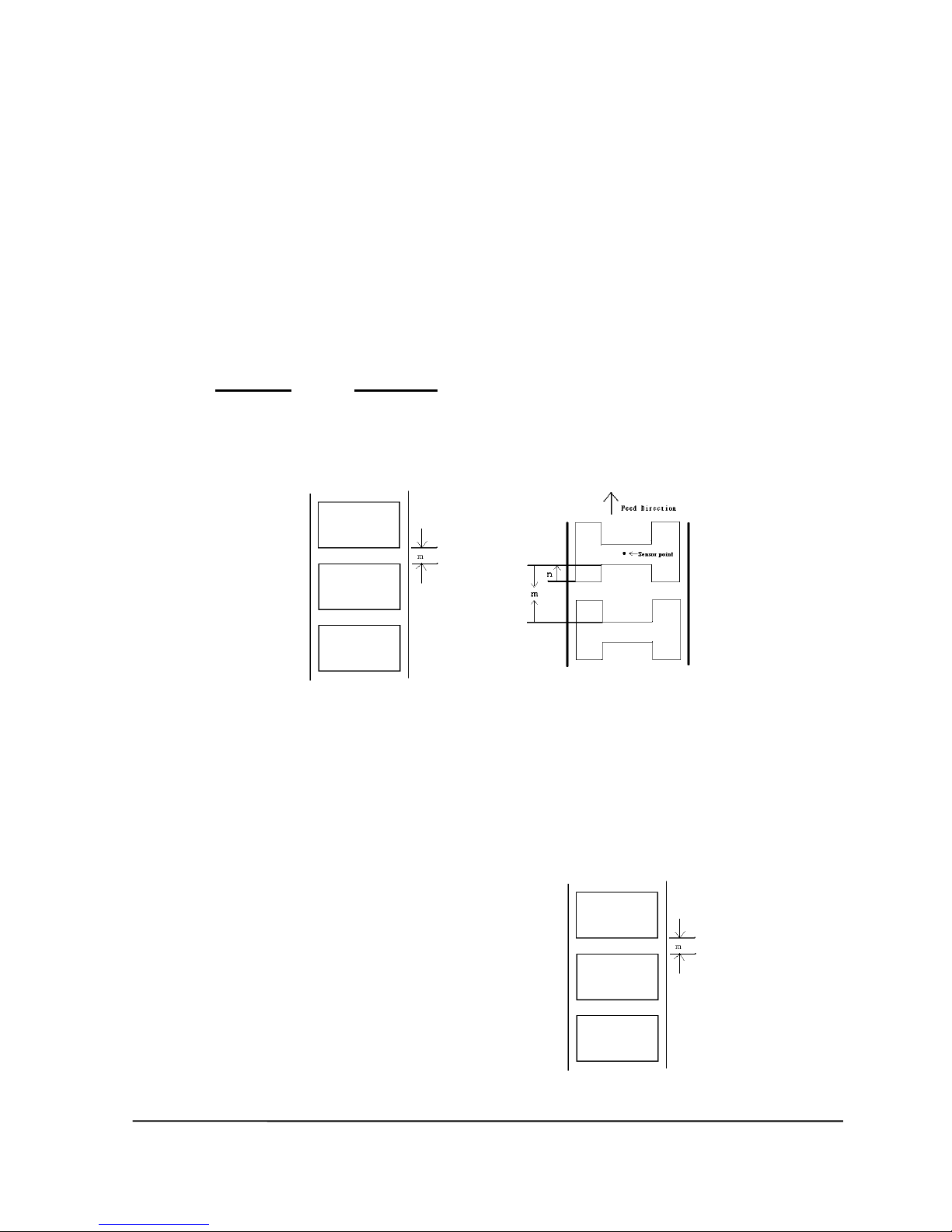
This command sets the distance between two labels.
Syntax
English system (inch)
GAP m,n
Metric system (mm)
GAP m mm,n mm
Parameter Description
m The gap distance between two labels
0 ≤ m ≤1 (inch), 0 ≤ m ≤ 25.4 (mm)
n The offset distance of the gap n ≤ label length (inch or mm)
0,0 Continuous label.
Note: For metric system, there must be a space between parameter and “mm”.
When the sensor type is changed from “Black Mark” to “GAP”, please send the
“GAP” command to the printer first.
Ex: In DOS mode,
C:\>copy con lpt1 <Enter>
GAP 2 mm,0 <Enter>
<Ctrl>+<Z> <Enter>
Example
Normal gap
English system (inch)
GAP 0.12,0
Metric system (mm)
GAP 3 mm,0
Continuous label
GAP 0,0
Page 14
TSC AUTO ID Technology Co., Ltd. 4 Copyright 2009 All Rights Reserved.
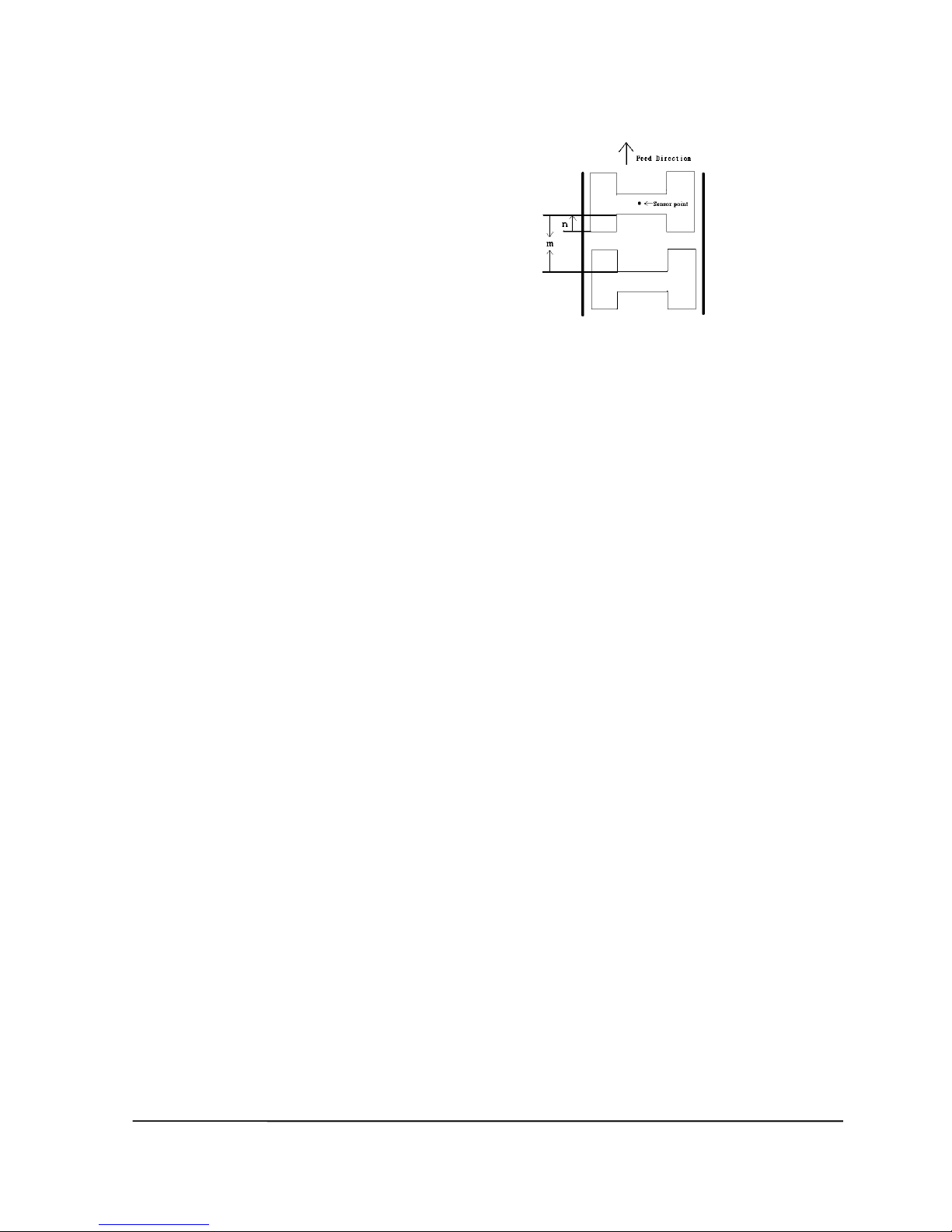
Special gap
English system (inch)
GAP 0.30, 0.10
Metric system (mm)
GAP 7.62 mm, 2.54 mm
See Also
SIZE, BLINE
Page 15

TSC AUTO ID Technology Co., Ltd. 5 Copyright 2009 All Rights Reserved.
GAPDETECT
Description
This command feeds the paper through the gap sensor in an effort to determine the paper
and gap sizes, respectively. This command references the user’s approximate measurements.
If the measurements conflict with the actual size, the GAPDETECT command will not work
properly. This calibration method can be applied to the labels with pre-printed logos or texts.
Syntax
GAPDETECT [x, y]
Parameter Description
x Paper length (in dots)
y Gap length (in dots)
Note: If the x, y parameters are ignored then the printer will calibrate and
determine the paper length and gap size automatically.
See Also
GAP, SIZE, BLINEDETECT, AUTODETECT
Page 16

TSC AUTO ID Technology Co., Ltd. 6 Copyright 2009 All Rights Reserved.
BLINEDETECT
Description
This command feeds the paper through the black mark sensor in an effort to determine the
paper and black mark sizes, respectively. This command references the user’s approximate
measurements. If the measurements conflict with the actual size, the BLINEDETECT
command will not work properly. This calibration method can be applied to the labels with
pre-printed logos or texts.
Syntax
BLINEDETECT [x, y]
Parameter Description
x Paper length (in dots)
y Gap length (in dots)
Note: If the x, y parameters are ignored then the printer will calibrate and
determine the paper length and gap size automatically.
See Also
GAP, SIZE, GAPDETECT, AUTODETECT
Page 17

TSC AUTO ID Technology Co., Ltd. 7 Copyright 2009 All Rights Reserved.
AUTODETECT
Description
This command feeds the paper through the gap/black mark sensor in an effort to determine
the paper and gap/black mark sizes, respectively. This command references the user’s
approximate measurements. If the measurements conflict with the actual size, the
AUTODETECT command will not work properly. This calibration method can be applied to
the labels with pre-printed logos or texts.
Syntax
AUTODETECT [x, y]
Parameter Description
x Paper length (in dots)
y Gap length (in dots)
Note:
(1). If the x, y parameters are ignored then the printer will calibrate and
determine the paper length and gap/black mark size automatically.
(2). When using this command, the printer will detect the label by the proper
sensor type so please don’t set the command GAP or BLINE in your
program.
(3). It is supported in firmware V6.86EZ or later.
See Also
GAP, SIZE, GAPDETECT, BLINEDETECT
Page 18

TSC AUTO ID Technology Co., Ltd. 8 Copyright 2009 All Rights Reserved.
BLINE
Description
This command sets the height of the black line and the user-defined extra label feeding
length each form feed takes.
Syntax
English system (inch)
BLINE m,n
Metric system (mm)
BLINE m mm,n mm
Parameter Description
m The height of black line either in inch or mm.
0 ≤ m ≤ 1 (inch), 0 ≤ m ≤ 25.4 (mm)
n The extra label feeding length. 0 ≤ n ≤ label length
0,0 Continuous label.
Note: For metric system, there must be a space between parameter and “mm”. When
the sensor type is changed from “GAP” to “Black Mark”, please send the
“BLINE” command to the printer first.
Ex : In DOS mode,
C :\>copy con lpt1 <Enter>
BLINE 2 mm,0 <Enter>
<Ctrl>+<Z> <Enter>
Example
English system (inch)
BLINE 0.20,0.50
Metric system (mm)
BLINE 5.08 mm,12.7 mm
Page 19

TSC AUTO ID Technology Co., Ltd. 9 Copyright 2009 All Rights Reserved.
See Also
SIZE, GAP
Page 20

TSC AUTO ID Technology Co., Ltd. 10 Copyright 2009 All Rights Reserved.
OFFSET
Description
This command defines the selective, extra label feeding length each form feed takes, which,
especially in peel-off mode and cutter mode, is used to adjust label stop position, so as for
label to register at proper places for the intended purposes. The printer back tracks the extra
feeding length before the next run of printing.
Syntax
English system (inch)
OFFSET m
Metric system (mm)
OFFSET m mm
Parameter Description
m The offset distance (inch or mm). -1 ≤ m ≤ 1(inch)
CAUTION: Impropriety offset value may cause paper jam.
Example
English system (inch)
OFFSET 0.5
Metric system (mm)
OFFSET 12.7 mm
See Also
SIZE, GAP, SET PEEL, SET CUTTER
Page 21

TSC AUTO ID Technology Co., Ltd. 11 Copyright 2009 All Rights Reserved.
SPEED
Description
This command defines the print speed.
Syntax
SPEED n
Parameter Description
n printing speed in inch per second
Model / IPS
1
1.5 2 2.5 3 3.5 4 5 6 8
10
12
TTP-243 series
x x x
TTP-243 Plus series
x x x
TTP-244ME series
x x x x TTP-244ME Plus series
x x x x TTP-244 series
x x x TTP-244CE series
x x x TTP-245 series
x x x x TTP-245C series
x x x x x TDP-245 series
x x x x TTP-246M series
x x x x x TTP-246M Plus series
x x x x x x TTP-248M series
x x x x
TTP-2410M series
x x x x
x
TDP-643 Plus series
x x x TDP-643R Plus series
x x x TTP-342 series
x x x TTP-342 Plus series
x x x TTP-342M series
x x x TTP-342M Plus series
x x x TTP-343 series
x x TTP-343C series
x x x TTP-344M series
x x x TTP-344M Plus series
x x x x TTP-346M series
x x x x TTP-384M series
x x x TTP-644M series
x x x M23 series
x x x x x
Example
SPEED 10
See Also
Page 22

TSC AUTO ID Technology Co., Ltd. 12 Copyright 2009 All Rights Reserved.
DENSITY
Page 23

TSC AUTO ID Technology Co., Ltd. 13 Copyright 2009 All Rights Reserved.
DENSITY
Description
This command sets the printing darkness.
Syntax
DENSITY n
Parameter Description
n 0~15
0: specifies the lightest level
15: specifies the darkest level
Note: Default DENSITY setting is 8
Example
DENSITY 7
See Also
DENSITY
Page 24

TSC AUTO ID Technology Co., Ltd. 14 Copyright 2009 All Rights Reserved.
DIRECTION and Mirror Image
Description
This command defines the printout direction and mirror image. This will be stored in the
printer memory.
Syntax
DIRECTION n[,m]
Parameter Description
n 0 or 1. Please refer to the illustrations below:
m 0: Print normal image.
1: Print mirror image.
Page 25

TSC AUTO ID Technology Co., Ltd. 15 Copyright 2009 All Rights Reserved.
Model
Support
DIRECTION
MIRROR
TTP-243 series X
TTP-243 Plus series
X
X
TTP-244ME series
X
TTP-244ME Plus series
X
X
TTP-244 series X X
TTP-244CE series
X
X
TTP-245 series X X
TTP-245C series X X
TDP-245 series X X
TTP-246M series
X
X
TTP-248M series X
TTP-2410M series
X
X
TDP-643 Plus series
X
TDP-643R Plus series
X
X
TTP-342 series X
TTP-342 Plus series
X
X
TTP-342M series X
TTP-342M Plus series
X
X
TTP-343 series X X
TTP-343C series X X
TTP-344M series
X
X
TTP-346M series
X
X
TTP-384M series
X
X
TTP-644M series
X
X
M23 series X X
Example
DIRECTION 0
DIRECTION 0,1
See Also
REFERENCE
Page 26
TSC AUTO ID Technology Co., Ltd. 16 Copyright 2009 All Rights Reserved.
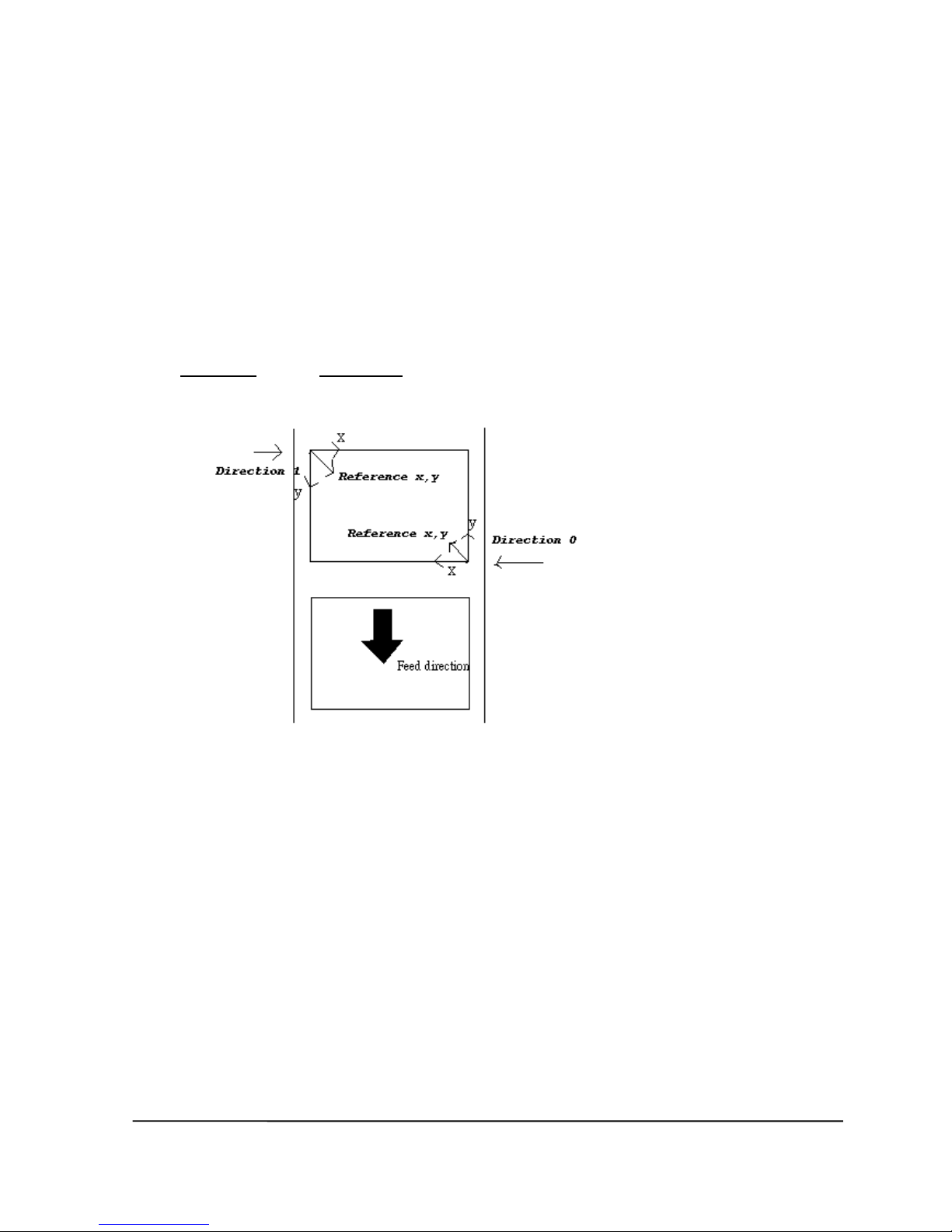
REFERENCE
Description
This command defines the reference point of the label. The reference (origin) point varies
with the print direction, as shown:
Syntax
REFERENCE x, y
Parameter Description
x Horizontal coordinate (in dots)
y Vertical coordinate (in dots)
Note: 200 DPI: 1 mm = 8 dots
300 DPI: 1 mm = 12 dots
Example
REFERENCE 10,10
See Also
DIRECTION
Page 27

TSC AUTO ID Technology Co., Ltd. 17 Copyright 2009 All Rights Reserved.
SHIFT
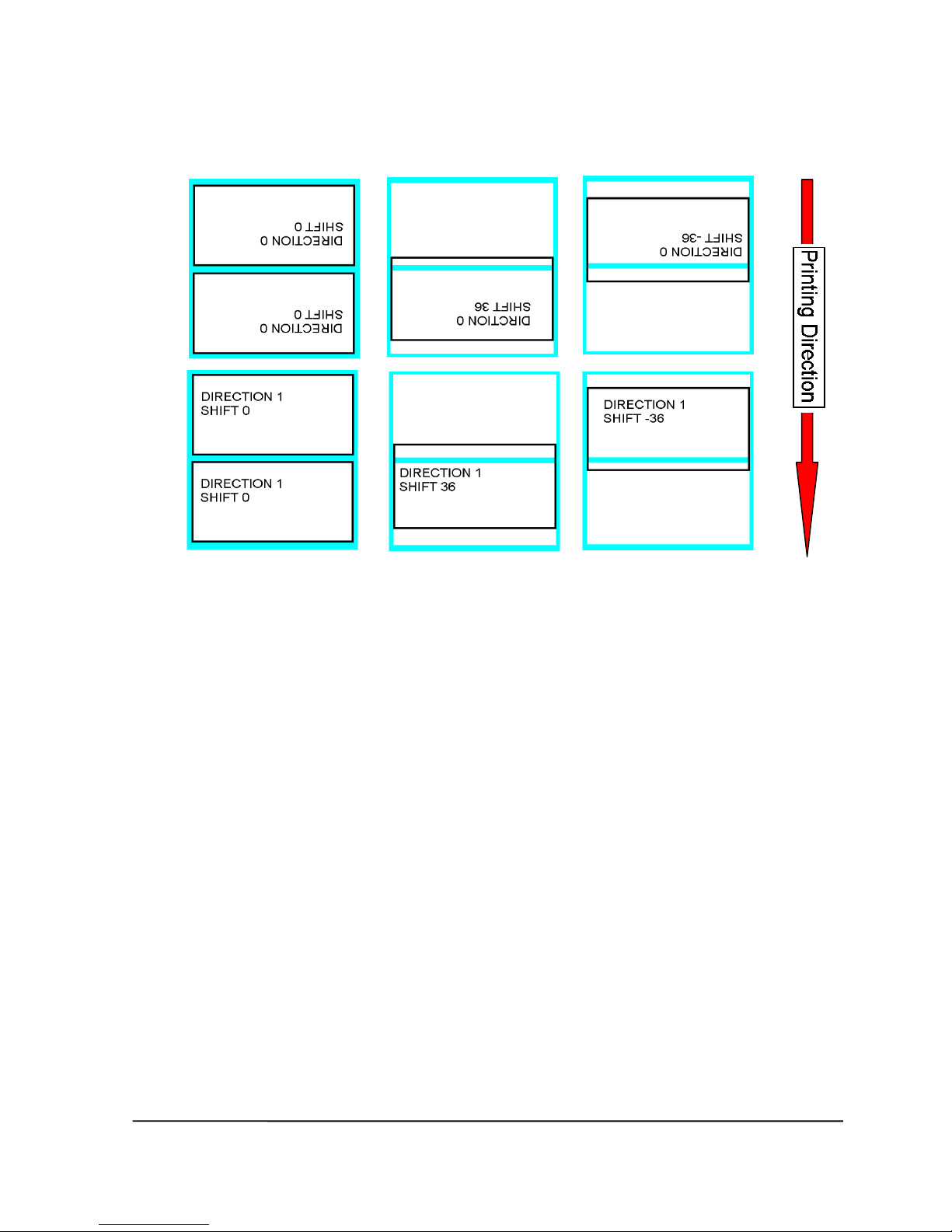
Description
This command moves the label’s vertical position. A positive value moves the label further
from the printing direction; a negative value moves the label towards the printing direction.
For a visual representation, see next page.
Syntax
SHIFT n
Parameter Description
n The maximum value is 1 inch. For 200 dpi printers, the range
is –203 to 203; for 300 dpi printers, the range is –300 to 300.
The unit is dot.
Model
Support
TTP-243 series
TTP-243 Plus series
X
TTP-244ME series
TTP-244ME Plus series
X
TTP-244 series
X
TTP-244CE series
X
TTP-245 series
X
TTP-245C series
X
TDP-245 series
X
TTP-246M series
X
TTP-248M series
TTP-2410M series
X
TDP-643 Plus series
TDP-643R Plus series
X
TTP-342 series
TTP-342 Plus series
X
TTP-342M series
TTP-342M Plus series
X
TTP-343 series
X
TTP-343C series
X
TTP-344M series
X
TTP-346M series
X
TTP-384M series
X
TTP-644M series
X
M23 series
Page 28
TSC AUTO ID Technology Co., Ltd. 18 Copyright 2009 All Rights Reserved.
Example
SIZE 4,2.5
GAP 2 mm,0
DIRECTION 0
SHIFT 30
OFFSET 0
CLS
TEXT 400,200,"3",0,1,1,"DIRECTION 0"
TEXT 400,250,"3",0,1,1,"SHIFT 30"
BOX 10,0,780,490,8
PRINT 3,1
See Also
OFFSET, REFERENCE
Page 29

TSC AUTO ID Technology Co., Ltd. 19 Copyright 2009 All Rights Reserved.
COUNTRY
Description
This command orients the keyboard for use in different countries via defining special
characters on the KP-200 series portable LCD keyboard (option).
Syntax
COUNTRY n
Parameter Description
n 001: USA
002: Canadian-French
003: Spanish (Latin America)
031: Dutch
032: Belgian
033: French (France)
034: Spanish (Spain)
036: Hungarian
038: Yugoslavian
039: Italian
041: Switzerland
042: Slovak
044: United Kingdom
045: Danish
046: Swedish
047: Norwegian
048: Polish
049: German
055: Brazil
061: English (International)
351: Portuguese
358: Finnish
Example
COUNTRY 001
See Also
CODEPAGE, ~!I
Page 30

TSC AUTO ID Technology Co., Ltd. 20 Copyright 2009 All Rights Reserved.
CODEPAGE
Description
This command defines the code page of international character set.
Syntax
CODEPAGE n
Parameter Description
n Name or number of code page, which can be divided
into 7-bit code page and 8-bit code page.
7-bit code page name
USA: USA
BRI: British
GER: German
FRE: French
DAN: Danish
ITA: Italian
SPA: Spanish
SWE: Swedish
SWI: Swiss
8-bit code page number
437: United States
850: Multilingual
852: Slavic
860: Portuguese
863: Canadian/French
865: Nordic
857: Turkish (TSPL2 printers only)
Windows code page
1250: Central Europe (TSPL2 printers only)
1252: Latin I (TSPL2 printers only)
1253: Greek (TSPL2 printers only)
1254: Turkish (TSPL2 printers only)
Note: DATA LENGTH determines 7-bit or 8-bit communications parameter.
Page 31

TSC AUTO ID Technology Co., Ltd. 21 Copyright 2009 All Rights Reserved.
Model
7-bit Codepage
8-bit Codepage
Windows Codepage
USA
BRI
GER
FRE
DAN
ITA
SPA
SWE
SWI
437
850
852
860
863
865
857
1250
1252
1253
1254
TTP-243 series
X X X X X X X X X X X X X X X
TTP-243 Plus series
X X X X X X X X X X X X X X X
TTP-244ME series
X X X X X X X X X X X X X X X
TTP-244ME Plus series
X X X X X X X X X X X X X X X
TTP-244 series
X X X X X X X X X X X X X X X X X X X
X
TTP-244 CE series
X X X X X X X X X X X X X X X X X X X
X
TTP-245 series
X X X X X X X X X X X X X X X X X X X
X
TTP-245C series
X X X X X X X X X X X X X X X X X X X
X
TDP-245 series
X X X X X X X X X X X X X X X X X X X
X
TTP-246M series
X X X X X X X X X X X X X X X X X X X
X
TTP-246M Plus series
X X X X X X X X X X X X X X X X X X X
X
TTP-248M series
X X X X X X X X X X X X X X X X X X X
X
TTP-2410M series
X X X X X X X X X X X X X X X X X X X
X
TDP-643 Plus series
X X X X X X X X X X X X X X X
TDP-643R Plus series
X X X X X X X X X X X X X X X
TTP-342 series
X X X X X X X X X X X X X X X
TTP-342 Plus series
X X X X X X X X X X X X X X X
TTP-342M series
X X X X X X X X X X X X X X X
TTP-342M Plus series
X X X X X X X X X X X X X X X
TTP-343 series
X X X X X X X X X X X X X X X X X X X
X
TTP-343C series
X X X X X X X X X X X X X X X X X X X
X
TTP-344M series
X X X X X X X X X X X X X X X X X X X
X
TTP-344M Plus series
X X X X X X X X X X X X X X X X X X X
X
TTP-346M series
X X X X X X X X X X X X X X X X X X X
X
TTP-384M series
X X X X X X X X X X X X X X X X X X X
X
TTP-644M series
X X X X X X X X X X X X X X X X X X X
X
M23 series
X X X X X X X X X X X X X X X
Example
CODEPAGE 437
See Also
COUNTRY, SET COM1, ~!I
Page 32

TSC AUTO ID Technology Co., Ltd. 22 Copyright 2009 All Rights Reserved.
CLS
Description
This command clears the image buffer.
Syntax
CLS
Parameter Description
None N/A
Note: This command must be placed after SIZE command.
Example
CLS
See Also
SIZE, GAP, BLINE
Page 33

TSC AUTO ID Technology Co., Ltd. 23 Copyright 2009 All Rights Reserved.
FEED
Description
This command feeds label with the specified length. The length is specified by dot.
Syntax
FEED n
Parameter Description
n unit: dot
1 ≤ n ≤ 9999
Note: 200 DPI: 1 mm = 8 dots
300 DPI: 1 mm = 12 dots
Example
FEED 40
See Also
BACKFEED, SIZE, GAP, BLINE, HOME, FORMFEED
Page 34

TSC AUTO ID Technology Co., Ltd. 24 Copyright 2009 All Rights Reserved.
BACKFEED & BACKUP
Description
This command feeds the label in reverse. The length is specified by dot.
Syntax
BACKUP n (TSPL printers only)
BACKFEED n (TSPL2 printers only)
Parameter Description
n unit: dot
1 ≤ n ≤ 9999
Note : 200 DPI : 1 mm = 8 dots
300 DPI : 1 mm = 12 dots
Model
Support
BACKUP
BACKFEED
TTP-243 series
X
TTP-243 Plus series
X
X
TTP-244ME series
X
TTP-244ME Plus series
X
X
TTP-244 series
X
X
TTP-244CE series
TTP-245 series
X
TTP-245C series
X
TDP-245 series
X
TTP-246M series
X
TTP-248M series
X
TTP-2410M series
X
X
TDP-643 Plus series
X
TDP-643R Plus series
X
X
TTP-342 series
X
TTP-342 Plus series
X
X
TTP-342M series
X
TTP-342M Plus series
X
X
TTP-343 series
X
TTP-343C series
X
TTP-344M series
X
TTP-346M series
X
X
TTP-384M series
X
X
TTP-644M series
X
X
M23 series X
CAUTION: Impropriety back feed value may cause paper jam or wrinkle.
Page 35

TSC AUTO ID Technology Co., Ltd. 25 Copyright 2009 All Rights Reserved.
Example
BACKUP 40
BACKFEED 40
See Also
FEED, SIZE, GAP, BLINE, HOME, FORMFEED
Page 36

TSC AUTO ID Technology Co., Ltd. 26 Copyright 2009 All Rights Reserved.
FORMFEED
Description
This command feeds label to the beginning of next label.
Syntax
FORMFEED
Parameter Description
None N/A
Example
SIZE 4, 2.5
GAP 0 mm,0
SPEED 4
DENSITY 7
DIRECTION 0
OFFSET 0.00
REFERENCE 0,0
SET PEEL OFF
SET CUTTER OFF
SET COUNTER @0 +1
@0="000001"
FORMFEED
CLS
BOX 1,1,360,65,12
TEXT 25,25, "3",0,1,1,"FORMFEED COMMAND TEST"
TEXT 25,80,"3",0,1,1,@0
PRINT 3,1
See Also
FEED, SIZE, GAP, BLINE, HOME, BACKFEED
Page 37

TSC AUTO ID Technology Co., Ltd. 27 Copyright 2009 All Rights Reserved.
HOME
Description
This command will feed label until the internal sensor has determined the origin. Size and
gap of the label should be defined before using this command.
Syntax
HOME
Parameter Description
None N/A
Model
HOME
Back Label
Feed Label
TTP-243 series
X
TTP-243 Plus series
X
TTP-244ME series
X
TTP-244ME Plus series
X
TTP-244 series
X
TTP-244CE series
X
TTP-245 series
X
TTP-245C series
X
TDP-245 series
X
TTP-246M series
X
TTP-248M series
X
TTP-2410M series
X
TDP-643 Plus series
X
TDP-643R Plus series
X
TTP-342 series
X
TTP-342 Plus series
X
TTP-342M series
X
TTP-342M Plus series
X
TTP-343 series
X
TTP-343C series
X
TTP-344M series
X
TTP-346M series
X
TTP-384M series
X
TTP-644M series
X
M23 series X
Page 38

TSC AUTO ID Technology Co., Ltd. 28 Copyright 2009 All Rights Reserved.
Example
SIZE 4,2.5
GAP 2 mm,0
SPEED 4
DENSITY 7
DIRECTION 0
OFFSET 0.00
REFERENCE 0,0
SET PEEL OFF
SET CUTTER OFF
SET COUNTER @0 +1
@0="000001"
HOME
CLS
BOX 1,1,360,65,12
TEXT 25,25,"3",0,1,1,"HOME COMMAND TEST"
TEXT 25,80,"3",0,1,1,@0
PRINT 3,1
See Also
FEED, SIZE, GAP, BLINE, FORMFEED
Page 39

TSC AUTO ID Technology Co., Ltd. 29 Copyright 2009 All Rights Reserved.
PRINT
Description
This command prints the label format currently stored in the image buffer.
Syntax
PRINT m [,n]
Parameter Description
m Specifies how many sets of labels will be printed.
1 ≤ m ≤ 999999999
If m=-1, printer will print the last label content for n copies.
n Specifies how many copies should be printed for each particular
label set. 1 ≤ n ≤ 999999999
Example
SIZE 60 mm, 20 mm
SET COUNTER @1 1
@1="0001"
CLS
TEXT 10,10,"3",0,1,1,@1
PRINT 3,2
PRINT –1,2
See Also
SET COUNTER, INPUT, DOWNLOAD
Page 40

TSC AUTO ID Technology Co., Ltd. 30 Copyright 2009 All Rights Reserved.
SOUND
Description
This command controls the sound frequency of the beeper. There are 10 levels of sounds.
The timing control can be set by the "interval" parameter.
Syntax
SOUND level, interval
Parameter Description
level Sound level: 0~9
interval Sound interval: 1~4095
Example
SOUND 5,200
SOUND 3,200
SOUND 3,200
SOUND 4,200
SOUND 2,200
SOUND 2,200
SOUND 1,200
SOUND 2,200
SOUND 3,200
SOUND 4,200
SOUND 5,200
Page 41

TSC AUTO ID Technology Co., Ltd. 31 Copyright 2009 All Rights Reserved.
CUT
Description
This command activates the cutter to immediately cut the labels without back feeding the
label.
Syntax
CUT
Parameter Description
None N/A
Example
SIZE 3,3
GAP 0 mm,0
CLS
DIRECTION 0
REFERENCE 0,0
OFFSET 0.00 mm
SET CUTTER OFF
SET TEAR OFF
BOX 0,0,866,866,5
TEXT 100,100,"5",0,1,1,"FEED & CUT"
TEXT 100,200,"5",0,1,1,"300 DPI"
PRINT 1,1
FEED 260
CUT
See Also
SET CUTTER, SET BACK, SET PARTITAL_CUTTER
Page 42

TSC AUTO ID Technology Co., Ltd. 32 Copyright 2009 All Rights Reserved.
LIMITFEED
Description
If the gap sensor is not set to a suitable sensitivity while feeding labels, the printer will not
be able to locate the correct position of the gap. This command stops label feeding and
makes the red LED flash if the printer does not locate gap after feeding the length of one
label plus one preset value.
Syntax
LIMITFEED n (inch, the English system)
LIMITFEED n mm (mm, the metric system)
Parameter Description
n The maximum length for sensor detecting.
Note:
The setting will remain resident in memory.
The default value is 10 inches when printer initializes.
For metric system, there must be a space between parameter n and mm.
Page 43

TSC AUTO ID Technology Co., Ltd. 33 Copyright 2009 All Rights Reserved.
SELFTEST
Description
At this command, the printer will print out the printer information.
Syntax
SELFTEST
Model
Support
TTP-243 series
TTP-243 Plus series
X
TTP-244ME series
TTP-244ME Plus series
X
TTP-244 series
X
TTP-244CE series
X
TTP-245 series
X
TTP-245C series
X
TDP-245 series
X
TTP-246M series
X
TTP-248M series
TTP-2410M series
X
TDP-643 Plus series
TDP-643R Plus series
X
TTP-342 series
TTP-342 Plus series
X
TTP-342M series
TTP-342M Plus series
X
TTP-343 series
X
TTP-343C series
X
TTP-344M series
X
TTP-346M series
X
TTP-384M series
X
TTP-644M series
X
M23 series
X
Example
SELFTEST
Page 44

TSC AUTO ID Technology Co., Ltd. 34 Copyright 2009 All Rights Reserved.
Label Formatting Commands
BAR
Description
This command draws a bar on the label format.
Syntax
BAR x, y, width, height
Parameter Description
x The upper left corner x-coordinate (in dots)
y The upper left corner y-coordinate (in dots)
width Bar width (in dots)
height Bar height (in dots)
Note: 200 DPI: 1 mm = 8 dots
300 DPI: 1 mm = 12 dots
Recommended max. bar height is 12 dots at 4” width. Bar height over 12 dots may
damage the power supply and affect the print quality.
Max. print ratio is different for each printer model. Desktop and industrial printer
print ratio is limited to 20% and 30% respectively.
Example
SIZE 4,2.5
GAP 0,0
SPEED 6
DENSITY 8
DIRECTION 0
CLS
BAR 100, 100, 300, 200
PRINT 1,1
See Also
BOX
Page 45

TSC AUTO ID Technology Co., Ltd. 35 Copyright 2009 All Rights Reserved.
BARCODE
Description
This command prints 1D barcodes. The available bar codes are listed below:
Code 128 (switching code subset automatically)
Code 128M (switching code subset manually)
EAN 128 (switching code subset automatically)
Interleaved 2 of 5
Interleaved 2 of 5 with check digit
Code 39 standard
Code 39 full ASCII
Code 39 full ASCII with check digit
Code 93
EAN 13
EAN 13 with 2 digits add-on
EAN 13 with 5 digits add-on
EAN 8
EAN 8 with 2 digits add-on
EAN 8 with 5 digits add-on
Codabar
Postnet
UPC-A
UPC-A with 2 digits add-on
UPC-A with 5 digits add-on
UPC-E
UPC-E with 2 digits add-on
UPC-E with 5 digits add-on
MSI
PLESSEY
China POST
ITF14
EAN14
CODE 11
Page 46

TSC AUTO ID Technology Co., Ltd. 36 Copyright 2009 All Rights Reserved.
Syntax
BARCODE X, Y, “code type”, height, human readable, rotation, narrow, wide, “code”
Parameter Description
X Specify the x-coordinate of the bar code on the label
Y Specify the y-coordinate of the bar code on the label
code type
128 Code 128, switching code subset A, B, C automatically
128M Code 128, switching code subset A, B, C manually.
Control code
A B C
096
FNC3
FNC3
NONE
097
FNC2
FNC2
NONE
098
SHIFT
SHIFT
NONE
099
CODE C
CODE C
NONE
100
CODE B
FNC4
CODE B
101
FNC4
CODE A
CODE A
102
FNC1
FNC1
FNC1
103
Start (CODE A)
104
Start (CODE B)
105
Start (CODE C)
Use “!” as a starting character for the control code followed by
three control codes. If the start subset is not set, the default starting
subset is B.
EAN128 Code 128, switching code subset A, B, C automatically
25 Interleaved 2 of 5
25C Interleaved 2 of 5 with check digits
39 Code 39 full ASCII for TSPL2 printers
Code 39 standard for TSPL printers
Auto switch full ASCII and standard code 39 for PLUS models.
39C Code 39 full ASCII with check digit for TSPL2 printers
Code 39 standard with check digit for TSPL printers
Auto switch full ASCII and standard code 39 for PLUS models.
39S Code 39 standard for TSPL2 printers
93 Code 93
EAN13 EAN 13
EAN13+2 EAN 13 with 2 digits add-on
EAN13+5 EAN 13 with 5 digits add-on
EAN8 EAN 8
EAN8+2 EAN 8 with 2 digits add-on
EAN8+5 EAN 8 with 5 digits add-on
CODA Codabar
POST Postnet
Page 47

TSC AUTO ID Technology Co., Ltd. 37 Copyright 2009 All Rights Reserved.
UPCA UPC-A
UPCA+2 UPC-A with 2 digits add-on
UPCA+5 UPC-A with 5 digits add-on
UPCE UPC-E
UPCE+2 UPC-E with 2 digits add-on
UPCE+5 UPC-E with 5 digits add-on
CPOST China post code
MSI MSI code
MSIC MSI with check digit
PLESSEY PLESSEY code
ITF14 ITF 14 code
EAN14 EAN 14 code
11 Code 11
height Bar code height (in dots)
human readable 0: not readable
1: human readable
rotation 0 : No rotation
90 : Rotate 90 degrees clockwise
180 : Rotate 180 degrees clockwise
270 : Rotate 270 degrees clockwise
narrow Width of narrow element (in dots)
wide Width of wide element (in dots)
narrow : wide
1:1
narrow : wide
1:2
narrow : wide
1:3
narrow : wide
2:5
narrow : wide
3:7
128
10x - - - -
EAN128
10x - - - -
25 - 10x
10x
5x
-
25C - 10x
10x
5x
-
39 - 10x
10x
5x
-
39C - 10x
10x
5x
-
93 - -
10x - -
EAN13
8x - - - -
EAN13+2
8x - - - -
EAN13+5
8x - - - -
EAN 8
8x - - - -
EAN 8+2
8x - - - -
EAN 8+5
8x - - - -
CODA - 10x
10x
5x
-
POST
1x - - - -
UPCA
8x - - - -
UPCA+2
8x - - - -
UPCA+5
8x - - - -
UPCE
8x - - - -
Page 48

TSC AUTO ID Technology Co., Ltd. 38 Copyright 2009 All Rights Reserved.
UPCE+2
8x - - - -
UPCE+5
8x - - - -
CPOST - - - -
1x
MSI - -
10x - -
MSIC
10x -
PLESSY - -
10x - -
ITF14 - 10x
10x
5x
-
EAN14
8x - - - -
11 - 10x
10x
5x
-
code number the maximum number of digits of bar code content
Barcode type
Maximum bar
code length
128 - EAN128
-
25 - 25C - 39 - 39C
-
93
-
EAN13
12
EAN13+2
14
EAN13+5
17
EAN 8
7
EAN 8+2
9
EAN 8+5
12
CODA
-
POST
5,9,11
UPCA
11
UPCA+2
13
UPCA+5
16
UPCE
6
UPCE+2
8
UPCE+5
11
CPOST
-
MSI
-
MSIC
PLESSY
-
ITF14
13
EAN14
13
CODE 11
-
Example
Page 49

TSC AUTO ID Technology Co., Ltd. 39 Copyright 2009 All Rights Reserved.
BARCODE 100,100,”39”,96,1,0,2,4,”1000”
BARCODE 10,10,”128M”,48,1,0,2,2,”!104!096ABCD!101EFGH”
(The above example of code 128M encoded with CODE B start character. The next
character will be the code 128 function character FNC3 which is then followed by the
ABCD characters and EFGH characters encoded as CODE A subset.)
Barcode Type
Model
128
EAN128
25
25C
39 for TSPL2
39 for TSPL
39 for PLUS
39C for TSPL2
39C for TSPL
39C for PLUS
39S
93
EAN13
EAN13+2
EAN13+5
EAN 8
EAN 8+2
EAN 8+5
CODA
POST
UPCA
UPCA+2
UPCA+5
UPCE
UPCE+2
UPCE+5
CPOST
MSI
MSIC
PLESSY
ITF14
EAN14
11
TTP-243 series
X X X X X X X X X X X X X X X X X X X X X X
TTP-243 Plus series
X X X X X X X X X X X X X X X X X X X X X X X X X X X X
TTP-244ME series
X X X X X X X X X X X X X X X X X X X X X X
TTP-244ME Plus series
X X X X X X X X X X X X X X X X X X X X X X X X X X X X
TTP-244 series
X X X X X X X X X X X X X X X X X X X X X X X X X X X X
TTP-244CE series
X X X X X X X X X X X X X X X X X X X X X X X X X X X X
TTP-245 series
X X X X X X X X X X X X X X X X X X X X X X X X X X X X X
TTP-245C series
X X X X X X X X X X X X X X X X X X X X X X X X X X X X X
TDP-245 series
X X X X X X X X X X X X X X X X X X X X X X X X X X X X X
TTP-246M series
X X X X X X X X X X X X X X X X X X X X X X X X X X X X X
TTP-248M series
X X X X X X X X X X X X X X X X X X X X X X X X X X X
TTP-2410M series
X X X X X X X X X X X X X X X X X X X X X X X X X X X X
TDP-643 Plus series
X X X X X X X X X X X X X X X X X X X X X X
TDP-643R Plus series
X X X X X X X X X X X X X X X X X X X X X X X X X X X X
TTP-342 series
X X X X X X X X X X X X X X X X X X X X X X
TTP-342 Plus series
X X X X X X X X X X X X X X X X X X X X X X X X X X X X
TTP-342M series
X X X X X X X X X X X X X X X X X X X X X X
TTP-342M Plus series
X X X X X X X X X X X X X X X X X X X X X X X X X X X X
TTP-343 series
X X X X X X X X X X X X X X X X X X X X X X X X X X X X X
TTP-343C series
X X X X X X X X X X X X X X X X X X X X X X X X X X X X X
TTP-344M series
X X X X X X X X X X X X X X X X X X X X X X X X X X X X X
TTP-346M series
X X X X X X X X X X X X X X X X X X X X X X X X X X X X
TTP-384M series
X X X X X X X X X X X X X X X X X X X X X X X X X X X X
TTP-644M series
X X X X X X X X X X X X X X X X X X X X X X X X X X X X
M23 series
X X X X X X X X X X X X X X X X X X X X X X X X X X X X X
Page 50

TSC AUTO ID Technology Co., Ltd. 40 Copyright 2009 All Rights Reserved.
BITMAP
Description
This command draws bitmap images (as opposed to BMP graphic files).
Syntax
BITMAP X, Y, width, height, mode, bitmap data…
Parameter Description
X Specify the x-coordinate
Y Specify the y-coordinate
width Image width (in bytes)
height Image height (in dots)
mode Graphic modes listed below:
0: OVERWRITE
1: OR
2: XOR
bitmap data Bitmap data
Example
Page 51

TSC AUTO ID Technology Co., Ltd. 41 Copyright 2009 All Rights Reserved.
ROW
(Y- axis)
L-Byte
R-Byte
Binary
Hexadecimal
Binary
Hexadecimal
0
00000000
00
00000000
00
1
00000000
00
00000000
00
2
00000000
00
00000000
00
3
00000111
07
11111111
FF
4
00000011
03
11111111
FF
5
00010001
11
11111111
FF
6
00011000
18
11111111
FF
7
00011100
1C
01111111
7F
8
00011110
1E
00111111
3F
9
00011111
1F
00011111
1F
A
00011111
1F
10001111
8F
B
00011111
1F
11000111
C7
C
00011111
1F
11100011
E3
D
00011111
1F
11110111
F7
E
00011111
1F
11111111
FF
F
00011111
1F
11111111
FF
SIZE 4,2
GAP 0,0
CLS
BITMAP 200,200,2,16,0, • -?
PRINT 1,1
Hexadecimal
ASCII
53 49 5A 45 20 34 2C 32 0D 0A 47 41 50
20 30 2C 30 0D 0A 43 4C 53 0D 0A 42 49
54 4D 41 50 20 32 30 30 2C 32 30 30 2C
32 2C 31 36 2C 30 2C 00 00 00 00 00 00 07
FF 03 FF 11 FF 18 FF 1C 7F 1E 3F 1F 1F 1F
8F 1F C7 1F E3 1F E7 1F FF 1F FF 0D 0A 50
52 49 4E 54 20 31 2C 31 0D 0A
SIZE 4,2
GAP 0,0
CLS
BITMAP 200,200,2,16,0,
• -?
PRINT 1,1
See Also
PUTBMP, PUTPCX
Page 52

TSC AUTO ID Technology Co., Ltd. 42 Copyright 2009 All Rights Reserved.
BOX
Description
This command draws rectangles on the label.
Syntax
BOX X_start, Y_start, X_end, Y_end, line thickness
Parameter Description
X_start Specify x-coordinate of upper left corner (in dots)
Y_start Specify y-coordinate of upper left corner (in dots)
X_end Specify x-coordinate of lower right corner (in dots)
Y_end Specify y-coordinate of lower right corner (in dots)
line thickness Line thickness (in dots)
Note: 200 DPI: 1 mm = 8 dots
300 DPI: 1 mm = 12 dots
Recommended max. thickness of box is 12mm at 4” width. Thickness of box larger
than 12 mm may damage the power supply and affect the print quality.
Max. print ratio is different for each printer model. Desktop and industrial printer
print ratio is limited to 20% and 30% respectively.
Example
SIZE 4,2.5
GAP 0,0
SPEED 6
DENSITY 8
DIRECTION 0
CLS
BOX 100,100,200,200,5
PRINT 1,1
See Also
BAR
Page 53

TSC AUTO ID Technology Co., Ltd. 43 Copyright 2009 All Rights Reserved.
CIRCLE
Description
This command draws a circle on the label.
Syntax
CIRCLE X_start, Y_start, diameter, circle thickness
Parameter Description
X_start Specify x-coordinate of upper left corner (in dots)
Y_start Specify y-coordinate of upper left corner (in dots)
diameter Specify the diameter of the circle (in dots)
thickness Thickness of the circle (in dots)
Example
SIZE 80 mm, 30 mm
GAP 0,0
DIRECTION 1
CLS
BAR 250,20,100,1
BAR 250,20,1,100
CIRCLE 250,20,100,1
PRINT 1
Page 54

TSC AUTO ID Technology Co., Ltd. 44 Copyright 2009 All Rights Reserved.
DMATRIX
Description
This command is used to define the DataMatrix 2D bar code. Currently, only ECC200 error
correction is supported.
Syntax
DMATRIX x, y, width, height, [xm,row,col], expression
Parameter Description
x Horizontal start position (in dots)
y Vertical start position (in dots)
width The expected width of barcode area (in dots)
height The expected height of barcode area (in dots)
xm Module size (in dots)
row Symbol size of row: 10 to 144
col Symbol size of col: 10 to 144
Example
SIZE 3,3
GAP 0,0
SPEED 4
DENSITY 8
DIRECTION 0
REFERENCE 0,0
OFFSET 0.00
SET CUTTER OFF
SET TEAR ON
CLS
DMATRIX 10,110,400,400,"DMATRIX EXAMPLE 1"
DMATRIX 310,110,400,400,x6,"DMATRIX EXAMPLE 2"
DMATRIX 10,310,400,400,x8,18,18,"DMATRIX EXAMPLE 3"
PRINT 1,1
Page 55

TSC AUTO ID Technology Co., Ltd. 45 Copyright 2009 All Rights Reserved.
ERASE
Description
This command clears a specified region in the image buffer.
Syntax
ERASE X_start, Y_start, X_width, Y_height
Parameter Description
X_start The x-coordinate of the starting point (in dots)
Y_start The y-coordinate of the starting point (in dots)
X_width The region width in x-axis direction (in dots)
Y_height The region height in y-axis direction (in dots)
Example
SIZE 4,2.5
GAP 0,0
SPEED 6
DENSITY 8
DIRECTION 0
CLS
BAR 100, 100, 300, 300
ERASE 150,150,200,200
PRINT 1,1
See Also
CLS
Page 56

TSC AUTO ID Technology Co., Ltd. 46 Copyright 2009 All Rights Reserved.
MAXICODE
Description
This command defines a 2D Maxicode.
Syntax
MAXICODE x, y, mode, [class, country, post, Lm,] "message"
For mode 2 or 3:
MAXICODE x, y, mode, class, country, postal code, “low priority message"
If country is 840, the postal code is in 99999,9999 format.
For other countries, the code is up to 6 alphanumeric characters.
For mode 4,5,6
MAXICODE x, y, mode, [Lm], "message"
* AIM special format is supported, see page 23 in the spec.
Note: Mode 6 is not supported in TSPL2 printers firmware.
Parameter Description
x X-coordinate of the starting point in dot
y Y-coordinate of the starting point in dot
mode 2,3,4,5
class Class of service, 3-digit number (for mode 2,3)
country Country code, 3-digit number (for mode 2,3)
post Post code (for mode 2,3)
Mode 2: (USA) 5-digit+ 4-digit number
Mode3: (Canada) 6 alphanumeric post code included by double
quotes.
Lm Expression length (double quote is ignored) , 1m138, (this
parameter is just for mode 4 and 5.)
message Barcode content
Example
SIZE 4,2
GAP 0,0
CLS
SPEED 4
DENSITY 8
OFFSET 0.00
REFERENCE 0,0
SET CUTTER OFF
SET TEAR ON
REM *****Mode 2 For USA*****
Page 57

TSC AUTO ID Technology Co., Ltd. 47 Copyright 2009 All Rights Reserved.
MAXICODE 110,100,2,300,840,06810,7317,"DEMO 2 FOR USA MAXICODE"
TEXT 100,520,"3",0,2,2,"Mode 2 For USA"
PRINT 1,1
REM *****Mode 3 For Canada*****
CLS
MAXICODE 110,100,3,300,863,"107317","DEMO 3 FOR CANADA MAXICODE"
TEXT 100,520,"3",0,2,2,"Mode 3 For CANADA"
PRINT 1,1
REM *****MODE4*****
CLS
MAXICODE 110,100,4,"DEMO 4 FOR MAXICODE"
MAXICODE 600,100,4,19,DEMO 4 FOR MAXICODE
TEXT 100,520,"3",0,2,2,"Mode 4 FOR MAXICODE"
PRINT 1,1
REM *****MODE 5*****
CLS
MAXICODE 110,100,5,"DEMO 5 FOR MAXICODE"
MAXICODE 600,100,5,19,DEMO 5 FOR MAXICODE
TEXT 100,520,"3",0,2,2,"DEMO 5 FOR MAXICODE"
PRINT 1
Page 58

TSC AUTO ID Technology Co., Ltd. 48 Copyright 2009 All Rights Reserved.
PDF417
Description
This command defines a PDF417 2D barcode.
Syntax
PDF417 x, y, width, height, rotate, [option], expression
Parameter Description
x X-coordinate of starting point (in dots)
y Y-coordinate of starting point (in dots)
width Expected width (in dots)
height Expected height (in dots)
rotate Rotation counterclockwise.
0 : No rotation
90 : 90 degrees
180 : 180 degrees
270 : 270 degrees
expression Barcode text or string expression to be printed.
[option]
P Data compression method
0: Auto encoding
1: Binary mode
E Error correction level. Range: 0~8
M Center pattern in barcode area
0: The pattern will print upper left justified the area
1: The pattern is printed middle of area
Ux,y,c Human readable
x: Human readable characters in the specified x-coordinate
y: Human readable characters in the specified y-coordinate
c: Maximum characters of human readable character per line
W Module width in dot. Range: 2~9
H Bar height in dot. Range: 4~99
R Maximum number of rows
C Maximum number of columns
T Truncation.
0: Not truncated
1: Truncated
Lm Expression length (without double quote), 1m2048
Page 59

TSC AUTO ID Technology Co., Ltd. 49 Copyright 2009 All Rights Reserved.
Example
SIZE 3,3
GAP 0.12,0
CLS
SPEED 6
DENSITY 8
DIRECTION 1
REFERENCE 0,0
REM *****WITHOUR OPTIONS*****
CLS
PDF417 50,50,400,200,0,"Without Options"
PRINT 1,1
REM *****OPTION:E4*****
CLS
PDF417 50,50,400,200,0,E4,"Error correction level:4"
PRINT 1,1
REM *****OPTION:E4 W4*****
CLS
PDF417 50,50,600,600,0,E4,W4,"Error correction level:4
module width 4 dots"
PRINT 1,1
REM *****OPTION:E4 W4 H4*****
CLS
PDF417 50,50,600,600,0,E4,W4,H4,"Error correction level:4
module width 4 dots
bar height 4 dots"
PRINT 1,1
REM *****OPTION:E4 W4 H4 R25*****
CLS
PDF417 50,50,600,600,0,E4,W4,H4,R25,"Error correction level:4
Module Width 4 dots
Bar Height 4 dots
Maximum Number of Rows: 25 Rows
"
PRINT 1,1
Page 60

TSC AUTO ID Technology Co., Ltd. 50 Copyright 2009 All Rights Reserved.
REM *****OPTION:E4 W4 H4 R40 C3*****
CLS
PDF417 50,50,600,600,0,E4,W4,H4,R40,C3,"Error correction level:4
Module Width 4 dots
Bar Height 4 dots
Maximum Number of Rows: 40 Rows
Maximum number of columns: 3 Cols
"
PRINT 1,1
REM *****OPTION:E4 W4 H4 R40 C4 T0*****
CLS
PDF417 50,50,600,600,0,E4,W4,H4,R40,C4,T0,"Error correction level:4
Module Width 4 dots
Bar Height 4 dots
Maximum Number of Rows: 40 Rows
Maximum number of columns: 4 Cols
Truncation:0
"
PRINT 1,1
REM *****OPTION:E4 W4 H4 R40 C4 T1*****
CLS
PDF417 50,50,900,900,0,E4,W4,H4,R40,C4,T1,"Error correction level:4
Module Width 4 dots
Bar Height 4 dots
Maximum Number of Rows:5 Rows
Maximum number of columns:90 Cols
Truncation:1
"
PRINT 1,1
REM *****OPTION:E4 W4 H4 R40 C4 T0 L169*****
CLS
PDF417 50,50,900,900,0,E4,W4,H4,R40,C4,T0,L169,Error correction level:4
Module Width 4 dots
Bar Height 4 dots
Maximum Number of Rows: 40 Rows
Maximum number of columns: 4 Cols
Truncation:0
Expression length:167
PRINT 1,1
REM *****OPTION:E4 W4 H4 R40 C4 T1 L169*****
CLS
PDF417 50,50,900,900,0,E4,W4,H4,R40,C4,T1,L169,Error correction level:4
Page 61

TSC AUTO ID Technology Co., Ltd. 51 Copyright 2009 All Rights Reserved.
Module Width 4 dots
Bar Height 4 dots
Maximum Number of Rows: 40 Rows
Maximum number of columns: 4 Cols
Truncation:1
Expression length:169
PRINT 1,1
REM *****OPTION:P0 E4 W4 H4 R40 C4 T1 L169*****
CLS
PDF417 50,50,900,900,0,P0,E4,W4,H4,R40,C4,T1,L169,Error correction level:4
Module Width 4 dots
Bar Height 4 dots
Maximum Number of Rows: 40 Rows
Maximum number of columns: 4 Cols
Truncation:1
Expression length:169
PRINT 1,1
REM *****OPTION:P0 E4 M0 W6 H6 R60 C4 T0 L283*****
CLS
PDF417 50,50,900,600,0,P0,E4,M0,W6,H6,R60,C4,T0,L283, Data compression method:
P0
Error correction level: E4
Center pattern in barcode area: M0
Human Readable: No
Module Width 6 dots: W6
Bar Height 6 dots: H6
Maximum Number of Rows: 60 Rows: R60
Maximum number of columns: 4 Cols: C4
Truncation:0: T0
Expression length:283: L283
PRINT 1,1
REM *****OPTION:P1 E4 M1 U100,500,10 W4 H4 R60 C4 T1 L297*****
CLS
PDF417 50,50,900,600,0,P1,E4,M1,U100,500,10,W6,H6,R60,C4,T1,L297, Data
compression method: P1
Error correction level: E4
Center pattern in barcode area: M1
Human Readable: Yes: U100,300,10
Module Width 6 dots: W6
Bar Height 6 dots: H6
Maximum Number of Rows: 60 Rows: R60
Maximum number of columns: 4 Cols: C4
Page 62

TSC AUTO ID Technology Co., Ltd. 52 Copyright 2009 All Rights Reserved.
Truncation:1: T1
Expression length:297: L297
PRINT 1,1
Page 63

TSC AUTO ID Technology Co., Ltd. 53 Copyright 2009 All Rights Reserved.
AZTEC
Description
This command is used to define the AZTEC 2D bar code. Supported by V6.60EZ.
Syntax
AZTEC x,y,rotate,[size,]ecp,]flg,]menu,]multi,]rev,]"content"
Parameter Description
x Horizontal start position (in dots)
y Vertical start position (in dots)
rotate Rotation
0: No rotation
90: 90 degrees
180: 180 degrees
270: 270 degrees
size Element module size (1 to 20), default is 6
ecp Error control (& symbol size/type) parameter
0 : default error correction level
1 to 99 : minimum error correction percentage
101 to 104 : 1 to 4-layer Compact symbol
201 to 232 : 1 to 32-layer Full-Range symbol
300 : a simple Aztec "Rune"
flg 0 : input message is straight bytes
1 : input uses "<Esc>n" for FLG(n), "<Esc><Esc>" for "<Esc>"
menu Menu symbol (0 : no, 1 : yes), default is 0
multi Number of symbols (1 to 26), default is 6
rev Output to be reversed (0 : no, 1 : yes), default is 0
content Barcode content
Example
SIZE 3,3
GAP 0,0
SPEED 4
DENSITY 8
DIRECTION 0
REFERENCE 0,0
OFFSET 0.00
SET CUTTER OFF
SET TEAR ON
CLS
AZTEC 200,10,0,"ABCDEFGHIJKLMNOPQRSTUVWXYZ0123456789"
PRINT 1
CLS
Page 64

TSC AUTO ID Technology Co., Ltd. 54 Copyright 2009 All Rights Reserved.
AZTEC 200,10,0,4,"ABCDEFGHIJKLMNOPQRSTUVWXYZ0123456789"
PRINT 1
CLS
AZTEC 200,10,0,4,1,"ABCDEFGHIJKLMNOPQRSTUVWXYZ0123456789"
PRINT 1
CLS
AZTEC 200,10,0,4,1,0,"ABCDEFGHIJKLMNOPQRSTUVWXYZ0123456789"
PRINT 1
CLS
AZTEC 200,10,0,4,1,0,0,"ABCDEFGHIJKLMNOPQRSTUVWXYZ0123456789"
PRINT 1
CLS
AZTEC 200,10,0,4,1,0,0,1,"ABCDEFGHIJKLMNOPQRSTUVWXYZ0123456789"
PRINT 1
CLS
AZTEC 200,10,0,4,1,0,0,1,1,"ABCDEFGHIJKLMNOPQRSTUVWXYZ0123456789"
PRINT 1
Page 65

TSC AUTO ID Technology Co., Ltd. 55 Copyright 2009 All Rights Reserved.
PUTBMP
Description
This command prints BMP format images.
Syntax
PUTBMP X, Y, "filename"
Parameter Description
X The x-coordinate of the BMP format image
Y The y-coordinate of the BMP format image
filename The downloaded BMP filename.
Model
PUTBMP Command Supported
TTP-243 series
TTP-243 Plus series
X
TTP-244ME series
TTP-244ME Plus series
X
TTP-244 series
X
TTP-244CE series
X
TTP-245 series
X
TTP-245C series
X
TDP-245 series
X
TTP-246M series
X
TTP-248M series
TTP-2410M series
X
TDP-643 Plus
TDP-643R Plus
X
TTP-342 series
TTP-342 Plus series
X
TTP-342M series
TTP-342M Plus series
X
TTP-343 series
X
TTP-343C series
X
TTP-344M series
X
TTP-346M series
X
TTP-384M series
X
TTP-644M series
X
M23 series
X
Page 66

TSC AUTO ID Technology Co., Ltd. 56 Copyright 2009 All Rights Reserved.
Example
See Also
DOWNLOAD, BITMAP, PUTPCX
Page 67

TSC AUTO ID Technology Co., Ltd. 57 Copyright 2009 All Rights Reserved.
PUTPCX
Description
This command prints PCX format images.
TSPL language supports 2-color PCX format graphics.
TSPL2 language supports 256-color PCX format graphics.
Syntax
PUTPCX X, Y, "filename"
Parameter Description
X The x-coordinate of the PCX image
Y The y-coordinate of the PCX image
filename The downloaded PCX filename. Case sensitive
Model
Support
2 – color PCX
256 – color PCX
TTP-243 series
X
TTP-243 Plus series
X
X
TTP-244ME series
X
TTP-244ME Plus series
X
X
TTP-244 series
X
X
TTP-244CE series
X
X
TTP-245 series
X
X
TTP-245C series
X
X
TDP-245 series
X
X
TTP-246M series
X
X
TTP-248M series
X
X
TTP-2410M series
X
X
TDP-643 Plus X
TDP-643R Plus
X
X
TTP-342 series
X
TTP-342 Plus series
X
X
TTP-342M series
X
TTP-342M Plus series
X
X
TTP-343 series
X
X
TTP-343C series
X
X
TTP-344M series
X
X
TTP-346M series
X
X
TTP-384M series
X
X
TTP-644M series
X
X
M23 series X X
Page 68

TSC AUTO ID Technology Co., Ltd. 58 Copyright 2009 All Rights Reserved.
Example
See Also
DOWNLOAD, BITMAP, PUTPCX
Page 69

TSC AUTO ID Technology Co., Ltd. 59 Copyright 2009 All Rights Reserved.
QRCODE
Description
This command prints QR code.
Syntax
QRCODE X, Y, ECC Level, cell width, mode, rotation, [model, mask,]"Data string"
Parameter Description
X The upper left corner x-coordinate of the QR code
Y The upper left corner y-coordinate of the QR code
ECC level Error correction recovery level
L : 7%
M : 15%
Q : 25%
H : 30%
cell width 1~10
mode Auto / manual encode
A : Auto
M : Manual
rotation 0 : 0 degree
90 : 90 degree
180 : 180 degree
270 : 270 degree
model M1: (default), original version
M2: enhanced version
mask S0~S8, default is S7
Data string The encodable character set is described as below
Encodable character set:
1). Numeric data: (digits 0~9)
2). Alphanumeric data
Digits 0-9
Upper case letters A-Z;
Nine other characters: space, $ % * + - . / : );
3). 8-bit byte data.
JIS 8-bit character set (Latin and Kana) in accordance with JIS X 0201
4). Kanji characters
Shift JIS values 8140
HEX
–9FFC
HEX
and E040
HEX
–EAA4
HEX
. These are
values shifted from those of JIS X 0208. Refer to JIS X 0208 Annex 1 Shift
Coded Representation for detail.
Data characters per symbol (for maximum symbol size):
Model 1 (Version 14-L) Model 2 (Version 40-L)
1). Numeric data: 1,167 characters 7,089 characters
Page 70

TSC AUTO ID Technology Co., Ltd. 60 Copyright 2009 All Rights Reserved.
2). Alphanumeric data: 707 characters 4,296 characters
3). 8-bit byte data: 486 characters 2,953 characters
4). Kanji data: 299 characters 1,817 characters
*If "A" is the first character in the data string, then the following data after "A" is
Alphanumeric data.
*If "N" is the first character in the data string, then the following data after "N" is
numeric data.
*If "B" is the first character in the data string, then the following 4 digits after "B" is
used to specify numbers of data. After the 4 digits is the number of bytes of binary data
to be encoded.
*If "K" is the first character in the data string , then the following data after "K" is Kanji
data.
*If "!" is in the data string and follows by "N", "A", "B", "K" then it will be switched to
specified encodable character set.
Model
QR Code
TTP-243 series
TTP-243 Plus series
X
TTP-244ME series
TTP-244ME Plus series
X
TTP-244 series
X
TTP-244CE series
X
TTP-245 series
X
TTP-245C series
X
TDP-245 series
X
TTP-246M series
X
TTP-248M series
TTP-2410M series
X
TDP-643 Plus
TDP-643R Plus
X
TTP-342 series
TTP-342 Plus series
X
TTP-342M series
TTP-342M Plus series
X
TTP-343 series
X
TTP-343C series
X
TTP-344M series
X
TTP-346M series
X
TTP-384M series
X
TTP-644M series
X
M23 series
X
Page 71

TSC AUTO ID Technology Co., Ltd. 61 Copyright 2009 All Rights Reserved.
Example
Manual mode example:
QRCODE 100,10,L,7,M,0,M1,S1,"ATHE FIRMWARE HAS BEEN UPDATED"
(Where A: Alphanumeric data)
QRCODE 100,10,M,7,M,0,M1,S2,"N123456"
(Where N: Numeric data)
QRCODE 100,10,Q,7,M,0,M1,S3,"N123456!ATHE FIRMWARE HAS BEEN UPDATED"
(Where N: Numeric data ; !:Transfer char ; A: Alphanumeric data)
QRCODE 100,10,H,7,M,0,M1,S3,"B0012Product name"
(where B: Binary data ; 0012: 12 bytes )
QRCODE 100,10,M,7,M,0,M1,S3,"K"
(Where K: Kanji data)
Auto mode example:
QRCODE 100,10,M,7,A,0,"THE FIRMWARE HAS BEEN UPDATED"
(1) Auto mode example
a. General data string
SIZE 4,2.5
GAP 0.12,0
CLS
QRCODE 10,10,H,4,A,0,"ABCabc123"
QRCODE 160,160,H,4,A,0,"123ABCabc"
QRCODE 310,310,H,4,A,0,"印表機 ABCabc123"
PRINT 1,1
b. Data string including <Enter> character (0Dh, 0Ah)
SIZE 4,2.5
GAP 0.12,0
CLS
QRCODE 10,10,H,4,A,0,"ABC<Enter>
abc<Enter>
123"
QRCODE 160,160,H,4,A,0,"123<Enter>
Page 72

TSC AUTO ID Technology Co., Ltd. 62 Copyright 2009 All Rights Reserved.
ABC<Enter>
abc"
QRCODE 310,310,H,4,A,0,"印表機<Enter>
ABC<Enter>
abc<Enter>
123"
PRINT 1,1
c. Data string concatenation (Must be used with DOWNLOAD ... EOP command)
DOWNLOAD “DEMO.BAS”
SIZE 4,2.5
CAP 0.12,0
CLS
QRCODE 10,10,H,4,A,0,"ABCabc123"+STR$(1234)
QRCODE 160,160,H,4,A,0,"123ABCabc"+"1234"
QRCODE 310,310,H,4,A,0,"印表機 ABCabc123"+"1234"+"abcd"
PRINT 1,1
EOP
DEMO
d. Data string including double quote (“) character, please use \["] instead of
SIZE 4,2.5
CAP 0.12,0
CLS
QRCODE 10,10,H,4,A,0,"ABC\["]abc\["]123"
QRCODE 160,160,H,4,A,0,"123\["]ABC\["]abc"
QRCODE 310,310,H,4,A,0,"\["]印表機\["]ABCabc123"
PRINT 1,1
(3) Manual mode
a. General data string:
SIZE 4,2.5
CAP 0.12,0
CLS
QRCODE 10,10,H,4,M,0,"AABC!B0003abc!N123"
QRCODE 160,160,H,4,M,0,"N123!AABC!B0003abc"
QRCODE 310,310,H,4,M,0,"K 印表機!AABC!B0006abc123"
PRINT 1,1
b. Data string including <Enter> character, <Enter> is an 8-bit byte data
SIZE 4,2.5
CAP 0.12,0
CLS
QRCODE 10,10,H,4,M,0,"AABC!B0007<Enter>
abc<Enter>
!N123"
QRCODE 160,160,H,4,M,0,"N123!B0002<Enter>
!AABC!B0005<Enter>
abc"
Page 73

TSC AUTO ID Technology Co., Ltd. 63 Copyright 2009 All Rights Reserved.
QRCODE 310,310,H,4,M,0,"K 印表機!B0002<Enter>
!AABC!B0010<Enter>
abc<Enter>
123"
PRINT 1,1
c. Data string concatenation (Must be used with DOWNLOAD ... EOP command)
DOWNLOAD “A.BAS”
SIZE 4,2.5
CAP 0.12,0
CLS
QRCODE 10,10,H,4,M,0,"AABC!B0006abc123!N"+STR$(1234)
QRCODE 160,160,H,4,M,0,"N123!AABC!B0007abc"+"1234"
QRCODE 310,310,H,4,M,0,"K 印表機!AABC!B0014abc123"+"1234"+"abcd"
PRINT 1,1
EOP
A
d. Data string including double quote (“) character, please use \["] instead of
SIZE 4,2.5
CAP 0.12,0
CLS
QRCODE 10,10,H,4,M,0,"AABC!B0005\["]abc\["]!N123"
QRCODE 160,160,H,4,M,0,"N123!B0001\["]!AABC!B0004\["]abc"
QRCODE 310,310,H,4,M,0,"B0001\["]!K 印表機!B0010\["]ABCabc123"
PRINT 1,1
Page 74

TSC AUTO ID Technology Co., Ltd. 64 Copyright 2009 All Rights Reserved.
RSS
Description
This command is used to draw a RSS bar code on the label format
Syntax
RSS x,y,"sym",rotate,pixMult,sepHt,"content"
RSS x,y,"RSSEXP",rotate,pixMult,sepHt,segWidth,"content"
RSS x,y,"UCC128CCA",rotate,pixMult,sepHt,linHeight,"content"
RSS x,y,"UCC128CCC",rotate,pixMult,sepHt,linHeight,"content"
Parameter Description
x X-coordinate
y Y-coordinate
sym Symbology type:
RSS14: RSS14
RSS14T: RSS14 Truncated
RSS14S: RSS14 Stacked
RSS14SO: RSS14 Stacked Omnidirectional
RSSLIM: RSS Limited
RSSEXP: RSS Expanded
UPCA: UPC-A
UPCE: UPC-E
EAN13: EAN-13
EAN8: EAN-8
UCC128CCA: UCC/EAN-128 & CC-A/B
UCC128CCC - UCC/EAN-128 & CC-C
Rotate Rotation (0, 90, 180, and 270 valid)
pixMult Module width in dot (1 to 10 valid).
The following barcode height is calculated by printer.
*RSS14: 33 × pixMult.
*RSS14T: 13 × pixMult.
*RSS14S: 13 × pixMult.
*RSS14SO: 33 × pixMult.
*RSSLIM: 13 × pixMult.
*RSSEXP: 33 × pixMult.
*EAN8: 60 × pixMult.
*EAN13: 74 × pixMult.
*UPCA: 74 × pixMult.
*UPCE: 74 × pixMult.
sepHt Separator row height (1 and 2 valid).
*pixMult times sepHt is the real separator row height. It is calculated by printer.
segWidth Segment width of RSS expanded (even 2 to 22 valid)
linHeight UCC/EAN-128 height in dot (1 to 500 valid)
content Barcode content or string expression
Content of UPCE must be:
*00abc0000hij = abhijc, where c = 0-2
*00abc00000ij = abcij3
*00abcd00000j = abcdj4
Page 75

TSC AUTO ID Technology Co., Ltd. 65 Copyright 2009 All Rights Reserved.
*00abcde0000j = abcdej where j = 5-9
Note: 200 DPI: 1 mm = 8 dots
300 DPI: 1 mm = 12 dots
Recommended max. height of reversed black area is 12mm at 4” width. Height of
reversed area that is larger than 12 mm may damage the power supply and affect the
print quality.
Max. print ratio is different for each printer model. Desktop and industrial printer
print ratio is limited to 20% and 30% respectively.
Example
SIZE 100 mm,100 mm
GAP 0,0
CLS
RSS 300,300,"RSS14",0,2,2,"1234567890|ABCDEFG"
RSS 300,300,"RSS14T",90,2,2,"1234567890|ABCDEFG"
RSS 300,300,"RSS14S",180,2,2,"1234567890|ABCDEFG"
RSS 300,300,"RSS14SO",270,2,2,"1234567890|ABCDEFG"
PRINT 1,1
SIZE 100 mm,100 mm
GAP 0,0
CLS
RSS 300,300,"RSSLIM",0,2,2,"1234567890|ABCDEFG"
RSS 300,300,"RSSEXP",90,2,2,22,"1234567890|ABCDEFG"
RSS 300,300,"UPCA",180,2,2,"1234567890|ABCDEFG"
RSS 300,300,"UPCE",270,2,2,"000|ABCDEFG"
PRINT 1,1
SIZE 100 mm,100 mm
GAP 0,0
CLS
RSS 300,300,"EAN13",0,2,2,"123456789012|ABCDEFG"
RSS 300,300,"EAN8",90,2,2,"1234567|ABCDEFG"
RSS 300,300,"UCC128CCA",180,2,2,25,"1234567890|ABCDEFG"
RSS 300,300,"UCC128CCC",270,2,2,25,"1234567890|ABCDEFG"
PRINT 1,1
*Example of UPCE mode
SIZE 4,1
CLS
REM UPCE Rule 1: 00abc0000hij = abhijc, where c = 0-2
RSS 10,10,"UPCE",0,2,2,"001200000456|ABCDEFG"
RSS 210,10,"UPCE",0,2,2,"001210000456|ABCDEFG"
Page 76

TSC AUTO ID Technology Co., Ltd. 66 Copyright 2009 All Rights Reserved.
RSS 410,10,"UPCE",0,2,2,"001220000456|ABCDEFG"
PRINT 1
SIZE 4,1
CLS
REM UPCE Rule 2: 00abc00000ij = abcij3
RSS 10,10,"UPCE",0,2,2,"001230000045|ABCDEFG"
PRINT 1
SIZE 4,1
CLS
REM UPCE Rule 3: 00abcd00000j = abcdj4
RSS 10,10,"UPCE",0,2,2,"001234000005|ABCDEFG"
PRINT 1
SIZE 4,1
CLS
REM UPCE Rule 4: 00abcde0000j = abcdej where j = 5-9
RSS 10,10,"UPCE",0,2,2,"001234500005|ABCDEFG"
RSS 160,10,"UPCE",0,2,2,"001234500006|ABCDEFG"
RSS 310,10,"UPCE",0,2,2,"001234500007|ABCDEFG"
RSS 460,10,"UPCE",0,2,2,"001234500008|ABCDEFG"
RSS 610,10,"UPCE",0,2,2,"001234500009|ABCDEFG"
PRINT 1
*Example of barcode height of EAN8 EAN13 UPCA and UPCE.
SIZE 4,4
GAP 0,0
CLS
RSS 10,10,"EAN8",0,1,1,"1234567|ABCDEFG"
RSS 210,10,"EAN8",0,2,1,"1234567|ABCDEFG"
RSS 410,10,"EAN8",0,3,1,"1234567|ABCDEFG"
PRINT 1
SIZE 4,3
GAP 0,0
CLS
RSS 10,10,"EAN13",0,1,1,"123456789012|ABCDEFG"
RSS 210,10,"EAN13",0,2,1,"123456789012|ABCDEFG"
RSS 410,10,"EAN13",0,3,1,"123456789012|ABCDEFG"
PRINT 1
SIZE 4,3
GAP 0,0
CLS
RSS 10,10,"UPCA",0,1,1,"12345678901|ABCDEFG"
RSS 210,10,"UPCA",0,2,1,"12345678901|ABCDEFG"
RSS 410,10,"UPCA",0,3,1,"12345678901|ABCDEFG"
PRINT 1
SIZE 4,3
GAP 0,0
CLS
Page 77

TSC AUTO ID Technology Co., Ltd. 67 Copyright 2009 All Rights Reserved.
RSS 10,10,"UPCE",0,1,1,"001200000456|ABCDEFG"
RSS 210,10,"UPCE",0,2,1,"001210000456|ABCDEFG"
RSS 410,10,"UPCE",0,3,1,"001220000456|ABCDEFG"
PRINT 1
Page 78

TSC AUTO ID Technology Co., Ltd. 68 Copyright 2009 All Rights Reserved.
REVERSE
Description
This command reverses a region in image buffer.
Syntax
REVERSE X_start, Y_start, X_width, Y_height
Parameter Description
X_start The x-coordinate of the starting point (in dots)
Y_start The y-coordinate of the starting point (in dots)
X_width X-axis region width (in dots)
Y_height Y-axis region height (in dots)
Note: 200 DPI: 1 mm = 8 dots
300 DPI: 1 mm = 12 dots
Recommended max. height of reversed black area is 12mm at 4” width. Height of
reversed area that is larger than 12 mm may damage the power supply and affect the
print quality.
Max. print ratio is different for each printer model. Desktop and industrial printer
print ratio is limited to 20% and 30% respectively.
Example
SIZE 4,2.5
GAP 0,0
SPEED 6
DENSITY 8
DIRECTION 0
CLS
TEXT 100,100,"3",0,1,1,"REVERSE"
REVERSE 90,90,128,40
PRINT 1,1
Page 79

TSC AUTO ID Technology Co., Ltd. 69 Copyright 2009 All Rights Reserved.
TEXT
Description
This command prints text on label
Syntax
TEXT X, Y, "font", rotation, x-multiplication, y-multiplication, "content"
Parameter Description
X The x-coordinate of the text
Y The y-coordinate of the text
font Font name
0: Monotye CG Triumvirate Bold Condensed, font width and height
is stretchable
1: 8 x 12 fixed pitch dot font
2: 12 x 20 fixed pitch dot font
3: 16 x 24 fixed pitch dot font
4: 24 x 32 fixed pitch dot font
5: 32 x 48 dot fixed pitch font
6: 14 x 19 dot fixed pitch font OCR-B
7: 21 x 27 dot fixed pitch font OCR-B
8: 14 x25 dot fixed pitch font OCR-A
ROMAN.TTF: Monotye CG Triumvirate Bold Condensed, font
width and height proportion is fixed
rotation The rotation angle of text
0 : No rotation
90 : degrees, in clockwise direction
180 : degrees, in clockwise direction
270 : degrees, in clockwise direction
x-multiplication Horizontal multiplication, up to 10x.
Available factors: 1~10
For "ROMAN.TTF" true type font, this parameter is ignored.
For font "0", this parameter is used to specify the width (point) of
true type font. 1 point=1/72 inch.
y-multiplication Vertical multiplication, up to 10x.
Available factors: 1~10
For true type font, this parameter is used to specify the height (point)
of true type font. 1 point=1/72 inch.
Note:
(1). The internal font (font #1~#5) pitch between TSPL and TSPL2 is different.
(2). Font “0” and “ROMAN.TTF” internal True Type Fonts are available in TSPL2
language printers, but not TSPL language printers.
(3). If there is any double quote (") within the text, please change it to \["].
(4). If font "0" is used, the font width and font height is stretchable by
Page 80

TSC AUTO ID Technology Co., Ltd. 70 Copyright 2009 All Rights Reserved.
x-multiplication and y-multiplication parameter. It is expressed by pt (point). 1
point=1/72inch.
MODEL
Font Type
0 1 2 3 4 5 6 7 8
ROMAN.TTF
TTP-243 series
X X X X X TTP-243 Plus series
X X X X X TTP-244ME series
X X X X X TTP-244ME Plus series
X X X X X TTP-244 series
X X X X X X X X X X TTP-244CE series
X X X X X X X X X X TTP-245 series
X X X X X X X X X
X
TTP-245C series
X X X X X X X X X
X
TDP-245 series
X X X X X X X X X X TTP-246M series
X X X X X X X X X X TTP-248M series
X X X X X X X X TTP-2410M series
X X X X X X X X X X TDP-643 Plus
X X X X X TDP-643R Plus
X X X X X TTP-342 series
X X X X X TTP-342 Plus series
X X X X X TTP-342M series
X X X X X TTP-342M Plus series
X X X X X
TTP-343 series
X X X X X X X X X
X
TTP-343C series
X X X X X X X X X X TTP-344M series
X X X X X X X X X X TTP-346M series
X X X X X X X X X
X
TTP-384M series
X X X X X X X X X
X
TTP-644M series
X X X X X X X X X X M23 X X X X X X X X X X
Example
SIZE 3,2
GAP 0,0
CLS
TEXT 100,100,"5",0,1,1,"\["]DEMO FOR TEXT\["]"
TEXT 100,200,"ROMAN.TTF",0,1,20,"\["]True Type Font Test Print\["]"
PRINT 1,1
Page 81

TSC AUTO ID Technology Co., Ltd. 71 Copyright 2009 All Rights Reserved.
Status Polling Commands (RS-232)
<ESC>!?
Description
This command obtains the printer status at any time, even in the event of printer error. An
inquiry request is solicited by sending an <ESC> (ASCII 27, escape character) as the beginning
control character to the printer. A one byte character is returned, flagging the printer status.
A 0 signifies the printer is ready to print labels.
Syntax
<ESC>!?
Parameter Description
N/A N/A
Bit (return value ) Status
0 Head opened
1 Paper jam
2 Out of paper
3 Out of ribbon
4 Pause
5 Printing
6 Cover opened (option)
Hex Receive
Printer Status
00
Normal
01
Head opened
02
Paper Jam
03
Paper Jam and head opened
04
Out of paper
05
Out of paper and head opened
08
Out of ribbon
09
Out of ribbon and head opened
0A
Out of ribbon and paper jam
0B
Out of ribbon, paper jam and head opened
0C
Out of ribbon and out of paper
0D
Out of ribbon, out of paper and head opened
10
Pause
20
Printing
80
Other error
See Also
<ESC>!R
Page 82

TSC AUTO ID Technology Co., Ltd. 72 Copyright 2009 All Rights Reserved.
<ESC>!R
Description
This command resets the printer. The beginning of the command is an ESCAPE character
(ASCII 27). The files downloaded in memory will be deleted. This command cannot be sent in
dump mode.
Syntax
<ESC>!R
Parameter Description
N/A N/A
See Also
<ESC>!?
Page 83

TSC AUTO ID Technology Co., Ltd. 73 Copyright 2009 All Rights Reserved.
~!@
Description
This command inquires the mileage of the printer. The integer part of mileage is returned
(the decimal part of mileage is not return). to the PC in ASCII characters. The ending
character of mileage is 0x0D.
Syntax
~!@
Parameter Description
None N/A
Example
~!@
Page 84

TSC AUTO ID Technology Co., Ltd. 74 Copyright 2009 All Rights Reserved.
~!A
Description
This command inquires the free memory of the printer. The number of bytes of free memory
is returned in decimal digits, with 0x0d as ending code of PC.
Syntax
~!A
Parameter Description
None N/A
Example
~!A
See Also
FILES
Page 85

TSC AUTO ID Technology Co., Ltd. 75 Copyright 2009 All Rights Reserved.
~!C
Description
This command inquires the presence of Real Time Clock. One byte is return from the printer,
indicating whether or not the RTC is installed. This command is only for the firmware before
V6.xx.
Syntax
~!C
Parameter Description
None N/A
Return value Description
0 RTC is not installed.
1 RTC is installed.
Example
~!C
See Also
YEAR, MONTH, DATE, WEEK, HOUR, MINUTE, SECOND, @YEAR, @MONTH, @DATE,
@DAY, @HOUR, @MINUTE, @SECOND
Page 86

TSC AUTO ID Technology Co., Ltd. 76 Copyright 2009 All Rights Reserved.
~!D
Description
This command enters the printer into DUMP mode. In DUMP mode, the printer outputs
code directly without interpretation.
Syntax
~!D
Parameter Description
None N/A
Example
~!D
Page 87

TSC AUTO ID Technology Co., Ltd. 77 Copyright 2009 All Rights Reserved.
~!F
Description
This command inquires all about files resident in the printer memory, and fonts installed in
the memory module. The filename are returned in ASCII characters. Each file name ends
with 0x0D. The ending character is 0x1A. Entering this command multiple times will cycle
through the files resident on memory.
Syntax
~!F
Parameter Description
None N/A
Example
~!F
See Also
FILES
Page 88

TSC AUTO ID Technology Co., Ltd. 78 Copyright 2009 All Rights Reserved.
~!I
Description
The command inquires the code page and country setting of the printer.
Syntax
~!I
Parameter Description
None N/A
The returned information is given in the following format:
code page, country code
ex: 8 bit: 437, 001
7 bit: USA, 001
Regarding the code pages and country codes supported by the printer, please refer to
the CODEPAGE and COUNTRY command respectively.
Example
~!I
See Also
COUNTRY, CODEPAGE
Page 89

TSC AUTO ID Technology Co., Ltd. 79 Copyright 2009 All Rights Reserved.
~!T
Description
This command inquires the model name and number of the printer. This information is
returned in ASCII characters.
Syntax
~!T
Parameter Description
None N/A
Printer Type
Returned String
TTP-243
TTP/TDP 243
TTP-243E
TTP/TDP 243E
TTP-243 Plus
TTP243P
TTP-243E Plus
TTP243EP
TTP-244ME
TTP/TDP 244ME
TTP-244ME Plus
TTP244MEP
TTP-245
TTP245
TTP-245C
TTP245C
TDP-245
TDP245
TTP-245G
TTP245G
TDP-245G
TDP245G
TTP-244
TTP244
TTP-244 Plus
TTP244Plus
TTP-244CE
TTP244CE
TTP-246M
TTP246M
TTP-246G
TTP246G
TTP-246M Plus
TTP246MP
TTP-248M
TTP248M
TTP-2410M
TTP2410M
TTP-342
TTP/TDP 342
TTP-342 Plus
TTP342MP
TTP-342M
TTP/TDP 342M
TTP-342M Plus
TTP342MP
TTP-344M
TTP344M
TTP-344M Plus
TTP344MP
TTP-346M
TTP346M
TTP-346M
TTP346M
TTP-384M
TTP384M
TTP-644M
TTP644M
TTP-343
TTP343
TTP-343C
TTP343C
Page 90

TSC AUTO ID Technology Co., Ltd. 80 Copyright 2009 All Rights Reserved.
M23
M23
Example
~!T
See Also
~!I, ~!F
Page 91

TSC AUTO ID Technology Co., Ltd. 81 Copyright 2009 All Rights Reserved.
Message Translation Protocols
~#
Description
The beginning identifier (~#) of the prompt message is sent from the printer to the KP-200
portable keyboard. The ending identifier is ~&.
@0 following the ending identifier ~& is used to instruct keyboard to display the prompt in
the first line of LCD display.
@1 following the ending identifier ~& is used to instruct keyboard to display the prompt in
the first line of LCD display.
If @0 or @1 are not present, prompt string will be displayed in first line of LCD and input
data will be displayed in second line of LCD.
Syntax
~#Prompt~&[@0]
~#Prompt~&[@1]
Parameter Description
None N/A
Example
DOWNLOAD "A.BAS"
OUT "~#KP-200~&@0"
OUT "~#Testing~&@1"
EOP
A
See Also
INPUT, OUT
Page 92

TSC AUTO ID Technology Co., Ltd. 82 Copyright 2009 All Rights Reserved.
Commands for Windows Driver
!B
Description
This command stores bitmap image data in the memory. Behind the nnn is the bitmap data.
Syntax
!Bnnn
Parameter Description
nnn The number of bytes of image data sent from PC to printer,
expressed in 3 decimal digits.
Example
!B100
See Also
BITMAP
Page 93

TSC AUTO ID Technology Co., Ltd. 83 Copyright 2009 All Rights Reserved.
!J
Description
This command prints bitmap data at the specified position (in y-direction).
Syntax
!Jnnnn
Parameter Description
nnnn Print image at the specified position in y-direction.
The position is expressed in 4 decimal digits.
Example
!J0100
See Also
FEED
Page 94

TSC AUTO ID Technology Co., Ltd. 84 Copyright 2009 All Rights Reserved.
!N
Description
This command prints a specified number of labels.
Syntax
!Nnnn
Parameter Description
nnn Specifies the number of copies to be printed.
Example
!N001
Page 95

TSC AUTO ID Technology Co., Ltd. 85 Copyright 2009 All Rights Reserved.
File Management Commands
DOWNLOAD
Description
"DOWNLOAD" is a header of the file that is to be saved in the printer's memory. The
downloaded files can be divided into two categories: program files and data files (including
text data files, PCX graphic files and bitmap font files) The detailed descriptions regarding
the download syntax for different files are as follows:
Maximum numbers of file saved in DRAM:
50 files for TSPL/TSPL2 language printers.
Maximum numbers of file saved in Flash memory:
50 files for TSPL language printers
256 files for TSPL2 language desktop printers (TTP/TDP-245 / TTP-343 / TTP-244)
256 files for TSPL2 language industrial printers (TTP-246M/344M)
Model
Maximum numbers of file saved in
DRAM
FLASH
Ext. FLASH
TTP-243
50
50
256
TTP-243E
50
50
256
TTP-243 Plus
50
256
256
TTP-243E Plus
50
256
256
TTP-244ME
50
50
256
TTP-244ME Plus
50
256
256
TTP-244
50
256
--
TTP-244 Plus
50
256
Depends on SD
card capacity
TTP-244CE
50
256
--
TTP-245
50
256
256
TTP-245 Plus
50
256
Depends on SD
card capacity
TDP-245
50
256
256
TDP-245 Plus
50
256
Depends on SD
card capacity
TTP-245G
50
256
256
TDP-245G
50
256
256
TTP-246M
50
256
256
TTP-246G
50
256
256
TTP-246M Plus
50
256
Depends on SD
card capacity
TTP-248M
50
256
256
TTP-2410M
50
256
Depends on SD
card capacity
Page 96

TSC AUTO ID Technology Co., Ltd. 86 Copyright 2009 All Rights Reserved.
TDP-643 Plus
50
50
--
TDP-643R Plus
50
256
--
TTP-342
50
50
256
TTP-342 Plus
50
256
256
TTP-342M
50
50
256
TTP-342M Plus
50
256
256
TTP-343
50
256
256
TTP-344M
50
256
256
TTP-344M Plus
50
256
256
TTP-346M
50
256
256
M23
50
256
256
If "AUTO.BAS" exists in the printer memory, it will be automatically executed upon printer
startup. To disable the auto execution function, please follow the procedures below.
For TTP-245/TTP-343/TDP-245 series, 245C/343C/244CE series
Hold the FEED key and power on the switch. The LED color will be changed as following
pattern.
Orange red (5 blinks) orange (5 blinks) green (5 blinks) solid green (for
firmware version before V3.37)
Orange red (5 blinks) orange (5 blinks) green (5 blinks) green and orange (5
blinks) red and orange (5 blinks) solid green (V3.37)
Release the FEED key while LED becomes solid green to prevent the printer from running
“AUTO.BAS”.
For TTP-246M/TTP-344M series
Hold the FEED key and power on the switch. The ERROR LED will be on. Printer is now ready
to use.
For TTP-2410M/TTP-246M PLUS series
Hold the PAUSE and FEED keys and power on the switch. “AUTO.BAS” will not be executed
after printer initialization, and will now be ready for use.
Alternatively, hold the PAUSE key and power on the switch. After sensor calibration, the
“AUTO.BAS” will not be executed. Printer is now ready for use.
Syntax
1. Download a program file:
DOWNLOAD [n,] "FILENAME.BAS"
Parameter Description
n Specify memory used to save downloaded files.
n is ignored: Download files to DRAM only. If you would
like to save the files from DRAM to Flash memory before
turning off power, issue the MOVE command to printer.
Page 97

TSC AUTO ID Technology Co., Ltd. 87 Copyright 2009 All Rights Reserved.
F: Download files to main board flash memory.
E: Download files to expansion memory module.
FILENAME.BAS The filename resident in printer memory.
Note:
(1). Filenames are case sensitive.
(2). File extensions must be ".BAS"
(3). Filenames must be in 8.3 format.
(4).It should use with EOP command.
(5). If memory is not specified, all files will be downloaded to DRAM.
No Battery is used to back up files in DRAM. which will be lost in the event
printer power is lost.
2. Download a data file:
DOWNLOAD [n,] "FILENAME", DATA SIZE, DATA CONTENT…
Parameter Description
n Specify the memory location to save downloaded files.
n is ignored: Download files to DRAM only. If you would
like to save the files from DRAM to Flash memory before
turning off power, issue the MOVE command to printer.
F: Download files to main board flash memory.
E: Download files to expansion memory module.
FILENAME The name of data file that will remain resident in the
printer memory (case sensitive).
DATA SIZE The actual size in bytes of the data file (without header)
DATA CONTENT The data which will be downloaded into printer.
Note:
(1). For text data files, CR (carriage return) 0x0D and LF (Line Feed) 0x0A is
the separator of data.
(2). If memory is not specified, all files will be downloaded to DRAM.
No Battery is used to back up files in DRAM. which will be lost in the event
printer power is lost.
Model
Support
DOWNLOAD
"filename"
MOVE
DOWNLOAD
F, "filename"
DOWNLOAD
E,"filename"
TTP-243 series
X X
TTP-243 Plus series
X X X
TTP-244ME series
X X
TTP-244ME Plus series
X X X
TTP-244 series
X X X
TTP-244CE series
X X X
Page 98

TSC AUTO ID Technology Co., Ltd. 88 Copyright 2009 All Rights Reserved.
TTP-245 series
X X X
X
TTP-245C series
X X X
X
TDP-245 series
X X X
X
TTP-246M series
X X X
X
TTP-248M series
X X
X
TTP-2410M series
X X X
X
TDP-643 Plus series
X X
TDP-643R Plus series
X X X
TTP-342 series
X X
TTP-342 Plus series
X X X
TTP-342M series
X X
TTP-342M Plus series
X X X
TTP-343 series
X X X
X
TTP-343C series
X X X
X
TTP-344M series
X X X
X
TTP-346M series
X X X
X
TTP-384M series
X X X
X
TTP-644M series
X X X
X
M23 series
X X X
X
Example
The example program listed below will download to printer SDRAM.
DOWNLOAD "EXAMPLE.BAS"
SIZE 4,4
GAP 0,0
DENSITY 8
SPEED 6
DIRECTION 0
REFERENCE 0,0
SET CUTTER OFF
SET PEEL OFF
CLS
TEXT 100,100,"3",0,1,1,"EXAMPLE PROGRAM"
PRINT 1
EOP
Note: When writing a download program, “DOWNLOAD” header must be placed
in the beginning of file, and “EOP” must be placed at the end of program.
To run the program, call the main filename without BAS extension or use RUN
command to start the download program.
Example:
Call the main filename
C:\>COPY CON LPT1<ENTER>
EXAMPLE<ENTER>
Page 99

TSC AUTO ID Technology Co., Ltd. 89 Copyright 2009 All Rights Reserved.
<CTRL><Z>
C:\>
Use Run command to start the program
C:\>COPY CON LPT1<ENTER>
RUN "EXAMPLE.BAS"<ENTER>
<CTRL><Z>
C:\>
Below is an example of downloading data file.
DOWNLOAD "DATA",20,COMPUTER<Enter>
2001<Enter>
21<Enter>
Note: <ENTER> stands for keyboard “ENTER” key. In the above example,
please press “ENTER” key instead of typing <ENTER>
See Also
EOP, RUN, PUTBMP, PUTPCX, INPUT
Page 100

TSC AUTO ID Technology Co., Ltd. 90 Copyright 2009 All Rights Reserved.
EOP
Description
End of program. To declare the start and end of BASIC language commands used in a
program, DOWNLOAD "FILENAME.BAS " must be added in the first line of the program, and
"EOP " statement at the last line of program.
Syntax
EOP
Example
DOWNLOAD "DEMO.BAS"
SIZE 4,4
GAP 0,0
DENSITY 8
SPEED 6
DIRECTION 0
REFERENCE 0,0
SET CUTTER OFF
SET PEEL OFF
CLS
TEXT 100,100,"3",0,1,1,"DEMO PROGRAM"
PRINT 1
EOP
See Also
DOWNLOAD, EOP, INPUT
 Loading...