

Page 1

USER GUIDE
ENIGMA
Page 2
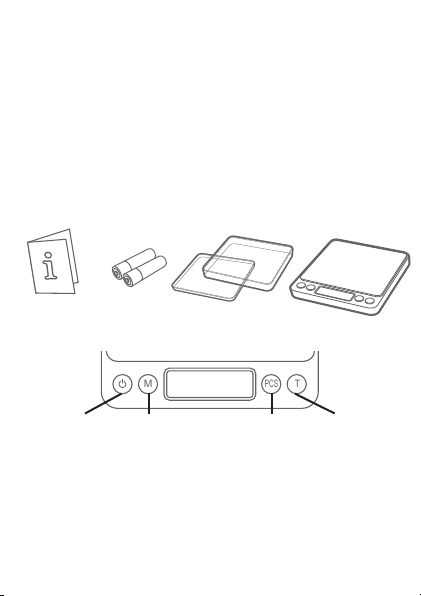
Thanks for purchasing the ENIGMA Digital Mini Scale! This
M
PCS
T
User Guide is designed to get you up and running quickly
with your scale. Scales are precision instruments and
require proper care and skill to get the best results. If you
have questions or need support, visit us at http://www.
truweigh.com/support or scan the QR Code on the back of
this manual using your smartphone.
What’s In The Box
User Guide
Two AAA
Batteries
Two Expansion
Trays
ENIGMA Digital
Mini Scale
Key Descriptions
TAREMODE PIECESON/OFF
ON/OFF - Turns the scale ON or OFF.
MODE - Changes the weighing unit.
PCS - Enter counting mode. Hold to set sample quantity
for average piece weight calculation.
TARE - Zero’s the scale. Also subtracts the weight of an
empty container (see Tare Function).
Page 3

Weighing Your First Item
Radio Frequency
Interference
Unlevel Surfaces High Humidity
Radio Frequency
Interference
1. Press the ON/OFF key to
turn the scale on.
2. Place the item on the center
of the weighing platform.
3. Take your reading from
the display. You can press
the MODE key to convert
between weighing units.
4. The scale’s auto-o function will turn the scale o
after 3 minutes of inactivity (See Auto-O Setting) or
you can press the ON/OFF key to turn the scale o.
Counting Function
1. Place a sample quantity of 25, 50, 75 or 100 pcs of
the item you want to count on the platform.
1. Press and hold the PCS key to enter counting setup.
2. Tap the MODE key to select your sample quantity.
3. Press the PCS key to conrm the sample qty and set
the average piece weight (APW) in memory.
4. You may now place any quantity on the scale and
view the piece count. (‘pcs’ will show on the display)
Things To Avoid
Unlevel Surfaces
Air Currents
Radio Frequency
Interference
Vibration
High Humidity
Extreme Temps
Page 4

Tare Function
T
The Tare function allows you to subtract the weight of a
container so that the display only shows the weight of the
contents.
Place an empty tray
or container on the
platform.
Press the TARE
key to subtract the
container’s weight.
Add items to the
container to see their
weight on the display.
NOTE: The weight of the container will subtract from
the available capacity and will leave a negative value
on the display once the weight is removed. Press
TARE again to return the display to zero.
Auto-Off Setting
By default, the scale will auto-o after 180 seconds of
inactivity. To change or disable the auto-o timer:
1. Turn the scale on and wait for the display to zero.
2. Press and hold the TARE key until the display shows
the current auto-o setting (ie 180), then release.
3. Press the MODE key to change the auto-o setting
between 180 sec,120 sec, 60 sec, or 0 sec (auto-o
disabled).
4. Press ON/OFF to turn the scale o when nished.
Accuracy
Your scale comes calibrated from the factory and most
users wont need to calibrate their scale for a long time.
Page 5

You should check your scale’s accuracy periodically
using calibration weights and perform calibration if
necessary.
NOTE: Only use trusted calibration weights.
Household items such as bottles and cans with
weights printed on the side are not suitable for
checking accuracy.
Calibration
Calibration adjustment is permanent and
should only be performed using accurate
calibration weights that match the
requirements for your scale (see the chart on
back). Do not use coins or other household
items to calibrate.
1. Prepare the required weight for your scale. (see
chart on back)
2. Find a at and level surface to perform calibration
and let the scale adjust to room temperature.
3. Press ON/OFF to turn the scale on and wait for the
scale to stabilize.
4. Press and hold the MODE key until the display
shows ‘CAL’.
5. Make sure nothing is on the platform then press
MODE to conrm the zero point.
6. The display will then ash the
required calibration weight.
7. Place the required calibration
weight on the center of the
platform.
8. The display will show ‘PASS’
then return to normal weighing
mode. You may now turn the
scale o or continue weighing.
Page 6

Specications
EN-500-01 EN-3000-1
500 g / 17.627 oz /
Max Capacity
Readability
Weighing
Units
Dimensions
Calibration
Weight
Power 2 x AAA Batteries
Warranty 10 Year Limited Warranty
For more information, including
weighing tips and support, scan
this code with your smartphone
Or visit us online at
truweigh.com/support/
16.075 ozt/ 321.51
dwt / 2500.00 ct /
7716 gn
0.01 g / 0.001 oz /
0.001 ozt / 0.01 dwt /
0.05 ct / 0.2 gn
g, oz, ozt, dwt, ct, gn
Overall: 4.9 in x 4.1 in x 0.8 in
Platform: 4.0 in x 4.0 in
Display: 0.5 in x 1.7 in
500g 2000g
3000 g / 105.82 oz /
96.45 ozt/ 1929 dwt /
15000 ct / 46296 gn
0.1 g / 0.01 oz / 0.01 ozt
/ 0.1 dwt / 0.5 ct / 2 gn
 Loading...