

Page 1

1
USER GUIDE
VGA & AUDIO TO HDMI CONVERTER
BENUTZERHANDBUCH
VGA & AUDIO-ZU-HDMI-KONVERTER
GUIDE D’UTILISATION
CONVERTISSEUR VGA ET AUDIO EN HDMI
MANUALE DELL’UTENTE
CONVERTITORE DA VGA E AUDIO A HDMI
HANDLEIDING
VGA & AUDIO NAAR HDMI CONVERTER
GUÍA DEL USUARIO
CONVERSOR DE VGA Y AUDIO A HDMI
UK-Model: 89024
US-Model: 40010
Page 2

1
Table of Contents
TABLE OF CONTENTS
Introduction ............................................................... 2
Features ................................................................... 3
System Requirements ............................................... 4
Package Contents..................................................... 5
Device Overview ....................................................... 6
Device Installation ..................................................... 7
Device Installation Diagrams ..................................... 8
Technical Specifications ............................................ 9
Cables To Go One Year Warranty ........................... 10
Important Safety Information ................................... 11
TABLE DES MATIERES
Introduction .............................................................. 2
Fonctions ................................................................. 3
Configuration du système ......................................... 4
Contenu du pack ...................................................... 5
Vue générale du périphérique ................................... 6
Installation du périphérique ....................................... 7
Schémas d’installation du périphérique ..................... 8
Caractéristiques techniques ...................................... 9
Garantie d'un an Cables To Go ............................... 10
Informations de sécurité importantes ...................... 11
INHOUDSOPGAVE
Inleiding .................................................................... 2
Onderdelen .............................................................. 3
Systeemvereisten ..................................................... 4
Inhoud verpakking .................................................... 5
Overzicht apparaat ................................................... 6
Installatie apparaat ................................................... 7
Installatiediagrammen apparaat ................................ 8
Technische specificaties ........................................... 9
Cables To Go 1 jaar garantie .................................. 10
Belangrijke veiligheidsinformatie ............................. 11
INHALTSVERZEICHNIS
Einführung ................................................................ 2
Merkmale ................................................................. 3
Systemanforderungen .............................................. 4
Packungsinhalt ......................................................... 5
Geräteübersicht ........................................................ 6
Geräteinstallation...................................................... 7
Geräteinstallation Diagramms ................................... 8
Technische Daten..................................................... 9
Einjährige Garantie von Cables To Go .................... 10
Wichtige Sicherheitshinweise.................................. 11
INDICE
Introduzione .............................................................. 2
Caratteristiche .......................................................... 3
Requisiti di Sistema .................................................. 4
Contenuto della confezione ....................................... 5
Panoramica del dispositivo........................................ 6
Installazione del dispositivo ....................................... 7
Diagramas de instalación del dispositivo ................... 8
Specifiche tecniche ................................................... 9
Cables To Go One un anno di garanzia .................. 10
Importanti informazioni sulla sicurezza .................... 11
INDICE
Introducción .............................................................. 2
Características ......................................................... 3
Requisitos del sistema .............................................. 4
Contenido del paquete .............................................. 5
Descripción general del dispositivo ........................... 6
Instalación del dispositivo ......................................... 7
Schemi di installazione del dispositivo ...................... 8
Especificaciones técnicas ......................................... 9
Un año de garantía Cables to Go ............................ 10
Información de seguridad importante ...................... 11
Page 3

2
INTRODUCTION
Thank you for purchasing the Trulink™ VGA & Audio to HDMI Converter. The VGA to HDMI converter is the perf ect solution for connecting a PC to newer monitors or TVs that do not have an
HD-15 (VGA) input. With an added 3.5mm audio connection, enjoy high definition video and audio. The converter is simple to use with no software or drivers required. Simply connect the
converter and begin enjoying PC content on your display. This is the ideal solution for viewing PC content on HDMI enabled monitors.
We recommend that you read this manual thoroughly and retain for future reference.
EINFÜHRUNG
Vielen Dank, dass Sie den Trulink™ VGA & Audio-zu-HDMI-Konverter gekauft haben. Der VGA-zu-HDMI-Konverter ist die perfekte Lösung für das Anschließen von PCs an neuere Monitore
oder Fernsehgeräte, die nicht über einen HD-15 (VGA)-Eingang verfügen. Mit einem zusätzlichen 3,5-mm-Audioanschluss genießen Sie Bild und Ton in hoher Auflösung. Der Konverter ist
einfach zu verwenden und es sind keine Software oder Treiber dafür erforderlich. Schließen Sie den Konverter einfach an und Sie können PC-Inhalte auf Ihrem Anzeigegerät genießen. Dies
ist die ideale Lösung für die Anzeige von PC-Inhalten auf HDMI-fähigen Monitoren.
Bitte lesen Sie dieses Handbuch sorgfältig durch und bewahren Sie es zum zukünftigen Nachschlagen auf.
INTRODUCTION
Merci d'avoir acheté le convertisseur VGA et audio en HDMI Trulink™. Le convertisseur de signal VGA en HDMI est la solution idéale pour connecter un PC sur des moniteurs ou des
téléviseurs plus récents qui ne comportent pas d'entrée HD-15 (VGA). En ajoutant une connexion audio 3,5 mm, vous profiterez d'une haute définition vidéo et audio. Le convertisseur est
simple à utiliser sans nécessité de logiciel ou de pilotes. Connectez simplement le convertisseur et vous s erez prêt à profiter du contenu de votre PC sur votre écran. C'est la solution idéale
pour voir le contenu de votre PC sur des écrans HDMI.
Nous recommandons de lire attentivement ce manuel et de le conserver pour toute référence ultérieure.
INTRODUZIONE
Grazie per aver acquistato il Convertitore Trulink™ da VGA e Audio a HDMI. Il convertitore da VGA a HDMI è la soluzione perfetta per collegare un PC a monitor o TV più recenti che non
hanno un ingresso HD-15 (VGA). Con un collegamento audio aggiunto da 3,5 mm, godetevi video e audio di alta definizione. Il convertitore è facile da usare e non sono necessari software o
driver. Basta collegare il convertitore e cominciare a visualizzare il contenuto del PC sul display. È la soluzione ideale per visualizzare il contenuto del PC su monitor abilitati HDMI.
Si consiglia di leggere il presente manuale attentamente e di conservarlo per riferimento futuro.
INLEIDING
Hartelijk dank voor uw aankoop van de Trulink™ VGA & Audio naar HDMI converter. De VGA naar HDMI converter is de perfecte oplossing voor het aansluiten van een pc op nieuwere
monitoren of televisies die geen HD-15 (VGA) ingang hebben. Met de ingebouwde 3,5mm audioverbinding kunt u van hoge definitie video en audio genieten. De converter is gemakkelijk in
het gebruik en er is geen software of besturingsprogramma nodig. Sluit de converter gewoon aan en begin met genieten van de inhoud van uw pc op uw display. Dit is de ideale oplossing
voor het bekijken van pc-inhoud op monitoren die geschikt zijn voor HDMI.
We raden u aan deze handleiding goed door te lezen en te bewaren voor gebruik in de toekomst..
INTRODUCCIÓN
Le agradecemos que haya adquirido el conversor de VGA y audio a HDMI de TruLink™. El conversor de VGA a HDMI es la solución perfecta para conectar un PC a monitores o televisores
de reciente aparición en el mercado que no tengan una entrada HD-15 (VGA). Gracias a la conexión de audio de 3,5 mm que lleva incorporada podrá disfrutar en ellos de vídeo y audio de
alta definición. Este conversor es fácil de usar y no hay que instalar controladores ni aplicaciones para utilizarlo, sino que lo único que tiene que hacer es conectar el conversor y empezar a
disfrutar de los contenidos multimedia de un PC en un dispositivo de visualización. Este conversor es la solución perfecta para visualizar contenido del PC en monitores con capacidad de
reconocimiento de HDMI.
Es recomendable que lea atentamente este manual y que lo guarde para poder consultarlo en el futuro.
INTRODUCTION
Page 4

3
FEATURES
FEATURES
Allows for the conversion of analog video and
stereo audio to digital format, avoiding costly
upgrades.
Allows input from a HD15pin VGA & Stereo audio
source
Allows input from a Component Video (YPbPr)
source device with proper cabling. (Optional)
Produces an HDMI signal output that includes both
audio and video
Note: This converter does not have an upscaler. All
signals are not converted to 1080P. Input signals will
be converted to similar resolution on HDMI output.
FONCTIONS
Permet la conversion de signaux vidéo
analogiques et audio stéréo en format numérique,
évitant les mises à niveau coûteuses.
Permet une entrée à partir d'une source VGA et
audio stéréo HD-15.
Permet une entrée depuis un appareil source à
composante vidéo (YPbPr) avec le câble
approprié (en option).
Produit une sortie de signal HDMI comprenant à
la fois l'audio et la vidéo.
Remarque : ce convertisseur ne possède pas de
processeur vidéo pour passer à une résolution plus
élevée. Les signaux ne sont pas tous convertis en 1080 p.
Les signaux d'entrée seront convertis à une résolution
similaire à celle de la sortie HDMI.
FUNZIONI
Consente di convertire audio stereo e video
analogico in formato digitale, evitando costosi
aggiornamenti.
Consente l’input da una sorgente audio VGA e
stereo da 15 pin HD
Consente l’input da un dispositivo sorgente
Component Video (YPbPr) con cablaggio
appropriato. (opzionale)
Produce un uscita di segnale HDMI che
comprende sia audio sia video
Nota: questo convertitore non ha un upscaler. Tutti i
segnali non sono convertiti in 1080P. I segnali di input
saranno convertiti in una risoluzione simile sull’uscita
HDMI.
KENMERKEN
Maakt de conversie mogelijk van analoge video en
stereo audio naar digitaal format, waardoor u dure
upgrades bespaart.
Heeft een ingang voor een HD-15pins VGA &
stereo audiobron
Heeft een ingang voor een componentvideo (Y, Pb,
Pr) bronapparaat met de juiste bekabeling
(optioneel)
Produceert een HDMI-signaaluitgang die zowel
audio als video bevat
Opmerking: Deze converter heeft geen upscaler.
Alle signalen worden niet naar 1080P omgezet. De
inkomende signalen worden omgezet naar een
vergelijkbare resolutie op de HDMI-uitgang.
CARACTERÍSTICAS
Permite la conversión de vídeo analógico y audio
estéreo a formato digital, con lo que se evita tener
que adquirir actualizaciones a alto precio.
Reconoce la señal de entrada de una fuente HD15
de VGA y audio estéreo.
Reconoce la señal de entrada de una fuente de
vídeo por componentes (YPbPr) cuando se usan
cables correctos para ello. (Opcional)
Produce una señal de salida HDMI que contiene
audio y vídeo.
Nota: este conversor no tiene un upscaler. No convierte
ninguna señal a 1080p. Las señales de entrada se
convertirán a una resolución similar a la salida HDMI.
MERKMALE
Ermöglicht die Umwandlung von analogem Bild
und Stereoton in das digitale Format und vermeidet
dadurch kostspielige Aufrüstungen.
Bietet einen Eingang für eine HD15pin VGA- und
Stereotonquelle.
Bietet einen Eingang für ein Component Video-
Quellgerät (YPbPr) mit entsprechender
Verkabelung. (Optional)
Produziert einen HDMI-Signalausgang, der sowohl
Ton als auch Bild umfasst.
Hinweis: Dieser Konverter hat keinen Upscaler. Es
werden nicht alle Signale zu 1080p umgewandelt.
Eingangssignale werden zu einer ähnlichen Auflösung
am HDMI-Ausgang umgewandelt.
Page 5

4
System Requirements
SYSTEM REQUIREMENTS
A VGA and audio source, i.e. a computer.
One male to male HD15 cable.
One male to male 3.5 mm audio cable.
One male to male HDMI cable
An HDMI display device, i.e. TV, Projector, etc…
REQUISITOS DEL SISTEMA
Una fuente de VGA y de audio, como puede ser un
ordenador.
Un cable HD15 macho a macho.
Un cable de audio de 3,5 mm macho a macho.
Un cable HDMI macho a macho.
Un dispositivo de visualización HDMI, como puede
ser un televisor, un proyector, etc.
SYSTEEMVEREISTEN
Een VGA en audiobron, d.w.z. een computer.
Een mannetje/mannetje HD-15 kabel
Een mannetje/mannetje 3,5mm audiokabel
Een mannetje/mannetje HDMI-kabel
Een HDMI displayapparaat, d.w.z. televisie,
projector, enz.
REQUISITI DI SISTEMA
Una sorgente audio e VGA, ad es. un computer.
Un cavo HD15 da maschio a maschio.
Un cavo audio da 3,5 mm da maschio a maschio.
Un cavo HDMI da maschio a maschio.
Un dispositivo di visualizzazione HDMI, ad es. TV,
proiettore ecc.
SYSTEMANFORDERUNGEN
Eine VGA- und Audioquelle, d.h. ein Computer.
Ein HD15-Kabel mit zwei Steckern
Ein 3,5-mm-Audiokabel mit zwei Steckern
Ein HDMI-Kabel mit zwei Steckern
Ein HDMI-Anzeigegerät, d.h. Fernseher, Projektor
usw.
CONFIGURATION DU SYSTEME
Source VGA et audio, par ex., un ordinateur.
Un câble HD15 mâle/mâle
Un câble audio 3,5 mm mâle/mâle
Un câble HDMI mâle/mâle.
Un appareil à écran HDMI, c.-à-d., TV, projecteur,
etc...
Page 6

5
STEP 1
DEVICE INSTALLATION
PACKAGE CONTENTS
PACKAGE CONTENTS
VGA & Audio/ to HDMI Converter
User Guide
UK - Universal (UK-EU) Power Adapter (98060)
US – AC/DC Adapter (98057)
PACKUNGSINHALT
VGA & Audio-zu-HDMI-Konverter
Benutzerhandbuch
UK – Universal-Netzadapter (UK-EU) (98060)
US – Netzadapter (98057)
CONTENIDO DEL PAQUETE
Conversor de VGA y audio a HDMI
Guía del usuario
Adaptador de corriente para Reino Unido y
universal (Reino Unido-UE; 98060)
Adaptador de CA/CC para EE. UU. (98057)
INHOUD VERPAKKING
VGA & Audio naar HDMI converter
Gebruikershandleiding
Universele (GB-EU) stroomadapter (98060)
US: AC/DC adapter (98057)
CONTENUTO DELLA CONFEZIONE
Convertitore da VGA e audio a HDMI
Manuale per l’utente
Adattatore di alimentazione universale UK (UK-UE)
(98060)
Adattatore CA/CC – USA (98057)
CONTENU DU PACK
Convertisseur VGA et audio en HDMI
Guide d’utilisation
RU – Adaptateur universel (RU-UE) (98060)
USA – Adaptateur CA/CC (98057)
Page 7
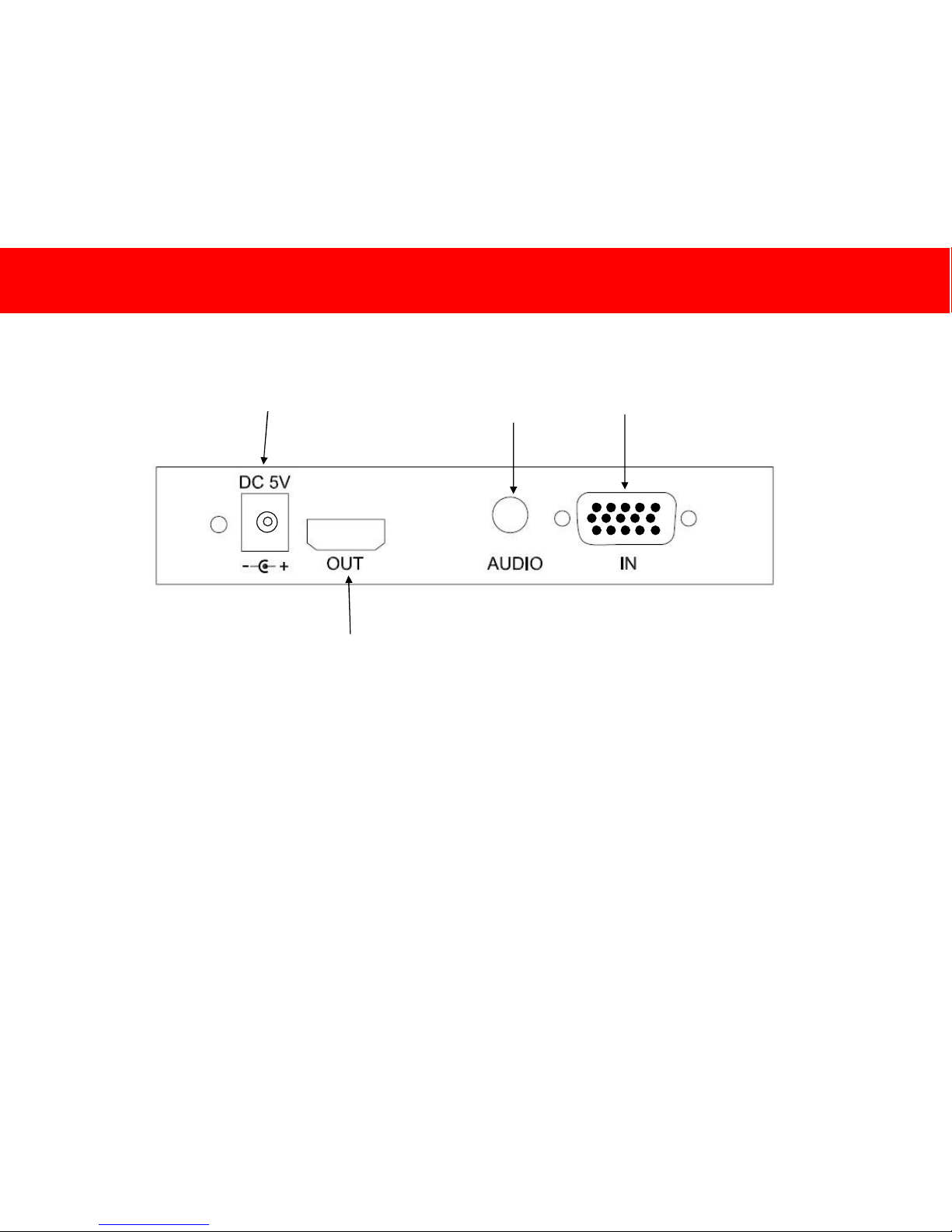
6
DEVICE OVERVIEW / GERÄTEÜBERSICHT / VUE GÉNÉRALE DE L’APPAREIL / PANORAMICA DISPOSITVO
OVERZICHT APPARAAT / DESCRIPCIÓN GENERAL DEL DISPOSITIVO /
Power Input
VGA Input
Audio
input
HDMI Output
Page 8

7
G
ERÄTEINSTALLATION
Schr itt 1
Sch alten Sie sowohl di e Vide oquell e als auc h d as Anz eigegerät au s.
Schr itt 2
Schl ieß en Si e d as Vid eo- und A udiokabel vom V ideoquell gerät an die
Eingänge am K onvert er an.
Schr itt 3
Schl ieß en Si e d as HDMI-K abel v om Aus gan g des Kon verter s an einen
frei en Ein gang am A nzeig egerät an.
Schr itt 4
Schl ieß en Si e d en Net zadapt er an den Netzeingang am Konvert er und
dann an ei ne Wandst eckdos e an.
Schr itt 5
Sch alten Sie das Vi deoqu ellg erät u nd das Anzeigegerä t ein und
vergewi ssern Sie sich, dass das An zeigegerä t auf den richtigen
Eingang ei ngestellt ist.
Hinw eis: E inige HD-Fernseher unterstü tzen modifizierte Signale, di e
von einem PC kommen, nicht. In diesem Fall wir d auf dem
Anz eigeger ät „Ni cht unter stützt es Signal“ angezei gt. Dies ist eine
Einschrän kung d es HD-Fer nseher s und nicht des TruLin k VGA- zuHDMI -K onv ert ers. S ollte dies auft reten, wenden Sie sich bitt e an den
Hersteller d es HD-Fer nseher s.
D
EVICE INSTALLATION
Step 1
Turn of f pow er to both t he vid eo sou rce an d t he display
Step 2
Connect y our video an d audi o cable f rom th e video source device
to t he inputs on the c onvert er
Step 3
Connect y our HDMI cable from the output of th e c onvert er t o an
avai lable inp ut on your display.
Step 4
Connect the power adapter t o the pow er input on t he con verter, and
then to an A/C w all outlet
Step 5
Pow er on you r vide o source device an d display, and th en make
sure th at the di splay is tun ed to the pr oper i nput.
Note : Some HDTVs do not offer support f or m odified sig nal s
comi ng from a PC. A s such, the dis play w ill show “Unsup ported
Signal”. T his is a lim itation of the HDTV and not th e T ruLink VGA t o
HDMI C onv ert er. Sh ould this occur, pl ease c ons ult the
manufacturer of you r HDTV
INSTALLATION DU PERIPHERIQUE
Installation du périphérique
Étape 1
Éteindre l a source vidéo et l'écran.
Étape 2
Connect er le câble audio et vidéo de l 'appar eil s ourc e vidé o aux
entrées du conv erti sseur.
Étape 3
Connect er le câble HDMI d e l a sort ie du convertisseur à une ent rée
disp onible de l'écran.
Étape 4
Brancher l'adaptat eur à l'entrée d'alim entation du c onvert isseur puis
à une prise d'alim entation sect eur CA .
Étape 5
Mett re l'apparei l vidéo source et l'écr an sou s t ension, puis s'assu rer
que l'écran est adapté à l'entrée approp rié e.
Remarque : certain s télé vis eurs HD n'acceptent p as les sign aux
modifié s prov enant d'u n PC. Si c'est le cas, l'éc ran affic he « P as de
pris e en c harge du sig nal ». C' est une restrict ion du télé vis eur HD et
non du convertisseur VGA en HD MI TruLink. Dans c e cas, c ons ult er
le fabric ant du télévi seur HD.
DEVICE INSTALLATION DIAGRAMS
DEVICE INSTALLATION
I
NSTALLAZIONE DISPOSITIVO
Fase 1
Scollegare l’ alimentaz ione sia all a sorgent e video sia al display
Fase 2
Coll egare il cav o audi o e video dal dispositivo della sorgent e vid eo
agli in gressi sul c onvertitore
Fase 3
Coll egare il cav o HDMI d all'usc ita del c onvert itore a un i ngr ess o
disp onibil e sul display.
Fase 4
Coll egare l’adattat ore di alimentazion e all’ ingres so di alimentazion e
sul convertit ore e quindi a una presa CA
Fase 5
Accend ere il di spositivo della sorgen te video e il display e
accert arsi che i l dis play sia sint onizz ato sul l’ingresso c orrett o.
Nota: alcune HDTV non su pportano seg nali m odific ati pr ovenienti
da un P C. Per quest o moti vo, il display visuali zzerà “Segnale non
support ato”. Questa è una limitazi one dell’HDTV e non d el
convertitore TruLin k da V GA a HDMI . S e ciò dovess e acc adere,
consult are il pr oduttore dell'H DTV.
I
NSTALLATIE APPARATUUR
Stap 1
Sch akel de stroom naar z owel d e vide obr on als de di splay uit
Stap 2
Sluit uw video- en audiok abel van de vi deobron op d e ingangen van
de c onvert er aan
Stap 3
Sluit uw HDMI -kabel v an d e uitg ang van de c onvert er aan op een
vrij e ingang op uw dis play.
Stap 4
Sluit de str oomadapter aan op de strooming ang op de c onv ert er, en
vervolg ens op een w isselstroom contac tdoos
Stap 5
Zet uw videobron en displ ay aan , en zorg er vervolgens voor d at de
disp lay op de juist e ingang staat afgesteld.
Opm erking: S omm ige HD TV’s bi eden geen onderst euning vo or
omg evormde sign alen die van een pc afkomstig zijn. Al s dit zo is,
toont d e display "Unsupport ed Signal" ( niet-onderst eund sign aal). Dit
is een bep erk ing v an de HDT V en niet van de TruLink V GA naar
HDMI c onv ert er. Neem als dit gebeu rt a.u.b. contact op met de
fabrikant van uw HDTV.
I
NSTALACIÓN DEL DISPOSITIVO
Paso 1
Apague la alimentac ión de l a fuente de vídeo y el dispositiv o d e
visualizac ión.
Paso 2
Conect e el c able de víde o y au dio de la fu ente d e víd eo a l as
entradas del conversor.
Paso 3
Conect e el c able HDMI de la salid a del con ver sor a una entrada
libre en el disp ositiv o d e visu ali zación.
Paso 4
Conect e el adapt ador d e alim entaci ón a l a entr ada de alimentación
del con versor y a una tom a de CC de par ed.
Paso 5
Enci enda l a fuente de víd eo y el disp ositiv o de visuali zación y
comp ruebe si este últim o tien e sint onizada l a entrada correct a.
Nota : hay tel evisores de alt a d efi nición que no admiten señal es
modific adas p rocedentes de un P C. Por el lo en el tel evisor
apar ecerá el mensaj e “Uns upp orted Signal ”. Esto es u na lim itación
del tel evisor de alta def inició n y no del c onversor de VGA a HDMI d e
TruLink. S i ocurre esto c onsult e al fabricante del tel evisor.
Page 9
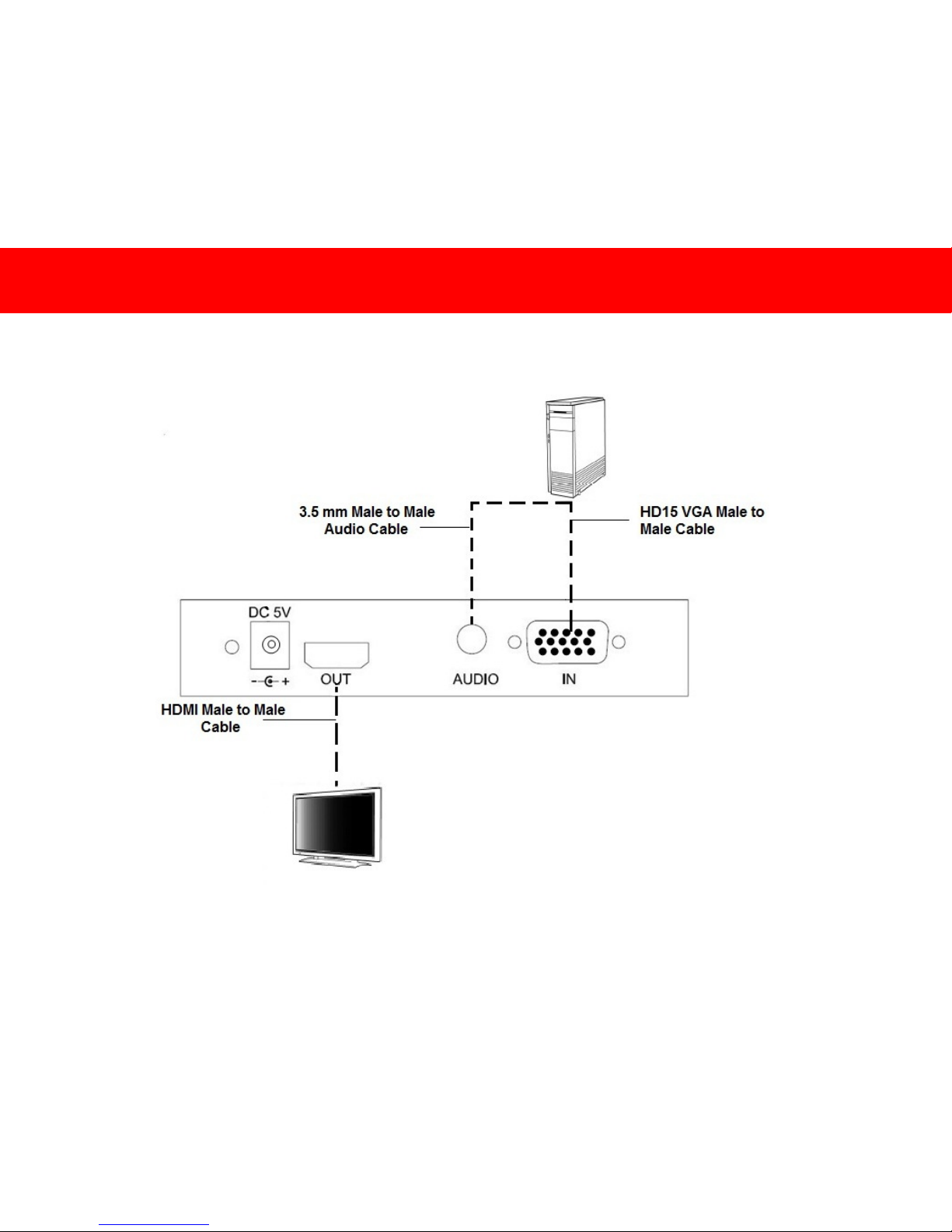
8
DEVICE INSTALLATION DIAGRAMS
Page 10
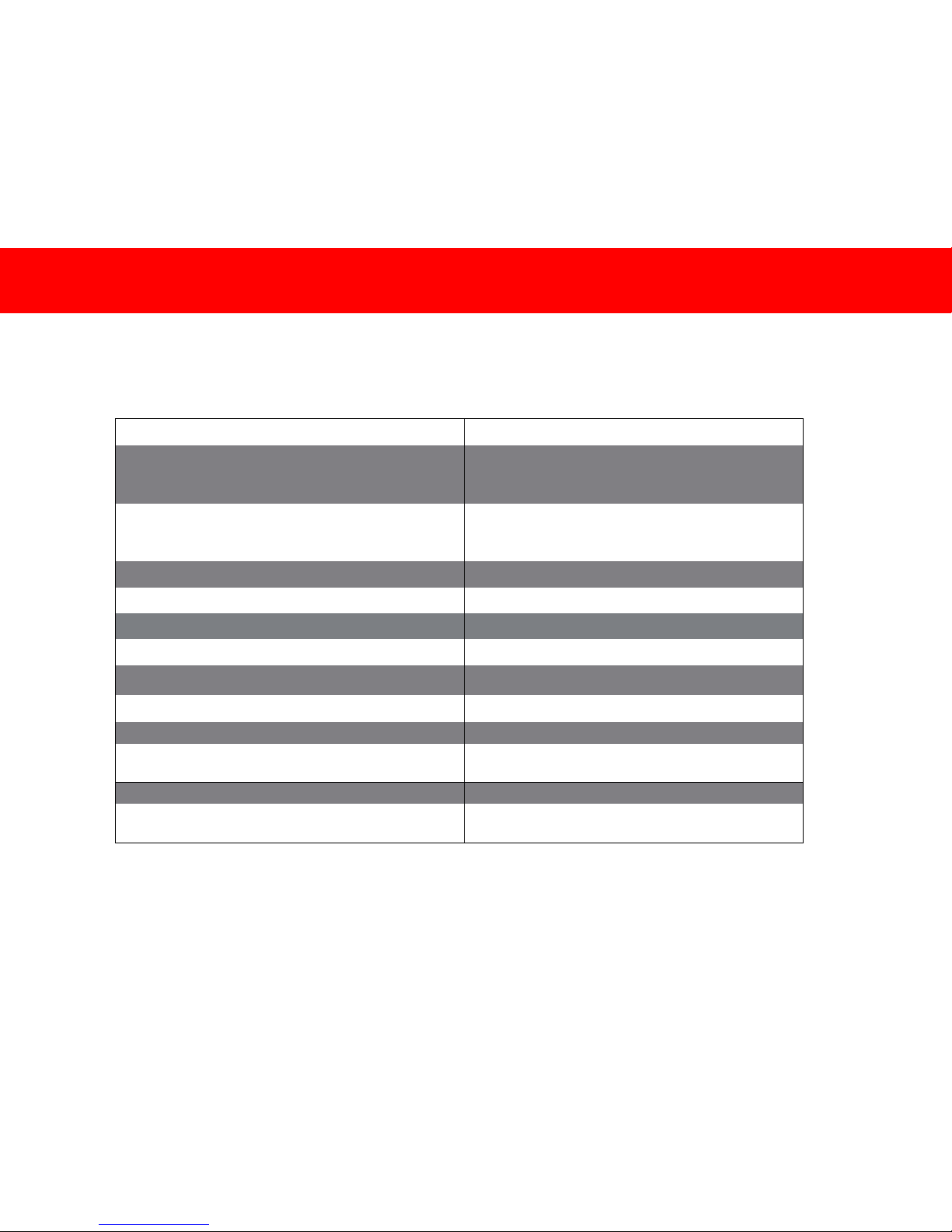
9
Part Number UK – 89024, US – 40010
Connectors
HD15/VGA – Female (Input)
3.5 mm – Female (Input)
HDMI – Female (Output)
Input Resolutions Supported
640x480, 720x576, 800x600, 1024x768,
1280x720, 1280x768, 1280x960,
1280x1024, 1360x765, 1920x1080
Output Resolutions Supported 480i, 480p, 576i, 576p, 720p, 1080i, 1080p
Bandwidth 1.65 Gps
Audio Frequency Response 20~20 kHz
Operating Frequency 150 MHz
Operating Temperature 0 ~ 45 ° C (32° ~ 113° F)
Storage Temperature -20 ~ 60° C (- 4° ~ 140° F)
Power adapter DC 5 V 1 A
Power Adapter Replacement Part Number
UK – 98060
US – 98057
Weight 0.204 kg (0.45 lb)
Dimensions
13.02 cm x 7.62 cm x 2.54 cm
(5.13 in x 3 in x 1 in)
TECHNICAL SPECIFICATIONS / TECHNISCHE DATEN / CARACTERISTIQUES TECHNIQUES / SPECIFICHE TECNICHE /
T
ECHNISHCE
S
PECIFICATIES
/ E
SPECIFICACI
ONES TÉCNICAS
Page 11

10
At Cables To Go, we want you to be totally confident in your purchase. That is why we offer a one year warranty on this device.
If you experience problems due to workmanship or material defect for the duration of this warranty, we will repair or replace this
device. To request a Return Merchandise Authorization (RMA) number, contact customer service at 800-506-9607 (US) 0800
328 2916 (UK) or www.cablestogo.com, www.cablestogo.co.uk
Wir bei Cables To Go möchten, dass Sie mit Ihrem Kauf vollständig zufrieden sind. Deshalb bieten wir eine einjährige Garantie
auf dieses Gerät. Wenn während dieser Garantie Probleme aufgrund eines Fertigungs- oder Materialfehlers auftreten,
reparieren oder ersetzen wir dieses Gerät. Wenden Sie sich zum Anfordern einer Return Merchandise Authorization (RMA)Nummer an unseren Kundenservice unter 0800 328 2916 oder www.cablestogo.co.uk.
Chez Cables To Go, nous voulons que vous soyez complètement satisfait de votre achat. C'est pourquoi vous bénéficiez d'un
an de garantie sur cet appareil. Si vous rencontrez des problèmes liés à des défauts matériels ou de fabrication pendant la
durée de cette garantie, nous réparerons ou remplacerons cet appareil. Pour demander un numéro d'autorisation de retour de
marchandise (ARM), contactez le service client au 0800.328.2916 ou www.cablestogo.co.uk.
Alla Cables To Go, vogliamo che i nostri clienti abbiano totale fiducia nei loro acquisti. Ecco perché, su questo dispositivo
offriamo una garanzia di un anno. Qualora nel corso del periodo coperto da garanzia dovessero verificarsi problemi legati alla
manodopera o ai materiali utilizzati, sarà nostra cura occuparci della riparazione o della sostituzione del dispositivo. Per
richiedere un numero RMA (Return Merchandise Authorization / autorizzazione alla restituzione della merce), contattare il
Servizio Clienti al numero 0800 328 2916 o visitare il sito www.cablestogo.co.uk.
Bij Cables To Go willen we dat u volledig op uw aankoop kunt vertrouwen. Daarom bieden we een garantie van een jaar op dit
apparaat. Als u problemen ondervindt door slecht vakmanschap of een materieel defect tijdens de garantieperiode, zullen we
het apparaat repareren of vervangen. Als u een RMA-nummer (Return Merchandise Authorization - Toestemming voor retour
van consumentenproducten) wilt, kunt u contact opnemen met klantenservice op 0800 328 2916 of via www.cablestogo.co.uk.
En Cables To Go queremos que confíe completamente en su compra. Esa es la razón por la que ofrecemos un año de
garantía en este dispositivo. Si experimenta problemas debidos a mano de obra o defectos de material durante el periodo de
validez de esta garantía, repararemos o sustituiremos este dispositivo. Para solicitar un número de autorización de devolución
de mercancía, contacte con el servicio de atención al cliente en el número de teléfono 0800 328 2916 o visite
www.cablestogo.co.uk
CABLES TO GO
®
ONE YEAR WARRANTY / EINJÄHRIGE GARANTIE VON CABLES TO GO® / GARANTIE D'UN AN DE
CABLES TO GO
®
/ GARANZIA DI UN ANNO CABLES TO GO® / CABLES TO GO® EÉNJAARSGARANTIE / UN AÑO DE
GARANTÍA CABLES TO GO®
Page 12

11
Cables To Go
3555 Kettering Blvd.
Moraine, OH 45439
1-800-506-9607
www.cablestogo.com
! Do not plug the unit in any outlet that does not have enough current to allow the device to function. Refer to the
specifications in this manual for power level of the unit.
IMPORTANT SAFETY INFORMATION
IMPORTANT SAFETY INFORMATION
Do not plug the unit in any outlet that does not have enough
current to allow the device to function. Refer to the specifications
in this manual for power level of the unit.
Liquid: If this unit or its corresponding power adapter has had
liquid spilled on or in it, do not attempt to use the unit. Do not
attempt to use this product in an outdoor environment as
elements such as rain, snow, hail, etc. can damage the product.
In case of a storm, it is recommended that you unplug this device
from the outlet.
Avoid placing this product next to objects that produce heat such
as portable heaters, space heaters, or heating ducts.
THERE ARE NO USER SERVICEABLE PARTS. Do not attempt
to open this product and expose the internal circuitry. If you feel
that the product is defective, unplug the unit and refer to the
warranty information section of this manual.
WICHTIGE SICHERHEITSHINWEISE
Schließen Sie das Gerät nicht an eine Steckdose an, die nicht
genug Strom für das Gerät liefert. Die entsprechenden Daten für
das Gerät finden Sie in diesem Handbuch.
Flüssigkeit: Wenn auf dieses Gerät oder den dazugehörigen
Netzadapter Flüssigkeiten geschüttet wurden, darf es/er nicht
verwendet werden. Verwenden Sie dieses Produkt nicht im
Freien, da Regen, Schnee, Hagel usw. das Produkt beschädigen
können. Ziehen Sie bei einem Gewitter den Netzstecker des
Geräts.
Stellen Sie dieses Produkt nicht in der Nähe von Gegenständen
auf, die Hitze erzeugen, zum Beispiel tragbare Heizgeräte,
Heizöfen oder Heizungsleitungen.
ES BEFINDEN SICH KEINE VOM BENUTZER
REPARIERBAREN TEILE IM GERÄT. Versuchen Sie nicht, das
Produkt zu öffnen und den internen Schaltkreis freizulegen. Wenn
das Produkt defekt ist, ziehen Sie den Netzstecker und sehen Sie
im Abschnitt mit den Garantieinformationen in diesem Handbuch
nach.
INFORMATIONS DE SECURITE IMPORTANTES
Pour permettre à l'appareil de fonctionner, ne branchez pas l'unité sur
une prise ne délivrant pas assez de courant. Reportez-vous aux
spécifications de ce manuel pour connaître le niveau d'alimentation de
l'unité.
Liquide : Si du liquide s'est répandu sur ou à l'intérieur de cette unité
ou son adaptateur d'alimentation correspondant, n'ess ayez pas
d'utiliser cette unité. N'essayez pas d'utiliser ce produit dans un
environnement extérieur car des éléments tels que la pluie, la neige,
la grêle, etc. peuvent endommager ce produit.
En cas de tempête, il est recommandé de débrancher cet appareil de
la source de courant.
Évitez de placer ce produit près d'objets produisant de la chaleur
comme les appareils de chauffage portables ou non et les conduits de
chauffage
AUCUNE PIÈCE NE NÉCESSITE D'ÊTRE ENTRETENUE PAR
L'UTILISATEUR. N'essayez pas d'ouvrir ce produit et d'exposer sa
circuiterie interne. Si vous pensez que ce produit présente des
défauts, débranchez l'unité et reportez-vous à la section de ce guide
comportant des informations de garantie.
INFORMATIONS DE SÉCURITÉ IMPORTANTES
Non collegare l'unità a prese che non dispongono di un quantitativo di
corrente sufficiente a garantire il corretto funzionamento del
dispositivo. Consultare le specifiche tecniche presenti in questo
manuale per maggiori informazioni relative al livello energetico del
dispositivo.
Liquidi: Se l'unità o il relativo alimentatore entrano in contatto con dei
liquidi, non cercare di utilizzare il dispositivo. Non cercare di utilizzare
il prodotto in presenza di pioggia, neve, grandine, ecc. Il dispositivo si
potrebbe danneggiare.
In caso di temporale si consiglia di scollegare il dispositivo dalla presa
di corrente.
Evitare di posizionare il dispositivo nelle vicinanze di oggetti che
producono calore come ad esempio stufette portatili, convettori termici
o condotti di riscaldamento.
IL DISPOSITIVO NON CONTIENE PARTI CHE POSSONO ESSERE
RIPARATE DALL’UTENTE. Non cercare di aprire il prodotto fino a
scoprire i circuiti interni. Se si ritiene che il prodotto sia difettoso,
scollegare l'unità e consultare la sezione informativa sulla garanzia
all'interno del presente manuale.
BELANGRIJKE VEILIGHEIDSINFORMATIE
Sluit de unit niet aan op een stopcontact dat niet genoeg spanning
levert om het apparaat te laten functioneren. Raadpleeg de
specificaties in deze handleiding voor het spanningsniveau van de
unit.
Vloeistof:Als op of in deze unit of de bijbehorende stroomadapter
vloeistof is gemorst, moet de unit niet gebruiken.
Gebruik dit product niet buitenshuis aangezien regen, sneeuw, hagel
enz. schade aan het product kunnen toebrengen.
Bij onweer is het aan te bevelen dit product van de stroom af te halen.
Plaats dit product niet bij voorwerpen die hitte afgeven zoals
radiatoren, verwarmingselementen of verwarmingsbuizen.
ER ZIJN GEEN ONDERDELEN DIE DE GEBRUIKER ZELF KAN
HERSTELLEN. Dit product niet te openen en het interne circuit niet
blootstellen. Als u meent dat het product defect is, koppel de unit dan
af en raadpleeg het gedeelte in deze handleiding over de garantieinformatie.
INFORMACIÓN DE SEGURIDAD IMPORTANTE
No conecte la unidad en una salida que no disponga de suficiente
corriente como para permitir que el dispositivo funcione. Consulte en
este manual las especificaciones sobre nivel de potencia de la
unidad.
Líquidos: Si se han derramado líquidos sobre la unidad, en la unidad
o en su correspondiente adaptador de potencia, no intente utilizar la
unidad. No intente utilizar este producto en el exterior, ya que
elementos como la lluvia, la nieve, el granizo, etc. pueden dañar el
producto.
En caso de tormenta, se recomienda que desconecte este dispositivo
del enchufe.
Evite situar este producto cerca de objetos que produzcan calor,
como calefacciones portátiles, calefactores o conductos de
calefacción.
NO HAY PIEZAS QUE PUEDA REPARAR EL PROPIO USUARIO.
No intente abrir este producto y exponer la circuitería interna. Si cree
que el producto presenta algún defecto, desconecte la unidad y
consulte la sección de garantía de este manual.
Important Safety Information
Page 13

12
For more information on this product or to check for updated drivers,
manuals or frequently asked questions please visit our website.
Weitere Informationen über dieses Produkt und aktualisierte Treiber,
Handbücher und häufig gestellte Fragen finden Sie auf unserer Website.
Pour plus d'informations concernant ce produit ou pour rechercher des pilotes actualisés,
des manuels ou des questions souvent posées, veuillez visiter notre site web.
Per ulteriori informazioni su questo prodotto oppure per verificare la presenza di aggiornamenti di driver
e manuali o per consultare le domande frequenti, visitare il nostro sito web.
Ga voor meer informatie over dit product of over bijgewerkte stuurprogramma’s,
handleidingen of veel gestelde vragen naar onze website.
Para obtener más información sobre este producto o para comprobar controladores actualizados,
manuales o preguntas frecuentes, visite nuestro sitio web.
www.cablestogo.com
www.cablestogo.co.uk
VER. 2.1.07.06.10
 Loading...