

Page 1

true pulse
USER GUIDE
HOW TO USE YOUR TRUE PULSE™
Your true pulse™ has been designed to work in combination
with the Nyftii app which is available for iOS and Android smart
phones.
Visit the App Store or the Google Play store to download and
install the Nyftii app for your iOS or Android phone.
Wristband with true pulse™
CHARGE YOUR TRUE PULSE™ FULLY BEFORE USE
Remove your true pulse™ from the wristband and insert it into the USB
adaptor.
To charge your true pulse™ connect the adaptor to a standard USB
charging point such as a USB port on a laptop or a USB phone charger.
Once fully charged reinsert your true pulse™ into the wrist band.
The battery will last for up to ve days. The more you use your true
pulse™ in exercise mode the more frequently you will need to charge it.
Charging Fully charged Low battery Battery is too low to perform this function
HOW TO WEAR YOUR TRUE PULSE™
The adjustable wristband has been designed to be comfortable to
wear both day and night.
USB adaptor
Your true pulse™ should be worn on the top of your left wrist, like
a watch. The silver coloured sensor should be on the side closest
to your thumb. The band should sit comfortably, just below your
wrist bone. For accurate readings always wear your true pulse™
on your left wrist. During readings your true pulse™ should be in
contact with your skin. It should not be worn too tightly as this
may restrict blood ow and impact the accuracy of the readings.
truenordic.com
TN2300000501 • 1
Page 2
Your true pulse™ is water resistant for a maximum of 30 minutes at a depth of no more than 1 meter. Do not charge
Carrier 12:34 AM 100%
Heather Gold
76 76/5843
excercise index
fatigue/stress
resting HR/
Sleep efficeincy
PWTT
57/ 95%
heart health
122/ 8282
body age
89
Health index
Fri, Oct 24 2017
Home Trend
Gym
SettingsBio
Nyftii App Nyftii App
BAND DISPLAY POP-UP NOTIFICATION
Time mode.
4-digit pairing code
BAND DISPLAY POP-UP NOTIFICATION
Time mode.
4-digit pairing code
Reconnecting/Sync
Missed call
your true pulse™ when it is wet. Do not expose your true pulse™ to excessive heat. The wristband can be washed with
soap and warm water.
The sensor on the back of your true pulse™ takes blood ow readings from your wrist.
The silver sensor on the front of your true pulse™ works like a touch screen that responds
to contact with your skin enabling you to switch between the different modes or start a
reading.
CONNECTING TO YOUR PHONE
Turn bluetooth on on your phone before connecting to your true pulse™.
Open the Nyftii app and complete your prole by entering your age, height, weight, and stride length. This can be
updated at any time by going to “Settings” / “Prole”.
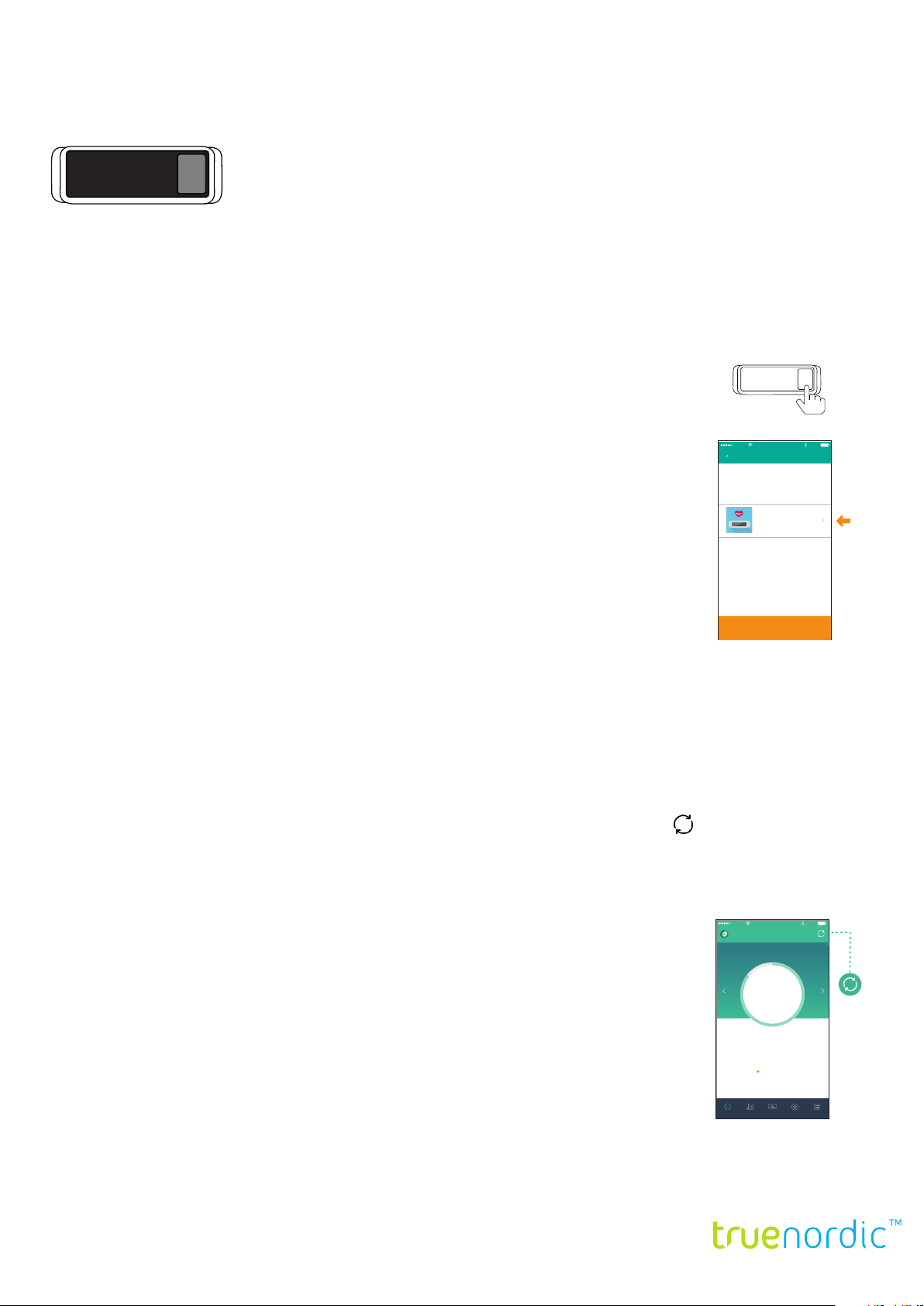
Tap twice on the sensor on your true pulse™ to see the battery status displayed on the screen,
tap once more to see a four digit pairing code.
Carrier
12:34 AM
100%Carrier
12:34 AM
100%
code: 9999
In the Nyftii app click “scan” to search for your device. You will see your true pulse™ listed with
the same four digit pairing code. Select your true pulse™ to pair it with your phone and sync
your data.
Set Up Device
Choose the device
If you are interrupted when pairing your device simply close the app and re-open it when you
are ready to connect your device.
To pair or re-pair your true pulse™ open the app and go to “Settings” / “Pair a device”.
Can’t find your device? Please scan again.
Once paired you are ready to start using your true pulse™. Track your daily “health index”. Measure your heart rate
variability. Calibrate and check your blood pressure. Track an exercise session. Monitor your heart rate while you sleep.
You can also set up “move alerts” to notify you when you haven’t moved for a specic length of time. Or turn on
notications so that notications from your phone appear on the screen of your true pulse™.
SYNCING YOUR TRUE PULSE™
Sync your true pulse™ with the app by opening the Nyftii app and selecting the sync icon in the top right corner.
The measurements from your true pulse™ will be transferred to the app on your phone and your health data will be
updated.
We recommend that you sync your device regularly. A good habit is to sync your true pulse™ each time you charge
your device.
As you wear and use your true pulse™ the accuracy of indicators such as health index and
body age will improve. For your health indicators to be as accurate as possible we recommend
Carrier 12:34 AM 100%
Heather Gold
Fri, Oct 24 2017
each true pulse™ health band is used by just one person.
89
Health index
TRACK YOUR DAILY PROGRESS
On the home screen of the Nyftii app you will see your daily statistics including:
Number of steps taken today
HRV - heart rate variability
Health index, body age, and fatigue/stress. These are calculated based on your HRV
measurements, blood pressure, activity levels and the other information that you have provided such as age, height and
weight.
76 76/5843
excercise index
heart health
Home Trend
body age
57/ 95%
resting HR/
Sleep efficeincy
fatigue/stress
122/ 8282
Gym
truenordic.com
PWTT
SettingsBio
TN2300000501 • 2
Page 3

WHAT IS AN AVERAGE HEART RATE?
While taking a reading your pulse will appear on your true pulse™ with an icon of a heart. Your pulse naturally
uctuates as your heart reacts to external and internal stimuli. Your average heart rate is an average of your pulse over
a set period of time and displays as beats per minute (BPM). Your average resting heart rate is likely to be between
60 and 100 beats per minute. If you are a well-conditioned athlete it may be closer to between 40 and 60 beats per
minute. Your maximum heart rate should be approximately 220 minus your age. During or after exercises your heart
rate should reach 60 - 80 % of this maximum.
If you are 40 then your maximum heart rate should be 180 and during exercise it is likely to be 108 - 144 BPM.
MEASURE YOUR HRV - HEART RATE VARIABILITY
HRV stands for heart rate variability and shows the variation in the time intervals between your heartbeats. It provides
a good indication of your cardiovascular tness and health in general.
Your true pulse™ takes two readings (an electrocardiogram and a photoplethysmograph) and uses them to calculate
your HRV. A small number means that there is less variation in your pulse and your body may be experiencing, or have
more diculty reacting to factors which cause stress. A larger number means a greater variation and is an indicator of
good cardiovascular tness and the ability for your body to handle internal and external stress.
The two best times of day to check your HRV are 30 minutes after waking up or in a quiet period before you go
to sleep. Avoid using the sauna, exercising, smoking or stimulating your metabolism with food, or hot, sugary or
caffeinated drinks for at least 30 minutes prior to completing an HRV reading.
Your true pulse™ should be worn on the top of your left wrist, like a watch. The silver coloured sensor should be on
the side closest to your thumb. The band should sit comfortably, just below your wrist bone.
Sit at a table and rest your arm comfortably on the table. Put both feet at on the oor, relax and breath normally.
Tap the sensor on the front of your true pulse™ to select HRV mode (the icon depicts a line graph).
Hold your nger on the sensor to begin measuring your HRV.
It will take up to three minutes to complete your HRV reading.
During the reading you will see a status bar and an indication of your heart’s beats per minute (BPM).
Once the reading is completed your true pulse™ will display your HRV and “body age” followed by a fatigue and stress
measurement. The lower the numbers are the better when it comes to measuring your body age, fatigue and stress.
Sync your true pulse™ with the Nyftii app. Tap on “Bio” or “Trend” in the app to see your latest HRV readings.
Your true pulse™ can be set to automatically measure your heart rate at regular intervals. This can be turned on in
“Settings” / “Heart Rate Measurement” / “Auto Measurement”.
CALIBRATE AND CHECK YOUR PWTT - PULSE WAVE TRANSIT TIME - BLOOD PRESSURE
PWTT stands for pulse wave transit time and is an indicator of blood pressure.
The correlation between blood pressure and PWTT varies from person to person based on height, weight, age and
other factors. To set the base point for your PWTT readings as an indicator of your blood pressure you will need to
enter a one off reading taken with a traditional blood pressure monitor and enter the details into the Nyftii app. If you
experience hypertension (high blood pressure) you must complete this calibration step before using your true pulse™
to monitor your blood pressure.
Complete the calibration:
• Use a traditional blood pressure monitor normally available at your local health clinic, pharmacy or GP to check
your systolic pressure, diastolic pressure and pulse.
• In the Nyftii app go to “Settings” / “PWTT” / “Calibration” and enter your measurements.
truenordic.com
TN2300000501 • 3
Page 4

• You are now ready to take your rst PWTT reading.
Avoid using the sauna, exercising, smoking or stimulating your metabolism with food, or hot, sugary or caffeinated
drinks for at least 30 minutes prior to completing your PWTT reading.
Your true pulse™ should be worn on the top of your left wrist, like a watch. The silver coloured sensor should be on
the side closest to your thumb. The band should sit comfortably, just below your wrist bone. For accurate readings
always wear your true pulse™ on your left wrist.
Sit at a table and rest your arm comfortably on the table. Put both feet at on the oor, relax and breath normally.
Tap the sensor on the front of your true pulse™ to select PWTT mode (the icon shows a clock and blood droplet).
Hold your nger on the sensor to begin measuring your PWTT.
Keep your nger in contact with the sensor for the duration of the reading.
It will take thirty seconds to complete your PWTT reading.
During the reading you will see a status bar and an indication of your heart’s beats per minute (BPM).
Once the reading is completed your true pulse™ will display your PWTT as a top value (systolic pressure) over a
bottom value (diastolic pressure) followed by your pulse as BPM.
Sync your true pulse™ with the Nyftii app. Tap on “Trends” in the app to see your latests PWTT readings.
The app will indicate whether your PWTT is with the normal range. A normal reading will show a top value (systolic
pressure) of between 90 and 120 and a bottom value (diastolic pressure) of between 60 and 80.
• below 90 over 60 = hypotension
• 90-120 over 60-80 = normal
• 120-129 over 60-80 = elevated blood pressure
• 130-139 or 80-89 = hypertension stage 1
• 140 or higher, or 90 or higher = hypertension stage 2
• 180 or higher over 120 or higher = seek immediate medical attention
Please note that your true pulse™ is designed to provide an indication of PWTT but is not a medical device. You
should always consult a medical professional if you notice that your readings are outside the normal range.
There are several factors that may negatively affect your blood pressure. These include sodium intake, caffeine intake,
alcohol intake, smoking, body weight, stress. Regular movement or exercise, meditation and getting the right nutrition
can all have a positive effect on blood pressure.
TRACK AN EXERCISE SESSION
Your true pulse™ can track your real time heart rate during exercise and provide you with a summary of the duration,
distance traveled and your average heart rate during your session.
From the time screen tap once to see your step count . Hold your nger on the sensor to start the ve second
countdown and begin tracking your exercise session.
While in exercise mode the screen on your true pulse™ will display your session length, distance traveled (based on
number of steps), and real time heart rate.
While in exercise mode tap the sensor to cycle through your steps , distance and calories burned .
Once you have completed your exercise hold your nger on the sensor to end the session.
The screen on your true pulse™ will display a summary of your session.
Sync your true pulse™ with the Nyftii app and tap on “Exercise” to see your session readings.
We recommend syncing your exercise data to the Nyftii app after every session.
truenordic.com
TN2300000501 • 4
Page 5

The app uses the step counter combined with your stride length to calculate the distance you have traveled while in
Carrier 12:34 AM 100%
Heather Gold
76 76/5843
excercise index
fatigue/stress
resting HR/
Sleep efficeincy
PWTT
57/ 95%
heart health
122/ 8282
body age
89
Health index
Fri, Oct 24 2017
Home Trend
Gym
SettingsBio
12:34 AM
100%
Settings
Pair a New Device
Metric Imperial
On the device list, select the
popup box with the 4-digit
number that matches the pairing
code on your device.
To upload your device data, go
to the Home screen and tap
the sync icon on the top-right
corner.
In Time screen, tap twice on the right side of
the device screen to get a 4-digit pairing
code.
Place the device close to your phone/tablet,
and tap “Scan” in the app.
Nyftii App
Nyftii App Nyftii App
IMPORTANT
Tap twice
Choose the device
Carrier
12:34 AM
100%Carrier
12:34 AM
100%
code: 9999
Set Up Device
Can’t find your device? Please scan again.
- After recharging an out-of-power battery, remember to sync your device with
the app. Otherwise your device will not register new data.
- If firmware update is disrupted (for example, the band is disconnected from the
phone or the phone battery is out of power), please do NOT remove device in
the settings, and the device will display the screen below until firmware is updated
again successfully.
BATTERY STATUS/FIRMWARE VERSION NUMBER
Tap twice
Gym
SettingsBio
exercise mode. Please note that this distance measurement is an indication only and will not be as accurate as a GPS
based measurement. Update your stride length under “Settings” / “Prole” / “Stride length” to increase the accuracy of
the distance calculation.
MONITOR YOUR SLEEP
Your true pulse™ can monitor your heart rate during a specic period of time to track your
quality of sleep. Let the app know when to track your sleep by entering your default sleep
times in “Settings”/“Prole”/“Sleep”.
Carrier
12:34 AM
Activity Sleep
Day Week Month Year
Fri, Oct 24 2015, 3/3
3:30pm Fri - 5:30pm Frix
100%
Edit
Wear your true pulse™ on your wrist while you sleep.
5:30pm3:30pm
80
%
1
times woke
You can view your sleep data in the Nyftii app by going to “Trends” / “Sleep”.
The sleep trends chart will display periods of light and deep sleep.
deep sleep light sleep awake
2h0
m
duration efficiency
Add sleep entry
For each entry you can click “edit” in the app to adjust the period of time to match the total
Home Trend
SettingsBio
Gym
time you slept for.
MOVE FREQUENTLY AND SET A DAILY STEPS GOAL
Your true pulse™ can be set to remind you to move at regular intervals. After a set period of time without movement
your true pulse™ will vibrate and display an icon of a person walking.
The move alert will appear if your true pulse™ senses that you have been sat still for a specic length of time. This
alert can be turned on in “Settings” / “Move Alert”.
The home screen in the Nyftii app displays how close you are to achieving your target number of steps each day.
Set your daily goal by going to “Settings” / “Me” / “Daily Goal” / “Set your Goal”.
PHONE NOTIFICATIONS
You can set your true pulse™ to display caller notications, text messages and alerts from your phone. You can turn
this feature on or off in “Settings” / “Phone notications”.
SETTINGS MENU
• Device
• Device name
• Remove
• Buzz/Vibration - on/off
• Battery Capacity %
• Erase and unpair device
• Wrist detection - on/off
• Firmware update version
• Phone Notication
• Device alarm
• Reminder
• Move alert - on/off
• 10:00 am - 9:00 pm
• When inactive for 30
minutes you get a move
alert
• Heart rate monitor
• Auto measurement
frequency*
• *Your band periodically
measures your
pulse based on the
measurement frequency
you set
• * First measurement will
occur immediately after
you sync the band with
the app
• Every 1 hour
• Your Heart Rate Zone
• PWTT
• Calibration mode
• Me
• Prole
• Unit
• Metric / Imperial
• Daily goal
• Set your goal
• Steps
• Nyftii
• Trouble shooting
• Version
• Things to know
• HRV
truenordic.com
TN2300000501 • 5
Page 6

IMPORTANT
If the battery on your true pulse™ runs out completely you will need to recharge your true pulse™ and sync it with the
app before any new data can be recorded.
REBOOT YOUR TRUE PULSE™
If your true pulse™ cannot connect to your phone’s bluetooth try rebooting your true pulse™.
From the time screen tap twice on the sensor to display the rmware version number then double tap twice to reboot
your true pulse™.
PRIVACY
The health data recorded by your true pulse™ is stored securely on the Nyftii app on your phone and is not accessible by
Truenordic.
DISCLAIMERS
• Keep all parts of this product out of the reach of infants and pets. Your true pulse™ and wrist band contain small
components that could cause a choking hazard.
• Your true pulse™ measures your heart rate by shining a green light onto your skin. Do not attempt to look directly at
the green light. If you are extremely sensitive to lights consult your doctor before using this product. Under normal
circumstances the green light does not have any adverse effects on the human body.
• Do not use your true pulse™ if it is cracked or damaged.
• Prolonged contact with this product may contribute to skin irritation or allergies in some users. To reduce the chance
of irritation keep the band clean and dry.
• If you notice any skin irritation we recommend removing your true pulse™. Consult your doctor if the symptoms
persist.
• Never attempt to dry your true pulse™ with a dryer, heater or microwave.
• Do not expose your true pulse™ to extremely high or low temperatures or excessive humidity.
• Do not attempt to disassemble, remodel, or repair this product.
• Your true pulse™ contains a lithium ion battery which should be disposed of according to local regulations for battery
disposal.
LIMITATIONS OF WARRANTY AND LIABILITY
• Your true pulse™ is not a medical device, and should not be used to diagnose, treat, cure, or prevent any disease.
• We cannot guarantee that this product will work continuously without any errors.
• We cannot guarantee that the product will transmit the data in real time through a wireless connection.
• We are not responsible for any loss or damage caused by inappropriate use of this product.
• We are not responsible for any loss or damage caused by damage to data stored in this product or software
malfunctions.
• We are not responsible for any loss or damage caused by natural disasters or environmental pollution.
truenordic.com
TN2300000501 • 6
 Loading...