

Page 1
Install Guide
PAKCROWN
Outdoor Luxury
AMP CONFIGURATION
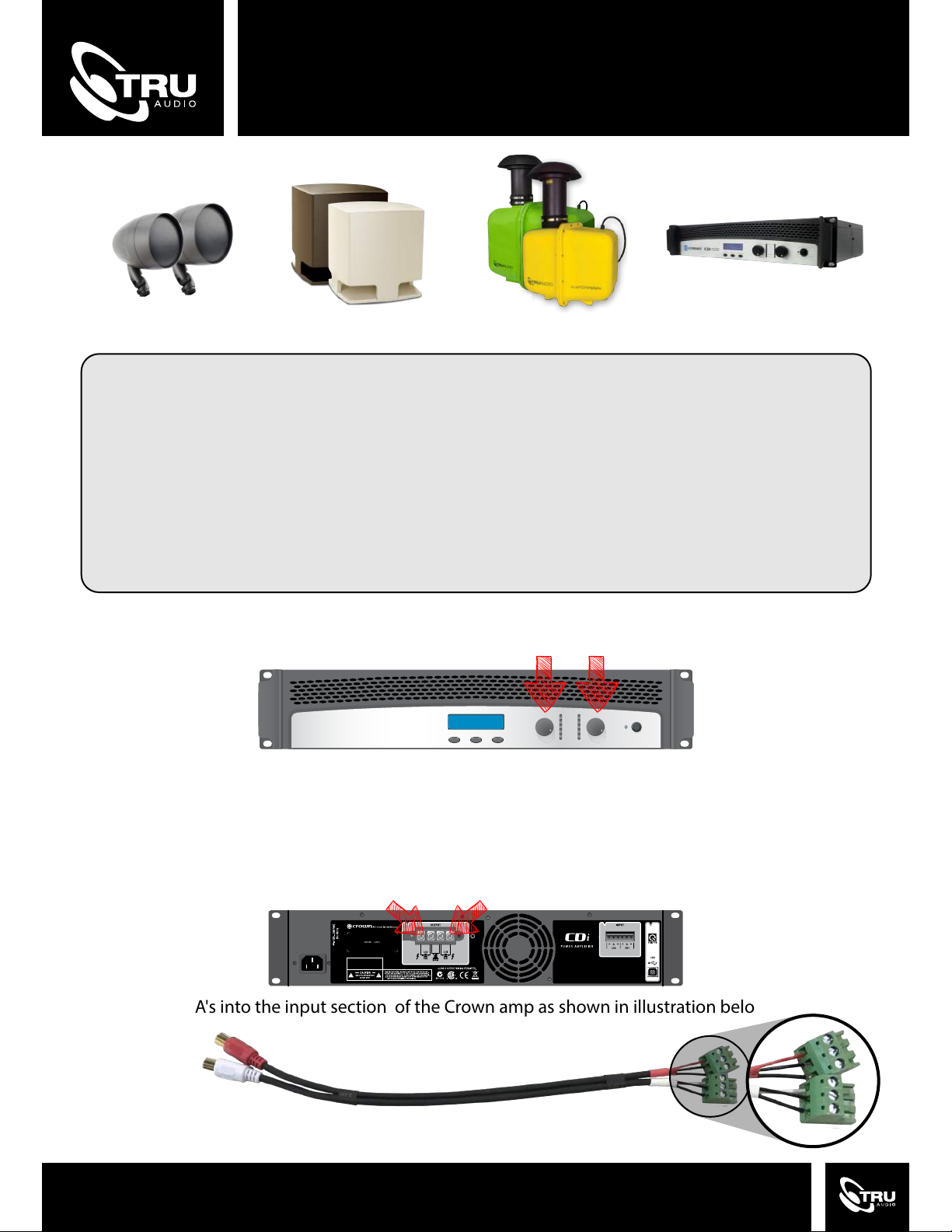
1. The Crown amp comes shipped at AS2/S10 preset. To change the preset press SET/ENTER twice
then use down/up button to select the right setting then press SET/ENTER button to load.
WARNING: Amplifier must be configured BEFORE speaker wires are connected.
AS1/S10 = AS-1 With Normal sub level
AS1/S10+ = AS-1 With sub level + 5db
AS2/S10 = AS-2 With Normal sub level.
AS2/10+ = AS-2 With sub level + 5db
AS1/S12 = AS-1 With Normal sub level
AS1/S12+ = AS-1 With sub level + 5db
AS2/S12 = AS-2 With Normal sub level.
AS2/S12+ = AS-2 With sub level + 5db
AS1/HS = AS-1 With Normal sub level
AS1/HS+ = AS-1 With sub level + 5db
AS2/HS = AS-2 With Normal sub level.
AS2/HS+ = AS-2 With sub level + 5db
BDCL/HS = AS-2 With Normal sub level.
BDCL/HS+ = AS-2 With sub level + 5db
BD/CL = BeatDrop or CL-70V
AS2/AS2 = AS2 on both channels
2. Set left and right gains evenly at 95% - 2 clicks back from full.
Gains
3. A 21” x 20” x 19” deep hole for the ST-SUB-10, or a 27” x 24” x 25” deep hole for the ST-SUB-12 should be
dug and prepped. When using two Subterrain’s you can wire them in parallel. Bury the Subterrain(s) and
wire to channel 1.
4. Set all Acoustiscape speakers to 70V AS-1(30w),AS-2(50W). Wire up Acoustiscape speakers
in parallel to channel 2.
Acoustiscape
Sub-Terrain
5. Wire the RCA's into the input section of the Crown amp as shown in illustration below.
Page 2
Wiring
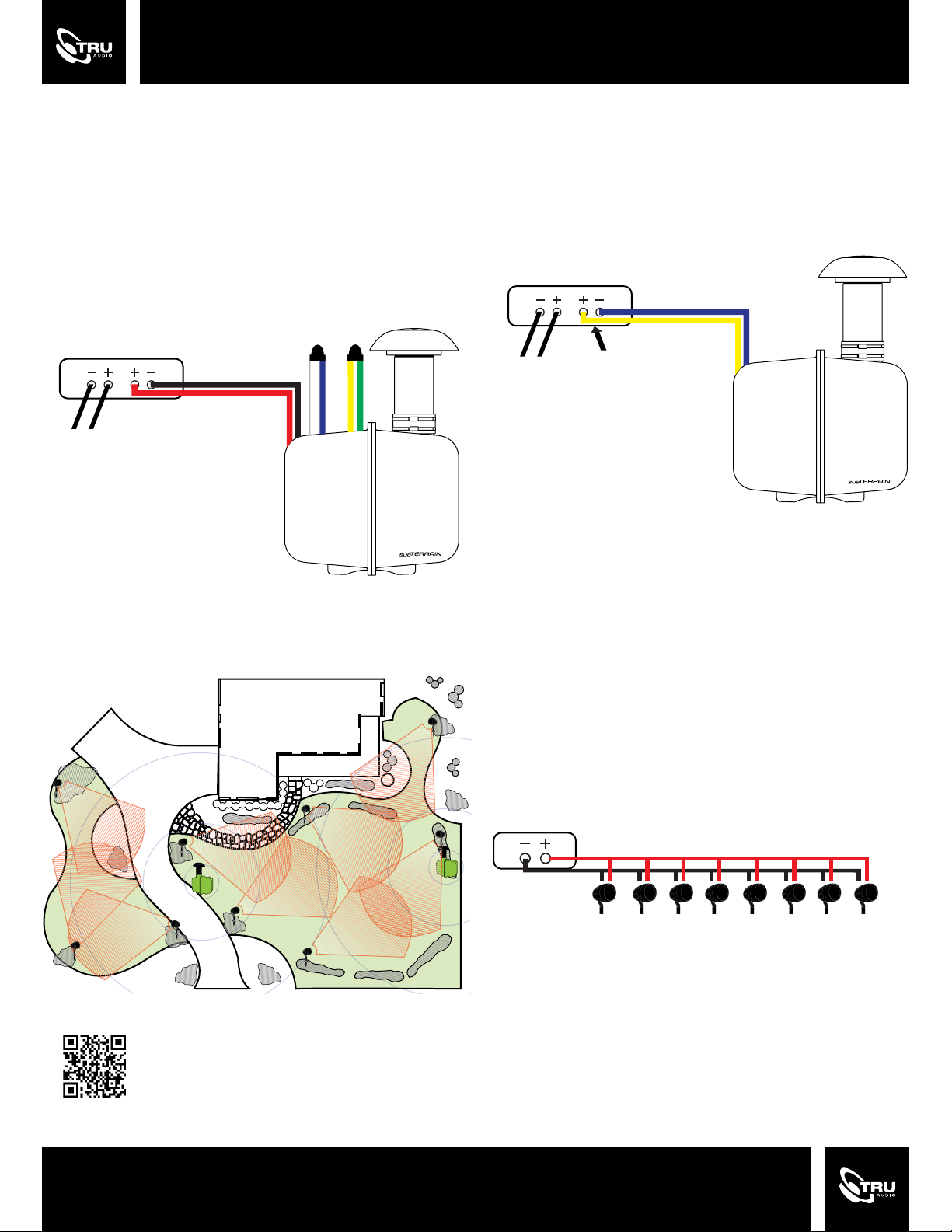
70V:
Note: for ST-SUB-12 Only
Connect the red cable (70V+) and black cable (70V-) to the
amp. Make sure the white cable (70V- Output) is
connected to the blue cable (4 Ohm - input) and the green
cable (70V+ Output) is attached to the yellow cable (4
Ohm + input).
ST-SUB-12
CROWN AMP
To 70V Speakers
70V
BLACK -
RED +
WHITE -
BLUE -
YELLOW +
GREEN +
4 Ohm - ST-SUB-12:
Connect the yellow wire (4 ohm + input) & the blue wire (4
ohm - input) to the 4 ohm amp.
ST-SUB-12
4 Ohm
CROWN AMP
BLUE -
YELLOW +
To 70V Speakers
4 Ohm
4 Ohm - ST-SUB-10 or RK-SUB:
Connect the (red + 4 ohm) and the (black - 4 ohm) to the
4 ohm amp
Backyard Satellite View
70V Tap Settings
Set taps to 80% maximum of amp’s capacity. The tap
settings can be changed as long as the total speaker
wattage does NOT exceed 80% of the amp’s power.
NOTE: Lower tap settings allow for more speakers but a
lower maximum volume
CROWN AMP
RED +
BLACK -
+ + + + + + +
50W
TAP SETTING
Finding the Correct Tap Setting
AMP POWER x 80% = SAFE
500W x 80% = 400W
400W ÷ 50W = 8 Speakers
OR
400W ÷ 30W = 13 Speakers
50W 50W 50W 50W 50W 50W 50W
=
= 400W or 80% of the Amp’s Power
Scan to view
install video
 Loading...