

Page 1

BC06
EN
OPERATING MANUAL
HUMIDITY / AIR
TEMPERATURE
MEASURING INSTRUMENT
TRT-BA-BC06-TC-001-EN
Page 2
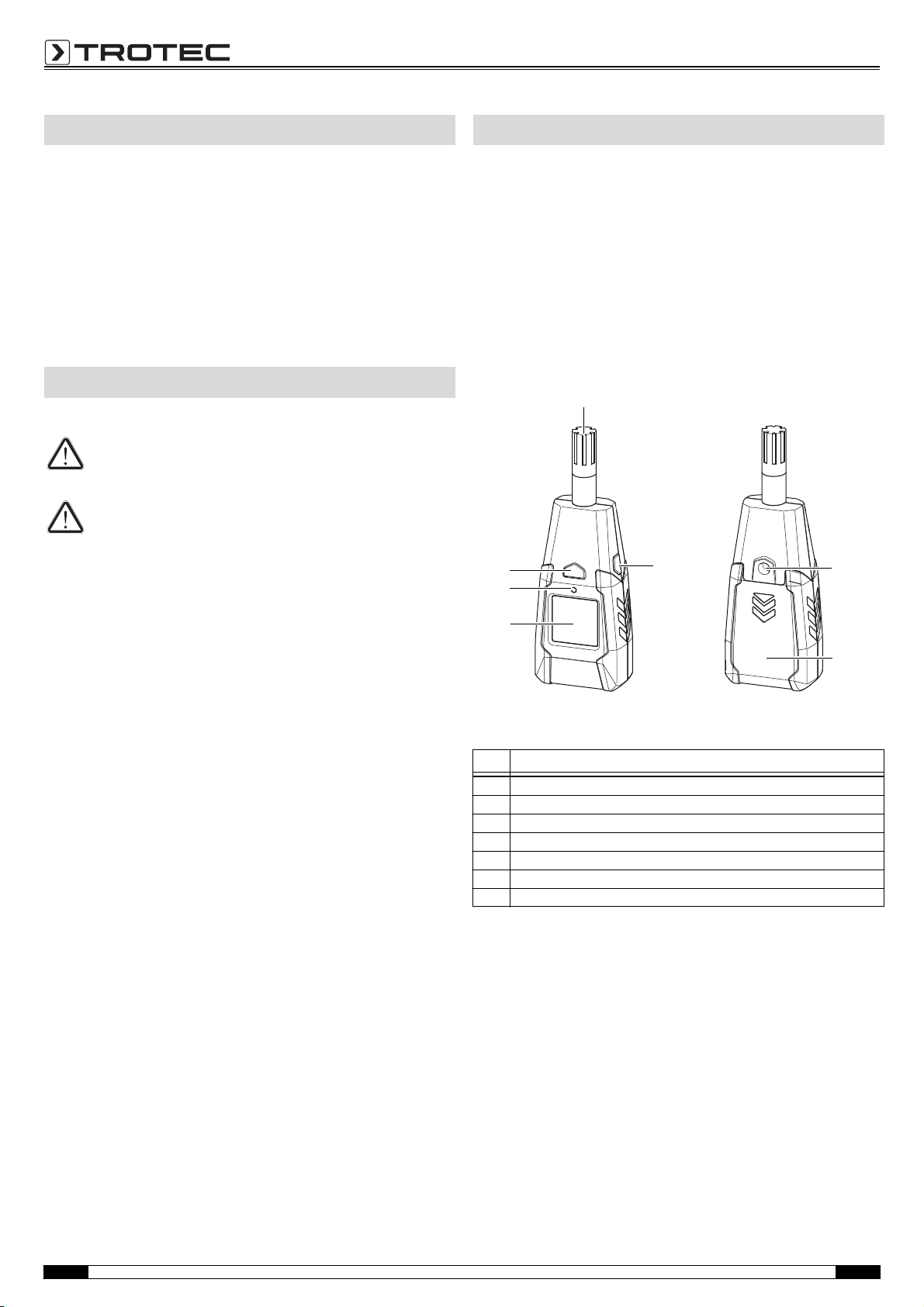
Table of contents
4
5
7
1
2
3
6
Information about the device
Notes regarding the operating manual .................................... 1
Information about the device ................................................... 1
Technical data ........................................................................ 2
Safety ..................................................................................... 2
Transport and storage ............................................................. 3
Operation................................................................................ 3
Maintenance and repair .......................................................... 4
Disposal.................................................................................. 5
Declaration of conformity ........................................................ 5
Notes regarding the operating manual
Symbols
Danger!
Warns of a hazard which can lead to injuries.
Caution!
Warns of a hazard which can lead to damage to property.
The current version of the operating manual can be found at:
www.trotec.de
Description of the device
By use of the humidity / air temperature measuring instrument
the temperature and humidity indoors can be determined.
Further available for the assessment of the measurements is a
MAX/MIN function (maximum and minimum value).
The display illumination automatically adjusts to the ambient light
conditions.
When not in use, an automatic switch-off saves the battery.
Device depiction
Legal notice
This release replaces all previous versions. No part of this
publication may be reproduced without written permission from
TROTEC®. The same applies for electronically processing,
duplicating or spreading the publication. Subject to technical
changes. All rights reserved. Trademarks are used without
guarantee that they may be used freely and primarily following
the spelling of the manufacturer. Product names are registered.
Changes to construction in the interests of constant improvements to the product, as well as changes to the shape and colour
are reserved.
The scope of delivery may vary from product images. This
document was created with all due care. TROTEC
liability whatsoever for possible mistakes or omissions.
The only party responsible for determining measured results to be
valid, drawing conclusions and deriving actions is the user!
®
TROTEC
accepts no claims of warranty for the correctness of
the determined measured values or measured results. Further,
TROTEC® accepts no liability whatsoever for possible mistakes or
damage which have been caused by utilising the determined
measured results. © TROTEC
®
®
accepts no
No. Operating element
1 Measuring sensor
2 MAX/MIN button
3 Tripod thread
4 Battery compartment with cover
5Display
6 Light sensor
7On/Off key
1 Operating manual – Humidity / air temperat ure measuring instrum ent BC06 EN
Page 3

Display
°C
°F
MAX MIN %RH
13
14
8
9
10
11
12
15
No. Display element
8 Indication of the relative humidity
9 Indication of the minimum value
10 Indication of the measured humidity value
11 Indication of the measured temperature value
12 Indication of the temperature unit
13 Indication for automatic switch-off
14 Indication of the maximum value
15 Battery status indication
Safety
Carefully read the operating manual before using the device and keep it within reach!
• Do not use the device in atmospheres containing oil, sulphur,
chlorine or salt.
• Protect the device from permanent direct sunlight.
• Do not remove any safety signs, stickers or labels from the
device. Keep all safety signs, stickers and labels in legible
condition.
• Observe the storage and operating conditions (see chapter
Technical data).
Intended use
Only use the device for indoor temperature and humidity
measurements within the measuring range specified in the
technical data. Here, read and observe the technical data.
To use the device for its intended use, only use accessories and
spare parts which have been approved by TROTEC
®
.
Technical data
Model: BC06
Weight: 152 g
Dimensions (H x W x D): 148 mm x 56 mm x 33 mm
Tem pera ture
Measuring range: -20 to +60 °C or -4 to 140 °F
Accuracy: ± 1 °C (0 °C to 40 °C)
Measuring range resolution: 0.1 °C or 0.1 °F
Relative humidity
Measuring range: 0.0 to 100.0 % RH
Accuracy: ± 3.5 % RH (20 % to 80 %)
Measuring range resolution: 0.1 % RH
Reaction time: < 15 seconds
Operating temperature: 0 to 50 °C with < 80 % RH
Storage temperature: -40 to 85 °C with < 99 % RH
Power supply: 1 x Alkaline 9 V battery
Automatic switch-off of the
device:
Scope of delivery
• 1 x humidity / air temperature measuring instrument BC06
• 1 x 9 V battery
• 1 x Getting started guide
± 2 °C (-20 °C to 0 °C and 40 °C to 60 °C)
± 5 % RH (0 % to 20 % and 80 % to 100 %)
battery life approx. 48 hours
If activated (13), after approx. 30 minutes of
non-use.
Improper use
Do not use the device in potentially explosive atmospheres, for
measurements in liquids or at live parts. TROTEC
liability for damages resulting from improper use. In such a case,
entitlements to a warranty are forfeited. Any unauthorised
modifications, alterations or structural changes to the device are
forbidden.
®
accepts no
Personnel qualifications
People who use this device must:
• have read and understood the operating manual, especially
the Safety chapter.
EN Operating manual – Hu midity / air temperature measuring instrum ent BC06 2
Page 4

Residual risks
16
17
Danger!
Do not leave the packaging lying around. Children may
use it as a dangerous toy.
Danger!
The device is not a toy and does not belong in the hands
of children.
Danger!
Dangers can occur at the device when it is used by
untrained people in an unprofessional or improper way.
Observe the personnel qualifications.
Caution!
To prevent damages to the device, do not expose it to
extreme temperatures, extreme humidity or moisture.
Caution!
Do not use abrasive cleaners or solvents to clean the
device.
Transport and storage
Transport
For transporting the device use a suitable bag to protect it from
external influences.
Storage
When the device is not being used, observe the following storage
conditions:
•dry.
• protected from dust and direct sunlight,
• with a plastic cover to protect it from invasive dust, if
neces sary.
• The storage temperature is the same as the range given in
the chapter Technical data.
• When storing the device for a long time, remove the batteries.
Operation
Inserting the battery
• Insert the supplied battery before first use.
Caution!
Make certain that the surface of the device is dry and the
device is switched off.
1. Remove the cover (16) from the device by sliding it in the direction of the arrow.
2. Use the battery clip (17) to connect the new battery with correct polarity.
3. Slide the cover (16) back on the device.
Switch-on and measurements
1. Press the on/off key (7).
– The display is switched on and the device is ready for
operation.
– In case of poor lighting conditions the display illumination
switches on automatically. The display illumination is
controlled by the sensor (6).
2. Point the device at the area to be measured.
– The measured values are indicated in % RH and °C.
– Wait for a moment to achieve a stable measured value.
Note:
Note that moving from a cold area to a warm area can lead to
condensation forming on the device's circuit board. This physical
and unavoidable effect can falsify the measurement. In this case,
the display shows either no measured values or they are
incorrect. Wait a few minutes until the device has become
adjusted to the changed conditions before carrying out a
measurement.
3 Operating manual – Humidity / air temperat ure measuring instrum ent BC06 EN
Page 5

Changing the unit °C / °F
The default setting for the temperature unit is °C.
1. Open the battery compartment.
2. Remove the battery.
– At the upper edge you can see an opening leading to the
inside of the device. That is where the switch is located.
3. Flip the switch by means of a suitable tool (e.g. a paper clip).
– The unit is set to °F.
MAX/MIN function
By use of the MAX/MIN function you can either read the highest
or the lowest value of the current measurement interval.
1. Press the MAX/MIN button (2).
– The indication MAX (14) appears on the display.
– The display now indicates the highest temperature and
humidity values measured since the device was
switched on.
2. Press the MAX/MIN button (2) again.
– The indication MIN (9) appears on the display.
– The display now indicates the lowest temperature and
humidity values measured since the device was
switched on.
3. Press the MAX/MIN button (2) again.
– The MAX/MIN function is deactivated and the currently
measured values are displayed.
Maintenance and repair
Battery change
A battery change is required, when the Battery indication (15)
lights up or the device can no longer be switched on.
See Inserting the battery on page 3.
Cleaning
Clean the device with a soft, damp and lint-free cloth. Ensure that
no moisture enters the housing. Do not use any sprays, solvents,
alcohol-based cleaning agents or abrasive cleaners. Only use
clean water to moisten the cloth.
Repair
Do not modify the device. Never open the device housing or install
any spare parts. For repairs or device testing, contact the
manufacturer.
Automatic switch-off
If the symbol for automatic switch-off (13) is displayed, the device
will switch off automatically when not in use for 30 minutes.
To deactivate automatic switch-off, please proceed as follows:
1. Press the MAX/MIN button (2) for approx. 2 seconds.
– The symbol (13) is no longer displayed.
– Automatic switch-off is deactivated.
2. Press the MAX/MIN button (2) again for approx. 2 seconds.
– Automatic switch-off is reactivated.
Switch-off
With activated automatic switch-off function (13) the device
switches off after 30 minutes of non-use.
• Press the On/Off key (7).
– The device will be switched off.
– The MAX and MIN values are reset.
EN Operating manual – Hu midity / air temperature measuring instrum ent BC06 4
Page 6

Disposal Declaration of conformity
In the European Union, electronic equipment must not
be treated as domestic waste, but must be disposed of
professionally in accordance with Directive
2002/96/EC of the European Parliament and Council of
27th January 2003 concerning old electrical and electronic
equipment. At the end of its life, please dispose of this instrument
in a manner appropriate to the relevant legal requirements.
in accordance with the EC Low Voltage Directive 2006/95/EC
and the EC Directive 2004/108/EC about electromagnetic
compatibility.
Herewith, we declare that the humidity / air temperature measuring instrument BC06 was developed, constructed and produced
in compliance with the named EC directives.
The marking is found on the rear of the device.
Manufacturer:
Trotec GmbH & Co. KG
Grebbener Straße 7
D-52525 Heinsberg
Phone: +49 2452 962-400
Fax: +49 2452 962-200
E-mail: info@trotec.com
Heinsberg, 31/03/2014
Managing Director: Detlef von der Lieck
5 Operating manual – Humidity / air temperat ure measuring instrum ent BC06 EN
Page 7

TROTEC GmbH & Co. KG
Grebbener Str. 7
52525 Heinsberg
Deutschland
+49 2452 962-0
+49 2452 962-200
info@trotec.com
www.trotec.com
 Loading...