

Page 1
Element T6 Max
Bluetooth Speaker
USER MANUAL
Page 2

CONTEN TS
English
Français
Italiano
Deutsch
Español
日本語
01~08
09~16
17~24
25~32
33~40
41~48
Page 3
English
Thank you for purchasing the Tronsmart Element T6 Max
Bluetooth Speaker. Please read the user manual before use
and keep it handy for future reference. If you have
trouble understanding or following the instructions in this
manual, please contact our customer support team directly at
[email protected]
Package Content
1 x Element T6 Max Bluetooth speaker
1 x USB-C charging cable
1 x 3.5mm audio cable
1 x Carrying pouch
1 x User manual
1 x Warranty card
6
1
2 3
7 158
9
10
45
01
Page 4
11
1
14
1213
2s On/OFF
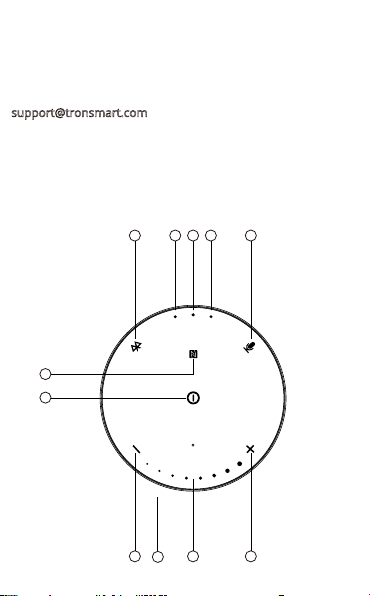
Overview
1
Play/Pause
2
Bluetooth connection/disconnection; TWS
3
Voice assistant; Hands-free phone calls
4
Volume +; Next track
5
Volume -; Previous track
6
NFC
7
Bluetooth & TWS pairing indicator
8
Charging indicator
9
Volume level indicator
10
Microphone
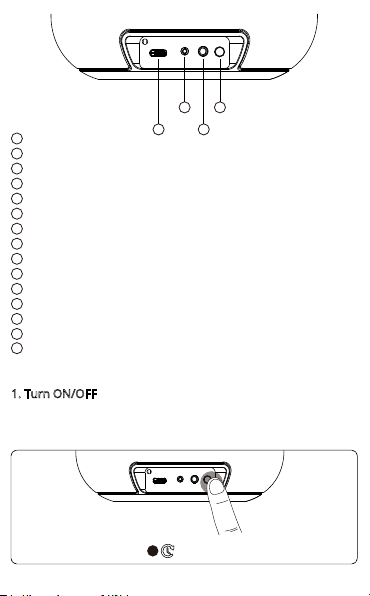
11
Turn ON/OFF; Reset
12
3.5 mm audio jack
13
USB-C port
14
DC charging port
15
AUX-IN indicator
How to Use
1. Turn ON/OFF
Hold the power button for 2 seconds to turn the speaker on
and off.
02
Page 5
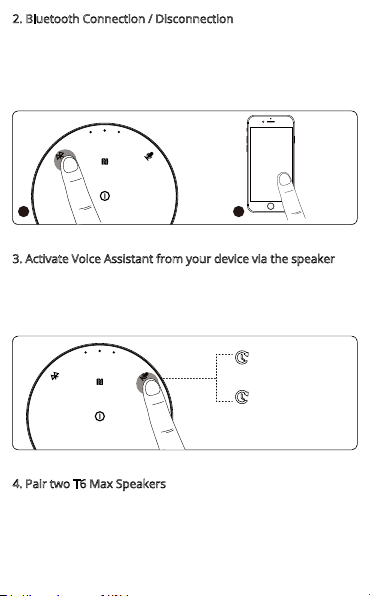
2. Bluetooth Connection / Disconnection
Tap the Bluetooth button once to enter pairing mode. Then,
turn on your device's Bluetooth setting, search for ‘Tronsmart
Element T6 Max’ and tap to connect.
Over the Bluetooth connection mode, tap the button once
again to disconnect.
Tronsmart
Element
T6 Max
1 2
3. Activate Voice Assistant from your device via the speaker
Over the Bluetooth connection mode, hold the voice assistant
button for 3 seconds to activate the personal assistant from
your device via the speaker.
Hold for 3 seconds again to end the voice assistant function.
3s On
3s Off
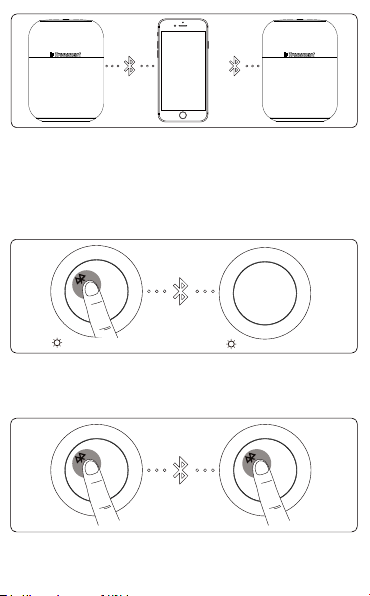
4. Pair two T6 Max Speakers
- How to pair two T6 Max speakers?
1. Turn on both speakers, and confirm one of the two speakers
has paired with your device while the other one is waiting for
pairing.
03
Page 6
Tronsmart
Element
T6 Max
“A” “B”
2. Hold the Bluetooth button of the speaker that has paired
with your device for 3 seconds. After a sound prompt is heard
and the Bluetooth indicator of the main speaker (the one you
hold the button on) will flash quickly while the sub speaker's
stay blue, which means two speakers have paired with each
other successfully.
“A” “B”
Stay blue
- How to operate two T6 Max after pairing up?
1. Disconnect two T6 Max to each other: Hold the Bluetooth
button of either of the speaker.
Stay blue
“A” “B”
04
Page 7

2. Disconnect the Bluetooth to your device: Tap the Bluetooth
button once of the main speaker.
“A”
Tronsmart
Element
T6 Max
3. Over Stereo Pairing mode, all operations are achieved
synchronously, such as turn on and off, play and pause, turn
up or down the volume and more.
5. NFC Streaming
Confirm Bluetooth & NFC functions are enabled on your
device, and then put the device on the NFC area of the speaker
to pair automatically. If you need to disconnect NFC streaming,
put the device back to the area again to disconnect.
6. AUX-IN Mode
Simply connect the speaker with your non-Bluetooth device via
the 3.5 mm audio jack cable.
Note: After plugging in an audio cable, the speaker will
automatically switch to AUX-IN mode. Over the AUX-IN mode,
control audio playback via the connected device, and there is
no automatic power-off function.
05
Page 8
7. Auto-power Off
The speaker will power off automatically after 10 minutes if it
does not pair with any device through Bluetooth or does not
play any sound after pairing. When in low battery, the speaker
will power off automatically as well.
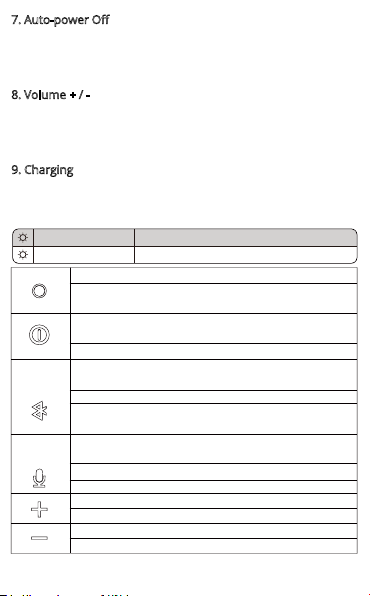
8. Volume + / There are 16 levels of volume settings and 8 LED indicators.
Two levels correspond to one LED. The maximum 16 levels of
volume with all LED lights on while the mute state without any
LED light.
9. Charging
When in low battery, there will have a sound prompt every 15
seconds. After the third time prompt, the speaker will
power-off automatically.
Red
Goes off
Turn ON/OFF: Hold for 2 seconds.
Reset: Hold for 8 - 10 seconds to reset to factory
default settings.
After powering on the speaker, tap once to start
normal usage.
Play/Pause: Tap once.
Bluetooth connection: Tap once to enter Bluetooth
pairing mode.
Bluetooth disconnection: Tap once to disconnect.
TWS function: Hold for 3 seconds to enter the TWS
pairing mode or disconnect the TWS mode.
Hold for 3 seconds to activate the personal
assistant.
Answer/End phone calls: Tap once.
Reject phone calls: Hold for 3 seconds.
Volume+: Tap once to turn up the volume.
Next track: Hold to choose the next track.
Volume-: Tap once to turn down the volume.
Previous track: Hold to choose the previous track.
In charging state
Fully charged
06
Page 9
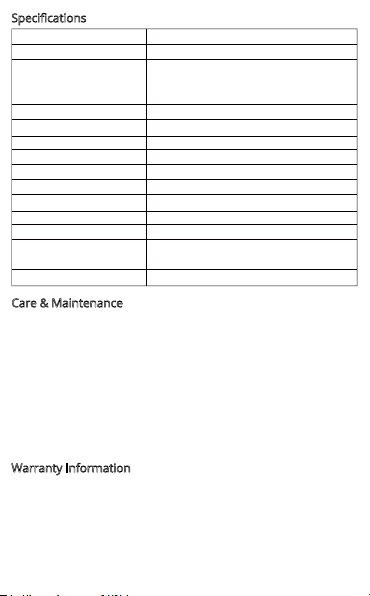
Specifications
Model
Bluetooth
Bluetooth profile
Output (Watt)
Transmission distance
Frequency range
Radio frequency
S/N
Playtime
Battery
Charge input
Charging time
Dimension
Weight
Care & Maintenance
Do not use any form of detergents or cleaning material to
clean the product as any type of chemical may make this
device unusable. Do not disassemble this product. It contains
no user serviceable parts. Do not drop or jump on it and treat
it with care for the best performance. Keep the product in a dry
location. Dust, dirt & moisture from humidity can accumulate
on the body of the product if kept at an unfriendly place. Do
not dispose this product in fire or batteries may explode or
leak.
Warranty Information
Your ‘Tronsmart Element T6 Max Bluetooth Speaker’, is
warranted to the original owner for 12 months from the date
of purchase against defects in material and workmanship
under normal use and service. Tronsmart is not responsible for
the accidental use of this product and its liability will not
exceed the purchase price of the product. If you have any
Element T6 Max
5.0
A2DP V1.3, AVRCP V1.6, GAVDP
V1.3, HFP V1.7, HID V1.1, IOPT,
SPP V1.2
60W Max.
10m / 33ft (open area)
40Hz - 20KHz
2.402 - 2.483G
- 65dB
Up to 20 hours
(50% volume level)12000 mAh
DC 5V/3A, 24V/0.65A
About 6 hours
140 x 140 x 193 mm /
5.51 x 5.51 x 7.60 inches
1.982kg / 69.91oz
07
Page 10

problems while using the product, please do not hesitate to
contact our customer support team at
[email protected]
FCC Statement
This device complies with Part 15 of the FCC Rules. Operation
is subject to the following two conditions:
(1) this device may not cause harmful interference, and (2) this
device must accept any interference received, including
interference that may cause undesired operation.
NOTE: This equipment has been tested and found to comply
with the limits for a Class B digital device, pursuant to part 15
of the FCC Rules. These limits are designed to provide
reasonable protection against harmful interference in a
residential installation. This equipment generates uses and can
radiate radio frequency energy and, if not installed and used in
accordance with the instructions, may cause harmful
interference to radio communications. However, there is no
guarantee that interference will not occur in a particular
installation. If this equipment does cause harmful interference
to radio or television reception, which can be determined by
turning the equipment off and on, the user is encouraged to
try to correct the interference by one or more of the following
measures:
- Reorient or relocate the receiving antenna.
- Increase the separation between the equipment and receiver.
- Connect the equipment into an outlet on a circuit different
from that to which the receiver is connected.
- Consult the dealer or an experienced radio/TV technician for
help.
Changes or modifications not expressly approved by the party
responsible for compliance could void the user's authority to
operate the equipment.
08
 Loading...