

Page 1
Page 2

Table of Contents
Important Safety Instructions
General Safety
Electrical Safety
Battery Safety
Getting Started
Shipping Materials
Parts Location
Installation
Operation
Maintenance
Troubleshooting
Technical Specifications
Service and Warranty
Page 3

Important Safety Instructions
SAVE THIS USER’S GUIDE. Contents of this User's Guide should be followed during
operation and maintenance of Tronix PowerCore.
General Safety
Do NOT expose to dust, moisture, liquids, rain or snow.
Do NOT block ventilation openings; Overheating may occur.
Do NOT place in a compartment with zero clearance.
Electrical Safety
Always connect Tronix PowerCore to a grounded outlet. The socket outlet to which
Tronix PowerCore is connected must be in close proximity and must be easily
accessed.
Computer units and other supported equipment must be properly connected to
Tronix PowerCore.
Always turn OFF and unplug Tronix PowerCore before doing any maintenance.
Battery Safety
Warning: Contains potentially hazardous voltages
Do NOT make any changes or modifications to PowerCore unless otherwise specified. Except
the batteries, Tronix PowerCore has no serviceable parts.
CAUTION: Do NOT place the batteries near open flames or heat. The batteries may
explode.
CAUTION: Be careful on checking the batteries during maintenance. Use of gloves is
recommended. The batteries contain chemicals that are harmful to the skin and
eyes. The batteries can also emit dangerous or explosive gases.
CAUTION: To avoid injury due to electrical hazard, remove metal accessories such
as wristwatches and jewelries when replacing batteries. Use properly insulated tools
and handles.
CAUTION: Tronix PowerCore uses two 12VDC, 100Ah Deep Cycle Lead-Acid batteries,
replace batteries with the same type as originally installed in Tronix PowerCore.
CAUTION: Observe proper polarity when connecting the batteries. Incorrect polarity
may cause electrical hazards or damage to Tronix PowerCore.
Dispose replaced batteries properly. Deliver the battery to its manufacturer for recycling.
IMPORTANT: Innovatronix Inc. does NOT recommend the Tronix PowerCore for use in life
support equipment, where malfunction of the product will significantly degrade effectiveness
of such equipment.
Examples of life support equipment are, but NOT limited to, the following: pacemakers, blood
pumps, ventilators and dialysis systems.
Page 4
Getting Started
Shipping Materials
Please check if the shipped package contains the following:
1.1 Tronix PowerCore unit
2.2 100Ah Deep Cycle Lead Acid Batteries (Already installed)
3.User's Guide (this document)
Contact Tronix Customer Service in case any item is missing in the package (see
Information
).
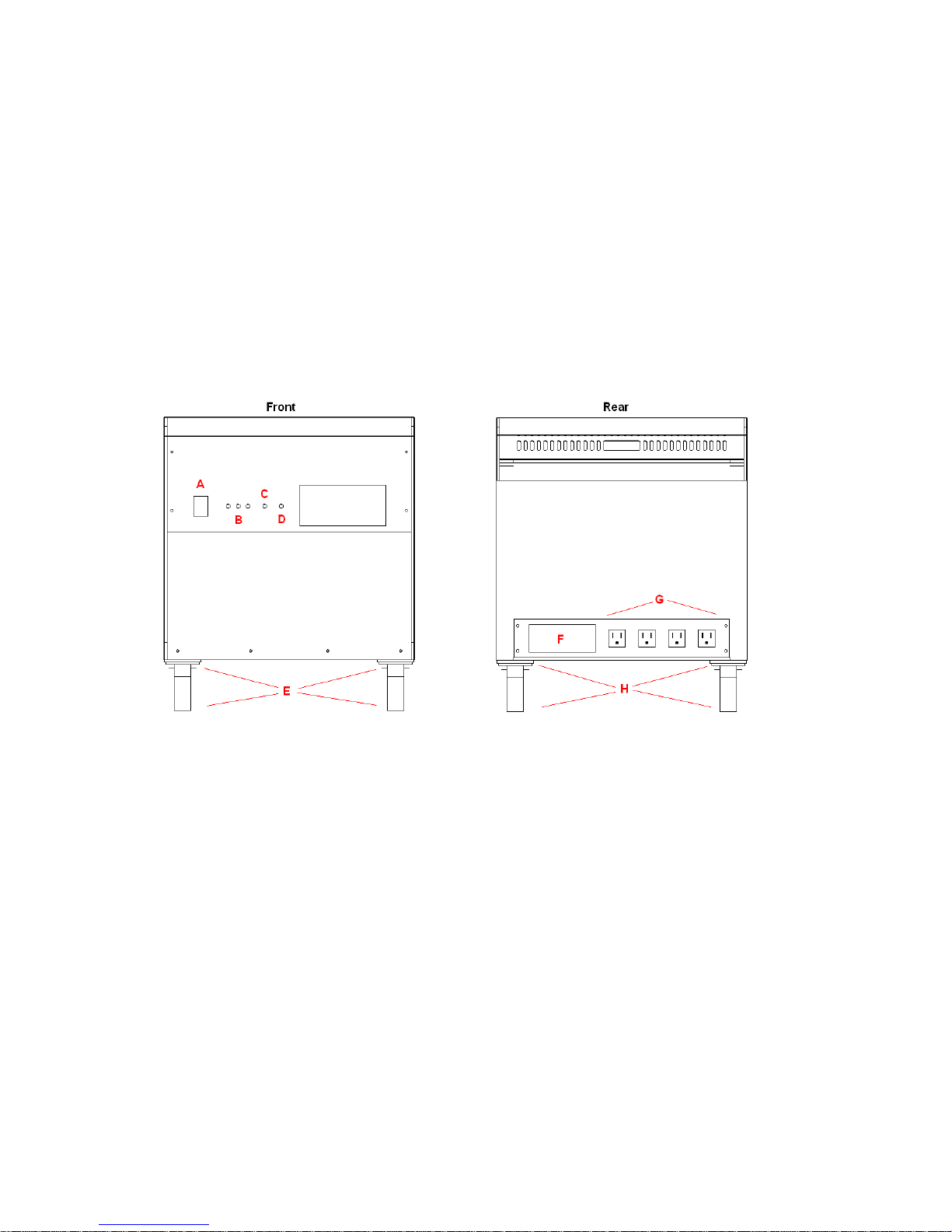
Parts Location
A. Power Switch
B. Battery Level Indicators (Green -Hi, Yellow -Mid, Red -Low)
C. Overload Indicator (Red LED)
D. Charging Indicator (Red/Green LED)
E. Front wheels
F. AC cord
G. Output Sockets
H. Rear wheels
Contact
Installation
1. Make sure that Tronix PowerCore is switched OFF.
2. Always place Tronix PowerCore in dry and well-ventilated area.
3. Plug the power cord to a 180V to 240V AC mains supply. The unit will automatically be in
charging mode. The Charging LED should lit.
Page 5

Operation
1. Make sure that Tronix PowerCore is charged as instructed in
Installation
2. Set up the load equipment.
3. Connect the plug of the load unit being used to one of Tronix PowerCore's sockets.
4. Turn on Tronix PowerCore by switching the power switch to on position. The Battery
Level Indicators (green Hi, yellow
Med
and red
Low
) will indicate “Hi” at this point
since the AC input power is available.
5. Test the backup feature by unplugging the Tronix PowerCore to the AC wall outlet.
The AC output should remain and a beep every 5 minutes will be heard from the
unit indicating that the UPS is now operating in backup battery mode.
6. The unit is rated at 350W. When overload occurs, overload indicator will light up. If
this happens, reduce the load of the Tronix PowerCore.
Below is a table of Tronix PowerCore's status and its corresponding indication:
Status Indication
Charging
Charging - Battery
Full
Battery Full Green
Battery at Half
Power
Battery Low Red
Charging
Charging
Hi
Yellow
Low
LED indicator is RED
LED indicator is GREEN
LED indicator is ON
Med
LED indicator is ON
LED indicator is ON
.
Tronix PowerCore's battery will be discharged if any of the following occurs:
Tronix PowerCore is switched ON at no load. Tronix PowerCore’s battery will be
discharged after few days at full charge.
Tronix PowerCore is switched OFF at no load. Tronix Power Core’s battery will be
discharged after few months. Thus, when not in use, it is recommended that Tronix
PowerCore should be plugged in to a 180V to 265V AC mains supply from time to time.
Tip: You can leave Tronix PowerCore plugged in even after it is fully charged. Tronix
PowerCore uses trickle charging. If the cord is still plugged after the battery reached full
charge, the battery will not be damaged in any way. Trickle charging also maintains the
battery's optimum life span.
Maintenance
For optimum performance, keep the battery fully charged. A lit green Hi LED indicates
a fully charged battery when Tronix PowerCore is being used. On the other hand, a lit
red
Low
LED indicates a drained battery.
Switch OFF the unit when not in use.
Use a dry cloth when cleaning the unit. Do not use any liquid or detergents.
Page 6
Battery Replacement
WARNING:
Risk of electric shock. Proceed with extreme caution.
Before replacing batteries, disconnect all cords and wait 30 minutes.
Remove any metal objects such as wristwatches and jewelry.
Use properly insulated tools and handles.
Strictly follow the instructions stated to avoid possible damage to the unit
and injury.
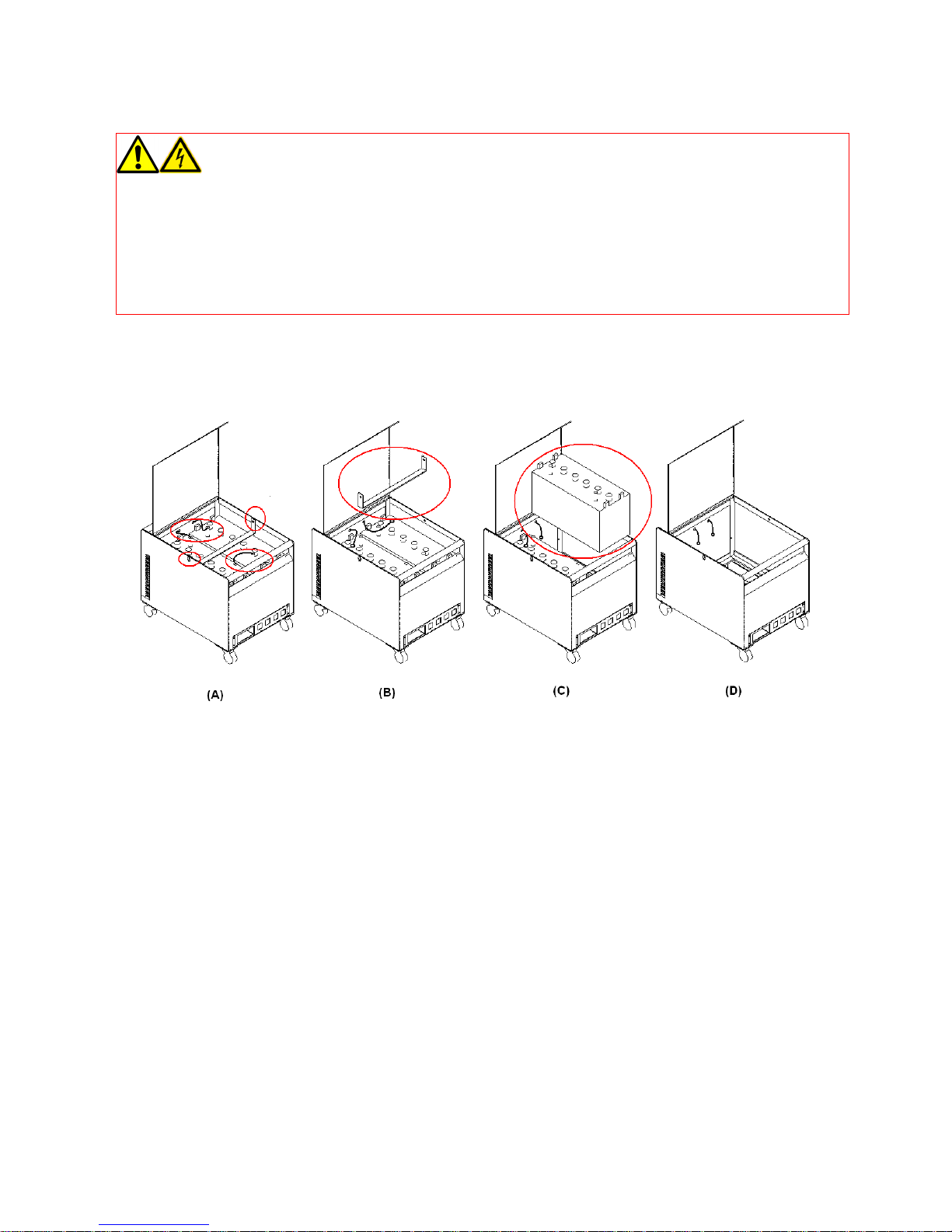
1. Make sure that Tronix PowerCore is turned OFF.
2. Open the top cover.
3. Remove the screws of the battery bracket.
4. Using pliers or screwdriver, remove the wires on the battery terminals. Be careful
not to short circuit the terminals of the batteries.
5. Remove/replace the batteries.
6. Reconnect the wires. Be sure to tighten all the nuts of battery terminals to assure
good contact. Loose connection will cause heating of terminals.
ATTENTION: Remember to take note of the polarity of the wires and not interchange
them. Otherwise, the unit will be damaged. Black wire is for the negative(–) terminal
and red wire is for the positive (+) terminal. Take note also of the original orientation
of the batteries. The positive terminal of one battery is aligned with the negative
terminal of the other battery for easier and simpler wiring connection.
7. Close the Tronix PowerCore cover. Fix it with the latch lock.
Dispose replaced batteries properly. Deliver the battery to its manufacturer for recycling.
Page 7

Troubleshooting
Refer to the table below to address minor problems regarding installation and operation of
Tronix PowerCore. For problems that can not be solved using the table, contact Tronix
Customer Service.
Problem Possible Cause Solution
Output
Overload Reduce load
voltage drops
Unit Beeps Not Plugged to Supply Check Tronix PowerCore connection to
AC supply
Battery
draining fast
Battery not fully
charged
Charge battery for 8 to 9 hours
Battery performance decreases with
Battery nearing end of
its useful life
time. Also, batteries age prematurely
when placed in places with high
temperatures. Replace battery. See
Battery Replacement
Technical Specifications
Feature Specification
UPS type Online Double Conversion
Transfer time AC to Battery = 0mS
Power Capacity 500VA/ 350W max.
Voltage 230Vac
Frequency 60 Hz
Current 1.52A
Waveform Pure Sine Wave
Socket 3 prong (x4)
AC Input
Voltage 230V
Frequency 60Hz
Current
Visual
Audible alarms
Output
Input
- Fully loaded, not charging batteries (1.8Arms)
- Charging batteries only, unloaded (1.7Arms
- Fully loaded + Charging fully drained batteries
(3.5Arms)
Indicators
Green, Yellow and Red LEDs for battery status
Red/Green LED for charging status
Red LED for overloaded status
Buzzer alarm every 5 minutes when in battery mode (no
AC)
Page 8

Buzzer alarm every 3-4 seconds when battery is critically
low (please see note on battery specs.)
Battery
Type Deep Cycle, Lead-Acid (x2)
Voltage 24V
Capacity 100Ah
Charging Time 8 – 9 hrs. (when the battery is fully drained)
24hrs with single desktop PC, normal use
Estimated Runtime
12hrs at 150W continuous load
6hrs at 300W continuous load
When battery is critically low, buzzer alarms every 3-4
Note:
seconds. This goes on for around 5 minutes and will
automatically shutdown and disables its AC output.
Physical
Dimensions 500mm x 380mm x 430mm (L x W x H)
Chassis Metal, Black
Wheels Swivel type, rubber with ball bearings
Net Weight 86kg.
Service and Warranty
The Tronix PowerCore is covered by a one-year warranty starting from the date of purchase.
From that date, the product should be free of any defect in material and workmanship and it
will function in accordance to its stated performance.
Within this period, Innovatronix Inc. will repair or replace defective parts. This warranty only
covers failures due to manufacturing defects and workmanship. Hence, breakdown of Tronix
PowerCore due to gross abuse and normal wear and tear is not covered in this warranty.
There are no warranties by use except as stated therein. For unsafe and/or faulty repairs,
Innovatronix Inc. and/or sellers shall not be liable by such cases. Any alternation made to this
product by unauthorized service technicians are the sole responsibility of the owner.
Maximum liability for any breach of this agreement or other claim to the use of this product
shall not exceed the purchase price of the product by the customer.
Warranty registration is not required. Warranty is applicable if and only if the
product is used under normal conditions and for its intended purpose.
All rights reserved. No part of this publication may be copied, duplicated or transmitted in any form or by any
means, or otherwise, without prior written permission from Innovatronix Inc. The information contained herein
is designed only for the use with Tronix PowerCore. Innovatronix is not responsible for any use of this
information as applied to other portable power supplies and other related products.
Copyright_2010 by Innovatronix Inc.
Page 9

Km. 26 The Richdale, Sumulong Highway
Sta. Cruz, Antipolo City, Philippines
Tel nos: ( 63 2) 661 4108 / 571 8622
Fax No: 661 4108
Email: [email protected] ; [email protected]
Website: www.innovatronix.com
 Loading...