

Page 1
Page 2
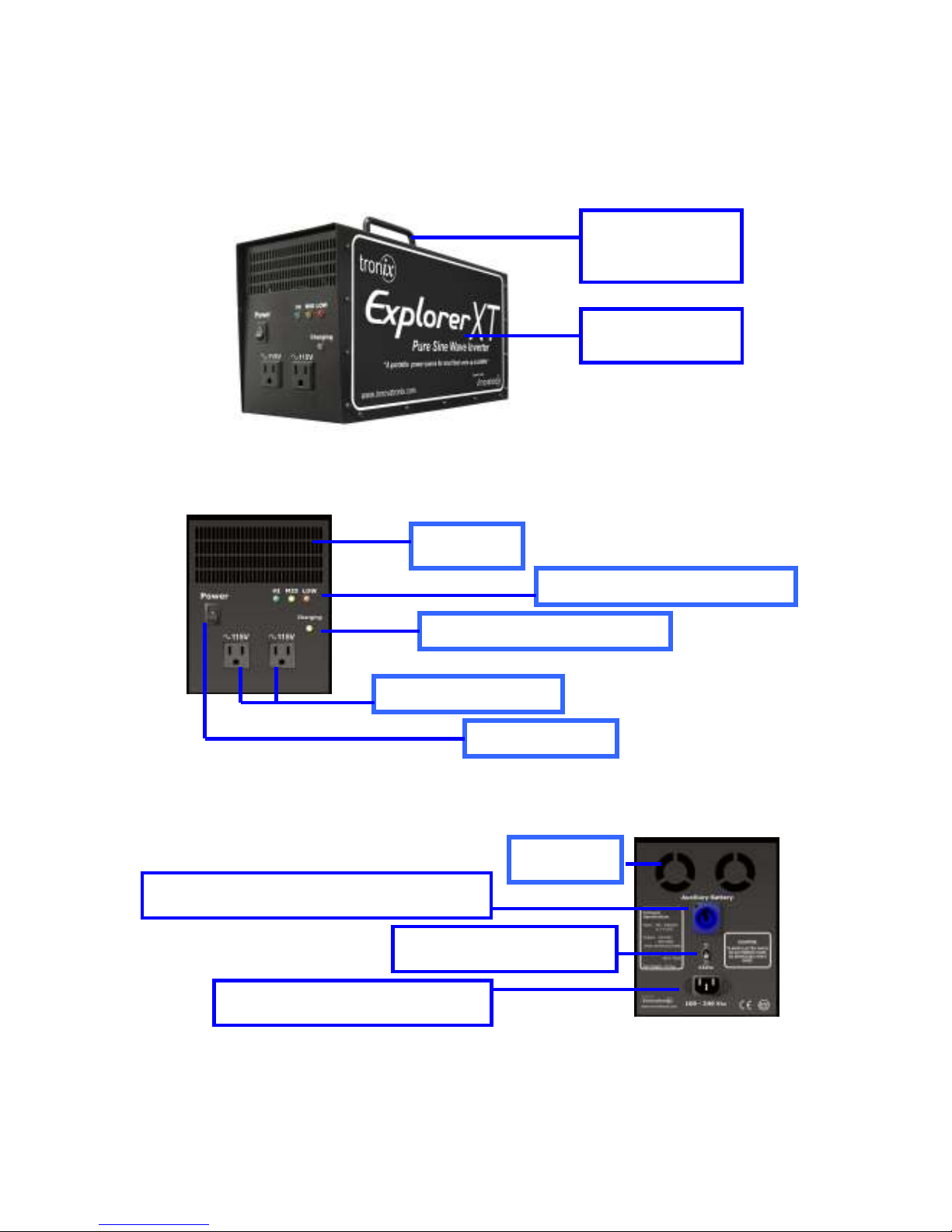
FRONT PANEL
BACK PANEL
GETTING STARTED
Robust Handle
Side Panel
Exhaust
Battery Level Indicators
Output Sockets
Auxiliary battery port for external battery
14V Car Battery Charger
Auto volt charging (110-240V)
LED Charger Indicator
Power Switch
Exhaust
Page 3
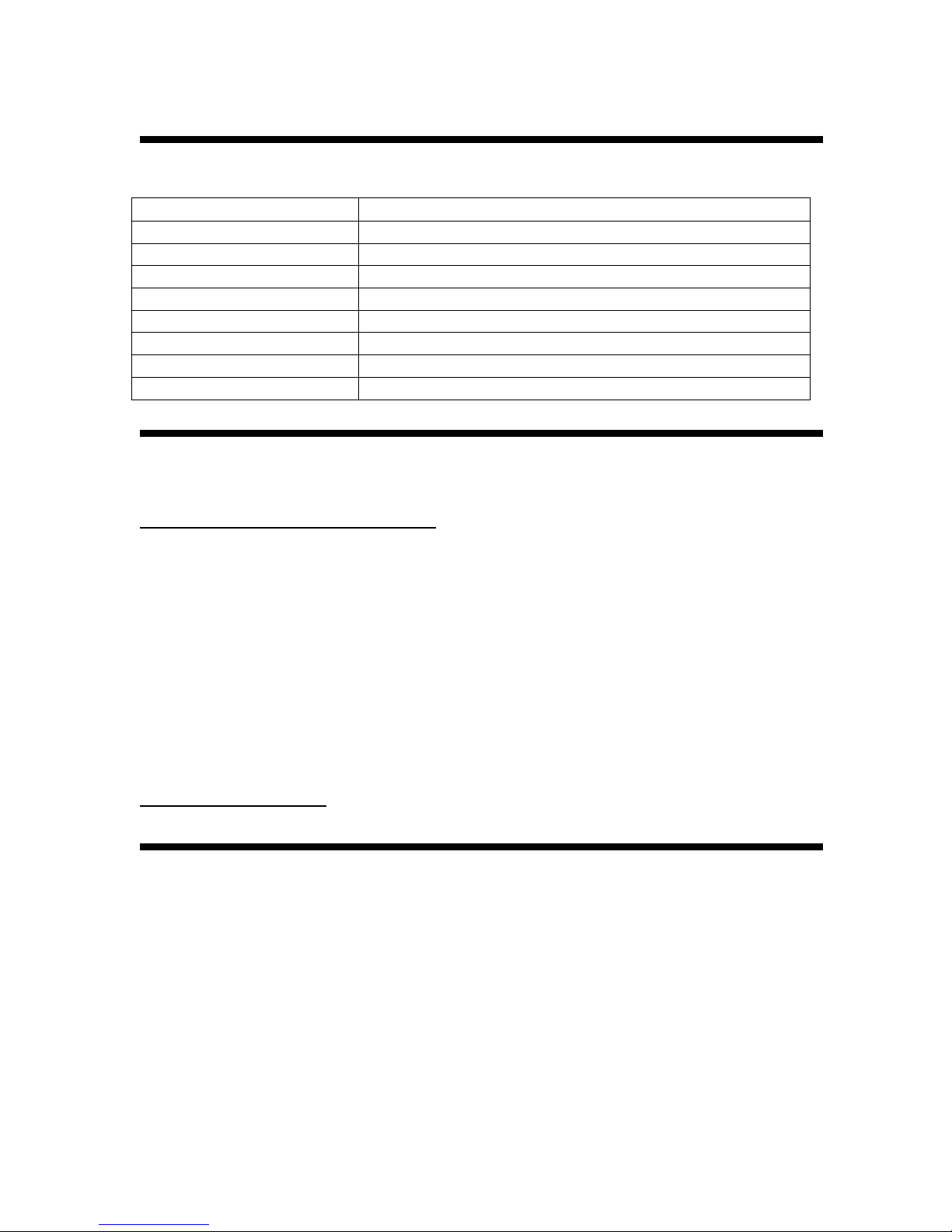
TECHNICAL SPECIFICATIONS
Power Output 325 watts (continuous) / 1200 watts (peak)
Sockets 2
Battery Two (2) 12Vdc, 7AH SLA
Charging Voltage Input 100-240V (auto volt) / 14Vdc (car battery charger)
Charger Built in
Indicators LEDs for battery and charging status
Net Weight 8.2 Kgs ( 18 lbs)
Dimension 37cm x 14cm x 18cm
Available Models 115V/60Hz, 230V/50Hz, 230V/60Hz
WHERE TO GET HELP?
You can send your questions 24 hours a day, seven days a week to:
[email protected]
. (As much as we wanted to answer your
queries as soon as possible, please give us up to 24 hours to reply).
You can call us at: +63 2 645 1592 or + 63 2 645 6124
You can also send your mails at:
Innovatronix, Incorporated
PO Box 391
Q-Plaza Post Office
Cainta Rizal, Philippines
Or for more information about the company, please log on to:
www.innovatronix.com
.
SHIPPING MATERIALS
The box shipped to you should contain the following materials
1. (1) Tronix Explorer XT unit
2. (1) Power cord
3. (1) Universal adapter
4. (1) 14-V car battery charger
5. User’s guide
6. Compatibility chart
Page 4

Capture the light, get images beyond boundaries….
TRONIX EXPLORER XT
Congratulations on your purchase of the Tronix Explorer XT.
The technically superior Tronix Explorer XT, rated at 325 watts continuous and at
1200 watts peak power, is designed to provide power to most flash units and
power packs. It makes your studio light work on location- with faster recycling
time, more power and better performance.
POWER AND RELIABILITY
1200 watts peak power, recommended up to 2400 ws
Provides clean sine wave from a 24V source
Efficient circuit design that generates almost a thousand full power pops
for 300 ws flash units
FLEXIBILITY AND MOBILITY
Auto volt / global charging feature (100V – 240V)
14V car battery charger and auxiliary battery port for 24V external battery
pack
Added mobility with the optional Tronix Explorer Bag
It can also be used for powering battery chargers, laptops, printers, etc.
SAFE AND EASY TO USE
Plug and play
Battery power and charging indicators
Short circuit switch over from battery to external battery pack
The convenience and reliability that Explorer XT boasts would be reason enough
to bring this gadget wherever a photographer travels and goes for work, and
needs it most.
Thank you for your purchase of Tronix Explorer XT. We hope you will enjoy the
product as much as we enjoyed developing it to serve your needs. Our customer
service would be glad to assist any of your concerns. You can send your email at
[email protected] 24 hours a day, seven days a week.
Page 5

How does the Tronix Explorer XT work?
The Tronix Explorer XT is a device which produces a clean 115V or 230V
(depending on the model, similar to any conventional household power outlet)
from 24V source through a fully engineered circuit. It is a portable power supply
for most types of flash and power pack units up to 2400 Ws.
Flash recycling is a function of three (3) factors: 1) the state of battery charge; 2)
the electronics design of the flash itself; and 3) the maximum power output of the
inverter.
SAFETY INSTRUCTIONS
- You MUST read and understand this user’s guide carefully before using the
unit. It is recommended that you follow and observe all the tips listed in this
guide.
- Do not place the unit near open flames or heat. It may explode.
- Do not expose the unit to moisture and water.
- Disconnect the charging plug and other plugs by taking it in hand instead of
pulling the cord.
- The unit should not be subjected to damage or stress. It should be kept away
from being stepped on or tripped over.
- Do not use the unit if it has been dropped, subjected to massive blow or been
damaged in any way.
- Do not disassemble the unit. Improper alteration or modification can cause
electric shock or fire. In doing this, the warranty is cancelled.
- Carefully note that the batteries can emit explosive gases when disposed
improperly.
- Always keep your unit in good working condition.
Page 6

BASIC OPERATIONS
Note: Before your first use, please charge your unit for 12 to 15 hours to
ensure optimum battery performance.
1. Check whether the batteries have sufficient power charge for your workload. If
not, charge the Explorer XT unit. (See charging).
2. Set-up your necessary lighting gear.
3. Connect the plug of your flash unit to one of Explorer XT’s sockets.
4. Turn on your Tronix Explorer XT by switching to POWER SWITCH to ON
position.
5. Test your flash units first. If you have set your desired lighting requirements,
proceed with your photo shoot. Note that using the modeling lamps in your
flash will prolong recycling charging time and will easily discharge the battery.
Please do not use your modeling lights when using the Explorer XT as your
power source.
CAUTION:
The Explorer XTs battery will be discharged if any of the following occurs
(aside from the normal use of powering strobes/flash units):
- The unit is turned ON at no load; it will be discharged after 40 hours.
- The unit is turned OFF at no load; it will be discharged after 200 days.
* Thus, it is recommended when the unit is under storage (not in use),
plug it in a 115V/230V or 14V outlet.
* The Explorer XT consumes about 0.35mA even it is turned OFF
because the internal monitoring and watchdog circuitry is still on. A totally
discharged battery will severely affect its useful life.
Charging
- Make sure that the unit is turned off.
- Plug in the power cord in a 100 –240 V power source. It usually takes 3-5 hours
to fully charge the battery. The battery is fully charged when the charging LED
stops blinking.
Emergency Charging
- Plug in the Explorer XT in your car cigarette lighter socket. However, you
cannot fully charge the Explorer XT by using this.
Page 7

MAINTENANCE
1. For optimum performance, keep the battery fully charged. A lighted
Green LED characterizes a fully charged battery when the unit is being
used. In addition, a lighted Red LED characterizes a drained battery.
2. The Explorer XT uses two (2) 12V/7Ah sealed lead acid batteries. If you
wish to replace the battery, use only battery provided by Tronix or with
the same specifications. Other batteries may not be suitable to the
system and may cause damage or injury.
3. Turn off the unit when not in use. Leaving it on will severely drain the
battery.
4. When cleaning the unit, wipe it with a dry cloth. Do not use any liquid or
detergents.
5. When not in use coil the cables. Loose cables usually cause accidents.
Coil the cables. Loose cables usually cause accidents.
TIPS:
You can leave the Explorer XT plugged in even after it is fully charged. It
uses trickle charging so that in case you forgot to unplug the cord, your
battery is not damaged in any way. This practice also maintains the
battery’s optimum life span.
Do not leave the Explorer XT unit stored for a long period of time without
charging; the battery’s life will be severely shortened.
Page 8

FREQUENTLY ASKED QUESTIONS
1.
There are three (3) models. How do I know which one will I need?
The model denotes the voltage output rating of the Explorer. You will
select the model which matches the input voltage of your studio lights or
power packs. For example, Explorer XT 115V/60Hz models are used by
photographers in North America (US and Canada) while the Explorer XT
230V/50Hz model are used by photographers in Europe, Middle East and
the rest of Asia including Australia and New Zealand..
2.
How do I know if my strobe or powerpack is compatible with the Explorer
XT? Why not all strobes and powerpacks are compatible with the Explorer
XT?
The Explorer XT is compatible to more digital strobes than the Explorer
1200 due to its increased power rating. However, we cannot guarantee
the compatibility to all strobes and power packs in the market due to the
differences in the design or make of strobes and power packs of other
brands. In a few cases, digitally controlled strobes will not be compatible
with the Explorer XT. Because immediately after the flash is fired, the
capacitors inside the strobe will draw a huge inrush current, which the
Explorer XT cannot adequately provide. Thus, for a second or two, the
voltage output will be less than adequate.
For analog flash, this is not a problem and can tolerate this voltage drop.
For digital flash units, this will probably cause it to go on reset and return
all its settings to the power up stage. Though this is not damaging to your
flash or to the Explorer XT, but it will just not work properly.
3.
How do I charge the Explorer XT?
There are two ways to charge the Explorer XT. Plug it to a conventional
outlet, direct to a power line. For a fully discharged battery, charging can
take about three (3) to five (5) hours. The Explorer XT can also be
charged using the car's battery. The unit has a designated car cigarette
jack that should be plugged into a 14Vdc slot located at the back of the
Explorer XT.
4.
How many pops can I expect in one full charge?
Page 9

The number of pops will depend on the type of flash unit and the power
loaded to the Explorer XT. Small loads will produce the greater number of
pops and faster recycling time compared to large power loads.
5.
What are the things to watch out when using the Explorer XT?
Just like any portable power source from battery, the recycling time of the
Explorer XT for flash units and power packs can never be much faster
than the recycling time when a studio light or power pack is plugged
directly from convenience outlet or power lines.
In addition, modeling light should be turned off as continuous load drains
the battery charge much faster.
The product should also be recharged after each use and should not be
kept stored for more than 3 months without using or charging. Similar to
other products that use lead acid batteries - a discharged battery for a few
months will severely damage the battery performance and eventually
shorten its useful life.
6.
Are there any maintenance tips on storing the Explorer XT?
The unit should be turned off when not in use. Leaving it on and
consequently draining the battery will severely damage the battery. The
Explorer's battery can be left plugged even after it is fully charged. It uses
trickle charging technology so that it won't overcharged. This practice also
maintains the battery's optimum life span.
7.
What is the expected lifespan of the Explorer battery? How much would
be the replacement battery?
The Explorer XT's batteries are rated at charge-discharge cycles or about
a year of every day use or depending on the battery's actual usage.
Typical batteries retail at US$20-30 per piece. If the user would need to
replace the battery, use only batteries provided by Innovatronix or with the
same specifications. The Explorer XT uses two (2) 12V, 7AH SLA
batteries. Other batteries may not be suitable to the system and may
cause damage or injury.
8.
Is the Explorer 1200 now discontinued?
No, the Explorer 1200 is not discontinued. The Explorer 1200 is
recommended for those who work for lower loads while the Explorer XT is
recommended for those who need faster recycle time and for larger
loads.
Page 10

9.
What is the customer satisfaction guarantee and/or warranty?
Only items with manufacturing defects should be returned for a full refund
if purchased within the last 30 days and will be replaced as soon as
possible. All costs are charged to Innovatronix Inc. It also carries a 30-day
satisfaction guarantee.
WARRANTY STATEMENT
The Tronix Explorer XT is covered by a one-year warranty from the date of
purchase. From that date, the product should be free of any defect in material
and workmanship and it will function in accordance with our stated performance.
Within this period, Innovatronix, Inc. will repair or replace defective parts. This
warranty only covers failures due to manufacturing defects and workmanship;
hence, breakdown of the unit due to gross abuse and normal wear and tear is not
covered in this warranty.
There are no warranties by use except as stated therein. For unsafe and/or faulty
repairs, Innovatronix, Inc. and/or sellers shall not be liable caused by such cases.
Any alterations made to this product by unauthorized service technicians are the
sole responsibility of the owner. Our maximum liability for any breach of this
agreement or other claim to the use of this product shall not exceed the purchase
price of the product by the customer.
Warranty registration is not required. Warranty is applicable if and only if the
product is used under normal conditions for its intended purpose.
Page 11

CAUTION
Do not make any changes or modifications to the product unless otherwise
specified in this manual. Any change or modifications made, you could be
required to stop the operation of the equipment.
Innovatronix shall not be liable for any damages or problems arising from the use
of any options or any accessories products other than those designated for the
product itself. The customer uses this product at his own risk and Innovatronix
and/or seller will not be held liable under any circumstances for incidental or
consequential loss, damage or injury, including but not limited to loss of
properties, due directly or indirectly from the use of this product.
All rights reserved. No part of this publication may be copied, duplicated or
transmitted in any form or by any means, or otherwise, without prior written
permission of Innovatronix, Inc. The info contained herein is designed only for the
use with the Tronix Explorer XT. Innovatronix is not responsible for any use of
this information as applied to other portable power supplies and other related
products.
Copyright _ 2007 by Innovatronix, Inc.
 Loading...