

Page 1
Page 2

• Telephone Application -
Basic Operations 3
- Dialling a stored number 3
- Speed dialling 4
- Unanswered calls indicator 4
- Voice messages indicator 5
- Short message texts (SMS) indicator 6
- Hands-free operation 6
- Switching off the microphone 7
- Choice of alert mode 7
- Adjusting the ring tone volume 8
- Adjusting the earpiece/speaker volume 8
- Adjusting the volume of the buttons 9
- Transmitting multi-frequency tones (DTMF) 9
- Placing a caller on hold and returning to
a caller on hold 10
- The Call Notication service 10
- Making a call during a telephone
conversation 11
- Receiving a call while a telephone
conversation is in progress 12
- Multiparty telephone conferencing 13
• The menus of the Telephone
application 15
1- Access to the menus 15
2- Entering text 16
3- Network services 18
4- Directories 19
5- Calls & Duration 27
6- Settings and personalisation
of your Mondo 33
7- Security functions 40
8- Voice message service 44
9- GSM Services 46
10- WAP 57
11- GSM User Interface Codes 66
Table of contents
This guide describes the operation of the Trium GSM/GPRS telephone Mondo
Edition 1, 2001.
© Mitsubishi Electric Telecom Europe, 2001
Whilst every effort has been made to ensure the accuracy of the instructions contained in this guide, Mitsubishi Electric
reserves the right to make improvements and changes to the product described in this guide and/or to the guide itself,
without prior notice.
Page 3

3
• Dialling a stored number
If the number of the person you wish to call is stored in your SIM card or in the
memory of your Mondo, you do not need to enter each digit using the number keys
on the virtual keyboard.
Simply select the number from the directory in your Mondo (this list contains all the
numbers you have stored yourself) or from one of the lists of last dialled numbers.
- Dialling a number from the directory:
From the standby screen of the Telephone application:
1- Tap on the arrow to open the directory.
A list of the contacts you have stored is displayed on the screen.
2- Tap on the contact of your choice.
PLEASE NOTE: A contact is a name to which more than one telephone number can
be assigned (for more details, refer to page 19).
If you select a contact to which several numbers have been assigned, a list of these
numbers is displayed. Tap on the number of your choice.
3- Tap on the key on the virtual keyboard or press the jog wheel of your Mondo.
The number you have selected is immediately dialled.
- Dialling a number from the list of last called numbers:
The memory of your Mondo stores:
Ø The last 10 numbers you have dialled (Last dial).
Ø The last 10 numbers of the incoming calls which you have not answered
(Unanswered).
Ø The last 10 numbers of the incoming calls which you have answered (Received).
To return a call to one of these numbers:
From the standby screen of the Telephone application:
1- Tap on the Menu function key to access the main menu of the Telephone application.
2- Tap on the or arrow on the virtual keyboard to display Calls & Times on the
screen.
3- Tap on the Calls & Times screen.
4- Tap on Calls log.
TELEPHONE APPLICATION -
BASIC OPERATIONS
Page 4

4
5- Tap on the category of number you require.
You have a choice of: Last dialled, Unanswered or Received.
6- Tap on the number of your choice.
7- Tap on the key on the virtual keyboard or press the jog wheel on your Mondo.
The number you have selected is immediately dialled.
- Rapid access to the list of the last 10 numbers dialled:
From the standby screen of the Telephone application:
1- Tap on the key on the virtual keyboard or press the jog wheel on your Mondo.
A list of the last 10 dialled numbers is displayed on the screen.
2- Tap on the number of your choice.
3- Tap once again on the key on the virtual keyboard or press the jog wheel on your
Mondo.
The number you have selected is immediately dialled.
• Speed dialling
The numbers recorded in the directory of your Mondo or your SIM card may be associated
with the to number keys on the soft keyboard (for further information, see
page 22).
By default, the number key on the soft keyboard is always allocated to the number
of your voice message service.
- To call a correspondent using speed dialling:
1- Tap and hold your stylus on the number key allocated to the name of your
correspondent.
Your correspondent’s number appears on the screen.
PLEASE NOTE: If you have recorded several telephone numbers under the same
name, the list of these numbers appears on the screen. In this case tap on the
number you have selected to trigger the call.
2- Tap on the key on the virtual keyboard or press the jog wheel on your Mondo.
The number of your called party is immediately dialled.
• Unanswered calls indicator
If you have received one or more calls which you have not answered (this can happen,
for example, if you are out of the room for a few minutes and have left your Mondo
on standby on your desk):
Ø The message indicator lamp on the top of your Mondo emits a series of (slow)
orange ashes.
Ø The symbol is displayed on the standby screen of the Telephone application,
if it is active.
This symbol is followed by a digit indicating the number of new calls received which
you have not answered.
Page 5

5
- To display the numbers of the callers who have contacted you:
From the standby screen of the Telephone application:
1- Tap on the Read function key on the virtual keyboard.
If you have received voice and/or SMS messages in addition to the calls you have not
answered, a menu offers you a choice of several options. Tap on unanswered.
2- The numbers of the last unanswered calls are displayed on the screen.
- If you want to know more about the date and time when a call was received:
3- Tap on the number of the call you wish to check.
4- Tap on the Options function key on the virtual keyboard.
5- Tap on Details in the list of options.
The number of the last unanswered call is displayed on the screen, together with the date and
time when the call was received.
- If you need to call the number displayed on the screen:
6- Tap on the key on the virtual keyboard or press the jog wheel on your Mondo.
PLEASE NOTE: The last 10 numbers of the calls you have not answered are stored in
the memory of your Mondo. To nd out how to access these numbers at a later stage
and to call them if required, please refer to the relevant section of this manual, page 3.
• Voice messages indicator
The receipt of new voice messages on your answering service is indicated in three
different ways:
Ø Your Mondo emits an audible signal (beep) when new messages are received.
Ø The message indicator lamp on the top of your Mondo emits a series of (slow)
orange ashes.
Ø The symbol is displayed on the standby screen of the Telephone application,
if it is active.
This symbol is followed by a digit indicating the number of new voice messages
received.
- To display the numbers of the callers:
From the standby screen of the Telephone application:
1- Tap on the Read function key on the virtual keyboard.
If you have received SMS messages or calls you have not answered in addition to the new
voice messages, a menu offers you a choice of several options. Tap on Voice messages.
2- The numbers of the last callers are displayed on the screen.
- If you want to know more about the date and time when a voice message
was received:
3- Tap on the number of the message you wish to check.
4- Tap on the Options function key on the virtual keyboard.
5- Tap on Details in the list of options.
The number of the caller is displayed on the screen, together with the date and time when his
message was received.
Page 6

6
- If you need to call the number displayed on the screen:
6- Tap on the key on the virtual keyboard or press the jog wheel on your Mondo.
- To access your voice messages by speed dialling:
Tap and hold down the stylus on the number key on the virtual keyboard.
• Short message texts (SMS) indicator
The receipt of a new SMS message is indicated in three different ways:
Ø Your Mondo emits an audible signal (beep) when a new SMS message is received.
Ø The message indicator lamp on the top of your Mondo emits a series of (slow)
orange ashes.
Ø The symbol is displayed on the standby screen of the Telephone application,
if it is active.
This symbol is followed by a digit indicating the number of new SMS messages
received.
- To read new SMS messages:
Tap on the Read function key or press the "Microsoft inbox" program button in the
lower part of your Mondo (for more information, refer to Windows-CE manual).
• Hands-free operation
The Hands-free function of your Mondo is particularly useful:
Ø If you want people near you to take part in the conversation (if you are in a
meeting for example).
Ø If you are in a car.
- To ring a caller in hands-free mode:
From the standby screen of the Telephone application:
1- Enter the number of the person you wish to call, using the number keys on the virtual
keyboard (or select the number from your directory or from the list of most recent
calls).
2- Tap on the key on the virtual keyboard.
The number is immediately dialled and you then hear the ringing tone.
- To answer a call in hands-free mode or to change over to hands-free mode
during a call:
Ø Tap on the key on the virtual keyboard.
- To deactivate hands-free mode during a call:
Ø Tap on the key.
PLEASE NOTE: If you forget to deactivate hands-free mode at the end of a call, it will
automatically be deactivated for the next call (outgoing or incoming).
Page 7

7
• Switching off the microphone
During a call, you can switch off the microphone of your Mondo in order to hold a private
conversation with the people near you without being overheard by the other caller.
- To switch off the microphone during a telephone conversation:
1- Tap on the Mute function key on the virtual keyboard.
A prompt asks you to conrm that you wish to switch off the microphone.
2- Tap on YES.
The microphone is switched off. The symbol is displayed at the top of the screen.
- To switch the microphone back on during a telephone conversation:
1- Tap on the Unmute function key on the virtual keyboard.
2- Tap on YES.
The microphone is switched on again. The symbol disappears from the screen. You can
now resume your conversation with the other caller.
PLEASE NOTE: If you forget to switch on the microphone before hanging up, it will be
switched on automatically for the next call (outgoing or incoming).
• Choice of alert mode
When you receive a call, your Mondo can alert you in a number of different ways,
depending on the alert mode you have programmed:
Ø Ring: Your Mondo emits an audible tone when a call is received.
Ø Silent: Your Mondo remains silent.
PLEASE NOTE: When this alert mode is selected, the signals emitted by your Mondo
when you tap on the buttons on the virtual keyboard are also muted.
Ø Vibrate: Your Mondo vibrates but does not emit an audible tone.
Ø Vibrate and ring: Your Mondo vibrates and simultaneously emits an audible tone.
Ø Vibrate then ring: Your Mondo vibrates, then emits an audible tone after a few
seconds if you have not answered the call.
Ø Ramping: If the ramping ring tone is in operation, your Mondo emits a quiet
audible tone when the call is received; the tone becomes increasingly loud until
you answer the call.
PLEASE NOTE: In each case, the indicator lamp on your Mondo emits a series of
(slow) orange ashes when the call is received.
- To select an alert mode (with the exception of Ramping):
From the standby screen of the Telephone application (while no calls are in progress):
1- Tap on the arrow on the virtual keyboard.
The Alert tones screen opens. A list of alert modes is displayed, with the exception of
Ramping (to activate or deactivate this alert mode, see below).
2- Tap on the alert mode you require.
Ø If you select the Ring alert alert mode and if you have previously set the
ring tone volume to 0, a warning message is displayed (for more details, refer
to next paragraph).
Page 8

8
Ø If you have chosen the Silent alert mode, the symbol is displayed on
the screen.
PLEASE NOTE: The choice of Silent alert mode is not retained when you exit from
the Telephone application. The Ring tone alert mode will be restored automatically
when you next launch the Telephone application.
Ø If you have chosen any of the Vibrate, Vibrate and ring or Vibrate then
ring alert modes, the symbol is displayed in the standby screen of the
Telephone application.
- To activate or deactivate the "Ramping ring tone" alert mode:
From the standby screen of the Telephone application (while no calls are in progress):
1- Tap on the arrow on the virtual keyboard.
The Volumes control screen appears.
2- Tap on Ramping arrow on the virtual keyboard.
The Ramping screen appears.
3- Tap on On or on Off.
• Adjusting the ring tone volume
From the standby screen of the Telephone application:
1- Tap on the arrow on the virtual keyboard.
The Volumes control screen appears.
The Ring component is already selected at the top of the list.
2- Tap on Ring.
The Ring Volume screen appears.
3- Tap as many times as necessary on the or arrow on the virtual keyboard in
order to increase or reduce the volume of the ring tone.
4- Tap on the OK function key to store your setting.
• Adjusting the earpiece/speaker volume
- To adjust the volume of the earpiece/speaker during a call:
From the communication screen of the Telephone application:
1- Tap on the or arrow on the virtual keyboard.
The Volumes screen appears.
2- Tap as many times as necessary on the or arrow in order to increase or reduce
the volume of the earpiece/speaker.
3- Tap on the OK arrow on the virtual keyboard to store your setting.
PLEASE NOTE: To increase or reduce the volume of the earpiece/speaker during a call,
you can also push the jog wheel up or down.
- To adjust the earpiece/speaker volume when no call is in progress:
From the standby screen of the Telephone application:
1- Tap on the arrow on the virtual keyboard.
The Volumes control screen appears.
Page 9

9
2- Tap on Conversation in the list of options.
The Speech volume screen appears.
3- Tap as many times as necessary on the or arrow to increase or reduce the
volume of the earpiece/speaker.
4- Tap on the OK function key to store your setting.
• Adjusting the volume of the Keys
When you tap on a key on the virtual keyboard of your Mondo, it emits an audible signal
(beep) to acknowledge your action.
You can adjust the volume of this audible signal (beep) from the standby screen of the
Telephone application (while no calls are in progress):
1- Tap on the arrow on the virtual keyboard.
The Volumes control screen appears.
2- Tap on Keys in the list of options.
The screen for adjusting the volume of the keys appears.
3- Tap as many times as necessary on the or arrow to increase or reduce the
volume of the audible signal (beep) from the buttons.
4- Tap on the OK function key to store your setting.
PLEASE NOTE: If you have selected the Silent alert mode (refer to page 6), your Mondo
will not emit any audible signal (beep) when you tap on the keys on the virtual keyboard,
regardless of the setting for the volume of the keys.
• Transmitting multi-frequency tones (DTMF)
Multi-frequency tones (DTMF) are transmitted in order to remotely interrogate telephone
answering services, voice messages, bank servers, etc. They are used to transmit
passwords and ringback numbers.
- Manual transmission of multi-frequency tones:
To transmit multi-frequency tones during a call, tap on the buttons on the virtual
keyboard of your Mondo.
The tones which correspond to these keys are emitted to the earpiece and are immediately
transmitted.
- Automatic transmission of multi-frequency tones:
If you need to transmit the same series of multi-frequency tones at regular intervals,
you can store it in the directory of your Mondo.
If the required series of tones is not yet stored in your directory:
1- During a call, tap on the Options function key on the virtual keyboard.
2- Tap on auto DTMF in the list of options.
3- Enter the required series of tones, using the number keys on the virtual keyboard.
4- Tap on the OK function key.
The series of tones you have entered is now stored in your directory.
The actual tones are emitted to the earpiece and are immediately transmitted.
The standard communication screen reappears.
Page 10

10
If the series of tones is already stored in your directory:
1- During a call, tap on the Options function key on the virtual keyboard.
2- Tap on DTMF auto in the list of options.
3- Tap on the Names function key to display the list of stored tones.
4- Tap on the name of your choice.
The multi-frequency tones assigned to the selected name are emitted to the earpiece and are
immediately transmitted. The standard communication screen reappears.
PLEASE NOTE: It is not possible to transmit multi-frequency tones when a caller
has been placed on hold.
- Using the Pause function:
It is possible to enter a telephone number and a series of multi-frequency tones on
the screen (just before replying to a call or in order to store them), provided that they
are separated by a pause. To do this:
1- Enter the telephone number, using the number keys on the virtual keyboard.
2- Tap and hold down the stylus on the * button until a P is displayed on the
screen.
3- Tap on the keys on the virtual keyboard which correspond to the required
multi-frequency tones.
PLEASE NOTE: You can enter as many pauses as necessary, with a maximum of 20 to 46
digits (depending on the memory capacity of the SIM card and of your Mondo).
• Placing a caller on hold and returning to a held caller
You are holding a telephone conversation.
- If you wish to place your caller on hold:
Ø Tap on the key on the virtual keyboard.
- To resume the conversation with your original caller:
Ø Tap again on the key on the virtual keyboard.
- If you want to terminate the conversation:
Ø Press the jog wheel on your Mondo or tap on the key on the virtual keyboard.
PLEASE NOTE: You can also place a caller on hold, resume the conversation with
your original caller, call another person, etc. by clicking on the Options function key
and selecting the required operations from the displayed menu (for more details,
refer to page 12).
• The Call Waiting service
Call Waiting is a service provided by the GSM telephone network:
Ø It alerts you to the arrival of new incoming calls, even when you are already holding
a telephone conversation.
Ø It allows you to place your existing caller on hold while you receive or make a
second call.
Page 11

11
- To activate or deactivate the Call Waiting service:
From the standby screen of the Telephone application:
1- Tap on the Menu function key to access the main menu of the Telephone
application.
2- Tap on the or arrow on the virtual keyboard to display the Settings screen.
3- Tap on the Settings screen.
4- Tap on GSM Services in the list of settings.
5- Tap on Call Waiting in the list of GSM Services.
6- Tap on Activate if you wish to make use of the Call Waiting service or on Cancel
if you do not wish to use this service.
The message Requesting in progress is displayed on the screen, followed by a second
message conrming that your request has been accepted.
• Making a call during a telephone conversation
- To make another call while you are holding a telephone conversation:
1- Notify your original caller that he/she will be placed on hold for a few moments.
2- Enter the telephone number of your second caller, using the number keys on
the virtual keyboard.
3- Tap on the key on the virtual keyboard.
4- Once the call has been put through, tap on the key on the virtual keyboard to
change from one caller to the other at will.
- To terminate the conversation with the on-line caller only:
1- Tap on the Options function key on the virtual keyboard.
2- Tap on End call in the list of options.
The conversation with your on-held caller is immediately resumed.
- To terminate the conversation with the held caller only:
1- Tap on the Options function key on the virtual keyboard.
2- Tap on End held call in the list of options.
You can continue the conversation with your on-line caller as normal.
- To terminate both conversations (held and active) simultaneously:
Ø Press the jog wheel on your Mondo or tap on the key on the virtual keyboard.
PLEASE NOTE: You can also place a caller on hold, resume the conversation with
your original caller, call another person, etc. by clicking on the Options function key
and selecting the required operations from the displayed menu (for more details,
refer to page 12).
- Making a call while connecting to WAPTM or GPRS:
Ø In the case of a WAPTM or GPRS connection in Standard mode:
Before making a telephone call, you must terminate the connection and exit
from the current session (refer to page 62). As an exception, the connection
is automatically terminated when an emergency call is made. In the case of a
connection to a PC, the connection is interrupted. It is possible to restore the
connection from the PC at a later stage.
Page 12

12
Ø In the case of a WAPTM or GPRS connection in Modem mode:
As your Mondo is disconnected from the GSM network, it is not possible to make
standard voice calls (except for emergency calls). An error message is displayed on
the screen in response to any attempt to make a voice call.
• Receiving a call while a telephone conversation is in
progress
If the Call Waiting service is activated on your Mondo:
Ø You will hear a double beep tone in the earpiece when you receive a call while a
telephone conversation is in progress.
Ø An animated graphic appears on the screen, together with the telephone number
of your caller (if it is accessible).
- To answer the call:
Tap on the key on the virtual keyboard.
Your original caller is placed on hold.
Once communication has been established with your second caller:
Ø You can alternate between the callers as many times as you wish:
Tap on the key on the virtual keyboard.
Ø You can terminate the conversation with the on-line caller only:
1- Tap on the Options function key on the virtual keyboard.
2- Tap on End call in the list of options.
The conversation with your on-hold caller is immediately resumed.
Ø You can terminate the conversation with the held caller only:
1- Tap on the Options function key on the virtual keyboard.
2- Tap on End held call in the list of options.
You can continue the conversation with your on-line caller as normal.
Ø You can terminate both conversations (active and held) simultaneously:
Press the jog wheel on your Mondo or tap on the key on the virtual keyboard.
- Receiving a call while connecting to WAPTM or GPRS:
Ø In the case of a WAPTM connection in Standard mode:
The incoming call is put through. If you wish, you can clear or suspend the WAPTM
connection in order to answer the call.
At the end of your telephone conversation, you must restore the connection by
calling the WAPTM context off-line. As the rst call requires access to the network, it
will re-establish the connection by deploying the parameters it used previously.
A PC connection must be restarted from the PC.
Ø In the case of a GPRS connection in Standard mode:
The incoming call is put through. If you wish, you can clear or suspend the GPRS
connection in order to answer the call.
You must restore the GPRS connection yourself after you have completed your
telephone conversation.
Ø In the case of a connection in Modem mode:
As your Mondo is disconnected from the GSM network, you are unable to receive
telephone calls.
Page 13

13
• Multiparty telephone conferencing
If the Call Waiting service is activated on your Mondo, you can hold up to 6 telephone
conversations at the same time. All the callers are able to talk to each other (to nd out
how to activate the Call Waiting service, refer to page 47).
1- Enter the telephone number of your rst caller, using the number keys on the
virtual keyboard.
2- Tap on the key on the virtual keyboard.
3- Once the call has been put through, notify your initial caller that he/she will be placed
on hold, then enter the number of your second caller.
4- Tap again on the key on the virtual keyboard.
5- Once the call has been put through to your second caller, tap on the Options
function key on the virtual keyboard.
A menu is displayed on the screen. It contains the following options:
Auto DTMF:
To transmit a series of multi-frequency tones to one or more on-line callers (on-hold
callers are unable to receive these tones).
Swap:
To swap from active callers to held callers.
Join:
To join the called parties (regardless of whether they are active or held) and set up
a multiparty conference.
Mute:
To switch the microphone of your Mondo on or off.
End held:
To terminate communication with the on-hold callers. You remain in communication
with the active callers.
End active:
To terminate the communication with active callers. Communication with the held
callers is automatically restored.
End all calls:
To terminate all the calls simultaneously.
*Private with:
To hold a private conversation with one of the participants in the multiparty conference.
This option is used to display a list of the participants: you can then select the one
with whom you wish to converse "in isolation". The other participants are automatically
placed on hold.
Hold/resume:
To place all the participants in the conference on hold or to resume the conference
with all the participants.
*End call:
To terminate communication with just one of the participants in the conference.
This option is used to display a list of the participants: you can then select the one
with whom you wish to terminate the call. The other participants remain in multiparty
conference mode.
Page 14

14
During the conference call, your Mondo displays and conrms the options you
have selected.
PLEASE NOTE: The options preceded by an asterisk * do not appear in the menu until
you have more than 2 callers (active or held).
If you are a subscriber to the Second Line service, you cannot combine your callers (on
Line 1 and on Line 2) in a multiparty conference.
If you want to ring a third caller:
1- Ring your rst two callers, as indicated above.
2- Tap on Join in the conference mode in the list of options in order to join your
active and held callers.
3- Notify your callers that they will be placed on hold for a few moments.
4- Enter the number of your third caller, using the number keys on the virtual
keyboard.
5- Tap on the key on the virtual keyboard.
6- Once the call has been put through, tap on the Options function key then select
the option of your choice.
PLEASE NOTE: Regardless of the number of callers (between 2 and 5), you should
always place the active and held callers in conference mode before you ring an additional
caller.
Page 15

15
1- Accessing the menus
Your Mondo is equipped with numerous functions which are easily accessible from the
menus via the arrow keys and function keys on the virtual keyboard.
With the aid of the integral SIM card, your Mondo is also capable of detecting and displaying
in the menu the services provided by your operator or of deleting those services to which
you do not subscribe.
- To access the main menu of the Telephone application from the standby
screen:
1- Tap on the Menu function key or on the arrow on the virtual keyboard.
2- Use the or arrow on the virtual keyboard to access the display screens for the
main functions (Phone book, Messages, Calls & Times, Settings and WAP).
3- Tap on the display screen for the required function in order to open the
corresponding submenu.
PLEASE NOTE: For ease of operation, your Mondo also allows you to access, from
the standby screen, all the numbers stored in the directory by clicking on the arrow
on the virtual keyboard.
- To access the options displayed in the menus:
With your stylus, tap on the option of your choice.
- To scroll through the pages of a menu (or of a directory):
Use the or arrow on the virtual keyboard.
or
push the jog wheel on your Mondo up or down.
- To return to the preceding menu (or submenu):
Tap on the Exit function key or on the arrow.
- To exit from the main menu and return to the standby screen of the Telephone
application:
Tap and hold down the stylus on the Exit function key.
If no call is in progress, you can also tap on the button on the virtual keyboard or press the jog
wheel on your Mondo.
The menus of the Telephone application
Page 16

16
• Organisation of the menus
PLEASE NOTE: The display or content of the menus shown in italics is dependent on your
subscription and the services provided by your operator.
The display or content of the menus marked with an asterisk (*) is dependent on the
selected operating mode (Standard or Modem).
2- Entering text
For certain functions, such as recording names in a directory, it is necessary to be able to
enter text (alphabetical and numerical characters) on the screen. You can do this by using
the virtual keyboard of your Mondo.
PLEASE NOTE: If you want to transmit an SMS message, you must use the Microsoft
Mailbox application to enter the text of your message. Select this application from the ÿ
Start menu.
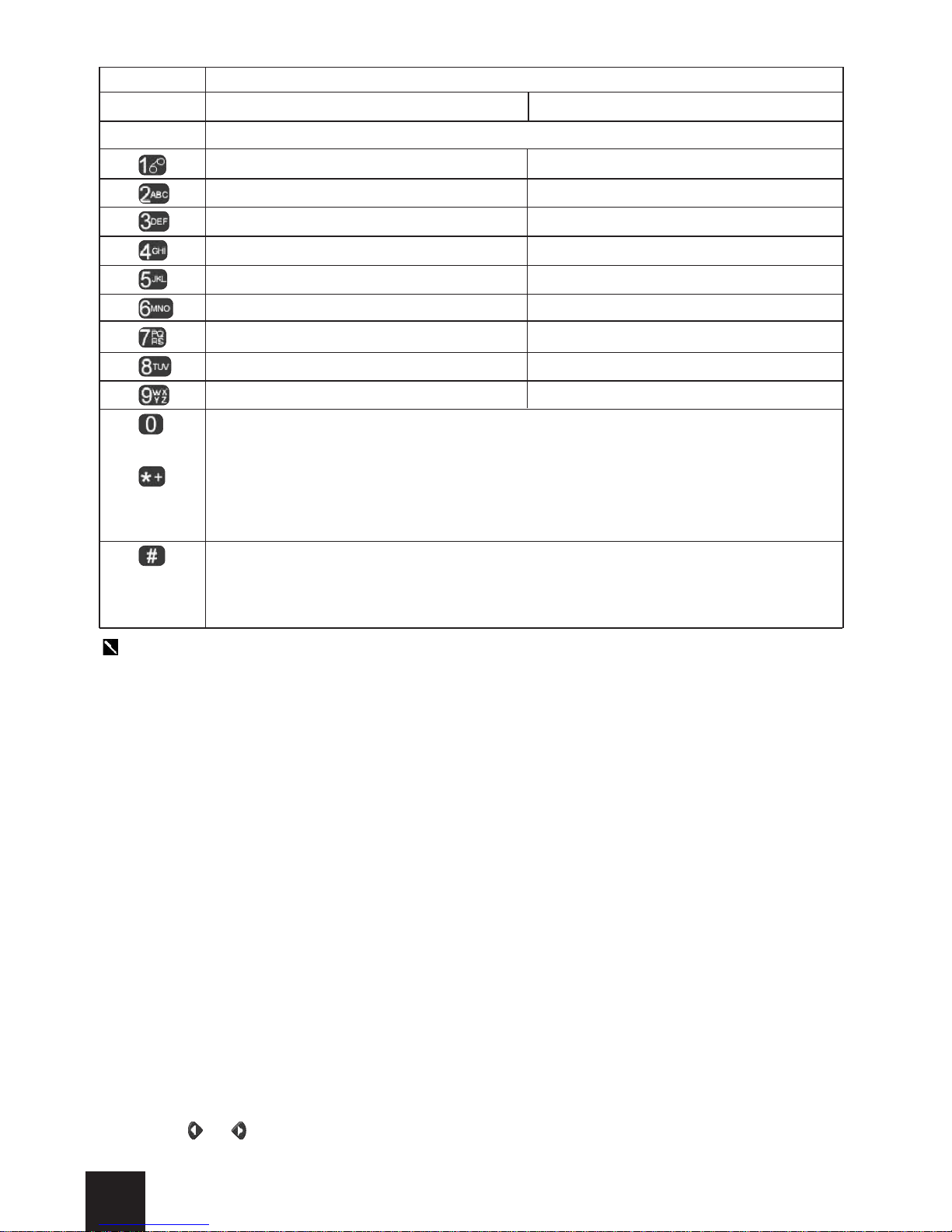
• The Multitype/Multipress method
In the screens used for entering text, tap briey on a key to display the rst alphabetical
character assigned to this key.
All the other characters or numerals assigned to this key are also displayed at the
top of the screen.
To display the second character assigned to a key, tap on the key.
To display the third character, tap three times, and so on.
The symbol is displayed if you are in lower case mode.
The symbol is displayed if you are in upper case mode (to change modes, refer to the
method of using the key - see below).
Ø Settings
Phone settings
Voice mail
GSM Services
SMS Alert
Ø WAP
Home page
Bookmarks
Other site
Prole list
Settings
Ø Calls and durations
Calls log
Call times
Cost of calls
Line selection
Ø Network services
Applications
Services
Information
Ø Phone book
Recall
SIM names
Contacts names
Store
Remaining
Own numbers
Fixed dialling
Phone book tones
SIM Names import
Ø Messages
Inbox
Outbox
Create message
Settings
Text templates
Audio alert
Storage
Page 17
17
Key Character
Lower case Upper case
1 . , - ‘ @: ?
a b c 2 A B C 2
d e f 3 D E F 3
g h i 4 G H I 4
j k l 5 J K L 5
m n o 6 M N O 6
p q r s 7 P Q R S 7
t u v 8 T U V 8
w x y z 9 W X Y Z 9
0 0
Tap on this key to change the next letter from lower case to upper
case and vice-versa.
Tap and hold down your stylus on this key to change all the subsequent
letters from lower case to upper case and vice-versa.
Tap on this key to enter a space character.
Tap and hold down your stylus on this key to access the following
special characters:
( ) % ! ; « _ @ § + # * / & = ¥ $ £ ¡ ¿
PLEASE NOTE: The characters assigned to the keys are dependent on the language used.
- To enter a character:
Tap as many times as necessary on the key assigned to the required character until
it is displayed on the screen.
- To enter the numeral assigned to a key:
Tap and hold down your stylus on this key until the corresponding numeral is
displayed.
If you need to enter two characters in succession which are assigned to the same key,
enter the rst character by clicking on the corresponding key, wait until the characters
displayed at the top of the screen are deleted, then tap on the key again (as many times as
necessary) to enter the second character.
- To delete the last entered character:
Tap on the Clear function key.
- To delete all the entered text:
Tap and hold down your stylus on the Clear function key.
- To move the cursor through the text in order to insert characters or make
corrections:
Use the or arrow on the virtual keyboard of the Telephone application.
Page 18

18
- To access special characters (displayed on three successive screens):
Tap and hold down your stylus on the key.
The characters are arranged in the same way as keys to on the virtual keyboard.
For example, to select the character ) and insert it directly into the text, tap on the
number key on the virtual keyboard.
Use the or arrow on the virtual keyboard to move to the next screen.
Example:
To enter the rst name "Paul" on the screen:
1- Tap on the Menu function key in the standby screen of the Telephone application.
2- Use the or arrow on the virtual keyboard to display the Phone Book screen.
3- Tap on the Phone Book screen.
4- Tap on Store in the displayed menu.
5- Tap on Contacts names in the displayed menu.
An input screen is displayed. The symbol is displayed in the top right corner. You are now in
upper case mode
6- Tap once on the key.
A capital "P" is displayed on the screen.
7- Wait until the available characters disappear from the screen, then tap and hold down
your stylus on until is displayed in the top right corner of the screen.
8- Tap once on the key to enter the character "a".
9- Tap twice on the key to enter the character "u".
10- Tap three times on the key to enter the character "l".
The rst name "Paul" is now displayed on the screen.
To delete this name and return to the standby screen, tap and hold down your stylus on
the Delete function key, then tap on the key on the virtual keyboard.
3- Network services
Your operator may provide you with useful services and telephone numbers. These services
and telephone numbers are stored on your SIM card and are added to the Services menu
under the heading Network services (for further information, contact your operator).
You can access these services and telephone numbers in three different ways:
Ø SIM Toolbox:
This method allows automatic access to the services offered by your network (and not
associated with your Mondo). These services are dependent on the SIM card.
Ø Pre-programmed numbers (SDN) stored on the SIM card:
Up to 32 pre-programmed numbers, which you cannot alter, can be stored on the
SIM card.
Ø Information numbers:
These can be selected from a menu, enabling you to call the information or network
numbers which are available on your network.
PLEASE NOTE: Some operators are able to provide the two types of service described
above on the same SIM card, in which case the Network services option appears under
two headings: Services (or Information) and Applications.
Page 19

19
4- Phone Books
The SIM card and the Mondo incorporate an internal memory which is capable of storing
names and telephone numbers.
The Mondo can store up to 100 proles (referred to as "extended proles").
These proles can incorporate the following information:
Ø Surname.
Ø First name.
Ø Icon.
Ø Home telephone number.
Ø Business telephone number.
Ø Mobile telephone number.
Ø Notes.
Your Mondo can also display the numbers stored on your SIM card.
This can contain up to 255 memory locations (this capacity is dependent on the SIM
card itself).
The memory locations on the SIM card contain the following information:
Ø Surname.
Ø Telephone number.
The SIM card is not able to store "extended proles".
The Recall function is able to locate a telephone number in the phone book of the SIM card
as well as in the phone book of your Mondo. The two phone books are interconnected.
• Storing names and telephone numbers in the phone books
Names and telephone numbers can be stored directly in the phone books or they can
be copied from other storage areas such as SMS messages, the notepad, the list of
last-called numbers, etc.
It is recommended that the numbers should be stored in international format, using the
prex + followed by the country code and then the telephone number.
This allows you to dial the number either from your own country or from a foreign
country.
There are several ways of storing the names and telephone numbers of your correspondents in your Mondo’s phone book or in the SIM phone book (see below).
• To store names or telephone numbers in your Mondo’s phone
book.
A- Storing information via the standby screen of the Telephone application.
1- Enter the number to be stored, using the number keys on the virtual keyboard.
2- Tap on the Store function key.
3- Tap on Contacts names in the list of options.
A list is displayed on the screen. It includes the options Home, Work and Cellular.
4- Tap on the option corresponding to the type of number entered.
Page 20

20
The following screens appear in succession:
Ø Family Name screen:
1- Enter the surname of your correspondent.
PLEASE NOTE: The procedure for entering characters on the screen is described
on page 18.
2- Then tap on the OK function key.
Ø First name screen:
3- Enter the rst name of your correspondent.
4- Then tap on the OK function key.
Ø Icon screen:
The icons are arranged in the same way as number keys to du clavier virtuel
de votre Mondo.
5- Tap on the key on the virtual keyboard which is assigned to the icon of
your choice.
Ø Home number screen:
6- If necessary, enter the home telephone number of your correspondent.
7- Then tap on the OK function key.
Ø Work number screen:
8- If necessary, enter the business telephone number of your correspondent.
9- Then tap on the OK function key.
Ø Cellular number screen:
10- If necessary, enter the mobile telephone number of your correspondent.
11- Then tap on the OK function key.
Ø Note screen:
12- If necessary, enter a comment.
This comment will be stored in the prole of your correspondent, together with the other
information relating to this correspondent.
13- Then tap on the OK function key.
A message is then briey displayed to conrm that the information you have entered has
been stored and to indicate the number of memory locations (proles) still available in
your phone book.
To return to the standby screen, tap on the Exit function key or on the key on
the virtual keyboard.
B- Storing information via the main menu of the Telephone application.
1- Tap on the Menu function key in the standby screen of the Telephone application.
2- Use the or arrow on the virtual keyboard to display the Phone Book screen.
3- Tap on the Phone Book screen.
4- Tap on Store in the displayed menu.
5- Tap on Contacts Names in the displayed menu.
The following screens are displayed in succession:
Ø Family Name screen:
1- Enter the surname of your correspondent.
Page 21

21
PLEASE NOTE: If you make a mistake while entering the name and telephone
number, tap on the Clear function key to delete the last character. Tap and
hold down your stylus on the same key to delete the entire name or number
you have entered.
For more information about entering text or numbers, refer to page 17.
2- Then tap on the OK function key.
Ø First name screen:
3- Enter the rst name of your correspondent.
4- Then tap on the OK function key.
Ø Icon screen:
The icons are arranged in the same way as number keys to on the virtual
keyboard of your Mondo.
5- Tap on the key on the virtual keyboard which is assigned to the icon of your
choice.
The following screens are displayed in succession:
Ø Home number screen:
6- If necessary, enter the home telephone number of your correspondent.
7- Then tap on the OK function key.
Ø Work number screen:
8- If necessary, enter the business telephone number of your correspondent.
9- Then tap on the OK function key.
Ø Cellular number screen:
10- If necessary, enter the mobile telephone number of your correspondent.
11- Then tap on the OK function key.
Ø Note screen:
12- If necessary, enter a comment.
This comment will be stored in the prole of your correspondent, together with the other
information relating to this correspondent.
13- Then tap on the OK function key.
A message is then briey displayed to conrm that the information you have entered has
been stored and to indicate the number of memory locations (proles) still available in
your Mondo’s phone book.
To return to the standby screen, tap on the Exit function key or on the key
on the virtual keyboard.
C- Storing information via other memory locations.
The numbers stored in the lists of last calls (outgoing, incoming or unanswered), in
the notepad and in SMS messages can all be copied into the directory of your Mondo:
From one of the memory locations indicated above:
1- Display the number you wish to copy.
2- Tap on the Options function key.
3- Tap on Store in the list of options.
4- Tap on Contacts names in the displayed list of phone books.
A list is displayed on the screen. It includes the options Home, Work and Cellular.
Page 22

22
5- Tap on the option corresponding to the type of number selected.
6- Tap on the OK function key to conrm the displayed information or to move to the
next screen. You can also enter any missing information (rst names, assigned
icons, other telephone numbers, notes) then tap on the OK function key.
A message is then briey displayed to conrm that the information displayed or that you have
entered has been stored and to indicate the number of memory locations (proles) still
available in your Mondo’s phone book.
To return to the standby screen, tap on the Exit function key or on the key on the
virtual keyboard.
• To store names or numbers in your SIM card’s phone book
A- Storing information via the standby screen.
1- Enter the number to be stored, using the number keys on the virtual keyboard.
2- Tap on the Store function key.
3- Tap on SIM names in the list of options.
The number you have entered is displayed on the screen.
4- Tap on the OK function key to conrm the entered number.
5- Enter the name of your correspondent.
PLEASE NOTE: If you make a mistake while entering the name, tap on the Clear
function key to delete the last character.
To delete the entire name, tap and hold down your stylus on the Clear function
key.
For more information about entering text or numbers, refer to page 17.
6- Then tap on the OK function key.
A message is then briey displayed to conrm that the name and number you have entered
have been stored and to indicate the number of memory locations (proles) still available in
your SIM card’s phone book.
To return to the standby screen, tap on the Exit function key or on the key
on the virtual keyboard.
B- Storing information via the main menu of the Telephone application.
1- Tap on the Menu function key in the standby screen of the Telephone application.
2- Use the or arrow on the virtual keyboard to display the Phone Book screen.
3- Tap on the Phone Book screen.
4- Tap on Store in the displayed menu.
5- Tap on SIM names in the displayed menu.
6- Enter the number to be stored, using the number keys on the virtual keyboard.
7- Tap on the OK function key to conrm the entered number.
8- Enter the name of your correspondent.
PLEASE NOTE: If you make a mistake while entering the name, tap on the Clear
function key to delete the last character.
To delete the entire name, tap and hold down your stylus on the Clear function key.
For more information about entering text or numbers, refer to page 17.
9- Then tap on the OK function key.
Page 23

23
A message is then briey displayed to conrm that the name and number you have entered
have been stored and to indicate the number of memory locations (proles) still available in
your SIM card’s phone book.
To return to the standby screen, tap on the Exit function key or on the key
on the virtual keyboard.
C- Storing information via other memory locations.
The numbers stored in the lists of last calls (outgoing, incoming or unanswered), in
the notepad and in SMS messages can all be copied into your SIM card’s phone book:
From one of the memory locations indicated above:
1- Display the number you wish to copy.
2- Tap on the Options function key.
3- Tap on Store in the list of options.
4- Tap on SIM names in the displayed list of phone books.
5- Enter a name and/or tap on the OK function key to conrm the displayed name.
PLEASE NOTE: If you make a mistake while entering the name, tap on the Clear
function key to delete the last character.
To delete the entire name, tap and hold down your stylus on the Clear function
key.
For more information about entering text or numbers, refer to page 17.
6- Tap on the OK function key to conrm the number.
A message is then briey displayed to conrm that the name and number you have entered
have been stored and to indicate the number of memory locations (proles) still available in
your SIM card’s phone book.
To return to the standby screen, tap on the Exit function key or on the key
on the virtual keyboard.
PLEASE NOTE: The characters *, +, P (pause), # and _ can be stored with numbers.
If the phone book of the SIM card or of the telephone is full, a warning message is
displayed on the screen when the phone book is selected.
• Memory locations available in the phone books
To nd out how many unoccupied memory locations are still available in the phone book of
your SIM card or of your Mondo:
1- Tap on the Menu function key in the standby screen of the Telephone application.
2- Use the or arrow on the virtual keyboard to display the Phone Book screen.
3- Tap on the Phone Book screen.
4- Tap on Remaining in the displayed menu.
5- Use the or arrow on the virtual keyboard to display the number of unoccupied
memory locations available in the various directories of your Mondo and of the SIM
card and, if applicable, the xed numbers.
To return to the standby screen, tap on the Exit function key or on the key on
the virtual keyboard.
Page 24
24
• Displaying and dialling a stored number
The numbers stored in the phone book of your Mondo or of the SIM card can be displayed
on the screen in order to be amended or deleted, copied or transferred to another phone
book or even dialled.
There are two ways of displaying on the screen the numbers stored in the phone books:
- Using the arrow on the virtual keyboard.
1- Tap on the arrow in the standby screen of the Telephone application.
2- Use the or arrow on the virtual keyboard to display the required name or
number on the screen.
- Using the arrow or the Menu function key on the virtual keyboard:
1- Tap on the arrow or the Menu function key in the standby screen of the Telephone
application.
2- Tap on the or arrow on the virtual keyboard to display the Phone Book screen.
3- Tap on the Phone Book screen.
4- Tap on Recall in the list of options.
5- Enter the rst letters (not more than 3) of the name of your correspondent and/or tap
on the OK function key.
PLEASE NOTE: If no initial is entered, the names stored in the phone book of
your Mondo or of your SIM card will be displayed in succession on the screen, in
alphabetical order (together with their associated numbers).
Ø Use the or arrow on the virtual keyboard to scroll through the phone book.
Ø To directly display a name of your choice, tap on the corresponding key on the
virtual keyboard. For example, to directly display the name ‘Nicholas’, tap twice
on the key (the letter ‘N’ is the second letter assigned to this button).
- To call the number displayed on the screen:
Tap on the key on the virtual keyboard or press the jog wheel on your Mondo.
- To amend, delete, copy or move the number displayed on the screen:
1- Tap on the Options function key.
The menu which appears includes the following options:
Option Function
Edit To Edit the displayed name or number.
Delete To delete the displayed name or number from the phone book
in which it is stored.
Copy To make a copy of the name or number displayed on the screen
and to store this copy in another phone book. You can edit this
name or number before you copy it.
Move To move the name or number displayed on the screen from its
existing memory location to another location. You can edit
this name or number before you move it.
Call To call the correspondent whose name or number is displayed
on the screen.
Page 25

25
2- Tap on the option of your choice.
To return to the standby screen, tap on the Exit function key or on the key on the
virtual keyboard.
• Displaying your own number
Your Mondo can display its main mobile telephone number (Line 1), your Line 2 number (if
you subscribe to this service) and your fax and data transfer. These numbers may be preset
on the SIM card. If this is not the case, you can enter them manually and assign names to
them. Line 1, for example, could be named Ofce’, etc.
- To display, enter or amend your own numbers:
1- Tap on the Menu function key in the standby screen of the Telephone application.
2- Use the or arrow on the virtual keyboard to display the Phone Book screen.
3- Tap on the Phone Book screen.
4- Tap on Own numbers in the list of options.
If you have already stored your main mobile telephone number (Line 1), it is displayed on the
screen.
If this is not the case:
• Enter this number using the number keys on the virtual keyboard.
• Tap on the OK function key.
• Then enter your name (to nd out how to enter text on the screen, refer to page 17)
• Tap again on the OK function key.
5- If necessary, use the or arrow on the virtual keyboard to display or enter your
Line 2, fax and e-mail numbers.
- If you want to enter a number or a name, or edit the numbers or names
displayed on the screen:
6- Tap on the Edit function key.
7- Enter or amend the number of your choice, using the number keys on the virtual
keyboard.
8- Tap on the OK function key.
9- Then enter or edit the associated name (to nd out how to enter text on the screen,
refer to page 14).
10- Tap again on the OK function key.
To return to the standby screen, tap on the Exit function key or on the key on the
virtual keyboard.
• Fixed dialling numbers (FDN)
Fixed call is a function which limits the possibility of making calls to only the "xed" or
"prexed" numbers stored in your SIM card (provided that it accepts this function).
When this function is activated, it is impossible to dial a number unless it appears in the list
of xed directory numbers.
The maximum number of xed directory numbers you can store depends on the capacity
of your SIM card.
Call forwarding and sending SMS messages to numbers which do not appear in the list is
not permitted.
Page 26
26
Activation of the xed call function and entering numbers in the list of xed dialling
numbers is protected by the PIN2 code.
- To activate or deactivate the Fixed Dialling Number function (FDN):
1- Tap on the Menu function key in the standby screen of the Telephone application.
2- Use the or arrow on the virtual keyboard to display the Phone Book screen.
3- Tap on the Phone Book screen.
4- Use the or arrow on the virtual keyboard to access the second page of the
displayed menu.
5- Tap on Fixed Dialling Numbers.
6- Tap on Status.
7- Tap on On or on Off.
8- Using the number keys on the virtual keyboard, enter your PIN2 number.
9- Tap on the OK function key to validate your number and conrm your choice.
- To display the list of xed dialling numbers:
1- Tap on the Menu function key in the standby screen of the Telephone application.
2- Use the or arrow on the virtual keyboard to display the Phone Book screen.
3- Tap on the Phone Book screen.
4- Use the or arrow on the virtual keyboard to access the second page of the
displayed menu.
5- Tap on Fixed Dialling Numbers.
6- Tap on View.
7- Use the or arrow on the virtual keyboard to display all the numbers in the list.
To modify or delete xed dialled numbers or to copy a number from the list into your
Mondo or your SIM card’s phone book:
From the list of xed dialling numbers:
1- Tap on the Options function key.
The menu which then appears includes the following options:
Option Function
Edit To edit the displayed name or number.
Delete To erase the displayed name or number from the phone book in
which it is stored.
Copy To make a copy of the name or number displayed on the screen
and to store the copy in another phone book. You can modify this
name or number before it is copied.
Move To move the name or number displayed on the screen from its
current memory location to another location. You can modify this
name or number before it is moved.
Call To call the correspondent whose name or number is displayed on
the screen.
2- Tap on the option of your choice.
Page 27
27
- To add a number to the list of xed dialling numbers:
1- Tap on the Menu function key in the standby screen of the Telephone application.
2- Use the or arrow on the virtual keyboard to display the Phone Book screen.
3- Tap on the Phone Book screen.
4- Use the or arrow on the virtual keyboard to access the second page of the
displayed menu.
5- Tap on Fixed Dialling Numbers.
6- Tap on Add New Number.
7- Using the number keys on the virtual keyboard, enter your PIN2 number.
8- Enter the telephone number you wish to add.
PLEASE NOTE: Substitute characters may be used to enter xed dialling numbers.
For example, the number +33153342_ _9 can be used to call all telephone numbers
between 0153342009 and 0153342999.
5- Calls & Times
Information relating to received and outgoing calls, the duration of the last call and the
cumulative total of all the calls is stored by your Mondo in the Calls & Times menu.
• Calls log
This log stores information (identity, time, date and duration of the call) relating to the last
10 dialled calls, the last 10 unanswered calls and the last 10 received calls.
The calls log is common to your primary line (Line 1) and your second line (Line 2).
1- Tap on the Menu function key in the standby screen of the Telephone application.
2- Use the or arrow on the virtual keyboard to display the Calls & Times screen.
3- Tap on the Calls & Times screen.
4- Tap on Calls log.
5- Tap on Last dial, Unanswered or Received in the displayed list.
6- Use the or arrow on the virtual keyboard to scroll through the calls.
The last call received or the last outgoing call is displayed at the top of the list. For
unanswered calls and received calls, the number of the caller (if known) is displayed;
otherwise, the message Unknown number is displayed on the screen.
- To call the number displayed on the screen:
Ø Tap on the key on the virtual keyboard or press the jog wheel of your Mondo.
Ø If necessary, tap on the Options function key to access the following menu:
Option Function
Store To store the displayed number in the phone book.
Delete To delete the displayed number
Delete all To delete all the numbers from the selected log
(Last dial, Unanswered or Received).
Page 28

28
Edit To Edit the displayed number.
Details To display details (the name, number, date and call duration,
where applicable) relating to the displayed number.
Call To call the displayed number. You can also
tap on the key on the virtual keyboard
or press the jog wheel of your Mondo.
Ø Tap on the option of your choice, then follow the instructions on the screen.
To return to the standby screen, tap on the Exit function key or on the key on the
virtual keyboard.
PLEASE NOTE: You can access the list of the last ten calls directly from the standby
screen, by simply tapping on the Off-hook key of the virtual keyboard or by pressing
the jog wheel of your Mondo.
• Duration of calls
Your Mondo records the duration of the last call, the cumulative total of all the calls
and the total duration of the calls for your primary line (Line 1) and your second line
(Line 2).
The durations of incoming and outgoing calls via the subscriber network and via other
(national and international) networks are displayed in the Details submenu.
1- Tap on the Menu function key in the standby screen of the Telephone application.
2- Use the or arrow on the virtual keyboard to display the Calls & Times screen.
3- Tap on the Calls & Times screen.
4- Tap on Call timers.
5- Tap on Show.
If the call timers have been reset (refer to Resetting the timers, page 30), the date when the
timers were last reset is briey displayed on the screen.
6- Use the or arrow on the virtual keyboard to display all the information recorded in
the call timer.
The telephone displays the category of calls and the cumulative durations of the incoming and
outgoing calls.
- To display details of calls in mobile mode, international calls, etc.:
Ø Tap on the Details function key.
To return to the standby screen, tap on the Exit function key or on the key on the
virtual keyboard.
PLEASE NOTE: If you subscribe to a second line, the durations of your calls are displayed
separately for your primary line (Line 1) and your second line (Line 2).
• Balance information (service provided on subscription)
This service is provided by some operators (on subscription only). It allows you to check
your current balance. This information is supplied by the network.
For further information, consult your telephone operator.
Page 29

29
- To access balance information:
1- Tap on the Menu function key in the standby screen of the Telephone application.
2- Use the or arrow on the virtual keyboard to display the Calls & Times screen.
3- Tap on the Calls & Times screen.
4- Tap on Call timers.
5- Tap on Balance information.
If the number of the Information Centre has already been stored in your Mondo:
6- Tap on Call.
If the number of the Information Centre has already been stored in your Mondo:
7- Tap on Set Number.
8- Using the number keys on the virtual keyboard, enter the number of the Information
Centre.
9- Tap on the OK function key if you only want to store the number of the Information
Centre or on the key on the virtual keyboard if you want to store this number and
immediately call the Information Centre.
At the end of the call, tap on the key on the virtual keyboard or press the jog wheel
on your Mondo.
• Review - call duration
When the Review Duration function is activated, your Mondo emits an audible signal to
notify you of the duration of the call in progress.
This function can be programmed to emit an audible signal at intervals in multiples of
one minute (from 1 to 59 minutes).
- To activate or deactivate the Review Duration function:
1- Tap on the Menu function key in the standby screen of the Telephone application.
2- Use the or arrow on the virtual keyboard to display the Calls & Times screen.
3- Tap on the Calls & Times screen.
4- Tap on Call timers.
5- Tap on Review Duration.
6- Tap on On or on Off.
7- If you have tapped on On, select the duration of the interval (between 1 and 59
minutes).
8- Tap on the OK function key to conrm your choice.
To return to the standby screen, tap on the Exit function key or on the key on the
virtual keyboard.
• Resetting the timers
To do this, you require the security code for your Mondo.
- To reset all your call timers:
1- Tap on the Menu function key in the standby screen of the Telephone application.
Page 30

30
2- Use the or the key on the virtual keyboard to bring up the Calls & Times screen.
3- Tap on the Calls & Times screen.
4- Tap on Call timers register.
5- Tap on Reset.
6- Tap on Yes to reset all your counters (or on No to cancel and return to the preceding
screen).
7- If you have tapped on Yes, enter the locking code of your Mondo using the number
keys on the virtual keyboard.
8- Tap on the OK function key.
A message will be displayed on the screen to conrm that all your counters have been reset.
To return to the standby screen, tap on the Exit function key or on the key on the
virtual keyboard.
• Management of the cost of calls (a subscription service)
Some operators offer (on subscription) an account consultation service which enables you
to nd out the cost of the last call made, the total cost of all your calls and the remaining
amount (in various currencies) of any “credit limit” set by the user.
To display this information in currencies, you must rst of all indicate the currency used
and the cost per unit. If you do not, the data will be expressed by default in units.
- If you wish the cost of calls to be expressed in various currencies:
1- Tap on the Menu function key in the standby screen of the Telephone application.
2- Use the or the key on the virtual keyboard to bring up the Calls & Times screen.
3- Tap on the Calls & Times screen.
4- Tap on Cost of calls.
5- Tap on Cost in ….
6- Tap on Currency.
The currency currently programmed will be displayed.
7- Tap on the Edit function key.
8- Enter your PIN2 number.
9- Tap on the OK function key to validate your number.
10- Enter the abbreviation for the currency.
11- Tap on the OK function key to validate your choice.
12- Enter the cost per unit in the currency selected.
13- Tap on the OK function key to validate the cost.
A message will be displayed on the screen to conrm your selection.
The information on the cost of calls will be expressed in the currency.
To return to the standby screen, tap on the Exit function key or on the key on the
virtual keyboard.
- If you wish the cost of calls to be expressed in units:
1- Tap on the Menu function key in the standby screen of the Telephone application.
2- Use the or the key on the virtual keyboard to bring up the Calls & Times screen.
Page 31

31
3- Tap on the Calls & Times screen.
4- Tap on Cost of calls.
5- Tap on Cost in ….
6- Tap on Units.
To return to the standby screen, tap on the Exit function key or on the key of the
virtual keyboard.
PLEASE NOTE: If the costs are expressed in units, the credit limit and remaining amount
are also displayed in units.
• Setting the credit limit (in units or currency)
Once you have specied the currency and the cost per unit, you may dene a credit limit
in units or in the currency of your choice (if you have subscribed to this service).
When your credit limit has been reached, your Mondo will not be able to make or receive
calls for which a charge is made.
PLEASE NOTE: It is always possible to call the emergency numbers.
1- Tap on the Menu function key in the standby screen of the Telephone application.
2- Use the or the key on the virtual keyboard to bring up the Calls & Times screen.
3- Tap on the Calls & Times screen.
4- Tap on Cost of calls.
5- Tap on Credit limit.
If a credit limit has previously been registered it will be displayed on the screen. If not, a No limit
message will appear.
6- Tap on the Edit function key.
7- Enter your PIN2 number.
8- Tap on the OK function key to validate your number.
9- Enter your credit limit (using the key on the virtual keyboard to enter a decimal point).
10- Tap on the OK function key to validate your choice.
To return to the standby screen, tap on the Exit function key or on the key on the virtual
keyboard.
• Consulting costs
1- Tap on the Menu function key in the standby screen of the Telephone application.
2- Use the or the key on the virtual keyboard to bring up the Calls & Times screen.
3- Tap on the Calls & Times screen.
4- Tap on Cost of calls.
5- Tap on Consult.
6- Use the or the key on the virtual keyboard to display the cost of the last call
(page 1), the cost of all calls (page 2) and the credit remaining (page 3).
PLEASE NOTE: The costs are expressed in units or currency, depending on the choice you
made in the Costs in... menu described above.
To return to the standby screen, tap on the Exit function key or on the key on the
virtual keyboard.
Page 32

32
• Resetting all the cost indicators
To reset all the cost indicators of your calls:
1- Tap on the Menu function key in the standby screen of the Telephone application.
2- Use the or the key on the virtual keyboard to bring up the Calls & Times screen.
3- Tap on the Calls & Times screen.
4- Tap on Cost of calls.
5- Tap on Reset.
6- Tap on Yes to reset all your counters (or on No to cancel and return to the
preceding screen).
7- If you have tapped on Yes, enter your PIN2 number using the number keys on the
virtual keyboard.
8- Tap on the OK function key.
A message will be displayed on the screen to conrm that all the cost indicators of your calls
have been reset.
To return to the standby screen, tap on the Exit function key or on the key on the
virtual keyboard.
• Second line service - selecting line 2 (a subscription service)
Some GSM 1800 operators offer the use of a second line to their users.
This service is generally provided on subscription. It enables personal and business calls
made and received to be kept separate.
The second line has its own mobile telephone number.
- To select the line on which you wish to call a correspondent (outgoing calls):
1- Tap on the Menu function key in the standby screen of the Telephone application.
2- Use the or the key on the virtual keyboard to bring up the Calls & Times screen.
3- Tap on the Calls & Times screen.
4- Tap on Line selection.
The line currently selected will be displayed on the screen.
5- Use the or the key on the virtual keyboard, if necessary, to display the line
required on the screen.
6- Tap on the Store function key.
PLEASE NOTE:
• You may allocate names to your main line (line 1) as well as to your second line
(line 2). For example: "Ofce" and "Private". For more information, please refer to the
section describing the Own numbers menu on page 25.
• You may receive calls on either or other line at all times, no matter which line is
selected for outgoing calls.
To return to the standby screen, tap on the Exit function key or on the key on the
virtual keyboard.
Page 33

33
6- Settings and customization of your Mondo
• Locking the soft keyboard of the telephone application
The soft keyboard of the Telephone application may be locked (when you are not using
it), in order to prevent any inadvertent operation.
For example, this would prevent any accidental calls being made when your Mondo is
carried in a handbag or pocket.
The locking remains activated as long as the Telephone application is not closed.
However, when a call is received, the keyboard is temporarily unlocked to allow you to
take it. After the call, locking is automatically re-established.
When the keyboard of the Telephone application is locked, a specic symbol appears on
the screen. If you tap on any key on the soft keyboard, the message # tap and hold
to unlock is temporarily displayed.
- You can lock the keyboard to the Telephone application in two different ways:
Ø From the standby screen of the Telephone application:
1- Tap and hold your stylus on the key.
The conrmation message Keyboard locked is temporarily displayed then a specic symbol
appears on the screen.
Ø From the "Settings" menu of the Telephone application:
1- Tap on the Menu function key, in the standby screen of the Telephone application.
2- Use the or key on the soft keyboard to bring up the Settings screen.
3- Tap on the Settings screen.
4- Tap on Telephone settings.
5- Tap on Lock keyboard.
The conrmation message Keyboard locked is temporarily displayed then a specic symbol
appears on the screen.
- To unlock the keyboard, proceed as follows:
1- Tap and hold your stylus on the key in the standby screen of the Telephone
application.
The conrmation message Keyboard unlocked is temporarily displayed on the screen of your
Mondo.
• Alert tones
When you receive a call, your Mondo may warn you of this in several different ways,
depending on the type of alert tone you have programmed:
Ø Ring: Your Mondo emits an audible tone when a call is received.
Ø Silent: Your Mondo remains silent.
PLEASE NOTE: When this alert mode is selected, the signals emitted by your Mondo
when you tap on the buttons on the virtual keyboard are also muted.
Ø Vibrate: Your Mondo vibrates but does not emit an audible tone.
Ø Vibrate and ring: Your Mondo vibrates and simultaneously emits an audible tone.
Ø Vibrate then ring: Your Mondo vibrates, then emits an audible tone after a few
seconds if you have not answered the call.
Ø Ramping: If ramping is in operation, your Mondo emits a quiet audible tone when the
call is received; the tone becomes increasingly loud until you answer the call.
Page 34

34
• To select an alert tone
1- Tap on the Menu function key in the standby screen of the Telephone application.
2- Use the or the key on the virtual keyboard to bring up the Settings screen.
3- Tap on the Settings screen.
4- Tap on Phone Settings.
5- Tap on Tones Settings.
6- Tap on Alert tones.
The Alert tones screen will be displayed. The list of alert tones is proposed with the exception of
Ramping tone (to activate or de-activate this type of alert tone, see below).
7- Tap on the alert tone selected.
Ø If you select the Ring mode, and if you have previously set the volume of ring
tone to 0, the warning message Warning, Ring volume off ! will be displayed
on the screen.
Ø If you select the Silent alert tone, the symbol will appear on the standby
screen of the Telephone application.
PLEASE NOTE: The selection of the Silent alert mode will not be retained when
the Telephone application is closed. The Ring mode will automatically be reinstated
when you relaunch the Telephone application.
Ø If you select one of the Vibrate, Vibrate and ring or Vibrate then ring modes, the
symbol will be displayed on the standby screen of the Telephone application.
To return to the standby screen, tap on the Exit function key or on the key on the
virtual keyboard.
• Activating/de-activating of the Ramping ring tone
1- Tap on the Menu function key in the standby screen of the Telephone application.
2- Use the or the key on the virtual keyboard to bring up the Settings screen.
3- Tap on the Settings screen.
4- Tap on Phone Settings.
5- Tap on Tones Settings.
6- Tap on Volume.
7- Tap on Increasing volume.
The Increasing Ring tone screen will appear.
8- Tap on On or on Off.
To return to the standby screen, tap on the Exit function key or on the key on the
virtual keyboard.
• Adjusting the volume
PLEASE NOTE: The volume of the ringing, the sounds of the keys and the reception
(conversation) and alarm (wake up and discharged battery) signals can be set individually
from the main menu of the Telephone application, as indicated below.
There are also other methods.
These settings may also be carried out from the Volumes control screen which is
directly accessible by tapping on the key on the standby screen of the Telephone
application.
Page 35

35
Setting the volume of reception may be carried out more quickly (during a call), using
the jog wheel of your Mondo. For further details on these shortcuts, please refer to the
section on Basic operations in this manual.
- To set the audio volume from the main menu:
1- Tap on the Menu function key in the standby screen of the Telephone application.
2- Use the or the key on the virtual keyboard to bring up the Settings screen.
3- Tap on the Settings screen.
4- Tap on Phone Settings.
5- Tap on Tones Settings.
6- Tap on Volume
7- Tap on the item which corresponds to the type of setting required. You can choose
between Ring, Ramping volume, Keys, Conversation, or Alarm.
The volume setting screen will be displayed as well as the type of setting selected.
8- Tap as many times as necessary on the or the key on the virtual keyboard to
increase or decrease the volume.
9- Tap on the OK function key to record your setting.
To return to the standby screen, tap on the Exit function key or on the key on the
virtual keyboard.
• Choosing melodies for the call tone and the wake up alarm
You can select melodies for your call tone (or alarm) from a list of 20 melodies stored
in the memory of your Mondo.
You can also allocate different tunes to incoming calls (depending on the type of calls)
and to the wake up alarm to help you distinguish them.
- To select a melody:
1- Tap on the Menu function key in the standby screen of the Telephone application.
2- Use the or the key on the virtual keyboard to bring up the Settings screen.
3- Tap on the Settings screen.
4- Tap on Phone Settings.
5- Tap on Tones Settings.
6- Tap on Melodies.
A menu will be displayed to enable you to select the type of call (or alarm) whose
melody you wish to change. It includes the following options:
Option Function
Standard/Line 1 To change the melody for incoming calls on your main line.
Wake up To change melody for the wake up alarm.
Phone names To change the melody for incoming calls from numbers
recorded in your Mondo’s phone book.
SIM repertory To change melody for incoming calls from numbers recorded in
your SIM card’s phone book.
Line 2 To change the melody for incoming calls on your second line.
Page 36

36
7- Tap on the option of your choice.
The list of melodies available will be displayed on the screen.
8- To listen to a melody, just tap once on its name to select it then wait 2 to 3 seconds.
9- If you like the melody you have been listening to, tap once more on its name to
validate your choice.
To return to the standby screen, tap on the Exit function key or on the key on the
virtual keyboard.
PLEASE NOTE: You can record your own melodies. To do this, use your pocket PC’s record
function (see Windows-CE manual).
• Customizing the graphics for the Telephone application
You can customize your Mondo by selecting new graphics for the Telephone application.
PLEASE NOTE: The graphics for the Telephone application will be altered immediately
when you validate your choice.
- To alter the graphics for the Telephone application:
1- Tap on the Menu function key in the standby screen of the Telephone application.
2- Use the or the key on the virtual keyboard to bring up the Settings screen.
3- Tap on the Settings screen.
4- Tap on Phone Settings.
5- Use the key on the virtual keyboard to go to the next page of the Phone Settings
options.
6- Tap on the Menu graphics.
7- Tap on the graphics of your choice.
To return to the standby screen, tap on the Exit function key or on the key on the
virtual keyboard.
• Answer using any key
This function enables you to answer an incoming call received by tapping on any key of
the virtual keyboard (except for the key and the Mute function key).
1- Tap on the Menu function key in the standby screen of the Telephone application.
2- Use the or the key on the virtual keyboard to bring up the Settings screen.
3- Tap on the Settings screen.
4- Tap on Phone Settings.
5- Use the key on the virtual keyboard to go to the next page of the Phone Settings
options.
6- Tap on Function Keys.
7- Tap on Any key answer.
8- Tap on On or Off.
To return to the standby screen, tap on the Exit function key or on the key on the
virtual keyboard.
Page 37

37
• Speed dialling
The numbers recorded in the directory of your Mondo or your SIM card may be associated
with the to number keys on the soft keyboard (see below).
By default, the number key on the soft keyboard is always allocated to the number
of your voice message service.
To call a correspondent, you then need only tap and hold your stylus on the number
key allocated to him.
If there is just one number in memory for this correspondent (which is the case for all
the numbers recorded in the directory of your SIM card), this number is immediately
displayed on the screen.
If several telephone numbers have been recorded for this correspondent (which may be
the case for numbers recorded in the directory of your Mondo), the list of numbers for this
correspondent is displayed and you have to select the number you want.
By default, key is always allocated to your voice mail centre. This operation is carried
out automatically when the number of your voice mail centre is recorded (for further
details, see page 44).
- To allocate telephone numbers to the number keys of the virtual keyboard:
1- Tap on the Menu function key in the standby screen of the Telephone application.
2- Use the or the key on the virtual keyboard to bring up the Settings screen.
3- Tap on the Settings screen.
4- Tap on Phone Settings.
5- Use the key on the virtual keyboard to go to the next page of the Phone Settings
options.
6- Tap on Function Keys.
7- Tap on Speed dial.
The screen displayed informs you that Key 1 of the virtual keyboard has been allocated to the
number of your voice mail centre (Voice Mail service). If the number of your voice message
centre is recorded in your phone book you cannot amend this setting.
8- Use the key on the virtual keyboard to go to the next page.
The program screen for Key 2 will appear.
9- If you wish to allocate a telephone number to Key 2 (or amend the number currently
allocated to it) tap on the Names function key to access your directory.
10- Use the or the key on the virtual keyboard to select a name or telephone
number in your directory.
11- Tap on the Select function key.
You will return to the program screen for Key 2. The name or telephone number selected will
appear on the screen.
12- Use the key on the virtual keyboard to go to the program screen for Key 3, and so
on.
PLEASE NOTE: When a number allocated to a speed dialling key is deleted from
the directory, the corresponding key is no longer allocated to any number. You may
reprogram it if you wish by following the instructions above.
To return to the standby screen, tap on the Exit function key or on the key on the
virtual keyboard.
Page 38

38
- To call a correspondent using speed dialling:
Ø Example 1: There is only one telephone number in memory for this
correspondent.
1- In the standby screen of the Telephone application, tap and hold your stylus on the
number key allocated to this correspondent.
Your correspondent’s number is displayed on the screen.
2- Tap on the key on the soft keyboard or press on the jog wheel of your Mondo.
The number displayed is immediately dialled.
Ø Example 2: There are several telephone numbers in memory for this
correspondent.
1- In the standby screen of the Telephone application, tap and hold your stylus on the
number key allocated to this correspondent.
The list of numbers for this correspondent appears on the screen.
2- Tap on the number you have selected.
The number selected is immediately dialled.
• Auto-answer
This function is only available if your Mondo is connected to a hands free kit or
headphones.
When this function is activated, you do not need to tap on the key of the virtual
keyboard to reply to an incoming call. Your Mondo automatically connects after about
ve seconds.
- To activate or de-activate the Auto-answer function:
1- Tap on the Menu function key in the standby screen of the Telephone application.
2- Use the or the key on the virtual keyboard to bring up the Settings screen.
3- Tap on the Settings screen.
4- Tap on Phone Settings.
5- Use the key on the virtual keyboard to go to the next page of the Phone Settings
options.
6- Tap on Auto features.
7- Tap on Auto answer.
8- Tap on On or Off.
To return to the standby screen, tap on the Exit function key or on the key of the soft
keyboard.
• Auto-retry
When you make a call which does not get through because the number is engaged or
the network unavailable, this function instructs your Mondo to redial the number called
automatically. In this case, your Mondo will try 10 times and then stop.
- To activate or de-activate the Auto-retry function:
1- Tap on the Menu function key in the standby screen of the Telephone application.
2- Use the or the key on the virtual keyboard to bring up the Settings screen.
Page 39
39
3- Tap on the Settings screen.
4- Tap on Phone Settings.
5- Use the key on the virtual keyboard to go to the next page of the Phone Settings
options.
6- Tap on Auto features.
7- Tap on Auto-retry.
8- Tap on On or Off.
To return to the standby screen, tap on the Exit function key or on the of the virtual
keyboard.
PLEASE NOTE: When this function is activated, the Auto-retry message will appear
together with a countdown. After each attempt to call back the telephone emits a
retry tone.
If the retry is successful, the communication continues normally.
You may at any time cancel the auto-retry by tapping on the Exit function key or on
any other key of the virtual keyboard.
• Restoring of the factory settings
PLEASE NOTE: This operation has no effect on the contents of the phone book nor on
the security codes.
When you use your Mondo for the rst time, its settings are as follows:
Function Factory Settings
Tone Ring
Melody Trium
Volumes (Ring, Keys, Conversation and Alarm) Medium values
Any key answer Off
Auto-retry Off
Auto answer Off
Ramping volume Off
Graphics Trium
- Restore your Mondo’s default settings:
1- Tap on the Menu function key in the standby screen of the Telephone application.
2- Use the or the key on the virtual keyboard to bring up the Settings screen.
3- Tap on the Settings screen.
4- Tap on Phone Settings.
5- Tap on the key on the virtual keyboard to go quickly to the third page of the Phone
Settings options.
6- Tap on Default settings.
7- Tap on Yes to restore the default settings, or on No to cancel.
To return to the standby screen, tap on the Exit function key or on the key on the
virtual keyboard.
Page 40

40
7- Security features
The security features described in this section protect your Mondo from any unauthorised
use.
When you are asked to do so:
1- Enter the code requested.
The code entered will be displayed on the screen in the form of asterisks "*".
2- Then tap on the OK function key.
Should an error be made when entering data:
Ø Tap on the Clear function key to delete the last character entered (shown as an
asterisk).
Ø Tap and keep your stylus pressed on the Clear function key to delete all of the
characters entered (shown as asterisks).
WARNING: Never use security codes similar to emergency numbers (112, for example). You
will thus avoid accidentally calling to one of these numbers.
KEEP YOUR CODES IN A SAFE PLACE.
LOSING YOUR CODES MAY CAUSE YOU SEVERE PREJUDICE.
• The locking code
A locking code is allocated to your Mondo for security reasons. This code protects your
Mondo in general and your WAP™ parameters from any unauthorised access.
The factory setting is 0000. We recommend that you amend this code and keep your
new code in a safe place separately from your Mondo.
The locking code of your Mondo is also required for resetting your call timers.
If it is activated, the locking code is requested each time you wish to open the Telephone
application.
- To amend the locking code:
1- Tap on the Menu function key in the standby screen of the Telephone application.
2- Use the or the key on the virtual keyboard to bring up the Settings screen.
3- Tap on the Settings screen.
4- Tap on Phone Settings.
5- Use the key on the virtual keyboard to go to the next page of the Phone Settings
options.
6- Tap on Security functions.
7- Tap on Phone lock code.
8- Tap on Change code.
9- Enter your old locking code.
10- Tap on the OK function key.
11- Enter your new locking code.
WARNING: Never use security codes similar to emergency numbers (112, for
example). You will thus avoid accidentally calling to one of these numbers.
12- Tap on the OK function key.
13- Enter your new locking code again.
14- Tap on the OK function key.
To return to the standby screen, tap on the Exit function key or on the key on the
virtual keyboard.
Page 41

41
• To activate or de-activate the locking code
1- Tap on the Menu function key in the standby screen of the Telephone application.
2- Use the or the key on the virtual keyboard to bring up the Settings screen.
3- Tap on the Settings screen.
4- Tap on Phone Settings.
5- Use the key on the virtual keyboard to go to the next page of the Phone Settings
options.
6- Tap on Security.
7- Tap on Phone lock code.
8- Tap on On or Off.
9- If you have chosen to amend the status, enter your locking code to effect this
modication.
10- Then tap on the OK function key.
To return to the standby screen, tap on the Exit function key or on the key on the virtual
keyboard.
PLEASE NOTE: When this feature is activated, it is always possible to dial the emergency
numbers without having to enter the locking code.
• The PIN number
Your SIM card includes a PIN number of 4 to 8 digits which protects it from any
unauthorised use.
When this protection is activated, the PIN number must be entered each time you wish
to open the Telephone application on your Mondo.
If an error is made three times in a row when entering the PIN number, your SIM
card is blocked and you will have to enter the 8 digit PUK number supplied by your
operator (see page 43).
- To activate or de-activate protection by PIN number:
1- Tap on the Menu function key in the standby screen of the Telephone application.
2- Use the or the key on the virtual keyboard to bring up the Settings screen.
3- Tap on the Settings screen.
4- Tap on Phone Settings.
5- Use the key on the virtual keyboard to go to the next page of the Phone Settings
options.
6- Tap on Security.
Ø If the protection by PIN number is currently de-activated, the option PIN enable
will appear at the top of the list displayed.
Ø If protection by PIN number is currently activated, the option PIN disable will
appear at the top of the list displayed.
7- If you wish to amend the status of the current protection, tap on PIN enable or PIN
disable (otherwise, tap on the Exit function key).
8- Enter your PIN number in order to effect this modication.
9- Then tap on the OK function key.
The message PIN enabled or PIN disabled will appear briey on the screen.
Page 42

42
To return to the standby screen, tap on the Exit function key or on the key on the
virtual keyboard.
- To change your PIN number:
PLEASE NOTE: To be able to change the PIN number, you must have enabled the protection
by PIN number beforehand (see above).
1- Tap on the Menu function key in the standby screen of the Telephone application.
2- Use the or the key on the virtual keyboard to bring up the Settings screen.
3- Tap on the Settings screen.
4- Tap on Phone Settings.
5- Use the key on the virtual keyboard to go to the next page of the Phone Settings
options.
6- Tap on Security.
7- Tap on PIN change number.
8- Enter your old PIN number.
9- Tap on the OK function key.
10- Enter your new PIN number.
WARNING: Never use security codes similar to emergency numbers (112, for
example). You will thus avoid accidentally calling to one of these numbers.
11- Tap on the OK function key.
12- Enter your new PIN number again.
13- Tap on the OK function key.
A message will appear briey on the screen to conrm the modication of your PIN number.
To return to the standby screen, tap on the Exit function key or on the key on the
virtual keyboard.
• The PIN2 number
The PIN2 number controls access to certain functions of your telephone such as the
activation or de-activation of the Fixed Dialling Numbers (FDN), modications to the
directory of xed numbers, the resetting of the costs of calls or modication of the
parameters for displaying costs.
PLEASE NOTE: The PIN2 number may be amended, but it is impossible to de-activate it.
- To amend the PIN2 number:
1- Tap on the Menu function key in the standby screen of the Telephone application.
2- Use the or the key on the virtual keyboard to bring up the Settings screen.
3- Tap on the Settings screen.
4- Tap on Phone Settings.
5- Use the key on the virtual keyboard to go to the next page of the Phone Settings
options.
6- Tap on Security.
7- Tap on PIN2 change number.
8- Enter your old PIN2 number.
Page 43

43
9- Tap on the OK function key.
10- Enter your new PIN2 number.
WARNING: Never use security codes similar to emergency numbers (112, for
example). You will thus avoid accidentally calling to one of these numbers.
11- Tap on the OK function key.
12- Enter your new PIN2 number again.
13- Tap on the OK function key.
A message will appear briey on the screen to conrm the modication of your PIN2 number.
To return to the standby screen, tap on the Exit function key or on the key on the
virtual keyboard.
• The PUK number
The PUK (PIN Unblock Key) number is an 8 digit number supplied by your operator.
It allows you to unblock your SIM card following three inaccurate entries of your PIN
number.
PLEASE NOTE: The PUK number cannot be amended.
When you are asked to do so:
1- Enter the PUK number requested.
2- Tap on the OK function key.
Then follow the instructions on the screen to reinitialise the PIN number.
WARNING: If you enter a PUK number wrongly ten successive times, your SIM card will no
longer be usable. Please contact your operator to obtain a new card.
• The PUK2 number
The PUK2 (PIN Unblock Key 2) number is an eight digit number supplied by your operator.
It allows you to unblock your SIM card following three inaccurate entries of your PIN2
number.
PLEASE NOTE: The PUK2 number cannot be amended.
When you are asked to do so:
1- Enter the PUK2 number requested.
2- Tap on the OK function key.
Then follow the instructions on the screen to reinitialise the PIN2 number.
WARNING: If you enter a PUK2 number wrongly ten successive times, your SIM card will
no longer be usable. Please contact your operator to obtain a new card.
• The call barring password
The call barring password is used to select the levels of call barring described in the GSM
Services – Call barring menu (see page 53).
It is supplied by your operator.
- To amend this password:
1- Tap on the Menu function key in the standby screen of the Telephone application.
Page 44
44
2- Use the or the key on the virtual keyboard to bring up the Settings screen.
3- Tap on the Settings screen.
4- Tap on GSM Services.
5- Use the key on the virtual keyboard to go to the next page of the GSM Services
options.
6- Tap on Call barring.
7- Tap on Change password.
8- Enter your old password.
9- Tap on the OK function key.
10- Enter your new password.
11- Tap on the OK function key.
12- Enter your new password again.
13- Tap on the OK function key.
To return to the standby screen, tap on the Exit function key or on the key on the
virtual keyboard.
- Summary table of codes and passwords:
Code/Password Length Number of attempts allowed If blocked or lost
Locking code 4 digits Unlimited Return the telephone
to the manufacturer.
PIN 4-8 digits 3 attempts Unblocked using the
PUK number.
PIN2 4-8 digits 3 attempts Unblocked using
the PUK2 number.
PUK 8 digits 10 attempts Contact your operator
PUK2 8 digits 10 attempts Contact your operator
Call barring 4 digits Determined by the network Contact your operator
password
8- Voice Mail service
Your operator may provide a voice mail service which operates as an answering service.
Contact your operator for further information.
• Recording the number of your voice mail centre
If the number of the voice mail centre is not automatically recorded on your SIM card,
it must be recorded manually:
1- Tap on the Menu function key in the standby screen of the Telephone application.
2- Use the or the key on the virtual keyboard to bring up the Settings screen.
3- Tap on the Settings screen.
4- Tap on Voice Mail Service.
Page 45

45
5- Tap on Number.
The screen for entering the number of your voice message service will appear.
6- Enter the number of your voice mail centre.
PLEASE NOTE: If this number is recorded in your directory, you can also tap on the
Names function key, then select it in your directory.
7- Tap on the OK function key to validate the number displayed.
To return to the standby screen, tap on the Exit function key or on the key on the
virtual keyboard.
PLEASE NOTE: If you have subscribed to the Second line service (Line 2), the number of
your voice mail centre must be recorded separately for the second line.
To enable you to have rapid access to your voice mail, the number of your voice mail
centre is automatically allocated to Key on the virtual keyboard of the Telephone
application.
• Activating/de-activating of the message alarm
When the mail alert is activated, your Mondo emits a tone to warn you of the reception
of a new message by your voice mail service.
- To activate or de-activate the mail alert:
1- Tap on the Menu function key in the standby screen of the Telephone application.
2- Use the or the key on the virtual keyboard to bring up the Settings screen.
3- Tap on the Settings screen.
4- Tap on Voice Mail Service.
5- Tap on Audio Alert.
6- Tap on On or Off.
To return to the standby screen, tap on the Exit function key or on the key on the
virtual keyboard.
• Calling your voice mail centre to consult messages
Two methods may be used:
When a message is received by your voice mail service, you may dial the number of
your voice mail centre directly:
Ø Tap and keep your stylus pressed on key .
The other method is as follows:
1- Tap on the Menu function key in the standby screen of the Telephone application.
2- Use the or the key on the virtual keyboard to bring up the Settings screen.
3- Tap on the Settings screen.
4- Tap on Voice Mail Service.
5- Tap on Call.
Your Mondo will immediately dial the number of your voice message centre.
PLEASE NOTE: If you tap on the Call function key and if the number of your voice
mail centre has not yet been recorded in your directory, you will be asked to enter this
number. In this case, proceed as directed in the section entitled "Recording the number
of your voice mail centre", page 44.
Page 46
46
9- GSM Services
• Call diverting (a network service)
Call diversion is a service allowing calls received, whether they are voice messages, faxes
or data transfers, to be diverted to another number.
- To programme and activate the call diverting service:
1- Tap on the Menu function key in the standby screen of the Telephone application.
2- Use the or the key on the virtual keyboard to bring up the Settings screen.
3- Tap on the Settings screen.
4- Tap on GSM Services.
5- Tap on Call diverting.
The menu displayed on the screen includes the following options:
Call diverting Function
Always Diverts all voice messages without exception.
If outside the network Diverts all voice messages when your Mondo
cannot be contacted.
If no reply Diverts all voice messages which remain unanswe-
red by you.
If Busy Diverts all voice messages when you are on another
call (when your Mondo is busy).
All Conditions Diverts all voice messages when the Telephone
application is closed, when you do not reply or when
you are already on another call.
Cancel all Allows you to cancel the diversion of all calls for
voice messages, data calls and fax calls.
All FAX calls Diverts all fax calls without exception.
All DATA calls Diverts all data calls without exception.
6- Tap on the option of your choice.
PLEASE NOTE: the list of options comprises two pages. If necessary, use the or the
key of the virtual keyboard to go from one page to another.
7- Tap on Activate.
8- You will then be asked to select the number to which you want calls to be diverted
(unless you have tapped on Cancel all).
Ø Tap on Voice Mail service to divert calls to your voice mail centre.
Ø Tap on Names to select a diversion number from your phone book.
Ø Tap on Number to enter a forwarding number on the screen.
9- A message will be displayed on the screen to conrm the diversion of calls to the
number selected.
To return to the standby screen, tap on the Exit function key or on the key on the
virtual keyboard.
Page 47

47
PLEASE NOTE:
• If you choose the option If no reply, you will be asked to enter a time after which calls
will be diverted of 5, 15 or 30 seconds.
• If you have subscribed to the Second line (Line 2) service, the call diversion service
must be congured separately for line 1 and line 2. When the call diversion service
is programmed, the diversion only covers the line being used. To programme the
diversion of calls received on the other line, you have to select this line rst of all
(for further details, see page 46).
- To de-activate call diversion or view the number to which calls are to be diverted:
1- Tap on the Menu function key in the standby screen of the Telephone application.
2- Use the or the key on the virtual keyboard to bring up the Settings screen.
3- Tap on the Settings screen.
4- Tap on GSM Services.
5- Tap on Call diverting.
6- Tap on the option of your choice.
PLEASE NOTE: the list of options comprises two pages. If necessary, use the or the
key of the virtual keyboard to go from one page to another.
7- Tap on Cancel to de-activate the call diversion option selection or on Status to view
the number to which corresponding calls are to be diverted.
To return to the standby screen, tap on the Exit function key or on the key on the
virtual keyboard.
- To cancel all call diversion:
1- Tap on the Menu function key in the standby screen of the Telephone application.
2- Use the or the key on the virtual keyboard to bring up the Settings screen.
3- Tap on the Settings screen.
4- Tap on GSM Services.
5- Tap on Call diverting.
6- Tap on Cancel all.
A message will be displayed on the screen to conrm the cancellation of all call diversion.
To return to the standby screen, tap on the Exit function key or on the key on the
virtual keyboard.
PLEASE NOTE: If you have subscribed to the Second line (Line 2) service, this operation
cancels the diversion of all calls (voice calls, fax calls and data calls) only for the line
currently being used. To cancel call diversion on the other line, you have to select this
line rst of all (for further details, see page 47).
• Call Waiting (a network service)
Call waiting is a service which, when activated, allows you to receive incoming calls even
when you are already on another call.
- To activate the Call Waiting service:
1- Tap on the Menu function key in the standby screen of the Telephone application.
2- Use the or the key on the virtual keyboard to bring up the Settings screen.
Page 48

48
3- Tap on the Settings screen.
4- Tap on GSM Services.
5- Tap on Call Waiting.
6- Tap on Activate.
A message is displayed on screen to conrm that the service has been activated.
- To de-activate the Call Waiting service:
1- Tap on the Menu function key in the standby screen of the Telephone application.
2- Use the or the key on the virtual keyboard to bring up the Settings screen.
3- Tap on the Settings screen.
4- Tap on GSM Services.
5- Tap on Call Waiting.
6- Tap on Cancel.
A message will be displayed on the screen to conrm that the service has been de-activated.
- To consult the status of the Call waiting service:
1- Tap on the Menu function key in the standby screen of the Telephone application.
2- Use the or the key on the virtual keyboard to bring up the Settings screen.
3- Tap on the Settings screen.
4- Tap on GSM Services.
5- Tap on Call waiting.
6- Tap on Status.
A message will be displayed on the screen to inform you of the state of the service: Active or
Inactive.
• Caller Line Identication (CLI)- To Show/Hide your mobile telephone
number
The caller identication service (Presentation of the number) is offered by most
networks.
This service enables you to know the number of the people who call you (or their name,
if this is recorded in your phone book).
- To check whether the caller ID service is offered by your network:
1- Tap on the Menu function key in the standby screen of the Telephone application.
2- Use the or the key on the virtual keyboard to bring up the Settings screen.
3- Tap on the Settings screen.
4- Tap on Receiving of caller ID.
A message will be displayed on the screen to inform you if the call identication service is
offered by your network:
Caller number: presentation available indicates that your network offers the call identication service.
Caller number: presentation unavailable indicates that your network does not offer the call
identication service.
To return to the standby screen, tap on the Exit function key or on the key on the
virtual keyboard.
Page 49

49
- To show or hide your mobile telephone number:
On some networks, you can hide your mobile telephone number when you choose:
Ø Enter the following sequence of characters #31# before the number you are calling.
You may also ask your operator to hide your number permanently. In this case, you can
reveal your number when you choose:
Ø Enter the following sequence of characters #31# before the number you are calling.
• Standard network settings
If you wish to re-establish the network settings by default for the transmission of your
mobile telephone number:
1- Tap on the Menu function key in the standby screen of the Telephone application.
2- Use the or the key on the virtual keyboard to bring up the Settings screen.
3- Tap on the Settings screen.
4- Tap on GSM Services.
5- Tap on Sending my ID.
6- Tap on My settings.
7- Tap on Preset value.
Your Mondo will restore the settings agreed with your network operator.
To return to the standby screen, tap on the Exit function key or on the key on the
virtual keyboard.
• To show or hide your number
1- Tap on the Menu function key in the standby screen of the Telephone application.
2- Use the or the key on the virtual keyboard to bring up the Settings screen.
3- Tap on the Settings screen.
4- Tap on GSM Services.
5- Tap on Sending my ID.
6- Tap on My settings.
7- Tap on Hide my ID or on Show my ID.
To return to the standby screen, tap on the Exit function key or on the key on the
virtual keyboard.
• To consult your current settings
1- Tap on the Menu function key in the standby screen of the Telephone application.
2- Use the or the key on the virtual keyboard to bring up the Settings screen.
3- Tap on the Settings screen.
4- Tap on GSM Services.
5- Tap on Sending my ID.
6- Tap on Status.
Your current settings will be displayed on the screen.
To return to the standby screen, tap on the Exit function key or on the key on the
virtual keyboard.
Page 50

50
• How to operate
You can choose between two modes of operation: Standard or Modem.
- Standard mode:
If you choose this mode of operation, your Mondo will behave like a class B mobile
telephone: it will attempt to connect to the GSM and GPRS networks. If it succeeds
in connecting to a GPRS network, the symbol will be displayed on the screen.
In this mode of operation, you may make and receive telephone calls and transfers
of data packets.
To choose this mode of operation:
1- Tap on the Menu function key in the standby screen of the Telephone application.
2- Use the or the key on the virtual keyboard to bring up the Settings screen.
3- Tap on the Settings screen.
4- Tap on GSM Services.
5- Tap on Mode of operation.
6- Tap on Voice (+ Data).
To return to the standby screen, tap on the Exit function key or on the key on the
virtual keyboard.
- Modem mode:
If you choose this mode of operation, your Mondo will behave like a class C
mobile telephone: it will attempt to connect to GPRS networks only (and not to
GSM networks).
In this mode of operation, you may only transmit data packets (your telephone calls
are restricted, whatever the capacities of the network).
PLEASE NOTE: If the GPRS services are lost, your Mondo will return automatically to
standard mode after a period of retaining the non-GPRS service.
1- Tap on the Menu function key in the standby screen of the Telephone application.
2- Use the or the key on the virtual keyboard to bring up the Settings screen.
3- Tap on the Settings screen.
4- Tap on GSM Services.
5- Tap on Mode of operation.
6- Tap on Modem.
To return to the standby screen, tap on the Exit function key or on the key on the
virtual keyboard.
• Networks
The memory of your Mondo contains a list of networks. These may be selected and
transferred to the list of preferred networks recorded on the SIM card.
When the Telephone application is open, your Mondo automatically seeks the last network
to which it was connected (generally the local network). If this is not accessible, it
automatically seeks and selects another network from the list of preferred networks
recorded on the SIM card.
This list may be adapted when you travel.
The order and name of the networks on the list may be amended.
Page 51
51
- To consult or amend the list of preferred networks:
1- Tap on the Menu function key in the standby screen of the Telephone application.
2- Use the or the key on the virtual keyboard to bring up the Settings screen.
3- Tap on the Settings screen.
4- Tap on GSM Services.
5- Tap on Network.
6- Tap on Preferred list.
A list of networks is displayed.
7- Use the or the key on the virtual keyboard to scroll through the list of preferred
networks.
- If you wish to amend this list or add a network:
8- Tap on the name of the network to be replaced.
PLEASE NOTE: To add a network, tap on an empty space indicated by the symbol …
(at the end of the list of preferred networks).
9- Then tap on the Options function key.
The menu displayed on the screen includes the following options:
Option Function
Modify by list Displays in alphabetical order the general list of all the networks
known which have been pre-recorded in the memory of your
Mondo. You just need to tap on the name of a network
to substitute it for the network to be replaced.
Modify by code Displays a screen in which you can enter an MCC or MNC
network code (if you know this information).
Delete Deletes the network that you have previously selected from
the list of preferred networks.
10- Tap on the option of your choice then follow the instructions on the screen.
To return to the standby screen, tap on the Exit function key or on the key on the
virtual keyboard.
- To consult the list of forbidden networks:
1- Tap on the Menu function key in the standby screen of the Telephone application.
2- Use the or the key on the virtual keyboard to bring up the Settings screen.
3- Tap on the Settings screen.
4- Tap on GSM Services.
5- Tap on Network.
6- Tap on Forbidden networks.
A list of forbidden networks is displayed.
To return to the standby screen, tap on the Exit function key or on the key on the
virtual keyboard.
PLEASE NOTE: It is impossible to delete a network from the list of prohibited networks.
Page 52

52
- To nd out the name of the home network:
1- Tap on the Menu function key in the standby screen of the Telephone application.
2- Use the or the key on the virtual keyboard to bring up the Settings screen.
3- Tap on the Settings screen.
4- Tap on GSM Services.
5- Tap on Network.
6- Tap on Home network.
The name of the home network will be displayed on the screen.
To return to the standby screen, tap on the Exit function key or on the key on the
virtual keyboard.
• Selecting Manual network search
In some cases, you may wish to select a specic network manually (for example, if it
provides better cover in the region where you are).
To do this:
1- Tap on the Menu function key in the standby screen of the Telephone application.
2- Use the or the key on the virtual keyboard to bring up the Settings screen.
3- Tap on the Settings screen.
4- Tap on GSM Services.
5- Tap on Network.
6- Tap on Network Search.
7- Tap on Manual.
The message Manual network selection will be displayed rst of all on the screen, followed by
the list of available networks.
8- Use the or the key on the virtual keyboard to scroll through the list of available
networks.
9- Tap on the name of the network of your choice.
The message Requesting in progress will be displayed rst of all on the screen, followed by the
name of the network requested, then you will return automatically to the standby screen of the
Telephone application
• Selecting Automatic network search (default setting):
1- Tap on the Menu function key in the standby screen of the Telephone application.
2- Use the or the key on the virtual keyboard to bring up the Settings screen.
3- Tap on the Settings screen.
4- Tap on GSM Services.
5- Tap on Network.
6- Tap on Network search.
7- Tap on Automatic.
The message Automatic network selection will be displayed rst of all on the screen, then you
will return automatically to the standby screen of the Telephone application.
Page 53
53
• Call barring (network service)
This network service allows you to bar various types of call from being made or received
on your Mondo.
It requires the use of a password for barring calls, which is provided by your operator.
- To activate the call barring function:
1- Tap on the Menu function key in the standby screen of the Telephone application.
2- Use the or the key on the virtual keyboard to bring up the Settings screen.
3- Tap on the Settings screen.
4- Tap on GSM Services.
5- Use the or the key on the virtual keyboard to go to the next page of GSM
service options.
6- Tap on Call barring.
7- Tap on Outgoing calls (to prevent certain types of outgoing call from being made) or
on Incoming calls (to prevent certain types of incoming call from being received).
The menus which will be displayed on the screen in each case will include the following
options:
Your selection Options proposed in the menu displayed Corresponding functions
Outgoing calls All outgoing The making of calls from your
Mondo is totally forbidden.
International calls International calls only are prohibi-
ted on your Mondo.
Int’nal excl. home The making of international calls is
forbidden on your Mondo, except
calls to subscribers to the local
network.
Incoming calls All incoming The reception of calls is totally
forbidden on your Mondo.
Roaming only The reception of calls is only autho-
rised on the home network.
8- Tap on the option of your choice.
9- Tap on Activated.
10- Enter your Password for barring calls.
11- Tap on the OK function key.
A message will be displayed on the screen to conrm your settings for prohibiting calls.
To return to the standby screen, tap on the Exit function key or on the key on the
virtual keyboard.
- To consult or de-activate the settings for barring calls:
1- Tap on the Menu function key in the standby screen of the Telephone application.
2- Use the or the key on the virtual keyboard to bring up the Settings screen.
3- Tap on the Settings screen.
4- Tap on GSM Services.
5- Use the key on the virtual keyboard to go to the next page of GSM service options.
6- Tap on Call barring.
Page 54

54
7- Tap on Outgoing calls (to consult or amend the prohibition of outgoing calls) or on
Incoming calls (to consult or amend the prohibition of incoming calls).
8- Tap on the call barring option that you wish to consult or de-activate.
To consult the status (activated or de-activated) of the selected call barring option:
9- Tap on Status.
A message will be displayed on the screen to let you know the status of the selected call
barring option.
To de-activate the selected barring option:
10- Tap on Cancel.
11- Enter your call barring password.
12- Tap on the OK function key.
A message will be displayed on the screen to conrm that the selected call barring option has
been de-activated.
To return to the standby screen, tap on the Exit function key or on the key on the
virtual keyboard.
- To change the call barring password:
1- Tap on the Menu function key in the standby screen of the Telephone application.
2- Use the or the key on the virtual keyboard to bring up the Settings screen.
3- Tap on the Settings screen.
4- Tap on GSM Services.
5- Use the key on the virtual keyboard to go to the next page of GSM service options.
6- Tap on Call barring.
7- Tap on Change password.
8- Enter your old password.
9- Tap on the OK function key.
10- Enter your new password.
11- Tap on the OK function key.
12- Enter your new password again.
13- Tap on the OK function key.
To return to the standby screen, tap on the Exit function key or on the key on the
virtual keyboard.
• Information messages
Information messages are broadcast by the networks to all GSM users.
They may contain general information on local telephone numbers, weather, trafc, etc.
Each type of message is numbered to allow you to select the type of information
you wish to receive.
There are sixteen types of standard message pre-programmed in the telephone, from
which you can make your choice.
New types of message can be recorded in your selection list using the message type
number (a three digit number).
Contact your operator for more details about the numbers and types of messages
distributed.
Page 55

55
Before activating the information message service, your selection list must contain at
least one type of message.
Up to 5 different types of message may be programmed in your selection list, but you
can only display one message at a time.
- To add a message type to the selection list:
1- Tap on the Menu function key in the standby screen of the Telephone application.
2- Use the or the arrow on the virtual keyboard to bring up the Settings screen.
3- Tap on the Settings screen.
4- Tap on Broadcast.
5- Tap on Message types.
6- Tap on an empty location indicated by ….
7- Tap on the Options function key.
8- Tap on Amend by list to select a message type.
PLEASE NOTE: If you know the number of the message type that you want to add
to your selection list, you may also tap on Amend by code, then enter the number
of the message type.
9- If necessary, use the or the key of the virtual keyboard to scroll through the list
of message types.
10- Tap on the message type that you want to add to your selection list.
A message will be displayed on the screen to conrm your selection.
11- If you want to add other message types to your selection list, tap once more on the
Options function key, then proceed as indicated above.
To return to the standby screen, tap on the Exit function key or on the key on the
virtual keyboard.
- To activate or de-activate the information message service:
1- Tap on the Menu function key in the standby screen of the Telephone application.
2- Use the or the key on the virtual keyboard to bring up the Settings screen.
3- Tap on the Settings screen.
4- Tap on Broadcast.
5- Tap on On/Off.
6- Tap on On or on Off.
To return to the standby screen, tap on the Exit function key or on the key on the
virtual keyboard.
• Reading information messages
Information messages can only be displayed from the standby screen of the Telephone
application, and are not accessible during a call or from a menu.
A message may contain up to 93 characters and include several pages.
The pages scroll automatically about every 5 seconds.
You may also scroll through them manually by tapping on the arrow on the virtual
keyboard of the Telephone application.
Page 56
56
• Options during the display of messages:
To delete the message being displayed:
Ø Tap on the Exit function key.
To dial the number displayed on the screen in the message:
Ø Tap on the key on the virtual keyboard, or press the jog wheel of your Mondo.
To access other options:
Ø Tap on the Options function key.
The menu which is displayed will include the following options:
Option Function
Delete Deletes the message being broadcast on the screen.
Delete all Deletes all the messages in the queue.
Numbers Enables numbers displayed on the screen to be dialled
and, if necessary, recorded in the directory.
Cancel broadcast De-activates the information message reception func-
tion.
Ø Select the option of your choice.
• Activating/de-activating the audio alert:
You may programme a beep each time a new message is received, as follows:
1- Tap on the Menu function key in the standby screen of the Telephone application.
2- Use the or the key on the virtual keyboard to bring up the Settings screen.
3- Tap on the Settings screen.
4- Tap on Broadcast.
5- Tap on On/Off.
6- Tap on On or on Off.
To return to the standby screen, tap on the Exit function key or on the key on the
virtual keyboard.
• Replacement or deletion of a message type in the selection list:
The message types recorded in the selection list may be amended or deleted as
follows:
1- Tap on the Menu function key in the standby screen of the Telephone application.
2- Use the or the arrow on the virtual keyboard to bring up the Settings screen.
3- Tap on the Settings screen.
4- Tap on Broadcast.
5- Tap on Message types.
6- Tap on the message type you want to replace or delete.
7- Tap on the Options function key.
8- Tap on Amend by list to replace the selected message type by another message
type, or on Delete to remove it from the selection list.
Page 57

57
PLEASE NOTE: If you know the code of the message type that you want to add
to your selection list, you may also tap on Amend by code, then enter its (three
digit) code.
To return to the standby screen, tap on the Exit function key or on the key on the
virtual keyboard.
• The language of the information messages
All information messages may be displayed in one of the following eight languages:
English, Dutch, French, German, Italian, Spanish, Portuguese and Greek.
To select the language of your choice:
1- Tap on the Menu function key in the standby screen of the Telephone application.
2- Use the or the key on the virtual keyboard to bring up the Settings screen.
3- Tap on the Settings screen.
4- Tap on Broadcast.
5- Tap on Languages.
6- If necessary, use the or the key on the virtual keyboard to scroll through the list
of available languages.
7- Tap on the language in which you wish to receive information messages.
To return to the standby screen, tap on the Exit function key or on the key on the
virtual keyboard.
10- WAP
Your Mondo is tted with a WAP browser which enables you to have access via the
Internet to the services (news, sport, weather, television programmes, etc.) provided by
your network operator and/or your Internet Access Provider.
To access these services from your Mondo, check that you have a DATA subscription.
Also check with your operator that the connection parameters have been pre-programmed
on your Mondo before its delivery. If not, you must enter these parameters manually
yourself and record them.
Once the parameters are recorded, you can use your WAP browser to access the services.
PLEASE NOTE: Access to the connection parameters may depend on the parameters entered
in the telephone if it has been pre-programmed in the factory before being delivered. In certain
cases, to avoid errors, it is possible that these parameters have been locked, thus prohibiting
any manual programming by the user.
• Setting/editing into memory/edition of the connection parameters
(provided by your operator)
Before starting, if you have not already done so, set the date and time on your Mondo.
Your Mondo enables you to access WAP services by using a standard GSM (circuit)
connection or a fast GPRS (packet) connection.
In order to use WAP services, you must create user proles associated with your
various Internet gateways. For each prole, you must enter the general parameters of
the gateway and specic parameters which correspond to access by the GSM network
and/or access by the GPRS network.
Page 58

58
This section explains the procedure to be followed in the various possible cases.
Before starting to create a prole, obtain all the necessary information from your
network operator.
- The information required for access by the GSM network is:
1- The call number for access.
2- The mode of transmission: digital or analog.
3- The speed of transmission (9600 bits/second standard, or 14400 bits/second if your
operator supports this rate).
4- The user name ("login").
5- The user password ("password").
- The information required for access by the GPRS network is:
1- The name of the GPRS access point.
2- The user name ("login").
3- The user password ("password").
PLEASE NOTE: The user name and the user password may be identical or different for each
of the access modes (circuit or packet), depending on your network operator.
- The information relating to the gateway itself is:
1- The IP address of the gateway of your operator.
2- The number of the port used for access to the host machine of the gateway (this
number is 9203 for a secure connection, and 9201 for a non secure connection).
3- Whether security is used by your operator.
4- The location of the home page of your gateway.
For the information required for access by the GPRS network, you must rst
include the information for the GPRS access point in the directory of access points.
The procedure to follow is described in the section which deals with the WAP
parameters.
NB: You may obtain the information above from your Internet Access Provider (IAP) and
from your GSM network operator.
- Creation of a prole with access by the GSM network alone:
When a connection is made with this type of prole, your Mondo uses GSM (of the
circuit type) to establish the WAP connection. If the GSM service is not available (for
example, if you are outside of GSM cover), the connection will not be made.
To enter and record the connection parameters of a prole with access by the GSM
(circuit) network alone:
1- Tap on the Menu function key in the standby screen of the Telephone application.
2- Use the or key on the virtual keyboard to bring up the WAP screen.
3- Tap on the WAP screen.
PLEASE NOTE: You may also tap on the WAP function key in the standby screen of
the Telephone application to go directly to the WAP menu.
4- Tap on Prole list.
Page 59

59
5- Tap on an empty prole location, indicated by ….
6- Tap on Edit.
7- Enter your 4 digit Locking code, then tap on the OK function key.
PLEASE NOTE: If you have not amended the default locking code since the acquisition
of your Mondo, it will be 0000.
8- Enter the Prole name, then tap on the OK function key.
9- Tap on Circuit in the list of connection modes.
10- Enter the Call number, then tap on the OK function key.
11- Tap on the Mode of transmission of your choice: Digital or Analog.
12- Tap on the Speed of transmission of your choice if it is asked for: 9600 or 14400.
13- Enter a User name (the "login" corresponding to the access circuit for the prole
selected) then tap on the OK function key.
14- Enter the User password (the password corresponding to the access circuit for the
prole selected), then tap on the OK function key.
15- Enter the Gateway IP address, then tap on the OK function key.
16- Enter/Correct the Normal port if it is asked for (this value is normally standard and
you should not have to amend it, unless a different value is indicated by your
operator), then tap on the OK function key.
17- Enter/Correct the Secure port if it is asked for (this value is normally standard and
you should not have to amend it, unless a different value is indicated by your
operator), then tap on the OK function key.
18- Enter the address of the Home page, then tap on the OK function key.
19- Tap on the Activate security parameter of your choice: On or Off.
A conrmation message will be displayed on the screen.
- Creation of a prole with access by the GPRS network alone:
When a connection is made with this type of prole, your Mondo uses GPRS support
(of the packet type) to establish the WAP connection. If the GPRS service is not
available, the connection will not be made. Note that the GPRS service may be
unavailable even where there is GSM cover. This depends on the infrastructures
of your network operator.
Before creating this type of prole, make sure that you have recorded the information
relating to the GPRS network access point in the access points directory, under the
WAP/Settings menu. If this list is empty, you will not be able to create the prole.
To enter and record the connection parameters of a prole with access by the GPRS
network (access by parcels) alone, proceed as follows:
1- Tap on the Menu function key in the standby screen of the Telephone application.
2- Use the or the key on the virtual keyboard to bring up the WAP screen.
3- Tap on the WAP screen.
PLEASE NOTE: You may also tap on the WAP function key in the standby screen of
the Telephone application to go directly to the WAP menu.
4- Tap on Prole list.
5- Tap on an empty prole location, indicated by ….
Page 60

60
6- Tap on Edit.
7- Enter your 4 digit Locking code, then tap on the OK function key.
PLEASE NOTE: If you have not amended the default locking code since the acquisition
of your Mondo, it will be 0000.
8- Enter the Proxy name, then tap on the OK function key.
9- Tap on Packets, in the list of connection modes.
10- Select the required GPRS access point from the list displayed, by tapping on the
alias of the access point of your choice.
11- Enter the Gateway IP address, then tap on the OK function key.
12- Enter/Correct the Normal port if it is asked for (this value is normally standard and
you should not have to amend it, unless a different value is indicated by your
operator), then tap on the OK function key.
13- Enter/Correct the Secure port if it is asked for (this value is normally standard and
you should not have to amend it, unless a different value is indicated by your
operator), then tap on the OK function key.
14- Enter the address of the Home page, then tap on the OK function key.
15- Tap on the Activate security parameter of your choice: On or Off.
A conrmation message will be displayed on the screen.
- Creating of a mixed prole with access by the GSM or GPRS networks:
When a connection is made with this type of prole, the rst medium tried by your
Mondo is that which you have dened beforehand in the WAP settings (Preferred
medium). If connection is impossible using this support, the other support will be
tried automatically.
By default, and if the reception conditions allow, the support tried rst will be the
GPRS (parcels) medium, then the GSM (circuit) medium if this fails.
Before creating this type of prole, make sure that you have recorded the information
relating to the GPRS network access point in the access points directory, under the
WAP/Settings menu. If this list is empty, you will not be able to create the prole.
To enter and record the connection parameters of a prole with access by the GSM
(circuit) or GPRS (packet) networks, proceed as follows:
1- Tap on the Menu function key in the standby screen of the Telephone application.
2- Use the or the arrow on the virtual keyboard to bring up the WAP screen.
3- Tap on the WAP screen.
PLEASE NOTE: You may also tap on the WAP function key in the standby screen of
the Telephone application to go directly to the WAP menu.
4- Tap on Prole list.
5- Tap on an empty prole location, indicated by ….
6- Tap on Amend.
7- Enter your 4 digit Locking code, then tap on the OK function key.
PLEASE NOTE: If you have not amended the default locking code since the acquisition
of your Mondo, it will be 0000.
8- Enter the Prole name, then tap on the OK function key.
9- Tap on Circuit + packets in the list of connection modes.
Page 61

61
10- Select the required GPRS access point from the list displayed, by tapping on the alias
of the access point of your choice.
11- Enter the Call number, then tap on the OK function key.
12- Tap on the Mode of transmission of your choice: Digital or Analog.
13- Tap on the Speed of transmission of your choice if it is asked for: 9600 or 14400.
14- Enter a User name (the "login" corresponding to the access circuit for the prole
selected), then tap on the OK function key.
15- Enter the User password (the password corresponding to the access circuit for the
prole selected), then tap on the OK function key.
16- Enter the Gateway IP address, then tap on the OK function key.
17- Enter/Correct the Normal port if it is asked for (this value is normally standard and
you should not have to amend it, unless a different value is indicated by your
operator), then tap on the OK function key.
18- Enter/Correct the Secure port if it is asked for (this value is normally standard and
you should not have to amend it, unless a different value is indicated by your
operator), then tap on the OK function key.
19- Enter the address of the Home page, then tap on the OK function key.
20- Tap on the Activate security parameter of your choice: On or Off.
A conrmation message will be displayed on the screen.
- To activate the required prole:
1- Tap on the required prole in the list of proles displayed on the screen.
To return to the standby screen, tap on the Exit function key or on the key on
the virtual keyboard.
PLEASE NOTE:
• If the PPP call number, the connection name and password, the http address of the
home page and the IP address are not predened, ask your operator and/or your
Internet Access Provider for this information.
• As regards the GPRS access point, ask your operator and/or your Internet Access
Provider (IAP) for the full name of the access point, the user name and the user
password.
• Customizing of your connection parameters
The connection parameters enable you to optimise the operation of your Mondo while it is
connected to the Internet.
1- Tap on the Menu function key in the standby screen of the Telephone application.
2- Use the or the arrow on the virtual keyboard to bring up the WAP screen.
3- Tap on the WAP screen.
4- Use the arrow on the virtual keyboard to go quickly to the second page of the WAP
menu.
PLEASE NOTE: You may also tap on the WAP function key in the standby screen of the
Telephone application to go directly to the WAP menu.
5- Tap on Settings.
Page 62

62
The menu which is displayed will include the following options:
Option Function
Clear cache
During an Internet connection session, certain information and certain
services to which you have had access have been stored in a zone
of memory called the cache zone.
To delete the elements contained in the cache memory:
Ø
Tap on this option, then tap on Yes.
Download pictures Certain pages of the sites may contain attached images whose
downloading may take a lot of time.
To reject all images and shorten the time for downloading:
Ø
Tap on this option, then tap on Off.
Scripting This option authorises or prohibits the execution of scripts within a
page. These scripts enable the entry of data or the execution of
calculations once the page has been loaded.
Auto-disconnect This function disconnects your Mondo from the Internet network after
a period of inactivity that you may dene yourself. Automatic discon nection may be dened differently for a packet type support or a
circuit type support (A shorter time is advised for the circuit support,
as this type of support consumes more radio resources than the
packet support).
Ø
Tap on this option.
Ø
Tap on Circuit or Packet support.
To activate the automatic disconnection function relating to the
selected support:
Ø
Enter a disconnection time (0 to 60 minutes), then tap on the
OK function key.
To de-activate the automatic disconnection function relating to
the selected support:
Ø
Proceed as above and enter a disconnection time of 0.
GPRS access points This option provides access to the directory of GPRS access points
using a GPRS type connection support within the GSM network.
A GPRS access point is the name of an access gate to an external
network (for example, the Internet).
Each access point has an associated full name, user name and user
password. An alias (free name) enables you to identify and manage
your access points at your convenience.
For more details about the creation of a GPRS access point, see
page 63.
Preferred medium This parameter serves to indicate to your Mondo the type of medium
it must use in priority to establish a WAP connection. You may select
the Packet (GPRS) medium, which is fast and consumes few radio
resources, or the Circuit (GSM) medium, which is slower and
uses more radio resources.
Ø
Tap on the option of your choice.
PLEASE NOTE: This option is only used on proles dened
as mixed (Circuit + parcels). The preferred medium dened by
default is the Parcels (GPRS) support.
Page 63

63
- Contact your operator rst to obtain the full name of the access point, as
well as the associated user name and user password:
Contact your operator rst to obtain the full name of the access point, as well as the
associated user name and user password.
1- Tap on the Menu function key in the standby screen of the Telephone application.
2- Use the or the key on the virtual keyboard to bring up the WAP screen.
3- Tap on the WAP screen.
4- Use the key on the virtual keyboard to go quickly to the second page of the WAP
menu.
PLEASE NOTE: You may also tap on the WAP function key in the standby screen of
the Telephone application to go directly to the WAP menu.
5- Tap on Settings.
6- Tap on GPRS access points.
7- Tap on an empty location, indicated by ….
8- Tap on Edit.
9- Enter the Alias of the access point, then tap on the OK function key.
10- Enter the Name of the access point (operator information), then tap on the OK
function key.
11- Enter a User name or "login" for this access point (operator information), then tap on
the OK function key.
12- Enter a User password for this access point (operator information), then tap on the
OK function key.
A conrmation message will appear on the screen, then the directory of access points will
appear. In this directory, the new access point is selected and identied by its alias.
To return to the standby screen, tap on the Exit function key or on the key on
the virtual keyboard.
• Accessing to the on line services proposed by your operator
1- Tap on the Menu function key in the standby screen of the Telephone application.
2- Use the or the arrow on the virtual keyboard to bring up the WAP screen.
3- Tap on the WAP screen.
PLEASE NOTE: You may also tap on the WAP function key in the standby screen of
the Telephone application to go directly to the WAP menu.
4- Tap on Home page.
The message Connection to, followed by the gateway name, will be displayed on the screen
while the access is being carried out.
The message Loading (the home page) will then appear.
Once it is connected, your Mondo displays the links proposed by your Internet Access
Provider or by your operator. The symbol displayed on the screen indicates that your
connection is active.
Ø Use the or the arrow on the virtual keyboard to scroll upwards or downwards in
the menus.
Ø Tap on the elements of your choice with your stylus to open them.
Page 64
64
Ø Use the or the arrow on the virtual keyboard to return to the previous page or go
to the next page in the menus.
PLEASE NOTE: While browsing, security may be activated by means of the "Activate
security" option (for more details, see page 41). This operation closes the non secure
session in progress and enables local browsing to continue (using the pages recorded
in the cache memory). If a connection to the network is required, a secure connection is
requested for the same prole. This procedure does not operate systematically, because
of the purge of parameters preceding connection by the server. In this case, browsing
must restart from the beginning. Once the secure connection is established, the symbol
will be displayed on the screen to indicate to you that the on line connection is
in secure mode.
• On line access to the connection options
If you tap on the Options function key when connected, a menu will be displayed.
NB: If this Options key does not appear, you may also gain access to this menu by tapping
the key on the virtual keyboard.
This menu will include the following options:
Option Function
Previous Returns to the previous page.
Zoom +/- Increases or decreases the size of the text displayed.
Disconnect Disconnects the browser from the network. However
the current page will remain locally active and may be
used with the browser of your Mondo.
Clear cache * Deletes the information recorded in the cache memo
ry.
Add to favourites * Adds the current page to the list of your favourites.
Go to ... * Displays a favourite that has been memorised pre
viously.
Home page Returns to the home page.
Update Updates the current page.
Terminate the session Disconnects your Mondo from the Internet network.
The appearance of the options indicated by an asterisk (*) may depend on the operator
and/or the parameters entered in the Settings menu.
• Ending the on line connection
To terminate the Internet connection:
Ø Tap on the key on the virtual keyboard of the Telephone application, or press the jog
wheel of your Mondo.
Ø You may also tap on Terminate the session in the Options menu presented above.
• Creating favourites
If you intend to revisit to a site or return frequently to certain sites.
Page 65

65
In this case, you should memorise these sites (or pages) in the form of favourites (or
bookmarks) which represent direct access links to the Internet sites of your choice.
You may memorise a maximum of 5 favourites.
These may only be used if they are accessible at the parameter level of the current
connection of your operator and/or your Internet Access Provider.
There are two methods for creating favourites.
- Directly from the standby screen:
1- Tap on the Menu function key in the standby screen of the Telephone application.
2- Use the or the key on the virtual keyboard to bring up the WAP screen.
3- Tap on the WAP screen.
PLEASE NOTE: You may also tap on the WAP function key in the standby screen of
the Telephone application to go directly to the WAP menu.
4- Tap on My Bookmarks.
5- Tap on an empty location indicated by … (or on a favourite site name that you want to
replace).
6- Tap on Edit.
7- Enter the name that you wish to give to your new favourite site, then tap on the OK
function key.
8- Enter the Internet address of your new favourite site, then tap on the OK
function key.
To return to the standby screen, tap on the Exit function key or on the key on
the virtual keyboard.
- During an active connection, whilst a page is being viewed:
1- Tap on the function key on the virtual keyboard to display the Options menu.
2- Tap on the Add a favourite option.
3- Enter a name for the site or the page that you want to add to the list of your
favourites, then tap on the OK function key.
PLEASE NOTE: Favourites can only be edited or deleted from the WAP menu, while
you are disconnected.
• Use of favourites
There are two methods for using favourites.
- Directly from the standby screen:
1- Tap on the Menu function key in the standby screen of the Telephone application.
2- Use the or the arrow on the virtual keyboard to bring up the WAP screen.
3- Tap on the WAP screen.
PLEASE NOTE: You may also tap on the WAP function key in the standby screen of
the Telephone application to go directly to the WAP menu.
4- Tap on My Bookmarks.
5- Tap on the favourite of your choice.
Page 66

66
- While browsing the Internet:
1- Tap on the function key on the virtual keyboard to display the Options menu.
2- Tap on the Go to … option.
3- Tap on the favourite of your choice.
• Other site
This option enables you to enter the address of a known Internet site and go directly
to this site.
WARNING: Unlike the addresses of your favourites, the addresses entered using the
Other site option are not retained in memory; you must enter them at every new
connection.
- To access the Other site option:
1- Tap on the Menu function key in the standby screen of the Telephone application.
2- Use the or the arrow on the virtual keyboard to bring up the WAP screen.
3- Tap on the WAP screen.
PLEASE NOTE: You may also tap on the WAP function key in the standby screen of
the Telephone application to go directly to the WAP menu.
4- Tap on Other site.
5- Enter the address of the site to which you want to connect, then tap on the
OK function key.
11- GSM User Interface Codes
Your Mondo supports the standard GSM key sequences including the characters * and #,
sent directly from the keyboard to the network.
These sequences activate the additional services proposed by the network.
Contact your operator for more information about these services.
 Loading...