

Page 1
TranScan Quick Guide
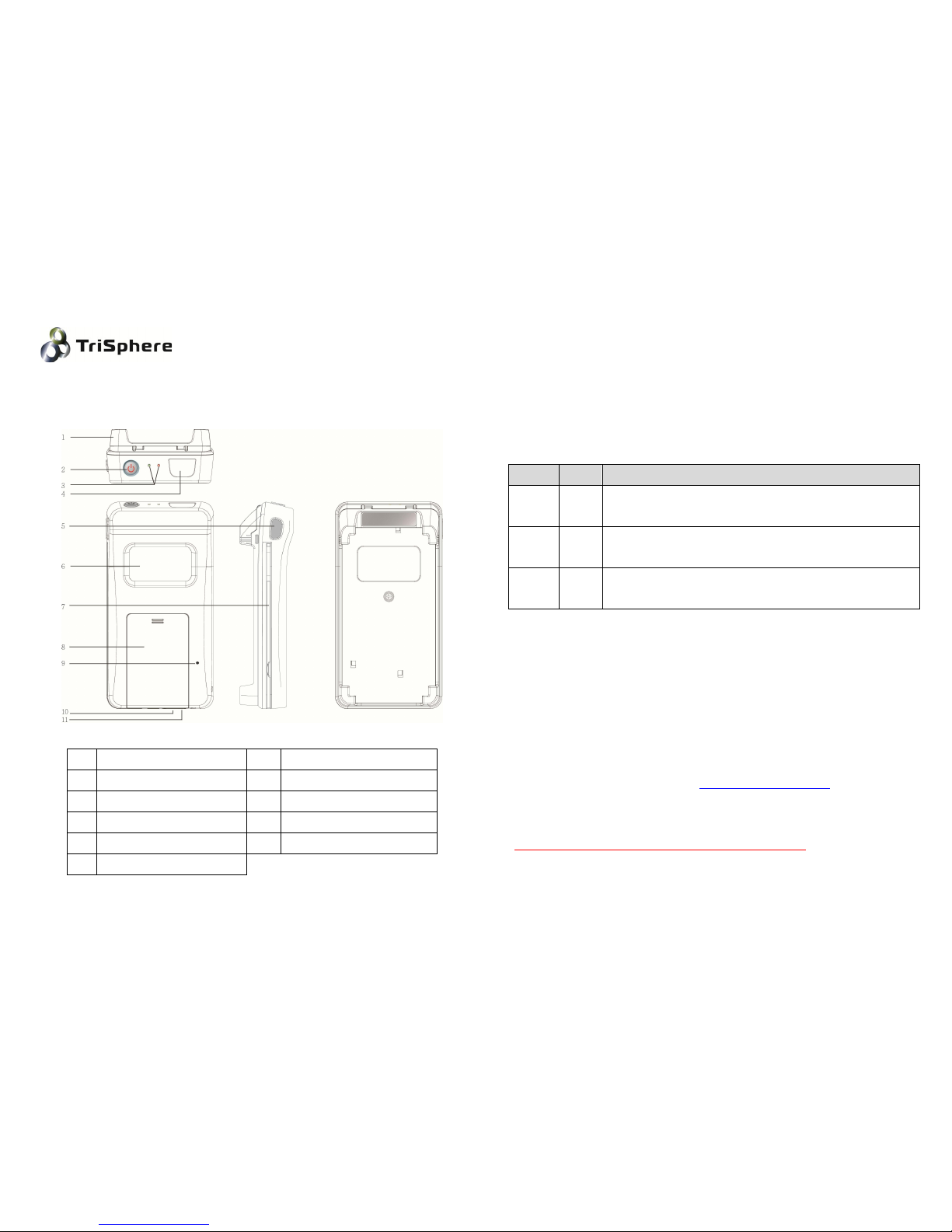
Appearance:
1 Flip front cover 7 MSR slot
2 Power button 8 Battery cover
3 LED indicator 9 Barcode setup switch
4 Barcode reader windows 10
Charge port
5 Barcode reader 11 Charge indicator
6 Camera peep-hole
Operation procedure:
1. Please fully charge the battery before use.
2. Open battery cover, put battery in.
3. Press ”2-Power button” to turn on the TranScan.
4. “3-LED indicator” :
Blue Red Status
Flash On BT disconnect.
Barcode reader: off / MSR: off
On Off BT connected.
Barcode reader: On. Power saved. / MSR: On, Standby.
On On BT connected.
Barcode reader: On. Setup mode. / MSR: On, Standby.
5. Turn on BT on smart phone, search for other BT devices. choose device
name “TriSphere” and pair it. BT pin code is “0000”.
6. After paired successfully, execute APP application on smart phone.
When APP connected successfully, LED goes to “Blue:ON; Red:Off”.
Then collecting data is available.
7. To setup barcode configuration, please insert the clip into the
“9-barcode setup switch” once. LED indicates “Blue:On;Red:On” and
beep 3 times. Then you can scan barcode configuration barcode. For
barcode setting, please contact [email protected].
8. Click “9-barcode setup switch” once again, barcode reader will go back
to power save mode.
Please make sure to do step-8 after barcode setting.
Page 2
WARNING:
1. To prevent burns, fire, explosions, or injury, do not
-put it into fire or expose prolonged temperatures above 50℃.
-short circuit or allow metal object to contact battery terminals.
-mutilate, crush, or attempt to disassemble.
2. Rechargeable batteries are advised to replace every year.
3. When battery deformed, please replace a new battery.
4. Battery must be recycled or disposed of properly.
5. Batteries will discharge after an extended period of not being used.
6. Do not look directly into the barcode scanner window to prevent eye injury.
General Product
Federal Communications Commission (FCC) Statement
15.21
You are cautioned that changes or modifications not expressly approved by the part
responsible for compliance could void the user’s authority to operate the equipment.
15.105(b)
This equipment has been tested and found to comply with the limits for a Class B digital
device, pursuant to part 15 of the FCC rules. These limits are designed to provide reasonable
protection against harmful interference in a residential installation.
This equipment generates uses and can radiate radio frequency energy and, if not installed
and used in accordance with the instructions, may cause harmful interference to radio
communications. However, there is no guarantee that interference will not occur in a
particular installation. If this equipment does cause harmful interference to radio or
television reception, which can be determined by turning the equipment off and on, the
user is encouraged to try to correct the interference by one or more of the following
measures:
-Reorient or relocate the receiving antenna.
-Increase the separation between the equipment and receiver.
-Connect the equipment into an outlet on a circuit different from that to which the receiver
is connected.
-Consult the dealer or an experienced radio/TV technician for help.
This device complies with part 15 of the FCC Rules. Operation is subject to the following two
conditions:
1) this device may not cause interference and
2) this device must accept any interference, including interference that may cause undesired
operation of the device.
Specification:
Barcode Reader
Light Source: 650nm Laser Diode Decoder Scanning Rate: 110 scan/sec
Best Resolution: Min. 0.1mm(4mil) PCS Value: > 0.45
Symbology: support all standard
barcodes
PCS=0.9 lable and 600 lux environment
Depth of Field: base on Standard Code 39
· 4 mils: 90 ~ 115 mm ·5 mils: 75 ~ 135 mm ·13 mils: 65 ~ 275 mm
·20 mils: 65 ~ 345 mm ·40 mils: 85 ~ 445 mm
MSR reader
Standards:
· ANSI/ISO Standards 7810,7811 1/5, 7812 & 7813,7816 ; JIS X6301, X6302 ; AAMVA
Decode:
ISO: Tk1-IATA, Tk2-ABA, Tk3-THRIFT JIS: JISI-Tk1, Tk2 JISII-Tk NTT
AAMVA Passbook
Page 3

Communication
Bluetooth Profile: Bluetooth SPP
Standard: V2.1+EDR
Coverage: Up to 10 meter
Battery
1100mAh
Current Consumption: Max. 60 mA
Charge Current: Max. 400mA
Dimension
147mm x 78mm x 33mm
Approx. 130g with battery
Environmental
Operating Temperature: 0 ~ 50 ℃
Storage Temperature: 0~60℃
Operation Humidity: 10~85% relative humidity
Storage Humidity: 5~95% relative humidity
Warranty
TranScan is on warranty for one year.
 Loading...