

Page 1

Owner’s Manual
PowerVerter® Portable
AC Inverters with USB Charging
Models: PV100USB, PV200CUSB, PV200USB, PV400USB
Introduction
Congratulations! Your new PowerVerter Portable AC Inverter with USB Charging will give you years of
reliable, carefree service. Use it to convert DC (battery) power into 110V AC (household) power to run
a variety of electronics: tablets, smartphones, laptop computers, game systems, small TVs/DVD players
and more! The Inverter’s PWM (Pulse Width Modulated) sinusoidal wave is suitable for almost all loads.
Important Safety Instructions
SAVE THESE INSTRUCTIONS!
This manual contains important instructions and warnings that should be followed during
the installation, operation and storage of all Tripp Lite Inverters.
Warning!
• Use of this equipment in life support applications where failure of this equipment can reasonably
be expected to cause the failure of the life support equipment or to significantly affect its safety
or effectiveness is not recommended. Do not use this equipment in the presence of a flammable
anesthetic mixture with air, oxygen or nitrous oxide.
• Do not operate your Inverter near flammable materials, fumes or gases.
Caution!
• Since the Inverter requires adequate ventilation during operation, do not block fan or cooling vents
or cover the Inverter, and do not operate near vehicle heating vents or in direct sunlight. Keep the
Inverter dry at all times and disconnect when not in use.
• Turn OFF connected equipment before starting your engine. DO NOT plug a surge protector, line
conditioner or UPS system into the Inverter. If you attach AC extension cords, use the heaviest
practical gauge.
• Before connecting a battery charger or adapter, check its manual to make sure that the Inverter’s
specifications (including output waveform) fall within its recommendations.
• For PV400USB model: Do not allow objects to contact the DC input terminals or battery
terminals. Do not short or bridge these terminals together. Serious personal injury or property
damage could result.
Register your product for quicker service and ultimate peace of mind.
PROTECT YOUR INVESTMENT!
You could also win an ISOBAR6ULTRA surge protector—a $100 value!
www.tripplite.com/warranty
1111 W. 35th Street, Chicago, IL 60609 USA • www.tripplite.com/support
Copyright © 2015 Tripp Lite. All rights reserved.
15-09-514-933411-EN-V2.indd 1 10/21/2015 11:49:08 AM
1
Page 2
Operation
Step 1: Plug Inverter into vehicle lighter/accessory outlet.
PV400USB Model Only: This unit contains a pair of DC input terminals to connect a 3 ft. cigarette
lighter plug cable or optional 3 ft. battery cable with alligator connectors that directly attaches to a
battery’s DC terminals.
Note: Always connect red connectors to red battery terminals (POS, P, +) and black connectors to black battery
terminals (NEG, N, -). For unmarked terminals, the positive post usually has a larger diameter than the negative post.
When disconnecting the charger, reverse the order of the connecting steps.
Step 2: Turn on Inverter.
Step 3: Plug equipment into the Inverter.
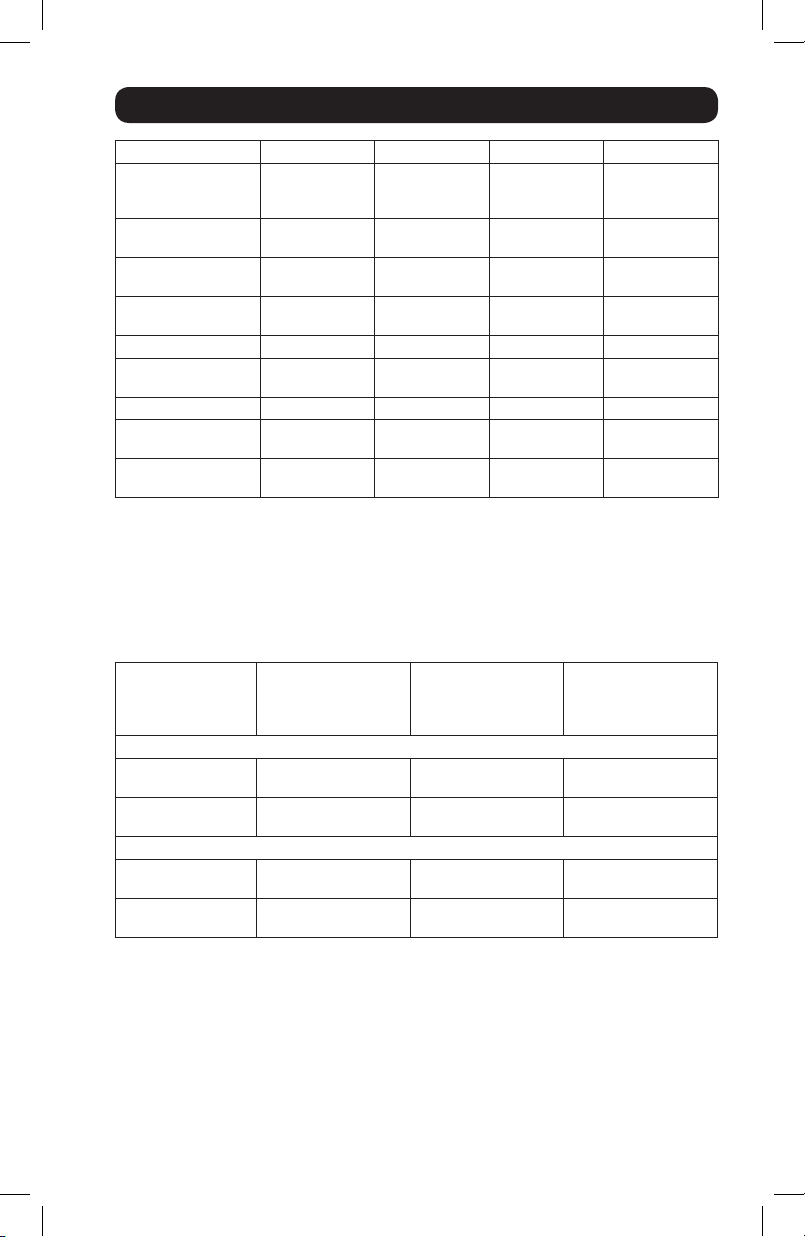
Determine your equipment’s total wattage.* Do not connect more watts than your Inverter’s Output
Power (Maximum Continuous Watts); see Specifications. See back page for typical equipment
runtimes. Also see back page for important note concerning the limitations of vehicle electrical
systems.
* Wattage ratings are usually listed in equipment manuals or on nameplates. If your equipment is rated in amps,
multiply that number times AC utility voltage to determine watts. (Example: a ¼ in. drill requires 2½ amps. 2½ amps
× 120 volts = 300 watts.)
Maintenance
Your Inverter requires no maintenance and contains no user-serviceable parts (except for replaceable
DC fuses, where applicable).
Troubleshooting
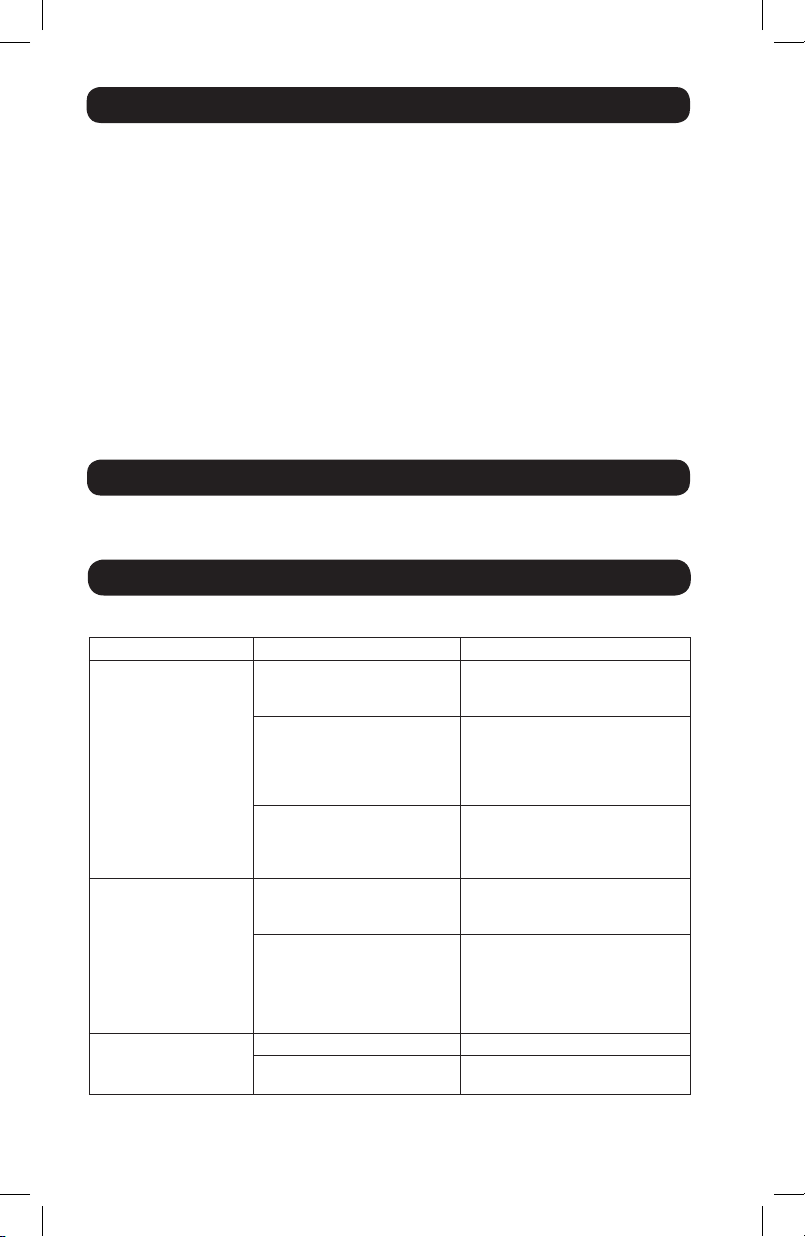
Please check the following before sending the Inverter in for warranty replacement:
Symptom Possible Cause Correction
Inverter does not turn
ON when power switch is
turned ON.
Inverter is unable
to power connected
equipment.
Connected equipment
experiences audio/video
distortion.
Automatic Inverter shutdown due
to low battery voltage (<10V).
Automatic Inverter shutdown due
to output overload.
Blown fuse. Replace fuse with standard
Battery running low. Low battery
voltage reduces Inverter power
output.
Connected equipment load
exceeds Inverter’s maximum
continuous output power.
Note: Fault LED will illuminate during
an overload (PV200USB
& PV400USB only).
Loose connections. Check and secure all connections.
Audio/video interference. Reposition equipment antennas and
Turn Inverter OFF and start engine
to recharge vehicle battery. Only use
Inverter with engine running.
Turn Inverter OFF and remove
overload by unplugging high-wattage
devices. Load should not exceed
your Inverter’s maximum continuous
output power (see Specifications).
automotive fuse of identical
amperage, where applicable (see
Specifications).
Turn Inverter OFF and start engine
to recharge vehicle battery. Only use
Inverter with engine running.
Turn Inverter OFF and remove
overload by unplugging high-wattage
devices. Load should not exceed
your Inverter’s maximum continuous
output power (see Specifications).
Inverter.
2
15-09-514-933411-EN-V2.indd 2 10/21/2015 11:49:08 AM
Page 3
Specifications
Model: PV100USB PV200CUSB PV200USB PV400USB
Output Power
(Maximum Continuous
Watts):*
Output Power
(Peak Watts):**
Input Voltage (DC): 12V nominal
Output Voltage (AC)/
Frequency:
Output Waveform: PWM Sine Wave PWM Sine Wave PWM Sine Wave PWM Sine Wave
Low Battery Voltage
Shutdown (Volts):
AC Outlets: 1 2 1 2
USB Ports: 1 x 2.1A,
Circuit Protection (DC
Overload):
* Maximum output power (continuous or peak) only available when vehicle battery is properly charged. Run vehicle
engine often to maintain proper charge. ** Peak Output Power is instantaneous. *** Replace with a fuse of equal
amperage rating only. Higher-rated fuses should not be used.
Typical Runtimes Before Battery Recharge
Although you can operate your Inverter with your vehicle engine off, best results are usually achieved
with the engine running. Since the Inverter converts electrical energy (and doesn’t produce it),
the Inverter’s performance is relative to the condition of your vehicle’s electrical system (battery,
alternator and wiring). If other loads (air conditioner, heater, lights, etc.) are also using power, you
may get less runtime.
Models: PV100USB, PV200CUSB, PV200USB
1/2 Load
(engine on/engine off)
Full Load
(engine on/engine off)
Model: PV400USB
1/2 Load
(engine on/engine off)
Full Load*
(engine on/engine off)
Vehicle Electrical System Limitations
Due to the limitations of certain vehicles’ 12V DC lighter/accessory outlet electrical systems, you
may not be able to continuously run a full load from your inverter. If you regularly blow fuses, it
may indicate your vehicle is not adequately wired to support your Inverter as it is designed. In this
case, consult vehicle manufacturer recommendations for rewiring from the fuse block or battery
with appropriate wiring (10 - 12 gauge) and fusing (at least 40 amp). All standard vehicle accessory
outlet electrical systems can support full loads for PV100USB models without any modifications.
PV100USB Connection Warning
The extra 12V DC CLA socket on the PV100USB is intended for low voltage electronic devices only
(smartphones, MP3 players, etc.). DO NOT plug another inverter into this port. DO NOT attempt to
use as a cigarette lighter.
100 200 200 400
200 400 400 800
(10-15V)
110V / 60 Hz.
nominal
10V 10V 10V 10V
1 x 1A
10-amp fuse
(internal) ***
With Typical Compact
Vehicle (4 cylinder)
Battery, Alternator &
Wiring
continuous/4-6 hrs. continuous/6-8 hrs. continuous/8-12 hrs.
continuous/2-3 hrs. continuous/3-4 hrs. continuous/4-6 hrs.
continuous/1-2 hrs. continuous/2-3 hrs. continuous/3-6 hrs.
continuous/30 min.-1
hr.
12V nominal
(10.5-15V)
110V / 60 Hz.
nominal
1 x 2.1A,
1 x 1A
20-amp fuse
(external) ***
With Typical Mid-Size
Vehicle (6 cylinder)
Battery, Alternator &
continuous/1-2 hrs. continuous/2-3 hrs.
Wiring
12V nominal
(10-15V)
110V / 60 Hz.
nominal
1 x 2.1A,
1 x 1A
20-amp fuse
(external) ***
With Typical Full-Size
Battery, Alternator &
12V nominal
(10-15V)
110V / 60 Hz.
nominal
1 x 2.1A,
1 x 1A
N/A
Vehicle (8 cylinder)
Wiring
3
15-09-514-933411-EN-V2.indd 3 10/21/2015 11:49:08 AM
Page 4

Warranty and Product Registration
1- Year Limited Warranty
Seller warrants this product, if used in accordance with all applicable instructions, to be free from original defects
in material and workmanship for a period of 1 year from the date of initial purchase. If the product should prove
defective in material or workmanship within that period, Seller will repair or replace the product, in its sole discretion.
Service under this Warranty can only be obtained by your delivering or shipping the product (with all shipping or
delivery charges prepaid) to: Tripp Lite, 1111 W. 35th Street, Chicago, IL 60609 USA . Seller will pay return shipping
charges. Visit www.tripplite.com/support before sending any equipment back for repair.
THIS WARRANTY DOES NOT APPLY TO NORMAL WEAR OR TO DAMAGE RESULTING FROM ACCIDENT, MISUSE, ABUSE
OR NEGLECT. SELLER MAKES NO EXPRESS WARRANTIES OTHER THAN THE WARRANTY EXPRESSLY SET FORTH
HEREIN. EXCEPT TO THE EXTENT PROHIBITED BY APPLICABLE LAW, ALL IMPLIED WARRANTIES, INCLUDING ALL
WARRANTIES OF MERCHANTABILITY OR FITNESS, ARE LIMITED IN DURATION TO THE WARRANTY PERIOD SET FORTH
ABOVE; AND THIS WARRANTY EXPRESSLY EXCLUDES ALL INCIDENTAL AND CONSEQUENTIAL DAMAGES. (Some
states do not allow limitations on how long an implied warranty lasts, and some states do not allow the exclusion or
limitation of incidental or consequential damages, so the above limitations or exclusions may not apply to you. This
Warranty gives you specific legal rights, and you may have other rights which vary from jurisdiction to jurisdiction).
WARNING: The individual user should take care to determine prior to use whether this device is suitable, adequate
or safe for the use intended. Since individual applications are subject to great variation, the manufacturer makes no
representation or warranty as to the suitability or fitness of these devices for any specific application.
Product Registration
Visit www.tripplite.com/warranty today to register your new Tripp Lite product. You’ll be automatically entered into a
drawing for a chance to win a FREE Tripp Lite product!*
* No purchase necessary. Void where prohibited. Some restrictions apply. See website for details.
Tripp Lite has a policy of continuous improvement. Specifications are subject to change without notice.
1111 W. 35th Street, Chicago, IL 60609 USA • www.tripplite.com/support
4
15-09-514-933411-EN-V2.indd 4 10/21/2015 11:49:08 AM
15-09-514 93-3411_RevB
 Loading...