

Page 1
- 1 -
Thermoelectric Wine Cooler
Model No: TCCV12B/TCCV18B/TCCV28B/TCCV21B2Z/TCCV24B2Z
USER MANUAL
Page 2

- 2 -
TABLE OF CONTENTS
I. GENERAL SAFETY PRECAUTIONS - 1 -
II. TECHNICAL DATA - 3 -
III. STRUCTURAL DIAGRAM - 3 -
IV. ELECTRICAL PARTS - 4 -
V. OPERATION OF WINE COOLER - 5 -
VI. SPECIFIC PRECAUTIONS - 5 -
VII. MAINTENANCE - 6 -
VIII. RECOMMENDED TEMPERATURE SETTINGS - 6 -
IX. TROUBLESHOOTING - 7 -
Page 3
- 1 -
THIS PRODUCT IS FOR HOUSEHOLD USE ONLY!
Please read these instructions carefully before
using this product and save this
manual for future reference.
I. GENERAL SAFETY PRECAUTIONS
• After removing the wine cooler from packaging, ensure it is not damaged. If you have any
doubts, do not use it and contact an authorised service centre.
• Packaging and installation tools should be kept out of reach of children. Read the operating
manual carefully before use. Check the rating data on the rating nameplate corresponds to
your power supply.
• This wine cooler can only be used for the purpose for which it was designed. The
manufacturer will not be responsible for any damage due to improper use or repairs made
by unqualified personnel.
• Before cleaning the wine cooler, make sure it is unplugged. Never clean the unit with an
acid preparation, a medical substance, substances that should be diluted, gasoline, oil or
any other kind of chemical substance that could damage the wine cooler.
• Repairs should only be performed by authorised service centres.
• Children under 8 years old should be supervised when using this product. Children are 8
years old should be instructed in the safe use of the appliance and understand the hazards
prior to use.
• Children must not be allowed to play with the appliance.
• Cleaning and user maintenance must not be performed by children without supervision.
• WARNING: When positioning the appliance, ensure the supply cord is not trapped or
damaged.
• WARNING: Do not locate multiple portable socket-outlets or portable power supplies at the
Page 4

- 2 -
rear of the appliance.
IMPORTANT SAFETY INSTRUCTIONS
• Improper use of the grounded plug can result in electrical shock. If the power cord is
damaged, have it replaced by an authorised service centre.
• This wine cooler should be placed on level ground for your safety.
• Do not under any circumstances alter the power cord supplied.
• The cord should be secured behind the wine cooler and not left exposed or dangling to
prevent accidental injury.
• Never unplug the wine cooler by pulling the power cord. Always grip the plug firmly and
pull it straight out from the power board.
• To re du ce th e ris k of fi re , r ep lac e fu se s on ly w it h the same type.
• Free-standing installation only.
• Do not use extension cords.
CAUTION
• Because refrigerant gases are combustible, professional service people will be required to
dispose of the wine cooler at the end of its use.
• Danger: Risk of child entrapment. Before throwing away your old wine cooler, you should
take off the door but leave the shelves in place so that children cannot easily climb inside.
• If the power cable is damaged it must be replaced by the manufacturer, its service agent or
similarly qualified persons in order to avoid a hazard.
Page 5
- 3 -
II. TECHNICAL DATA
Reference:
TCCV12B/TCCV18B/TCCV28B
TCCV24B2Z
Rated voltage:
AC 220~240V
AC 220~240V
Ampere:
0.55A
1.0A
Rated frequency:
50Hz
50Hz
Climate class:
N, SN
N, SN
Protection against electrical shock:
I
I
Insulation foam:
Cyclopentane
Cyclopentane
Climate class:
- Extended temperate (SN): this refrigerating appliance is intended to be used at ambient temperatures
ranging from 10 °C to 32 °C;
- Tem pe ra te (N ): this refrigerating appliance is intended to be used at ambient temperatures ranging
from 16 °C to 32 °C;
- Subtropical (ST): this refrigerating appliance is intended to be used at ambient temperatures ranging
from 16 °C to 38 °C;
- Tropical(T): this refrigerating appliance is intended to be used at ambient temperatures ranging from
16 °C to 43 °C;
Note: For more information, please scan the QR code on the energy label.
III. STRUCTURAL DIAGRAM
Page 6
- 4 -
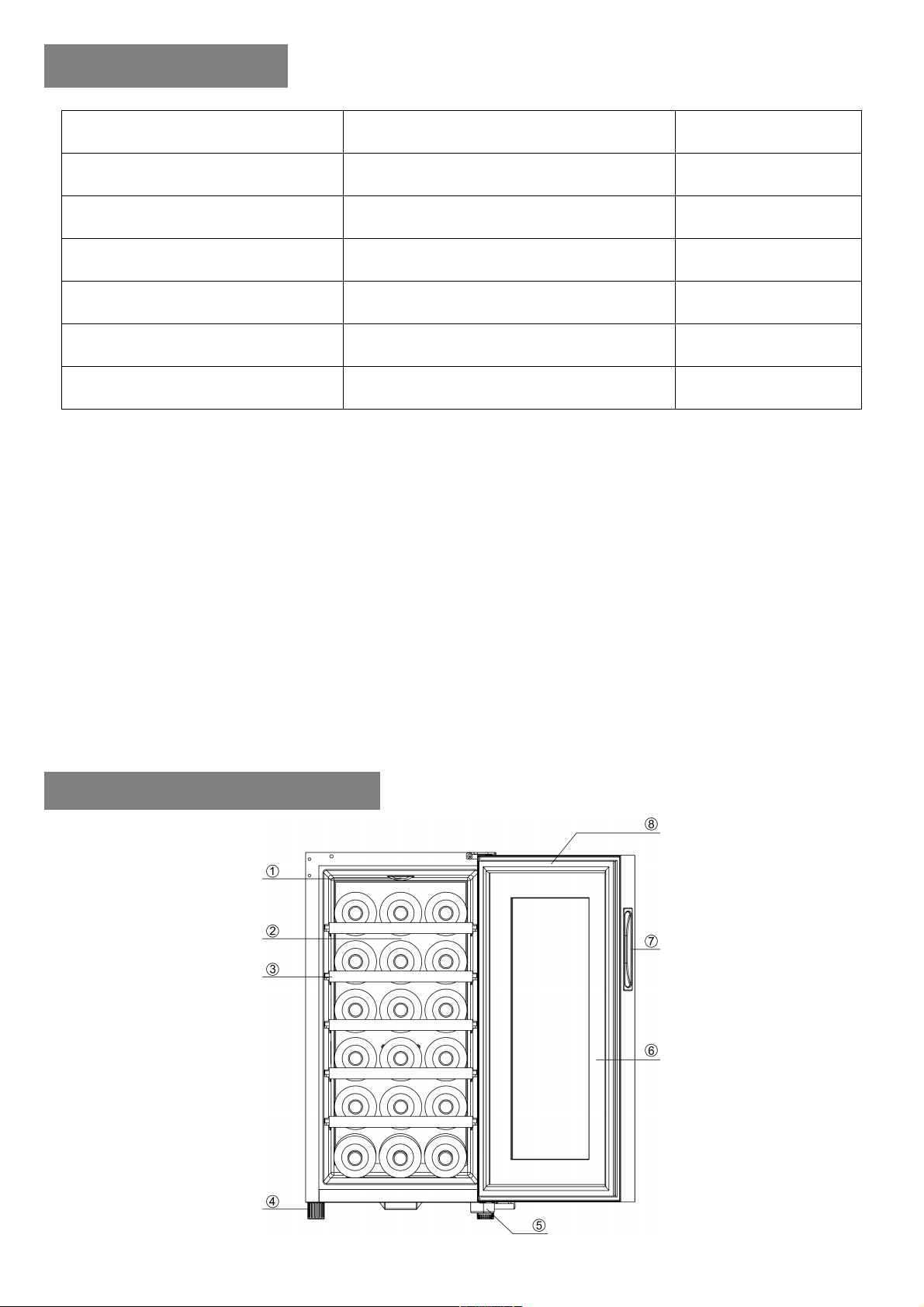
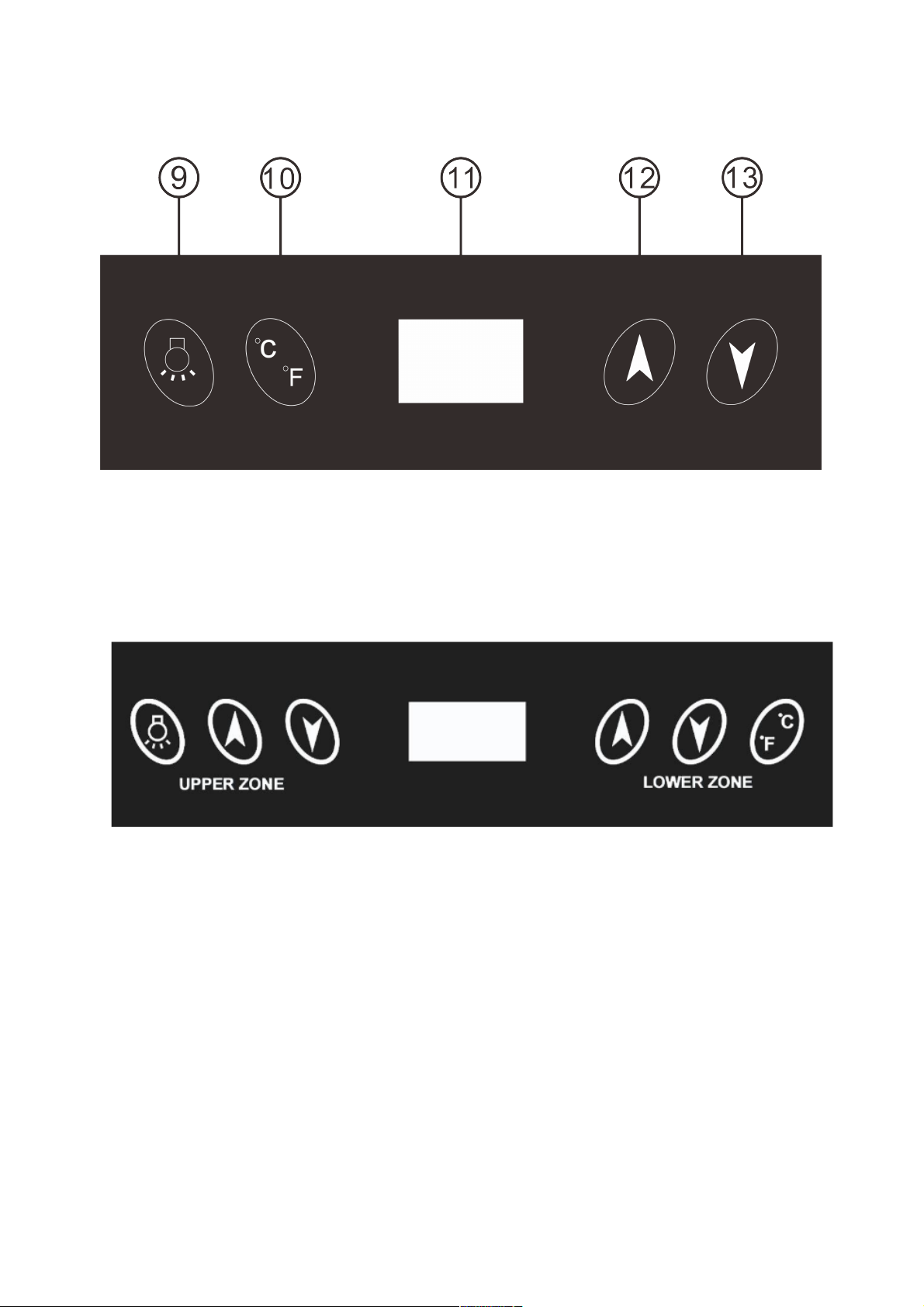
1. LIGHT 2. ALUMINUM RACK 3. SHELF TRIM 4. FOOT
5. HINGE 6. MAGNETIC SEAL 7. HANDLE 8. DOOR
9. Light button 10. Celsius/Fahrenheit button 11. LCD display
12. Set temp. up button 13. Set temp. down button
For TCCV21B2Z:
Page 7
- 5 -
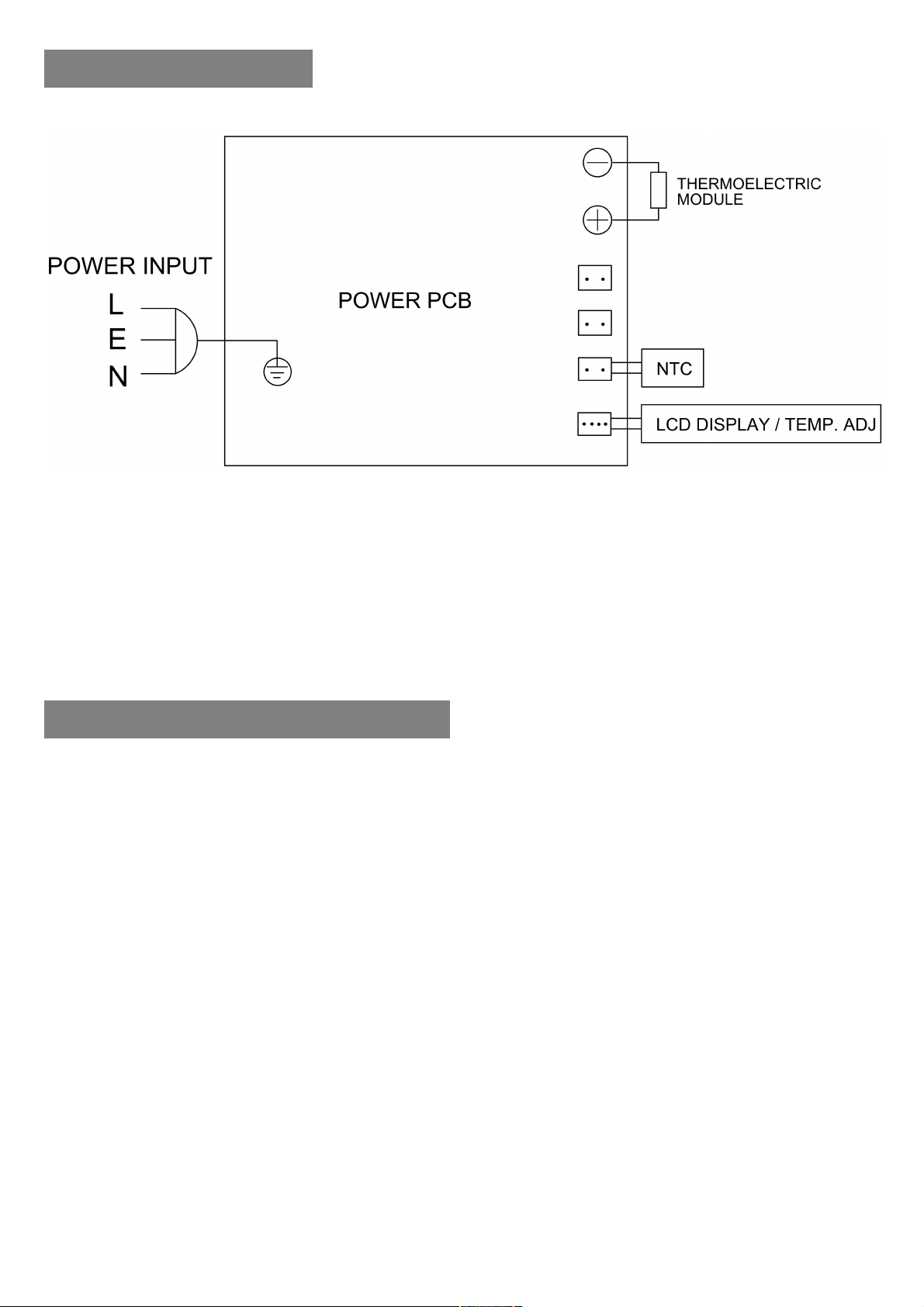
IV. ELECTRICAL PARTS
V. O P E RATION OF WINE COOLER
• The internal temperature of this thermoelectric wine cooler depends on the room
temperature. The wine cooler can be adjusted in the range 11–18°C (±1°C) when it is in an
ideal room temperature of 25°C. For TCCV21B2Z, the upper zone can be adjusted in the
range of 7–12°C, and the lower zone can be adjusted in the range 12–18°C when it is in an
ideal room temperature of 25°C.
• When first turned on, with no objects placed inside it, the wine cooler will reach the
temperature programmed after 2-2.5 hours.
• When the power is connected, the cooling system starts to work.
• The temp. you want can be set by touching ▲ and ▼ with your finger. While the internal
temperature is higher than the set temperature, the cooling system will function. While the
Page 8

- 6 -
internal temperature is lower than the set temperature, the cooling system will not
function, and the inside temperature will rise. When it rises above the set temperature, the
cooling system will start functioning again. The wine cooler has cooling cycles.
• The light can be turned ON or OFF by touching “ " . The light will switch off 10 min after
pressing the button.
VI. SPECIFIC PRECAUTIONS
• In order to function optimally, this wine cooler needs to be placed on a flat floor with 2cm
gaps to the sides and a 10cm gap at the rear.
• Use the adjusters provided to make sure the wine cooler is completely level.
• Avoid placing the wine cooler in sunlight and other heat sources.
• Hot items should be cooled down before being placed in the wine cooler.
• Do not place heavy items on the top of the wine cooler.
• Opening the door for long periods can cause a significant increase of the temperature in
the compartments of the appliance.
• If the wine cooler is left empty for long periods, switch off, clean, dry, and leave the door
open to prevent mould developing within the appliance.
VII. MAINTENANCE
• Shut off the power supply before cleaning the interior.
• Take o ut al l bottles, and the shelves, then clean the interior with water containing bi-card
soda first, then wipe again with clean water.
• Do not use soap or detergent to clean the interior.
• Clean the wine cooler regularly.
Page 9
- 7 -
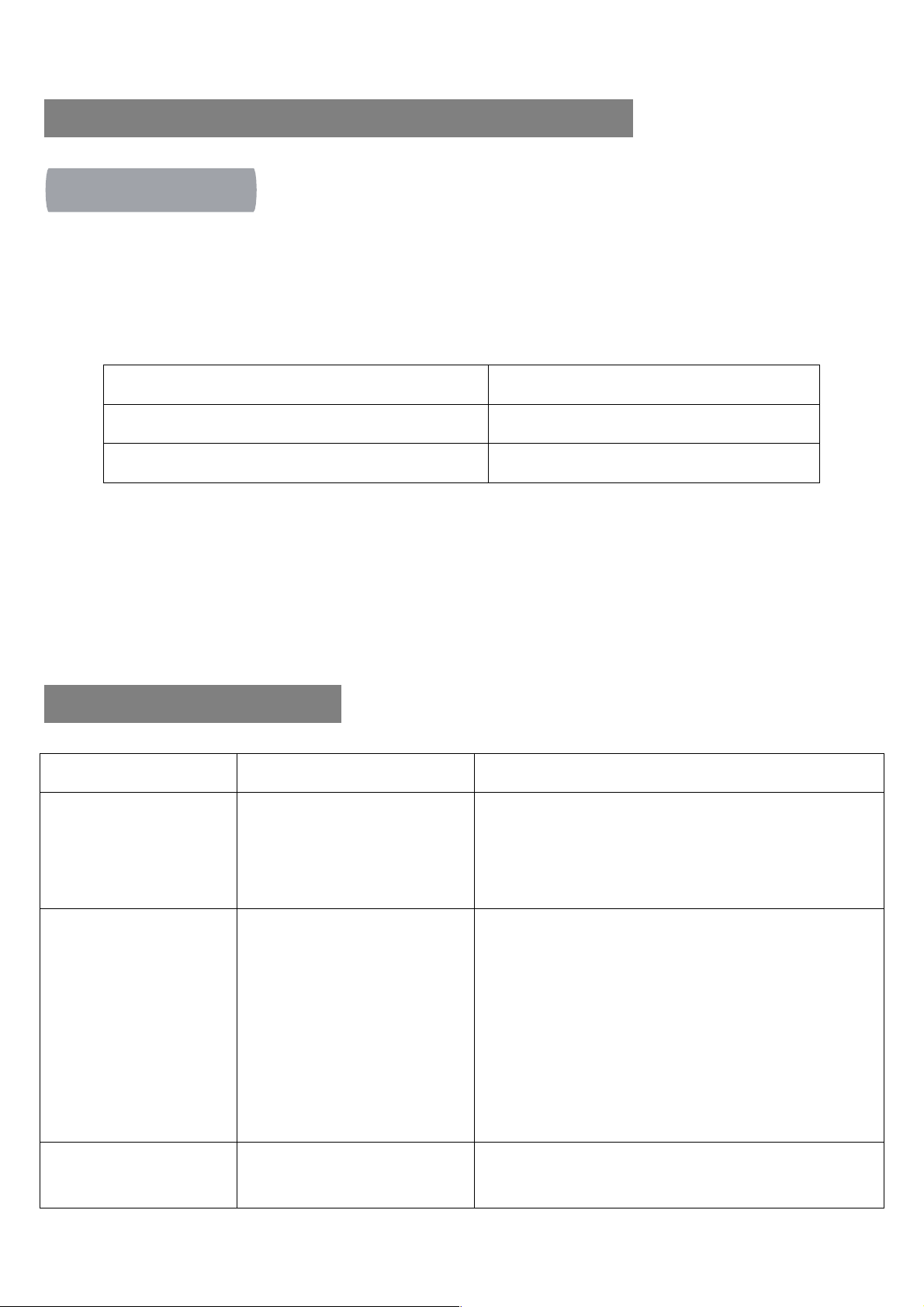
Red Wines
15.5-18±1°C
Dry/White Wines
11-15°C
Vintage wine
13°C
Issues
Possible Cause
Solutions
No cooling.
Not plugged in.
Low voltage.
Fuse broken.
Plug in.
Ensure correct voltage.
Change fuse.
Temperature inside not
low enough.
The wine cooler is placed too
near a heat source.
Bad ventilation.
Fans don’t work
The door is not closed tightly or
is opened too frequently or for
too long a time.
Keep the wine cooler away from sunlight and other
heat sources.
Place the wine cooler in an area with good ventilation
and keep things away from the fans.
Check whether the plug is in the power socket or change
the fan.
Close the door tightly and limit opening
Strange smell inside the
wine cooler.
Check whether anything has
gone off inside the wine
Wrap the source of the smell or take it out of the wine
cooler. Clean the cooler
VIII. RECOMMENDED TEMPERATURE SETTINGS
INTENDED USE
This wine cooler is intended for keeping wine however can be used for other beverages including juices,
nutritional drinks, soft drinks, snacks, water, and beer.
The chart indicates the ideal storage temperatures for different types of wines:
IX. TROUBLESHOOTING
Page 10
- 8 -
cooler.
The internal light is
flashing.
You have s et a tem pe rat ur e
higher than the internal
temperature.
The automatic defrost function
is starting to work.
Adjust the temp. setting with the controls.
Normal function. No repair needed.
Frost on the heat sink.
To o m uc h hu m id i ty or to o l ow
a temperature inside the wine
cooler.
Turn the wine cooler of f and disconnect the power, then
defrost by hand. Connect the power again when the ice
has thawed.
If you have any questions, please call the authorised service centre.
CORRECT
DISPOSAL
This marking indicates that this product should not be disposed with other household
waste. To prevent possible harm to the environment or human health from uncontrolled waste
disposal, recycle it responsibly to promote the sustainable reuse of resources. To return your used
device, please use contact the retailer where the product was purchased.
OF
THIS
PRODUCT
 Loading...