

Page 1

993
USER MANUAL
Page 2

1
thank you
Welcome
Firstly, thank you for purchasing your Trilogy Audio Systems 993 Power Amplier, we value your custom.
We strive to design and build world class products that stand the test of time. By reading this manual you
can gain a clear understanding of the 993’s operation and learn to care for it correctly. In turn, it will reward
you with a lifetime of outstanding performance.
......................................
Nic Poulson.
CEO Trilogy Audio Systems.
www.trilogyaudio.com
Page 3

2
Page 4

3
Getting Started
5 Introduction
5 About this manual
7 Unpacking
7 Environment
7 Power Supply
9 Connections
11 Operation Guide
13 Operational Warnings
15 Operational Warnings
15 Protective Lockout Modes
17 TAS link Overview
19 TAS link Pinout
Care & Service
21 Cleaning
21 Servicing
21 Declarations
Glossary
22 Glossary
Specications/Returns
23 993 Specications
23 Returns
Acknowledgements
24 Acknowledgments
contents
Page 5

4
Page 6

5
Introduction
We prefer that your Trilogy dealer delivers, installs, sets up and explains your 993’s operation to you. However, we still
recommend that you read through this manual thoroughly and keep it to hand for reference.
Should any part of this manual or the operation of the 993 not be clear to you, please do not hesitate to contact your
Trilogy dealer. If they are not available please contact ourselves directly.
About this manual
Throughout this user manual, the following icons are used:
[power] This refers to a physical control or indicator on the 993.
LEFT OUTPUT This refers to a physical connection on the 993.
From this point on, any information presented on the left hand pages are pictorial representations of either the front or back
views of the 993 or other diagrams. Therefore consider the left hand pages as additional information to accompany the
written descriptions on the opposite pages.
Page 7

6
Page 8

7
Unpacking
Be careful when unpacking your Trilogy amplier, it is heavy: 19kg. Seek assistance if necessary. Store the packaging safely
for future use. It is the ideal method of protecting your amplier from damage during transport.
Environment
Do not site the amplier near liquids, or place water-lled containers near the unit. If water does come into contact with the
unit there is serious potential for an electric shock or re hazard. Immediately pull out the mains plug from the wall socket.
Contact your dealer to arrange an inspection before further use.
The amplier is cooled by convection and so needs good circulation of room temperature air under and around it. Do not
place it near sources of heat such as radiators or in direct sunlight. Do not enclose in a cupboard. Do not place directly on
carpet.
A at, smooth surface is required. As with all high resolution audio equipment, your amplier is sensitive to vibration, strong
magnetic elds and radio interference. A dedicated high performance equipment platform sited away from other appliances
is the optimum location.
Power Supply
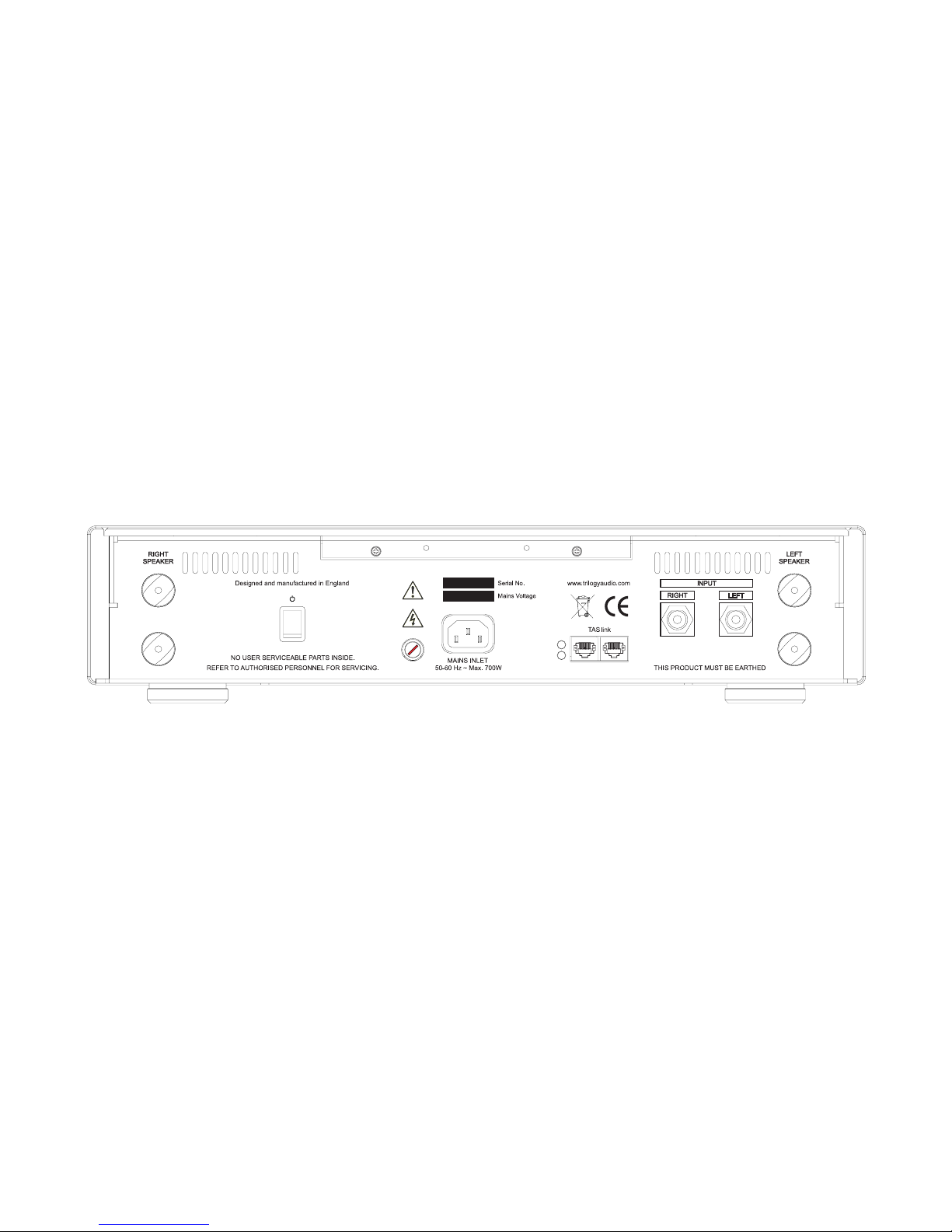
The AC input voltage has been set for the country where it was purchased. Check that the label on the rear panel matches
your AC supply voltage before connecting the supply. The provided AC inlet cable should be used.
The 993 must be earthed through the IEC inlet connector. Do not disconnect the AC earth at any time. If in doubt about any
aspect of power supply, consult your Trilogy dealer or a qualied electrician.
To realise your amplier’s full potential we recommend high quality mains conditioning. See www.Isol-8.co.uk for more on
power supply and system solutions from our highly acclaimed sister company. If you are not using a mains conditioner for
best performance, make a direct connection to a mains outlet. Avoid using adapters where possible.
The input mains fuse is housed in a rear panel fuseholder. This is a 20mm ceramic type, full specication on page 23, which
the user can replace if required. Good quality power supplies, such as that in the 993, often have relatively high inrush
current when rst powered. Note this is when the 993 is turned on from standby, not when it is connected to the mains.
Depending on the exact position of the incoming mains sinusoidal waveform this can rarely blow the fuse or age the fuse
and lower its rated capacity for subsequent use. This is not unusual, it is similar to traditional light bulbs blowing usually when
rst turned on. It would therefore not be unknown to replace the fuse occasionally. However, if a replacement fuse blows
again immediately then there may be a serious fault. The unit should be unplugged from the mains, then please contact your
Trilogy dealer.
Page 9
8
Page 10

9
Connections
It is good practice to complete all interconnections before switching on to avoid any damage to your system’s loudspeakers.
Do not make connections or disconnections while the amplier is powered.
Connect with the supplied power input cable. The 993 can be left connected at all times to ensure reliable operation. If not
being used for extended periods of time, switch off at the mains outlet or at the rear panel power switch.
The amplier has single ended inputs on RCA “Phono” connectors.
The output is via copper terminals for connection to your loudspeakers. It is important to connect the speaker cables
correctly. Connect the red terminal (+) to the positive terminal of your loudspeaker, and the black (-) to the negative. Take
note of left and right and make sure that each connection is secure and the cable terminals are not touching another. Do not
over tighten the terminals as damage may result. Finger tight is sufcient torque.
Twin TAS link connectors allow system interconnection and control with other Trilogy Audio System products. TAS link allows
remote on and off switching plus status reporting of various parameters which can be displayed on your Trilogy preamplier.
See your Trilogy preamplier manual for further details.
TAS link cables of varying lengths are available from your Trilogy dealer.
Page 11
10
Page 12

11
Operation Guide
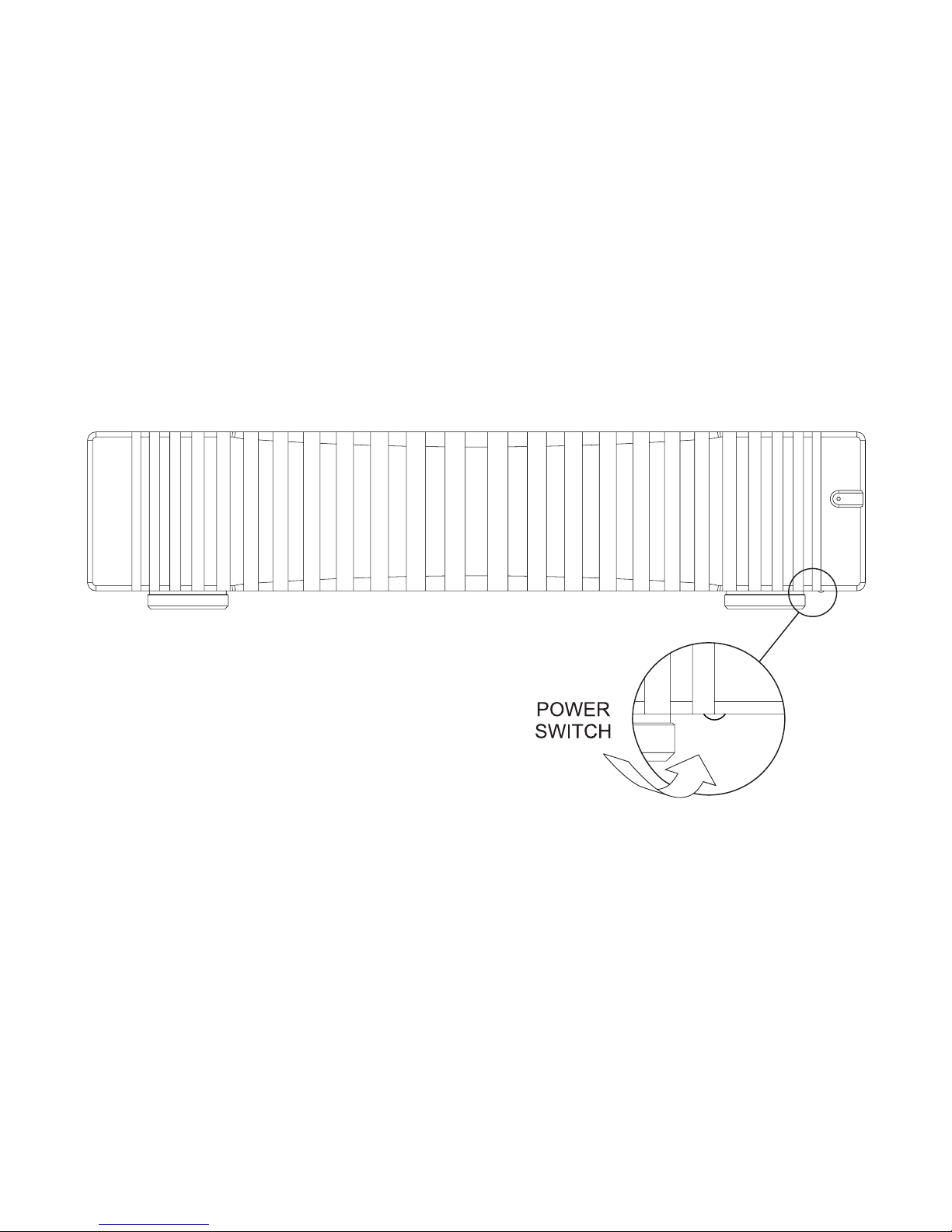
Having made and checked all appropriate input, output and power connections, power can be applied by turning on the
[rear panel rocker switch]. The [power indicator] will be dimly lit to indicate the 993 is in standby. To fully turn on the 993
press the [power button]. The power button is a momentary (non-latching) type and is located on the underside of the front
panel/heatsink on the right, normally hidden from view.
The [power indicator] will pulsate for 50 seconds. During this “warm up” period, the output will be muted.
The [power indicator] will now remain on. The 993 is now ready for use.
Optimal performance will be achieved in about 1 hour once the amplier has become quite warm to the touch. The high
mass heatsink for the output devices is at the very centre of the 993’s design, also serving as the front panel. Normal
extruded nned heatsinks resonate strongly, this has a negative effect on the small signal performance of the output stage.
The 993’s heatsink is machined from a solid billet and deliberately designed to be of high thermal inertia. This maintains the
993’s output stage at the optimal operating temperature whilst amplifying music. The temperature of the heatsink will vary
depending on the temperature of your room, the efciency of the loudspeaker used and listening levels, Typically the heatsink
will feel quite warm to the touch, this is normal.
To turn the amplier off, press the [power] button and the amplier will go into standby. The 993 consumes very little power in
this mode and will stand by waiting for return to operation via TAS link or another press of the [power] button. If the amplier
is not being used for an extended period, the [rear panel rocker switch] removes power completely.
Page 13

12
Power Indicator
Normal
Mode 993 Status TAS link Message
Dim Standby Off Turn on with TAS link
or button
Standby..Temp xxC
Pulsate Warm up Mute Warm up takes
50 seconds
Warm Up
On On Operational Trip counter is reset at
power up
Temp xxC..Trip xx
Equal Flash On On Shows TAS link pre is
muted
Temp xxC..Trip xx
Power Indicator
On ash to off
Warning 993 Status TAS link Message
1 Over current Mute output
and increment
trip counter
Mute time varies Current !
2 VLF 250msec minimum
mute
VLF !
3 DC Offset Mutes when
DC present
DC Offset !
4 Temperature Hot Operational Heatsink hotter
than 57C
Hot !
Power Indicator
Off ash to on
Shutdown 993 Status TAS link Message
1 Over current Off can turn on Shuts down excessive
current
Shutdown..Current
2 VLF Off can turn on Shuts down VLF over
2 seconds
Shutdown..VLF
3 DC Offset Off can turn on Shuts down DC over
1 second
Shutdown..DC Offset
4 Temperature Hot Off until 53C Shuts down heatsink
over 62C
Shutdown..Overheat
5 Power Supply Locked Out Contact Trilogy dealer Service..Code 058
6 Output Stage Locked Out Contact Trilogy dealer Service..Code 101
Warning ashes are 0.5 second duration, spaced one second apart, sequence repeating every 8 seconds
Page 14

13
Operational Warnings
The 993 contains no audio processing to compress or limit amplication. This approach is combined with a generous power
supply to deliver an unconstrained dynamic performance for both low frequencies and high frequency transients. This design
philosophy frees the amplier to operate within its physical limits without early onset of clipping or similar performance
degrading safeguards found in lesser ampliers.
This philosophy is only possible because the amplier continually and invisibly monitors various parameters and can warn
the user of excessive listening levels or unusual amplier output. Only if absolutely necessary, the amplier can shut down to
protect itself or the connected loudspeaker if required.
Usually the [Power indicator] is dim for off, pulsating equally on and off for warm up, or continually lit when the amplier is
operational. However, for some monitored conditions the [Power indicator] will ash a xed number of times followed by a
break before repeating this sequence. While the 993 is running the [Power indicator] is on with ashes to off, but after any
shutdown the [Power indicator] will be off with the sequence seen as ashes to on
If the 993 is connected to a Trilogy preamplier via TAS link, then messages relevant to operational warnings will also be
reported on the Preamplier’s display. The user can view a trip counter which is only reset at power on and shows the
number of times that the amplier has had to intervene.
Over Current
The amplier's output is ultimately limited by the maximum temperature the output stage can withstand. High temperatures
are caused by high currents which equate to loud listening levels, the exact loudness depending on speaker type.
Heating of the output stage has two components, the most obvious is a long term heating that is reected in the
temperature of the front panel heatsink and an explanation of this is given below. The other component of heating, to which
this Over Current warning applies, is due to short term transients which are allowed for best audio performance but are
cumulative in heating the output device. One short, very large transient or many quieter transients close together might have
equal heating effect.
By design the heatsink temperature will not immediately change, or may not change at all, even with large transients. Initially
the heat is very much within the output devices and cannot be measured using traditional methods. Instead these over
current warnings rely on sophisticated, custom algorithms that model the hidden effects of overload. These algorithms were
the result of intense research by Trilogy and accumulate a record of transient heat, but also predict how quickly this heat
dissipates into the heatsink. Again, this allows the amplier to operate unconstrained as much as possible.
Because the amplier will intentionally not reduce the listening level, over current warnings are accompanied by a short break
in audio while heat from the output device dissipates. The shortest break is one second and this also acts as a cue for the
user to reduce listening levels. Extreme currents can produce breaks of several seconds and ultimately the amplier will turn
off to prevent damage.
Where the user has a TASlink equipped Trilogy pre amplier the user gains additional functionality. The 993 power indicator
will ash evenly on/off when the preamplier is muted, not to be confused with warning ash codes. The accumulated
993 valve hours can also be viewed in the pre amplier, but of particular interest the user can view the live working of the
algorithm described above. Refer to the pre amplier manual for the display of live and accumulated energy.
Page 15

14
Power Indicator
Normal
Mode 993 Status TAS link Message
Dim Standby Off Turn on with TAS link
or button
Standby..Temp xxC
Pulsate Warm up Mute Warm up takes
50 seconds
Warm Up
On On Operational Trip counter is reset at
power up
Temp xxC..Trip xx
Equal Flash On On Shows TAS link pre is
muted
Temp xxC..Trip xx
Power Indicator
On ash to off
Warning 993 Status TAS link Message
1 Over current Mute output
and increment
trip counter
Mute time varies Current !
2 VLF 250msec minimum
mute
VLF !
3 DC Offset Mutes when
DC present
DC Offset !
4 Temperature Hot Operational Heatsink hotter
than 57C
Hot !
Power Indicator
Off ash to on
Shutdown 993 Status TAS link Message
1 Over current Off can turn on Shuts down excessive
current
Shutdown..Current
2 VLF Off can turn on Shuts down VLF over
2 seconds
Shutdown..VLF
3 DC Offset Off can turn on Shuts down DC over
1 second
Shutdown..DC Offset
4 Temperature Hot Off until 53C Shuts down heatsink
over 62C
Shutdown..Overheat
5 Power Supply Locked Out Contact Trilogy dealer Service..Code 058
6 Output Stage Locked Out Contact Trilogy dealer Service..Code 101
Warning ashes are 0.5 second duration, spaced one second apart, sequence repeating every 8 seconds
Page 16
15
VLF
VLF is the acronym for Very Low Frequency, a signal which the 993 can output indenitely. However excessive amounts of
VLF will heat loudspeaker voice coils beyond their limit. Playing source material with extremely low frequencies at relatively
high levels may cause VLF warning, badly warped vinyl for example.
DC Offset
There is a very ne line between VLF and true DC as the monitoring circuit may have to make a quick decision for protection
of the connected loudspeaker. As with VLF, playing source material with extremely low frequencies at relatively high levels
may cause a DC warning, but it is also possible after a brief interruption of the electrical supply that was not long enough to
cause the amplier to turn off completely.
Temperature Hot
The temperature of the 993’s heatsink is constantly measured by a sensor. If the temperature of the heatsink is too high a
warning will be given before shutdown at excessive temperatures. Common causes of high heatsink temperatures are placing the amplier in direct sunlight, obstruction of airow to the heatsink, sustained heavy drive for very long periods of time or
very low impedance load.
Protective Shutdown and Lockout Modes
If the 993 has entered a protective shutdown or lockout mode the 993 will have turned off to protect itself from permanent
damage.
It is important to take appropriate action to avoid the shutdown recurring before you attempt to switch the 993 back on.
Examples are a short circuit in the loudspeaker cabling or the airow over the heatsink is obstructed.
If you are condent that you have found the cause of the shutdown and have taken action to prevent it from recurring, you
can attempt to re-power the 993. Follow normal turn on procedure.
If the 993 re-enters the same shutdown mode, (remember it may take some considerable time for the fault condition to reappear if, for example, it was an over temperature shutdown) it is important to consult your Trilogy dealer as there may be an
internal fault.
Power supply and Output stage lockout modes indicate an internal fault has occurred and switch on will not be possible to
prevent damage. In this event please consult your Trilogy dealer.
Page 17
16
Page 18

17
TAS link Overview
TAS link is Trilogy’s proprietary bus system offering power and data to remote displays, and also data to other Trilogy audio
products to synchronise power on/off and provide reporting information. TAS link has a bus remote line (GPI) allowing
equipment from other manufacturers to be powered on/off by a Trilogy pre-amp, or allow the 993 to be turned on by another
system.
Standard screened Cat5 or Cat5e cables are used with RJ45 plug terminations to take advantage of any existing structured
wiring.
WARNING! Do not cross-plug computer, or any other network with TAS link. They are not compatible and damage may
result. It should be noted that Cat5/RJ45 cables are not unique to computer networks and are often used for telephony and
other control systems. The cross-plugging issue is not unique to Trilogy products and Trilogy can take no responsibility for
damage caused by failure to follow this instruction.
Security Bonding
To protect your investment in Trilogy equipment, this facility allows your 993 to be security bonded to a TAS link equipped
Trilogy preamplier. Your 993, once bonded, cannot be turned on with its local power button or via TAS link, other than with
the original bonding Trilogy preamplier.
TAS link must be used to bond one component to another. See the relevant section on Bonding in the Trilogy preamplier’s
user manual.
Please note: there is deliberately no indication of which Trilogy component is bonded to your 993 for your security.
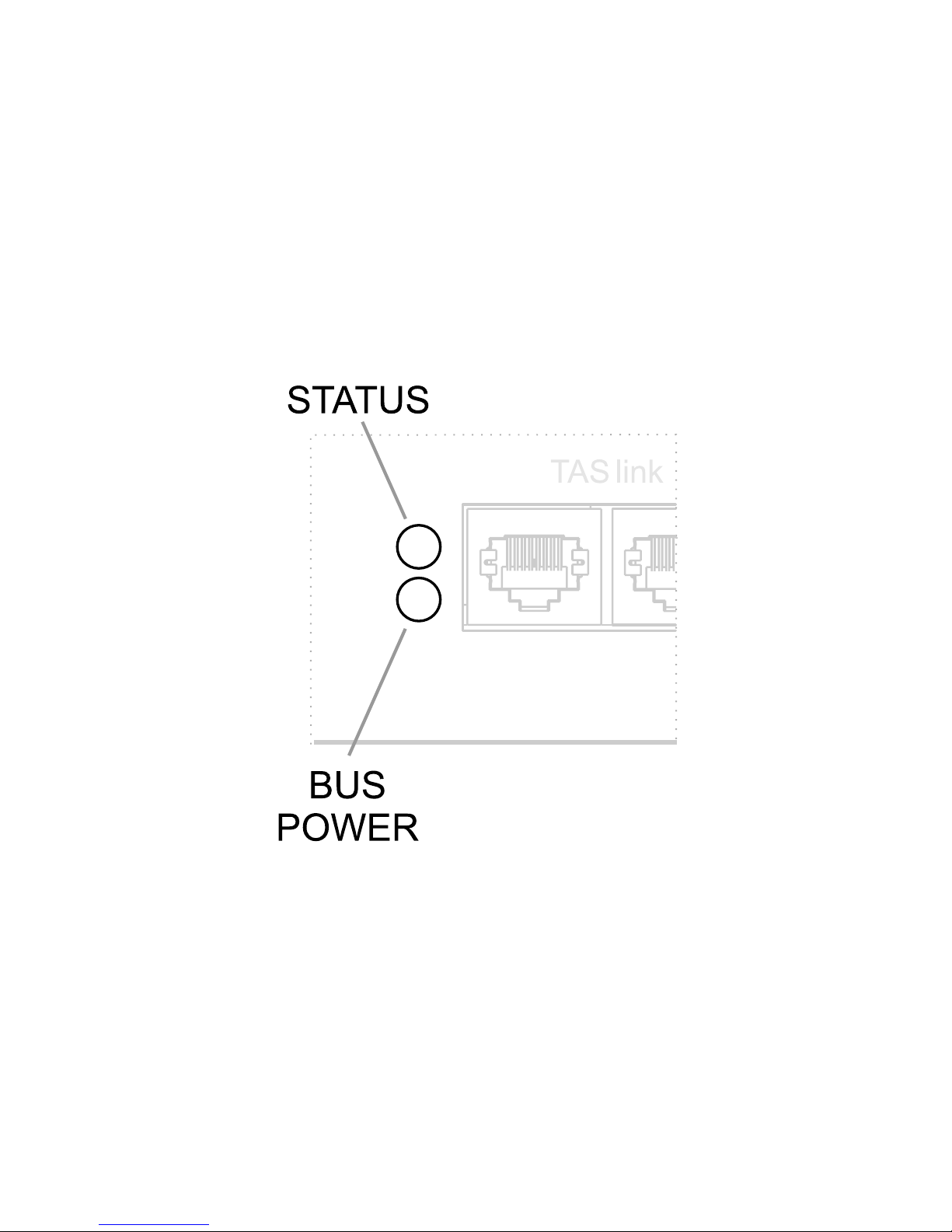
Rear Panel LEDs
There are two rear panel LEDs associated with TAS link. As in the diagram, these are used to indicate:
BUS POWER: if TAS link is connected and Bus Power in enabled on the Pre amplier.
STATUS: microcontroller and TAS link bus activity.
Diagnostics using these LEDs is possible. You may be asked to look at these LEDs as part of any telephone support.
Page 19

18
Page 20
19
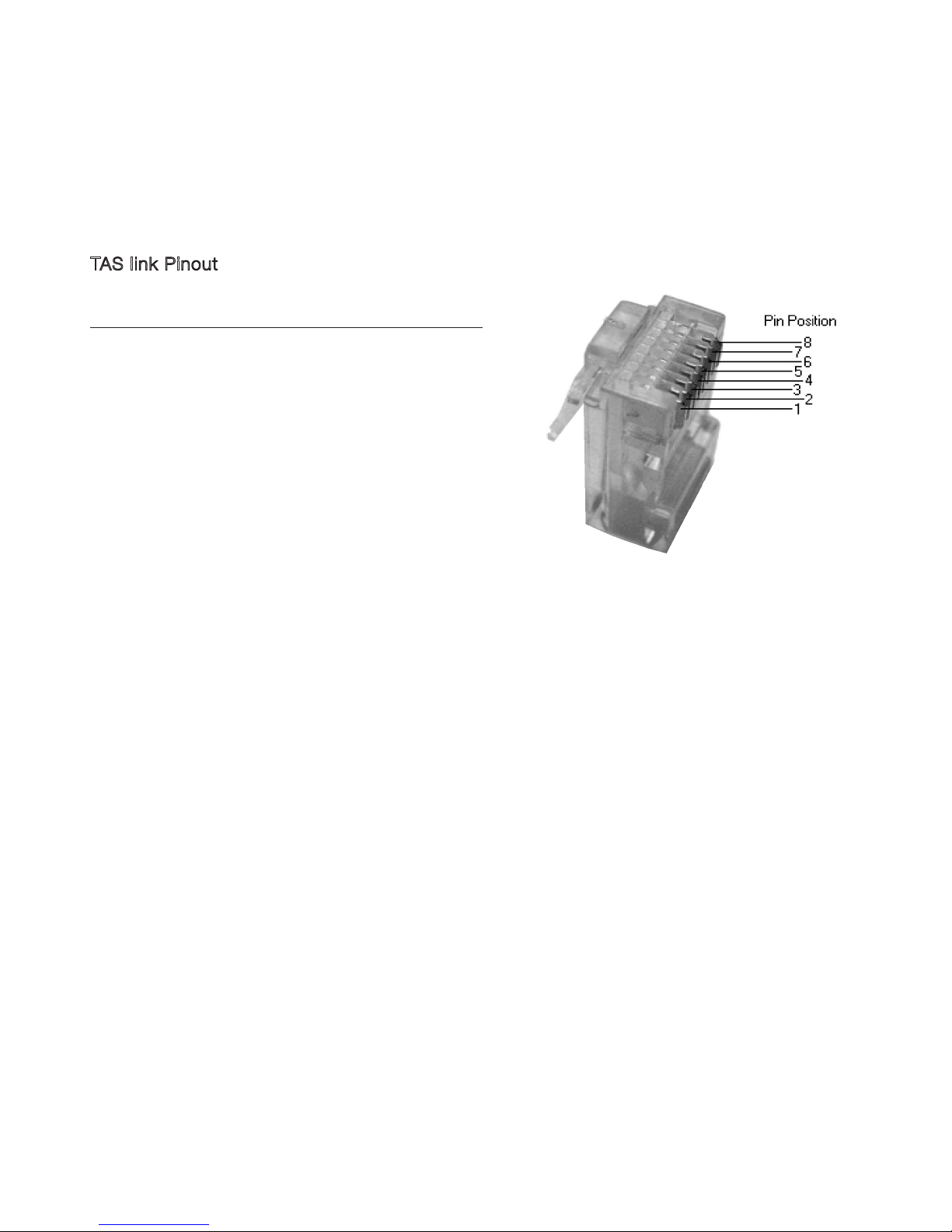
TAS link Pinout
RJ45 CAT5 COLOUR FUNCTION
2
1
Orange/white
White/orange
BUS POWER
0V
6
3
Green/white
White/green
LSW
LSS
4
5
Blue/white
White/blue
DATA +
DATA -
8
7
Brown/white
White/brown
BUS REMOTE
LSD
TAS link pinout is shown for completeness but most signals are
proprietary for use by Trilogy equipment. However, to turn amplier
on remotely the user can apply 8-24VDC between pin1 (0V) and
pin8 (24V max). Remove this voltage to return amplier to standby.
Page 21

20
Page 22

21
Cleaning
Dust the unit regularly with a soft cloth or soft brush. For more stubborn marks make sure the unit is switched off and
disconnected from the power supply. Use a slightly damp cloth with a very small amount of mild, PH neutral detergent. Do
not use a wet cloth. Be careful when using cleaning or polishing agents. Never use abrasives or alcohol based agents, they
will harm the surface nish. Do not allow the unit to become wet when cleaning.
Servicing
Your 993 uses thermionic valves or vacuum tubes for amplication. They are the key component in realising your ampliers
very high performance. Valves have a nite lifespan and will need replacing during the lifetime of the amplier. This lifespan
depends on how long and how hard they are used. In typical use, small signal valves can last for 5000 hours. Frequent
switching on and off reduces valve life.
Early valve failures can occur, usually due to mechanical stresses that can occur during shipping. This is not due to the
ampliers design but is an inherent characteristic of all valves, and is impossible to predict even during the ampliers factory
burn in period. The good news is considerate circuit design and modern manufacturing methods mean that valves are now
typically very reliable once established in service.
It is good practice to replace the valves your amplier periodically to prevent sudden loss of a signal path. Your Trilogy
amplier uses readily available and inexpensive valves should replacement be needed. If you are in any doubt your Trilogy
dealer will help you assess whether your valves need replacing.
If your amplier exhibits noticeable loss of performance, extreme sensitivity to vibration or becomes excessively noisy then
new valves should be tted by your authorised Trilogy dealer.
WARNING! There are no user serviceable parts inside. Do not open or attempt to repair the unit, potentially fatal voltages are
present inside even when disconnected from the power supply. Refer to your authorised Trilogy dealer for servicing.
Declarations
This product is guaranteed against defects in material and workmanship for 3 years from the date of purchase.
This Guarantee excludes valves which are guaranteed for 6 months from date of purchase.
The Guarantee is not transferable and is offered to the original purchaser only.
This guarantee does not limit your statutory rights within the country of purchase.
Failure to comply with any of the above instructions during installation or operation will render the manufacturers warranty
null and void.
Marking by the “CE” symbol indicates compliance of this device with the EMC (Electromagnetic Compatibility) and LVD
(Low Voltage Directive) standards of the European Community.
This amplier has been tested to ensure that its operation is not adversely affected by normal background levels of radio
frequency interference, and that it does not itself generate excessive amounts of radio frequency energy. If your amplier
exhibits sensitivity to nearby radio frequency devices or is suspected of affecting another device, increase the distance
between them. If the problem persists, consult your Trilogy dealer.
.
Page 23

22
Glossary
Single
ended input
An input with the signal referenced to earth. RJ45 A standard latching connector chosen for TAS link.
Bond A unique security feature allowing your 993 to be
controlled ONLY by your Trilogy preamplier and be
included in it’s the PIN CODE protection.
Cat5(e) A standard 4 pair data cable chosen for TAS link.
TAS
link
Trilogy Audio Systems’ proprietary Link between
products.
GPI General Purpose Interface.
Page 24

23
993 Specifications
Input 1 pair RCA phono sockets Weight 19Kg
Outputs 2 pair 5-way copper binding posts Weight
(packaged)
22Kg
Input
impedance
400K Ohms Standby power
consumption
< 1 Watt
Input
sensitivity
2.0V RMS for rated output Idle power
consumption
50 Watts
Frequency
response
5Hz-30KHz +/-0.5dB Maximum power
consumption
700 Watts
Distortion < 1% A weighted at rated output British
model
240V
Rear panel fuse: T5A Ceramic 20mm
Phase Phase correct (non inverting) European
model
230V
Rear panel fuse: T5A Ceramic 20mm
Rated Power
(8 Ohms)
125 Watts per channel USA/Canadian
model
120V
Rear panel fuse: T10A Ceramic 20mm
Rated Power
(4 Ohms)
200 Watts per channel Japanese
model
100V
Rear panel fuse: T10A Ceramic 20mm
Recommended load
Impedance
4-16 Ohms Storage
temperature
-20 to +50°C
Size 465*346*106
(W*D*H)
Operating
temperature
0 to +30°C
Size (including
connectors)
465*378*106
(W*D*H)
Operating
humidity
10 to 80% (no condensation)
Size
(packaged)
590*510*250
(W*D*H)
SPECIFICATION SUBJECT TO CHANGE
Returns
Should it be necessary for your 993 to be serviced, please send it in the original packaging to your dealer.
If this is not possible please contact us directly and request a Return Authorisation Number. Please mark this number in the
space provided on the outer packaging.
Please do not send products back to us without this number as we will not accept liability for the product.
If a product is not returned to us in its original packaging, after servicing we will return it, in Trilogy packaging and a nominal
charge will be made.
.
Page 25

24
Whilst the information given in this document is correct at the time of printing, small production changes in the course of our
Company’s policy of improvement through continued research and development might not necessarily be indicated in the
specication.
If clarication of any point or specication is required, please refer to your Trilogy dealer.
We welcome your feedback, whether positive or negative, to help us further rene our products.
Please write to; Trilogy Audio Systems
PO Box 56402
London SE3 7WQ
United Kingdom
Please visit our web site; www.trilogyaudio.com
Acknowledgements
Many people have worked tirelessly to help bring the 993 to you, and I would like to take this opportunity to thank
- Emeka Chigbu, Nigel Crump, Simon Dart, Chris Sims and Simon Quill for their dedication to this project.
© Copyright Trilogy Audio Systems 2016. E&OE
Page 26

USER MANUAL 993.13092016.V1
Designed & Manufactured in London, England.
 Loading...